Batch Apex
Dave Helgerson
davehelgerson.com
@davehelgerson
Batch Apex Agenda
• High level description of Batch Apex
• How to use Batch Apex
• Simple Code Examples
• Demos in a Salesforce org
• Questions
What is Batch Apex?
• Batch Apex is a way to process millions of
records on the Salesforce platform
How does Batch Apex work?
• Start by defining a dataset to process through
– Database.QueryLocator
– Custom Iterator
– List Collection
How does Batch Apex work? (cont.)
• Then, the dataset is divided into smaller
chunks of records
– Each chunk of dataset processes as a separate
transaction
– Size of each chunk is defined when submitting the
Batch process
How does Batch Apex work? (cont.)
• Finally, after all chunks of the dataset have
been processed, post processing can be run
– Send Emails
– Update aggregate totals
How does Batch Apex work? (cont.)
• Define the dataset
• Divide and process
• Post processing
How does Batch Apex run?
• Asynchronously, of course!
• Like @future methods or Queueable Apex
What conditions are ideal for Batch
Apex?
• Tasks that involve large datasets or are
processing intensive
• Source of data is from a single database
object, and Dataset can be retrieved with a
single SOQL statement
• Each unit of work is independent
• Not time-critical
Give me scenarios for Batch Apex
processing
• Record Ownership Reassignment
• Data Retention
• Data Cleansing
• Recalculating Apex Managed Sharing
• Other Mass Record Update
What does the code look like?
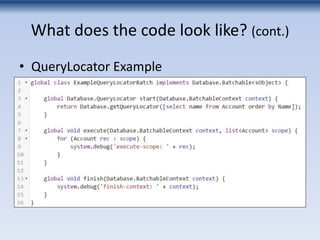
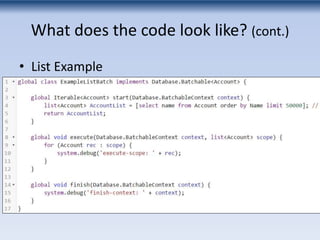
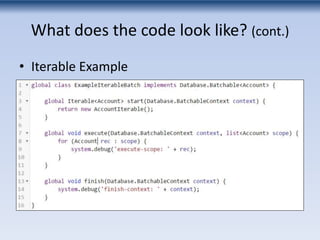
• Class definition implements the
Database.Batchable interface
• Three methods are required
– start()
– execute()
– finally()
What does the code look like? (cont.)
• QueryLocator Example
What does the code look like? (cont.)
• List Example
What does the code look like? (cont.)
• Iterable Example
What does the code look like? (cont.)
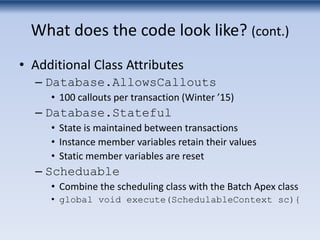
• Additional Class Attributes
– Database.AllowsCallouts
• 100 callouts per transaction (Winter ’15)
– Database.Stateful
• State is maintained between transactions
• Instance member variables retain their values
• Static member variables are reset
– Scheduable
• Combine the scheduling class with the Batch Apex class
• global void execute(SchedulableContext sc){
How do I run a job?
• Batch Apex is invoked programmatically with
Database.executeBatch or
System.scheduleBatch
– Visualforce page controller
– Apex trigger
– Ajax Toolkit
– Execute Anonymous from Force.com IDE or
Developer Console
– Scheduled Job
How do I run a job? (cont.)
• Database.executeBatch
– Submits a job to the queue
– Parameters:
• Instance of the class
• Scope (optional)
– Example:
• Database.executeBatch(new ExampleBatch(),
100);
How do I run a job? (cont.)
• System.scheduleBatch
– Creates a scheduled job
– Parameters:
• Instance of the class
• Job name
• Time interval, in minutes, after which the job should start
executing
• Scope (optional)
– Example:
• System.scheduleBatch(new ExampleBatch(),
'Test', 5, 100);
How do I run a job? (cont.)
• Job is submitted to the queue
– 5 jobs can be processing at once
– 100 jobs can be in the queue at once.
• Flex Queue (Spring ‘15)
• Enable in the “Apex Flex Queue” in Critical Updates
• Job Id is returned
– Track progress by the job Id
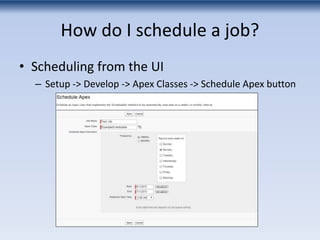
How do I schedule a job?
• Scheduling from the UI
– Setup -> Develop -> Apex Classes -> Schedule Apex button
How do I schedule a job? (cont.)
• Scheduling in Apex
• system.schedule()
• Name
• Cron expression
• Instance of Schedulable class
• Example:
– system.schedule('My Scheduled Job',
'0 15 * * * ?', new ExampleSchedulable());
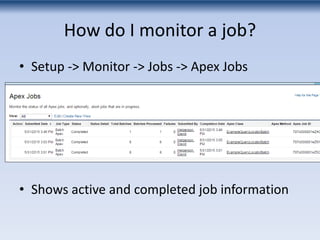
How do I monitor a job?
• Setup -> Monitor -> Jobs -> Apex Jobs
• Shows active and completed job information
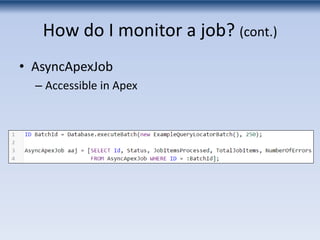
How do I monitor a job? (cont.)
• AsyncApexJob
– Accessible in Apex
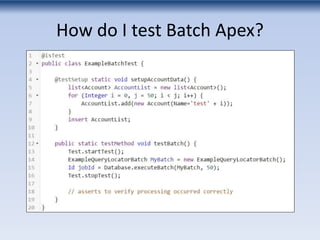
How do I test Batch Apex?
• Use Test.startTest() and Test.endTest()
• Asynchronous processes run synchronously
when the Test.endTest() command executes
• The execute() method may only be invoked
once
How do I test Batch Apex?
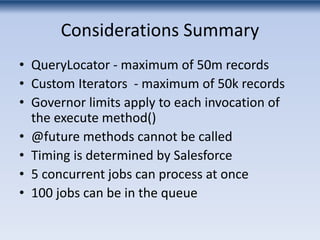
Considerations Summary
• QueryLocator - maximum of 50m records
• Custom Iterators - maximum of 50k records
• Governor limits apply to each invocation of
the execute method()
• @future methods cannot be called
• Timing is determined by Salesforce
• 5 concurrent jobs can process at once
• 100 jobs can be in the queue
Demo
• Submitting
• Scheduling
• Monitoring
Questions?
davehelgerson.com
@davehelgerson

Batch Apex in Salesforce

  • 1.
  • 2.
    Batch Apex Agenda •High level description of Batch Apex • How to use Batch Apex • Simple Code Examples • Demos in a Salesforce org • Questions
  • 3.
    What is BatchApex? • Batch Apex is a way to process millions of records on the Salesforce platform
  • 4.
    How does BatchApex work? • Start by defining a dataset to process through – Database.QueryLocator – Custom Iterator – List Collection
  • 5.
    How does BatchApex work? (cont.) • Then, the dataset is divided into smaller chunks of records – Each chunk of dataset processes as a separate transaction – Size of each chunk is defined when submitting the Batch process
  • 6.
    How does BatchApex work? (cont.) • Finally, after all chunks of the dataset have been processed, post processing can be run – Send Emails – Update aggregate totals
  • 7.
    How does BatchApex work? (cont.) • Define the dataset • Divide and process • Post processing
  • 8.
    How does BatchApex run? • Asynchronously, of course! • Like @future methods or Queueable Apex
  • 9.
    What conditions areideal for Batch Apex? • Tasks that involve large datasets or are processing intensive • Source of data is from a single database object, and Dataset can be retrieved with a single SOQL statement • Each unit of work is independent • Not time-critical
  • 10.
    Give me scenariosfor Batch Apex processing • Record Ownership Reassignment • Data Retention • Data Cleansing • Recalculating Apex Managed Sharing • Other Mass Record Update
  • 11.
    What does thecode look like? • Class definition implements the Database.Batchable interface • Three methods are required – start() – execute() – finally()
  • 12.
    What does thecode look like? (cont.) • QueryLocator Example
  • 13.
    What does thecode look like? (cont.) • List Example
  • 14.
    What does thecode look like? (cont.) • Iterable Example
  • 15.
    What does thecode look like? (cont.) • Additional Class Attributes – Database.AllowsCallouts • 100 callouts per transaction (Winter ’15) – Database.Stateful • State is maintained between transactions • Instance member variables retain their values • Static member variables are reset – Scheduable • Combine the scheduling class with the Batch Apex class • global void execute(SchedulableContext sc){
  • 16.
    How do Irun a job? • Batch Apex is invoked programmatically with Database.executeBatch or System.scheduleBatch – Visualforce page controller – Apex trigger – Ajax Toolkit – Execute Anonymous from Force.com IDE or Developer Console – Scheduled Job
  • 17.
    How do Irun a job? (cont.) • Database.executeBatch – Submits a job to the queue – Parameters: • Instance of the class • Scope (optional) – Example: • Database.executeBatch(new ExampleBatch(), 100);
  • 18.
    How do Irun a job? (cont.) • System.scheduleBatch – Creates a scheduled job – Parameters: • Instance of the class • Job name • Time interval, in minutes, after which the job should start executing • Scope (optional) – Example: • System.scheduleBatch(new ExampleBatch(), 'Test', 5, 100);
  • 19.
    How do Irun a job? (cont.) • Job is submitted to the queue – 5 jobs can be processing at once – 100 jobs can be in the queue at once. • Flex Queue (Spring ‘15) • Enable in the “Apex Flex Queue” in Critical Updates • Job Id is returned – Track progress by the job Id
  • 20.
    How do Ischedule a job? • Scheduling from the UI – Setup -> Develop -> Apex Classes -> Schedule Apex button
  • 21.
    How do Ischedule a job? (cont.) • Scheduling in Apex • system.schedule() • Name • Cron expression • Instance of Schedulable class • Example: – system.schedule('My Scheduled Job', '0 15 * * * ?', new ExampleSchedulable());
  • 22.
    How do Imonitor a job? • Setup -> Monitor -> Jobs -> Apex Jobs • Shows active and completed job information
  • 23.
    How do Imonitor a job? (cont.) • AsyncApexJob – Accessible in Apex
  • 24.
    How do Itest Batch Apex? • Use Test.startTest() and Test.endTest() • Asynchronous processes run synchronously when the Test.endTest() command executes • The execute() method may only be invoked once
  • 25.
    How do Itest Batch Apex?
  • 26.
    Considerations Summary • QueryLocator- maximum of 50m records • Custom Iterators - maximum of 50k records • Governor limits apply to each invocation of the execute method() • @future methods cannot be called • Timing is determined by Salesforce • 5 concurrent jobs can process at once • 100 jobs can be in the queue
  • 27.
  • 28.

Editor's Notes

  • #3 Today we will be talking about Batch Apex. I’ll start describing Batch Apex at high level. Then I’ll get into how you would use it. We will look at some simple code examples, I’ll do some demos, and hopefully you will walk away with a good understanding on how it can help you in future projects.