Desktop, Laptop, Tablet or Smartphone
Personal Computing Choices

Presented by:
Dr. Jan Vanderpool
vanderj@wlac.edu
Exactly what is personal computing?

Personal computing affords the user the ability to carry on with their
computational responsibilities in the office or on the go; wherever one happen
to be. These tasks can be personal , business or as so often the case, a
combination of both. Activities include writing papers or creating exams;
checking and sending emails or Tweets, checking, setting or conducting
calendar activities such as exams, office hours or student support
Getting to Know Your Computer
•
•
•
•
•
•

Desktops vs. Laptops vs. Tablets vs. Smartphones
CPU’s-Central Processing Units
Memory-RAM-Random Access Memory
Storage-HDD-Hard Disk Drive
Display-Monitor-Computer Screen LCD vs CRT
Operating System-Microsoft Windows
– Windows 8
– Windows 7
– Windows Vista
– Windows XP
– Windows 2000, ME, 98 & 95
Definitions-CPU
• CPU(Central processing unit)- This is the brains
of the computer and its power is generally
measured in clock speed (cpu cycles). Today’s
CPU’s clock speeds will exceed 3 GHz on
desktops and 2 GHz on laptops.
• Caveat-Rated clock speeds are not linear
measurements- a 3.4 GHz Core 2 is actually
less powerful than a 3.2 GHz i5
Definitions- Memory
• Memory (RAM)- non permanent storage
measured in megabytes (MB) or preferably,
gigabytes (GB). Desktops should have at least 4-8
GB of RAM while laptops may have 1 GB but
should have 4+ GB of RAM
• Caveat- Windows XP can only recognize 3.28 GB
of RAM. Anything more is wasted. Windows 7 & 8
(32 bit) can recognize 4 GB and Windows 7 & 8
(64 bit) can recognize 192 GB
Definitions-Storage
• Permanent Storage (Hard drive) – Unlike RAM,
data stored in permanent storage remains
after the power is turned off. Storage, like
RAM, is measured in gigabytes (GB). Desktops
should have at a minimum 1 TB of storage
while laptops may suffice with 500 GB
• Caveat- If you plan to store pictures, videos or
music, you should opt for as much storage as
possible (terabyte plus)
Operating System
• Windows is the predominant operating system found on
PCs
– Windows XP-released October 30, 2001 and is currently the
most widely installed PC operating system (est. >400 million
worldwide)
– Windows Vista-released January 30, 2007 and has been plagued
by problems ever since its release
– Windows 7- released October 22, 2009 purportedly to fix all
past mistakes (installed on all new, major brand computers)
– Windows 8-released on August 1, 2012 is a touch-centric
operating system designed with mobile device integration in
mind. The lack of the Start button drew such criticism that
Microsoft released an update, Version 8.1 on October 13, 2013
which returned certain Windows 7 features such as the Start
button
Definitions-Desktop
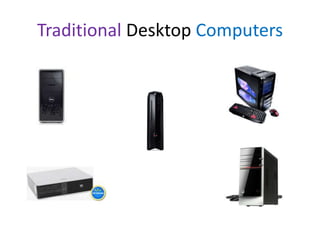
• Desktop computer-May consist of five or more
components; but may also be of an all-in-one design
– Main frame or box which houses the CPU, memory,
permanent storage, DVD or CD drive, video adapter, sound
adapter, Ethernet connector, keyboard, mouse, speakers
and display
– Non-portable configuration whose components may weigh
more than twenty pounds

• Review sites
– http://reviews.cnet.com/desktop-computers/
– http://www.pcworld.com/products/computers/desktops.h
tml
Traditional Desktop Computers
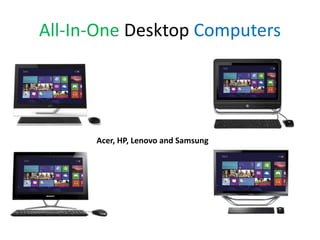
All-In-One Desktop Computers

Acer, HP, Lenovo and Samsung
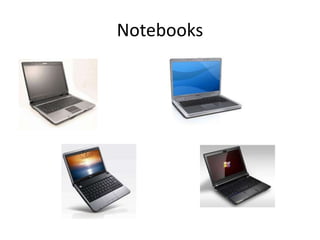
Netbooks, Notebooks and Laptops
• While tablets and smartphones are in and of
themselves wonderful mobile devices, some
applications require the power, capacity and
flexibility of a classic desktop. Presently
netbooks, notebooks and laptops offer these
desktop features in a mobile mode.
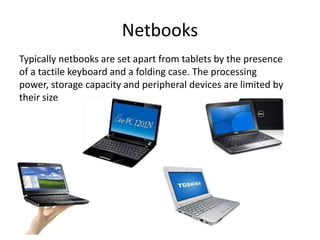
Netbooks
Typically netbooks are set apart from tablets by the presence
of a tactile keyboard and a folding case. The processing
power, storage capacity and peripheral devices are limited by
their size
Notebooks
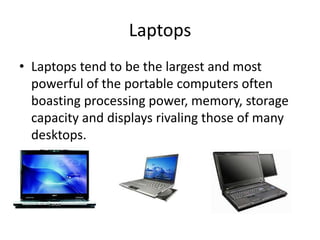
Laptops
• Laptops tend to be the largest and most
powerful of the portable computers often
boasting processing power, memory, storage
capacity and displays rivaling those of many
desktops.
Tablet Computers
• Tablet computers are an evolution of the
portable-laptop-notebook computer and have
been around for several years. Lately,
innovations in technology have allowed for an
extreme compression of computing power
into previously unheard of smaller sizes.
Improved computing circuitry, more efficient
heat release and greater storage capacity have
all melded together to create this new breed
of computer.
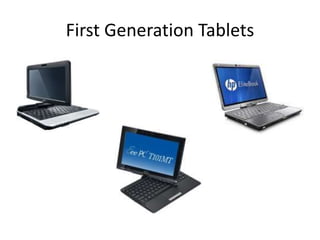
First Generation Tablets
Current Tablet Makers
• There are a wide variety of manufacturers of
tablets today. Among some of the more popular
are:
–
–
–
–
–
–
–
–

Apple (iPad)
Acer
Lenovo
Viewsonic
Samsung (Microsoft Windows 8)
Hewlett Packard
Dell
And a host of others
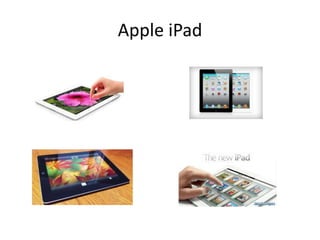
Apple iPad
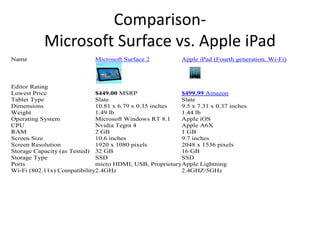
ComparisonMicrosoft Surface vs. Apple iPad
Name

Microsoft Surface 2

Apple iPad (Fourth generation, Wi-Fi)

Editor Rating
Lowest Price
$449.00 MSRP
$499.99 Amazon
Tablet Type
Slate
Slate
Dimensions
10.81 x 6.79 x 0.35 inches
9.5 x 7.31 x 0.37 inches
Weight
1.49 lb
1.44 lb
Operating System
Microsoft Windows RT 8.1
Apple iOS
CPU
Nvidia Tegra 4
Apple A6X
RAM
2 GB
1 GB
Screen Size
10.6 inches
9.7 inches
Screen Resolution
1920 x 1080 pixels
2048 x 1536 pixels
Storage Capacity (as Tested) 32 GB
16 GB
Storage Type
SSD
SSD
Ports
micro HDMI, USB, ProprietaryApple Lightning
Wi-Fi (802.11x) Compatibility2.4GHz
2.4GHZ/5GHz
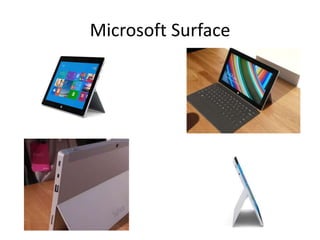
Microsoft Surface
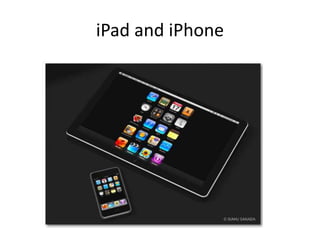
iPad and iPhone
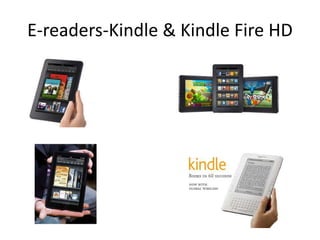
E-readers-Kindle & Kindle Fire HD
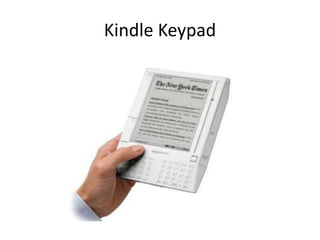
Kindle Keypad
Smartphones
• What defines a smartphone
– Operating system
•
•
•
•
•

Android from Google
Windows CE from Microsoft
Blackberry from RIM
iOS from Apple
Symbian OS from Nokia

– Features
•
•
•
•

Powerful processors
Abundant memory
Independent applications
Multiple components, ie. Cameras(Front and Rear Facing), LED
Flash, wi-fi, touch screen, GPS, calendar, email
Smartphones
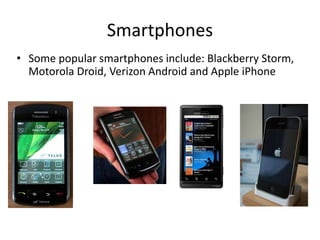
• Some popular smartphones include: Blackberry Storm,
Motorola Droid, Verizon Android and Apple iPhone
Smartphone or Tablet?
• Newer models of smartphones combine the
computing power of the tablet with the
communication capability of a cell phone into
one device, often with an included writing stylus.
–
–
–
–

Some units feature quad core processors
Front and rear facing cameras for video calling
Stylus for accurate drawing and pointing
Outstanding graphics on super large touch screens 5”
or larger
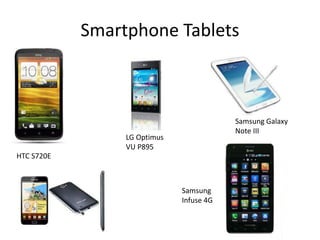
Smartphone Tablets

Samsung Galaxy
Note III

LG Optimus
VU P895
HTC S720E

Samsung
Infuse 4G
Smartphone Apps
• What are Apps?
– Apps refer to programs developed especially to
run on specific phone operating systems and
within the confines of the phone environment
– Generally Apps designed to run on one phone
operating system such as iOS will not run on a
competing operating system such as Blackberry
OS
Popular Tablet and Smartphone Apps
• iPhone Education Apps
– http://smartphoneapps.com/iphone-education/

• Blackberry Education Apps
– http://na.blackberry.com/eng/services/appworld/?

• Android Education Apps
– http://mobileappamerica.com/blog/2010/must-haveeducational-android-apps/

• Combined Education Apps
– http://www.ecampusnews.com/business-news/new10-of-the-best-apple-and-android-apps-for-highereducation-in-2013/?
iTunesU
• Apple iTunes hosts an amazing site known as
iTunes U, an educational portal to podcasts
from some of the top educational centers
around the country. Lectures are recorded and
published as podcasts which are available to
whomever visits the particular school’s virtual
lecture halls.
• http://www.apple.com/itunesu

Desktop, laptop, tablet or smartphone

  • 1.
    Desktop, Laptop, Tabletor Smartphone Personal Computing Choices Presented by: Dr. Jan Vanderpool vanderj@wlac.edu
  • 2.
    Exactly what ispersonal computing? Personal computing affords the user the ability to carry on with their computational responsibilities in the office or on the go; wherever one happen to be. These tasks can be personal , business or as so often the case, a combination of both. Activities include writing papers or creating exams; checking and sending emails or Tweets, checking, setting or conducting calendar activities such as exams, office hours or student support
  • 3.
    Getting to KnowYour Computer • • • • • • Desktops vs. Laptops vs. Tablets vs. Smartphones CPU’s-Central Processing Units Memory-RAM-Random Access Memory Storage-HDD-Hard Disk Drive Display-Monitor-Computer Screen LCD vs CRT Operating System-Microsoft Windows – Windows 8 – Windows 7 – Windows Vista – Windows XP – Windows 2000, ME, 98 & 95
  • 4.
    Definitions-CPU • CPU(Central processingunit)- This is the brains of the computer and its power is generally measured in clock speed (cpu cycles). Today’s CPU’s clock speeds will exceed 3 GHz on desktops and 2 GHz on laptops. • Caveat-Rated clock speeds are not linear measurements- a 3.4 GHz Core 2 is actually less powerful than a 3.2 GHz i5
  • 5.
    Definitions- Memory • Memory(RAM)- non permanent storage measured in megabytes (MB) or preferably, gigabytes (GB). Desktops should have at least 4-8 GB of RAM while laptops may have 1 GB but should have 4+ GB of RAM • Caveat- Windows XP can only recognize 3.28 GB of RAM. Anything more is wasted. Windows 7 & 8 (32 bit) can recognize 4 GB and Windows 7 & 8 (64 bit) can recognize 192 GB
  • 6.
    Definitions-Storage • Permanent Storage(Hard drive) – Unlike RAM, data stored in permanent storage remains after the power is turned off. Storage, like RAM, is measured in gigabytes (GB). Desktops should have at a minimum 1 TB of storage while laptops may suffice with 500 GB • Caveat- If you plan to store pictures, videos or music, you should opt for as much storage as possible (terabyte plus)
  • 7.
    Operating System • Windowsis the predominant operating system found on PCs – Windows XP-released October 30, 2001 and is currently the most widely installed PC operating system (est. >400 million worldwide) – Windows Vista-released January 30, 2007 and has been plagued by problems ever since its release – Windows 7- released October 22, 2009 purportedly to fix all past mistakes (installed on all new, major brand computers) – Windows 8-released on August 1, 2012 is a touch-centric operating system designed with mobile device integration in mind. The lack of the Start button drew such criticism that Microsoft released an update, Version 8.1 on October 13, 2013 which returned certain Windows 7 features such as the Start button
  • 8.
    Definitions-Desktop • Desktop computer-Mayconsist of five or more components; but may also be of an all-in-one design – Main frame or box which houses the CPU, memory, permanent storage, DVD or CD drive, video adapter, sound adapter, Ethernet connector, keyboard, mouse, speakers and display – Non-portable configuration whose components may weigh more than twenty pounds • Review sites – http://reviews.cnet.com/desktop-computers/ – http://www.pcworld.com/products/computers/desktops.h tml
  • 9.
  • 10.
    All-In-One Desktop Computers Acer,HP, Lenovo and Samsung
  • 11.
    Netbooks, Notebooks andLaptops • While tablets and smartphones are in and of themselves wonderful mobile devices, some applications require the power, capacity and flexibility of a classic desktop. Presently netbooks, notebooks and laptops offer these desktop features in a mobile mode.
  • 12.
    Netbooks Typically netbooks areset apart from tablets by the presence of a tactile keyboard and a folding case. The processing power, storage capacity and peripheral devices are limited by their size
  • 13.
  • 14.
    Laptops • Laptops tendto be the largest and most powerful of the portable computers often boasting processing power, memory, storage capacity and displays rivaling those of many desktops.
  • 15.
    Tablet Computers • Tabletcomputers are an evolution of the portable-laptop-notebook computer and have been around for several years. Lately, innovations in technology have allowed for an extreme compression of computing power into previously unheard of smaller sizes. Improved computing circuitry, more efficient heat release and greater storage capacity have all melded together to create this new breed of computer.
  • 16.
  • 17.
    Current Tablet Makers •There are a wide variety of manufacturers of tablets today. Among some of the more popular are: – – – – – – – – Apple (iPad) Acer Lenovo Viewsonic Samsung (Microsoft Windows 8) Hewlett Packard Dell And a host of others
  • 18.
  • 19.
    ComparisonMicrosoft Surface vs.Apple iPad Name Microsoft Surface 2 Apple iPad (Fourth generation, Wi-Fi) Editor Rating Lowest Price $449.00 MSRP $499.99 Amazon Tablet Type Slate Slate Dimensions 10.81 x 6.79 x 0.35 inches 9.5 x 7.31 x 0.37 inches Weight 1.49 lb 1.44 lb Operating System Microsoft Windows RT 8.1 Apple iOS CPU Nvidia Tegra 4 Apple A6X RAM 2 GB 1 GB Screen Size 10.6 inches 9.7 inches Screen Resolution 1920 x 1080 pixels 2048 x 1536 pixels Storage Capacity (as Tested) 32 GB 16 GB Storage Type SSD SSD Ports micro HDMI, USB, ProprietaryApple Lightning Wi-Fi (802.11x) Compatibility2.4GHz 2.4GHZ/5GHz
  • 20.
  • 21.
  • 22.
  • 23.
  • 24.
    Smartphones • What definesa smartphone – Operating system • • • • • Android from Google Windows CE from Microsoft Blackberry from RIM iOS from Apple Symbian OS from Nokia – Features • • • • Powerful processors Abundant memory Independent applications Multiple components, ie. Cameras(Front and Rear Facing), LED Flash, wi-fi, touch screen, GPS, calendar, email
  • 25.
    Smartphones • Some popularsmartphones include: Blackberry Storm, Motorola Droid, Verizon Android and Apple iPhone
  • 26.
    Smartphone or Tablet? •Newer models of smartphones combine the computing power of the tablet with the communication capability of a cell phone into one device, often with an included writing stylus. – – – – Some units feature quad core processors Front and rear facing cameras for video calling Stylus for accurate drawing and pointing Outstanding graphics on super large touch screens 5” or larger
  • 27.
    Smartphone Tablets Samsung Galaxy NoteIII LG Optimus VU P895 HTC S720E Samsung Infuse 4G
  • 28.
    Smartphone Apps • Whatare Apps? – Apps refer to programs developed especially to run on specific phone operating systems and within the confines of the phone environment – Generally Apps designed to run on one phone operating system such as iOS will not run on a competing operating system such as Blackberry OS
  • 29.
    Popular Tablet andSmartphone Apps • iPhone Education Apps – http://smartphoneapps.com/iphone-education/ • Blackberry Education Apps – http://na.blackberry.com/eng/services/appworld/? • Android Education Apps – http://mobileappamerica.com/blog/2010/must-haveeducational-android-apps/ • Combined Education Apps – http://www.ecampusnews.com/business-news/new10-of-the-best-apple-and-android-apps-for-highereducation-in-2013/?
  • 30.
    iTunesU • Apple iTuneshosts an amazing site known as iTunes U, an educational portal to podcasts from some of the top educational centers around the country. Lectures are recorded and published as podcasts which are available to whomever visits the particular school’s virtual lecture halls. • http://www.apple.com/itunesu