Thoughts on Deployment


   roger@10Gen.com
        @rogerb
Congratulations !

  Development done ?

Toll ! Ready to Deploy :-)
some points to consider
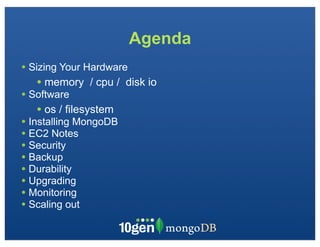
Agenda
• Sizing Your Hardware
   • memory   / cpu / disk io
• Software
   • os / filesystem
• Installing MongoDB
• EC2 Notes
• Security
• Backup
• Durability
• Upgrading
• Monitoring
• Scaling out
Sizing Hardware: Memory
• Memory Mapped files
   • Maps DB on Filesystem to Memory
   • Minor Page Faults - in memory - cheap
   • Major Page Faults - not in memory - from disk -
   expensive

• Indices
   • Part of the regular DB files
   • Can be completely in memory ..
   • Or partially
• Working set should be as much in memory as possible, but
Sizing Hardware: CPU
• MongoDB uses multiple cores
   • For working-set queries, CPU usage is minimal
   • Generally, faster CPU are better

• Aggregation, Full Tablescans
   •Makes heavy use of CPU / Disk
   •Instead of counting / computing:
       • cache / precompute
• Map Reduce
   • Currently Single threaded
       •Parallel in sharded environments.
   • This restriction may be eliminated, investigating options
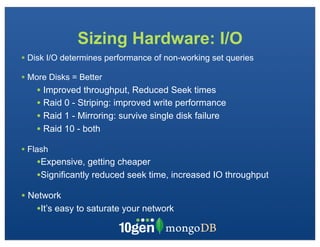
Sizing Hardware: I/O
• Disk I/O determines performance of non-working set queries
• More Disks = Better
    • Improved throughput, Reduced Seek times
    • Raid 0 - Striping: improved write performance
    • Raid 1 - Mirroring: survive single disk failure
    • Raid 10 - both
• Flash
    •Expensive, getting cheaper
    •Significantly reduced seek time, increased IO throughput
• Network
   •It’s easy to saturate your network
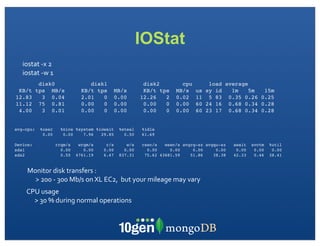
IOStat
   iostat	
  -­‐x	
  2
   iostat	
  -­‐w	
  1
            disk0                      disk1                         disk2                cpu             load average
 KB/t      tps MB/s                 KB/t tps         MB/s            KB/t tps           MB/s       us    sy id   1m    5m 15m
12.83        3 0.04                 2.01   0         0.00           12.26   2           0.02       11     5 83 0.35 0.26 0.25
11.12       75 0.81                 0.00   0         0.00            0.00   0           0.00       60    24 16 0.68 0.34 0.28
 4.00        3 0.01                 0.00   0         0.00            0.00   0           0.00       60    23 17 0.68 0.34 0.28


avg-cpu:     %user         %nice %system %iowait        %steal       %idle
              0.00          0.00    7.96   29.85          0.50       61.69

Device:                  rrqm/s    wrqm/s       r/s        w/s       rsec/s   wsec/s avgrq-sz avgqu-sz           await   svctm   %util
sda1                       0.00      0.00      0.00       0.00         0.00     0.00     0.00     0.00            0.00    0.00    0.00
sda2                       0.50   4761.19      6.47     837.31        75.62 43681.59    51.86    38.38           42.33    0.46   38.41


     Monitor	
  disk	
  transfers	
  :	
  
       >	
  200	
  -­‐	
  300	
  Mb/s	
  on	
  XL	
  EC2,	
  	
  but	
  your	
  mileage	
  may	
  vary
     CPU	
  usage
       >	
  30	
  %	
  during	
  normal	
  operations	
  
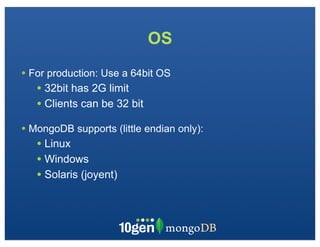
OS
• For production: Use a 64bit OS
   • 32bit has 2G limit
   • Clients can be 32 bit
• MongoDB supports (little endian only):
   • Linux
   • Windows
   • Solaris (joyent)
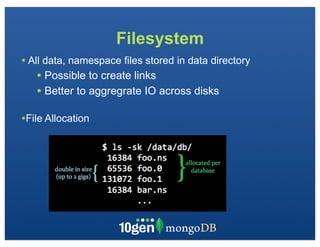
Filesystem
• All data, namespace files stored in data directory
   • Possible to create links
   • Better to aggregrate IO across disks
•File Allocation
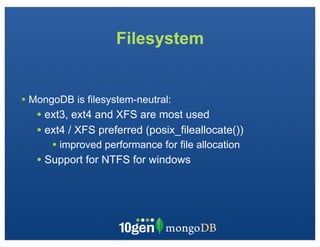
Filesystem


• MongoDB is filesystem-neutral:
   • ext3, ext4 and XFS are most used
   • ext4 / XFS preferred (posix_fileallocate())
      • improved performance for file allocation
   • Support for NTFS for windows
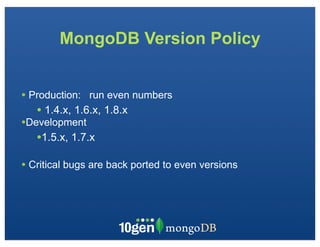
MongoDB Version Policy


• Production: run even numbers
   • 1.4.x, 1.6.x, 1.8.x
•Development
   •1.5.x, 1.7.x
• Critical bugs are back ported to even versions
Installing MongoDB

• Installing from Source
   • Requires Scons, C++ compiler, Boost libraries, ...

• Installing from Binaries (easiest)
   • curl -O http://downloads.mongodb.org/_os_/_version_
• Upgrading database
   • Install new version of MongoDB
   • Stop previous version
   • Start new version
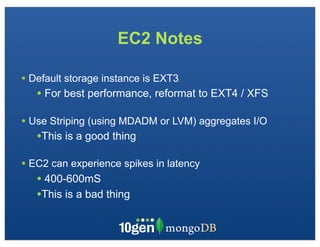
EC2 Notes

• Default storage instance is EXT3
   • For best performance, reformat to EXT4 / XFS

• Use Striping (using MDADM or LVM) aggregates I/O
   •This is a good thing
• EC2 can experience spikes in latency
   • 400-600mS
   •This is a bad thing
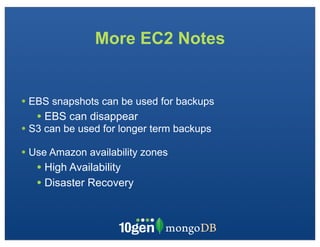
More EC2 Notes


• EBS snapshots can be used for backups
   • EBS can disappear
• S3 can be used for longer term backups
• Use Amazon availability zones
   • High Availability
   • Disaster Recovery
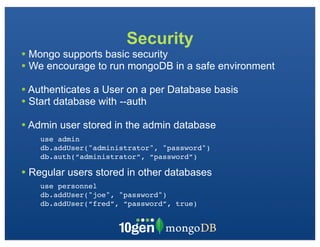
Security
• Mongo supports basic security
• We encourage to run mongoDB in a safe environment
• Authenticates a User on a per Database basis
• Start database with --auth
• Admin user stored in the admin database
    use admin
    db.addUser("administrator", "password")
    db.auth(“administrator”, “password”)

• Regular users stored in other databases
    use personnel
    db.addUser("joe", "password")
    db.addUser(“fred”, “password”, true)
Backup
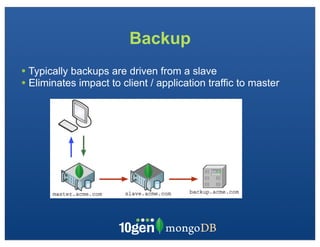
• Typically backups are driven from a slave
• Eliminates impact to client / application traffic to master
Backup


•Two main Strategies
   • mongodump / mongorestore
   • Filesystem
   • Filelock + fsync
mongodump


• binary, compact object dump
• each consistent object is written
• not necessarily consistent from start to finish
• mongorestore to restore database
   • database does not have to be up to restore
Filesystem Backup

• MUST
   •fsync - flushes buffers to disk
   • lock - blocks writes
      db.runCommand({fsync:1,lock:1})

• Use file-system / LVM / storage snapshot
• unlock
   db.$cmd.sys.unlock.findOne();
Durability


 What failures do you need to recover from?
• Loss of a single database node?
• Loss of a group of nodes?
Durability - Master only

• Write acknowledged
when in memory on
master only
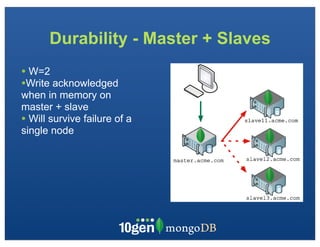
Durability - Master + Slaves
• W=2
•Write acknowledged
when in memory on
master + slave
• Will survive failure of a
single node
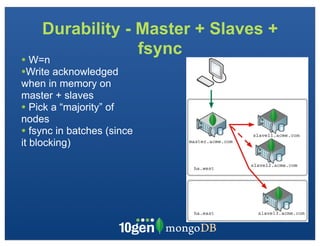
Durability - Master + Slaves +
                 fsync
• W=n
•Write acknowledged
when in memory on
master + slaves
• Pick a “majority” of
nodes
• fsync in batches (since
it blocking)
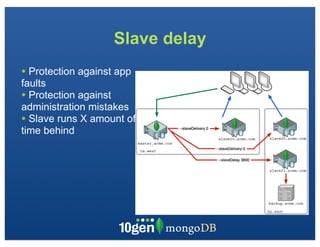
Slave delay
• Protection against app
faults
• Protection against
administration mistakes
• Slave runs X amount of
time behind
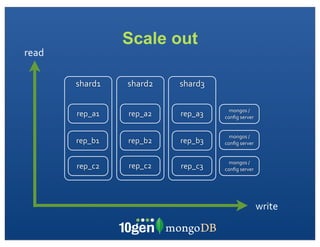
Scale out
read

       shard1   shard2   shard3

                                    mongos	
  /	
  
       rep_a1   rep_a2   rep_a3   config	
  server


                                    mongos	
  /	
  
       rep_b1   rep_b2   rep_b3   config	
  server


                                    mongos	
  /	
  
       rep_c2   rep_c2   rep_c3   config	
  server


                                                      write
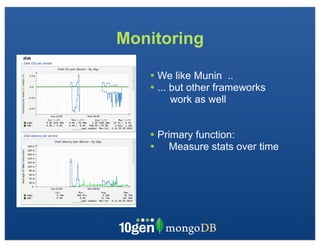
Monitoring

   • We like Munin ..
   • ... but other frameworks
       work as well


   • Primary function:
   • Measure stats over time
Thank You :-)
  @rogerb
download at mongodb.org

                conferences,	
  appearances,	
  and	
  meetups
                                         http://www.10gen.com/events


    Facebook	


  |	


  Twitter	


  |	


  LinkedIn
http://bit.ly/mongoN	
                                                        @mongodb                                          http://linkd.in/joinmongo

Deployment

  • 2.
    Thoughts on Deployment roger@10Gen.com @rogerb
  • 3.
    Congratulations ! Development done ? Toll ! Ready to Deploy :-)
  • 4.
  • 5.
    Agenda • Sizing YourHardware • memory / cpu / disk io • Software • os / filesystem • Installing MongoDB • EC2 Notes • Security • Backup • Durability • Upgrading • Monitoring • Scaling out
  • 6.
    Sizing Hardware: Memory •Memory Mapped files • Maps DB on Filesystem to Memory • Minor Page Faults - in memory - cheap • Major Page Faults - not in memory - from disk - expensive • Indices • Part of the regular DB files • Can be completely in memory .. • Or partially • Working set should be as much in memory as possible, but
  • 7.
    Sizing Hardware: CPU •MongoDB uses multiple cores • For working-set queries, CPU usage is minimal • Generally, faster CPU are better • Aggregation, Full Tablescans •Makes heavy use of CPU / Disk •Instead of counting / computing: • cache / precompute • Map Reduce • Currently Single threaded •Parallel in sharded environments. • This restriction may be eliminated, investigating options
  • 8.
    Sizing Hardware: I/O •Disk I/O determines performance of non-working set queries • More Disks = Better • Improved throughput, Reduced Seek times • Raid 0 - Striping: improved write performance • Raid 1 - Mirroring: survive single disk failure • Raid 10 - both • Flash •Expensive, getting cheaper •Significantly reduced seek time, increased IO throughput • Network •It’s easy to saturate your network
  • 9.
    IOStat iostat  -­‐x  2 iostat  -­‐w  1 disk0 disk1 disk2 cpu load average KB/t tps MB/s KB/t tps MB/s KB/t tps MB/s us sy id 1m 5m 15m 12.83 3 0.04 2.01 0 0.00 12.26 2 0.02 11 5 83 0.35 0.26 0.25 11.12 75 0.81 0.00 0 0.00 0.00 0 0.00 60 24 16 0.68 0.34 0.28 4.00 3 0.01 0.00 0 0.00 0.00 0 0.00 60 23 17 0.68 0.34 0.28 avg-cpu: %user %nice %system %iowait %steal %idle 0.00 0.00 7.96 29.85 0.50 61.69 Device: rrqm/s wrqm/s r/s w/s rsec/s wsec/s avgrq-sz avgqu-sz await svctm %util sda1 0.00 0.00 0.00 0.00 0.00 0.00 0.00 0.00 0.00 0.00 0.00 sda2 0.50 4761.19 6.47 837.31 75.62 43681.59 51.86 38.38 42.33 0.46 38.41 Monitor  disk  transfers  :   >  200  -­‐  300  Mb/s  on  XL  EC2,    but  your  mileage  may  vary CPU  usage >  30  %  during  normal  operations  
  • 10.
    OS • For production:Use a 64bit OS • 32bit has 2G limit • Clients can be 32 bit • MongoDB supports (little endian only): • Linux • Windows • Solaris (joyent)
  • 11.
    Filesystem • All data,namespace files stored in data directory • Possible to create links • Better to aggregrate IO across disks •File Allocation
  • 12.
    Filesystem • MongoDB isfilesystem-neutral: • ext3, ext4 and XFS are most used • ext4 / XFS preferred (posix_fileallocate()) • improved performance for file allocation • Support for NTFS for windows
  • 13.
    MongoDB Version Policy •Production: run even numbers • 1.4.x, 1.6.x, 1.8.x •Development •1.5.x, 1.7.x • Critical bugs are back ported to even versions
  • 14.
    Installing MongoDB • Installingfrom Source • Requires Scons, C++ compiler, Boost libraries, ... • Installing from Binaries (easiest) • curl -O http://downloads.mongodb.org/_os_/_version_ • Upgrading database • Install new version of MongoDB • Stop previous version • Start new version
  • 15.
    EC2 Notes • Defaultstorage instance is EXT3 • For best performance, reformat to EXT4 / XFS • Use Striping (using MDADM or LVM) aggregates I/O •This is a good thing • EC2 can experience spikes in latency • 400-600mS •This is a bad thing
  • 16.
    More EC2 Notes •EBS snapshots can be used for backups • EBS can disappear • S3 can be used for longer term backups • Use Amazon availability zones • High Availability • Disaster Recovery
  • 17.
    Security • Mongo supportsbasic security • We encourage to run mongoDB in a safe environment • Authenticates a User on a per Database basis • Start database with --auth • Admin user stored in the admin database use admin db.addUser("administrator", "password") db.auth(“administrator”, “password”) • Regular users stored in other databases use personnel db.addUser("joe", "password") db.addUser(“fred”, “password”, true)
  • 18.
    Backup • Typically backupsare driven from a slave • Eliminates impact to client / application traffic to master
  • 19.
    Backup •Two main Strategies • mongodump / mongorestore • Filesystem • Filelock + fsync
  • 20.
    mongodump • binary, compactobject dump • each consistent object is written • not necessarily consistent from start to finish • mongorestore to restore database • database does not have to be up to restore
  • 21.
    Filesystem Backup • MUST •fsync - flushes buffers to disk • lock - blocks writes db.runCommand({fsync:1,lock:1}) • Use file-system / LVM / storage snapshot • unlock db.$cmd.sys.unlock.findOne();
  • 22.
    Durability What failuresdo you need to recover from? • Loss of a single database node? • Loss of a group of nodes?
  • 23.
    Durability - Masteronly • Write acknowledged when in memory on master only
  • 24.
    Durability - Master+ Slaves • W=2 •Write acknowledged when in memory on master + slave • Will survive failure of a single node
  • 25.
    Durability - Master+ Slaves + fsync • W=n •Write acknowledged when in memory on master + slaves • Pick a “majority” of nodes • fsync in batches (since it blocking)
  • 26.
    Slave delay • Protectionagainst app faults • Protection against administration mistakes • Slave runs X amount of time behind
  • 27.
    Scale out read shard1 shard2 shard3 mongos  /   rep_a1 rep_a2 rep_a3 config  server mongos  /   rep_b1 rep_b2 rep_b3 config  server mongos  /   rep_c2 rep_c2 rep_c3 config  server write
  • 28.
    Monitoring • We like Munin .. • ... but other frameworks work as well • Primary function: • Measure stats over time
  • 29.
  • 30.
    download at mongodb.org conferences,  appearances,  and  meetups http://www.10gen.com/events Facebook                    |                  Twitter                  |                  LinkedIn http://bit.ly/mongoN   @mongodb http://linkd.in/joinmongo