

Scaling with MongoDB
       Eliot Horowitz
       @eliothorowitz
          MongoSV
      December 3, 2010
Scaling

• Storage needs only go up
• Operations/sec only go up
• Complexity only goes up
Scaling by Optimization

• Schema Design
• Index Design
• Hardware Configuration
Horizontal Scaling

• Vertical scaling is limited
• Hard to scale vertically in the cloud
• Can scale wider than higher
Schema

• Modeling the same data in different ways
  can change performance by orders of
  magnitude
• Very often performance problems can be
  solved by changing Schema
Embedding

• Great for read performance
• One seek to load entire object
• One roundtrip to database
• Writes can be slow if adding to objects all
  the time
Should you embed comments?
             {
                 title : “MongoDB is fun” ,
                 author : “eliot” ,
                 date : “2010-12-03” ,
                 comments : [
                   { author : “bob” , text : “...” } ,
                   { author : “joe” , text : “...” }
                 ]
             }

db.posts.update( { title : “MongoDB is fun” } ,
                 { $push : { author : “sam” , text : “...” } } )
Indexes

• Index common queries
• Make sure there aren’t duplicates: (A) and
  (A,B) aren’t needed
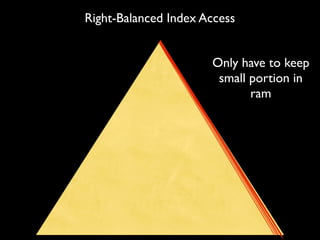
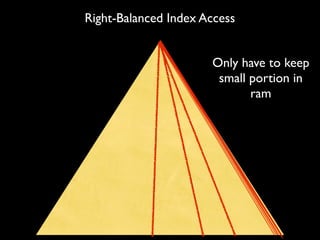
• Right-balanced indexes keep working set
  small
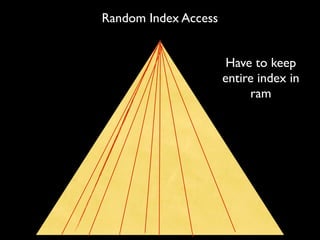
Random Index Access


                       Have to keep
                      entire index in
                           ram
Right-Balanced Index Access


                      Only have to keep
                       small portion in
                             ram
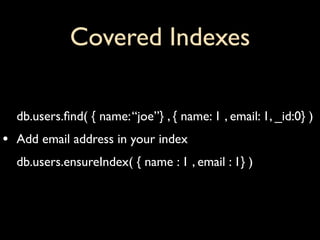
Covered Indexes

    db.users.find( { name: “joe”} , { name: 1 , email: 1, _id:0} )
•   Add email address in your index
    db.users.ensureIndex( { name : 1 , email : 1} )
RAM Requirements

• Understand working set
• What percentage of your data has to fit in
  RAM?
• How do you figure this out?
Hardware

• Disk performance
• How many drives
• What about ec2?
• Network performance
Read Scaling

• One master at any time
• Programmer determines if read hits master
  or a slave
• Pro: easy to setup, can scale reads very well
• Con: reads are inconsistent on a slave
• Writes don’t scale
One Master, Many Slaves


• Custom Master/Slave setup
• Have as many slaves as you want
• Can put them local to application servers
• Good for 90+% read heavy applications
  (Wikipedia)
Replica Sets
• High Availability Cluster
• One master at any time, up to 6 slaves
• A slave automatically promoted to master if
  failure
• Drivers support auto routing of reads to
  slaves if programmer allows
• Good for applications that need high write
  availability but mostly reads (Commenting
  System)
Sharding

• Many masters, even more slaves
• Can scale reads and writes in two
  dimensions
• Add slaves for inconsistent read scaling and
  redundancy
• Add Shards for write and data size scaling
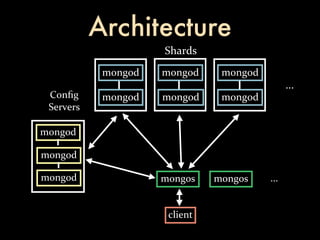
Architecture
                     Shards
            mongod   mongod     mongod
                                               ...
 Config      mongod   mongod     mongod
 Servers

mongod

mongod

mongod               mongos    mongos    ...


                      client
Common Setup
• Typical setup is 3 shards with 3 servers per
  shard: 3 masters, 6 slaves
• One massive collection, dozen non-sharded
• Can add sharding later to an existing replica
  set with no down time
• Can have sharded and non-sharded
  collections
Choosing a Shard Key

• Shard key determines how data is
  partitioned
• Hard to change
• Most important performance decision
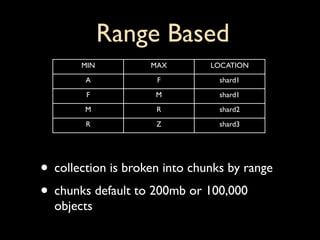
Range Based
       MIN          MAX        LOCATION
        A            F           shard1
        F            M           shard1
        M            R           shard2
        R            Z           shard3


• collection is broken into chunks by range
• chunks default to 200mb or 100,000
  objects
Use Case: User Profiles
  { email : “eliot@10gen.com” ,
      addresses : [ { state : “NY” } ]
  }
• Shard by email
• Lookup by email hits 1 node
• Index on { “addresses.state” : 1 }
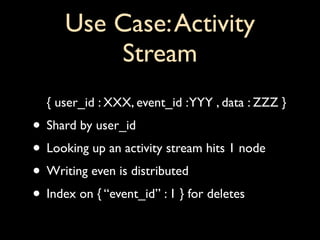
Use Case: Activity
          Stream
  { user_id : XXX, event_id : YYY , data : ZZZ }
• Shard by user_id
• Looking up an activity stream hits 1 node
• Writing even is distributed
• Index on { “event_id” : 1 } for deletes
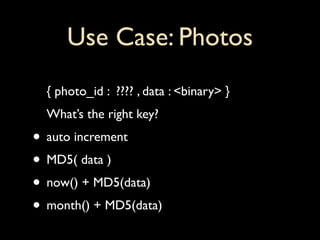
Use Case: Photos
  { photo_id : ???? , data : <binary> }
  What’s the right key?
• auto increment
• MD5( data )
• now() + MD5(data)
• month() + MD5(data)
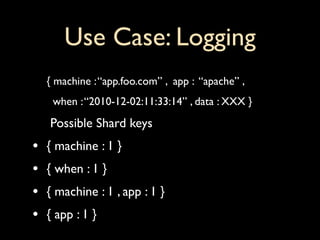
Use Case: Logging
    { machine : “app.foo.com” , app : “apache” ,
     when : “2010-12-02:11:33:14” , data : XXX }
    Possible Shard keys
•   { machine : 1 }
•   { when : 1 }
•   { machine : 1 , app : 1 }
•   { app : 1 }
Right-Balanced Index Access


                      Only have to keep
                       small portion in
                             ram
Download MongoDB
      http://www.mongodb.org


   and
let
us
know
what
you
think
    @eliothorowitz


@mongodb


       10gen is hiring!
http://www.10gen.com/jobs

Scaling with MongoDB

  • 1.
    Scaling with MongoDB Eliot Horowitz @eliothorowitz MongoSV December 3, 2010
  • 2.
    Scaling • Storage needsonly go up • Operations/sec only go up • Complexity only goes up
  • 3.
    Scaling by Optimization •Schema Design • Index Design • Hardware Configuration
  • 4.
    Horizontal Scaling • Verticalscaling is limited • Hard to scale vertically in the cloud • Can scale wider than higher
  • 5.
    Schema • Modeling thesame data in different ways can change performance by orders of magnitude • Very often performance problems can be solved by changing Schema
  • 6.
    Embedding • Great forread performance • One seek to load entire object • One roundtrip to database • Writes can be slow if adding to objects all the time
  • 7.
    Should you embedcomments? { title : “MongoDB is fun” , author : “eliot” , date : “2010-12-03” , comments : [ { author : “bob” , text : “...” } , { author : “joe” , text : “...” } ] } db.posts.update( { title : “MongoDB is fun” } , { $push : { author : “sam” , text : “...” } } )
  • 8.
    Indexes • Index commonqueries • Make sure there aren’t duplicates: (A) and (A,B) aren’t needed • Right-balanced indexes keep working set small
  • 9.
    Random Index Access Have to keep entire index in ram
  • 10.
    Right-Balanced Index Access Only have to keep small portion in ram
  • 11.
    Covered Indexes db.users.find( { name: “joe”} , { name: 1 , email: 1, _id:0} ) • Add email address in your index db.users.ensureIndex( { name : 1 , email : 1} )
  • 12.
    RAM Requirements • Understandworking set • What percentage of your data has to fit in RAM? • How do you figure this out?
  • 13.
    Hardware • Disk performance •How many drives • What about ec2? • Network performance
  • 14.
    Read Scaling • Onemaster at any time • Programmer determines if read hits master or a slave • Pro: easy to setup, can scale reads very well • Con: reads are inconsistent on a slave • Writes don’t scale
  • 15.
    One Master, ManySlaves • Custom Master/Slave setup • Have as many slaves as you want • Can put them local to application servers • Good for 90+% read heavy applications (Wikipedia)
  • 16.
    Replica Sets • HighAvailability Cluster • One master at any time, up to 6 slaves • A slave automatically promoted to master if failure • Drivers support auto routing of reads to slaves if programmer allows • Good for applications that need high write availability but mostly reads (Commenting System)
  • 17.
    Sharding • Many masters,even more slaves • Can scale reads and writes in two dimensions • Add slaves for inconsistent read scaling and redundancy • Add Shards for write and data size scaling
  • 18.
    Architecture Shards mongod mongod mongod ... Config mongod mongod mongod Servers mongod mongod mongod mongos mongos ... client
  • 19.
    Common Setup • Typicalsetup is 3 shards with 3 servers per shard: 3 masters, 6 slaves • One massive collection, dozen non-sharded • Can add sharding later to an existing replica set with no down time • Can have sharded and non-sharded collections
  • 20.
    Choosing a ShardKey • Shard key determines how data is partitioned • Hard to change • Most important performance decision
  • 21.
    Range Based MIN MAX LOCATION A F shard1 F M shard1 M R shard2 R Z shard3 • collection is broken into chunks by range • chunks default to 200mb or 100,000 objects
  • 22.
    Use Case: UserProfiles { email : “eliot@10gen.com” , addresses : [ { state : “NY” } ] } • Shard by email • Lookup by email hits 1 node • Index on { “addresses.state” : 1 }
  • 23.
    Use Case: Activity Stream { user_id : XXX, event_id : YYY , data : ZZZ } • Shard by user_id • Looking up an activity stream hits 1 node • Writing even is distributed • Index on { “event_id” : 1 } for deletes
  • 24.
    Use Case: Photos { photo_id : ???? , data : <binary> } What’s the right key? • auto increment • MD5( data ) • now() + MD5(data) • month() + MD5(data)
  • 25.
    Use Case: Logging { machine : “app.foo.com” , app : “apache” , when : “2010-12-02:11:33:14” , data : XXX } Possible Shard keys • { machine : 1 } • { when : 1 } • { machine : 1 , app : 1 } • { app : 1 }
  • 26.
    Right-Balanced Index Access Only have to keep small portion in ram
  • 27.
    Download MongoDB http://www.mongodb.org and
let
us
know
what
you
think @eliothorowitz


@mongodb 10gen is hiring! http://www.10gen.com/jobs

Editor's Notes

  • #2 \n
  • #3 \n
  • #4 What is scaling?\nWell - hopefully for everyone here.\n\n
  • #5 \n
  • #6 ec2 goes up to 64gb, maybe mention 256gb box here??? ($30-40k)\nmaybe can but 256gb box, but i spin up 10 ec2 64gb boxes in 10 minutes\n
  • #7 \n
  • #8 not schema less - dynamic schema\nschema is just as important, or more important than relational\nunderstand write vs read tradeoffs\n\n
  • #9 compare to mysql here\n\n
  • #10 \n
  • #11 most common performance problem\nwhy _id index can be ignored\n
  • #12 \n
  • #13 \n
  • #14 \n
  • #15 data looked at per second/minute/hour/day\nare you indexes accessed randomly\n
  • #16 \n256gb ram $30-40k\n
  • #17 \n
  • #18 \n
  • #19 \n
  • #20 \n
  • #21 \n
  • #22 Don&amp;#x2019;t pre-emptively shard - easy to add later\n
  • #23 \n
  • #24 \n
  • #25 \n
  • #26 \n
  • #27 \n
  • #28 \n
  • #29 \n
  • #30 \n
  • #31 \n
  • #32 \n