Btrfs and Snapper
The Next Steps From Pure Filesystem
Features to Management Integration and Compliance
SUSECon 2013, Orlando, Florida

Gábor Nyers

Arvin Schnell

Sr. System Engineer @SUSE
gnyers@suse.com

Sr. Software Developer
aschnell@suse.com
Abstract
Btrfs as technology has been getting a lot of attention over
the past few years. While interesting for its feature set alone,
like checksums, copy on write, snapshots and built-in device
management, without proper management tooling and
integration with other parts of the operating system, it is
difficult for the average user to use Btrfs to its full potential.
This session will help you understand the features of Btrfs
and how Snapper can be used for snapshot management in
SUSE Linux Enterprise. We also will provide an outlook for
future functionality.

2
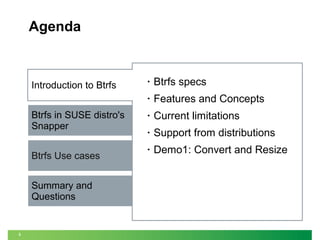
Agenda

Btrfs in SUSE distro's
Snapper
Btrfs Use cases
Summary and
Questions

3

•

Btrfs specs

•

Introduction to Btrfs

Features and Concepts

•

Current limitations

•

Support from distributions

•

Demo1: Convert and Resize
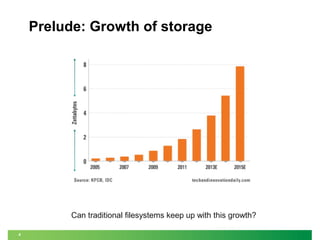
Prelude: Growth of storage

Can traditional filesystems keep up with this growth?
4
What People Say About Btrfs...
Chris Mason (lead developer Btrfs)
‒

General purpose filesystem that scales to very large storage

‒

Focused on features that no other Linux filesystems have

‒

Easy administration and fault tolerant operation

Ted Tso (lead developer Ext4)
‒

(Btrfs is) “... the way forward”

Others:
‒
‒

5

“Next generation Linux filesystem”
“Btrfs is the Linux answer to ZFS”
Why Another Linux filesystem?
•

Solve Storage Challenges
‒
‒

Dynamic Resources (expand and shrink)

‒

Storage Management

‒

6

Data Integrity

‒

•

Scalability

Server, Cloud – Desktop, Mobile

Compete with and exceed the filesystem capabilities
of other Operating Systems
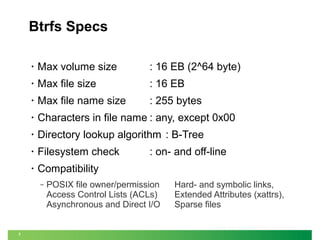
Btrfs Specs
•

Max volume size

: 16 EB (2^64 byte)

•

Max file size

: 16 EB

•

Max file name size

: 255 bytes

•

Characters in file name : any, except 0x00

•

Directory lookup algorithm : B-Tree

•

Filesystem check

•

Compatibility
‒

7

: on- and off-line

POSIX file owner/permission
Access Control Lists (ACLs)
Asynchronous and Direct I/O

Hard- and symbolic links,
Extended Attributes (xattrs),
Sparse files
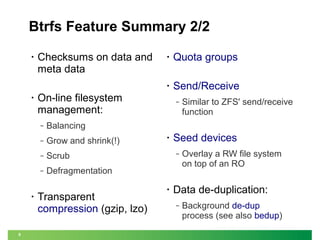
Btrfs Feature Summary 1/2
•

Copy-on-write
‒

•

Never overwrite data!

Multi-device
Management
‒

•

‒

‒

8

At file system level
RO / RW

on-line add and remove of
devices

Light weight

‒

•

‒

Snapshots

mixed size and speed

In-place conversion from
Ext[234] to Btrfs

•

Object level RAID:
‒

•

0, 1, 10

SSD support
(optimizations, trim)
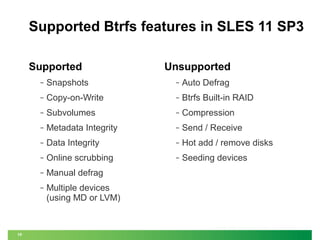
Btrfs Feature Summary 2/2

•

Checksums on data and
meta data

Send/Receive

Grow and shrink(!)

‒

Scrub

‒

‒

Defragmentation

Similar to ZFS' send/receive
function

Balancing

‒

9

Quota groups

On-line filesystem
management:
‒

•

•

•

•

Transparent
compression (gzip, lzo)

•

Seed devices
‒

•

Overlay a RW file system
on top of an RO

Data de-duplication:
‒

Background de-dup
process (see also bedup)
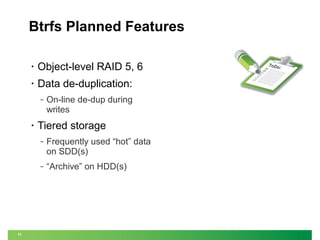
Supported Btrfs features in SLES 11 SP3
Supported

Unsupported

‒

‒

Auto Defrag

‒

Copy-on-Write

‒

Btrfs Built-in RAID

‒

Subvolumes

‒

Compression

‒

Metadata Integrity

‒

Send / Receive

‒

Data Integrity

‒

Hot add / remove disks

‒

Online scrubbing

‒

Seeding devices

‒

Manual defrag

‒

10

Snapshots

Multiple devices
(using MD or LVM)
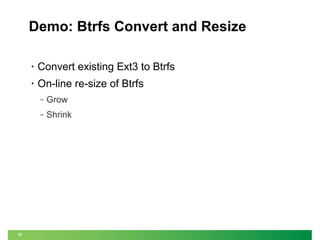
Btrfs Planned Features
•

Object-level RAID 5, 6

•

Data de-duplication:
‒

•

On-line de-dup during
writes

Tiered storage
‒

‒

11

Frequently used “hot” data
on SDD(s)
“Archive” on HDD(s)

ToDo
:
Demo: Btrfs Convert and Resize
•

Convert existing Ext3 to Btrfs

•

On-line re-size of Btrfs
‒
‒

12

Grow
Shrink
Btrfs Concepts
•

•

Subvolume

•

13

Extents and Chunks
B-Tree

•

Snapshot
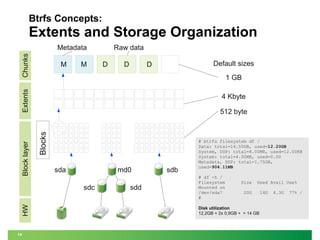
Btrfs Concepts:

Extents and Storage Organization
Chunks

Metadata
M

M

Raw data
D

D

Default sizes

D

4 Kbyte
512 byte

Blocks

Block layer

Extents

1 GB

sda

md0

HW

sdc

14

sdd

sdb

# btrfs filesystem df /
Data: total=14.50GB, used=12.20GB
System, DUP: total=8.00MB, used=12.00KB
System: total=4.00MB, used=0.00
Metadata, DUP: total=1.75GB,
used=904.11MB
# df -h /
Filesystem
Mounted on
/dev/sda7
#

Size

Used Avail Use%

20G

Disk utilization
12,2GB + 2x 0,9GB + = 14 GB

14G

4.3G

77% /
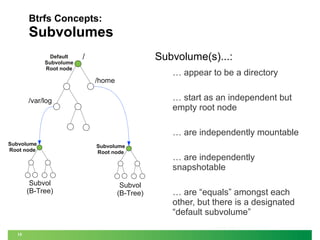
Btrfs Concepts:

Subvolumes
Default
Subvolume
Root node

Subvolume(s)...:

/

… appear to be a directory

/home

… start as an independent but
empty root node

/var/log

… are independently mountable
Subvolume
Root node

Subvol
(B-Tree)

15

Subvolume
Root node

Subvol
(B-Tree)

… are independently
snapshotable
… are “equals” amongst each
other, but there is a designated
“default subvolume”
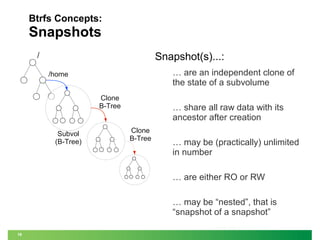
Btrfs Concepts:

Snapshots
Snapshot(s)...:

/

… are an independent clone of
the state of a subvolume

/home
Clone
B-Tree

Subvol
(B-Tree)

… share all raw data with its
ancestor after creation
Clone
B-Tree

… may be (practically) unlimited
in number
… are either RO or RW
… may be “nested”, that is
“snapshot of a snapshot”

16
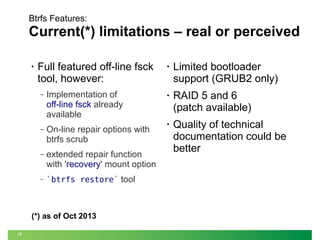
Btrfs Features:

Current(*) limitations – real or perceived
•

Full featured off-line fsck
tool, however:
‒

Implementation of
off-line fsck already
available

‒

On-line repair options with
btrfs scrub

‒

extended repair function
with 'recovery' mount option

‒

`btrfs restore` tool

(*) as of Oct 2013
17

•

Limited bootloader
support (GRUB2 only)

•

RAID 5 and 6
(patch available)

•

Quality of technical
documentation could be
better
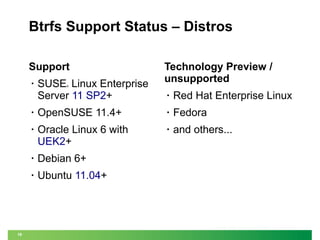
Btrfs Support Status – Distros
Support
•

SUSE Linux Enterprise
Server 11 SP2+

Technology Preview /
unsupported

®

•

Red Hat Enterprise Linux

•

•

Fedora

•

Oracle Linux 6 with
UEK2+

•

and others...

•

Debian 6+

•

18

OpenSUSE 11.4+

Ubuntu 11.04+
Agenda

Introduction to Btrfs

•

Btrfs integration in SLES and
openSUSE

Btrfs in SUSE distro's
Snapper

•

Partitioner

•

Planned features

•

Filesystem recommendations

•

Demos

Btrfs Use cases
Summary and
Questions

19
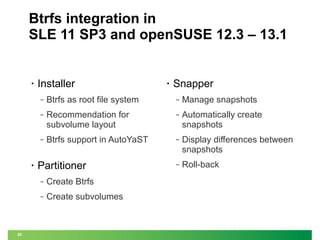
Btrfs integration in
SLE 11 SP3 and openSUSE 12.3 – 13.1

•

Installer

•

Snapper

‒

‒

Manage snapshots

‒

Recommendation for
subvolume layout

‒

Automatically create
snapshots

‒

•

Btrfs as root file system

Btrfs support in AutoYaST

‒

Display differences between
snapshots

‒

Roll-back

Partitioner
‒
‒

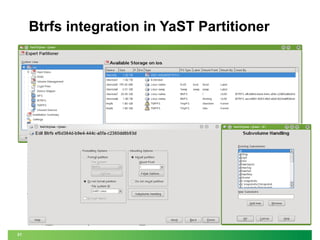
20

Create Btrfs
Create subvolumes
Btrfs integration in YaST Partitioner

21
A Few Recommendations 1/3
Purpose driven filesystem choices, ie: what
filesystems to choose for what use case?

Please see session TT1376
Matthias Eckermann (SUSE Product Management)
Jeff Mahoney (SUSE Kernel Team)

22
A Few Recommendations 2/3
Free disk space:
‒

Starting: ~30% filling

‒

Subvolumes layout
‒

Directories containing logs
to avoid log roll-back

Operation: <90% filling
‒

Directories w/ high volume
write I/O, like:
/tmp, /srv,
/var/spool,
/var/log, /var/run,
/var/tmp, /opt:

should be on their own
subvolumes, or a non-Btrfs
filesystem;
Especially on rotating
disks!
23
A Few Recommendations 3/3
A proposed filesystem maintenance plan
•

Preparations
‒

•

•

Get a baseline on “Hot
zones” for a period of
ca. 1 week – 1 month

‒

‒

Monitor free space
Monitor performance impact
of “Hot zones”

•

if Btrfs on / Manual defrag
(if Btrfs on HDD, instead of
on SSD)

‒

Daily maintenance
‒

Weekly maintenance

Check / remove unneeded
snapshots

Monthly maintenance

`btrfs file balance`

‒

24

re-evaluate need for
filesystem extension

‒

‒

‒

re-evaluate subvolume
layout

Scheduled Scrub
Demo: Dealing with fragmentation
Specifically for HDDs, file fragmentation caused by the CoW feature may
impact disk I/O performance. To prevent performance degradation,
regular de-fragmentation is advisable.
•

Find the top 10 most
fragmented files in the
current directory:
filefrag * | sort -nr -k 2
head -10

•

files:
btrfs file defrag $file

‒

directories:
btrfs file defrag /var/log/

‒

whole filesystem:
btrfs file defrag /

25

Hot zones:
‒

system specific:
/var/log/journal/
/tmp

‒

user specific:
/home/

|

Defrag
‒

•
Btrfs integration in SLE 11 and openSUSE

Future plans
•

YaST partitioner support
for:
‒

Built-in multi-device
handling and RAID

‒

Transparent compression

•

•

26

Bootloader support for
/boot on btrfs (SLE12)
Snapshot integration into
bootloader
Btrfs References
Publications
•

Btrfs wiki (and mirror)

•

Josef Bacik's article on Btrfs

•

Arne Jansen's paper on
qgroups (quota support)

Video's

•

•

•

Oloh Rodeh - B-trees,
Shadowing, and Clones, IBM
Research paper
LWN - “A short history of btrfs”
article

•

Matthias Eckerman: Why btrfs is the
Bread and Butter of Filesystems,
LinuxCon 2013, New Orleans
(49min, link)

•

Chris Mason: Introduction to Btrfs
(26min, link)

•

Chris Mason: Btrfs Filesystem: Status
and New Features, (May 2012, link)

•

Avi Miller's Btrfs talk at LinuxConf AU
(49min, Jan 2012)
‒
‒

Wikipedia - Btrfs article
•

Demo of “mount -o recovery”
Animations of disk usage on Ext3,
XFS and Btrfs

Douglas Fuller's talk
(24min, Apr 2011)
‒

27

Nice performance demo's
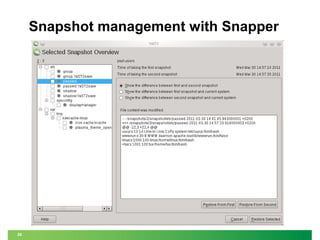
Snapper: snapshot management
Functions
•

Create / Delete
snapshots
‒

Also for non-root users
through DBus

Compare snapshots
‒

List of files

‒

28

•

Undo changes, ie: per
file rollback

•

Mount / Unmount
snapshots

Automated

‒

•

Store and manage
additional snapshot
related metadata

Manually

‒

•

Content of files (diff)
Snapshot management with Snapper

29
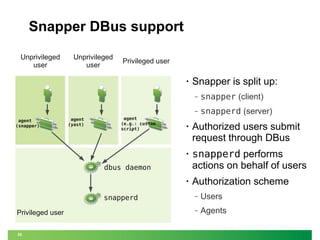
Snapper DBus support
Unprivileged
user

Unprivileged
user

Privileged user
•

Snapper is split up:
‒
‒

agent
(snapper)

agent
(yast)

agent
(e.g.: custom
script)

snapper (client)
snapperd (server)

•

Authorized users submit
request through DBus

•

snapperd performs
actions on behalf of users

•

Authorization scheme

dbus daemon

snapperd
Privileged user
30

‒

Users

‒

Agents
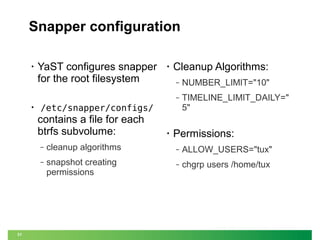
Snapper configuration
•

YaST configures snapper
for the root filesystem

•

Cleanup Algorithms:
NUMBER_LIMIT="10"

‒

•

‒

TIMELINE_LIMIT_DAILY="
5"

/etc/snapper/configs/

contains a file for each
btrfs subvolume:

•

Permissions:

‒

‒

ALLOW_USERS="tux"

‒

31

cleanup algorithms
snapshot creating
permissions

‒

chgrp users /home/tux
Snapper – Metadata
Meta information stored with each snapshot:
‒

: [ Pre | Post | Single ]

‒

#

: Nr of snapshot

‒

Pre #

: Matching “Pre” number, if type is “Post”

‒

Date

: Timestamp

‒

User

: User who created the snapshot

‒

Cleanup

: Cleanup algorithm for this snapshot

‒

Description : A fitting description of the snapshot (free text)

‒

32

Type

Userdata

: key=value pairs to record all sorts of useful
information about the snapshot in an
(e.g.: easily parsing from scripts)
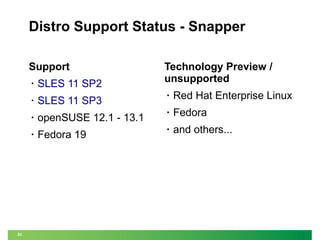
Distro Support Status - Snapper
Support
•

SLES 11 SP2

Technology Preview /
unsupported

SLES 11 SP3

•

Red Hat Enterprise Linux

•

openSUSE 12.1 - 13.1

•

Fedora

•

Fedora 19

•

and others...

•

33
Snapper – Planned features
•

Keep track of space usage
by snapshots, utilizing
qgroups;
In other words: how much space will
be reclaimed when deleting a
snapshot

•

Integration points
‒

Hooks for external scripts
‒
‒

34

Snapshot create
Snapshot delete
Demo
Snapper
•
•

Snapper integration with YaST

•

Snapper command line tool

•

35

Snapper module for YaST

Snapper as non-root
Agenda

Introduction to Btrfs

•

Filesystem changes after
software installation

Btrfs in SUSE distro's
Snapper

•

Server side copy with
Samba4

•

Automated Recovery Points
with Samba4

•

ITIL Change Management vs.
DC reality

Btrfs Use cases
Summary and
Questions

36
Use Case: Filesystem changes after
installation of some software
•

Step 1: Create “Pre”
snapshot

snapper create --type pre
--description "Before
installation”
•

Step 2: Install application

•

Step 3: Create “Post”
snapshot

snapper create --type post
--pre-number $PreNR
--description “After
installation”

37

•

Step 4: Compare “Pre” and
“Post” situation
# snapper status $PreNR..$PostNr
c... /etc/ld.so.cache
+... /usr/lib/libXi.so.6
+... /usr/lib/libXi.so.6.1.0
c... /var/cache/ldconfig/aux-cache
[...]
Use Case:
Server Side copy with Samba4
•

Prolem:
‒

•

Solution:
‒

•

Copying of large file(s)
initiated from workstation is
slow and requires large
bandwith
Clone file(s) on the server

Required:
‒

‒

38

Samba 4.1
(supports Server side copy)
Client: Windows Server
2012
Use Case:
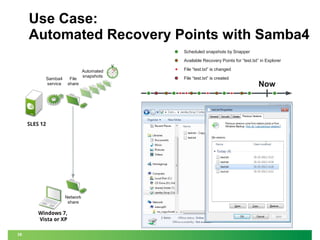
Automated Recovery Points with Samba4
Scheduled snapshots by Snapper
Available Recovery Points for “test.txt” in Explorer

Samba4
service

File
share

SLES 12

Network
share

Windows 7,
Vista or XP
39

Automated
snapshots

File “test.txt” is changed
File “test.txt” is created

Now
Use Case:
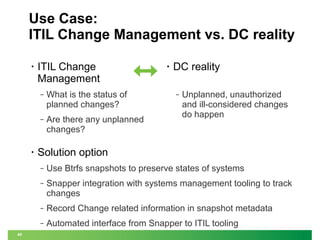
ITIL Change Management vs. DC reality
•

ITIL Change
Management
‒

‒

•

What is the status of
planned changes?
Are there any unplanned
changes?

•

DC reality
‒

Unplanned, unauthorized
and ill-considered changes
do happen

Solution option
‒
‒

Snapper integration with systems management tooling to track
changes

‒

Record Change related information in snapshot metadata

‒
40

Use Btrfs snapshots to preserve states of systems

Automated interface from Snapper to ITIL tooling
Use Case:
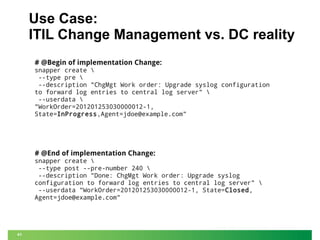
ITIL Change Management vs. DC reality
# @Begin of implementation Change:
snapper create 
--type pre 
--description "ChgMgt Work order: Upgrade syslog configuration
to forward log entries to central log server" 
--userdata 
"WorkOrder=201201253030000012-1,
State=InProgress,Agent=jdoe@example.com"

# @End of implementation Change:

snapper create 
--type post --pre-number 240 
--description "Done: ChgMgt Work order: Upgrade syslog
configuration to forward log entries to central log server" 
--userdata "WorkOrder=201201253030000012-1, State=Closed,
Agent=jdoe@example.com"

41
Agenda

Introduction to Btrfs

Summary
•
•

Development is ongoing

•

Distributions support is mounting

•

Lots of practical applications yet to
come

•

Btrfs in SUSE distro's
Snapper

Lots of desirable features

Please direct your questions or
remarks to
Gábor Nyers <gnyers@suse.com>

Btrfs Use cases
Summary and
Questions

42
For more information please
visit our website:
www.suse.com

Thank you.

43
Unpublished Work of SUSE. All Rights Reserved.
This work is an unpublished work and contains confidential, proprietary and trade secret information of SUSE.
Access to this work is restricted to SUSE employees who have a need to know to perform tasks within the scope of
their assignments. No part of this work may be practiced, performed, copied, distributed, revised, modified, translated,
abridged, condensed, expanded, collected, or adapted without the prior written consent of SUSE.
Any use or exploitation of this work without authorization could subject the perpetrator to criminal and civil liability.

General Disclaimer
This document is not to be construed as a promise by any participating company to develop, deliver, or market a
product. It is not a commitment to deliver any material, code, or functionality, and should not be relied upon in making
purchasing decisions. SUSE makes no representations or warranties with respect to the contents of this document,
and specifically disclaims any express or implied warranties of merchantability or fitness for any particular purpose. The
development, release, and timing of features or functionality described for SUSE products remains at the sole
discretion of SUSE. Further, SUSE reserves the right to revise this document and to make changes to its content, at
any time, without obligation to notify any person or entity of such revisions or changes. All SUSE marks referenced in
this presentation are trademarks or registered trademarks of Novell, Inc. in the United States and other countries. All
third-party trademarks are the property of their respective owners.

Btrfs and Snapper - The Next Steps from Pure Filesystem Features to Integration and Compliance

  • 1.
    Btrfs and Snapper TheNext Steps From Pure Filesystem Features to Management Integration and Compliance SUSECon 2013, Orlando, Florida Gábor Nyers Arvin Schnell Sr. System Engineer @SUSE gnyers@suse.com Sr. Software Developer aschnell@suse.com
  • 2.
    Abstract Btrfs as technologyhas been getting a lot of attention over the past few years. While interesting for its feature set alone, like checksums, copy on write, snapshots and built-in device management, without proper management tooling and integration with other parts of the operating system, it is difficult for the average user to use Btrfs to its full potential. This session will help you understand the features of Btrfs and how Snapper can be used for snapshot management in SUSE Linux Enterprise. We also will provide an outlook for future functionality. 2
  • 3.
    Agenda Btrfs in SUSEdistro's Snapper Btrfs Use cases Summary and Questions 3 • Btrfs specs • Introduction to Btrfs Features and Concepts • Current limitations • Support from distributions • Demo1: Convert and Resize
  • 4.
    Prelude: Growth ofstorage Can traditional filesystems keep up with this growth? 4
  • 5.
    What People SayAbout Btrfs... Chris Mason (lead developer Btrfs) ‒ General purpose filesystem that scales to very large storage ‒ Focused on features that no other Linux filesystems have ‒ Easy administration and fault tolerant operation Ted Tso (lead developer Ext4) ‒ (Btrfs is) “... the way forward” Others: ‒ ‒ 5 “Next generation Linux filesystem” “Btrfs is the Linux answer to ZFS”
  • 6.
    Why Another Linuxfilesystem? • Solve Storage Challenges ‒ ‒ Dynamic Resources (expand and shrink) ‒ Storage Management ‒ 6 Data Integrity ‒ • Scalability Server, Cloud – Desktop, Mobile Compete with and exceed the filesystem capabilities of other Operating Systems
  • 7.
    Btrfs Specs • Max volumesize : 16 EB (2^64 byte) • Max file size : 16 EB • Max file name size : 255 bytes • Characters in file name : any, except 0x00 • Directory lookup algorithm : B-Tree • Filesystem check • Compatibility ‒ 7 : on- and off-line POSIX file owner/permission Access Control Lists (ACLs) Asynchronous and Direct I/O Hard- and symbolic links, Extended Attributes (xattrs), Sparse files
  • 8.
    Btrfs Feature Summary1/2 • Copy-on-write ‒ • Never overwrite data! Multi-device Management ‒ • ‒ ‒ 8 At file system level RO / RW on-line add and remove of devices Light weight ‒ • ‒ Snapshots mixed size and speed In-place conversion from Ext[234] to Btrfs • Object level RAID: ‒ • 0, 1, 10 SSD support (optimizations, trim)
  • 9.
    Btrfs Feature Summary2/2 • Checksums on data and meta data Send/Receive Grow and shrink(!) ‒ Scrub ‒ ‒ Defragmentation Similar to ZFS' send/receive function Balancing ‒ 9 Quota groups On-line filesystem management: ‒ • • • • Transparent compression (gzip, lzo) • Seed devices ‒ • Overlay a RW file system on top of an RO Data de-duplication: ‒ Background de-dup process (see also bedup)
  • 10.
    Supported Btrfs featuresin SLES 11 SP3 Supported Unsupported ‒ ‒ Auto Defrag ‒ Copy-on-Write ‒ Btrfs Built-in RAID ‒ Subvolumes ‒ Compression ‒ Metadata Integrity ‒ Send / Receive ‒ Data Integrity ‒ Hot add / remove disks ‒ Online scrubbing ‒ Seeding devices ‒ Manual defrag ‒ 10 Snapshots Multiple devices (using MD or LVM)
  • 11.
    Btrfs Planned Features • Object-levelRAID 5, 6 • Data de-duplication: ‒ • On-line de-dup during writes Tiered storage ‒ ‒ 11 Frequently used “hot” data on SDD(s) “Archive” on HDD(s) ToDo :
  • 12.
    Demo: Btrfs Convertand Resize • Convert existing Ext3 to Btrfs • On-line re-size of Btrfs ‒ ‒ 12 Grow Shrink
  • 13.
  • 14.
    Btrfs Concepts: Extents andStorage Organization Chunks Metadata M M Raw data D D Default sizes D 4 Kbyte 512 byte Blocks Block layer Extents 1 GB sda md0 HW sdc 14 sdd sdb # btrfs filesystem df / Data: total=14.50GB, used=12.20GB System, DUP: total=8.00MB, used=12.00KB System: total=4.00MB, used=0.00 Metadata, DUP: total=1.75GB, used=904.11MB # df -h / Filesystem Mounted on /dev/sda7 # Size Used Avail Use% 20G Disk utilization 12,2GB + 2x 0,9GB + = 14 GB 14G 4.3G 77% /
  • 15.
    Btrfs Concepts: Subvolumes Default Subvolume Root node Subvolume(s)...: / …appear to be a directory /home … start as an independent but empty root node /var/log … are independently mountable Subvolume Root node Subvol (B-Tree) 15 Subvolume Root node Subvol (B-Tree) … are independently snapshotable … are “equals” amongst each other, but there is a designated “default subvolume”
  • 16.
    Btrfs Concepts: Snapshots Snapshot(s)...: / … arean independent clone of the state of a subvolume /home Clone B-Tree Subvol (B-Tree) … share all raw data with its ancestor after creation Clone B-Tree … may be (practically) unlimited in number … are either RO or RW … may be “nested”, that is “snapshot of a snapshot” 16
  • 17.
    Btrfs Features: Current(*) limitations– real or perceived • Full featured off-line fsck tool, however: ‒ Implementation of off-line fsck already available ‒ On-line repair options with btrfs scrub ‒ extended repair function with 'recovery' mount option ‒ `btrfs restore` tool (*) as of Oct 2013 17 • Limited bootloader support (GRUB2 only) • RAID 5 and 6 (patch available) • Quality of technical documentation could be better
  • 18.
    Btrfs Support Status– Distros Support • SUSE Linux Enterprise Server 11 SP2+ Technology Preview / unsupported ® • Red Hat Enterprise Linux • • Fedora • Oracle Linux 6 with UEK2+ • and others... • Debian 6+ • 18 OpenSUSE 11.4+ Ubuntu 11.04+
  • 19.
    Agenda Introduction to Btrfs • Btrfsintegration in SLES and openSUSE Btrfs in SUSE distro's Snapper • Partitioner • Planned features • Filesystem recommendations • Demos Btrfs Use cases Summary and Questions 19
  • 20.
    Btrfs integration in SLE11 SP3 and openSUSE 12.3 – 13.1 • Installer • Snapper ‒ ‒ Manage snapshots ‒ Recommendation for subvolume layout ‒ Automatically create snapshots ‒ • Btrfs as root file system Btrfs support in AutoYaST ‒ Display differences between snapshots ‒ Roll-back Partitioner ‒ ‒ 20 Create Btrfs Create subvolumes
  • 21.
    Btrfs integration inYaST Partitioner 21
  • 22.
    A Few Recommendations1/3 Purpose driven filesystem choices, ie: what filesystems to choose for what use case? Please see session TT1376 Matthias Eckermann (SUSE Product Management) Jeff Mahoney (SUSE Kernel Team) 22
  • 23.
    A Few Recommendations2/3 Free disk space: ‒ Starting: ~30% filling ‒ Subvolumes layout ‒ Directories containing logs to avoid log roll-back Operation: <90% filling ‒ Directories w/ high volume write I/O, like: /tmp, /srv, /var/spool, /var/log, /var/run, /var/tmp, /opt: should be on their own subvolumes, or a non-Btrfs filesystem; Especially on rotating disks! 23
  • 24.
    A Few Recommendations3/3 A proposed filesystem maintenance plan • Preparations ‒ • • Get a baseline on “Hot zones” for a period of ca. 1 week – 1 month ‒ ‒ Monitor free space Monitor performance impact of “Hot zones” • if Btrfs on / Manual defrag (if Btrfs on HDD, instead of on SSD) ‒ Daily maintenance ‒ Weekly maintenance Check / remove unneeded snapshots Monthly maintenance `btrfs file balance` ‒ 24 re-evaluate need for filesystem extension ‒ ‒ ‒ re-evaluate subvolume layout Scheduled Scrub
  • 25.
    Demo: Dealing withfragmentation Specifically for HDDs, file fragmentation caused by the CoW feature may impact disk I/O performance. To prevent performance degradation, regular de-fragmentation is advisable. • Find the top 10 most fragmented files in the current directory: filefrag * | sort -nr -k 2 head -10 • files: btrfs file defrag $file ‒ directories: btrfs file defrag /var/log/ ‒ whole filesystem: btrfs file defrag / 25 Hot zones: ‒ system specific: /var/log/journal/ /tmp ‒ user specific: /home/ | Defrag ‒ •
  • 26.
    Btrfs integration inSLE 11 and openSUSE Future plans • YaST partitioner support for: ‒ Built-in multi-device handling and RAID ‒ Transparent compression • • 26 Bootloader support for /boot on btrfs (SLE12) Snapshot integration into bootloader
  • 27.
    Btrfs References Publications • Btrfs wiki(and mirror) • Josef Bacik's article on Btrfs • Arne Jansen's paper on qgroups (quota support) Video's • • • Oloh Rodeh - B-trees, Shadowing, and Clones, IBM Research paper LWN - “A short history of btrfs” article • Matthias Eckerman: Why btrfs is the Bread and Butter of Filesystems, LinuxCon 2013, New Orleans (49min, link) • Chris Mason: Introduction to Btrfs (26min, link) • Chris Mason: Btrfs Filesystem: Status and New Features, (May 2012, link) • Avi Miller's Btrfs talk at LinuxConf AU (49min, Jan 2012) ‒ ‒ Wikipedia - Btrfs article • Demo of “mount -o recovery” Animations of disk usage on Ext3, XFS and Btrfs Douglas Fuller's talk (24min, Apr 2011) ‒ 27 Nice performance demo's
  • 28.
    Snapper: snapshot management Functions • Create/ Delete snapshots ‒ Also for non-root users through DBus Compare snapshots ‒ List of files ‒ 28 • Undo changes, ie: per file rollback • Mount / Unmount snapshots Automated ‒ • Store and manage additional snapshot related metadata Manually ‒ • Content of files (diff)
  • 29.
  • 30.
    Snapper DBus support Unprivileged user Unprivileged user Privilegeduser • Snapper is split up: ‒ ‒ agent (snapper) agent (yast) agent (e.g.: custom script) snapper (client) snapperd (server) • Authorized users submit request through DBus • snapperd performs actions on behalf of users • Authorization scheme dbus daemon snapperd Privileged user 30 ‒ Users ‒ Agents
  • 31.
    Snapper configuration • YaST configuressnapper for the root filesystem • Cleanup Algorithms: NUMBER_LIMIT="10" ‒ • ‒ TIMELINE_LIMIT_DAILY=" 5" /etc/snapper/configs/ contains a file for each btrfs subvolume: • Permissions: ‒ ‒ ALLOW_USERS="tux" ‒ 31 cleanup algorithms snapshot creating permissions ‒ chgrp users /home/tux
  • 32.
    Snapper – Metadata Metainformation stored with each snapshot: ‒ : [ Pre | Post | Single ] ‒ # : Nr of snapshot ‒ Pre # : Matching “Pre” number, if type is “Post” ‒ Date : Timestamp ‒ User : User who created the snapshot ‒ Cleanup : Cleanup algorithm for this snapshot ‒ Description : A fitting description of the snapshot (free text) ‒ 32 Type Userdata : key=value pairs to record all sorts of useful information about the snapshot in an (e.g.: easily parsing from scripts)
  • 33.
    Distro Support Status- Snapper Support • SLES 11 SP2 Technology Preview / unsupported SLES 11 SP3 • Red Hat Enterprise Linux • openSUSE 12.1 - 13.1 • Fedora • Fedora 19 • and others... • 33
  • 34.
    Snapper – Plannedfeatures • Keep track of space usage by snapshots, utilizing qgroups; In other words: how much space will be reclaimed when deleting a snapshot • Integration points ‒ Hooks for external scripts ‒ ‒ 34 Snapshot create Snapshot delete
  • 35.
    Demo Snapper • • Snapper integration withYaST • Snapper command line tool • 35 Snapper module for YaST Snapper as non-root
  • 36.
    Agenda Introduction to Btrfs • Filesystemchanges after software installation Btrfs in SUSE distro's Snapper • Server side copy with Samba4 • Automated Recovery Points with Samba4 • ITIL Change Management vs. DC reality Btrfs Use cases Summary and Questions 36
  • 37.
    Use Case: Filesystemchanges after installation of some software • Step 1: Create “Pre” snapshot snapper create --type pre --description "Before installation” • Step 2: Install application • Step 3: Create “Post” snapshot snapper create --type post --pre-number $PreNR --description “After installation” 37 • Step 4: Compare “Pre” and “Post” situation # snapper status $PreNR..$PostNr c... /etc/ld.so.cache +... /usr/lib/libXi.so.6 +... /usr/lib/libXi.so.6.1.0 c... /var/cache/ldconfig/aux-cache [...]
  • 38.
    Use Case: Server Sidecopy with Samba4 • Prolem: ‒ • Solution: ‒ • Copying of large file(s) initiated from workstation is slow and requires large bandwith Clone file(s) on the server Required: ‒ ‒ 38 Samba 4.1 (supports Server side copy) Client: Windows Server 2012
  • 39.
    Use Case: Automated RecoveryPoints with Samba4 Scheduled snapshots by Snapper Available Recovery Points for “test.txt” in Explorer Samba4 service File share SLES 12 Network share Windows 7, Vista or XP 39 Automated snapshots File “test.txt” is changed File “test.txt” is created Now
  • 40.
    Use Case: ITIL ChangeManagement vs. DC reality • ITIL Change Management ‒ ‒ • What is the status of planned changes? Are there any unplanned changes? • DC reality ‒ Unplanned, unauthorized and ill-considered changes do happen Solution option ‒ ‒ Snapper integration with systems management tooling to track changes ‒ Record Change related information in snapshot metadata ‒ 40 Use Btrfs snapshots to preserve states of systems Automated interface from Snapper to ITIL tooling
  • 41.
    Use Case: ITIL ChangeManagement vs. DC reality # @Begin of implementation Change: snapper create --type pre --description "ChgMgt Work order: Upgrade syslog configuration to forward log entries to central log server" --userdata "WorkOrder=201201253030000012-1, State=InProgress,Agent=jdoe@example.com" # @End of implementation Change: snapper create --type post --pre-number 240 --description "Done: ChgMgt Work order: Upgrade syslog configuration to forward log entries to central log server" --userdata "WorkOrder=201201253030000012-1, State=Closed, Agent=jdoe@example.com" 41
  • 42.
    Agenda Introduction to Btrfs Summary • • Developmentis ongoing • Distributions support is mounting • Lots of practical applications yet to come • Btrfs in SUSE distro's Snapper Lots of desirable features Please direct your questions or remarks to Gábor Nyers <gnyers@suse.com> Btrfs Use cases Summary and Questions 42
  • 43.
    For more informationplease visit our website: www.suse.com Thank you. 43
  • 45.
    Unpublished Work ofSUSE. All Rights Reserved. This work is an unpublished work and contains confidential, proprietary and trade secret information of SUSE. Access to this work is restricted to SUSE employees who have a need to know to perform tasks within the scope of their assignments. No part of this work may be practiced, performed, copied, distributed, revised, modified, translated, abridged, condensed, expanded, collected, or adapted without the prior written consent of SUSE. Any use or exploitation of this work without authorization could subject the perpetrator to criminal and civil liability. General Disclaimer This document is not to be construed as a promise by any participating company to develop, deliver, or market a product. It is not a commitment to deliver any material, code, or functionality, and should not be relied upon in making purchasing decisions. SUSE makes no representations or warranties with respect to the contents of this document, and specifically disclaims any express or implied warranties of merchantability or fitness for any particular purpose. The development, release, and timing of features or functionality described for SUSE products remains at the sole discretion of SUSE. Further, SUSE reserves the right to revise this document and to make changes to its content, at any time, without obligation to notify any person or entity of such revisions or changes. All SUSE marks referenced in this presentation are trademarks or registered trademarks of Novell, Inc. in the United States and other countries. All third-party trademarks are the property of their respective owners.