



Dell Windows 8 Tablet &
Mobility Solutions
12th June 2013
Luke Fieldhouse
Today’s business reality: You must stay relevant to successfully compete
…the world is shaking
from a global economic
earthquake…
- Richard Quest, CNN , 2012
2
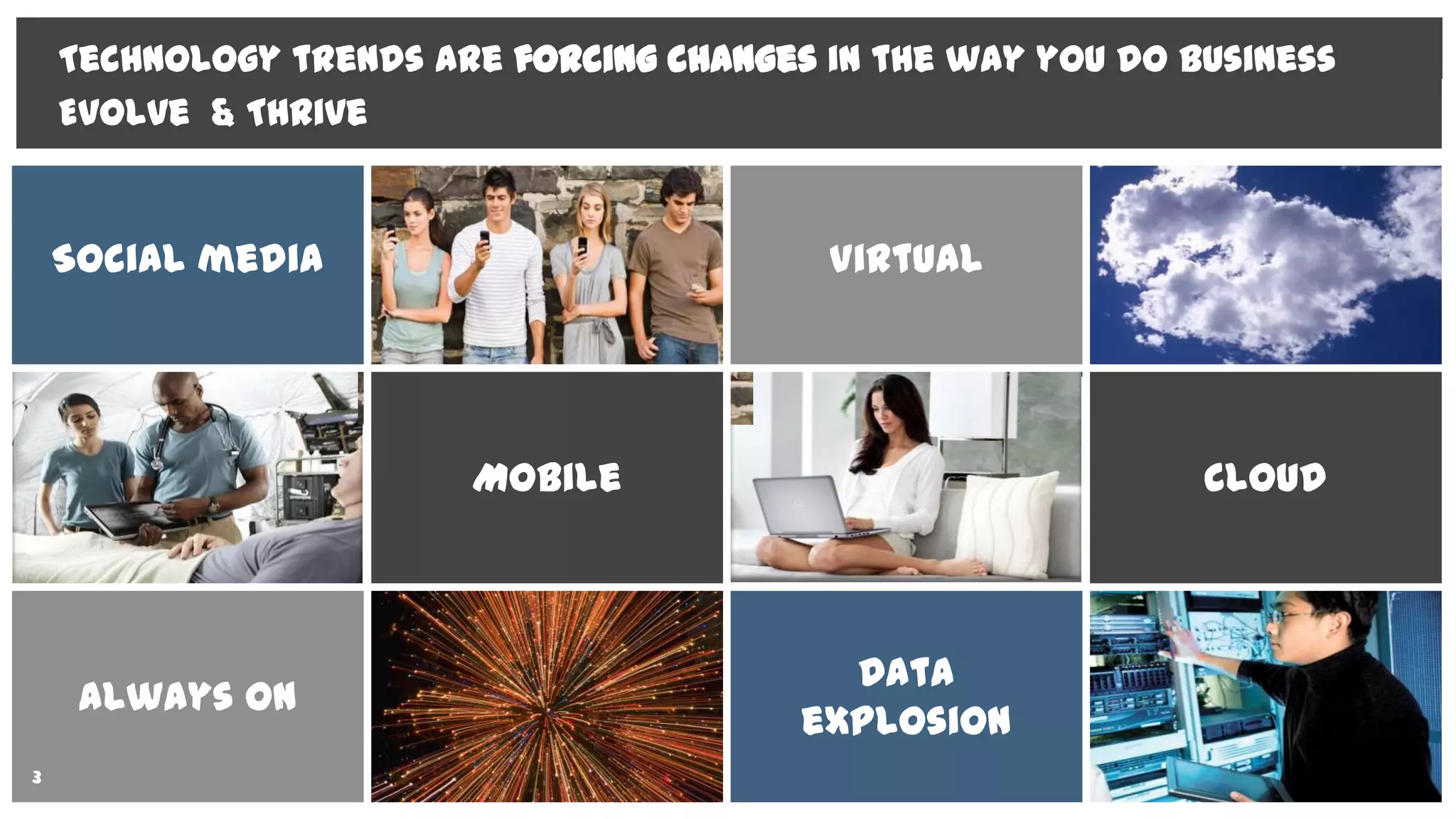
Social media Virtual
Mobile Cloud
Always on
Data
explosion
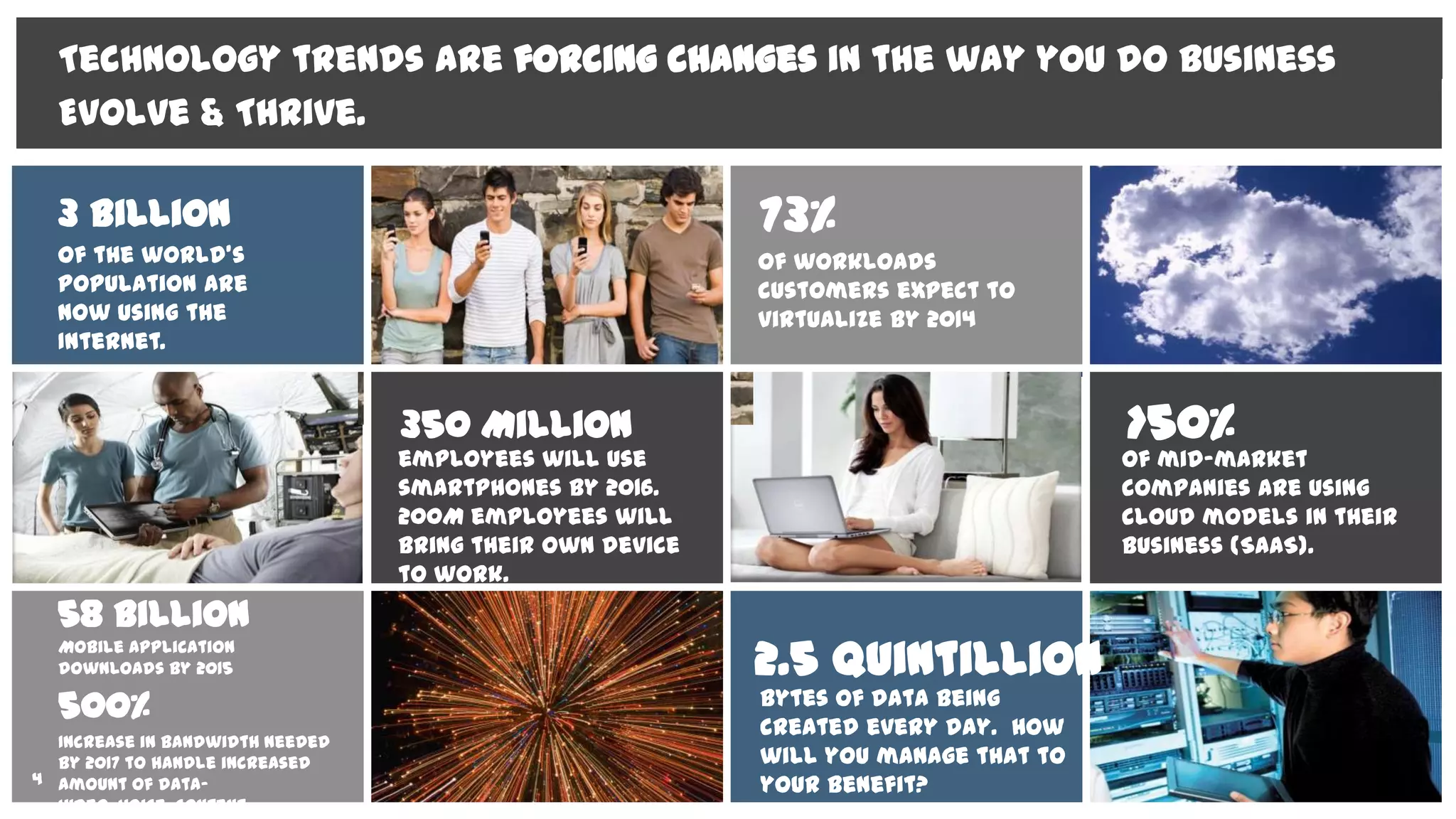
Technology trends are forcing changes in the way you do business
Evolve & Thrive
3
of the world’s
population are
now using the
Internet.
3 Billion
employees will use
smartphones by 2016.
200M employees will
bring their own device
to work.
350 Million
of mid-market
companies are using
cloud models in their
business (SaaS).
>50%
58 Billion
Mobile application
downloads by 2015 2.5 Quintillion
bytes of data being
created every day. How
will you manage that to
your benefit?
Technology trends are forcing changes in the way you do business
Evolve & Thrive.
of workloads
customers expect to
virtualize by 2014
73%
4
500%
Increase in bandwidth needed
by 2017 to handle increased
amount of data-
video, voice, content
DPF-0035 Define Phase Exit
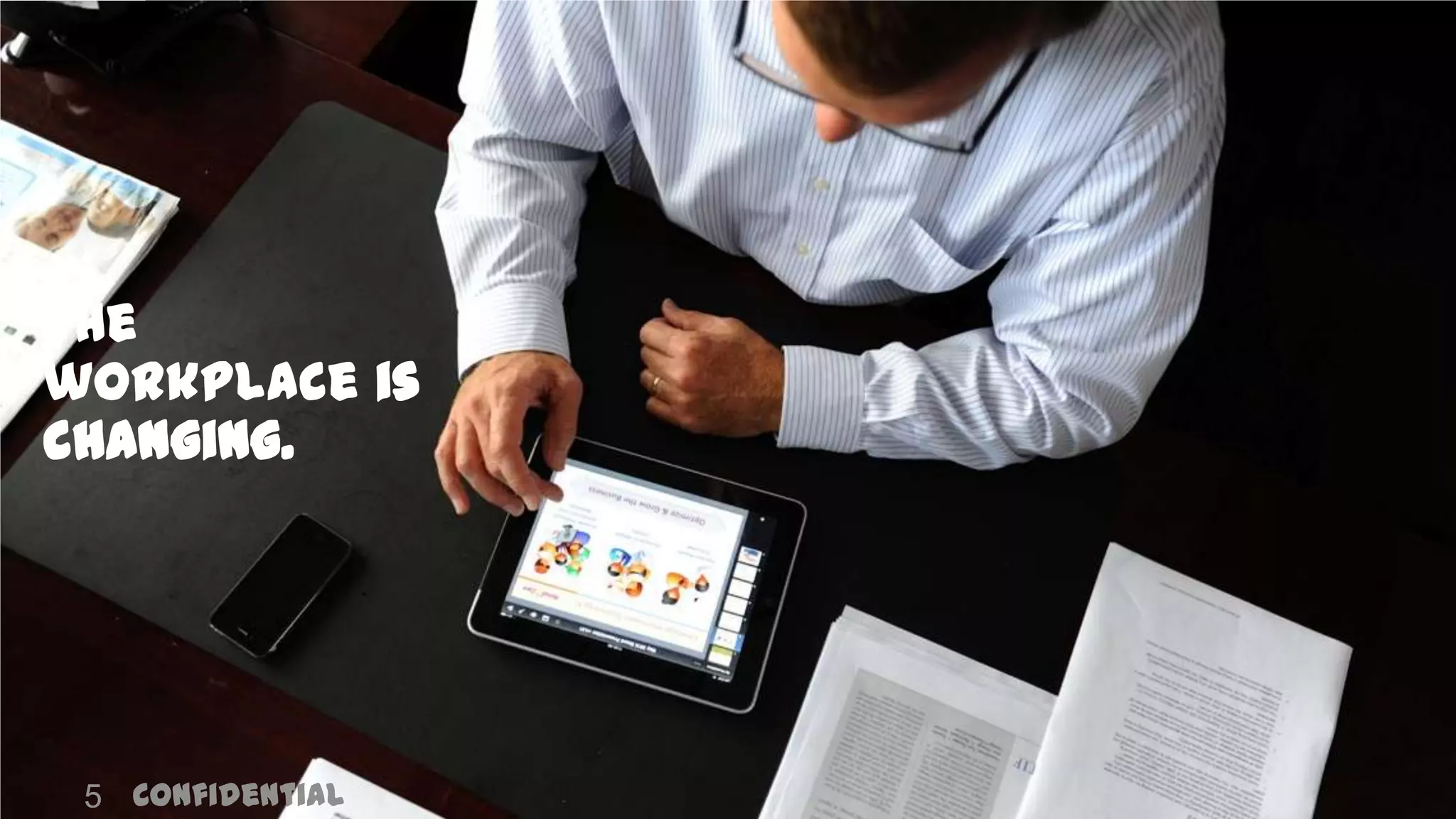
The
workplace is
changing.
Confidential5
Global Marketing
1960 1970 1980 1990 2000 2010 2020
Devices
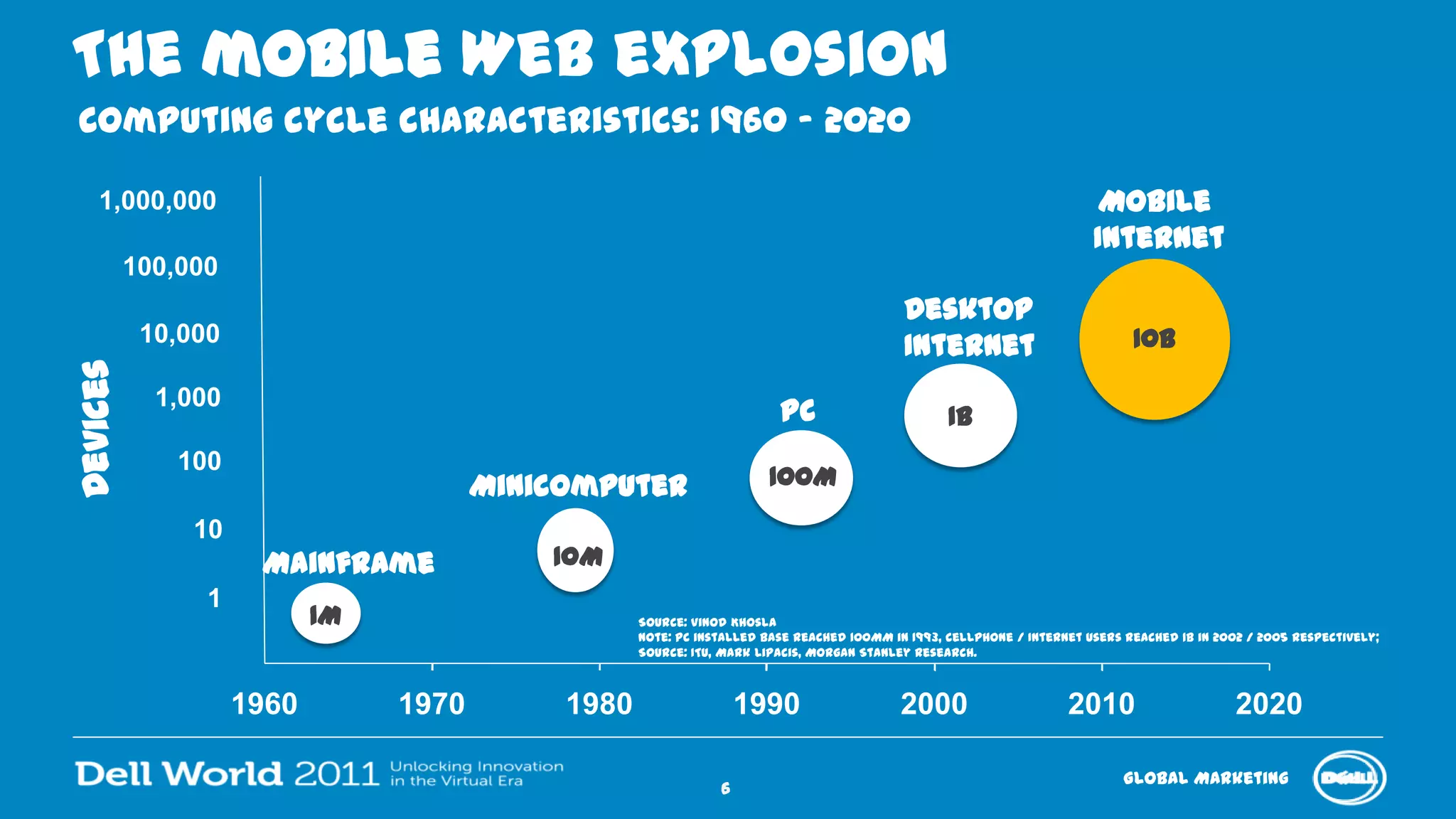
The mobile Web explosion
Minicomputer
10M
Computing cycle characteristics: 1960 – 2020
Source: Vinod Khosla
Note: PC installed base reached 100MM in 1993, cellphone / Internet users reached 1B in 2002 / 2005 respectively;
Source: ITU, Mark Lipacis, Morgan Stanley Research.
1
10
100
1,000
10,000
100,000
1,000,000
PC
100M
Mainframe
Mobile
Internet
10B
Desktop
Internet
1B
1M
6
DPF-0035 Define Phase Exit
What is clear:
the status quo is
no longer
sustainable.
7
Today’s end users
want the freedom
to connect
anytime, anywher
e, to anything, on
any device.
Services & Solutions GroupInfrastructure & Cloud ComputingDell Proprietary & Confidential8
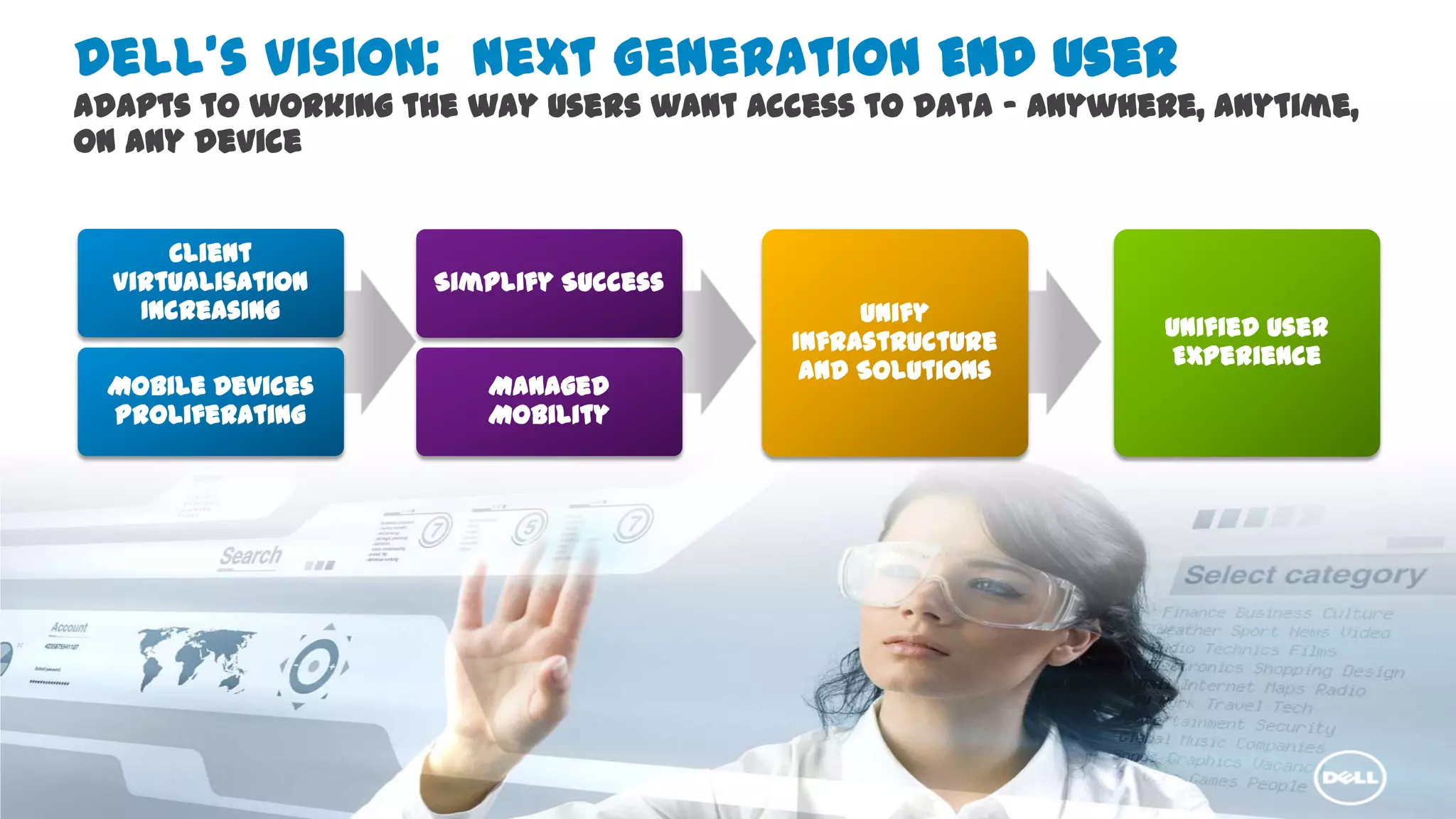
Dell’s vision: Next Generation End User
Adapts to working the way users want access to data – anywhere, anytime,
on any device
Client
Virtualisation
Increasing
Simplify
Unify
Infrastructure
Mobile Devices
Proliferating
Simplify Success
Managed
Mobility
Unify
Infrastructure
and Solutions
Unified User
Experience
Services & Solutions GroupInfrastructure & Cloud ComputingDell Proprietary & Confidential9
Distributed device management
delivered as a SaaS services
High performance SAN iSCSi
solutions for virtualization
Intelligent infrastructure and
mgmt. of multi-tier storage
architecture Storage
compression & de-
duplication
Remote systems management
appliance
Clustered NAS storage
A single point of mgmt
for both physical and
virtual resources
Remote email management –
continuity and archiving SaaS
Archiving and image management
solution for healthcare vertical.
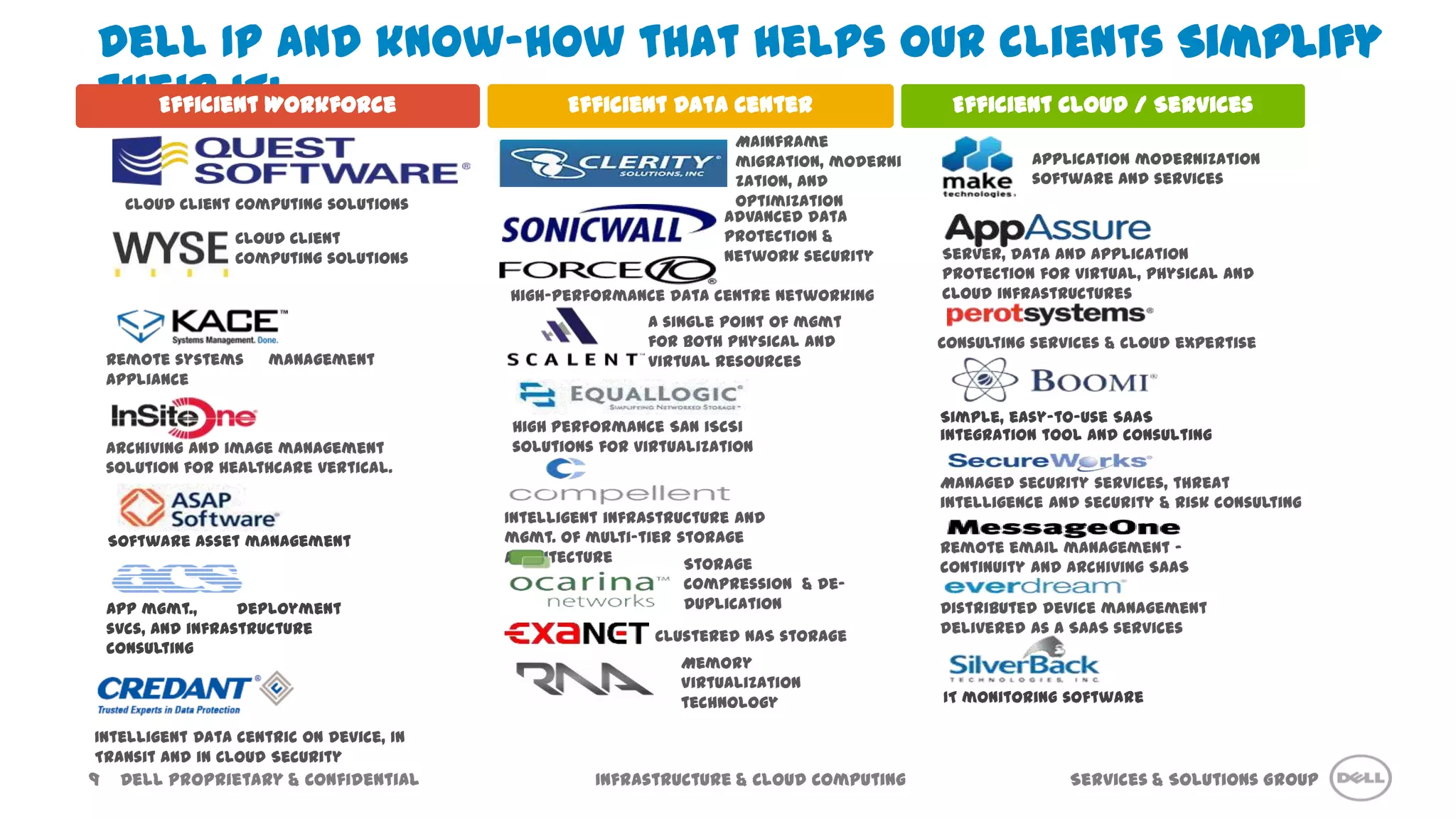
Dell IP and know-how that helps our clients Simplify
their IT:
Software asset management
IT monitoring software
App mgmt., deployment
svcs, and infrastructure
consulting
Simple, easy-to-use SaaS
integration tool and consulting
Efficient Workforce Efficient Cloud / ServicesEfficient Data Center
Managed security services, threat
intelligence and security & risk consulting
Memory
Virtualization
technology
Consulting services & cloud expertise
Server, data and application
protection for virtual, physical and
cloud infrastructures
Advanced data
protection &
network security
High-performance data centre networking
Cloud Client
Computing solutions
Mainframe
migration, moderni
zation, and
optimization
Application modernization
software and services
Cloud Client Computing solutions
Intelligent Data centric on Device, In
Transit and in Cloud Security
Confidential10
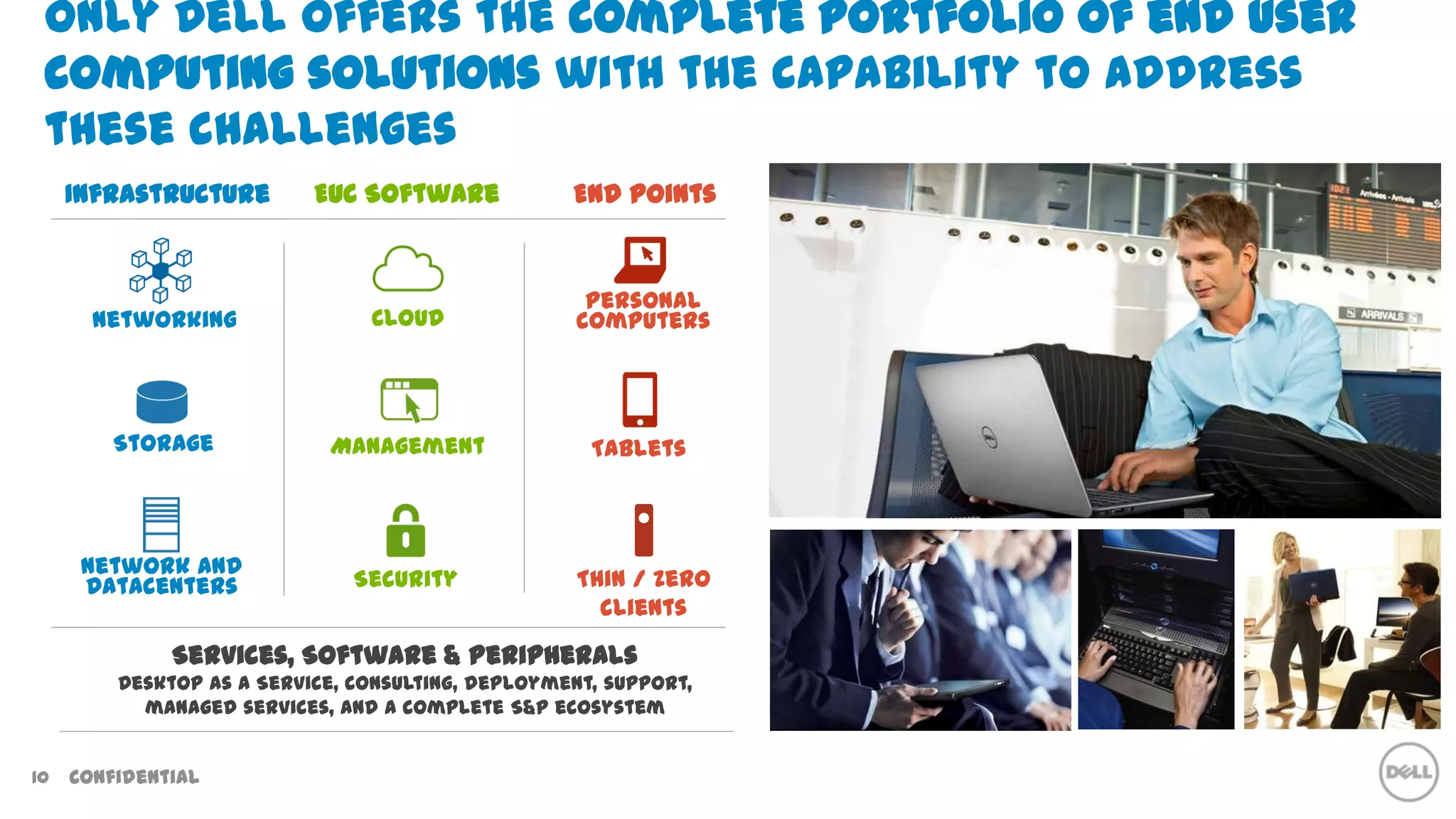
Only Dell offers the complete portfolio of end user
computing solutions with the capability to address
these challenges
Services, Software & Peripherals
Desktop as a Service, consulting, deployment, support,
managed services, and a complete S&P ecosystem
Infrastructure
Networking
Storage
Network and
Datacenters
EUC Software
Cloud
Management
Security
Tablets
Thin / Zero
clients
End points
Personal
computers
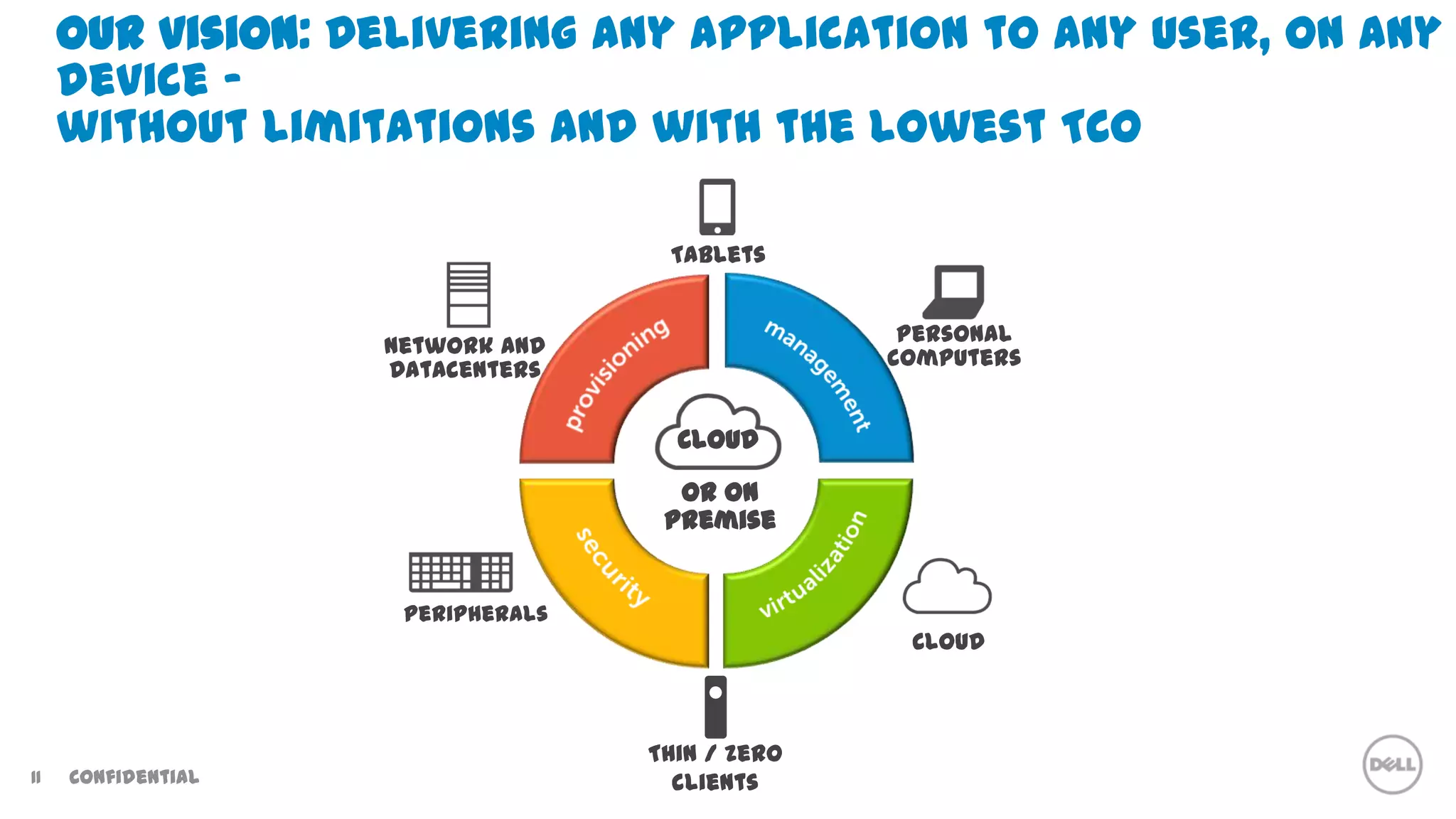
Our vision: Delivering any application to any user, on any
device -
without limitations and with the lowest TCO
or on
premise
Cloud
Thin / zero
clients
Tablets
Network and
Datacenters
Cloud
Personal
computers
Peripherals
Confidential11
DPF-0035 Define Phase Exit
Solutions for the
Evolving
Workforce
DPF-0035 Define Phase Exit
driver
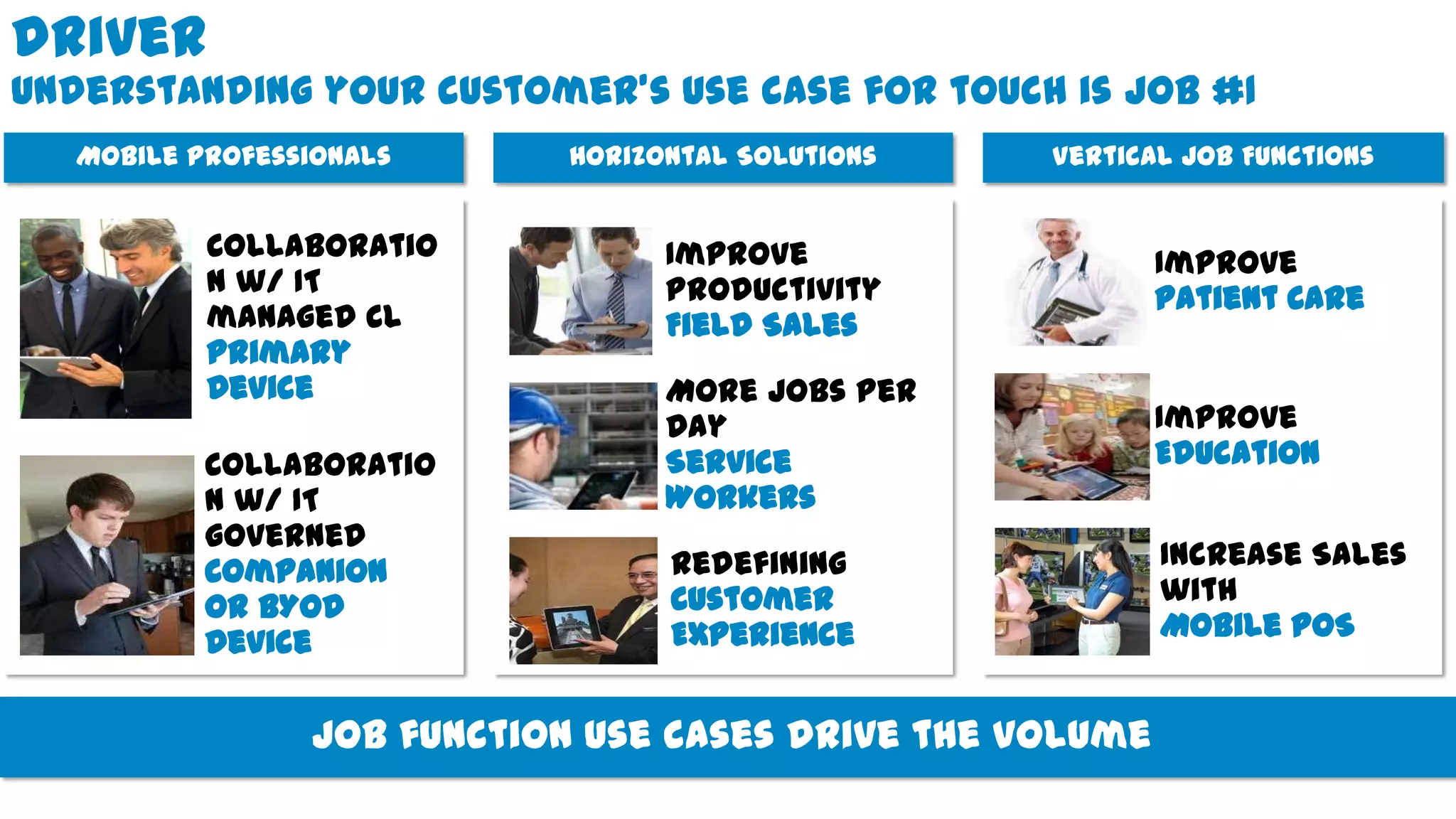
Understanding your customer’s use case for touch is job #1
Vertical Job FunctionsHorizontal SolutionsMobile Professionals
Collaboratio
n w/ IT
governed
Companion
or BYOD
Device
Collaboratio
n w/ IT
managed CL
Primary
Device
Redefining
Customer
Experience
More Jobs Per
Day
Service
Workers
Improve
Productivity
Field Sales
Improve
Education
Increase Sales
with
Mobile POS
Improve
Patient Care
Job function use cases drive the volume
DPF-0035 Define Phase Exit
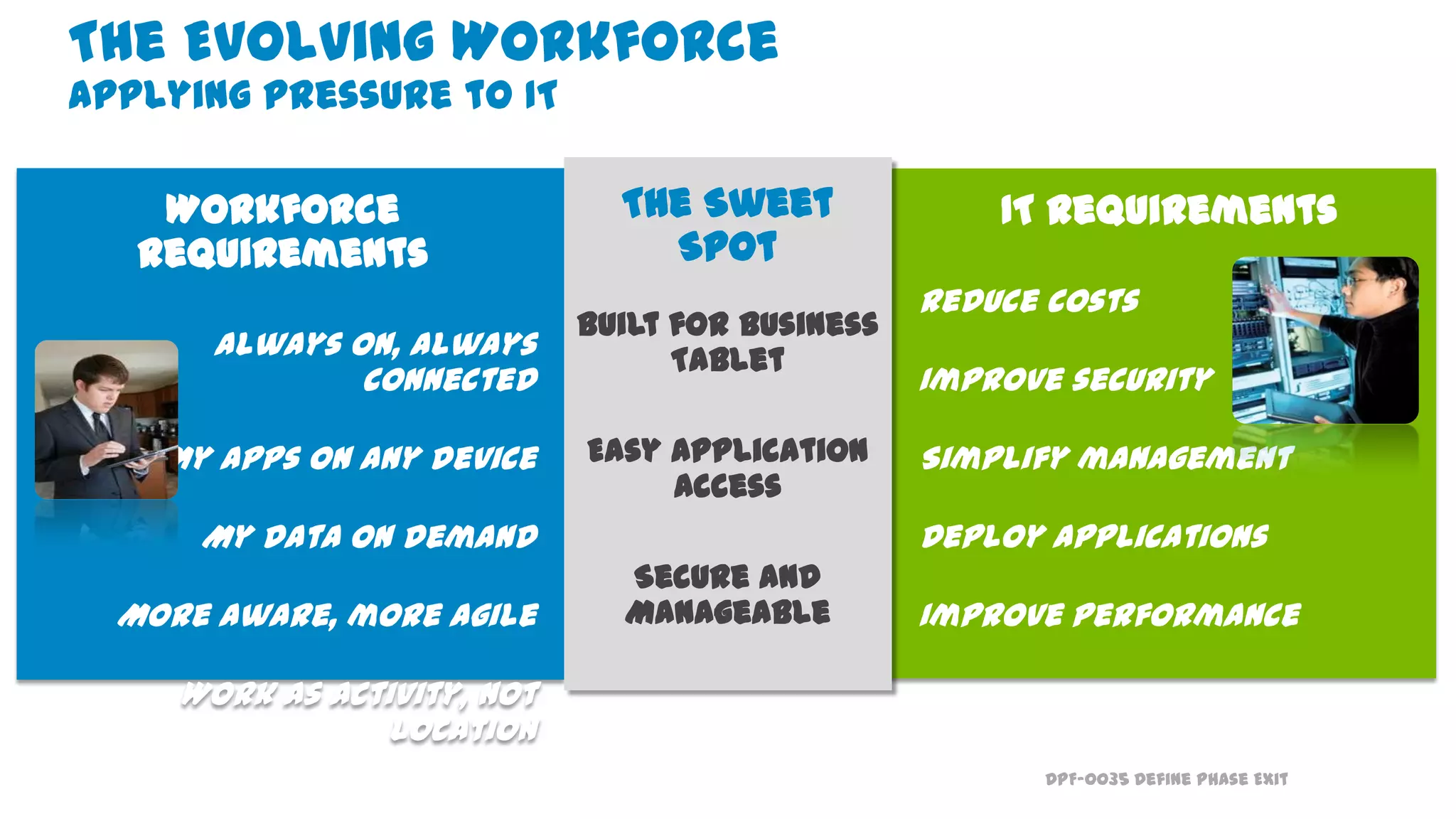
Workforce
requirements
Always on, always
connected
My apps on any device
My data on demand
More aware, more agile
Work as activity, not
location
IT requirements
Reduce costs
Improve security
Simplify management
Deploy applications
Improve performance
The Sweet
Spot
Built for Business
Tablet
Easy Application
Access
Secure and
Manageable
The Evolving Workforce
Applying pressure to IT
DPF-0035 Define Phase Exit
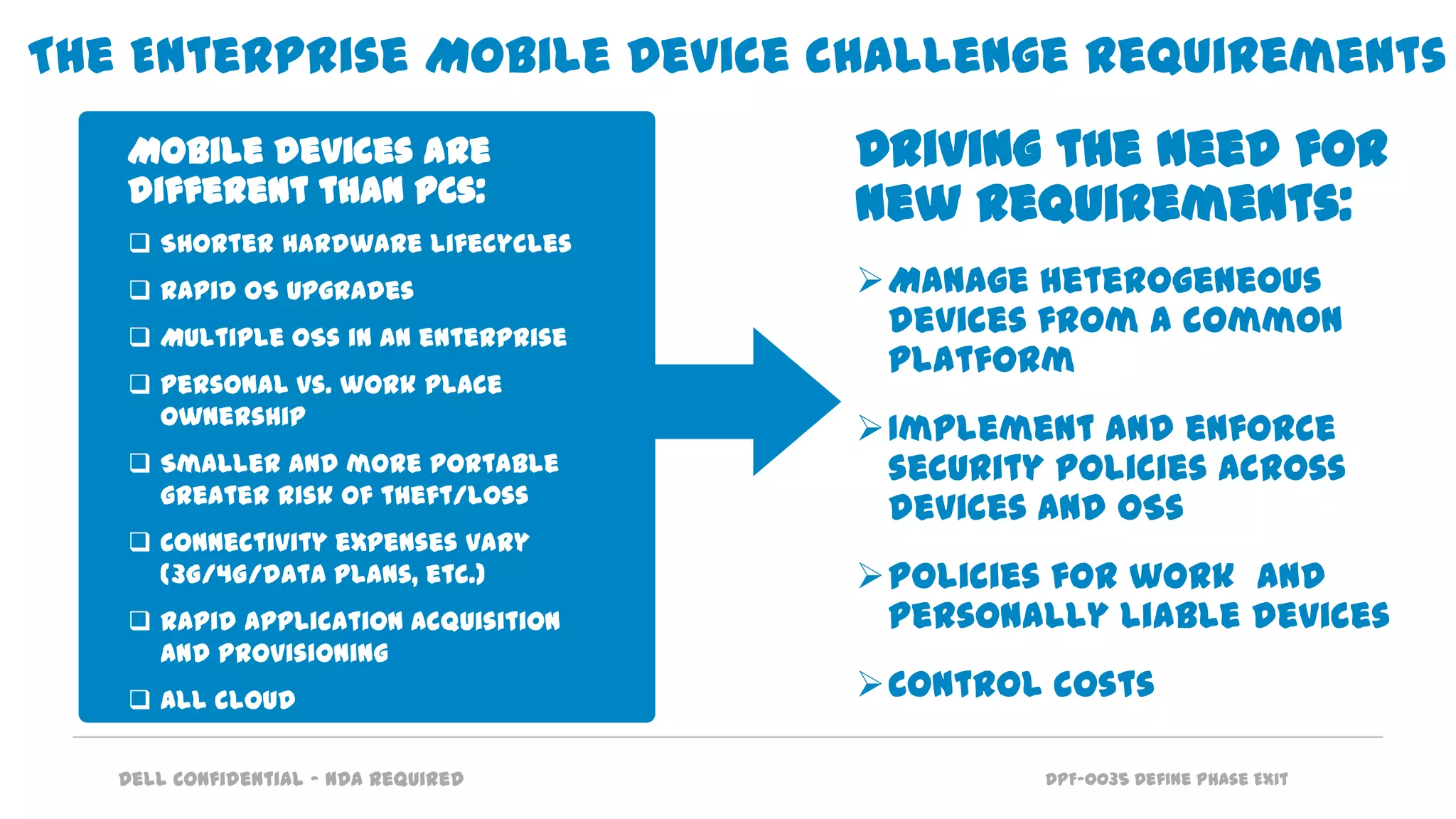
The Enterprise Mobile Device challenge requirements
Driving the need for
new requirements:
Manage heterogeneous
devices from a common
platform
Implement and enforce
security policies across
devices and OSs
Policies for work and
personally liable devices
Control costs
Mobile devices are
different than PCs:
 Shorter hardware lifecycles
 Rapid OS upgrades
 Multiple OSs in an enterprise
 Personal vs. work place
ownership
 Smaller and more portable
greater risk of theft/loss
 Connectivity expenses vary
(3G/4G/data plans, etc.)
 Rapid application acquisition
and provisioning
 All cloud
Dell Confidential – NDA Required
DPF-0035 Define Phase Exit
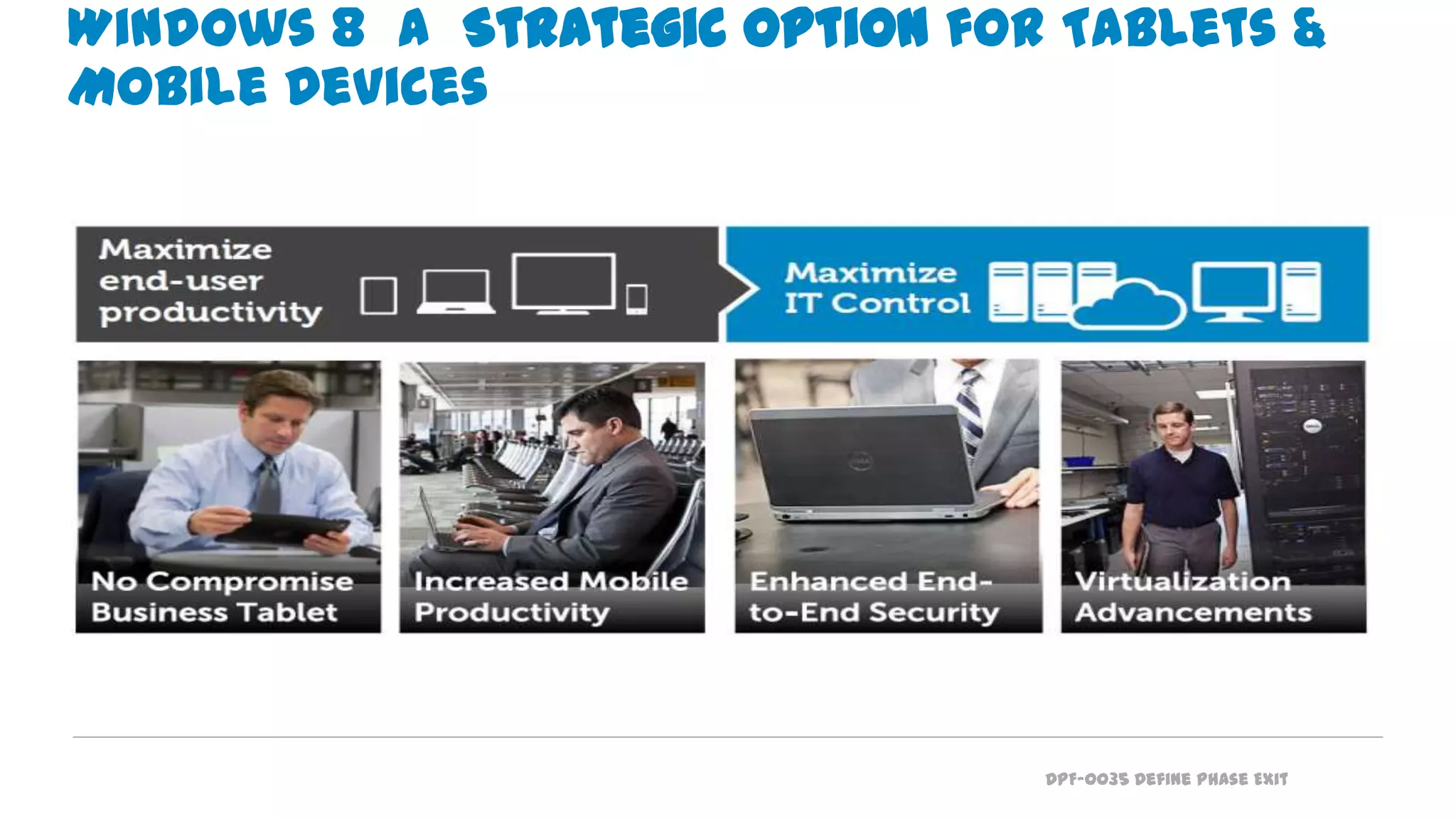
Windows 8 a Strategic Option for Tablets &
Mobile Devices
DPF-0035 Define Phase Exit
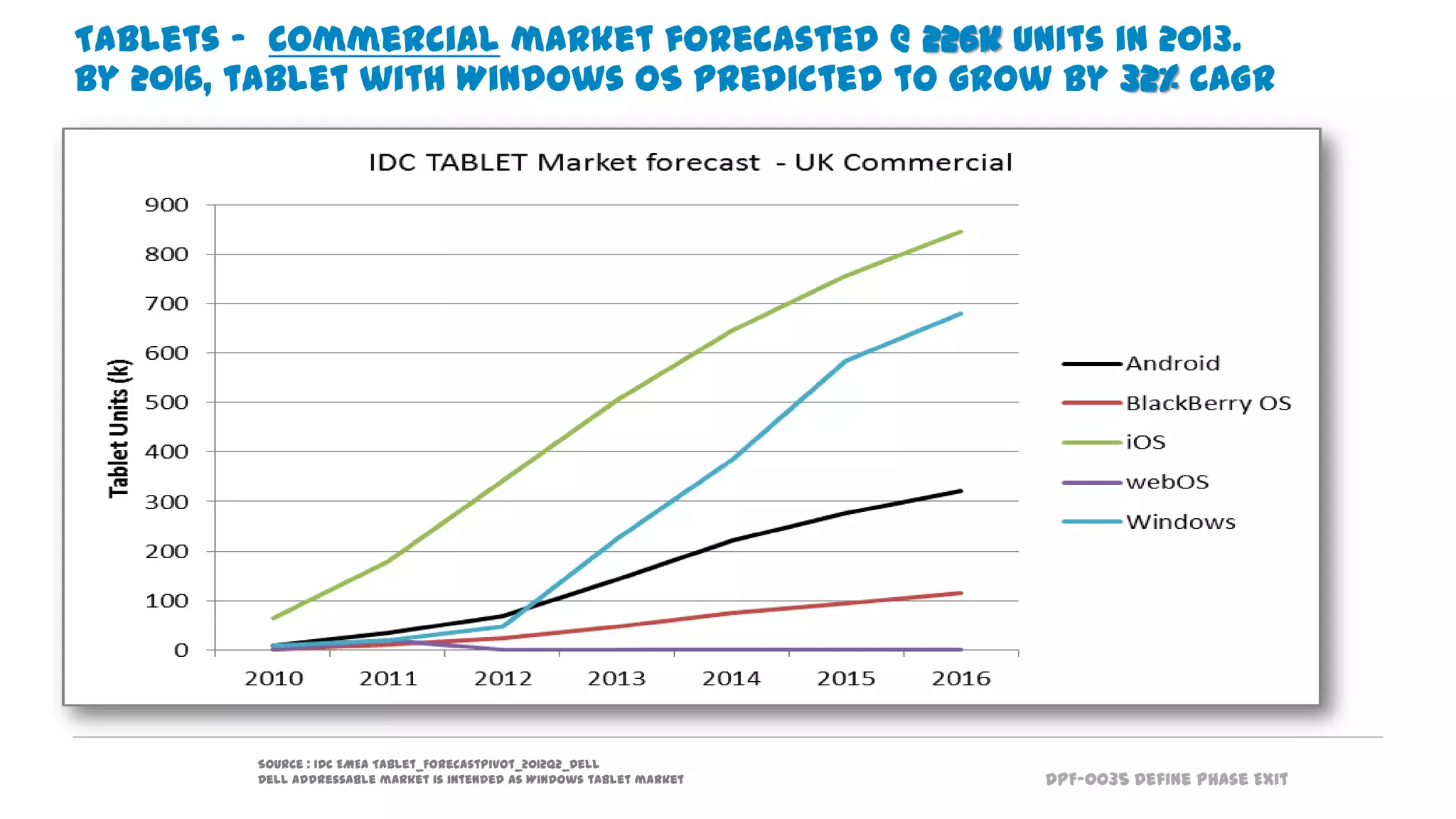
Tablets - Commercial market forecasted @ 226k units in 2013.
By 2016, tablet with Windows OS predicted to grow by 32% CAGR
Source : IDC EMEA Tablet_ForecastPivot_2012Q2_Dell
Dell addressable market is intended as Windows tablet market
DPF-0035 Define Phase Exit
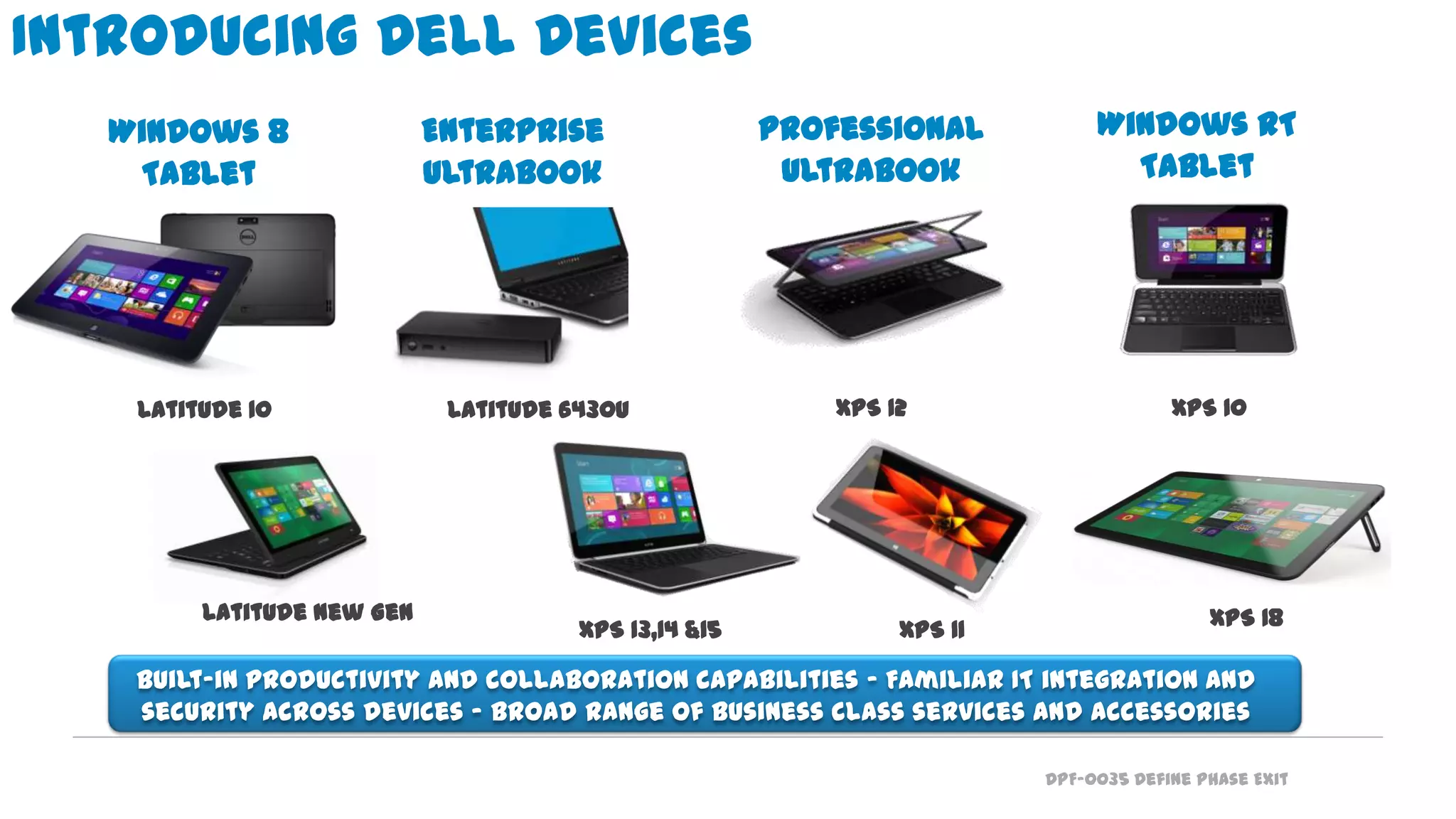
Introducing Dell Devices
Built-in productivity and collaboration capabilities - Familiar IT integration and
security across devices - Broad range of business class services and accessories
Windows 8
Tablet
Enterprise
Ultrabook
Professional
Ultrabook
Windows RT
Tablet
Latitude New Gen
Latitude 10 XPS 12Latitude 6430u XPS 10
XPS 13,14 &15 XPS 11 XPS 18
DPF-0035 Define Phase Exit
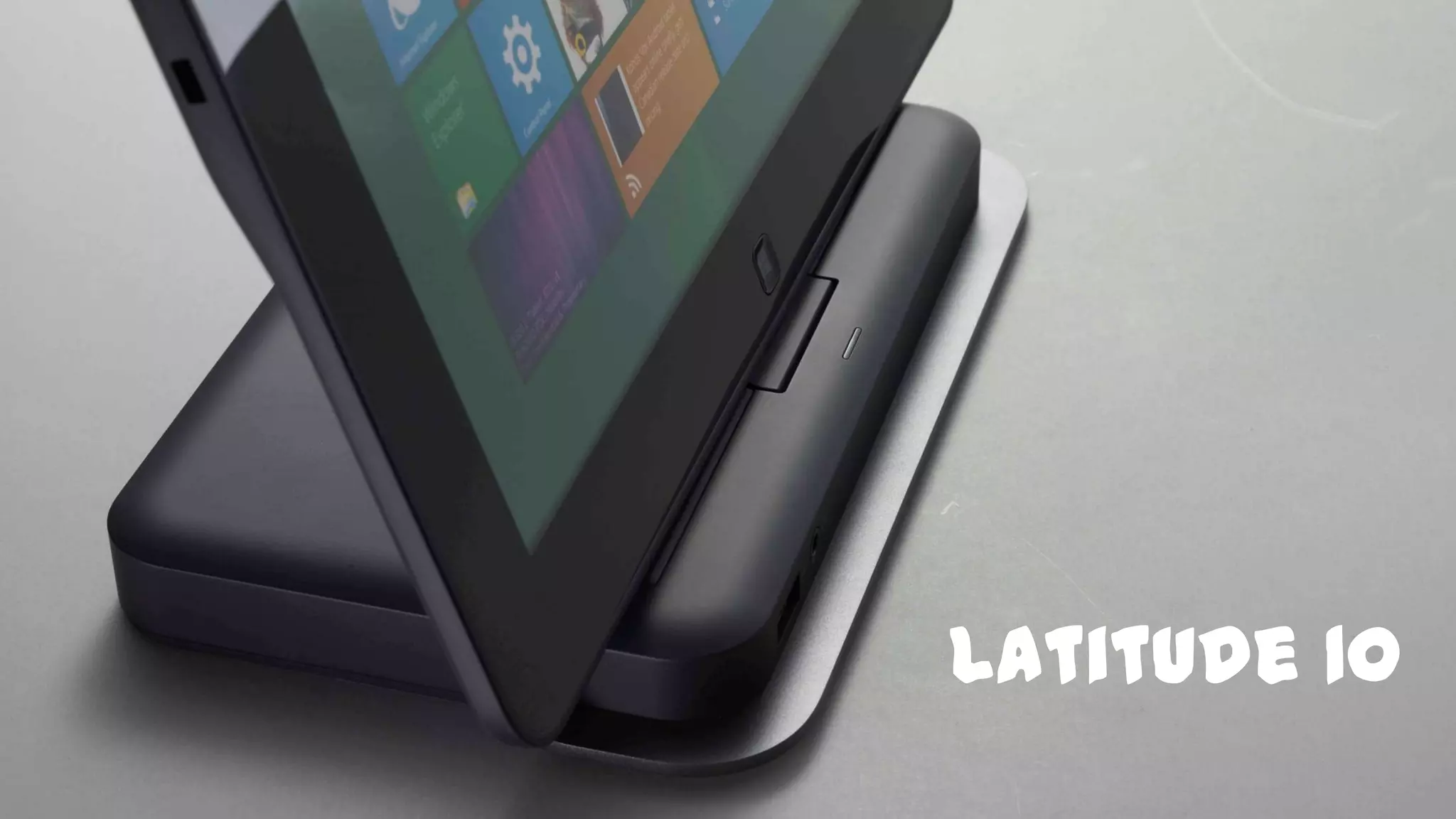
Latitude 10
DPF-0035 Define Phase Exit
Latitude 10
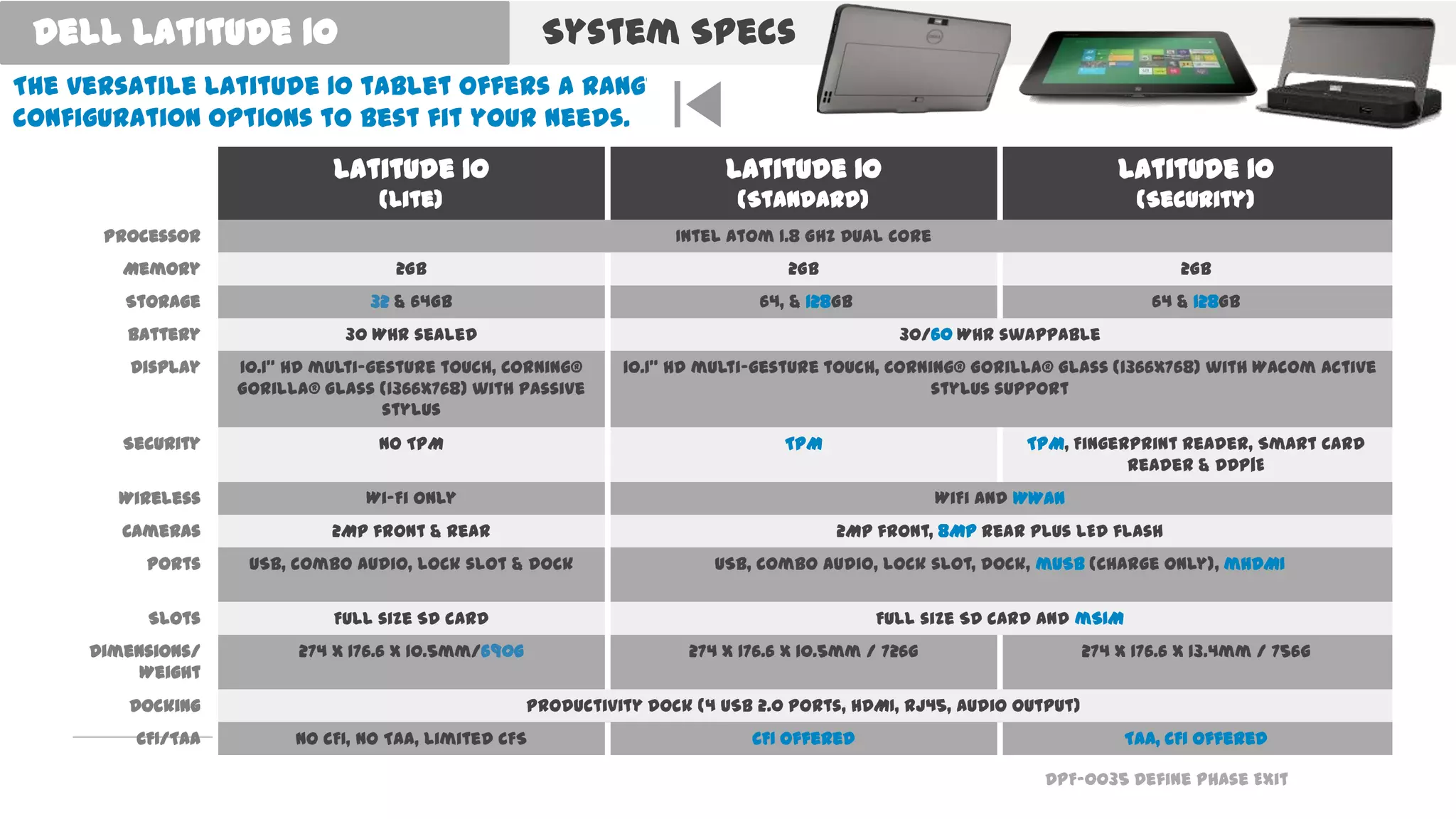
(Lite)
Latitude 10
(Standard)
Latitude 10
(Security)
Processor Intel Atom 1.8 GHz Dual Core
Memory 2GB 2GB 2GB
Storage 32 & 64GB 64, & 128GB 64 & 128GB
Battery 30 WHr sealed 30/60 WHr swappable
Display 10.1” HD multi-gesture touch, Corning®
Gorilla® Glass (1366x768) with passive
stylus
10.1” HD multi-gesture touch, Corning® Gorilla® Glass (1366x768) with Wacom active
stylus support
Security No TPM TPM TPM, Fingerprint Reader, Smart Card
Reader & DDP|E
Wireless Wi-Fi only WiFi and WWAN
Cameras 2MP front & rear 2MP front, 8MP rear plus LED flash
Ports USB, combo audio, lock slot & dock USB, combo audio, lock slot, dock, mUSB (charge only), mHDMI
Slots Full size SD card Full size SD card and mSIM
Dimensions/
Weight
274 x 176.6 x 10.5mm/690g 274 x 176.6 x 10.5mm / 726g 274 x 176.6 x 13.4mm / 756g
Docking Productivity dock (4 USB 2.0 ports, HDMI, RJ45, audio output)
CFI/TAA No CFI, No TAA, Limited CFS CFI offered TAA, CFI offered
The versatile Latitude 10 tablet offers a range of
configuration options to best fit your needs.
System SpecsDell Latitude 10
DPF-0035 Define Phase Exit
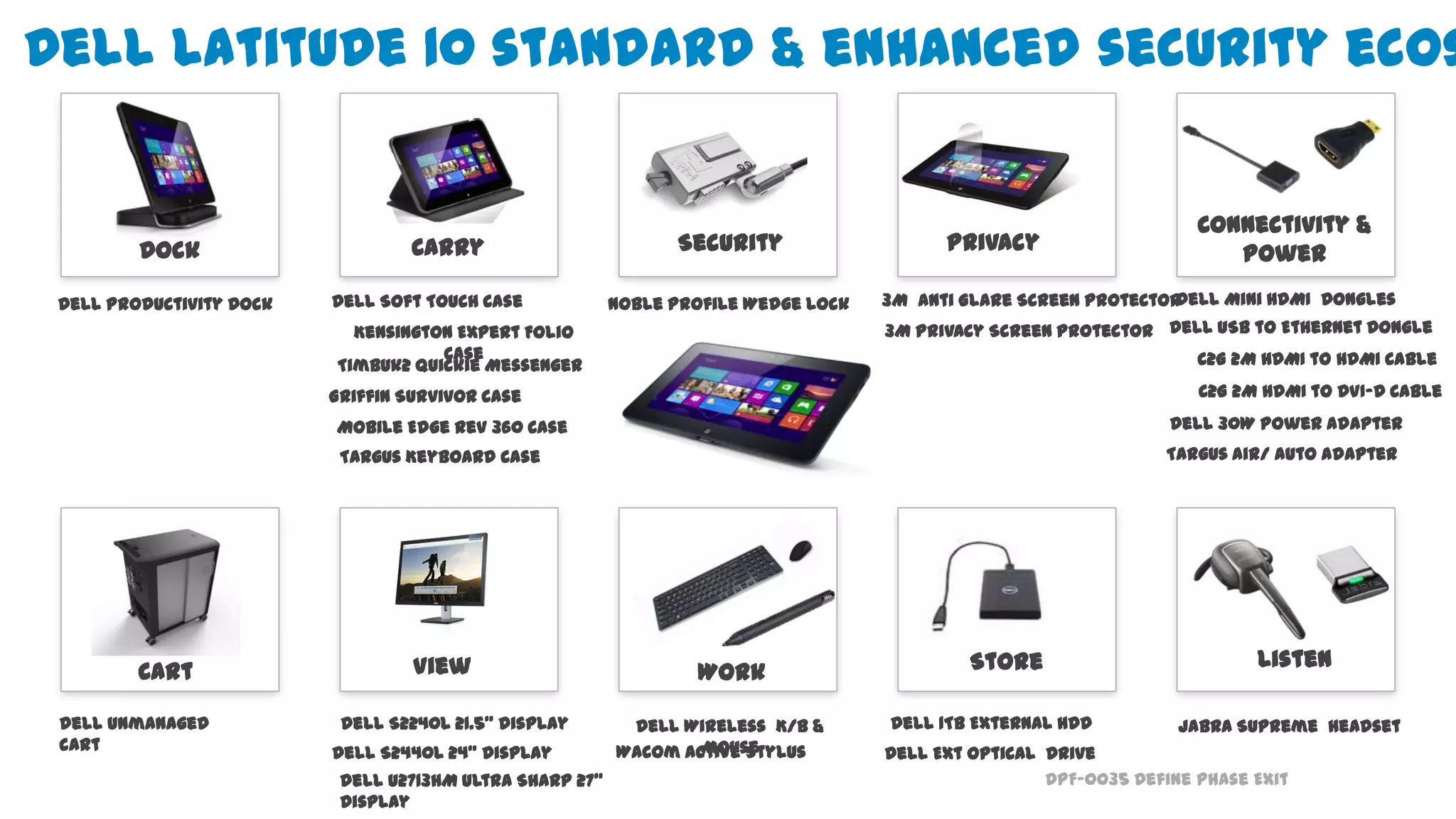
Dell Latitude 10 standard & enhanced security ecos
Dell S2440L 24” Display
.
View
Dell S2240L 21.5” Display
Listen
Jabra Supreme Headset
Wacom Active Stylus
Dell U2713HM Ultra Sharp 27”
Display
Work
Dell Wireless K/B &
Mouse
Store
Dell 1TB External HDD
Dell Ext Optical Drive
Cart
Dell Unmanaged
cart
Dell Productivity Dock
Privacy
3M Anti Glare Screen Protector
Carry
Connectivity &
PowerDock
Timbuk2 Quickie Messenger
Griffin Survivor Case
Mobile Edge Rev 360 Case
3M Privacy Screen Protector
Dell Soft Touch Case
Targus Keyboard Case
Security
Noble Profile Wedge Lock
Kensington Expert Folio
Case
Dell Mini HDMI Dongles
Dell USB to Ethernet Dongle
Dell 30W Power Adapter
Targus Air/ Auto Adapter
C2G 2M HDMI to HDMI Cable
C2G 2M HDMI to DVI-D Cable
DPF-0035 Define Phase Exit
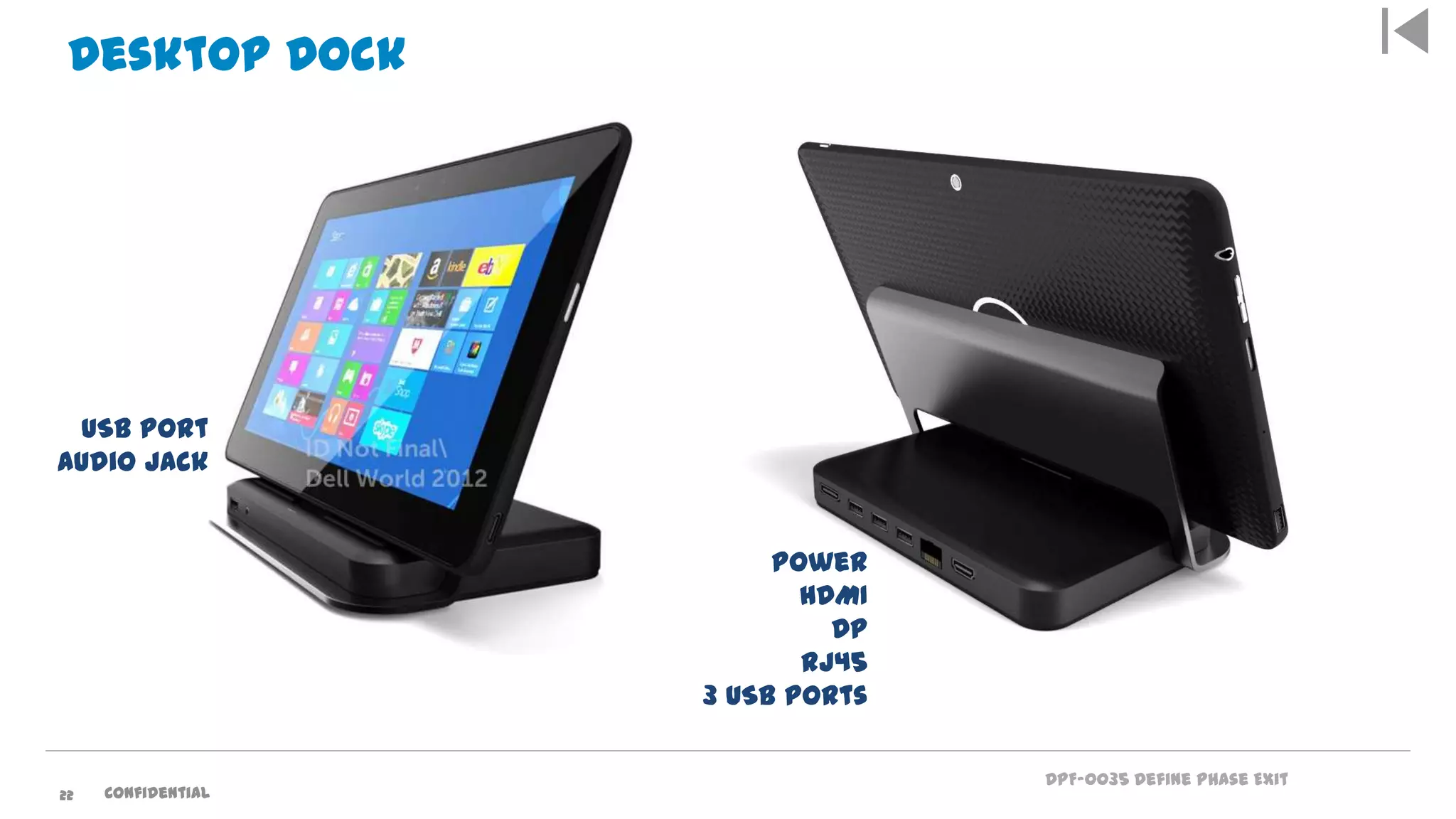
Desktop Dock
Power
HDMI
DP
RJ45
3 USB Ports
USB Port
Audio Jack
22 Confidential
DPF-0035 Define Phase Exit
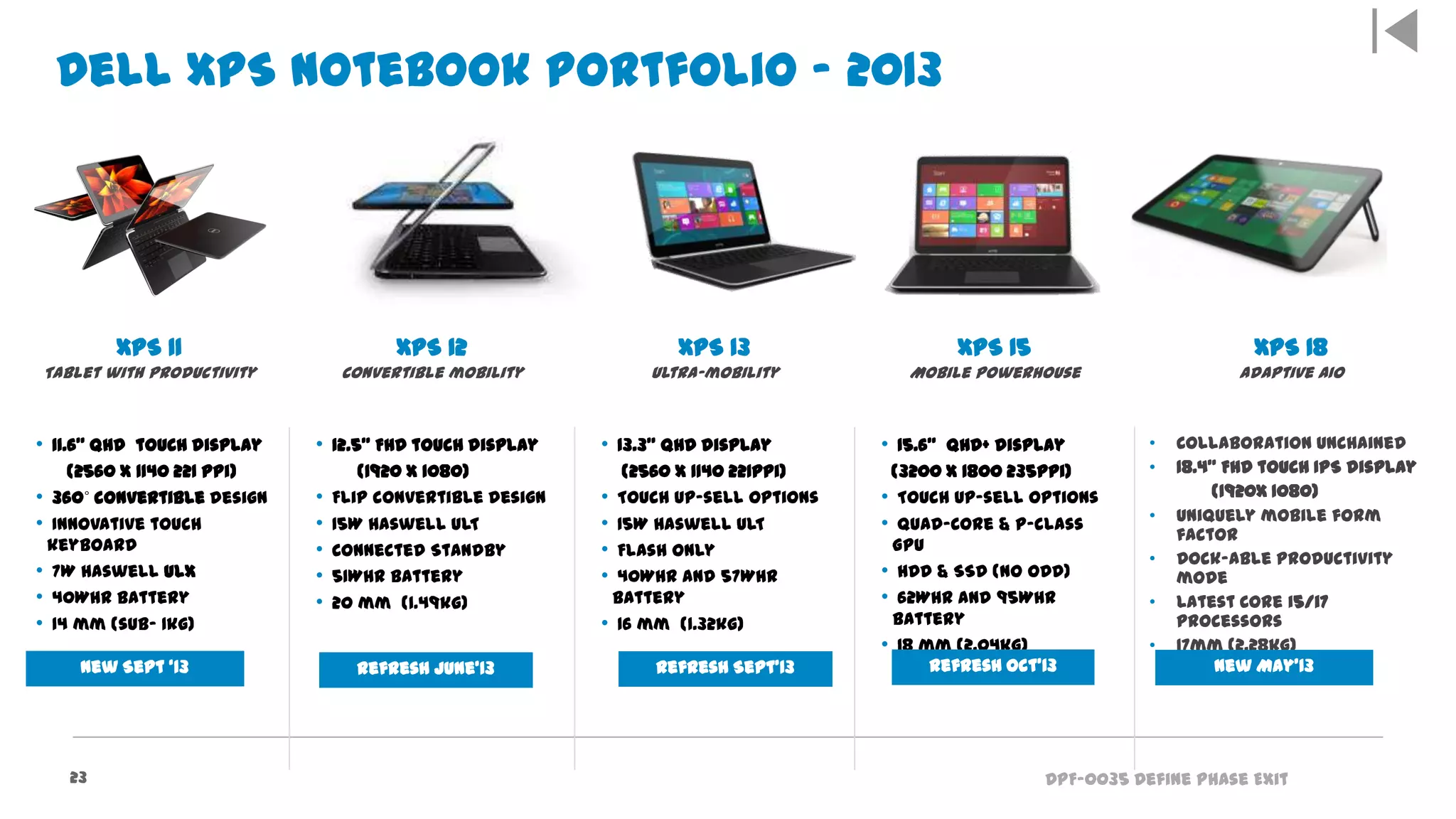
XPS 11
Tablet with productivity
XPS 12
Convertible mobility
XPS 13
Ultra-mobility
XPS 15
Mobile Powerhouse
XPS 18
Adaptive AIO
• 11.6” QHD touch display
(2560 x 1140 221 ppi)
• 360˚ convertible design
• Innovative touch
keyboard
• 7W Haswell ULX
• 40Whr battery
• 14 mm (sub- 1kg)
• 12.5” FHD touch display
(1920 x 1080)
• Flip convertible design
• 15W Haswell ULT
• Connected Standby
• 51Whr battery
• 20 mm (1.49kg)
• 13.3” QHD display
(2560 x 1140 221ppi)
• Touch up-sell options
• 15W Haswell ULT
• Flash only
• 40Whr and 57Whr
battery
• 16 mm (1.32kg)
• 15.6” QHD+ display
(3200 x 1800 235ppi)
• Touch up-sell options
• Quad-Core & P-class
GPU
• HDD & SSD (no ODD)
• 62Whr and 95Whr
battery
• 18 mm (2.04kg)
• Collaboration unchained
• 18.4” FHD touch IPS display
(1920x 1080)
• Uniquely mobile form
factor
• Dock-able productivity
mode
• Latest Core i5/i7
processors
• 17mm (2.28kg)
Dell XPS Notebook Portfolio – 2013
23
New Sept ‘13 Refresh June’13 Refresh Sept’13 Refresh Oct’13 New May’13
DPF-0035 Define Phase Exit
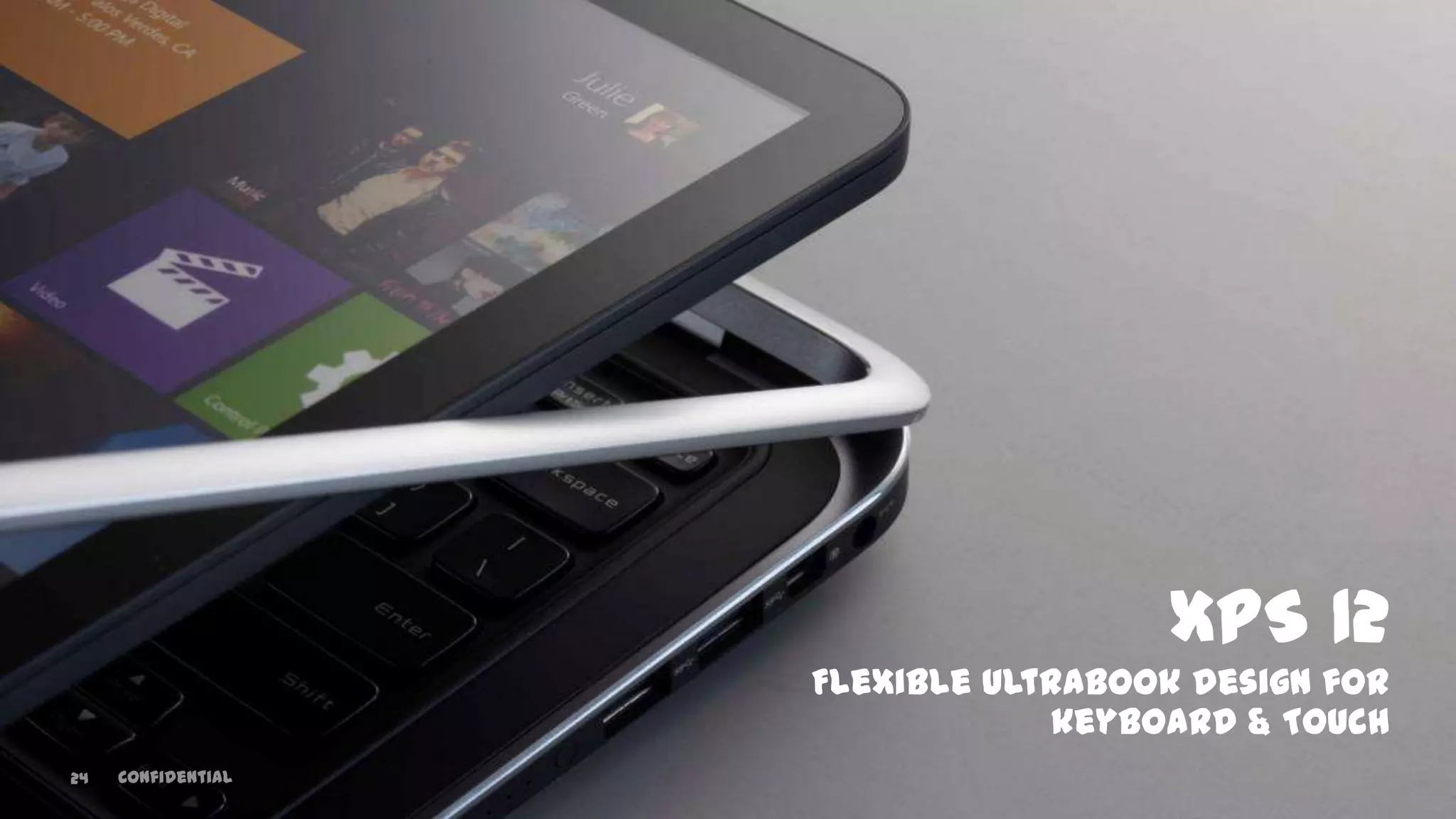
XPS 12
Flexible Ultrabook design for
keyboard & Touch
24 Confidential
DPF-0035 Define Phase Exit
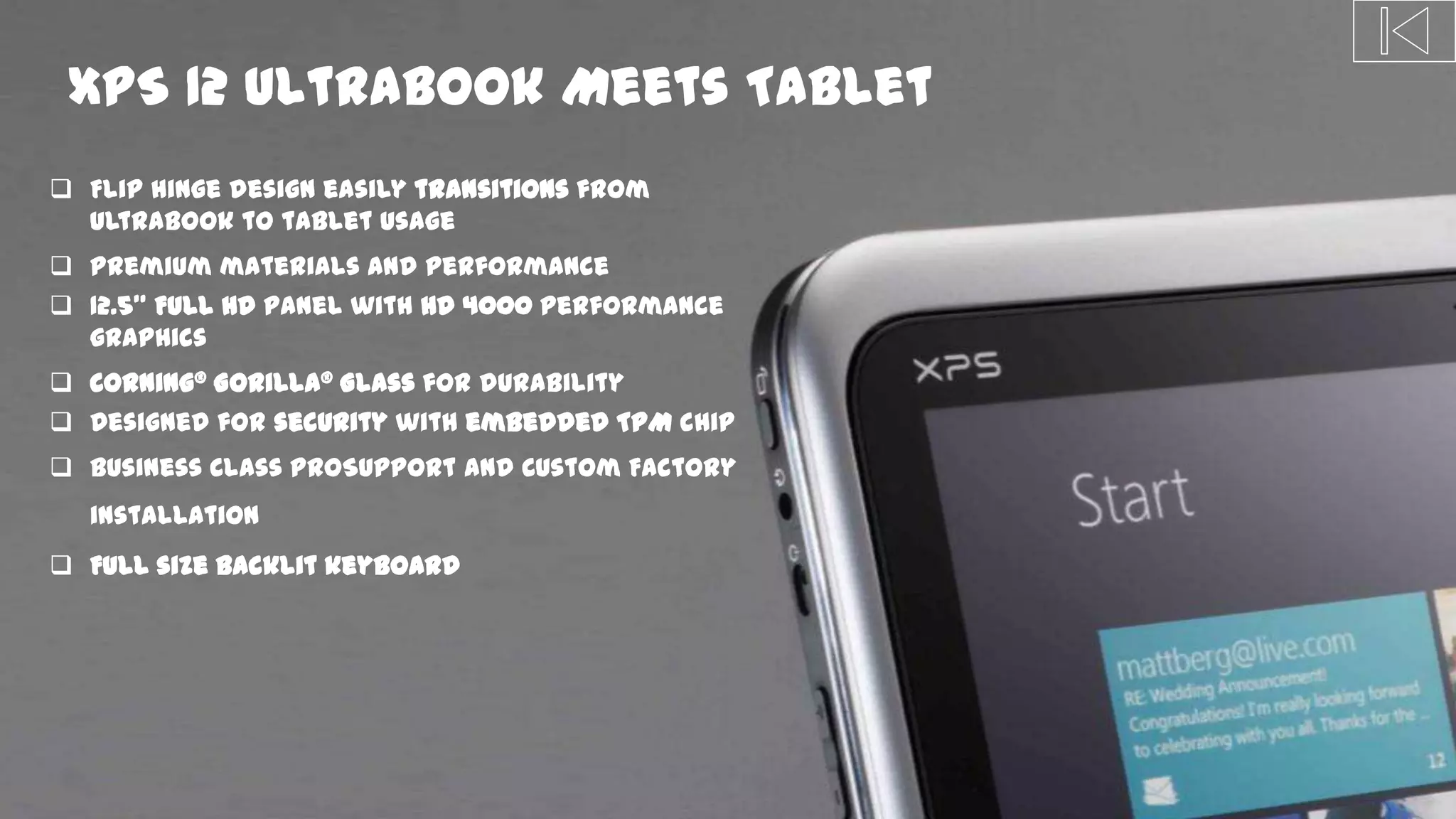
XPS 12 Ultrabook Meets Tablet
 Flip hinge design easily transitions from
Ultrabook to tablet usage
 Premium materials and performance
 12.5” Full HD panel with HD 4000 performance
graphics
 Corning® Gorilla® Glass for durability
 Designed for security with embedded TPM chip
 Business Class ProSupport and Custom Factory
installation
 Full size backlit keyboard
DPF-0035 Define Phase Exit
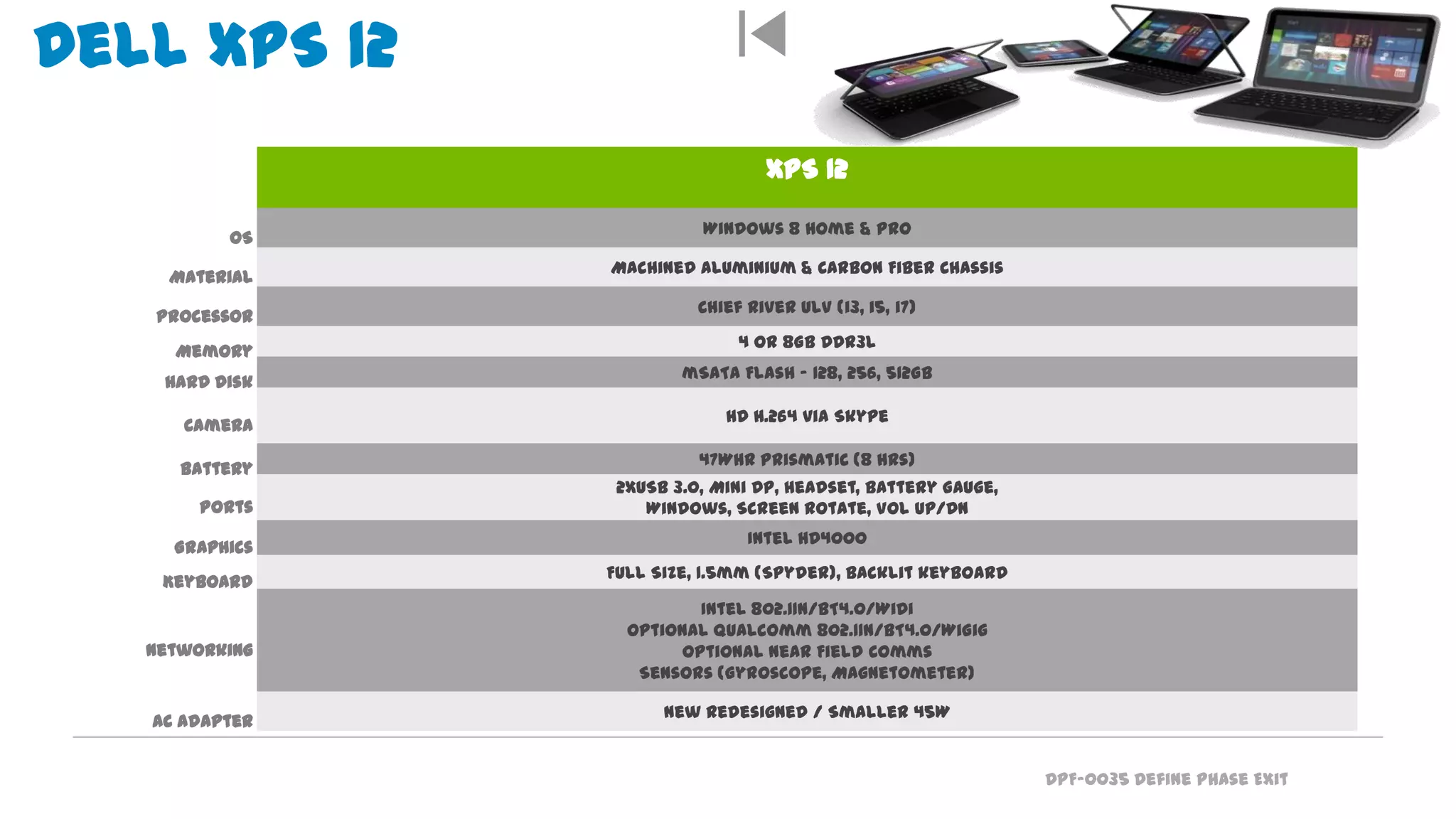
XPS 12
Windows 8 Home & Pro
Machined Aluminium & Carbon Fiber Chassis
Chief River ULV (i3, i5, i7)
4 or 8GB DDR3L
mSATA Flash – 128, 256, 512GB
HD H.264 via Skype
47Whr Prismatic (8 hrs)
2xUSB 3.0, Mini DP, Headset, Battery Gauge,
Windows, Screen Rotate, Vol Up/Dn
Intel HD4000
Full Size, 1.5mm (Spyder), backlit keyboard
Intel 802.11n/BT4.0/WiDi
Optional Qualcomm 802.11n/BT4.0/WiGig
Optional Near Field Comms
Sensors (Gyroscope, Magnetometer)
New Redesigned / Smaller 45W
OS
Material
Processor
Memory
Hard Disk
Camera
Battery
Ports
Graphics
Keyboard
Networking
AC Adapter
Dell XPS 12Power of a laptop,
convenience of a tablet
DPF-0035 Define Phase Exit
XPS 11
DPF-0035 Define Phase Exit
Everything you expect from a tablet… and more
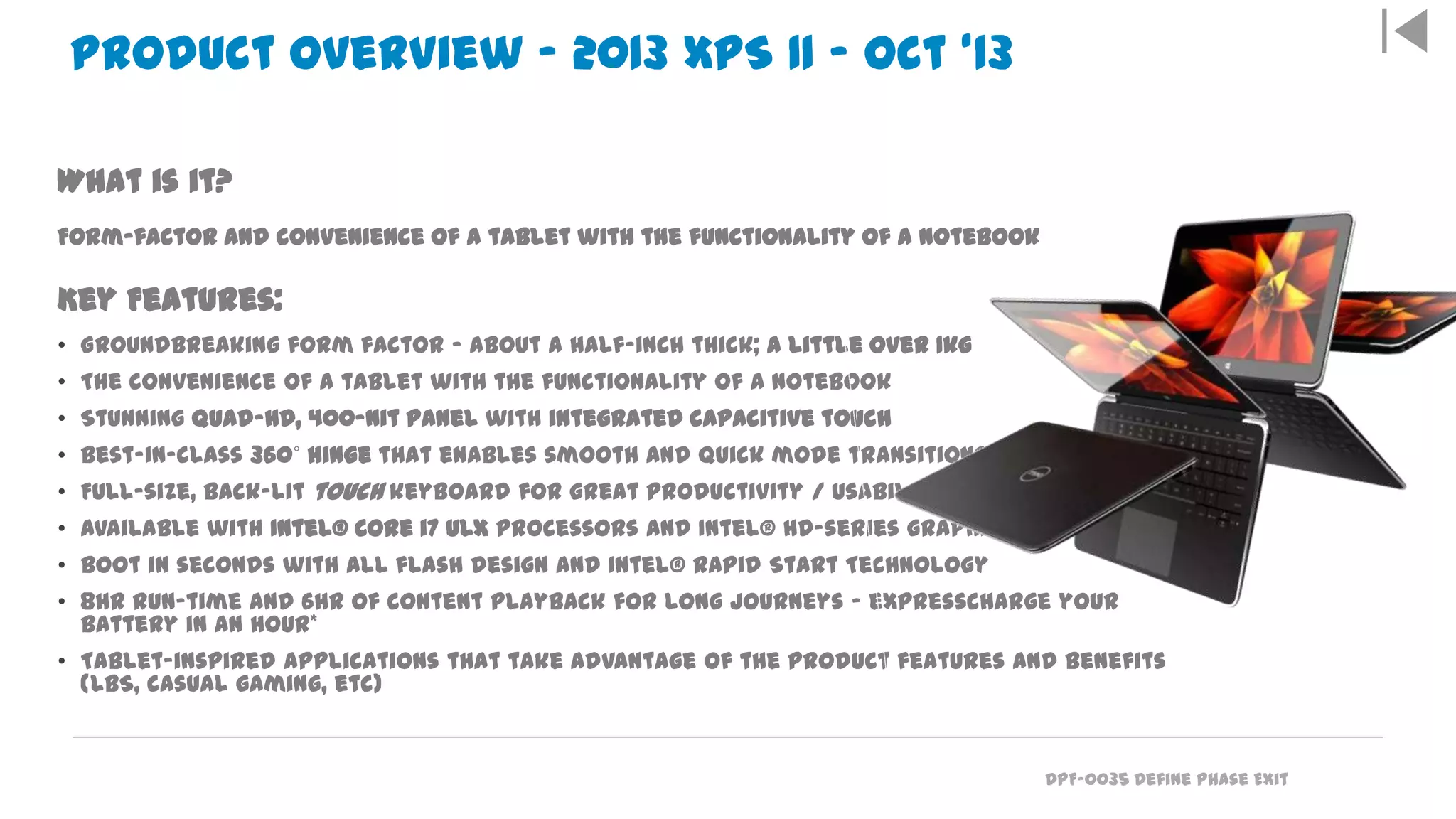
What is it?
Form-factor and convenience of a tablet with the functionality of a notebook
Key Features:
• Groundbreaking form factor – about a half-inch thick; a little over 1kg
• The convenience of a tablet with the functionality of a notebook
• Stunning Quad-HD, 400-nit panel with integrated capacitive touch
• Best-in-class 360˚ hinge that enables smooth and quick mode transitions
• Full-size, back-lit touch keyboard for great productivity / usability
• Available with Intel® Core i7 ULX processors and Intel® HD-series graphics
• Boot in seconds with all flash design and Intel® Rapid Start Technology
• 8hr run-time and 6hr of content playback for long journeys – expresscharge your
battery in an hour*
• Tablet-inspired applications that take advantage of the product features and benefits
(LBS, casual gaming, etc)
Product Overview – 2013 XPS 11 – Oct ‘13
DPF-0035 Define Phase Exit
XPS 18 Portable AIO: Product Overview
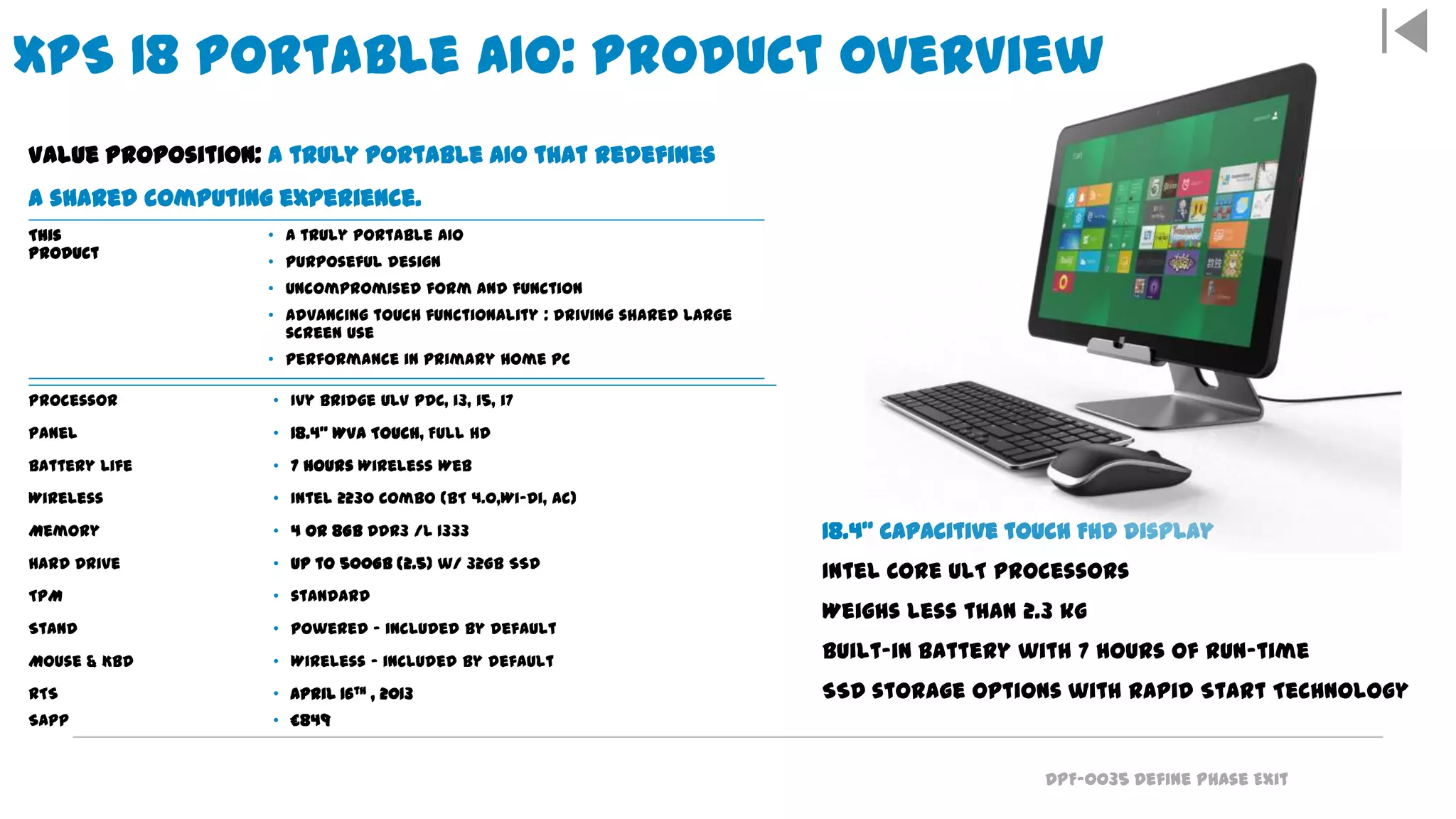
18.4” capacitive touch FHD display
Intel Core ULT processors
Weighs less than 2.3 kg
Built-in battery with 7 hours of run-time
SSD storage options with Rapid Start Technology
Value Proposition: A truly portable AIO that redefines
a shared computing experience.
This
Product
• A truly portable AIO
• Purposeful design
• Uncompromised form and function
• Advancing touch functionality : driving shared large
screen use
• Performance in primary home PC
Processor • Ivy Bridge ULV PDC, i3, i5, i7
Panel • 18.4" WVA Touch, Full HD
Battery Life • 7 hours Wireless Web
Wireless • Intel 2230 Combo (BT 4.0,Wi-Di, ac)
Memory • 4 or 8GB DDR3 /L 1333
Hard Drive • up to 500GB (2.5) w/ 32GB SSD
TPM • standard
Stand • Powered – included by default
Mouse & Kbd • Wireless – included by default
RTS
SAPP
• April 16th , 2013
• £849
DPF-0035 Define Phase Exit
Confidential3
Tablet Futures
DPF-0035 Define Phase Exit
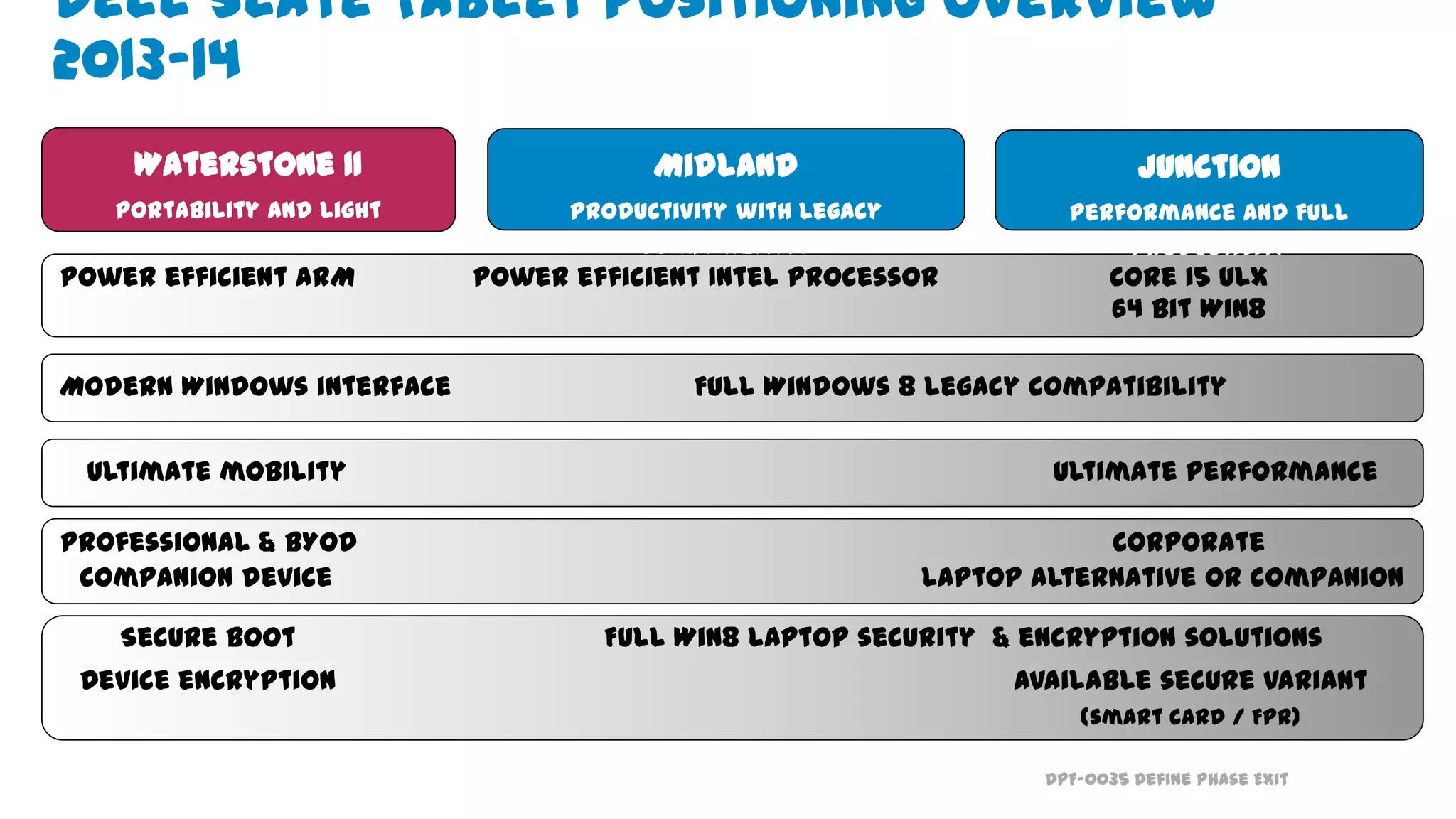
Ultimate mobility Ultimate performance
Power efficient ARM Power efficient Intel processor Core i5 ULX
64 bit Win8
Professional & BYOD Corporate
Companion device Laptop alternative or companion
Modern Windows interface Full Windows 8 legacy compatibility
Secure boot Full Win8 laptop security & encryption solutions
Device encryption Available secure variant
(smart card / FPR)
Waterstone 11
Portability and Light
Productivity
Midland
Productivity with Legacy
Compatibility
Junction
Performance and Full
Productivity
Tablets for Every Need
Dell Slate Tablet Positioning Overview
2013-14
DPF-0035 Define Phase Exit
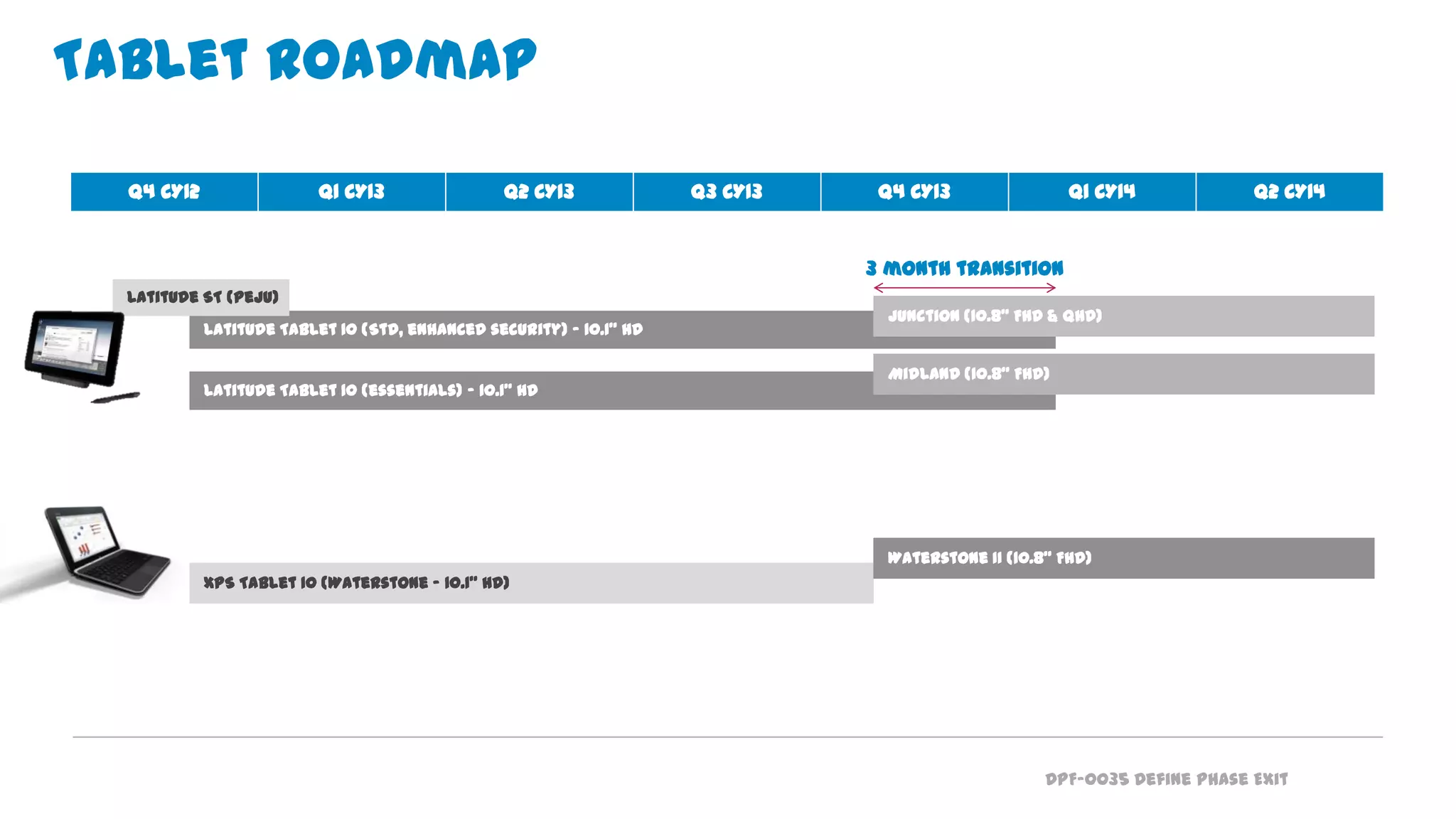
Latitude Tablet 10 (Std, enhanced security) - 10.1” HD
Latitude Tablet 10 (essentials) – 10.1” HD
XPS Tablet 10 (Waterstone - 10.1” HD)
Waterstone II (10.8” FHD)
Tablet Roadmap
Junction (10.8” FHD & QHD)
Midland (10.8” FHD)
Q4 CY12 Q1 CY13 Q2 CY13 Q3 CY13 Q4 CY13 Q1 CY14 Q2 CY14
3 month transition
Latitude ST (Peju)
DPF-0035 Define Phase Exit
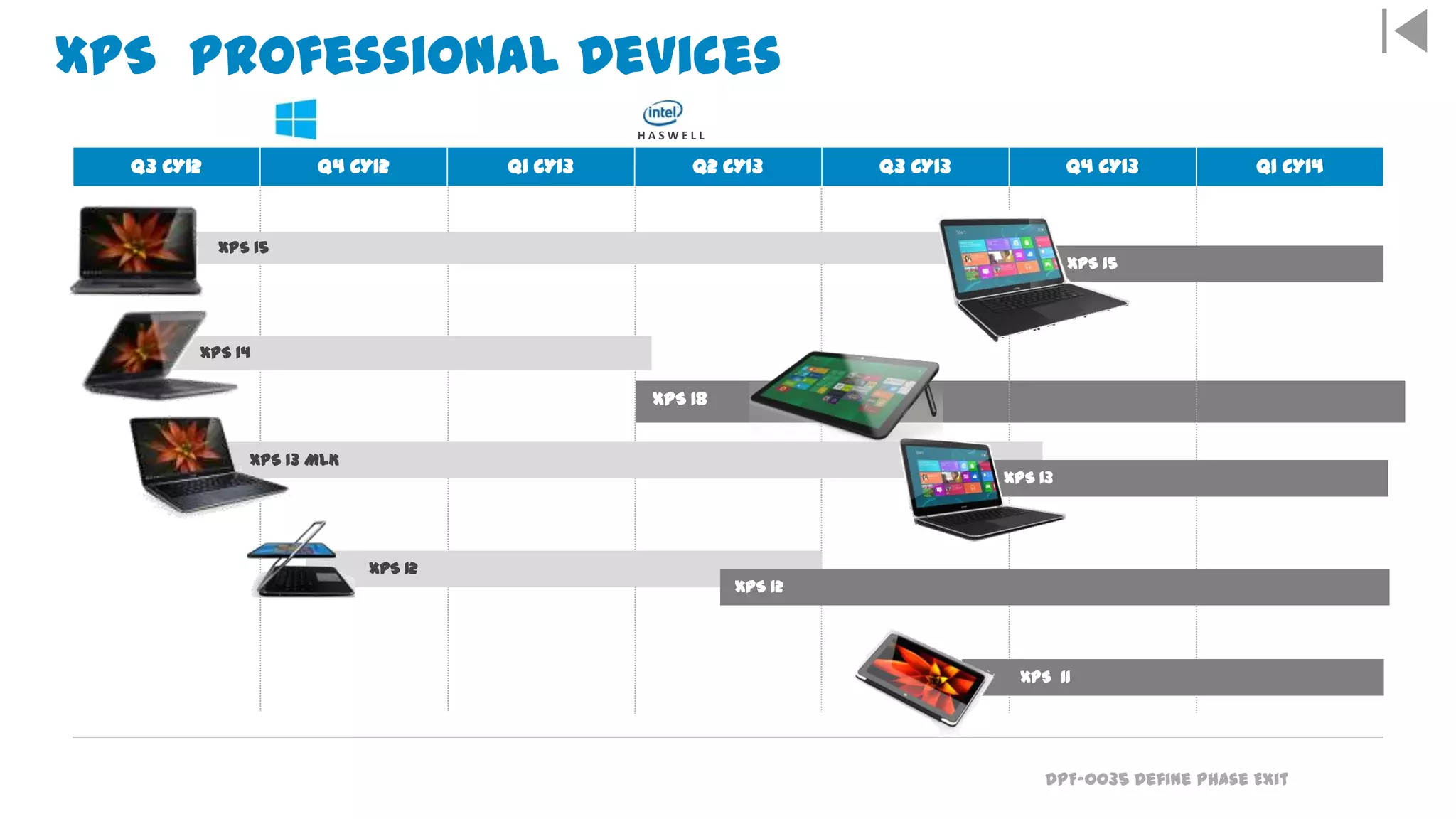
XPS Professional Devices
XPS 15
XPS 14
XPS 13 MLK
XPS 13
XPS 12
XPS 12
Q3 CY12 Q4 CY12 Q1 CY13 Q2 CY13 Q3 CY13 Q4 CY13 Q1 CY14
H A S W E L L
XPS 15
XPS 11
XPS 18
DPF-0035 Define Phase Exit
New Tablet
Keyboards &
Docks, &
Accessories
DPF-0035 Define Phase Exit
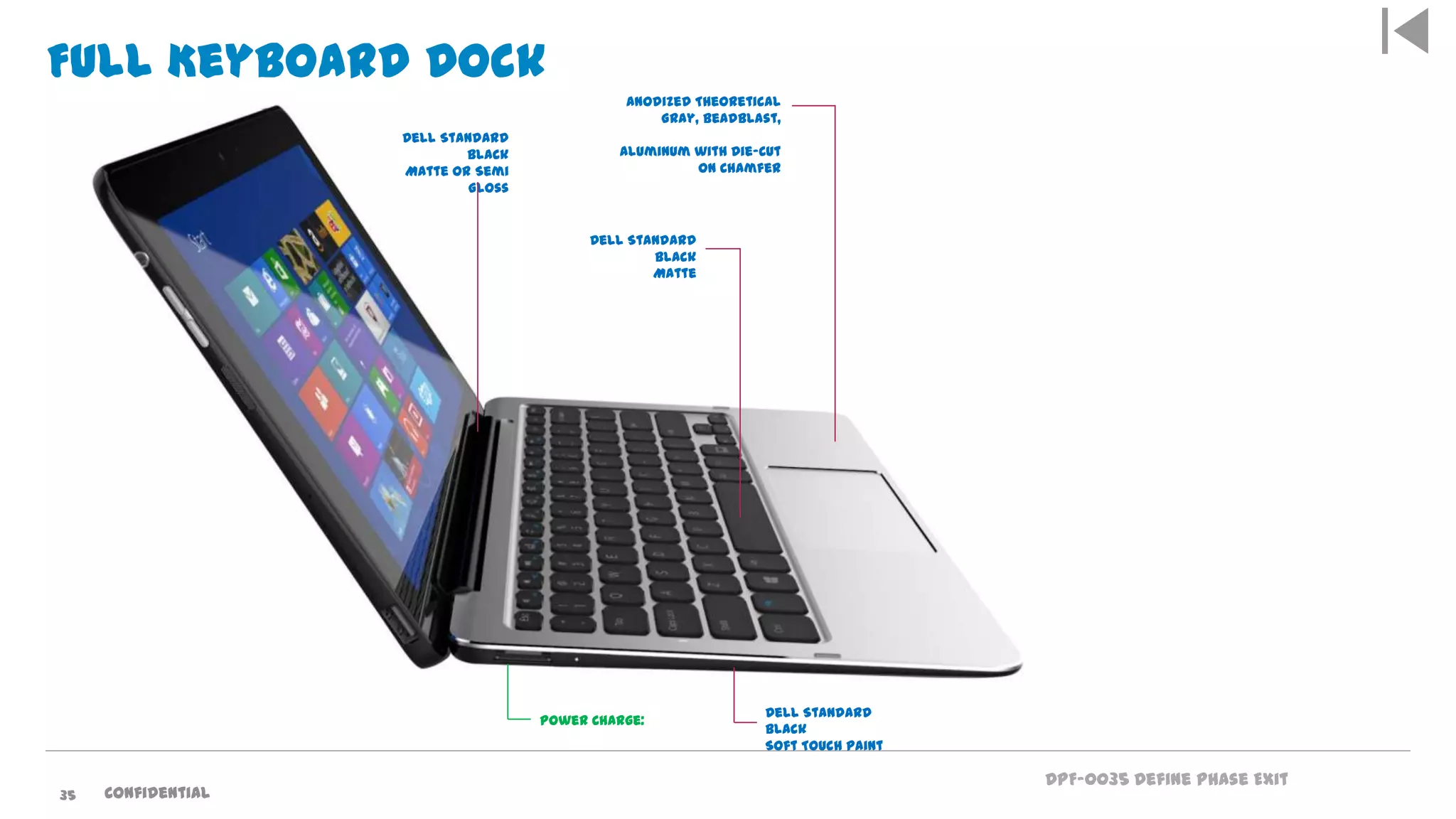
Full Keyboard Dock
Anodized Theoretical
Gray, Beadblast,
Aluminum with Die-Cut
on Chamfer
Dell Standard
Black
Matte
Power Charge:
Dell Standard
Black
Soft Touch Paint
Dell Standard
Black
Matte or Semi
Gloss
Confidential35
DPF-0035 Define Phase Exit
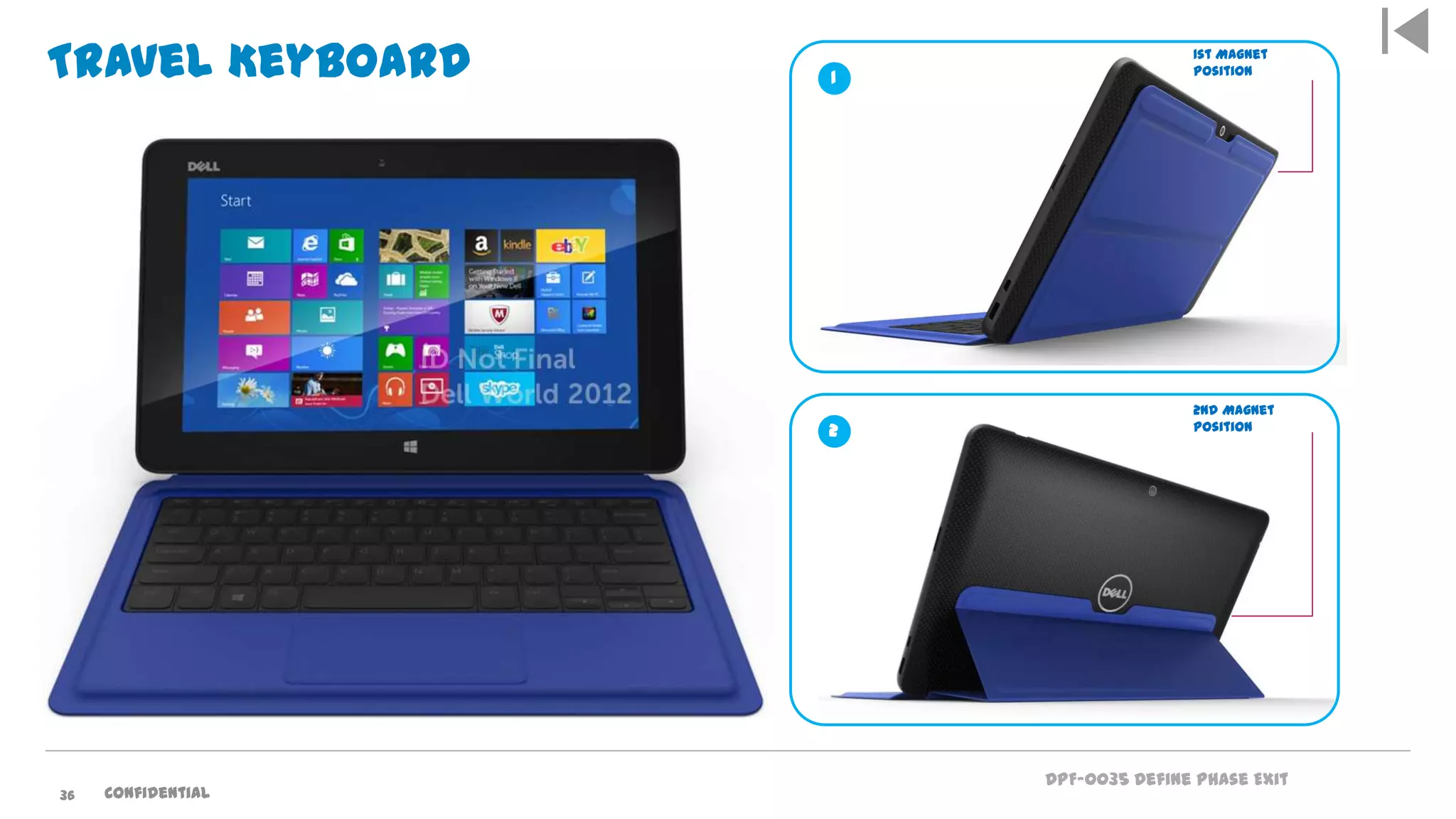
Travel Keyboard 1
2
2nd Magnet
Position
1st Magnet
Position
36 Confidential
Thank You
Questions?
What’s Next ?

Dell Windows 8 Tablet & Mobility Solutions

  • 1.
    Dell Windows 8Tablet & Mobility Solutions 12th June 2013 Luke Fieldhouse
  • 2.
    Today’s business reality:You must stay relevant to successfully compete …the world is shaking from a global economic earthquake… - Richard Quest, CNN , 2012 2
  • 3.
    Social media Virtual MobileCloud Always on Data explosion Technology trends are forcing changes in the way you do business Evolve & Thrive 3
  • 4.
    of the world’s populationare now using the Internet. 3 Billion employees will use smartphones by 2016. 200M employees will bring their own device to work. 350 Million of mid-market companies are using cloud models in their business (SaaS). >50% 58 Billion Mobile application downloads by 2015 2.5 Quintillion bytes of data being created every day. How will you manage that to your benefit? Technology trends are forcing changes in the way you do business Evolve & Thrive. of workloads customers expect to virtualize by 2014 73% 4 500% Increase in bandwidth needed by 2017 to handle increased amount of data- video, voice, content
  • 5.
    DPF-0035 Define PhaseExit The workplace is changing. Confidential5
  • 6.
    Global Marketing 1960 19701980 1990 2000 2010 2020 Devices The mobile Web explosion Minicomputer 10M Computing cycle characteristics: 1960 – 2020 Source: Vinod Khosla Note: PC installed base reached 100MM in 1993, cellphone / Internet users reached 1B in 2002 / 2005 respectively; Source: ITU, Mark Lipacis, Morgan Stanley Research. 1 10 100 1,000 10,000 100,000 1,000,000 PC 100M Mainframe Mobile Internet 10B Desktop Internet 1B 1M 6
  • 7.
    DPF-0035 Define PhaseExit What is clear: the status quo is no longer sustainable. 7 Today’s end users want the freedom to connect anytime, anywher e, to anything, on any device.
  • 8.
    Services & SolutionsGroupInfrastructure & Cloud ComputingDell Proprietary & Confidential8 Dell’s vision: Next Generation End User Adapts to working the way users want access to data – anywhere, anytime, on any device Client Virtualisation Increasing Simplify Unify Infrastructure Mobile Devices Proliferating Simplify Success Managed Mobility Unify Infrastructure and Solutions Unified User Experience
  • 9.
    Services & SolutionsGroupInfrastructure & Cloud ComputingDell Proprietary & Confidential9 Distributed device management delivered as a SaaS services High performance SAN iSCSi solutions for virtualization Intelligent infrastructure and mgmt. of multi-tier storage architecture Storage compression & de- duplication Remote systems management appliance Clustered NAS storage A single point of mgmt for both physical and virtual resources Remote email management – continuity and archiving SaaS Archiving and image management solution for healthcare vertical. Dell IP and know-how that helps our clients Simplify their IT: Software asset management IT monitoring software App mgmt., deployment svcs, and infrastructure consulting Simple, easy-to-use SaaS integration tool and consulting Efficient Workforce Efficient Cloud / ServicesEfficient Data Center Managed security services, threat intelligence and security & risk consulting Memory Virtualization technology Consulting services & cloud expertise Server, data and application protection for virtual, physical and cloud infrastructures Advanced data protection & network security High-performance data centre networking Cloud Client Computing solutions Mainframe migration, moderni zation, and optimization Application modernization software and services Cloud Client Computing solutions Intelligent Data centric on Device, In Transit and in Cloud Security
  • 10.
    Confidential10 Only Dell offersthe complete portfolio of end user computing solutions with the capability to address these challenges Services, Software & Peripherals Desktop as a Service, consulting, deployment, support, managed services, and a complete S&P ecosystem Infrastructure Networking Storage Network and Datacenters EUC Software Cloud Management Security Tablets Thin / Zero clients End points Personal computers
  • 11.
    Our vision: Deliveringany application to any user, on any device - without limitations and with the lowest TCO or on premise Cloud Thin / zero clients Tablets Network and Datacenters Cloud Personal computers Peripherals Confidential11
  • 12.
    DPF-0035 Define PhaseExit Solutions for the Evolving Workforce
  • 13.
    DPF-0035 Define PhaseExit driver Understanding your customer’s use case for touch is job #1 Vertical Job FunctionsHorizontal SolutionsMobile Professionals Collaboratio n w/ IT governed Companion or BYOD Device Collaboratio n w/ IT managed CL Primary Device Redefining Customer Experience More Jobs Per Day Service Workers Improve Productivity Field Sales Improve Education Increase Sales with Mobile POS Improve Patient Care Job function use cases drive the volume
  • 14.
    DPF-0035 Define PhaseExit Workforce requirements Always on, always connected My apps on any device My data on demand More aware, more agile Work as activity, not location IT requirements Reduce costs Improve security Simplify management Deploy applications Improve performance The Sweet Spot Built for Business Tablet Easy Application Access Secure and Manageable The Evolving Workforce Applying pressure to IT
  • 15.
    DPF-0035 Define PhaseExit The Enterprise Mobile Device challenge requirements Driving the need for new requirements: Manage heterogeneous devices from a common platform Implement and enforce security policies across devices and OSs Policies for work and personally liable devices Control costs Mobile devices are different than PCs:  Shorter hardware lifecycles  Rapid OS upgrades  Multiple OSs in an enterprise  Personal vs. work place ownership  Smaller and more portable greater risk of theft/loss  Connectivity expenses vary (3G/4G/data plans, etc.)  Rapid application acquisition and provisioning  All cloud Dell Confidential – NDA Required
  • 16.
    DPF-0035 Define PhaseExit Windows 8 a Strategic Option for Tablets & Mobile Devices
  • 17.
    DPF-0035 Define PhaseExit Tablets - Commercial market forecasted @ 226k units in 2013. By 2016, tablet with Windows OS predicted to grow by 32% CAGR Source : IDC EMEA Tablet_ForecastPivot_2012Q2_Dell Dell addressable market is intended as Windows tablet market
  • 18.
    DPF-0035 Define PhaseExit Introducing Dell Devices Built-in productivity and collaboration capabilities - Familiar IT integration and security across devices - Broad range of business class services and accessories Windows 8 Tablet Enterprise Ultrabook Professional Ultrabook Windows RT Tablet Latitude New Gen Latitude 10 XPS 12Latitude 6430u XPS 10 XPS 13,14 &15 XPS 11 XPS 18
  • 19.
    DPF-0035 Define PhaseExit Latitude 10
  • 20.
    DPF-0035 Define PhaseExit Latitude 10 (Lite) Latitude 10 (Standard) Latitude 10 (Security) Processor Intel Atom 1.8 GHz Dual Core Memory 2GB 2GB 2GB Storage 32 & 64GB 64, & 128GB 64 & 128GB Battery 30 WHr sealed 30/60 WHr swappable Display 10.1” HD multi-gesture touch, Corning® Gorilla® Glass (1366x768) with passive stylus 10.1” HD multi-gesture touch, Corning® Gorilla® Glass (1366x768) with Wacom active stylus support Security No TPM TPM TPM, Fingerprint Reader, Smart Card Reader & DDP|E Wireless Wi-Fi only WiFi and WWAN Cameras 2MP front & rear 2MP front, 8MP rear plus LED flash Ports USB, combo audio, lock slot & dock USB, combo audio, lock slot, dock, mUSB (charge only), mHDMI Slots Full size SD card Full size SD card and mSIM Dimensions/ Weight 274 x 176.6 x 10.5mm/690g 274 x 176.6 x 10.5mm / 726g 274 x 176.6 x 13.4mm / 756g Docking Productivity dock (4 USB 2.0 ports, HDMI, RJ45, audio output) CFI/TAA No CFI, No TAA, Limited CFS CFI offered TAA, CFI offered The versatile Latitude 10 tablet offers a range of configuration options to best fit your needs. System SpecsDell Latitude 10
  • 21.
    DPF-0035 Define PhaseExit Dell Latitude 10 standard & enhanced security ecos Dell S2440L 24” Display . View Dell S2240L 21.5” Display Listen Jabra Supreme Headset Wacom Active Stylus Dell U2713HM Ultra Sharp 27” Display Work Dell Wireless K/B & Mouse Store Dell 1TB External HDD Dell Ext Optical Drive Cart Dell Unmanaged cart Dell Productivity Dock Privacy 3M Anti Glare Screen Protector Carry Connectivity & PowerDock Timbuk2 Quickie Messenger Griffin Survivor Case Mobile Edge Rev 360 Case 3M Privacy Screen Protector Dell Soft Touch Case Targus Keyboard Case Security Noble Profile Wedge Lock Kensington Expert Folio Case Dell Mini HDMI Dongles Dell USB to Ethernet Dongle Dell 30W Power Adapter Targus Air/ Auto Adapter C2G 2M HDMI to HDMI Cable C2G 2M HDMI to DVI-D Cable
  • 22.
    DPF-0035 Define PhaseExit Desktop Dock Power HDMI DP RJ45 3 USB Ports USB Port Audio Jack 22 Confidential
  • 23.
    DPF-0035 Define PhaseExit XPS 11 Tablet with productivity XPS 12 Convertible mobility XPS 13 Ultra-mobility XPS 15 Mobile Powerhouse XPS 18 Adaptive AIO • 11.6” QHD touch display (2560 x 1140 221 ppi) • 360˚ convertible design • Innovative touch keyboard • 7W Haswell ULX • 40Whr battery • 14 mm (sub- 1kg) • 12.5” FHD touch display (1920 x 1080) • Flip convertible design • 15W Haswell ULT • Connected Standby • 51Whr battery • 20 mm (1.49kg) • 13.3” QHD display (2560 x 1140 221ppi) • Touch up-sell options • 15W Haswell ULT • Flash only • 40Whr and 57Whr battery • 16 mm (1.32kg) • 15.6” QHD+ display (3200 x 1800 235ppi) • Touch up-sell options • Quad-Core & P-class GPU • HDD & SSD (no ODD) • 62Whr and 95Whr battery • 18 mm (2.04kg) • Collaboration unchained • 18.4” FHD touch IPS display (1920x 1080) • Uniquely mobile form factor • Dock-able productivity mode • Latest Core i5/i7 processors • 17mm (2.28kg) Dell XPS Notebook Portfolio – 2013 23 New Sept ‘13 Refresh June’13 Refresh Sept’13 Refresh Oct’13 New May’13
  • 24.
    DPF-0035 Define PhaseExit XPS 12 Flexible Ultrabook design for keyboard & Touch 24 Confidential
  • 25.
    DPF-0035 Define PhaseExit XPS 12 Ultrabook Meets Tablet  Flip hinge design easily transitions from Ultrabook to tablet usage  Premium materials and performance  12.5” Full HD panel with HD 4000 performance graphics  Corning® Gorilla® Glass for durability  Designed for security with embedded TPM chip  Business Class ProSupport and Custom Factory installation  Full size backlit keyboard
  • 26.
    DPF-0035 Define PhaseExit XPS 12 Windows 8 Home & Pro Machined Aluminium & Carbon Fiber Chassis Chief River ULV (i3, i5, i7) 4 or 8GB DDR3L mSATA Flash – 128, 256, 512GB HD H.264 via Skype 47Whr Prismatic (8 hrs) 2xUSB 3.0, Mini DP, Headset, Battery Gauge, Windows, Screen Rotate, Vol Up/Dn Intel HD4000 Full Size, 1.5mm (Spyder), backlit keyboard Intel 802.11n/BT4.0/WiDi Optional Qualcomm 802.11n/BT4.0/WiGig Optional Near Field Comms Sensors (Gyroscope, Magnetometer) New Redesigned / Smaller 45W OS Material Processor Memory Hard Disk Camera Battery Ports Graphics Keyboard Networking AC Adapter Dell XPS 12Power of a laptop, convenience of a tablet
  • 27.
  • 28.
    DPF-0035 Define PhaseExit Everything you expect from a tablet… and more What is it? Form-factor and convenience of a tablet with the functionality of a notebook Key Features: • Groundbreaking form factor – about a half-inch thick; a little over 1kg • The convenience of a tablet with the functionality of a notebook • Stunning Quad-HD, 400-nit panel with integrated capacitive touch • Best-in-class 360˚ hinge that enables smooth and quick mode transitions • Full-size, back-lit touch keyboard for great productivity / usability • Available with Intel® Core i7 ULX processors and Intel® HD-series graphics • Boot in seconds with all flash design and Intel® Rapid Start Technology • 8hr run-time and 6hr of content playback for long journeys – expresscharge your battery in an hour* • Tablet-inspired applications that take advantage of the product features and benefits (LBS, casual gaming, etc) Product Overview – 2013 XPS 11 – Oct ‘13
  • 29.
    DPF-0035 Define PhaseExit XPS 18 Portable AIO: Product Overview 18.4” capacitive touch FHD display Intel Core ULT processors Weighs less than 2.3 kg Built-in battery with 7 hours of run-time SSD storage options with Rapid Start Technology Value Proposition: A truly portable AIO that redefines a shared computing experience. This Product • A truly portable AIO • Purposeful design • Uncompromised form and function • Advancing touch functionality : driving shared large screen use • Performance in primary home PC Processor • Ivy Bridge ULV PDC, i3, i5, i7 Panel • 18.4" WVA Touch, Full HD Battery Life • 7 hours Wireless Web Wireless • Intel 2230 Combo (BT 4.0,Wi-Di, ac) Memory • 4 or 8GB DDR3 /L 1333 Hard Drive • up to 500GB (2.5) w/ 32GB SSD TPM • standard Stand • Powered – included by default Mouse & Kbd • Wireless – included by default RTS SAPP • April 16th , 2013 • £849
  • 30.
    DPF-0035 Define PhaseExit Confidential3 Tablet Futures
  • 31.
    DPF-0035 Define PhaseExit Ultimate mobility Ultimate performance Power efficient ARM Power efficient Intel processor Core i5 ULX 64 bit Win8 Professional & BYOD Corporate Companion device Laptop alternative or companion Modern Windows interface Full Windows 8 legacy compatibility Secure boot Full Win8 laptop security & encryption solutions Device encryption Available secure variant (smart card / FPR) Waterstone 11 Portability and Light Productivity Midland Productivity with Legacy Compatibility Junction Performance and Full Productivity Tablets for Every Need Dell Slate Tablet Positioning Overview 2013-14
  • 32.
    DPF-0035 Define PhaseExit Latitude Tablet 10 (Std, enhanced security) - 10.1” HD Latitude Tablet 10 (essentials) – 10.1” HD XPS Tablet 10 (Waterstone - 10.1” HD) Waterstone II (10.8” FHD) Tablet Roadmap Junction (10.8” FHD & QHD) Midland (10.8” FHD) Q4 CY12 Q1 CY13 Q2 CY13 Q3 CY13 Q4 CY13 Q1 CY14 Q2 CY14 3 month transition Latitude ST (Peju)
  • 33.
    DPF-0035 Define PhaseExit XPS Professional Devices XPS 15 XPS 14 XPS 13 MLK XPS 13 XPS 12 XPS 12 Q3 CY12 Q4 CY12 Q1 CY13 Q2 CY13 Q3 CY13 Q4 CY13 Q1 CY14 H A S W E L L XPS 15 XPS 11 XPS 18
  • 34.
    DPF-0035 Define PhaseExit New Tablet Keyboards & Docks, & Accessories
  • 35.
    DPF-0035 Define PhaseExit Full Keyboard Dock Anodized Theoretical Gray, Beadblast, Aluminum with Die-Cut on Chamfer Dell Standard Black Matte Power Charge: Dell Standard Black Soft Touch Paint Dell Standard Black Matte or Semi Gloss Confidential35
  • 36.
    DPF-0035 Define PhaseExit Travel Keyboard 1 2 2nd Magnet Position 1st Magnet Position 36 Confidential
  • 37.

Editor's Notes

  • #3 Speaker notes:Your business – and organizations across the globe - face many complex challenges as they compete in today’s difficult business environment. Today organizations must address rapidly changing technologies and IT models – discover ways to use technology to improve their ability to drive efficiencies across their business, to understand and reach their customers, but also to innovate.In addition, businesses must respond to customer pressures to be socially responsible and give back to the world in which they operate.Another complex challenge today involves operationalizing and proving compliance to rapidly changing regulatory requirements, whichhave never been more numerous or rapidly changing.So, what investments must we consider to stay relevantand continue create value for our customers and our stakeholdersand not only survive…but thrive.
  • #6 HOW THE WORKPLACE HAS CHANGED From how, to where we work, job expectations are different than they once were. Now more than ever, it’s imperative for employees to be mobile – and for us to understand this need.
  • #7 But it’s not just new workers entering the workforce that are driving the technology changes. It’s also existing workers, who are becoming more technologically savvy. Every decade, the world sees a new paradigm for end user computing. So far, there have been distinct eras for mainframe computing, minicomputers, personal computing, the desktop Internet, and most recently, devices for mobile Internet access. With each era, there has been exponential growth in the number of devices in use at any one point in time: When there was a worldwide market for a million mainframes, the market for minicomputers was closer to 10 million+ units, the early PC market was 100 million+ units, and the desktop internet market is 1 billion+ units. In the next era -- mobile Internet devices including smart phones, media tablets, and internet-connected personal media players – the number of new devices will far exceed the size of the total PC market. According to VinodKhosla, a prominent entrepreneur and investor, it is possible that ten years from now the full market for these devices could be as high as 10 billion units.
  • #11 Speaker notes:The impact of adopting new technologies and embracing new business models can be overwhelming, You need a partner who can help guide you.Dell is the only IT Services Provider that offers End User Computing solutions that can help you transform your business with Dell IP providing the entire portfolio. We do not have to rely on 3rd party relationships and their ability or inability to deliver.Our infrastructure solutions include our award winning 12G servers, flexible storage and the most secure and manageable network offering in the market.Our software includes award winning management as well as virtualization software. Dell is the only company to offer Pretested, preconfigured solutions for cloud client computing, mobility device management, and BYOD programs – all designed to deploy quickly and provide value tailored to YOUR business needs that allow you to scale and grow with your business.We have a heritage in award winning commercial PCs and desktops and have added new Ultrabook and tablet platforms. With the Wyse acquisition this year, we now offer the broadest and most complete suite of award winning zero clients and thin clients.
  • #12 Speaker notes:Dell’s vision is to deliver a dynamic, seamless user experience -- VOICE / VIDEO/ DATA on any application to any user and to any device without limitations.As a result, our E2E solutions cover all possible scenarios. hile customers are trying to understand how to incorporate social media, mobile devices, virtualization technologies, and utilization of the cloud …. Dell continues to address those needs from an IT perspective. Security, manageability, availability, TCO, and scalability are central to our offerings. And application is not limited because we consider the integration of the infrastructure, the software, and the supporting hardware – as well as the device..
  • #14 Your customer wants to improve productivity with tablets… These are the use cases that deliver better productivity equations (more work in the same amount of time) for your customer with touch devices.You need to identify which of these use cases they are going after.Ask your customer ”Which employee type needs a tablet?”
  • #19 Latitude 10Enhanced security and manageability for enterprise-class control (with Windows Pro)Managed life cycles and transitions with global availability for predictability Integration into legacy applications and systems XPS 10All-day battery life and sleek portable design for on-the-go work and playMobile keyboard dock and bundled MS Office Home & Student 2013 RT Preview for enhanced productivity & collaboration Security/encryption and device drivers built in out-of-the-boxXPS 12Flip hinge design to transition from notebook to tablet usage12.5” full HD screen and Intel HD 4000 graphics Full size, backlit keyboard and the latest Intel® Ivy Bridge ULV processors
  • #20 Latitude 10: The versatile Dell Latitude 10 tablet delivers go-anywhere productivity with Windows 8, optional docking station, expandable storage, and seamless connectivity, while delivering enterprise-class security and management to easily snap into your business environment.
  • #25 XPS Duo 12: Unique flip hinge design quickly and easily transforms from tablet to notebook usage. No compromise in performance or design – XPS Duo 12 includes a 12.5” full HD screen and premium materials like carbon fiber for beauty and function. It will support Windows 8 offering the best of both touch and non-touch usage.Feature/benefit highlightsFlip hinge design to transition from notebook to tablet usage12.5” full HD screen and Intel HD 4000 graphics Full size, backlit keyboard and the latest Intel® Ivy Bridge ULV processors
  • #26 XPS Duo 12: SPECIFICATIONSForm factor: Ultrabook ConvertibleDisplay: 12.5” FHD 16:9OS: Windows 8Processor: Ivy Bridge ULVMemory: 4GB DDR3-1333Storage: 128/256GB SSDBattery: 8 hours/47WhrPorts: USB3X2, Mini-DP, HSJKeyboard: Yes, backlitWireless: 802.11n 2x2, BTDimensions: 317x214x8-20mmWeight: 3.2 lb
  • #30 Purposeful design: Sleek, space-saving design/ largest standout is ultimately creating an AIO with no cordsUncompromised form and function- (tablet touch functionality/ power capability of primary home PC) thin and light at under 5 lbs/ internal battery life of 7hrs/ Full PC exp with ULT processorsOptimized Performance- enhances computer experience: stationary stand and mobile stand- enhances purpose of each room / task/entertainment A lot of times, people don’t know what they want until you show it to them.- Median price paid for tablet $587
  • #31 Latitude 10 Customer: The Latitude 10 is designed for Mobile Professional/ITDMs that value:Business device for productivity on the road or docked in the officeLooking for a device that snaps into existing Windows environmentPrioritize security and managementFeature/benefit highlightsEnhanced security and manageability for enterprise-class controlManaged life cycles and transitions with global availability for predictability Integration into legacy applications and systems