Nutanix Metro-Availability
Christian Johannsen, Senior SE Nutanix
Nutanix – Technology Review
3
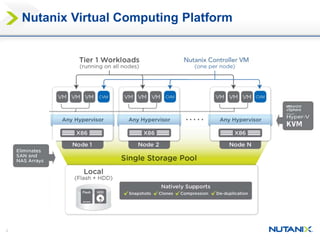
Nutanix Virtual Computing Platform
4
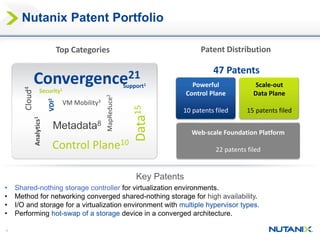
Convergence21
Data15
Metadata8
Cloud4
VM Mobility3
Control Plane10
VDI2
MapReduce2
Security1
Support1
Analytics1
• Shared-nothing storage controller for virtualization environments.
• Method for networking converged shared-nothing storage for high availability.
• I/O and storage for a virtualization environment with multiple hypervisor types.
• Performing hot-swap of a storage device in a converged architecture.
Key Patents
Top Categories
Web-scale Foundation Platform
22 patents filed
Powerful
Control Plane
10 patents filed
Scale-out
Data Plane
15 patents filed
47 Patents
Patent Distribution
Nutanix Patent Portfolio
5
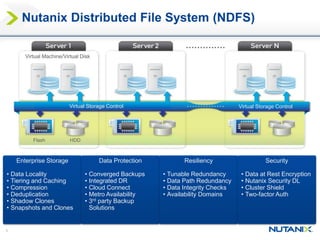
Nutanix Distributed File System (NDFS)
Virtual Storage Control Virtual Storage Control
Virtual Machine/Virtual Disk
Flash HDD
Enterprise Storage
• Data Locality
• Tiering and Caching
• Compression
• Deduplication
• Shadow Clones
• Snapshots and Clones
Data Protection
• Converged Backups
• Integrated DR
• Cloud Connect
• Metro Availability
• 3rd party Backup
Solutions
Resiliency
• Tunable Redundancy
• Data Path Redundancy
• Data Integrity Checks
• Availability Domains
Security
• Data at Rest Encryption
• Nutanix Security DL
• Cluster Shield
• Two-factor Auth
Nutanix – Data Protection
7
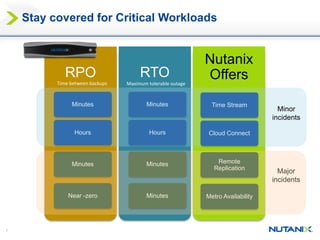
Stay covered for Critical Workloads
RTORPO
Nutanix
Offers
Minutes Minutes Time Stream
Hours Hours Cloud Connect
Near -zero Minutes Metro Availability
Minutes Minutes Remote
Replication
Minor
incidents
Major
incidents
Time between backups Maximum tolerable outage
8
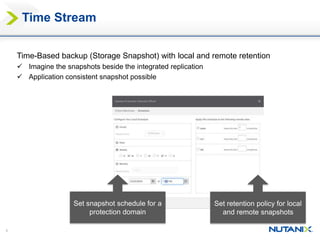
Time Stream
Set retention policy for local
and remote snapshots
Set snapshot schedule for a
protection domain
Time-Based backup (Storage Snapshot) with local and remote retention
 Imagine the snapshots beside the integrated replication
 Application consistent snapshot possible
9
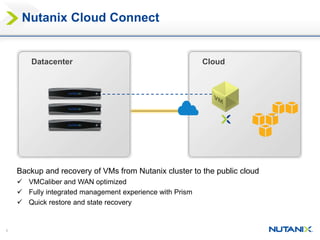
Nutanix Cloud Connect
Datacenter Cloud
Backup and recovery of VMs from Nutanix cluster to the public cloud
 VMCaliber and WAN optimized
 Fully integrated management experience with Prism
 Quick restore and state recovery
10
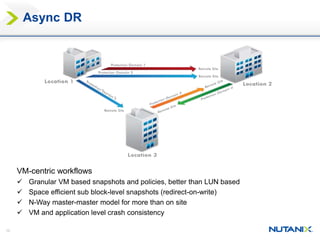
Async DR
VM-centric workflows
 Granular VM based snapshots and policies, better than LUN based
 Space efficient sub block-level snapshots (redirect-on-write)
 N-Way master-master model for more than on site
 VM and application level crash consistency
11
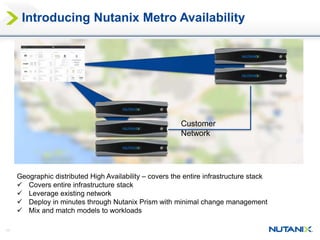
Introducing Nutanix Metro Availability
Geographic distributed High Availability – covers the entire infrastructure stack
 Covers entire infrastructure stack
 Leverage existing network
 Deploy in minutes through Nutanix Prism with minimal change management
 Mix and match models to workloads
Customer
Network
12
 Network
 <=5ms RTT
 < 400 KMs between two sites
 Bandwidth depends on ‘data change rate’
 Recommended: redundant physical networks b/w sites
 General
 2 Nutanix clusters, one on each site
 Mixing hardware models allowed
 Hypervisor
 ESXi in NOS 4.1
 Hyper-V/KVM in the future (Q1 CY 2015)
Requirements
13
Architecture
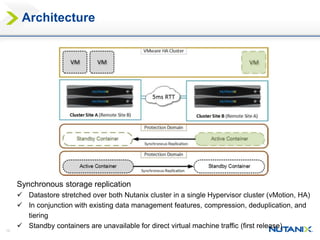
Synchronous storage replication
 Datastore stretched over both Nutanix cluster in a single Hypervisor cluster (vMotion, HA)
 In conjunction with existing data management features, compression, deduplication, and
tiering
 Standby containers are unavailable for direct virtual machine traffic (first release)
14
Nutanix I/O Path
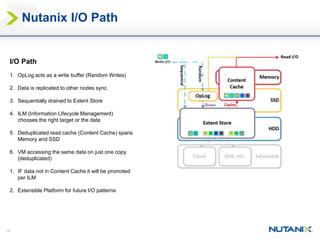
I/O Path
1. OpLog acts as a write buffer (Random Writes)
2. Data is replicated to other nodes sync.
3. Sequentially drained to Extent Store
4. ILM (Information Lifecycle Management)
chooses the right target or the data
5. Deduplicated read cache (Content Cache) spans
Memory and SSD
6. VM accessing the same data on just one copy
(deduplicated)
1. IF data not in Content Cache it will be promoted
per ILM
2. Extensible Platform for future I/O patterns
15
15
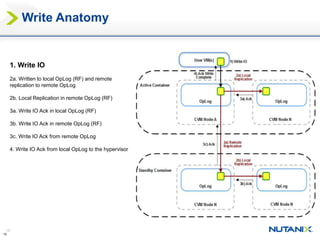
1. Write IO
2a. Written to local OpLog (RF) and remote
replication to remote OpLog
2b. Local Replication in remote OpLog (RF)
3a. Write IO Ack in local OpLog (RF)
3b. Write IO Ack in remote OpLog (RF)
3c. Write IO Ack from remote OpLog
4. Write IO Ack from local OpLog to the hypervisor
Write Anatomy
16
16
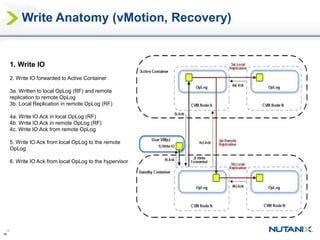
1. Write IO
2. Write IO forwarded to Active Container
3a. Written to local OpLog (RF) and remote
replication to remote OpLog
3b. Local Replication in remote OpLog (RF)
4a. Write IO Ack in local OpLog (RF)
4b. Write IO Ack in remote OpLog (RF)
4c. Write IO Ack from remote OpLog
5. Write IO Ack from local OpLog to the remote
OpLog
6. Write IO Ack from local OpLog to the hypervisor
Write Anatomy (vMotion, Recovery)
17
17
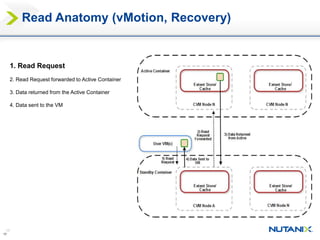
1. Read Request
2. Read Request forwarded to Active Container
3. Data returned from the Active Container
4. Data sent to the VM
Read Anatomy (vMotion, Recovery)
18
18
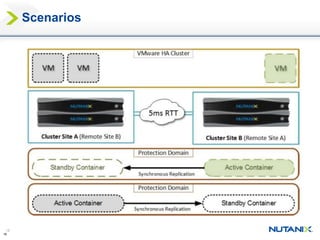
Scenarios
19
19
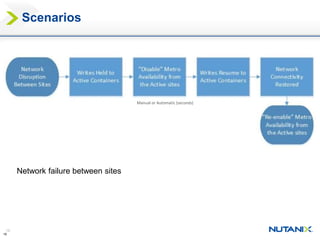
Scenarios
Network failure between sites
Manual or Automatic (seconds)
20
20
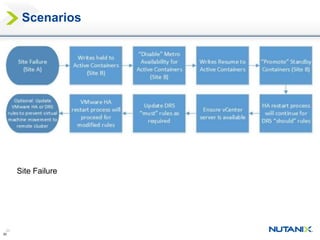
Scenarios
Site Failure
Demo Time!
https://drive.google.com/a/nutanix.com/file/d/0B3sqKkY-Et4deF9Db2NPdlYzMmM/view
Thank You

Nutanix - Expert Session - Metro Availability

  • 1.
  • 2.
  • 3.
  • 4.
    4 Convergence21 Data15 Metadata8 Cloud4 VM Mobility3 Control Plane10 VDI2 MapReduce2 Security1 Support1 Analytics1 •Shared-nothing storage controller for virtualization environments. • Method for networking converged shared-nothing storage for high availability. • I/O and storage for a virtualization environment with multiple hypervisor types. • Performing hot-swap of a storage device in a converged architecture. Key Patents Top Categories Web-scale Foundation Platform 22 patents filed Powerful Control Plane 10 patents filed Scale-out Data Plane 15 patents filed 47 Patents Patent Distribution Nutanix Patent Portfolio
  • 5.
    5 Nutanix Distributed FileSystem (NDFS) Virtual Storage Control Virtual Storage Control Virtual Machine/Virtual Disk Flash HDD Enterprise Storage • Data Locality • Tiering and Caching • Compression • Deduplication • Shadow Clones • Snapshots and Clones Data Protection • Converged Backups • Integrated DR • Cloud Connect • Metro Availability • 3rd party Backup Solutions Resiliency • Tunable Redundancy • Data Path Redundancy • Data Integrity Checks • Availability Domains Security • Data at Rest Encryption • Nutanix Security DL • Cluster Shield • Two-factor Auth
  • 6.
    Nutanix – DataProtection
  • 7.
    7 Stay covered forCritical Workloads RTORPO Nutanix Offers Minutes Minutes Time Stream Hours Hours Cloud Connect Near -zero Minutes Metro Availability Minutes Minutes Remote Replication Minor incidents Major incidents Time between backups Maximum tolerable outage
  • 8.
    8 Time Stream Set retentionpolicy for local and remote snapshots Set snapshot schedule for a protection domain Time-Based backup (Storage Snapshot) with local and remote retention  Imagine the snapshots beside the integrated replication  Application consistent snapshot possible
  • 9.
    9 Nutanix Cloud Connect DatacenterCloud Backup and recovery of VMs from Nutanix cluster to the public cloud  VMCaliber and WAN optimized  Fully integrated management experience with Prism  Quick restore and state recovery
  • 10.
    10 Async DR VM-centric workflows Granular VM based snapshots and policies, better than LUN based  Space efficient sub block-level snapshots (redirect-on-write)  N-Way master-master model for more than on site  VM and application level crash consistency
  • 11.
    11 Introducing Nutanix MetroAvailability Geographic distributed High Availability – covers the entire infrastructure stack  Covers entire infrastructure stack  Leverage existing network  Deploy in minutes through Nutanix Prism with minimal change management  Mix and match models to workloads Customer Network
  • 12.
    12  Network  <=5msRTT  < 400 KMs between two sites  Bandwidth depends on ‘data change rate’  Recommended: redundant physical networks b/w sites  General  2 Nutanix clusters, one on each site  Mixing hardware models allowed  Hypervisor  ESXi in NOS 4.1  Hyper-V/KVM in the future (Q1 CY 2015) Requirements
  • 13.
    13 Architecture Synchronous storage replication Datastore stretched over both Nutanix cluster in a single Hypervisor cluster (vMotion, HA)  In conjunction with existing data management features, compression, deduplication, and tiering  Standby containers are unavailable for direct virtual machine traffic (first release)
  • 14.
    14 Nutanix I/O Path I/OPath 1. OpLog acts as a write buffer (Random Writes) 2. Data is replicated to other nodes sync. 3. Sequentially drained to Extent Store 4. ILM (Information Lifecycle Management) chooses the right target or the data 5. Deduplicated read cache (Content Cache) spans Memory and SSD 6. VM accessing the same data on just one copy (deduplicated) 1. IF data not in Content Cache it will be promoted per ILM 2. Extensible Platform for future I/O patterns
  • 15.
    15 15 1. Write IO 2a.Written to local OpLog (RF) and remote replication to remote OpLog 2b. Local Replication in remote OpLog (RF) 3a. Write IO Ack in local OpLog (RF) 3b. Write IO Ack in remote OpLog (RF) 3c. Write IO Ack from remote OpLog 4. Write IO Ack from local OpLog to the hypervisor Write Anatomy
  • 16.
    16 16 1. Write IO 2.Write IO forwarded to Active Container 3a. Written to local OpLog (RF) and remote replication to remote OpLog 3b. Local Replication in remote OpLog (RF) 4a. Write IO Ack in local OpLog (RF) 4b. Write IO Ack in remote OpLog (RF) 4c. Write IO Ack from remote OpLog 5. Write IO Ack from local OpLog to the remote OpLog 6. Write IO Ack from local OpLog to the hypervisor Write Anatomy (vMotion, Recovery)
  • 17.
    17 17 1. Read Request 2.Read Request forwarded to Active Container 3. Data returned from the Active Container 4. Data sent to the VM Read Anatomy (vMotion, Recovery)
  • 18.
  • 19.
    19 19 Scenarios Network failure betweensites Manual or Automatic (seconds)
  • 20.
  • 21.
  • 22.

Editor's Notes

  • #4 The secret to this radical change is in the patented Nutanix Distributed File System. What you see here is a diagram representing a typical Nutanix cluster made up of nodes which are nothing but standard x86 servers w direct attached SSDs and HDDs. Unlike traditional infrastructure with a finite number of storage controllers, each additional node added to the Nutanix cluster incorporates a storage controller VM ensuring no bottlenecks in the architecture as you scale out. In doing so, you completely avoid forklift upgrades, irregularities in performance as new users are added, and reduce footprint significantly. Lastly, each Nutanix node has a built-in hypervisor of choice, whether it be vSphere, Hyper-V or KVM. This ensures the deployment is well provisioned for future enhancements such as integration with public clouds.
  • #5 Convergence - 16 Data - 9 Metadata, MapReduce – 8 Cloud, VM Mobility – 6 Control Plane – 3 VDI - 2 Analytics, Security, Support – 3 (US Patent 8601473)
  • #8 Purpose: Nutanix delivers the power of web-scale infrastructure to enterprise customers as a turnkey solutions Key Points: What Nutanix does is bring the simplicity, agility and rapid scale that web-scale technologies deliver but as a turnkey enterprise solution Customers can run their diverse application workloads without having to build custom applications Customers don’t have to learn how to use Cassandra, map-reduce, etc. The Nutanix solution does all that under the hood Talk about “controlled disruption” – Nutanix is building the bridge for enterprise IT to embrace web-scale IT without completely overhauling the way they do things
  • #9 The notes section should have a detailed description of how the feature works. De-duplication of data on disk: An administrator can enable disk de-dupe on a container level and/or a vdisk level to reclaim capacity across the cluster. This feature will be available to new as well as existing customers after they upgrade their clusters to NOS 4.0. The feature is disabled by default and has to be explicitly enabled. Once enabled, NDFS deduplicates data in chunks of 4KB blocks (although block size for dedupe is configurable - it works optimally at 4KB). When enabled, upon a write IO request, NDFS calculates and stores SHA01 fingerprint in metadata - data is not deduped at this point. The system performs dedupe when a subsequent read occurs for that data. Curator process scans the data resident on the disks and compares SHA01 fingerprint of the 4KB blocks (which was calculated at the write time and stored along with the metadata). If the fingerprint of a new block matches another existing block, then it updates the metadata to point to the existing block and releases the newly created block. This feature de-dupes data at block level. The block size used by de-dupe is 4KB by default (its configurable). Block Awareness /RF is done at a level below dedupe. So the system has only 2 copies (or 3 copies in case of RF3) of a unique block across the cluster, which are spread over the cluster. Dedupe comes in two flavors - inline and post-process (async). With inline dedupe, there is a performance penalty since it competes with CVM resources (CPU memory) that are being used for servicing user IO at the same time. Whereas, with async/post-processing the performance penalty is minimal. How much CPU/Memory resources of the CVM controller are consumed when de-duplicating disk data? Will we have disk de-dupe inline or post process in Danube? Inline is target. Post process will definitely be there. Inline needs to be turned on for ingest. SE/User should turn it OFF after ingest else performance impact. Which workloads are helped by compression and De-dupe? Can we turn on both compression and De-dupe at the same time? Do we prevent our users to do so at the same time? We do not prevent users to do that from the UI. However, when both are enabled on a container, compression wins today in the backend and de-dupe is disabled. How does de-dupe interoperate with snapshots, backups and quick clones etc.? De-dupe works with snapshots, backups and quick clones. It is not recommended to use de-dupe with shadow clones. Compression and de-dupe? Will prism let them do it? Confirm. They use different block sizes. We don’t recommend mixing both. But the UI lets the user do it. Which workloads should be targeted towards de-dupe and compression? Josh Rodgers: Check best practice. Can a user get any indication of how much space savings he can expect if he enables disk de-dupe on a given Nutanix container before turning de-dupe ON? Dedupe may yield significant savings for workloads (VDI), but may not yield similar returns for all workloads (e.g. server virtualization). Therefore, one should keep this in mind when enabling dedupe for a container/vdisk.
  • #11 The notes section should have a detailed description of how the feature works. De-duplication of data on disk: An administrator can enable disk de-dupe on a container level and/or a vdisk level to reclaim capacity across the cluster. This feature will be available to new as well as existing customers after they upgrade their clusters to NOS 4.0. The feature is disabled by default and has to be explicitly enabled. Once enabled, NDFS deduplicates data in chunks of 4KB blocks (although block size for dedupe is configurable - it works optimally at 4KB). When enabled, upon a write IO request, NDFS calculates and stores SHA01 fingerprint in metadata - data is not deduped at this point. The system performs dedupe when a subsequent read occurs for that data. Curator process scans the data resident on the disks and compares SHA01 fingerprint of the 4KB blocks (which was calculated at the write time and stored along with the metadata). If the fingerprint of a new block matches another existing block, then it updates the metadata to point to the existing block and releases the newly created block. This feature de-dupes data at block level. The block size used by de-dupe is 4KB by default (its configurable). Block Awareness /RF is done at a level below dedupe. So the system has only 2 copies (or 3 copies in case of RF3) of a unique block across the cluster, which are spread over the cluster. Dedupe comes in two flavors - inline and post-process (async). With inline dedupe, there is a performance penalty since it competes with CVM resources (CPU memory) that are being used for servicing user IO at the same time. Whereas, with async/post-processing the performance penalty is minimal. How much CPU/Memory resources of the CVM controller are consumed when de-duplicating disk data? Will we have disk de-dupe inline or post process in Danube? Inline is target. Post process will definitely be there. Inline needs to be turned on for ingest. SE/User should turn it OFF after ingest else performance impact. Which workloads are helped by compression and De-dupe? Can we turn on both compression and De-dupe at the same time? Do we prevent our users to do so at the same time? We do not prevent users to do that from the UI. However, when both are enabled on a container, compression wins today in the backend and de-dupe is disabled. How does de-dupe interoperate with snapshots, backups and quick clones etc.? De-dupe works with snapshots, backups and quick clones. It is not recommended to use de-dupe with shadow clones. Compression and de-dupe? Will prism let them do it? Confirm. They use different block sizes. We don’t recommend mixing both. But the UI lets the user do it. Which workloads should be targeted towards de-dupe and compression? Josh Rodgers: Check best practice. Can a user get any indication of how much space savings he can expect if he enables disk de-dupe on a given Nutanix container before turning de-dupe ON? Dedupe may yield significant savings for workloads (VDI), but may not yield similar returns for all workloads (e.g. server virtualization). Therefore, one should keep this in mind when enabling dedupe for a container/vdisk.
  • #13 Requirement is enough bandwidth to handle the data change rate, and a round trip time of <=5ms. A redundant network link is obviously highly recommended. Keep in mind that the cluster used to replicate data does not have to have the exact same hardware.