
Becoming a Professional with Prism
@Twitter
2
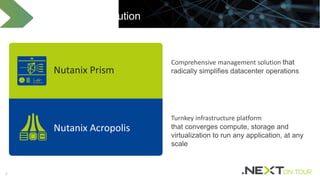
Turnkey infrastructure platform
that converges compute, storage and
virtualization to run any application, at any
scale
Comprehensive management solution that
radically simplifies datacenter operations
The Nutanix Solution
Nutanix Prism
Nutanix Acropolis
3
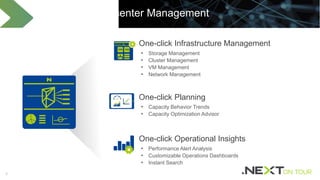
Simplified Datacenter Management
• Storage Management
• Cluster Management
• VM Management
• Network Management
One-click Infrastructure Management
• Capacity Behavior Trends
• Capacity Optimization Advisor
One-click Planning
• Performance Alert Analysis
• Customizable Operations Dashboards
• Instant Search
One-click Operational Insights
4
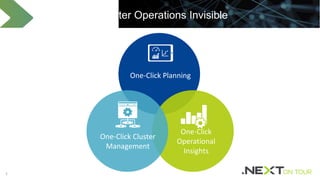
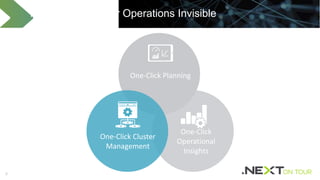
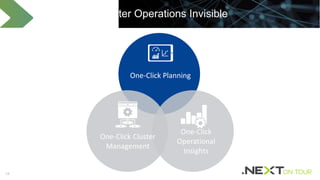
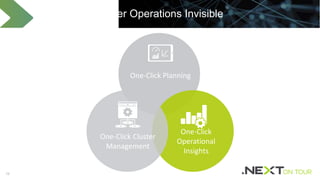
One-Click Planning
Making Datacenter Operations Invisible
One-Click
Operational
Insights
One-Click Cluster
Management
5
One-Click Planning
Making Datacenter Operations Invisible
One-Click
Operational
Insights
One-Click Cluster
Management
66
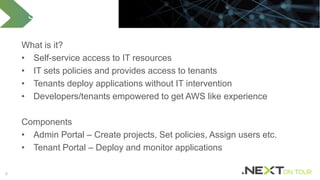
What is it?
• Self-service access to IT resources
• IT sets policies and provides access to tenants
• Tenants deploy applications without IT intervention
• Developers/tenants empowered to get AWS like experience
Components
• Admin Portal – Create projects, Set policies, Assign users etc.
• Tenant Portal – Deploy and monitor applications
Self-Service Portal
77
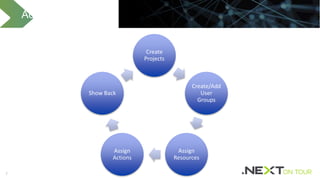
Admin Capabilities
Create
Projects
Create/Add
User
Groups
Assign
Resources
Assign
Actions
Show Back
8
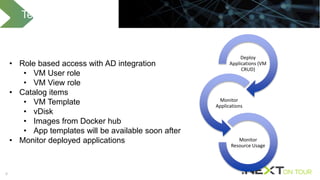
Tenant Capabilities
Deploy
Applications (VM
CRUD)
Monitor
Applications
Monitor
Resource Usage
• Role based access with AD integration
• VM User role
• VM View role
• Catalog items
• VM Template
• vDisk
• Images from Docker hub
• App templates will be available soon after
• Monitor deployed applications
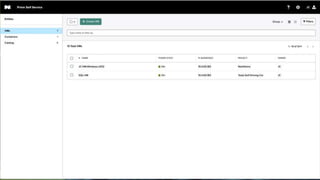
Demo – Nutanix self-service
12
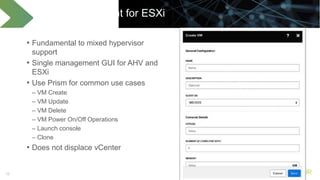
VM Management for ESXi
• Fundamental to mixed hypervisor
support
• Single management GUI for AHV and
ESXi
• Use Prism for common use cases
– VM Create
– VM Update
– VM Delete
– VM Power On/Off Operations
– Launch console
– Clone
• Does not displace vCenter
13
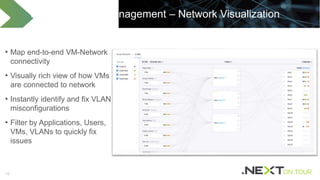
Virtual Network Management – Network Visualization
• Map end-to-end VM-Network
connectivity
• Visually rich view of how VMs
are connected to network
• Instantly identify and fix VLAN
misconfigurations
• Filter by Applications, Users,
VMs, VLANs to quickly fix
issues
14
Making Datacenter Operations Invisible
One-Click Planning
One-Click
Operational
Insights
One-Click Cluster
Management
15
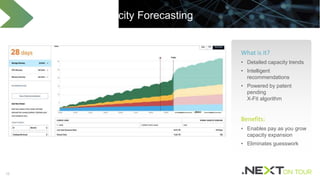
Actionable Capacity Forecasting
What is it?
• Detailed capacity trends
• Intelligent
recommendations
• Powered by patent
pending
X-Fit algorithm
Benefits:
• Enables pay as you grow
capacity expansion
• Eliminates guesswork
16
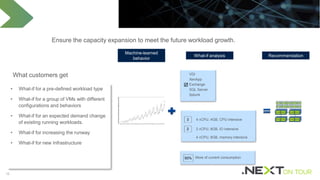
3 4 vCPU, 4GB, CPU intensive
2 2 vCPU, 8GB, IO intensive
4 vCPU, 8GB, memory intensive
VDI
XenApp
Exchange
SQL Server
Splunk

What-if Analysis
• What-if for a pre-defined workload type
• What-if for a group of VMs with different
configurations and behaviors
• What-if for an expected demand change
of existing running workloads.
• What-if for increasing the runway
• What-if for new Infrastructure
What customers get
Ensure the capacity expansion to meet the future workload growth.
50% More of current consumption
Machine-learned
behavior
What-if analysis Recommendation
Demo – Capacity Planning and What-if Analysis
19
One-Click Planning
Making Datacenter Operations Invisible
One-Click
Operational
Insights
One-Click Cluster
Management
20
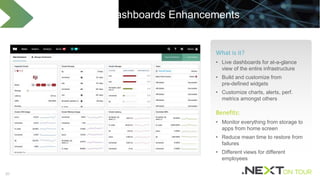
Customizable Dashboards Enhancements
What is it?
• Live dashboards for at-a-glance
view of the entire infrastructure
• Build and customize from
pre-defined widgets
• Customize charts, alerts, perf.
metrics amongst others
Benefits:
• Monitor everything from storage to
apps from home screen
• Reduce mean time to restore from
failures
• Different views for different
employees
21
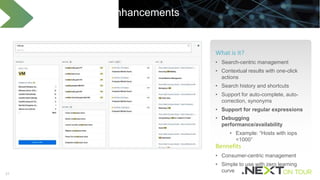
Prism Search Enhancements
What is it?
• Search-centric management
• Contextual results with one-click
actions
• Search history and shortcuts
• Support for auto-complete, auto-
correction, synonyms
• Support for regular expressions
• Debugging
performance/availability
• Example: “Hosts with iops
<1000”
Bennefits
• Consumer-centric management
• Simple to use with zero learning
curve
22
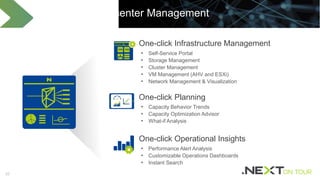
Simplified Datacenter Management
• Self-Service Portal
• Storage Management
• Cluster Management
• VM Management (AHV and ESXi)
• Network Management & Visualization
One-click Infrastructure Management
• Capacity Behavior Trends
• Capacity Optimization Advisor
• What-if Analysis
One-click Planning
• Performance Alert Analysis
• Customizable Operations Dashboards
• Instant Search
One-click Operational Insights
2323
Like What You Heard?
READ
 Nutanix XCP Datasheet
 Nutanix Acropolis Datasheet
 Nutanix Prism Datasheet
 The Nutanix Bible
USE
 Nutanix Community Edition
Thank You
25
Icons
Download full Nutanix Icon Set at http://www.nutanix.com/branding/

Becoming a Professional with Prism

  • 1.
    Becoming a Professionalwith Prism @Twitter
  • 2.
    2 Turnkey infrastructure platform thatconverges compute, storage and virtualization to run any application, at any scale Comprehensive management solution that radically simplifies datacenter operations The Nutanix Solution Nutanix Prism Nutanix Acropolis
  • 3.
    3 Simplified Datacenter Management •Storage Management • Cluster Management • VM Management • Network Management One-click Infrastructure Management • Capacity Behavior Trends • Capacity Optimization Advisor One-click Planning • Performance Alert Analysis • Customizable Operations Dashboards • Instant Search One-click Operational Insights
  • 4.
    4 One-Click Planning Making DatacenterOperations Invisible One-Click Operational Insights One-Click Cluster Management
  • 5.
    5 One-Click Planning Making DatacenterOperations Invisible One-Click Operational Insights One-Click Cluster Management
  • 6.
    66 What is it? •Self-service access to IT resources • IT sets policies and provides access to tenants • Tenants deploy applications without IT intervention • Developers/tenants empowered to get AWS like experience Components • Admin Portal – Create projects, Set policies, Assign users etc. • Tenant Portal – Deploy and monitor applications Self-Service Portal
  • 7.
  • 8.
    8 Tenant Capabilities Deploy Applications (VM CRUD) Monitor Applications Monitor ResourceUsage • Role based access with AD integration • VM User role • VM View role • Catalog items • VM Template • vDisk • Images from Docker hub • App templates will be available soon after • Monitor deployed applications
  • 9.
    Demo – Nutanixself-service
  • 12.
    12 VM Management forESXi • Fundamental to mixed hypervisor support • Single management GUI for AHV and ESXi • Use Prism for common use cases – VM Create – VM Update – VM Delete – VM Power On/Off Operations – Launch console – Clone • Does not displace vCenter
  • 13.
    13 Virtual Network Management– Network Visualization • Map end-to-end VM-Network connectivity • Visually rich view of how VMs are connected to network • Instantly identify and fix VLAN misconfigurations • Filter by Applications, Users, VMs, VLANs to quickly fix issues
  • 14.
    14 Making Datacenter OperationsInvisible One-Click Planning One-Click Operational Insights One-Click Cluster Management
  • 15.
    15 Actionable Capacity Forecasting Whatis it? • Detailed capacity trends • Intelligent recommendations • Powered by patent pending X-Fit algorithm Benefits: • Enables pay as you grow capacity expansion • Eliminates guesswork
  • 16.
    16 3 4 vCPU,4GB, CPU intensive 2 2 vCPU, 8GB, IO intensive 4 vCPU, 8GB, memory intensive VDI XenApp Exchange SQL Server Splunk  What-if Analysis • What-if for a pre-defined workload type • What-if for a group of VMs with different configurations and behaviors • What-if for an expected demand change of existing running workloads. • What-if for increasing the runway • What-if for new Infrastructure What customers get Ensure the capacity expansion to meet the future workload growth. 50% More of current consumption Machine-learned behavior What-if analysis Recommendation
  • 17.
    Demo – CapacityPlanning and What-if Analysis
  • 19.
    19 One-Click Planning Making DatacenterOperations Invisible One-Click Operational Insights One-Click Cluster Management
  • 20.
    20 Customizable Dashboards Enhancements Whatis it? • Live dashboards for at-a-glance view of the entire infrastructure • Build and customize from pre-defined widgets • Customize charts, alerts, perf. metrics amongst others Benefits: • Monitor everything from storage to apps from home screen • Reduce mean time to restore from failures • Different views for different employees
  • 21.
    21 Prism Search Enhancements Whatis it? • Search-centric management • Contextual results with one-click actions • Search history and shortcuts • Support for auto-complete, auto- correction, synonyms • Support for regular expressions • Debugging performance/availability • Example: “Hosts with iops <1000” Bennefits • Consumer-centric management • Simple to use with zero learning curve
  • 22.
    22 Simplified Datacenter Management •Self-Service Portal • Storage Management • Cluster Management • VM Management (AHV and ESXi) • Network Management & Visualization One-click Infrastructure Management • Capacity Behavior Trends • Capacity Optimization Advisor • What-if Analysis One-click Planning • Performance Alert Analysis • Customizable Operations Dashboards • Instant Search One-click Operational Insights
  • 23.
    2323 Like What YouHeard? READ  Nutanix XCP Datasheet  Nutanix Acropolis Datasheet  Nutanix Prism Datasheet  The Nutanix Bible USE  Nutanix Community Edition
  • 24.
  • 25.
    25 Icons Download full NutanixIcon Set at http://www.nutanix.com/branding/

Editor's Notes

  • #3 Now, let’s talk about the actual products that Nutanix offers. There are two foundational products in the Nutanix solution -  Nutanix Acropolis, and Nutanix Prism.  Acropolis is the data fabric that natively converges compute, storage and virtualization to run any application at any scale.  Prism is the control plane that simplifies datacenter operations by providing a single pane of glass to manage compute, storage and virtualization and offering rich automation and operational insights.
  • #4 Prism brings simplicity to infrastructure management, and features innovative One-Click technology that streamlines time-consuming IT tasks One-Click Infrastructure Management - Nutanix Prism gives administrators an easy way to manage virtual environments running on Acropolis. It simplifies and streamlines common workflows for hypervisor and virtual machine (VM) management, from VM creation and migration to virtual network setup and hypervisor upgrades. Rather than replicating the full set of features found in other virtualization solutions, virtualization management in Prism has been designed for an uncluttered, consumer-grade experience. One-click Operational Insight - Prism provides rich insights about day-to-day operations of the datacenter. Prism is powered by advanced machine learning technology with built-in heuristics and business intelligence to easily and quickly mine large volumes of system data and generate actionable insights for optimizing all aspects of infrastructure performance. One-Click Remediation - Nutanix Prism reduces mean time to resolution significantly by proactively analyzing trends and predict when certain failures can occur. In addition to that Prism also provides customized recommendations to resolve issues with a single click. Instead of showing individual alerts, Prism intelligently maps alerts to specific services and shows the errors impact on applications, helping IT admins gain more confidence about how their applications are running.
  • #5 Higher service quality Improved IT productivity Better business agility
  • #6 Higher service quality Improved IT productivity Better business agility
  • #7 Create projects Create/add user groups Assign resources Assign actions Run Show-back reports Deploy applications Monitor applications Monitor resource usage
  • #8 Create projects Create/add user groups Assign resources Assign actions Run Show-back reports Deploy applications Monitor applications Monitor resource usage
  • #14 Vlan misconfiguration Connectivity information
  • #15 Higher service quality Improved IT productivity Better business agility
  • #16 Visual – screenshots of runway and scale-out recommendation Forecast of CPU, memory, and storage capacity runway (time remaining) Based on machine-learned consumption behavior from running workloads Detail trend of hosts (in CPU and memory) and containers (in storage) level Recommendation of appropriate scale out options (node types and numbers)
  • #17 Planning of the expansion based on existing and new workload demands. Simplified demand definition by selecting a pre-defined workload type appropriate VM types and numbers from a VM configuration and behavior catalogue an adjustment of existing running workloads.
  • #20 Higher service quality Improved IT productivity Better business agility
  • #21 Visual – screenshots of home page and widget configuration Creation and customization a dashboard by dragging and dropping widgets Pre-defined and customizable widgets for charting, alerts, cluster status, capacity runway, and top resource utilization top. Out-of-the box home dashboard for 360° view of the Nutanix clusters.
  • #22 Visual – screenshot of a search with its result Keywords based search with auto-complete and instant result Contextual results, showing configuration, charts, alerts, appropriate actions, and help contents Saved and recent search shortcuts for quick access
  • #23 Prism brings simplicity to infrastructure management, and features innovative One-Click technology that streamlines time-consuming IT tasks One-Click Infrastructure Management - Nutanix Prism gives administrators an easy way to manage virtual environments running on Acropolis. It simplifies and streamlines common workflows for hypervisor and virtual machine (VM) management, from VM creation and migration to virtual network setup and hypervisor upgrades. Rather than replicating the full set of features found in other virtualization solutions, virtualization management in Prism has been designed for an uncluttered, consumer-grade experience. One-click Operational Insight - Prism provides rich insights about day-to-day operations of the datacenter. Prism is powered by advanced machine learning technology with built-in heuristics and business intelligence to easily and quickly mine large volumes of system data and generate actionable insights for optimizing all aspects of infrastructure performance. One-Click Remediation - Nutanix Prism reduces mean time to resolution significantly by proactively analyzing trends and predict when certain failures can occur. In addition to that Prism also provides customized recommendations to resolve issues with a single click. Instead of showing individual alerts, Prism intelligently maps alerts to specific services and shows the errors impact on applications, helping IT admins gain more confidence about how their applications are running.