Nutanix Basic Concept
Index
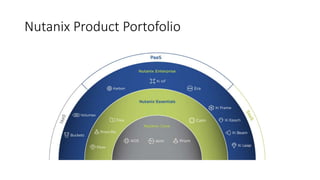
• Nutanix Product Portofolio
• Acropolis Foundation
• Acropolis HyperVisor
• Distributed Storage Fabric
• App Mobility Fabric
• Acropolis Hypervisor
• AHV Feature
• Security
• XPlay
• Distributed Storage Fabric (DSF)
• DSF Feature
• Data Protection
• Deduplication and Compression Option
• Erasure Coding
• Basic Management (How to add License, how to access Nutanix healt, etc)
• How to use Nutanix Sizing tools
• Tools and Resource
DSF Feature
• Data Locality
• AI Data Placement
• Distributed Workload
• Deduplication and Compression Option
• Erasure Coding
Nutanix Product Portofolio
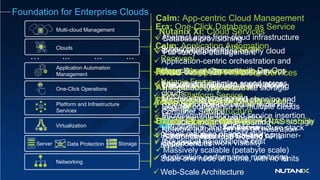
Foundation for Enterprise Clouds
Networking
One-Click Operations
Server Storage
Data Protection
Virtualization
Application Automation
Management
Clouds
Multi-cloud Management
Platform and Infrastructure
Services
… ... ... ...
Acropolis: Hyperconverged
Infrastructure
 Replaces enterprise SAN and NAS storage
 Powers all apps – virtual and container-
based
 Scale one node at a time, with no limits
 Web-Scale Architecture
All Popular Hypervisors
AHV: Native Virtualization
 High-performance, secure hypervisor
 Single console for managing
virtualization and full infrastructure stack
 Included at no additional cost
Era: One-Click Database as Service
 Database provisioning
 Full lifecycle management
AF/BS: Acropolis File/Block Services
 Integrated, easy-to-use file storage
 NFS & SMB and iSCSI LUN support
Object Storage Services
 S3 Compatible REST-based APIs
 Massively scalable (petabyte scale)
Prism: Single Pane Management
 One-click infrastructure provisioning
 Machine learning-based planning and
scaling
 Full stack insight and reporting
 Automatic Resource Scaling
Flow: Native Networking Services
 Microsegmentation and service insertion
 Network automation and orchestration
 End-to-end network visibility
Calm: Application Automation
 Application-centric orchestration and
lifecycle management with DevOps
 Integrated application marketplace
 Self-service provisioning
 Container Service
Nutanix Xi: Cloud Services
 Subscription-based Disaster
Recovery
 Cloud-based VDI services with
Nutanix Frame
 Xi-IoT Platform Service
Calm: App-centric Cloud Management
 Abstract apps from cloud infrastructure
 Deploy/manage apps on any cloud
Beam: Cloud Governance
 Analyze and optimize spend across
clouds
 Security compliance for multiple clouds
Epoch: App Monitoring and Observability
 Visual mapping of application
dependencies
 Application performance monitoring
@nutanix
Nutanix as your HCI
AOS AHV MOVE PRISM
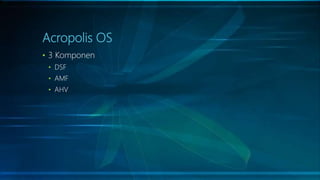
Acropolis OS
• 3 Komponen
• DSF
• AMF
• AHV
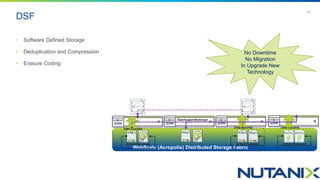
DSF
Acropolis Distributed Storage Fabric
WebScale (Acropolis) Distributed Storage Fabric
No Downtime
No Migration
In Upgrade New
Technology
AI Data Placement
Data Locality
Distributed Workload
Data Locality
AI Data Placement
Data Locality
AI Data Placement
| 9
• Software Defined Storage
• Deduplication and Compression
• Erasure Coding
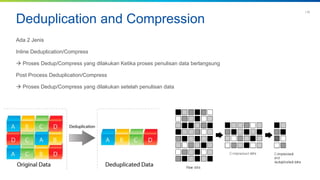
Deduplication and Compression
Ada 2 Jenis
Inline Deduplication/Compress
 Proses Dedup/Compress yang dilakukan Ketika proses penulisan data berlangsung
Post Process Deduplication/Compress
 Proses Dedup/Compress yang dilakukan setelah penulisan data
| 10
Redundancy Factor
is the number of components that a Nutanix cluster can withstand at any time +1. These components include disks, NIC’s,
and nodes. For example, in a two block environment and the default Redundancy Factor of 2, you can lose a disk, NIC
or node and still maintain no data loss.
RF 2  Toleransi 1 node mati dengan minimal 3 Node
RF 3  Toleransi 2 node mati dengan minimal 5 Node
| 12
Erasure Coding
T I T L E O F P R E S E N T A T I O N | C O N F I D E N T I A L
| 13
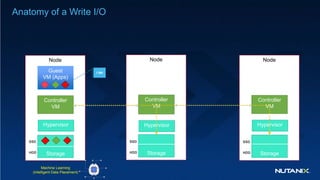
Anatomy of a Write I/O
Node
Guest
VM (Apps)
Hypervisor
Controller
VM
Storage
Node
Hypervisor
Controller
VM
Storage
Node
Hypervisor
Controller
VM
Storage
1 Mb
SSD
HDD
SSD
HDD
SSD
HDD
Machine Learning
(Intelligent Data Placement)
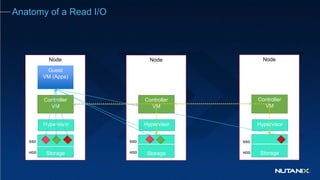
Anatomy of a Read I/O
Node
Guest
VM (Apps)
Hypervisor
Controller
VM
Storage
Node
Hypervisor
Controller
VM
Storage
Node
Hypervisor
Controller
VM
Storage
SSD
HDD
SSD
HDD
SSD
HDD
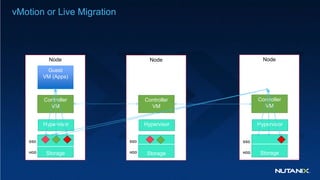
vMotion or Live Migration
Node
Hypervisor
Controller
VM
Storage
Node
Hypervisor
Controller
VM
Storage
Node
Guest
VM (Apps)
Hypervisor
Controller
VM
Storage
SSD
HDD
SSD
HDD
SSD
HDD
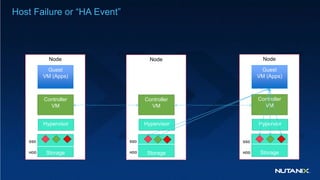
Host Failure or “HA Event”
Node
Hypervisor
Controller
VM
Storage
Node
Hypervior
Controller
VM
Storage
Node
Guest
VM (Apps)
Hypervisor
Controller
VM
Storage
Guest
VM (Apps)
SSD
HDD
SSD
HDD
SSD
HDD
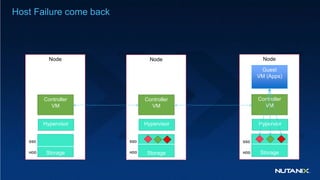
Host Failure come back
Node
Hypervisor
Controller
VM
Storage
Node
Hypervior
Controller
VM
Storage
Node
Hypervisor
Controller
VM
Storage
Guest
VM (Apps)
SSD
HDD
SSD
HDD
SSD
HDD
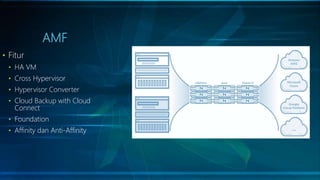
AMF
• Fitur
• HA VM
• Cross Hypervisor
• Hypervisor Converter
• Cloud Backup with Cloud
Connect
• Foundation
• Affinity dan Anti-Affinity
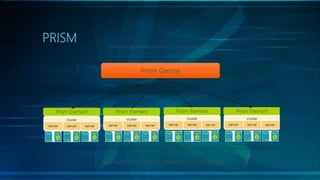
PRISM
Prism Element
• View or modify certain cluster parameters.
• Create a new storage container.
• Add new nodes to the cluster.
• Upgrade the cluster to a newer AOS version.
• Update disk firmware and other upgradeable components.
• Add, update, and delete user accounts.
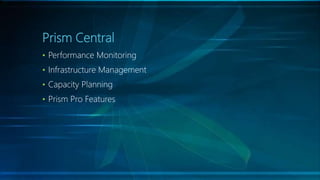
Prism Central
• Performance Monitoring
• Infrastructure Management
• Capacity Planning
• Prism Pro Features
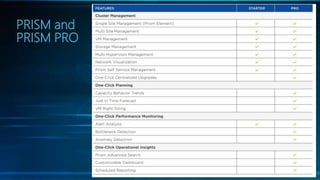
PRISM and
PRISM PRO
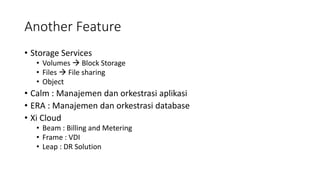
Another Feature
• Storage Services
• Volumes  Block Storage
• Files  File sharing
• Object
• Calm : Manajemen dan orkestrasi aplikasi
• ERA : Manajemen dan orkestrasi database
• Xi Cloud
• Beam : Billing and Metering
• Frame : VDI
• Leap : DR Solution
Basic Management
• Demo : Lifecycle Management Tour
• Cluster Resources
• Health Dashboard
• How to view Alert
• Register Prism Central
Licensing Table
How to use sizing tools
• Contoh Kasus
• Keperluan untuk HCI dengan spesifikasi
• 200 vcpu
• 640 Gb Memory
• 15Tb Disk
Resources and Tools Available
• Nutanix Demo Portal : Portal to show Nutanix Management
Dashboard. Usually used for show demo to customer
• Nutanix Move : Portal for Migration from another hypervisor (event
from cloud) to Nutanix AHV
• Nutanix Xray : Portal for running simulation automatically
• Nutanix Bible : Usually used to explain detail architecture of Nutanix
to Customer.
• Nutanix Case Studies: Usually used when customer need to be
convince for specific workload.
Important Link
• My Nutanix Portal : https://my.nutanix.com/#/page/accounts
• Nutanix Bible : https://nutanixbible.com/
• Nutanix Case Studies : http://www.nutanix.com/resources/case-
studies/
• Nutanix Demo Portal : https://demo.nutanix.com/

Nutanix basic

  • 1.
  • 2.
    Index • Nutanix ProductPortofolio • Acropolis Foundation • Acropolis HyperVisor • Distributed Storage Fabric • App Mobility Fabric • Acropolis Hypervisor • AHV Feature • Security • XPlay • Distributed Storage Fabric (DSF) • DSF Feature • Data Protection • Deduplication and Compression Option • Erasure Coding • Basic Management (How to add License, how to access Nutanix healt, etc) • How to use Nutanix Sizing tools • Tools and Resource
  • 3.
    DSF Feature • DataLocality • AI Data Placement • Distributed Workload • Deduplication and Compression Option • Erasure Coding
  • 4.
  • 5.
    Foundation for EnterpriseClouds Networking One-Click Operations Server Storage Data Protection Virtualization Application Automation Management Clouds Multi-cloud Management Platform and Infrastructure Services … ... ... ... Acropolis: Hyperconverged Infrastructure  Replaces enterprise SAN and NAS storage  Powers all apps – virtual and container- based  Scale one node at a time, with no limits  Web-Scale Architecture All Popular Hypervisors AHV: Native Virtualization  High-performance, secure hypervisor  Single console for managing virtualization and full infrastructure stack  Included at no additional cost Era: One-Click Database as Service  Database provisioning  Full lifecycle management AF/BS: Acropolis File/Block Services  Integrated, easy-to-use file storage  NFS & SMB and iSCSI LUN support Object Storage Services  S3 Compatible REST-based APIs  Massively scalable (petabyte scale) Prism: Single Pane Management  One-click infrastructure provisioning  Machine learning-based planning and scaling  Full stack insight and reporting  Automatic Resource Scaling Flow: Native Networking Services  Microsegmentation and service insertion  Network automation and orchestration  End-to-end network visibility Calm: Application Automation  Application-centric orchestration and lifecycle management with DevOps  Integrated application marketplace  Self-service provisioning  Container Service Nutanix Xi: Cloud Services  Subscription-based Disaster Recovery  Cloud-based VDI services with Nutanix Frame  Xi-IoT Platform Service Calm: App-centric Cloud Management  Abstract apps from cloud infrastructure  Deploy/manage apps on any cloud Beam: Cloud Governance  Analyze and optimize spend across clouds  Security compliance for multiple clouds Epoch: App Monitoring and Observability  Visual mapping of application dependencies  Application performance monitoring
  • 6.
    @nutanix Nutanix as yourHCI AOS AHV MOVE PRISM
  • 7.
    Acropolis OS • 3Komponen • DSF • AMF • AHV
  • 8.
    DSF Acropolis Distributed StorageFabric WebScale (Acropolis) Distributed Storage Fabric No Downtime No Migration In Upgrade New Technology AI Data Placement Data Locality Distributed Workload Data Locality AI Data Placement Data Locality AI Data Placement | 9 • Software Defined Storage • Deduplication and Compression • Erasure Coding
  • 9.
    Deduplication and Compression Ada2 Jenis Inline Deduplication/Compress  Proses Dedup/Compress yang dilakukan Ketika proses penulisan data berlangsung Post Process Deduplication/Compress  Proses Dedup/Compress yang dilakukan setelah penulisan data | 10
  • 10.
    Redundancy Factor is thenumber of components that a Nutanix cluster can withstand at any time +1. These components include disks, NIC’s, and nodes. For example, in a two block environment and the default Redundancy Factor of 2, you can lose a disk, NIC or node and still maintain no data loss. RF 2  Toleransi 1 node mati dengan minimal 3 Node RF 3  Toleransi 2 node mati dengan minimal 5 Node | 12
  • 11.
    Erasure Coding T IT L E O F P R E S E N T A T I O N | C O N F I D E N T I A L | 13
  • 12.
    Anatomy of aWrite I/O Node Guest VM (Apps) Hypervisor Controller VM Storage Node Hypervisor Controller VM Storage Node Hypervisor Controller VM Storage 1 Mb SSD HDD SSD HDD SSD HDD Machine Learning (Intelligent Data Placement)
  • 13.
    Anatomy of aRead I/O Node Guest VM (Apps) Hypervisor Controller VM Storage Node Hypervisor Controller VM Storage Node Hypervisor Controller VM Storage SSD HDD SSD HDD SSD HDD
  • 14.
    vMotion or LiveMigration Node Hypervisor Controller VM Storage Node Hypervisor Controller VM Storage Node Guest VM (Apps) Hypervisor Controller VM Storage SSD HDD SSD HDD SSD HDD
  • 15.
    Host Failure or“HA Event” Node Hypervisor Controller VM Storage Node Hypervior Controller VM Storage Node Guest VM (Apps) Hypervisor Controller VM Storage Guest VM (Apps) SSD HDD SSD HDD SSD HDD
  • 16.
    Host Failure comeback Node Hypervisor Controller VM Storage Node Hypervior Controller VM Storage Node Hypervisor Controller VM Storage Guest VM (Apps) SSD HDD SSD HDD SSD HDD
  • 17.
    AMF • Fitur • HAVM • Cross Hypervisor • Hypervisor Converter • Cloud Backup with Cloud Connect • Foundation • Affinity dan Anti-Affinity
  • 18.
  • 19.
    Prism Element • Viewor modify certain cluster parameters. • Create a new storage container. • Add new nodes to the cluster. • Upgrade the cluster to a newer AOS version. • Update disk firmware and other upgradeable components. • Add, update, and delete user accounts.
  • 20.
    Prism Central • PerformanceMonitoring • Infrastructure Management • Capacity Planning • Prism Pro Features
  • 21.
  • 22.
    Another Feature • StorageServices • Volumes  Block Storage • Files  File sharing • Object • Calm : Manajemen dan orkestrasi aplikasi • ERA : Manajemen dan orkestrasi database • Xi Cloud • Beam : Billing and Metering • Frame : VDI • Leap : DR Solution
  • 23.
    Basic Management • Demo: Lifecycle Management Tour • Cluster Resources • Health Dashboard • How to view Alert • Register Prism Central
  • 24.
  • 25.
    How to usesizing tools • Contoh Kasus • Keperluan untuk HCI dengan spesifikasi • 200 vcpu • 640 Gb Memory • 15Tb Disk
  • 26.
    Resources and ToolsAvailable • Nutanix Demo Portal : Portal to show Nutanix Management Dashboard. Usually used for show demo to customer • Nutanix Move : Portal for Migration from another hypervisor (event from cloud) to Nutanix AHV • Nutanix Xray : Portal for running simulation automatically • Nutanix Bible : Usually used to explain detail architecture of Nutanix to Customer. • Nutanix Case Studies: Usually used when customer need to be convince for specific workload.
  • 27.
    Important Link • MyNutanix Portal : https://my.nutanix.com/#/page/accounts • Nutanix Bible : https://nutanixbible.com/ • Nutanix Case Studies : http://www.nutanix.com/resources/case- studies/ • Nutanix Demo Portal : https://demo.nutanix.com/

Editor's Notes

  • #5 Jelasin Portofolio fiturnya
  • #6 We’ve built our Nutanix Enterprise Cloud with a single, unified IT stack that integrates all infrastructure resources to run nearly any application, along with a scalable management (control) plane for simplified management of both infrastructure and applications. Key attributes of the Nutanix solution: 100% software-defined, with the flexibility of running on a multitude of server platforms, including turnkey appliances from Nutanix and OEM partners like Dell EMC, Lenovo and IBM, as well as customer-procured servers from HPE, Cisco and others Runs nearly any application, including business-critical enterprise applications like Oracle and SAP, databases including SQL Server and Postgres, VDI with powered by Citrix or VMware, big data services like Hadoop and Splunk and more This same software stack can be deployed in any location, from small remote and branch office locations to core datacenter deployments A single software OS for all locations, running any application.
  • #9 The Nutanix CVM is responsible for the core Nutanix platform logic and handles services like: Storage I/O & transforms (Deduplication, Compression, EC) UI / API Upgrades DR / Replication
  • #10 Skrg pake infra untuk lebih mudah scaling, bisa berinovasi lebih cepat, ada Intelligent operations, nah ini namanya enterprise Cloud System. Untuk teknologinya sendiri namanya web scale IT Simpifly : DSF
  • #11 Deduplication is most effective in environments that have a high degree of redundant data, such as virtual desktop infrastructure or storage backup systems. Keterangan Inline Post Process bagusnya buat apa? Dan kenapa
  • #20 HA. Automatically restarts virtual machines in the event of unplanned downtime on a node. Cross-hypervisor backup. Backup VM-level data from one Nutanix system to another running a different hypervisor Cross-hypervisor DR. Failover VMs to another site running a different hypervisor in the event of a site failure One-click hypervisor conversion. Change hypervisors automatically with minimal risk/disruption Cloud backup with Cloud Connect. Back up data to public cloud services like AWS and Azure Sizer. Determine configuration requirements based on workload Foundation. Install any supported hypervisor to a Nutanix cluster
  • #21 Hypervisor features: Virtual networking Host profiles Rolling upgrades (-> Host maintenance mode) Storage configuration VM features Intelligent placement Live migration Disaster Recovery and Replication VM operations Analytics
  • #24 Infrastructure Management Streamline common hypervisor and VM tasks. Deploy, configure, and manage clusters for storage and virtualization. Deploy, configure, migrate, and manage virtual machines. Create datastores, manage storage policies, and administer DR. Operational Insight Advanced machine learning technology Built-in heuristics and business intelligence Customizable dashboards Built-in and custom reporting Single-click query Capacity Planning Predictive analytics based on capacity usage and workload behavior Capacity optimization advisor Capacity expansion forecast Performance Monitoring Real-time performance behavior of VMs and workloads Utilizes predictive monitoring based on behavioral analysis to detect anomalies Detects bottlenecks and provides guidance for VM resource allocation
  • #27 Siapin capture,an dan demo
  • #29 Cara Baca Sizing