SOFTWARE/WEB/MOBILE/DATABASE ARCHITECT, ENGINEER, AND DEVELOPER
TORONTO, CANADA
HTTP://SAYED.JUSTETC.NET
HTTP://WWW.JUSTETC.NET
Sayed Ahmed
Logical Design of a Data Warehouse
OUR SERVICES
ļƒ’ Free Training and Educational Services
ļƒ‰ Training and Education in Bangla:
 Bangla.SaLearningSchool.com
ļƒ‰ Training and Education in English:
 www.SaLearningSchool.com
 English.SaLearningSchool.com
 http://sitestree.com
ļƒ‰ Ask a question and get answers:
 Ask.JustEtc.net
DESIGNING DIMENSIONS
ļƒ’ Dimension Field/Column Types
ļƒ‰ Yes, when designing dimension tables, you need
to define the following types of columns/fields to
facilitate with reporting and analysis
 Keys : Used to identify entities
 Name columns: Used for human names of entities
 Attributes: Used for pivoting in analyses
 Member properties: Used for labels in a report
 Lineage columns: Used for auditing, and never
exposed to end users
DESIGNING DIMENSIONS
ļƒ’ You need to design your dimensions keeping analysis in mind
ļƒ’ Yes, reporting need to be in your mind for sure
ļƒ’ For analysis, we use
ļƒ‰ Pivot Table
ļƒ‰ Pivot Graph
ļƒ’ For Dimensions
ļƒ‰ The fields used as for pivoting are called
 Attributes
ļƒ‰ Not all columns in a dimension are attributes
 in OLTP tables, all columns are attributes
ļƒ‰ Attributes:
 The fields based on what
ļƒ— analysis are done
ļƒ‰ In previous slide
 you saw the different types of columns in a dimension table
DIMENSION ATTRIBUTES
ļƒ’ Attributes
ļƒ‰ For pivoting
 discrete attributes with a small number of distinct
values are the most appropriate
ļƒ‰ Attribute values should not be continuous
ļƒ‰ Keys are not good candidates for pivoting and
analysis; and so, not great for attributes
ļƒ‰ To make continuous column for pivoting
 Convert/utilize it as a small set of discrete values
ON DIMENSION ATTRIBUTES
ļƒ’ SQL Server Analysis Service (SSAS) can
discretize continuous columns to achieve
discrete attributes
ļƒ‰ Not always great (the automated process)
 you need to keep business perspectives as well
 Such as, 1 year difference in age can be significant at
young ages
 though may not matter when the age is 60 (depends on the
business perspective as well)
 Considering, we are using age for pivoting
ļƒ‰ Age and Income are not good candidates for auto
discretize
NAMING COLUMNS, AND MEMBER PROPERTIES
ļƒ’ Naming columns (another dimension column
type) to identify the entity
ļƒ‰ Not good for pivoting or keys
ļƒ‰ Such as Address, city, or phones
ļƒ’ Member Properties
ļƒ‰ Columns used in reports as labels only, not for
pivoting, are called member properties.
ļƒ’ Can include translations i.e. Naming/member
properties
LINEAGE AND AUDITING
ļƒ’ Lineage and auditing columns
ļƒ‰ Used for auditing data
ļƒ‰ Never exposed to the users
AUDITING AND LINEAGE
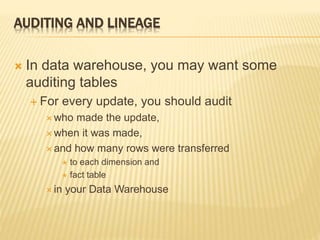
ļƒ’ In data warehouse, you may want some
auditing tables
ļƒ‰ For every update, you should audit
 who made the update,
 when it was made,
 and how many rows were transferred
ļƒ— to each dimension and
ļƒ— fact table
 in your Data Warehouse
AUDITING AND LINEAGE
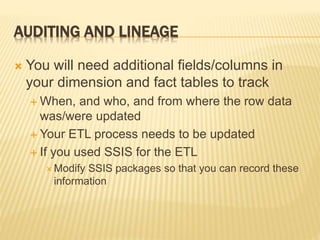
ļƒ’ You will need additional fields/columns in
your dimension and fact tables to track
ļƒ‰ When, and who, and from where the row data
was/were updated
ļƒ‰ Your ETL process needs to be updated
ļƒ‰ If you used SSIS for the ETL
 Modify SSIS packages so that you can record these
information
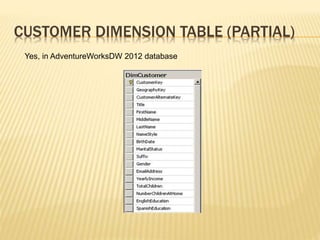
CUSTOMER DIMENSION TABLE (PARTIAL)
Yes, in AdventureWorksDW 2012 database
POSSIBLE ATTRIBUTES FOR CUSTOMER DIMENSION
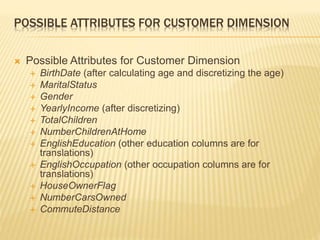
ļƒ’ Possible Attributes for Customer Dimension
ļƒ‰ BirthDate (after calculating age and discretizing the age)
ļƒ‰ MaritalStatus
ļƒ‰ Gender
ļƒ‰ YearlyIncome (after discretizing)
ļƒ‰ TotalChildren
ļƒ‰ NumberChildrenAtHome
ļƒ‰ EnglishEducation (other education columns are for
translations)
ļƒ‰ EnglishOccupation (other occupation columns are for
translations)
ļƒ‰ HouseOwnerFlag
ļƒ‰ NumberCarsOwned
ļƒ‰ CommuteDistance
DATE DIMENSION IN ADVENTUREWORKSDW
DATE DIMENSION ATTRIBUTES
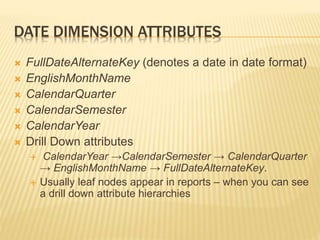
ļƒ’ FullDateAlternateKey (denotes a date in date format)
ļƒ’ EnglishMonthName
ļƒ’ CalendarQuarter
ļƒ’ CalendarSemester
ļƒ’ CalendarYear
ļƒ’ Drill Down attributes
ļƒ‰ CalendarYear →CalendarSemester → CalendarQuarter
→ EnglishMonthName → FullDateAlternateKey.
ļƒ‰ Usually leaf nodes appear in reports – when you can see
a drill down attribute hierarchies
DRILL DOWN HIERARCHIES
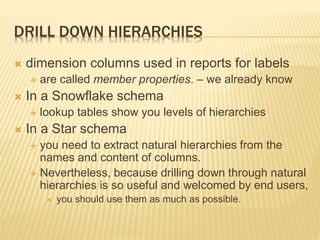
ļƒ’ dimension columns used in reports for labels
ļƒ‰ are called member properties. – we already know
ļƒ’ In a Snowflake schema
ļƒ‰ lookup tables show you levels of hierarchies
ļƒ’ In a Star schema
ļƒ‰ you need to extract natural hierarchies from the
names and content of columns.
ļƒ‰ Nevertheless, because drilling down through natural
hierarchies is so useful and welcomed by end users,
 you should use them as much as possible.
SLOWLY CHANGING DIMENSIONS
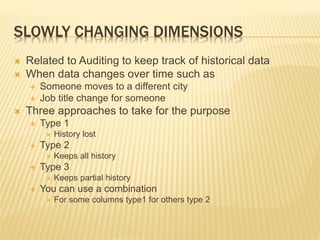
ļƒ’ Related to Auditing to keep track of historical data
ļƒ’ When data changes over time such as
ļƒ‰ Someone moves to a different city
ļƒ‰ Job title change for someone
ļƒ’ Three approaches to take for the purpose
ļƒ‰ Type 1
 History lost
ļƒ‰ Type 2
 Keeps all history
ļƒ‰ Type 3
 Keeps partial history
ļƒ‰ You can use a combination
 For some columns type1 for others type 2
TYPE 1
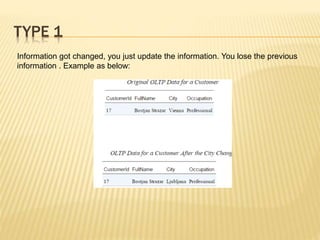
Information got changed, you just update the information. You lose the previous
information . Example as below:
TYPE 2 SCD
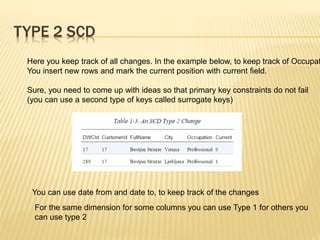
Here you keep track of all changes. In the example below, to keep track of Occupat
You insert new rows and mark the current position with current field.
Sure, you need to come up with ideas so that primary key constraints do not fail
(you can use a second type of keys called surrogate keys)
You can use date from and date to, to keep track of the changes
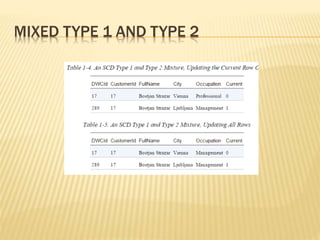
For the same dimension for some columns you can use Type 1 for others you
can use type 2
MIXED TYPE 1 AND TYPE 2
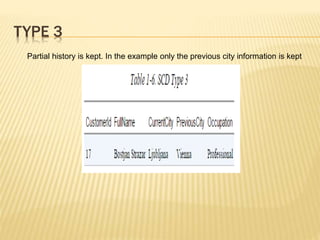
TYPE 3
Partial history is kept. In the example only the previous city information is kept
THANK YOU FOR BEING WITH US
ļƒ’ That’s the end of Dimension Table Design
ļƒ’ I may come again with a training video on it
ļƒ’ You will see some slides on Fact Table
Design after this slide
ļƒ‰ I will make another presentation document on
that topic
OUR SERVICES
ļƒ’ Free Training and Educational Services
ļƒ‰ Training and Education in Bangla:
 Bangla.SaLearningSchool.com
ļƒ‰ Training and Education in English:
 www.SaLearningSchool.com
 English.SaLearningSchool.com
 http://sitestree.com
ļƒ‰ Ask a question and get answers:
 Ask.JustEtc.net
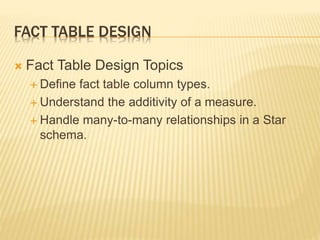
FACT TABLE DESIGN
ļƒ’ Fact Table Design Topics
ļƒ‰ Define fact table column types.
ļƒ‰ Understand the additivity of a measure.
ļƒ‰ Handle many-to-many relationships in a Star
schema.
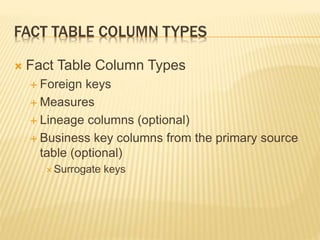
FACT TABLE COLUMN TYPES
ļƒ’ Fact Table Column Types
ļƒ‰ Foreign keys
ļƒ‰ Measures
ļƒ‰ Lineage columns (optional)
ļƒ‰ Business key columns from the primary source
table (optional)
 Surrogate keys
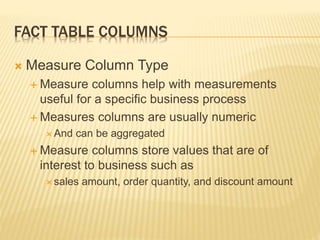
FACT TABLE COLUMNS
ļƒ’ Measure Column Type
ļƒ‰ Measure columns help with measurements
useful for a specific business process
ļƒ‰ Measures columns are usually numeric
 And can be aggregated
ļƒ‰ Measure columns store values that are of
interest to business such as
 sales amount, order quantity, and discount amount
FACT TABLE COLUMNS
ļƒ’ Foreign Key – Column Type
ļƒ‰ These are the columns as coming from
Dimension Tables
DESIGNING FACT TABLES
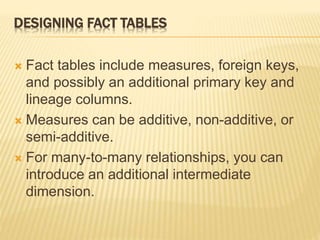
ļƒ’ Fact tables include measures, foreign keys,
and possibly an additional primary key and
lineage columns.
ļƒ’ Measures can be additive, non-additive, or
semi-additive.
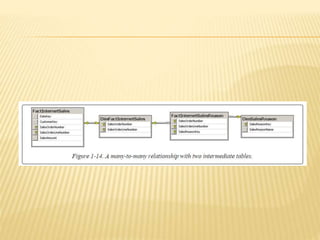
ļƒ’ For many-to-many relationships, you can
introduce an additional intermediate
dimension.
ļƒ’ Surrogate Key
ļƒ‰ Usually will comes from the primary dimension
table for the current fact table
ļƒ‰ Usually one or two columns in a fact table are
surrogate keys
ļƒ‰
SURROGATE KEYS FOR FACT TABLES
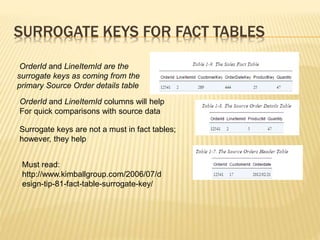
OrderId and LineItemId are the
surrogate keys as coming from the
primary Source Order details table
OrderId and LineItemId columns will help
For quick comparisons with source data
Surrogate keys are not a must in fact tables;
however, they help
Must read:
http://www.kimballgroup.com/2006/07/d
esign-tip-81-fact-table-surrogate-key/
LINEAGE COLUMNS IN FACT TABLES
ļƒ’ Lineage columns –
ļƒ‰ Just as with dimension tables, these are strictly
for auditing purposes.
ļƒ’ References:
ļƒ‰ https://upsearch.com/implementing-a-data-
warehouse-fact-tables/
ADDITIVITY OF MEASURES
ļƒ’ The primary purpose of Data warehouse is reporting,
and forecasting ( and analysis in some cases)
ļƒ‰ Many times reports are aggregations such as sum or
avergae
 Example: sales by quarter, by region, by product type,
ļƒ’ Many reports are usually aggregation
ļƒ’ Hence, fact tables will have some columns to assist
with that measures and aggregation for reporting
ļƒ‰ These are the measures columns as we discussed
before
ļƒ’ The measures that you add will help in how you want
to do the measures and reporting
TYPES OF ADDITIVITY OF MEASURES
ļƒ’ Types of Additivity of Measures
ļƒ‰ additive measures
ļƒ‰ Semi-additive measures
ļƒ‰ non-additive measures
ļƒ’
ļƒ’ Additive
ļƒ‰ If a measure can be summed across all dimensions,
it’s referred to as an additive measure.
ļƒ’ Semi-additive
ļƒ‰ Sometimes, however, we can sum a measure across
all dimensions except for time such as account
balance
 We can’t sum the account balance across the time
dimension. We would need to do something like take the
average instead, or simply use the last value. Measures
like this are called semi-additive measures.
ļƒ’ Finally, some measures can’t ever be
summed. These are called non-additive
measures, and include measures like
discount percentages and prices
ADDITIVITY OF MEASURES IN SSAS
ļƒ’ SSAS has support for semi-additive and non-additive
measures
ļƒ’ The SSAS database model is called the Business
Intelligence Semantic Model (BISM). Compared to the
SQL Server database model, BISM includes much
additional metadata.
ļƒ’ SSAS has two types of storage:
ļƒ‰ dimensional and tabular.
ļƒ’ Tabular storage is quicker to develop, because it works
through tables like a data warehouse does.
ļƒ’ The dimensional model more properly represents a cube.
ļƒ’ However, the dimensional model includes even more
metadata than the tabular model.
ļƒ’ In BISM dimensional processing, SSAS
offers semi-additive aggregate functions out
of the box.
ļƒ’ For example, SSAS offers the LastNonEmpty
aggregate function, which properly uses the
SUM aggregate function across all
dimensions but time, and defines the last
known value as the aggregate over time.
ļƒ’ In the BISM tabular model, you use the Data
Analysis Expression (DAX) language. The
DAX language includes functions that let you
build semi-additive expressions quite quickly
as well.
ļƒ’ Fact tables
ļƒ‰ Collection of measurements on a specific
aspects of business
ļƒ‰ Measure columns
ļƒ‰ sales amount, order quantity, and discount
amount.
Data ware   dimension design

Data ware dimension design

  • 1.
    SOFTWARE/WEB/MOBILE/DATABASE ARCHITECT, ENGINEER,AND DEVELOPER TORONTO, CANADA HTTP://SAYED.JUSTETC.NET HTTP://WWW.JUSTETC.NET Sayed Ahmed Logical Design of a Data Warehouse
  • 2.
    OUR SERVICES ļƒ’ FreeTraining and Educational Services ļƒ‰ Training and Education in Bangla:  Bangla.SaLearningSchool.com ļƒ‰ Training and Education in English:  www.SaLearningSchool.com  English.SaLearningSchool.com  http://sitestree.com ļƒ‰ Ask a question and get answers:  Ask.JustEtc.net
  • 3.
    DESIGNING DIMENSIONS ļƒ’ DimensionField/Column Types ļƒ‰ Yes, when designing dimension tables, you need to define the following types of columns/fields to facilitate with reporting and analysis  Keys : Used to identify entities  Name columns: Used for human names of entities  Attributes: Used for pivoting in analyses  Member properties: Used for labels in a report  Lineage columns: Used for auditing, and never exposed to end users
  • 4.
    DESIGNING DIMENSIONS ļƒ’ Youneed to design your dimensions keeping analysis in mind ļƒ’ Yes, reporting need to be in your mind for sure ļƒ’ For analysis, we use ļƒ‰ Pivot Table ļƒ‰ Pivot Graph ļƒ’ For Dimensions ļƒ‰ The fields used as for pivoting are called  Attributes ļƒ‰ Not all columns in a dimension are attributes  in OLTP tables, all columns are attributes ļƒ‰ Attributes:  The fields based on what ļƒ— analysis are done ļƒ‰ In previous slide  you saw the different types of columns in a dimension table
  • 5.
    DIMENSION ATTRIBUTES ļƒ’ Attributes ļƒ‰For pivoting  discrete attributes with a small number of distinct values are the most appropriate ļƒ‰ Attribute values should not be continuous ļƒ‰ Keys are not good candidates for pivoting and analysis; and so, not great for attributes ļƒ‰ To make continuous column for pivoting  Convert/utilize it as a small set of discrete values
  • 6.
    ON DIMENSION ATTRIBUTES ļƒ’SQL Server Analysis Service (SSAS) can discretize continuous columns to achieve discrete attributes ļƒ‰ Not always great (the automated process)  you need to keep business perspectives as well  Such as, 1 year difference in age can be significant at young ages  though may not matter when the age is 60 (depends on the business perspective as well)  Considering, we are using age for pivoting ļƒ‰ Age and Income are not good candidates for auto discretize
  • 7.
    NAMING COLUMNS, ANDMEMBER PROPERTIES ļƒ’ Naming columns (another dimension column type) to identify the entity ļƒ‰ Not good for pivoting or keys ļƒ‰ Such as Address, city, or phones ļƒ’ Member Properties ļƒ‰ Columns used in reports as labels only, not for pivoting, are called member properties. ļƒ’ Can include translations i.e. Naming/member properties
  • 8.
    LINEAGE AND AUDITING ļƒ’Lineage and auditing columns ļƒ‰ Used for auditing data ļƒ‰ Never exposed to the users
  • 9.
    AUDITING AND LINEAGE ļƒ’In data warehouse, you may want some auditing tables ļƒ‰ For every update, you should audit  who made the update,  when it was made,  and how many rows were transferred ļƒ— to each dimension and ļƒ— fact table  in your Data Warehouse
  • 10.
    AUDITING AND LINEAGE ļƒ’You will need additional fields/columns in your dimension and fact tables to track ļƒ‰ When, and who, and from where the row data was/were updated ļƒ‰ Your ETL process needs to be updated ļƒ‰ If you used SSIS for the ETL  Modify SSIS packages so that you can record these information
  • 11.
    CUSTOMER DIMENSION TABLE(PARTIAL) Yes, in AdventureWorksDW 2012 database
  • 12.
    POSSIBLE ATTRIBUTES FORCUSTOMER DIMENSION ļƒ’ Possible Attributes for Customer Dimension ļƒ‰ BirthDate (after calculating age and discretizing the age) ļƒ‰ MaritalStatus ļƒ‰ Gender ļƒ‰ YearlyIncome (after discretizing) ļƒ‰ TotalChildren ļƒ‰ NumberChildrenAtHome ļƒ‰ EnglishEducation (other education columns are for translations) ļƒ‰ EnglishOccupation (other occupation columns are for translations) ļƒ‰ HouseOwnerFlag ļƒ‰ NumberCarsOwned ļƒ‰ CommuteDistance
  • 13.
    DATE DIMENSION INADVENTUREWORKSDW
  • 14.
    DATE DIMENSION ATTRIBUTES ļƒ’FullDateAlternateKey (denotes a date in date format) ļƒ’ EnglishMonthName ļƒ’ CalendarQuarter ļƒ’ CalendarSemester ļƒ’ CalendarYear ļƒ’ Drill Down attributes ļƒ‰ CalendarYear →CalendarSemester → CalendarQuarter → EnglishMonthName → FullDateAlternateKey. ļƒ‰ Usually leaf nodes appear in reports – when you can see a drill down attribute hierarchies
  • 15.
    DRILL DOWN HIERARCHIES ļƒ’dimension columns used in reports for labels ļƒ‰ are called member properties. – we already know ļƒ’ In a Snowflake schema ļƒ‰ lookup tables show you levels of hierarchies ļƒ’ In a Star schema ļƒ‰ you need to extract natural hierarchies from the names and content of columns. ļƒ‰ Nevertheless, because drilling down through natural hierarchies is so useful and welcomed by end users,  you should use them as much as possible.
  • 16.
    SLOWLY CHANGING DIMENSIONS ļƒ’Related to Auditing to keep track of historical data ļƒ’ When data changes over time such as ļƒ‰ Someone moves to a different city ļƒ‰ Job title change for someone ļƒ’ Three approaches to take for the purpose ļƒ‰ Type 1  History lost ļƒ‰ Type 2  Keeps all history ļƒ‰ Type 3  Keeps partial history ļƒ‰ You can use a combination  For some columns type1 for others type 2
  • 17.
    TYPE 1 Information gotchanged, you just update the information. You lose the previous information . Example as below:
  • 18.
    TYPE 2 SCD Hereyou keep track of all changes. In the example below, to keep track of Occupat You insert new rows and mark the current position with current field. Sure, you need to come up with ideas so that primary key constraints do not fail (you can use a second type of keys called surrogate keys) You can use date from and date to, to keep track of the changes For the same dimension for some columns you can use Type 1 for others you can use type 2
  • 19.
    MIXED TYPE 1AND TYPE 2
  • 20.
    TYPE 3 Partial historyis kept. In the example only the previous city information is kept
  • 21.
    THANK YOU FORBEING WITH US ļƒ’ That’s the end of Dimension Table Design ļƒ’ I may come again with a training video on it ļƒ’ You will see some slides on Fact Table Design after this slide ļƒ‰ I will make another presentation document on that topic
  • 22.
    OUR SERVICES ļƒ’ FreeTraining and Educational Services ļƒ‰ Training and Education in Bangla:  Bangla.SaLearningSchool.com ļƒ‰ Training and Education in English:  www.SaLearningSchool.com  English.SaLearningSchool.com  http://sitestree.com ļƒ‰ Ask a question and get answers:  Ask.JustEtc.net
  • 23.
    FACT TABLE DESIGN ļƒ’Fact Table Design Topics ļƒ‰ Define fact table column types. ļƒ‰ Understand the additivity of a measure. ļƒ‰ Handle many-to-many relationships in a Star schema.
  • 24.
    FACT TABLE COLUMNTYPES ļƒ’ Fact Table Column Types ļƒ‰ Foreign keys ļƒ‰ Measures ļƒ‰ Lineage columns (optional) ļƒ‰ Business key columns from the primary source table (optional)  Surrogate keys
  • 25.
    FACT TABLE COLUMNS ļƒ’Measure Column Type ļƒ‰ Measure columns help with measurements useful for a specific business process ļƒ‰ Measures columns are usually numeric  And can be aggregated ļƒ‰ Measure columns store values that are of interest to business such as  sales amount, order quantity, and discount amount
  • 26.
    FACT TABLE COLUMNS ļƒ’Foreign Key – Column Type ļƒ‰ These are the columns as coming from Dimension Tables
  • 27.
    DESIGNING FACT TABLES ļƒ’Fact tables include measures, foreign keys, and possibly an additional primary key and lineage columns. ļƒ’ Measures can be additive, non-additive, or semi-additive. ļƒ’ For many-to-many relationships, you can introduce an additional intermediate dimension.
  • 28.
    ļƒ’ Surrogate Key ļƒ‰Usually will comes from the primary dimension table for the current fact table ļƒ‰ Usually one or two columns in a fact table are surrogate keys ļƒ‰
  • 29.
    SURROGATE KEYS FORFACT TABLES OrderId and LineItemId are the surrogate keys as coming from the primary Source Order details table OrderId and LineItemId columns will help For quick comparisons with source data Surrogate keys are not a must in fact tables; however, they help Must read: http://www.kimballgroup.com/2006/07/d esign-tip-81-fact-table-surrogate-key/
  • 30.
    LINEAGE COLUMNS INFACT TABLES ļƒ’ Lineage columns – ļƒ‰ Just as with dimension tables, these are strictly for auditing purposes. ļƒ’ References: ļƒ‰ https://upsearch.com/implementing-a-data- warehouse-fact-tables/
  • 31.
    ADDITIVITY OF MEASURES ļƒ’The primary purpose of Data warehouse is reporting, and forecasting ( and analysis in some cases) ļƒ‰ Many times reports are aggregations such as sum or avergae  Example: sales by quarter, by region, by product type, ļƒ’ Many reports are usually aggregation ļƒ’ Hence, fact tables will have some columns to assist with that measures and aggregation for reporting ļƒ‰ These are the measures columns as we discussed before ļƒ’ The measures that you add will help in how you want to do the measures and reporting
  • 32.
    TYPES OF ADDITIVITYOF MEASURES ļƒ’ Types of Additivity of Measures ļƒ‰ additive measures ļƒ‰ Semi-additive measures ļƒ‰ non-additive measures ļƒ’
  • 33.
    ļƒ’ Additive ļƒ‰ Ifa measure can be summed across all dimensions, it’s referred to as an additive measure. ļƒ’ Semi-additive ļƒ‰ Sometimes, however, we can sum a measure across all dimensions except for time such as account balance  We can’t sum the account balance across the time dimension. We would need to do something like take the average instead, or simply use the last value. Measures like this are called semi-additive measures.
  • 34.
    ļƒ’ Finally, somemeasures can’t ever be summed. These are called non-additive measures, and include measures like discount percentages and prices
  • 35.
    ADDITIVITY OF MEASURESIN SSAS ļƒ’ SSAS has support for semi-additive and non-additive measures ļƒ’ The SSAS database model is called the Business Intelligence Semantic Model (BISM). Compared to the SQL Server database model, BISM includes much additional metadata. ļƒ’ SSAS has two types of storage: ļƒ‰ dimensional and tabular. ļƒ’ Tabular storage is quicker to develop, because it works through tables like a data warehouse does. ļƒ’ The dimensional model more properly represents a cube. ļƒ’ However, the dimensional model includes even more metadata than the tabular model.
  • 36.
    ļƒ’ In BISMdimensional processing, SSAS offers semi-additive aggregate functions out of the box. ļƒ’ For example, SSAS offers the LastNonEmpty aggregate function, which properly uses the SUM aggregate function across all dimensions but time, and defines the last known value as the aggregate over time.
  • 37.
    ļƒ’ In theBISM tabular model, you use the Data Analysis Expression (DAX) language. The DAX language includes functions that let you build semi-additive expressions quite quickly as well.
  • 38.
    ļƒ’ Fact tables ļƒ‰Collection of measurements on a specific aspects of business ļƒ‰ Measure columns ļƒ‰ sales amount, order quantity, and discount amount.