Building Data WareHouse by
Inmon

Chapter 12: The Really Large Data Warehouse

http://it-slideshares.blogspot.com/
Why   the Rapid Growth?
The Impact of Large Volumes of Data
Disk Storage in the Face of Data Separation
Moving Data from One Environment to
 Another
Inverting the Data Warehouse
Total Cost
Maximum Capacity
Summary
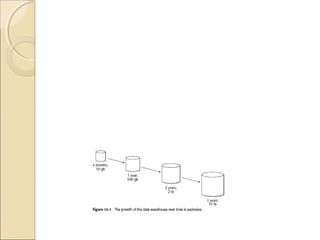
Why the Rapid Growth?
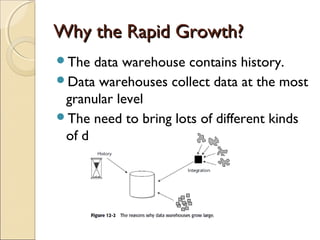
The  data warehouse contains history.
Data warehouses collect data at the most
 granular level
The need to bring lots of different kinds
 of data together
The Impact of Large Volumes of Data
    Basic   Data-Management Activities
     ◦ As data volumes grow large, normal database
       functions require increasingly larger amounts
       of resources.
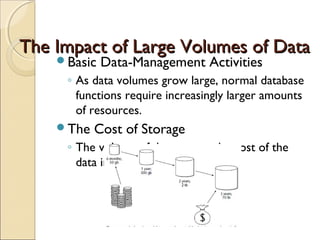
    The   Cost of Storage
     ◦ The volume of data grows, the cost of the
       data increases dramatically
The Impact of Large Volumes of Data
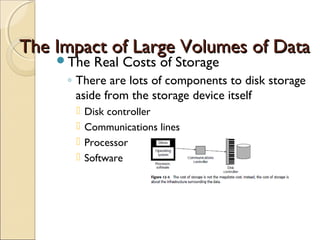
    The    Real Costs of Storage
     ◦ There are lots of components to disk storage
       aside from the storage device itself
         Disk controller
         Communications lines
         Processor
         Software
The Impact of Large Volumes of Data
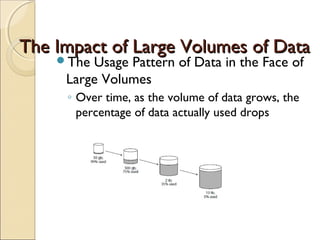
    The Usage Pattern of Data in the Face of
     Large Volumes
     ◦ Over time, as the volume of data grows, the
       percentage of data actually used drops
The Impact of Large Volumes of Data
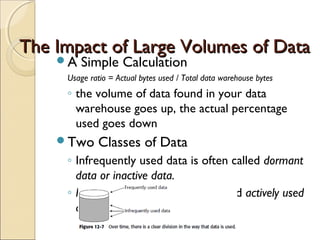
    A   Simple Calculation
     Usage ratio = Actual bytes used / Total data warehouse bytes
     ◦ the volume of data found in your data
       warehouse goes up, the actual percentage
       used goes down
    Two     Classes of Data
     ◦ Infrequently used data is often called dormant
       data or inactive data.
     ◦ Frequently used data is often called actively used
       data.
The Impact of Large Volumes of Data
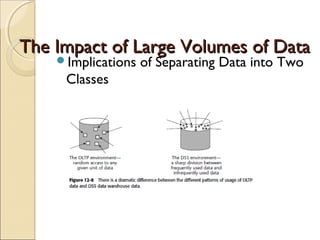
    Implications   of Separating Data into Two
     Classes
Disk Storage
in the Face of Data Separation
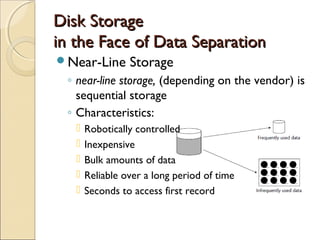
Near-Line       Storage
 ◦ near-line storage, (depending on the vendor) is
   sequential storage
 ◦ Characteristics:
      Robotically controlled
      Inexpensive
      Bulk amounts of data
      Reliable over a long period of time
      Seconds to access first record
Disk Storage
in the Face of Data Separation
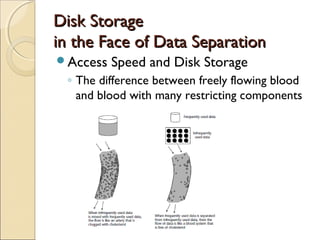
Access   Speed and Disk Storage
 ◦ The difference between freely flowing blood
   and blood with many restricting components
Disk Storage
in the Face of Data Separation
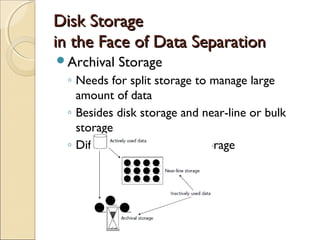
Archival   Storage
 ◦ Needs for split storage to manage large
   amount of data
 ◦ Besides disk storage and near-line or bulk
   storage
 ◦ Different with near-line storage
Disk Storage
in the Face of Data Separation
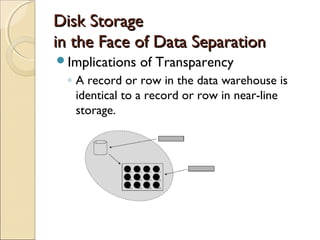
Implications   of Transparency
 ◦ A record or row in the data warehouse is
   identical to a record or row in near-line
   storage.
Moving Data from
One Environment to Another
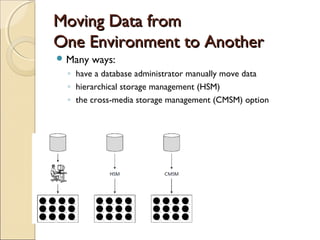
 Many   ways:
  ◦ have a database administrator manually move data
  ◦ hierarchical storage management (HSM)
  ◦ the cross-media storage management (CMSM) option
Moving Data from
    One Environment to Another
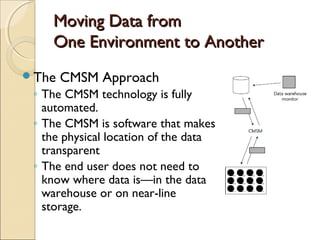
The   CMSM Approach
 ◦ The CMSM technology is fully
   automated.
 ◦ The CMSM is software that makes
   the physical location of the data
   transparent
 ◦ The end user does not need to
   know where data is—in the data
   warehouse or on near-line
   storage.
Moving Data from
One Environment to Another
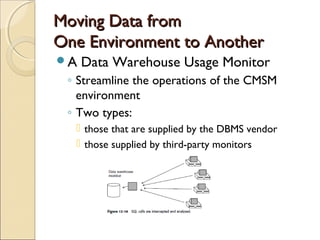
A   Data Warehouse Usage Monitor
 ◦ Streamline the operations of the CMSM
   environment
 ◦ Two types:
   those that are supplied by the DBMS vendor
   those supplied by third-party monitors
Inverting the Data Warehouse
inverteddata warehouse: Consider a
 normal data warehouse.
To build a data warehouse:
 ◦ Normal way: put data first into disk storage
    (after the data ages) near-line or archival
   storage
 ◦ Alternative way: first enter data into near-line
   storage (not disk storage)  data is “staged”
   from the near-line environment to the disk
   environment (to accessed and analyzed) 
   (after over) returned to near-line storage
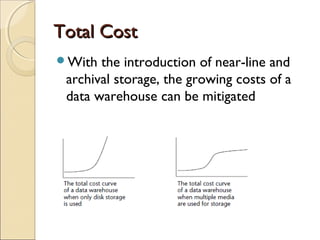
Total Cost
With  the introduction of near-line and
 archival storage, the growing costs of a
 data warehouse can be mitigated
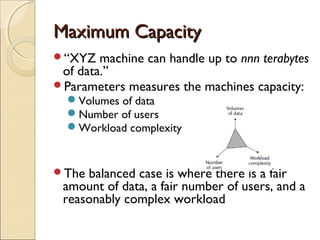
Maximum Capacity
“XYZ   machine can handle up to nnn terabytes
 of data.”
Parameters measures the machines capacity:
  Volumes of data
  Number of users
  Workload complexity


The balanced case is where there is a fair
 amount of data, a fair number of users, and a
 reasonably complex workload
Summary
Data  warehouses grow large explosively
The data inside the warehouse separates
 into one of two classes—frequently used
 data or infrequently used data
Without near-line and/or archival
 storage, the costs of the data
 warehouseskyrocket as the data
 warehouse grows large
http://it-slideshares.blogspot.com/

Lecture 12 The Really Large Data Warehouse

  • 1.
    Building Data WareHouseby Inmon Chapter 12: The Really Large Data Warehouse http://it-slideshares.blogspot.com/
  • 2.
    Why the Rapid Growth? The Impact of Large Volumes of Data Disk Storage in the Face of Data Separation Moving Data from One Environment to Another Inverting the Data Warehouse Total Cost Maximum Capacity Summary
  • 4.
    Why the RapidGrowth? The data warehouse contains history. Data warehouses collect data at the most granular level The need to bring lots of different kinds of data together
  • 5.
    The Impact ofLarge Volumes of Data Basic Data-Management Activities ◦ As data volumes grow large, normal database functions require increasingly larger amounts of resources. The Cost of Storage ◦ The volume of data grows, the cost of the data increases dramatically
  • 6.
    The Impact ofLarge Volumes of Data The Real Costs of Storage ◦ There are lots of components to disk storage aside from the storage device itself  Disk controller  Communications lines  Processor  Software
  • 7.
    The Impact ofLarge Volumes of Data The Usage Pattern of Data in the Face of Large Volumes ◦ Over time, as the volume of data grows, the percentage of data actually used drops
  • 8.
    The Impact ofLarge Volumes of Data A Simple Calculation Usage ratio = Actual bytes used / Total data warehouse bytes ◦ the volume of data found in your data warehouse goes up, the actual percentage used goes down Two Classes of Data ◦ Infrequently used data is often called dormant data or inactive data. ◦ Frequently used data is often called actively used data.
  • 9.
    The Impact ofLarge Volumes of Data Implications of Separating Data into Two Classes
  • 10.
    Disk Storage in theFace of Data Separation Near-Line Storage ◦ near-line storage, (depending on the vendor) is sequential storage ◦ Characteristics:  Robotically controlled  Inexpensive  Bulk amounts of data  Reliable over a long period of time  Seconds to access first record
  • 11.
    Disk Storage in theFace of Data Separation Access Speed and Disk Storage ◦ The difference between freely flowing blood and blood with many restricting components
  • 12.
    Disk Storage in theFace of Data Separation Archival Storage ◦ Needs for split storage to manage large amount of data ◦ Besides disk storage and near-line or bulk storage ◦ Different with near-line storage
  • 13.
    Disk Storage in theFace of Data Separation Implications of Transparency ◦ A record or row in the data warehouse is identical to a record or row in near-line storage.
  • 14.
    Moving Data from OneEnvironment to Another  Many ways: ◦ have a database administrator manually move data ◦ hierarchical storage management (HSM) ◦ the cross-media storage management (CMSM) option
  • 15.
    Moving Data from One Environment to Another The CMSM Approach ◦ The CMSM technology is fully automated. ◦ The CMSM is software that makes the physical location of the data transparent ◦ The end user does not need to know where data is—in the data warehouse or on near-line storage.
  • 16.
    Moving Data from OneEnvironment to Another A Data Warehouse Usage Monitor ◦ Streamline the operations of the CMSM environment ◦ Two types:  those that are supplied by the DBMS vendor  those supplied by third-party monitors
  • 17.
    Inverting the DataWarehouse inverteddata warehouse: Consider a normal data warehouse. To build a data warehouse: ◦ Normal way: put data first into disk storage  (after the data ages) near-line or archival storage ◦ Alternative way: first enter data into near-line storage (not disk storage)  data is “staged” from the near-line environment to the disk environment (to accessed and analyzed)  (after over) returned to near-line storage
  • 18.
    Total Cost With the introduction of near-line and archival storage, the growing costs of a data warehouse can be mitigated
  • 19.
    Maximum Capacity “XYZ machine can handle up to nnn terabytes of data.” Parameters measures the machines capacity: Volumes of data Number of users Workload complexity The balanced case is where there is a fair amount of data, a fair number of users, and a reasonably complex workload
  • 20.
    Summary Data warehousesgrow large explosively The data inside the warehouse separates into one of two classes—frequently used data or infrequently used data Without near-line and/or archival storage, the costs of the data warehouseskyrocket as the data warehouse grows large http://it-slideshares.blogspot.com/

Editor's Notes

  • #5 Historical data _ Detailed data _ Diverse data = Lots of data
  • #11 Splitting data over multiple storage media based on frequency of usage
  • #13 Archival storage is very similar to near-line storage , except that in archival storage, the probability of access drops very low. To put the probability of access in perspective, consider the following simple chart: High performance disk storage Access a unit of data once a month Near-line storage Access 0.5 units of data every year Archival storage Access 0.1 units of data every decade. Near-line storage can be thought of as a logical extension of the data warehouse. Archival storage cannot be thought of as a logical extension.
  • #15 Options for Moving Data: ADVANTAGES Manual Very simple; available immediately; operates at the row level HSM Relatively simple; not too expensive; fully automated CMSM Fully automated; operates at the row level DISADVANTAGES Manual Prone to error; requires human interaction HSM Operates at the data set level CMSM Expensive; complex to implement and operate
  • #17 third-party monitors are much better because the monitors supplied by the DBMS vendors require far more resources than those supplied The Extension of the Data Warehouse across Different Storage Media: The data warehouse can grow to petabytes (equivalent to a quadrillion bytes) of data and can still be effective and still be managed.
  • #18 third-party monitors are much better because the monitors supplied by the DBMS vendors require far more resources than those supplied