Lecture -3
      on
Data structures
    Array
Array
Data structures are classified as either linear or nonlinear.
A data structure is said to be linear if its elements form a sequence or a linear
list.
There are two basic ways of representing such linear structures in memory.
One way is to have the linear relationship between the elements represented by
means of sequential memory locations. These linear structures are called
arrays.
The other way is to have the linear relationship between the elements
represented by means of pointers or links. These linear structures are called
linked lists.
Nonlinear structures are trees and graphs.
Linear Arrays
A linear array is a list of finite number n of homogeneous data elements such that :
a) The elements of the array are referenced respectively by an index set consisting
   of n consecutive numbers.
b) The elements of the array are stored respectively in successive memory
   locations.
The number n of elements is called the length or size of the array.

Three numbers define an array : lower bound, upper bound, size.
a. The lower bound is the smallest subscript you can use in the array (usually 0)
b. The upper bound is the largest subscript you can use in the array
c. The size / length of the array refers to the number of elements in the array , It
    can be computed as upper bound - lower bound + 1

Let, Array name is A then the elements of A is : a1,a2….. an
Or by the bracket notation A[1], A[2], A[3],…………., A[n]
The number k in A[k] is called a subscript and A[k] is called a subscripted variable.
Linear Arrays
Example :
A linear array DATA consisting of the name of six elements

             DATA
                              DATA[1] = 247
    1   247
                              DATA[2] = 56
    2   56
    3                         DATA[3] = 429
        429
    4   135                   DATA[4] = 135
    5   87                    DATA[5] = 87
    6
        156                   DATA[6] = 156
Linear Arrays
Example :
An automobile company uses an array AUTO to record the number of auto mobile
sold each year from 1932 through 1984.
AUTO[k] = Number of auto mobiles sold in the year K
LB = 1932
UB = 1984
Length = UB – LB+1 = 1984 – 1930+1 =55
Representation of linear array in memory
Let LA be a linear array in the memory of the computer. The memory of the
computer is a sequence of addressed locations.
           LA
1000
1001                       The computer does not need to keep track of the
1002                       address of every element of LA, but needs to keep
1003                       track only of the first element of LA, denoted by
1004
                                            Base(LA)
1005
                           Called the base address of LA. Using this address
                           Base(LA), the computer calculates the address of
                           any element of LA by the following formula :
                           LOC(LA[k]) = Base(LA) + w(K – lower bound)
                           Where w is the number of words per memory cell for
Fig : Computer memory      the array LA
Representation of linear array in memory
200
201                         Example :
                            An automobile company uses an array AUTO to record
202
                            the number of auto mobile sold each year from 1932
203              AUTO[1932]
                            through 1984. Suppose AUTO appears in memory as
204                         pictured in fig A . That is Base(AUTO) = 200, and w = 4
205                         words per memory cell for AUTO. Then,
206                         LOC(AUTO[1932]) = 200, LOC(AUTO[1933]) =204
207              AUTO[1933] LOC(AUTO[1934]) = 208
                            the address of the array element for the year K = 1965
208                         can be obtained by using :
209                         LOC(AUTO[1965]) = Base(AUTO) + w(1965 – lower
210              AUTO[1934] bound)
211                         =200+4(1965-1932)=332
212


      Fig : A
Traversing linear arrays
 Print the contents of each element of DATA or Count the number of
elements of DATA with a given property. This can be accomplished by
traversing DATA, That is, by accessing and processing (visiting) each
element of DATA exactly once.
      Algorithm 2.3: Given DATA is a linear array with lower bound LB and
upper bound UB . This algorithm traverses DATA applying an operation
PROCESS to each element of DATA.


              1.   Set K : = LB.
              2.   Repeat steps 3 and 4 while K<=UB:
              3.   Apply PROCESS to DATA[k]
              4.   Set K : = K+1.
              5.   Exit.
Traversing linear arrays
  Example :
  An automobile company uses an array AUTO to record the number of auto
  mobile sold each year from 1932 through 1984.
  a) Find the number NUM of years during which more than 300 automobiles
  were sold.
  b) Print each year and the number of automobiles sold in that year


1. Set NUM : = 0.
2. Repeat for K = 1932 to 1984:                1. Repeat for K = 1932 to 1984:
if AUTO[K]> 300, then : set NUM : = NUM+1      Write : K, AUTO[K]
3. Exit.                                       2. Exit.
Inserting and Deleting
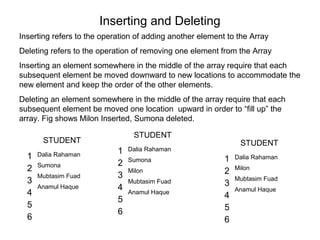
Inserting refers to the operation of adding another element to the Array
Deleting refers to the operation of removing one element from the Array
Inserting an element somewhere in the middle of the array require that each
subsequent element be moved downward to new locations to accommodate the
new element and keep the order of the other elements.
Deleting an element somewhere in the middle of the array require that each
subsequent element be moved one location upward in order to “fill up” the
array. Fig shows Milon Inserted, Sumona deleted.

                                 STUDENT
       STUDENT                                                  STUDENT
                            1   Dalia Rahaman
  1   Dalia Rahaman
                                Sumona                     1   Dalia Rahaman
      Sumona                2
  2                             Milon                      2   Milon
      Mubtasim Fuad         3                                  Mubtasim Fuad
  3                             Mubtasim Fuad              3
      Anamul Haque          4                                  Anamul Haque
  4                             Anamul Haque
                                                           4
                            5
  5                                                        5
                            6
  6                                                        6
Insertion

INSERTING AN ELEMENT INTO AN ARRAY:
Insert (LA, N, K, ITEM)
Here LA is linear array with N elements and K is a positive integer such that
K<=N.This algorithm inserts an element ITEM into the Kth position in LA.
ALGORITHM
Step 1.       [Initialize counter] Set J:=N
Step 2.       Repeat Steps 3 and 4] while J>=K
Step 3.       [Move Jth element downward] Set LA [J+1]: =LA [J]
Step 4.       [Decrease counter] Set J:=J-1
[End of step 2 loop]
Step 5        [Insert element] Set LA [K]: =ITEM
Step 6.       [Reset N] Set N:=N+1
Step 7.       Exit
Deletion
DELETING AN ELEMENT FROM A LINEAR ARRAY
Delete (LA, N, K, ITEM)
ALGORITHM
Step 1.       Set ITEM: = LA [K]
Step 2.       Repeat for J=K to N-1
[Move J+1st element upward] Set LA [J]: =LA [J+1]
[End of loop]
Step 3        [Reset the number N of elements in LA] Set N:=N-1
Step 4.       Exit
Bubble sort
Bubble sort is one of the easiest sort algorithms. It is called bubble sort because
it will 'bubble' values in your list to the top.

 Algorithm Bubble_Sort (DATA, N):

 1.  Repeat steps 2 and 3 for K = 1 to N-1.
 2.  Set PTR: =1.[Initializes pass pointer PTR]
 3.  Repeat while PTR<=N-K: [Executes pass]
 a)  If DATA[PTR]>DATA[PTR+1],then:
         TEMP := DATA[PTR], DATA[PTR] :=
     DATA[PTR+1],DATA[PTR+1] := temp            [End of if structure]
 b) Set PTR: =PTR+1
                   [End of inner loop]
                   [End of step 1 Outer loop]
 4. Exit
Sorting : Bubble sort

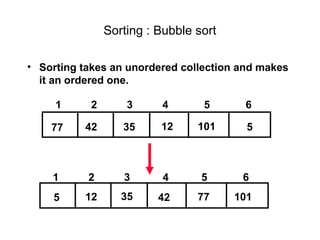
• Sorting takes an unordered collection and makes
  it an ordered one.

     1     2       3     4       5      6

    77    42      35     12     101      5


    1      2      3       4      5      6
    5     12      35     42     77     101
"Bubbling Up" the Largest Element

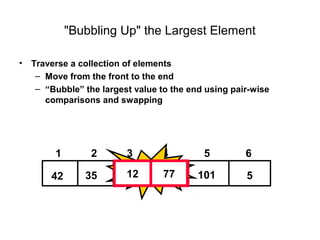
•   Traverse a collection of elements
     – Move from the front to the end
     – “Bubble” the largest value to the end using pair-wise
       comparisons and swapping


         1        2       3       4         5         6

        77      42       35       12       101        5
"Bubbling Up" the Largest Element

•   Traverse a collection of elements
     – Move from the front to the end
     – “Bubble” the largest value to the end using pair-wise
       comparisons and swapping


         1        2       3       4         5         6
        42Swap77                  12       101
        77   42          35                           5
"Bubbling Up" the Largest Element

•   Traverse a collection of elements
     – Move from the front to the end
     – “Bubble” the largest value to the end using pair-wise
       comparisons and swapping


         1        2       3       4         5         6

        42      77 Swap77
                 35    35         12       101        5
"Bubbling Up" the Largest Element

•   Traverse a collection of elements
     – Move from the front to the end
     – “Bubble” the largest value to the end using pair-wise
       comparisons and swapping


         1        2       3       4         5         6
                          12Swap12
                                77         101
        42      35       77                           5
"Bubbling Up" the Largest Element

•   Traverse a collection of elements
     – Move from the front to the end
     – “Bubble” the largest value to the end using pair-wise
       comparisons and swapping


         1        2       3       4         5         6

        42      35       12       77       101        5

                               No need to swap
"Bubbling Up" the Largest Element

•   Traverse a collection of elements
     – Move from the front to the end
     – “Bubble” the largest value to the end using pair-wise
       comparisons and swapping


         1        2       3       4         5         6

        42      35       12       77        5 Swap101
                                           101     5
"Bubbling Up" the Largest Element

•   Traverse a collection of elements
     – Move from the front to the end
     – “Bubble” the largest value to the end using pair-wise
       comparisons and swapping


         1        2       3       4         5         6

        42      35       12       77        5        101

              Largest value correctly placed
Putting It All Together
Items of Interest


• Notice that only the largest value is correctly
  placed
• All other values are still out of order
• So we need to repeat this process


     1       2      3      4        5       6

    42     35      12      77       5      101

         Largest value correctly placed
Repeat “Bubble Up” How Many Times?

• If we have N elements…

• And if each time we bubble an element, we
  place it in its correct location…

• Then we repeat the “bubble up” process N – 1
  times.

• This guarantees we’ll correctly
  place all N elements.
“Bubbling” All the Elements


       1     2      3     4       5       6
      42    35     12     77      5      101
       1     2      3     4       5       6
      35    12     42     5      77      101
       1     2      3     4       5       6
N-1


      12     35     5     42     77      101
       1     2      3     4       5       6
      12     5      35    42     77      101
      1      2      3     4       5       6
      5      12     35    42     77      101
Reducing the Number of Comparisons

 1    2     3    4      5      6
77   42    35    12    101    5
 1    2     3    4      5      6
42   35    12    77     5     101
 1    2     3    4      5      6
35   12    42    5     77     101
 1   2     3     4      5      6
12   35    5     42    77     101
 1   2     3     4      5      6
12   5     35    42    77     101
Summary

• “Bubble Up” algorithm will move largest value to
  its correct location (to the right)
• Repeat “Bubble Up” until all elements are
  correctly placed:
   – Maximum of N-1 times
   – Can finish early if no swapping occurs
• We reduce the number of elements we compare
  each time one is correctly placed
Complexity of the bubble sort algorithm

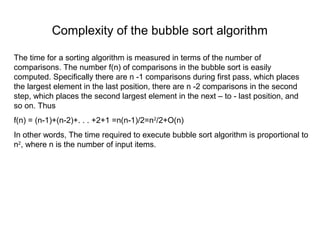
The time for a sorting algorithm is measured in terms of the number of
comparisons. The number f(n) of comparisons in the bubble sort is easily
computed. Specifically there are n -1 comparisons during first pass, which places
the largest element in the last position, there are n -2 comparisons in the second
step, which places the second largest element in the next – to - last position, and
so on. Thus
f(n) = (n-1)+(n-2)+. . . +2+1 =n(n-1)/2=n2/2+O(n)
In other words, The time required to execute bubble sort algorithm is proportional to
n2, where n is the number of input items.
Selection Sort

•   SelectionSort(A,N)

    for i:=1 to N-1 do

       for j:=i+1 to N-1 do

        if A[i] > A[j] then
                  temp:=A[i]
                  A[i] := A[j]
                  A[j] := temp
Insertion Sort:

•   Insertionsort(A,N)

     for j:=2 to N
        key:=A[j]
        i:=j-1

       while i>0 and A[i] > key do
                 A[i]:=A[i+1]
                 i--
       A[i+1]:=key

Data structure lecture 3

  • 1.
    Lecture -3 on Data structures Array
  • 2.
    Array Data structures areclassified as either linear or nonlinear. A data structure is said to be linear if its elements form a sequence or a linear list. There are two basic ways of representing such linear structures in memory. One way is to have the linear relationship between the elements represented by means of sequential memory locations. These linear structures are called arrays. The other way is to have the linear relationship between the elements represented by means of pointers or links. These linear structures are called linked lists. Nonlinear structures are trees and graphs.
  • 3.
    Linear Arrays A lineararray is a list of finite number n of homogeneous data elements such that : a) The elements of the array are referenced respectively by an index set consisting of n consecutive numbers. b) The elements of the array are stored respectively in successive memory locations. The number n of elements is called the length or size of the array. Three numbers define an array : lower bound, upper bound, size. a. The lower bound is the smallest subscript you can use in the array (usually 0) b. The upper bound is the largest subscript you can use in the array c. The size / length of the array refers to the number of elements in the array , It can be computed as upper bound - lower bound + 1 Let, Array name is A then the elements of A is : a1,a2….. an Or by the bracket notation A[1], A[2], A[3],…………., A[n] The number k in A[k] is called a subscript and A[k] is called a subscripted variable.
  • 4.
    Linear Arrays Example : Alinear array DATA consisting of the name of six elements DATA DATA[1] = 247 1 247 DATA[2] = 56 2 56 3 DATA[3] = 429 429 4 135 DATA[4] = 135 5 87 DATA[5] = 87 6 156 DATA[6] = 156
  • 5.
    Linear Arrays Example : Anautomobile company uses an array AUTO to record the number of auto mobile sold each year from 1932 through 1984. AUTO[k] = Number of auto mobiles sold in the year K LB = 1932 UB = 1984 Length = UB – LB+1 = 1984 – 1930+1 =55
  • 6.
    Representation of lineararray in memory Let LA be a linear array in the memory of the computer. The memory of the computer is a sequence of addressed locations. LA 1000 1001 The computer does not need to keep track of the 1002 address of every element of LA, but needs to keep 1003 track only of the first element of LA, denoted by 1004 Base(LA) 1005 Called the base address of LA. Using this address Base(LA), the computer calculates the address of any element of LA by the following formula : LOC(LA[k]) = Base(LA) + w(K – lower bound) Where w is the number of words per memory cell for Fig : Computer memory the array LA
  • 7.
    Representation of lineararray in memory 200 201 Example : An automobile company uses an array AUTO to record 202 the number of auto mobile sold each year from 1932 203 AUTO[1932] through 1984. Suppose AUTO appears in memory as 204 pictured in fig A . That is Base(AUTO) = 200, and w = 4 205 words per memory cell for AUTO. Then, 206 LOC(AUTO[1932]) = 200, LOC(AUTO[1933]) =204 207 AUTO[1933] LOC(AUTO[1934]) = 208 the address of the array element for the year K = 1965 208 can be obtained by using : 209 LOC(AUTO[1965]) = Base(AUTO) + w(1965 – lower 210 AUTO[1934] bound) 211 =200+4(1965-1932)=332 212 Fig : A
  • 8.
    Traversing linear arrays Print the contents of each element of DATA or Count the number of elements of DATA with a given property. This can be accomplished by traversing DATA, That is, by accessing and processing (visiting) each element of DATA exactly once. Algorithm 2.3: Given DATA is a linear array with lower bound LB and upper bound UB . This algorithm traverses DATA applying an operation PROCESS to each element of DATA. 1. Set K : = LB. 2. Repeat steps 3 and 4 while K<=UB: 3. Apply PROCESS to DATA[k] 4. Set K : = K+1. 5. Exit.
  • 9.
    Traversing linear arrays Example : An automobile company uses an array AUTO to record the number of auto mobile sold each year from 1932 through 1984. a) Find the number NUM of years during which more than 300 automobiles were sold. b) Print each year and the number of automobiles sold in that year 1. Set NUM : = 0. 2. Repeat for K = 1932 to 1984: 1. Repeat for K = 1932 to 1984: if AUTO[K]> 300, then : set NUM : = NUM+1 Write : K, AUTO[K] 3. Exit. 2. Exit.
  • 10.
    Inserting and Deleting Insertingrefers to the operation of adding another element to the Array Deleting refers to the operation of removing one element from the Array Inserting an element somewhere in the middle of the array require that each subsequent element be moved downward to new locations to accommodate the new element and keep the order of the other elements. Deleting an element somewhere in the middle of the array require that each subsequent element be moved one location upward in order to “fill up” the array. Fig shows Milon Inserted, Sumona deleted. STUDENT STUDENT STUDENT 1 Dalia Rahaman 1 Dalia Rahaman Sumona 1 Dalia Rahaman Sumona 2 2 Milon 2 Milon Mubtasim Fuad 3 Mubtasim Fuad 3 Mubtasim Fuad 3 Anamul Haque 4 Anamul Haque 4 Anamul Haque 4 5 5 5 6 6 6
  • 11.
    Insertion INSERTING AN ELEMENTINTO AN ARRAY: Insert (LA, N, K, ITEM) Here LA is linear array with N elements and K is a positive integer such that K<=N.This algorithm inserts an element ITEM into the Kth position in LA. ALGORITHM Step 1. [Initialize counter] Set J:=N Step 2. Repeat Steps 3 and 4] while J>=K Step 3. [Move Jth element downward] Set LA [J+1]: =LA [J] Step 4. [Decrease counter] Set J:=J-1 [End of step 2 loop] Step 5 [Insert element] Set LA [K]: =ITEM Step 6. [Reset N] Set N:=N+1 Step 7. Exit
  • 12.
    Deletion DELETING AN ELEMENTFROM A LINEAR ARRAY Delete (LA, N, K, ITEM) ALGORITHM Step 1. Set ITEM: = LA [K] Step 2. Repeat for J=K to N-1 [Move J+1st element upward] Set LA [J]: =LA [J+1] [End of loop] Step 3 [Reset the number N of elements in LA] Set N:=N-1 Step 4. Exit
  • 14.
    Bubble sort Bubble sortis one of the easiest sort algorithms. It is called bubble sort because it will 'bubble' values in your list to the top. Algorithm Bubble_Sort (DATA, N): 1. Repeat steps 2 and 3 for K = 1 to N-1. 2. Set PTR: =1.[Initializes pass pointer PTR] 3. Repeat while PTR<=N-K: [Executes pass] a) If DATA[PTR]>DATA[PTR+1],then: TEMP := DATA[PTR], DATA[PTR] := DATA[PTR+1],DATA[PTR+1] := temp [End of if structure] b) Set PTR: =PTR+1 [End of inner loop] [End of step 1 Outer loop] 4. Exit
  • 15.
    Sorting : Bubblesort • Sorting takes an unordered collection and makes it an ordered one. 1 2 3 4 5 6 77 42 35 12 101 5 1 2 3 4 5 6 5 12 35 42 77 101
  • 16.
    "Bubbling Up" theLargest Element • Traverse a collection of elements – Move from the front to the end – “Bubble” the largest value to the end using pair-wise comparisons and swapping 1 2 3 4 5 6 77 42 35 12 101 5
  • 17.
    "Bubbling Up" theLargest Element • Traverse a collection of elements – Move from the front to the end – “Bubble” the largest value to the end using pair-wise comparisons and swapping 1 2 3 4 5 6 42Swap77 12 101 77 42 35 5
  • 18.
    "Bubbling Up" theLargest Element • Traverse a collection of elements – Move from the front to the end – “Bubble” the largest value to the end using pair-wise comparisons and swapping 1 2 3 4 5 6 42 77 Swap77 35 35 12 101 5
  • 19.
    "Bubbling Up" theLargest Element • Traverse a collection of elements – Move from the front to the end – “Bubble” the largest value to the end using pair-wise comparisons and swapping 1 2 3 4 5 6 12Swap12 77 101 42 35 77 5
  • 20.
    "Bubbling Up" theLargest Element • Traverse a collection of elements – Move from the front to the end – “Bubble” the largest value to the end using pair-wise comparisons and swapping 1 2 3 4 5 6 42 35 12 77 101 5 No need to swap
  • 21.
    "Bubbling Up" theLargest Element • Traverse a collection of elements – Move from the front to the end – “Bubble” the largest value to the end using pair-wise comparisons and swapping 1 2 3 4 5 6 42 35 12 77 5 Swap101 101 5
  • 22.
    "Bubbling Up" theLargest Element • Traverse a collection of elements – Move from the front to the end – “Bubble” the largest value to the end using pair-wise comparisons and swapping 1 2 3 4 5 6 42 35 12 77 5 101 Largest value correctly placed
  • 23.
  • 24.
    Items of Interest •Notice that only the largest value is correctly placed • All other values are still out of order • So we need to repeat this process 1 2 3 4 5 6 42 35 12 77 5 101 Largest value correctly placed
  • 25.
    Repeat “Bubble Up”How Many Times? • If we have N elements… • And if each time we bubble an element, we place it in its correct location… • Then we repeat the “bubble up” process N – 1 times. • This guarantees we’ll correctly place all N elements.
  • 26.
    “Bubbling” All theElements 1 2 3 4 5 6 42 35 12 77 5 101 1 2 3 4 5 6 35 12 42 5 77 101 1 2 3 4 5 6 N-1 12 35 5 42 77 101 1 2 3 4 5 6 12 5 35 42 77 101 1 2 3 4 5 6 5 12 35 42 77 101
  • 27.
    Reducing the Numberof Comparisons 1 2 3 4 5 6 77 42 35 12 101 5 1 2 3 4 5 6 42 35 12 77 5 101 1 2 3 4 5 6 35 12 42 5 77 101 1 2 3 4 5 6 12 35 5 42 77 101 1 2 3 4 5 6 12 5 35 42 77 101
  • 28.
    Summary • “Bubble Up”algorithm will move largest value to its correct location (to the right) • Repeat “Bubble Up” until all elements are correctly placed: – Maximum of N-1 times – Can finish early if no swapping occurs • We reduce the number of elements we compare each time one is correctly placed
  • 29.
    Complexity of thebubble sort algorithm The time for a sorting algorithm is measured in terms of the number of comparisons. The number f(n) of comparisons in the bubble sort is easily computed. Specifically there are n -1 comparisons during first pass, which places the largest element in the last position, there are n -2 comparisons in the second step, which places the second largest element in the next – to - last position, and so on. Thus f(n) = (n-1)+(n-2)+. . . +2+1 =n(n-1)/2=n2/2+O(n) In other words, The time required to execute bubble sort algorithm is proportional to n2, where n is the number of input items.
  • 30.
    Selection Sort • SelectionSort(A,N) for i:=1 to N-1 do for j:=i+1 to N-1 do if A[i] > A[j] then temp:=A[i] A[i] := A[j] A[j] := temp
  • 31.
    Insertion Sort: • Insertionsort(A,N) for j:=2 to N key:=A[j] i:=j-1 while i>0 and A[i] > key do A[i]:=A[i+1] i-- A[i+1]:=key