MSc IT Part – I, Semester-1 Page No:- ________ 
DATA MINING Date:- ____________ 
Sonali. Parab. 
PRACTICAL NO: 1 
Aim:Build the data mining model structure and built the decision tree with proper decision 
nodes and infer at least five different types of reports. Implement Using RTool. 
Solution: 
Dataset Used :Iris 
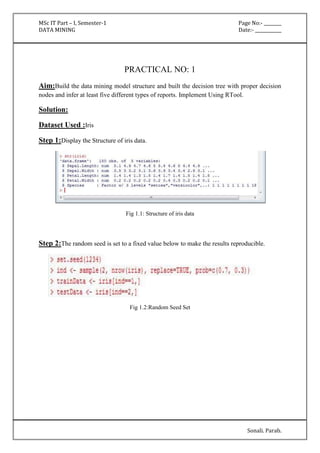
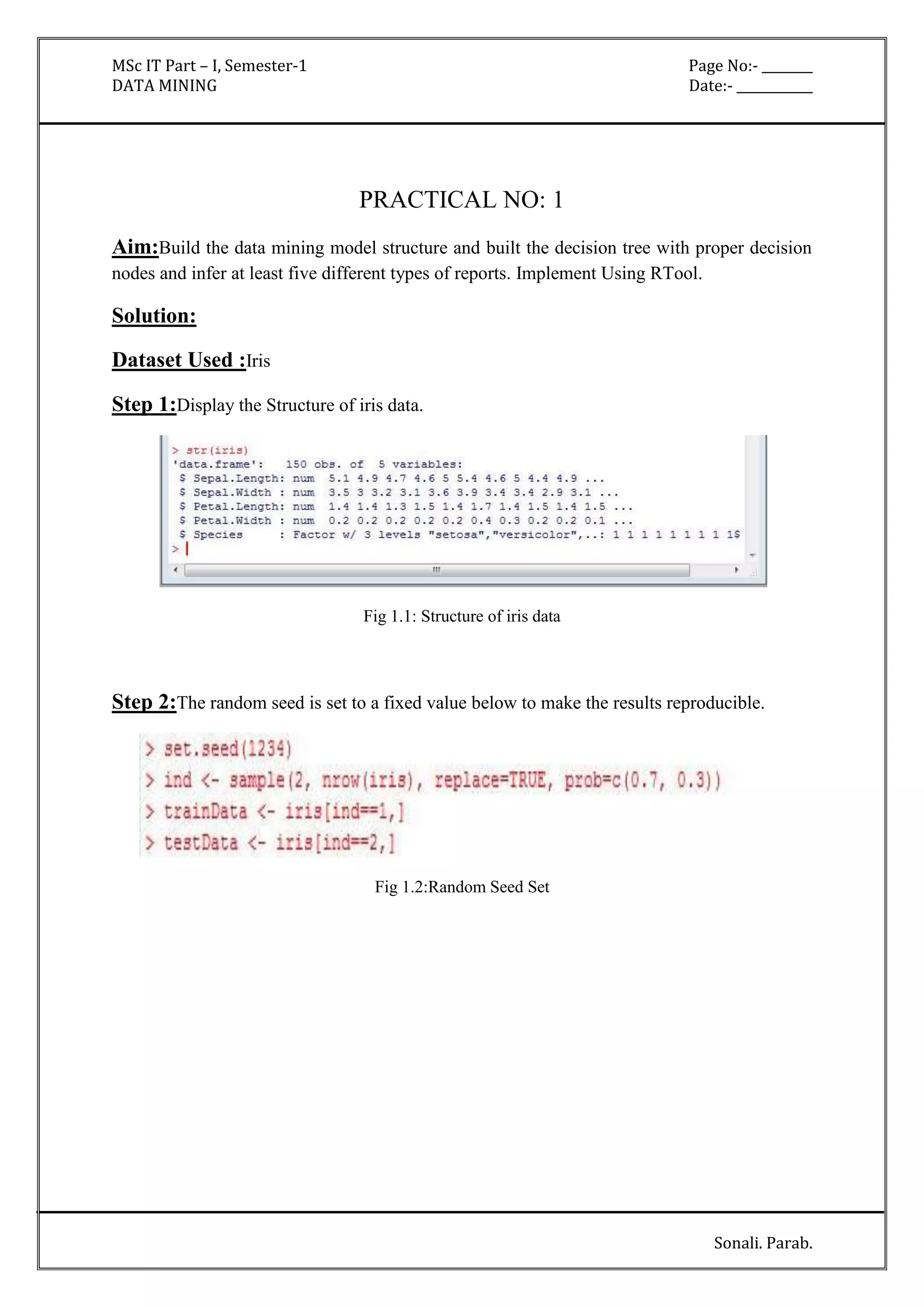
Step 1:Display the Structure of iris data. 
Fig 1.1: Structure of iris data 
Step 2:The random seed is set to a fixed value below to make the results reproducible. 
Fig 1.2:Random Seed Set
MSc IT Part – I, Semester-1 Page No:- ________ 
DATA MINING Date:- ____________ 
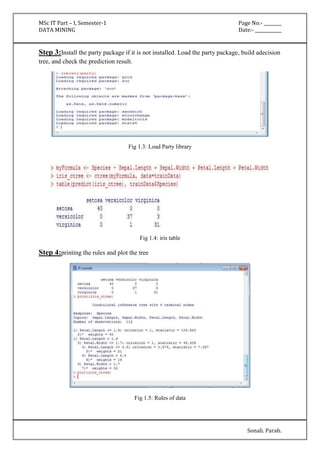
Step 3:Install the party package if it is not installed. Load the party package, build adecision 
tree, and check the prediction result. 
Sonali. Parab. 
Fig 1.3: Load Party library 
Fig 1.4: iris table 
Step 4:printing the rules and plot the tree 
Fig 1.5: Rules of data
MSc IT Part – I, Semester-1 Page No:- ________ 
DATA MINING Date:- ____________ 
Sonali. Parab. 
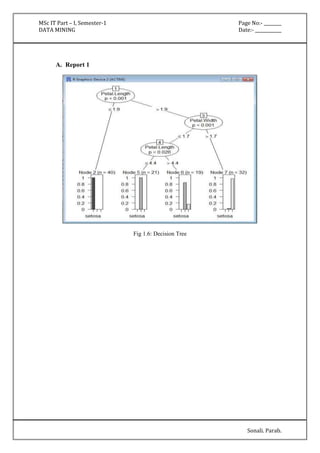
A. Report 1 
Fig 1.6: Decision Tree
MSc IT Part – I, Semester-1 Page No:- ________ 
DATA MINING Date:- ____________ 
Sonali. Parab. 
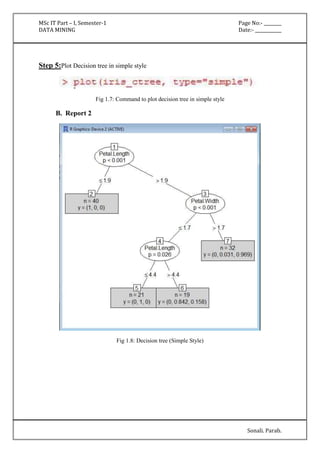
Step 5:Plot Decision tree in simple style 
Fig 1.7: Command to plot decision tree in simple style 
B. Report 2 
Fig 1.8: Decision tree (Simple Style)
MSc IT Part – I, Semester-1 Page No:- ________ 
DATA MINING Date:- ____________ 
Sonali. Parab. 
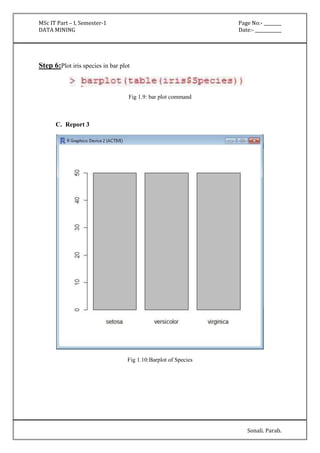
Step 6:Plot iris species in bar plot 
Fig 1.9: bar plot command 
C. Report 3 
Fig 1.10:Barplot of Species
MSc IT Part – I, Semester-1 Page No:- ________ 
DATA MINING Date:- ____________ 
Sonali. Parab. 
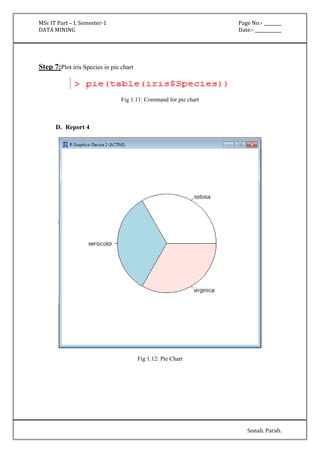
Step 7:Plot iris Species in pie chart 
Fig 1.11: Command for pie chart 
D. Report 4 
Fig 1.12: Pie Chart
MSc IT Part – I, Semester-1 Page No:- ________ 
DATA MINING Date:- ____________ 
Sonali. Parab. 
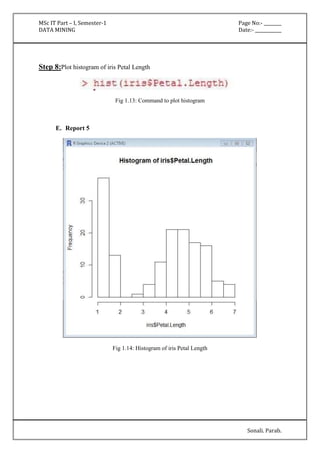
Step 8:Plot histogram of iris Petal Length 
Fig 1.13: Command to plot histogram 
E. Report 5 
Fig 1.14: Histogram of iris Petal Length
MSc IT Part – I, Semester-1 Page No:- ________ 
DATA MINING Date:- ____________ 
Sonali. Parab. 
PRACTICAL NO: 2 
Aim:Build the data mining model structure and Implement Naïve Bayes Algorithm. 
Implement Using WEKA. 
Solution: 
Dataset Used :Diabetes.arff 
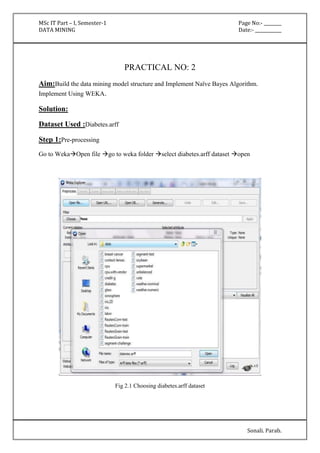
Step 1:Pre-processing 
Go to WekaOpen file go to weka folder select diabetes.arff dataset open 
Fig 2.1 Choosing diabetes.arff dataset
MSc IT Part – I, Semester-1 Page No:- ________ 
DATA MINING Date:- ____________ 
Sonali. Parab. 
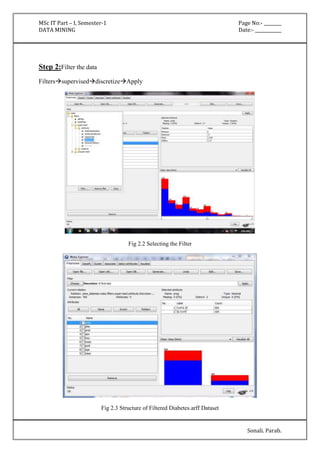
Step 2:Filter the data 
FilterssuperviseddiscretizeApply 
Fig 2.2 Selecting the Filter 
Fig 2.3 Structure of Filtered Diabetes.arff Dataset
MSc IT Part – I, Semester-1 Page No:- ________ 
DATA MINING Date:- ____________ 
Sonali. Parab. 
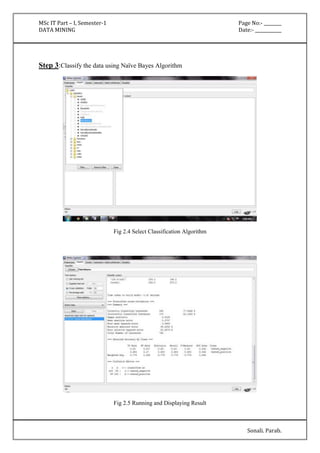
Step 3:Classify the data using Naïve Bayes Algorithm 
Fig 2.4 Select Classification Algorithm 
Fig 2.5 Running and Displaying Result
MSc IT Part – I, Semester-1 Page No:- ________ 
DATA MINING Date:- ____________ 
Sonali. Parab. 
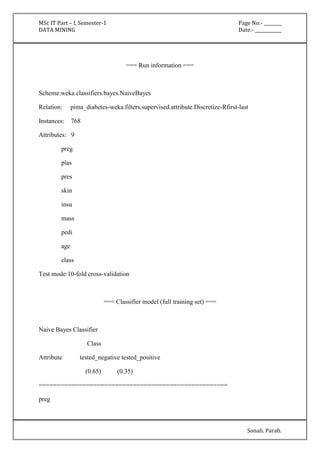
=== Run information === 
Scheme:weka.classifiers.bayes.NaiveBayes 
Relation: pima_diabetes-weka.filters.supervised.attribute.Discretize-Rfirst-last 
Instances: 768 
Attributes: 9 
preg 
plas 
pres 
skin 
insu 
mass 
pedi 
age 
class 
Test mode:10-fold cross-validation 
=== Classifier model (full training set) === 
Naive Bayes Classifier 
Class 
Attribute tested_negative tested_positive 
(0.65) (0.35) 
==================================================== 
preg
MSc IT Part – I, Semester-1 Page No:- ________ 
DATA MINING Date:- ____________ 
Sonali. Parab. 
'(-inf-6.5]' 427.0 174.0 
'(6.5-inf)' 75.0 96.0 
[total] 502.0 270.0 
plas 
'(-inf-99.5]' 182.0 17.0 
'(99.5-127.5]' 211.0 79.0 
'(127.5-154.5]' 86.0 77.0 
'(154.5-inf)' 25.0 99.0 
[total] 504.0 272.0 
pres 
'All' 501.0 269.0 
[total] 501.0 269.0 
skin 
'All' 501.0 269.0 
[total] 501.0 269.0 
insu 
'(-inf-14.5]' 237.0 140.0 
'(14.5-121]' 165.0 28.0 
'(121-inf)' 101.0 103.0 
[total] 503.0 271.0 
mass 
'(-inf-27.85]' 196.0 28.0
MSc IT Part – I, Semester-1 Page No:- ________ 
DATA MINING Date:- ____________ 
Sonali. Parab. 
'(27.85-inf)' 306.0 242.0 
[total] 502.0 270.0 
pedi 
'(-inf-0.5275]' 362.0 149.0 
'(0.5275-inf)' 140.0 121.0 
[total] 502.0 270.0 
age 
'(-inf-28.5]' 297.0 72.0 
'(28.5-inf)' 205.0 198.0 
[total] 502.0 270.0 
Time taken to build model: 0 seconds
MSc IT Part – I, Semester-1 Page No:- ________ 
DATA MINING Date:- ____________ 
Sonali. Parab. 
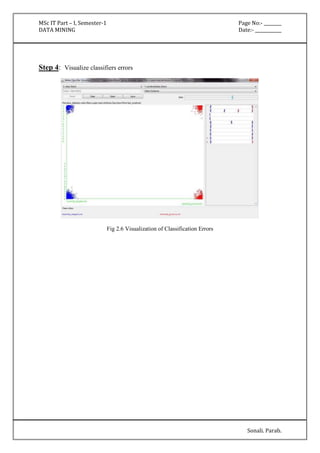
Step 4: Visualize classifiers errors 
Fig 2.6 Visualization of Classification Errors
MSc IT Part – I, Semester-1 Page No:- ________ 
DATA MINING Date:- ____________ 
Sonali. Parab. 
PRACTICAL NO: 3 
Aim:Implement the clustering Algorithm By Using Weka Tool. 
Solution: 
Dataset Used :Iris.arff 
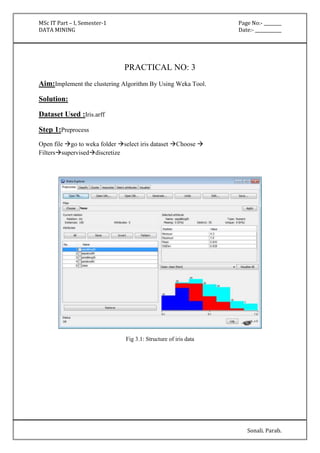
Step 1:Preprocess 
Open file go to weka folder select iris dataset Choose  
Filterssuperviseddiscretize 
Fig 3.1: Structure of iris data
MSc IT Part – I, Semester-1 Page No:- ________ 
DATA MINING Date:- ____________ 
Sonali. Parab. 
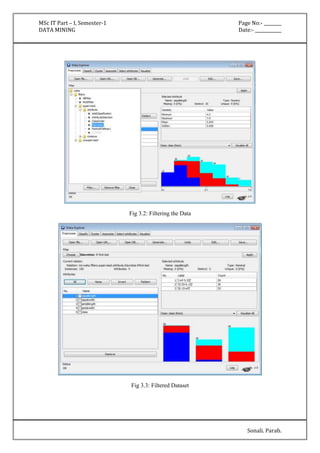
Fig 3.2: Filtering the Data 
Fig 3.3: Filtered Dataset
MSc IT Part – I, Semester-1 Page No:- ________ 
DATA MINING Date:- ____________ 
Sonali. Parab. 
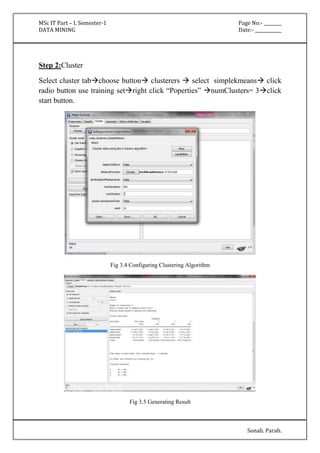
Step 2:Cluster 
Select cluster tabchoose button clusterers  select simplekmeans click 
radio button use training setright click “Poperties” numClusters= 3click 
start button. 
Fig 3.4 Configuring Clustering Algorithm 
Fig 3.5 Generating Result
MSc IT Part – I, Semester-1 Page No:- ________ 
DATA MINING Date:- ____________ 
Sonali. Parab. 
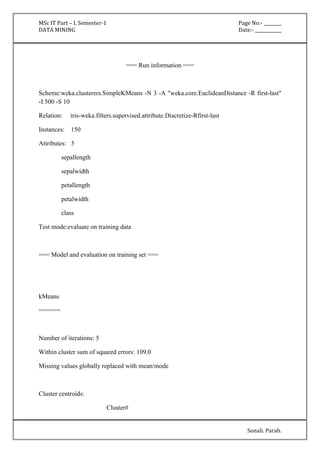
=== Run information === 
Scheme:weka.clusterers.SimpleKMeans -N 3 -A "weka.core.EuclideanDistance -R first-last" 
-I 500 -S 10 
Relation: iris-weka.filters.supervised.attribute.Discretize-Rfirst-last 
Instances: 150 
Attributes: 5 
sepallength 
sepalwidth 
petallength 
petalwidth 
class 
Test mode:evaluate on training data 
=== Model and evaluation on training set === 
kMeans 
====== 
Number of iterations: 5 
Within cluster sum of squared errors: 109.0 
Missing values globally replaced with mean/mode 
Cluster centroids: 
Cluster#
MSc IT Part – I, Semester-1 Page No:- ________ 
DATA MINING Date:- ____________ 
Sonali. Parab. 
Attribute Full Data 0 1 2 
(150) (50) (50) (50) 
===================================================== 
sepallength '(-inf-5.55]' '(-inf-5.55]' '(5.55-6.15]' '(6.15-inf)' 
sepalwidth '(-inf-2.95]' '(3.35-inf)' '(-inf-2.95]' '(2.95-3.35]' 
petallength '(4.75-inf)' '(-inf-2.45]' '(2.45-4.75]' '(4.75-inf)' 
petalwidth '(0.8-1.75]' '(-inf-0.8]' '(0.8-1.75]' '(1.75-inf)' 
class Iris-setosa Iris-setosa Iris-versicolor Iris-virginica 
Time taken to build model (full training data) : 0 seconds 
=== Model and evaluation on training set === 
Clustered Instances 
0 50 ( 33%) 
1 50 ( 33%) 
2 50 ( 33%)
MSc IT Part – I, Semester-1 Page No:- ________ 
DATA MINING Date:- ____________ 
Sonali. Parab. 
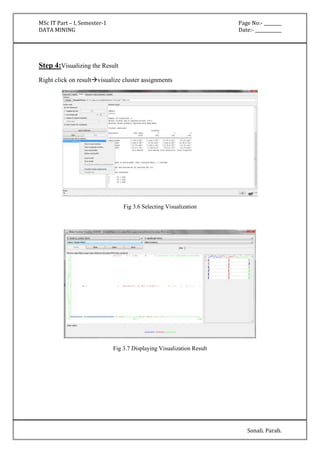
Step 4:Visualizing the Result 
Right click on resultvisualize cluster assignments 
Fig 3.6 Selecting Visualization 
Fig 3.7 Displaying Visualization Result
MSc IT Part – I, Semester-1 Page No:- ________ 
DATA MINING Date:- ____________ 
Sonali. Parab. 
PRACTICAL NO: 4 
Aim :Build the basic Time series model structure and create the predictions 
BodyFatDataset.By Using RTool. 
Solution: 
Dataset Used :BodyFat 
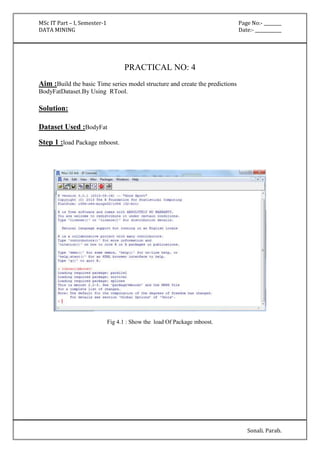
Step 1 :load Package mboost. 
Fig 4.1 : Show the load Of Package mboost.
MSc IT Part – I, Semester-1 Page No:- ________ 
DATA MINING Date:- ____________ 
Sonali. Parab. 
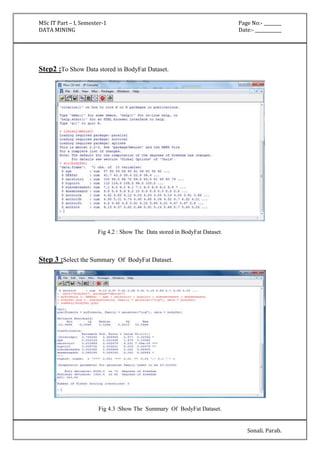
Step2 :To Show Data stored in BodyFat Dataset. 
Fig 4.2 : Show The Data stored in BodyFat Dataset. 
Step 3 :Select the Summary Of BodyFat Dataset. 
Fig 4.3 :Show The Summary Of BodyFat Dataset.
MSc IT Part – I, Semester-1 Page No:- ________ 
DATA MINING Date:- ____________ 
Sonali. Parab. 
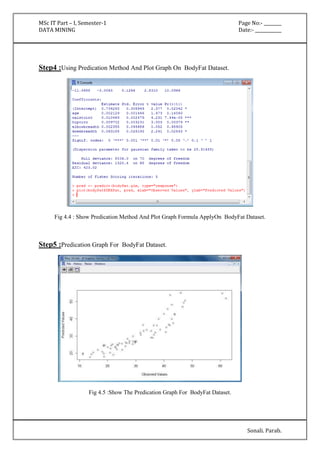
Step4 :Using Predication Method And Plot Graph On BodyFat Dataset. 
Fig 4.4 : Show Predication Method And Plot Graph Formula ApplyOn BodyFat Dataset. 
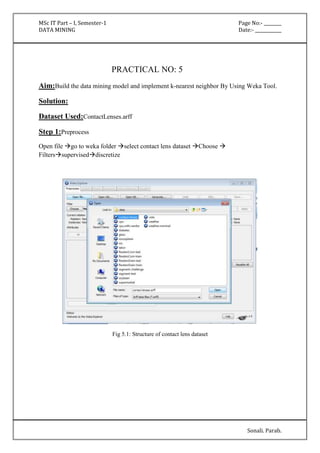
Step5 :Predication Graph For BodyFat Dataset. 
Fig 4.5 :Show The Predication Graph For BodyFat Dataset.
MSc IT Part – I, Semester-1 Page No:- ________ 
DATA MINING Date:- ____________ 
Sonali. Parab. 
PRACTICAL NO: 5 
Aim:Build the data mining model and implement k-nearest neighbor By Using Weka Tool. 
Solution: 
Dataset Used:ContactLenses.arff 
Step 1:Preprocess 
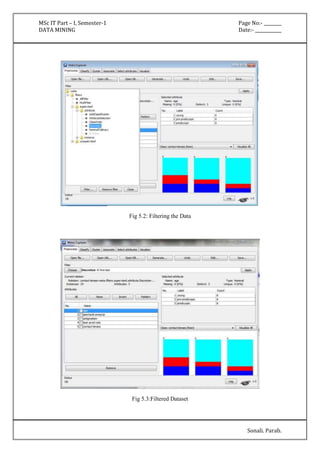
Open file go to weka folder select contact lens dataset Choose  
Filterssuperviseddiscretize 
Fig 5.1: Structure of contact lens dataset
MSc IT Part – I, Semester-1 Page No:- ________ 
DATA MINING Date:- ____________ 
Sonali. Parab. 
Fig 5.2: Filtering the Data 
Fig 5.3:Filtered Dataset
MSc IT Part – I, Semester-1 Page No:- ________ 
DATA MINING Date:- ____________ 
Sonali. Parab. 
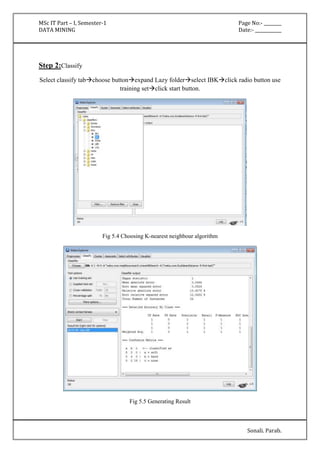
Step 2:Classify 
Select classify tabchoose buttonexpand Lazy folderselect IBKclick radio button use 
training setclick start button. 
Fig 5.4 Choosing K-nearest neighbour algorithm 
Fig 5.5 Generating Result
MSc IT Part – I, Semester-1 Page No:- ________ 
DATA MINING Date:- ____________ 
Sonali. Parab. 
=== Run information === 
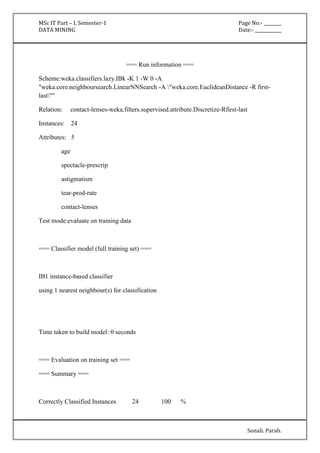
Scheme:weka.classifiers.lazy.IBk -K 1 -W 0 -A 
"weka.core.neighboursearch.LinearNNSearch -A "weka.core.EuclideanDistance -R first-last"" 
Relation: contact-lenses-weka.filters.supervised.attribute.Discretize-Rfirst-last 
Instances: 24 
Attributes: 5 
age 
spectacle-prescrip 
astigmatism 
tear-prod-rate 
contact-lenses 
Test mode:evaluate on training data 
=== Classifier model (full training set) === 
IB1 instance-based classifier 
using 1 nearest neighbour(s) for classification 
Time taken to build model: 0 seconds 
=== Evaluation on training set === 
=== Summary === 
Correctly Classified Instances 24 100 %
MSc IT Part – I, Semester-1 Page No:- ________ 
DATA MINING Date:- ____________ 
Sonali. Parab. 
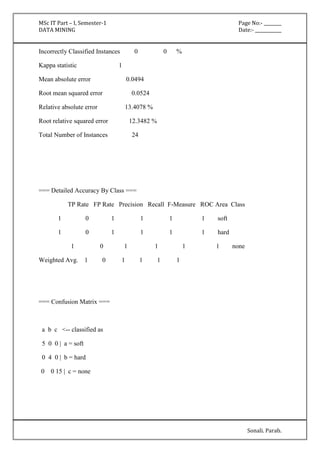
Incorrectly Classified Instances 0 0 % 
Kappa statistic 1 
Mean absolute error 0.0494 
Root mean squared error 0.0524 
Relative absolute error 13.4078 % 
Root relative squared error 12.3482 % 
Total Number of Instances 24 
=== Detailed Accuracy By Class === 
TP Rate FP Rate Precision Recall F-Measure ROC Area Class 
1 0 1 1 1 1 soft 
1 0 1 1 1 1 hard 
1 0 1 1 1 1 none 
Weighted Avg. 1 0 1 1 1 1 
=== Confusion Matrix === 
a b c <-- classified as 
5 0 0 | a = soft 
0 4 0 | b = hard 
0 0 15 | c = none
MSc IT Part – I, Semester-1 Page No:- ________ 
DATA MINING Date:- ____________ 
Sonali. Parab. 
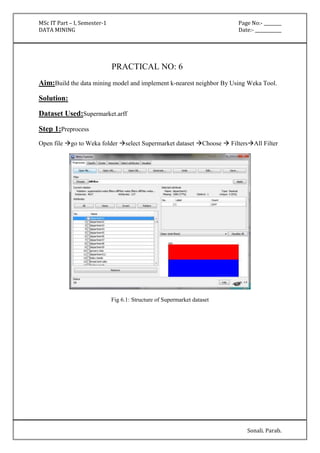
PRACTICAL NO: 6 
Aim:Build the data mining model and implement k-nearest neighbor By Using Weka Tool. 
Solution: 
Dataset Used:Supermarket.arff 
Step 1:Preprocess 
Open file go to Weka folder select Supermarket dataset Choose  FiltersAll Filter 
Fig 6.1: Structure of Supermarket dataset
MSc IT Part – I, Semester-1 Page No:- ________ 
DATA MINING Date:- ____________ 
Sonali. Parab. 
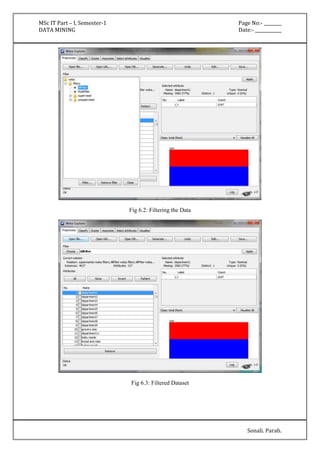
Fig 6.2: Filtering the Data 
Fig 6.3: Filtered Dataset
MSc IT Part – I, Semester-1 Page No:- ________ 
DATA MINING Date:- ____________ 
Sonali. Parab. 
Step 2:Associate 
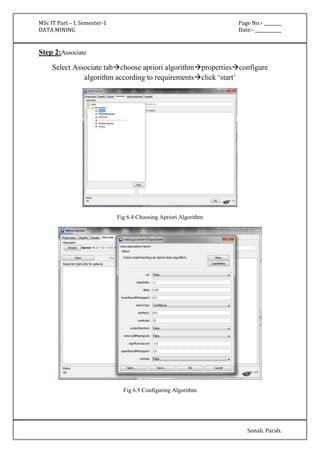
Select Associate tabchoose apriori algorithmpropertiesconfigure 
algorithm according to requirementsclick ‘start’ 
Fig 6.4 Choosing Apriori Algorithm 
Fig 6.5 Configuring Algorithm
MSc IT Part – I, Semester-1 Page No:- ________ 
DATA MINING Date:- ____________ 
Sonali. Parab. 
Fig 6.6 Displaying Association Results 
=== Run information === 
Scheme: weka.associations.Apriori -N 12 -T 0 -C 0.9 -D 0.05 -U 1.0 -M 0.1 -S -1.0 -c -1 
Relation: supermarket-weka.filters.AllFilter-weka.filters.AllFilter-weka.filters.AllFilter-weka. 
filters.AllFilter-weka.filters.MultiFilter-Fweka.filters.AllFilter-weka.filters.AllFilter-weka. 
filters.AllFilter 
Instances: 4627 
Attributes: 217 
[list of attributes omitted] 
=== Associator model (full training set) ===
MSc IT Part – I, Semester-1 Page No:- ________ 
DATA MINING Date:- ____________ 
Sonali. Parab. 
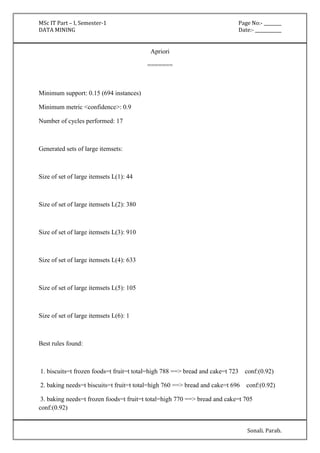
Apriori 
======= 
Minimum support: 0.15 (694 instances) 
Minimum metric <confidence>: 0.9 
Number of cycles performed: 17 
Generated sets of large itemsets: 
Size of set of large itemsets L(1): 44 
Size of set of large itemsets L(2): 380 
Size of set of large itemsets L(3): 910 
Size of set of large itemsets L(4): 633 
Size of set of large itemsets L(5): 105 
Size of set of large itemsets L(6): 1 
Best rules found: 
1. biscuits=t frozen foods=t fruit=t total=high 788 ==> bread and cake=t 723 conf:(0.92) 
2. baking needs=t biscuits=t fruit=t total=high 760 ==> bread and cake=t 696 conf:(0.92) 
3. baking needs=t frozen foods=t fruit=t total=high 770 ==> bread and cake=t 705 
conf:(0.92)
MSc IT Part – I, Semester-1 Page No:- ________ 
DATA MINING Date:- ____________ 
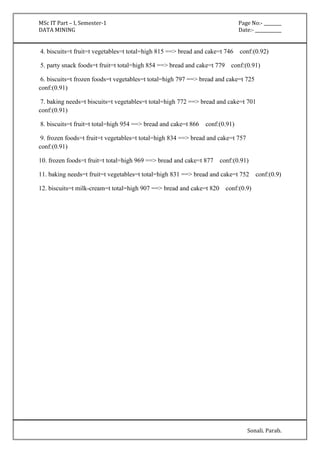
4. biscuits=t fruit=t vegetables=t total=high 815 ==> bread and cake=t 746 conf:(0.92) 
5. party snack foods=t fruit=t total=high 854 ==> bread and cake=t 779 conf:(0.91) 
6. biscuits=t frozen foods=t vegetables=t total=high 797 ==> bread and cake=t 725 
conf:(0.91) 
7. baking needs=t biscuits=t vegetables=t total=high 772 ==> bread and cake=t 701 
conf:(0.91) 
Sonali. Parab. 
8. biscuits=t fruit=t total=high 954 ==> bread and cake=t 866 conf:(0.91) 
9. frozen foods=t fruit=t vegetables=t total=high 834 ==> bread and cake=t 757 
conf:(0.91) 
10. frozen foods=t fruit=t total=high 969 ==> bread and cake=t 877 conf:(0.91) 
11. baking needs=t fruit=t vegetables=t total=high 831 ==> bread and cake=t 752 conf:(0.9) 
12. biscuits=t milk-cream=t total=high 907 ==> bread and cake=t 820 conf:(0.9)
MSc IT Part – I, Semester-1 Page No:- ________ 
DATA MINING Date:- ____________ 
Sonali. Parab. 
PRACTICAL NO: 7 
Aim:Build the data mining model and implement k-nearest neighbor By Using Weka Tool. 
Solution: 
Dataset Used:Titanic 
Step 1:Preprocess 
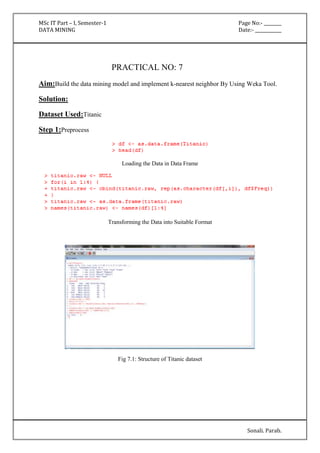
Loading the Data in Data Frame 
Transforming the Data into Suitable Format 
Fig 7.1: Structure of Titanic dataset
MSc IT Part – I, Semester-1 Page No:- ________ 
DATA MINING Date:- ____________ 
Sonali. Parab. 
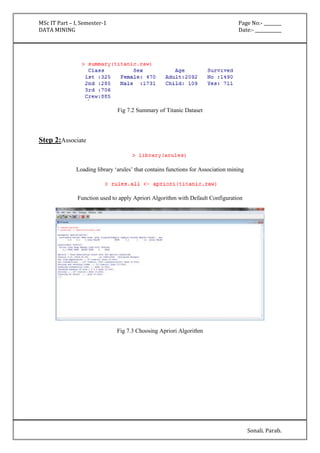
Fig 7.2 Summary of Titanic Dataset 
Step 2:Associate 
Loading library ‘arules’ that contains functions for Association mining 
Function used to apply Apriori Algorithm with Default Configuration 
Fig 7.3 Choosing Apriori Algorithm
MSc IT Part – I, Semester-1 Page No:- ________ 
DATA MINING Date:- ____________ 
Sonali. Parab. 
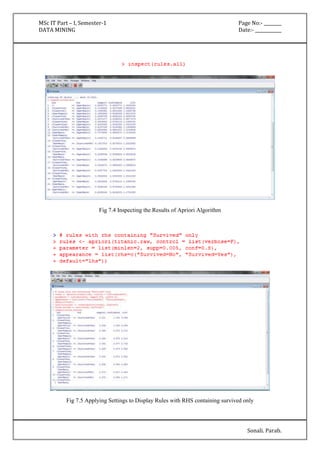
Fig 7.4 Inspecting the Results of Apriori Algorithm 
Fig 7.5 Applying Settings to Display Rules with RHS containing survived only
MSc IT Part – I, Semester-1 Page No:- ________ 
DATA MINING Date:- ____________ 
Sonali. Parab. 
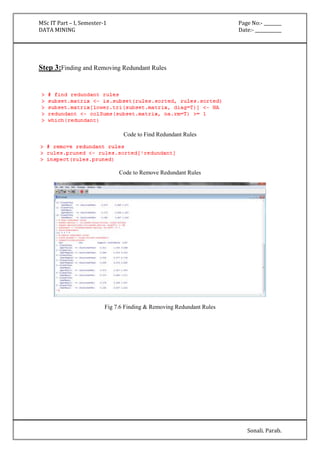
Step 3:Finding and Removing Redundant Rules 
Code to Find Redundant Rules 
Code to Remove Redundant Rules 
Fig 7.6 Finding & Removing Redundant Rules
MSc IT Part – I, Semester-1 Page No:- ________ 
DATA MINING Date:- ____________ 
Sonali. Parab. 
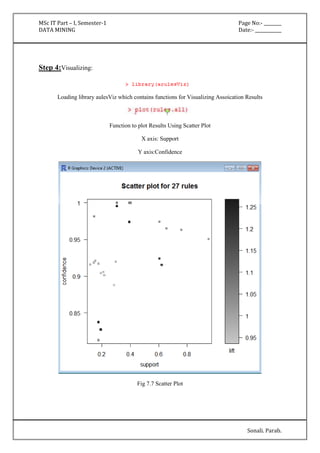
Step 4:Visualizing: 
Loading library aulesViz which contains functions for Visualizing Assoication Results 
Function to plot Results Using Scatter Plot 
X axis: Support 
Y axis:Confidence 
Fig 7.7 Scatter Plot
MSc IT Part – I, Semester-1 Page No:- ________ 
DATA MINING Date:- ____________ 
Sonali. Parab. 
Function to plot Association Results as Graph Plot 
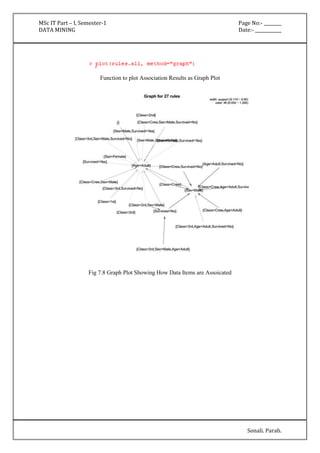
Fig 7.8 Graph Plot Showing How Data Items are Assoicated
MSc IT Part – I, Semester-1 Page No:- ________ 
DATA MINING Date:- ____________ 
Sonali. Parab. 
PRACTICAL NO: 8 
Aim:Consider the suitable data for text mining and Implement the Text Mining technique 
using R-Tool. 
Solution: 
Dataset Used:Plain Text File (www.txt) 
Step 1:Loading the Text File 
Loading Essential Libraries for Text Mining tm, SnowballC and twitteR 
Loading The Data From Text File Into RTool Using readLines() 
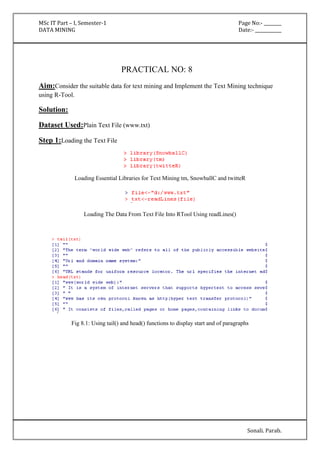
Fig 8.1: Using tail() and head() functions to display start and of paragraphs
MSc IT Part – I, Semester-1 Page No:- ________ 
DATA MINING Date:- ____________ 
Sonali. Parab. 
Step 2:Transforming 
Loading tm library and transforming document to Corpusdoc 
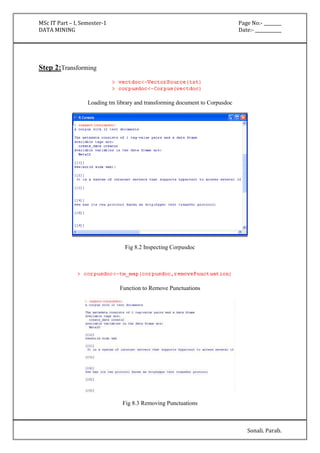
Fig 8.2 Inspecting Corpusdoc 
Function to Remove Punctuations 
Fig 8.3 Removing Punctuations
MSc IT Part – I, Semester-1 Page No:- ________ 
DATA MINING Date:- ____________ 
Sonali. Parab. 
Function to Strip White Spaces 
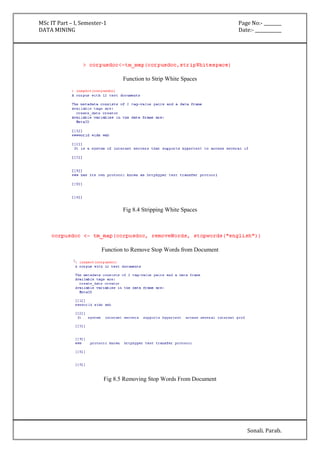
Fig 8.4 Stripping White Spaces 
Function to Remove Stop Words from Document 
Fig 8.5 Removing Stop Words From Document
MSc IT Part – I, Semester-1 Page No:- ________ 
DATA MINING Date:- ____________ 
Sonali. Parab. 
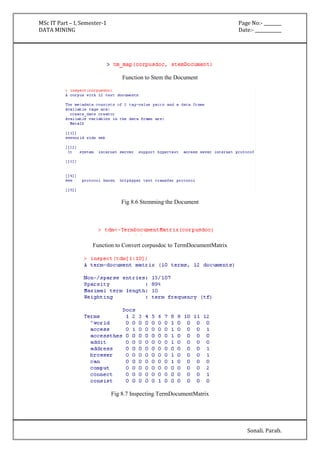
Function to Stem the Document 
Fig 8.6 Stemming the Document 
Function to Convert corpusdoc to TermDocumentMatrix 
Fig 8.7 Inspecting TermDocumentMatrix
MSc IT Part – I, Semester-1 Page No:- ________ 
DATA MINING Date:- ____________ 
Sonali. Parab. 
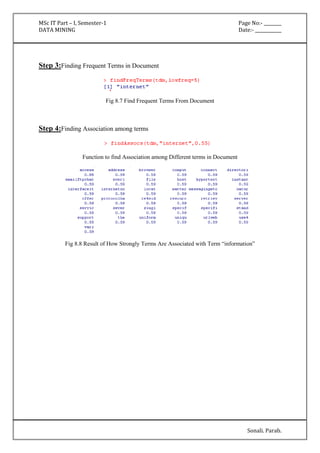
Step 3:Finding Frequent Terms in Document 
Fig 8.7 Find Frequent Terms From Document 
Step 4:Finding Association among terms 
Function to find Association among Different terms in Document 
Fig 8.8 Result of How Strongly Terms Are Associated with Term “information”

Data Mining

  • 1.
    MSc IT Part– I, Semester-1 Page No:- ________ DATA MINING Date:- ____________ Sonali. Parab. PRACTICAL NO: 1 Aim:Build the data mining model structure and built the decision tree with proper decision nodes and infer at least five different types of reports. Implement Using RTool. Solution: Dataset Used :Iris Step 1:Display the Structure of iris data. Fig 1.1: Structure of iris data Step 2:The random seed is set to a fixed value below to make the results reproducible. Fig 1.2:Random Seed Set
  • 2.
    MSc IT Part– I, Semester-1 Page No:- ________ DATA MINING Date:- ____________ Step 3:Install the party package if it is not installed. Load the party package, build adecision tree, and check the prediction result. Sonali. Parab. Fig 1.3: Load Party library Fig 1.4: iris table Step 4:printing the rules and plot the tree Fig 1.5: Rules of data
  • 3.
    MSc IT Part– I, Semester-1 Page No:- ________ DATA MINING Date:- ____________ Sonali. Parab. A. Report 1 Fig 1.6: Decision Tree
  • 4.
    MSc IT Part– I, Semester-1 Page No:- ________ DATA MINING Date:- ____________ Sonali. Parab. Step 5:Plot Decision tree in simple style Fig 1.7: Command to plot decision tree in simple style B. Report 2 Fig 1.8: Decision tree (Simple Style)
  • 5.
    MSc IT Part– I, Semester-1 Page No:- ________ DATA MINING Date:- ____________ Sonali. Parab. Step 6:Plot iris species in bar plot Fig 1.9: bar plot command C. Report 3 Fig 1.10:Barplot of Species
  • 6.
    MSc IT Part– I, Semester-1 Page No:- ________ DATA MINING Date:- ____________ Sonali. Parab. Step 7:Plot iris Species in pie chart Fig 1.11: Command for pie chart D. Report 4 Fig 1.12: Pie Chart
  • 7.
    MSc IT Part– I, Semester-1 Page No:- ________ DATA MINING Date:- ____________ Sonali. Parab. Step 8:Plot histogram of iris Petal Length Fig 1.13: Command to plot histogram E. Report 5 Fig 1.14: Histogram of iris Petal Length
  • 8.
    MSc IT Part– I, Semester-1 Page No:- ________ DATA MINING Date:- ____________ Sonali. Parab. PRACTICAL NO: 2 Aim:Build the data mining model structure and Implement Naïve Bayes Algorithm. Implement Using WEKA. Solution: Dataset Used :Diabetes.arff Step 1:Pre-processing Go to WekaOpen file go to weka folder select diabetes.arff dataset open Fig 2.1 Choosing diabetes.arff dataset
  • 9.
    MSc IT Part– I, Semester-1 Page No:- ________ DATA MINING Date:- ____________ Sonali. Parab. Step 2:Filter the data FilterssuperviseddiscretizeApply Fig 2.2 Selecting the Filter Fig 2.3 Structure of Filtered Diabetes.arff Dataset
  • 10.
    MSc IT Part– I, Semester-1 Page No:- ________ DATA MINING Date:- ____________ Sonali. Parab. Step 3:Classify the data using Naïve Bayes Algorithm Fig 2.4 Select Classification Algorithm Fig 2.5 Running and Displaying Result
  • 11.
    MSc IT Part– I, Semester-1 Page No:- ________ DATA MINING Date:- ____________ Sonali. Parab. === Run information === Scheme:weka.classifiers.bayes.NaiveBayes Relation: pima_diabetes-weka.filters.supervised.attribute.Discretize-Rfirst-last Instances: 768 Attributes: 9 preg plas pres skin insu mass pedi age class Test mode:10-fold cross-validation === Classifier model (full training set) === Naive Bayes Classifier Class Attribute tested_negative tested_positive (0.65) (0.35) ==================================================== preg
  • 12.
    MSc IT Part– I, Semester-1 Page No:- ________ DATA MINING Date:- ____________ Sonali. Parab. '(-inf-6.5]' 427.0 174.0 '(6.5-inf)' 75.0 96.0 [total] 502.0 270.0 plas '(-inf-99.5]' 182.0 17.0 '(99.5-127.5]' 211.0 79.0 '(127.5-154.5]' 86.0 77.0 '(154.5-inf)' 25.0 99.0 [total] 504.0 272.0 pres 'All' 501.0 269.0 [total] 501.0 269.0 skin 'All' 501.0 269.0 [total] 501.0 269.0 insu '(-inf-14.5]' 237.0 140.0 '(14.5-121]' 165.0 28.0 '(121-inf)' 101.0 103.0 [total] 503.0 271.0 mass '(-inf-27.85]' 196.0 28.0
  • 13.
    MSc IT Part– I, Semester-1 Page No:- ________ DATA MINING Date:- ____________ Sonali. Parab. '(27.85-inf)' 306.0 242.0 [total] 502.0 270.0 pedi '(-inf-0.5275]' 362.0 149.0 '(0.5275-inf)' 140.0 121.0 [total] 502.0 270.0 age '(-inf-28.5]' 297.0 72.0 '(28.5-inf)' 205.0 198.0 [total] 502.0 270.0 Time taken to build model: 0 seconds
  • 14.
    MSc IT Part– I, Semester-1 Page No:- ________ DATA MINING Date:- ____________ Sonali. Parab. Step 4: Visualize classifiers errors Fig 2.6 Visualization of Classification Errors
  • 15.
    MSc IT Part– I, Semester-1 Page No:- ________ DATA MINING Date:- ____________ Sonali. Parab. PRACTICAL NO: 3 Aim:Implement the clustering Algorithm By Using Weka Tool. Solution: Dataset Used :Iris.arff Step 1:Preprocess Open file go to weka folder select iris dataset Choose  Filterssuperviseddiscretize Fig 3.1: Structure of iris data
  • 16.
    MSc IT Part– I, Semester-1 Page No:- ________ DATA MINING Date:- ____________ Sonali. Parab. Fig 3.2: Filtering the Data Fig 3.3: Filtered Dataset
  • 17.
    MSc IT Part– I, Semester-1 Page No:- ________ DATA MINING Date:- ____________ Sonali. Parab. Step 2:Cluster Select cluster tabchoose button clusterers  select simplekmeans click radio button use training setright click “Poperties” numClusters= 3click start button. Fig 3.4 Configuring Clustering Algorithm Fig 3.5 Generating Result
  • 18.
    MSc IT Part– I, Semester-1 Page No:- ________ DATA MINING Date:- ____________ Sonali. Parab. === Run information === Scheme:weka.clusterers.SimpleKMeans -N 3 -A "weka.core.EuclideanDistance -R first-last" -I 500 -S 10 Relation: iris-weka.filters.supervised.attribute.Discretize-Rfirst-last Instances: 150 Attributes: 5 sepallength sepalwidth petallength petalwidth class Test mode:evaluate on training data === Model and evaluation on training set === kMeans ====== Number of iterations: 5 Within cluster sum of squared errors: 109.0 Missing values globally replaced with mean/mode Cluster centroids: Cluster#
  • 19.
    MSc IT Part– I, Semester-1 Page No:- ________ DATA MINING Date:- ____________ Sonali. Parab. Attribute Full Data 0 1 2 (150) (50) (50) (50) ===================================================== sepallength '(-inf-5.55]' '(-inf-5.55]' '(5.55-6.15]' '(6.15-inf)' sepalwidth '(-inf-2.95]' '(3.35-inf)' '(-inf-2.95]' '(2.95-3.35]' petallength '(4.75-inf)' '(-inf-2.45]' '(2.45-4.75]' '(4.75-inf)' petalwidth '(0.8-1.75]' '(-inf-0.8]' '(0.8-1.75]' '(1.75-inf)' class Iris-setosa Iris-setosa Iris-versicolor Iris-virginica Time taken to build model (full training data) : 0 seconds === Model and evaluation on training set === Clustered Instances 0 50 ( 33%) 1 50 ( 33%) 2 50 ( 33%)
  • 20.
    MSc IT Part– I, Semester-1 Page No:- ________ DATA MINING Date:- ____________ Sonali. Parab. Step 4:Visualizing the Result Right click on resultvisualize cluster assignments Fig 3.6 Selecting Visualization Fig 3.7 Displaying Visualization Result
  • 21.
    MSc IT Part– I, Semester-1 Page No:- ________ DATA MINING Date:- ____________ Sonali. Parab. PRACTICAL NO: 4 Aim :Build the basic Time series model structure and create the predictions BodyFatDataset.By Using RTool. Solution: Dataset Used :BodyFat Step 1 :load Package mboost. Fig 4.1 : Show the load Of Package mboost.
  • 22.
    MSc IT Part– I, Semester-1 Page No:- ________ DATA MINING Date:- ____________ Sonali. Parab. Step2 :To Show Data stored in BodyFat Dataset. Fig 4.2 : Show The Data stored in BodyFat Dataset. Step 3 :Select the Summary Of BodyFat Dataset. Fig 4.3 :Show The Summary Of BodyFat Dataset.
  • 23.
    MSc IT Part– I, Semester-1 Page No:- ________ DATA MINING Date:- ____________ Sonali. Parab. Step4 :Using Predication Method And Plot Graph On BodyFat Dataset. Fig 4.4 : Show Predication Method And Plot Graph Formula ApplyOn BodyFat Dataset. Step5 :Predication Graph For BodyFat Dataset. Fig 4.5 :Show The Predication Graph For BodyFat Dataset.
  • 24.
    MSc IT Part– I, Semester-1 Page No:- ________ DATA MINING Date:- ____________ Sonali. Parab. PRACTICAL NO: 5 Aim:Build the data mining model and implement k-nearest neighbor By Using Weka Tool. Solution: Dataset Used:ContactLenses.arff Step 1:Preprocess Open file go to weka folder select contact lens dataset Choose  Filterssuperviseddiscretize Fig 5.1: Structure of contact lens dataset
  • 25.
    MSc IT Part– I, Semester-1 Page No:- ________ DATA MINING Date:- ____________ Sonali. Parab. Fig 5.2: Filtering the Data Fig 5.3:Filtered Dataset
  • 26.
    MSc IT Part– I, Semester-1 Page No:- ________ DATA MINING Date:- ____________ Sonali. Parab. Step 2:Classify Select classify tabchoose buttonexpand Lazy folderselect IBKclick radio button use training setclick start button. Fig 5.4 Choosing K-nearest neighbour algorithm Fig 5.5 Generating Result
  • 27.
    MSc IT Part– I, Semester-1 Page No:- ________ DATA MINING Date:- ____________ Sonali. Parab. === Run information === Scheme:weka.classifiers.lazy.IBk -K 1 -W 0 -A "weka.core.neighboursearch.LinearNNSearch -A "weka.core.EuclideanDistance -R first-last"" Relation: contact-lenses-weka.filters.supervised.attribute.Discretize-Rfirst-last Instances: 24 Attributes: 5 age spectacle-prescrip astigmatism tear-prod-rate contact-lenses Test mode:evaluate on training data === Classifier model (full training set) === IB1 instance-based classifier using 1 nearest neighbour(s) for classification Time taken to build model: 0 seconds === Evaluation on training set === === Summary === Correctly Classified Instances 24 100 %
  • 28.
    MSc IT Part– I, Semester-1 Page No:- ________ DATA MINING Date:- ____________ Sonali. Parab. Incorrectly Classified Instances 0 0 % Kappa statistic 1 Mean absolute error 0.0494 Root mean squared error 0.0524 Relative absolute error 13.4078 % Root relative squared error 12.3482 % Total Number of Instances 24 === Detailed Accuracy By Class === TP Rate FP Rate Precision Recall F-Measure ROC Area Class 1 0 1 1 1 1 soft 1 0 1 1 1 1 hard 1 0 1 1 1 1 none Weighted Avg. 1 0 1 1 1 1 === Confusion Matrix === a b c <-- classified as 5 0 0 | a = soft 0 4 0 | b = hard 0 0 15 | c = none
  • 29.
    MSc IT Part– I, Semester-1 Page No:- ________ DATA MINING Date:- ____________ Sonali. Parab. PRACTICAL NO: 6 Aim:Build the data mining model and implement k-nearest neighbor By Using Weka Tool. Solution: Dataset Used:Supermarket.arff Step 1:Preprocess Open file go to Weka folder select Supermarket dataset Choose  FiltersAll Filter Fig 6.1: Structure of Supermarket dataset
  • 30.
    MSc IT Part– I, Semester-1 Page No:- ________ DATA MINING Date:- ____________ Sonali. Parab. Fig 6.2: Filtering the Data Fig 6.3: Filtered Dataset
  • 31.
    MSc IT Part– I, Semester-1 Page No:- ________ DATA MINING Date:- ____________ Sonali. Parab. Step 2:Associate Select Associate tabchoose apriori algorithmpropertiesconfigure algorithm according to requirementsclick ‘start’ Fig 6.4 Choosing Apriori Algorithm Fig 6.5 Configuring Algorithm
  • 32.
    MSc IT Part– I, Semester-1 Page No:- ________ DATA MINING Date:- ____________ Sonali. Parab. Fig 6.6 Displaying Association Results === Run information === Scheme: weka.associations.Apriori -N 12 -T 0 -C 0.9 -D 0.05 -U 1.0 -M 0.1 -S -1.0 -c -1 Relation: supermarket-weka.filters.AllFilter-weka.filters.AllFilter-weka.filters.AllFilter-weka. filters.AllFilter-weka.filters.MultiFilter-Fweka.filters.AllFilter-weka.filters.AllFilter-weka. filters.AllFilter Instances: 4627 Attributes: 217 [list of attributes omitted] === Associator model (full training set) ===
  • 33.
    MSc IT Part– I, Semester-1 Page No:- ________ DATA MINING Date:- ____________ Sonali. Parab. Apriori ======= Minimum support: 0.15 (694 instances) Minimum metric <confidence>: 0.9 Number of cycles performed: 17 Generated sets of large itemsets: Size of set of large itemsets L(1): 44 Size of set of large itemsets L(2): 380 Size of set of large itemsets L(3): 910 Size of set of large itemsets L(4): 633 Size of set of large itemsets L(5): 105 Size of set of large itemsets L(6): 1 Best rules found: 1. biscuits=t frozen foods=t fruit=t total=high 788 ==> bread and cake=t 723 conf:(0.92) 2. baking needs=t biscuits=t fruit=t total=high 760 ==> bread and cake=t 696 conf:(0.92) 3. baking needs=t frozen foods=t fruit=t total=high 770 ==> bread and cake=t 705 conf:(0.92)
  • 34.
    MSc IT Part– I, Semester-1 Page No:- ________ DATA MINING Date:- ____________ 4. biscuits=t fruit=t vegetables=t total=high 815 ==> bread and cake=t 746 conf:(0.92) 5. party snack foods=t fruit=t total=high 854 ==> bread and cake=t 779 conf:(0.91) 6. biscuits=t frozen foods=t vegetables=t total=high 797 ==> bread and cake=t 725 conf:(0.91) 7. baking needs=t biscuits=t vegetables=t total=high 772 ==> bread and cake=t 701 conf:(0.91) Sonali. Parab. 8. biscuits=t fruit=t total=high 954 ==> bread and cake=t 866 conf:(0.91) 9. frozen foods=t fruit=t vegetables=t total=high 834 ==> bread and cake=t 757 conf:(0.91) 10. frozen foods=t fruit=t total=high 969 ==> bread and cake=t 877 conf:(0.91) 11. baking needs=t fruit=t vegetables=t total=high 831 ==> bread and cake=t 752 conf:(0.9) 12. biscuits=t milk-cream=t total=high 907 ==> bread and cake=t 820 conf:(0.9)
  • 35.
    MSc IT Part– I, Semester-1 Page No:- ________ DATA MINING Date:- ____________ Sonali. Parab. PRACTICAL NO: 7 Aim:Build the data mining model and implement k-nearest neighbor By Using Weka Tool. Solution: Dataset Used:Titanic Step 1:Preprocess Loading the Data in Data Frame Transforming the Data into Suitable Format Fig 7.1: Structure of Titanic dataset
  • 36.
    MSc IT Part– I, Semester-1 Page No:- ________ DATA MINING Date:- ____________ Sonali. Parab. Fig 7.2 Summary of Titanic Dataset Step 2:Associate Loading library ‘arules’ that contains functions for Association mining Function used to apply Apriori Algorithm with Default Configuration Fig 7.3 Choosing Apriori Algorithm
  • 37.
    MSc IT Part– I, Semester-1 Page No:- ________ DATA MINING Date:- ____________ Sonali. Parab. Fig 7.4 Inspecting the Results of Apriori Algorithm Fig 7.5 Applying Settings to Display Rules with RHS containing survived only
  • 38.
    MSc IT Part– I, Semester-1 Page No:- ________ DATA MINING Date:- ____________ Sonali. Parab. Step 3:Finding and Removing Redundant Rules Code to Find Redundant Rules Code to Remove Redundant Rules Fig 7.6 Finding & Removing Redundant Rules
  • 39.
    MSc IT Part– I, Semester-1 Page No:- ________ DATA MINING Date:- ____________ Sonali. Parab. Step 4:Visualizing: Loading library aulesViz which contains functions for Visualizing Assoication Results Function to plot Results Using Scatter Plot X axis: Support Y axis:Confidence Fig 7.7 Scatter Plot
  • 40.
    MSc IT Part– I, Semester-1 Page No:- ________ DATA MINING Date:- ____________ Sonali. Parab. Function to plot Association Results as Graph Plot Fig 7.8 Graph Plot Showing How Data Items are Assoicated
  • 41.
    MSc IT Part– I, Semester-1 Page No:- ________ DATA MINING Date:- ____________ Sonali. Parab. PRACTICAL NO: 8 Aim:Consider the suitable data for text mining and Implement the Text Mining technique using R-Tool. Solution: Dataset Used:Plain Text File (www.txt) Step 1:Loading the Text File Loading Essential Libraries for Text Mining tm, SnowballC and twitteR Loading The Data From Text File Into RTool Using readLines() Fig 8.1: Using tail() and head() functions to display start and of paragraphs
  • 42.
    MSc IT Part– I, Semester-1 Page No:- ________ DATA MINING Date:- ____________ Sonali. Parab. Step 2:Transforming Loading tm library and transforming document to Corpusdoc Fig 8.2 Inspecting Corpusdoc Function to Remove Punctuations Fig 8.3 Removing Punctuations
  • 43.
    MSc IT Part– I, Semester-1 Page No:- ________ DATA MINING Date:- ____________ Sonali. Parab. Function to Strip White Spaces Fig 8.4 Stripping White Spaces Function to Remove Stop Words from Document Fig 8.5 Removing Stop Words From Document
  • 44.
    MSc IT Part– I, Semester-1 Page No:- ________ DATA MINING Date:- ____________ Sonali. Parab. Function to Stem the Document Fig 8.6 Stemming the Document Function to Convert corpusdoc to TermDocumentMatrix Fig 8.7 Inspecting TermDocumentMatrix
  • 45.
    MSc IT Part– I, Semester-1 Page No:- ________ DATA MINING Date:- ____________ Sonali. Parab. Step 3:Finding Frequent Terms in Document Fig 8.7 Find Frequent Terms From Document Step 4:Finding Association among terms Function to find Association among Different terms in Document Fig 8.8 Result of How Strongly Terms Are Associated with Term “information”