1. Plan ahead 
 Managing needs 
 Ethics 
 Plagiarism 
 Note-taking 
2. Organizing your data 
 Files 
 Metadata 
 RSS feeds 
 Manage your email 
 References 
 Remote access 
 Safekeeping 
3. Preserving your data 
 What to keep/delete 
 Long-term storage 
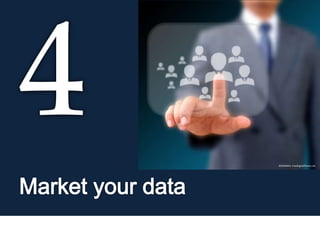
4. Market your data 
 Reasons to share 
 Reasons not to share 
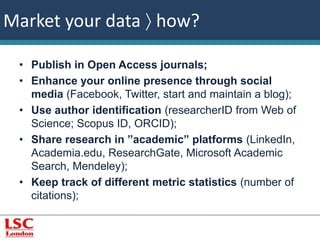
 How ? 
G. Gabriel 
Attribution-NonCommercial-ShareAlike 
Manage 
your data 
© jannoon028, FreeDigitalPhotos.net 
LSC Library 
Pocock House 
235 Southwark Bridge Road 
London SE1 6NP 
library@lsclondon.co.uk
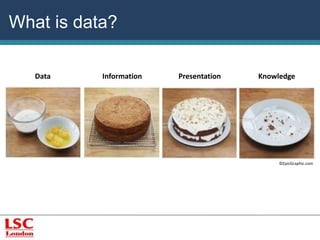
What is data? 
Data Information Presentation Knowledge 
©EpicGraphic.com
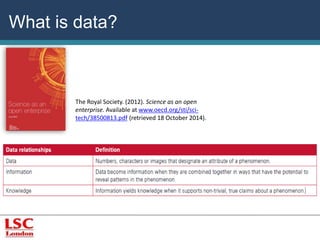
What is data? 
The Royal Society. (2012). Science as an open 
enterprise. Available at www.oecd.org/sti/sci-tech/ 
38500813.pdf (retrieved 18 October 2014).
What is research data? 
“’research data’ are defined as factual records 
(numerical scores, textual records, images and 
sounds) used as primary sources for scientific 
research, and that are commonly accepted in the 
scientific community as necessary to validate 
research findings. A research data set 
constitutes a systematic, partial representation of 
the subject being investigated.” 
OECD. (2007). OECD Principles and guidelines for access to 
research from public funding. Available at www.oecd.org/sti/sci-tech/ 
38500813.pdf (retrieved 1 October 2014).
EMC. (2012). The digital 
universe: 50-fold growth 
from the beginning of 
2010 to the end of 2020 
[picture]. Available at 
http://www.emc.com/lead 
ership/digital-universe/ 
iview/executive-summary- 
a-universe-of. 
htm (retrieved 14 
August 2014). 
Digital universe
Types/formats of research data 
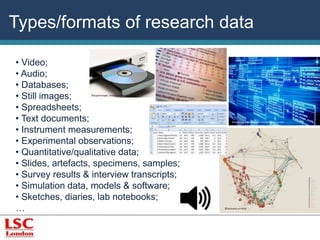
• Video; 
• Audio; 
• Databases; 
• Still images; 
©Supertrooper, FreeDigitalPhotos.net 
• Spreadsheets; 
• Text documents; 
• Instrument measurements; 
• Experimental observations; 
• Quantitative/qualitative data; 
• Slides, artefacts, specimens, samples; 
• Survey results & interview transcripts; 
• Simulation data, models & software; 
• Sketches, diaries, lab notebooks; 
… 
©David Castillo Dominici, FreeDigitalPhotos.net 
©thmvmnt on Flickr
©Stuart Miles, FreeDigitalPhotos.net © Stuart Miller, FreeDigitalPhotos.net
Plan ahead  data management needs 
Consider your data needs: 
• Type of data created 
• Consider what data will be created (e.g. 
interviews/transcripts, experimental 
measurements); 
• Consider how data will be created/captured (e.g. 
recorded, written, printed); 
• Consider the equipment/software required (find 
out if there is funding in case new software is 
needed).
Plan ahead  data management needs 
Consider your data needs: 
• Choose format(s) 
• What software/formats have you (or your 
colleagues) used in past projects; 
• What software/formats can be easily 
modified/shared (e.g. Microsoft Excel, SPSS); 
• What formats are at risk of obsolescence; 
• What software is compatible with hardware you 
already have.
Plan ahead  data management needs 
Consider your data needs: 
• Volume of data created 
• Consider where data is going to be stored; 
• Consider if the scale of data poses challenges 
when sharing/ transferring data. 
• Plan how to sort and analyse data; 
• Investigate about Intellectual property rights (IPR) 
concerning your research and its dissemination, future 
related research projects, and associated profit/credit.
• Investigate about data protection and ethics - 
according to the Data Protection Act 1998 (governs the 
processing of personal data), information must follow 
eight data protection principles: 
 processed fairly and lawfully 
 obtained for specified and lawful purposes 
 adequate, relevant and not excessive 
 accurate and, where necessary, kept up-to-date 
 not kept for longer than necessary 
 processed in accordance with the subject's rights 
 kept secure 
 not transferred abroad without adequate protection 
Available at 
http://www.legisl 
ation.gov.uk/ukp 
ga/1998/29/cont 
ents (retrieved 17 
August 2014). 
Plan ahead  ethics
“Plagiarism is defined as submitting as one's own 
work, irrespective of intent to deceive, that 
which derives in part or in its entirety from the 
work of others without due acknowledgement. It 
is both poor scholarship and a breach of 
academic integrity.”. 
© Thomas Hawk via Flickr 
University of Cambridge. (2011). University-wide statement on plagiarism. Available at 
http://www.admin.cam.ac.uk/univ/plagiarism/students/statement.html (Retrieved 10 July 
2014). 
Plan ahead  plagiarism
Plan ahead  avoiding plagiarism 
While you are reading/writing, make sure you identify: 
• Which part is your own thought and which is taken from 
other authors; 
• Which parts of your own writing are a response to the 
argument or directly inspired by ideas in the text; 
• Which parts are paraphrases of the author’s points; 
• Which parts were done in collaboration with others.
Plan ahead  note-taking 
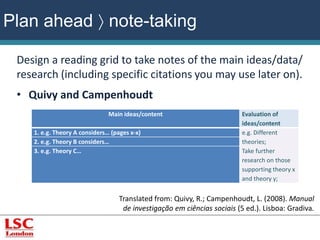
Design a reading grid to take notes of the main ideas/data/ 
research (including specific citations you may use later on). 
• Quivy and Campenhoudt 
Main ideas/content Evaluation of 
ideas/content 
1. e.g. Theory A considers… (pages x-x) e.g. Different 
theories; 
Take further 
research on those 
supporting theory x 
and theory y; 
2. e.g. Theory B considers… 
3. e.g. Theory C… 
Translated from: Quivy, R.; Campenhoudt, L. (2008). Manual 
de investigação em ciências sociais (5 ed.). Lisboa: Gradiva.
Plan ahead  note-taking 
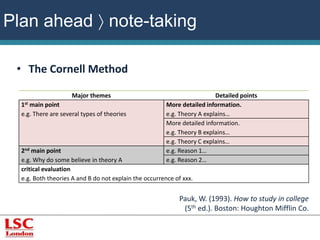
• The Cornell Method 
Major themes Detailed points 
1st main point 
e.g. There are several types of theories 
More detailed information. 
e.g. Theory A explains… 
More detailed information. 
e.g. Theory B explains… 
e.g. Theory C explains… 
2nd main point 
e.g. Why do some believe in theory A 
e.g. Reason 1… 
e.g. Reason 2… 
critical evaluation 
e.g. Both theories A and B do not explain the occurrence of xxx. 
Pauk, W. (1993). How to study in college 
(5th ed.). Boston: Houghton Mifflin Co.
Plan ahead  further information 
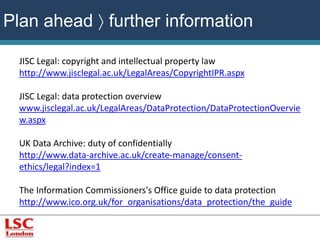
JISC Legal: copyright and intellectual property law 
http://www.jisclegal.ac.uk/LegalAreas/CopyrightIPR.aspx 
JISC Legal: data protection overview 
www.jisclegal.ac.uk/LegalAreas/DataProtection/DataProtectionOvervie 
w.aspx 
UK Data Archive: duty of confidentially 
http://www.data-archive.ac.uk/create-manage/consent-ethics/ 
legal?index=1 
The Information Commissioners's Office guide to data protection 
http://www.ico.org.uk/for_organisations/data_protection/the_guide
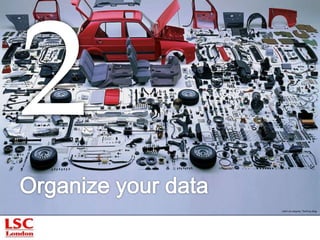
LEKO via Jalopnik, ThePimp.Blog
Organize your data  files 
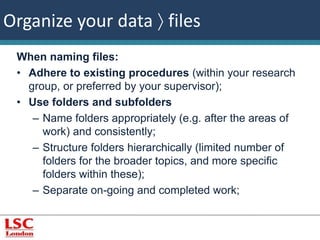
When naming files: 
• Adhere to existing procedures (within your research 
group, or preferred by your supervisor); 
• Use folders and subfolders 
– Name folders appropriately (e.g. after the areas of 
work) and consistently; 
– Structure folders hierarchically (limited number of 
folders for the broader topics, and more specific 
folders within these); 
– Separate on-going and completed work;
Organize your data  files 
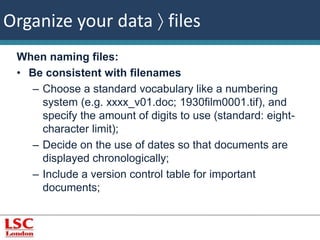
When naming files: 
• Be consistent with filenames 
– Choose a standard vocabulary like a numbering 
system (e.g. xxxx_v01.doc; 1930film0001.tif), and 
specify the amount of digits to use (standard: eight-character 
limit); 
– Decide on the use of dates so that documents are 
displayed chronologically; 
– Include a version control table for important 
documents;
Organize your data  files 
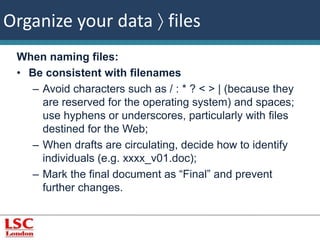
When naming files: 
• Be consistent with filenames 
– Avoid characters such as / : * ? < > | (because they 
are reserved for the operating system) and spaces; 
use hyphens or underscores, particularly with files 
destined for the Web; 
– When drafts are circulating, decide how to identify 
individuals (e.g. xxxx_v01.doc); 
– Mark the final document as “Final” and prevent 
further changes.
Organize your data  files 
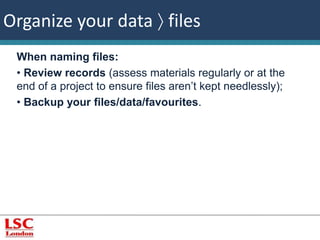
When naming files: 
• Review records (assess materials regularly or at the 
end of a project to ensure files aren’t kept needlessly); 
• Backup your files/data/favourites.
Organize your data  metadata 
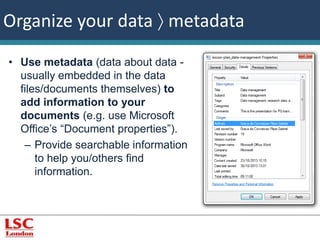
• Use metadata (data about data - 
usually embedded in the data 
files/documents themselves) to 
add information to your 
documents (e.g. use Microsoft 
Office’s “Document properties”). 
– Provide searchable information 
to help you/others find 
information.
Organize your data  metadata 
• Standard metadata fields: 
– Title (name of the dataset or research project); 
– Creator (who created the data); 
– Identifier (number used to identify the data); 
– Subject(s) (keywords); 
– Intellectual property rights held for the data; 
– Access information (where/how data can be 
accessed by others); 
– Methodology (how the data was generated); 
– Versions (date/time stamp for each file).
Organize your data  RSS feeds 
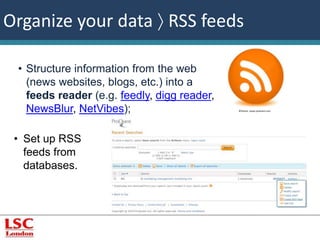
• Structure information from the web 
(news websites, blogs, etc.) into a 
feeds reader (e.g. feedly, digg reader, 
NewsBlur, NetVibes); ©Vector, www.youtoart.com 
• Set up RSS 
feeds from 
databases.
Organize your data  manage your email 
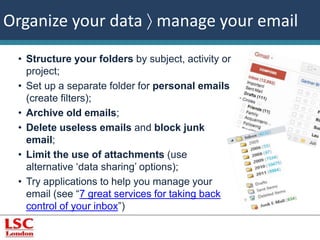
• Structure your folders by subject, activity or 
project; 
• Set up a separate folder for personal emails 
(create filters); 
• Archive old emails; 
• Delete useless emails and block junk 
email; 
• Limit the use of attachments (use 
alternative ‘data sharing’ options); 
• Try applications to help you manage your 
email (see “7 great services for taking back 
control of your inbox”)
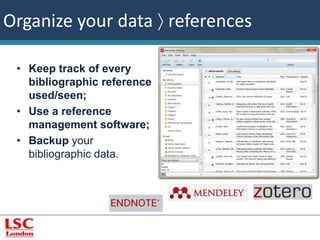
Organize your data  references 
• Keep track of every 
bibliographic reference 
used/seen; 
• Use a reference 
management software; 
• Backup your 
bibliographic data.
©winnond, 
FreeDigitalPhotos.net 
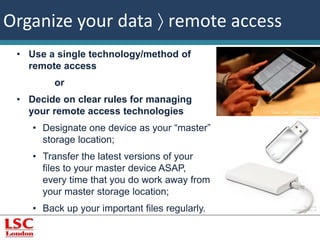
Organize your data  remote access 
• Use a single technology/method of 
remote access 
or 
• Decide on clear rules for managing 
your remote access technologies 
• Designate one device as your “master” 
storage location; 
• Transfer the latest versions of your 
files to your master device ASAP, 
every time that you do work away from 
your master storage location; 
• Back up your important files regularly.
Organize your data  safekeeping 
• Key printed data should be kept in a secure location 
(e.g. locked cupboards); 
• Keep sensitive electronic data password protected, 
encrypted or sett privileged levels of access 
(including backups); 
• Do not use printouts with sensitive data as scrap 
paper. Decide on efficient methods of disposing 
(e.g. shredding);
Organize your data  safekeeping 
• Computer terminals should not be left unattended 
and should be logged off at the end of each 
session; 
• Protect your computer with anti-virus, firewall and 
anti-keylogging; 
• Choose strong passwords and change them 
frequently (if you store passwords on a computer 
system, encrypt the file);
Organize your data  safekeeping 
• Store crucial data in more than one secure location: 
• Networked drives; 
• Personal computers/laptops; 
• External storage devices (CDs, DVDs, USB flash 
drives); 
• Remote or online systems for storing (Dropbox, Mozy, 
A-Drive, etc.).
Organize your data  further information 
Data Documentation Initiative 
www.ddialliance.org 
UK Data Archive: documenting your data 
www.data-archive.ac.uk/create-manage/document/overview 
MIT Libraries documentation and metadata 
http://libraries.mit.edu/guides/subjects/data-management/ 
metadata.html 
Online services that provide storage (e.g. DropBox) 
Online/desktop programs to storage and keep track of the changes 
made to documents (e.g. Git)
Organize your data  further information 
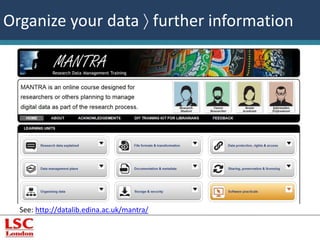
See: http://datalib.edina.ac.uk/mantra/
Organize your data  further information 
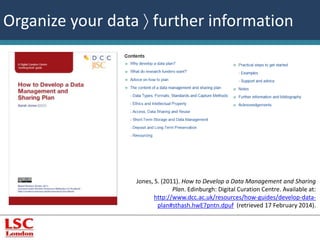
Jones, S. (2011). How to Develop a Data Management and Sharing 
Plan. Edinburgh: Digital Curation Centre. Available at: 
http://www.dcc.ac.uk/resources/how-guides/develop-data-plan# 
sthash.hwE7pntn.dpuf (retrieved 17 February 2014).
©Pixabay.com
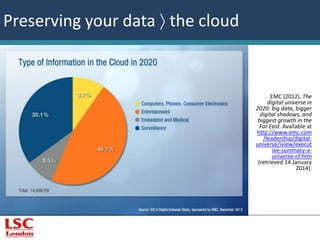
EMC (2012). The 
digital universe in 
2020: big data, bigger 
digital shadows, and 
biggest growth in the 
Far East. Available at 
http://www.emc.com 
/leadership/digital-universe/ 
iview/execut 
ive-summary-a-universe- 
of.htm 
(retrieved 14 January 
2014). 
Preserving your data  the cloud
Preserving your data  what to 
keep/delete? 
• Does your funder needs to keep data and /or make 
it available for a certain amount of time? 
• Is the data a vital record of a project/organisation/ 
and therefore needs to be retained indefinitely? 
• Do you have the legal and intellectual property 
rights to keep and re-use the data? If not, can 
these be negotiated? 
• Does sufficient metadata exist to allow data to be 
found wherever it is stored?
Preserving your data  what to 
keep/delete? 
• If you need to pay to keep the data, can you afford 
it? 
• Only store what you need to keep! Storage costs 
money and/or effort and storing massive amounts of data 
require a well thought plan to organize it so that 
information is easily found;
Preserving your data  long term 
storage 
• Digital repository 
Provides online archival storage – usually open access – 
and cares for digital materials, ensuring that they remain 
readable for as long as the repository survives. 
• Archive/data center 
Ensure data safe-keeping in the long term: datasets are 
fully documented with all bibliographical details and 
users of the data are aware of the need to acknowledge 
the data sources in publications. 
e.g. Archaeology Data Service
Preserving your data  further reading 
Digital Curation Centre: the value of digital curation 
www.dcc.ac.uk/digital-curation 
UK Data Archive FAQ 
www.data-archive.ac.uk/help/user-faq#2 
National Preservation Office: caring for CDs and DVDs 
www.bl.uk/blpac/pdf/cd.pdf 
Wikipedia: list of backup software 
http://en.wikipedia.org/wiki/List_of_backup_software 
Wikipedia: comparison of online back-up services 
http://en.wikipedia.org/wiki/List_of_online_backup_services 
https://dmponline.dcc.ac.uk
Digital Curation Centre. 
(cop. 2004-2014). DCC 
curation lifecycle model 
[image]. Available at 
http://www.dcc.ac.uk/res 
ources/curation-lifecycle-model 
(retrieved 17 
February 2014).
©SOMMAI, FreeDigitalPhotos.net
Market your data  reasons to share 
• Scientific integrity - publishing your data and citing 
its location in published research papers can allow 
others to replicate, validate, or correct your results, 
thereby improving the scientific record. 
• Funding mandates - UK research councils are 
increasingly mandating data sharing so as to avoid 
duplication of effort and save costs. 
• Raise/Increase the impact of your research - those 
who make use of your data and cite it in their own 
research will help to increase your impact within your 
field and beyond it.
Market your data  reasons to share 
• Preserve your data for future use – anyone can 
benefit by being able to identify, retrieve, and 
understand the data by themselves after you have lost 
familiarity with it (perhaps several years hence). 
• Making publicly funded research available publicly 
- there is a growing movement for making publicly 
funded research available to the public, as indicated 
for example, in the Organisation for Economic Co-operation 
and Development (OECD) Principles and 
Guidelines for Access to Research Data from Public 
Funding.
Market your data  reasons to share 
• Increase transparency through creating, 
disseminating and curating knowledge. 
• Increase collaboration - the use of archived data by 
other researchers may lead to with the data owner and 
to co-authorship of publications based on re-use of the 
data.
Market your data  reasons not to share 
• If your data has financial value or is the basis for 
potentially valuable patents, it may be unwise to share 
it, even with a data licence or terms and conditions 
attached. 
• If the data contains sensitive, personal information 
about human subjects, it may violate the Data 
Protection Act, ethics codes, or written consent forms. 
Do not even share data with other researchers. Note: 
often there are ways to anonymise the data to remove 
the personally identifying information from it, thus 
making it sharable as a public use dataset.
Market your data  reasons not to share 
• If parts of the data are owned by others (such as 
commercial entities or authors) you may not have the 
rights to share the data, even if you have derived 
wholly new data from the original sources.
Market your data  how? 
• Publish in Open Access journals; 
• Enhance your online presence through social 
media (Facebook, Twitter, start and maintain a blog); 
• Use author identification (researcherID from Web of 
Science; Scopus ID, ORCID); 
• Share research in ”academic” platforms (LinkedIn, 
Academia.edu, ResearchGate, Microsoft Academic 
Search, Mendeley); 
• Keep track of different metric statistics (number of 
citations);
Market your data  Further information 
Digital Curation Centre Overview of major funders’ data policies 
SHERPA JULIET searchable international database of funders' open access 
and archiving requirements. 
Times Higher Education supplement "Research intelligence - Request hits 
a raw spot" (15 July 2010). 
DOAJ – Directory of Open Access Journals (with information on OA 
journal preservation program and OA quality standards. 
OAD – Open Access Directory.
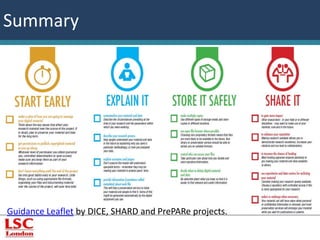
Summary 
Guidance Leaflet by DICE, SHARD and PrePARe projects.
LSC Library 
Pocock House 
235 Southwark Bridge Road 
London 
SE1 6NP 
library@lsclondon.co.uk 
Attribution-NonCommercial-ShareAlike

Data management

  • 1.
    1. Plan ahead  Managing needs  Ethics  Plagiarism  Note-taking 2. Organizing your data  Files  Metadata  RSS feeds  Manage your email  References  Remote access  Safekeeping 3. Preserving your data  What to keep/delete  Long-term storage 4. Market your data  Reasons to share  Reasons not to share  How ? G. Gabriel Attribution-NonCommercial-ShareAlike Manage your data © jannoon028, FreeDigitalPhotos.net LSC Library Pocock House 235 Southwark Bridge Road London SE1 6NP library@lsclondon.co.uk
  • 2.
    What is data? Data Information Presentation Knowledge ©EpicGraphic.com
  • 3.
    What is data? The Royal Society. (2012). Science as an open enterprise. Available at www.oecd.org/sti/sci-tech/ 38500813.pdf (retrieved 18 October 2014).
  • 4.
    What is researchdata? “’research data’ are defined as factual records (numerical scores, textual records, images and sounds) used as primary sources for scientific research, and that are commonly accepted in the scientific community as necessary to validate research findings. A research data set constitutes a systematic, partial representation of the subject being investigated.” OECD. (2007). OECD Principles and guidelines for access to research from public funding. Available at www.oecd.org/sti/sci-tech/ 38500813.pdf (retrieved 1 October 2014).
  • 5.
    EMC. (2012). Thedigital universe: 50-fold growth from the beginning of 2010 to the end of 2020 [picture]. Available at http://www.emc.com/lead ership/digital-universe/ iview/executive-summary- a-universe-of. htm (retrieved 14 August 2014). Digital universe
  • 6.
    Types/formats of researchdata • Video; • Audio; • Databases; • Still images; ©Supertrooper, FreeDigitalPhotos.net • Spreadsheets; • Text documents; • Instrument measurements; • Experimental observations; • Quantitative/qualitative data; • Slides, artefacts, specimens, samples; • Survey results & interview transcripts; • Simulation data, models & software; • Sketches, diaries, lab notebooks; … ©David Castillo Dominici, FreeDigitalPhotos.net ©thmvmnt on Flickr
  • 7.
    ©Stuart Miles, FreeDigitalPhotos.net© Stuart Miller, FreeDigitalPhotos.net
  • 8.
    Plan ahead data management needs Consider your data needs: • Type of data created • Consider what data will be created (e.g. interviews/transcripts, experimental measurements); • Consider how data will be created/captured (e.g. recorded, written, printed); • Consider the equipment/software required (find out if there is funding in case new software is needed).
  • 9.
    Plan ahead data management needs Consider your data needs: • Choose format(s) • What software/formats have you (or your colleagues) used in past projects; • What software/formats can be easily modified/shared (e.g. Microsoft Excel, SPSS); • What formats are at risk of obsolescence; • What software is compatible with hardware you already have.
  • 10.
    Plan ahead data management needs Consider your data needs: • Volume of data created • Consider where data is going to be stored; • Consider if the scale of data poses challenges when sharing/ transferring data. • Plan how to sort and analyse data; • Investigate about Intellectual property rights (IPR) concerning your research and its dissemination, future related research projects, and associated profit/credit.
  • 11.
    • Investigate aboutdata protection and ethics - according to the Data Protection Act 1998 (governs the processing of personal data), information must follow eight data protection principles:  processed fairly and lawfully  obtained for specified and lawful purposes  adequate, relevant and not excessive  accurate and, where necessary, kept up-to-date  not kept for longer than necessary  processed in accordance with the subject's rights  kept secure  not transferred abroad without adequate protection Available at http://www.legisl ation.gov.uk/ukp ga/1998/29/cont ents (retrieved 17 August 2014). Plan ahead  ethics
  • 12.
    “Plagiarism is definedas submitting as one's own work, irrespective of intent to deceive, that which derives in part or in its entirety from the work of others without due acknowledgement. It is both poor scholarship and a breach of academic integrity.”. © Thomas Hawk via Flickr University of Cambridge. (2011). University-wide statement on plagiarism. Available at http://www.admin.cam.ac.uk/univ/plagiarism/students/statement.html (Retrieved 10 July 2014). Plan ahead  plagiarism
  • 13.
    Plan ahead avoiding plagiarism While you are reading/writing, make sure you identify: • Which part is your own thought and which is taken from other authors; • Which parts of your own writing are a response to the argument or directly inspired by ideas in the text; • Which parts are paraphrases of the author’s points; • Which parts were done in collaboration with others.
  • 14.
    Plan ahead note-taking Design a reading grid to take notes of the main ideas/data/ research (including specific citations you may use later on). • Quivy and Campenhoudt Main ideas/content Evaluation of ideas/content 1. e.g. Theory A considers… (pages x-x) e.g. Different theories; Take further research on those supporting theory x and theory y; 2. e.g. Theory B considers… 3. e.g. Theory C… Translated from: Quivy, R.; Campenhoudt, L. (2008). Manual de investigação em ciências sociais (5 ed.). Lisboa: Gradiva.
  • 15.
    Plan ahead note-taking • The Cornell Method Major themes Detailed points 1st main point e.g. There are several types of theories More detailed information. e.g. Theory A explains… More detailed information. e.g. Theory B explains… e.g. Theory C explains… 2nd main point e.g. Why do some believe in theory A e.g. Reason 1… e.g. Reason 2… critical evaluation e.g. Both theories A and B do not explain the occurrence of xxx. Pauk, W. (1993). How to study in college (5th ed.). Boston: Houghton Mifflin Co.
  • 16.
    Plan ahead further information JISC Legal: copyright and intellectual property law http://www.jisclegal.ac.uk/LegalAreas/CopyrightIPR.aspx JISC Legal: data protection overview www.jisclegal.ac.uk/LegalAreas/DataProtection/DataProtectionOvervie w.aspx UK Data Archive: duty of confidentially http://www.data-archive.ac.uk/create-manage/consent-ethics/ legal?index=1 The Information Commissioners's Office guide to data protection http://www.ico.org.uk/for_organisations/data_protection/the_guide
  • 17.
    LEKO via Jalopnik,ThePimp.Blog
  • 18.
    Organize your data files When naming files: • Adhere to existing procedures (within your research group, or preferred by your supervisor); • Use folders and subfolders – Name folders appropriately (e.g. after the areas of work) and consistently; – Structure folders hierarchically (limited number of folders for the broader topics, and more specific folders within these); – Separate on-going and completed work;
  • 19.
    Organize your data files When naming files: • Be consistent with filenames – Choose a standard vocabulary like a numbering system (e.g. xxxx_v01.doc; 1930film0001.tif), and specify the amount of digits to use (standard: eight-character limit); – Decide on the use of dates so that documents are displayed chronologically; – Include a version control table for important documents;
  • 20.
    Organize your data files When naming files: • Be consistent with filenames – Avoid characters such as / : * ? < > | (because they are reserved for the operating system) and spaces; use hyphens or underscores, particularly with files destined for the Web; – When drafts are circulating, decide how to identify individuals (e.g. xxxx_v01.doc); – Mark the final document as “Final” and prevent further changes.
  • 21.
    Organize your data files When naming files: • Review records (assess materials regularly or at the end of a project to ensure files aren’t kept needlessly); • Backup your files/data/favourites.
  • 22.
    Organize your data metadata • Use metadata (data about data - usually embedded in the data files/documents themselves) to add information to your documents (e.g. use Microsoft Office’s “Document properties”). – Provide searchable information to help you/others find information.
  • 23.
    Organize your data metadata • Standard metadata fields: – Title (name of the dataset or research project); – Creator (who created the data); – Identifier (number used to identify the data); – Subject(s) (keywords); – Intellectual property rights held for the data; – Access information (where/how data can be accessed by others); – Methodology (how the data was generated); – Versions (date/time stamp for each file).
  • 24.
    Organize your data RSS feeds • Structure information from the web (news websites, blogs, etc.) into a feeds reader (e.g. feedly, digg reader, NewsBlur, NetVibes); ©Vector, www.youtoart.com • Set up RSS feeds from databases.
  • 25.
    Organize your data manage your email • Structure your folders by subject, activity or project; • Set up a separate folder for personal emails (create filters); • Archive old emails; • Delete useless emails and block junk email; • Limit the use of attachments (use alternative ‘data sharing’ options); • Try applications to help you manage your email (see “7 great services for taking back control of your inbox”)
  • 26.
    Organize your data references • Keep track of every bibliographic reference used/seen; • Use a reference management software; • Backup your bibliographic data.
  • 27.
    ©winnond, FreeDigitalPhotos.net Organizeyour data  remote access • Use a single technology/method of remote access or • Decide on clear rules for managing your remote access technologies • Designate one device as your “master” storage location; • Transfer the latest versions of your files to your master device ASAP, every time that you do work away from your master storage location; • Back up your important files regularly.
  • 28.
    Organize your data safekeeping • Key printed data should be kept in a secure location (e.g. locked cupboards); • Keep sensitive electronic data password protected, encrypted or sett privileged levels of access (including backups); • Do not use printouts with sensitive data as scrap paper. Decide on efficient methods of disposing (e.g. shredding);
  • 29.
    Organize your data safekeeping • Computer terminals should not be left unattended and should be logged off at the end of each session; • Protect your computer with anti-virus, firewall and anti-keylogging; • Choose strong passwords and change them frequently (if you store passwords on a computer system, encrypt the file);
  • 30.
    Organize your data safekeeping • Store crucial data in more than one secure location: • Networked drives; • Personal computers/laptops; • External storage devices (CDs, DVDs, USB flash drives); • Remote or online systems for storing (Dropbox, Mozy, A-Drive, etc.).
  • 31.
    Organize your data further information Data Documentation Initiative www.ddialliance.org UK Data Archive: documenting your data www.data-archive.ac.uk/create-manage/document/overview MIT Libraries documentation and metadata http://libraries.mit.edu/guides/subjects/data-management/ metadata.html Online services that provide storage (e.g. DropBox) Online/desktop programs to storage and keep track of the changes made to documents (e.g. Git)
  • 32.
    Organize your data further information See: http://datalib.edina.ac.uk/mantra/
  • 33.
    Organize your data further information Jones, S. (2011). How to Develop a Data Management and Sharing Plan. Edinburgh: Digital Curation Centre. Available at: http://www.dcc.ac.uk/resources/how-guides/develop-data-plan# sthash.hwE7pntn.dpuf (retrieved 17 February 2014).
  • 34.
  • 35.
    EMC (2012). The digital universe in 2020: big data, bigger digital shadows, and biggest growth in the Far East. Available at http://www.emc.com /leadership/digital-universe/ iview/execut ive-summary-a-universe- of.htm (retrieved 14 January 2014). Preserving your data  the cloud
  • 36.
    Preserving your data what to keep/delete? • Does your funder needs to keep data and /or make it available for a certain amount of time? • Is the data a vital record of a project/organisation/ and therefore needs to be retained indefinitely? • Do you have the legal and intellectual property rights to keep and re-use the data? If not, can these be negotiated? • Does sufficient metadata exist to allow data to be found wherever it is stored?
  • 37.
    Preserving your data what to keep/delete? • If you need to pay to keep the data, can you afford it? • Only store what you need to keep! Storage costs money and/or effort and storing massive amounts of data require a well thought plan to organize it so that information is easily found;
  • 38.
    Preserving your data long term storage • Digital repository Provides online archival storage – usually open access – and cares for digital materials, ensuring that they remain readable for as long as the repository survives. • Archive/data center Ensure data safe-keeping in the long term: datasets are fully documented with all bibliographical details and users of the data are aware of the need to acknowledge the data sources in publications. e.g. Archaeology Data Service
  • 39.
    Preserving your data further reading Digital Curation Centre: the value of digital curation www.dcc.ac.uk/digital-curation UK Data Archive FAQ www.data-archive.ac.uk/help/user-faq#2 National Preservation Office: caring for CDs and DVDs www.bl.uk/blpac/pdf/cd.pdf Wikipedia: list of backup software http://en.wikipedia.org/wiki/List_of_backup_software Wikipedia: comparison of online back-up services http://en.wikipedia.org/wiki/List_of_online_backup_services https://dmponline.dcc.ac.uk
  • 40.
    Digital Curation Centre. (cop. 2004-2014). DCC curation lifecycle model [image]. Available at http://www.dcc.ac.uk/res ources/curation-lifecycle-model (retrieved 17 February 2014).
  • 41.
  • 42.
    Market your data reasons to share • Scientific integrity - publishing your data and citing its location in published research papers can allow others to replicate, validate, or correct your results, thereby improving the scientific record. • Funding mandates - UK research councils are increasingly mandating data sharing so as to avoid duplication of effort and save costs. • Raise/Increase the impact of your research - those who make use of your data and cite it in their own research will help to increase your impact within your field and beyond it.
  • 43.
    Market your data reasons to share • Preserve your data for future use – anyone can benefit by being able to identify, retrieve, and understand the data by themselves after you have lost familiarity with it (perhaps several years hence). • Making publicly funded research available publicly - there is a growing movement for making publicly funded research available to the public, as indicated for example, in the Organisation for Economic Co-operation and Development (OECD) Principles and Guidelines for Access to Research Data from Public Funding.
  • 44.
    Market your data reasons to share • Increase transparency through creating, disseminating and curating knowledge. • Increase collaboration - the use of archived data by other researchers may lead to with the data owner and to co-authorship of publications based on re-use of the data.
  • 45.
    Market your data reasons not to share • If your data has financial value or is the basis for potentially valuable patents, it may be unwise to share it, even with a data licence or terms and conditions attached. • If the data contains sensitive, personal information about human subjects, it may violate the Data Protection Act, ethics codes, or written consent forms. Do not even share data with other researchers. Note: often there are ways to anonymise the data to remove the personally identifying information from it, thus making it sharable as a public use dataset.
  • 46.
    Market your data reasons not to share • If parts of the data are owned by others (such as commercial entities or authors) you may not have the rights to share the data, even if you have derived wholly new data from the original sources.
  • 47.
    Market your data how? • Publish in Open Access journals; • Enhance your online presence through social media (Facebook, Twitter, start and maintain a blog); • Use author identification (researcherID from Web of Science; Scopus ID, ORCID); • Share research in ”academic” platforms (LinkedIn, Academia.edu, ResearchGate, Microsoft Academic Search, Mendeley); • Keep track of different metric statistics (number of citations);
  • 48.
    Market your data Further information Digital Curation Centre Overview of major funders’ data policies SHERPA JULIET searchable international database of funders' open access and archiving requirements. Times Higher Education supplement "Research intelligence - Request hits a raw spot" (15 July 2010). DOAJ – Directory of Open Access Journals (with information on OA journal preservation program and OA quality standards. OAD – Open Access Directory.
  • 49.
    Summary Guidance Leafletby DICE, SHARD and PrePARe projects.
  • 50.
    LSC Library PocockHouse 235 Southwark Bridge Road London SE1 6NP library@lsclondon.co.uk Attribution-NonCommercial-ShareAlike