Data
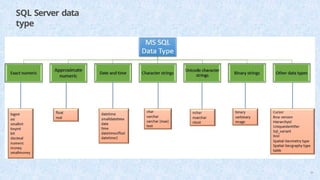
Storage
4
• Information storageand retrieval (data processing)
is a major part of the software application
development in the IT industry.
• It is mandatory for every software
professional to be aware of the approach of data
storage and retrieval systems.
5.
Data and information
5
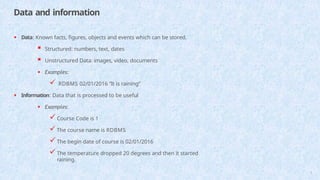
•Data: Known facts, figures, objects and events which can be stored.
Structured: numbers, text, dates
Unstructured Data: images, video, documents
• Examples:
RDBMS 02/01/2016 “It is raining”
• Information: Data that is processed to be useful
• Examples:
Course Code is 1
The course name is RDBMS
The begin date of course is 02/01/2016
The temperature dropped 20 degrees and then it started
raining.
6.
Traditional approach
6
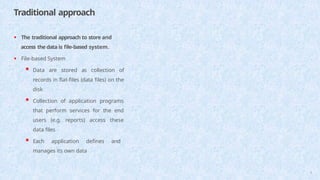
• Thetraditional approach to store and
access the data is file-based system.
• File-based System
Data are stored as collection of
records in flat-files (data files) on the
disk
Collection of application programs
that perform services for the end
users (e.g. reports) access these
data files
Each application defines and
manages its own data
7.
How traditional approachworks?
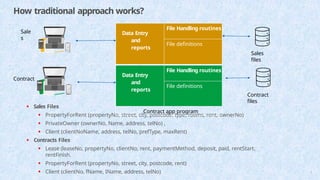
• Sales Files
• PropertyForRent (propertyNo, street, city, postcode, type, rooms, rent, ownerNo)
• PrivateOwner (ownerNo, Name, address, telNo) ,
• Client (clientNoName, address, telNo, prefType, maxRent)
• Contracts Files
• Lease (leaseNo, propertyNo, clientNo, rent, paymentMethod, deposit, paid, rentStart,
rentFinish.
• PropertyForRent (propertyNo, street, city, postcode, rent)
• Client (clientNo, fName, IName, address, telNo)
Data Entry
and
reports
File Handling routines
File definitions
Sales app program
Data Entry
and
reports
File Handling routines
File definitions
Contract app program
Sales
files
Contract
files
Sale
s
Contract
7
8.
Limitations of traditional
approach
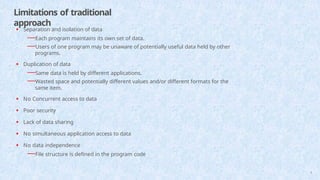
•Separation and isolation of data
—Each program maintains its own set of data.
—Users of one program may be unaware of potentially useful data held by other
programs.
• Duplication of data
—Same data is held by different applications.
—Wasted space and potentially different values and/or different formats for the
same item.
• No Concurrent access to data
• Poor security
• Lack of data sharing
• No simultaneous application access to data
• No data independence
—File structure is defined in the program code
8
9.
Database approach
9
• Datais stored in the database as a collection of data files.
• Database:
—A collection of related data.
• Database Management System (DBMS):
—A software package/ system to facilitate the creation and maintenance of a computerized
database.
• Database System:
—The DBMS software together with the database
10.
Advantages of databaseapproach
10
• Control of data redundancy
• Data consistency
• Program-Data independence
• More Secure
• Concurrent access to data through application
programs
• Flexible for application development
11.
Data
Model
11
• What isdata model?
—Integrated collection of concepts (Tool) for describing data, relationships between
data, and constraints on the data in a database
• Why data model?
—To represent data in an understandable way.
• Types of data models include:
• Object-Based Data Models
—Entity-Relationship, Semantic, Functional, Object-Oriented.
• Record-Based Data Models
—Relational Data Model, Network Data Model, Hierarchical Data Model, Physical
Data Models
12.
Relational data model
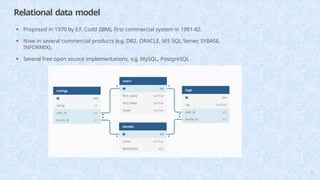
•Proposed in 1970 by E.F. Codd (IBM), first commercial system in 1981-82.
• Now in several commercial products (e.g. DB2, ORACLE, MS SQL Server, SYBASE,
INFORMIX).
• Several free open source implementations, e.g. MySQL, PostgreSQL
12
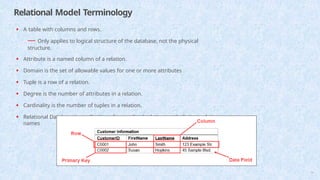
Relational Model Terminology
•A table with columns and rows.
— Only applies to logical structure of the database, not the physical
structure.
• Attribute is a named column of a relation.
• Domain is the set of allowable values for one or more attributes
• Tuple is a row of a relation.
• Degree is the number of attributes in a relation.
• Cardinality is the number of tuples in a relation.
• Relational Database is a collection of normalized relations with distinct relation
names
14
15.
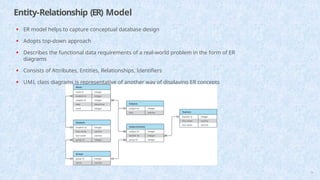
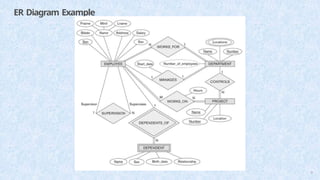
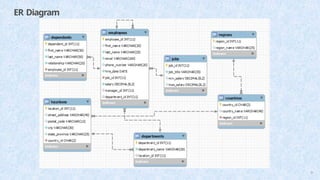
Entity-Relationship (ER) Model
•ER model helps to capture conceptual database design
• Adopts top-down approach
• Describes the functional data requirements of a real-world problem in the form of ER
diagrams
• Consists of Attributes, Entities, Relationships, Identifiers
• UML class diagrams is representative of another way of displaying ER concepts
15
16.
Entity and Attribute
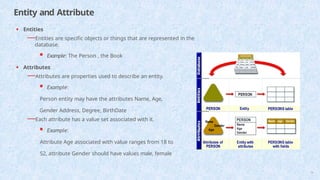
•Entities
—Entities are specific objects or things that are represented in the
database.
Example: The Person , the Book
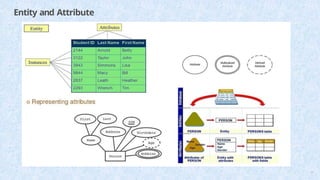
• Attributes
—Attributes are properties used to describe an entity.
Example:
Person entity may have the attributes Name, Age,
Gender Address, Degree, BirthDate
—Each attribute has a value set associated with it.
Example:
Attribute Age associated with value ranges from 18 to
52, attribute Gender should have values male, female
16
Types of Entities
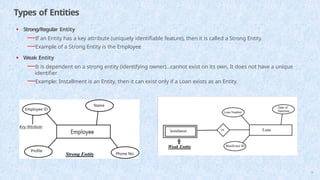
•Strong/Regular Entity
—If an Entity has a key attribute (uniquely identifiable feature), then it is called a Strong Entity.
—Example of a Strong Entity is the Employee
• Weak Entity
—It is dependent on a strong entity (identifying owner)…cannot exist on its own, It does not have a unique
identifier
—Example: Installment is an Entity, then it can exist only if a Loan exists as an Entity.
18
19.
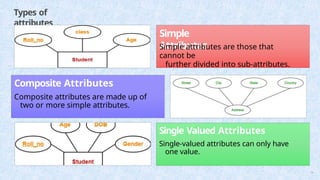
Types of
attributes
Simple
Attributes
Simple attributesare those that
cannot be
further divided into sub-attributes.
Composite Attributes
Composite attributes are made up of
two or more simple attributes.
Single Valued Attributes
Single-valued attributes can only have
one value.
19
20.
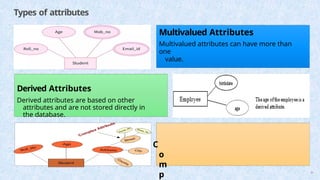
Types of attributes
MultivaluedAttributes
Multivalued attributes can have more than
one
value.
Derived Attributes
Derived attributes are based on other
attributes and are not stored directly in
the database.
C
o
m
p 20
21.
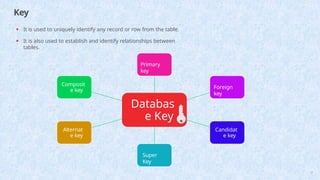
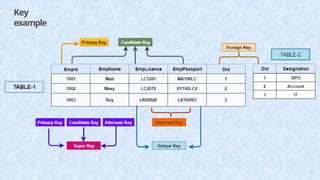
Key
• It isused to uniquely identify any record or row from the table.
• It is also used to establish and identify relationships between
tables.
Databas
e Key
Primary
key
Foreign
key
Candidat
e key
Super
Key
Alternat
e key
Composit
e key
21
Primary
key
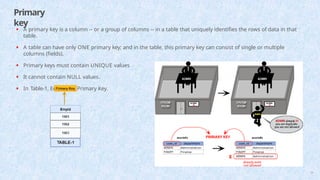
• A primarykey is a column -- or a group of columns -- in a table that uniquely identifies the rows of data in that
table.
• A table can have only ONE primary key; and in the table, this primary key can consist of single or multiple
columns (fields).
• Primary keys must contain UNIQUE values
• It cannot contain NULL values.
• In Table-1, Empid is a Primary Key.
23
24.
Candidate
Key
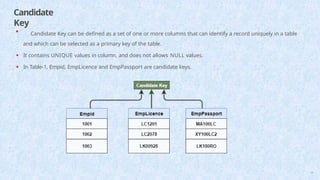
• Candidate Keycan be defined as a set of one or more columns that can identify a record uniquely in a table
and which can be selected as a primary key of the table.
• It contains UNIQUE values in column, and does not allows NULL values.
• In Table-1, Empid, EmpLicence and EmpPassport are candidate keys.
24
25.
Foreign
key
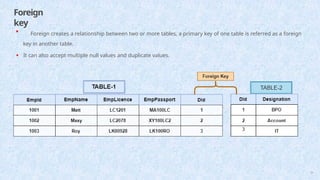
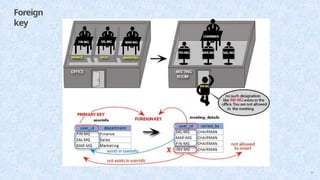
• Foreign createsa relationship between two or more tables, a primary key of one table is referred as a foreign
key in another table.
• It can also accept multiple null values and duplicate values.
25
Alternate
Key
27
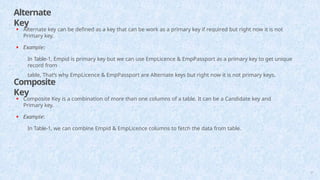
• Alternate keycan be defined as a key that can be work as a primary key if required but right now it is not
Primary key.
• Example:
In Table-1, Empid is primary key but we can use EmpLicence & EmpPassport as a primary key to get unique
record from
table, That’s why EmpLicence & EmpPassport are Alternate keys but right now it is not primary keys.
Composite
Key
• Composite Key is a combination of more than one columns of a table. It can be a Candidate key and
Primary key.
• Example:
In Table-1, we can combine Empid & EmpLicence columns to fetch the data from table.
28.
Super Key
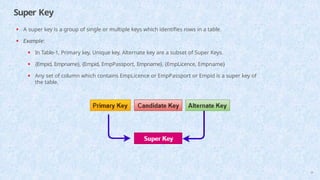
• Asuper key is a group of single or multiple keys which identifies rows in a table.
• Example:
• In Table-1, Primary key, Unique key, Alternate key are a subset of Super Keys.
• {Empid, Empname}, {Empid, EmpPassport, Empname}, {EmpLicence, Empname}
• Any set of column which contains EmpLicence or EmpPassport or Empid is a super key of
the table.
28
29.
Relationships
29
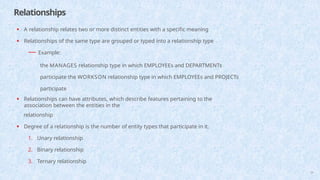
• A relationshiprelates two or more distinct entities with a specific meaning
• Relationships of the same type are grouped or typed into a relationship type
— Example:
the MANAGES relationship type in which EMPLOYEEs and DEPARTMENTs
participate the WORKSON relationship type in which EMPLOYEEs and PROJECTs
participate
• Relationships can have attributes, which describe features pertaining to the
association between the entities in the
relationship
• Degree of a relationship is the number of entity types that participate in it.
1. Unary relationship
2. Binary relationship
3. Ternary relationship
30.
Cardinality of Relationships
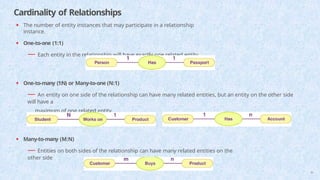
•The number of entity instances that may participate in a relationship
instance.
• One-to-one (1:1)
— Each entity in the relationship will have exactly one related entity
• One-to-many (1:N) or Many-to-one (N:1)
— An entity on one side of the relationship can have many related entities, but an entity on the other side
will have a
maximum of one related entity
• Many-to-many (M:N)
— Entities on both sides of the relationship can have many related entities on the
other side
30
What is Normalization?
34
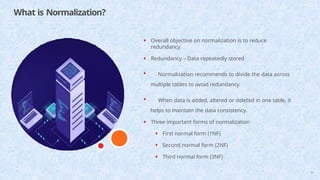
•Overall objective on normalization is to reduce
redundancy
• Redundancy – Data repeatedly stored
• Normalization recommends to divide the data across
multiple tables to avoid redundancy
• When data is added, altered or deleted in one table, it
helps to maintain the data consistency.
• Three important forms of normalization
• First normal form (1NF)
• Second normal form (2NF)
• Third normal form (3NF)
35.
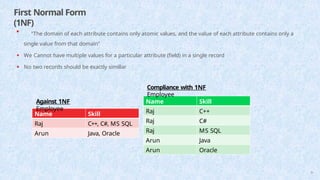
First Normal Form
(1NF)
35
NameSkill
Raj C++, C#, MS SQL
Arun Java, Oracle
Name Skill
Raj C++
Raj C#
Raj MS SQL
Arun Java
Arun Oracle
• "The domain of each attribute contains only atomic values, and the value of each attribute contains only a
single value from that domain"
• We Cannot have multiple values for a particular attribute (field) in a single record
• No two records should be exactly simillar
Compliance with 1NF
Employee
Against 1NF
Employee
36.
Second Normal Form
(2NF)
36
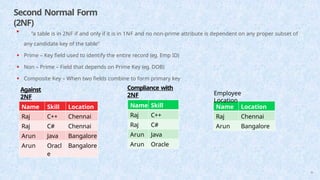
•"a table is in 2NF if and only if it is in 1NF and no non-prime attribute is dependent on any proper subset of
any candidate key of the table"
• Prime – Key field used to identify the entire record (eg. Emp ID)
• Non – Prime – Field that depends on Prime Key (eg. DOB)
• Composite Key – When two fields combine to form primary key
Against
2NF
Employee
Name Skill Location
Raj C++ Chennai
Raj C# Chennai
Arun Java Bangalore
Arun Oracl
e
Bangalore
Compliance with
2NF
Employee Skill
Name Skill
Raj C++
Raj C#
Arun Java
Arun Oracle
Name Location
Raj Chennai
Arun Bangalore
Employee
Location
37.
Third Normal Form
(3NF)
37
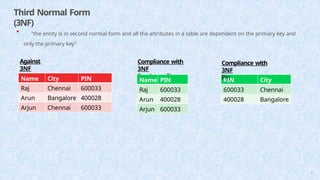
•"the entity is in second normal form and all the attributes in a table are dependent on the primary key and
only the primary key"
Against
3NF
Employee
Name City PIN
Raj Chennai 600033
Arun Bangalore 400028
Arjun Chennai 600033
Compliance with
3NF
Employee Pin
Name PIN
Raj 600033
Arun 400028
Arjun 600033
PIN City
600033 Chennai
400028 Bangalore
Compliance with
3NF
Pin
38.
Characteristics of gooddatabase system
38
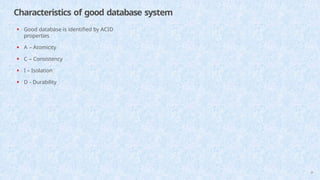
• Good database is identified by ACID
properties
• A – Atomicity
• C – Consistency
• I – Isolation
• D - Durability
39.
Atomicity
39
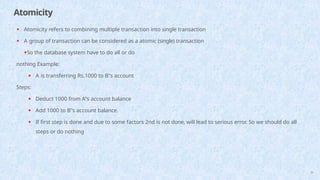
• Atomicity refersto combining multiple transaction into single transaction
• A group of transaction can be considered as a atomic (single) transaction
•So the database system have to do all or do
nothing Example:
• A is transferring Rs.1000 to B"s account
Steps:
• Deduct 1000 from A"s account balance
• Add 1000 to B"s account balance.
• If first step is done and due to some factors 2nd is not done, will lead to serious error. So we should do all
steps or do nothing
40.
Consistency
40
• System willprovide the user to define some rules regarding the data. (eg.
Unique Key)
• Once rules defined, they are consistently maintained until the database is
deleted
41.
Isolation
41
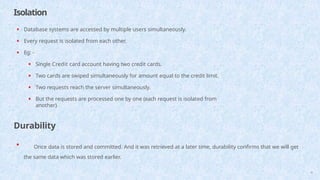
• Database systemsare accessed by multiple users simultaneously.
• Every request is isolated from each other.
• Eg: -
• Single Credit card account having two credit cards.
• Two cards are swiped simultaneously for amount equal to the credit limit.
• Two requests reach the server simultaneously.
• But the requests are processed one by one (each request is isolated from
another)
Durability
• Once data is stored and committed. And it was retrieved at a later time, durability confirms that we will get
the same data which was stored earlier.
42.
What is SQL?
42
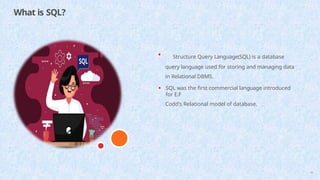
•Structure Query Language(SQL) is a database
query language used for storing and managing data
in Relational DBMS.
• SQL was the first commercial language introduced
for E.F
Codd's Relational model of database.
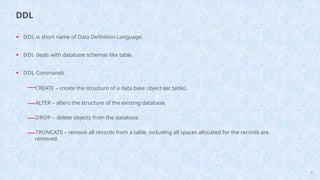
• DDL isshort name of Data Definition Language.
• DDL deals with database schemas like table.
• DDL Commands
—CREATE – create the structure of a data base object (ex: table).
—ALTER – alters the structure of the existing database.
—DROP – delete objects from the database.
—TRUNCATE – remove all records from a table, including all spaces allocated for the records are
removed.
45
DDL
46.
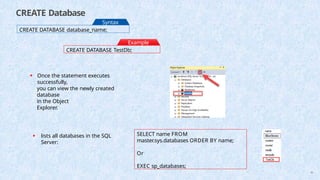
CREATE Database
CREATE DATABASEdatabase_name;
Syntax
:
CREATE DATABASE TestDb;
Example
:
• Once the statement executes
successfully,
you can view the newly created
database
in the Object
Explorer.
• lists all databases in the SQL
Server:
SELECT name FROM
master.sys.databases ORDER BY name;
Or
EXEC sp_databases;
46
47.
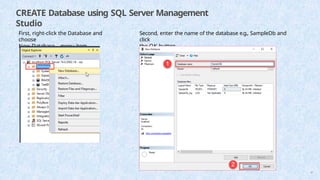
CREATE Database usingSQL Server Management
Studio
First, right-click the Database and
choose
New Database… menu item.
Second, enter the name of the database e.g., SampleDb and
click
the OK button.
47
48.
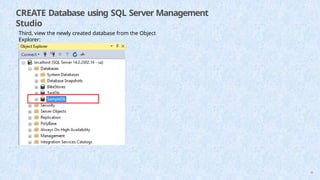
CREATE Database usingSQL Server Management
Studio
Third, view the newly created database from the Object
Explorer:
48
49.
Delete Database
DROP DATABASE[ IF EXISTS ]
database_name
[,database_name2,...]
;
Syntax
:
DROP DATABASE IF EXISTS TestDb;
Example
:
49
CREATE TABLE
CREATE TABLE[database_name.][schema_name.]table_name (
column_definition
1,
column_definition
2,
........,
table_constraints
);
Syntax:
CREATE TABLE
TestDB.dbo.Student( Id INT
IDENTITY PRIMARY KEY, Name
VARCHAR(65) NOT NULL,
Gender VARCHAR(20),
Age INT,
Marks INT
)
Example
:
51
• command display the structure of the
table
Exec sp_help tablename
52.
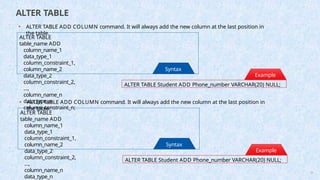
ALTER TABLE
ALTER TABLE
table_nameADD
column_name_1
data_type_1
column_constraint_1,
column_name_2
data_type_2
column_constraint_2,
...,
column_name_n
data_type_n
column_constraint_n;
Syntax
:
ALTER TABLE Student ADD Phone_number VARCHAR(20) NULL;
Example
:
• ALTER TABLE ADD COLUMN command. It will always add the new column at the last position in
the table.
ALTER TABLE
table_name ADD
column_name_1
data_type_1
column_constraint_1,
column_name_2
data_type_2
column_constraint_2,
...,
column_name_n
data_type_n
Syntax
:
ALTER TABLE Student ADD Phone_number VARCHAR(20) NULL;
Example
:
52
• ALTER TABLE ADD COLUMN command. It will always add the new column at the last position in
the table.
53.
ALTER TABLE
ALTER TABLE
table_nameADD
column_name_1
data_type_1
column_constraint_1,
column_name_2
data_type_2
column_constraint_2,
...,
column_name_n
data_type_n
column_constraint_n;
Syntax
:
ALTER TABLE Student ADD Phone_number VARCHAR(20) NULL;
Example
:
• ALTER TABLE ADD COLUMN command. It will always add the new column at the last position in
the table.
ALTER TABLE table_name
ALTER COLUMN column_name
new_data_type(size);
Syntax
:
ALTER TABLE [Student] ALTER COLUMN Gender NVARCHAR(10);
Example
:
53
• ALTER TABLE ALTER COLUMN statement to modify the column data
type.
54.
ALTER TABLE
ALTER TABLEtable_name
DROP COLUMN column_name1, DROP COLUMN column_name2...
• If we want to delete more than one column we can use the following
syntax:
Syntax:
ALTER TABLE Student DROP COLUMN Phone_number;
Example
:
ALTER TABLE table_name
ADD CONSTRAINT [constraint_name] PRIMARY KEY ([column_name])
Syntax
:
ALTER TABLE Student ADD CONSTRAINT PrimaryKey PRIMARY KEY (Id);
Example
:
54
• Add Constraint on the
Column
55.
ALTER TABLE
ALTER TABLEtable_name DROP CONSTRAINT [constraint_name]
Syntax
:
ALTER TABLE Student DROP CONSTRAINT PrimaryKey;
Example
:
55
• Drop Constraint on the
Column
56.
INSERT INTO TABLE
INSERTINTO [database_name].[dbo].
[table_name] (column_name1,
column_name2, ... )
VALUES
(value1, value2, ... );
Syntax
:
INSERT INTO Student (Name, Gender, Age,
Marks) VALUES ('Peter Huges', 'Male', 32, 450);
Example
:
• Insert Data into the
table
• store single records for all
fields,
INSERT INTO Student
VALUES ('Jolly Evans', 'Female', 28,
475),
('Alan Simmons', 'Male', 32, 405),
('Laura Bennet', 'Female', 30, 435);
Example
:
56
• store multiple records for all fields, use SELECT * FROM student to display records
in table
57.
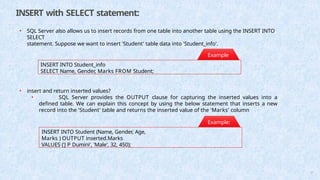
INSERT with SELECTstatement:
• SQL Server also allows us to insert records from one table into another table using the INSERT INTO
SELECT
statement. Suppose we want to insert 'Student' table data into 'Student_info'.
INSERT INTO Student_info
SELECT Name, Gender, Marks FROM Student;
Example
:
INSERT INTO Student (Name, Gender, Age,
Marks ) OUTPUT inserted.Marks
VALUES ('J P Dumini', 'Male', 32, 450);
• insert and return inserted values?
• SQL Server provides the OUTPUT clause for capturing the inserted values into a
defined table. We can explain this concept by using the below statement that inserts a new
record into the 'Student' table and returns the inserted value of the 'Marks' column
Example:
57
58.
Update Data in
table
UPDATE[database_name].
[ schema_name].table_name SET column1 =
new_value1,
column2 =
new_value2, ... [WHERE
Clause]
• The UPDATE query is always recommended to use with the SET and WHERE clause. We can
modify or
update the single or multiple columns at a time.
Syntax:
UPDATE
Student SET
Marks = 492
WHERE Name =
'Alan Simmons';
Example
:
• Update Single
Column
UPDATE Student
SET Age = 28, Marks = 492
WHERE Name = 'Diego
Bennet';
Example
:
58
• Update Multiple
Column
59.
Delete
table
DELETE FROM table_name[WHERE Condition];
• Use the DELETE statement to delete data from the existing table in the current schema or
tables of the
schema on which you have the DELETE privilege.
Syntax:
DELETE FROM student WHERE id = 1;
Example
:
• delete Single
record
DELETE FROM student;
• delete Delete All Rows which results in Now, the Select * from Employee query will display the
empty table.
Example:
DROP TABLE IF EXISTS sales.revenues;
Example
:
59
• Drop a table that does not
exist
SQL WHERE clause
61
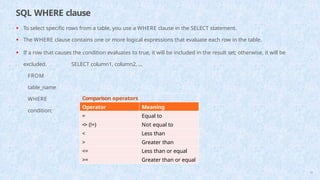
•To select specific rows from a table, you use a WHERE clause in the SELECT statement.
• The WHERE clause contains one or more logical expressions that evaluate each row in the table.
• If a row that causes the condition evaluates to true, it will be included in the result set; otherwise, it will be
excluded. SELECT column1, column2, ...
FROM
table_name
WHERE
condition;
Comparison operators
Operator Meaning
= Equal to
<> (!=) Not equal to
< Less than
> Greater than
<= Less than or equal
>= Greater than or equal
62.
SQL WHERE clauseLogical Operators
62
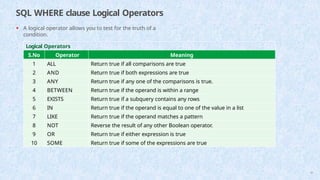
• A logical operator allows you to test for the truth of a
condition.
Logical Operators
S.No Operator Meaning
1 ALL Return true if all comparisons are true
2 AND Return true if both expressions are true
3 ANY Return true if any one of the comparisons is true.
4 BETWEEN Return true if the operand is within a range
5 EXISTS Return true if a subquery contains any rows
6 IN Return true if the operand is equal to one of the value in a list
7 LIKE Return true if the operand matches a pattern
8 NOT Reverse the result of any other Boolean operator.
9 OR Return true if either expression is true
10 SOME Return true if some of the expressions are true
63.
65
SQL WHERE clause
Example
SQL WHERE clause with numeric comparison
SELECT employee_id, first_name, last_name, salary
FROM [dbo].[Employees]
WHERE salary > 14000
SQL WHERE clause with characters comparison
SELECT employee_id, first_name, last_name
FROM [dbo].[Employees]
WHERE last_name = 'Chen’;
SQL WHERE clause with date comparison
SELECT employee_id, first_name, last_name,
hire_date
FROM [dbo].[Employees]
Note: Use YEAR function to get the year from hire_date
column WHERE YEAR (hire_date) = 1999
64.
SQL WHERE clauseLogical Operators
Example
SQL WHERE clause with AND operator
SELECT first_name, last_name, salary
FROM [dbo].[Employees]
WHERE salary > 5000 AND salary < 7000
SQL WHERE clause with OR operator
SELECT employee_id, first_name, last_name
FROM [dbo].[Employees]
WHERE salary = 7000 OR salary = 8000;
SQL WHERE clause with BETWEEN operator
SELECT employee_id, first_name, last_name,
hire_date
FROM [dbo].[Employees]
WHERE salary BETWEEN 9000 AND 12000 64
65.
SQL WHERE clauseLogical Operators
• The IN operator compares a value to a list of specified values. The IN operator returns true if the
compared value matches at least one value in the list; otherwise, it returns false.
Example
SQL WHERE clause with AND operator
SELECT first_name, last_name, department_id
FROM [dbo].[Employees]
WHERE department_id IN (8, 9)
65
66.
SQL WHERE clauseLogical Operators
• The LIKE operator compares a value to similar values using a wildcard
operator.
• The percent sign ( %) represents zero, one, or multiple characters.
• The underscore sign ( _) represents a single character.
Example
SQL WHERE clause with LIKE operator
SELECT employee_id, first_name, last_name
FROM [dbo].[Employees]
WHERE first_name LIKE 'jo%’;
SQL WHERE clause with LIKE operator
SELECT employee_id, first_name, last_name
FROM [dbo].[Employees]
WHERE first_name LIKE '_h%'
66
67.
SQL WHERE clausewith IS NULL
Example
SQL WHERE clause with IS NULL operator
SELECT employee_id, first_name,
last_name,
FROM [dbo].[Employees]
WHERE phone_number IS NULL;
phone_numb
er
SQL WHERE clause with IS NOT NULL
operator
SELECT employee_id, first_name,
last_name,
FROM [dbo].[Employees]
WHERE phone_number IS NOT NULL;
phone_numb
er
• To determine whether an expression or column is NULL or not, you use the IS NULL
operator.
• To check if an expression or column is not NULL, you use the IS NOT operator:
67
68.
SQL ORDER BYclause
68
• The ORDER BY is an optional clause of the SELECT statement.
• The ORDER BY clause allows you to sort the rows returned by the SELECT clause by one or more sort
expressions in ascending or descending order.
Syntax:
SELECT column_list
FROM table1
ORDER BY sort_expression [ASC | DESC];
69.
SQL ORDER BYclause
Example
SQL ORDER BY DESC clause
SELECT employee_id, first_name, last_name, hire_date, salary
FROM [dbo].[Employees]
ORDER BY hire_date DESC;
SQL ORDER BY clause
SELECT employee_id, first_name, last_name, hire_date, salary
FROM [dbo].[Employees]
ORDER BY first_name;
Note:- ORDER BY clause sort first_name column in ascending order or use ASC
Keyword
69
70.
SQL LIMIT andOFFSET clause
70
• To limit the number of rows returned by a select statement, you use the FETCH and OFFSET
clauses.
Syntax:
ORDER BY column_list [ASC |DESC]
OFFSET offset_row_count {ROW | ROWS}
FETCH {FIRST | NEXT} fetch_row_count {ROW | ROWS} ONLY;
• The FETCH row_count determines the number of rows (row_count) returned by the query.
• The OFFSET offset clause skips the offset rows before beginning to return the rows. The OFFSET clause is
optional.
71.
SQL LIMIT andOFFSET clause
71
Example
SQL FETCH and OFFSET clause
SELECT product_name, list_price
FROM production.products
ORDER BY list_price,
product_name
OFFSET 10 ROWS
FETCH NEXT 10 ROWS ONLY;
Fill the belowgiven query to select all the records where the value of
the Price column is range 10 to 20
SELECT * FROM
Products WHERE Price
;
A. BETWEEN 10 AND 20
B.BETWEEN 10 OR 20
C. BETWEEN 10 >= 20
D. None of the above
BETWEEN 10 AND 20
3
Select all records where the first letter of the City starts with anything from an "a" to
"f".
SELECT * FROM Customers
WHERE City ;
A. LIKE '%[a to f]’
C. LIKE '[a-f] %’
B. LIKE '[a to f] %'
D. LIKE '%[a-f]'
Ans: LIKE '[a-f] %'
4
73
74.
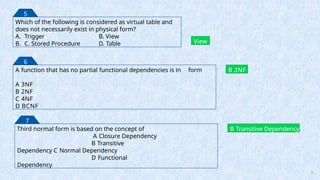
Which of thefollowing is considered as virtual table and
does not necessarily exist in physical form?
A. Trigger B. View
B. C. Stored Procedure D. Table View
5
A function that has no partial functional dependencies is in form
A 3NF
B 2NF
C 4NF
D BCNF
B 2NF
6
Third normal form is based on the concept of
A Closure Dependency
B Transitive
Dependency C Normal Dependency
D Functional
Dependency
B Transitive Dependency
7
74




![Delete Database
DROP DATABASE [ IF EXISTS ]
database_name
[,database_name2,...]
;
Syntax
:
DROP DATABASE IF EXISTS TestDb;
Example
:
49](https://image.slidesharecdn.com/sql-queries-for-data-analysts-updated-250505115443-6c809bbb/85/SQL-queries-for-Data-Analysts-Updated-pptx-49-320.jpg)
![CREATE TABLE
CREATE TABLE [database_name.][schema_name.]table_name (
column_definition
1,
column_definition
2,
........,
table_constraints
);
Syntax:
CREATE TABLE
TestDB.dbo.Student( Id INT
IDENTITY PRIMARY KEY, Name
VARCHAR(65) NOT NULL,
Gender VARCHAR(20),
Age INT,
Marks INT
)
Example
:
51
• command display the structure of the
table
Exec sp_help tablename](https://image.slidesharecdn.com/sql-queries-for-data-analysts-updated-250505115443-6c809bbb/85/SQL-queries-for-Data-Analysts-Updated-pptx-51-320.jpg)
![ALTER TABLE
ALTER TABLE
table_name ADD
column_name_1
data_type_1
column_constraint_1,
column_name_2
data_type_2
column_constraint_2,
...,
column_name_n
data_type_n
column_constraint_n;
Syntax
:
ALTER TABLE Student ADD Phone_number VARCHAR(20) NULL;
Example
:
• ALTER TABLE ADD COLUMN command. It will always add the new column at the last position in
the table.
ALTER TABLE table_name
ALTER COLUMN column_name
new_data_type(size);
Syntax
:
ALTER TABLE [Student] ALTER COLUMN Gender NVARCHAR(10);
Example
:
53
• ALTER TABLE ALTER COLUMN statement to modify the column data
type.](https://image.slidesharecdn.com/sql-queries-for-data-analysts-updated-250505115443-6c809bbb/85/SQL-queries-for-Data-Analysts-Updated-pptx-53-320.jpg)
![ALTER TABLE
ALTER TABLE table_name
DROP COLUMN column_name1, DROP COLUMN column_name2...
• If we want to delete more than one column we can use the following
syntax:
Syntax:
ALTER TABLE Student DROP COLUMN Phone_number;
Example
:
ALTER TABLE table_name
ADD CONSTRAINT [constraint_name] PRIMARY KEY ([column_name])
Syntax
:
ALTER TABLE Student ADD CONSTRAINT PrimaryKey PRIMARY KEY (Id);
Example
:
54
• Add Constraint on the
Column](https://image.slidesharecdn.com/sql-queries-for-data-analysts-updated-250505115443-6c809bbb/85/SQL-queries-for-Data-Analysts-Updated-pptx-54-320.jpg)
![ALTER TABLE
ALTER TABLE table_name DROP CONSTRAINT [constraint_name]
Syntax
:
ALTER TABLE Student DROP CONSTRAINT PrimaryKey;
Example
:
55
• Drop Constraint on the
Column](https://image.slidesharecdn.com/sql-queries-for-data-analysts-updated-250505115443-6c809bbb/85/SQL-queries-for-Data-Analysts-Updated-pptx-55-320.jpg)
![INSERT INTO TABLE
INSERT INTO [database_name].[dbo].
[table_name] (column_name1,
column_name2, ... )
VALUES
(value1, value2, ... );
Syntax
:
INSERT INTO Student (Name, Gender, Age,
Marks) VALUES ('Peter Huges', 'Male', 32, 450);
Example
:
• Insert Data into the
table
• store single records for all
fields,
INSERT INTO Student
VALUES ('Jolly Evans', 'Female', 28,
475),
('Alan Simmons', 'Male', 32, 405),
('Laura Bennet', 'Female', 30, 435);
Example
:
56
• store multiple records for all fields, use SELECT * FROM student to display records
in table](https://image.slidesharecdn.com/sql-queries-for-data-analysts-updated-250505115443-6c809bbb/85/SQL-queries-for-Data-Analysts-Updated-pptx-56-320.jpg)
![Update Data in
table
UPDATE [database_name].
[ schema_name].table_name SET column1 =
new_value1,
column2 =
new_value2, ... [WHERE
Clause]
• The UPDATE query is always recommended to use with the SET and WHERE clause. We can
modify or
update the single or multiple columns at a time.
Syntax:
UPDATE
Student SET
Marks = 492
WHERE Name =
'Alan Simmons';
Example
:
• Update Single
Column
UPDATE Student
SET Age = 28, Marks = 492
WHERE Name = 'Diego
Bennet';
Example
:
58
• Update Multiple
Column](https://image.slidesharecdn.com/sql-queries-for-data-analysts-updated-250505115443-6c809bbb/85/SQL-queries-for-Data-Analysts-Updated-pptx-58-320.jpg)
![Delete
table
DELETE FROM table_name [WHERE Condition];
• Use the DELETE statement to delete data from the existing table in the current schema or
tables of the
schema on which you have the DELETE privilege.
Syntax:
DELETE FROM student WHERE id = 1;
Example
:
• delete Single
record
DELETE FROM student;
• delete Delete All Rows which results in Now, the Select * from Employee query will display the
empty table.
Example:
DROP TABLE IF EXISTS sales.revenues;
Example
:
59
• Drop a table that does not
exist](https://image.slidesharecdn.com/sql-queries-for-data-analysts-updated-250505115443-6c809bbb/85/SQL-queries-for-Data-Analysts-Updated-pptx-59-320.jpg)

![65
SQL WHERE clause
Example
SQL WHERE clause with numeric comparison
SELECT employee_id, first_name, last_name, salary
FROM [dbo].[Employees]
WHERE salary > 14000
SQL WHERE clause with characters comparison
SELECT employee_id, first_name, last_name
FROM [dbo].[Employees]
WHERE last_name = 'Chen’;
SQL WHERE clause with date comparison
SELECT employee_id, first_name, last_name,
hire_date
FROM [dbo].[Employees]
Note: Use YEAR function to get the year from hire_date
column WHERE YEAR (hire_date) = 1999](https://image.slidesharecdn.com/sql-queries-for-data-analysts-updated-250505115443-6c809bbb/85/SQL-queries-for-Data-Analysts-Updated-pptx-63-320.jpg)
![SQL WHERE clause Logical Operators
Example
SQL WHERE clause with AND operator
SELECT first_name, last_name, salary
FROM [dbo].[Employees]
WHERE salary > 5000 AND salary < 7000
SQL WHERE clause with OR operator
SELECT employee_id, first_name, last_name
FROM [dbo].[Employees]
WHERE salary = 7000 OR salary = 8000;
SQL WHERE clause with BETWEEN operator
SELECT employee_id, first_name, last_name,
hire_date
FROM [dbo].[Employees]
WHERE salary BETWEEN 9000 AND 12000 64](https://image.slidesharecdn.com/sql-queries-for-data-analysts-updated-250505115443-6c809bbb/85/SQL-queries-for-Data-Analysts-Updated-pptx-64-320.jpg)
![SQL WHERE clause Logical Operators
• The IN operator compares a value to a list of specified values. The IN operator returns true if the
compared value matches at least one value in the list; otherwise, it returns false.
Example
SQL WHERE clause with AND operator
SELECT first_name, last_name, department_id
FROM [dbo].[Employees]
WHERE department_id IN (8, 9)
65](https://image.slidesharecdn.com/sql-queries-for-data-analysts-updated-250505115443-6c809bbb/85/SQL-queries-for-Data-Analysts-Updated-pptx-65-320.jpg)
![SQL WHERE clause Logical Operators
• The LIKE operator compares a value to similar values using a wildcard
operator.
• The percent sign ( %) represents zero, one, or multiple characters.
• The underscore sign ( _) represents a single character.
Example
SQL WHERE clause with LIKE operator
SELECT employee_id, first_name, last_name
FROM [dbo].[Employees]
WHERE first_name LIKE 'jo%’;
SQL WHERE clause with LIKE operator
SELECT employee_id, first_name, last_name
FROM [dbo].[Employees]
WHERE first_name LIKE '_h%'
66](https://image.slidesharecdn.com/sql-queries-for-data-analysts-updated-250505115443-6c809bbb/85/SQL-queries-for-Data-Analysts-Updated-pptx-66-320.jpg)
![SQL WHERE clause with IS NULL
Example
SQL WHERE clause with IS NULL operator
SELECT employee_id, first_name,
last_name,
FROM [dbo].[Employees]
WHERE phone_number IS NULL;
phone_numb
er
SQL WHERE clause with IS NOT NULL
operator
SELECT employee_id, first_name,
last_name,
FROM [dbo].[Employees]
WHERE phone_number IS NOT NULL;
phone_numb
er
• To determine whether an expression or column is NULL or not, you use the IS NULL
operator.
• To check if an expression or column is not NULL, you use the IS NOT operator:
67](https://image.slidesharecdn.com/sql-queries-for-data-analysts-updated-250505115443-6c809bbb/85/SQL-queries-for-Data-Analysts-Updated-pptx-67-320.jpg)
![SQL ORDER BY clause
68
• The ORDER BY is an optional clause of the SELECT statement.
• The ORDER BY clause allows you to sort the rows returned by the SELECT clause by one or more sort
expressions in ascending or descending order.
Syntax:
SELECT column_list
FROM table1
ORDER BY sort_expression [ASC | DESC];](https://image.slidesharecdn.com/sql-queries-for-data-analysts-updated-250505115443-6c809bbb/85/SQL-queries-for-Data-Analysts-Updated-pptx-68-320.jpg)
![SQL ORDER BY clause
Example
SQL ORDER BY DESC clause
SELECT employee_id, first_name, last_name, hire_date, salary
FROM [dbo].[Employees]
ORDER BY hire_date DESC;
SQL ORDER BY clause
SELECT employee_id, first_name, last_name, hire_date, salary
FROM [dbo].[Employees]
ORDER BY first_name;
Note:- ORDER BY clause sort first_name column in ascending order or use ASC
Keyword
69](https://image.slidesharecdn.com/sql-queries-for-data-analysts-updated-250505115443-6c809bbb/85/SQL-queries-for-Data-Analysts-Updated-pptx-69-320.jpg)
![SQL LIMIT and OFFSET clause
70
• To limit the number of rows returned by a select statement, you use the FETCH and OFFSET
clauses.
Syntax:
ORDER BY column_list [ASC |DESC]
OFFSET offset_row_count {ROW | ROWS}
FETCH {FIRST | NEXT} fetch_row_count {ROW | ROWS} ONLY;
• The FETCH row_count determines the number of rows (row_count) returned by the query.
• The OFFSET offset clause skips the offset rows before beginning to return the rows. The OFFSET clause is
optional.](https://image.slidesharecdn.com/sql-queries-for-data-analysts-updated-250505115443-6c809bbb/85/SQL-queries-for-Data-Analysts-Updated-pptx-70-320.jpg)


![Fill the below given query to select all the records where the value of
the Price column is range 10 to 20
SELECT * FROM
Products WHERE Price
;
A. BETWEEN 10 AND 20
B.BETWEEN 10 OR 20
C. BETWEEN 10 >= 20
D. None of the above
BETWEEN 10 AND 20
3
Select all records where the first letter of the City starts with anything from an "a" to
"f".
SELECT * FROM Customers
WHERE City ;
A. LIKE '%[a to f]’
C. LIKE '[a-f] %’
B. LIKE '[a to f] %'
D. LIKE '%[a-f]'
Ans: LIKE '[a-f] %'
4
73](https://image.slidesharecdn.com/sql-queries-for-data-analysts-updated-250505115443-6c809bbb/85/SQL-queries-for-Data-Analysts-Updated-pptx-73-320.jpg)