Download free for 30 days
Sign in
Upload
Language (EN)
Support
Business
Mobile
Social Media
Marketing
Technology
Art & Photos
Career
Design
Education
Presentations & Public Speaking
Government & Nonprofit
Healthcare
Internet
Law
Leadership & Management
Automotive
Engineering
Software
Recruiting & HR
Retail
Sales
Services
Science
Small Business & Entrepreneurship
Food
Environment
Economy & Finance
Data & Analytics
Investor Relations
Sports
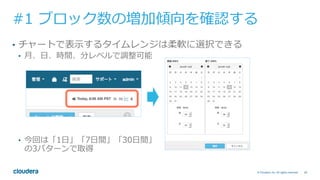
Spiritual
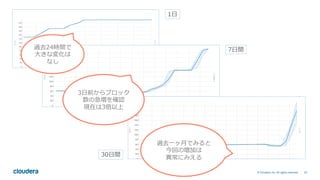
News & Politics
Travel
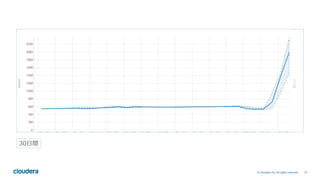
Self Improvement
Real Estate
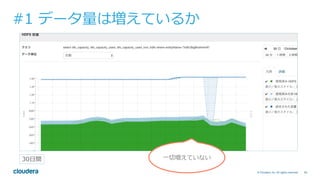
Entertainment & Humor
Health & Medicine
Devices & Hardware
Lifestyle
Change Language
Language
English
Español
Português
Français
Deutsche
Cancel
Save
Submit search
EN
Uploaded by
Cloudera Japan
3,027 views
#cwt2016 Cloudera Managerを用いた Hadoop のトラブルシューティング
Cloudera World Tokyo 2016 (http://www.clouderaworldtokyo.com/) での講演内容です
Data & Analytics
◦
Read more
4
Save
Share
Embed
Embed presentation
Download
Downloaded 26 times
1
/ 66
2
/ 66
3
/ 66
4
/ 66
5
/ 66
6
/ 66
7
/ 66
8
/ 66
9
/ 66
10
/ 66
11
/ 66
12
/ 66
13
/ 66
14
/ 66
15
/ 66
16
/ 66
17
/ 66
18
/ 66
19
/ 66
20
/ 66
21
/ 66
22
/ 66
23
/ 66
24
/ 66
25
/ 66
26
/ 66
27
/ 66
28
/ 66
29
/ 66
30
/ 66
31
/ 66
32
/ 66
33
/ 66
34
/ 66
35
/ 66
36
/ 66
37
/ 66
38
/ 66
39
/ 66
40
/ 66
41
/ 66
42
/ 66
43
/ 66
44
/ 66
45
/ 66
46
/ 66
47
/ 66
48
/ 66
49
/ 66
50
/ 66
51
/ 66
52
/ 66
53
/ 66
54
/ 66
55
/ 66
56
/ 66
57
/ 66
58
/ 66
59
/ 66
60
/ 66
61
/ 66
62
/ 66
63
/ 66
64
/ 66
65
/ 66
66
/ 66
More Related Content
PDF
Apache Bigtop3.2 (仮)(Open Source Conference 2022 Online/Hiroshima 発表資料)
by
NTT DATA Technology & Innovation
PDF
Hadoop/Spark を使うなら Bigtop を使い熟そう! ~並列分散処理基盤のいま、から Bigtop の最近の取り組みまで一挙ご紹介~(Ope...
by
NTT DATA Technology & Innovation
PPTX
Hadoop -NameNode HAの仕組み-
by
Yuki Gonda
PPTX
BigtopでHadoopをビルドする(Open Source Conference 2021 Online/Spring 発表資料)
by
NTT DATA Technology & Innovation
PDF
ストリーム処理を支えるキューイングシステムの選び方
by
Yoshiyasu SAEKI
PDF
Oracle GoldenGate FAQ
by
オラクルエンジニア通信
PDF
Hadoopの概念と基本的知識
by
Ken SASAKI
PDF
Hadoopのシステム設計・運用のポイント
by
Cloudera Japan
Apache Bigtop3.2 (仮)(Open Source Conference 2022 Online/Hiroshima 発表資料)
by
NTT DATA Technology & Innovation
Hadoop/Spark を使うなら Bigtop を使い熟そう! ~並列分散処理基盤のいま、から Bigtop の最近の取り組みまで一挙ご紹介~(Ope...
by
NTT DATA Technology & Innovation
Hadoop -NameNode HAの仕組み-
by
Yuki Gonda
BigtopでHadoopをビルドする(Open Source Conference 2021 Online/Spring 発表資料)
by
NTT DATA Technology & Innovation
ストリーム処理を支えるキューイングシステムの選び方
by
Yoshiyasu SAEKI
Oracle GoldenGate FAQ
by
オラクルエンジニア通信
Hadoopの概念と基本的知識
by
Ken SASAKI
Hadoopのシステム設計・運用のポイント
by
Cloudera Japan
What's hot
PPTX
Apache Bigtopによるオープンなビッグデータ処理基盤の構築(オープンデベロッパーズカンファレンス 2021 Online 発表資料)
by
NTT DATA Technology & Innovation
PDF
Apache Impalaパフォーマンスチューニング #dbts2018
by
Cloudera Japan
PPTX
Dockerからcontainerdへの移行
by
Akihiro Suda
PPTX
Apache BigtopによるHadoopエコシステムのパッケージング(Open Source Conference 2021 Online/Osaka...
by
NTT DATA Technology & Innovation
PDF
トランザクション処理可能な分散DB 「YugabyteDB」入門(Open Source Conference 2022 Online/Fukuoka 発...
by
NTT DATA Technology & Innovation
PDF
Apache Kafkaって本当に大丈夫?~故障検証のオーバービューと興味深い挙動の紹介~
by
NTT DATA OSS Professional Services
PDF
Oracle Data Guard による高可用性
by
Yahoo!デベロッパーネットワーク
PDF
【Oracle Cloud ウェビナー】WebLogic Serverのご紹介
by
オラクルエンジニア通信
PDF
Apache Hadoopの未来 3系になって何が変わるのか?
by
NTT DATA OSS Professional Services
PDF
アーキテクチャから理解するPostgreSQLのレプリケーション
by
Masahiko Sawada
PPT
Cassandraのしくみ データの読み書き編
by
Yuki Morishita
PDF
Yahoo! JAPANのOracle構成-2017年版
by
Yahoo!デベロッパーネットワーク
PDF
データインターフェースとしてのHadoop ~HDFSとクラウドストレージと私~ (NTTデータ テクノロジーカンファレンス 2019 講演資料、2019...
by
NTT DATA Technology & Innovation
PDF
ちょっと理解に自信がないな という皆さまに贈るHadoop/Sparkのキホン (IBM Datapalooza Tokyo 2016講演資料)
by
hamaken
PDF
Oracle GoldenGate入門
by
オラクルエンジニア通信
PDF
ヤフー発のメッセージキュー「Pulsar」のご紹介
by
Yahoo!デベロッパーネットワーク
PDF
あなたの知らないPostgreSQL監視の世界
by
Yoshinori Nakanishi
PDF
Presto on YARNの導入・運用
by
cyberagent
PPTX
分散ストレージ技術Cephの最新情報
by
Emma Haruka Iwao
PDF
Open Liberty: オープンソースになったWebSphere Liberty
by
Takakiyo Tanaka
Apache Bigtopによるオープンなビッグデータ処理基盤の構築(オープンデベロッパーズカンファレンス 2021 Online 発表資料)
by
NTT DATA Technology & Innovation
Apache Impalaパフォーマンスチューニング #dbts2018
by
Cloudera Japan
Dockerからcontainerdへの移行
by
Akihiro Suda
Apache BigtopによるHadoopエコシステムのパッケージング(Open Source Conference 2021 Online/Osaka...
by
NTT DATA Technology & Innovation
トランザクション処理可能な分散DB 「YugabyteDB」入門(Open Source Conference 2022 Online/Fukuoka 発...
by
NTT DATA Technology & Innovation
Apache Kafkaって本当に大丈夫?~故障検証のオーバービューと興味深い挙動の紹介~
by
NTT DATA OSS Professional Services
Oracle Data Guard による高可用性
by
Yahoo!デベロッパーネットワーク
【Oracle Cloud ウェビナー】WebLogic Serverのご紹介
by
オラクルエンジニア通信
Apache Hadoopの未来 3系になって何が変わるのか?
by
NTT DATA OSS Professional Services
アーキテクチャから理解するPostgreSQLのレプリケーション
by
Masahiko Sawada
Cassandraのしくみ データの読み書き編
by
Yuki Morishita
Yahoo! JAPANのOracle構成-2017年版
by
Yahoo!デベロッパーネットワーク
データインターフェースとしてのHadoop ~HDFSとクラウドストレージと私~ (NTTデータ テクノロジーカンファレンス 2019 講演資料、2019...
by
NTT DATA Technology & Innovation
ちょっと理解に自信がないな という皆さまに贈るHadoop/Sparkのキホン (IBM Datapalooza Tokyo 2016講演資料)
by
hamaken
Oracle GoldenGate入門
by
オラクルエンジニア通信
ヤフー発のメッセージキュー「Pulsar」のご紹介
by
Yahoo!デベロッパーネットワーク
あなたの知らないPostgreSQL監視の世界
by
Yoshinori Nakanishi
Presto on YARNの導入・運用
by
cyberagent
分散ストレージ技術Cephの最新情報
by
Emma Haruka Iwao
Open Liberty: オープンソースになったWebSphere Liberty
by
Takakiyo Tanaka
Viewers also liked
PDF
PostgreSQLアーキテクチャ入門
by
Uptime Technologies LLC (JP)
PPTX
PostgreSQLクエリ実行の基礎知識 ~Explainを読み解こう~
by
Miki Shimogai
PDF
まずやっとくPostgreSQLチューニング
by
Kosuke Kida
PDF
[db tech showcase Tokyo 2016] C32: 世界一速いPostgreSQLを目指せ!インメモリカラムナの実現 by 富士通株式会...
by
Insight Technology, Inc.
PDF
Ibis: すごい pandas ⼤規模データ分析もらっくらく #summerDS
by
Cloudera Japan
PDF
大規模データに対するデータサイエンスの進め方 #CWT2016
by
Cloudera Japan
PDF
#cwt2016 Apache Kudu 構成とテーブル設計
by
Cloudera Japan
PDF
[db tech showcase Tokyo 2015] A26:内部犯行による漏えいを防ぐPostgreSQLの透過的暗号化機能に関する実装と利用方法...
by
Insight Technology, Inc.
PDF
Migr8.rb チュートリアル
by
kwatch
PDF
今すぐ使えるクラウドとPostgreSQL
by
Soudai Sone
PPTX
【自社プロダクト開発エンジニア募集中】エーピーコミュニケーションズ 先進開発グループ
by
APCommunications-recruit
PDF
Cloud Native Hadoop #cwt2016
by
Cloudera Japan
PDF
クラウド上でHadoopを構築できる Cloudera Director 2.0 の紹介 #dogenzakalt
by
Cloudera Japan
PDF
Cloudera + MicrosoftでHadoopするのがイイらしい。 #CWT2016
by
Cloudera Japan
PDF
Ivsctonightandday2016winter moringsession awsreinvent2016recap
by
Tadashi Okazaki
PPTX
HAWQをCDHで動かしてみた
by
adachij2002
PDF
[db tech showcase Tokyo 2015] B16:最新版PostgreSQLのパフォーマンスを引き出すためのポイント by Postgr...
by
Insight Technology, Inc.
PDF
初心者がAWSでWebサービスを始めるまで 〜たった3ステップでWebページは公開できる〜
by
Takeshi Wakamatsu
PDF
Osc2015 hokkaido postgresql-semi-stuructured-datatype
by
Toshi Harada
PPTX
レシピブログのサービス設計と今後の展望
by
Masaki Nakagawa
PostgreSQLアーキテクチャ入門
by
Uptime Technologies LLC (JP)
PostgreSQLクエリ実行の基礎知識 ~Explainを読み解こう~
by
Miki Shimogai
まずやっとくPostgreSQLチューニング
by
Kosuke Kida
[db tech showcase Tokyo 2016] C32: 世界一速いPostgreSQLを目指せ!インメモリカラムナの実現 by 富士通株式会...
by
Insight Technology, Inc.
Ibis: すごい pandas ⼤規模データ分析もらっくらく #summerDS
by
Cloudera Japan
大規模データに対するデータサイエンスの進め方 #CWT2016
by
Cloudera Japan
#cwt2016 Apache Kudu 構成とテーブル設計
by
Cloudera Japan
[db tech showcase Tokyo 2015] A26:内部犯行による漏えいを防ぐPostgreSQLの透過的暗号化機能に関する実装と利用方法...
by
Insight Technology, Inc.
Migr8.rb チュートリアル
by
kwatch
今すぐ使えるクラウドとPostgreSQL
by
Soudai Sone
【自社プロダクト開発エンジニア募集中】エーピーコミュニケーションズ 先進開発グループ
by
APCommunications-recruit
Cloud Native Hadoop #cwt2016
by
Cloudera Japan
クラウド上でHadoopを構築できる Cloudera Director 2.0 の紹介 #dogenzakalt
by
Cloudera Japan
Cloudera + MicrosoftでHadoopするのがイイらしい。 #CWT2016
by
Cloudera Japan
Ivsctonightandday2016winter moringsession awsreinvent2016recap
by
Tadashi Okazaki
HAWQをCDHで動かしてみた
by
adachij2002
[db tech showcase Tokyo 2015] B16:最新版PostgreSQLのパフォーマンスを引き出すためのポイント by Postgr...
by
Insight Technology, Inc.
初心者がAWSでWebサービスを始めるまで 〜たった3ステップでWebページは公開できる〜
by
Takeshi Wakamatsu
Osc2015 hokkaido postgresql-semi-stuructured-datatype
by
Toshi Harada
レシピブログのサービス設計と今後の展望
by
Masaki Nakagawa
Similar to #cwt2016 Cloudera Managerを用いた Hadoop のトラブルシューティング
PPTX
HBaseサポート最前線 #hbase_ca
by
Cloudera Japan
PPTX
HDFS Supportaiblity Improvements
by
Cloudera Japan
PDF
Cloudera Manager 4 の紹介
by
Cloudera Japan
PPTX
Clouderaが提供するエンタープライズ向け運用、データ管理ツールの使い方 #CW2017
by
Cloudera Japan
PDF
CDHの歴史とCDH5新機能概要 #at_tokuben
by
Cloudera Japan
PDF
はじめるCassandra
by
Kakeru Iwanaga
PDF
ヤフーにおけるHadoop Operations #tdtech
by
Yahoo!デベロッパーネットワーク
PPTX
Hadoop Troubleshooting 101 - Japanese Version
by
Cloudera, Inc.
PDF
Troubleshooting Using Cloudera Manager #cwt2015
by
Cloudera Japan
PDF
C5.2 (Cloudera Manager + CDH) アップデート #cwt2014
by
Cloudera Japan
PDF
HBase Meetup Tokyo Summer 2015 #hbasejp
by
Cloudera Japan
PDF
Hadoop Operations #cwt2013
by
Cloudera Japan
PDF
HBase活用事例 #hbase_ca
by
Cloudera Japan
PDF
Cloudera Manager 5 (hadoop運用) #cwt2013
by
Cloudera Japan
PDF
Cloudera Manager4.0とNameNode-HAセミナー資料
by
Cloudera Japan
PDF
HBase Across the World #LINE_DM
by
Cloudera Japan
PPTX
Cloudera大阪セミナー 20130219
by
Cloudera Japan
PDF
CDH4セミナー資料
by
Cloudera Japan
PPTX
Hadoopトレーニング番外編 〜間違えられやすいHadoopの7つの仕様〜
by
Cloudera Japan
PDF
「新製品 Kudu 及び RecordServiceの概要」 #cwt2015
by
Cloudera Japan
HBaseサポート最前線 #hbase_ca
by
Cloudera Japan
HDFS Supportaiblity Improvements
by
Cloudera Japan
Cloudera Manager 4 の紹介
by
Cloudera Japan
Clouderaが提供するエンタープライズ向け運用、データ管理ツールの使い方 #CW2017
by
Cloudera Japan
CDHの歴史とCDH5新機能概要 #at_tokuben
by
Cloudera Japan
はじめるCassandra
by
Kakeru Iwanaga
ヤフーにおけるHadoop Operations #tdtech
by
Yahoo!デベロッパーネットワーク
Hadoop Troubleshooting 101 - Japanese Version
by
Cloudera, Inc.
Troubleshooting Using Cloudera Manager #cwt2015
by
Cloudera Japan
C5.2 (Cloudera Manager + CDH) アップデート #cwt2014
by
Cloudera Japan
HBase Meetup Tokyo Summer 2015 #hbasejp
by
Cloudera Japan
Hadoop Operations #cwt2013
by
Cloudera Japan
HBase活用事例 #hbase_ca
by
Cloudera Japan
Cloudera Manager 5 (hadoop運用) #cwt2013
by
Cloudera Japan
Cloudera Manager4.0とNameNode-HAセミナー資料
by
Cloudera Japan
HBase Across the World #LINE_DM
by
Cloudera Japan
Cloudera大阪セミナー 20130219
by
Cloudera Japan
CDH4セミナー資料
by
Cloudera Japan
Hadoopトレーニング番外編 〜間違えられやすいHadoopの7つの仕様〜
by
Cloudera Japan
「新製品 Kudu 及び RecordServiceの概要」 #cwt2015
by
Cloudera Japan
More from Cloudera Japan
PDF
Apache Hadoop YARNとマルチテナントにおけるリソース管理
by
Cloudera Japan
PDF
Apache Kuduを使った分析システムの裏側
by
Cloudera Japan
PDF
Apache Kuduは何がそんなに「速い」DBなのか? #dbts2017
by
Cloudera Japan
PPTX
Impala + Kudu を用いたデータウェアハウス構築の勘所 (仮)
by
Cloudera Japan
PDF
Cloudera Data Science WorkbenchとPySparkで 好きなPythonライブラリを 分散で使う #cadeda
by
Cloudera Japan
PDF
Cloudera in the Cloud #CWT2017
by
Cloudera Japan
PDF
先行事例から学ぶ IoT / ビッグデータの始め方
by
Cloudera Japan
PDF
Train, predict, serve: How to go into production your machine learning model
by
Cloudera Japan
PDF
MapReduceを置き換えるSpark 〜HadoopとSparkの統合〜 #cwt2015
by
Cloudera Japan
PDF
How to go into production your machine learning models? #CWT2017
by
Cloudera Japan
PDF
Cloudera のサポートエンジニアリング #supennight
by
Cloudera Japan
PDF
PCIコンプライアンスに向けたビジネス指針〜MasterCardの事例〜 #cwt2015
by
Cloudera Japan
PPTX
機械学習の定番プラットフォームSparkの紹介
by
Cloudera Japan
PDF
Apache Kudu - Updatable Analytical Storage #rakutentech
by
Cloudera Japan
PPTX
基調講演: 「データエコシステムへの挑戦」 #cwt2015
by
Cloudera Japan
PPTX
Hue 4.0 / Hue Meetup Tokyo #huejp
by
Cloudera Japan
PDF
分散DB Apache Kuduのアーキテクチャ DBの性能と一貫性を両立させる仕組み 「HybridTime」とは
by
Cloudera Japan
PPTX
基調講演:「ビッグデータのセキュリティとガバナンス要件」 #cwt2015
by
Cloudera Japan
PDF
基調講演: 「パーペイシブ分析を目指して」#cwt2015
by
Cloudera Japan
Apache Hadoop YARNとマルチテナントにおけるリソース管理
by
Cloudera Japan
Apache Kuduを使った分析システムの裏側
by
Cloudera Japan
Apache Kuduは何がそんなに「速い」DBなのか? #dbts2017
by
Cloudera Japan
Impala + Kudu を用いたデータウェアハウス構築の勘所 (仮)
by
Cloudera Japan
Cloudera Data Science WorkbenchとPySparkで 好きなPythonライブラリを 分散で使う #cadeda
by
Cloudera Japan
Cloudera in the Cloud #CWT2017
by
Cloudera Japan
先行事例から学ぶ IoT / ビッグデータの始め方
by
Cloudera Japan
Train, predict, serve: How to go into production your machine learning model
by
Cloudera Japan
MapReduceを置き換えるSpark 〜HadoopとSparkの統合〜 #cwt2015
by
Cloudera Japan
How to go into production your machine learning models? #CWT2017
by
Cloudera Japan
Cloudera のサポートエンジニアリング #supennight
by
Cloudera Japan
PCIコンプライアンスに向けたビジネス指針〜MasterCardの事例〜 #cwt2015
by
Cloudera Japan
機械学習の定番プラットフォームSparkの紹介
by
Cloudera Japan
Apache Kudu - Updatable Analytical Storage #rakutentech
by
Cloudera Japan
基調講演: 「データエコシステムへの挑戦」 #cwt2015
by
Cloudera Japan
Hue 4.0 / Hue Meetup Tokyo #huejp
by
Cloudera Japan
分散DB Apache Kuduのアーキテクチャ DBの性能と一貫性を両立させる仕組み 「HybridTime」とは
by
Cloudera Japan
基調講演:「ビッグデータのセキュリティとガバナンス要件」 #cwt2015
by
Cloudera Japan
基調講演: 「パーペイシブ分析を目指して」#cwt2015
by
Cloudera Japan
#cwt2016 Cloudera Managerを用いた Hadoop のトラブルシューティング
1.
Cloudera Manager を⽤いた Hadoop
のトラブルシューティング テクニカルサポートの現場から Daisuke Kobayashi | Customer Operations Engineer
2.
2© Cloudera, Inc.
All rights reserved. ⾃⼰紹介 • ⼩林⼤輔 (@d1ce_) • Cloudera ⼊社五年⽬ • カスタマーオペレーションズエンジニア == テクニカルサポート • 過去の主な講演 • Hadoop Operations (2013) http://www.slideshare.net/Cloudera_jp/b3-hadoop-operations-20131107 • HBaseサポート最前線 (2015) http://www.slideshare.net/Cloudera_jp/hbase-hbaseca • Troubleshooting Using Cloudera Manager (2015) http://www.slideshare.net/Cloudera_jp/troubleshooting-using-cloudera-manager-cwt2015
3.
12© Cloudera, Inc.
All rights reserved. 障害対応時に必要な情報 • どんなログがでているか • どのバージョンを使⽤しているか • どのような設定で動かしているか • 発⽣前に変更した設定はあるか • いつ、何をしたときに発⽣したか • 発⽣頻度は? • 推奨構成となっているか • 使⽤しているコンポーネントは? • これまでにどのような対応を実施したか
4.
13© Cloudera, Inc.
All rights reserved. 障害対応時に必要な情報 • どんなログがでているか • どのバージョンを使⽤しているか • どのような設定で動かしているか • 発⽣前に変更した設定はあるか • いつ、何をしたときに発⽣したか • 発⽣頻度は? • 推奨構成となっているか • 使⽤しているコンポーネントは? • これまでにどのような対応を実施したか
5.
14© Cloudera, Inc.
All rights reserved. 本講演では Cloudera Manager (CM) を使って 1. 障害を回避するためにできること 2. 障害が発⽣したときに Cloudera サポートチームが • 何をみて • どのように • 問題解決しているのか を紹介します
6.
15© Cloudera, Inc.
All rights reserved. 昨年のセッション
7.
16© Cloudera, Inc.
All rights reserved. 昨年のセッションをベースに講演します Troubleshooting Using Cloudera Manager #cwt2015 http://www.slideshare.net/Cloudera_jp/troubleshooting-using-cloudera-manager-cwt2015 How Cloudera Manager Makes Hadoop Troubleshooting Easy http://qiita.com/d1ce_/items/9dd13a71f574ad1000af
8.
17©Cloudera, Inc. All
rights reserved. トラブルシューティングに先⽴って 必要となる前提知識の確認
9.
18© Cloudera, Inc.
All rights reserved. サポート要件の確認 http://www.cloudera.com/documentation/enterprise/release-notes/topics/rn_consolidated_pcm.html • サポートOS/Database/JDK のバージョンを確認すること • ディスク要件 • DataNode や Kafkaのノード • 独⽴したディスクを使⽤すること (JBOD) • DataNode のドライブは SSD/HDD 混在の構成もサポート (CDH 5.4 以上) http://www.cloudera.com/documentation/enterprise/latest/topics/admin_heterogeneous_storage_oview.html • new! DataNode 内ディスク間バランシングも対応 (CDH 5.8.2 以上) https://hadoop.apache.org/docs/current/hadoop-project-dist/hadoop-hdfs/HDFSDiskbalancer.html • マスターノード • NameNode/JournalNode/ZooKeeper でそれぞれ独⽴したドライブを⽤意すること
10.
19© Cloudera, Inc.
All rights reserved. サポート要件の確認 http://www.cloudera.com/documentation/enterprise/release-notes/topics/rn_consolidated_pcm.html • ネットワーク要件 • 複数 NIC の利⽤は未サポート • ホスト同⼠は FQDN で通信できるよう確認すること • ファイアーウォールは無効化すること
11.
20© Cloudera, Inc.
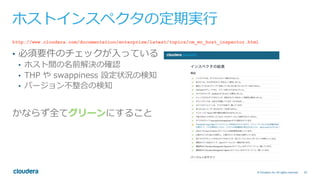
All rights reserved. ホストインスペクタの定期実⾏ http://www.cloudera.com/documentation/enterprise/latest/topics/cm_mc_host_inspector.html • 必須要件のチェックが⼊っている • ホスト間の名前解決の確認 • THP や swappiness 設定状況の検知 • バージョン不整合の検知 かならず全てグリーンにすること
12.
21© Cloudera, Inc.
All rights reserved. CMが利⽤するポート http://www.cloudera.com/documentation/enterprise/latest/topics/cm_ig_ports_cm.html 注: この他にもコンポーネント間の通信⽤に ランダムにエフェメラルポートを利⽤
13.
22© Cloudera, Inc.
All rights reserved. CMが利⽤するポート http://www.cloudera.com/documentation/enterprise/latest/topics/cm_ig_ports_cm.html • CDHのプロセスはすべてsupervisordが管理 • CM⾃⾝はHDFSのデータやHiveメタストアの 情報を持たない
14.
23© Cloudera, Inc.
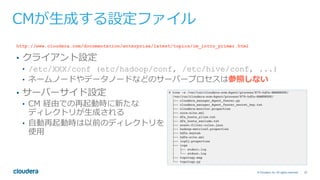
All rights reserved. CMが⽣成する設定ファイル http://www.cloudera.com/documentation/enterprise/latest/topics/cm_intro_primer.html • クライアント設定 • /etc/XXX/conf (etc/hadoop/conf, /etc/hive/conf, ...) • ネームノードやデータノードなどのサーバープロセスは参照しない • サーバーサイド設定 • CM 経由での再起動時に新たな ディレクトリが⽣成される • ⾃動再起動時は以前のディレクトリを 使⽤
15.
24© Cloudera, Inc.
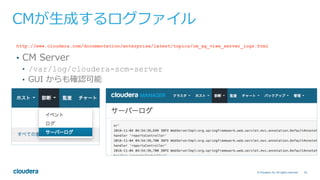
All rights reserved. CMが⽣成するログファイル http://www.cloudera.com/documentation/enterprise/latest/topics/cm_ag_view_server_logs.html • CM Server • /var/log/cloudera-scm-server • GUI からも確認可能
16.
25© Cloudera, Inc.
All rights reserved. CMが⽣成するログファイル http://www.cloudera.com/documentation/enterprise/latest/topics/cm_ag_view_agent_logs.html • CM Agent • /var/log/cloudera-scm-agent • GUI からも確認可能
17.
26© Cloudera, Inc.
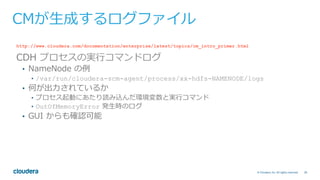
All rights reserved. CMが⽣成するログファイル http://www.cloudera.com/documentation/enterprise/latest/topics/cm_intro_primer.html CDH プロセスの実⾏コマンドログ • NameNode の例 • /var/run/cloudera-scm-agent/process/xx-hdfs-NAMENODE/logs • 何が出⼒されているか • プロセス起動にあたり読み込んだ環境変数と実⾏コマンド • OutOfMemoryError 発⽣時のログ • GUI からも確認可能
18.
27© Cloudera, Inc.
All rights reserved. CMが⽣成するログファイル • GUI からも確認可能
19.
28© Cloudera, Inc.
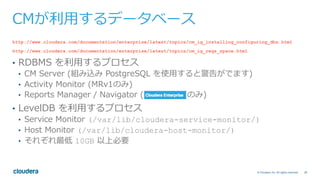
All rights reserved. CMが利⽤するデータベース http://www.cloudera.com/documentation/enterprise/latest/topics/cm_ig_installing_configuring_dbs.html http://www.cloudera.com/documentation/enterprise/latest/topics/cm_ig_reqs_space.html • RDBMS を利⽤するプロセス • CM Server (組み込み PostgreSQL を使⽤すると警告がでます) • Activity Monitor (MRv1のみ) • Reports Manager / Navigator ( のみ) • LevelDB を利⽤するプロセス • Service Monitor (/var/lib/cloudera-service-monitor/) • Host Monitor (/var/lib/cloudera-host-monitor/) • それぞれ最低 10GB 以上必要
20.
29© Cloudera, Inc.
All rights reserved. アップグレードにあたって http://www.cloudera.com/documentation/enterprise/latest/topics/cm_ag_upgrading_cm.html • かならず CM を先にアップグレードすること • CM のマイナーバージョン >= CDH のマイナーバージョンを維持すること • マイナーバージョン: バージョン番号 X.Y.Z の X.Y を指す • CM <= CDH は未サポート & 最悪の場合まともに動きません CM アップグレード CDH アップグレード
21.
30© Cloudera, Inc.
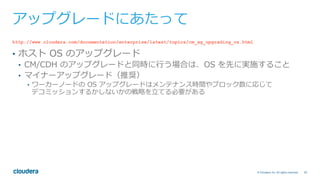
All rights reserved. アップグレードにあたって http://www.cloudera.com/documentation/enterprise/latest/topics/cm_ag_upgrading_os.html • ホスト OS のアップグレード • CM/CDH のアップグレードと同時に⾏う場合は、OS を先に実施すること • マイナーアップグレード(推奨) • ワーカーノードの OS アップグレードはメンテナンス時間やブロック数に応じて デコミッションするかしないかの戦略を⽴てる必要がある
22.
31© Cloudera, Inc.
All rights reserved. チャートの活⽤ http://www.cloudera.com/documentation/enterprise/latest/topics/cm_dg_chart_time_series_data.html
23.
32© Cloudera, Inc.
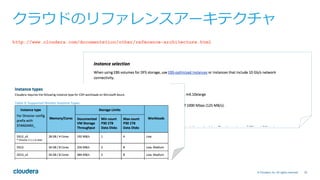
All rights reserved. クラウドのリファレンスアーキテクチャ http://www.cloudera.com/documentation/other/reference-architecture.html
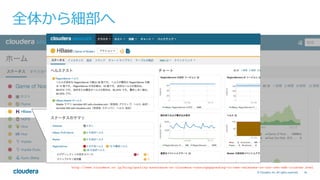
24.
33© Cloudera, Inc.
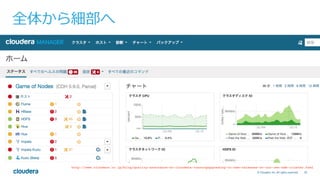
All rights reserved. 全体から細部へ http://www.cloudera.co.jp/blog/quality-assurance-at-cloudera-runningupgrading-to-new-releases-on-our-own-edh-cluster.html
25.
34© Cloudera, Inc.
All rights reserved. 全体から細部へ http://www.cloudera.co.jp/blog/quality-assurance-at-cloudera-runningupgrading-to-new-releases-on-our-own-edh-cluster.html
26.
35© Cloudera, Inc.
All rights reserved. 全体から細部へ http://www.cloudera.co.jp/blog/quality-assurance-at-cloudera-runningupgrading-to-new-releases-on-our-own-edh-cluster.html
27.
36©Cloudera, Inc. All
rights reserved. トラブルシューティングの実際
28.
37© Cloudera, Inc.
All rights reserved. 障害の三⼤原因 • 製品バグ • ハードウェアの問題 • ユーザーのオペミス
29.
38© Cloudera, Inc.
All rights reserved. 障害の三⼤原因 • 製品バグ • ハードウェアの問題 • ユーザーのオペミス
30.
#1 ブロック数が急増した原因は?
31.
40© Cloudera, Inc.
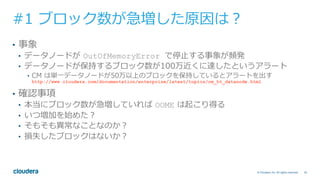
All rights reserved. #1 ブロック数が急増した原因は? • 事象 • データノードが OutOfMemoryError で停⽌する事象が頻発 • データノードが保持するブロック数が100万近くに達したというアラート • CM は単⼀データノードが50万以上のブロックを保持しているとアラートを出す http://www.cloudera.com/documentation/enterprise/latest/topics/cm_ht_datanode.html
32.
45© Cloudera, Inc.
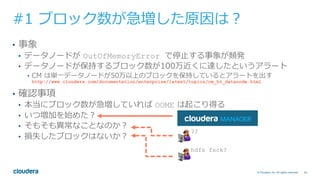
All rights reserved. #1 ブロック数が急増した原因は? • 事象 • データノードが OutOfMemoryError で停⽌する事象が頻発 • データノードが保持するブロック数が100万近くに達したというアラート • CM は単⼀データノードが50万以上のブロックを保持しているとアラートを出す http://www.cloudera.com/documentation/enterprise/latest/topics/cm_ht_datanode.html • 確認事項 • 本当にブロック数が急増していれば OOME は起こり得る • いつ増加を始めた? • そもそも異常なことなのか? • 損失したブロックはないか?
33.
46© Cloudera, Inc.
All rights reserved. #1 ブロック数が急増した原因は? • 事象 • データノードが OutOfMemoryError で停⽌する事象が頻発 • データノードが保持するブロック数が100万近くに達したというアラート • CM は単⼀データノードが50万以上のブロックを保持しているとアラートを出す http://www.cloudera.com/documentation/enterprise/latest/topics/cm_ht_datanode.html • 確認事項 • 本当にブロック数が急増していれば OOME は起こり得る • いつ増加を始めた? • そもそも異常なことなのか? • 損失したブロックはないか? ?? hdfs fsck?
34.
47© Cloudera, Inc.
All rights reserved. #1 ブロック数はいつ増加し始めたのか 1. 現在のブロック数を確認する • ネームノード WebU Iのデータノード⼀覧ページから確認できる 2. ブロック数の増加傾向を確認する • tsquey を投げる? SELECT blocks_total WHERE entityName rlike "hdfs.*" AND category = SERVICE • 事前定義されたチャートからも確認できる • HDFS --> チャートライブラリ --> Blocks and Files
35.
48© Cloudera, Inc.
All rights reserved. #1 ブロック数の増加傾向を確認する • チャートで表⽰するタイムレンジは柔軟に選択できる • ⽉、⽇、時間、分レベルで調整可能 • 今回は「1⽇」「7⽇間」「30⽇間」 の3パターンで取得
36.
49© Cloudera, Inc.
All rights reserved. 1⽇
37.
50© Cloudera, Inc.
All rights reserved. 7⽇間
38.
51© Cloudera, Inc.
All rights reserved. 30⽇間
39.
53© Cloudera, Inc.
All rights reserved. 1⽇ 7⽇間 30⽇間 過去24時間で ⼤きな変化は なし 3⽇前からブロック 数の急増を確認 現在は3倍以上 過去⼀ヶ⽉でみると 今回の増加は 異常にみえる
40.
54© Cloudera, Inc.
All rights reserved. #1 ブロック数の急増はなぜ起きたか • 営業チームに連絡が⼊っていないか確認 • 新たなデータソースの追加予定はあったか? • クラスタの利⽤⽤途は以前と変わっていないか? • ブロック数が増えたことはわかったが、データ量は増えているか? • 2PB 近いデータが何の予告もなしに投⼊されたとは考えにくい • ⼩さいファイルが⼤量投⼊された可能性が⾼い • CM からチャートを確認 • HDFS のサービスページに事前定義されたチャートがある
41.
56© Cloudera, Inc.
All rights reserved. #1 データ量は増えているか 30⽇間 ⼀切増えていない
42.
57© Cloudera, Inc.
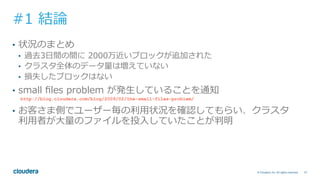
All rights reserved. #1 結論 • 状況のまとめ • 過去3⽇間の間に 2000万近いブロックが追加された • クラスタ全体のデータ量は増えていない • 損失したブロックはない • small files problem が発⽣していることを通知 http://blog.cloudera.com/blog/2009/02/the-small-files-problem/ • お客さま側でユーザー毎の利⽤状況を確認してもらい、クラスタ 利⽤者が⼤量のファイルを投⼊していたことが判明
43.
#2 70万個のブロックが損失した原因は?
44.
59© Cloudera, Inc.
All rights reserved. #2 70万個のブロックが損失した理由は? • 事象 • データノードのホットスワップ後、70万以上のブロック損失が検知された
45.
60© Cloudera, Inc.
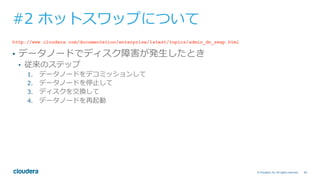
All rights reserved. #2 ホットスワップについて http://www.cloudera.com/documentation/enterprise/latest/topics/admin_dn_swap.html • データノードでディスク障害が発⽣したとき • 従来のステップ 1. データノードをデコミッションして 2. データノードを停⽌して 3. ディスクを交換して 4. データノードを再起動
46.
61© Cloudera, Inc.
All rights reserved. #2 ホットスワップについて http://www.cloudera.com/documentation/enterprise/latest/topics/admin_dn_swap.html • データノードでディスク障害が発⽣したとき • 従来のステップ 1. データノードをデコミッションして 2. データノードを停⽌して 3. ディスクを交換して 4. データノードを再起動 ブロックの転送は ネットワークと ディスクI/Oを 消費する上 時間がかかる
47.
62© Cloudera, Inc.
All rights reserved. #2 ホットスワップについて http://www.cloudera.com/documentation/enterprise/latest/topics/admin_dn_swap.html • データノードでディスク障害が発⽣したとき • 従来のステップ 1. データノードをデコミッションして 2. データノードを停⽌して 3. ディスクを交換して 4. データノードを再起動 • データノードのホットスワップ機能を使うと 1. 対象のディレクトリを削除して 2. データノードのリフレッシュを実⾏(デコミッションや停⽌が不要) 3. 新たなディスクを追加して 4. データノードのリフレッシュを実⾏
48.
63© Cloudera, Inc.
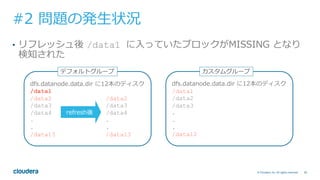
All rights reserved. #2 問題の発⽣状況 • データノードに2種類の設定グループが存在 dfs.datanode.data.dir に12本のディスク /data2 /data3 /data4 . . . /data13 デフォルトグループ dfs.datanode.data.dir に12本のディスク /data1 /data2 /data3 . . . /data12 カスタムグループ
49.
64© Cloudera, Inc.
All rights reserved. #2 問題の発⽣状況 • 実際は・・・ • 過去のリフレッシュ時にデフォルトグループのデータノードに /data1 が追加 dfs.datanode.data.dir に12本のディスク /data1 /data2 /data3 /data4 . . /data13 デフォルトグループ dfs.datanode.data.dir に12本のディスク /data1 /data2 /data3 . . . /data12 カスタムグループ
50.
65© Cloudera, Inc.
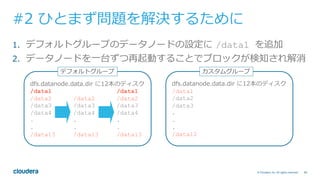
All rights reserved. #2 問題の発⽣状況 • リフレッシュ後 /data1 に⼊っていたブロックがMISSING となり 検知された dfs.datanode.data.dir に12本のディスク /data1 /data2 /data2 /data3 /data3 /data4 /data4 . . . . /data13 /data13 デフォルトグループ dfs.datanode.data.dir に12本のディスク /data1 /data2 /data3 . . . /data12 カスタムグループ refresh後
51.
66© Cloudera, Inc.
All rights reserved. #2 ひとまず問題を解決するために 1. デフォルトグループのデータノードの設定に /data1 を追加 2. データノードを⼀台ずつ再起動することでブロックが検知され解消 dfs.datanode.data.dir に12本のディスク /data1 /data1 /data2 /data2 /data2 /data3 /data3 /data3 /data4 /data4 /data4 . . . . . . /data13 /data13 /data13 デフォルトグループ dfs.datanode.data.dir に12本のディスク /data1 /data2 /data3 . . . /data12 カスタムグループ
52.
67© Cloudera, Inc.
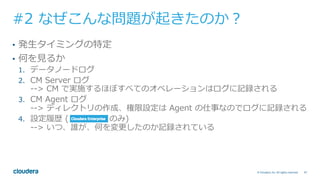
All rights reserved. #2 なぜこんな問題が起きたのか? • 発⽣タイミングの特定 • 何を⾒るか 1. データノードログ 2. CM Server ログ --> CM で実施するほぼすべてのオペレーションはログに記録される 3. CM Agent ログ --> ディレクトリの作成、権限設定は Agent の仕事なのでログに記録される 4. 設定履歴 ( のみ) --> いつ、誰が、何を変更したのか記録されている
53.
68© Cloudera, Inc.
All rights reserved. #2 データノードログの確認 • ディレクトリ名で grep して特定 2016-10-05 22:20:09,021 INFO org.apache.hadoop.conf.ReconfigurableBase: Change property: dfs.datanode.data.dir from "file:///data10/dfs/dn,file:///data11/dfs/dn,file:///data12/dfs/dn,file:/// data13/dfs/dn,file:///data2/dfs/dn,file:///data3/dfs/dn,file:///data4/dfs/dn,file:///data5/dfs/ dn,file:///data6/dfs/dn,file:///data7/dfs/dn,file:///data8/dfs/dn,file:///data9/dfs/dn" to "file:/// data10/dfs/dn,file:///data11/dfs/dn,file:///data12/dfs/dn,file:///data2/dfs/dn,file:///data3/dfs/ dn,file:///data4/dfs/dn,file:///data5/dfs/dn,file:///data6/dfs/dn,file:///data7/dfs/dn,file:///data8/ dfs/dn,file:///data9/dfs/dn,file:///data1/dfs/dn". 2016-10-05 22:20:09,021 INFO org.apache.hadoop.hdfs.server.datanode.DataNode: Reconfiguring dfs.datanode.data.dir to file:///data10/dfs/dn,file:///data11/dfs/dn,file:///data12/dfs/dn,file:/// data2/dfs/dn,file:///data3/dfs/dn,file:///data4/dfs/dn,file:///data5/dfs/dn,file:///data6/dfs/ dn,file:///data7/dfs/dn,file:///data8/dfs/dn,file:///data9/dfs/dn,file:///data1/dfs/dn 2016-10-05 22:20:09,056 INFO org.apache.hadoop.hdfs.server.datanode.DataNode: Adding new volumes: [DISK]file:/data1/dfs/dn/ /var/log/hadoop-hdfs/hadoop-cmf-HDFS-1-DATANODE-xxxx.log.out
54.
69© Cloudera, Inc.
All rights reserved. #2 データノードログの確認 • データノードが間違いなく /data1 を使⽤していたことを確認 /var/log/hadoop-hdfs/hadoop-cmf-HDFS-1-DATANODE-xxxx.log.out 2016-10-05 22:20:09,021 INFO org.apache.hadoop.conf.ReconfigurableBase: Change property: dfs.datanode.data.dir from "file:///data10/dfs/dn,file:///data11/dfs/dn,file:///data12/dfs/dn,file:/// data13/dfs/dn,file:///data2/dfs/dn,file:///data3/dfs/dn,file:///data4/dfs/dn,file:///data5/dfs/ dn,file:///data6/dfs/dn,file:///data7/dfs/dn,file:///data8/dfs/dn,file:///data9/dfs/dn" to "file:/// data10/dfs/dn,file:///data11/dfs/dn,file:///data12/dfs/dn,file:///data2/dfs/dn,file:///data3/dfs/ dn,file:///data4/dfs/dn,file:///data5/dfs/dn,file:///data6/dfs/dn,file:///data7/dfs/dn,file:///data8/ dfs/dn,file:///data9/dfs/dn,file:///data1/dfs/dn". 2016-10-05 22:20:09,021 INFO org.apache.hadoop.hdfs.server.datanode.DataNode: Reconfiguring dfs.datanode.data.dir to file:///data10/dfs/dn,file:///data11/dfs/dn,file:///data12/dfs/dn,file:/// data2/dfs/dn,file:///data3/dfs/dn,file:///data4/dfs/dn,file:///data5/dfs/dn,file:///data6/dfs/ dn,file:///data7/dfs/dn,file:///data8/dfs/dn,file:///data9/dfs/dn,file:///data1/dfs/dn 2016-10-05 22:20:09,056 INFO org.apache.hadoop.hdfs.server.datanode.DataNode: Adding new volumes: [DISK]file:/data1/dfs/dn/
55.
70© Cloudera, Inc.
All rights reserved. #2 CM Serverログの確認 • ディレクトリ名で grep して特定 2016-10-05 22:20:03,406 INFO 630935751@scm-web-121355:com.cloudera.cmf.service.ServiceHandlerRegistry: Executing role command RefreshDataNode BasicCmdArgs{args=[]}. Service: DbService{id=36, name=hdfs} Role: DbRole{id=412, name=hdfs-DATANODE-87bdc0df8fa3dc718873de138b3f301b, hostName=example.com} /var/log/cloudera-scm-server/cloudera-scm-server.log
56.
71© Cloudera, Inc.
All rights reserved. #2 CM Serverログの確認 • CM UI からリフレッシュを実⾏したときに記録される /var/log/cloudera-scm-server/cloudera-scm-server.log 2016-10-05 22:20:03,406 INFO 630935751@scm-web-121355:com.cloudera.cmf.service.ServiceHandlerRegistry: Executing role command RefreshDataNode BasicCmdArgs{args=[]}. Service: DbService{id=36, name=hdfs} Role: DbRole{id=412, name=hdfs-DATANODE-87bdc0df8fa3dc718873de138b3f301b, hostName=example.com}
57.
72© Cloudera, Inc.
All rights reserved. #2 CM Agentログの確認 • ディレクトリ名で grep して特定 [05/Oct/2016 22:20:04 +0000] 48933 MainThread agent INFO Chowning /data1/dfs/dn to hdfs (496) hadoop (497) [05/Oct/2016 22:20:04 +0000] 48933 MainThread agent INFO Chmod'ing /data1/dfs/dn to 0755 [05/Oct/2016 22:20:04 +0000] 48933 MainThread agent INFO Created /data1/dfs/dn /var/log/cloudera-scm-agent/cloudera-scm-agent.log
58.
73© Cloudera, Inc.
All rights reserved. #2 CM Agentログの確認 • CM Server からの命令をうけて CM Agent がディレクトリを⽤意 • Agent が作成したディレクトリを使⽤してデータノードは ブロックを書き込む [05/Oct/2016 22:20:04 +0000] 48933 MainThread agent INFO Chowning /data1/dfs/dn to hdfs (496) hadoop (497) [05/Oct/2016 22:20:04 +0000] 48933 MainThread agent INFO Chmod'ing /data1/dfs/dn to 0755 [05/Oct/2016 22:20:04 +0000] 48933 MainThread agent INFO Created /data1/dfs/dn /var/log/cloudera-scm-agent/cloudera-scm-agent.log
59.
74© Cloudera, Inc.
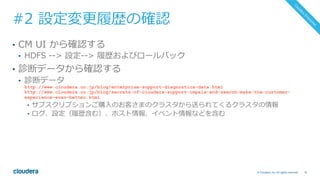
All rights reserved. #2 設定変更履歴の確認 • CM UI から確認する • HDFS --> 設定--> 履歴およびロールバック • 診断データから確認する • 診断データ http://www.cloudera.co.jp/blog/enterprise-support-diagnostics-data.html http://www.cloudera.co.jp/blog/secrets-of-cloudera-support-impala-and-search-make-the-customer- experience-even-better.html • サブスクリプションご購⼊のお客さまのクラスタから送られてくるクラスタの情報 • ログ、設定(履歴含む)、ホスト情報、イベント情報などを含む
60.
75© Cloudera, Inc.
All rights reserved. #2 設定変更履歴の確認 • CM UI から確認する • HDFS --> 設定--> 履歴およびロールバック • 診断データから確認する • 診断データ http://www.cloudera.co.jp/blog/enterprise-support-diagnostics-data.html http://www.cloudera.co.jp/blog/secrets-of-cloudera-support-impala-and-search-make-the-customer- experience-even-better.html • サブスクリプションご購⼊のお客さまのクラスタから送られてくるクラスタの情報 • ログ、設定(履歴含む)、ホスト情報、イベント情報などを含む
61.
76© Cloudera, Inc.
All rights reserved. #2 設定変更履歴の確認 ["configs",0,"groupName"] "hdfs-DATANODE-BASE" ["configs",0,"newValue"] "/data10/dfs/dn,/data11/dfs/dn,/data12/dfs/dn,/data2/dfs/dn,/data3/dfs/dn,/ data4/dfs/dn,/data5/dfs/dn,/data6/dfs/dn,/data7/dfs/dn,/data8/dfs/dn,/data9/dfs/dn,/data1/dfs/dn" ["configs",0,"oldValue"] "/data10/dfs/dn,/data11/dfs/dn,/data12/dfs/dn,/data13/dfs/dn,/data2/dfs/dn,/ data3/dfs/dn,/data4/dfs/dn,/data5/dfs/dn,/data6/dfs/dn,/data7/dfs/dn,/data8/dfs/dn,/data9/dfs/dn" ["message"] "Role config group 'DataNode Default Group' config update from API." ["userName"] ”user1" Wednesday October 05, 2016 11:43:52 am
62.
77© Cloudera, Inc.
All rights reserved. #2 設定変更履歴の確認 ["configs",0,"groupName"] "hdfs-DATANODE-BASE" ["configs",0,"newValue"] "/data10/dfs/dn,/data11/dfs/dn,/data12/dfs/dn,/data2/dfs/dn,/data3/dfs/dn,/ data4/dfs/dn,/data5/dfs/dn,/data6/dfs/dn,/data7/dfs/dn,/data8/dfs/dn,/data9/dfs/dn,/data1/dfs/dn" ["configs",0,"oldValue"] "/data10/dfs/dn,/data11/dfs/dn,/data12/dfs/dn,/data13/dfs/dn,/data2/dfs/dn,/ data3/dfs/dn,/data4/dfs/dn,/data5/dfs/dn,/data6/dfs/dn,/data7/dfs/dn,/data8/dfs/dn,/data9/dfs/dn" ["message"] "Role config group 'DataNode Default Group' config update from API." ["userName"] ”user1" Wednesday October 05, 2016 11:43:52 am
63.
78© Cloudera, Inc.
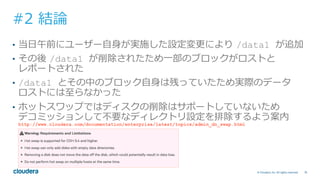
All rights reserved. #2 結論 • 当⽇午前にユーザー⾃⾝が実施した設定変更により /data1 が追加 • その後 /data1 が削除されたため⼀部のブロックがロストと レポートされた • /data1 とその中のブロック⾃⾝は残っていたため実際のデータ ロストには⾄らなかった • ホットスワップではディスクの削除はサポートしていないため デコミッションして不要なディレクトリ設定を排除するよう案内 http://www.cloudera.com/documentation/enterprise/latest/topics/admin_dn_swap.html
64.
79© Cloudera, Inc.
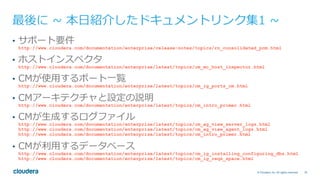
All rights reserved. 最後に ~ 本⽇紹介したドキュメントリンク集1 ~ • サポート要件 http://www.cloudera.com/documentation/enterprise/release-notes/topics/rn_consolidated_pcm.html • ホストインスペクタ http://www.cloudera.com/documentation/enterprise/latest/topics/cm_mc_host_inspector.html • CMが使⽤するポート⼀覧 http://www.cloudera.com/documentation/enterprise/latest/topics/cm_ig_ports_cm.html • CMアーキテクチャと設定の説明 http://www.cloudera.com/documentation/enterprise/latest/topics/cm_intro_primer.html • CMが⽣成するログファイル http://www.cloudera.com/documentation/enterprise/latest/topics/cm_ag_view_server_logs.html http://www.cloudera.com/documentation/enterprise/latest/topics/cm_ag_view_agent_logs.html http://www.cloudera.com/documentation/enterprise/latest/topics/cm_intro_primer.html • CMが利⽤するデータベース http://www.cloudera.com/documentation/enterprise/latest/topics/cm_ig_installing_configuring_dbs.html http://www.cloudera.com/documentation/enterprise/latest/topics/cm_ig_reqs_space.html
65.
80© Cloudera, Inc.
All rights reserved. 最後に ~ 本⽇紹介したドキュメントリンク集2 ~ • アップグレード関連 http://www.cloudera.com/documentation/enterprise/latest/topics/cm_ag_upgrading_cm.html http://www.cloudera.com/documentation/enterprise/latest/topics/cm_ag_upgrading_os.html • チャートの説明 http://www.cloudera.com/documentation/enterprise/latest/topics/cm_dg_chart_time_series_data.html • クラウドのリファレンスアーキテクチャ http://www.cloudera.com/documentation/other/reference-architecture.html • 診断データ http://www.cloudera.com/documentation/enterprise/latest/topics/cm_ag_data_collection.html http://www.cloudera.co.jp/blog/secrets-of-cloudera-support-impala-and-search-make-the-customer- experience-even-better.html • サポート社内のHadoopクラスタについて http://www.cloudera.co.jp/blog/quality-assurance-at-cloudera-runningupgrading-to-new-releases-on-our- own-edh-cluster.html
66.
81© Cloudera, Inc.
All rights reserved. Thank you
Download























![68© Cloudera, Inc. All rights reserved.
#2 データノードログの確認
• ディレクトリ名で grep して特定
2016-10-05 22:20:09,021 INFO org.apache.hadoop.conf.ReconfigurableBase: Change property:
dfs.datanode.data.dir from "file:///data10/dfs/dn,file:///data11/dfs/dn,file:///data12/dfs/dn,file:///
data13/dfs/dn,file:///data2/dfs/dn,file:///data3/dfs/dn,file:///data4/dfs/dn,file:///data5/dfs/
dn,file:///data6/dfs/dn,file:///data7/dfs/dn,file:///data8/dfs/dn,file:///data9/dfs/dn" to "file:///
data10/dfs/dn,file:///data11/dfs/dn,file:///data12/dfs/dn,file:///data2/dfs/dn,file:///data3/dfs/
dn,file:///data4/dfs/dn,file:///data5/dfs/dn,file:///data6/dfs/dn,file:///data7/dfs/dn,file:///data8/
dfs/dn,file:///data9/dfs/dn,file:///data1/dfs/dn".
2016-10-05 22:20:09,021 INFO org.apache.hadoop.hdfs.server.datanode.DataNode: Reconfiguring
dfs.datanode.data.dir to file:///data10/dfs/dn,file:///data11/dfs/dn,file:///data12/dfs/dn,file:///
data2/dfs/dn,file:///data3/dfs/dn,file:///data4/dfs/dn,file:///data5/dfs/dn,file:///data6/dfs/
dn,file:///data7/dfs/dn,file:///data8/dfs/dn,file:///data9/dfs/dn,file:///data1/dfs/dn
2016-10-05 22:20:09,056 INFO org.apache.hadoop.hdfs.server.datanode.DataNode: Adding new volumes:
[DISK]file:/data1/dfs/dn/
/var/log/hadoop-hdfs/hadoop-cmf-HDFS-1-DATANODE-xxxx.log.out](https://image.slidesharecdn.com/cwt2016-troubleshooting-using-cm-161109082802/85/cwt2016-Cloudera-Manager-Hadoop-53-320.jpg)
![69© Cloudera, Inc. All rights reserved.
#2 データノードログの確認
• データノードが間違いなく /data1 を使⽤していたことを確認
/var/log/hadoop-hdfs/hadoop-cmf-HDFS-1-DATANODE-xxxx.log.out
2016-10-05 22:20:09,021 INFO org.apache.hadoop.conf.ReconfigurableBase: Change property:
dfs.datanode.data.dir from "file:///data10/dfs/dn,file:///data11/dfs/dn,file:///data12/dfs/dn,file:///
data13/dfs/dn,file:///data2/dfs/dn,file:///data3/dfs/dn,file:///data4/dfs/dn,file:///data5/dfs/
dn,file:///data6/dfs/dn,file:///data7/dfs/dn,file:///data8/dfs/dn,file:///data9/dfs/dn" to "file:///
data10/dfs/dn,file:///data11/dfs/dn,file:///data12/dfs/dn,file:///data2/dfs/dn,file:///data3/dfs/
dn,file:///data4/dfs/dn,file:///data5/dfs/dn,file:///data6/dfs/dn,file:///data7/dfs/dn,file:///data8/
dfs/dn,file:///data9/dfs/dn,file:///data1/dfs/dn".
2016-10-05 22:20:09,021 INFO org.apache.hadoop.hdfs.server.datanode.DataNode: Reconfiguring
dfs.datanode.data.dir to file:///data10/dfs/dn,file:///data11/dfs/dn,file:///data12/dfs/dn,file:///
data2/dfs/dn,file:///data3/dfs/dn,file:///data4/dfs/dn,file:///data5/dfs/dn,file:///data6/dfs/
dn,file:///data7/dfs/dn,file:///data8/dfs/dn,file:///data9/dfs/dn,file:///data1/dfs/dn
2016-10-05 22:20:09,056 INFO org.apache.hadoop.hdfs.server.datanode.DataNode: Adding new volumes:
[DISK]file:/data1/dfs/dn/](https://image.slidesharecdn.com/cwt2016-troubleshooting-using-cm-161109082802/85/cwt2016-Cloudera-Manager-Hadoop-54-320.jpg)
![70© Cloudera, Inc. All rights reserved.
#2 CM Serverログの確認
• ディレクトリ名で grep して特定
2016-10-05 22:20:03,406 INFO 630935751@scm-web-121355:com.cloudera.cmf.service.ServiceHandlerRegistry:
Executing role command RefreshDataNode BasicCmdArgs{args=[]}. Service: DbService{id=36, name=hdfs}
Role: DbRole{id=412, name=hdfs-DATANODE-87bdc0df8fa3dc718873de138b3f301b, hostName=example.com}
/var/log/cloudera-scm-server/cloudera-scm-server.log](https://image.slidesharecdn.com/cwt2016-troubleshooting-using-cm-161109082802/85/cwt2016-Cloudera-Manager-Hadoop-55-320.jpg)
![71© Cloudera, Inc. All rights reserved.
#2 CM Serverログの確認
• CM UI からリフレッシュを実⾏したときに記録される
/var/log/cloudera-scm-server/cloudera-scm-server.log
2016-10-05 22:20:03,406 INFO 630935751@scm-web-121355:com.cloudera.cmf.service.ServiceHandlerRegistry:
Executing role command RefreshDataNode BasicCmdArgs{args=[]}. Service: DbService{id=36, name=hdfs}
Role: DbRole{id=412, name=hdfs-DATANODE-87bdc0df8fa3dc718873de138b3f301b, hostName=example.com}](https://image.slidesharecdn.com/cwt2016-troubleshooting-using-cm-161109082802/85/cwt2016-Cloudera-Manager-Hadoop-56-320.jpg)
![72© Cloudera, Inc. All rights reserved.
#2 CM Agentログの確認
• ディレクトリ名で grep して特定
[05/Oct/2016 22:20:04 +0000] 48933 MainThread agent INFO Chowning /data1/dfs/dn to hdfs (496) hadoop (497)
[05/Oct/2016 22:20:04 +0000] 48933 MainThread agent INFO Chmod'ing /data1/dfs/dn to 0755
[05/Oct/2016 22:20:04 +0000] 48933 MainThread agent INFO Created /data1/dfs/dn
/var/log/cloudera-scm-agent/cloudera-scm-agent.log](https://image.slidesharecdn.com/cwt2016-troubleshooting-using-cm-161109082802/85/cwt2016-Cloudera-Manager-Hadoop-57-320.jpg)
![73© Cloudera, Inc. All rights reserved.
#2 CM Agentログの確認
• CM Server からの命令をうけて CM Agent がディレクトリを⽤意
• Agent が作成したディレクトリを使⽤してデータノードは
ブロックを書き込む
[05/Oct/2016 22:20:04 +0000] 48933 MainThread agent INFO Chowning /data1/dfs/dn to hdfs (496) hadoop (497)
[05/Oct/2016 22:20:04 +0000] 48933 MainThread agent INFO Chmod'ing /data1/dfs/dn to 0755
[05/Oct/2016 22:20:04 +0000] 48933 MainThread agent INFO Created /data1/dfs/dn
/var/log/cloudera-scm-agent/cloudera-scm-agent.log](https://image.slidesharecdn.com/cwt2016-troubleshooting-using-cm-161109082802/85/cwt2016-Cloudera-Manager-Hadoop-58-320.jpg)

![76© Cloudera, Inc. All rights reserved.
#2 設定変更履歴の確認
["configs",0,"groupName"] "hdfs-DATANODE-BASE"
["configs",0,"newValue"] "/data10/dfs/dn,/data11/dfs/dn,/data12/dfs/dn,/data2/dfs/dn,/data3/dfs/dn,/
data4/dfs/dn,/data5/dfs/dn,/data6/dfs/dn,/data7/dfs/dn,/data8/dfs/dn,/data9/dfs/dn,/data1/dfs/dn"
["configs",0,"oldValue"] "/data10/dfs/dn,/data11/dfs/dn,/data12/dfs/dn,/data13/dfs/dn,/data2/dfs/dn,/
data3/dfs/dn,/data4/dfs/dn,/data5/dfs/dn,/data6/dfs/dn,/data7/dfs/dn,/data8/dfs/dn,/data9/dfs/dn"
["message"] "Role config group 'DataNode Default Group' config update from API."
["userName"] ”user1"
Wednesday October 05, 2016 11:43:52 am](https://image.slidesharecdn.com/cwt2016-troubleshooting-using-cm-161109082802/85/cwt2016-Cloudera-Manager-Hadoop-61-320.jpg)
![77© Cloudera, Inc. All rights reserved.
#2 設定変更履歴の確認
["configs",0,"groupName"] "hdfs-DATANODE-BASE"
["configs",0,"newValue"] "/data10/dfs/dn,/data11/dfs/dn,/data12/dfs/dn,/data2/dfs/dn,/data3/dfs/dn,/
data4/dfs/dn,/data5/dfs/dn,/data6/dfs/dn,/data7/dfs/dn,/data8/dfs/dn,/data9/dfs/dn,/data1/dfs/dn"
["configs",0,"oldValue"] "/data10/dfs/dn,/data11/dfs/dn,/data12/dfs/dn,/data13/dfs/dn,/data2/dfs/dn,/
data3/dfs/dn,/data4/dfs/dn,/data5/dfs/dn,/data6/dfs/dn,/data7/dfs/dn,/data8/dfs/dn,/data9/dfs/dn"
["message"] "Role config group 'DataNode Default Group' config update from API."
["userName"] ”user1"
Wednesday October 05, 2016 11:43:52 am](https://image.slidesharecdn.com/cwt2016-troubleshooting-using-cm-161109082802/85/cwt2016-Cloudera-Manager-Hadoop-62-320.jpg)


![[db tech showcase Tokyo 2016] C32: 世界一速いPostgreSQLを目指せ!インメモリカラムナの実現 by 富士通株式会...](https://cdn.slidesharecdn.com/ss_thumbnails/decdzrorcuek1megqnk7-signature-4c0dd3fcb9eb3d17930cacb079ea1fd12d54c70d5a7ef5cbe3514e2f97cef80f-poli-160902010202-thumbnail.jpg?width=640&height=640&fit=bounds)


![[db tech showcase Tokyo 2015] A26:内部犯行による漏えいを防ぐPostgreSQLの透過的暗号化機能に関する実装と利用方法...](https://cdn.slidesharecdn.com/ss_thumbnails/dbts-tokyo-2015a26postgresqlnec-150616021014-lva1-app6892-thumbnail.jpg?width=640&height=640&fit=bounds)


![[db tech showcase Tokyo 2015] B16:最新版PostgreSQLのパフォーマンスを引き出すためのポイント by Postgr...](https://cdn.slidesharecdn.com/ss_thumbnails/dbts-tokyo-2015b16postgresqlpgecons-150616021257-lva1-app6892-thumbnail.jpg?width=640&height=640&fit=bounds)


