Computer System
Servicing NC II
Grade 12
E X P E C T A T I O N
Upon completion of this lesson you should be able to:
1. Define Network Operating System (NOS)
2. Explain the types of Network Operating System(NOS)
3. Cite some importance of Network Operating Systems (NOS)
Network Operating System (NOS)
A network operating system is a specialized operating system for a network device
such as a router, switch or firewall.
Historically operating systems with networking capabilities were described as
network operating system because they allowed personal computers (PCs) to
participate in computer networks and shared file and printer access within a
local area network (LAN). This description of operating systems is now largely
historical, as common operating systems include a network stack to support a
client–server model.
You have heard a lot about the network operating system (NOS) but not fully
understand it. Therefore this lesson will broaden your understanding about the
Network Operating Systems (NOS)
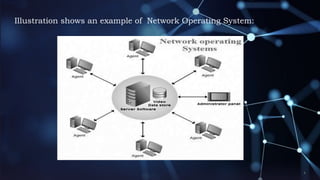
Illustration shows an example of Network Operating System:
What is Network Operating System (NOS)
A computer operating system referred to as Networking Operating
System was designed with the sole purpose of supporting
workstations, database, application, file and printer access sharing
between multiple computers in a network.
There are two (2) major types of Network Operating System namely:
 Peer-to-Peer
 Client/Server
Peer-to-Peer
Peer-to-peer network operating systems allow users to share resources and files
located on their computers and to access shared resources found on other
computers. However, they do not have a file server or a centralized management
source (See fig. 1). In a peer-to-peer network, all computers are considered equal;
they all have the same abilities to use the resources available on the network.
Peer-to-peer networks are designed primarily for small to medium local area
networks. Nearly all modern desktop operating systems, such as Macintosh OSX,
Linux, and Windows, can function as peer-to-peer network operating systems.
Advantages of a peer-to-peer network:
• Less initial expense - No need for a dedicated server.
• Setup - An operating system (such as Windows 7) already in place
may only need to be reconfigured for Advantages of a peer-to-peer
network
Disadvantages of a peer-to-peer network:
• Decentralized - No central repository for files and applications.
• Security - Does not provide the security available on a client/server
network.
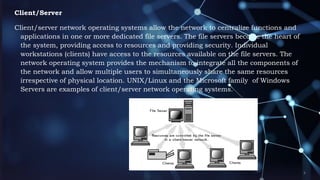
Client/Server
Client/server network operating systems allow the network to centralize functions and
applications in one or more dedicated file servers. The file servers become the heart of
the system, providing access to resources and providing security. Individual
workstations (clients) have access to the resources available on the file servers. The
network operating system provides the mechanism to integrate all the components of
the network and allow multiple users to simultaneously share the same resources
irrespective of physical location. UNIX/Linux and the Microsoft family of Windows
Servers are examples of client/server network operating systems.
Advantages of a client/server network:
• Centralized - Resources and data security are controlled through the server.
• Scalability - Any or all elements can be replaced individually as needs increase.
• Flexibility - New technology can be easily integrated into system.
• Interoperability - All components (client/network/server) work together.
• Accessibility - Server can be accessed remotely and across multiple platforms.
Disadvantages of a client/server network:
• Expense - Requires initial investment in dedicated server.
• Maintenance - Large networks will require a staff to ensure efficient operation.
• Dependence - When server goes down, operations will cease across the network.
Network Operating System Software
The following links include some of the more popular peer-to-
peer and client/server network operating systems.
 Macintosh OS X
 Microsoft Windows Server
 UNIX/Linux
Network Operating System Software
The following links include some of the more popular peer-to-
peer and client/server network operating systems.
 Macintosh OS X
 Microsoft Windows Server
 UNIX/Linux
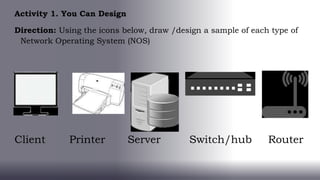
Activity 1. You Can Design
Direction: Using the icons below, draw /design a sample of each type of
Network Operating System (NOS)
Client Printer Server Switch/hub Router

CSS 12 - Q1 - Lesson 3.pptx

  • 1.
  • 2.
    E X PE C T A T I O N Upon completion of this lesson you should be able to: 1. Define Network Operating System (NOS) 2. Explain the types of Network Operating System(NOS) 3. Cite some importance of Network Operating Systems (NOS)
  • 3.
    Network Operating System(NOS) A network operating system is a specialized operating system for a network device such as a router, switch or firewall. Historically operating systems with networking capabilities were described as network operating system because they allowed personal computers (PCs) to participate in computer networks and shared file and printer access within a local area network (LAN). This description of operating systems is now largely historical, as common operating systems include a network stack to support a client–server model. You have heard a lot about the network operating system (NOS) but not fully understand it. Therefore this lesson will broaden your understanding about the Network Operating Systems (NOS)
  • 4.
    Illustration shows anexample of Network Operating System:
  • 5.
    What is NetworkOperating System (NOS) A computer operating system referred to as Networking Operating System was designed with the sole purpose of supporting workstations, database, application, file and printer access sharing between multiple computers in a network. There are two (2) major types of Network Operating System namely:  Peer-to-Peer  Client/Server
  • 6.
    Peer-to-Peer Peer-to-peer network operatingsystems allow users to share resources and files located on their computers and to access shared resources found on other computers. However, they do not have a file server or a centralized management source (See fig. 1). In a peer-to-peer network, all computers are considered equal; they all have the same abilities to use the resources available on the network. Peer-to-peer networks are designed primarily for small to medium local area networks. Nearly all modern desktop operating systems, such as Macintosh OSX, Linux, and Windows, can function as peer-to-peer network operating systems.
  • 7.
    Advantages of apeer-to-peer network: • Less initial expense - No need for a dedicated server. • Setup - An operating system (such as Windows 7) already in place may only need to be reconfigured for Advantages of a peer-to-peer network Disadvantages of a peer-to-peer network: • Decentralized - No central repository for files and applications. • Security - Does not provide the security available on a client/server network.
  • 8.
    Client/Server Client/server network operatingsystems allow the network to centralize functions and applications in one or more dedicated file servers. The file servers become the heart of the system, providing access to resources and providing security. Individual workstations (clients) have access to the resources available on the file servers. The network operating system provides the mechanism to integrate all the components of the network and allow multiple users to simultaneously share the same resources irrespective of physical location. UNIX/Linux and the Microsoft family of Windows Servers are examples of client/server network operating systems.
  • 9.
    Advantages of aclient/server network: • Centralized - Resources and data security are controlled through the server. • Scalability - Any or all elements can be replaced individually as needs increase. • Flexibility - New technology can be easily integrated into system. • Interoperability - All components (client/network/server) work together. • Accessibility - Server can be accessed remotely and across multiple platforms. Disadvantages of a client/server network: • Expense - Requires initial investment in dedicated server. • Maintenance - Large networks will require a staff to ensure efficient operation. • Dependence - When server goes down, operations will cease across the network.
  • 10.
    Network Operating SystemSoftware The following links include some of the more popular peer-to- peer and client/server network operating systems.  Macintosh OS X  Microsoft Windows Server  UNIX/Linux
  • 11.
    Network Operating SystemSoftware The following links include some of the more popular peer-to- peer and client/server network operating systems.  Macintosh OS X  Microsoft Windows Server  UNIX/Linux
  • 12.
    Activity 1. YouCan Design Direction: Using the icons below, draw /design a sample of each type of Network Operating System (NOS) Client Printer Server Switch/hub Router