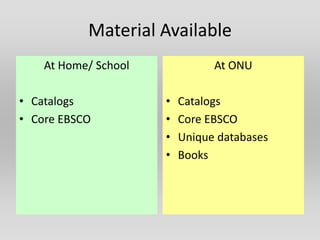
Material Available
    At Home/ School             At ONU

• Catalogs            •   Catalogs
• Core EBSCO          •   Core EBSCO
                      •   Unique databases
                      •   Books
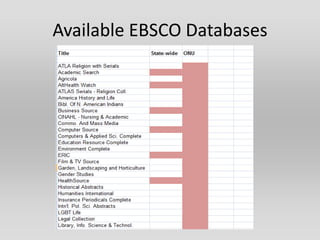
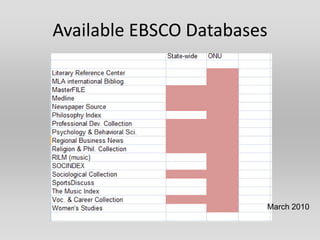
Available EBSCO Databases


                        March 2010
Resource Providers

• InfOhio – serving Ohio’s schools
  http://www.infohio.org/ER/ER9-12.asp
• OPLIN – serving Ohio’s public libraries
  http://www.oplin.lib.oh.us/index.cfm
• OhioLINK – serving Ohio’s college and
  university libraries
  http://www.ohiolink.edu
Printing, Downloading, Saving
• All three catalogs allow you to mark entries
  and later to save or E-mail them.
• Most databases offer the same options
• If you have created an EBSCO account, you can
  save articles to it.
• If you have a flash memory device, you can
  save articles to it.
• Today, you SHOULD be able to print without
  charge in the labs.
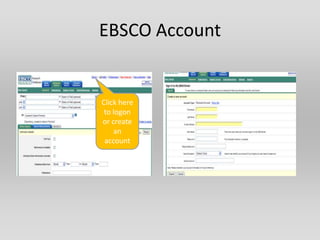
EBSCO Account


Click here
 to logon
or create
    an
 account
RESEARCH TOOLS

• Catalogs – includes printed and E-
  books, maps, government
  documents, etc.

• Research Databases – covers
  periodical articles, statistics, etc.

• Web Resources
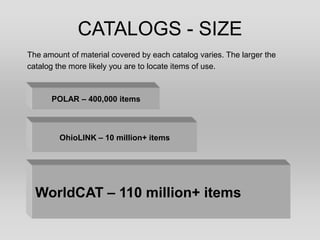
CATALOGS - SIZE
The amount of material covered by each catalog varies. The larger the
catalog the more likely you are to locate items of use.


      POLAR – 400,000 items


        OhioLINK – 10 million+ items


  WorldCAT – 110 million+ items
Database Search Strategies
•   Specific searches – author, title
•   Concept searches - subject, keyword
•   Limiting features – date, language, etc.
•   Search history – records searches and allows
    you to mix and match terms
Major Types of Searching by Concept-
                Keyword

• Looks in several locations (usually subject,
  article title, abstracts or contents)
• Does not require an exact match
• Generates comparatively large number of hits
  (not precise)
• Good if you are not familiar with terminology
Major Types of Searches by Concept-
                 Subject
• Looks in one place – subject
• Usually requires an exact match between your
  term and a pre-set list of terms
• Precise
• Can be used after keyword search has
  identified specific subjects
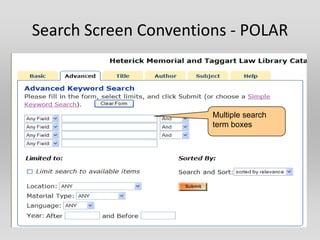
Search Screen Conventions - POLAR


                       Multiple search
                       term boxes
Search Screens - POLAR


                Set type of search.
                Default is keyword
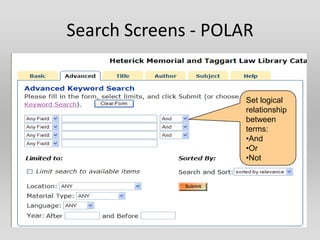
Search Screens - POLAR


                     Set logical
                     relationship
                     between
                     terms:
                     •And
                     •Or
                     •Not
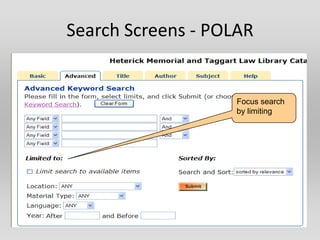
Search Screens - POLAR


                    Focus search
                    by limiting
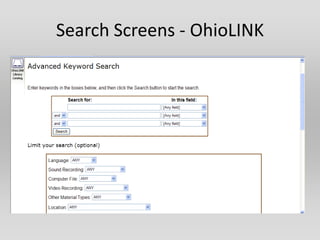
Search Screens - OhioLINK
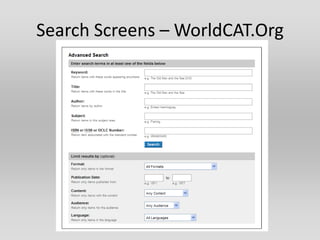
Search Screens – WorldCAT.Org
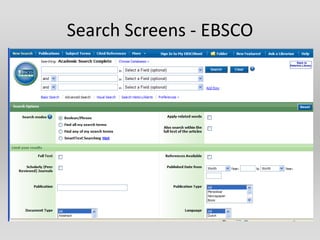
Search Screens - EBSCO
Catalog Content
Materials commonly listed in catalogs:
• Books
• Maps
• Music Scores
• Audiovisual materials
• Government documents
• Increasingly links to resources on the Internet

Not newspaper and magazine articles
Other Sources
Bluffton Public Library
• Can fill loan requests
• Need to have a library card (parental permission required)
• See: http://blufftonlibrary.oplin.org/Interlibraryloan.htm

Bluffton University
• Does not fill loan requests, but materials can be used in the library

Findlay/ Hancock Co. Public Library

Macomb Public Library
Contact Us

Use the “contact us” link on the Heterick
home page or E-mail or Instant Messaging
• t-moritz@onu.edu
• plogsdon@onu.edu
Databases

• Used mostly for locating newspaper and
   magazine articles
• Access controlled
• Offer broad and subject-specific
  coverage
• Available to general public via InfOhio and
   OPLIN (some)
Multi-disciplinary Databases
• Academic Search (EBSCO) available state-wide
• Lexis-Nexis – licensed sites (OhioLINK)
• Opposing Viewpoints – licensed sites
  (individual libraries)

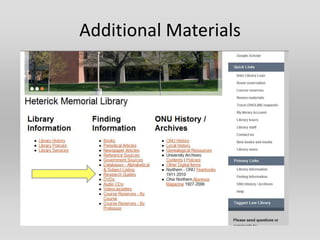
Available from Heterick home page
Additional Materials
Cory Rawson 2012

Cory Rawson 2012

  • 2.
    Material Available At Home/ School At ONU • Catalogs • Catalogs • Core EBSCO • Core EBSCO • Unique databases • Books
  • 3.
  • 4.
  • 5.
    Resource Providers • InfOhio– serving Ohio’s schools http://www.infohio.org/ER/ER9-12.asp • OPLIN – serving Ohio’s public libraries http://www.oplin.lib.oh.us/index.cfm • OhioLINK – serving Ohio’s college and university libraries http://www.ohiolink.edu
  • 6.
    Printing, Downloading, Saving •All three catalogs allow you to mark entries and later to save or E-mail them. • Most databases offer the same options • If you have created an EBSCO account, you can save articles to it. • If you have a flash memory device, you can save articles to it. • Today, you SHOULD be able to print without charge in the labs.
  • 7.
    EBSCO Account Click here to logon or create an account
  • 8.
    RESEARCH TOOLS • Catalogs– includes printed and E- books, maps, government documents, etc. • Research Databases – covers periodical articles, statistics, etc. • Web Resources
  • 9.
    CATALOGS - SIZE Theamount of material covered by each catalog varies. The larger the catalog the more likely you are to locate items of use. POLAR – 400,000 items OhioLINK – 10 million+ items WorldCAT – 110 million+ items
  • 10.
    Database Search Strategies • Specific searches – author, title • Concept searches - subject, keyword • Limiting features – date, language, etc. • Search history – records searches and allows you to mix and match terms
  • 11.
    Major Types ofSearching by Concept- Keyword • Looks in several locations (usually subject, article title, abstracts or contents) • Does not require an exact match • Generates comparatively large number of hits (not precise) • Good if you are not familiar with terminology
  • 12.
    Major Types ofSearches by Concept- Subject • Looks in one place – subject • Usually requires an exact match between your term and a pre-set list of terms • Precise • Can be used after keyword search has identified specific subjects
  • 13.
    Search Screen Conventions- POLAR Multiple search term boxes
  • 14.
    Search Screens -POLAR Set type of search. Default is keyword
  • 15.
    Search Screens -POLAR Set logical relationship between terms: •And •Or •Not
  • 16.
    Search Screens -POLAR Focus search by limiting
  • 17.
  • 18.
    Search Screens –WorldCAT.Org
  • 19.
  • 20.
    Catalog Content Materials commonlylisted in catalogs: • Books • Maps • Music Scores • Audiovisual materials • Government documents • Increasingly links to resources on the Internet Not newspaper and magazine articles
  • 21.
    Other Sources Bluffton PublicLibrary • Can fill loan requests • Need to have a library card (parental permission required) • See: http://blufftonlibrary.oplin.org/Interlibraryloan.htm Bluffton University • Does not fill loan requests, but materials can be used in the library Findlay/ Hancock Co. Public Library Macomb Public Library
  • 22.
    Contact Us Use the“contact us” link on the Heterick home page or E-mail or Instant Messaging • t-moritz@onu.edu • plogsdon@onu.edu
  • 23.
    Databases • Used mostlyfor locating newspaper and magazine articles • Access controlled • Offer broad and subject-specific coverage • Available to general public via InfOhio and OPLIN (some)
  • 24.
    Multi-disciplinary Databases • AcademicSearch (EBSCO) available state-wide • Lexis-Nexis – licensed sites (OhioLINK) • Opposing Viewpoints – licensed sites (individual libraries) Available from Heterick home page
  • 25.