Computer
Programming 2
Lesson 9– Java – Decision Making
Prepared by: Analyn G. Regaton
DECISION
MAKING
Decision making structures have one
or more conditions to be evaluated
or tested by the program, along with
a statement or statements that are to
be executed if the condition is
determined to be true, and
optionally, other statements to be
executed if the condition is
determined to be false.
TYPESOF
DECISION
MAKING
STATEMENT
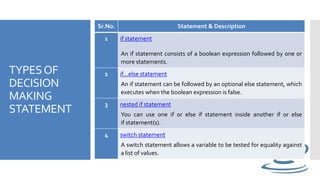
Sr.No. Statement & Description
1 if statement
An if statement consists of a boolean expression followed by one or
more statements.
2 if...else statement
An if statement can be followed by an optional else statement, which
executes when the boolean expression is false.
3 nested if statement
You can use one if or else if statement inside another if or else
if statement(s).
4 switch statement
A switch statement allows a variable to be tested for equality against
a list of values.
SYNTAX
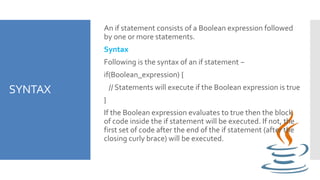
An if statement consists of a Boolean expression followed
by one or more statements.
Syntax
Following is the syntax of an if statement −
if(Boolean_expression) {
// Statements will execute if the Boolean expression is true
}
If the Boolean expression evaluates to true then the block
of code inside the if statement will be executed. If not, the
first set of code after the end of the if statement (after the
closing curly brace) will be executed.
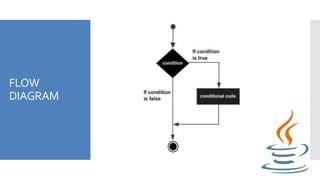
FLOW
DIAGRAM
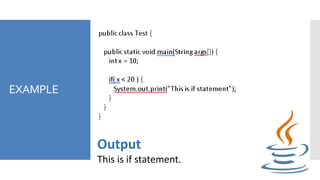
EXAMPLE
Output
This is if statement.
IF ELSE
STATEMENT
An if statement can be followed by an optional else statement, which
executes when the Boolean expression is false.
Syntax
Following is the syntax of an if...else statement −
if(Boolean_expression) {
// Executes when the Boolean expression is true
}
else {
// Executes when the Boolean expression is false
}
If the boolean expression evaluates to true, then the if block of code will be
executed, otherwise else block of code will be executed.
FLOW
DIAGRAM
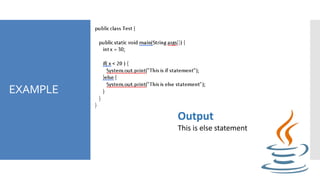
EXAMPLE
Output
This is else statement
IF..ELSE..IF
STATEMENT
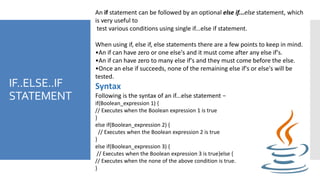
An if statement can be followed by an optional else if...else statement, which
is very useful to
test various conditions using single if...else if statement.
When using if, else if, else statements there are a few points to keep in mind.
•An if can have zero or one else's and it must come after any else if's.
•An if can have zero to many else if's and they must come before the else.
•Once an else if succeeds, none of the remaining else if's or else's will be
tested.
Syntax
Following is the syntax of an if...else statement −
if(Boolean_expression 1) {
// Executes when the Boolean expression 1 is true
}
else if(Boolean_expression 2) {
// Executes when the Boolean expression 2 is true
}
else if(Boolean_expression 3) {
// Executes when the Boolean expression 3 is true}else {
// Executes when the none of the above condition is true.
}
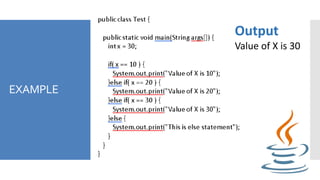
EXAMPLE
Output
Value of X is 30
NESTED IF –
ELSE
STATEMENT
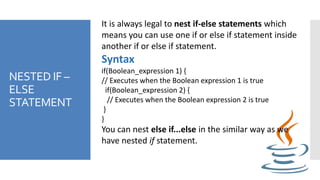
It is always legal to nest if-else statements which
means you can use one if or else if statement inside
another if or else if statement.
Syntax
if(Boolean_expression 1) {
// Executes when the Boolean expression 1 is true
if(Boolean_expression 2) {
// Executes when the Boolean expression 2 is true
}
}
You can nest else if...else in the similar way as we
have nested if statement.
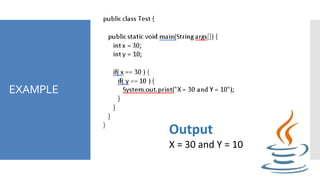
EXAMPLE
Output
X = 30 and Y = 10
SWITCH
STATEMENT
A switch statement allows a variable to be tested for equality against a
list of values. Each value is called a case,
and the variable being switched on is checked for each case.
Syntax
The syntax of enhanced for loop is −
switch(expression)
{
case value :
// Statements
break; // optional
case value :
// Statements
break; // optional
// You can have any number of case statements.
default : // Optional
// Statements
}
RULESAPPLY
TOSWITCH
STATEMENT
The following rules apply to a switch statement −
 The variable used in a switch statement can only be
integers, convertable integers (byte, short, char),
strings and enums.
 You can have any number of case statements within a
switch. Each case is followed by the value to be
compared to and a colon.
 The value for a case must be the same data type as
the variable in the switch and it must be a constant or
a literal.
 When the variable being switched on is equal to a
case, the statements following that case will execute
until a break statement is reached.
RULESAPPLY
TOSWITCH
STATEMENT
 When a break statement is reached, the
switch terminates, and the flow of control
jumps to the next line following the switch
statement.
 Not every case needs to contain a break. If no
break appears, the flow of control will fall
through to subsequent cases until a break is
reached.
 A switch statement can have an optional
default case, which must appear at the end of
the switch. The default case can be used for
performing a task when none of the cases is
true. No break is needed in the default case.
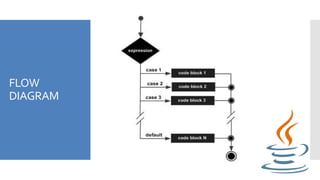
FLOW
DIAGRAM
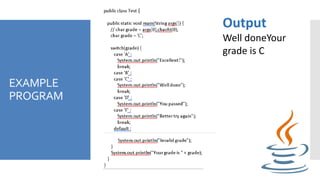
EXAMPLE
PROGRAM
Output
Well doneYour
grade is C
REMINDERS
You have to try the example
program to your java compiler to
exercise your mine, you can edit
with it.
Thank you 

Computer programming 2 Lesson 9

  • 1.
    Computer Programming 2 Lesson 9–Java – Decision Making Prepared by: Analyn G. Regaton
  • 2.
    DECISION MAKING Decision making structureshave one or more conditions to be evaluated or tested by the program, along with a statement or statements that are to be executed if the condition is determined to be true, and optionally, other statements to be executed if the condition is determined to be false.
  • 3.
    TYPESOF DECISION MAKING STATEMENT Sr.No. Statement &Description 1 if statement An if statement consists of a boolean expression followed by one or more statements. 2 if...else statement An if statement can be followed by an optional else statement, which executes when the boolean expression is false. 3 nested if statement You can use one if or else if statement inside another if or else if statement(s). 4 switch statement A switch statement allows a variable to be tested for equality against a list of values.
  • 4.
    SYNTAX An if statementconsists of a Boolean expression followed by one or more statements. Syntax Following is the syntax of an if statement − if(Boolean_expression) { // Statements will execute if the Boolean expression is true } If the Boolean expression evaluates to true then the block of code inside the if statement will be executed. If not, the first set of code after the end of the if statement (after the closing curly brace) will be executed.
  • 5.
  • 6.
  • 7.
    IF ELSE STATEMENT An ifstatement can be followed by an optional else statement, which executes when the Boolean expression is false. Syntax Following is the syntax of an if...else statement − if(Boolean_expression) { // Executes when the Boolean expression is true } else { // Executes when the Boolean expression is false } If the boolean expression evaluates to true, then the if block of code will be executed, otherwise else block of code will be executed.
  • 8.
  • 9.
  • 10.
    IF..ELSE..IF STATEMENT An if statementcan be followed by an optional else if...else statement, which is very useful to test various conditions using single if...else if statement. When using if, else if, else statements there are a few points to keep in mind. •An if can have zero or one else's and it must come after any else if's. •An if can have zero to many else if's and they must come before the else. •Once an else if succeeds, none of the remaining else if's or else's will be tested. Syntax Following is the syntax of an if...else statement − if(Boolean_expression 1) { // Executes when the Boolean expression 1 is true } else if(Boolean_expression 2) { // Executes when the Boolean expression 2 is true } else if(Boolean_expression 3) { // Executes when the Boolean expression 3 is true}else { // Executes when the none of the above condition is true. }
  • 11.
  • 12.
    NESTED IF – ELSE STATEMENT Itis always legal to nest if-else statements which means you can use one if or else if statement inside another if or else if statement. Syntax if(Boolean_expression 1) { // Executes when the Boolean expression 1 is true if(Boolean_expression 2) { // Executes when the Boolean expression 2 is true } } You can nest else if...else in the similar way as we have nested if statement.
  • 13.
  • 14.
    SWITCH STATEMENT A switch statementallows a variable to be tested for equality against a list of values. Each value is called a case, and the variable being switched on is checked for each case. Syntax The syntax of enhanced for loop is − switch(expression) { case value : // Statements break; // optional case value : // Statements break; // optional // You can have any number of case statements. default : // Optional // Statements }
  • 15.
    RULESAPPLY TOSWITCH STATEMENT The following rulesapply to a switch statement −  The variable used in a switch statement can only be integers, convertable integers (byte, short, char), strings and enums.  You can have any number of case statements within a switch. Each case is followed by the value to be compared to and a colon.  The value for a case must be the same data type as the variable in the switch and it must be a constant or a literal.  When the variable being switched on is equal to a case, the statements following that case will execute until a break statement is reached.
  • 16.
    RULESAPPLY TOSWITCH STATEMENT  When abreak statement is reached, the switch terminates, and the flow of control jumps to the next line following the switch statement.  Not every case needs to contain a break. If no break appears, the flow of control will fall through to subsequent cases until a break is reached.  A switch statement can have an optional default case, which must appear at the end of the switch. The default case can be used for performing a task when none of the cases is true. No break is needed in the default case.
  • 17.
  • 18.
  • 19.
    REMINDERS You have totry the example program to your java compiler to exercise your mine, you can edit with it. Thank you 