Control Structure
Repetition
Outlines
 Repetition Statements
 while statement
 do..while statement
 for statement
 Nested loops
 Repetition Control Structures
Repetition Statements
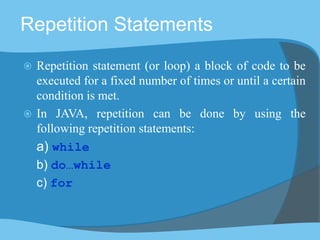
 Repetition statement (or loop) a block of code to be
executed for a fixed number of times or until a certain
condition is met.
 In JAVA, repetition can be done by using the
following repetition statements:
a) while
b) do…while
c) for
The while statement
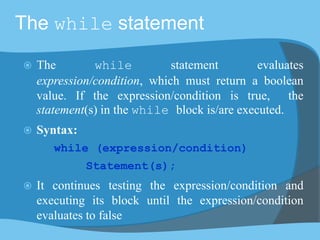
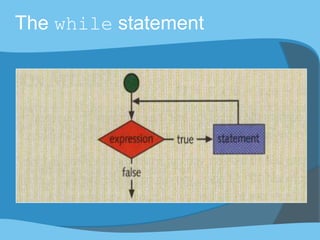
 The while statement evaluates
expression/condition, which must return a boolean
value. If the expression/condition is true, the
statement(s) in the while block is/are executed.
 Syntax:
while (expression/condition)
Statement(s);
 It continues testing the expression/condition and
executing its block until the expression/condition
evaluates to false
The while statement
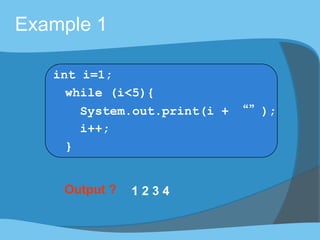
Output ? 1 2 3 4
Example 1
int i=1;
while (i<5){
System.out.print(i + “”);
i++;
}
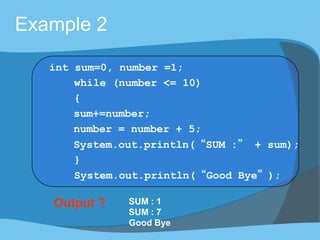
Output ? SUM : 1
SUM : 7
Good Bye
Example 2
int sum=0, number =1;
while (number <= 10)
{
sum+=number;
number = number + 5;
System.out.println(“SUM :” + sum);
}
System.out.println(“Good Bye”);
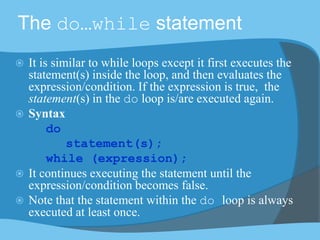
The do…while statement
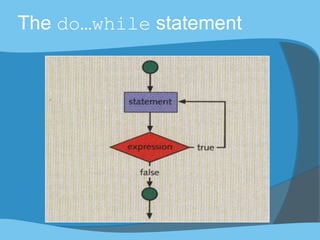
 It is similar to while loops except it first executes the
statement(s) inside the loop, and then evaluates the
expression/condition. If the expression is true, the
statement(s) in the do loop is/are executed again.
 Syntax
do
statement(s);
while (expression);
 It continues executing the statement until the
expression/condition becomes false.
 Note that the statement within the do loop is always
executed at least once.
The do…while statement
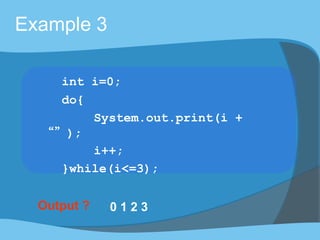
Output ? 0 1 2 3
Example 3
int i=0;
do{
System.out.print(i +
“”);
i++;
}while(i<=3);
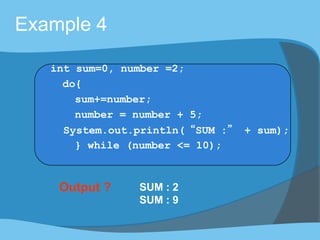
Output ? SUM : 2
SUM : 9
Example 4
int sum=0, number =2;
do{
sum+=number;
number = number + 5;
System.out.println(“SUM :” + sum);
} while (number <= 10);
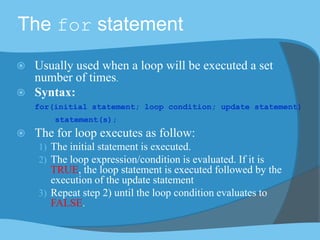
The for statement
 Usually used when a loop will be executed a set
number of times.
 Syntax:
for(initial statement; loop condition; update statement)
statement(s);
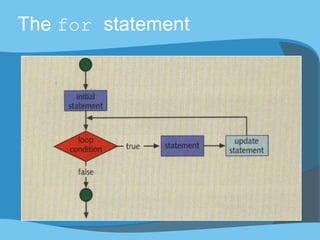
 The for loop executes as follow:
1) The initial statement is executed.
2) The loop expression/condition is evaluated. If it is
TRUE, the loop statement is executed followed by the
execution of the update statement
3) Repeat step 2) until the loop condition evaluates to
FALSE.
The for statement
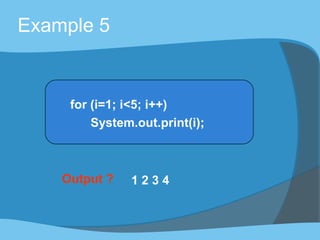
Output ? 1 2 3 4
Example 5
for (i=1; i<5; i++)
System.out.print(i);
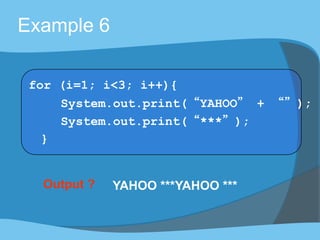
Output ? YAHOO ***YAHOO ***
Example 6
for (i=1; i<3; i++){
System.out.print(“YAHOO” + “”);
System.out.print(“***”);
}
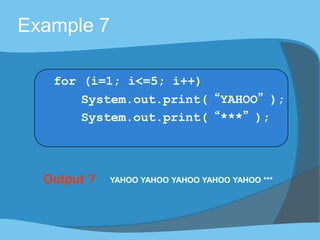
Output ? YAHOO YAHOO YAHOO YAHOO YAHOO ***
Example 7
for (i=1; i<=5; i++)
System.out.print(“YAHOO”);
System.out.print(“***”);
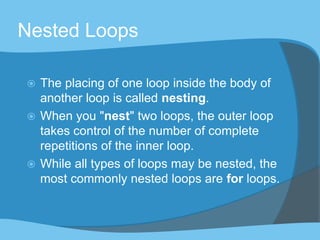
Nested Loops
 The placing of one loop inside the body of
another loop is called nesting.
 When you "nest" two loops, the outer loop
takes control of the number of complete
repetitions of the inner loop.
 While all types of loops may be nested, the
most commonly nested loops are for loops.
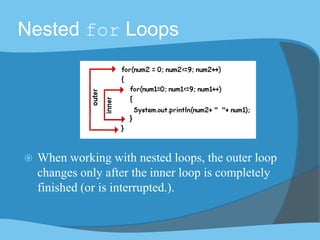
Nested for Loops
 When working with nested loops, the outer loop
changes only after the inner loop is completely
finished (or is interrupted.).
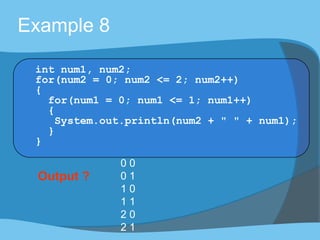
Example 8
int num1, num2;
for(num2 = 0; num2 <= 2; num2++)
{
for(num1 = 0; num1 <= 1; num1++)
{
System.out.println(num2 + " " + num1);
}
}
Output ?
0 0
0 1
1 0
1 1
2 0
2 1
Infinite Loop
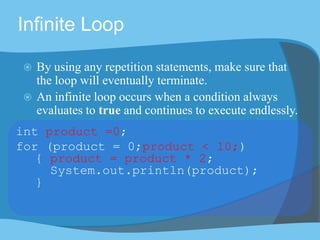
 By using any repetition statements, make sure that
the loop will eventually terminate.
 An infinite loop occurs when a condition always
evaluates to true and continues to execute endlessly.
int product =0;
for (product = 0;product < 10;)
{ product = product * 2;
System.out.println(product);
}
Repetition Control Structures
Repetition can be controlled by:
 Counter controlled loop
 Sentinel controlled loop
 Flag controlled loop
Exercise
Counter Controlled Loop
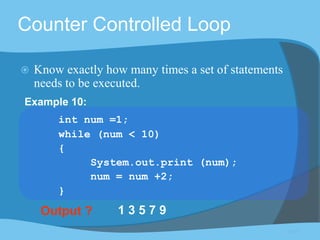
 Know exactly how many times a set of statements
needs to be executed.
Output ? 1 3 5 7 9
int num =1;
while (num < 10)
{
System.out.print (num);
num = num +2;
}
Example 10:
back
Sentinel Controlled Loop
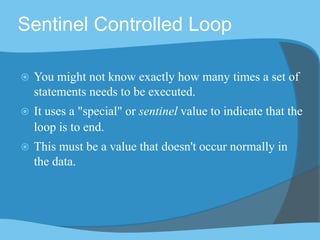
 You might not know exactly how many times a set of
statements needs to be executed.
 It uses a "special" or sentinel value to indicate that the
loop is to end.
 This must be a value that doesn't occur normally in
the data.
Example 11 (complete program)
import java.util.Scanner;
class sentinelLoop {
public static void main (String[] args) {
Scanner input = new Scanner(System.in);
System.out.print("Enter an Integer, or -1 to stop: ");
int choice= input.nextInt();
while (choice!=-1)
{
System.out.println("INSIDE LOOPING");
System.out.print("Enter an Integer, or -1 to stop: ");
choice= input.nextInt();
}
System.out.println("Sentinel value detected. Good Bye.");
}
}
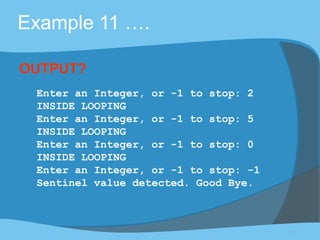
Example 11 ….
Enter an Integer, or -1 to stop: 2
INSIDE LOOPING
Enter an Integer, or -1 to stop: 5
INSIDE LOOPING
Enter an Integer, or -1 to stop: 0
INSIDE LOOPING
Enter an Integer, or -1 to stop: -1
Sentinel value detected. Good Bye.
OUTPUT?
back
Flag Controlled Loop
 Use a boolean variable to control the loop
boolean found = false;
while (!found){
:
:
if(expression)
found = true;
}
back
Exercise 1:
What is the output of the following program?
public class LoopExercise1
{
public static void main (String args[])
{
int choice=1, total=0;
while (choice <4){
total = choice++;
System.out.print(total); }
}
}
Exercise 2:
What is the output of the following program?
public class LoopExercise2
{
public static void main (String args[]){
for (int number =2; number <20; number++)
{
number = number *2;
if (number <15)
System.out.println(number);}
}
}
Exercise 3:
How many times is the following loop body repeated?
public class LoopExercise3 {
public static void main (String args[])
{
int i=1;
do {
if ((i % 2)== 0)
System.out.print(i);
i++;
} while(i<5);
}
}

Repetition Structure

  • 1.
  • 2.
    Outlines  Repetition Statements while statement  do..while statement  for statement  Nested loops  Repetition Control Structures
  • 3.
    Repetition Statements  Repetitionstatement (or loop) a block of code to be executed for a fixed number of times or until a certain condition is met.  In JAVA, repetition can be done by using the following repetition statements: a) while b) do…while c) for
  • 4.
    The while statement The while statement evaluates expression/condition, which must return a boolean value. If the expression/condition is true, the statement(s) in the while block is/are executed.  Syntax: while (expression/condition) Statement(s);  It continues testing the expression/condition and executing its block until the expression/condition evaluates to false
  • 5.
  • 6.
    Output ? 12 3 4 Example 1 int i=1; while (i<5){ System.out.print(i + “”); i++; }
  • 7.
    Output ? SUM: 1 SUM : 7 Good Bye Example 2 int sum=0, number =1; while (number <= 10) { sum+=number; number = number + 5; System.out.println(“SUM :” + sum); } System.out.println(“Good Bye”);
  • 8.
    The do…while statement It is similar to while loops except it first executes the statement(s) inside the loop, and then evaluates the expression/condition. If the expression is true, the statement(s) in the do loop is/are executed again.  Syntax do statement(s); while (expression);  It continues executing the statement until the expression/condition becomes false.  Note that the statement within the do loop is always executed at least once.
  • 9.
  • 10.
    Output ? 01 2 3 Example 3 int i=0; do{ System.out.print(i + “”); i++; }while(i<=3);
  • 11.
    Output ? SUM: 2 SUM : 9 Example 4 int sum=0, number =2; do{ sum+=number; number = number + 5; System.out.println(“SUM :” + sum); } while (number <= 10);
  • 12.
    The for statement Usually used when a loop will be executed a set number of times.  Syntax: for(initial statement; loop condition; update statement) statement(s);  The for loop executes as follow: 1) The initial statement is executed. 2) The loop expression/condition is evaluated. If it is TRUE, the loop statement is executed followed by the execution of the update statement 3) Repeat step 2) until the loop condition evaluates to FALSE.
  • 13.
  • 14.
    Output ? 12 3 4 Example 5 for (i=1; i<5; i++) System.out.print(i);
  • 15.
    Output ? YAHOO***YAHOO *** Example 6 for (i=1; i<3; i++){ System.out.print(“YAHOO” + “”); System.out.print(“***”); }
  • 16.
    Output ? YAHOOYAHOO YAHOO YAHOO YAHOO *** Example 7 for (i=1; i<=5; i++) System.out.print(“YAHOO”); System.out.print(“***”);
  • 17.
    Nested Loops  Theplacing of one loop inside the body of another loop is called nesting.  When you "nest" two loops, the outer loop takes control of the number of complete repetitions of the inner loop.  While all types of loops may be nested, the most commonly nested loops are for loops.
  • 18.
    Nested for Loops When working with nested loops, the outer loop changes only after the inner loop is completely finished (or is interrupted.).
  • 19.
    Example 8 int num1,num2; for(num2 = 0; num2 <= 2; num2++) { for(num1 = 0; num1 <= 1; num1++) { System.out.println(num2 + " " + num1); } } Output ? 0 0 0 1 1 0 1 1 2 0 2 1
  • 20.
    Infinite Loop  Byusing any repetition statements, make sure that the loop will eventually terminate.  An infinite loop occurs when a condition always evaluates to true and continues to execute endlessly. int product =0; for (product = 0;product < 10;) { product = product * 2; System.out.println(product); }
  • 21.
    Repetition Control Structures Repetitioncan be controlled by:  Counter controlled loop  Sentinel controlled loop  Flag controlled loop Exercise
  • 22.
    Counter Controlled Loop Know exactly how many times a set of statements needs to be executed. Output ? 1 3 5 7 9 int num =1; while (num < 10) { System.out.print (num); num = num +2; } Example 10: back
  • 23.
    Sentinel Controlled Loop You might not know exactly how many times a set of statements needs to be executed.  It uses a "special" or sentinel value to indicate that the loop is to end.  This must be a value that doesn't occur normally in the data.
  • 24.
    Example 11 (completeprogram) import java.util.Scanner; class sentinelLoop { public static void main (String[] args) { Scanner input = new Scanner(System.in); System.out.print("Enter an Integer, or -1 to stop: "); int choice= input.nextInt(); while (choice!=-1) { System.out.println("INSIDE LOOPING"); System.out.print("Enter an Integer, or -1 to stop: "); choice= input.nextInt(); } System.out.println("Sentinel value detected. Good Bye."); } }
  • 25.
    Example 11 …. Enteran Integer, or -1 to stop: 2 INSIDE LOOPING Enter an Integer, or -1 to stop: 5 INSIDE LOOPING Enter an Integer, or -1 to stop: 0 INSIDE LOOPING Enter an Integer, or -1 to stop: -1 Sentinel value detected. Good Bye. OUTPUT? back
  • 26.
    Flag Controlled Loop Use a boolean variable to control the loop boolean found = false; while (!found){ : : if(expression) found = true; } back
  • 27.
    Exercise 1: What isthe output of the following program? public class LoopExercise1 { public static void main (String args[]) { int choice=1, total=0; while (choice <4){ total = choice++; System.out.print(total); } } }
  • 28.
    Exercise 2: What isthe output of the following program? public class LoopExercise2 { public static void main (String args[]){ for (int number =2; number <20; number++) { number = number *2; if (number <15) System.out.println(number);} } }
  • 29.
    Exercise 3: How manytimes is the following loop body repeated? public class LoopExercise3 { public static void main (String args[]) { int i=1; do { if ((i % 2)== 0) System.out.print(i); i++; } while(i<5); } }