CONTENTS PAGE ANALYSIS
How I Created my Contents Page
1…
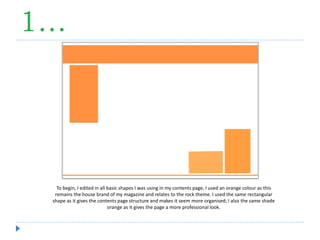
To begin, I edited in all basic shapes I was using in my contents page, I used an orange colour as this
remains the house brand of my magazine and relates to the rock theme. I used the same rectangular
shape as it gives the contents page structure and makes it seem more organised; I also the same shade
orange as it gives the page a more professional look.
2…
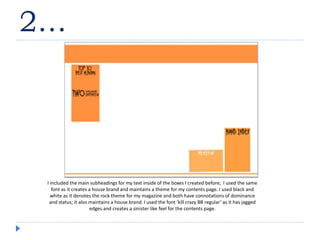
I included the main subheadings for my text inside of the boxes I created before; I used the same
font as it creates a house brand and maintains a theme for my contents page. I used black and
white as it denotes the rock theme for my magazine and both have connotations of dominance
and status; it also maintains a house brand. I used the font ‘kill crazy BB regular’ as it has jagged
edges and creates a sinister like feel for the contents page.
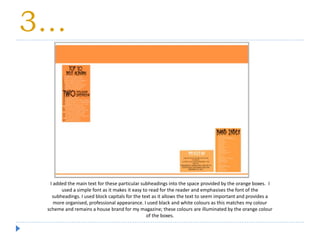
3…
I added the main text for these particular subheadings into the space provided by the orange boxes. I
used a simple font as it makes it easy to read for the reader and emphasises the font of the
subheadings. I used block capitals for the text as it allows the text to seem important and provides a
more organised, professional appearance. I used black and white colours as this matches my colour
scheme and remains a house brand for my magazine; these colours are illuminated by the orange colour
of the boxes.
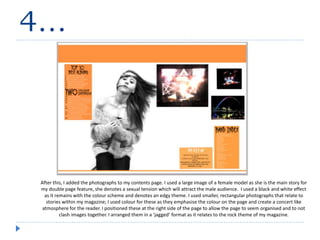
4…
After this, I added the photographs to my contents page. I used a large image of a female model as she is the main story for
my double page feature, she denotes a sexual tension which will attract the male audience. I used a black and white effect
as it remains with the colour scheme and denotes an edgy theme. I used smaller, rectangular photographs that relate to
stories within my magazine; I used colour for these as they emphasise the colour on the page and create a concert like
atmosphere for the reader. I positioned these at the right side of the page to allow the page to seem organised and to not
clash images together. I arranged them in a ‘jagged’ format as it relates to the rock theme of my magazine.
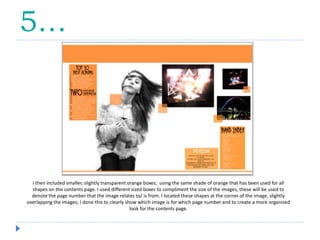
5…
I then included smaller, slightly transparent orange boxes; using the same shade of orange that has been used for all
shapes on the contents page. I used different sized boxes to compliment the size of the images, these will be used to
denote the page number that the image relates to/ is from. I located these shapes at the corner of the image, slightly
overlapping the images; I done this to clearly show which image is for which page number and to create a more organised
look for the contents page.
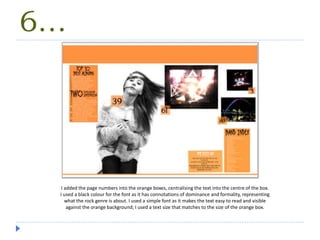
6…
I added the page numbers into the orange boxes, centralising the text into the centre of the box.
I used a black colour for the font as it has connotations of dominance and formality, representing
what the rock genre is about. I used a simple font as it makes the text easy to read and visible
against the orange background; I used a text size that matches to the size of the orange box.
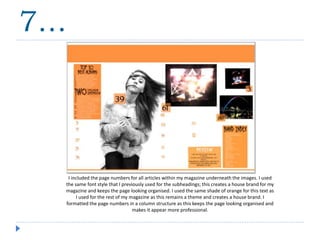
I included the page numbers for all articles within my magazine underneath the images. I used
the same font style that I previously used for the subheadings; this creates a house brand for my
magazine and keeps the page looking organised. I used the same shade of orange for this text as
I used for the rest of my magazine as this remains a theme and creates a house brand. I
formatted the page numbers in a column structure as this keeps the page looking organised and
makes it appear more professional.
7…
8…
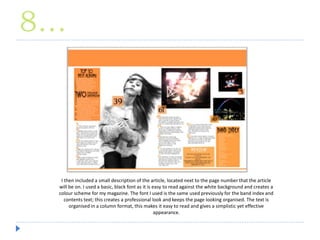
I then included a small description of the article, located next to the page number that the article
will be on. I used a basic, black font as it is easy to read against the white background and creates a
colour scheme for my magazine. The font I used is the same used previously for the band index and
contents text; this creates a professional look and keeps the page looking organised. The text is
organised in a column format, this makes it easy to read and gives a simplistic yet effective
appearance.
9…
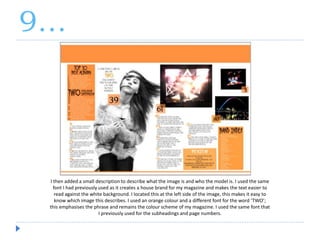
I then added a small description to describe what the image is and who the model is. I used the same
font I had previously used as it creates a house brand for my magazine and makes the text easier to
read against the white background. I located this at the left side of the image, this makes it easy to
know which image this describes. I used an orange colour and a different font for the word ‘TWO’;
this emphasises the phrase and remains the colour scheme of my magazine. I used the same font that
I previously used for the subheadings and page numbers.
10…
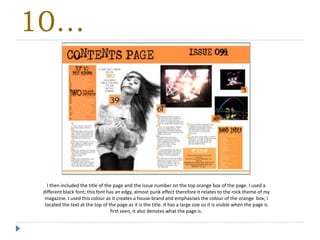
I then included the title of the page and the issue number on the top orange box of the page. I used a
different black font; this font has an edgy, almost punk effect therefore it relates to the rock theme of my
magazine. I used this colour as it creates a house brand and emphasises the colour of the orange box; I
located the text at the top of the page as it is the title. It has a large size so it is visible when the page is
first seen, it also denotes what the page is.
11…
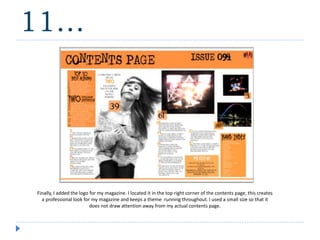
Finally, I added the logo for my magazine. I located it in the top right corner of the contents page, this creates
a professional look for my magazine and keeps a theme running throughout. I used a small size so that it
does not draw attention away from my actual contents page.

Contents page analysis

  • 1.
    CONTENTS PAGE ANALYSIS HowI Created my Contents Page
  • 2.
    1… To begin, Iedited in all basic shapes I was using in my contents page, I used an orange colour as this remains the house brand of my magazine and relates to the rock theme. I used the same rectangular shape as it gives the contents page structure and makes it seem more organised; I also the same shade orange as it gives the page a more professional look.
  • 3.
    2… I included themain subheadings for my text inside of the boxes I created before; I used the same font as it creates a house brand and maintains a theme for my contents page. I used black and white as it denotes the rock theme for my magazine and both have connotations of dominance and status; it also maintains a house brand. I used the font ‘kill crazy BB regular’ as it has jagged edges and creates a sinister like feel for the contents page.
  • 4.
    3… I added themain text for these particular subheadings into the space provided by the orange boxes. I used a simple font as it makes it easy to read for the reader and emphasises the font of the subheadings. I used block capitals for the text as it allows the text to seem important and provides a more organised, professional appearance. I used black and white colours as this matches my colour scheme and remains a house brand for my magazine; these colours are illuminated by the orange colour of the boxes.
  • 5.
    4… After this, Iadded the photographs to my contents page. I used a large image of a female model as she is the main story for my double page feature, she denotes a sexual tension which will attract the male audience. I used a black and white effect as it remains with the colour scheme and denotes an edgy theme. I used smaller, rectangular photographs that relate to stories within my magazine; I used colour for these as they emphasise the colour on the page and create a concert like atmosphere for the reader. I positioned these at the right side of the page to allow the page to seem organised and to not clash images together. I arranged them in a ‘jagged’ format as it relates to the rock theme of my magazine.
  • 6.
    5… I then includedsmaller, slightly transparent orange boxes; using the same shade of orange that has been used for all shapes on the contents page. I used different sized boxes to compliment the size of the images, these will be used to denote the page number that the image relates to/ is from. I located these shapes at the corner of the image, slightly overlapping the images; I done this to clearly show which image is for which page number and to create a more organised look for the contents page.
  • 7.
    6… I added thepage numbers into the orange boxes, centralising the text into the centre of the box. I used a black colour for the font as it has connotations of dominance and formality, representing what the rock genre is about. I used a simple font as it makes the text easy to read and visible against the orange background; I used a text size that matches to the size of the orange box.
  • 8.
    I included thepage numbers for all articles within my magazine underneath the images. I used the same font style that I previously used for the subheadings; this creates a house brand for my magazine and keeps the page looking organised. I used the same shade of orange for this text as I used for the rest of my magazine as this remains a theme and creates a house brand. I formatted the page numbers in a column structure as this keeps the page looking organised and makes it appear more professional. 7…
  • 9.
    8… I then includeda small description of the article, located next to the page number that the article will be on. I used a basic, black font as it is easy to read against the white background and creates a colour scheme for my magazine. The font I used is the same used previously for the band index and contents text; this creates a professional look and keeps the page looking organised. The text is organised in a column format, this makes it easy to read and gives a simplistic yet effective appearance.
  • 10.
    9… I then addeda small description to describe what the image is and who the model is. I used the same font I had previously used as it creates a house brand for my magazine and makes the text easier to read against the white background. I located this at the left side of the image, this makes it easy to know which image this describes. I used an orange colour and a different font for the word ‘TWO’; this emphasises the phrase and remains the colour scheme of my magazine. I used the same font that I previously used for the subheadings and page numbers.
  • 11.
    10… I then includedthe title of the page and the issue number on the top orange box of the page. I used a different black font; this font has an edgy, almost punk effect therefore it relates to the rock theme of my magazine. I used this colour as it creates a house brand and emphasises the colour of the orange box; I located the text at the top of the page as it is the title. It has a large size so it is visible when the page is first seen, it also denotes what the page is.
  • 12.
    11… Finally, I addedthe logo for my magazine. I located it in the top right corner of the contents page, this creates a professional look for my magazine and keeps a theme running throughout. I used a small size so that it does not draw attention away from my actual contents page.