Content Security Policy
Lessons learned at Yahoo
B-Sides DC
10/17/2015
Binu Ramakrishnan & Vibha Sethi
Yahoo Inc.
https://cwe.mitre.org/data/definitions/79.html
http://bit.ly/1ZK9COc
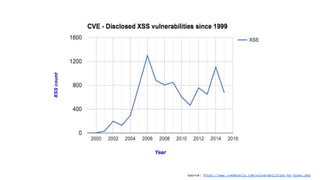
Cross-site Scripting
● Execution of malicious code injected by an attacker
on victim’s web page
● Leads to credentials and data theft, malware
distribution, site defacement etc.
● Primary reason: Improper neutralization of user input
when it gets rendered on a web page
● Remained as a top threat on OWASP top ten list
since its first publication in 2004
Common Remedies
● Input validation and output encoding
● Whitelist trusted contents and tags
● Isolation - e.g. safe iframes
http://bit.ly/1VRI1Gb
source: https://www.cvedetails.com/vulnerabilities-by-types.php
CSP - An additional layer of protection
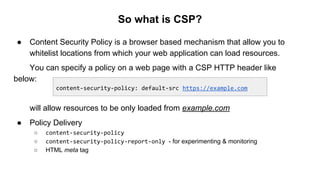
So what is CSP?
● Content Security Policy is a browser based mechanism that allow you to
whitelist locations from which your web application can load resources.
You can specify a policy on a web page with a CSP HTTP header like
below:
will allow resources to be only loaded from example.com
● Policy Delivery
○ content-security-policy
○ content-security-policy-report-only - for experimenting & monitoring
○ HTML meta tag
content-security-policy: default-src https://example.com
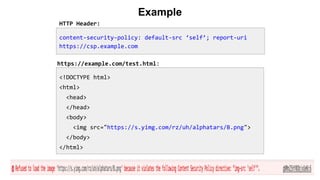
Example
<!DOCTYPE html>
<html>
<head>
</head>
<body>
<img src="https://s.yimg.com/rz/uh/alphatars/B.png">
</body>
</html>
content-security-policy: default-src ‘self’; report-uri
https://csp.example.com
HTTP Header:
https://example.com/test.html:
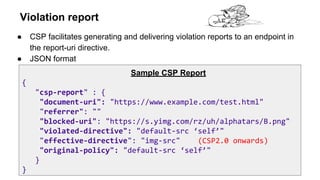
Violation report
● CSP facilitates generating and delivering violation reports to an endpoint in
the report-uri directive.
● JSON format
Sample CSP Report
{
"csp-report" : {
"document-uri": "https://www.example.com/test.html"
"referrer": ""
"blocked-uri": "https://s.yimg.com/rz/uh/alphatars/B.png"
"violated-directive": "default-src ‘self’"
"effective-directive": "img-src" (CSP2.0 onwards)
"original-policy": "default-src ‘self’"
}
}
Content Security Policy Directives
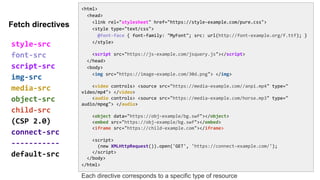
<html>
<head>
<link rel="stylesheet" href="https://style-example.com/pure.css">
<style type="text/css">
@font-face { font-family: "MyFont"; src: url(http://font-example.org/f.ttf); }
</style>
<script src="https://js-example.com/jsquery.js"></script>
</head>
<body>
<img src="https://image-example.com/30d.png"> </img>
<video controls> <source src="https://media-example.com//anpi.mp4" type="
video/mp4"> </video>
<audio controls> <source src="https://media-example.com/horse.mp3" type="
audio/mpeg"> </audio>
<object data="https://obj-example/bg.swf"></object>
<embed src="https://obj-example/bg.swf"></embed>
<iframe src="https://child-example.com"></iframe>
<script>
(new XMLHttpRequest()).open('GET', 'https://connect-example.com/');
</script>
</body>
</html>
style-src
font-src
script-src
img-src
media-src
object-src
child-src
(CSP 2.0)
connect-src
-----------
default-src
Fetch directives
Each directive corresponds to a specific type of resource
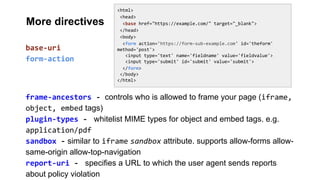
<html>
<head>
<base href="https://example.com/" target="_blank">
</head>
<body>
<form action='https://form-sub-example.com' id='theform'
method='post'>
<input type='text' name='fieldname' value='fieldvalue'>
<input type='submit' id='submit' value='submit'>
</form>
</body>
</html>
frame-ancestors - controls who is allowed to frame your page (iframe,
object, embed tags)
plugin-types - whitelist MIME types for object and embed tags. e.g.
application/pdf
sandbox - similar to iframe sandbox attribute. supports allow-forms allow-
same-origin allow-top-navigation
report-uri - specifies a URL to which the user agent sends reports
about policy violation
base-uri
form-action
More directives
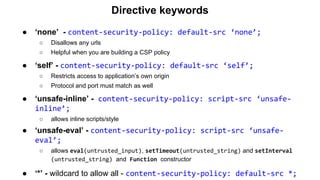
Directive keywords
● ‘none’ - content-security-policy: default-src ‘none’;
○ Disallows any urls
○ Helpful when you are building a CSP policy
● ‘self’ - content-security-policy: default-src ‘self’;
○ Restricts access to application’s own origin
○ Protocol and port must match as well
● ‘unsafe-inline’ - content-security-policy: script-src ‘unsafe-
inline’;
○ allows inline scripts/style
● ‘unsafe-eval’ - content-security-policy: script-src ‘unsafe-
eval’;
○ allows eval(untrusted_input), setTimeout(untrusted_string) and setInterval
(untrusted_string) and Function constructor
● ‘*’ - wildcard to allow all - content-security-policy: default-src *;
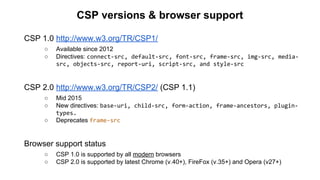
CSP versions & browser support
CSP 1.0 http://www.w3.org/TR/CSP1/
○ Available since 2012
○ Directives: connect-src, default-src, font-src, frame-src, img-src, media-
src, objects-src, report-uri, script-src, and style-src
CSP 2.0 http://www.w3.org/TR/CSP2/ (CSP 1.1)
○ Mid 2015
○ New directives: base-uri, child-src, form-action, frame-ancestors, plugin-
types.
○ Deprecates frame-src
Browser support status
○ CSP 1.0 is supported by all modern browsers
○ CSP 2.0 is supported by latest Chrome (v.40+), FireFox (v.35+) and Opera (v27+)
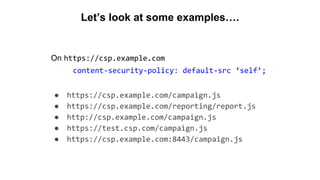
Let’s look at some examples….
On https://csp.example.com
content-security-policy: default-src ‘self’;
● https://csp.example.com/campaign.js
● https://csp.example.com/reporting/report.js
● http://csp.example.com/campaign.js
● https://test.csp.com/campaign.js
● https://csp.example.com:8443/campaign.js
Why inline Javascript is bad?
Content-Type: text/html; charset=utf-8
<script>console.log("Legitimate javascript code as part of the page");</script>
<div> Welcome, <script>alert("Attack!");</script></div>
https://trusted.example.com/welcome.php?username=<script>alert("Attack!");</script>
<?php
echo '<script>console.log("This is a legitimate javascript code as part of the
page");</script>'
echo '<div class="header"> Welcome, ' . $_GET['username']; . '</div>';
?>
It is hard for the browser to distinguish trusted javascript with a malicious script
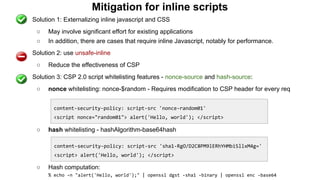
Mitigation for inline scripts
● Solution 1: Externalizing inline javascript and CSS
○ May involve significant effort for existing applications
○ In addition, there are cases that require inline Javascript, notably for performance.
● Solution 2: use unsafe-inline
○ Reduce the effectiveness of CSP
● Solution 3: CSP 2.0 script whitelisting features - nonce-source and hash-source:
○ nonce whitelisting: nonce-$random - Requires modification to CSP header for every req
○ hash whitelisting - hashAlgorithm-base64hash
○ Hash computation:
% echo -n "alert('Hello, world');" | openssl dgst -sha1 -binary | openssl enc -base64
content-security-policy: script-src 'nonce-random01'
<script nonce="random01"> alert('Hello, world'); </script>
content-security-policy: script-src 'sha1-RgO/D2C8PM9lERhYHMbiSllxM4g='
<script> alert('Hello, world'); </script>
Cross-site Scripting
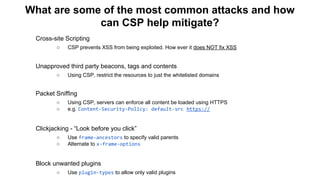
○ CSP prevents XSS from being exploited. How ever it does NOT fix XSS
Unapproved third party beacons, tags and contents
○ Using CSP, restrict the resources to just the whitelisted domains
Packet Sniffing
○ Using CSP, servers can enforce all content be loaded using HTTPS
○ e.g. Content-Security-Policy: default-src https://
Clickjacking - “Look before you click”
○ Use frame-ancestors to specify valid parents
○ Alternate to x-frame-options
Block unwanted plugins
○ Use plugin-types to allow only valid plugins
What are some of the most common attacks and how
can CSP help mitigate?
Browser behavior
Feature completeness
Implementation disparities
Mobile browsers
https://www.flickr.com/photos/stargardener/5178063063/
CSP deployment
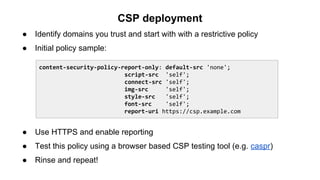
● Identify domains you trust and start with with a restrictive policy
● Initial policy sample:
● Use HTTPS and enable reporting
● Test this policy using a browser based CSP testing tool (e.g. caspr)
● Rinse and repeat!
content-security-policy-report-only: default-src 'none';
script-src 'self';
connect-src 'self';
img-src 'self';
style-src 'self';
font-src 'self';
report-uri https://csp.example.com
Automation with csp-validator.js
% bin/phantomjs csp-validator.js
Usage: csp-validator.js [--quiet] <URL>
Returns:
0 => SUCCESS - No violations
1 => FAIL - System/parse/input error
2 => CSP-VIOLATION - Violation detected
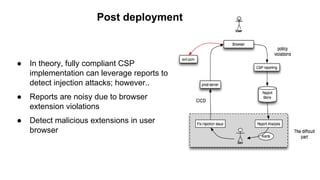
Post deployment
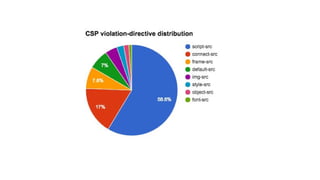
● In theory, fully compliant CSP
implementation can leverage reports to
detect injection attacks; however..
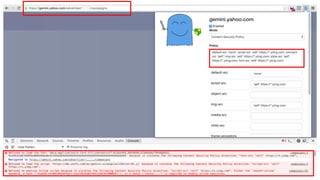
● Reports are noisy due to browser
extension violations
● Detect malicious extensions in user
browser
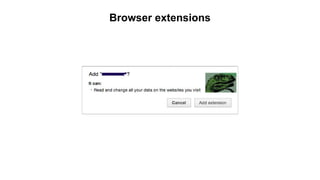
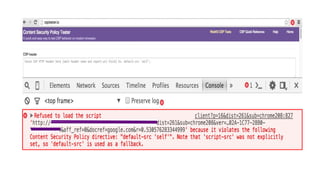
Browser extensions
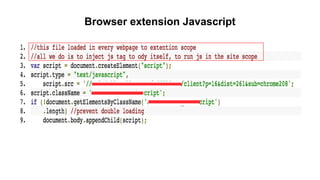
Browser extension Javascript
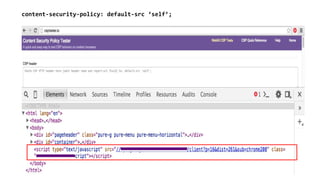
content-security-policy: default-src ‘self’;
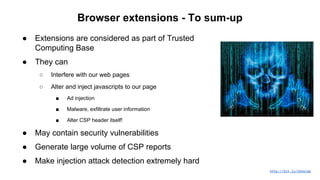
Browser extensions - To sum-up
● Extensions are considered as part of Trusted
Computing Base
● They can
○ Interfere with our web pages
○ Alter and inject javascripts to our page
■ Ad injection
■ Malware, exfiltrate user information
■ Alter CSP header itself!
● May contain security vulnerabilities
● Generate large volume of CSP reports
● Make injection attack detection extremely hard
http://bit.ly/1kbsLbp
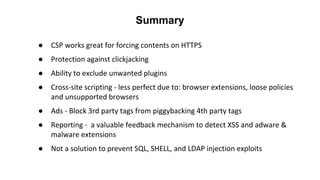
● Not a solution for all content injection problems
○ E.g. SQL, Shell and other server side injections
● Loose policies
○ Render CSP less effective
● Browser extensions can override CSP policies,
○ Less effective against malicious extensions
● Whitelisted locations are fully trusted
○ CDN scenario
Not so good side of CSP
● Maintain code hygiene
○ Keep HTML, CSS and Javascript separate
○ Use Javascript event handlers
● Automation
○ csp-validator.js protects against CSP misconfigurations and HTTPS
enforcement
● Use stricter policies
○ Always use https:
○ Avoid the use of unsafe-inline and unsafe-eval
○ Use paths https://cdn.example.com/asset/path/ (CSP 2.0 feature)
○ Avoid wildcards if possible - *.example.com
● Enable reporting even on enforce mode
○ Help in detecting content injection in near real time
CSP best practices
CSP - What else?
● Scan violation URLs for malwares
● Detect injection attacks in near real time by
analyzing CSP violation reports
● Threat intelligence - IP and URL reputation
based on blocked links
https://www.flickr.com/photos/drp/34988312
CSP testing tools
● csptester.io - Open source tool
● csp-validator.js for CICD - PhantomJS headless script to audit CSP policy
for the given URL
● GitHub: https://github.com/yahoo/csptester
● Chrome browser plugin - caspr
Demo
● csptester.io
● csp-validator.js
●
●
●
●
●
●
●
Summary
Q & A
Thank you!

Content Security Policy - Lessons learned at Yahoo

  • 1.
    Content Security Policy Lessonslearned at Yahoo B-Sides DC 10/17/2015 Binu Ramakrishnan & Vibha Sethi Yahoo Inc.
  • 2.
    https://cwe.mitre.org/data/definitions/79.html http://bit.ly/1ZK9COc Cross-site Scripting ● Executionof malicious code injected by an attacker on victim’s web page ● Leads to credentials and data theft, malware distribution, site defacement etc. ● Primary reason: Improper neutralization of user input when it gets rendered on a web page ● Remained as a top threat on OWASP top ten list since its first publication in 2004
  • 3.
    Common Remedies ● Inputvalidation and output encoding ● Whitelist trusted contents and tags ● Isolation - e.g. safe iframes http://bit.ly/1VRI1Gb
  • 4.
  • 5.
    CSP - Anadditional layer of protection
  • 6.
    So what isCSP? ● Content Security Policy is a browser based mechanism that allow you to whitelist locations from which your web application can load resources. You can specify a policy on a web page with a CSP HTTP header like below: will allow resources to be only loaded from example.com ● Policy Delivery ○ content-security-policy ○ content-security-policy-report-only - for experimenting & monitoring ○ HTML meta tag content-security-policy: default-src https://example.com
  • 7.
    Example <!DOCTYPE html> <html> <head> </head> <body> <img src="https://s.yimg.com/rz/uh/alphatars/B.png"> </body> </html> content-security-policy:default-src ‘self’; report-uri https://csp.example.com HTTP Header: https://example.com/test.html:
  • 8.
    Violation report ● CSPfacilitates generating and delivering violation reports to an endpoint in the report-uri directive. ● JSON format Sample CSP Report { "csp-report" : { "document-uri": "https://www.example.com/test.html" "referrer": "" "blocked-uri": "https://s.yimg.com/rz/uh/alphatars/B.png" "violated-directive": "default-src ‘self’" "effective-directive": "img-src" (CSP2.0 onwards) "original-policy": "default-src ‘self’" } }
  • 9.
  • 10.
    <html> <head> <link rel="stylesheet" href="https://style-example.com/pure.css"> <styletype="text/css"> @font-face { font-family: "MyFont"; src: url(http://font-example.org/f.ttf); } </style> <script src="https://js-example.com/jsquery.js"></script> </head> <body> <img src="https://image-example.com/30d.png"> </img> <video controls> <source src="https://media-example.com//anpi.mp4" type=" video/mp4"> </video> <audio controls> <source src="https://media-example.com/horse.mp3" type=" audio/mpeg"> </audio> <object data="https://obj-example/bg.swf"></object> <embed src="https://obj-example/bg.swf"></embed> <iframe src="https://child-example.com"></iframe> <script> (new XMLHttpRequest()).open('GET', 'https://connect-example.com/'); </script> </body> </html> style-src font-src script-src img-src media-src object-src child-src (CSP 2.0) connect-src ----------- default-src Fetch directives Each directive corresponds to a specific type of resource
  • 11.
    <html> <head> <base href="https://example.com/" target="_blank"> </head> <body> <formaction='https://form-sub-example.com' id='theform' method='post'> <input type='text' name='fieldname' value='fieldvalue'> <input type='submit' id='submit' value='submit'> </form> </body> </html> frame-ancestors - controls who is allowed to frame your page (iframe, object, embed tags) plugin-types - whitelist MIME types for object and embed tags. e.g. application/pdf sandbox - similar to iframe sandbox attribute. supports allow-forms allow- same-origin allow-top-navigation report-uri - specifies a URL to which the user agent sends reports about policy violation base-uri form-action More directives
  • 12.
    Directive keywords ● ‘none’- content-security-policy: default-src ‘none’; ○ Disallows any urls ○ Helpful when you are building a CSP policy ● ‘self’ - content-security-policy: default-src ‘self’; ○ Restricts access to application’s own origin ○ Protocol and port must match as well ● ‘unsafe-inline’ - content-security-policy: script-src ‘unsafe- inline’; ○ allows inline scripts/style ● ‘unsafe-eval’ - content-security-policy: script-src ‘unsafe- eval’; ○ allows eval(untrusted_input), setTimeout(untrusted_string) and setInterval (untrusted_string) and Function constructor ● ‘*’ - wildcard to allow all - content-security-policy: default-src *;
  • 13.
    CSP versions &browser support CSP 1.0 http://www.w3.org/TR/CSP1/ ○ Available since 2012 ○ Directives: connect-src, default-src, font-src, frame-src, img-src, media- src, objects-src, report-uri, script-src, and style-src CSP 2.0 http://www.w3.org/TR/CSP2/ (CSP 1.1) ○ Mid 2015 ○ New directives: base-uri, child-src, form-action, frame-ancestors, plugin- types. ○ Deprecates frame-src Browser support status ○ CSP 1.0 is supported by all modern browsers ○ CSP 2.0 is supported by latest Chrome (v.40+), FireFox (v.35+) and Opera (v27+)
  • 14.
    Let’s look atsome examples…. On https://csp.example.com content-security-policy: default-src ‘self’; ● https://csp.example.com/campaign.js ● https://csp.example.com/reporting/report.js ● http://csp.example.com/campaign.js ● https://test.csp.com/campaign.js ● https://csp.example.com:8443/campaign.js
  • 15.
    Why inline Javascriptis bad? Content-Type: text/html; charset=utf-8 <script>console.log("Legitimate javascript code as part of the page");</script> <div> Welcome, <script>alert("Attack!");</script></div> https://trusted.example.com/welcome.php?username=<script>alert("Attack!");</script> <?php echo '<script>console.log("This is a legitimate javascript code as part of the page");</script>' echo '<div class="header"> Welcome, ' . $_GET['username']; . '</div>'; ?> It is hard for the browser to distinguish trusted javascript with a malicious script
  • 16.
    Mitigation for inlinescripts ● Solution 1: Externalizing inline javascript and CSS ○ May involve significant effort for existing applications ○ In addition, there are cases that require inline Javascript, notably for performance. ● Solution 2: use unsafe-inline ○ Reduce the effectiveness of CSP ● Solution 3: CSP 2.0 script whitelisting features - nonce-source and hash-source: ○ nonce whitelisting: nonce-$random - Requires modification to CSP header for every req ○ hash whitelisting - hashAlgorithm-base64hash ○ Hash computation: % echo -n "alert('Hello, world');" | openssl dgst -sha1 -binary | openssl enc -base64 content-security-policy: script-src 'nonce-random01' <script nonce="random01"> alert('Hello, world'); </script> content-security-policy: script-src 'sha1-RgO/D2C8PM9lERhYHMbiSllxM4g=' <script> alert('Hello, world'); </script>
  • 17.
    Cross-site Scripting ○ CSPprevents XSS from being exploited. How ever it does NOT fix XSS Unapproved third party beacons, tags and contents ○ Using CSP, restrict the resources to just the whitelisted domains Packet Sniffing ○ Using CSP, servers can enforce all content be loaded using HTTPS ○ e.g. Content-Security-Policy: default-src https:// Clickjacking - “Look before you click” ○ Use frame-ancestors to specify valid parents ○ Alternate to x-frame-options Block unwanted plugins ○ Use plugin-types to allow only valid plugins What are some of the most common attacks and how can CSP help mitigate?
  • 18.
    Browser behavior Feature completeness Implementationdisparities Mobile browsers https://www.flickr.com/photos/stargardener/5178063063/
  • 19.
    CSP deployment ● Identifydomains you trust and start with with a restrictive policy ● Initial policy sample: ● Use HTTPS and enable reporting ● Test this policy using a browser based CSP testing tool (e.g. caspr) ● Rinse and repeat! content-security-policy-report-only: default-src 'none'; script-src 'self'; connect-src 'self'; img-src 'self'; style-src 'self'; font-src 'self'; report-uri https://csp.example.com
  • 21.
    Automation with csp-validator.js %bin/phantomjs csp-validator.js Usage: csp-validator.js [--quiet] <URL> Returns: 0 => SUCCESS - No violations 1 => FAIL - System/parse/input error 2 => CSP-VIOLATION - Violation detected
  • 22.
    Post deployment ● Intheory, fully compliant CSP implementation can leverage reports to detect injection attacks; however.. ● Reports are noisy due to browser extension violations ● Detect malicious extensions in user browser
  • 23.
  • 24.
  • 25.
  • 27.
    Browser extensions -To sum-up ● Extensions are considered as part of Trusted Computing Base ● They can ○ Interfere with our web pages ○ Alter and inject javascripts to our page ■ Ad injection ■ Malware, exfiltrate user information ■ Alter CSP header itself! ● May contain security vulnerabilities ● Generate large volume of CSP reports ● Make injection attack detection extremely hard http://bit.ly/1kbsLbp
  • 29.
    ● Not asolution for all content injection problems ○ E.g. SQL, Shell and other server side injections ● Loose policies ○ Render CSP less effective ● Browser extensions can override CSP policies, ○ Less effective against malicious extensions ● Whitelisted locations are fully trusted ○ CDN scenario Not so good side of CSP
  • 30.
    ● Maintain codehygiene ○ Keep HTML, CSS and Javascript separate ○ Use Javascript event handlers ● Automation ○ csp-validator.js protects against CSP misconfigurations and HTTPS enforcement ● Use stricter policies ○ Always use https: ○ Avoid the use of unsafe-inline and unsafe-eval ○ Use paths https://cdn.example.com/asset/path/ (CSP 2.0 feature) ○ Avoid wildcards if possible - *.example.com ● Enable reporting even on enforce mode ○ Help in detecting content injection in near real time CSP best practices
  • 31.
    CSP - Whatelse? ● Scan violation URLs for malwares ● Detect injection attacks in near real time by analyzing CSP violation reports ● Threat intelligence - IP and URL reputation based on blocked links https://www.flickr.com/photos/drp/34988312
  • 32.
    CSP testing tools ●csptester.io - Open source tool ● csp-validator.js for CICD - PhantomJS headless script to audit CSP policy for the given URL ● GitHub: https://github.com/yahoo/csptester ● Chrome browser plugin - caspr
  • 33.
  • 34.
  • 35.