How can we predict for the unknown? Drawing out underlying trends from existing practice Gráinne Conole Institute of Educational Technology [email_address] Enhancing the education environment Queens University, Belfast 18 th  September 2006
The macro and micro context Current developments Complexity and  Interconnection: macro and  micro contexts Bridging the gap
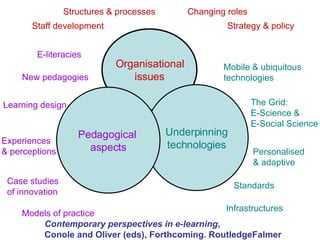
Contemporary perspectives in e-learning ,  Conole and Oliver (eds), Forthcoming. RoutledgeFalmer Organisational issues Changing roles  Strategy & policy  Structures & processes Staff development Underpinning technologies Mobile & ubiquitous technologies The Grid:  E-Science &  E-Social Science Personalised  & adaptive Standards Infrastructures Pedagogical  aspects E-literacies   New pedagogies   Models of practice Case studies  of innovation Learning design   Experiences  & perceptions
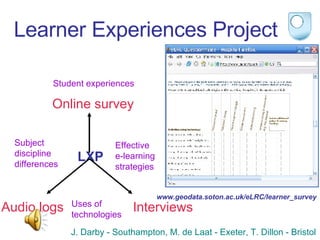
Learner Experiences Project LXP Student experiences Subject  discipline  differences Uses of  technologies Effective  e-learning  strategies J. Darby - Southampton, M. de Laat - Exeter, T. Dillon - Bristol Online survey Audio logs Interviews www.geodata.soton.ac.uk/eLRC/learner_survey
Expected findings Use of standard packages: Word, PowerPoint Data manipulation: Excel, statistical software Use of search engines/internet for information Unexpected findings Use of communication tools for learning:  Mobile phone, Instant messaging,  Discussion forums VLE not so popular  Often only provides content or  teacher notes/powerpoint slides Computer science students prefer to build  their own infrastructure and websites
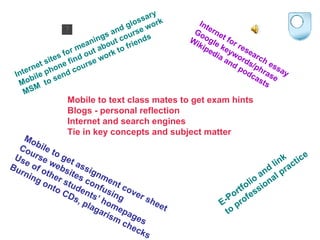
Mobile to text class mates to get exam hints Blogs - personal reflection Internet and search engines Tie in key concepts and subject matter Mobile to get assignment cover sheet  Course websites confusing Use of other students’ homepages Burning onto CDs, plagarism checks E-Portfolio and link  to professional practice Internet sites for meanings and glossary Mobile phone find out about course work MSM  to send course work to friends Internet for research essay Google keywords/phrase Wikipedia and podcasts
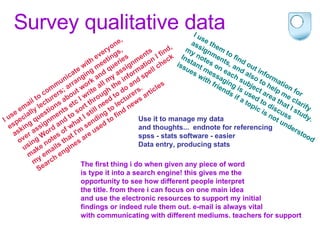
Survey qualitative data I use email to communicate with everyone,  especially lecturers; arranging meetings,  asking questions about work and queries  over assignments etc I write all my assignments  using Word and to sort through the information I find,  make notes of what I still need to do and spell check  my emails that I'm sending to lecturers. Search engines are used to find news articles I use them to find out information for assignments, and also to help me clarify  my notes on each subject area that I study.  Instant messaging is used to discuss  issues with friends if a topic is not understood Use it to manage my data  and thoughts...  endnote for referencing  spss - stats software - easier  Data entry, producing stats The first thing i do when given any piece of word  is type it into a search engine! this gives me the  opportunity to see how different people interpret  the title. from there i can focus on one main idea  and use the electronic resources to support my initial  findings or indeed rule them out. e-mail is always vital  with communicating with different mediums. teachers for support
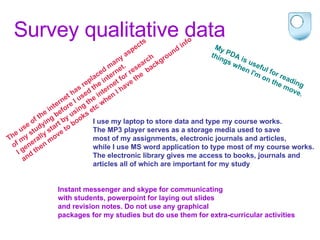
Survey qualitative data The use of the internet has replaced many aspects  of my studying before I used the internet.  I generally start by using the internet for research  and then move to books etc when I have the  background info My PDA is useful for reading  things when I'm on the move. I use my laptop to store data and type my course works.  The MP3 player serves as a storage media used to save  most of my assignments, electronic journals and articles,  while I use MS word application to type most of my course works.  The electronic library gives me access to books, journals and  articles all of which are important for my study Instant messenger and skype for communicating  with students, powerpoint for laying out slides  and revision notes. Do not use any graphical  packages for my studies but do use them for extra-curricular activities
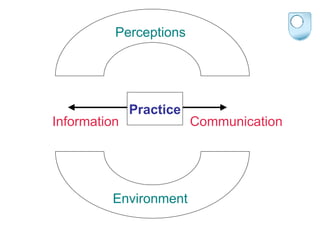
Practice Information Communication Perceptions Environment
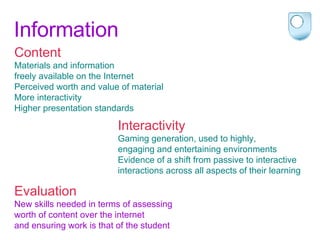
Information Content Materials and information  freely available on the Internet Perceived worth and value of material More interactivity  Higher presentation standards   Evaluation New skills needed in terms of assessing  worth of content over the internet  and ensuring work is that of the student Interactivity Gaming generation, used to highly,  engaging and entertaining environments Evidence of a shift from passive to interactive  interactions across all aspects of their learning
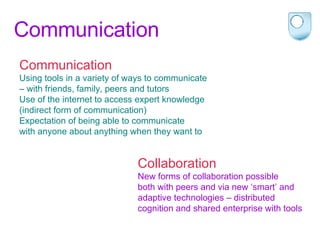
Communication Communication Using tools in a variety of ways to communicate  –  with friends, family, peers and tutors  Use of the internet to access expert knowledge  (indirect form of communication) Expectation of being able to communicate  with anyone about anything when they want to   Collaboration New forms of collaboration possible  both with peers and via new ‘smart’ and  adaptive technologies – distributed  cognition and shared enterprise with tools
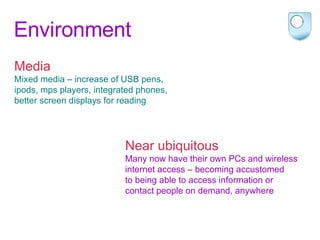
Environment Media Mixed media – increase of USB pens,  ipods, mps players, integrated phones,  better screen displays for reading Near ubiquitous Many now have their own PCs and wireless  internet access – becoming accustomed  to being able to access information or  contact people on demand, anywhere
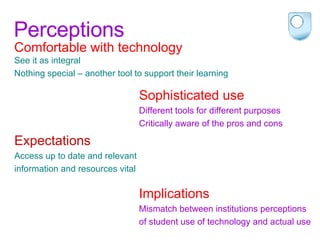
Perceptions Comfortable with technology See it as integral Nothing special – another tool to support their learning Sophisticated use  Different tools for different purposes Critically aware of the pros and cons Expectations Access up to date and relevant  information and resources vital Implications Mismatch between institutions perceptions  of student use of technology and actual use
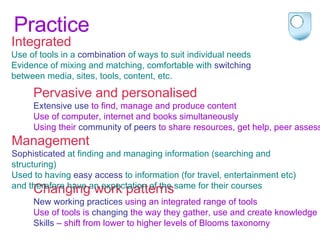
Practice Integrated Use of tools in a  combination  of ways to suit individual needs  Evidence of mixing and matching, comfortable with  switching   between media, sites, tools, content, etc.  Pervasive and personalised Extensive use  to find, manage and produce content  Use of computer, internet and books simultaneously Using their  community of peers  to share resources, get help, peer assess Changing work patterns New working practices  using an integrated range of tools Use of tools is  changing  the way they gather, use and create knowledge Skills  – shift from lower to higher levels of Blooms taxonomy  Management Sophisticated  at finding and managing information (searching and structuring) Used to having  easy access  to information (for travel, entertainment etc)  and therefore have an expectation of the same for their courses
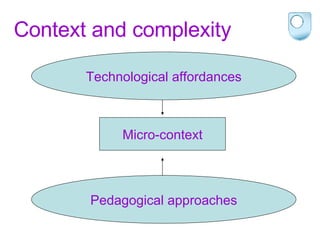
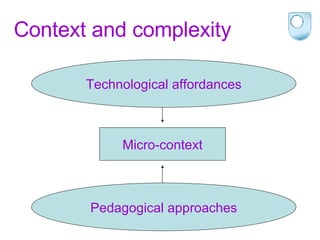
Context and complexity Macro-context Micro-context Socio-cultural/technological trends Organisational/policy constraints Technological affordances Pedagogical approaches
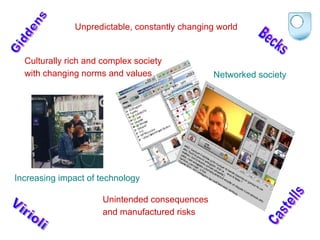
Culturally rich and complex society  with changing norms and values Unpredictable, constantly changing world Giddens Virioli Increasing impact of technology Unintended consequences  and manufactured risks   Becks Networked society Castells
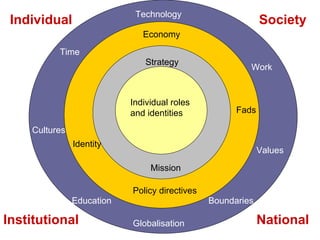
Society Work Education Technology Globalisation Cultures Time Values Boundaries Fads Policy directives Economy Identity National Strategy Mission Institutional Individual roles  and identities Individual
Context and complexity Micro-context Technological affordances Pedagogical approaches
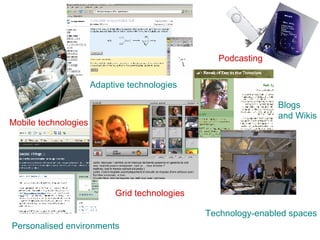
Mobile technologies Blogs  and Wikis Technology-enabled spaces Personalised environments Grid technologies Adaptive technologies Podcasting
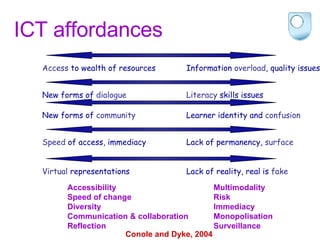
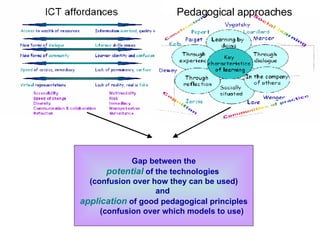
ICT affordances  Access  to wealth of resources Information  overload , quality issues New forms of  dialogue Literacy  skills issues New forms of  community Learner identity and  confusion Speed  of access, immediacy Lack of permanency,  surface Virtual  representations Lack of reality, real is  fake Accessibility Speed of change Diversity Communication & collaboration Reflection Multimodality Risk Immediacy Monopolisation Surveillance Conole and Dyke, 2004
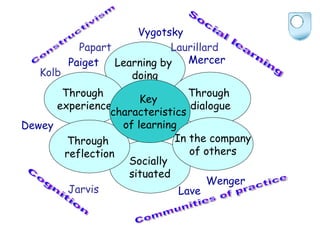
Learning by  doing Through  experience Through  dialogue Socially  situated Through  reflection Mercer Vygotsky Laurillard Papart Kolb Dewey Lave Jarvis Paiget Wenger Constructivism Communities of practice Social learning Cognition Key  characteristics  of learning In the company of others
Gap between the potential   of the technologies  (confusion over how they can be used) and  application   of good pedagogical principles (confusion over which models to use) Pedagogical approaches
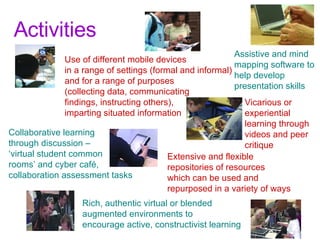
Activities Use of different mobile devices  in a range of settings (formal and informal)  and for a range of purposes  (collecting data, communicating  findings, instructing others),  imparting situated information Assistive and mind  mapping software to  help develop  presentation skills Vicarious or  experiential learning through videos and peer  critique Collaborative learning  through discussion –  ‘ virtual student common  rooms’ and cyber café,  collaboration assessment tasks Rich, authentic virtual or blended  augmented environments to  encourage active, constructivist learning Extensive and flexible repositories of resources  which can be used and  repurposed in a variety of ways
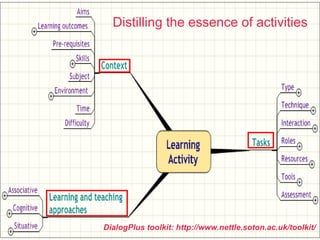
DialogPlus toolkit: http://www.nettle.soton.ac.uk/toolkit/ Distilling the essence of activities


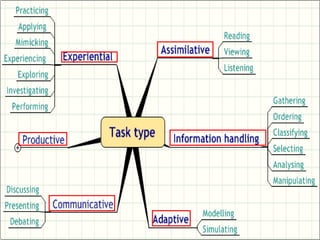
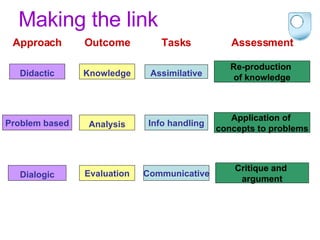
Making the link Didactic Re-production  of knowledge Approach Outcome Tasks Assessment Knowledge Assimilative Problem based Application of  concepts to problems Analysis Info handling Dialogic Critique and  argument Evaluation Communicative
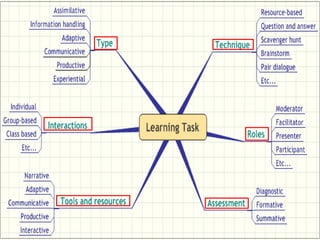
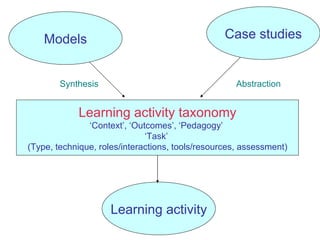
Learning activity taxonomy ‘ Context’, ‘Outcomes’, ‘Pedagogy’  ‘ Task’  (Type, technique, roles/interactions, tools/resources, assessment) Models Synthesis Learning activity Abstraction Case studies
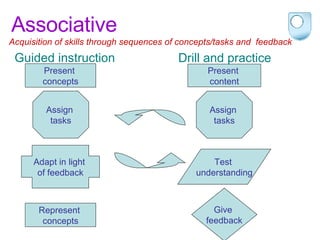
Associative  Present  concepts Assign  tasks Adapt in light  of feedback Represent  concepts Present  content Assign  tasks Give  feedback Test  understanding Acquisition of skills through sequences of concepts/tasks and  feedback  Guided instruction Drill and practice
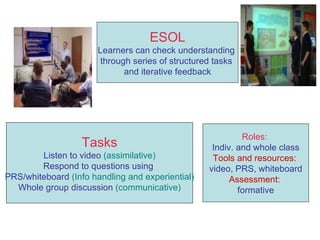
Tasks Listen to video  (assimilative) Respond to questions using  PRS/whiteboard  (Info handling and experiential) Whole group discussion  (communicative) Roles:  Indiv. and whole class Tools and resources:  video, PRS, whiteboard Assessment:  formative ESOL Learners can check understanding  through series of structured tasks  and iterative feedback
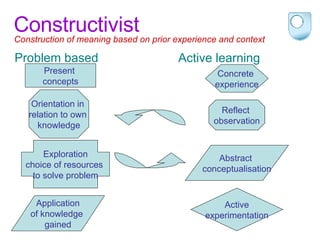
Constructivist  Present  concepts Orientation in  relation to own  knowledge Exploration choice of resources  to solve problem Reflect  observation Active experimentation Application of knowledge  gained Construction of meaning based on prior experience and context Problem based Active learning Abstract  conceptualisation Concrete  experience
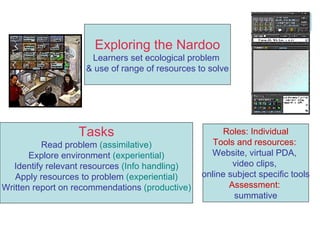
Tasks Read problem  (assimilative) Explore environment  (experiential) Identify relevant resources  (Info handling) Apply resources to problem  (experiential) Written report on recommendations  (productive) Roles: Individual Tools and resources:   Website, virtual PDA,  video clips,  online subject specific tools Assessment:  summative Exploring the Nardoo Learners set ecological problem  & use of range of resources to solve
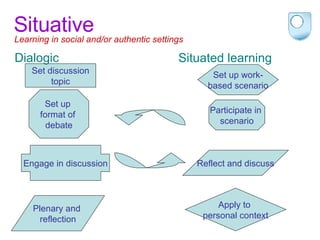
Situative  Set discussion topic Set up  format of  debate Engage in discussion Participate in  scenario Apply to  personal context Plenary and  reflection Learning in social and/or authentic settings Dialogic Situated learning Reflect and discuss Set up work- based scenario
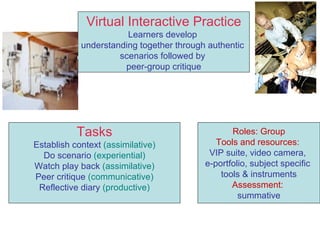
Tasks Establish context  (assimilative) Do scenario  (experiential) Watch play back  (assimilative) Peer critique  (communicative) Reflective diary  (productive) Roles: Group Tools and resources:  VIP suite, video camera,  e-portfolio, subject specific  tools & instruments Assessment:  summative Virtual Interactive Practice Learners develop  understanding together through authentic  scenarios followed by  peer-group critique
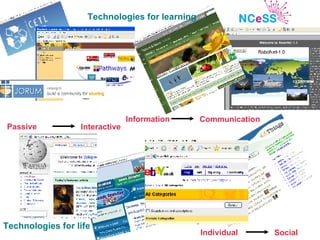
Technologies for learning Technologies for life Information   Communication Passive Interactive Individual Social
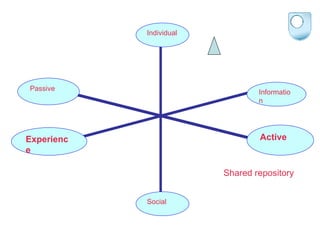
Learning object Shared repository Active Passive Experience Information Social Individual
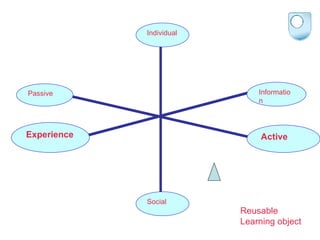
Active Passive Experience Information Reusable  Learning object Social Individual
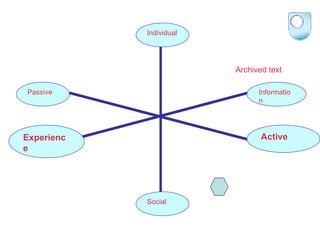
Chat Archived text Active Passive Experience Information Social Individual

Conole Final Queens

  • 1.
    How can wepredict for the unknown? Drawing out underlying trends from existing practice Gráinne Conole Institute of Educational Technology [email_address] Enhancing the education environment Queens University, Belfast 18 th September 2006
  • 2.
    The macro andmicro context Current developments Complexity and Interconnection: macro and micro contexts Bridging the gap
  • 3.
    Contemporary perspectives ine-learning , Conole and Oliver (eds), Forthcoming. RoutledgeFalmer Organisational issues Changing roles Strategy & policy Structures & processes Staff development Underpinning technologies Mobile & ubiquitous technologies The Grid: E-Science & E-Social Science Personalised & adaptive Standards Infrastructures Pedagogical aspects E-literacies New pedagogies Models of practice Case studies of innovation Learning design Experiences & perceptions
  • 4.
    Learner Experiences ProjectLXP Student experiences Subject discipline differences Uses of technologies Effective e-learning strategies J. Darby - Southampton, M. de Laat - Exeter, T. Dillon - Bristol Online survey Audio logs Interviews www.geodata.soton.ac.uk/eLRC/learner_survey
  • 5.
    Expected findings Useof standard packages: Word, PowerPoint Data manipulation: Excel, statistical software Use of search engines/internet for information Unexpected findings Use of communication tools for learning: Mobile phone, Instant messaging, Discussion forums VLE not so popular Often only provides content or teacher notes/powerpoint slides Computer science students prefer to build their own infrastructure and websites
  • 6.
    Mobile to textclass mates to get exam hints Blogs - personal reflection Internet and search engines Tie in key concepts and subject matter Mobile to get assignment cover sheet Course websites confusing Use of other students’ homepages Burning onto CDs, plagarism checks E-Portfolio and link to professional practice Internet sites for meanings and glossary Mobile phone find out about course work MSM to send course work to friends Internet for research essay Google keywords/phrase Wikipedia and podcasts
  • 7.
    Survey qualitative dataI use email to communicate with everyone, especially lecturers; arranging meetings, asking questions about work and queries over assignments etc I write all my assignments using Word and to sort through the information I find, make notes of what I still need to do and spell check my emails that I'm sending to lecturers. Search engines are used to find news articles I use them to find out information for assignments, and also to help me clarify my notes on each subject area that I study. Instant messaging is used to discuss issues with friends if a topic is not understood Use it to manage my data and thoughts... endnote for referencing spss - stats software - easier Data entry, producing stats The first thing i do when given any piece of word is type it into a search engine! this gives me the opportunity to see how different people interpret the title. from there i can focus on one main idea and use the electronic resources to support my initial findings or indeed rule them out. e-mail is always vital with communicating with different mediums. teachers for support
  • 8.
    Survey qualitative dataThe use of the internet has replaced many aspects of my studying before I used the internet. I generally start by using the internet for research and then move to books etc when I have the background info My PDA is useful for reading things when I'm on the move. I use my laptop to store data and type my course works. The MP3 player serves as a storage media used to save most of my assignments, electronic journals and articles, while I use MS word application to type most of my course works. The electronic library gives me access to books, journals and articles all of which are important for my study Instant messenger and skype for communicating with students, powerpoint for laying out slides and revision notes. Do not use any graphical packages for my studies but do use them for extra-curricular activities
  • 9.
    Practice Information CommunicationPerceptions Environment
  • 10.
    Information Content Materialsand information freely available on the Internet Perceived worth and value of material More interactivity Higher presentation standards Evaluation New skills needed in terms of assessing worth of content over the internet and ensuring work is that of the student Interactivity Gaming generation, used to highly, engaging and entertaining environments Evidence of a shift from passive to interactive interactions across all aspects of their learning
  • 11.
    Communication Communication Usingtools in a variety of ways to communicate – with friends, family, peers and tutors Use of the internet to access expert knowledge (indirect form of communication) Expectation of being able to communicate with anyone about anything when they want to Collaboration New forms of collaboration possible both with peers and via new ‘smart’ and adaptive technologies – distributed cognition and shared enterprise with tools
  • 12.
    Environment Media Mixedmedia – increase of USB pens, ipods, mps players, integrated phones, better screen displays for reading Near ubiquitous Many now have their own PCs and wireless internet access – becoming accustomed to being able to access information or contact people on demand, anywhere
  • 13.
    Perceptions Comfortable withtechnology See it as integral Nothing special – another tool to support their learning Sophisticated use Different tools for different purposes Critically aware of the pros and cons Expectations Access up to date and relevant information and resources vital Implications Mismatch between institutions perceptions of student use of technology and actual use
  • 14.
    Practice Integrated Useof tools in a combination of ways to suit individual needs Evidence of mixing and matching, comfortable with switching between media, sites, tools, content, etc. Pervasive and personalised Extensive use to find, manage and produce content Use of computer, internet and books simultaneously Using their community of peers to share resources, get help, peer assess Changing work patterns New working practices using an integrated range of tools Use of tools is changing the way they gather, use and create knowledge Skills – shift from lower to higher levels of Blooms taxonomy Management Sophisticated at finding and managing information (searching and structuring) Used to having easy access to information (for travel, entertainment etc) and therefore have an expectation of the same for their courses
  • 15.
    Context and complexityMacro-context Micro-context Socio-cultural/technological trends Organisational/policy constraints Technological affordances Pedagogical approaches
  • 16.
    Culturally rich andcomplex society with changing norms and values Unpredictable, constantly changing world Giddens Virioli Increasing impact of technology Unintended consequences and manufactured risks Becks Networked society Castells
  • 17.
    Society Work EducationTechnology Globalisation Cultures Time Values Boundaries Fads Policy directives Economy Identity National Strategy Mission Institutional Individual roles and identities Individual
  • 18.
    Context and complexityMicro-context Technological affordances Pedagogical approaches
  • 19.
    Mobile technologies Blogs and Wikis Technology-enabled spaces Personalised environments Grid technologies Adaptive technologies Podcasting
  • 20.
    ICT affordances Access to wealth of resources Information overload , quality issues New forms of dialogue Literacy skills issues New forms of community Learner identity and confusion Speed of access, immediacy Lack of permanency, surface Virtual representations Lack of reality, real is fake Accessibility Speed of change Diversity Communication & collaboration Reflection Multimodality Risk Immediacy Monopolisation Surveillance Conole and Dyke, 2004
  • 21.
    Learning by doing Through experience Through dialogue Socially situated Through reflection Mercer Vygotsky Laurillard Papart Kolb Dewey Lave Jarvis Paiget Wenger Constructivism Communities of practice Social learning Cognition Key characteristics of learning In the company of others
  • 22.
    Gap between thepotential of the technologies (confusion over how they can be used) and application of good pedagogical principles (confusion over which models to use) Pedagogical approaches
  • 23.
    Activities Use ofdifferent mobile devices in a range of settings (formal and informal) and for a range of purposes (collecting data, communicating findings, instructing others), imparting situated information Assistive and mind mapping software to help develop presentation skills Vicarious or experiential learning through videos and peer critique Collaborative learning through discussion – ‘ virtual student common rooms’ and cyber café, collaboration assessment tasks Rich, authentic virtual or blended augmented environments to encourage active, constructivist learning Extensive and flexible repositories of resources which can be used and repurposed in a variety of ways
  • 24.
  • 25.
  • 26.
  • 27.
  • 28.
    Making the linkDidactic Re-production of knowledge Approach Outcome Tasks Assessment Knowledge Assimilative Problem based Application of concepts to problems Analysis Info handling Dialogic Critique and argument Evaluation Communicative
  • 29.
    Learning activity taxonomy‘ Context’, ‘Outcomes’, ‘Pedagogy’ ‘ Task’ (Type, technique, roles/interactions, tools/resources, assessment) Models Synthesis Learning activity Abstraction Case studies
  • 30.
    Associative Present concepts Assign tasks Adapt in light of feedback Represent concepts Present content Assign tasks Give feedback Test understanding Acquisition of skills through sequences of concepts/tasks and feedback Guided instruction Drill and practice
  • 31.
    Tasks Listen tovideo (assimilative) Respond to questions using PRS/whiteboard (Info handling and experiential) Whole group discussion (communicative) Roles: Indiv. and whole class Tools and resources: video, PRS, whiteboard Assessment: formative ESOL Learners can check understanding through series of structured tasks and iterative feedback
  • 32.
    Constructivist Present concepts Orientation in relation to own knowledge Exploration choice of resources to solve problem Reflect observation Active experimentation Application of knowledge gained Construction of meaning based on prior experience and context Problem based Active learning Abstract conceptualisation Concrete experience
  • 33.
    Tasks Read problem (assimilative) Explore environment (experiential) Identify relevant resources (Info handling) Apply resources to problem (experiential) Written report on recommendations (productive) Roles: Individual Tools and resources: Website, virtual PDA, video clips, online subject specific tools Assessment: summative Exploring the Nardoo Learners set ecological problem & use of range of resources to solve
  • 34.
    Situative Setdiscussion topic Set up format of debate Engage in discussion Participate in scenario Apply to personal context Plenary and reflection Learning in social and/or authentic settings Dialogic Situated learning Reflect and discuss Set up work- based scenario
  • 35.
    Tasks Establish context (assimilative) Do scenario (experiential) Watch play back (assimilative) Peer critique (communicative) Reflective diary (productive) Roles: Group Tools and resources: VIP suite, video camera, e-portfolio, subject specific tools & instruments Assessment: summative Virtual Interactive Practice Learners develop understanding together through authentic scenarios followed by peer-group critique
  • 36.
    Technologies for learningTechnologies for life Information Communication Passive Interactive Individual Social
  • 37.
    Learning object Sharedrepository Active Passive Experience Information Social Individual
  • 38.
    Active Passive ExperienceInformation Reusable Learning object Social Individual
  • 39.
    Chat Archived textActive Passive Experience Information Social Individual

Editor's Notes

  • #2 It’s a rather a daunting proposition having to do an inaugural as it is difficult to know how to pitch it and it feels as if you are leaving your research philosophy very much bear. Also should one describe some in depth research or a broad overview? I have decided to opt for the latter. What I hope to do in this talk is three things. Firstly, I hope I can share with you my passion for this area of research and show you why I think it is such an exciting area to be working in. Secondly, I hope to be able to demonstrate why this is an important area, highlighting ways in which it is impacting on policy and practice. Thirdly, I would like to give you a snapshot of some of my current research interests.