Computer
Vision
Syndrome
Presenter
Dr.Navid Rahman
DO,FCPS resident,NIO&H,Dhaka
Definition
Facts
Symptoms
Pathophysiology
CONTENTS
Management
Children & CVS
Definition
The American Optometric
Association defines computer
vision syndrome(CVS) as complex
eye & vision related problems
experienced during prolong use of
computer,tablet,e-reader,
cell phones or any digital screen.
Also known as Digital eye strain
on cell phone doing homework,
Facts about CVS
• CVS is now one of the major office related health problems
• Studies show that eye strain & other bothersome visual
symptoms occur in 50%-90% of computer worker.
• An average American child spend 1to3 hours per day on
the computer and another 1to 3hours on cell phone doing
homework,online chatting,social networking,playing
games.
on cell phone doing homework,
Facts about CVS
• More than 143 million American work on computer
each day,with 88% of them suffering from computer
eye strain,according to estimates.
• 54 million American children(almost 100%)work at a
computer each day either at home or at school.
• CVS has significant negative effects on productivity of
workers;according to studies about 4%-19%.
on cell phone doing homework,
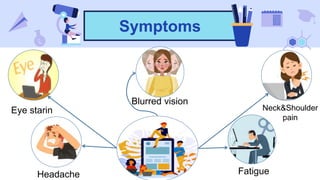
Symptoms
Eye starin
Headache
Blurred vision
Fatigue
Neck&Shoulder
pain
on cell phone doing homework,
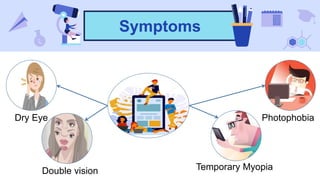
Symptoms
Dry Eye
Double vision
Photophobia
Temporary Myopia
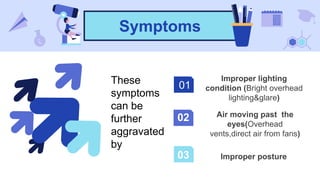
Symptoms
01
02
03
These
symptoms
can be
further
aggravated
by
on cell phone doing homework,
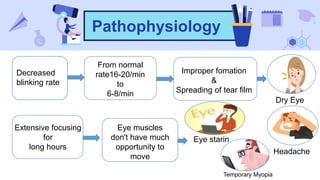
Pathophysiology
Decreased
blinking rate
From normal
rate16-20/min
to
6-8/min
Improper fomation
&
Spreading of tear film
Dry Eye
Extensive focusing
for
long hours
Eye muscles
don't have much
opportunity to
move
Eye starin
Headache
Temporary Myopia
on cell phone doing homework,
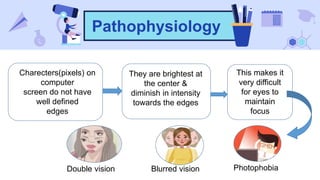
Pathophysiology
They are brightest at
the center &
diminish in intensity
towards the edges
Charecters(pixels) on
computer
screen do not have
well defined
edges
This makes it
very difficult
for eyes to
maintain
focus
Blurred vision PhotophobiaDouble vision
on cell phone doing homework,
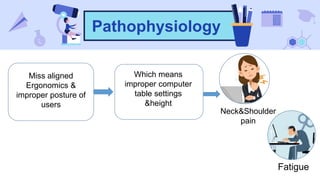
Pathophysiology
Which means
improper computer
table settings
&height
Miss aligned
Ergonomics &
improper posture of
users
Neck&Shoulder
pain
Fatigue
Simple Solution??
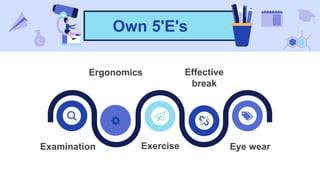
Own 5'E's
on cell phone doing homework,
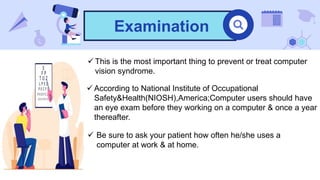
Examination
 This is the most important thing to prevent or treat computer
vision syndrome.
 According to National Institute of Occupational
Safety&Health(NIOSH),America;Computer users should have
an eye exam before they working on a computer & once a year
thereafter.
 Be sure to ask your patient how often he/she uses a
computer at work & at home.
on cell phone doing homework,
Ergonomics
Eye-Screen
distance 20'-28'
Adjust the height
of the desk or chair
so that the middle
of the computer
screen is about 20
degrees below eye
level.
Feet flat on
the ground or
on the
footrest
Backrest of
chair supports
lower back
Arms parallel
with the floor
on cell phone doing homework,
Ergonomics
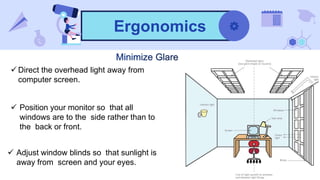
 Direct the overhead light away from
computer screen.
 Position your monitor so that all
windows are to the side rather than to
the back or front.
 Adjust window blinds so that sunlight is
away from screen and your eyes.
on cell phone doing homework,
Ergonomics
 Adjust brightness settings of
screen about the same as
working environment.
 Also adjust screen settings to make
sure the contrast between the screen
background and on screen charecter is
high.Size&colour are optimized for the
most comfort.
 Ideal text size should be 3 times the
smallest size a person can read from
normal viewing position
on cell phone doing homework,
Ergonomics
 Install an anti-glare optically coated glassfilter on the computer screen
on cell phone doing homework,
Exercise
Eye Exercise
 Aesthenopic symptoms in eyes are
responsible for much of the morbidity in
CVS.
 Proper rest of the eyes &its muscle is
therefore recommended.
 A popular catch phrase that have been
propagated to give eye rest while
working is
“20-20-20”rule.
on cell phone doing homework,
Exercise
 This basically gives convenievt distance and time frame for a person to
follow the advice from Ophthalmologist.
Otherwise,the patient advised to close his/her eyes(Which has a
similar effect)for 20 seconds every half hour or even more frequently.
on cell phone doing homework,
EXERCISE
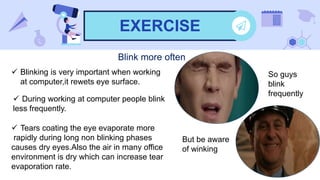
Blink more often
 Blinking is very important when working
at computer,it rewets eye surface.
 During working at computer people blink
less frequently.
 Tears coating the eye evaporate more
rapidly during long non blinking phases
causes dry eyes.Also the air in many office
environment is dry which can increase tear
evaporation rate.
So guys
blink
frequently
But be aware
of winking
on cell phone doing homework,
Eye Drops
 Lubricating eye drops are meant to provide
moisturizing relief to your eyes, which have
become dry and irritated by working for long
hours on the computer.
 Lubricating eye drops help in soothing the eyes
and relieving irritation, redness & the eyestrain.
 Lubricating eye drops can be used as often as
you want, especially the newer ones, which are
safe to the eye enabling their frequent use.
on cell phone doing homework,
Effective braek
 Computer users can reduce fatigue by taking
breaks from work and can benefit from taking
a five minutes break for every 30 minutes of
work.
 According to recent study computer worker
who took 4 additional 5 minutes mini break
throughout workig hour(total 20mins extra/day),
had significantly less eye strain&discomfort.
 It did not reduce productivity,rather data entry
speed of workers significantly faster than who
didn't took mini break.
on cell phone doing homework,
Eye Wear
 These glasses have a special tint that reduces glare and the intensity of the light
produced by an average computer monitor. They also feature a special UV
coating that blocks UV rays produced by monitors and fluorescent lighting.
Computer Glass
 These glasses are designed for people who don't need vision correction or who
wear contact lenses to correct their vision.Occupetional progressive Glass is
required for them who need refractive correction.
Children & CVS
Risk Factors
 Parents now a days encourage their childrens as young as 2 or 3 years old to
use computer & other digital devices.
 90% School age children have either computer or cell phone access in USA.Our
country scenario is not much different than them,specially in city area.
 According American Optometric Association,the impact of using digital devices
on children's vision involves following factors-
 Children have limited degree of self awareness. They may perform
tasks on computer for hours taking vey few breaks,this prolong
activity can cause eye strain & focusing problems.
Risk Factors
 Childrens are very adaptable.They assume that what they see & how they see
is normal-Even if their vision is problemetic.
So,it is important for parents to monitor childs spendinding hour on digital devices.
 Childrens are smaller than adults.As computer work stations are often
arrenged for adult use only,this can change e viewing angle of children.
 As a result of difficulty in reaching keybord or placing their feet on the floor,a
child may experience neck,shoulder and/or back pain.
Impact
 Many pediatric computer vision eye specialists believe that haevy digital device
use among children can put them at risk for early myopia.
 They point to several recent studies as
evidence that digital devices can have
negative effect on child's vision
 Other ocular problems that has discussd
can also occur in childrens.
Prevention
5 tips to prevent CVS in
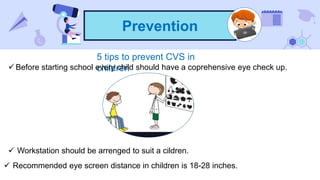
children Before starting school every child should have a coprehensive eye check up.
 Workstation should be arrenged to suit a cildren.
 Recommended eye screen distance in children is 18-28 inches.
Prevention
 Parents and teacher should be aware of any behaviour that indicate potential
problems,such as redness,frequent rubbing of eyes,blurring of vision or abnormal
postures,head turn
 Most importantly have your child's eye check by a computer vision specialist.
Screen Time
What is it?
Screen time is any time spent using a:
• TV
• Cell phone
• Smart Watch
• Gamig console
• Tablet
• Computer
Screen Time
Recommended Screen Time for Children
According to American Association of Paediatrics
Babies(<18months)
No Screen time Toddlers(18-24mos)
Little or no Screen time
Preschoolers(3-5Y)
Up to 1hr/day
Screen Time
Elementary school(6-10Y)
Up to 1-1.5 hr/day
Middle school(11-13Y)
Up to 2hr/day
Teen agers
no time limitation
Suggestions
To meet the suggested screen time-
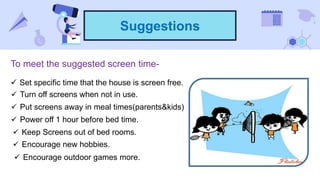
 Set specific time that the house is screen free.
 Turn off screens when not in use.
 Put screens away in meal times(parents&kids)
 Power off 1 hour before bed time.
 Encourage new hobbies.
 Keep Screens out of bed rooms.
 Encourage outdoor games more.
Conclusion
 Globally,computer vision syndrome is becoming a common and major public
health problem.
 Students have high prevalence then other people who use computer.
 Medical students still have lack of knowledge as compare to other students.
 Computer users should be provided with knowledge on computer vision
syndrome and its prevention method.
 Building awareness since childhood is compulsory for now a days.
Wish you all Happy
computing
Thank you for
listening to

Computer vision syndrome

  • 1.
  • 2.
  • 3.
  • 4.
    Definition The American Optometric Associationdefines computer vision syndrome(CVS) as complex eye & vision related problems experienced during prolong use of computer,tablet,e-reader, cell phones or any digital screen. Also known as Digital eye strain
  • 5.
    on cell phonedoing homework, Facts about CVS • CVS is now one of the major office related health problems • Studies show that eye strain & other bothersome visual symptoms occur in 50%-90% of computer worker. • An average American child spend 1to3 hours per day on the computer and another 1to 3hours on cell phone doing homework,online chatting,social networking,playing games.
  • 6.
    on cell phonedoing homework, Facts about CVS • More than 143 million American work on computer each day,with 88% of them suffering from computer eye strain,according to estimates. • 54 million American children(almost 100%)work at a computer each day either at home or at school. • CVS has significant negative effects on productivity of workers;according to studies about 4%-19%.
  • 7.
    on cell phonedoing homework, Symptoms Eye starin Headache Blurred vision Fatigue Neck&Shoulder pain
  • 8.
    on cell phonedoing homework, Symptoms Dry Eye Double vision Photophobia Temporary Myopia
  • 9.
  • 10.
    on cell phonedoing homework, Pathophysiology Decreased blinking rate From normal rate16-20/min to 6-8/min Improper fomation & Spreading of tear film Dry Eye Extensive focusing for long hours Eye muscles don't have much opportunity to move Eye starin Headache Temporary Myopia
  • 11.
    on cell phonedoing homework, Pathophysiology They are brightest at the center & diminish in intensity towards the edges Charecters(pixels) on computer screen do not have well defined edges This makes it very difficult for eyes to maintain focus Blurred vision PhotophobiaDouble vision
  • 12.
    on cell phonedoing homework, Pathophysiology Which means improper computer table settings &height Miss aligned Ergonomics & improper posture of users Neck&Shoulder pain Fatigue
  • 13.
  • 14.
  • 15.
    on cell phonedoing homework, Examination  This is the most important thing to prevent or treat computer vision syndrome.  According to National Institute of Occupational Safety&Health(NIOSH),America;Computer users should have an eye exam before they working on a computer & once a year thereafter.  Be sure to ask your patient how often he/she uses a computer at work & at home.
  • 16.
    on cell phonedoing homework, Ergonomics Eye-Screen distance 20'-28' Adjust the height of the desk or chair so that the middle of the computer screen is about 20 degrees below eye level. Feet flat on the ground or on the footrest Backrest of chair supports lower back Arms parallel with the floor
  • 17.
    on cell phonedoing homework, Ergonomics  Direct the overhead light away from computer screen.  Position your monitor so that all windows are to the side rather than to the back or front.  Adjust window blinds so that sunlight is away from screen and your eyes.
  • 18.
    on cell phonedoing homework, Ergonomics  Adjust brightness settings of screen about the same as working environment.  Also adjust screen settings to make sure the contrast between the screen background and on screen charecter is high.Size&colour are optimized for the most comfort.  Ideal text size should be 3 times the smallest size a person can read from normal viewing position
  • 19.
    on cell phonedoing homework, Ergonomics  Install an anti-glare optically coated glassfilter on the computer screen
  • 20.
    on cell phonedoing homework, Exercise Eye Exercise  Aesthenopic symptoms in eyes are responsible for much of the morbidity in CVS.  Proper rest of the eyes &its muscle is therefore recommended.  A popular catch phrase that have been propagated to give eye rest while working is “20-20-20”rule.
  • 21.
    on cell phonedoing homework, Exercise  This basically gives convenievt distance and time frame for a person to follow the advice from Ophthalmologist. Otherwise,the patient advised to close his/her eyes(Which has a similar effect)for 20 seconds every half hour or even more frequently.
  • 22.
    on cell phonedoing homework, EXERCISE Blink more often  Blinking is very important when working at computer,it rewets eye surface.  During working at computer people blink less frequently.  Tears coating the eye evaporate more rapidly during long non blinking phases causes dry eyes.Also the air in many office environment is dry which can increase tear evaporation rate. So guys blink frequently But be aware of winking
  • 23.
    on cell phonedoing homework, Eye Drops  Lubricating eye drops are meant to provide moisturizing relief to your eyes, which have become dry and irritated by working for long hours on the computer.  Lubricating eye drops help in soothing the eyes and relieving irritation, redness & the eyestrain.  Lubricating eye drops can be used as often as you want, especially the newer ones, which are safe to the eye enabling their frequent use.
  • 24.
    on cell phonedoing homework, Effective braek  Computer users can reduce fatigue by taking breaks from work and can benefit from taking a five minutes break for every 30 minutes of work.  According to recent study computer worker who took 4 additional 5 minutes mini break throughout workig hour(total 20mins extra/day), had significantly less eye strain&discomfort.  It did not reduce productivity,rather data entry speed of workers significantly faster than who didn't took mini break.
  • 25.
    on cell phonedoing homework, Eye Wear  These glasses have a special tint that reduces glare and the intensity of the light produced by an average computer monitor. They also feature a special UV coating that blocks UV rays produced by monitors and fluorescent lighting. Computer Glass  These glasses are designed for people who don't need vision correction or who wear contact lenses to correct their vision.Occupetional progressive Glass is required for them who need refractive correction.
  • 26.
  • 27.
    Risk Factors  Parentsnow a days encourage their childrens as young as 2 or 3 years old to use computer & other digital devices.  90% School age children have either computer or cell phone access in USA.Our country scenario is not much different than them,specially in city area.  According American Optometric Association,the impact of using digital devices on children's vision involves following factors-  Children have limited degree of self awareness. They may perform tasks on computer for hours taking vey few breaks,this prolong activity can cause eye strain & focusing problems.
  • 28.
    Risk Factors  Childrensare very adaptable.They assume that what they see & how they see is normal-Even if their vision is problemetic. So,it is important for parents to monitor childs spendinding hour on digital devices.  Childrens are smaller than adults.As computer work stations are often arrenged for adult use only,this can change e viewing angle of children.  As a result of difficulty in reaching keybord or placing their feet on the floor,a child may experience neck,shoulder and/or back pain.
  • 29.
    Impact  Many pediatriccomputer vision eye specialists believe that haevy digital device use among children can put them at risk for early myopia.  They point to several recent studies as evidence that digital devices can have negative effect on child's vision  Other ocular problems that has discussd can also occur in childrens.
  • 30.
    Prevention 5 tips toprevent CVS in children Before starting school every child should have a coprehensive eye check up.  Workstation should be arrenged to suit a cildren.  Recommended eye screen distance in children is 18-28 inches.
  • 31.
    Prevention  Parents andteacher should be aware of any behaviour that indicate potential problems,such as redness,frequent rubbing of eyes,blurring of vision or abnormal postures,head turn  Most importantly have your child's eye check by a computer vision specialist.
  • 32.
    Screen Time What isit? Screen time is any time spent using a: • TV • Cell phone • Smart Watch • Gamig console • Tablet • Computer
  • 33.
    Screen Time Recommended ScreenTime for Children According to American Association of Paediatrics Babies(<18months) No Screen time Toddlers(18-24mos) Little or no Screen time Preschoolers(3-5Y) Up to 1hr/day
  • 34.
    Screen Time Elementary school(6-10Y) Upto 1-1.5 hr/day Middle school(11-13Y) Up to 2hr/day Teen agers no time limitation
  • 35.
    Suggestions To meet thesuggested screen time-  Set specific time that the house is screen free.  Turn off screens when not in use.  Put screens away in meal times(parents&kids)  Power off 1 hour before bed time.  Encourage new hobbies.  Keep Screens out of bed rooms.  Encourage outdoor games more.
  • 36.
    Conclusion  Globally,computer visionsyndrome is becoming a common and major public health problem.  Students have high prevalence then other people who use computer.  Medical students still have lack of knowledge as compare to other students.  Computer users should be provided with knowledge on computer vision syndrome and its prevention method.  Building awareness since childhood is compulsory for now a days.
  • 37.
    Wish you allHappy computing
  • 38.