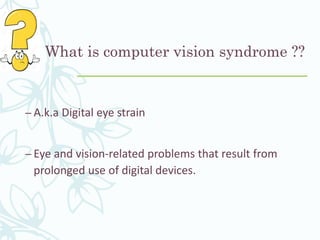









Computer
Vision
Syndrome
(CVS)
Presenter :
Bipin Koirala
Moderator:
Hira Nath Dahal
MMC,IOM
What is computer vision syndrome ??
– A.k.a Digital eye strain
– Eye and vision-related problems that result from
prolonged use of digital devices.
Impact of CVS
Extensive digital devices will affect the
1. Physical wellbeing
2. Mental wellbeing
3. Reduced productivity
Digital devices?
– A physical unit of equipment that contains a computer
or microcontroller.
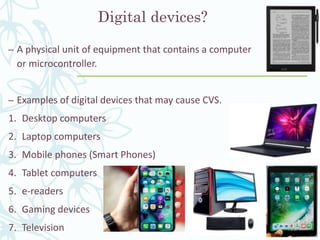
– Examples of digital devices that may cause CVS.
1. Desktop computers
2. Laptop computers
3. Mobile phones (Smart Phones)
4. Tablet computers
5. e-readers
6. Gaming devices
7. Television
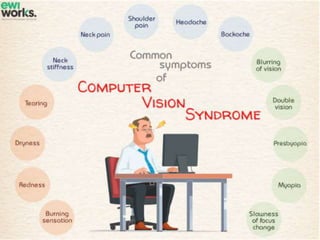
Symptoms of Computer Vision
Syndrome
– Multiple manifestations
– Depends on various factors
1. Time period spend on digital devices
2. Nature of work
3. Protective measures used
4. Age of digital device user.
Knowledge, Attitude and practice of Computer Vision
Syndrome among medical students and its impact on
ocular morbidity
Ranju Kharel (Sitaula)1 and Anadi Khatri, 1.. 1 Department of Ophthalmology, B.P. Koirala Lions Centre
for Ophthalmic Studies, Maharajgunj Medical Campus, Tribhuvan University, Institute of Medicine,
Kathmandu, Nepal.
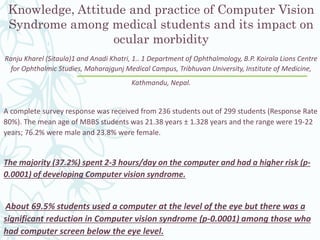
A complete survey response was received from 236 students out of 299 students (Response Rate
80%). The mean age of MBBS students was 21.38 years ± 1.328 years and the range were 19-22
years; 76.2% were male and 23.8% were female.
The majority (37.2%) spent 2-3 hours/day on the computer and had a higher risk (p-
0.0001) of developing Computer vision syndrome.
About 69.5% students used a computer at the level of the eye but there was a
significant reduction in Computer vision syndrome (p-0.0001) among those who
had computer screen below the eye level.
Contd..
– Association between taking breaks (p-0.0001) and frequent blinking (p-0.0411)
during computer use and relief of symptoms was significant.
– Only 22.9% had pre-existing knowledge of Computer vision
syndrome and only 25.5% of them were practicing the ideal viewing
distance. Among 80 medical students randomly selected for detail eye
examinations (63.7% male;36.2% female), the prevalence of Computer vision
syndrome was 71.6%. The commonest ocular complaint was a
headache (50%) and dry eyes (45%)
Is there any fixed time period of using
digital devices after which CVS will
occur?
– Yes there is……………..
– Usually if a person uses digital devices for at least 2-3
consecutive hours then he/she has high probability of
having CVS.
– According to the US National Institute for Occupational Safety and
Health, computer vision syndrome affects about 90% of the people
who spend three hours or more a day at a computer.
– The American Optometric Association estimates that 50%-90% of
computer users suffer symptoms of Computer Vision Syndrome.
Likewise, the Vision Council reports over 200 million Americans
report these symptoms after only two hours a day in front of a
screen.
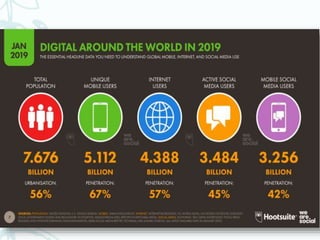
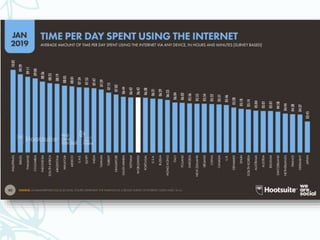
– An average American spends at least 6 hrs./day on internet & 7-8
hrs./day on digital devices
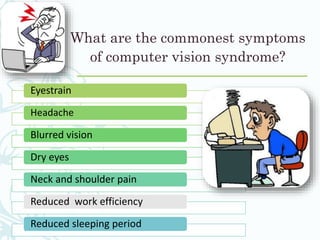
What are the commonest symptoms
of computer vision syndrome?
Eyestrain
Headache
Blurred vision
Dry eyes
Neck and shoulder pain
Reduced work efficiency
Reduced sleeping period
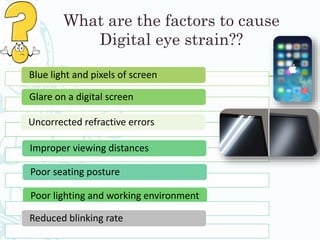
What are the factors to cause
Digital eye strain??
Blue light and pixels of screen
Glare on a digital screen
Poor lighting and working environment
Improper viewing distances
Poor seating posture
Uncorrected refractive errors
Reduced blinking rate
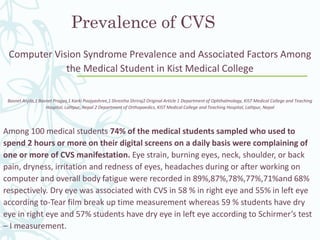
Prevalence of CVS
Computer Vision Syndrome Prevalence and Associated Factors Among
the Medical Student in Kist Medical College
Basnet Anjila,1 Basnet Pragya,1 Karki Poojyashree,1 Shrestha Shriraj2 Original Article 1 Department of Ophthalmology, KIST Medical College and Teaching
Hospital, Lalitpur, Nepal 2 Department of Orthopaedics, KIST Medical College and Teaching Hospital, Lalitpur, Nepal
Among 100 medical students 74% of the medical students sampled who used to
spend 2 hours or more on their digital screens on a daily basis were complaining of
one or more of CVS manifestation. Eye strain, burning eyes, neck, shoulder, or back
pain, dryness, irritation and redness of eyes, headaches during or after working on
computer and overall body fatigue were recorded in 89%,87%,78%,77%,71%and 68%
respectively. Dry eye was associated with CVS in 58 % in right eye and 55% in left eye
according to-Tear film break up time measurement whereas 59 % students have dry
eye in right eye and 57% students have dry eye in left eye according to Schirmer’s test
– I measurement.
What is blue light ?
Blue light??
Blue light is short wavelength and
high energy visible light rays
What are the sources of Blue
light ?
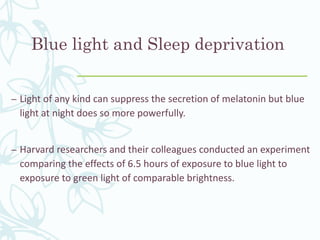
– Fluorescent light
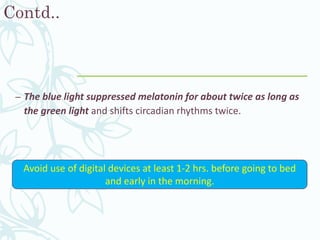
– Flat screen of TV , smartphones , computer screen
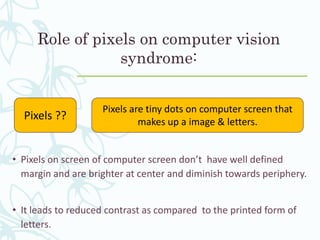
– LED light used indoor
Contd…
– Rayleigh scattering of light is inversely proportional to the fourth
power of wavelength, so that shorter wavelength violet and blue
light will scatter more than the longer wavelengths (yellow and
especially red light).
Shorter
wavelength
Greater
scattering
Difficult to bring
into focus
Blue light and Sleep deprivation
– Light of any kind can suppress the secretion of melatonin but blue
light at night does so more powerfully.
– Harvard researchers and their colleagues conducted an experiment
comparing the effects of 6.5 hours of exposure to blue light to
exposure to green light of comparable brightness.
Contd..
– The blue light suppressed melatonin for about twice as long as
the green light and shifts circadian rhythms twice.
Avoid use of digital devices at least 1-2 hrs. before going to bed
and early in the morning.
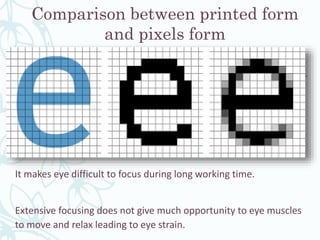
Role of pixels on computer vision
syndrome:
• Pixels on screen of computer screen don’t have well defined
margin and are brighter at center and diminish towards periphery.
• It leads to reduced contrast as compared to the printed form of
letters.
Pixels ??
Pixels are tiny dots on computer screen that
makes up a image & letters.
Comparison between printed form
and pixels form
It makes eye difficult to focus during long working time.
Extensive focusing does not give much opportunity to eye muscles
to move and relax leading to eye strain.
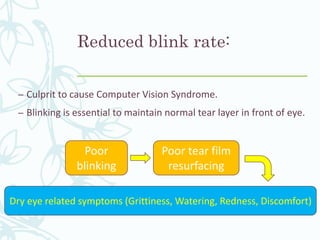
Reduced blink rate:
– Culprit to cause Computer Vision Syndrome.
– Blinking is essential to maintain normal tear layer in front of eye.
Poor
blinking
Poor tear film
resurfacing
Dry eye related symptoms (Grittiness, Watering, Redness, Discomfort)
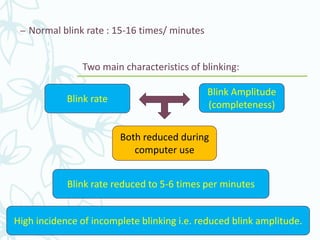
– Normal blink rate : 15-16 times/ minutes
Two main characteristics of blinking:
Blink rate
Blink Amplitude
(completeness)
Both reduced during
computer use
Blink rate reduced to 5-6 times per minutes
High incidence of incomplete blinking i.e. reduced blink amplitude.
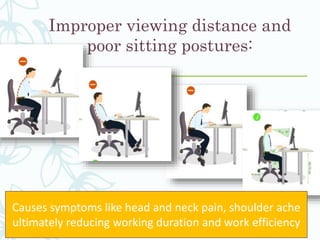
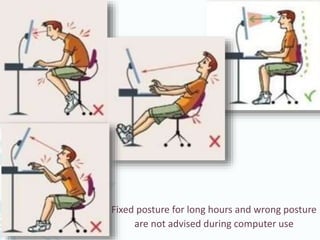
Improper viewing distance and
poor sitting postures:
Causes symptoms like head and neck pain, shoulder ache
ultimately reducing working duration and work efficiency
Fixed posture for long hours and wrong posture
are not advised during computer use
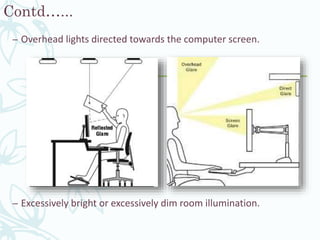
Poor working Environment and Glare:
– Sitting in front of air
conditioner, heater, fan,
humidifiers facing its air draft.
– Positioning yourself in front of
computer screen facing open
window light.
Contd…...
– Overhead lights directed towards the computer screen.
– Excessively bright or excessively dim room illumination.
Uncorrected Refractive Error:
– Use of digital devices without correcting the refractive error may
exacerbate the symptom of digital eye strain.
– Using wrong prescription or under correction(Eg: small uncorrected
astigmatism) for specific working distance may exaggerate the
symptom during long computer use
– Any form of refractive error must be adequately corrected for the
viewing distance of digital device i.e. Myopia, Hyperopia, Astigmatism
& especially Presbyopia
How is Computer Vision
Syndrome diagnosed?
– Clinical diagnosis can be done by following steps:
1) History taking
a) Chief complaints
b) Ocular history (h/o Ref error, Ocular disease, Sx)
c) Systemic history(Any diz.., Any Medication)
d) Personal history (profession)
Contd…
2) Investigations
a) Visual acuity (Near + Distance) (both with and without correction)
b) Refraction (Near + Distance)
c) Tear film breakup time , Blink quality (Rate + Amplitude)
d) Investigating presence of any NSBV disorders
e) Evaluation of working ergonomics
Following questions must be asked to
every patients during history taking
– How many hours daily & when you spend on digital devices?
– What types of digital devices do you use?
– Do you have any idea about CVS?
– What activity will make your symptom relived and what will
make your symptom more expressed?
– Do you follow any protective measures to avoid CVS like as use
of computer glasses?
Contd..
– Using the information obtained from these tests and
analyzing the symptoms, along with results of other ancillary
tests, we can determine if patient has Computer Vision
Syndrome and we can advise best treatment options.
Is CVS Permanente?
– CVS is not Permanente rather temporary.
– It could be avoided as well as minimized by following some simple
tips in your daily life.
Management of computer
vision syndrome:
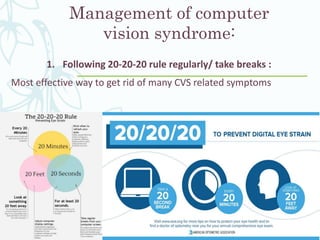
1. Following 20-20-20 rule regularly/ take breaks :
Most effective way to get rid of many CVS related symptoms
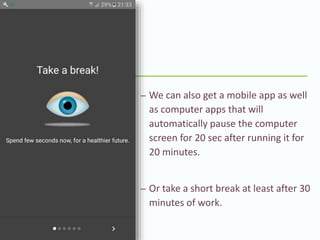
– We can also get a mobile app as well
as computer apps that will
automatically pause the computer
screen for 20 sec after running it for
20 minutes.
– Or take a short break at least after 30
minutes of work.
2. Regular use of tear supplements:
– Use at a hour interval or according to advice of eye doctor or your
convenience.
– Helps to get rid of dry related symptoms due to reduced blink rate
and blink amplitude which may exacerbate the CVS.
3. Proper refractive correction and Computer lens use
– Myopia , Hyperopia, Astigmatism as well as Presbyopia must be
corrected with proper refractive correction modality
(specs/contacts/Sx.) for the computer working distance.
– Computer lenses are the prescription glasses that are designed to
wear when doing computer related work.
What should we expect from a ideal
computer lens?
Reduce glare
Correct refractive error
Enhance contrast
Eliminate blue rays
Reduce unwanted reflections
Work for intermediate distance(Presbyopia)
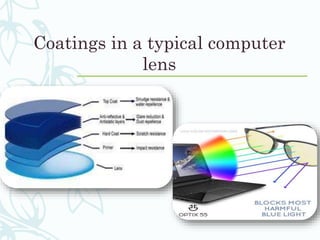
Anti reflection coating
– Main purpose of AR coating is to reduce unwanted reflection from
front as well as back surface of lens
– As reflection decreases light transmission increases
– ARC coating has great role in a computer lens as it reduces
unwanted reflection and glare hence reducing eye strain
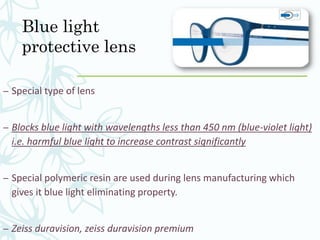
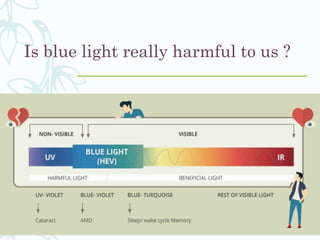
Blue light
protective lens
– Special type of lens
– Blocks blue light with wavelengths less than 450 nm (blue-violet light)
i.e. harmful blue light to increase contrast significantly
– Special polymeric resin are used during lens manufacturing which
gives it blue light eliminating property.
– Zeiss duravision, zeiss duravision premium
Is blue light really harmful to us ?
Coatings in a typical computer
lens
Refractive error and Computer
lens options:
– For patient above 40 yrs. Bifocals can provide clear distance
and near vision, but intermediate vision (needed for computer
use and seeing your smartphone) often remains a problem.
– And progressive lenses or trifocals, though they offer some
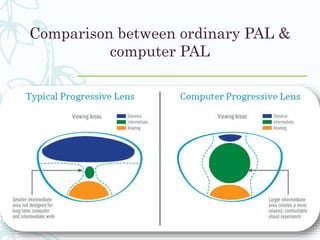
help for intermediate vision, often don't have a large enough
intermediate zone for comfortable computer work.
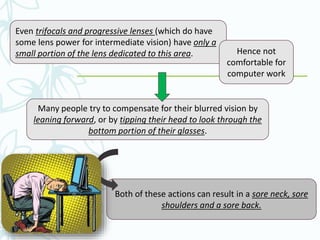
Even trifocals and progressive lenses (which do have
some lens power for intermediate vision) have only a
small portion of the lens dedicated to this area. Hence not
comfortable for
computer work
Many people try to compensate for their blurred vision by
leaning forward, or by tipping their head to look through the
bottom portion of their glasses.
Both of these actions can result in a sore neck, sore
shoulders and a sore back.
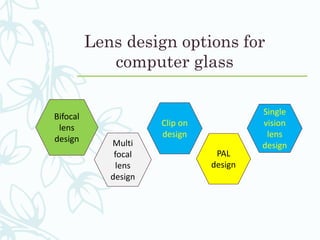
Lens design options for
computer glass
Bifocal
lens
design
Single
vision
lens
design
PAL
design
Multi
focal
lens
design
Clip on
design
Comparison between ordinary PAL &
computer PAL
Digital lens
– It is specifically designed to meet the vision needs of people
in their 30s and 40s who are experiencing near vision
discomfort for the first time. Regardless of whether they are
single vision wearers or not yet spectacle wearers.
– Example : Zeiss digital lens
4. Voluntary blink exercise and vision therapy to treat binocular
vision disorders.
Voluntary blink exercise is done to improve both blink frequency as
well as blink amplitude.
Vision therapy: These eye exercises help remediate deficiencies in
eye movement, eye focusing and eye teaming and reinforce the eye-
brain connection. Treatment may include office-based as well as
home training procedures.
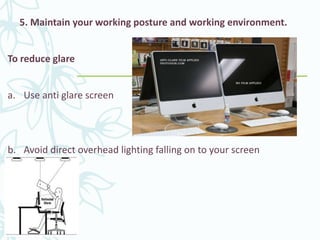
5. Maintain your working posture and working environment.
To reduce glare
a. Use anti glare screen
b. Avoid direct overhead lighting falling on to your screen
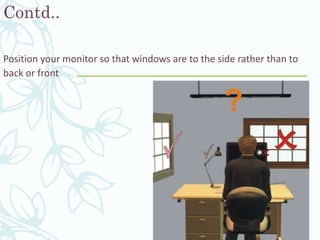
Contd..
Position your monitor so that windows are to the side rather than to
back or front
Contd..
Avoid air draft of AC, humidifiers, heater, fans
directed into your eyes
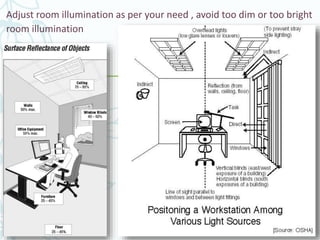
Adjust room illumination as per your need , avoid too dim or too bright
room illumination
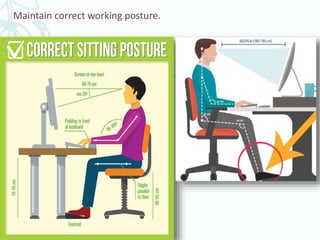
Maintain correct working posture.
Take home messages

My computer vision syndrome

  • 1.
  • 2.
    What is computervision syndrome ?? – A.k.a Digital eye strain – Eye and vision-related problems that result from prolonged use of digital devices.
  • 3.
    Impact of CVS Extensivedigital devices will affect the 1. Physical wellbeing 2. Mental wellbeing 3. Reduced productivity
  • 4.
    Digital devices? – Aphysical unit of equipment that contains a computer or microcontroller. – Examples of digital devices that may cause CVS. 1. Desktop computers 2. Laptop computers 3. Mobile phones (Smart Phones) 4. Tablet computers 5. e-readers 6. Gaming devices 7. Television
  • 7.
    Symptoms of ComputerVision Syndrome – Multiple manifestations – Depends on various factors 1. Time period spend on digital devices 2. Nature of work 3. Protective measures used 4. Age of digital device user.
  • 8.
    Knowledge, Attitude andpractice of Computer Vision Syndrome among medical students and its impact on ocular morbidity Ranju Kharel (Sitaula)1 and Anadi Khatri, 1.. 1 Department of Ophthalmology, B.P. Koirala Lions Centre for Ophthalmic Studies, Maharajgunj Medical Campus, Tribhuvan University, Institute of Medicine, Kathmandu, Nepal. A complete survey response was received from 236 students out of 299 students (Response Rate 80%). The mean age of MBBS students was 21.38 years ± 1.328 years and the range were 19-22 years; 76.2% were male and 23.8% were female. The majority (37.2%) spent 2-3 hours/day on the computer and had a higher risk (p- 0.0001) of developing Computer vision syndrome. About 69.5% students used a computer at the level of the eye but there was a significant reduction in Computer vision syndrome (p-0.0001) among those who had computer screen below the eye level.
  • 9.
    Contd.. – Association betweentaking breaks (p-0.0001) and frequent blinking (p-0.0411) during computer use and relief of symptoms was significant. – Only 22.9% had pre-existing knowledge of Computer vision syndrome and only 25.5% of them were practicing the ideal viewing distance. Among 80 medical students randomly selected for detail eye examinations (63.7% male;36.2% female), the prevalence of Computer vision syndrome was 71.6%. The commonest ocular complaint was a headache (50%) and dry eyes (45%)
  • 10.
    Is there anyfixed time period of using digital devices after which CVS will occur? – Yes there is…………….. – Usually if a person uses digital devices for at least 2-3 consecutive hours then he/she has high probability of having CVS.
  • 11.
    – According tothe US National Institute for Occupational Safety and Health, computer vision syndrome affects about 90% of the people who spend three hours or more a day at a computer. – The American Optometric Association estimates that 50%-90% of computer users suffer symptoms of Computer Vision Syndrome. Likewise, the Vision Council reports over 200 million Americans report these symptoms after only two hours a day in front of a screen. – An average American spends at least 6 hrs./day on internet & 7-8 hrs./day on digital devices
  • 13.
    What are thecommonest symptoms of computer vision syndrome? Eyestrain Headache Blurred vision Dry eyes Neck and shoulder pain Reduced work efficiency Reduced sleeping period
  • 15.
    What are thefactors to cause Digital eye strain?? Blue light and pixels of screen Glare on a digital screen Poor lighting and working environment Improper viewing distances Poor seating posture Uncorrected refractive errors Reduced blinking rate
  • 16.
    Prevalence of CVS ComputerVision Syndrome Prevalence and Associated Factors Among the Medical Student in Kist Medical College Basnet Anjila,1 Basnet Pragya,1 Karki Poojyashree,1 Shrestha Shriraj2 Original Article 1 Department of Ophthalmology, KIST Medical College and Teaching Hospital, Lalitpur, Nepal 2 Department of Orthopaedics, KIST Medical College and Teaching Hospital, Lalitpur, Nepal Among 100 medical students 74% of the medical students sampled who used to spend 2 hours or more on their digital screens on a daily basis were complaining of one or more of CVS manifestation. Eye strain, burning eyes, neck, shoulder, or back pain, dryness, irritation and redness of eyes, headaches during or after working on computer and overall body fatigue were recorded in 89%,87%,78%,77%,71%and 68% respectively. Dry eye was associated with CVS in 58 % in right eye and 55% in left eye according to-Tear film break up time measurement whereas 59 % students have dry eye in right eye and 57% students have dry eye in left eye according to Schirmer’s test – I measurement.
  • 17.
    What is bluelight ? Blue light?? Blue light is short wavelength and high energy visible light rays
  • 18.
    What are thesources of Blue light ? – Fluorescent light – Flat screen of TV , smartphones , computer screen – LED light used indoor
  • 19.
    Contd… – Rayleigh scatteringof light is inversely proportional to the fourth power of wavelength, so that shorter wavelength violet and blue light will scatter more than the longer wavelengths (yellow and especially red light). Shorter wavelength Greater scattering Difficult to bring into focus
  • 20.
    Blue light andSleep deprivation – Light of any kind can suppress the secretion of melatonin but blue light at night does so more powerfully. – Harvard researchers and their colleagues conducted an experiment comparing the effects of 6.5 hours of exposure to blue light to exposure to green light of comparable brightness.
  • 21.
    Contd.. – The bluelight suppressed melatonin for about twice as long as the green light and shifts circadian rhythms twice. Avoid use of digital devices at least 1-2 hrs. before going to bed and early in the morning.
  • 22.
    Role of pixelson computer vision syndrome: • Pixels on screen of computer screen don’t have well defined margin and are brighter at center and diminish towards periphery. • It leads to reduced contrast as compared to the printed form of letters. Pixels ?? Pixels are tiny dots on computer screen that makes up a image & letters.
  • 23.
    Comparison between printedform and pixels form It makes eye difficult to focus during long working time. Extensive focusing does not give much opportunity to eye muscles to move and relax leading to eye strain.
  • 24.
    Reduced blink rate: –Culprit to cause Computer Vision Syndrome. – Blinking is essential to maintain normal tear layer in front of eye. Poor blinking Poor tear film resurfacing Dry eye related symptoms (Grittiness, Watering, Redness, Discomfort)
  • 25.
    – Normal blinkrate : 15-16 times/ minutes Two main characteristics of blinking: Blink rate Blink Amplitude (completeness) Both reduced during computer use Blink rate reduced to 5-6 times per minutes High incidence of incomplete blinking i.e. reduced blink amplitude.
  • 26.
    Improper viewing distanceand poor sitting postures: Causes symptoms like head and neck pain, shoulder ache ultimately reducing working duration and work efficiency
  • 27.
    Fixed posture forlong hours and wrong posture are not advised during computer use
  • 28.
    Poor working Environmentand Glare: – Sitting in front of air conditioner, heater, fan, humidifiers facing its air draft. – Positioning yourself in front of computer screen facing open window light.
  • 29.
    Contd…... – Overhead lightsdirected towards the computer screen. – Excessively bright or excessively dim room illumination.
  • 30.
    Uncorrected Refractive Error: –Use of digital devices without correcting the refractive error may exacerbate the symptom of digital eye strain. – Using wrong prescription or under correction(Eg: small uncorrected astigmatism) for specific working distance may exaggerate the symptom during long computer use – Any form of refractive error must be adequately corrected for the viewing distance of digital device i.e. Myopia, Hyperopia, Astigmatism & especially Presbyopia
  • 31.
    How is ComputerVision Syndrome diagnosed? – Clinical diagnosis can be done by following steps: 1) History taking a) Chief complaints b) Ocular history (h/o Ref error, Ocular disease, Sx) c) Systemic history(Any diz.., Any Medication) d) Personal history (profession)
  • 32.
    Contd… 2) Investigations a) Visualacuity (Near + Distance) (both with and without correction) b) Refraction (Near + Distance) c) Tear film breakup time , Blink quality (Rate + Amplitude) d) Investigating presence of any NSBV disorders e) Evaluation of working ergonomics
  • 33.
    Following questions mustbe asked to every patients during history taking – How many hours daily & when you spend on digital devices? – What types of digital devices do you use? – Do you have any idea about CVS? – What activity will make your symptom relived and what will make your symptom more expressed? – Do you follow any protective measures to avoid CVS like as use of computer glasses?
  • 34.
    Contd.. – Using theinformation obtained from these tests and analyzing the symptoms, along with results of other ancillary tests, we can determine if patient has Computer Vision Syndrome and we can advise best treatment options.
  • 35.
    Is CVS Permanente? –CVS is not Permanente rather temporary. – It could be avoided as well as minimized by following some simple tips in your daily life.
  • 36.
    Management of computer visionsyndrome: 1. Following 20-20-20 rule regularly/ take breaks : Most effective way to get rid of many CVS related symptoms
  • 37.
    – We canalso get a mobile app as well as computer apps that will automatically pause the computer screen for 20 sec after running it for 20 minutes. – Or take a short break at least after 30 minutes of work.
  • 38.
    2. Regular useof tear supplements: – Use at a hour interval or according to advice of eye doctor or your convenience. – Helps to get rid of dry related symptoms due to reduced blink rate and blink amplitude which may exacerbate the CVS.
  • 39.
    3. Proper refractivecorrection and Computer lens use – Myopia , Hyperopia, Astigmatism as well as Presbyopia must be corrected with proper refractive correction modality (specs/contacts/Sx.) for the computer working distance. – Computer lenses are the prescription glasses that are designed to wear when doing computer related work.
  • 40.
    What should weexpect from a ideal computer lens? Reduce glare Correct refractive error Enhance contrast Eliminate blue rays Reduce unwanted reflections Work for intermediate distance(Presbyopia)
  • 41.
    Anti reflection coating –Main purpose of AR coating is to reduce unwanted reflection from front as well as back surface of lens – As reflection decreases light transmission increases – ARC coating has great role in a computer lens as it reduces unwanted reflection and glare hence reducing eye strain
  • 42.
    Blue light protective lens –Special type of lens – Blocks blue light with wavelengths less than 450 nm (blue-violet light) i.e. harmful blue light to increase contrast significantly – Special polymeric resin are used during lens manufacturing which gives it blue light eliminating property. – Zeiss duravision, zeiss duravision premium
  • 43.
    Is blue lightreally harmful to us ?
  • 44.
    Coatings in atypical computer lens
  • 45.
    Refractive error andComputer lens options: – For patient above 40 yrs. Bifocals can provide clear distance and near vision, but intermediate vision (needed for computer use and seeing your smartphone) often remains a problem. – And progressive lenses or trifocals, though they offer some help for intermediate vision, often don't have a large enough intermediate zone for comfortable computer work.
  • 46.
    Even trifocals andprogressive lenses (which do have some lens power for intermediate vision) have only a small portion of the lens dedicated to this area. Hence not comfortable for computer work Many people try to compensate for their blurred vision by leaning forward, or by tipping their head to look through the bottom portion of their glasses. Both of these actions can result in a sore neck, sore shoulders and a sore back.
  • 47.
    Lens design optionsfor computer glass Bifocal lens design Single vision lens design PAL design Multi focal lens design Clip on design
  • 48.
    Comparison between ordinaryPAL & computer PAL
  • 49.
    Digital lens – Itis specifically designed to meet the vision needs of people in their 30s and 40s who are experiencing near vision discomfort for the first time. Regardless of whether they are single vision wearers or not yet spectacle wearers. – Example : Zeiss digital lens
  • 50.
    4. Voluntary blinkexercise and vision therapy to treat binocular vision disorders. Voluntary blink exercise is done to improve both blink frequency as well as blink amplitude. Vision therapy: These eye exercises help remediate deficiencies in eye movement, eye focusing and eye teaming and reinforce the eye- brain connection. Treatment may include office-based as well as home training procedures.
  • 51.
    5. Maintain yourworking posture and working environment. To reduce glare a. Use anti glare screen b. Avoid direct overhead lighting falling on to your screen
  • 52.
    Contd.. Position your monitorso that windows are to the side rather than to back or front
  • 53.
    Contd.. Avoid air draftof AC, humidifiers, heater, fans directed into your eyes
  • 54.
    Adjust room illuminationas per your need , avoid too dim or too bright room illumination
  • 55.
  • 56.