


D R D AVID - EK E .K .
( O.D , MN OA ) )
COMPUTER VISION
SYNDROME
(CVS)
OUTLINE
• Introduction.
• What is computer vision syndrome?
• Symptoms of computer vision syndrome.
• Causes of computer vision syndrome.
• Prevention of computer vision syndrome.
INTRODUCTION
Computers are now a way of life…
• Computers used in health care.
COMPUTERS USED IN SCHOOLS….
COMPUTERS USED IN OFFICES…
WHAT IS COMPUTER VISION
SYNDROME?
•A complex of eye or vision
problems which are experienced
during the use/prolonged use of
the computer.
SYMPTOMS OF COMPUTER VISION
SYNDROME
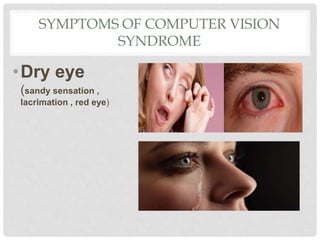
•Dry eye
(sandy sensation ,
lacrimation , red eye)
SYMPTOMS OF COMPUTER VISION
SYNDROME
•Eye aches
• Double vision
•Photophobia
• Halos
• Headaches
• neck/back
pains.
CAUSES OF COMPUTER VISION
SYNDROME
• Reduction in blink rate.
• Improper lighting conditions .
• Extensive focusing on the screen.
• Refractive errors.
• Poor position in relation to the computer .
CAUSES OF COMPUTER VISION
SYNDROME
•Improper placement of computer
screen.
•Improper contrast.
REDUCTION IN BLINK RATE
• Normally a person blinks 15 times/m but
while working on a computer the blink rate
is reduced to 5 times/m due to continuous
staring at the screen .
• Blinking is important for spreading tears
all over the surface of the cornea.
• Thus, in the absence of adequate blinking
eyes becomes dry and irritated.
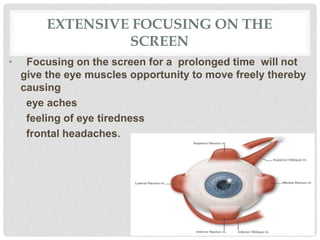
EXTENSIVE FOCUSING ON THE
SCREEN
• Focusing on the screen for a prolonged time will not
give the eye muscles opportunity to move freely thereby
causing
eye aches
feeling of eye tiredness
frontal headaches.
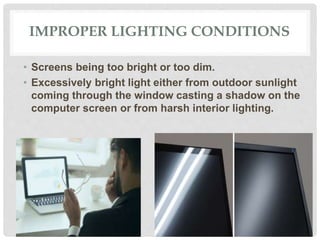
IMPROPER LIGHTING CONDITIONS
• Screens being too bright or too dim.
• Excessively bright light either from outdoor sunlight
coming through the window casting a shadow on the
computer screen or from harsh interior lighting.
IMPROPER CONTRAST
Too little contrast between the characters on the screen
and background can make reading difficult causing
headaches, eye aches.
Typing a black text on a white background is usually the
best.
IMPROPER PLACEMENT OF COMPUTER
SCREEN
• Screens placed too close or too far away may cause
you to assume awkward positions that may lead to
eyestrain.
REFRACTIVE ERRORS
• Refractive errors are a type of vision problems that
makes it difficult for the eyes to see clearly.
POOR POSITION IN RELATION TO THE
COMPUTER.
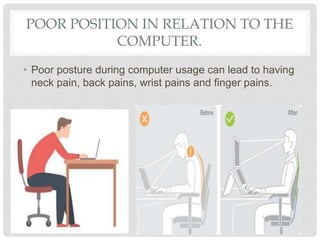
• Poor posture during computer usage can lead to having
neck pain, back pains, wrist pains and finger pains.
PREVENTION OF COMPUTER VISION
SYNDROME
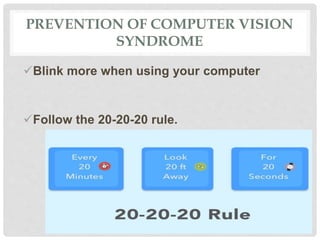
Blink more when using your computer
Follow the 20-20-20 rule.
PREVENTION OF COMPUTER
SYNDROME
Eliminate exterior light by closing the window
blind/drapes and use fewer bulbs for interior
light.
Position your computer so that the windows are
not facing directly to your computer screen.
PREVENTION OF COMPUTER VISION
SYNDROME
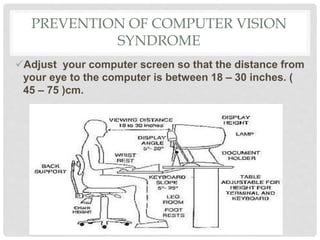
Adjust your computer screen so that the distance from
your eye to the computer is between 18 – 30 inches. (
45 – 75 )cm.
PREVENTION OF COMPUTER VISION
SYNDROME
Adjust the
brightness and
contrast of your
computer or
smart phone
screens. You can
activate eye care
on your smart
phones.
PREVENTION OF COMPUTER VISION
SYNDROME
Adjusting test contrast.
 using a white background for black text is usually
the best for comfort.
PREVENTION OF COMPUTER VISION
SYNDROME
Use of computer glasses :
• Distant vision glasses and reading glasses(presbyopic) are different from
computer glasses and are not quite right for computer work.
• Distant vision glasses are for distant vision only (6m or 20ft)
• Reading glasses(presbyopic) are for reading, and normal reading distance
is 35cm.
• Computer viewing distance is btw 45cm – 75cm so computer glasses
should be for that distance alone. (intermediary)
• that’s why you have difficulty using your computer with your bifocals.
PREVENTION OF COMPUTER VISION
SYNDROME
• Use special lenses.
anti fatigue lenses
anti glare lenses
transition lenses
blue filter lenses
PREVENTION OF COMPUTER VISION
SYNDROME
• Use a wrist rest during computer usage.
Use a document holder.
PREVENTION OF COMPUTER VISION
SYNDROME
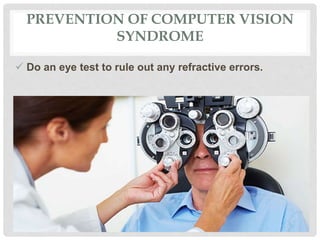
 Do an eye test to rule out any refractive errors.
REFERENCES
• www.webmd.com/eyehealth/computer-vision-
syndrome.
• www.aoa.org/patients-and-public/caring-for-your-
vision/protecting-your-vision/computer-vision-syndrome.
Computer vision syndrome document

Computer vision syndrome document

  • 1.
    D R DAVID - EK E .K . ( O.D , MN OA ) ) COMPUTER VISION SYNDROME (CVS)
  • 2.
    OUTLINE • Introduction. • Whatis computer vision syndrome? • Symptoms of computer vision syndrome. • Causes of computer vision syndrome. • Prevention of computer vision syndrome.
  • 3.
    INTRODUCTION Computers are nowa way of life… • Computers used in health care.
  • 4.
    COMPUTERS USED INSCHOOLS….
  • 5.
  • 6.
    WHAT IS COMPUTERVISION SYNDROME? •A complex of eye or vision problems which are experienced during the use/prolonged use of the computer.
  • 7.
    SYMPTOMS OF COMPUTERVISION SYNDROME •Dry eye (sandy sensation , lacrimation , red eye)
  • 8.
    SYMPTOMS OF COMPUTERVISION SYNDROME •Eye aches • Double vision •Photophobia • Halos • Headaches • neck/back pains.
  • 9.
    CAUSES OF COMPUTERVISION SYNDROME • Reduction in blink rate. • Improper lighting conditions . • Extensive focusing on the screen. • Refractive errors. • Poor position in relation to the computer .
  • 10.
    CAUSES OF COMPUTERVISION SYNDROME •Improper placement of computer screen. •Improper contrast.
  • 11.
    REDUCTION IN BLINKRATE • Normally a person blinks 15 times/m but while working on a computer the blink rate is reduced to 5 times/m due to continuous staring at the screen . • Blinking is important for spreading tears all over the surface of the cornea. • Thus, in the absence of adequate blinking eyes becomes dry and irritated.
  • 12.
    EXTENSIVE FOCUSING ONTHE SCREEN • Focusing on the screen for a prolonged time will not give the eye muscles opportunity to move freely thereby causing eye aches feeling of eye tiredness frontal headaches.
  • 13.
    IMPROPER LIGHTING CONDITIONS •Screens being too bright or too dim. • Excessively bright light either from outdoor sunlight coming through the window casting a shadow on the computer screen or from harsh interior lighting.
  • 14.
    IMPROPER CONTRAST Too littlecontrast between the characters on the screen and background can make reading difficult causing headaches, eye aches. Typing a black text on a white background is usually the best.
  • 15.
    IMPROPER PLACEMENT OFCOMPUTER SCREEN • Screens placed too close or too far away may cause you to assume awkward positions that may lead to eyestrain.
  • 16.
    REFRACTIVE ERRORS • Refractiveerrors are a type of vision problems that makes it difficult for the eyes to see clearly.
  • 17.
    POOR POSITION INRELATION TO THE COMPUTER. • Poor posture during computer usage can lead to having neck pain, back pains, wrist pains and finger pains.
  • 18.
    PREVENTION OF COMPUTERVISION SYNDROME Blink more when using your computer Follow the 20-20-20 rule.
  • 19.
    PREVENTION OF COMPUTER SYNDROME Eliminateexterior light by closing the window blind/drapes and use fewer bulbs for interior light. Position your computer so that the windows are not facing directly to your computer screen.
  • 20.
    PREVENTION OF COMPUTERVISION SYNDROME Adjust your computer screen so that the distance from your eye to the computer is between 18 – 30 inches. ( 45 – 75 )cm.
  • 21.
    PREVENTION OF COMPUTERVISION SYNDROME Adjust the brightness and contrast of your computer or smart phone screens. You can activate eye care on your smart phones.
  • 22.
    PREVENTION OF COMPUTERVISION SYNDROME Adjusting test contrast.  using a white background for black text is usually the best for comfort.
  • 23.
    PREVENTION OF COMPUTERVISION SYNDROME Use of computer glasses : • Distant vision glasses and reading glasses(presbyopic) are different from computer glasses and are not quite right for computer work. • Distant vision glasses are for distant vision only (6m or 20ft) • Reading glasses(presbyopic) are for reading, and normal reading distance is 35cm. • Computer viewing distance is btw 45cm – 75cm so computer glasses should be for that distance alone. (intermediary) • that’s why you have difficulty using your computer with your bifocals.
  • 24.
    PREVENTION OF COMPUTERVISION SYNDROME • Use special lenses. anti fatigue lenses anti glare lenses transition lenses blue filter lenses
  • 25.
    PREVENTION OF COMPUTERVISION SYNDROME • Use a wrist rest during computer usage. Use a document holder.
  • 26.
    PREVENTION OF COMPUTERVISION SYNDROME  Do an eye test to rule out any refractive errors.
  • 27.