LET’S HAVE A REVIEW
Recap
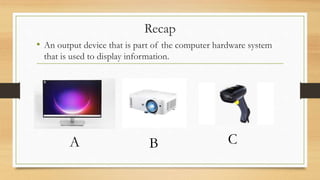
• An output device that is part of the computer hardware system
that is used to display information.
A B C
Recap
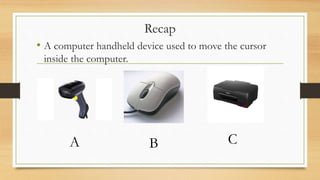
• A computer handheld device used to move the cursor
inside the computer.
A B C
Recap
• .
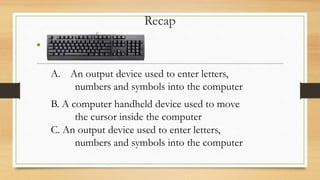
A. An output device used to enter letters,
numbers and symbols into the computer
B. A computer handheld device used to move
the cursor inside the computer
C. An output device used to enter letters,
numbers and symbols into the computer
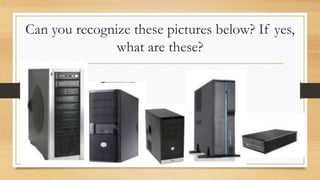
Can you recognize these pictures below? If yes,
what are these?
Computer Systems
Design
Computer Systems Design
•concerned with the hardware design of the
computer
•concerned with the determination of what
hardware should be used and how the parts
should be connected.
Types of Computer Cases
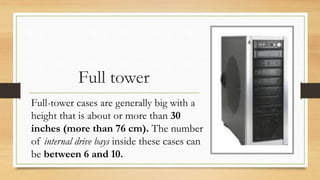
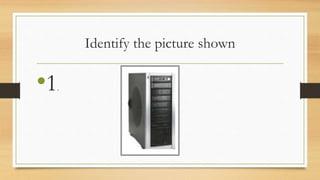
Full tower
Full-tower cases are generally big with a
height that is about or more than 30
inches (more than 76 cm). The number
of internal drive bays inside these cases can
be between 6 and 10.
Take note:
•Bay refers to a space or slot in a computing device where you
can insert a specific type of hardware component or peripheral.
peripheral. It is often used to expand or enhance the device's
functionality. Bays are commonly found in computers, servers,
and networking equipment
Mid tower
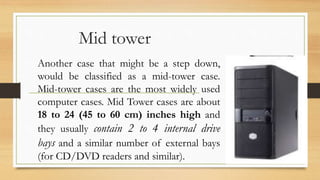
Another case that might be a step down,
would be classified as a mid-tower case.
Mid-tower cases are the most widely used
computer cases. Mid Tower cases are about
18 to 24 (45 to 60 cm) inches high and
they usually contain 2 to 4 internal drive
bays and a similar number of external bays
(for CD/DVD readers and similar).
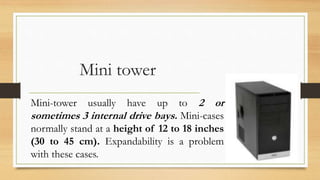
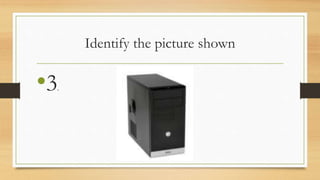
Mini tower
Mini-tower usually have up to 2 or
sometimes 3 internal drive bays. Mini-cases
normally stand at a height of 12 to 18 inches
(30 to 45 cm). Expandability is a problem
with these cases.
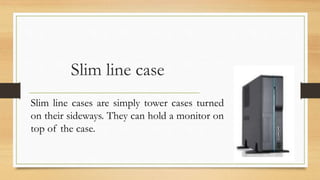
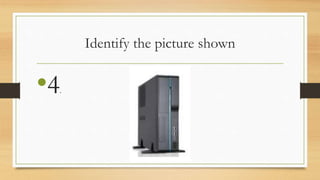
Slim line case
Slim line cases are simply tower cases turned
on their sideways. They can hold a monitor on
top of the case.
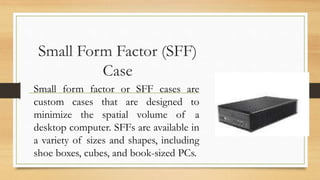
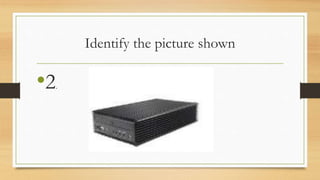
Small Form Factor (SFF)
Case
Small form factor or SFF cases are
custom cases that are designed to
minimize the spatial volume of a
desktop computer. SFFs are available in
a variety of sizes and shapes, including
shoe boxes, cubes, and book-sized PCs.
Group activity
• Convene with your permanent group. Select a
discussant from the group who will help his or her
groupmates understand more of the discussion of the
topic. The rest of the group members will be called to
participate in the recitation, except for the discussant.
Grades for every group will be based on the number of
questions answered by the participants.
Generalization:
• What did we learn from the lesson today?
• What are the different types of system cases?
• Can you mention the characteristics that make each
system case unique?
Assessment:
Get ¼ sheet of paper
Identify the picture shown
•1.
Identify the picture shown
•2.
Identify the picture shown
•3.
Identify the picture shown
•4.
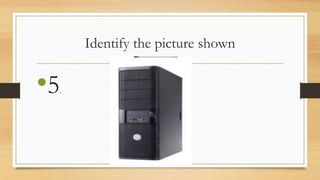
Identify the picture shown
•5.
Identify what is being described below:
6. A computer case designed to minimize the spatial volume of a desktop
computer.
7. It usually have up to 2 or sometimes 3 internal drive bays. It normally
stand at a height of 12 to 18 inches (30 to 45 cm).
8. This computer case is much thinner than most computer cases. Often
include integrated components to save up space and have limited upgrade
capabilities.
9. This computer case is generally big with a height that is about or more
than 30 inches (more than 76 cm).
10. This refers to a space or slot in a computing device where you can
insert a specific type of hardware component or peripheral.
Additional Activity:
• FAMILIARIZE THE COMPUTER ASSEMBLY
PROCEDURE.
• INCLUDE THE TOOLS TO BE USED IN
ASSEMBLING THE COMPUTER SYSTEM.

computer system design.pptx

  • 1.
  • 2.
    Recap • An outputdevice that is part of the computer hardware system that is used to display information. A B C
  • 3.
    Recap • A computerhandheld device used to move the cursor inside the computer. A B C
  • 4.
    Recap • . A. Anoutput device used to enter letters, numbers and symbols into the computer B. A computer handheld device used to move the cursor inside the computer C. An output device used to enter letters, numbers and symbols into the computer
  • 6.
    Can you recognizethese pictures below? If yes, what are these?
  • 7.
  • 8.
    Computer Systems Design •concernedwith the hardware design of the computer •concerned with the determination of what hardware should be used and how the parts should be connected.
  • 9.
  • 10.
    Full tower Full-tower casesare generally big with a height that is about or more than 30 inches (more than 76 cm). The number of internal drive bays inside these cases can be between 6 and 10.
  • 11.
    Take note: •Bay refersto a space or slot in a computing device where you can insert a specific type of hardware component or peripheral. peripheral. It is often used to expand or enhance the device's functionality. Bays are commonly found in computers, servers, and networking equipment
  • 12.
    Mid tower Another casethat might be a step down, would be classified as a mid-tower case. Mid-tower cases are the most widely used computer cases. Mid Tower cases are about 18 to 24 (45 to 60 cm) inches high and they usually contain 2 to 4 internal drive bays and a similar number of external bays (for CD/DVD readers and similar).
  • 13.
    Mini tower Mini-tower usuallyhave up to 2 or sometimes 3 internal drive bays. Mini-cases normally stand at a height of 12 to 18 inches (30 to 45 cm). Expandability is a problem with these cases.
  • 14.
    Slim line case Slimline cases are simply tower cases turned on their sideways. They can hold a monitor on top of the case.
  • 15.
    Small Form Factor(SFF) Case Small form factor or SFF cases are custom cases that are designed to minimize the spatial volume of a desktop computer. SFFs are available in a variety of sizes and shapes, including shoe boxes, cubes, and book-sized PCs.
  • 16.
    Group activity • Convenewith your permanent group. Select a discussant from the group who will help his or her groupmates understand more of the discussion of the topic. The rest of the group members will be called to participate in the recitation, except for the discussant. Grades for every group will be based on the number of questions answered by the participants.
  • 17.
    Generalization: • What didwe learn from the lesson today? • What are the different types of system cases? • Can you mention the characteristics that make each system case unique?
  • 18.
  • 19.
  • 20.
  • 21.
  • 22.
  • 23.
  • 24.
    Identify what isbeing described below: 6. A computer case designed to minimize the spatial volume of a desktop computer. 7. It usually have up to 2 or sometimes 3 internal drive bays. It normally stand at a height of 12 to 18 inches (30 to 45 cm). 8. This computer case is much thinner than most computer cases. Often include integrated components to save up space and have limited upgrade capabilities. 9. This computer case is generally big with a height that is about or more than 30 inches (more than 76 cm). 10. This refers to a space or slot in a computing device where you can insert a specific type of hardware component or peripheral.
  • 25.
    Additional Activity: • FAMILIARIZETHE COMPUTER ASSEMBLY PROCEDURE. • INCLUDE THE TOOLS TO BE USED IN ASSEMBLING THE COMPUTER SYSTEM.

Editor's Notes

  • #7 Which of these are you most familiar with? Why does size matter in most computer cases? How does size affect its performance in carrying out a task?
  • #8 Computer cases designs, sizes are the results of the goal which is to create a well-organized and efficient structure that meets the intended purpose while considering factors like scalability, maintainability, and performance.
  • #9 System design is the process of defining the architecture, components, modules, interfaces, and data for a system to satisfy specified requirements. It involves translating user requirements into a detailed blueprint that guides the implementation phase. The goal is to create a well-organized and efficient structure that meets the intended purpose while considering factors like scalability, maintainability, and performance.
  • #10 The most common system case type is the tower. Depending on the specific number of internal drive bays and the height of the tower, these cases can be further classified into mini-size, mid-size and full-size tower cases. One of the biggest considerations when choosing between case sizes is the number of slots and the number of devices we would like to add to those cases
  • #11 Internal bays are where drives are mounted in the computer, but you can't get to them from outside the case. Like HDD bays. (basically, to enhance or expand the device’s functionality.) External bays are places to put drives that you CAN access from outside the case. Like DVD/floppy drive bays.
  • #12 Internal bays are where drives are mounted in the computer, but you can't get to them from outside the case. Like HDD bays. (basically, to enhance or expand the device’s functionality.) External bays are places to put drives that you CAN access from outside the case. Like DVD/floppy drive bays.
  • #13 Internal bays are where drives are mounted in the computer, but you can't get to them from outside the case. Like HDD bays. External bays are places to put drives that you CAN access from outside the case. Like DVD/floppy drive bays.
  • #14 Internal bays are where drives are mounted in the computer, but you can't get to them from outside the case. Like HDD bays. (basically, to enhance or expand the device’s functionality.) External bays are places to put drives that you CAN access from outside the case. Like DVD/floppy drive bays.
  • #15 A slimline model is a small desktop computer that is thinner than most desktop computers. Slimline computers often include integrated components to save space, and have limited upgrade capabilities.  In general, integrate, integrated, and integration are all terms describing combining several smaller things into one larger thing that operates as a whole. For example, an IC (integrated circuit) is a device containing several smaller components (e.g., transistors and resistors) that operate together.
  • #25 6. Small Form Factor 7. Mini tower 8. Slim line case 9. Full tower 10. Bay