Computer users needdifferent types of computer
system. What the user does with the computer
dictates the components and peripherals needed.
Looking at the computer systems by purpose is a good
place to start with design.
COMPUTER SYSTEM DESIGN
2.
TYPES OF COMPUTERCASES
Full Tower
Full-tower cases are
generally big with a height
that is about or more than
30 inches(more than 76
cm).The number of internal
drive bays inside these
cases can be between 6
and 10.
3.
Take note:
*Bay-refers toa space or slot in a
computing device where you can
insert a specific type of hardware
component or peripheral. It is often
used to expand or enhance the
devices functionally. Bays are
commonly found in computers,
servers ,and networking equipment.
4.
Mid tower
Another casethat might be a
step down, would be classified
as a mid-tower case. Mid-tower
cases are he most widely used
computer cases. Mid-tower
cases are about 18 to 24 (45
to 60 cm) inches high and
they usually contain 2 to 4 internal
drive bays and a similar number
of external bays (for CD/DVD
readers and similar).
5.
Mini tower
Mini-tower usuallyhave
up to 2 or sometimes
3 internal drive bays.
Mini-cases normally
stand at a height of 12
to 18 inches (30 to 45
cm). Expandability is a
problem with these
cases.
6.
Slim line casesare simply
tower cases turned on
their sideways. They can
hold a monitor on top of
the case.
Slim line case
7.
Small Form Factor(SFF) Case
Small form factor or SFF
cases are custom cases
that are designed to
minimize the spatial volume
of a desktop computer.
SFFs are available in a
variety of sizes and shapes,
including shoe boxes,
cubes, and book-sized PCs.
8.
Mice typically havetwo buttons, a
scroll wheel and a laser sensor.
They are used to move the cursor
on the screen, select objects and
click on buttons. The mouse, which
individuals use to direct cursors
and make selections on a
computer screen, is integral to
graphical user interfaces.
Mouse case
9.
Keyboard
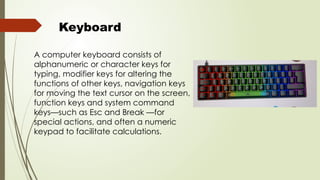
A computer keyboardconsists of
alphanumeric or character keys for
typing, modifier keys for altering the
functions of other keys, navigation keys
for moving the text cursor on the screen,
function keys and system command
keys—such as Esc and Break —for
special actions, and often a numeric
keypad to facilitate calculations.
10.
A typical motherboard
containsthe CPU, memory,
storage, ROM BIOS,
Southbridge and Northbridge
chipsets, cooling fans,
peripheral connector slots,
connectors for peripheral
devices, the battery backup
and the power connector.
Motherboard case
11.
Chipset
A chipset isa collection of
electronic components on a
motherboard that manages
the flow of data between the
CPU, GPU, RAM, storage, and
peripherals. It acts as the
traffic controller of the
motherboard, facilitating
communication between all
connected components.
12.
CPU
Principal components ofa CPU include the
arithmetic–logic unit (ALU) that performs
arithmetic and logic operations,
processor registers that supply operands to
the ALU and store the results of ALU
operations, and a control unit that
orchestrates the fetching (from memory),
decoding and execution (of instructions) by
directing the coordinated operations of the
ALU, registers, and other components.
13.
In your ownopinion,
what is computer
system design?
Activity: In ¼ sheet of paper. 2 to 3
sentences only.
14.
1. Give atleast 5 types of computer case.
Ii: ENUMERATION
i: identification
1. Refers to a space or slot in a computing device where you can insert a specific
type of hardware component or peripheral.
2. Usually have up to 2 or sometimes 3 internal drive bays.
3. Are simply tower cases turned on their sideways.
4. It the CPU, memory, storage, ROM BIOS, Southbridge and Northbridge chipsets,
cooling fans, peripheral connector slots, connectors for peripheral devices, the battery
backup and the power connector.
5. is a collection of electronic components on a motherboard that manages the flow of
data between the CPU, GPU, RAM, storage, and peripherals.







![Presentation1 [Recovered]](https://cdn.slidesharecdn.com/ss_thumbnails/presentation1recovered-090802065007-phpapp02-thumbnail.jpg?width=640&height=640&fit=bounds)


