GRADES 1 to12
DAILY LESSON LOG
School: DepEdClub.com Grade Level: 9
Name of Teacher Learning Area: TLE - ICT
Teaching Dates and Time: SEPTEMBER 1 - 5, 2025 (WEEK 2) Quarter: Second
I. OBJECTIVES
MONDAY TUESDAY WEDNESDAY THURSDAY FRIDAY
November 14, 2022 November 15, 2022 November 17, 2022 November 18, 2022
A. Content Standards The learners demonstrate an understanding of concepts and principles in installing configuring computer systems
B. Performance
Standards
The learners shall be able to install and configure computer systems based on established procedures and system requirements
C. Learning
Competencies/
Objectives.
CONDUCT TESTING AND
DOCUMENTATION
SYSTEM’S SPECIFICATION
TLE_IACSS9- 12ICCS-IIIf-j-
32
CONDUCT TESTING AND
DOCUMENTATION
PROCESSOR SPEED AND
ARCHITECTURE
RAM (RANDOM ACCESS
MEMORY)
TLE_IACSS9- 12ICCS-IIIf-j-
32
CONDUCT TESTING AND
DOCUMENTATION
GRAPHICS SYSTEM
TLE_IACSS9- 12ICCS-IIIf-j-
32
CONDUCT TESTING AND
DOCUMENTATION
HARD DRIVE SPEED AND
CAPACITY
TLE_IACSS9- 12ICCS-IIIf-j-
32
II.CONTENT
( Subject Matter)
SYSTEM’S SPECIFICATION PROCESSOR SPEED AND
ARCHITECTURE
RAM (RANDOM ACCESS
MEMORY)
GRAPHICS SYSTEM HARD DRIVE SPEED AND
CAPACITY
III. LEARNING
RESOURCES
A. References
1. Teacher’s Guide
pages
2. Learner’s Material
pages
ICT 9 QUARTER2,
MODULE 2
pp. 1
ICT 9 QUARTER2, MODULE
2
pp. 1-2
ICT 9 QUARTER2, MODULE
2
pp. 2
ICT 9 QUARTER2, MODULE
2
pp. 2
3. Textbook pages
4. Additional
2.
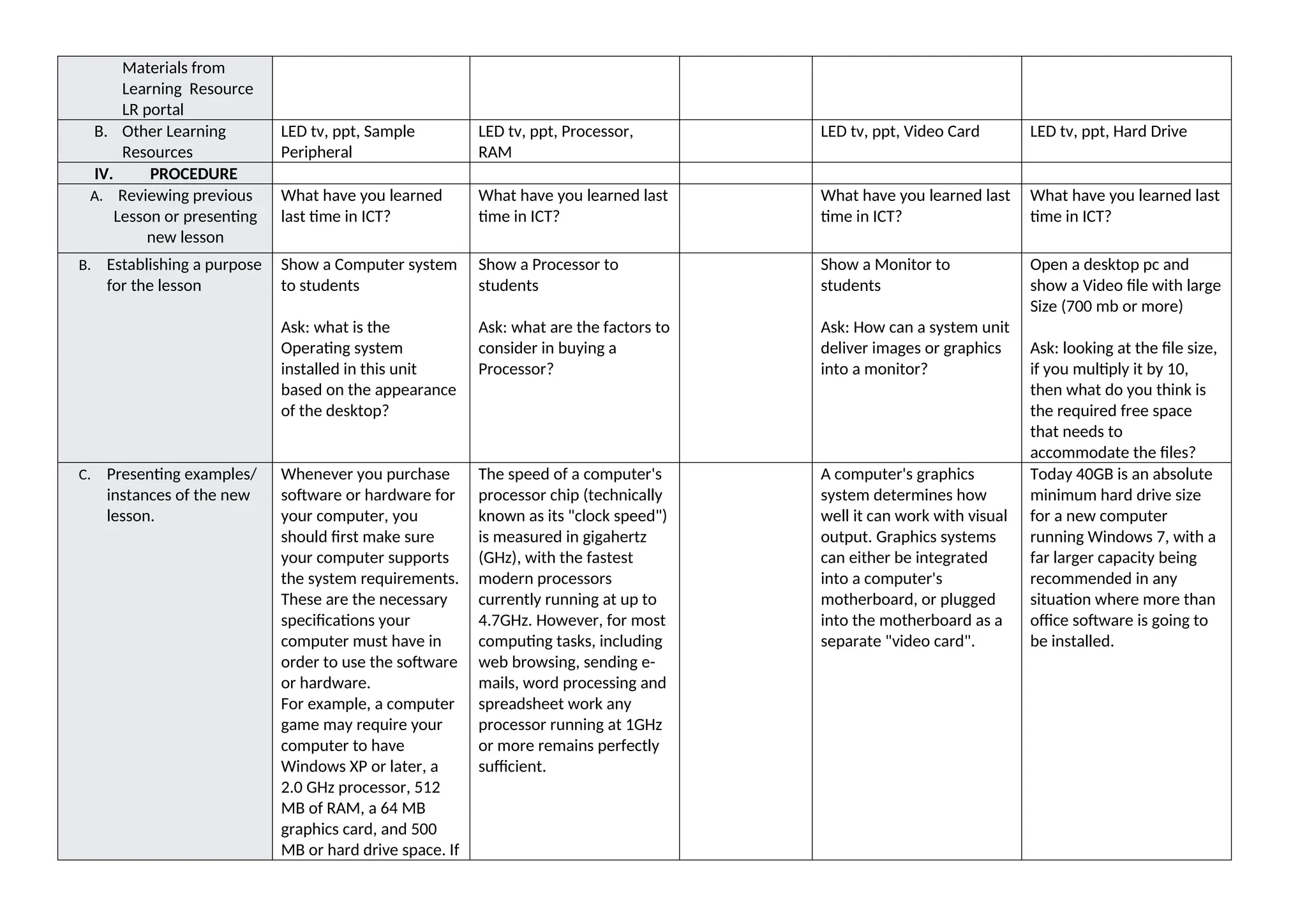
Materials from
Learning Resource
LRportal
B. Other Learning
Resources
LED tv, ppt, Sample
Peripheral
LED tv, ppt, Processor,
RAM
LED tv, ppt, Video Card LED tv, ppt, Hard Drive
IV. PROCEDURE
A. Reviewing previous
Lesson or presenting
new lesson
What have you learned
last time in ICT?
What have you learned last
time in ICT?
What have you learned last
time in ICT?
What have you learned last
time in ICT?
B. Establishing a purpose
for the lesson
Show a Computer system
to students
Ask: what is the
Operating system
installed in this unit
based on the appearance
of the desktop?
Show a Processor to
students
Ask: what are the factors to
consider in buying a
Processor?
Show a Monitor to
students
Ask: How can a system unit
deliver images or graphics
into a monitor?
Open a desktop pc and
show a Video file with large
Size (700 mb or more)
Ask: looking at the file size,
if you multiply it by 10,
then what do you think is
the required free space
that needs to
accommodate the files?
C. Presenting examples/
instances of the new
lesson.
Whenever you purchase
software or hardware for
your computer, you
should first make sure
your computer supports
the system requirements.
These are the necessary
specifications your
computer must have in
order to use the software
or hardware.
For example, a computer
game may require your
computer to have
Windows XP or later, a
2.0 GHz processor, 512
MB of RAM, a 64 MB
graphics card, and 500
MB or hard drive space. If
The speed of a computer's
processor chip (technically
known as its "clock speed")
is measured in gigahertz
(GHz), with the fastest
modern processors
currently running at up to
4.7GHz. However, for most
computing tasks, including
web browsing, sending e-
mails, word processing and
spreadsheet work any
processor running at 1GHz
or more remains perfectly
sufficient.
A computer's graphics
system determines how
well it can work with visual
output. Graphics systems
can either be integrated
into a computer's
motherboard, or plugged
into the motherboard as a
separate "video card".
Today 40GB is an absolute
minimum hard drive size
for a new computer
running Windows 7, with a
far larger capacity being
recommended in any
situation where more than
office software is going to
be installed.
3.
your computer doesnot
meet all of these
requirements, the game
will not run very well or
might not run at all.
D. Discussing new
concepts and
practicing new skills.
#1
SYSTEM’S SPECIFICATION
It is just as important to
check system
requirements for
hardware devices. For
example, if you buy a
printer, it may require
either Windows XP or
Mac OS X 10.3 or later. It
may also require a USB
port and 80 MB of
available hard drive
space. If your computer
does not have any USB
ports, you will not be able
to physically connect the
printer. If your machine
does not have Windows
XP or Mac OS X 10.3 or
later, the printer drivers
may be incompatible with
your operating system.
This means your
computer will be unable
to recognize the printer.
PROCESSOR SPEED AND
ARCHITECTURE
For applications such as
video editing, 3D graphics
work and (for the majority
of "power users") playing
computer games, higher
processor speeds are highly
required. CPU performance
is now determined by far
more than raw speed
alone. Intel made this very
clear when it introduced its
system of
processor numbers. These
provide an indication of a
processor's "architecture",
"cache" and "front side bus
(FSB) speed" in addition to
its clock speed.
Graphics systems
integrated into the
motherboard (also known
as "onboard graphics") are
now quite powerful, and
sufficient for handling the
requirements of most
software applications aside
from games playing, 3D
modeling, and some forms
of video editing.
Any form of modern
computer graphics system
can now display high
resolution color images on
a standard-sized display
screen (ie any monitor up
to about 19" in size). The
more sophisticated
graphics cards now
determine how well a
computer can handle the
playback of high definition
video, as well as the speed
and quality at which 3D
scenes can be rendered.
A computer will frequently
be used to edit video, a
second internal hard disk
dedicated only to video
storage is highly
recommended for stable
operation. Indeed, for
professional video editing
using a program like
Premiere Pro CS5, Adobe
now recommend that a PC
has at least three internal
hard disks (one for the
operating system and
programs, one for video
project files, and one for
video media).
E. Discussing new
concepts and
practicing new skills
#2.
When you are shopping
for computer software or
hardware, it is a good
idea to first find out
exactly what your
system's specifications
are and write them down
The architecture of a
processor is the most
important factor to
determine its performance,
and refers to its basic
design and complexity.
key feature of separate
graphics card is that most
of them now allow more
than one display screen to
be connected to a
computer. Others also
permit the recording of
Two key factors determine
the speed of traditional,
spinning hard disks. The
first is the rotational
velocity of the physical disk
itself. This can currently be
4200, 5400, 7200, 10000 or
4.
on a pieceof paper.
The important
information to record
includes:
1.Operating System (i.e.
Windows XP, SP 2 or Mac
OS X 10.3.8)
2.Processor Speed (i.e.
Pentium 4, 3.2 GHz or
Power PC G5, 2.0 GHz)
3.Memory, a.k.a. RAM
(i.e. 512 MB)
4.Graphics Card (i.e. ATI
Radeon 9800 w/ 256 MB
video memory)
5.Hard Disk Space (i.e. 80
GB available)
6.I/O Ports (i.e. USB,
Firewire, Serial, Parallel,
SCSI, VGA, DVI ports)
Cache is a form of very fast
memory integrated into
the processor chip, and
used to store up
instructions (work for the
processor) so that it has to
slow down as little as
possible between tasks.
Front side bus (FSB) speed
is a measure of how fast a
microprocessor
communicates with the
computer's main circuit
board (or "motherboard")
into which it is physically
connected.
RAM (RANDOM ACCESS
MEMORY) RAM is
measured in megabytes
(MB) and gigabytes (GB), as
detailed on the storage
page. Just how much RAM
a computer needs depends
on the software it is
required to run effectively.
video. As a basic rule,
unless a computer is going
to be used to handle 3D
graphics or to undertake a
significant volume of video
editing or recording, today
there is little point in opting
for anything other than
onboard graphics (not least
because separate graphics
cards consume quite a lot
of electricity and create
quite a lot of heat and
noise). Adding a new
graphics card to a
computer with onboard
graphics is also a very easy
upgrade if required in the
future.
15000 rpm (revolutions per
minute). The faster the disk
spins, the quicker data can
be read from or written to
it, hence the faster the disk
the better (although faster
disks consumer more
power, make more noise,
and generate more heat).
Most desktop hard disks
run at either 5400 or 7200
rpm, whilst most laptop
hard disks run at 4200 or
5400.
The second key factor that
determines performance of
a traditional, internal hard
disk is the interface used to
connect it to the
computer's motherboard.
Three types of interface
exist: Serial Advance
Technology Attachment
(SATA), which is the most
modern and now pretty
much the norm on new
PCs; Integrated Device
Electronics (IDE) (also
known as UDMA), which is
a slower and older form of
interface, and finally Small
Computer System
Interface (SCSI), which
happens to be the oldest
but in it most modern
variant is still the fastest
disk interface standard.
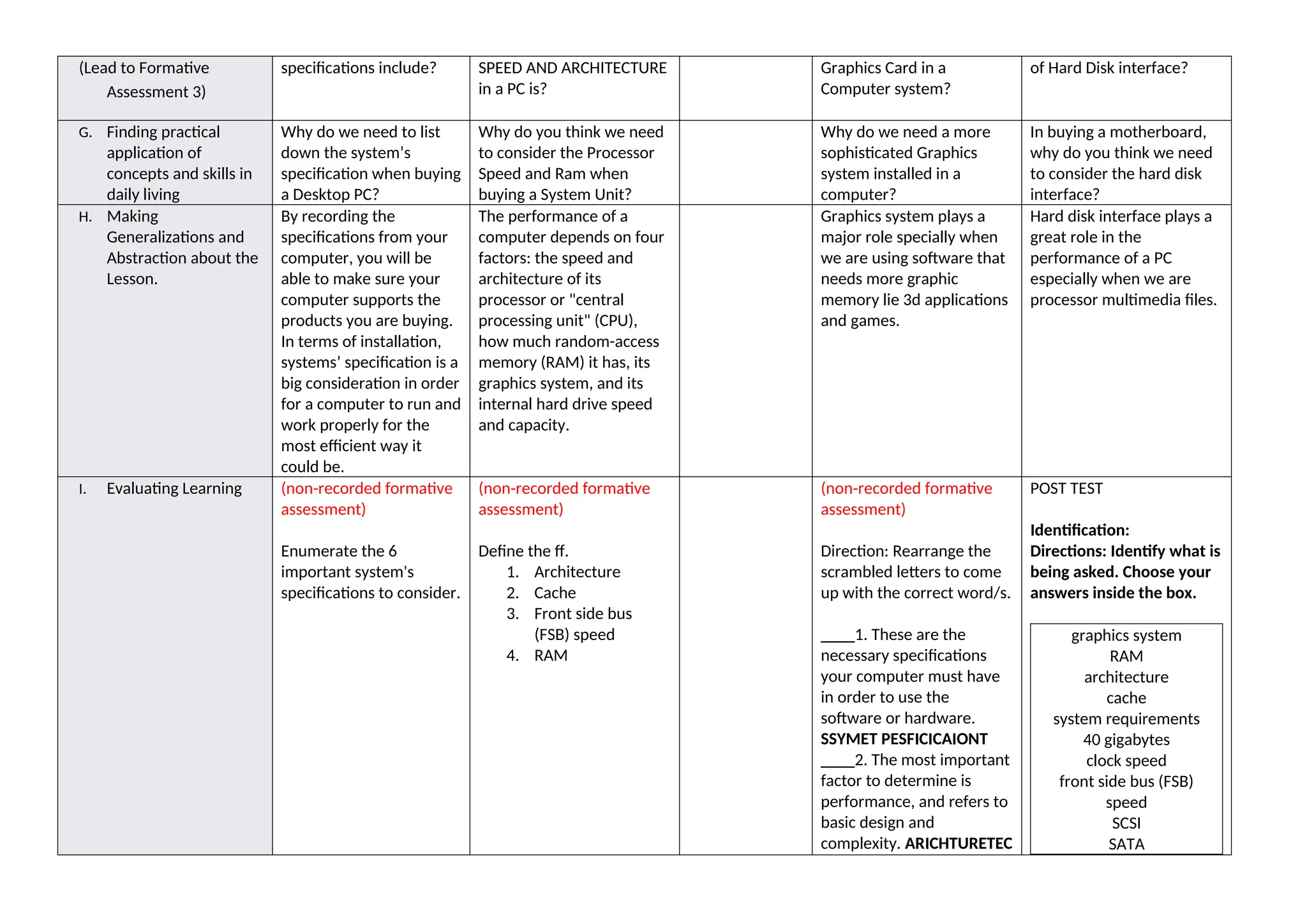
F. Developing Mastery The 6 important system's The role of PROCESSOR What is the function of What are the Three types
5.
(Lead to Formative
Assessment3)
specifications include? SPEED AND ARCHITECTURE
in a PC is?
Graphics Card in a
Computer system?
of Hard Disk interface?
G. Finding practical
application of
concepts and skills in
daily living
Why do we need to list
down the system’s
specification when buying
a Desktop PC?
Why do you think we need
to consider the Processor
Speed and Ram when
buying a System Unit?
Why do we need a more
sophisticated Graphics
system installed in a
computer?
In buying a motherboard,
why do you think we need
to consider the hard disk
interface?
H. Making
Generalizations and
Abstraction about the
Lesson.
By recording the
specifications from your
computer, you will be
able to make sure your
computer supports the
products you are buying.
In terms of installation,
systems’ specification is a
big consideration in order
for a computer to run and
work properly for the
most efficient way it
could be.
The performance of a
computer depends on four
factors: the speed and
architecture of its
processor or "central
processing unit" (CPU),
how much random-access
memory (RAM) it has, its
graphics system, and its
internal hard drive speed
and capacity.
Graphics system plays a
major role specially when
we are using software that
needs more graphic
memory lie 3d applications
and games.
Hard disk interface plays a
great role in the
performance of a PC
especially when we are
processor multimedia files.
I. Evaluating Learning (non-recorded formative
assessment)
Enumerate the 6
important system's
specifications to consider.
(non-recorded formative
assessment)
Define the ff.
1. Architecture
2. Cache
3. Front side bus
(FSB) speed
4. RAM
(non-recorded formative
assessment)
Direction: Rearrange the
scrambled letters to come
up with the correct word/s.
____1. These are the
necessary specifications
your computer must have
in order to use the
software or hardware.
SSYMET PESFICICAIONT
____2. The most important
factor to determine is
performance, and refers to
basic design and
complexity. ARICHTURETEC
POST TEST
Identification:
Directions: Identify what is
being asked. Choose your
answers inside the box.
graphics system
RAM
architecture
cache
system requirements
40 gigabytes
clock speed
front side bus (FSB)
speed
SCSI
SATA
6.
____3. The main“brain” or
“heart” of a computer
system. SORPROCES
____4. A part of a PC
wherein programs are
dependent to run
effectively. MAR
____5. A computer
peripheral that supplies
power to the system.
WERPO PLYSUP
1.It is an absolute minimum
hard drive size for a new
computer running
Windows 7.
2.It determines how well
computer can work with
visual output
3.It is a measure of how
fast a microprocessor
communicates with the
motherboard.
4.It is the technical term
used pertaining to the
speed of a computer's
processor chip.
5.These are the necessary
specifications your
computer must have in
order to use the software
or hardware.
6.This refers to a
processor’s basic design
and complexity.
7.It is a form of very fast
memory integrated into
the processor chip, and
used to store up
instructions.
8.It happens to be the
oldest but in it most
modern variant is still the
fastest disk interface
standard.
9.It is measured in
megabytes (MB) and
gigabytes (GB) and its
needs depend on the
7.
software
required to runit
effectively.
10.It is the most modern
variant and now pretty
much the norm on new
PCs.
J. Additional Activities
for Application or
Remediation
Performance Task
Complete the chart by
supplying information
about a PC’s
Specification:
System Specification
Hardware/
Software
Specificati
on
Operating
System
Processor
Speed
Memory
Graphics
Card
Hard Disk
Space
I/O Ports
Performance Task
Create a diagram or
illustration showing how
the four factors affect the
performance of the
computer. (10 PTS)
SCORING RUBRIC FOR THE
PERFORMANCE TASK
V. REMARKS
VI. REFLECTION
A. No. of learners earned
80% in the evaluation.
B . No. of learners who
required additional
activities for
remediation who
scored below 80%
8.
C. Did theremedial lesson
work? No. of learners
who have caught up
with the lesson.
D. No. of learner who
continue to require
remediation
E. Which of my teaching
strategies worked
well? Why did these
work?
F. What difficulties did I
encounter which my
principal or supervisor
can help me solve?
G. What innovation or
localized materials did
I used/discover which
I wish to share with
other teachers?
Prepared by: Checked by:







![ICT lessonE]DWFWQFRQEWVGFWEQQQGERTGWGGWTE4](https://cdn.slidesharecdn.com/ss_thumbnails/ictlesson1dll-250928232849-7cd6b991-thumbnail.jpg?width=640&height=640&fit=bounds)


