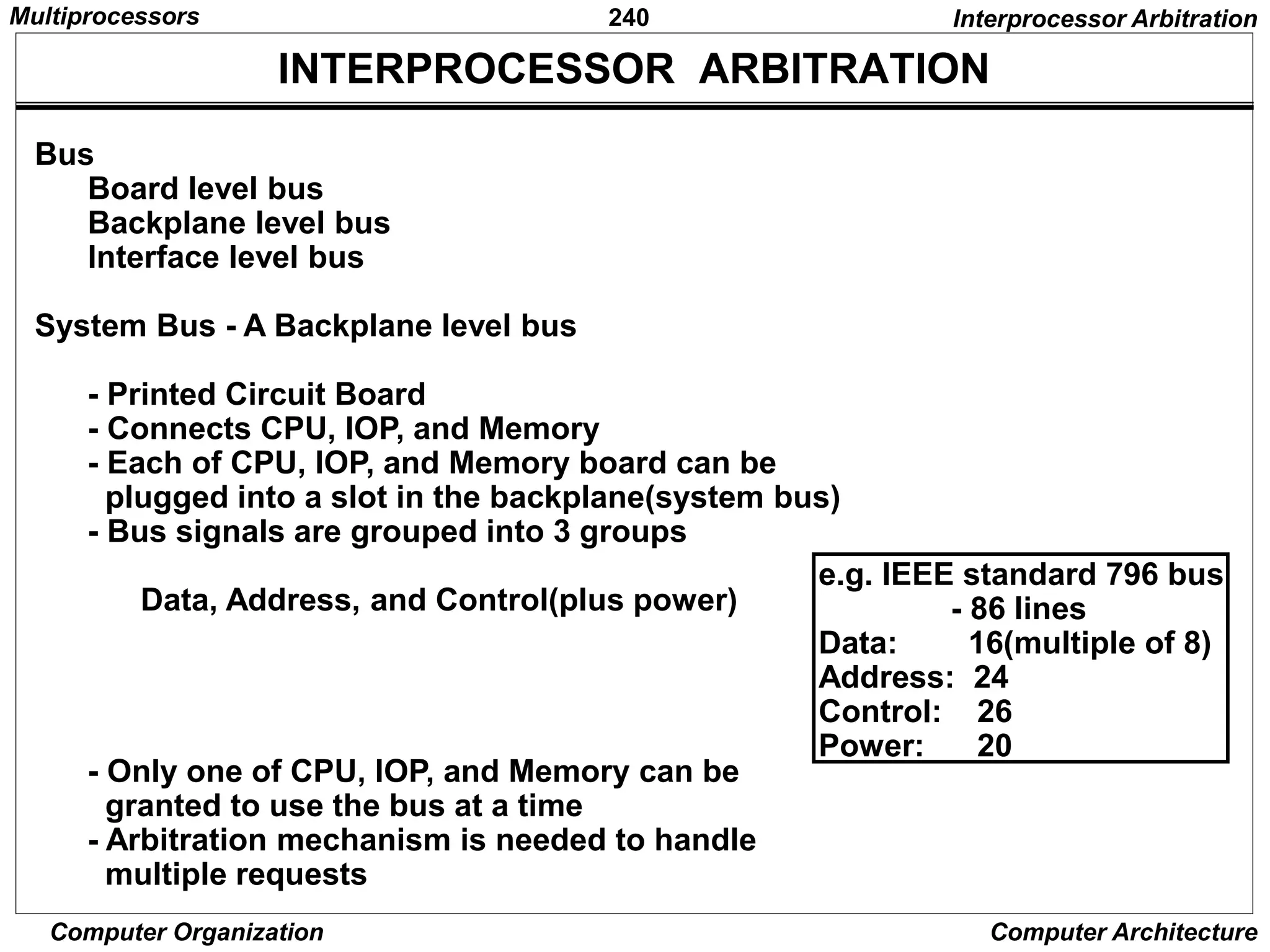
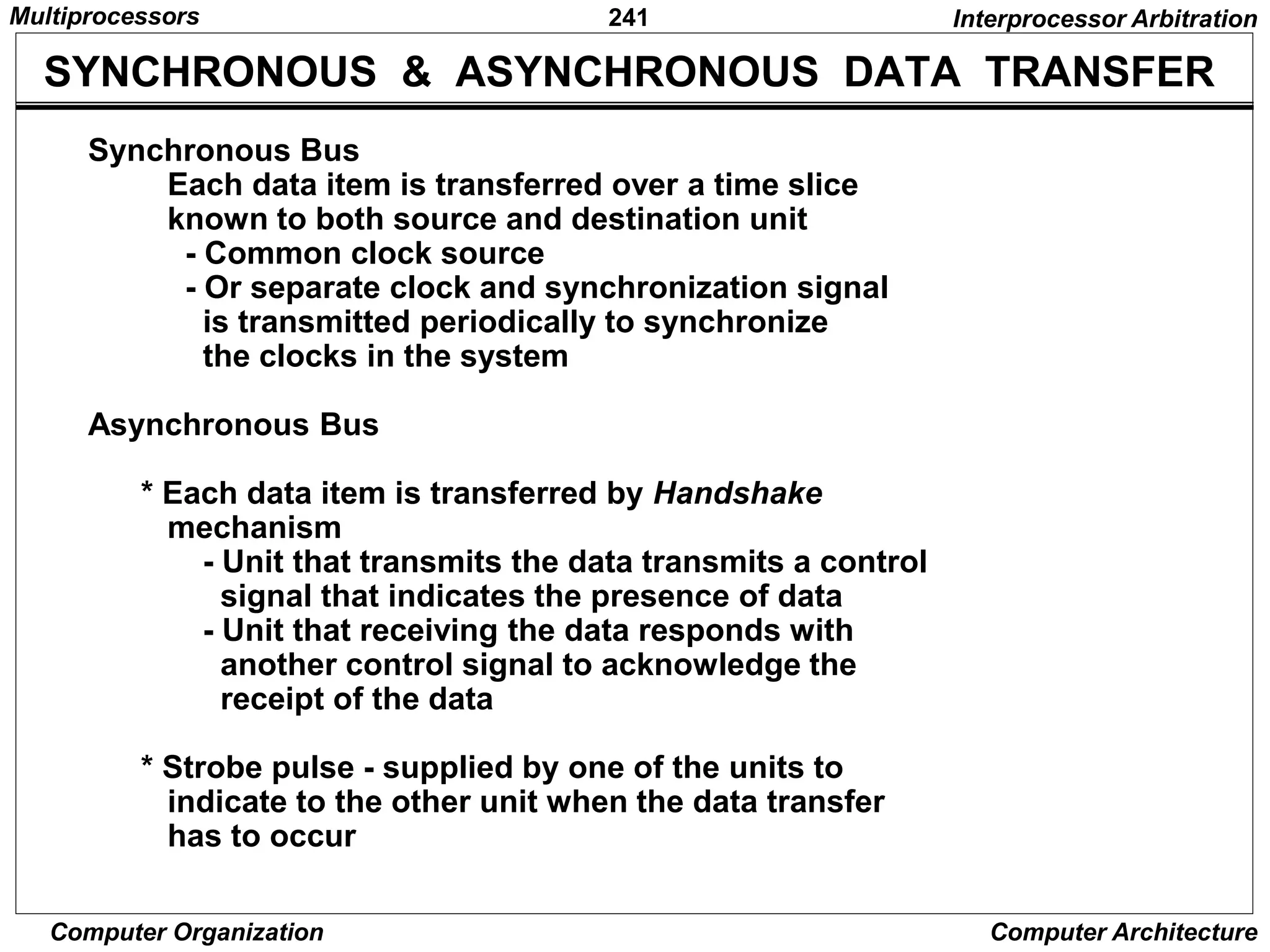
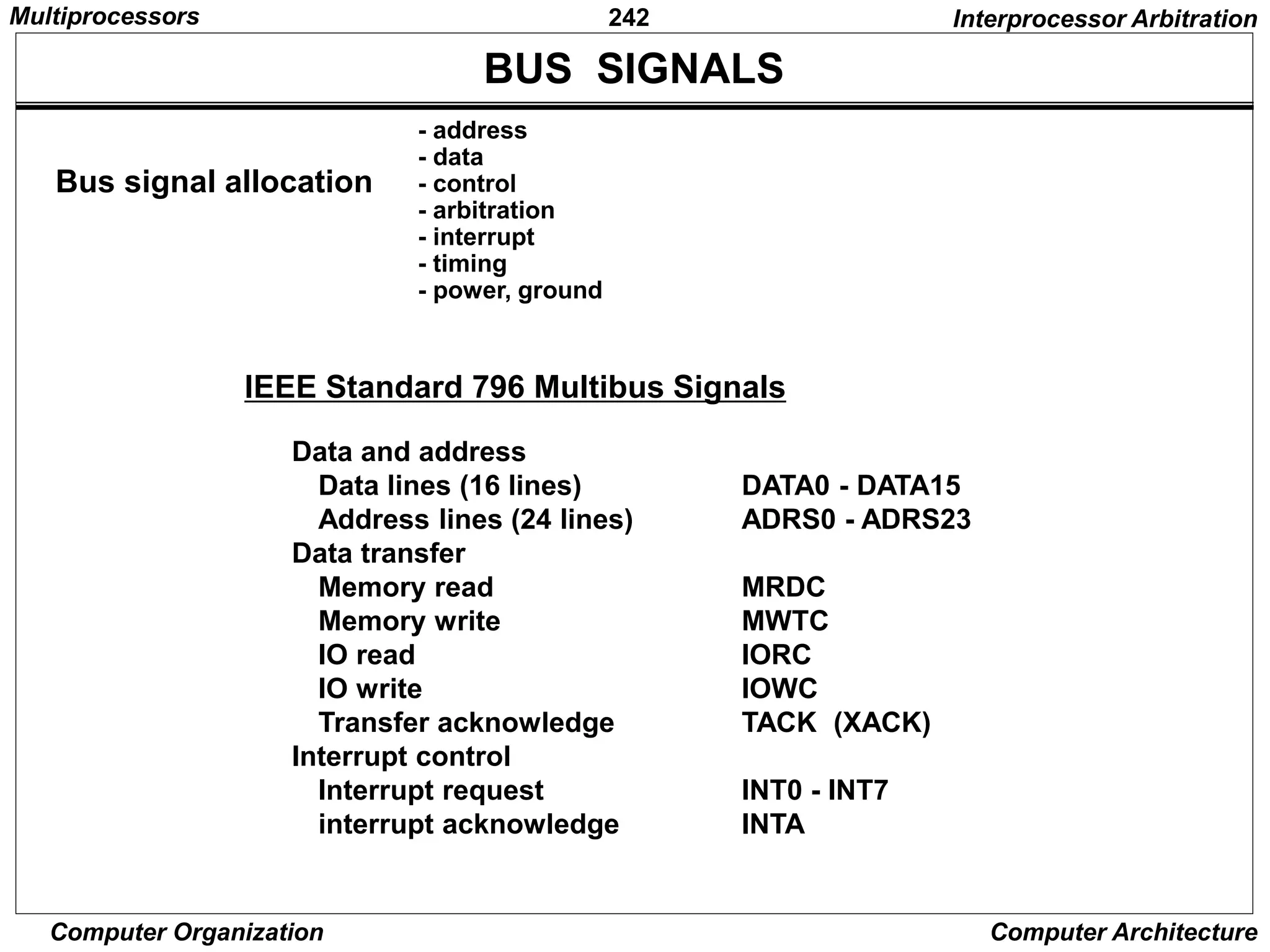
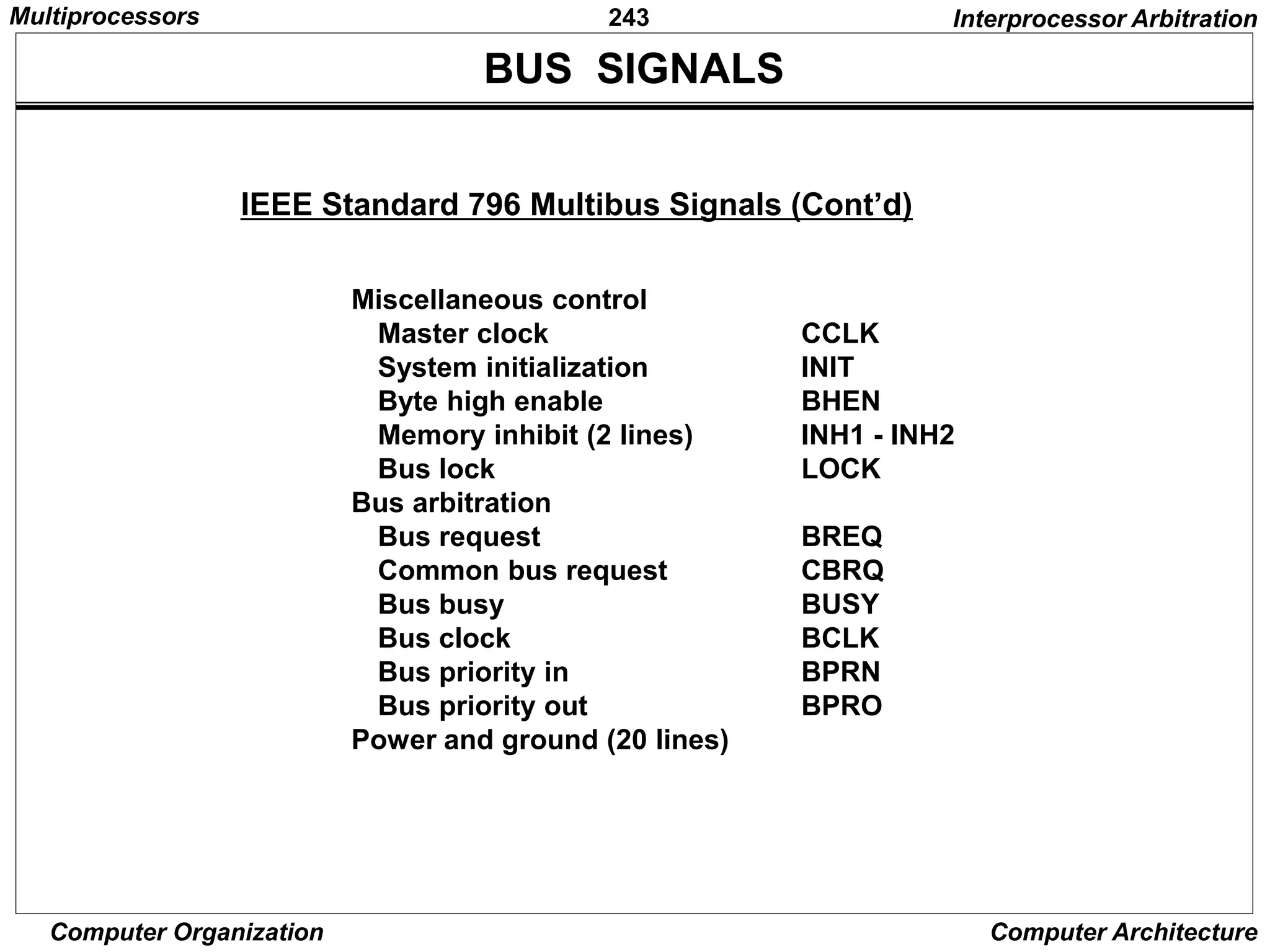
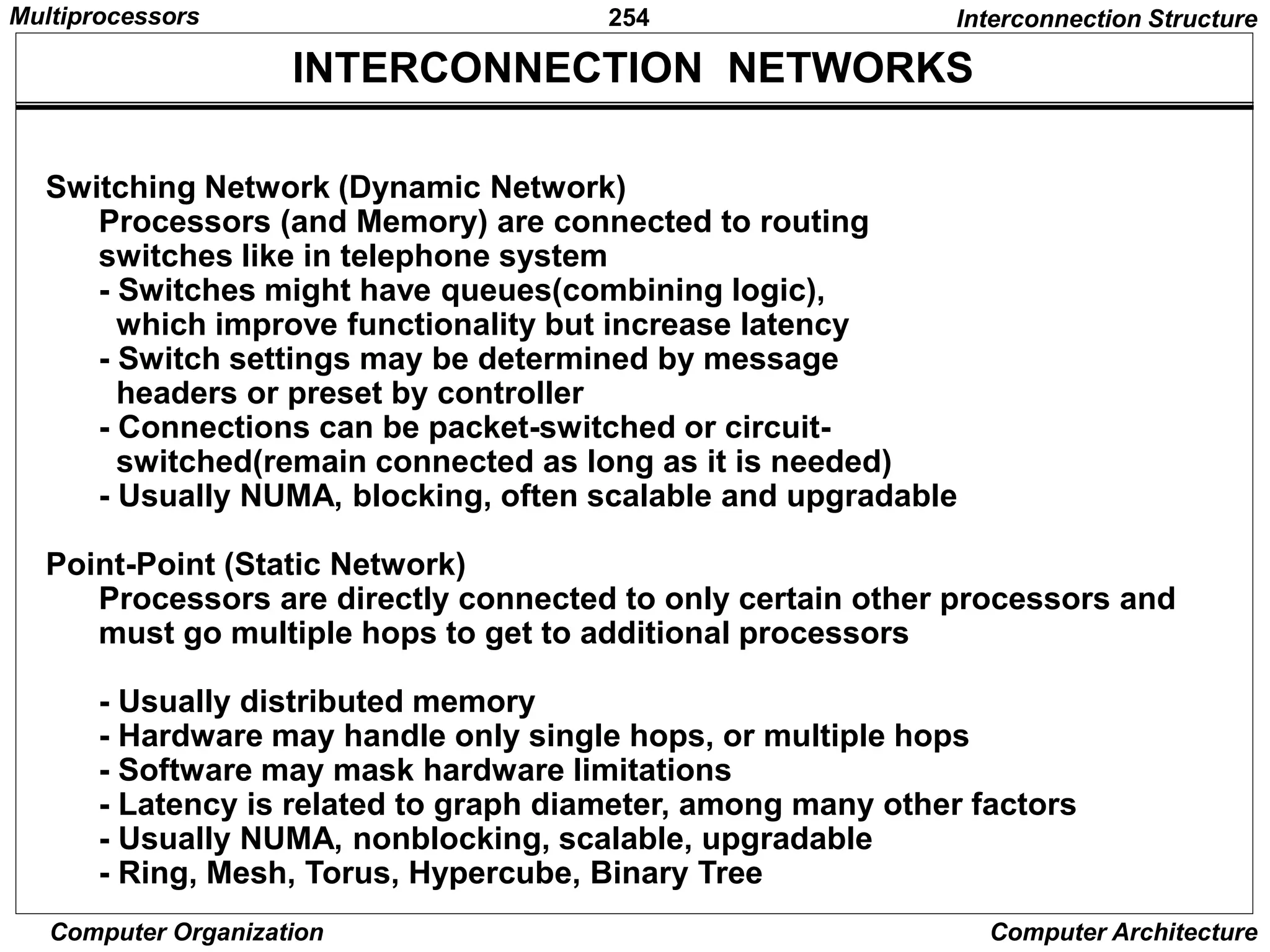
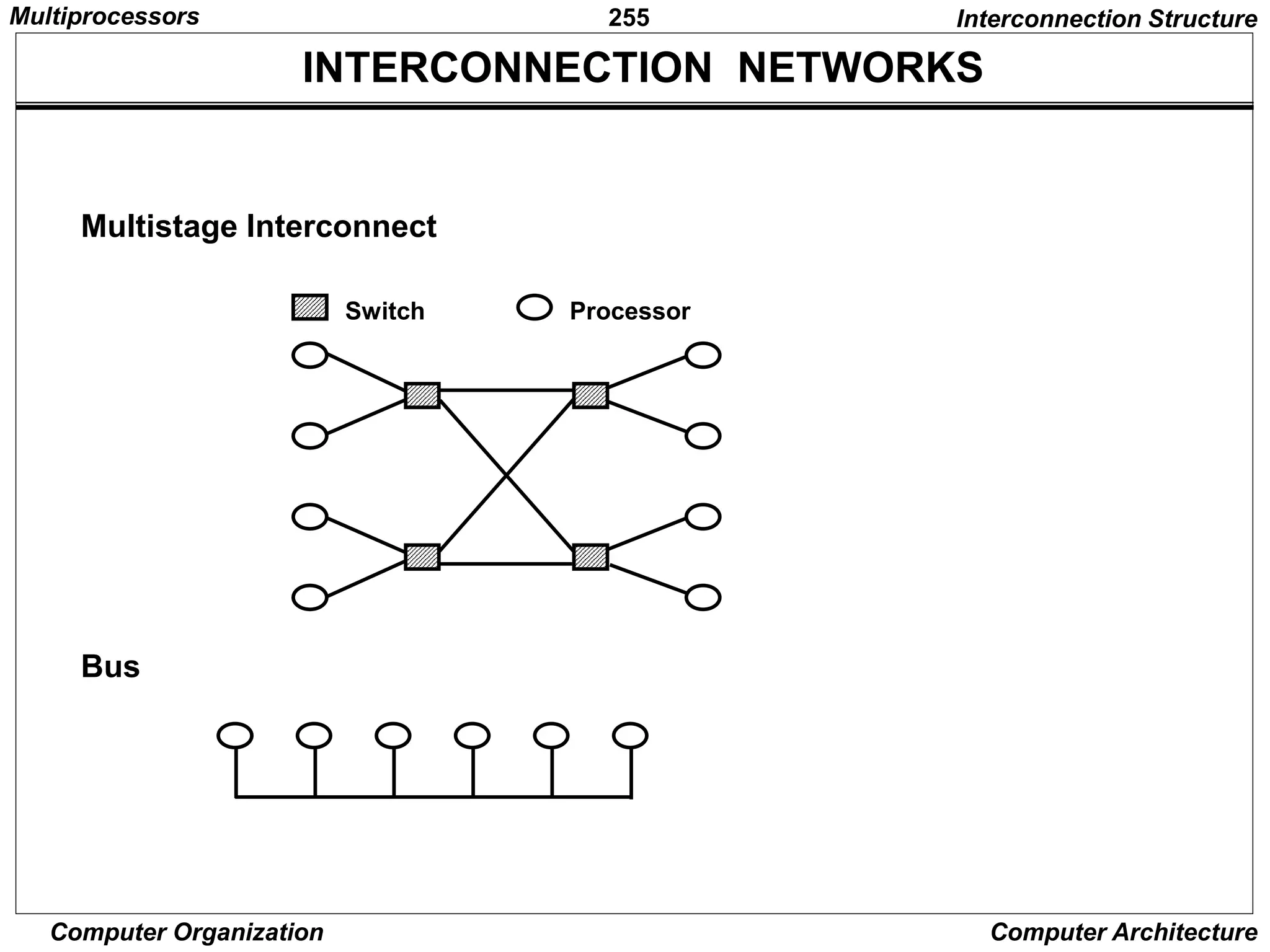
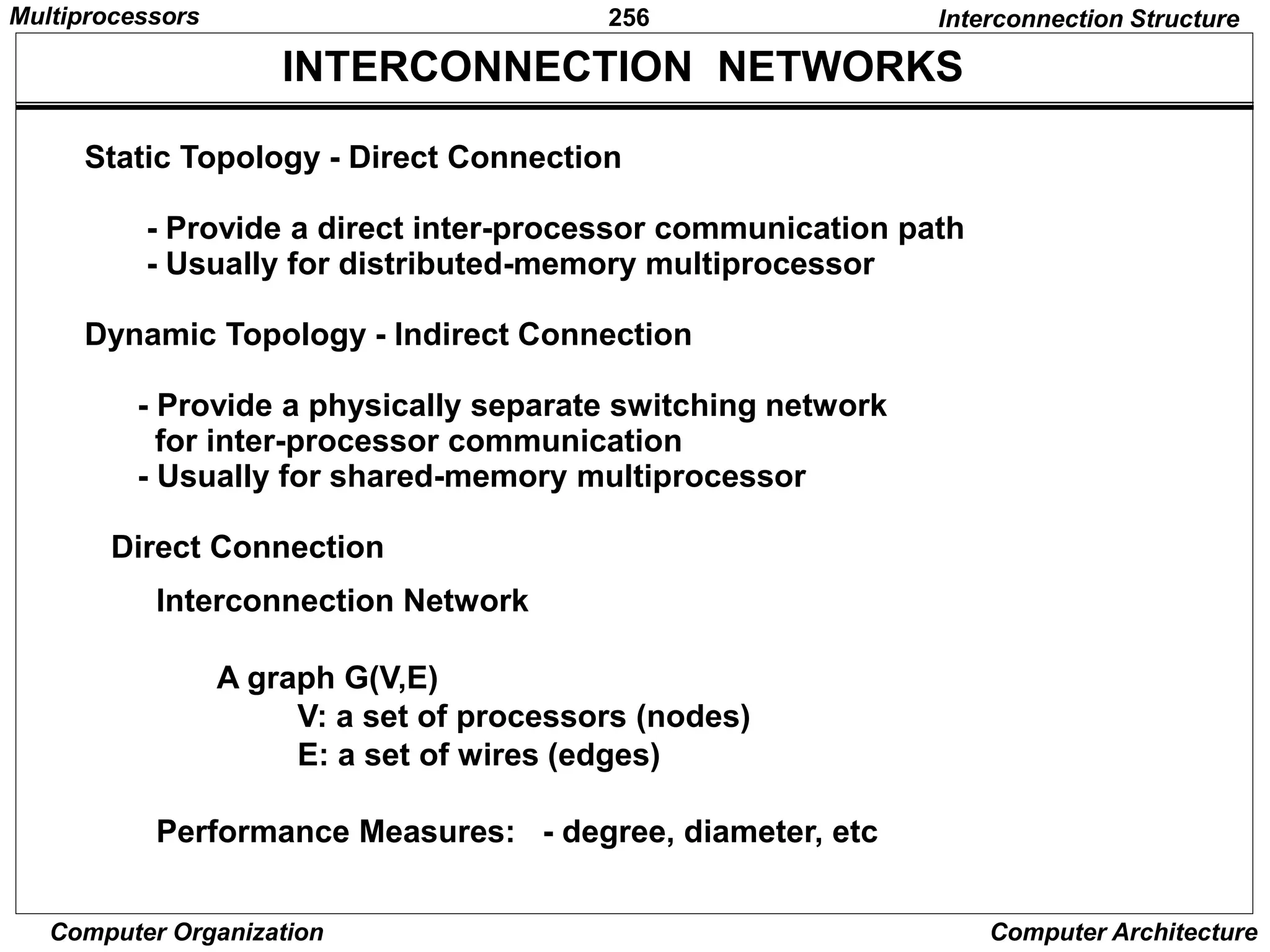
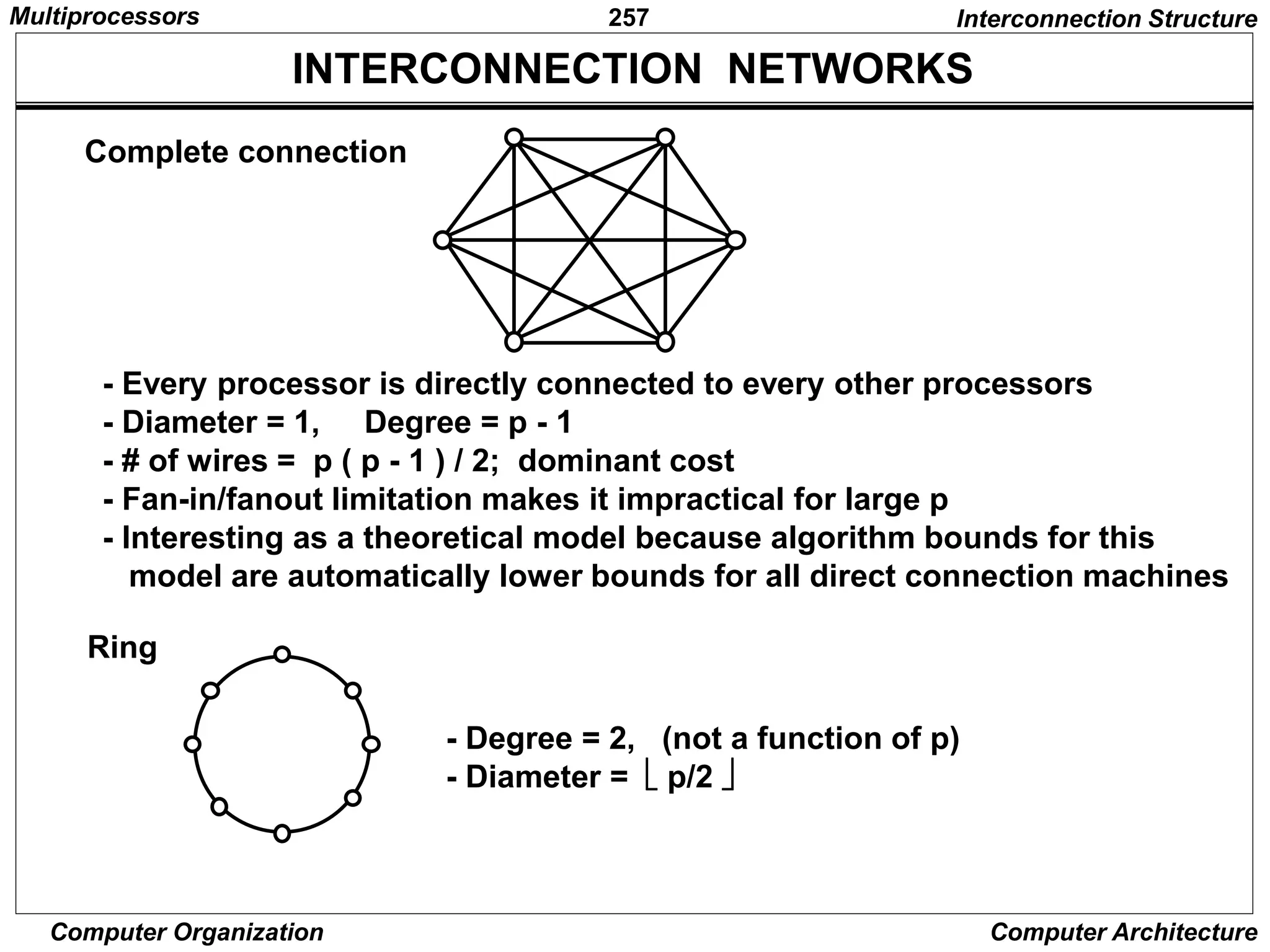
1
Computer Organization Computer Architecture
Dr.Chao Tan,
Carnegie Mellon University
2
Computer Organization Computer Architecture
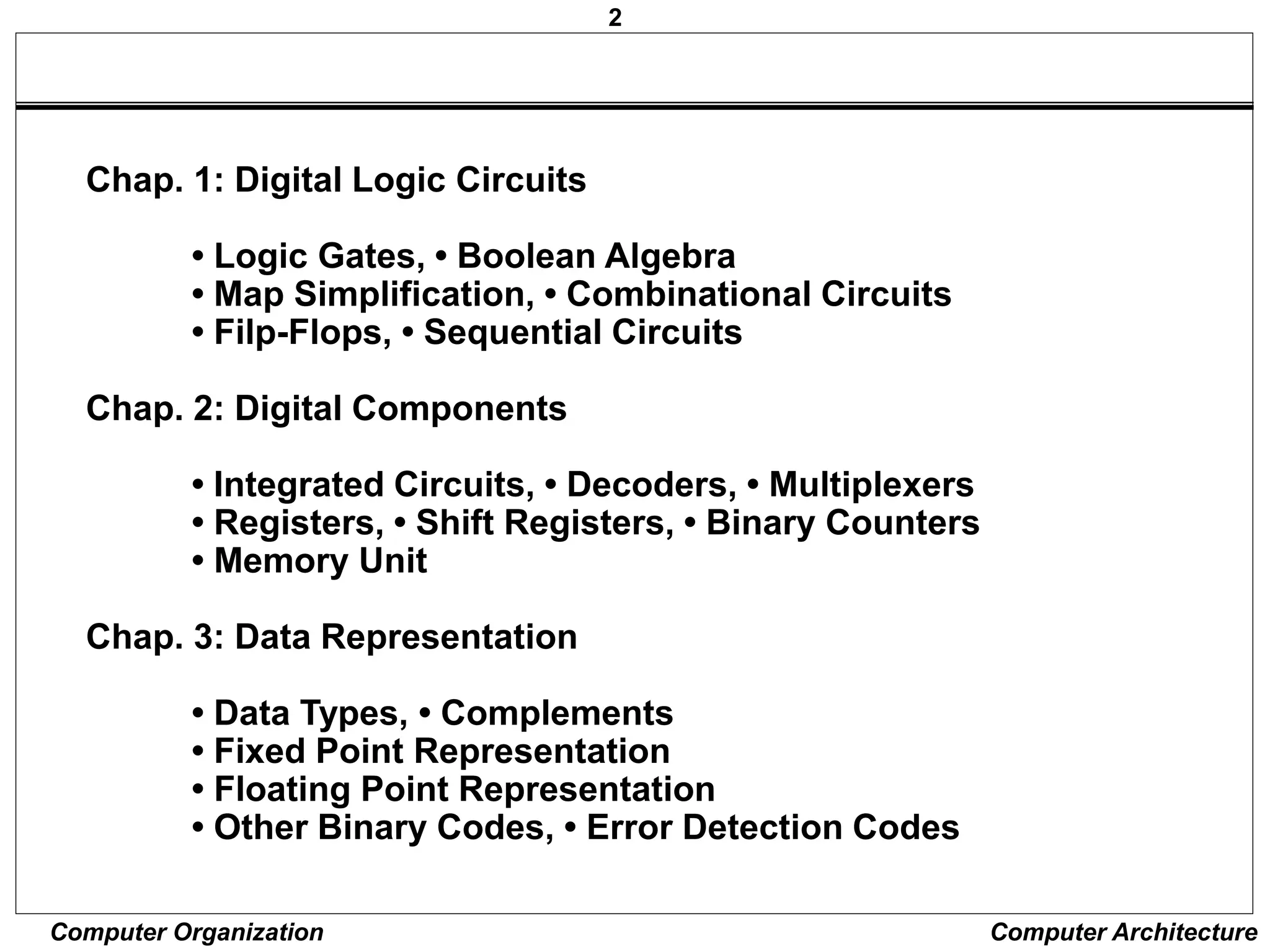
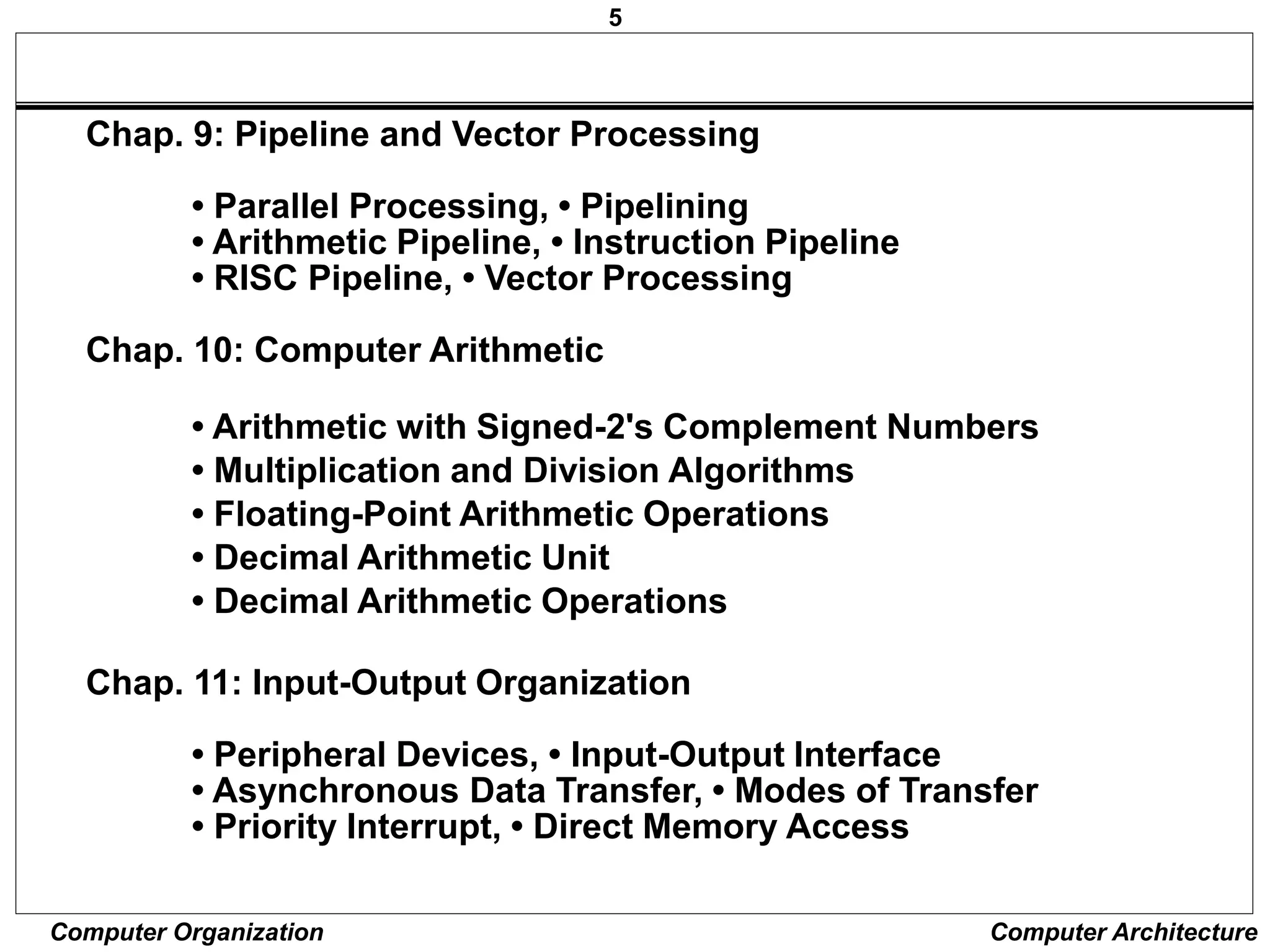
Chap. 1: Digital Logic Circuits
• Logic Gates, • Boolean Algebra
• Map Simplification, • Combinational Circuits
• Filp-Flops, • Sequential Circuits
Chap. 2: Digital Components
• Integrated Circuits, • Decoders, • Multiplexers
• Registers, • Shift Registers, • Binary Counters
• Memory Unit
Chap. 3: Data Representation
• Data Types, • Complements
• Fixed Point Representation
• Floating Point Representation
• Other Binary Codes, • Error Detection Codes
3
Computer Organization Computer Architecture
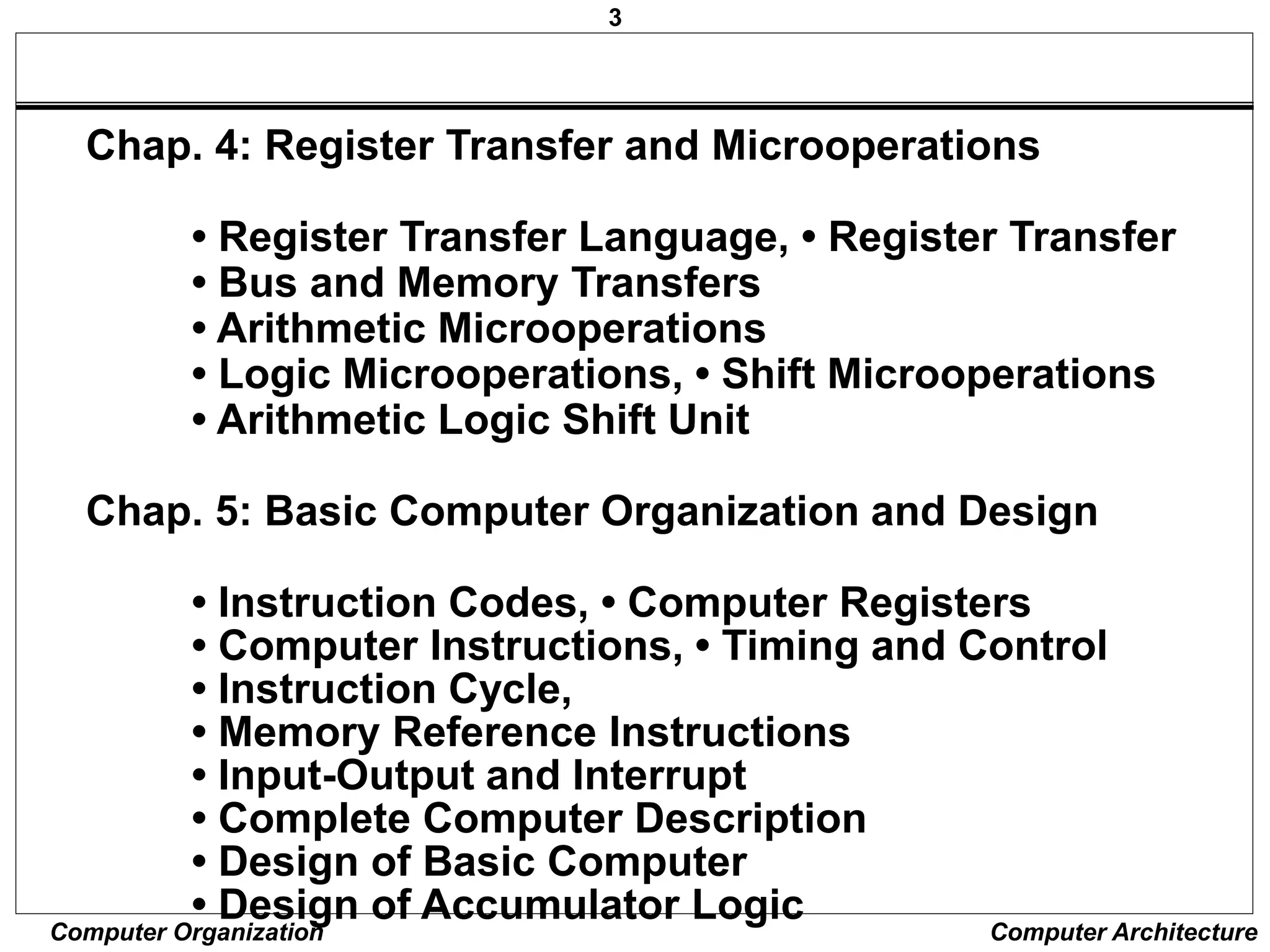
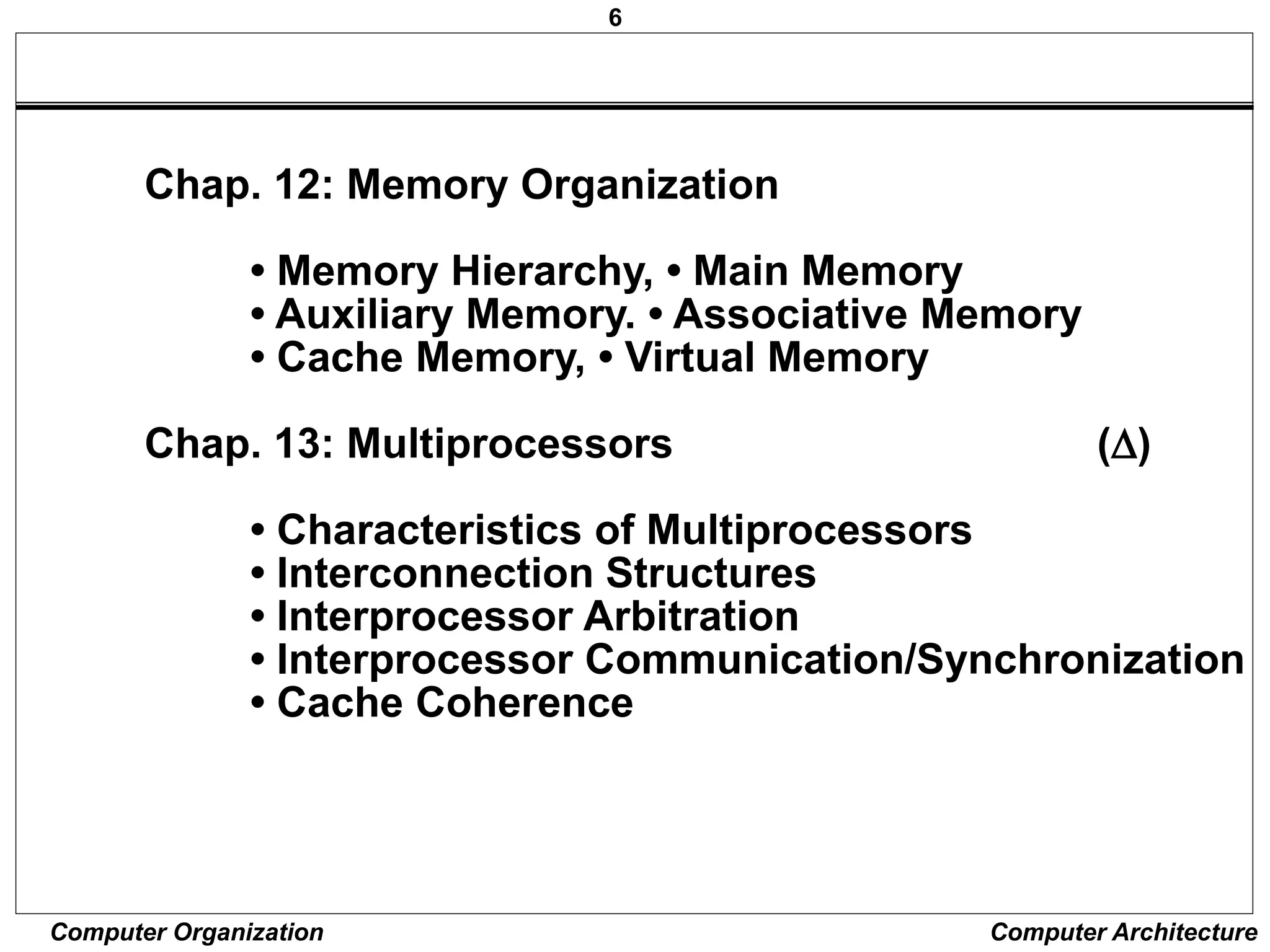
Chap. 4: Register Transfer and Microoperations
• Register Transfer Language, • Register Transfer
• Bus and Memory Transfers
• Arithmetic Microoperations
• Logic Microoperations, • Shift Microoperations
• Arithmetic Logic Shift Unit
Chap. 5: Basic Computer Organization and Design
• Instruction Codes, • Computer Registers
• Computer Instructions, • Timing and Control
• Instruction Cycle,
• Memory Reference Instructions
• Input-Output and Interrupt
• Complete Computer Description
• Design of Basic Computer
• Design of Accumulator Logic
4
Computer Organization Computer Architecture
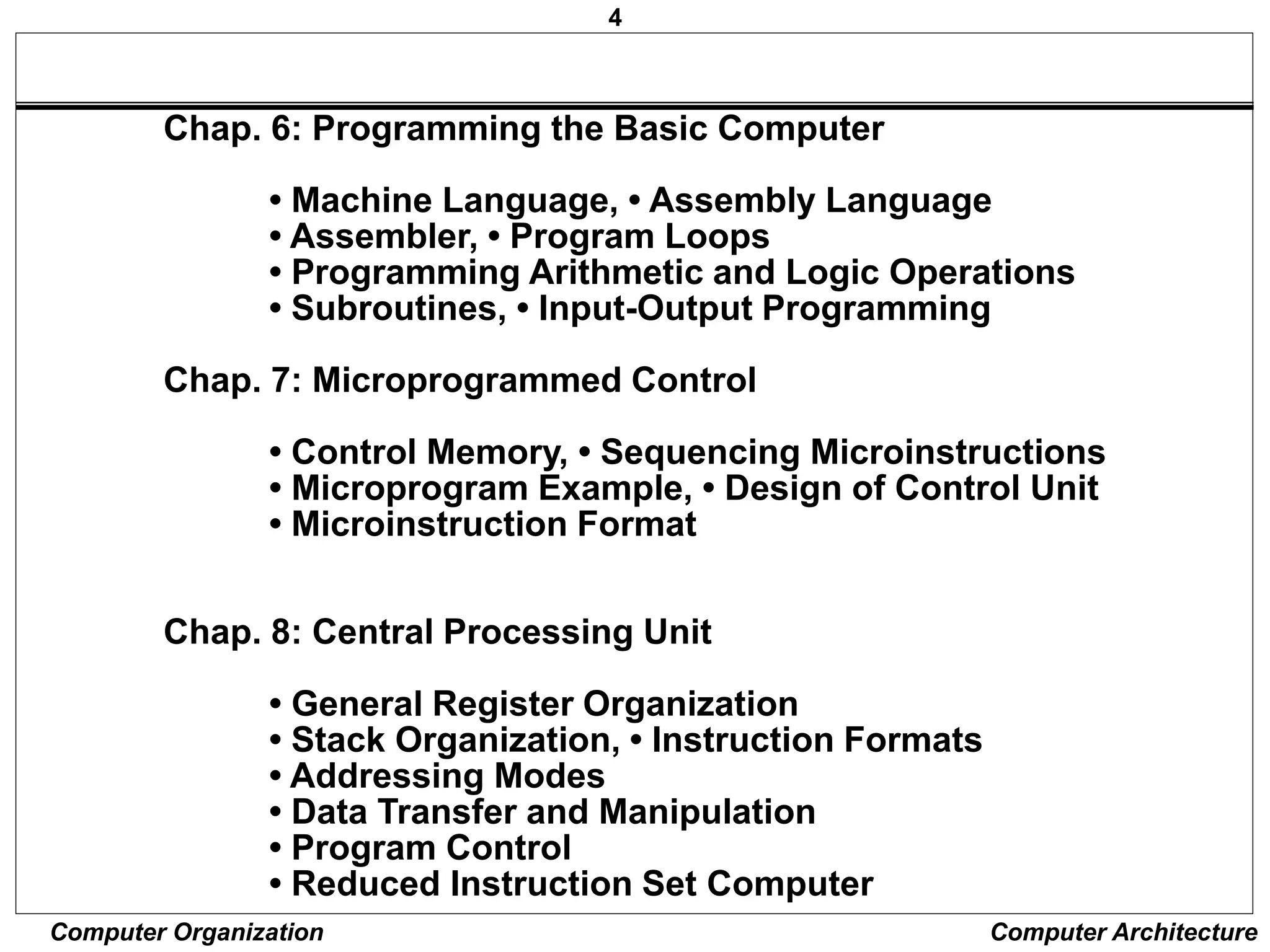
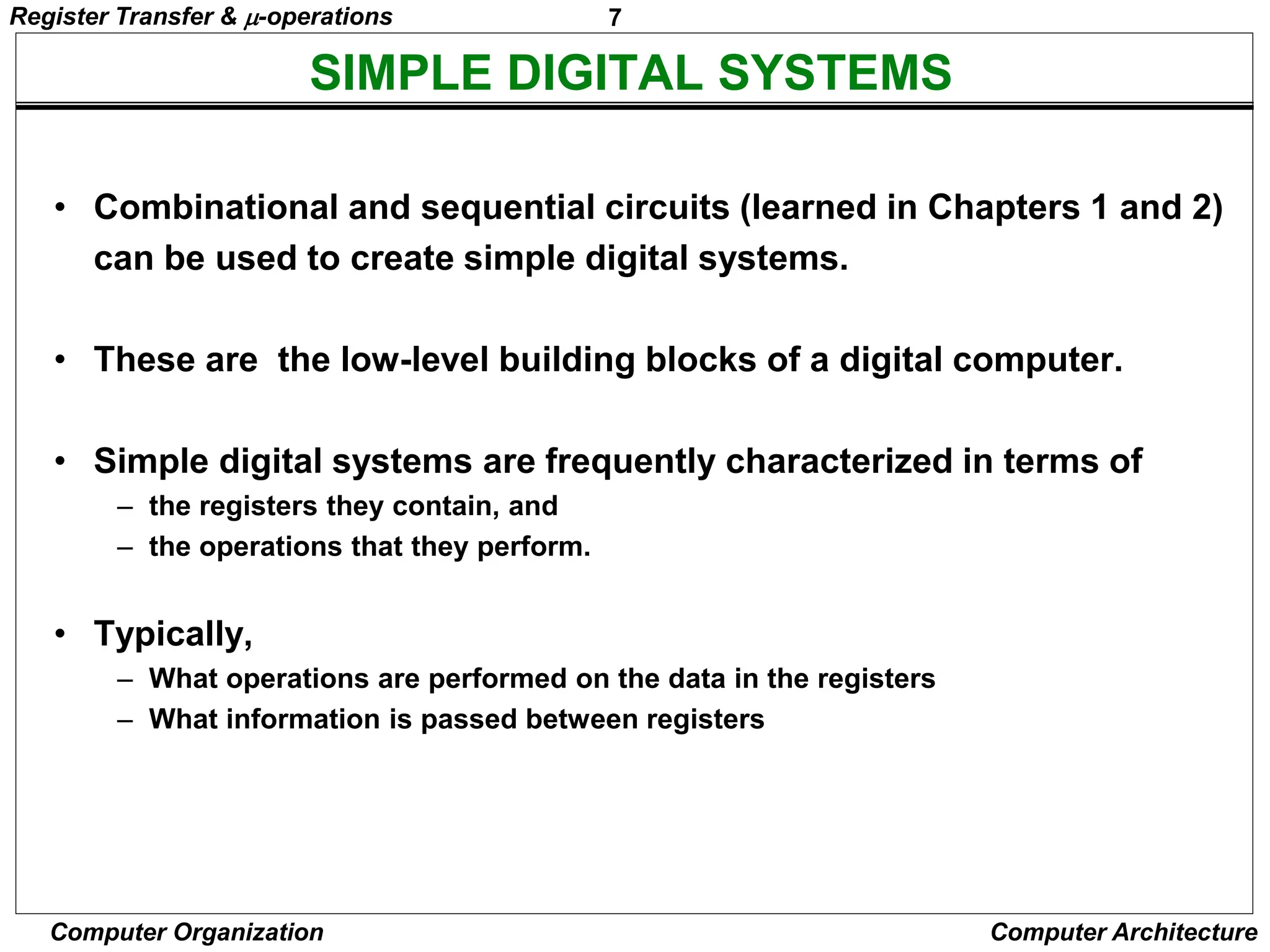
Chap. 6: Programming the Basic Computer
• Machine Language, • Assembly Language
• Assembler, • Program Loops
• Programming Arithmetic and Logic Operations
• Subroutines, • Input-Output Programming
Chap. 7: Microprogrammed Control
• Control Memory, • Sequencing Microinstructions
• Microprogram Example, • Design of Control Unit
• Microinstruction Format
Chap. 8: Central Processing Unit
• General Register Organization
• Stack Organization, • Instruction Formats
• Addressing Modes
• Data Transfer and Manipulation
• Program Control
• Reduced Instruction Set Computer
5
Computer Organization Computer Architecture
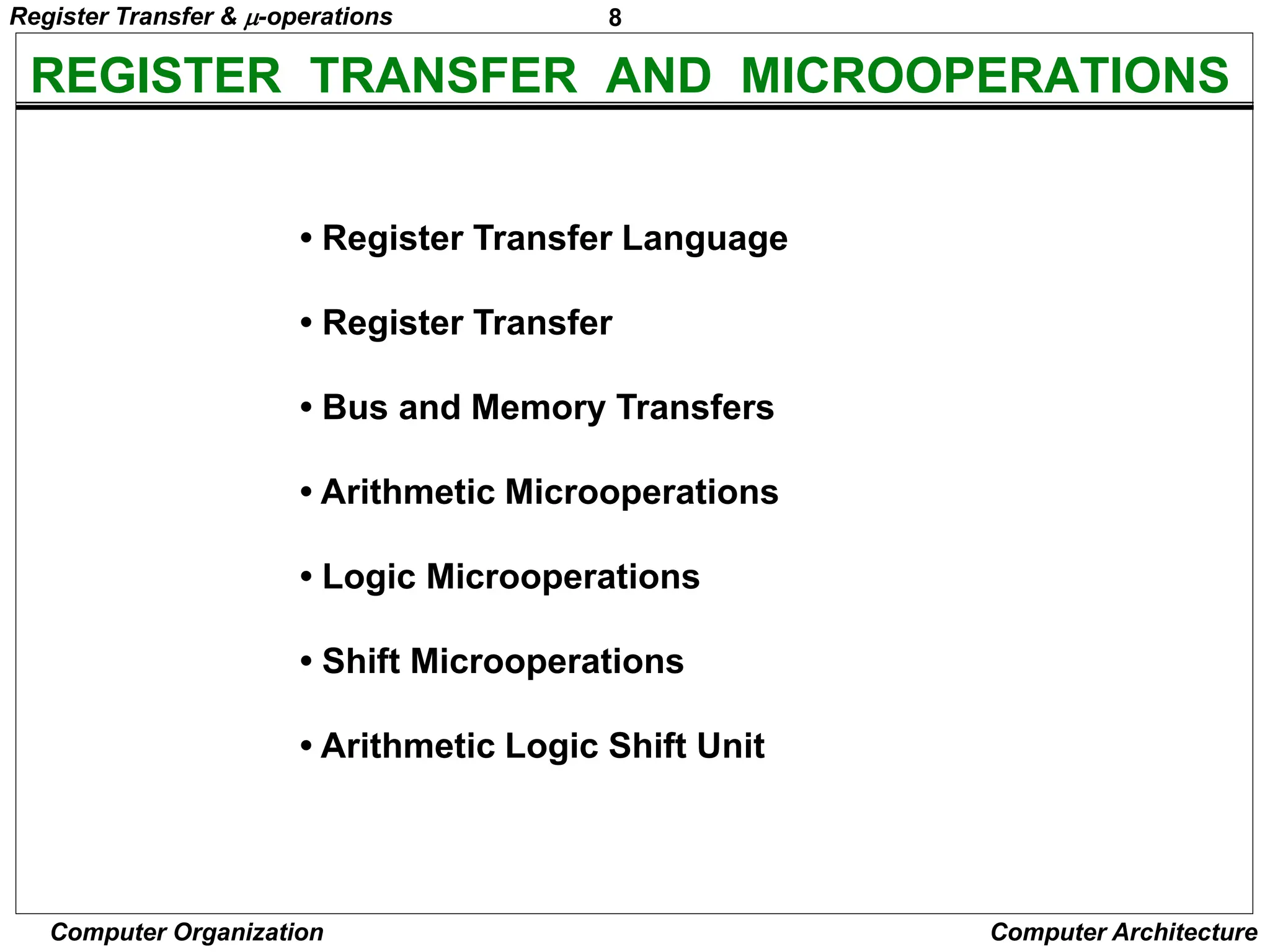
Chap. 9: Pipeline and Vector Processing
• Parallel Processing, • Pipelining
• Arithmetic Pipeline, • Instruction Pipeline
• RISC Pipeline, • Vector Processing
Chap. 10: Computer Arithmetic
• Arithmetic with Signed-2's Complement Numbers
• Multiplication and Division Algorithms
• Floating-Point Arithmetic Operations
• Decimal Arithmetic Unit
• Decimal Arithmetic Operations
Chap. 11: Input-Output Organization
• Peripheral Devices, • Input-Output Interface
• Asynchronous Data Transfer, • Modes of Transfer
• Priority Interrupt, • Direct Memory Access
6
Computer Organization Computer Architecture
Chap. 12: Memory Organization
• Memory Hierarchy, • Main Memory
• Auxiliary Memory. • Associative Memory
• Cache Memory, • Virtual Memory
Chap. 13: Multiprocessors ()
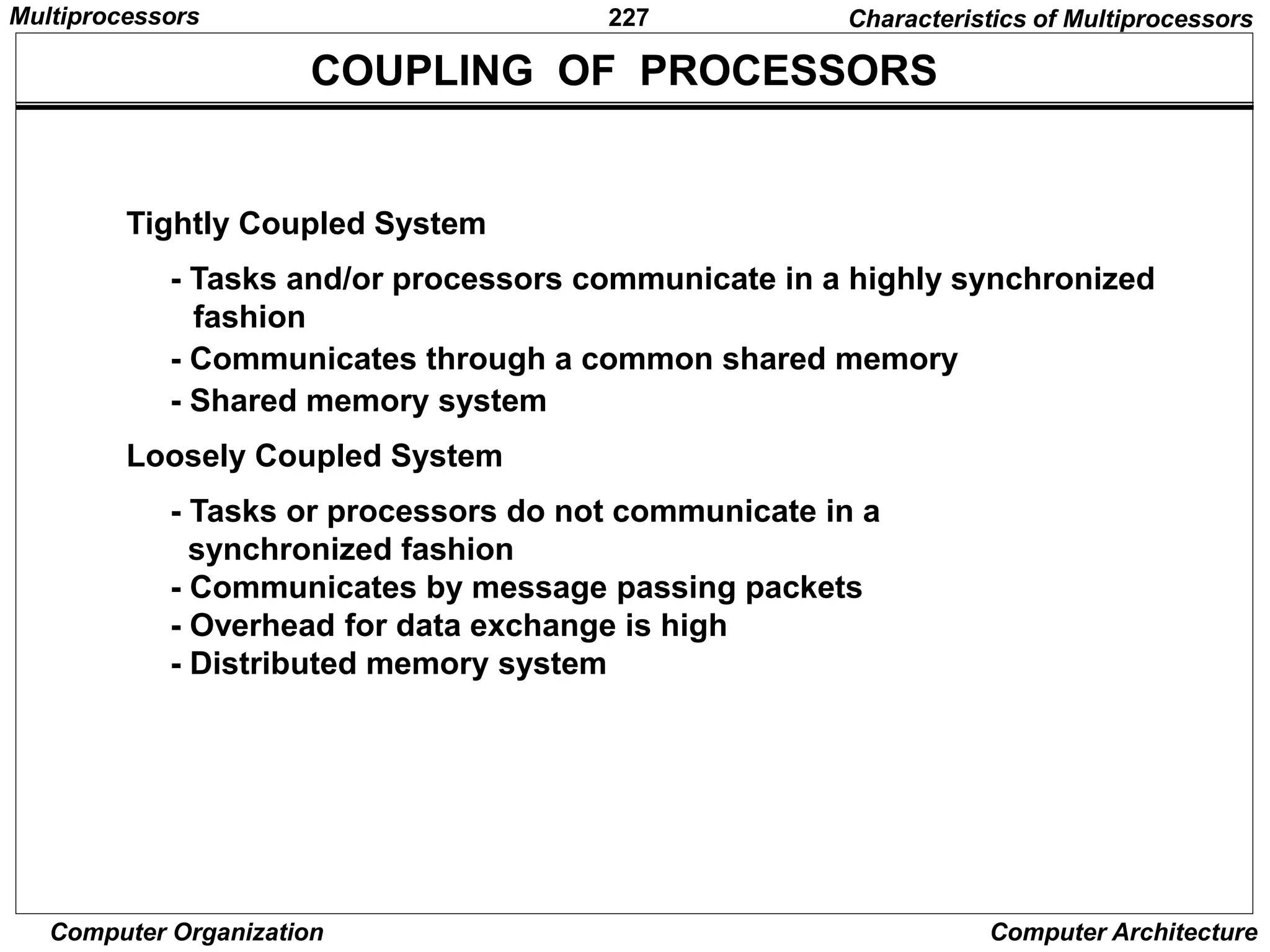
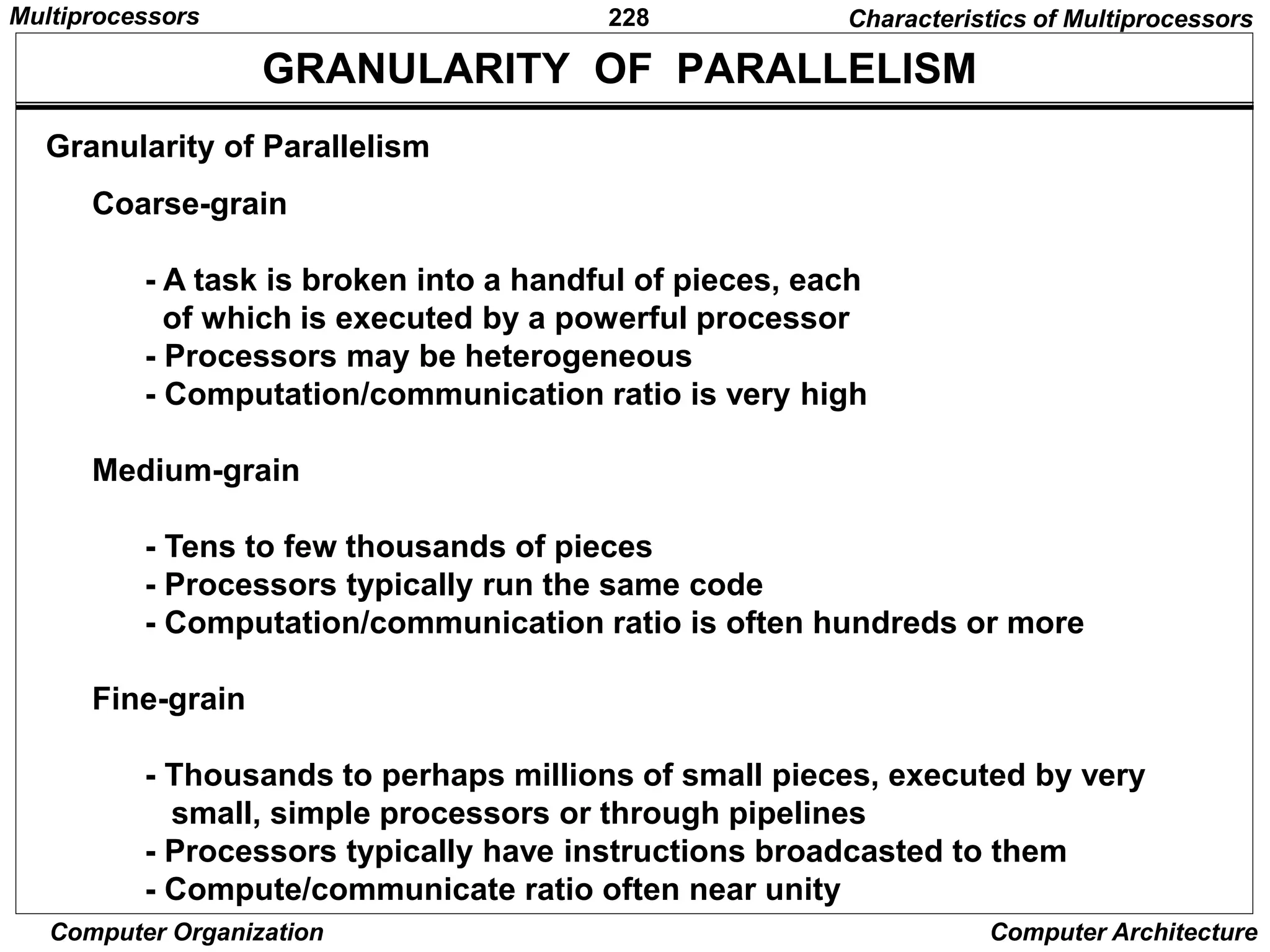
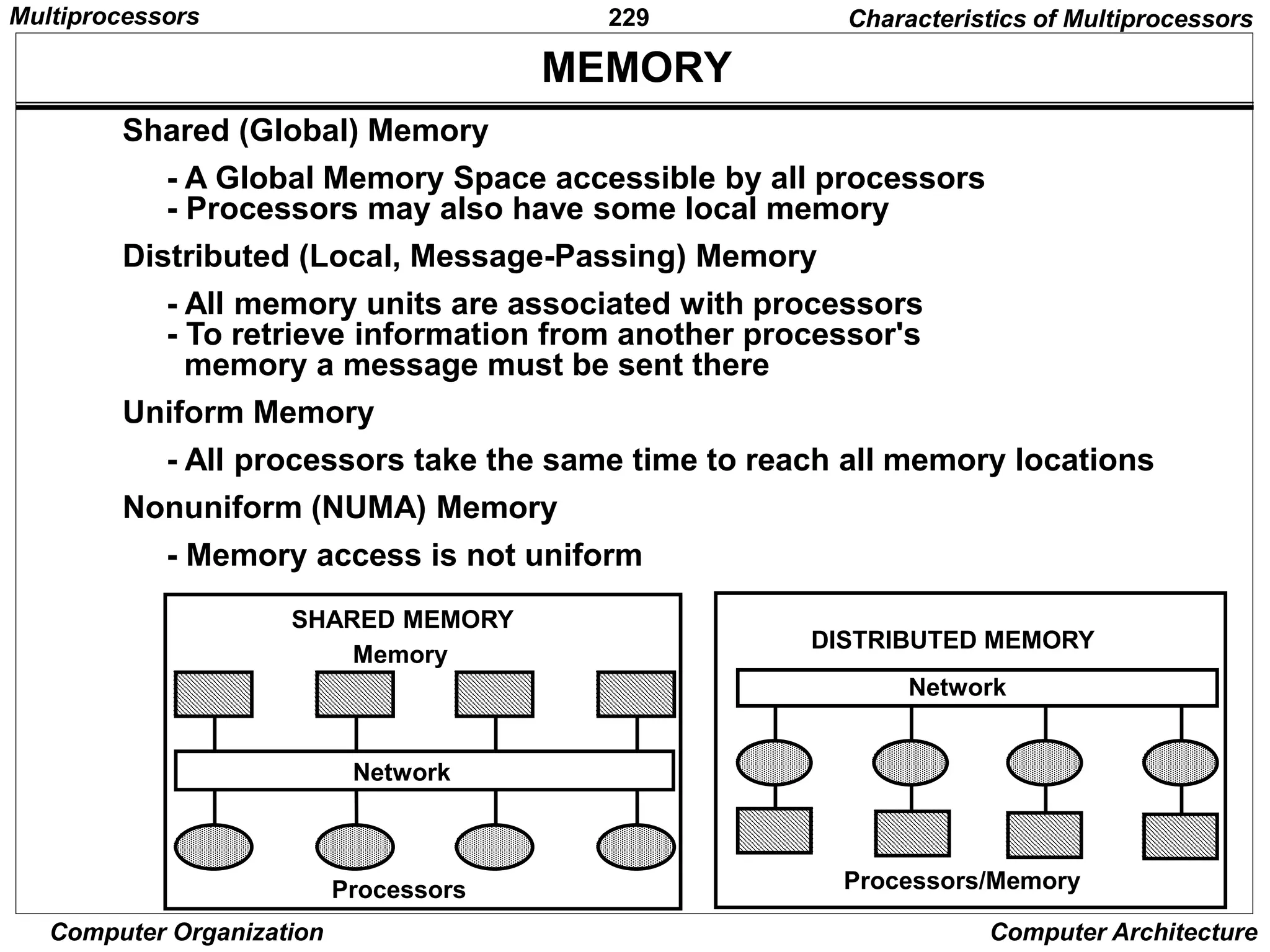
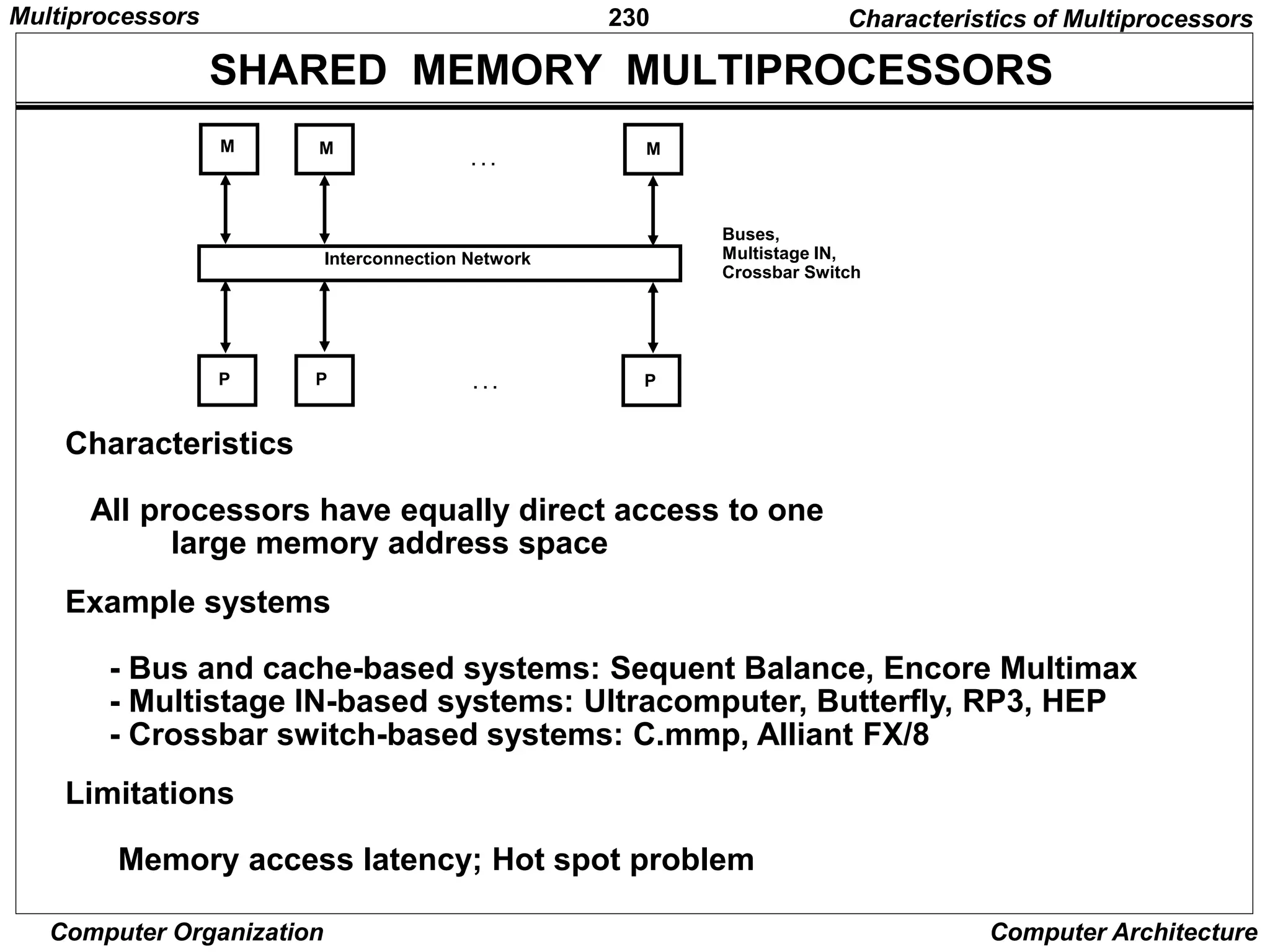
• Characteristics of Multiprocessors
• Interconnection Structures
• Interprocessor Arbitration
• Interprocessor Communication/Synchronization
• Cache Coherence
7
Computer Organization Computer Architecture
SIMPLE DIGITAL SYSTEMS
• Combinational and sequential circuits (learned in Chapters 1 and 2)
can be used to create simple digital systems.
• These are the low-level building blocks of a digital computer.
• Simple digital systems are frequently characterized in terms of
– the registers they contain, and
– the operations that they perform.
• Typically,
– What operations are performed on the data in the registers
– What information is passed between registers
Register Transfer & -operations
8
Computer Organization Computer Architecture
REGISTER TRANSFER AND MICROOPERATIONS
• Register Transfer Language
• Register Transfer
• Bus and Memory Transfers
• Arithmetic Microoperations
• Logic Microoperations
• Shift Microoperations
• Arithmetic Logic Shift Unit
Register Transfer & -operations
9
Computer Organization Computer Architecture
MICROOPERATIONS (1)
Register Transfer Language
• The operations on the data in registers are called
microoperations.
• The functions built into registers are examples of
microoperations
– Shift
– Load
– Clear
– Increment
– …
Register Transfer & -operations
10
Computer Organization Computer Architecture
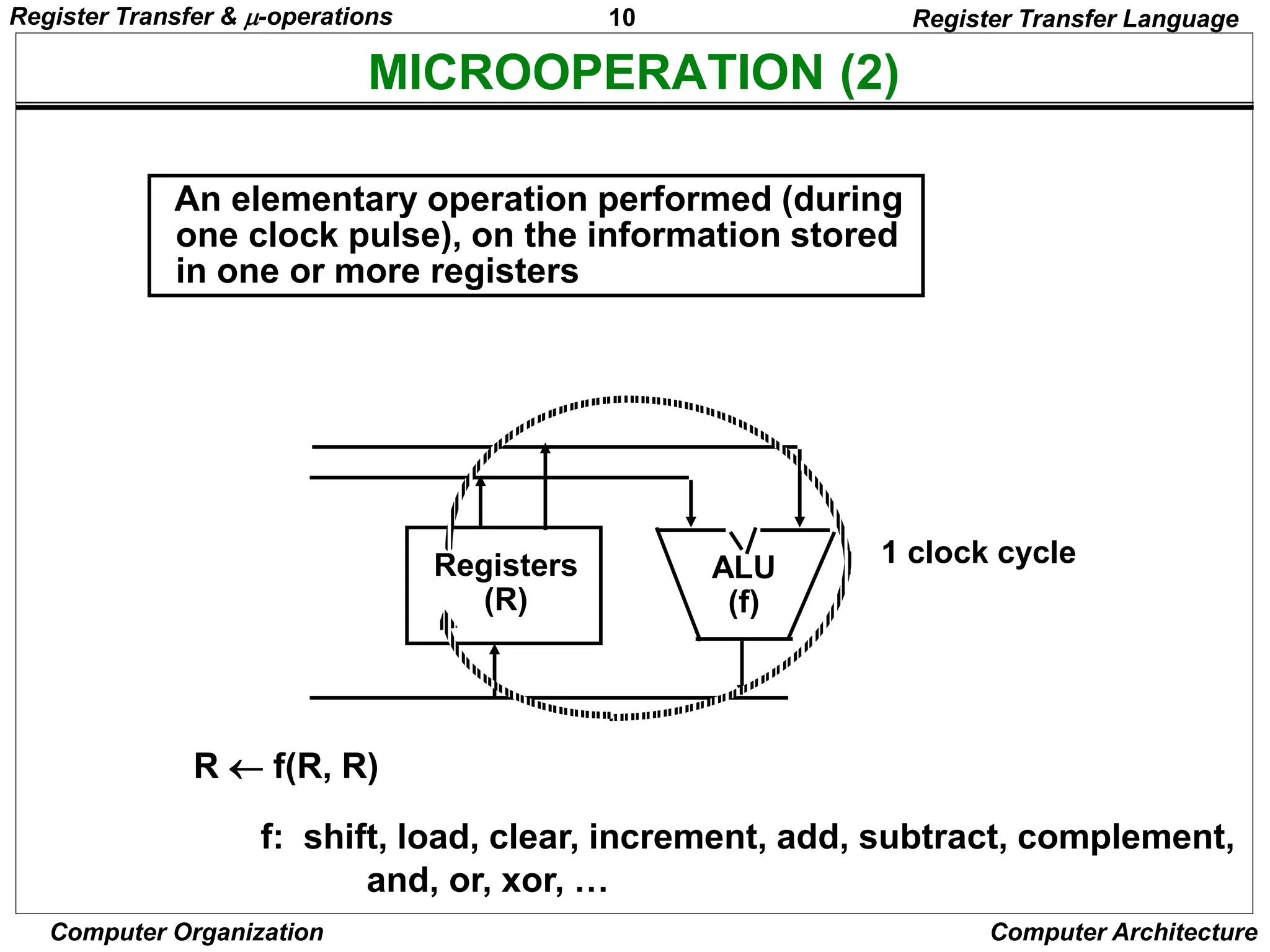
MICROOPERATION (2)
An elementary operation performed (during
one clock pulse), on the information stored
in one or more registers
R  f(R, R)
f: shift, load, clear, increment, add, subtract, complement,
and, or, xor, …
ALU
(f)
Registers
(R)
1 clock cycle
Register Transfer Language
Register Transfer & -operations
11
Computer Organization Computer Architecture
ORGANIZATION OF A DIGITAL SYSTEM
- Set of registers and their functions
- Microoperations set
Set of allowable microoperations provided
by the organization of the computer
- Control signals that initiate the sequence of
microoperations (to perform the functions)
• Definition of the (internal) organization of a computer
Register Transfer Language
Register Transfer & -operations
12
Computer Organization Computer Architecture
REGISTER TRANSFER LEVEL
Register Transfer Language
• Viewing a computer, or any digital system, in this way is
called the register transfer level
• This is because we’re focusing on
– The system’s registers
– The data transformations in them, and
– The data transfers between them.
Register Transfer & -operations
13
Computer Organization Computer Architecture
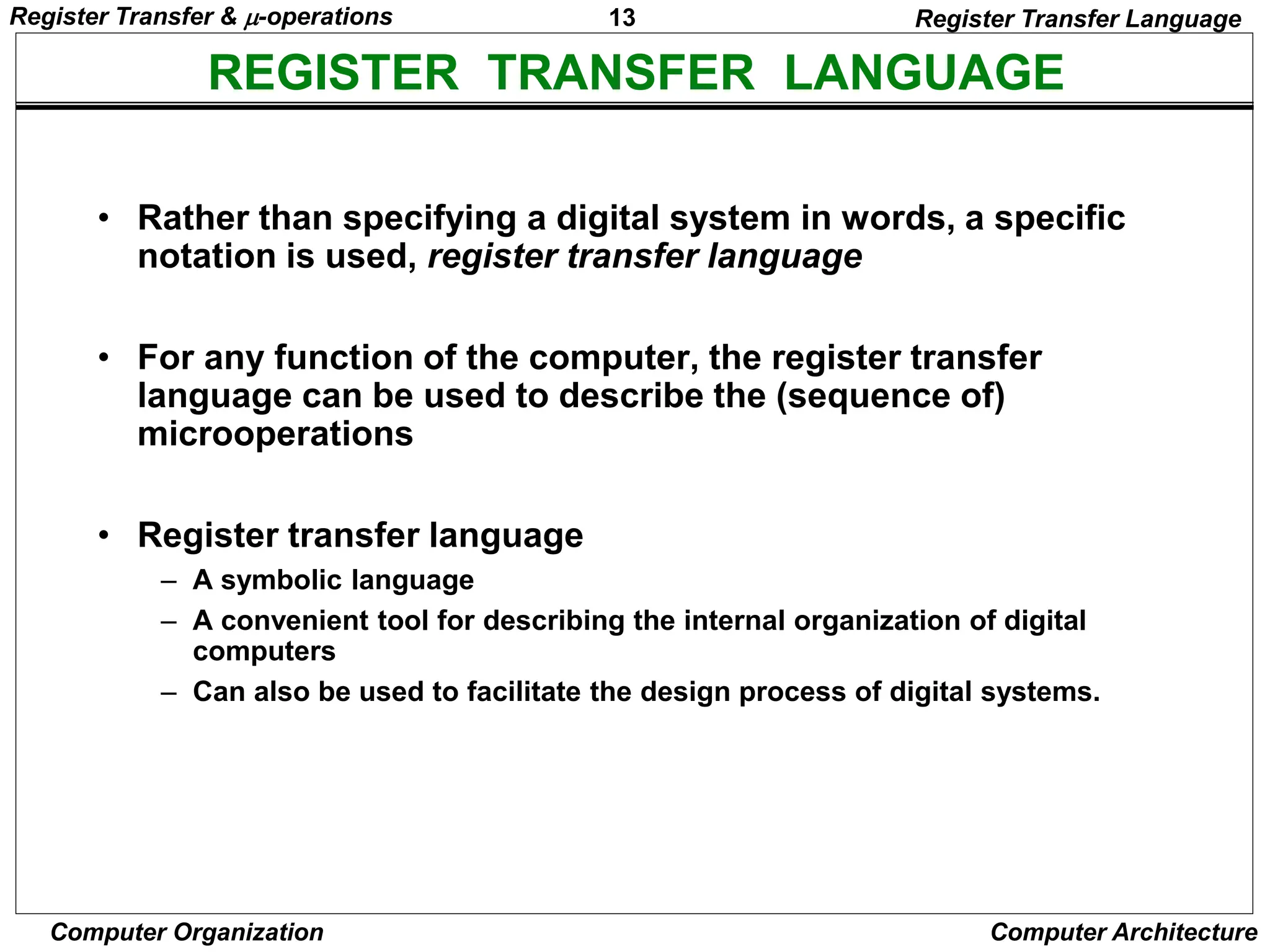
REGISTER TRANSFER LANGUAGE
Register Transfer Language
• Rather than specifying a digital system in words, a specific
notation is used, register transfer language
• For any function of the computer, the register transfer
language can be used to describe the (sequence of)
microoperations
• Register transfer language
– A symbolic language
– A convenient tool for describing the internal organization of digital
computers
– Can also be used to facilitate the design process of digital systems.
Register Transfer & -operations
14
Computer Organization Computer Architecture
DESIGNATION OF REGISTERS
Register Transfer Language
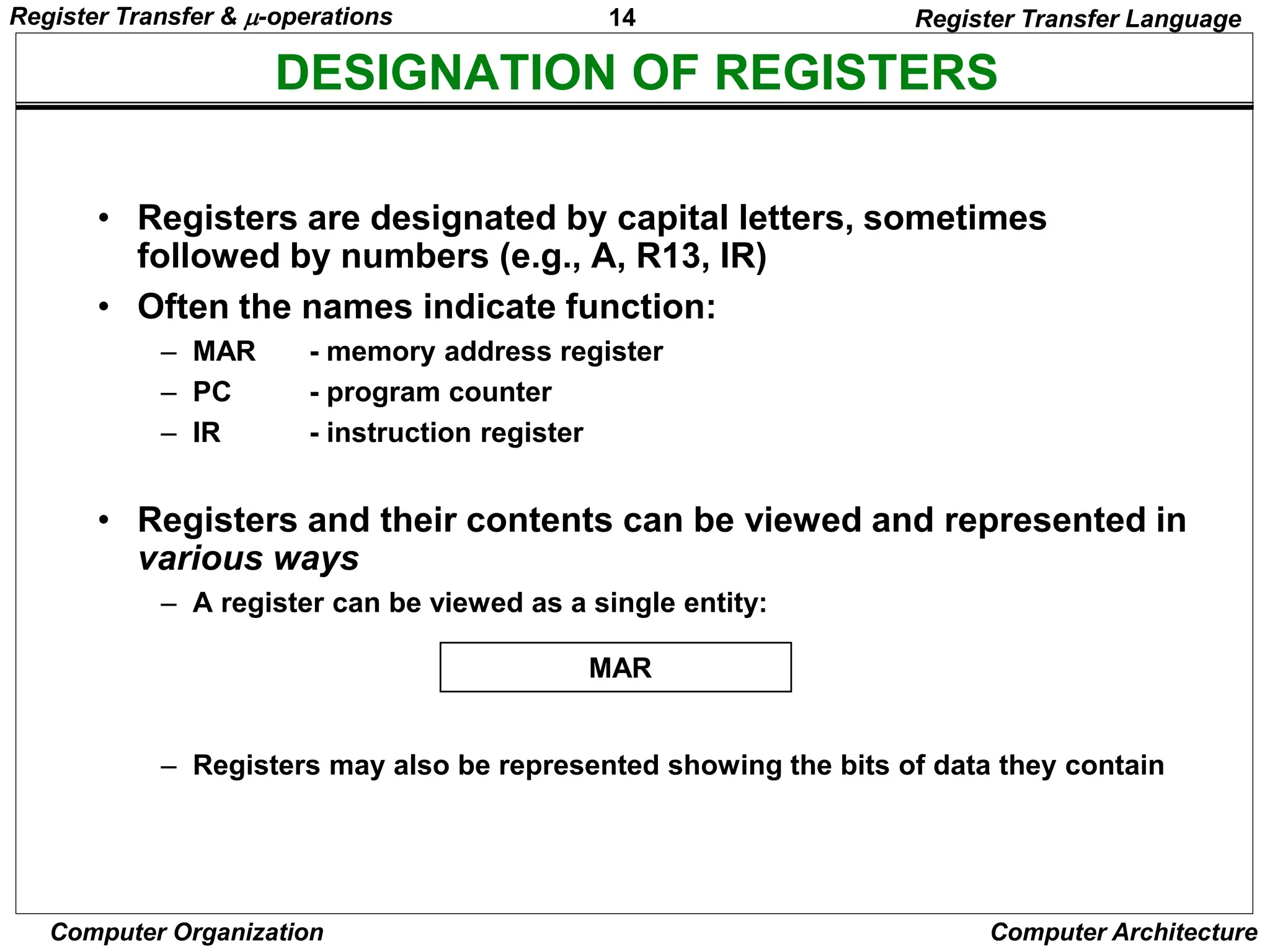
• Registers are designated by capital letters, sometimes
followed by numbers (e.g., A, R13, IR)
• Often the names indicate function:
– MAR - memory address register
– PC - program counter
– IR - instruction register
• Registers and their contents can be viewed and represented in
various ways
– A register can be viewed as a single entity:
– Registers may also be represented showing the bits of data they contain
MAR
Register Transfer & -operations
15
Computer Organization Computer Architecture
DESIGNATION OF REGISTERS
Register Transfer Language
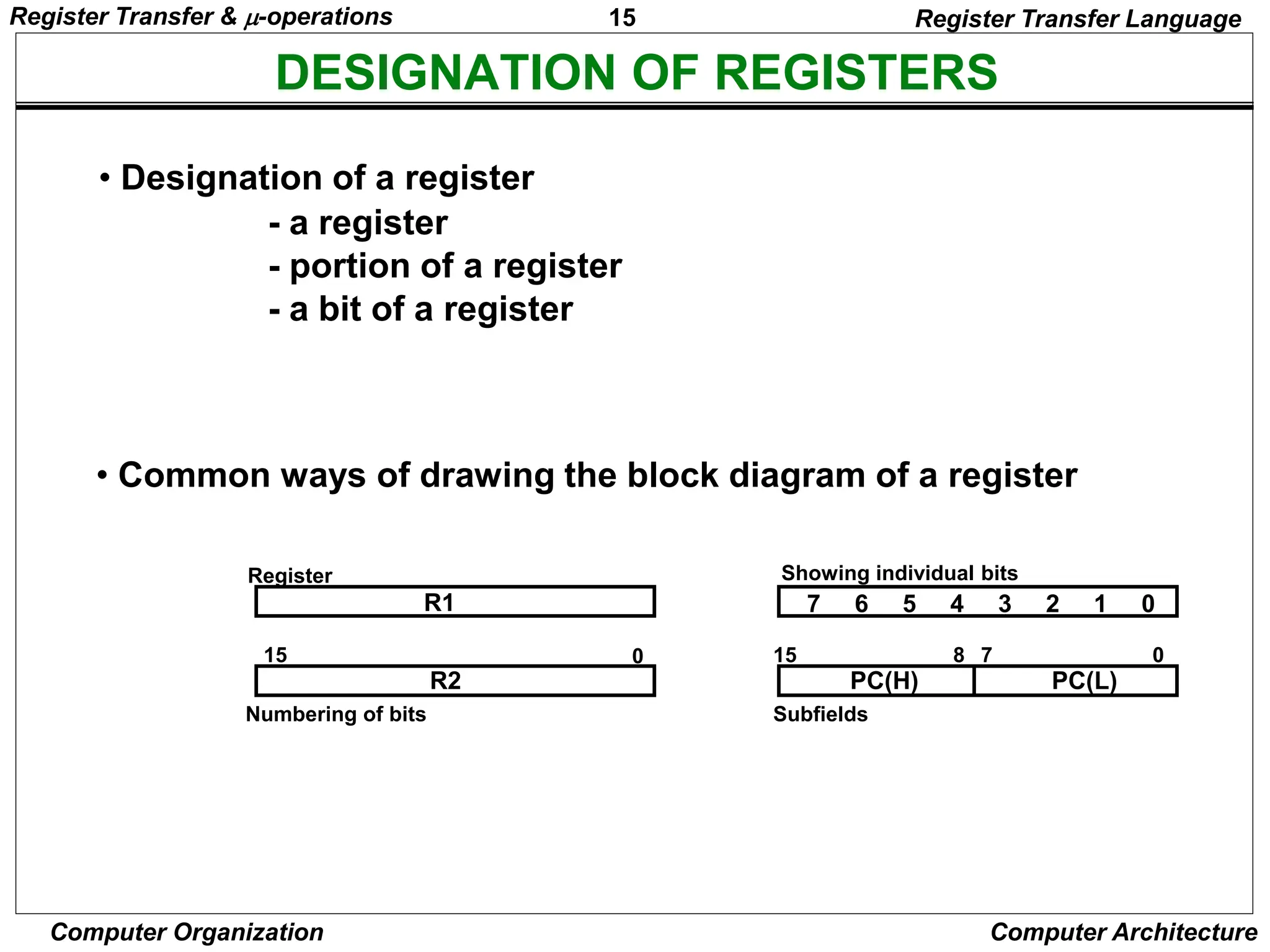
R1
Register
Numbering of bits
Showing individual bits
Subfields
PC(H) PC(L)
15 8 7 0
- a register
- portion of a register
- a bit of a register
• Common ways of drawing the block diagram of a register
7 6 5 4 3 2 1 0
R2
15 0
• Designation of a register
Register Transfer & -operations
16
Computer Organization Computer Architecture
REGISTER TRANSFER
Register Transfer
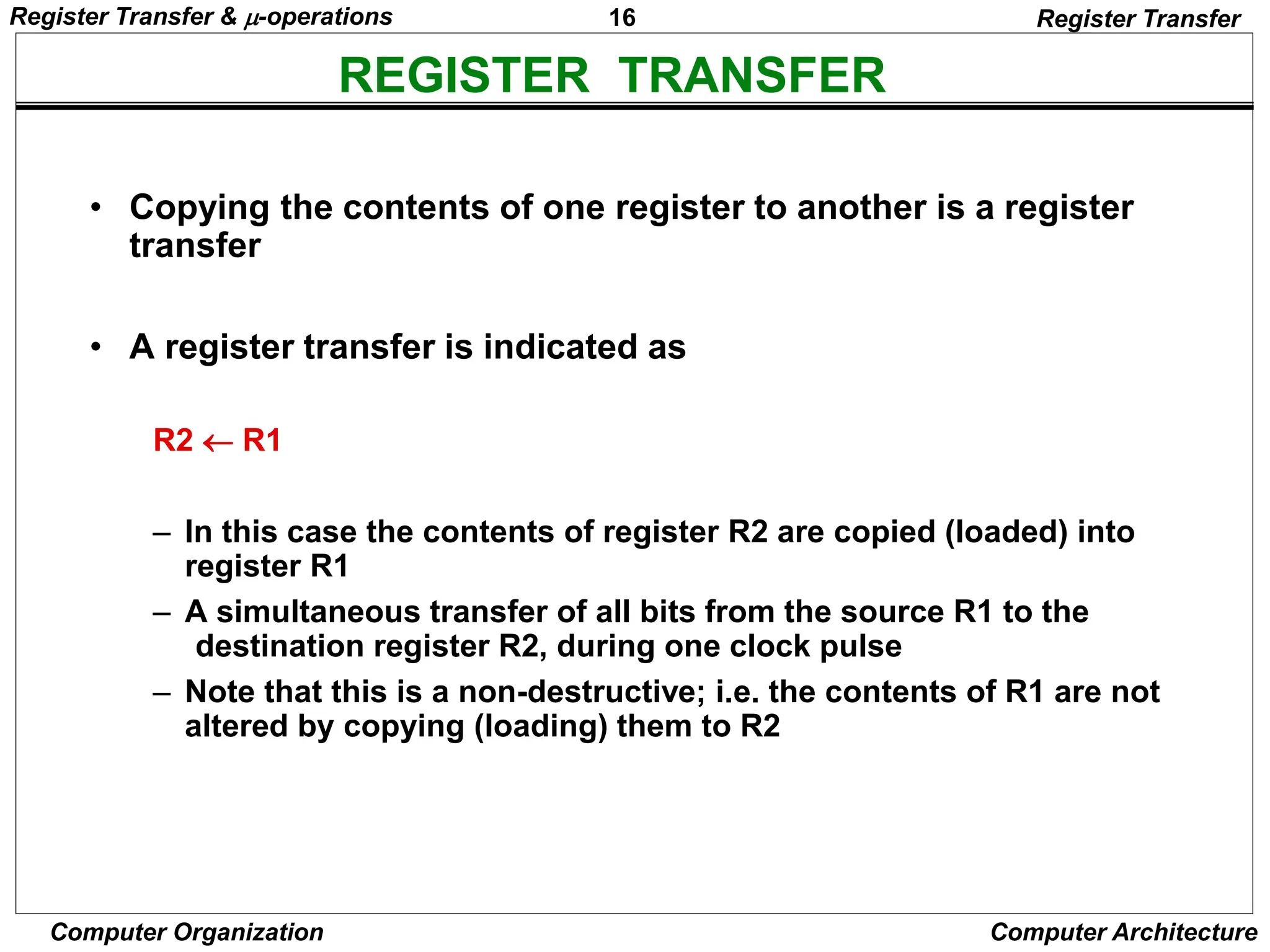
• Copying the contents of one register to another is a register
transfer
• A register transfer is indicated as
R2  R1
– In this case the contents of register R2 are copied (loaded) into
register R1
– A simultaneous transfer of all bits from the source R1 to the
destination register R2, during one clock pulse
– Note that this is a non-destructive; i.e. the contents of R1 are not
altered by copying (loading) them to R2
Register Transfer & -operations
17
Computer Organization Computer Architecture
REGISTER TRANSFER
Register Transfer
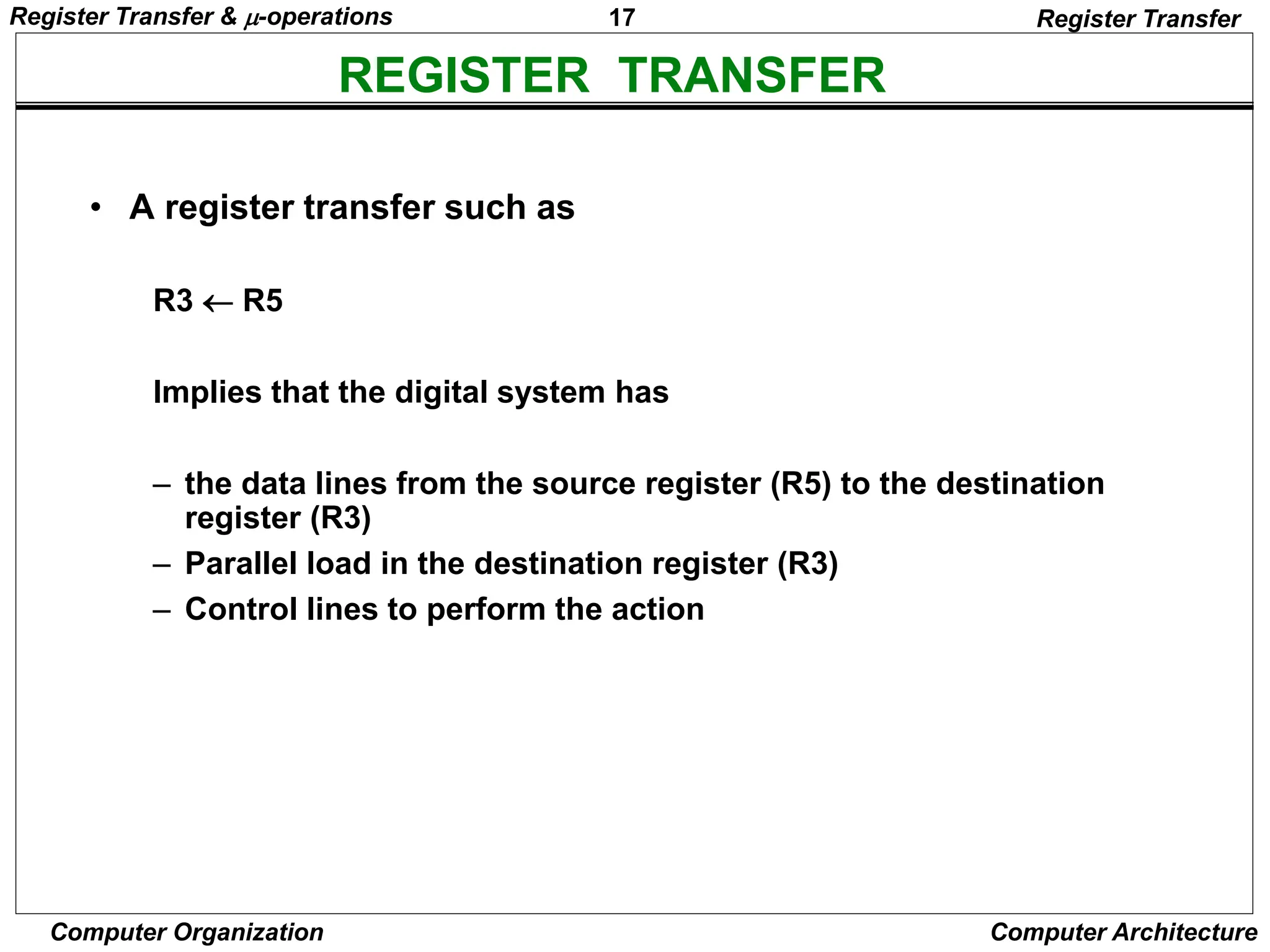
• A register transfer such as
R3  R5
Implies that the digital system has
– the data lines from the source register (R5) to the destination
register (R3)
– Parallel load in the destination register (R3)
– Control lines to perform the action
Register Transfer & -operations
18
Computer Organization Computer Architecture
CONTROL FUNCTIONS
Register Transfer
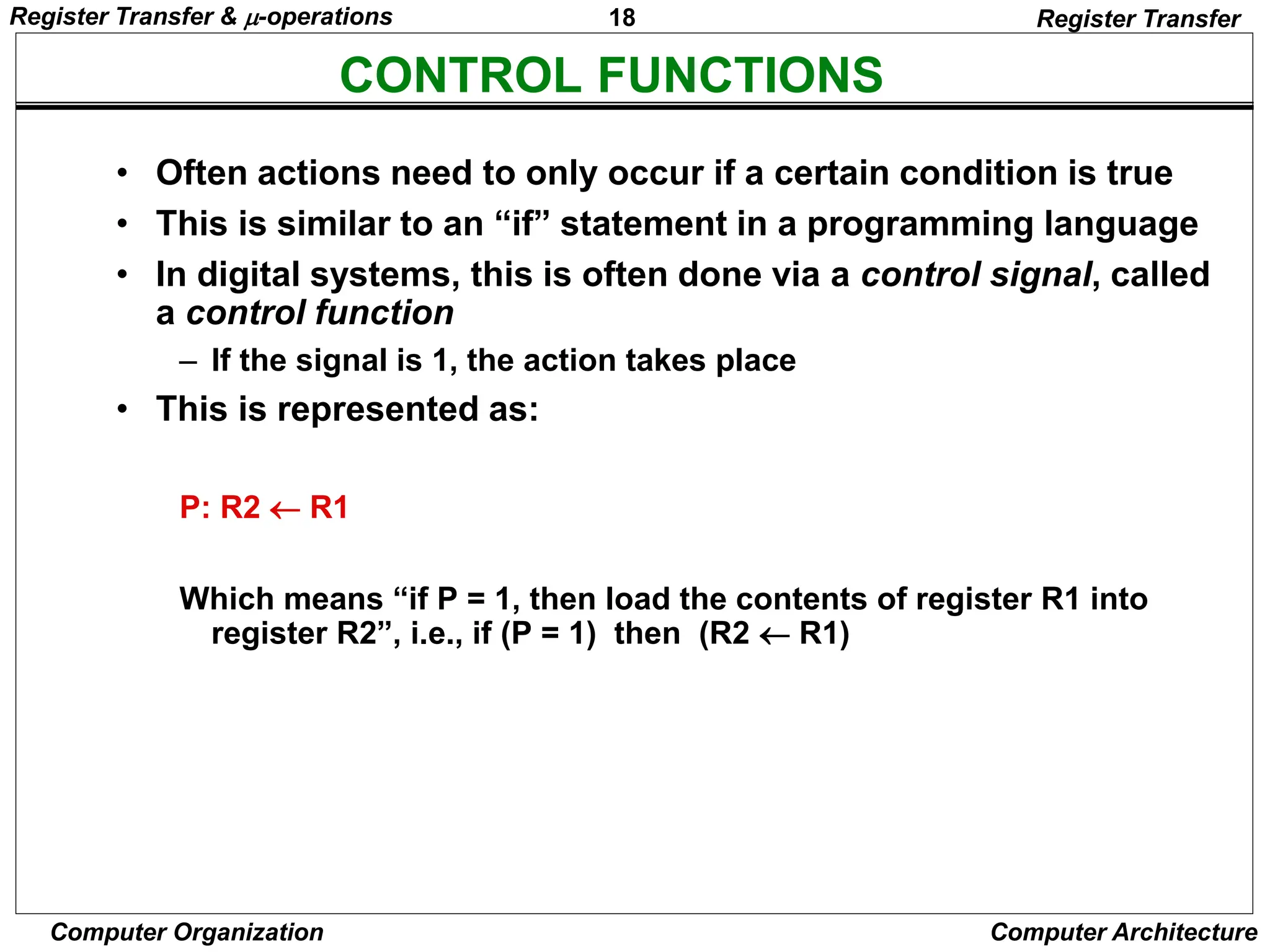
• Often actions need to only occur if a certain condition is true
• This is similar to an “if” statement in a programming language
• In digital systems, this is often done via a control signal, called
a control function
– If the signal is 1, the action takes place
• This is represented as:
P: R2  R1
Which means “if P = 1, then load the contents of register R1 into
register R2”, i.e., if (P = 1) then (R2  R1)
Register Transfer & -operations
19
Computer Organization Computer Architecture
HARDWARE IMPLEMENTATION OF CONTROLLED TRANSFERS
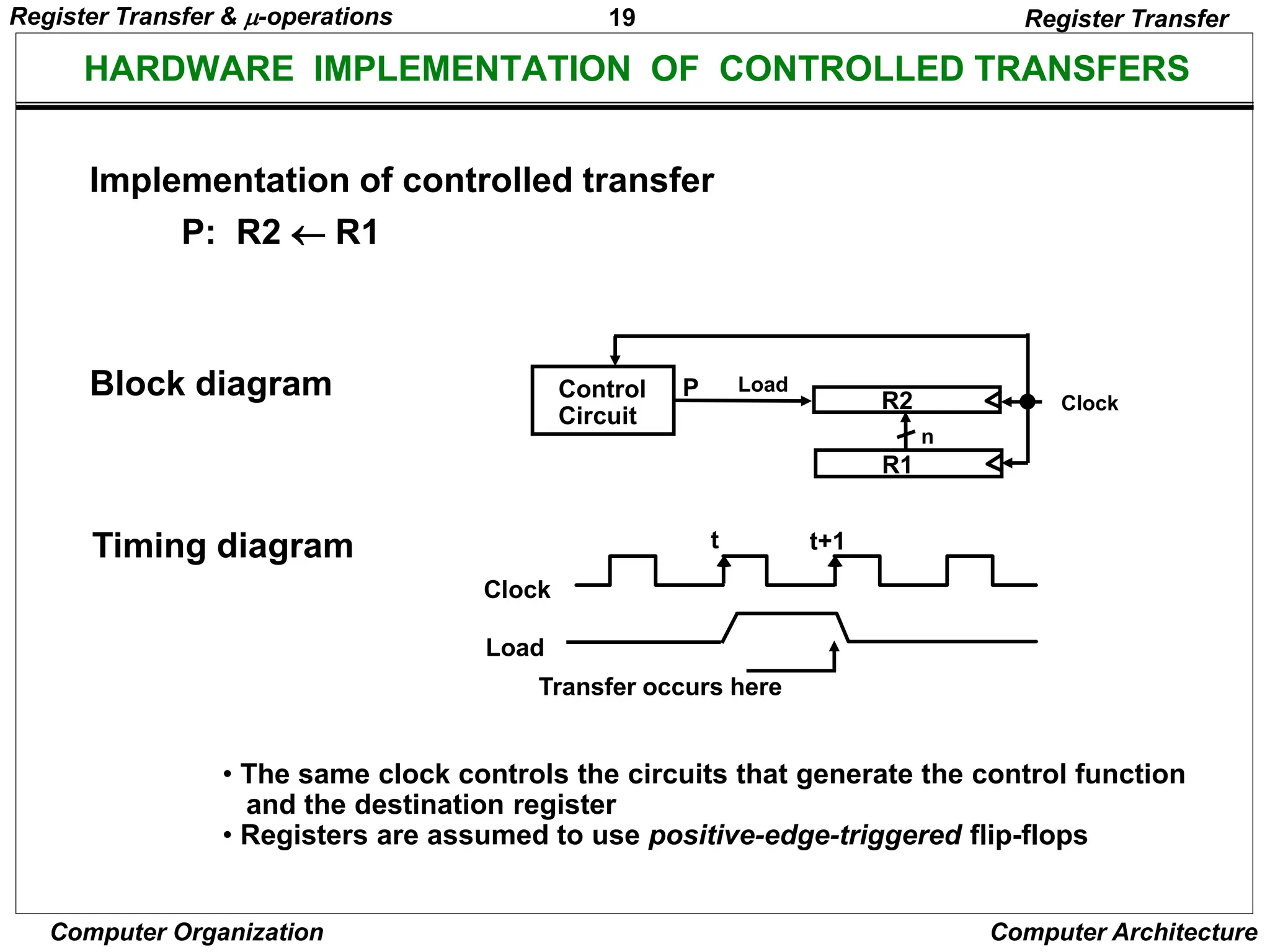
Implementation of controlled transfer
P: R2 R1
Block diagram
Timing diagram
Clock
Register Transfer
Transfer occurs here
R2
R1
Control
Circuit
Load
P
n
Clock
Load
t t+1
• The same clock controls the circuits that generate the control function
and the destination register
• Registers are assumed to use positive-edge-triggered flip-flops
Register Transfer & -operations
20
Computer Organization Computer Architecture
SIMULTANEOUS OPERATIONS
Register Transfer
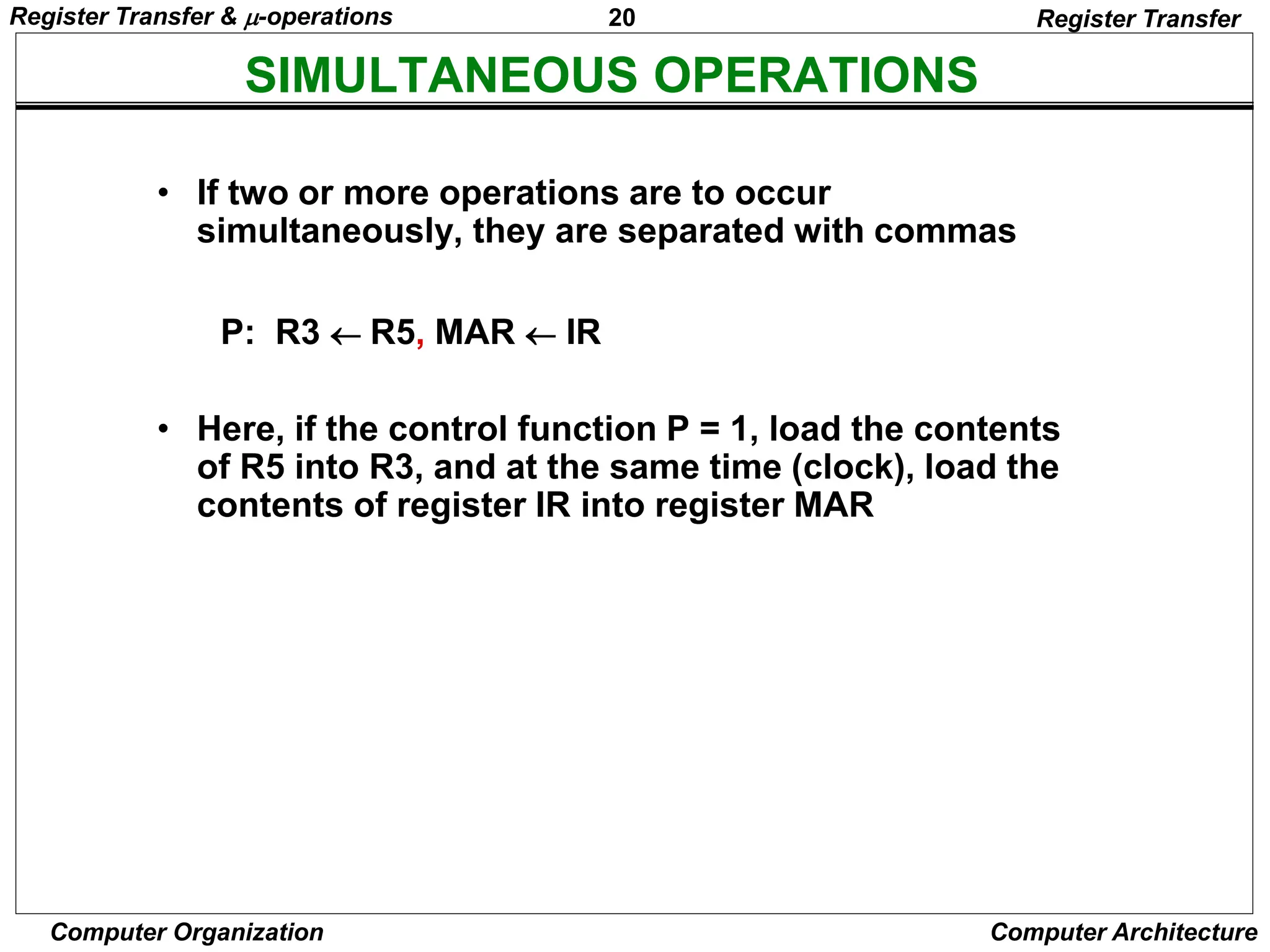
• If two or more operations are to occur
simultaneously, they are separated with commas
P: R3  R5, MAR  IR
• Here, if the control function P = 1, load the contents
of R5 into R3, and at the same time (clock), load the
contents of register IR into register MAR
Register Transfer & -operations
21
Computer Organization Computer Architecture
BASIC SYMBOLS FOR REGISTER TRANSFERS
Capital letters Denotes a register MAR, R2
& numerals
Parentheses () Denotes a part of a register R2(0-7), R2(L)
Arrow  Denotes transfer of information R2  R1
Colon : Denotes termination of control function P:
Comma , Separates two micro-operations A  B, B  A
Symbols Description Examples
Register Transfer
Register Transfer & -operations
22
Computer Organization Computer Architecture
CONNECTING REGISTRS
Register Transfer
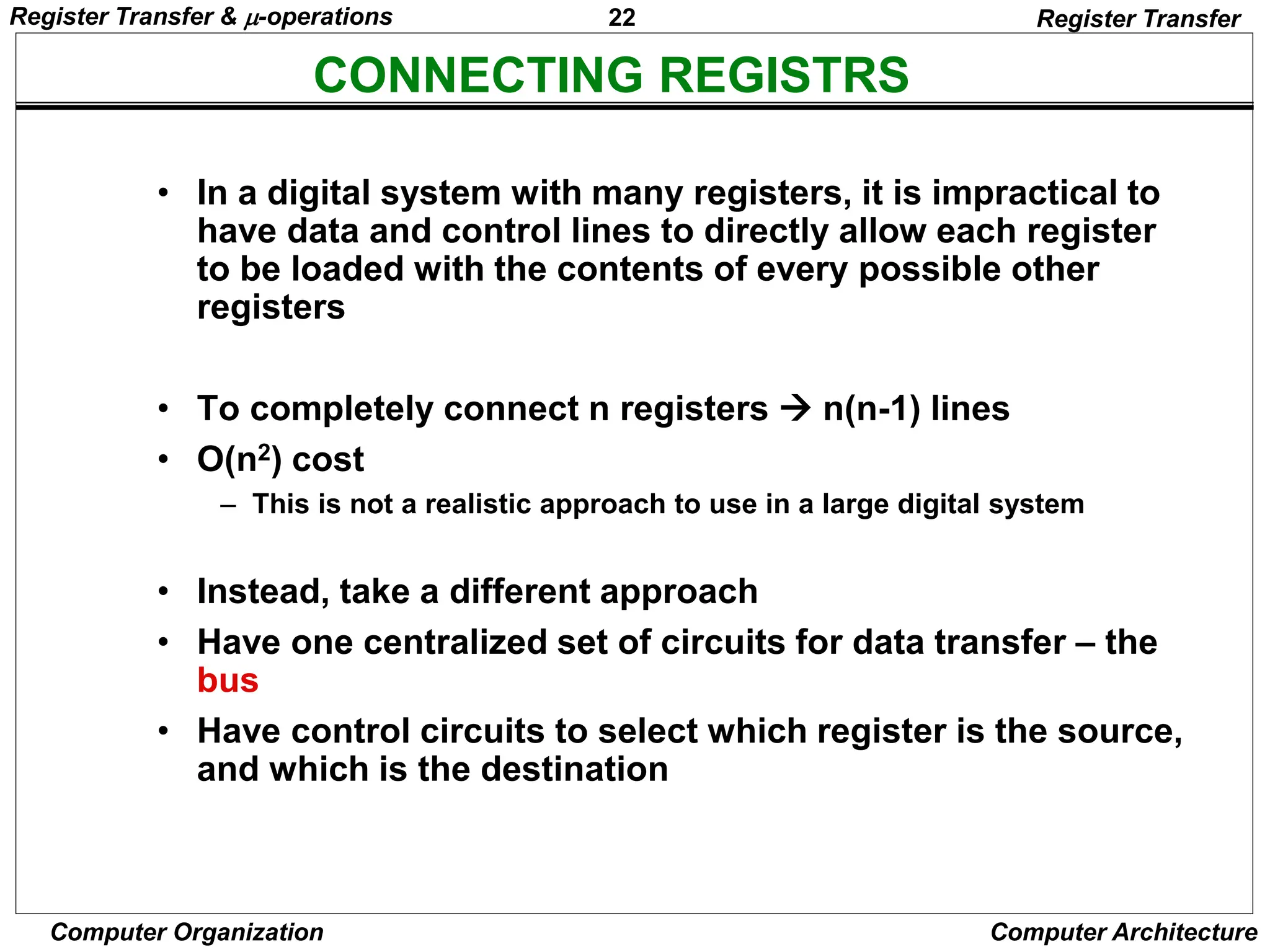
• In a digital system with many registers, it is impractical to
have data and control lines to directly allow each register
to be loaded with the contents of every possible other
registers
• To completely connect n registers  n(n-1) lines
• O(n2) cost
– This is not a realistic approach to use in a large digital system
• Instead, take a different approach
• Have one centralized set of circuits for data transfer – the
bus
• Have control circuits to select which register is the source,
and which is the destination
Register Transfer & -operations
23
Computer Organization Computer Architecture
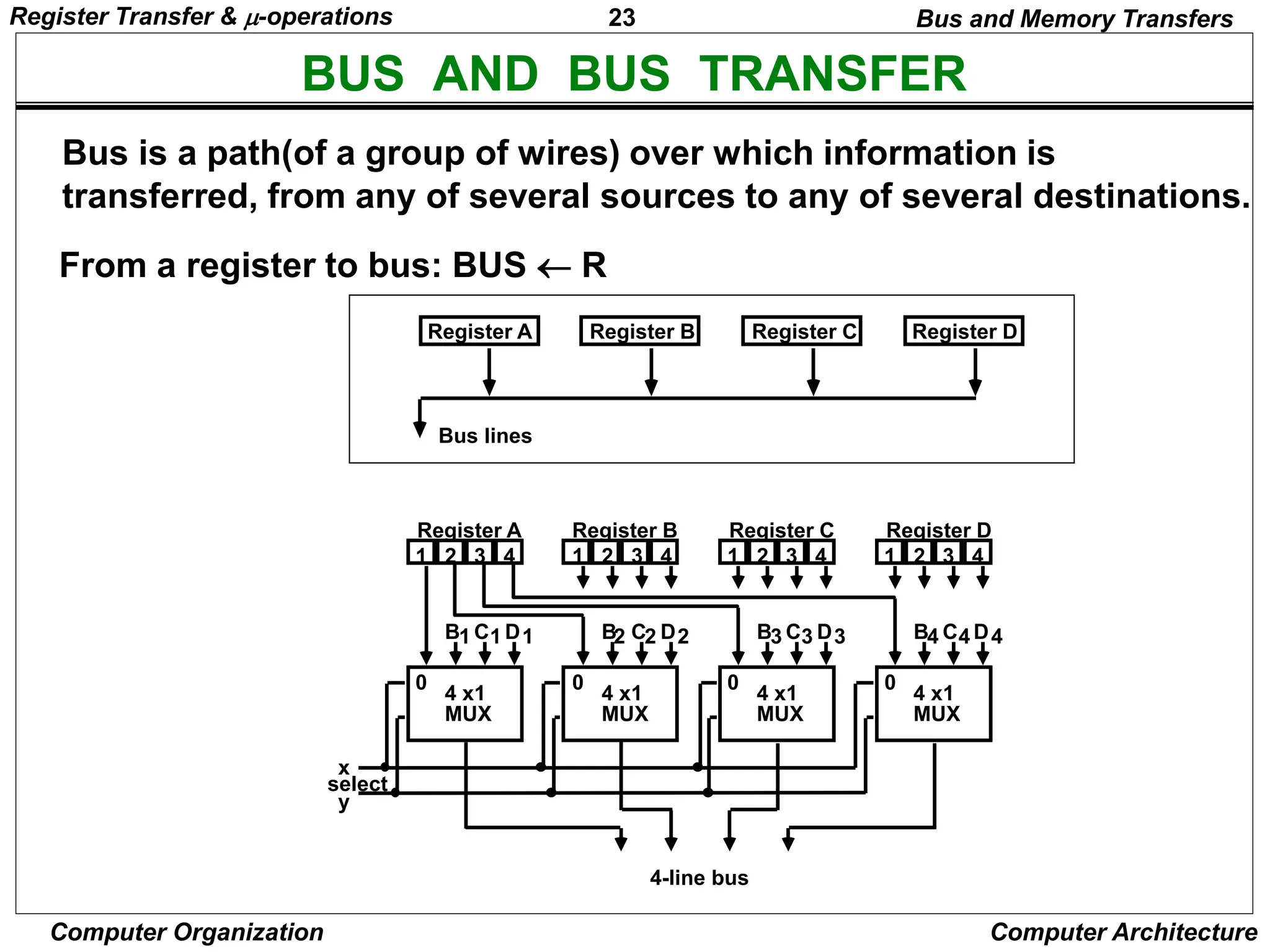
BUS AND BUS TRANSFER
Bus is a path(of a group of wires) over which information is
transferred, from any of several sources to any of several destinations.
From a register to bus: BUS  R
1 2 3 4 1 2 3 4 1 2 3 4 1 2 3 4
Register A Register B Register C Register D
B C D
1 1 1
4 x1
MUX
B C D
2 2 2
4 x1
MUX
B C D
3 3 3
4 x1
MUX
B C D
4 4 4
4 x1
MUX
4-line bus
x
y
select
0 0 0 0
Register A Register B Register C Register D
Bus lines
Bus and Memory Transfers
Register Transfer & -operations
24
Computer Organization Computer Architecture
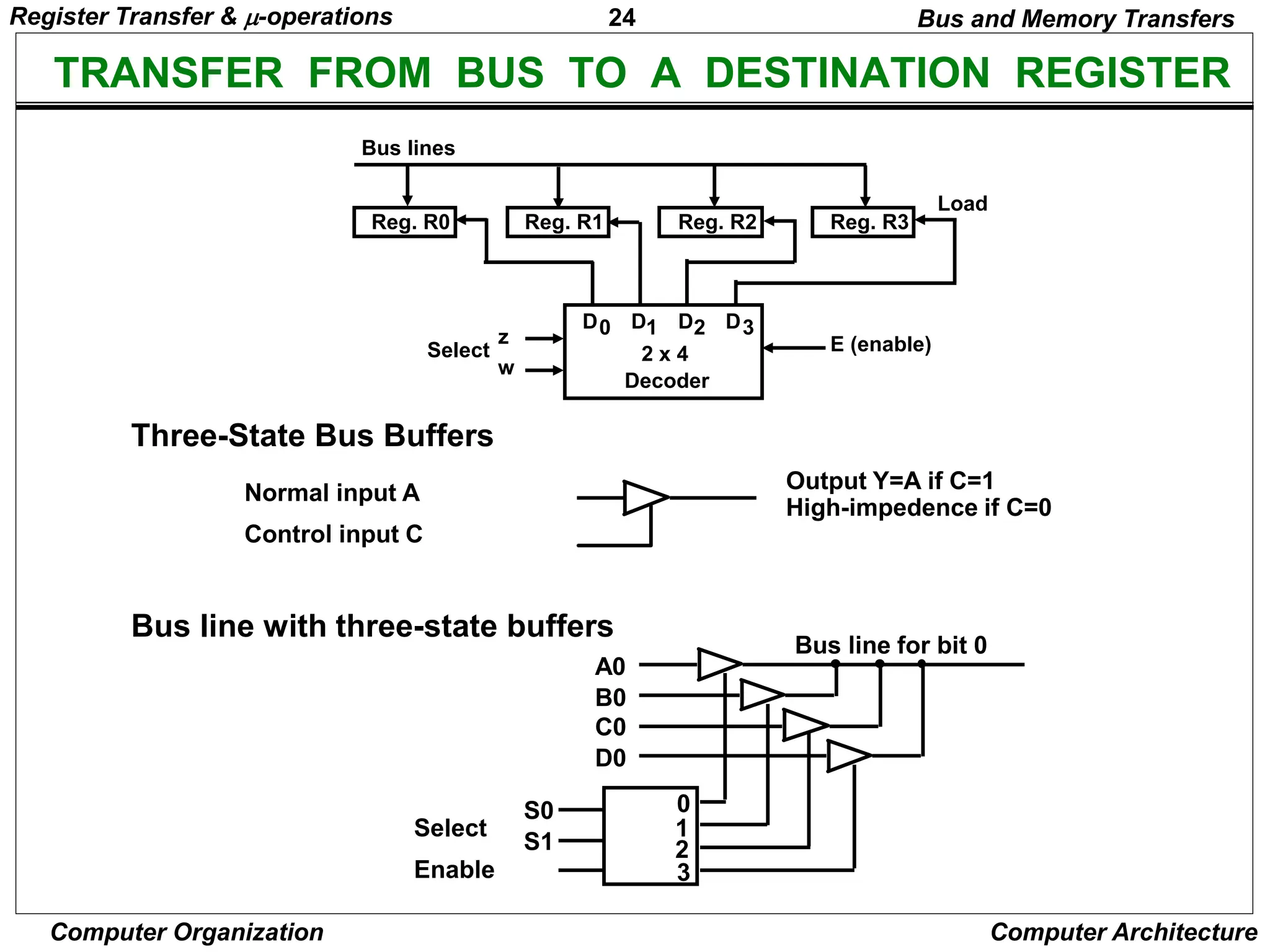
TRANSFER FROM BUS TO A DESTINATION REGISTER
Three-State Bus Buffers
Bus line with three-state buffers
Reg. R0 Reg. R1 Reg. R2 Reg. R3
Bus lines
2 x 4
Decoder
Load
D0 D1 D2 D3
z
w
Select E (enable)
Output Y=A if C=1
High-impedence if C=0
Normal input A
Control input C
Select
Enable
0
1
2
3
S0
S1
A0
B0
C0
D0
Bus line for bit 0
Bus and Memory Transfers
Register Transfer & -operations
25
Computer Organization Computer Architecture
BUS TRANSFER IN RTL
Bus and Memory Transfers
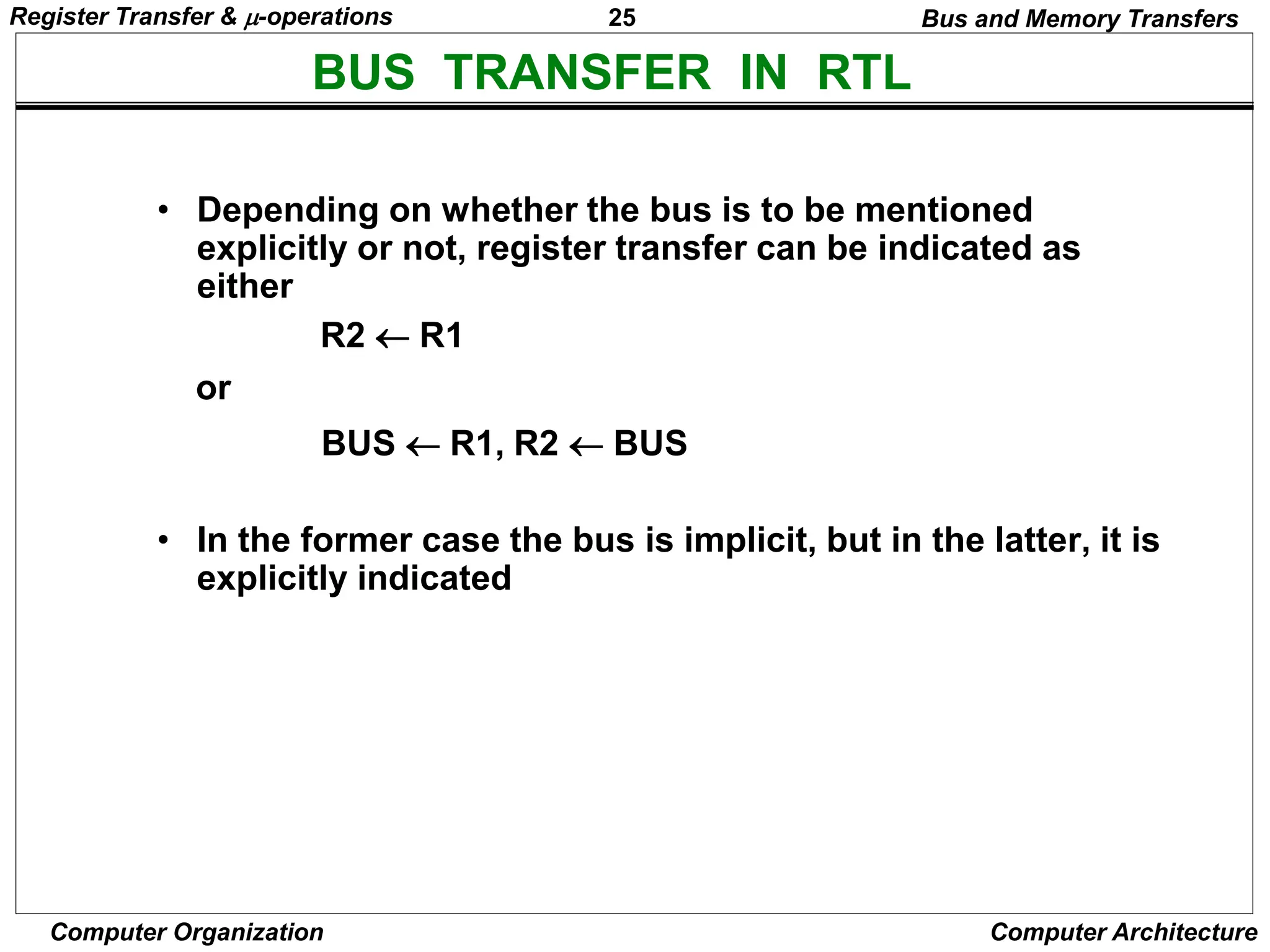
• Depending on whether the bus is to be mentioned
explicitly or not, register transfer can be indicated as
either
or
• In the former case the bus is implicit, but in the latter, it is
explicitly indicated
R2 R1
BUS R1, R2  BUS
Register Transfer & -operations
26
Computer Organization Computer Architecture
MEMORY (RAM)
Bus and Memory Transfers
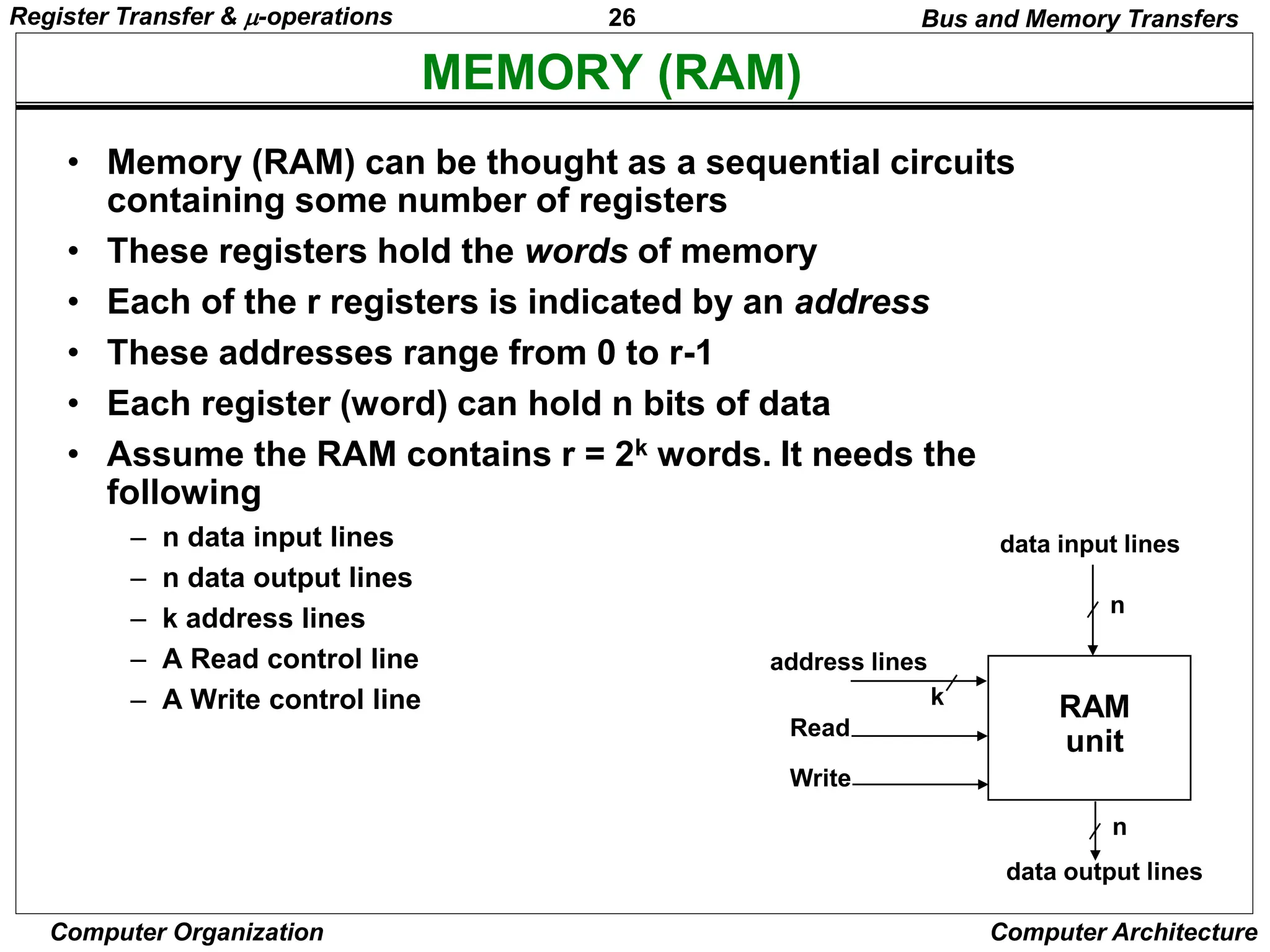
• Memory (RAM) can be thought as a sequential circuits
containing some number of registers
• These registers hold the words of memory
• Each of the r registers is indicated by an address
• These addresses range from 0 to r-1
• Each register (word) can hold n bits of data
• Assume the RAM contains r = 2k words. It needs the
following
– n data input lines
– n data output lines
– k address lines
– A Read control line
– A Write control line
data input lines
data output lines
n
n
k
address lines
Read
Write
RAM
unit
Register Transfer & -operations
27
Computer Organization Computer Architecture
MEMORY TRANSFER
Bus and Memory Transfers
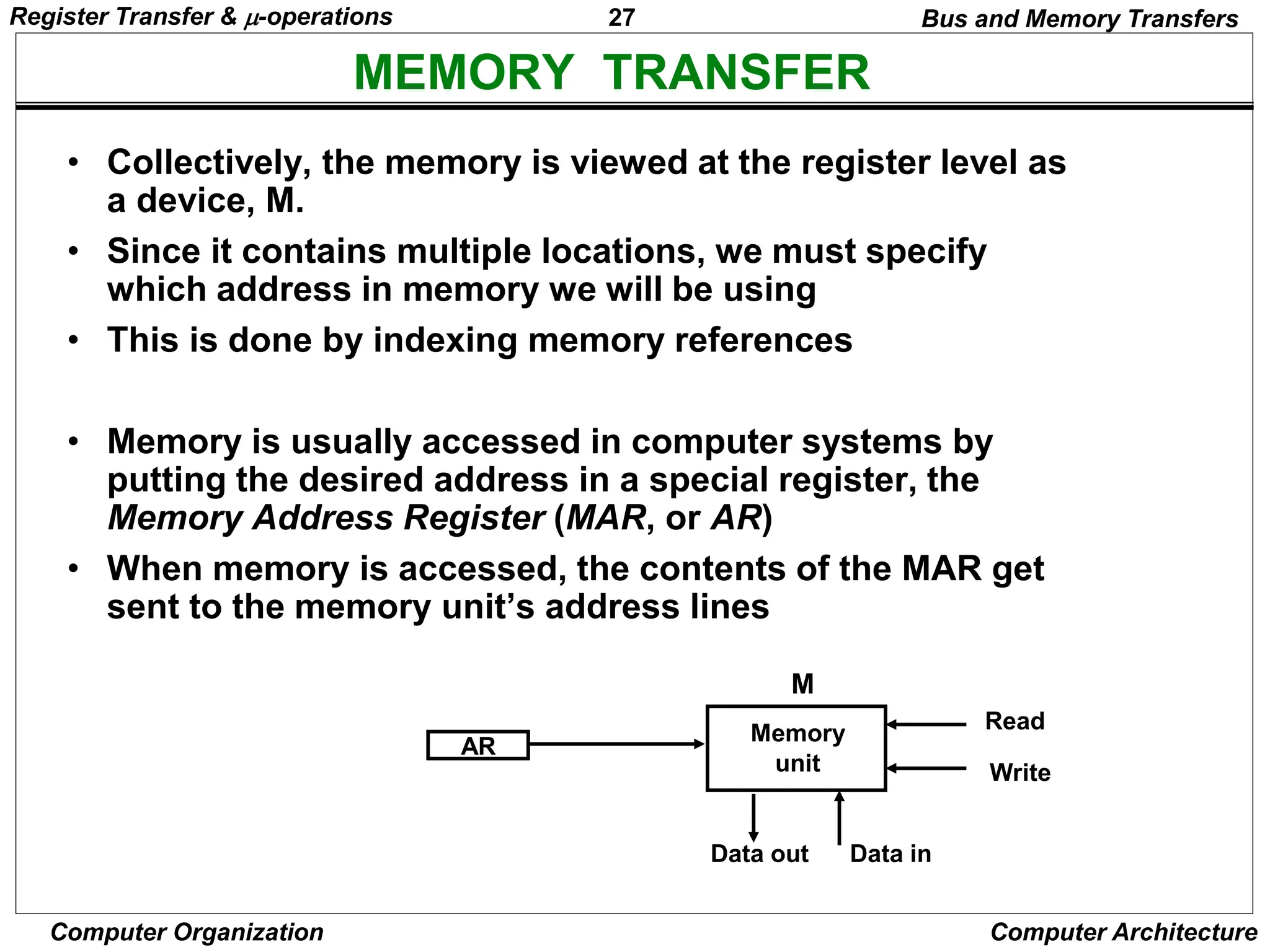
• Collectively, the memory is viewed at the register level as
a device, M.
• Since it contains multiple locations, we must specify
which address in memory we will be using
• This is done by indexing memory references
• Memory is usually accessed in computer systems by
putting the desired address in a special register, the
Memory Address Register (MAR, or AR)
• When memory is accessed, the contents of the MAR get
sent to the memory unit’s address lines
AR
Memory
unit
Read
Write
Data in
Data out
M
Register Transfer & -operations
28
Computer Organization Computer Architecture
MEMORY READ
Bus and Memory Transfers
• To read a value from a location in memory and load it into
a register, the register transfer language notation looks
like this:
• This causes the following to occur
– The contents of the MAR get sent to the memory address lines
– A Read (= 1) gets sent to the memory unit
– The contents of the specified address are put on the memory’s
output data lines
– These get sent over the bus to be loaded into register R1
R1  M[MAR]
Register Transfer & -operations
29
Computer Organization Computer Architecture
MEMORY WRITE
Bus and Memory Transfers
• To write a value from a register to a location in memory
looks like this in register transfer language:
• This causes the following to occur
– The contents of the MAR get sent to the memory address lines
– A Write (= 1) gets sent to the memory unit
– The values in register R1 get sent over the bus to the data input lines
of the memory
– The values get loaded into the specified address in the memory
M[MAR]  R1
Register Transfer & -operations
30
Computer Organization Computer Architecture
SUMMARY OF R. TRANSFER MICROOPERATIONS
Bus and Memory Transfers
A  B Transfer content of reg. B into reg. A
AR  DR(AD) Transfer content of AD portion of reg. DR into reg. AR
A  constant Transfer a binary constant into reg. A
ABUS  R1, Transfer content of R1 into bus A and, at the same time,
R2  ABUS transfer content of bus A into R2
AR Address register
DR Data register
M[R] Memory word specified by reg. R
M Equivalent to M[AR]
DR  M Memory read operation: transfers content of
memory word specified by AR into DR
M  DR Memory write operation: transfers content of
DR into memory word specified by AR
Register Transfer & -operations
31
Computer Organization Computer Architecture
MICROOPERATIONS
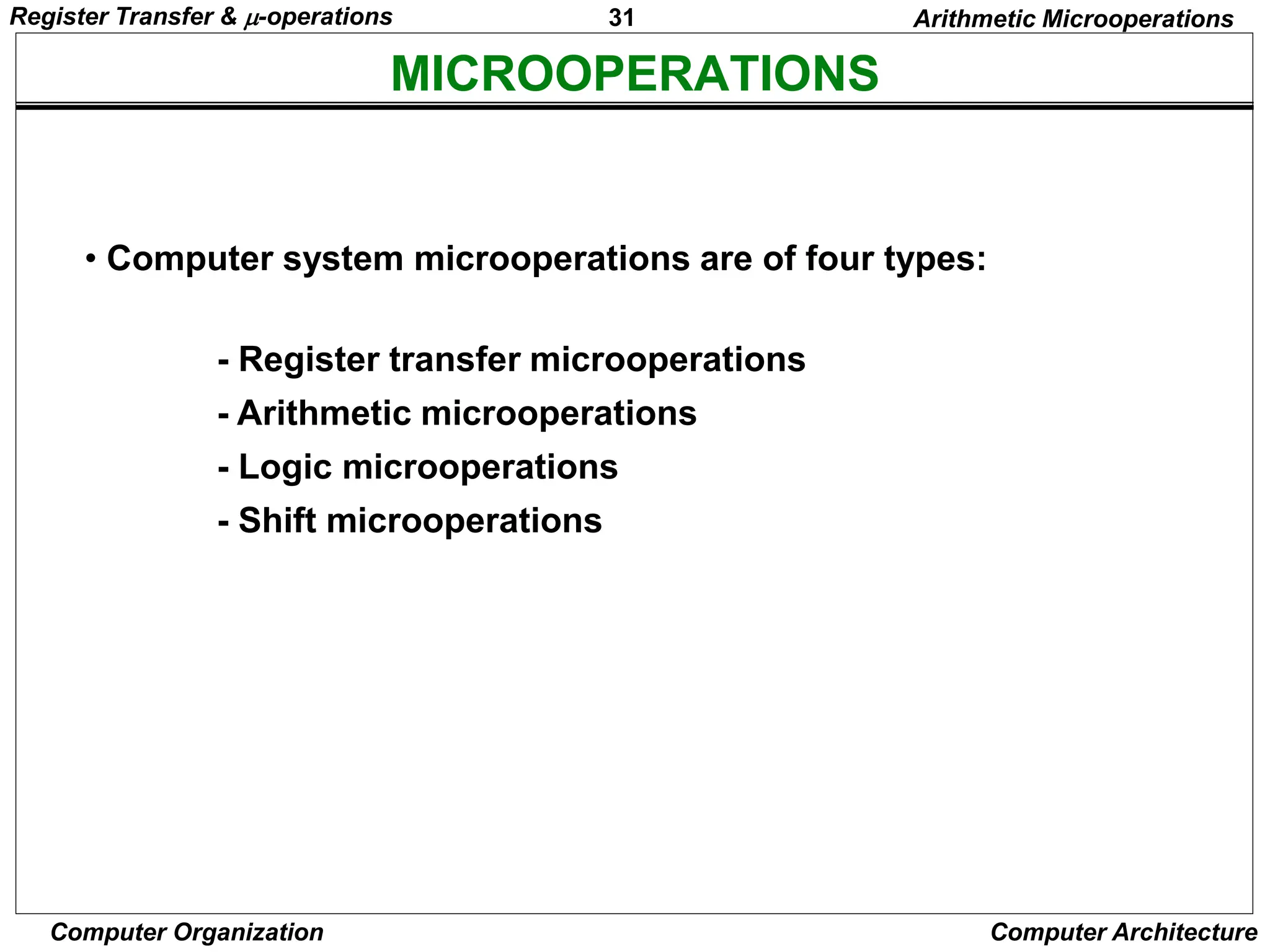
• Computer system microoperations are of four types:
- Register transfer microoperations
- Arithmetic microoperations
- Logic microoperations
- Shift microoperations
Arithmetic Microoperations
Register Transfer & -operations
32
Computer Organization Computer Architecture
ARITHMETIC MICROOPERATIONS
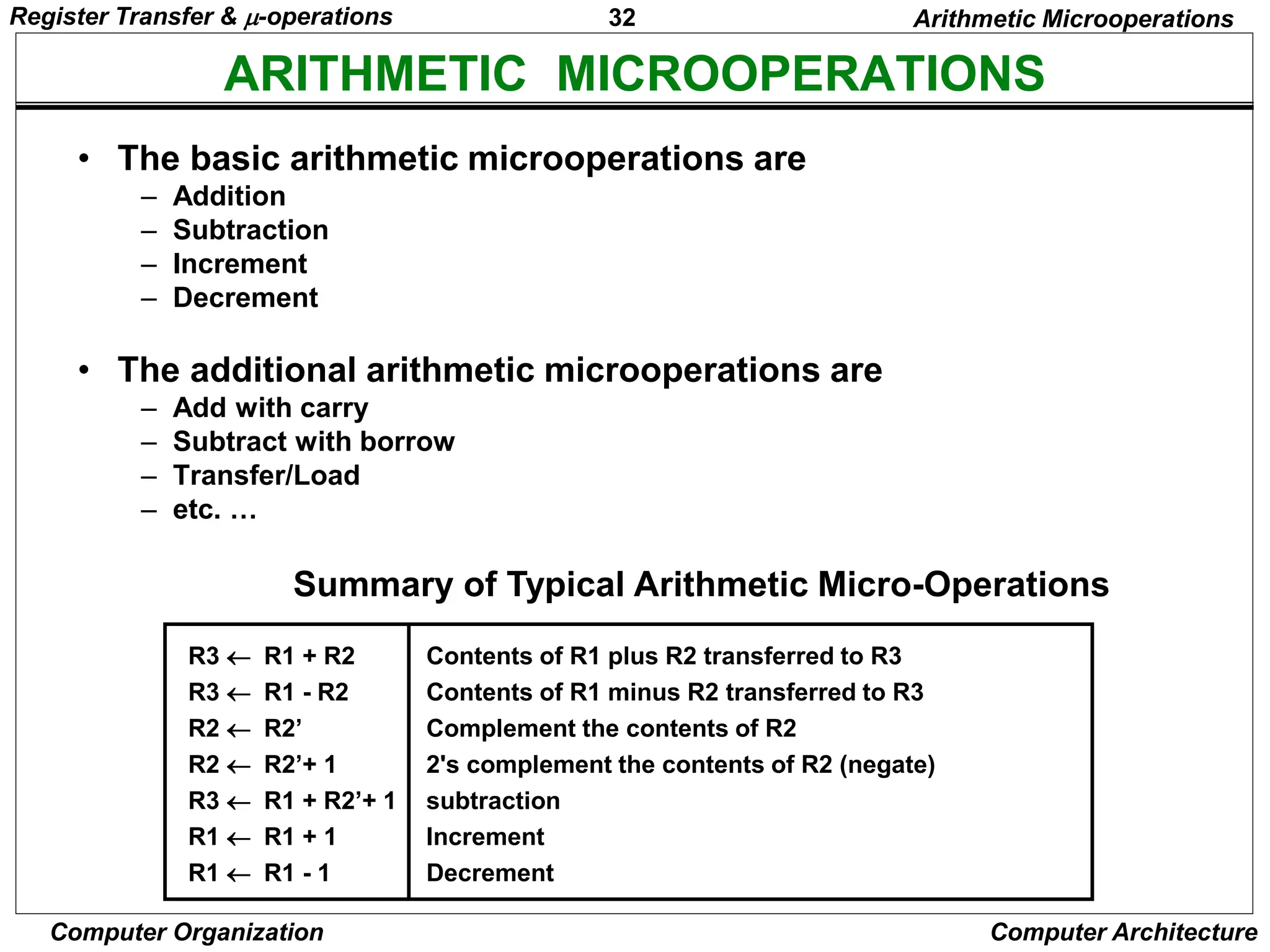
Summary of Typical Arithmetic Micro-Operations
Arithmetic Microoperations
R3  R1 + R2 Contents of R1 plus R2 transferred to R3
R3  R1 - R2 Contents of R1 minus R2 transferred to R3
R2  R2’ Complement the contents of R2
R2  R2’+ 1 2's complement the contents of R2 (negate)
R3  R1 + R2’+ 1 subtraction
R1  R1 + 1 Increment
R1  R1 - 1 Decrement
• The basic arithmetic microoperations are
– Addition
– Subtraction
– Increment
– Decrement
• The additional arithmetic microoperations are
– Add with carry
– Subtract with borrow
– Transfer/Load
– etc. …
Register Transfer & -operations
33
Computer Organization Computer Architecture
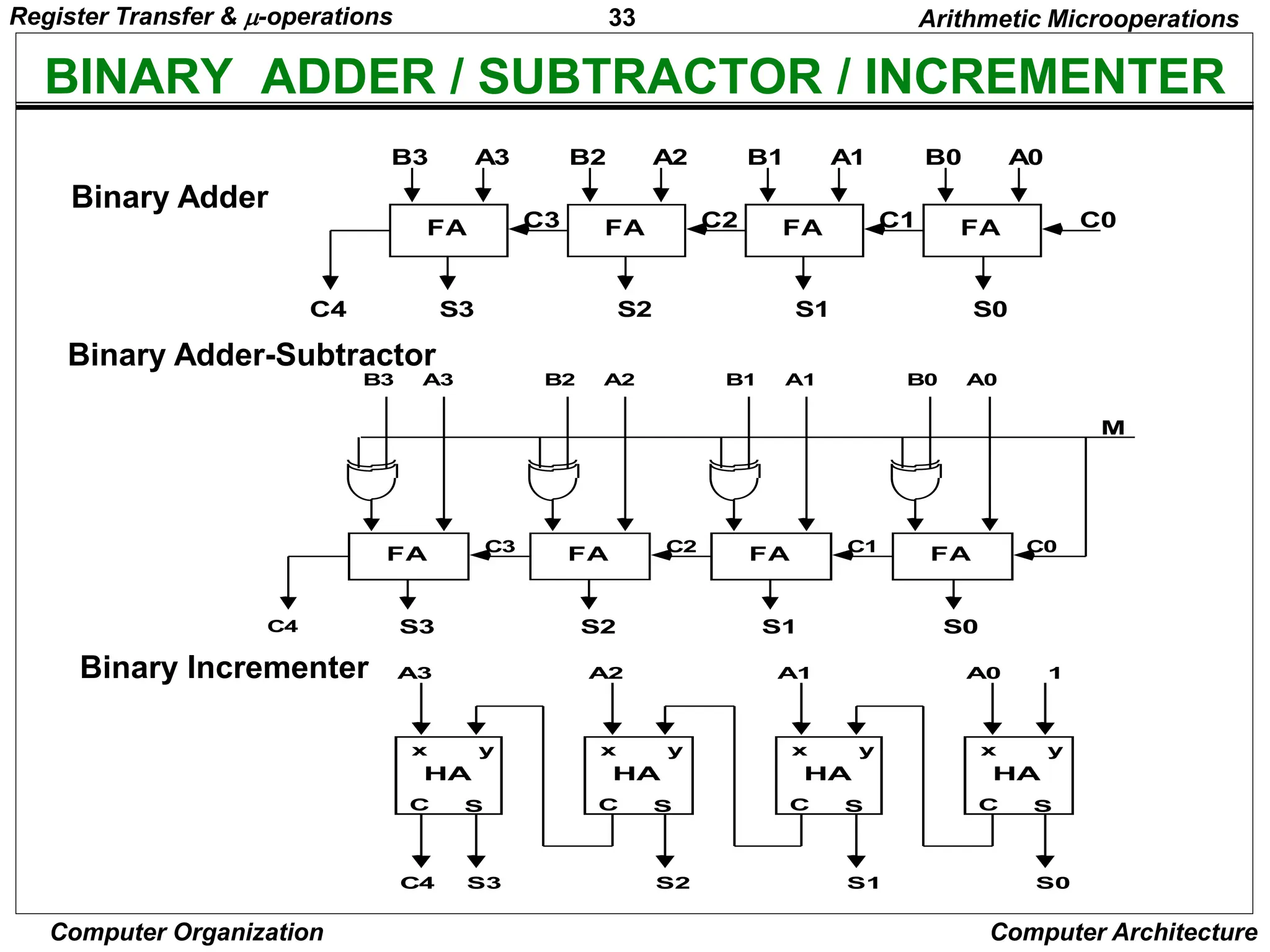
BINARY ADDER / SUBTRACTOR / INCREMENTER
FA
B0 A0
S0
C0
FA
B1 A1
S1
C1
FA
B2 A2
S2
C2
FA
B3 A3
S3
C3
C4
Binary Adder-Subtractor
FA
B0 A0
S0
C0
C1
FA
B1 A1
S1
C2
FA
B2 A2
S2
C3
FA
B3 A3
S3
C4
M
Binary Incrementer
HA
x y
C S
A0 1
S0
HA
x y
C S
A1
S1
HA
x y
C S
A2
S2
HA
x y
C S
A3
S3
C4
Binary Adder
Arithmetic Microoperations
Register Transfer & -operations
34
Computer Organization Computer Architecture
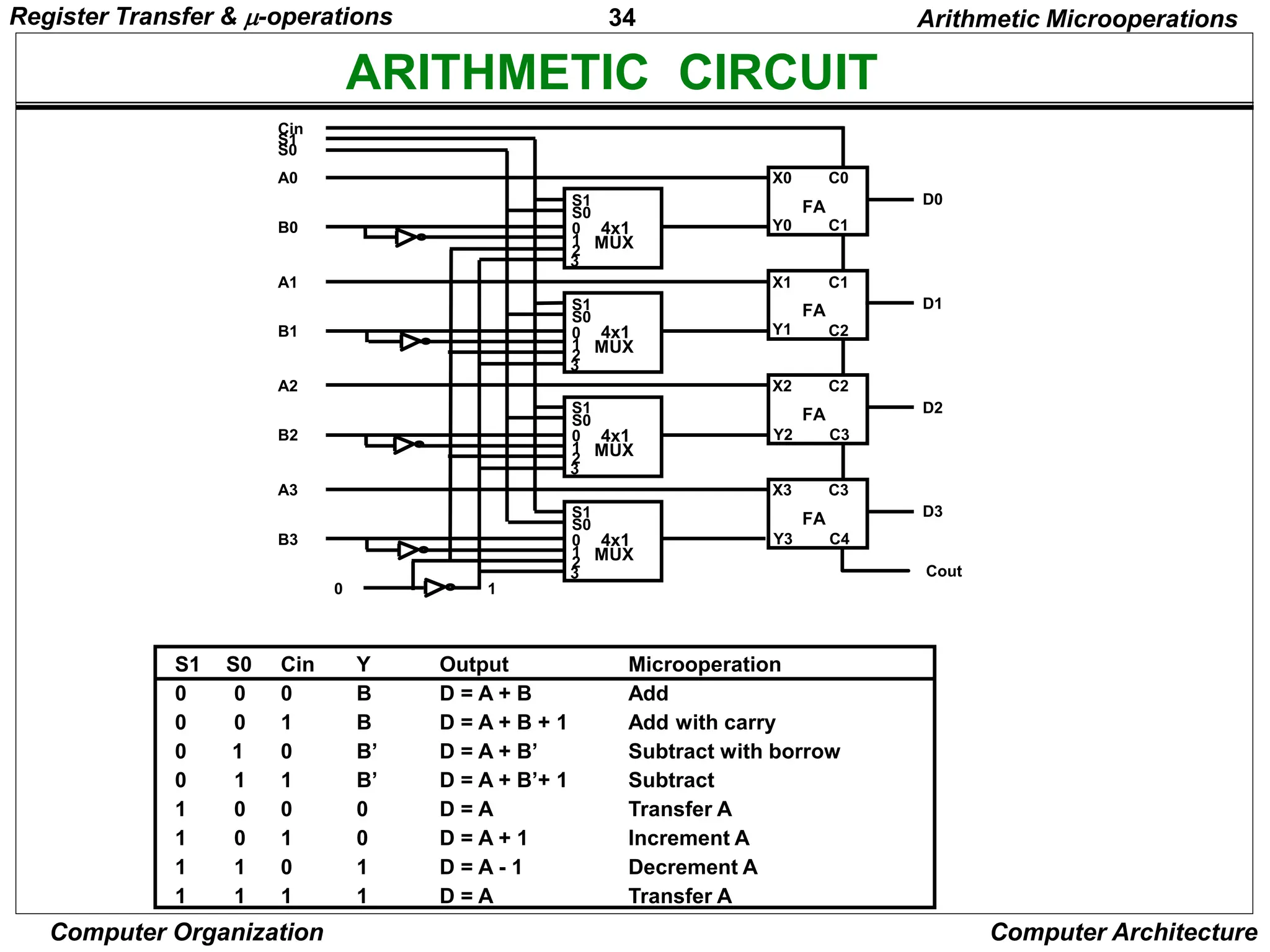
ARITHMETIC CIRCUIT
S1
S0
0
1
2
3
4x1
MUX
X0
Y0
C0
C1
D0
FA
S1
S0
0
1
2
3
4x1
MUX
X1
Y1
C1
C2
D1
FA
S1
S0
0
1
2
3
4x1
MUX
X2
Y2
C2
C3
D2
FA
S1
S0
0
1
2
3
4x1
MUX
X3
Y3
C3
C4
D3
FA
Cout
A0
B0
A1
B1
A2
B2
A3
B3
0 1
S0
S1
Cin
S1 S0 Cin Y Output Microoperation
0 0 0 B D = A + B Add
0 0 1 B D = A + B + 1 Add with carry
0 1 0 B’ D = A + B’ Subtract with borrow
0 1 1 B’ D = A + B’+ 1 Subtract
1 0 0 0 D = A Transfer A
1 0 1 0 D = A + 1 Increment A
1 1 0 1 D = A - 1 Decrement A
1 1 1 1 D = A Transfer A
Arithmetic Microoperations
Register Transfer & -operations
35
Computer Organization Computer Architecture
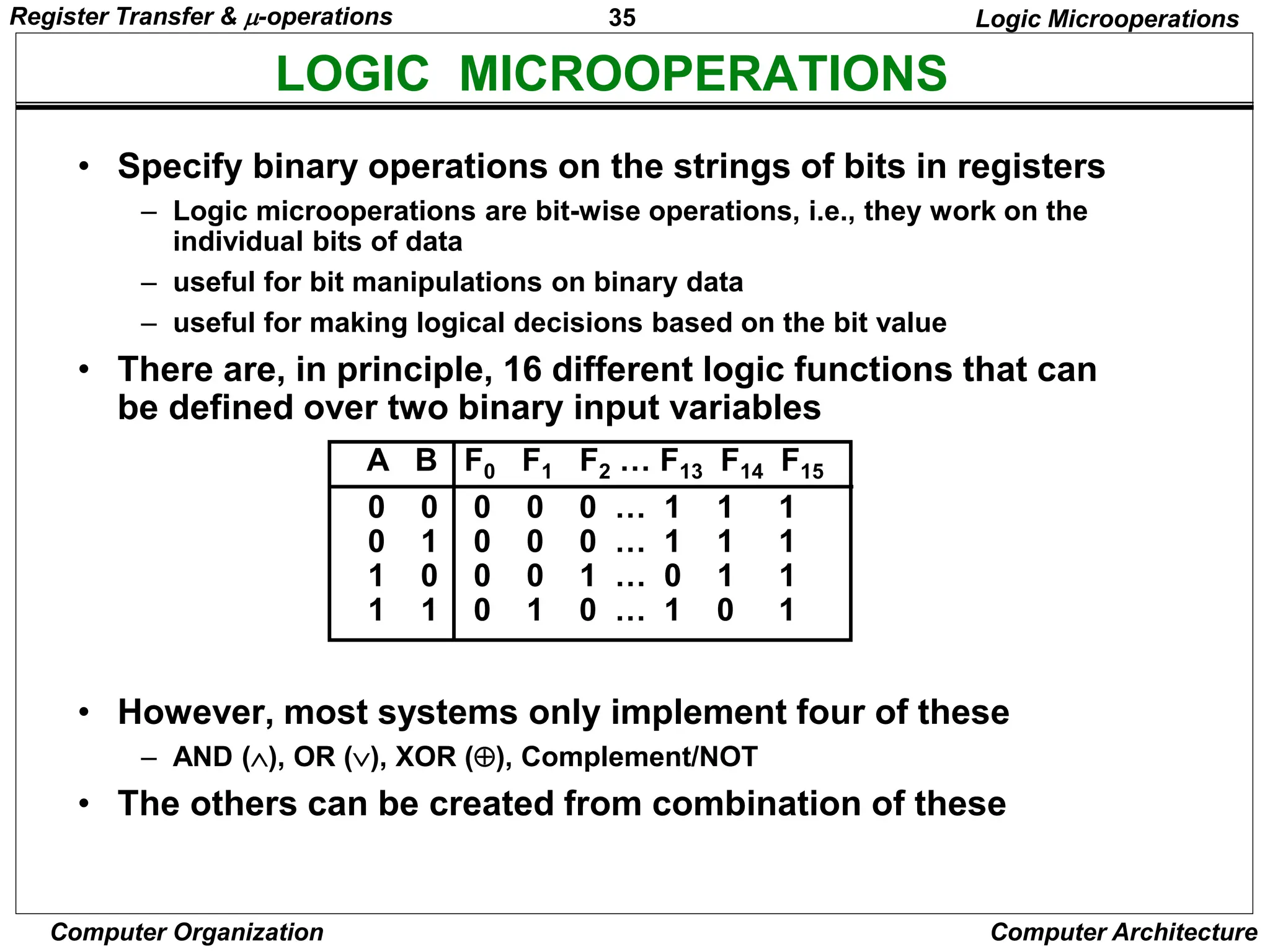
LOGIC MICROOPERATIONS
Logic Microoperations
• Specify binary operations on the strings of bits in registers
– Logic microoperations are bit-wise operations, i.e., they work on the
individual bits of data
– useful for bit manipulations on binary data
– useful for making logical decisions based on the bit value
• There are, in principle, 16 different logic functions that can
be defined over two binary input variables
• However, most systems only implement four of these
– AND (), OR (), XOR (), Complement/NOT
• The others can be created from combination of these
0 0 0 0 0 … 1 1 1
0 1 0 0 0 … 1 1 1
1 0 0 0 1 … 0 1 1
1 1 0 1 0 … 1 0 1
A B F0 F1 F2 … F13 F14 F15
Register Transfer & -operations
36
Computer Organization Computer Architecture
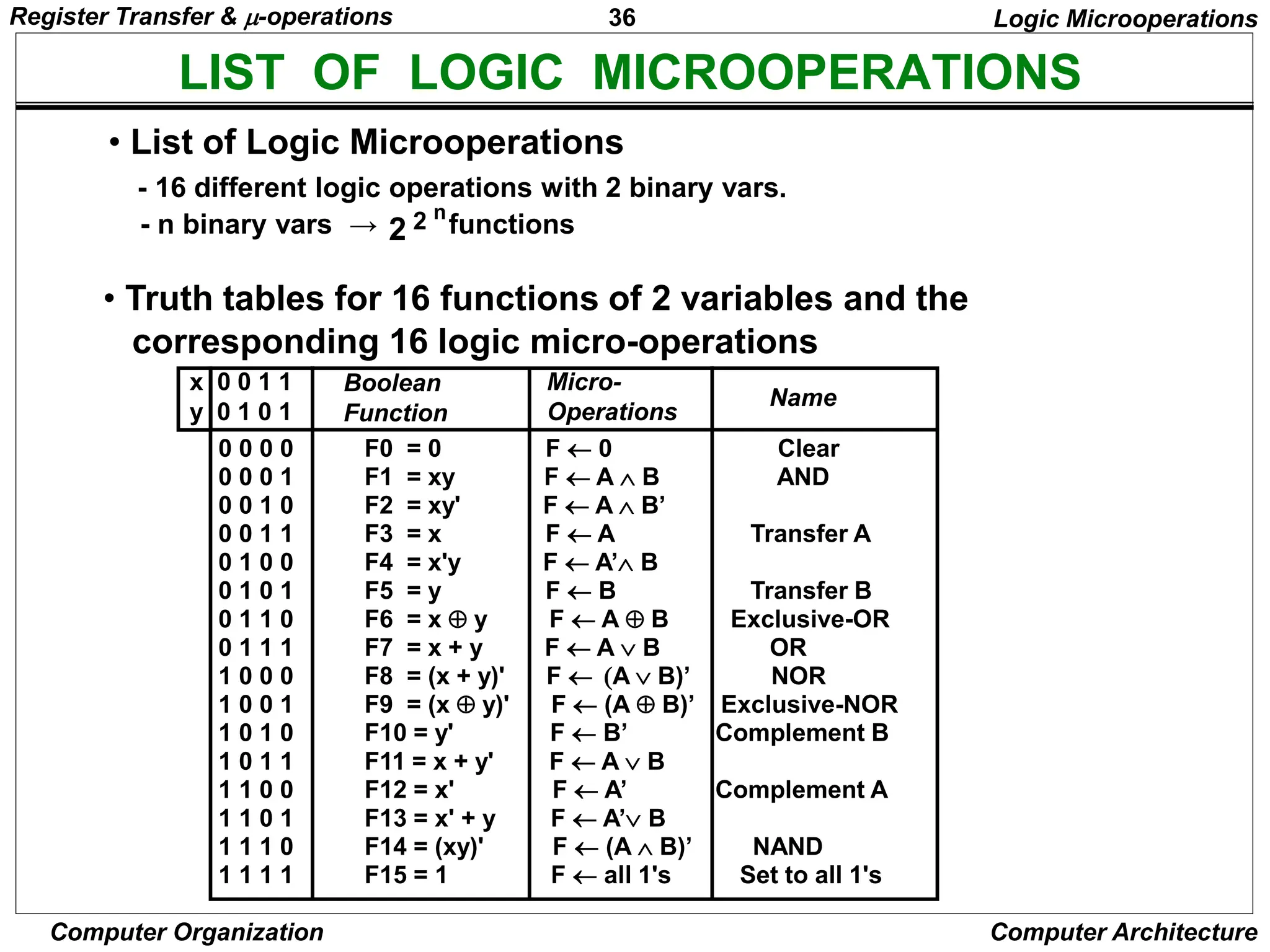
LIST OF LOGIC MICROOPERATIONS
• List of Logic Microoperations
- 16 different logic operations with 2 binary vars.
- n binary vars → functions
2 2 n
• Truth tables for 16 functions of 2 variables and the
corresponding 16 logic micro-operations
Boolean
Function
Micro-
Operations
Name
x 0 0 1 1
y 0 1 0 1
Logic Microoperations
0 0 0 0 F0 = 0 F  0 Clear
0 0 0 1 F1 = xy F  A  B AND
0 0 1 0 F2 = xy' F  A  B’
0 0 1 1 F3 = x F  A Transfer A
0 1 0 0 F4 = x'y F  A’ B
0 1 0 1 F5 = y F  B Transfer B
0 1 1 0 F6 = x  y F  A  B Exclusive-OR
0 1 1 1 F7 = x + y F  A  B OR
1 0 0 0 F8 = (x + y)' F  A  B)’ NOR
1 0 0 1 F9 = (x  y)' F  (A  B)’ Exclusive-NOR
1 0 1 0 F10 = y' F  B’ Complement B
1 0 1 1 F11 = x + y' F  A  B
1 1 0 0 F12 = x' F  A’ Complement A
1 1 0 1 F13 = x' + y F  A’ B
1 1 1 0 F14 = (xy)' F  (A  B)’ NAND
1 1 1 1 F15 = 1 F  all 1's Set to all 1's
Register Transfer & -operations
37
Computer Organization Computer Architecture
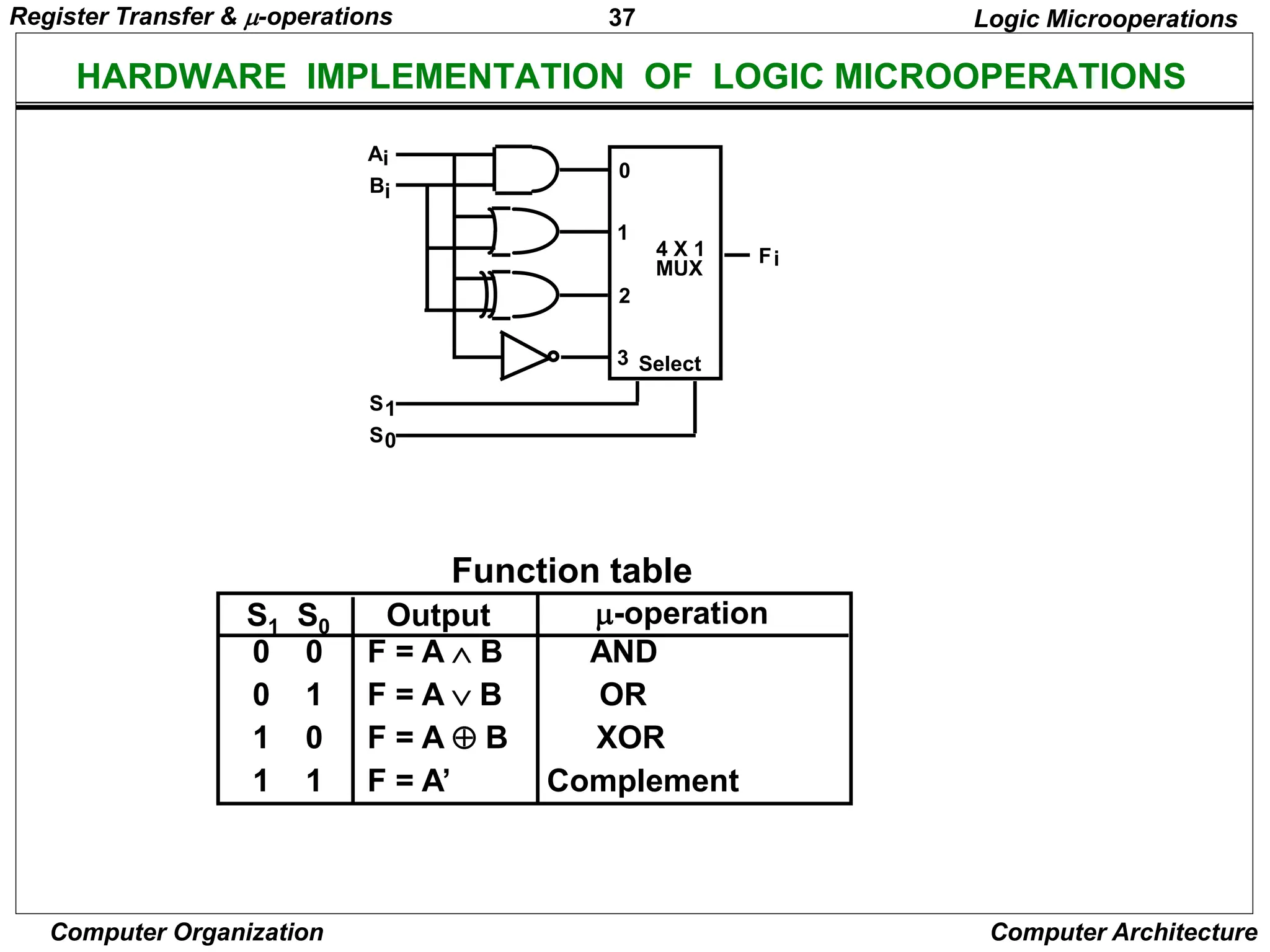
HARDWARE IMPLEMENTATION OF LOGIC MICROOPERATIONS
0 0 F = A  B AND
0 1 F = AB OR
1 0 F = A  B XOR
1 1 F = A’ Complement
S1 S0 Output -operation
Function table
Logic Microoperations
B
A
S
S
F
1
0
i
i
i
0
1
2
3
4 X 1
MUX
Select
Register Transfer & -operations
38
Computer Organization Computer Architecture
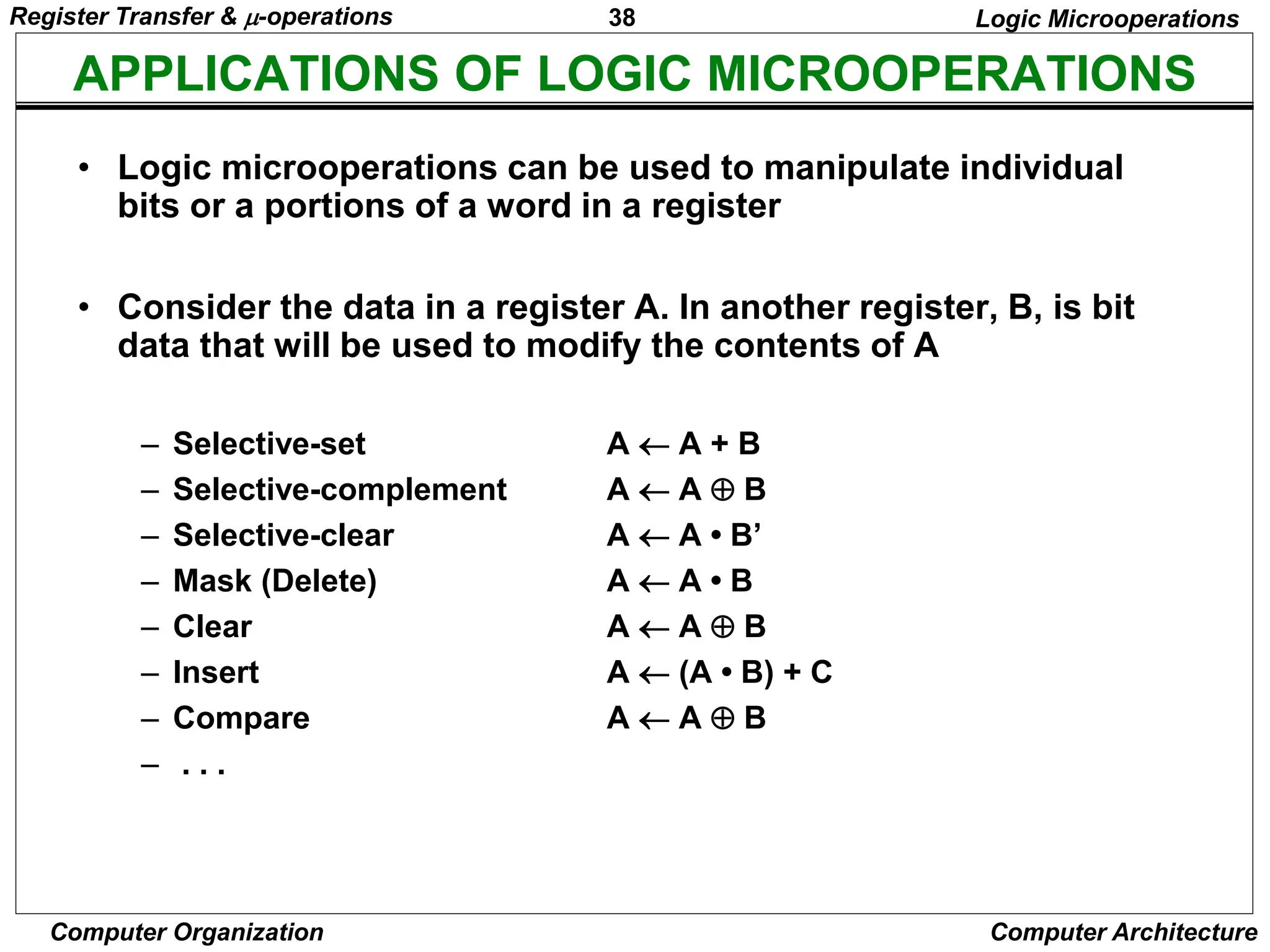
APPLICATIONS OF LOGIC MICROOPERATIONS
Logic Microoperations
• Logic microoperations can be used to manipulate individual
bits or a portions of a word in a register
• Consider the data in a register A. In another register, B, is bit
data that will be used to modify the contents of A
– Selective-set A  A + B
– Selective-complement A  A  B
– Selective-clear A  A • B’
– Mask (Delete) A  A • B
– Clear A  A  B
– Insert A  (A • B) + C
– Compare A  A  B
– . . .
Register Transfer & -operations
39
Computer Organization Computer Architecture
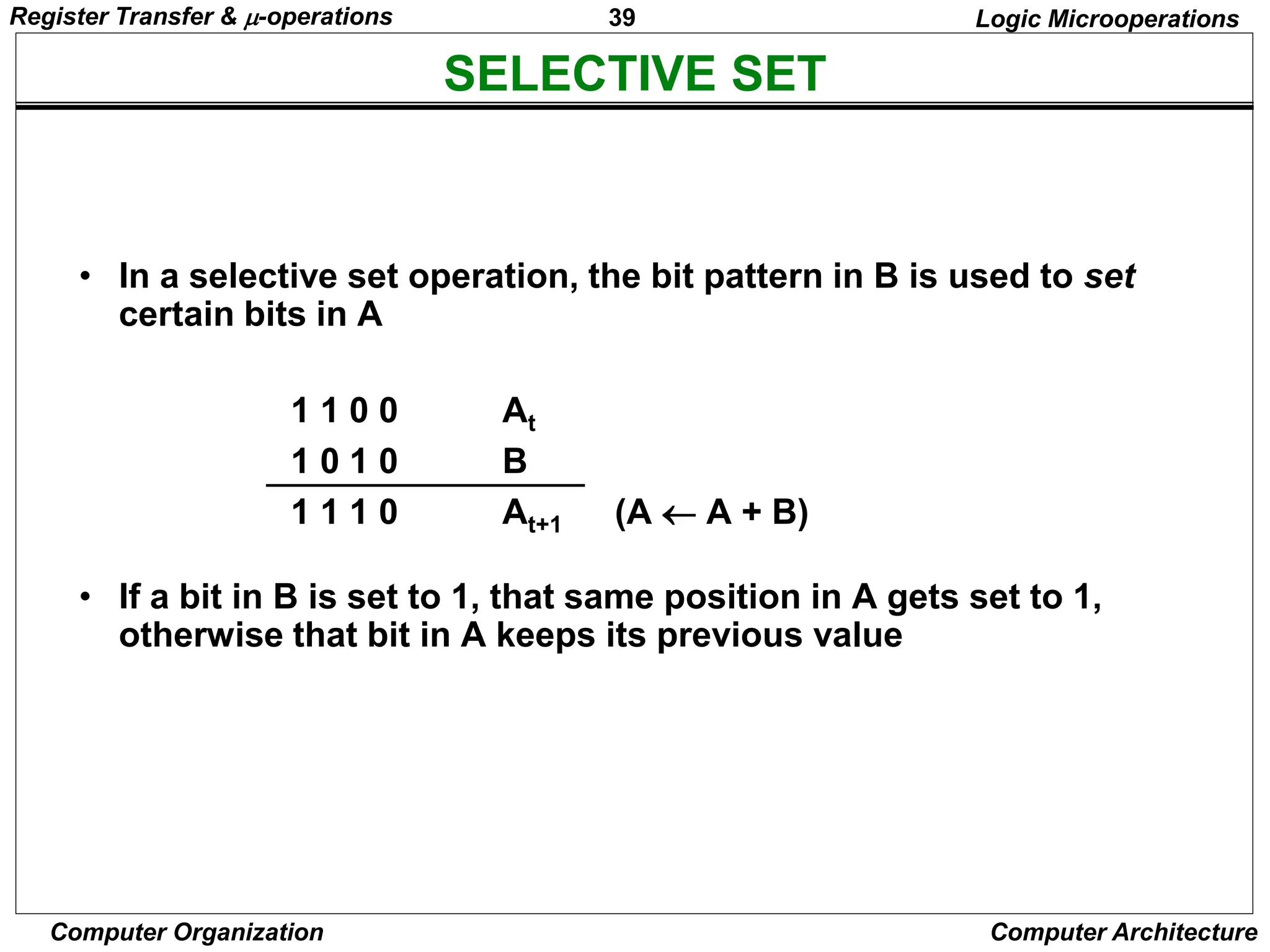
SELECTIVE SET
Logic Microoperations
• In a selective set operation, the bit pattern in B is used to set
certain bits in A
1 1 0 0 At
1 0 1 0 B
1 1 1 0 At+1 (A  A + B)
• If a bit in B is set to 1, that same position in A gets set to 1,
otherwise that bit in A keeps its previous value
Register Transfer & -operations
40
Computer Organization Computer Architecture
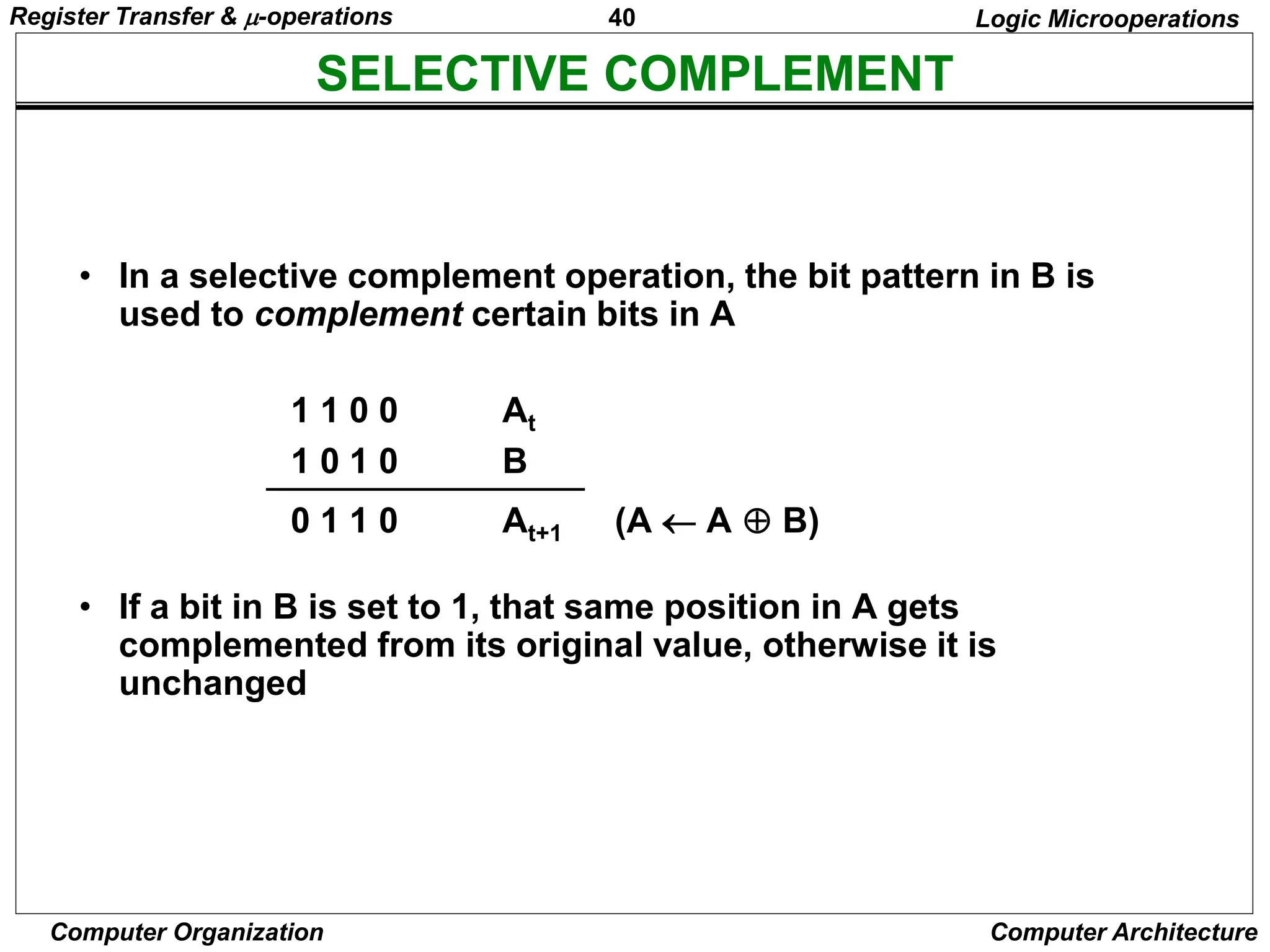
SELECTIVE COMPLEMENT
Logic Microoperations
• In a selective complement operation, the bit pattern in B is
used to complement certain bits in A
1 1 0 0 At
1 0 1 0 B
0 1 1 0 At+1 (A  A  B)
• If a bit in B is set to 1, that same position in A gets
complemented from its original value, otherwise it is
unchanged
Register Transfer & -operations
41
Computer Organization Computer Architecture
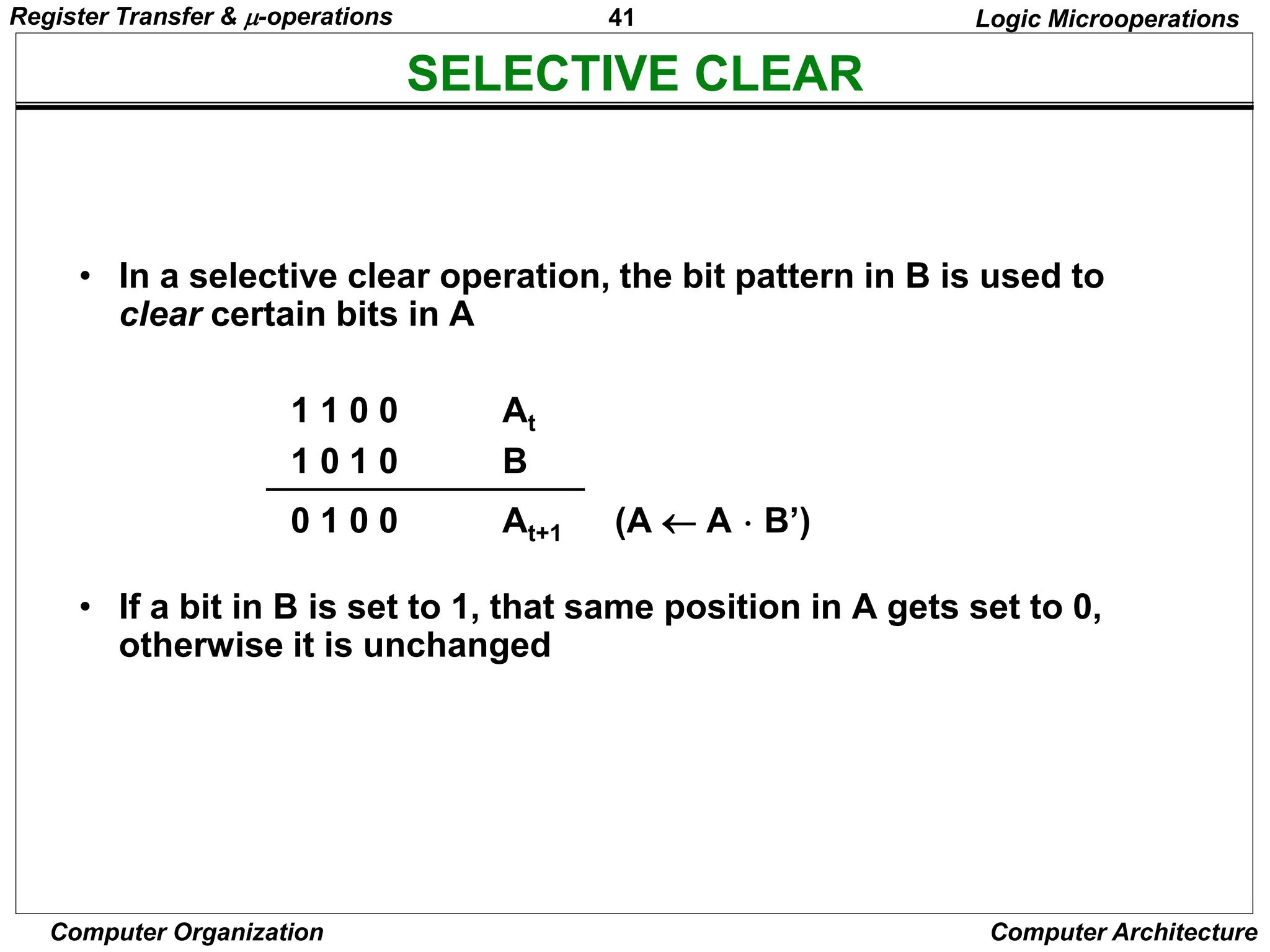
SELECTIVE CLEAR
Logic Microoperations
• In a selective clear operation, the bit pattern in B is used to
clear certain bits in A
1 1 0 0 At
1 0 1 0 B
0 1 0 0 At+1 (A  A  B’)
• If a bit in B is set to 1, that same position in A gets set to 0,
otherwise it is unchanged
Register Transfer & -operations
42
Computer Organization Computer Architecture
MASK OPERATION
Logic Microoperations
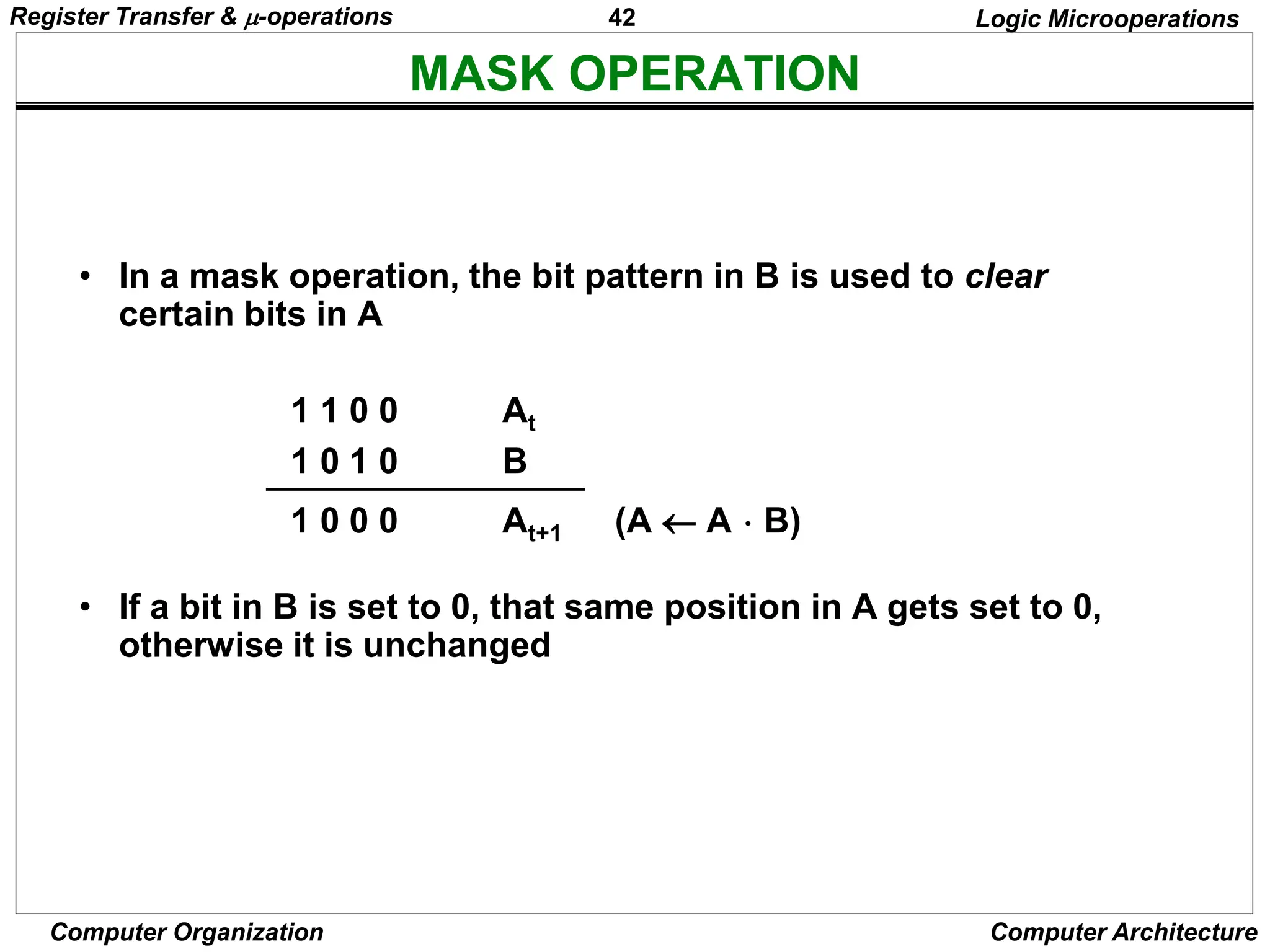
• In a mask operation, the bit pattern in B is used to clear
certain bits in A
1 1 0 0 At
1 0 1 0 B
1 0 0 0 At+1 (A  A  B)
• If a bit in B is set to 0, that same position in A gets set to 0,
otherwise it is unchanged
Register Transfer & -operations
43
Computer Organization Computer Architecture
CLEAR OPERATION
Logic Microoperations
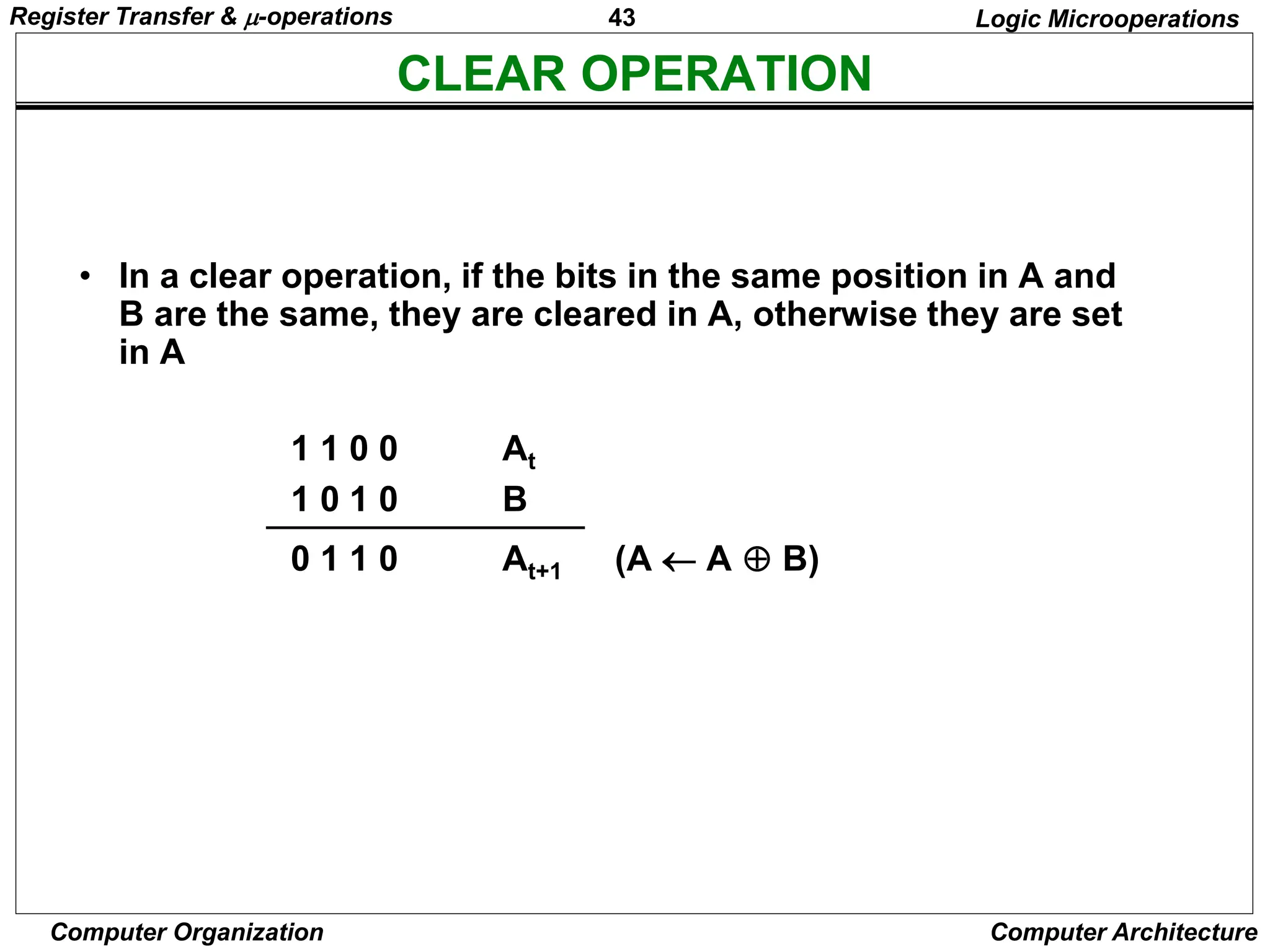
• In a clear operation, if the bits in the same position in A and
B are the same, they are cleared in A, otherwise they are set
in A
1 1 0 0 At
1 0 1 0 B
0 1 1 0 At+1 (A  A  B)
Register Transfer & -operations
44
Computer Organization Computer Architecture
INSERT OPERATION
Logic Microoperations
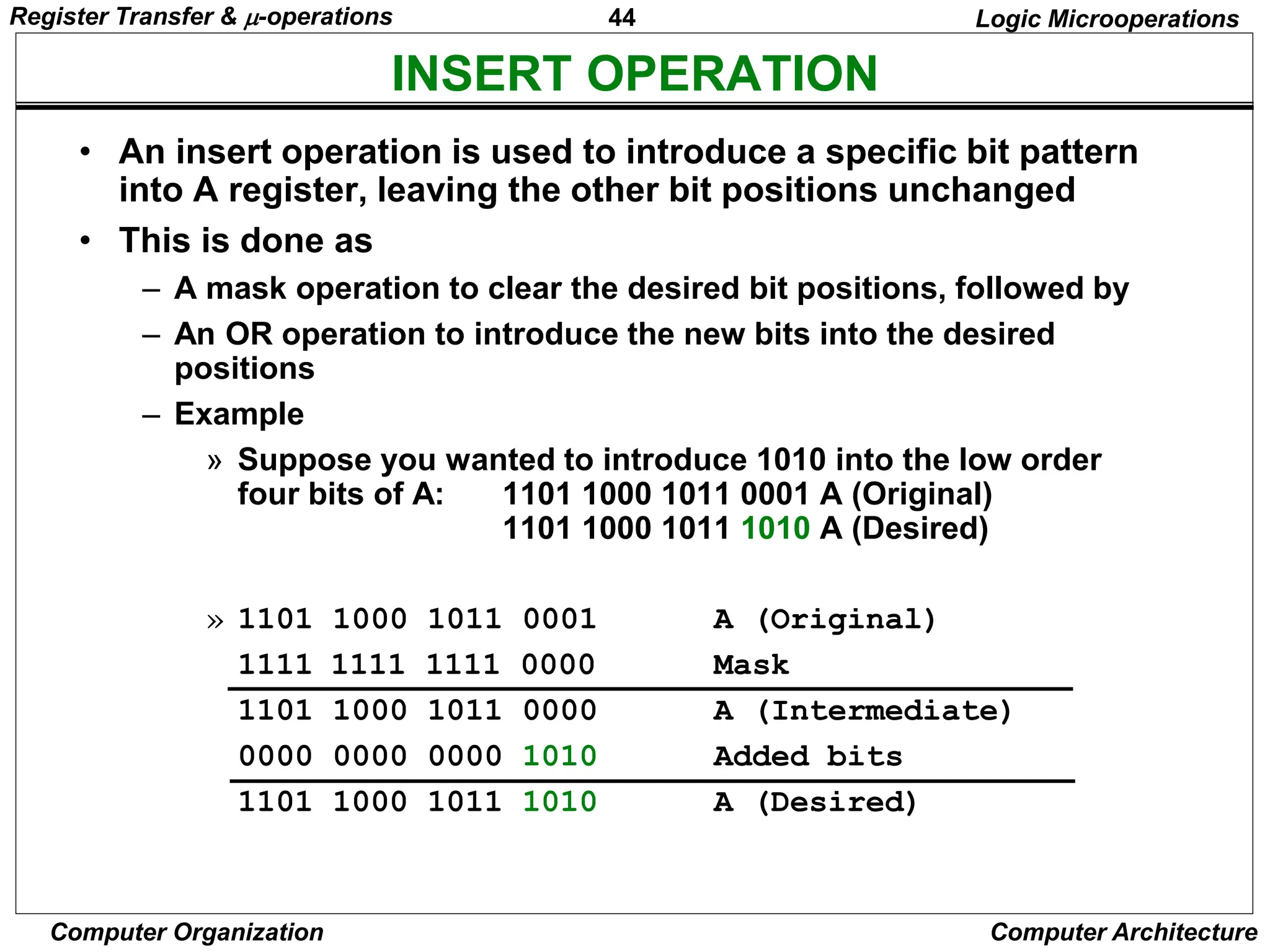
• An insert operation is used to introduce a specific bit pattern
into A register, leaving the other bit positions unchanged
• This is done as
– A mask operation to clear the desired bit positions, followed by
– An OR operation to introduce the new bits into the desired
positions
– Example
» Suppose you wanted to introduce 1010 into the low order
four bits of A: 1101 1000 1011 0001 A (Original)
1101 1000 1011 1010 A (Desired)
» 1101 1000 1011 0001 A (Original)
1111 1111 1111 0000 Mask
1101 1000 1011 0000 A (Intermediate)
0000 0000 0000 1010 Added bits
1101 1000 1011 1010 A (Desired)
Register Transfer & -operations
45
Computer Organization Computer Architecture
SHIFT MICROOPERATIONS
Shift Microoperations
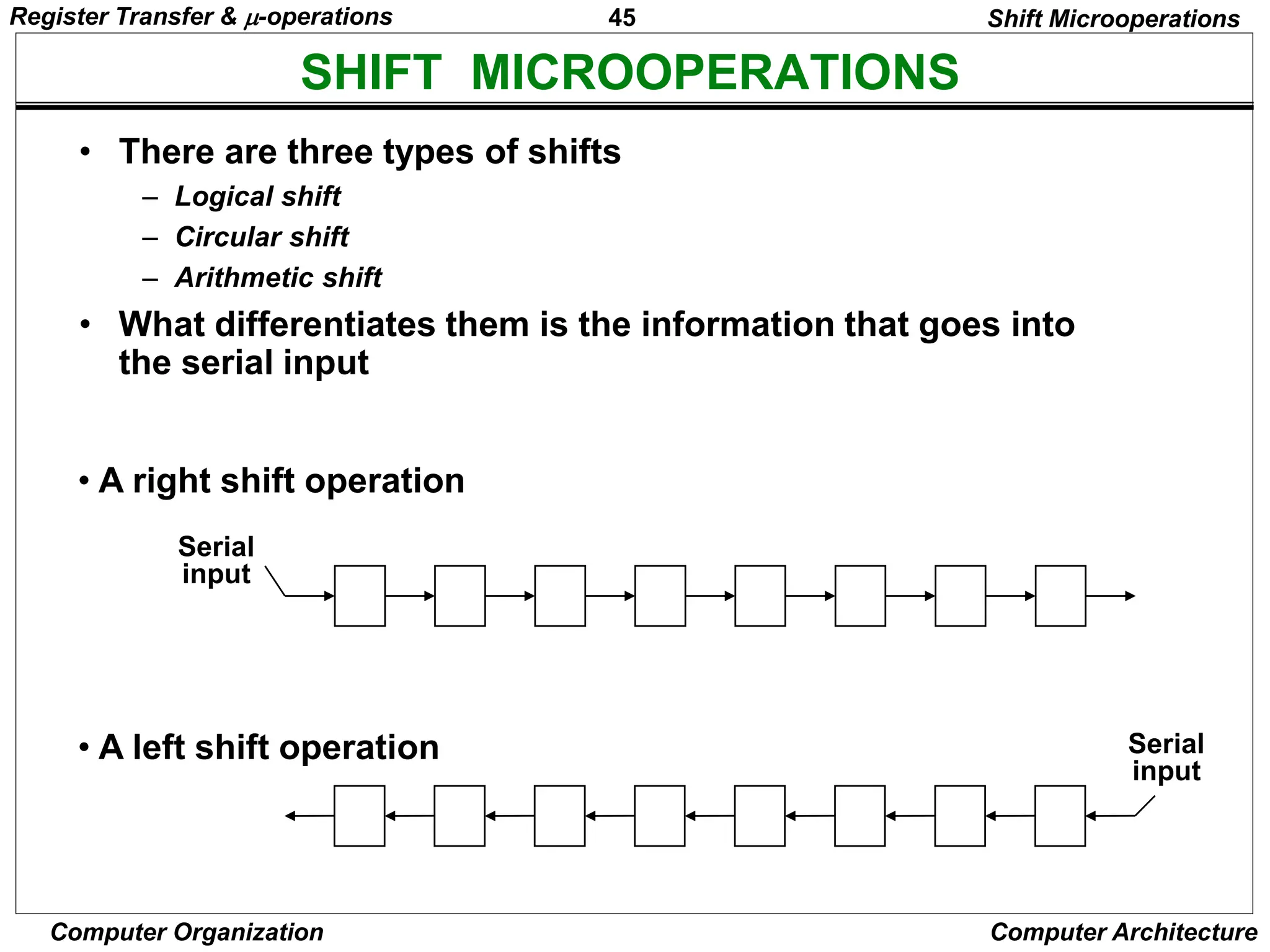
• There are three types of shifts
– Logical shift
– Circular shift
– Arithmetic shift
• What differentiates them is the information that goes into
the serial input
Serial
input
• A right shift operation
• A left shift operation Serial
input
Register Transfer & -operations
46
Computer Organization Computer Architecture
LOGICAL SHIFT
Shift Microoperations
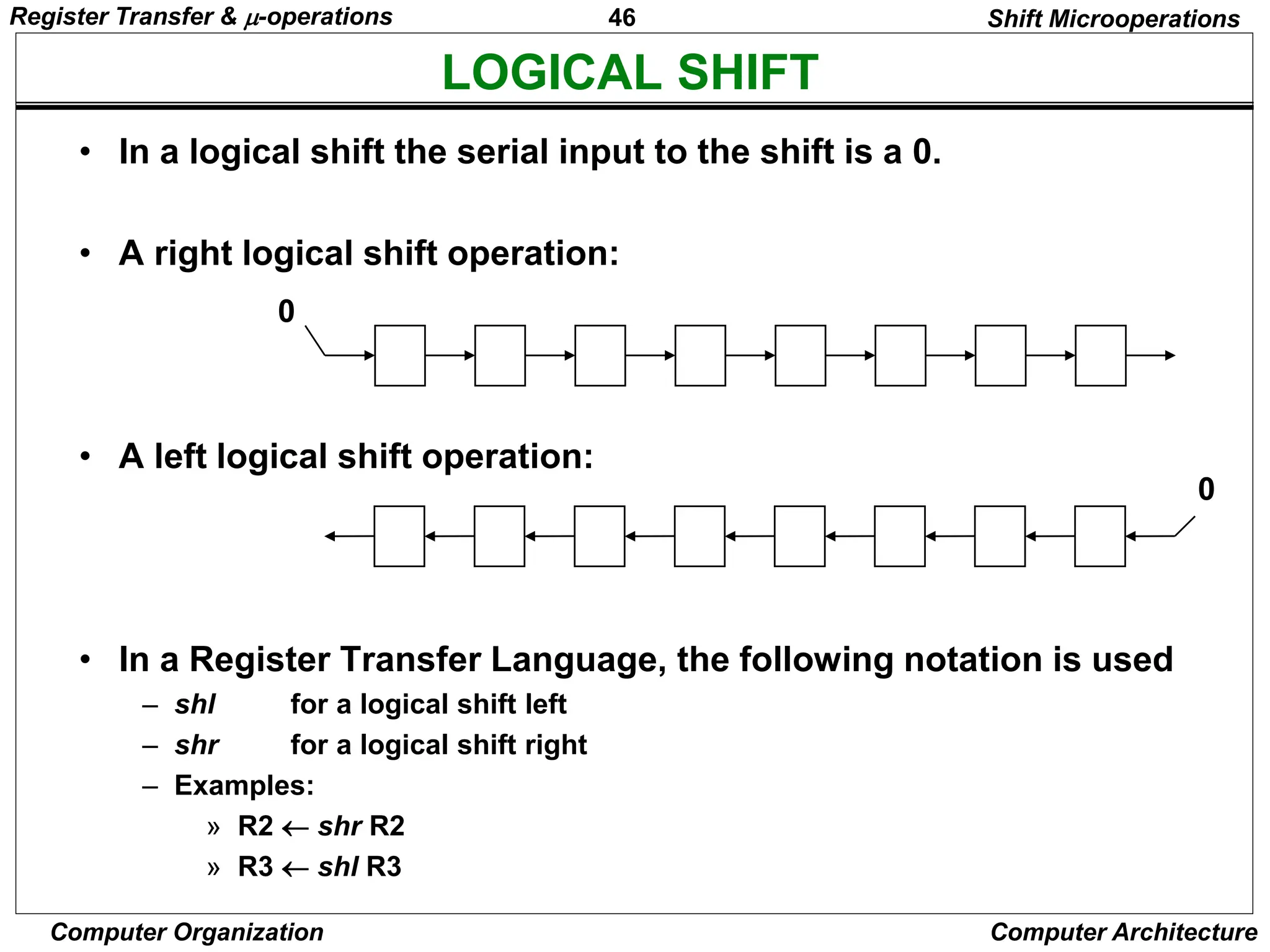
• In a logical shift the serial input to the shift is a 0.
• A right logical shift operation:
• A left logical shift operation:
• In a Register Transfer Language, the following notation is used
– shl for a logical shift left
– shr for a logical shift right
– Examples:
» R2  shr R2
» R3  shl R3
0
0
Register Transfer & -operations
47
Computer Organization Computer Architecture
CIRCULAR SHIFT
Shift Microoperations
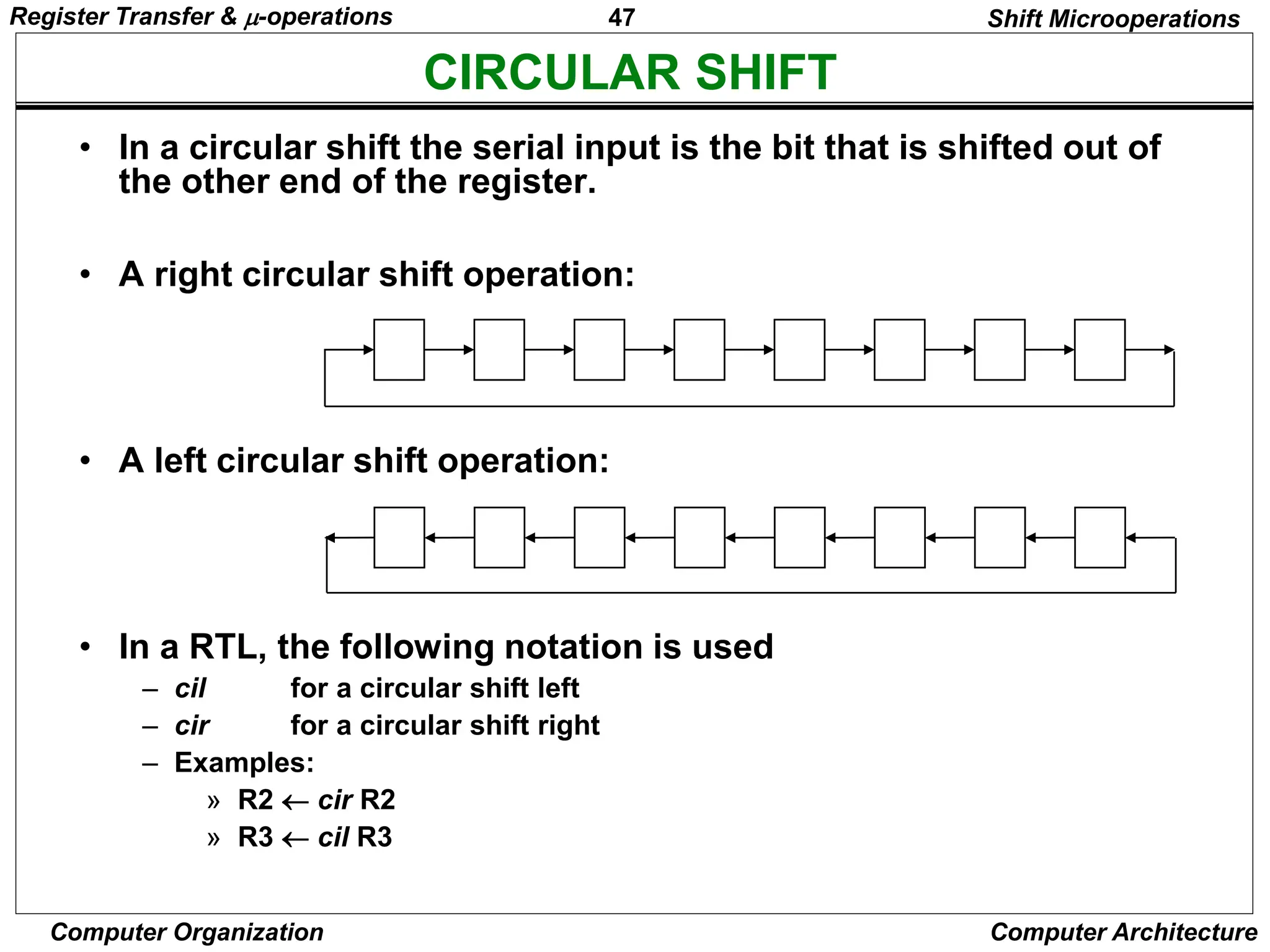
• In a circular shift the serial input is the bit that is shifted out of
the other end of the register.
• A right circular shift operation:
• A left circular shift operation:
• In a RTL, the following notation is used
– cil for a circular shift left
– cir for a circular shift right
– Examples:
» R2  cir R2
» R3  cil R3
Register Transfer & -operations
48
Computer Organization Computer Architecture
ARITHMETIC SHIFT
Shift Microoperations
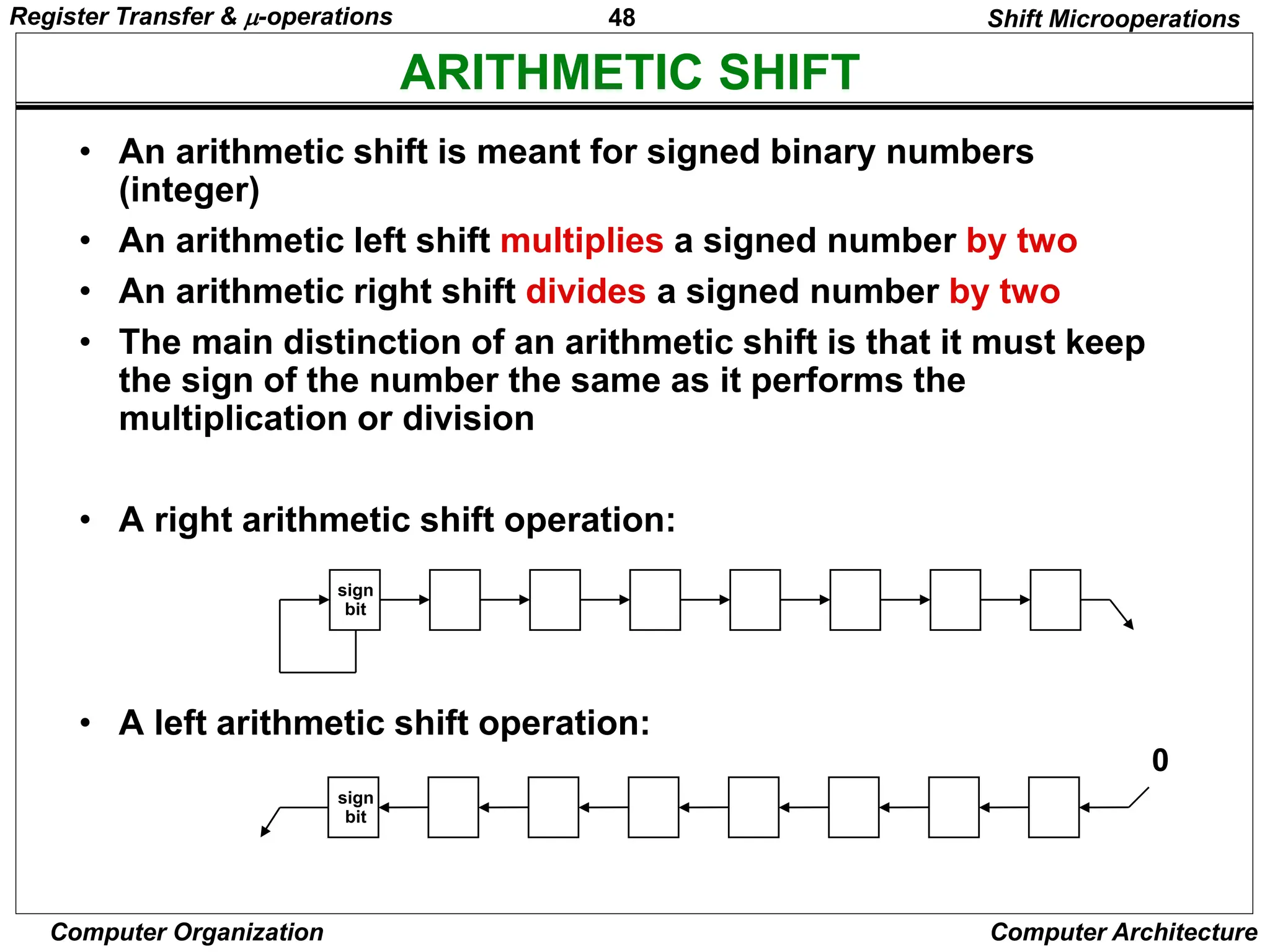
• An arithmetic shift is meant for signed binary numbers
(integer)
• An arithmetic left shift multiplies a signed number by two
• An arithmetic right shift divides a signed number by two
• The main distinction of an arithmetic shift is that it must keep
the sign of the number the same as it performs the
multiplication or division
• A right arithmetic shift operation:
• A left arithmetic shift operation:
0
sign
bit
sign
bit
Register Transfer & -operations
49
Computer Organization Computer Architecture
ARITHMETIC SHIFT
Shift Microoperations
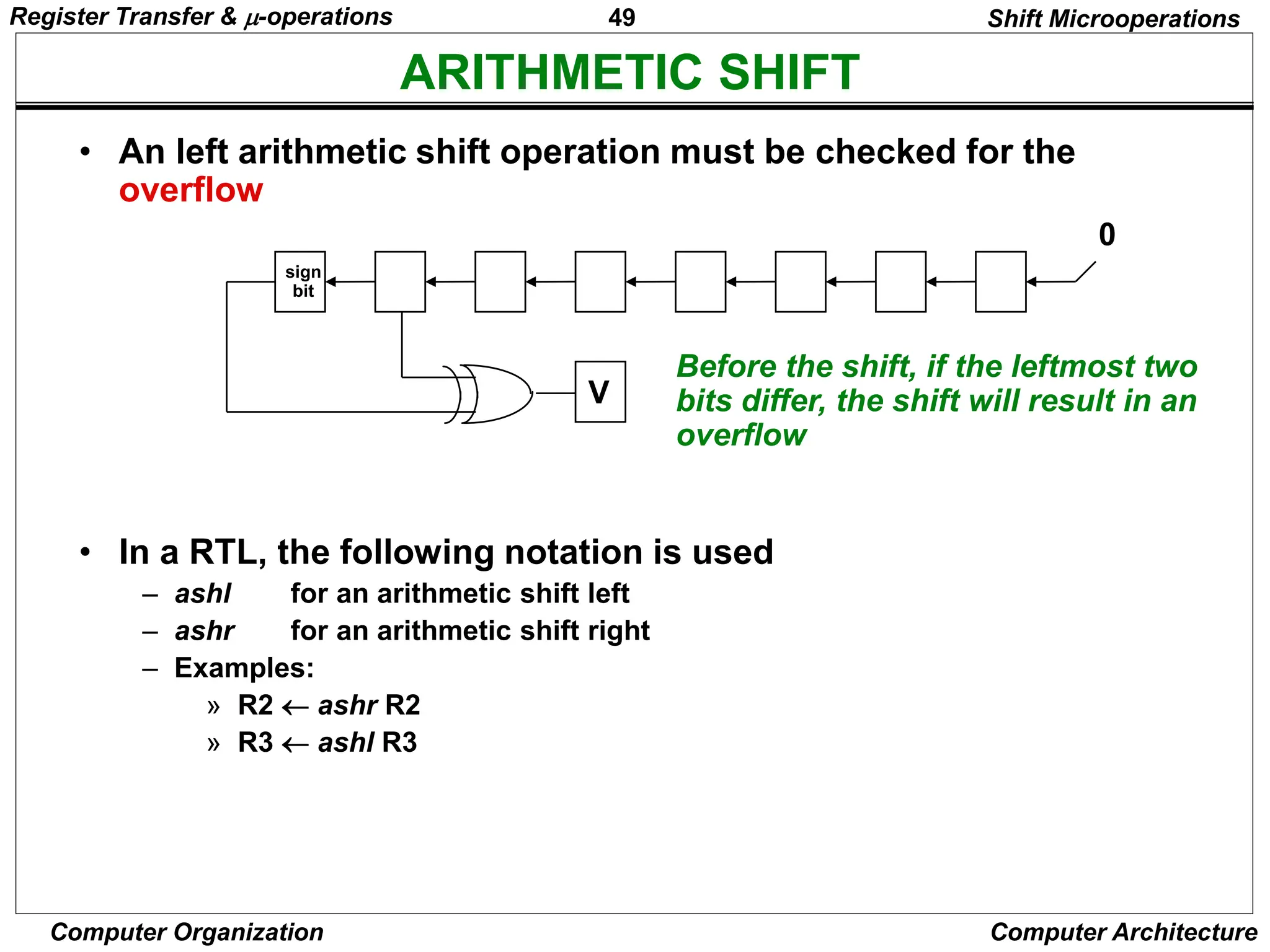
• An left arithmetic shift operation must be checked for the
overflow
0
V
Before the shift, if the leftmost two
bits differ, the shift will result in an
overflow
• In a RTL, the following notation is used
– ashl for an arithmetic shift left
– ashr for an arithmetic shift right
– Examples:
» R2  ashr R2
» R3  ashl R3
sign
bit
Register Transfer & -operations
50
Computer Organization Computer Architecture
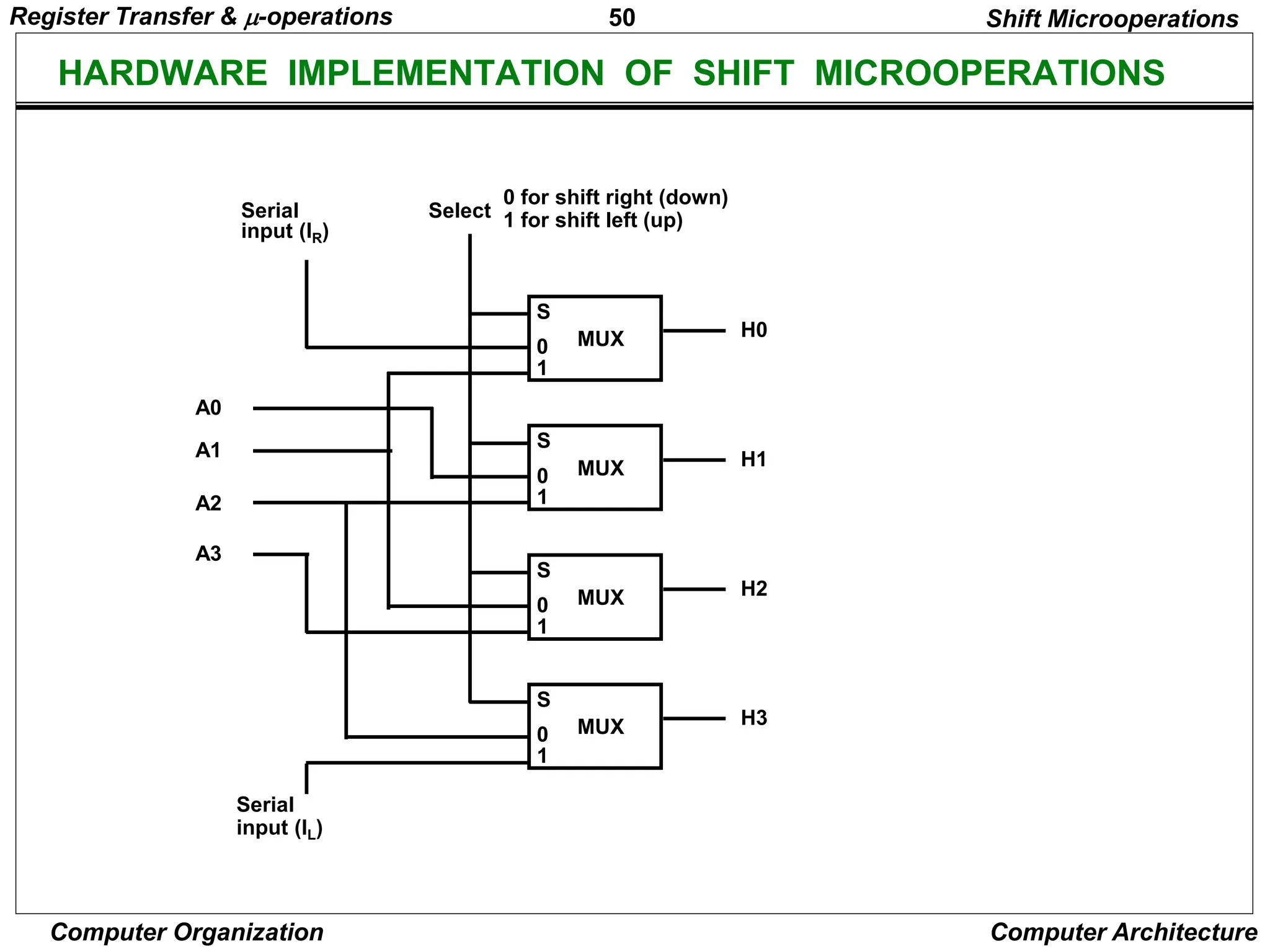
HARDWARE IMPLEMENTATION OF SHIFT MICROOPERATIONS
Shift Microoperations
S
0
1
H0
MUX
S
0
1
H1
MUX
S
0
1
H2
MUX
S
0
1
H3
MUX
Select
0 for shift right (down)
1 for shift left (up)
Serial
input (IR)
A0
A1
A2
A3
Serial
input (IL)
Register Transfer & -operations
51
Computer Organization Computer Architecture
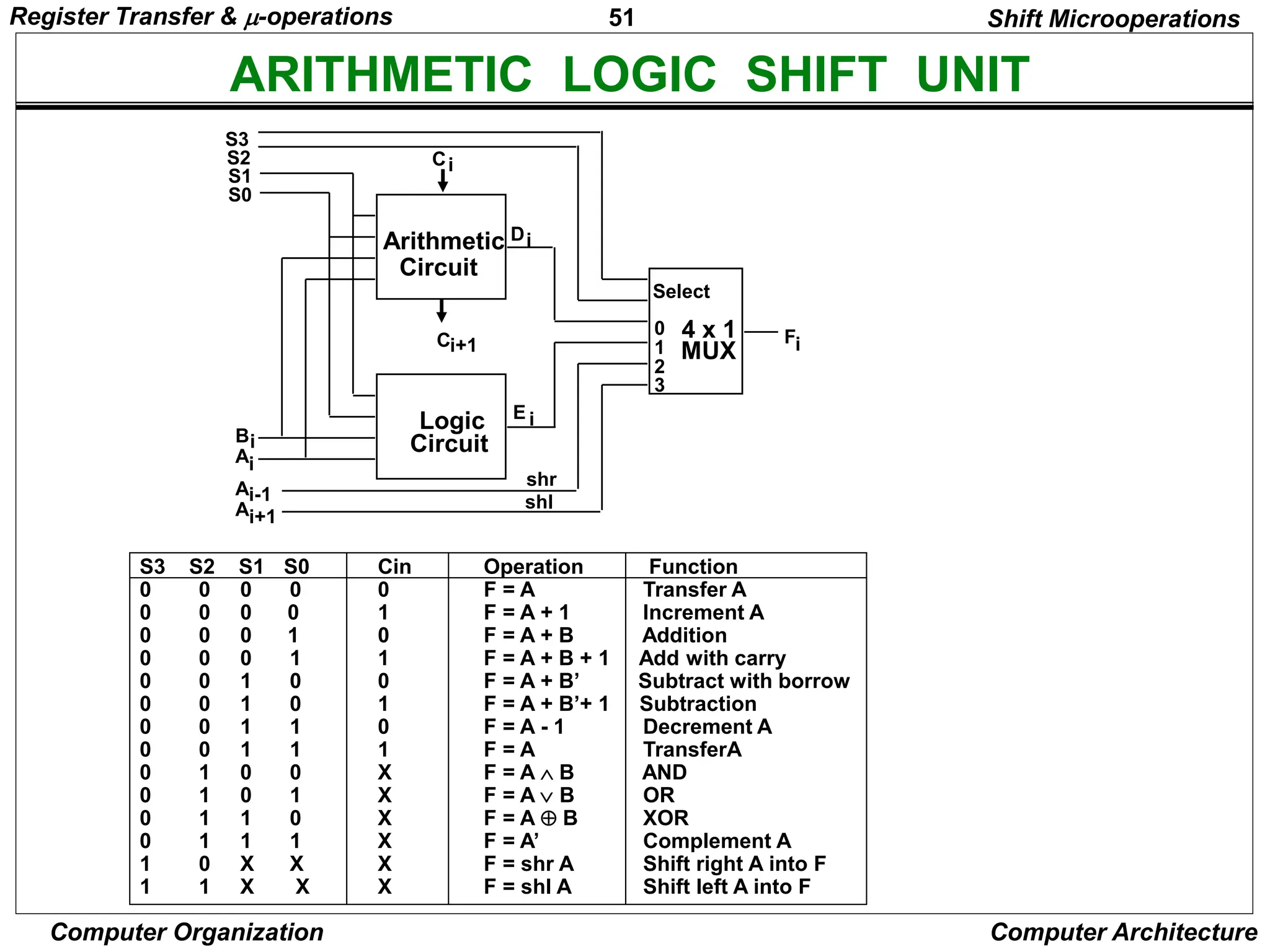
ARITHMETIC LOGIC SHIFT UNIT
S3 S2 S1 S0 Cin Operation Function
0 0 0 0 0 F = A Transfer A
0 0 0 0 1 F = A + 1 Increment A
0 0 0 1 0 F = A + B Addition
0 0 0 1 1 F = A + B + 1 Add with carry
0 0 1 0 0 F = A + B’ Subtract with borrow
0 0 1 0 1 F = A + B’+ 1 Subtraction
0 0 1 1 0 F = A - 1 Decrement A
0 0 1 1 1 F = A TransferA
0 1 0 0 X F = A  B AND
0 1 0 1 X F = A B OR
0 1 1 0 X F = A  B XOR
0 1 1 1 X F = A’ Complement A
1 0 X X X F = shr A Shift right A into F
1 1 X X X F = shl A Shift left A into F
Shift Microoperations
Arithmetic
Circuit
Logic
Circuit
C
C 4 x 1
MUX
Select
0
1
2
3
F
S3
S2
S1
S0
B
A
i
A
D
A
E
shr
shl
i+1 i
i
i
i+1
i-1
i
i
Register Transfer & -operations
52
Computer Organization Computer Architecture
BASIC COMPUTER ORGANIZATION AND DESIGN
• Instruction Codes
• Computer Registers
• Computer Instructions
• Timing and Control
• Instruction Cycle
• Memory Reference Instructions
• Input-Output and Interrupt
• Complete Computer Description
• Design of Basic Computer
• Design of Accumulator Logic
Basic Computer Organization & Design
53
Computer Organization Computer Architecture
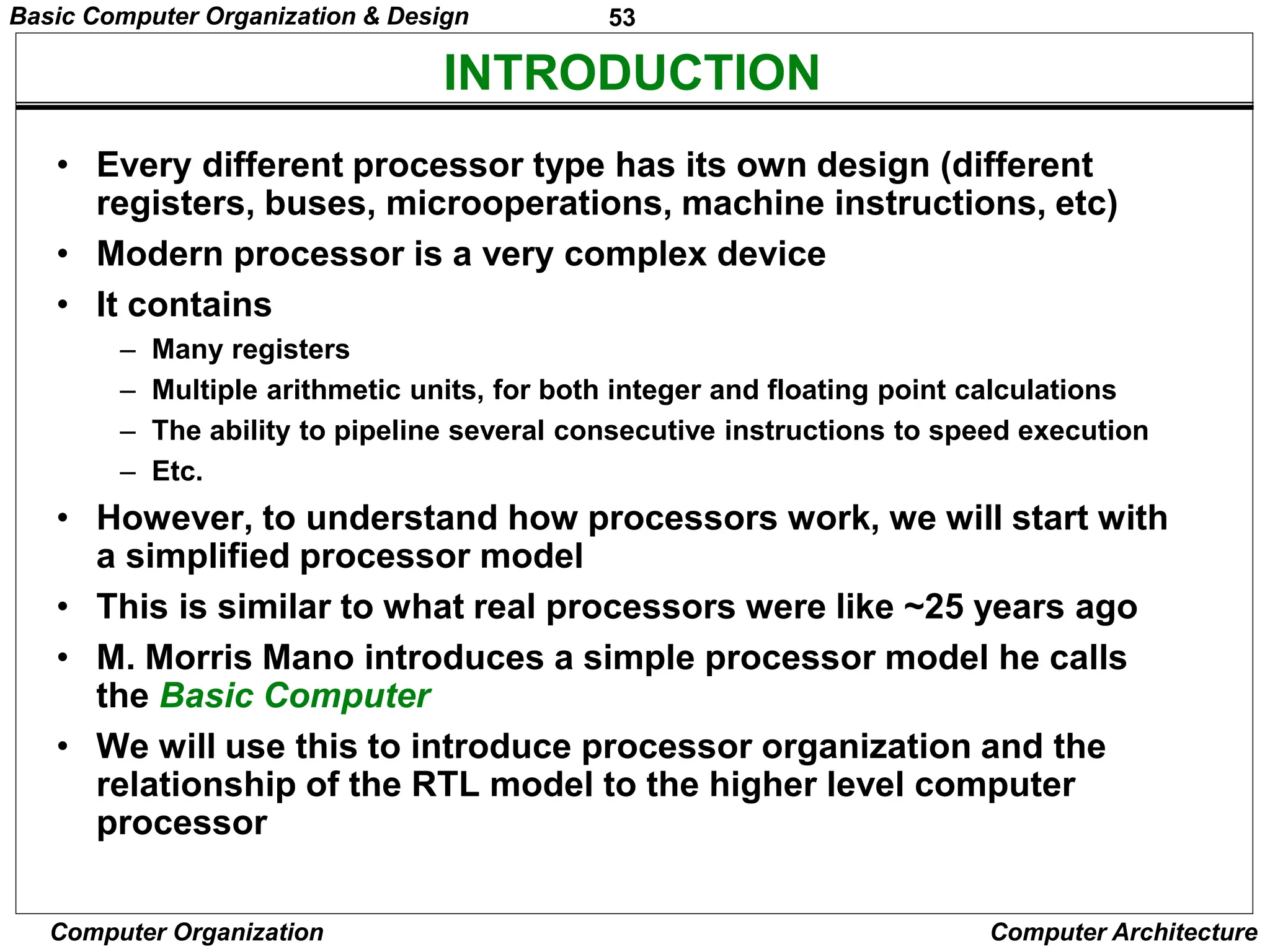
INTRODUCTION
• Every different processor type has its own design (different
registers, buses, microoperations, machine instructions, etc)
• Modern processor is a very complex device
• It contains
– Many registers
– Multiple arithmetic units, for both integer and floating point calculations
– The ability to pipeline several consecutive instructions to speed execution
– Etc.
• However, to understand how processors work, we will start with
a simplified processor model
• This is similar to what real processors were like ~25 years ago
• M. Morris Mano introduces a simple processor model he calls
the Basic Computer
• We will use this to introduce processor organization and the
relationship of the RTL model to the higher level computer
processor
Basic Computer Organization & Design
54
Computer Organization Computer Architecture
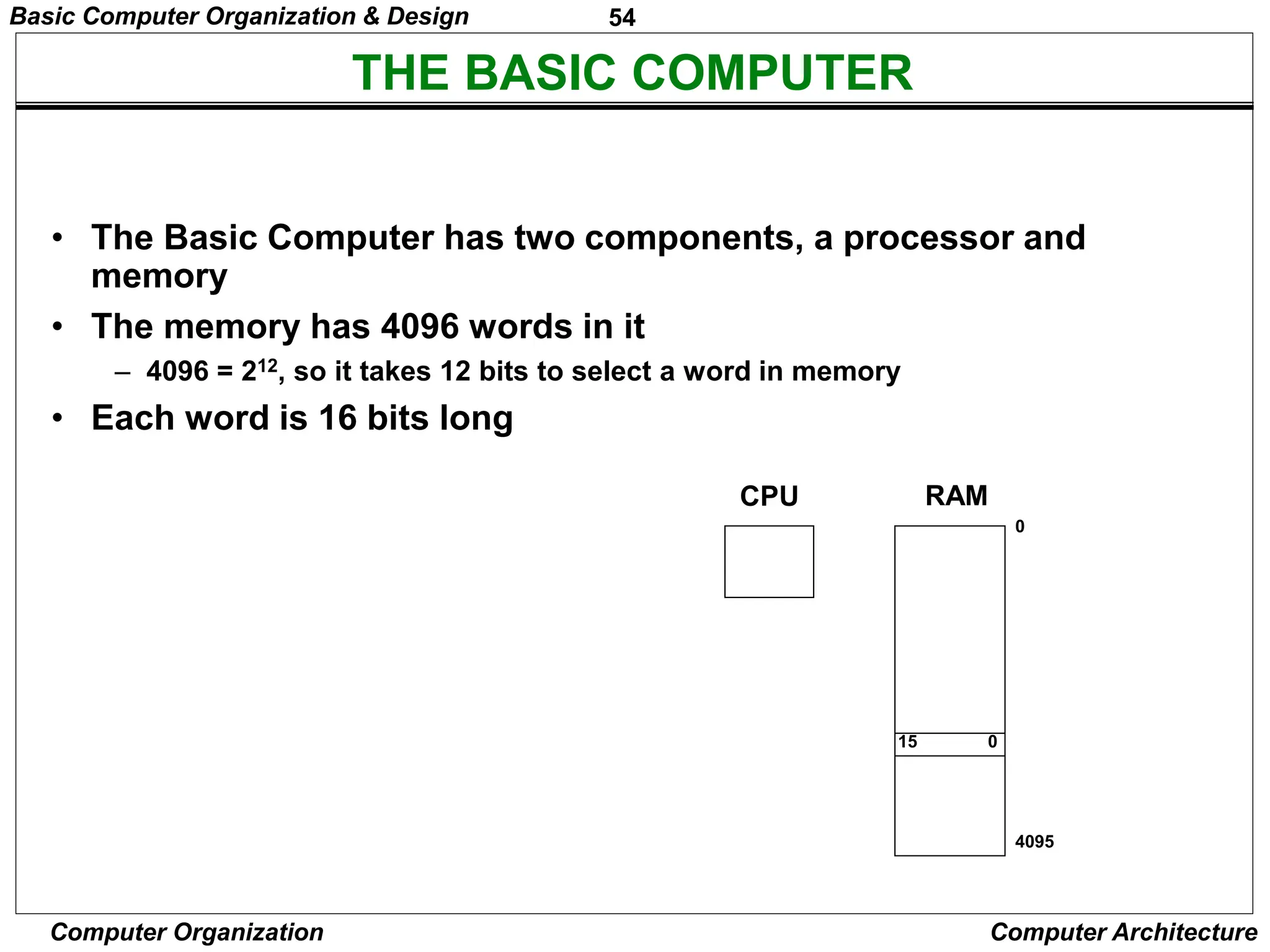
THE BASIC COMPUTER
• The Basic Computer has two components, a processor and
memory
• The memory has 4096 words in it
– 4096 = 212, so it takes 12 bits to select a word in memory
• Each word is 16 bits long
CPU RAM
0
4095
0
15
Basic Computer Organization & Design
55
Computer Organization Computer Architecture
INSTRUCTIONS
Instruction codes
• Program
– A sequence of (machine) instructions
• (Machine) Instruction
– A group of bits that tell the computer to perform a specific operation
(a sequence of micro-operation)
• The instructions of a program, along with any needed data
are stored in memory
• The CPU reads the next instruction from memory
• It is placed in an Instruction Register (IR)
• Control circuitry in control unit then translates the
instruction into the sequence of microoperations
necessary to implement it
Basic Computer Organization & Design
56
Computer Organization Computer Architecture
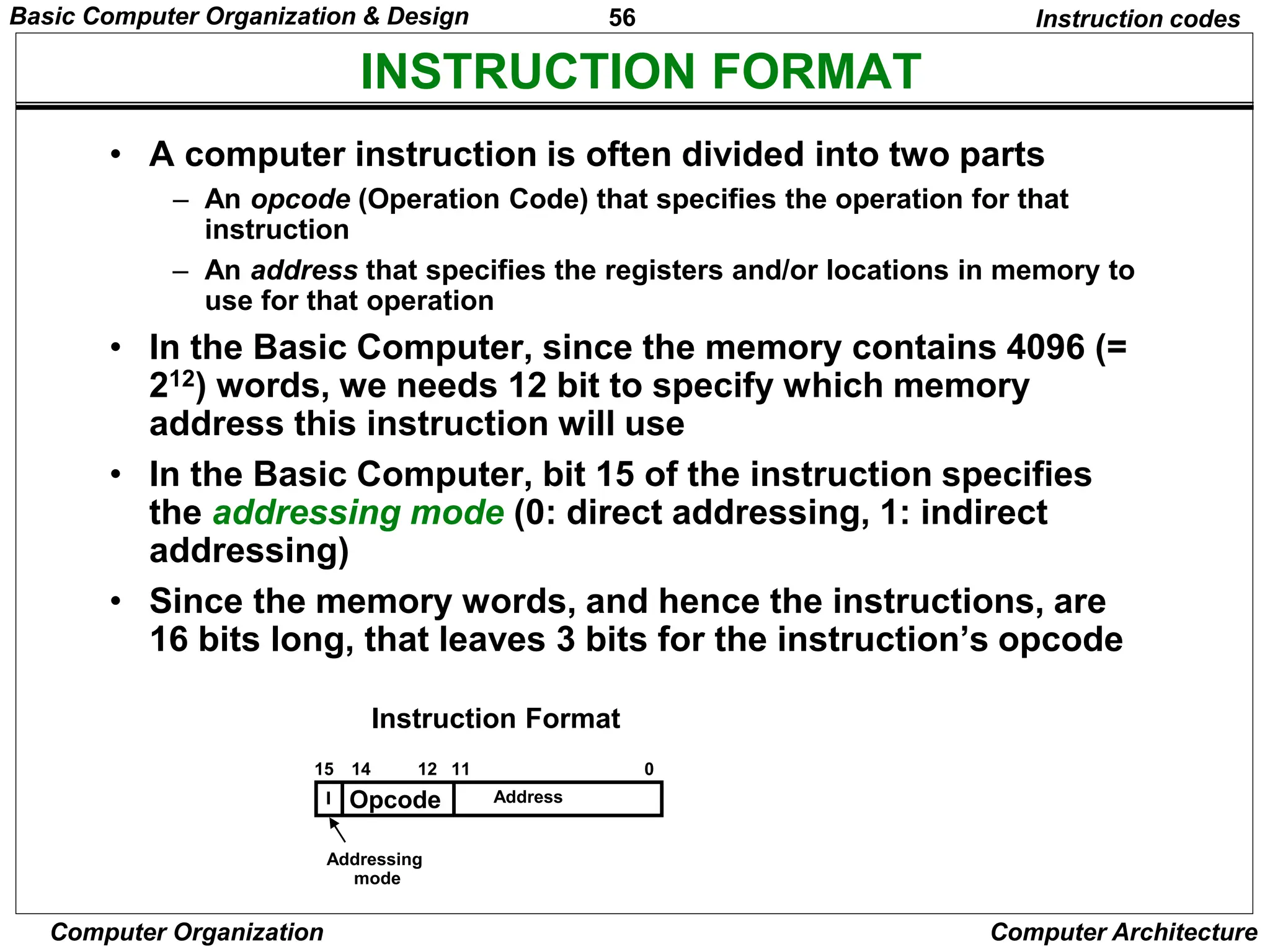
INSTRUCTION FORMAT
Instruction codes
• A computer instruction is often divided into two parts
– An opcode (Operation Code) that specifies the operation for that
instruction
– An address that specifies the registers and/or locations in memory to
use for that operation
• In the Basic Computer, since the memory contains 4096 (=
212) words, we needs 12 bit to specify which memory
address this instruction will use
• In the Basic Computer, bit 15 of the instruction specifies
the addressing mode (0: direct addressing, 1: indirect
addressing)
• Since the memory words, and hence the instructions, are
16 bits long, that leaves 3 bits for the instruction’s opcode
Opcode Address
Instruction Format
15 14 12 0
I
11
Addressing
mode
Basic Computer Organization & Design
57
Computer Organization Computer Architecture
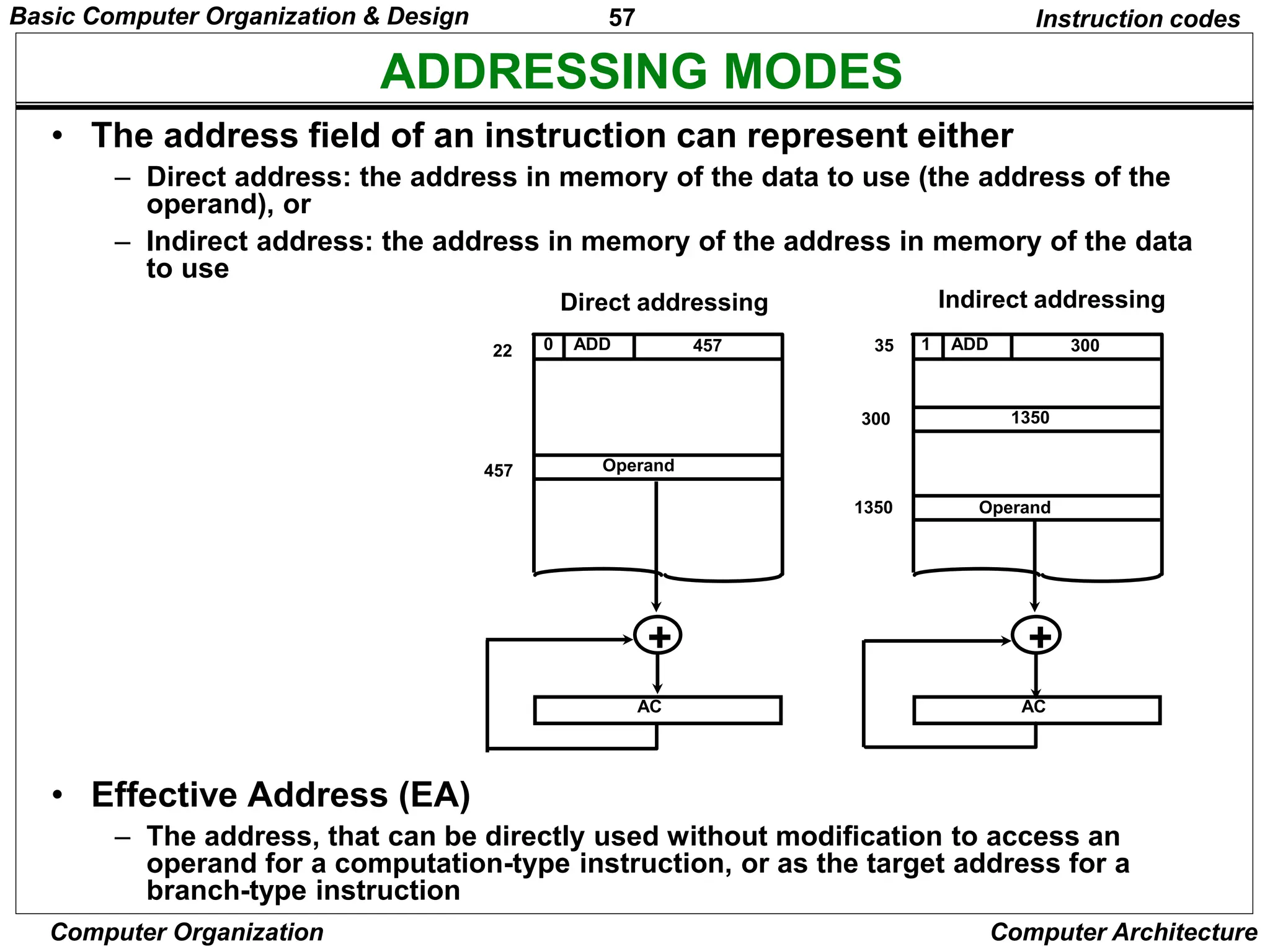
ADDRESSING MODES
Instruction codes
• The address field of an instruction can represent either
– Direct address: the address in memory of the data to use (the address of the
operand), or
– Indirect address: the address in memory of the address in memory of the data
to use
• Effective Address (EA)
– The address, that can be directly used without modification to access an
operand for a computation-type instruction, or as the target address for a
branch-type instruction
0 ADD 457
22
Operand
457
1 ADD 300
35
1350
300
Operand
1350
+
AC
+
AC
Direct addressing Indirect addressing
Basic Computer Organization & Design
58
Computer Organization Computer Architecture
PROCESSOR REGISTERS
Instruction codes
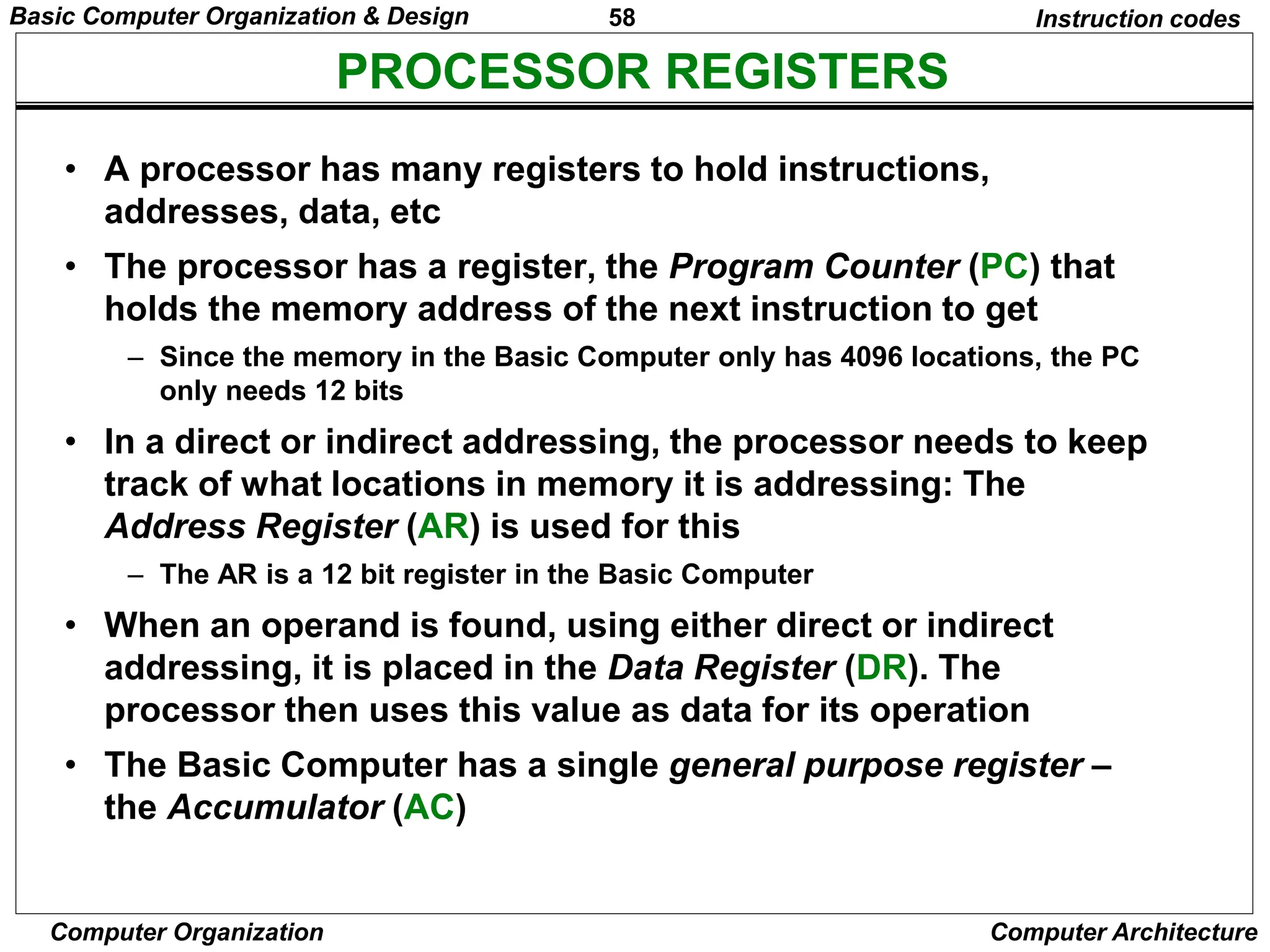
• A processor has many registers to hold instructions,
addresses, data, etc
• The processor has a register, the Program Counter (PC) that
holds the memory address of the next instruction to get
– Since the memory in the Basic Computer only has 4096 locations, the PC
only needs 12 bits
• In a direct or indirect addressing, the processor needs to keep
track of what locations in memory it is addressing: The
Address Register (AR) is used for this
– The AR is a 12 bit register in the Basic Computer
• When an operand is found, using either direct or indirect
addressing, it is placed in the Data Register (DR). The
processor then uses this value as data for its operation
• The Basic Computer has a single general purpose register –
the Accumulator (AC)
Basic Computer Organization & Design
59
Computer Organization Computer Architecture
PROCESSOR REGISTERS
Instruction codes
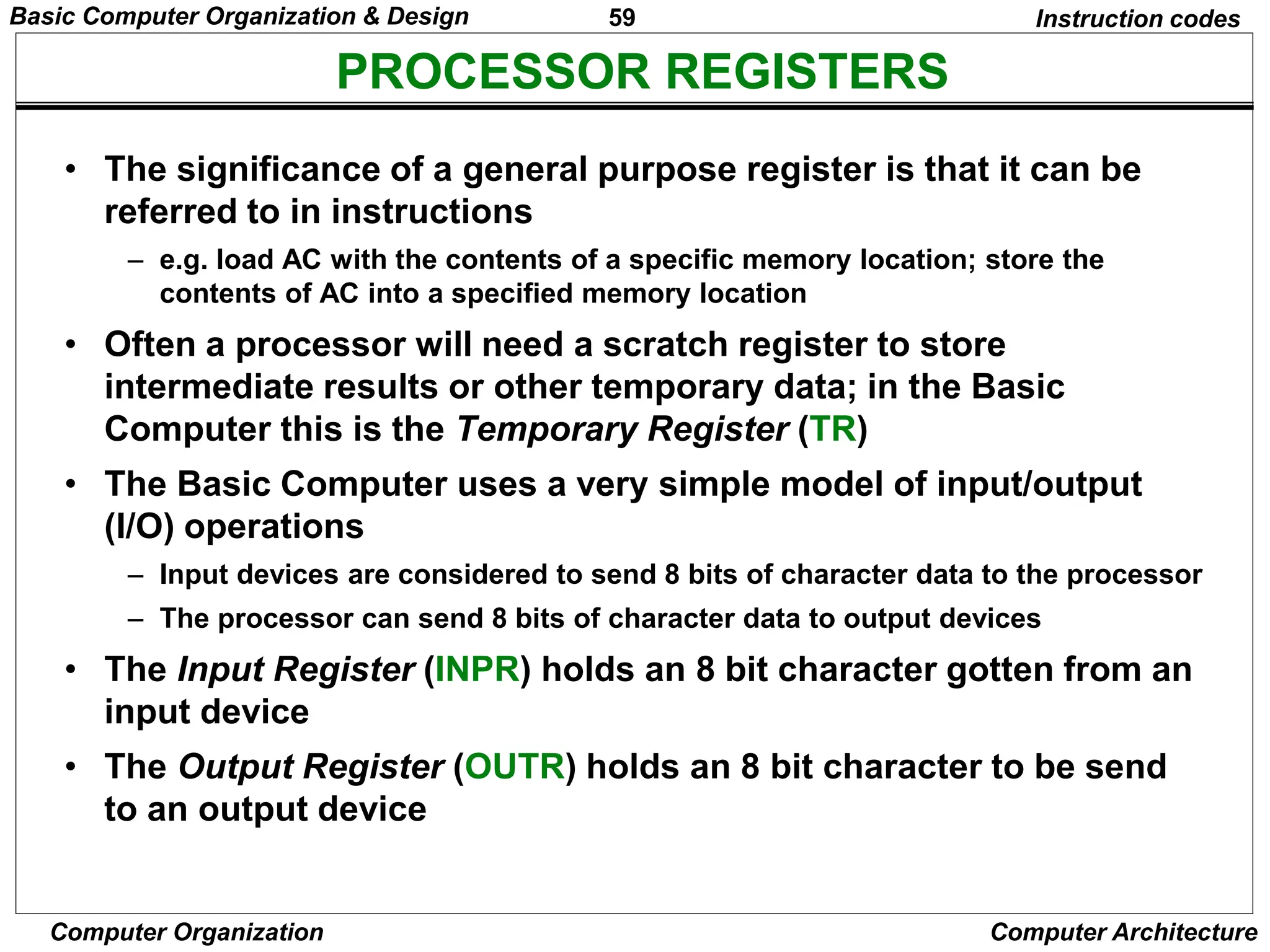
• The significance of a general purpose register is that it can be
referred to in instructions
– e.g. load AC with the contents of a specific memory location; store the
contents of AC into a specified memory location
• Often a processor will need a scratch register to store
intermediate results or other temporary data; in the Basic
Computer this is the Temporary Register (TR)
• The Basic Computer uses a very simple model of input/output
(I/O) operations
– Input devices are considered to send 8 bits of character data to the processor
– The processor can send 8 bits of character data to output devices
• The Input Register (INPR) holds an 8 bit character gotten from an
input device
• The Output Register (OUTR) holds an 8 bit character to be send
to an output device
Basic Computer Organization & Design
60
Computer Organization Computer Architecture
BASIC COMPUTER REGISTERS
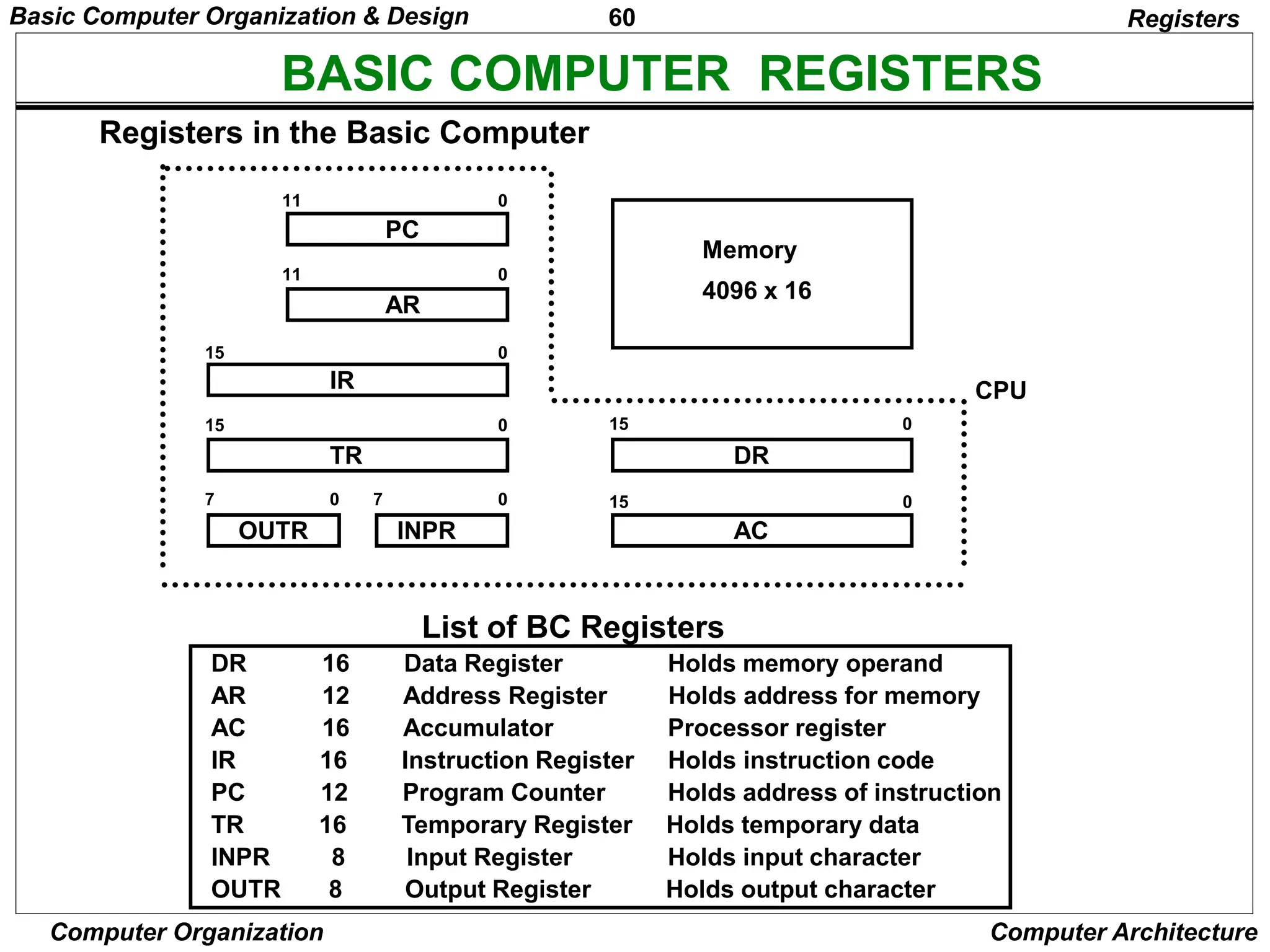
List of BC Registers
DR 16 Data Register Holds memory operand
AR 12 Address Register Holds address for memory
AC 16 Accumulator Processor register
IR 16 Instruction Register Holds instruction code
PC 12 Program Counter Holds address of instruction
TR 16 Temporary Register Holds temporary data
INPR 8 Input Register Holds input character
OUTR 8 Output Register Holds output character
Registers
Registers in the Basic Computer
11 0
PC
15 0
IR
15 0
TR
7 0
OUTR
15 0
DR
15 0
AC
11 0
AR
INPR
0 7
Memory
4096 x 16
CPU
Basic Computer Organization & Design
61
Computer Organization Computer Architecture
COMMON BUS SYSTEM
Registers
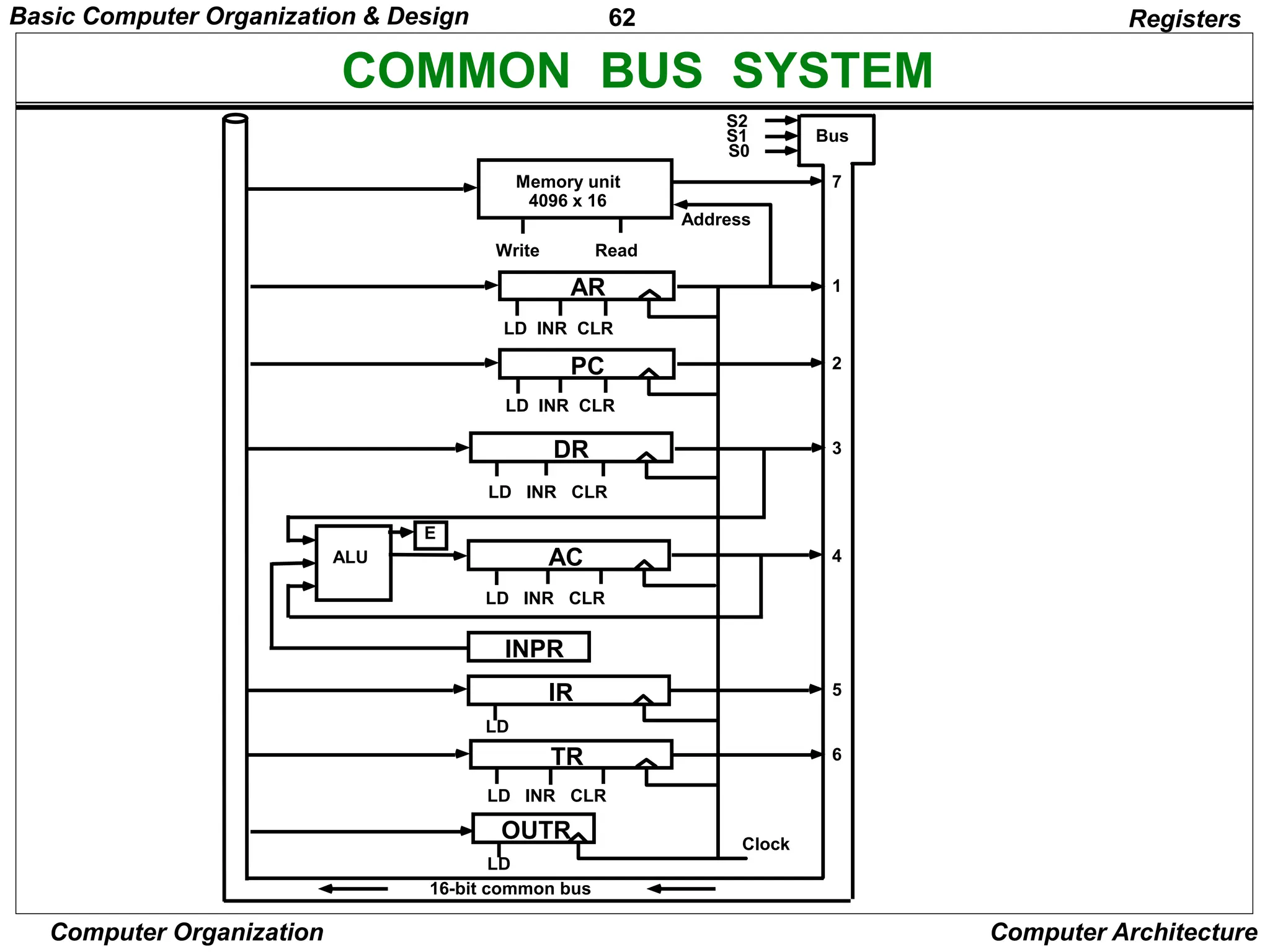
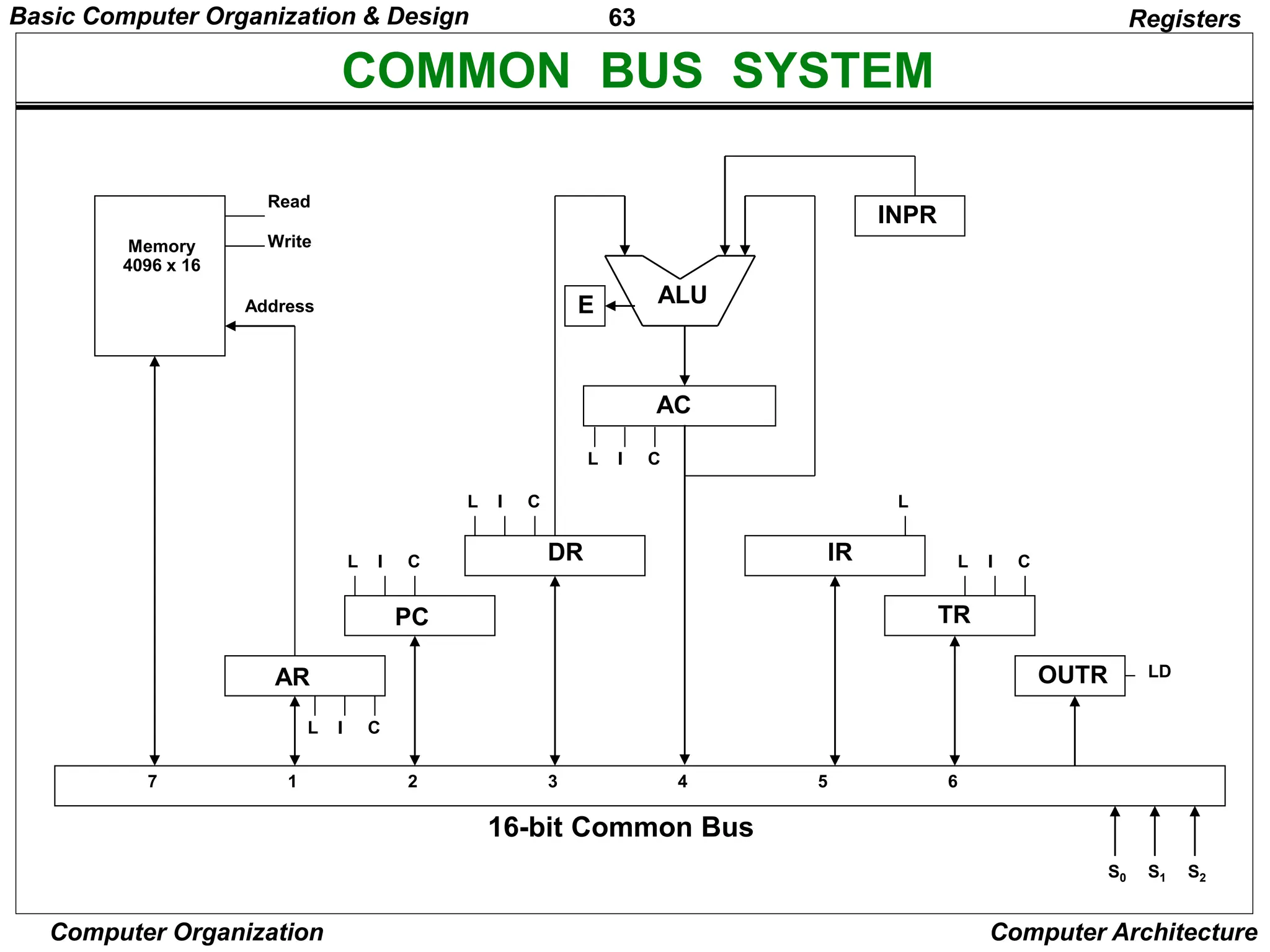
• The registers in the Basic Computer are connected using a
bus
• This gives a savings in circuitry over complete
connections between registers
Basic Computer Organization & Design
62
Computer Organization Computer Architecture
COMMON BUS SYSTEM
Registers
S2
S1
S0
Bus
Memory unit
4096 x 16
LD INR CLR
Address
Read
Write
AR
LD INR CLR
PC
LD INR CLR
DR
LD INR CLR
AC
ALU
E
INPR
IR
LD
LD INR CLR
TR
OUTR
LD
Clock
16-bit common bus
7
1
2
3
4
5
6
Basic Computer Organization & Design
63
Computer Organization Computer Architecture
COMMON BUS SYSTEM
Registers
AR
PC
DR
L I C
L I C
L I C
AC
L I C
ALU
E
IR
L
TR
L I C
OUTR LD
INPR
Memory
4096 x 16
Address
Read
Write
16-bit Common Bus
7 1 2 3 4 5 6
S0 S1 S2
Basic Computer Organization & Design
64
Computer Organization Computer Architecture
COMMON BUS SYSTEM
Registers
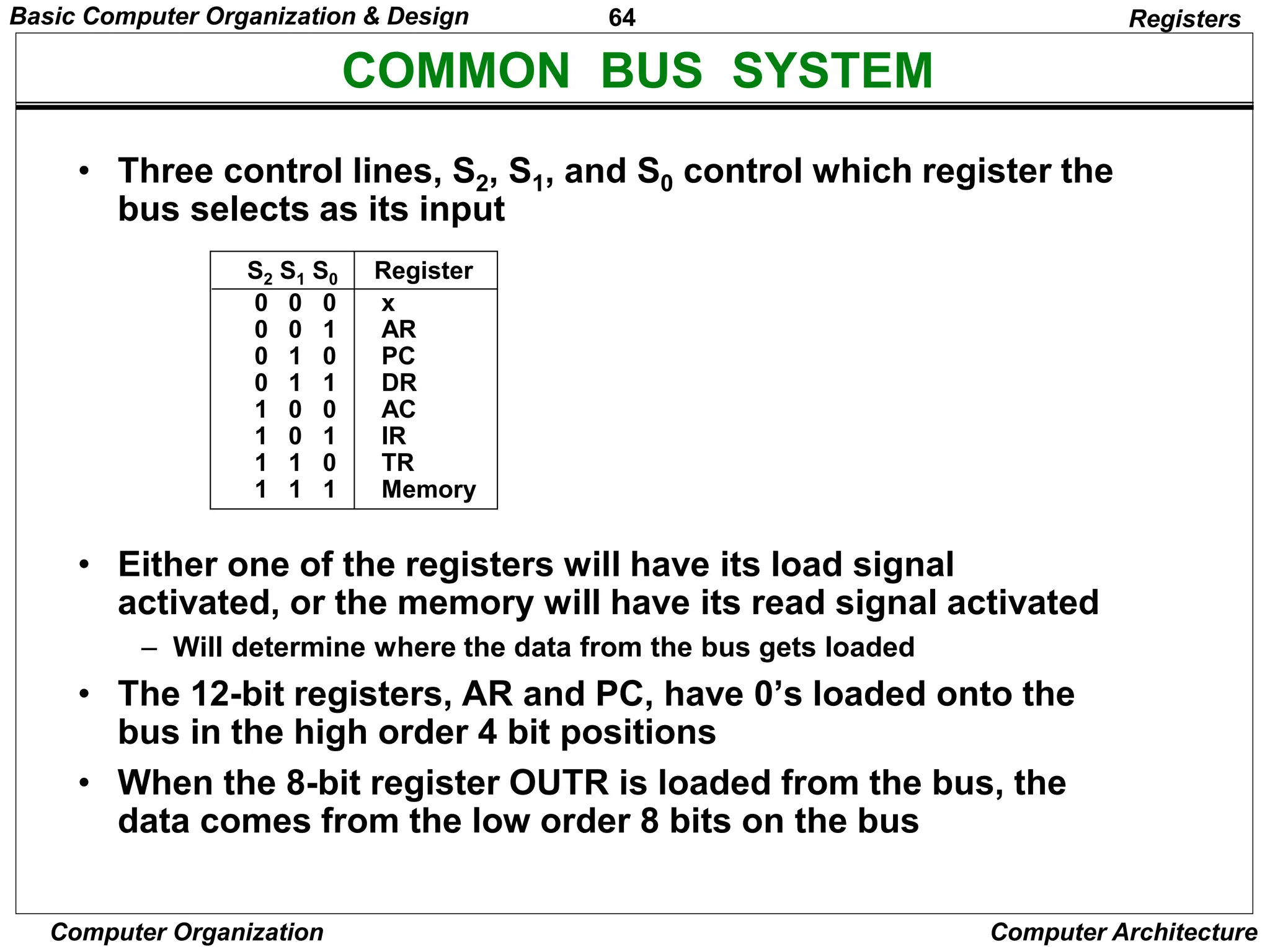
• Three control lines, S2, S1, and S0 control which register the
bus selects as its input
• Either one of the registers will have its load signal
activated, or the memory will have its read signal activated
– Will determine where the data from the bus gets loaded
• The 12-bit registers, AR and PC, have 0’s loaded onto the
bus in the high order 4 bit positions
• When the 8-bit register OUTR is loaded from the bus, the
data comes from the low order 8 bits on the bus
0 0 0 x
0 0 1 AR
0 1 0 PC
0 1 1 DR
1 0 0 AC
1 0 1 IR
1 1 0 TR
1 1 1 Memory
S2 S1 S0 Register
Basic Computer Organization & Design
65
Computer Organization Computer Architecture
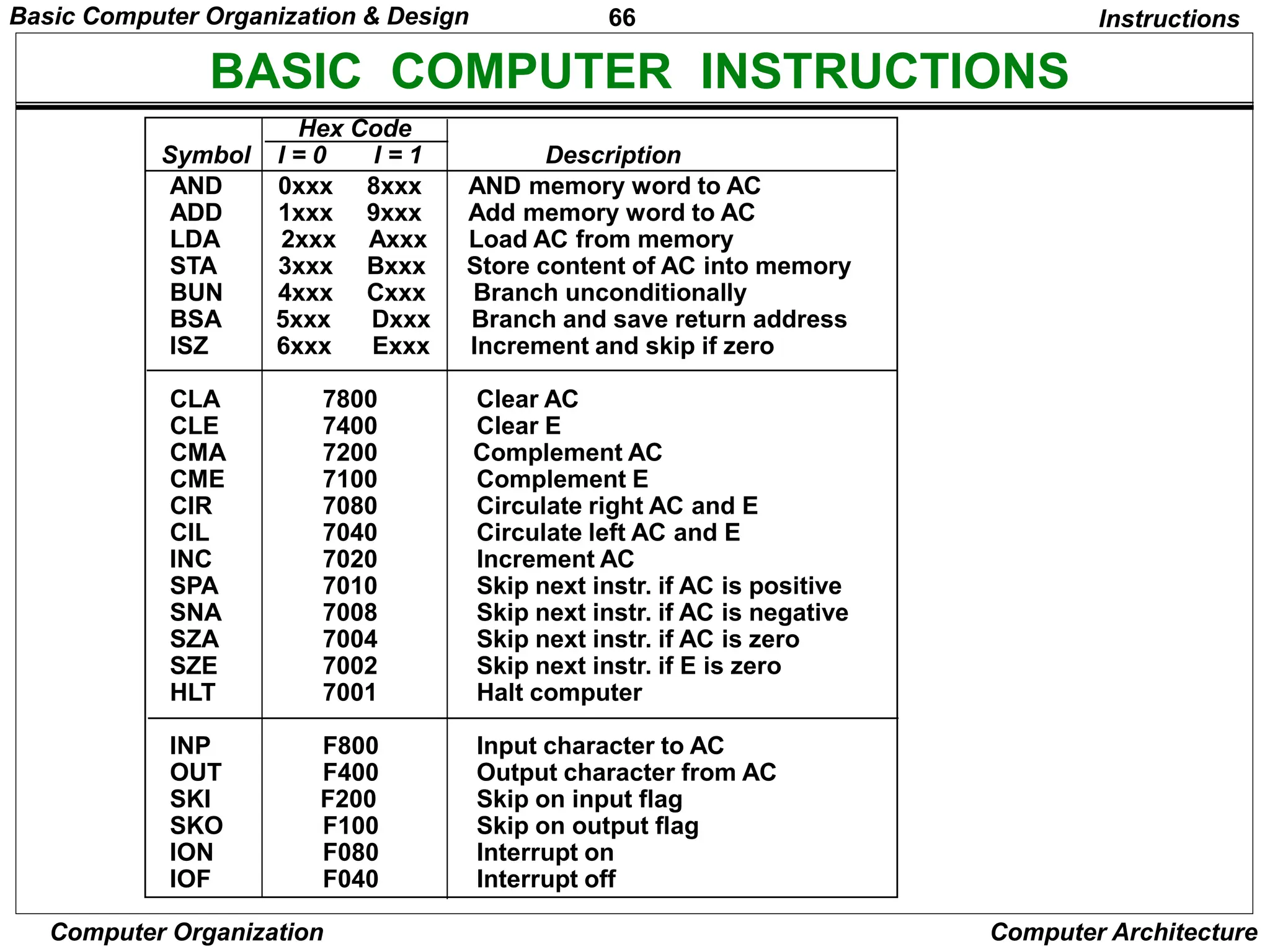
BASIC COMPUTER INSTRUCTIONS
Instructions
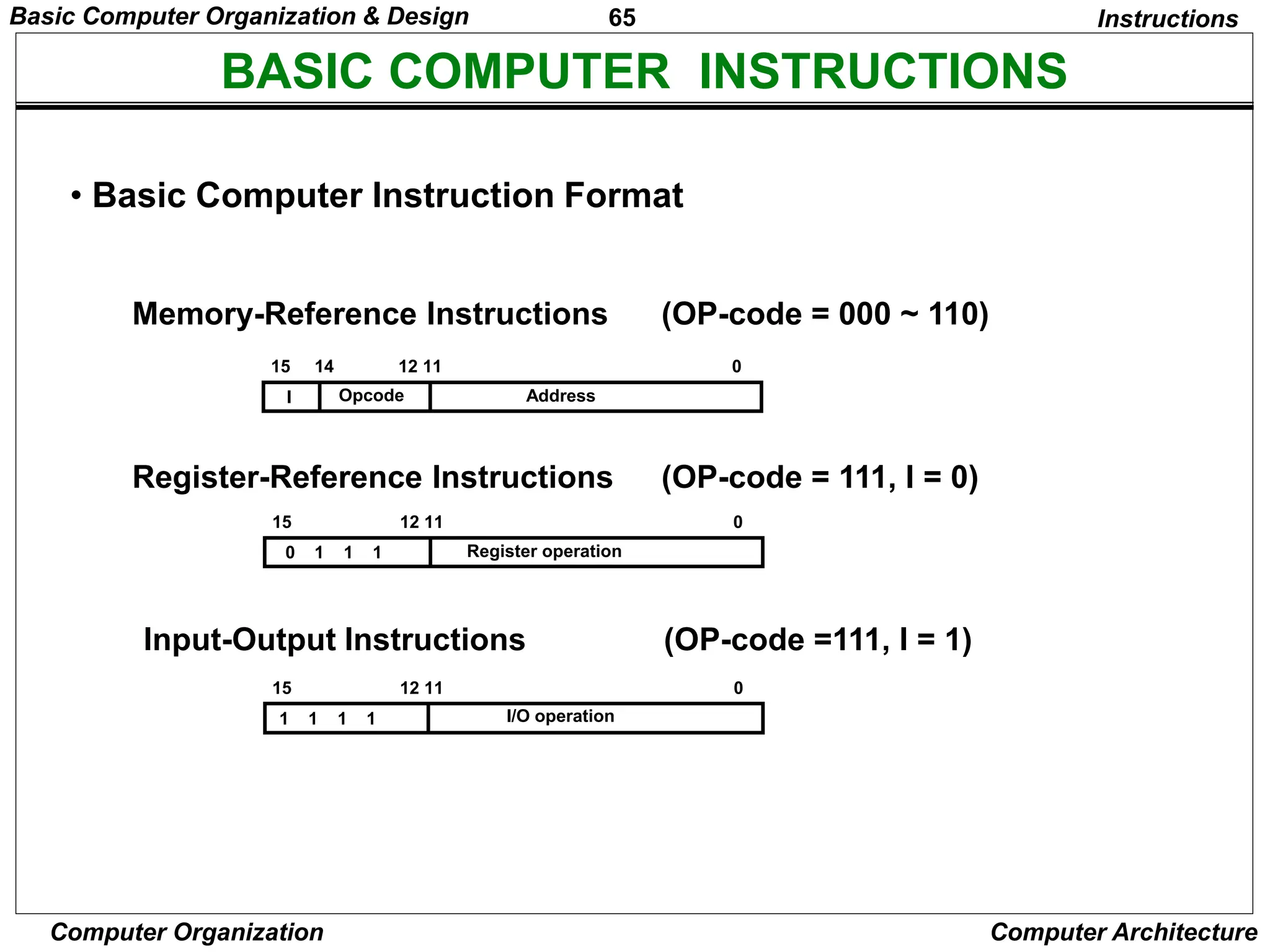
• Basic Computer Instruction Format
15 14 12 11 0
I Opcode Address
Memory-Reference Instructions (OP-code = 000 ~ 110)
Register-Reference Instructions (OP-code = 111, I = 0)
Input-Output Instructions (OP-code =111, I = 1)
15 12 11 0
Register operation
0 1 1 1
15 12 11 0
I/O operation
1 1 1 1
Basic Computer Organization & Design
66
Computer Organization Computer Architecture
BASIC COMPUTER INSTRUCTIONS
Hex Code
Symbol I = 0 I = 1 Description
AND 0xxx 8xxx AND memory word to AC
ADD 1xxx 9xxx Add memory word to AC
LDA 2xxx Axxx Load AC from memory
STA 3xxx Bxxx Store content of AC into memory
BUN 4xxx Cxxx Branch unconditionally
BSA 5xxx Dxxx Branch and save return address
ISZ 6xxx Exxx Increment and skip if zero
CLA 7800 Clear AC
CLE 7400 Clear E
CMA 7200 Complement AC
CME 7100 Complement E
CIR 7080 Circulate right AC and E
CIL 7040 Circulate left AC and E
INC 7020 Increment AC
SPA 7010 Skip next instr. if AC is positive
SNA 7008 Skip next instr. if AC is negative
SZA 7004 Skip next instr. if AC is zero
SZE 7002 Skip next instr. if E is zero
HLT 7001 Halt computer
INP F800 Input character to AC
OUT F400 Output character from AC
SKI F200 Skip on input flag
SKO F100 Skip on output flag
ION F080 Interrupt on
IOF F040 Interrupt off
Instructions
Basic Computer Organization & Design
67
Computer Organization Computer Architecture
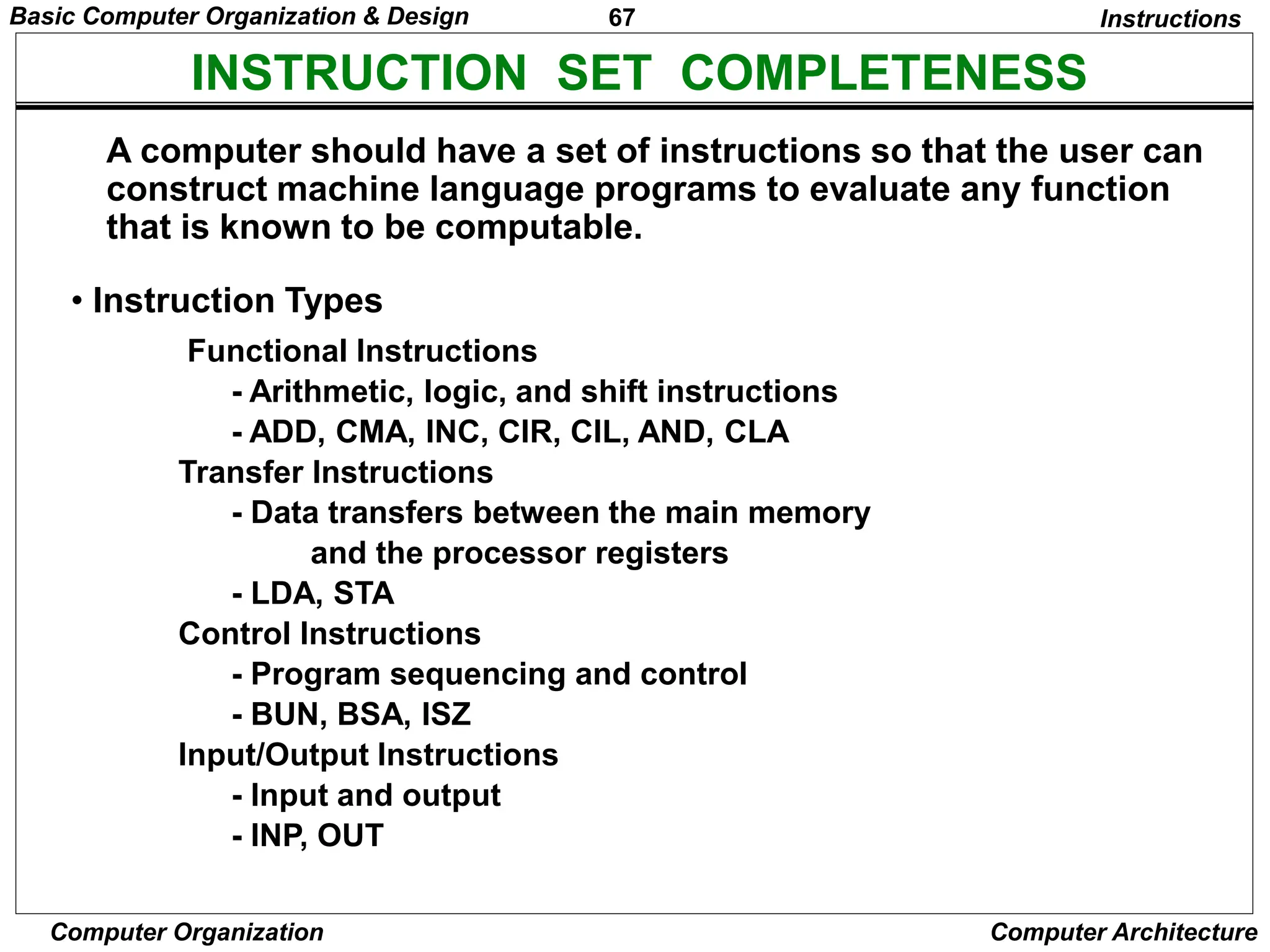
INSTRUCTION SET COMPLETENESS
• Instruction Types
A computer should have a set of instructions so that the user can
construct machine language programs to evaluate any function
that is known to be computable.
Functional Instructions
- Arithmetic, logic, and shift instructions
- ADD, CMA, INC, CIR, CIL, AND, CLA
Transfer Instructions
- Data transfers between the main memory
and the processor registers
- LDA, STA
Control Instructions
- Program sequencing and control
- BUN, BSA, ISZ
Input/Output Instructions
- Input and output
- INP, OUT
Instructions
Basic Computer Organization & Design
68
Computer Organization Computer Architecture
CONTROL UNIT
Instruction codes
• Control unit (CU) of a processor translates from machine
instructions to the control signals for the microoperations
that implement them
• Control units are implemented in one of two ways
• Hardwired Control
– CU is made up of sequential and combinational circuits to generate the
control signals
• Microprogrammed Control
– A control memory on the processor contains microprograms that
activate the necessary control signals
• We will consider a hardwired implementation of the control
unit for the Basic Computer
Basic Computer Organization & Design
69
Computer Organization Computer Architecture
TIMING AND CONTROL
Control unit of Basic Computer
Timing and control
Instruction register (IR)
15 14 13 12 11 - 0
3 x 8
decoder
7 6 5 4 3 2 1 0
I
D 0
15 14 . . . . 2 1 0
4 x 16
decoder
4-bit
sequence
counter
(SC)
Increment (INR)
Clear (CLR)
Clock
Other inputs
Control
signals
D
T
T
7
15
0
Combinational
Control
logic
Basic Computer Organization & Design
70
Computer Organization Computer Architecture
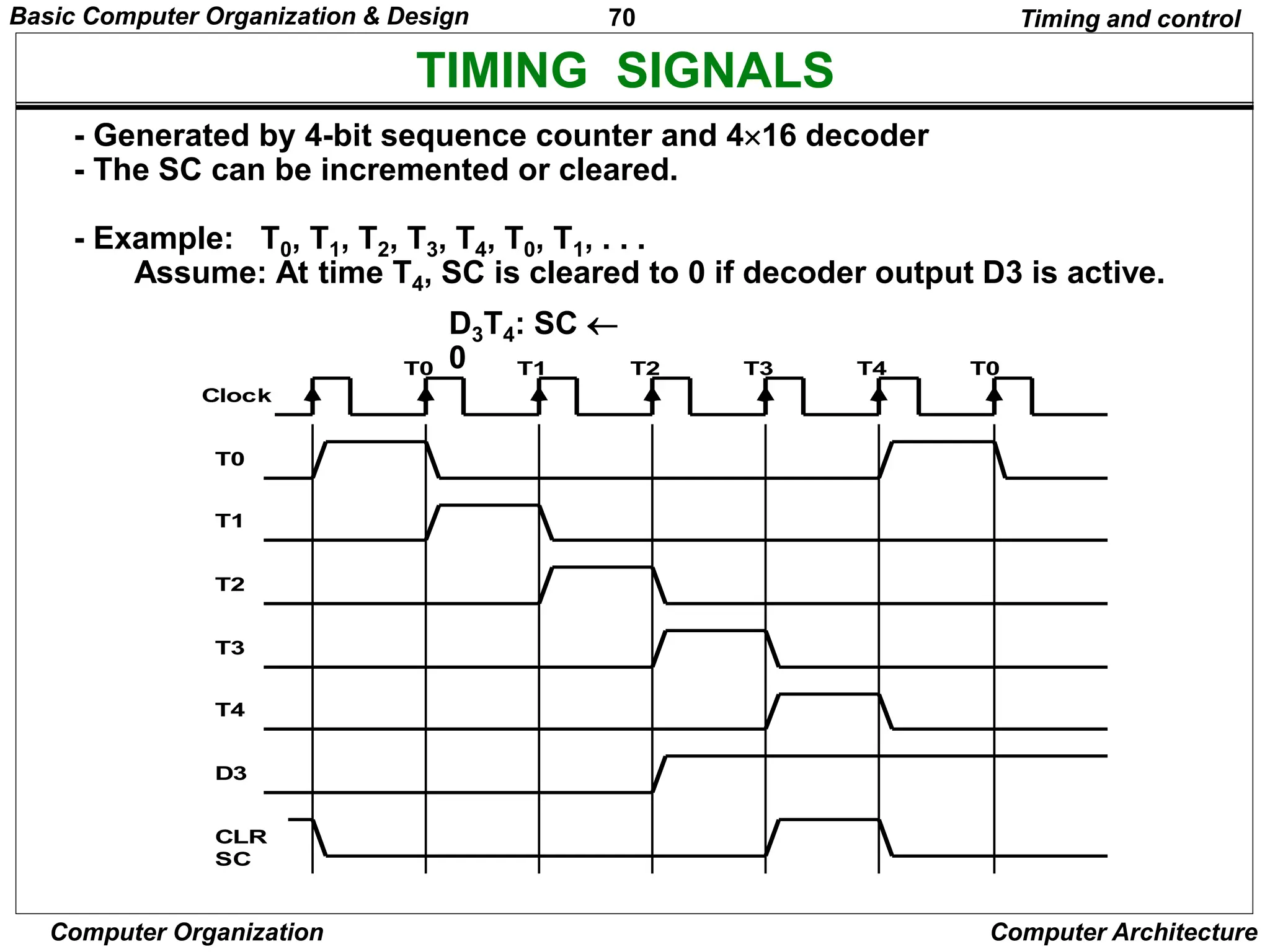
TIMING SIGNALS
Clock
T0 T1 T2 T3 T4 T0
T0
T1
T2
T3
T4
D3
CLR
SC
- Generated by 4-bit sequence counter and 416 decoder
- The SC can be incremented or cleared.
- Example: T0, T1, T2, T3, T4, T0, T1, . . .
Assume: At time T4, SC is cleared to 0 if decoder output D3 is active.
D3T4: SC 
0
Timing and control
Basic Computer Organization & Design
71
Computer Organization Computer Architecture
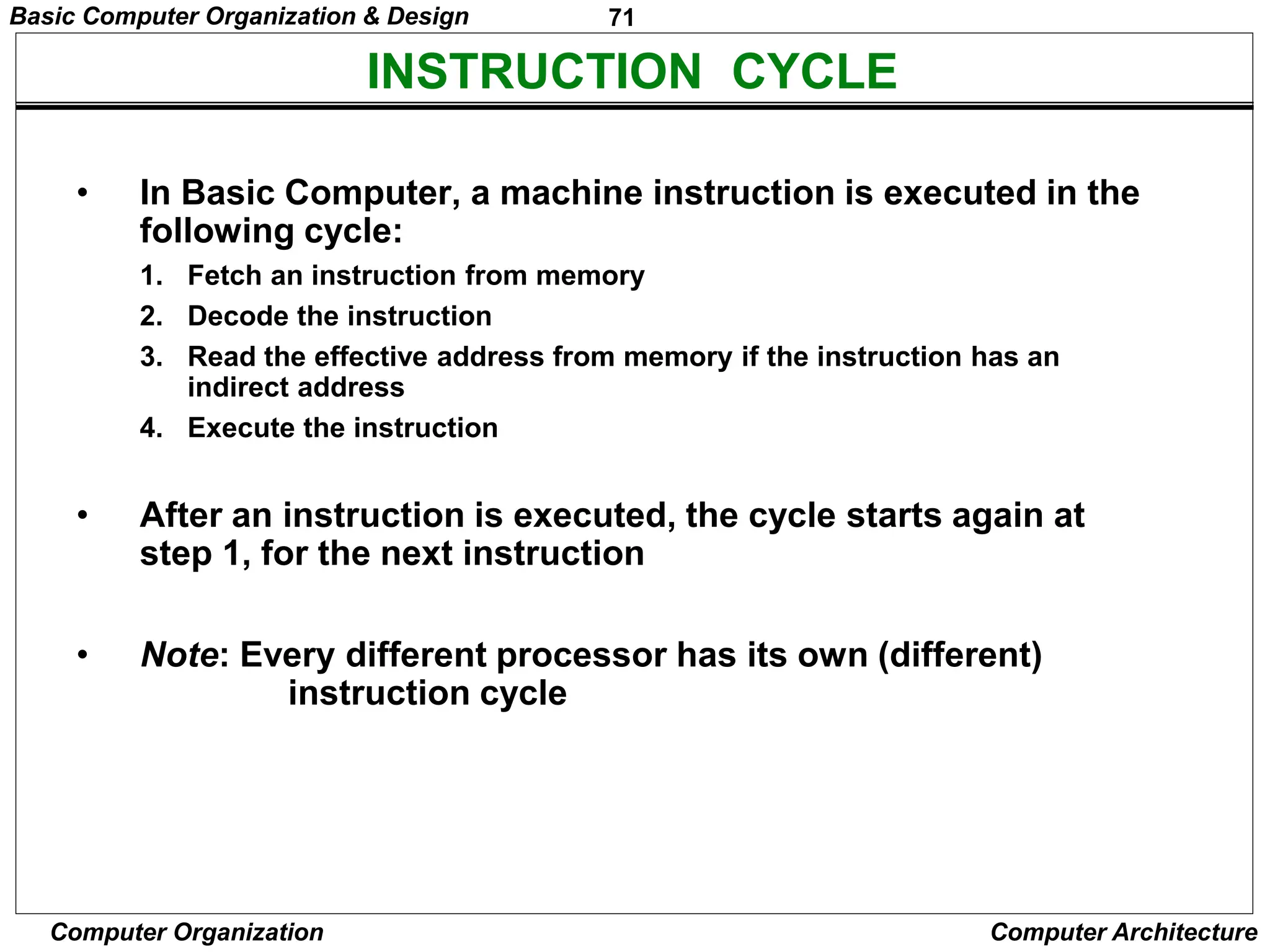
INSTRUCTION CYCLE
• In Basic Computer, a machine instruction is executed in the
following cycle:
1. Fetch an instruction from memory
2. Decode the instruction
3. Read the effective address from memory if the instruction has an
indirect address
4. Execute the instruction
• After an instruction is executed, the cycle starts again at
step 1, for the next instruction
• Note: Every different processor has its own (different)
instruction cycle
Basic Computer Organization & Design
72
Computer Organization Computer Architecture
FETCH and DECODE
• Fetch and Decode T0: AR PC (S0S1S2=010, T0=1)
T1: IR  M [AR], PC  PC + 1 (S0S1S2=111, T1=1)
T2: D0, . . . , D7  Decode IR(12-14), AR  IR(0-11), I  IR(15)
S2
S1
S0
Bus
7
Memory
unit
Address
Read
AR
LD
PC
INR
IR
LD
Clock
1
2
5
Common bus
T1
T0
Instruction Cycle
Basic Computer Organization & Design
73
Computer Organization Computer Architecture
DETERMINE THE TYPE OF INSTRUCTION
= 0 (direct)
D'7IT3: AR M[AR]
D'7I'T3: Nothing
D7I'T3: Execute a register-reference instr.
D7IT3: Execute an input-output instr.
Instrction Cycle
Start
SC  0
AR  PC
T0
IR  M[AR], PC  PC + 1
T1
AR  IR(0-11), I  IR(15)
Decode Opcode in IR(12-14),
T2
D7
= 0 (Memory-reference)
(Register or I/O) = 1
I
I
Execute
register-reference
instruction
SC  0
Execute
input-output
instruction
SC  0
M[AR]

AR Nothing
= 0 (register)
(I/O) = 1 (indirect) = 1
T3 T3 T3 T3
Execute
memory-reference
instruction
SC  0
T4
Basic Computer Organization & Design
74
Computer Organization Computer Architecture
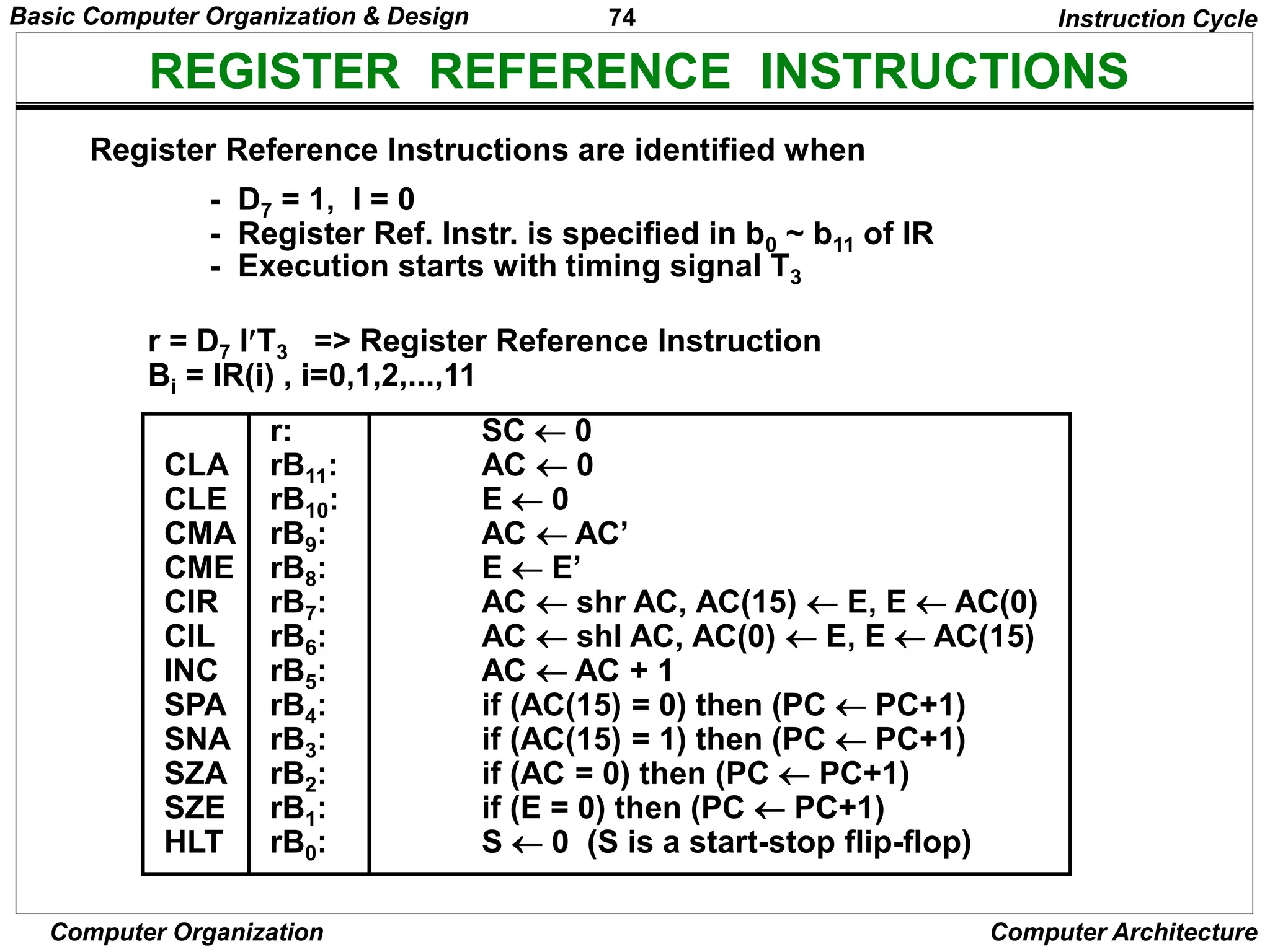
REGISTER REFERENCE INSTRUCTIONS
r = D7 IT3 => Register Reference Instruction
Bi = IR(i) , i=0,1,2,...,11
- D7 = 1, I = 0
- Register Ref. Instr. is specified in b0 ~ b11 of IR
- Execution starts with timing signal T3
Instruction Cycle
Register Reference Instructions are identified when
r: SC  0
CLA rB11: AC  0
CLE rB10: E  0
CMA rB9: AC  AC’
CME rB8: E  E’
CIR rB7: AC  shr AC, AC(15)  E, E  AC(0)
CIL rB6: AC  shl AC, AC(0)  E, E  AC(15)
INC rB5: AC  AC + 1
SPA rB4: if (AC(15) = 0) then (PC  PC+1)
SNA rB3: if (AC(15) = 1) then (PC  PC+1)
SZA rB2: if (AC = 0) then (PC  PC+1)
SZE rB1: if (E = 0) then (PC  PC+1)
HLT rB0: S  0 (S is a start-stop flip-flop)
Basic Computer Organization & Design
75
Computer Organization Computer Architecture
MEMORY REFERENCE INSTRUCTIONS
AND to AC
D0T4: DR  M[AR] Read operand
D0T5: AC  AC  DR, SC  0 AND with AC
ADD to AC
D1T4: DR  M[AR] Read operand
D1T5: AC  AC + DR, E  Cout, SC  0 Add to AC and store carry in E
- The effective address of the instruction is in AR and was placed there during
timing signal T2 when I = 0, or during timing signal T3 when I = 1
- Memory cycle is assumed to be short enough to complete in a CPU cycle
- The execution of MR instruction starts with T4
MR Instructions
Symbol
Operation
Decoder Symbolic Description
AND D0 AC  AC  M[AR]
ADD D1 AC  AC + M[AR], E  Cout
LDA D2 AC  M[AR]
STA D3 M[AR]  AC
BUN D4 PC  AR
BSA D5 M[AR]  PC, PC  AR + 1
ISZ D6 M[AR]  M[AR] + 1, if M[AR] + 1 = 0 then PC  PC+1
Basic Computer Organization & Design
76
Computer Organization Computer Architecture
MEMORY REFERENCE INSTRUCTIONS
Memory, PC after execution
21
0 BSA 135
Next instruction
Subroutine
20
PC = 21
AR = 135
136
1 BUN 135
Memory, PC, AR at time T4
0 BSA 135
Next instruction
Subroutine
20
21
135
PC = 136
1 BUN 135
Memory Memory
LDA: Load to AC
D2T4: DR  M[AR]
D2T5: AC  DR, SC  0
STA: Store AC
D3T4: M[AR]  AC, SC  0
BUN: Branch Unconditionally
D4T4: PC  AR, SC  0
BSA: Branch and Save Return Address
M[AR]  PC, PC  AR + 1
Basic Computer Organization & Design
77
Computer Organization Computer Architecture
MEMORY REFERENCE INSTRUCTIONS
MR Instructions
BSA:
D5T4: M[AR]  PC, AR  AR + 1
D5T5: PC  AR, SC  0
ISZ: Increment and Skip-if-Zero
D6T4: DR  M[AR]
D6T5: DR  DR + 1
D6T4: M[AR]  DR, if (DR = 0) then (PC  PC + 1), SC  0
Basic Computer Organization & Design
78
Computer Organization Computer Architecture
FLOWCHART FOR MEMORY REFERENCE INSTRUCTIONS
MR Instructions
Memory-reference instruction
DR  M[AR] DR  M[AR] DR  M[AR] M[AR]  AC
SC  0
AND ADD LDA STA
AC  AC DR
SC  0
AC  AC + DR
E  Cout
SC  0
AC  DR
SC  0
D T
0 4 D T
1 4 D T
2 4 D T
3 4
D T
0 5 D T
1 5 D T
2 5
PC  AR
SC  0
M[AR]  PC
AR  AR + 1
DR  M[AR]
BUN BSA ISZ
D T
4 4 D T
5 4 D T
6 4
DR  DR + 1
D T
5 5 D T
6 5
PC  AR
SC  0
M[AR]  DR
If (DR = 0)
then (PC  PC + 1)
SC  0
D T
6 6

Basic Computer Organization & Design
79
Computer Organization Computer Architecture
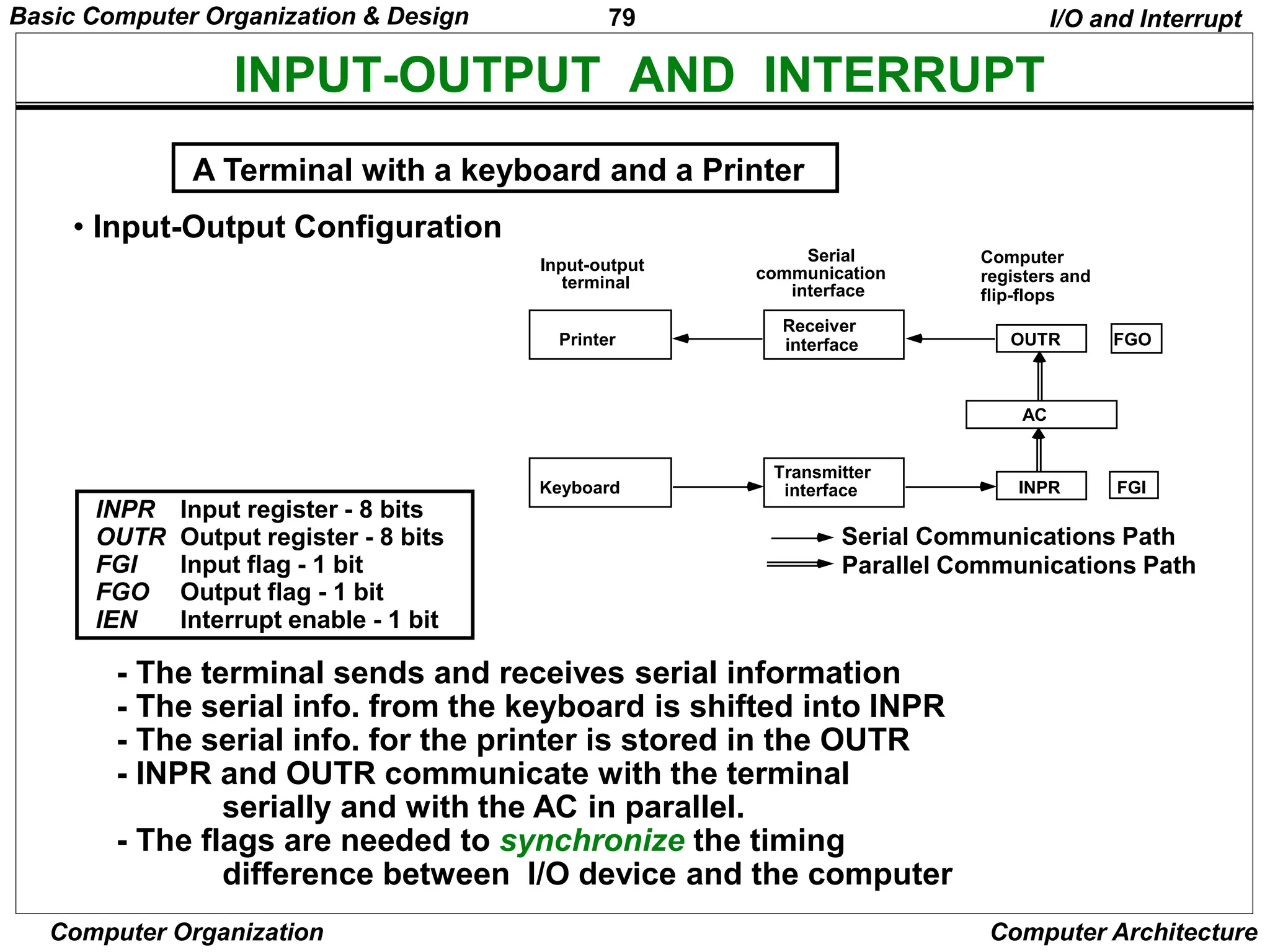
INPUT-OUTPUT AND INTERRUPT
• Input-Output Configuration
INPR Input register - 8 bits
OUTR Output register - 8 bits
FGI Input flag - 1 bit
FGO Output flag - 1 bit
IEN Interrupt enable - 1 bit
- The terminal sends and receives serial information
- The serial info. from the keyboard is shifted into INPR
- The serial info. for the printer is stored in the OUTR
- INPR and OUTR communicate with the terminal
serially and with the AC in parallel.
- The flags are needed to synchronize the timing
difference between I/O device and the computer
A Terminal with a keyboard and a Printer
I/O and Interrupt
Input-output
terminal
Serial
communication
interface
Computer
registers and
flip-flops
Printer
Keyboard
Receiver
interface
Transmitter
interface
FGO
OUTR
AC
INPR FGI
Serial Communications Path
Parallel Communications Path
Basic Computer Organization & Design
80
Computer Organization Computer Architecture
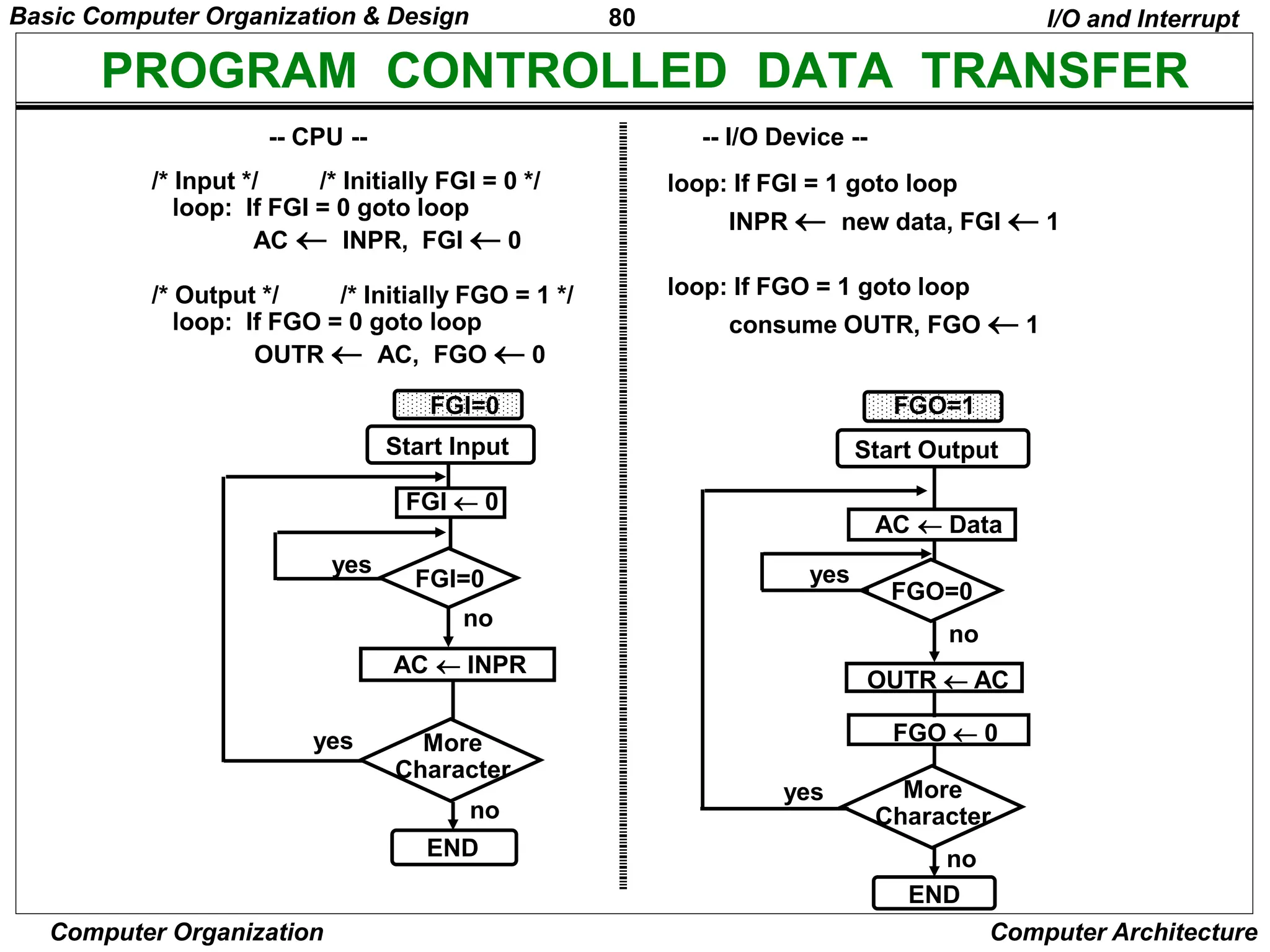
PROGRAM CONTROLLED DATA TRANSFER
loop: If FGI = 1 goto loop
INPR  new data, FGI  1
loop: If FGO = 1 goto loop
consume OUTR, FGO  1
-- CPU -- -- I/O Device --
/* Input */ /* Initially FGI = 0 */
loop: If FGI = 0 goto loop
AC  INPR, FGI  0
/* Output */ /* Initially FGO = 1 */
loop: If FGO = 0 goto loop
OUTR  AC, FGO  0
I/O and Interrupt
Start Input
FGI  0
FGI=0
AC  INPR
More
Character
END
Start Output
FGO  0
FGO=0
More
Character
END
OUTR  AC
AC  Data
yes
no
yes
no
FGI=0 FGO=1
yes
yes
no
no
Basic Computer Organization & Design
81
Computer Organization Computer Architecture
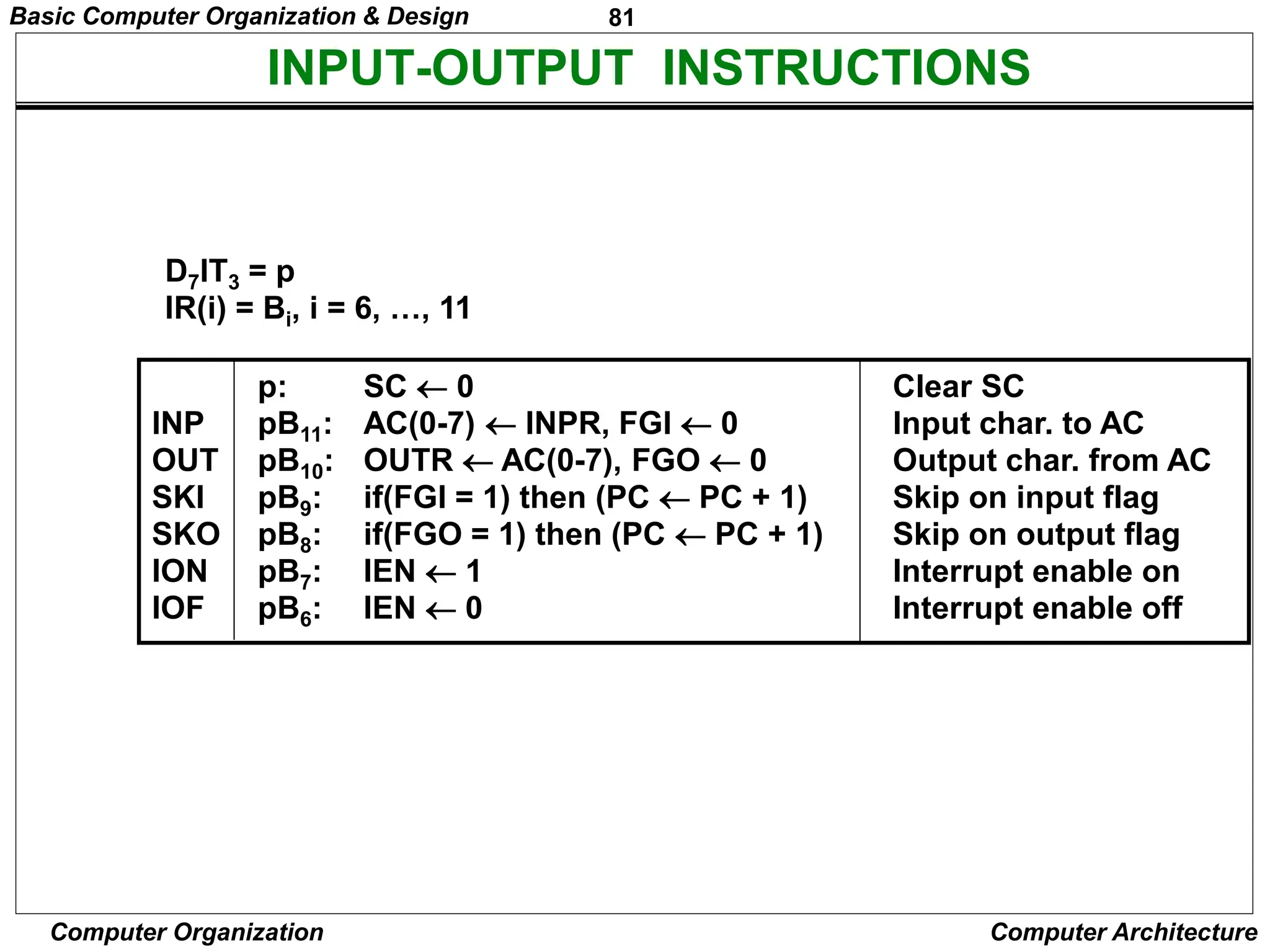
INPUT-OUTPUT INSTRUCTIONS
D7IT3 = p
IR(i) = Bi, i = 6, …, 11
p: SC  0 Clear SC
INP pB11: AC(0-7)  INPR, FGI  0 Input char. to AC
OUT pB10: OUTR  AC(0-7), FGO  0 Output char. from AC
SKI pB9: if(FGI = 1) then (PC  PC + 1) Skip on input flag
SKO pB8: if(FGO = 1) then (PC  PC + 1) Skip on output flag
ION pB7: IEN  1 Interrupt enable on
IOF pB6: IEN  0 Interrupt enable off
Basic Computer Organization & Design
82
Computer Organization Computer Architecture
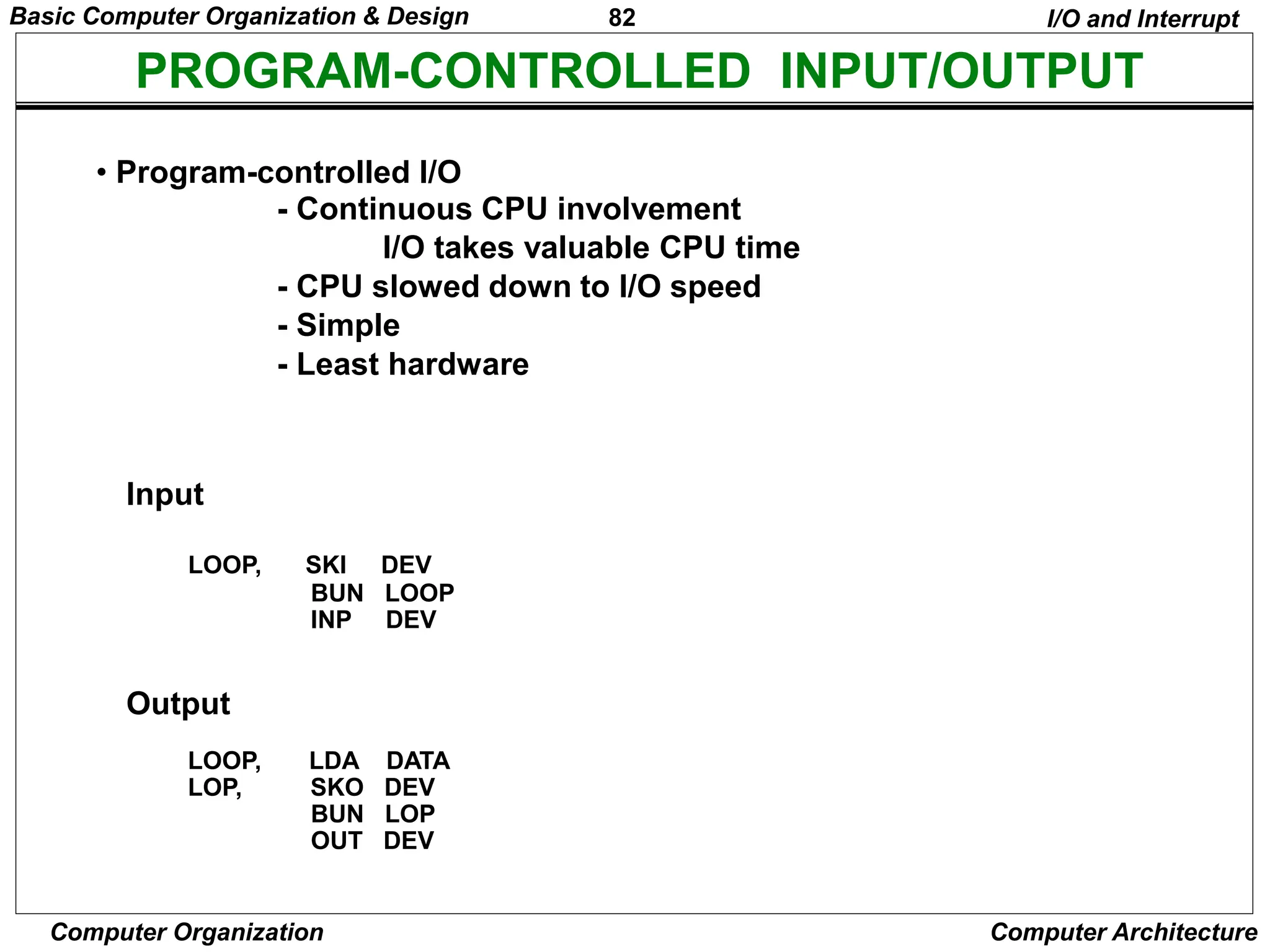
PROGRAM-CONTROLLED INPUT/OUTPUT
• Program-controlled I/O
- Continuous CPU involvement
I/O takes valuable CPU time
- CPU slowed down to I/O speed
- Simple
- Least hardware
I/O and Interrupt
Input
LOOP, SKI DEV
BUN LOOP
INP DEV
Output
LOOP, LDA DATA
LOP, SKO DEV
BUN LOP
OUT DEV
Basic Computer Organization & Design
83
Computer Organization Computer Architecture
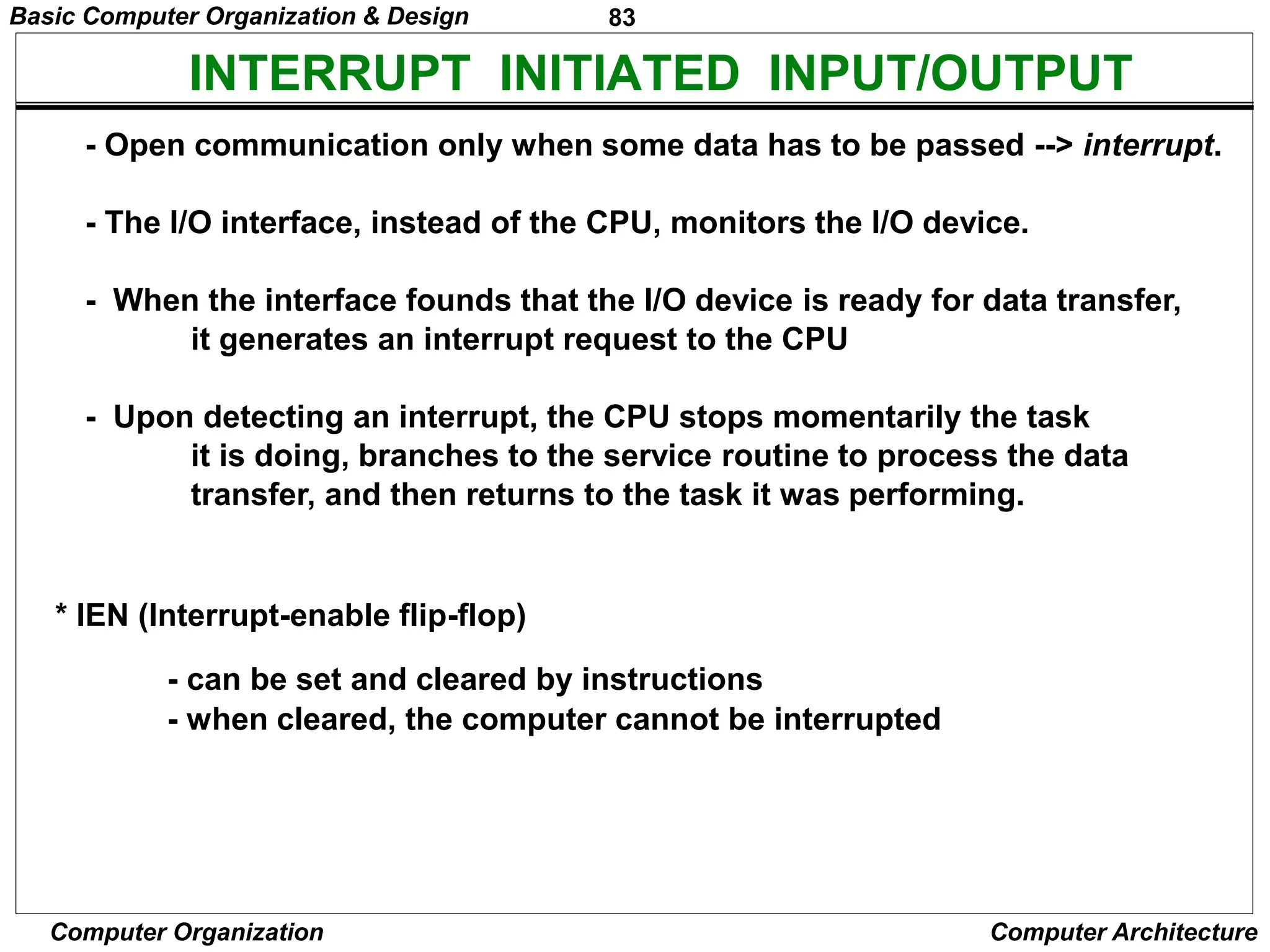
INTERRUPT INITIATED INPUT/OUTPUT
- Open communication only when some data has to be passed --> interrupt.
- The I/O interface, instead of the CPU, monitors the I/O device.
- When the interface founds that the I/O device is ready for data transfer,
it generates an interrupt request to the CPU
- Upon detecting an interrupt, the CPU stops momentarily the task
it is doing, branches to the service routine to process the data
transfer, and then returns to the task it was performing.
* IEN (Interrupt-enable flip-flop)
- can be set and cleared by instructions
- when cleared, the computer cannot be interrupted
Basic Computer Organization & Design
84
Computer Organization Computer Architecture
FLOWCHART FOR INTERRUPT CYCLE
R = Interrupt f/f
- The interrupt cycle is a HW implementation of a branch
and save return address operation.
- At the beginning of the next instruction cycle, the
instruction that is read from memory is in address 1.
- At memory address 1, the programmer must store a branch instruction
that sends the control to an interrupt service routine
- The instruction that returns the control to the original
program is "indirect BUN 0"
I/O and Interrupt
Store return address
R
=1
=0
in location 0
M[0]  PC
Branch to location 1
PC  1
IEN  0
R  0
Interrupt cycle
Instruction cycle
Fetch and decode
instructions
IEN
FGI
FGO
Execute
instructions
R  1
=1
=1
=1
=0
=0
=0
Basic Computer Organization & Design
85
Computer Organization Computer Architecture
REGISTER TRANSFER OPERATIONS IN INTERRUPT CYCLE
Register Transfer Statements for Interrupt Cycle
- R F/F  1 if IEN (FGI + FGO)T0T1T2
 T0T1T2 (IEN)(FGI + FGO): R  1
- The fetch and decode phases of the instruction cycle
must be modified Replace T0, T1, T2 with R'T0, R'T1, R'T2
- The interrupt cycle :
RT0: AR  0, TR  PC
RT1: M[AR]  TR, PC  0
RT2: PC  PC + 1, IEN  0, R  0, SC  0
After interrupt cycle
0 BUN 1120
0
1
PC = 256
255
1 BUN 0
Before interrupt
Main
Program
1120
I/O
Program
0 BUN 1120
0
PC = 1
256
255
1 BUN 0
Memory
Main
Program
1120
I/O
Program
256
I/O and Interrupt
Basic Computer Organization & Design
86
Computer Organization Computer Architecture
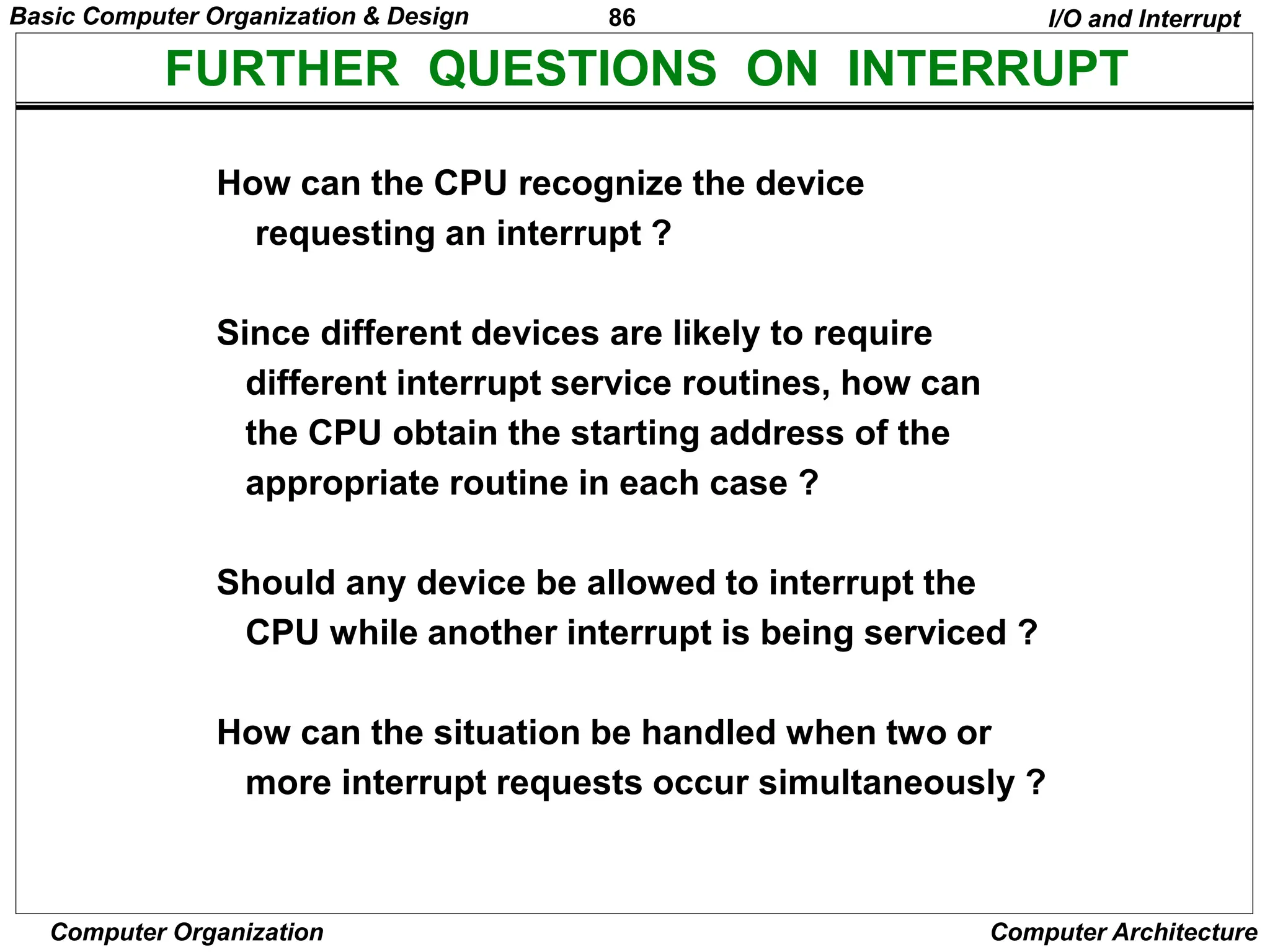
FURTHER QUESTIONS ON INTERRUPT
How can the CPU recognize the device
requesting an interrupt ?
Since different devices are likely to require
different interrupt service routines, how can
the CPU obtain the starting address of the
appropriate routine in each case ?
Should any device be allowed to interrupt the
CPU while another interrupt is being serviced ?
How can the situation be handled when two or
more interrupt requests occur simultaneously ?
I/O and Interrupt
Basic Computer Organization & Design
87
Computer Organization Computer Architecture
COMPLETE COMPUTER DESCRIPTION
Flowchart of Operations
Description
=1 (I/O) =0 (Register) =1(Indir) =0(Dir)
start
SC  0, IEN  0, R  0
R
AR  PC
R’T0
IR  M[AR], PC  PC + 1
R’T1
AR  IR(0~11), I  IR(15)
D0...D7  Decode IR(12 ~ 14)
R’T2
AR  0, TR  PC
RT0
M[AR]  TR, PC  0
RT1
PC  PC + 1, IEN  0
R  0, SC  0
RT2
D7
I I
Execute
I/O
Instruction
Execute
RR
Instruction
AR <- M[AR] Idle
D7IT3 D7I’T3 D7’IT3 D7’I’T3
Execute MR
Instruction
=0(Instruction =1(Interrupt
Cycle) Cycle)
=1(Register or I/O) =0(Memory Ref)
D7’T4
Basic Computer Organization & Design
88
Computer Organization Computer Architecture
COMPLETE COMPUTER DESCRIPTION
Microoperations
Description
Fetch
Decode
Indirect
Interrupt
Memory-Reference
AND
ADD
LDA
STA
BUN
BSA
ISZ
RT0:
RT1:
RT2:
D7IT3:
RT0:
RT1:
RT2:
D0T4:
D0T5:
D1T4:
D1T5:
D2T4:
D2T5:
D3T4:
D4T4:
D5T4:
D5T5:
D6T4:
D6T5:
D6T6:
AR  PC
IR  M[AR], PC  PC + 1
D0, ..., D7  Decode IR(12 ~ 14),
AR  IR(0 ~ 11), I  IR(15)
AR  M[AR]
R  1
AR  0, TR  PC
M[AR]  TR, PC  0
PC  PC + 1, IEN  0, R  0, SC  0
DR  M[AR]
AC  AC  DR, SC  0
DR  M[AR]
AC  AC + DR, E  Cout, SC  0
DR  M[AR]
AC  DR, SC  0
M[AR]  AC, SC  0
PC  AR, SC  0
M[AR]  PC, AR  AR + 1
PC  AR, SC  0
DR  M[AR]
DR  DR + 1
M[AR]  DR, if(DR=0) then (PC  PC + 1),
SC  0
T0T1T2(IEN)(FGI + FGO):
Basic Computer Organization & Design
89
Computer Organization Computer Architecture
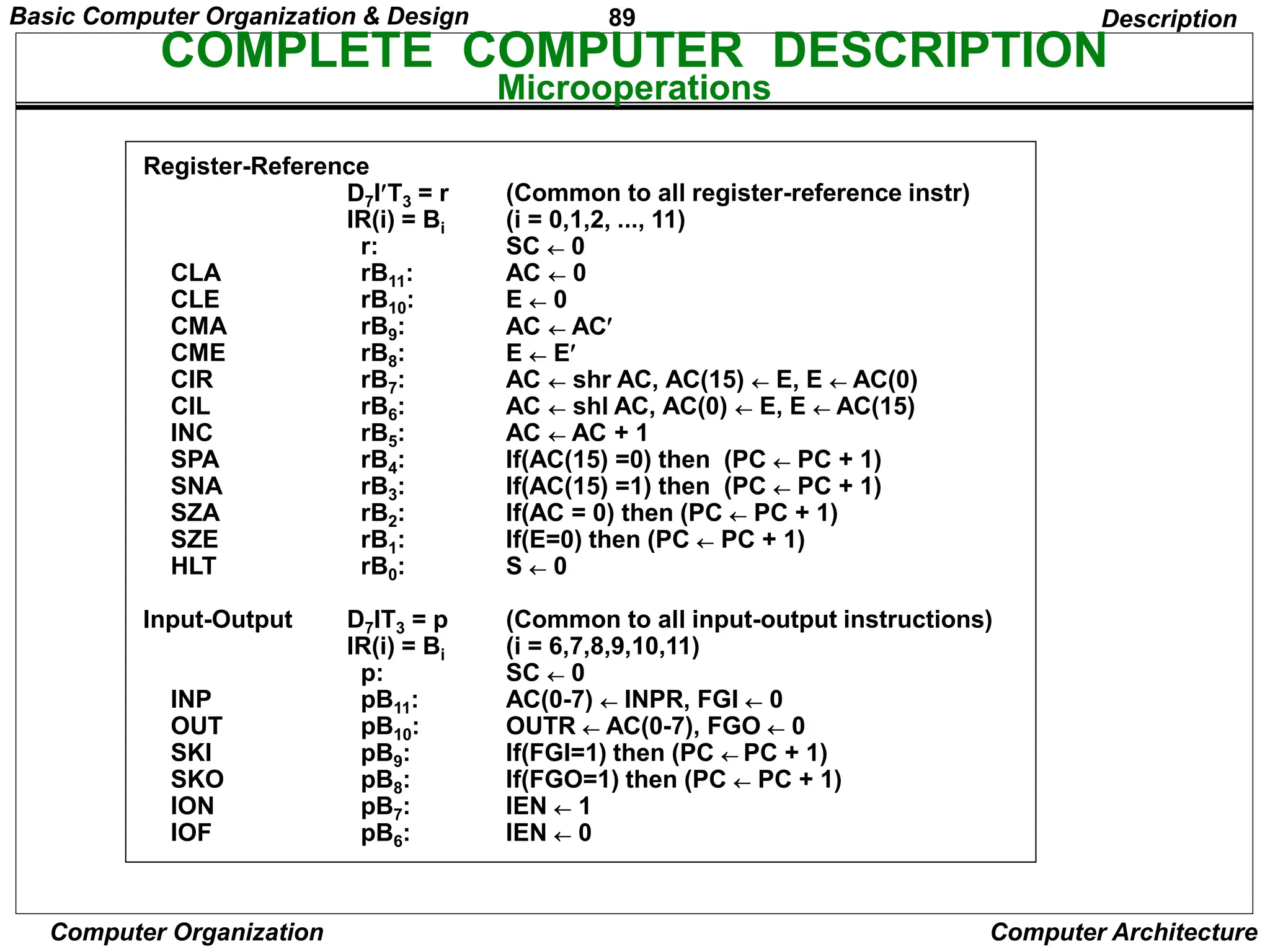
Register-Reference
CLA
CLE
CMA
CME
CIR
CIL
INC
SPA
SNA
SZA
SZE
HLT
Input-Output
INP
OUT
SKI
SKO
ION
IOF
D7IT3 = r
IR(i) = Bi
r:
rB11:
rB10:
rB9:
rB8:
rB7:
rB6:
rB5:
rB4:
rB3:
rB2:
rB1:
rB0:
D7IT3 = p
IR(i) = Bi
p:
pB11:
pB10:
pB9:
pB8:
pB7:
pB6:
(Common to all register-reference instr)
(i = 0,1,2, ..., 11)
SC  0
AC  0
E  0
AC  AC
E  E
AC  shr AC, AC(15)  E, E  AC(0)
AC  shl AC, AC(0)  E, E  AC(15)
AC  AC + 1
If(AC(15) =0) then (PC  PC + 1)
If(AC(15) =1) then (PC  PC + 1)
If(AC = 0) then (PC  PC + 1)
If(E=0) then (PC  PC + 1)
S  0
(Common to all input-output instructions)
(i = 6,7,8,9,10,11)
SC  0
AC(0-7)  INPR, FGI  0
OUTR  AC(0-7), FGO  0
If(FGI=1) then (PC  PC + 1)
If(FGO=1) then (PC  PC + 1)
IEN  1
IEN  0
Description
COMPLETE COMPUTER DESCRIPTION
Microoperations
Basic Computer Organization & Design
90
Computer Organization Computer Architecture
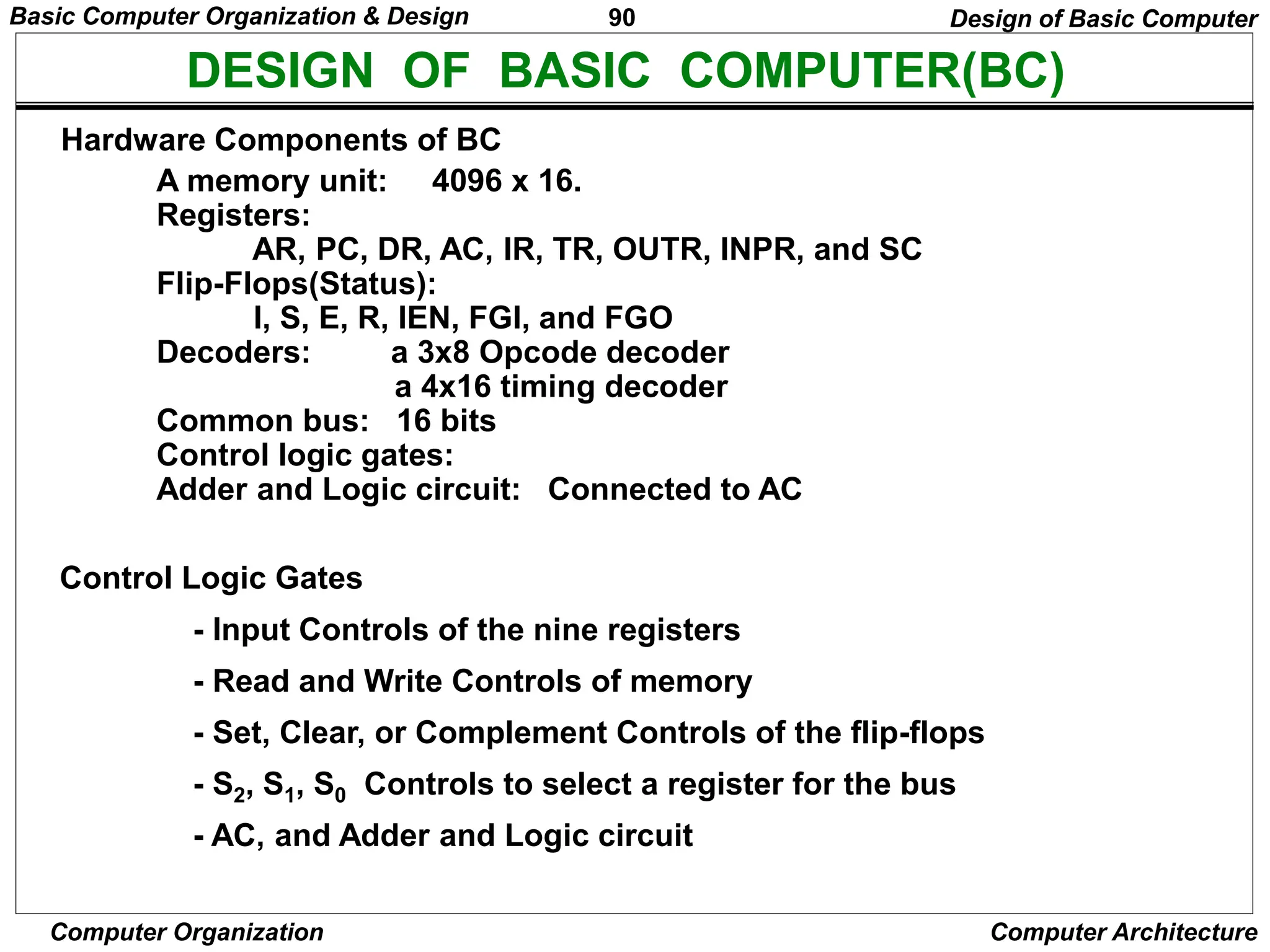
DESIGN OF BASIC COMPUTER(BC)
Hardware Components of BC
A memory unit: 4096 x 16.
Registers:
AR, PC, DR, AC, IR, TR, OUTR, INPR, and SC
Flip-Flops(Status):
I, S, E, R, IEN, FGI, and FGO
Decoders: a 3x8 Opcode decoder
a 4x16 timing decoder
Common bus: 16 bits
Control logic gates:
Adder and Logic circuit: Connected to AC
Control Logic Gates
- Input Controls of the nine registers
- Read and Write Controls of memory
- Set, Clear, or Complement Controls of the flip-flops
- S2, S1, S0 Controls to select a register for the bus
- AC, and Adder and Logic circuit
Design of Basic Computer
Basic Computer Organization & Design
91
Computer Organization Computer Architecture
CONTROL OF REGISTERS AND MEMORY
Scan all of the register transfer statements that change the content of AR:
LD(AR) = R'T0 + R'T2 + D'7IT3
CLR(AR) = RT0
INR(AR) = D5T4
Address Register; AR
R’T0: AR  PC LD(AR)
R’T2: AR  IR(0-11) LD(AR)
D’7IT3: AR  M[AR] LD(AR)
RT0: AR  0 CLR(AR)
D5T4: AR  AR + 1 INR(AR)
Design of Basic Computer
AR
LD
INR
CLR
Clock
To bus
12
From bus
12
D'
I
T
T
R
T
D
T
7
3
2
0
4
Basic Computer Organization & Design
92
Computer Organization Computer Architecture
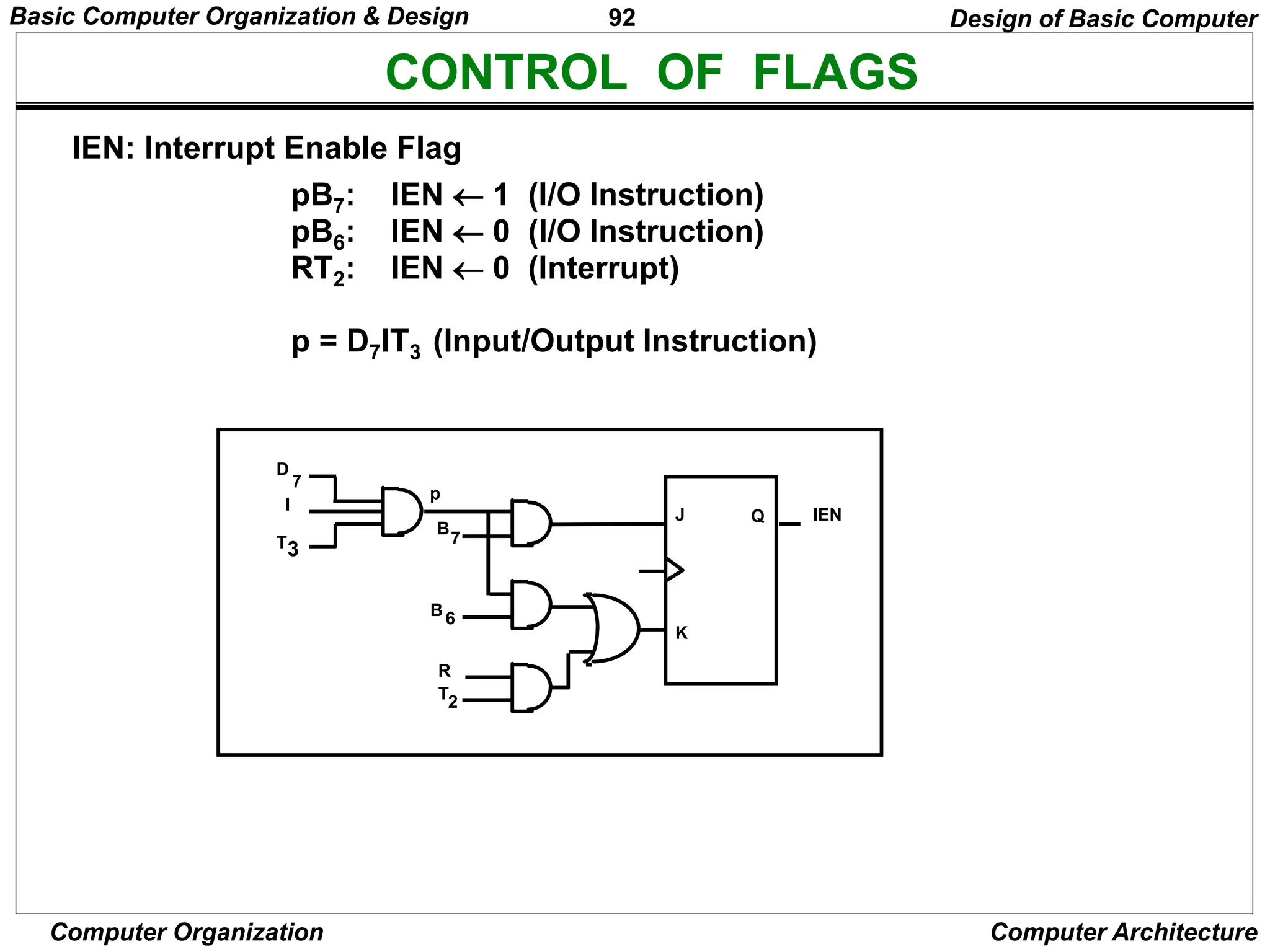
CONTROL OF FLAGS
pB7: IEN  1 (I/O Instruction)
pB6: IEN  0 (I/O Instruction)
RT2: IEN  0 (Interrupt)
p = D7IT3 (Input/Output Instruction)
IEN: Interrupt Enable Flag
Design of Basic Computer
D
I
T3
7
J
K
Q IEN
p
B
7
B6
T2
R
Basic Computer Organization & Design
93
Computer Organization Computer Architecture
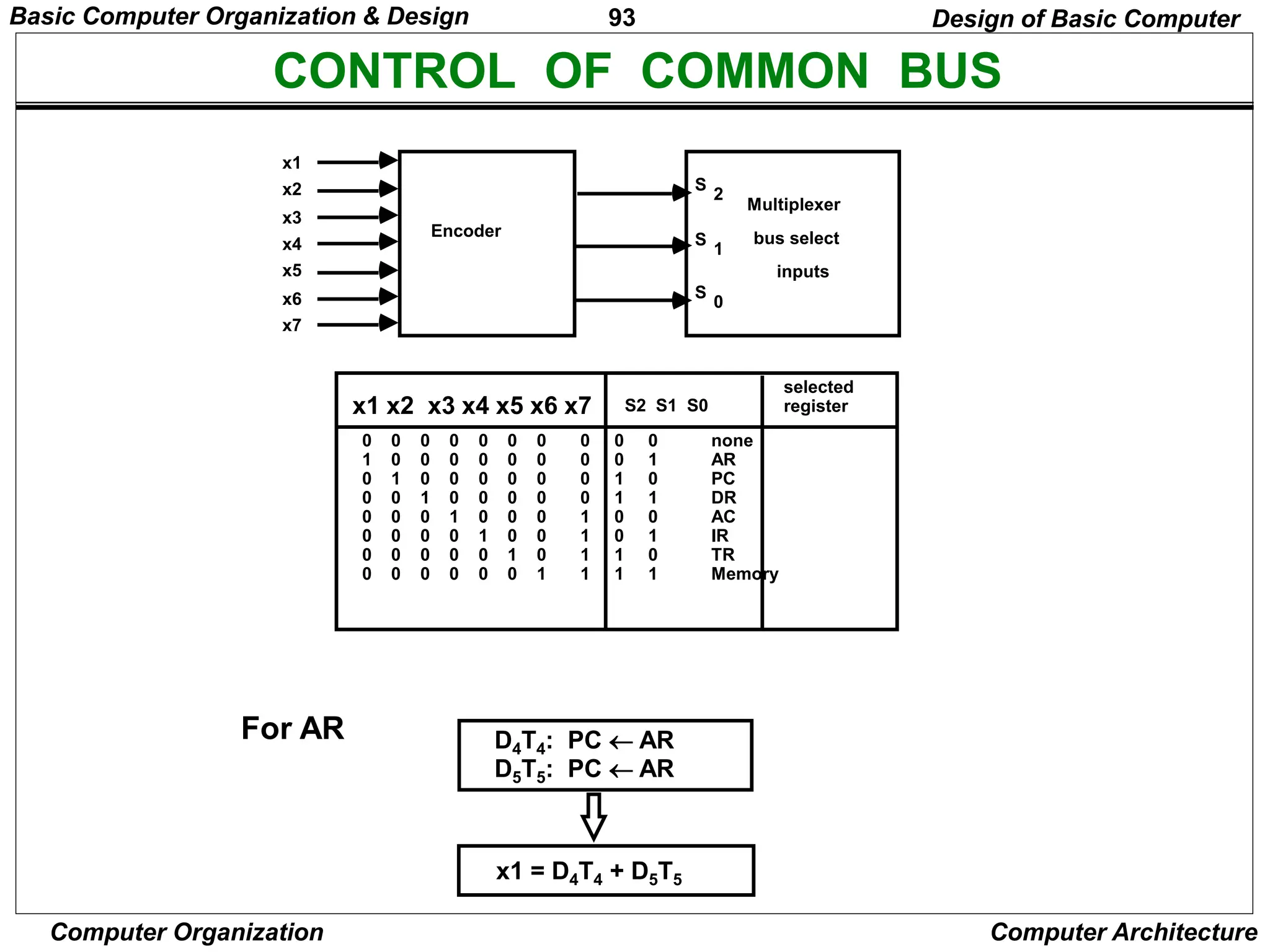
CONTROL OF COMMON BUS
For AR D4T4: PC  AR
D5T5: PC  AR
x1 = D4T4 + D5T5
Design of Basic Computer
x1
x2
x3
x4
x5
x6
x7
Encoder
S
2
S
1
S
0
Multiplexer
bus select
inputs
x1 x2 x3 x4 x5 x6 x7 S2 S1 S0
selected
register
0 0 0 0 0 0 0 0 0 0 none
1 0 0 0 0 0 0 0 0 1 AR
0 1 0 0 0 0 0 0 1 0 PC
0 0 1 0 0 0 0 0 1 1 DR
0 0 0 1 0 0 0 1 0 0 AC
0 0 0 0 1 0 0 1 0 1 IR
0 0 0 0 0 1 0 1 1 0 TR
0 0 0 0 0 0 1 1 1 1 Memory
Basic Computer Organization & Design
94
Computer Organization Computer Architecture
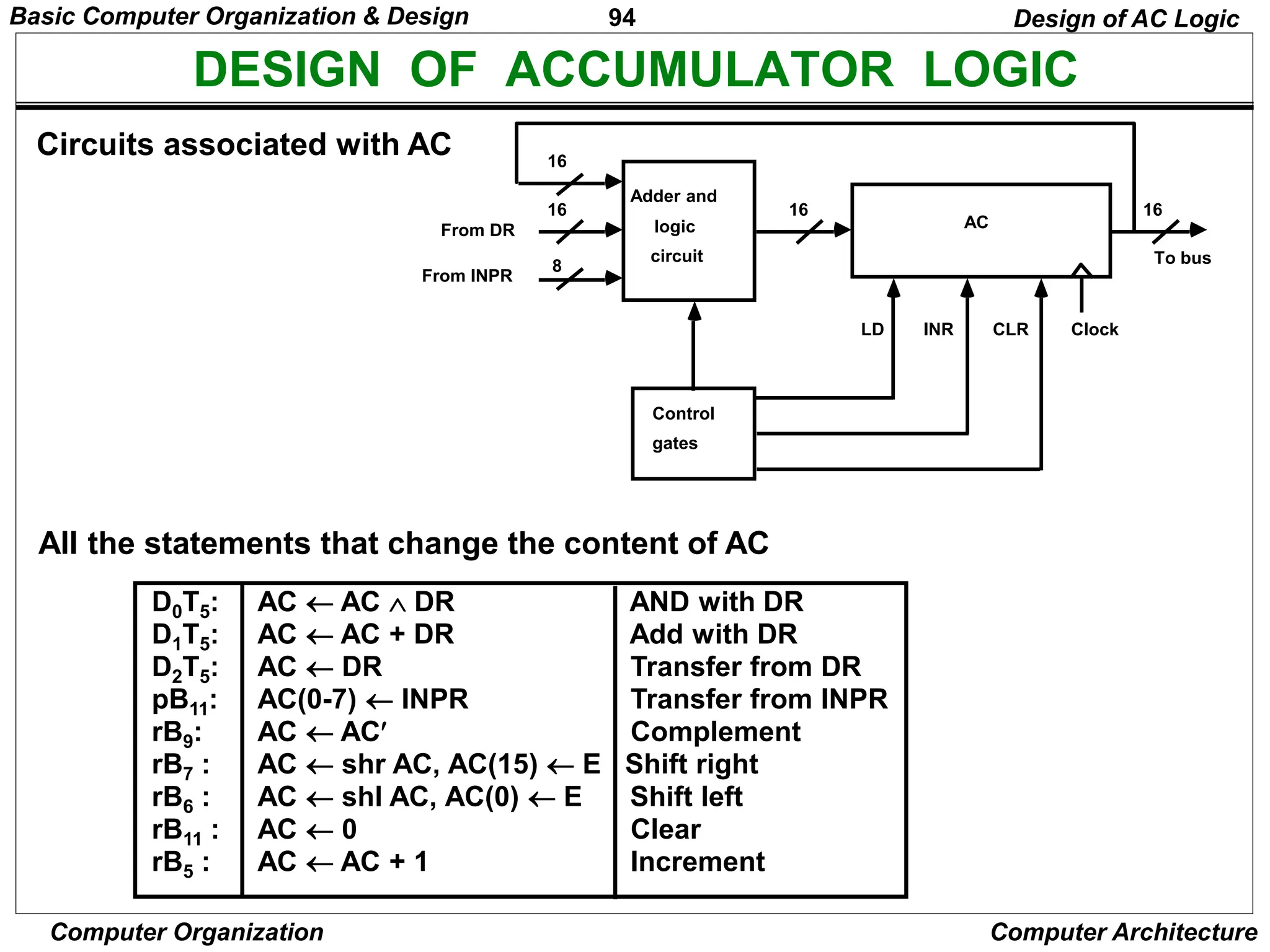
DESIGN OF ACCUMULATOR LOGIC
Circuits associated with AC
All the statements that change the content of AC
Design of AC Logic
16
16
8
Adder and
logic
circuit
16
AC
From DR
From INPR
Control
gates
LD INR CLR
16
To bus
Clock
D0T5: AC  AC  DR AND with DR
D1T5: AC  AC + DR Add with DR
D2T5: AC  DR Transfer from DR
pB11: AC(0-7)  INPR Transfer from INPR
rB9: AC  AC Complement
rB7 : AC  shr AC, AC(15)  E Shift right
rB6 : AC  shl AC, AC(0)  E Shift left
rB11 : AC  0 Clear
rB5 : AC  AC + 1 Increment
Basic Computer Organization & Design
95
Computer Organization Computer Architecture
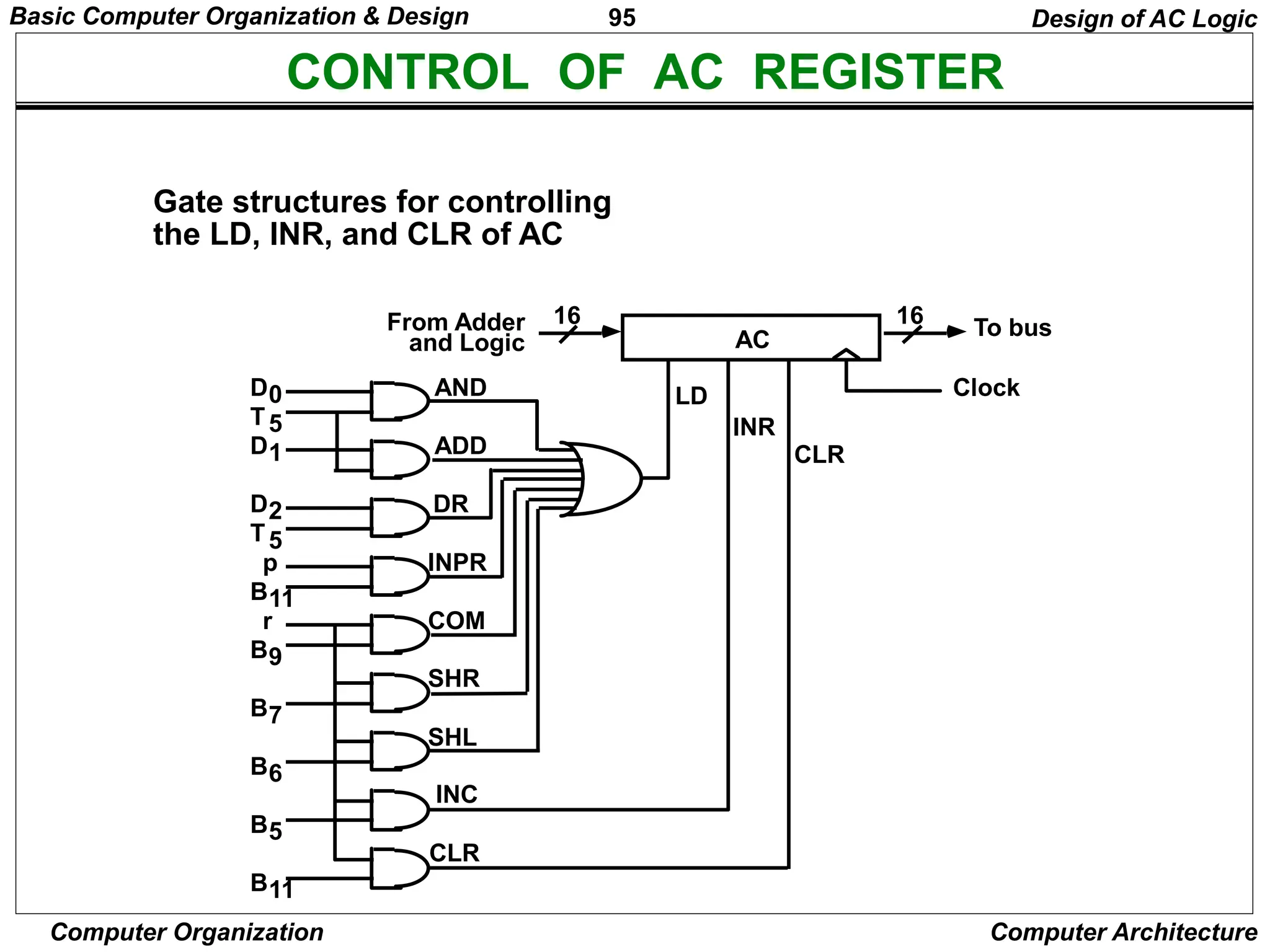
CONTROL OF AC REGISTER
Gate structures for controlling
the LD, INR, and CLR of AC
AC
LD
INR
CLR
Clock
To bus
16
From Adder
and Logic
16
AND
ADD
DR
INPR
COM
SHR
SHL
INC
CLR
D0
D1
D2
B11
B9
B7
B6
B5
B11
r
p
T5
T5
Design of AC Logic
Basic Computer Organization & Design
96
Computer Organization Computer Architecture
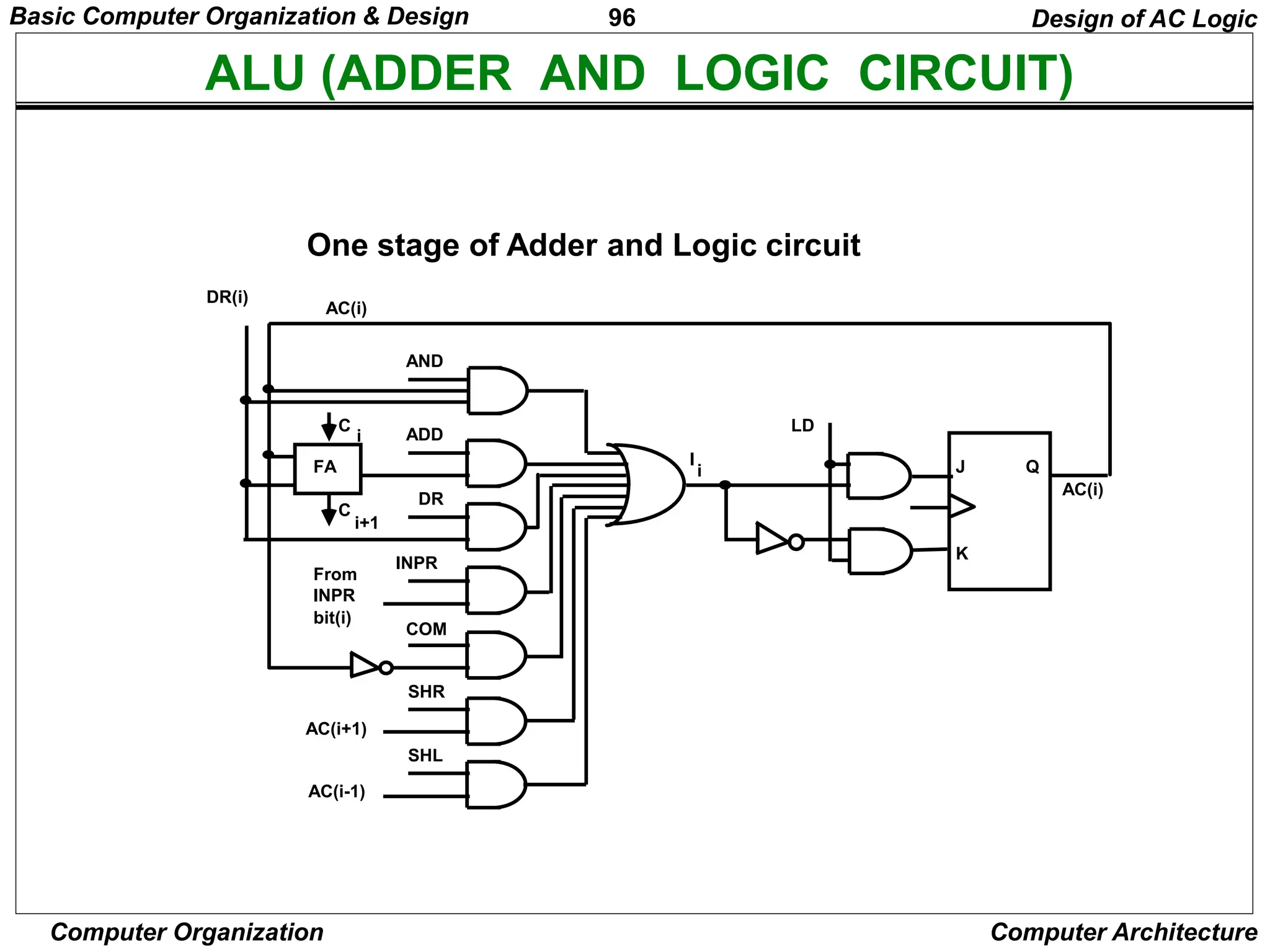
ALU (ADDER AND LOGIC CIRCUIT)
One stage of Adder and Logic circuit
Design of AC Logic
AND
ADD
DR
INPR
COM
SHR
SHL
J
K
Q
AC(i)
LD
FA
C
C
From
INPR
bit(i)
DR(i)
AC(i)
AC(i+1)
AC(i-1)
i
i
i+1
I
Basic Computer Organization & Design
97
Computer Organization Computer Architecture
PROGRAMMING THE BASIC COMPUTER
Introduction
Machine Language
Assembly Language
Assembler
Program Loops
Programming Arithmetic and Logic Operations
Subroutines
Input-Output Programming
Programming the Basic Computer
98
Computer Organization Computer Architecture
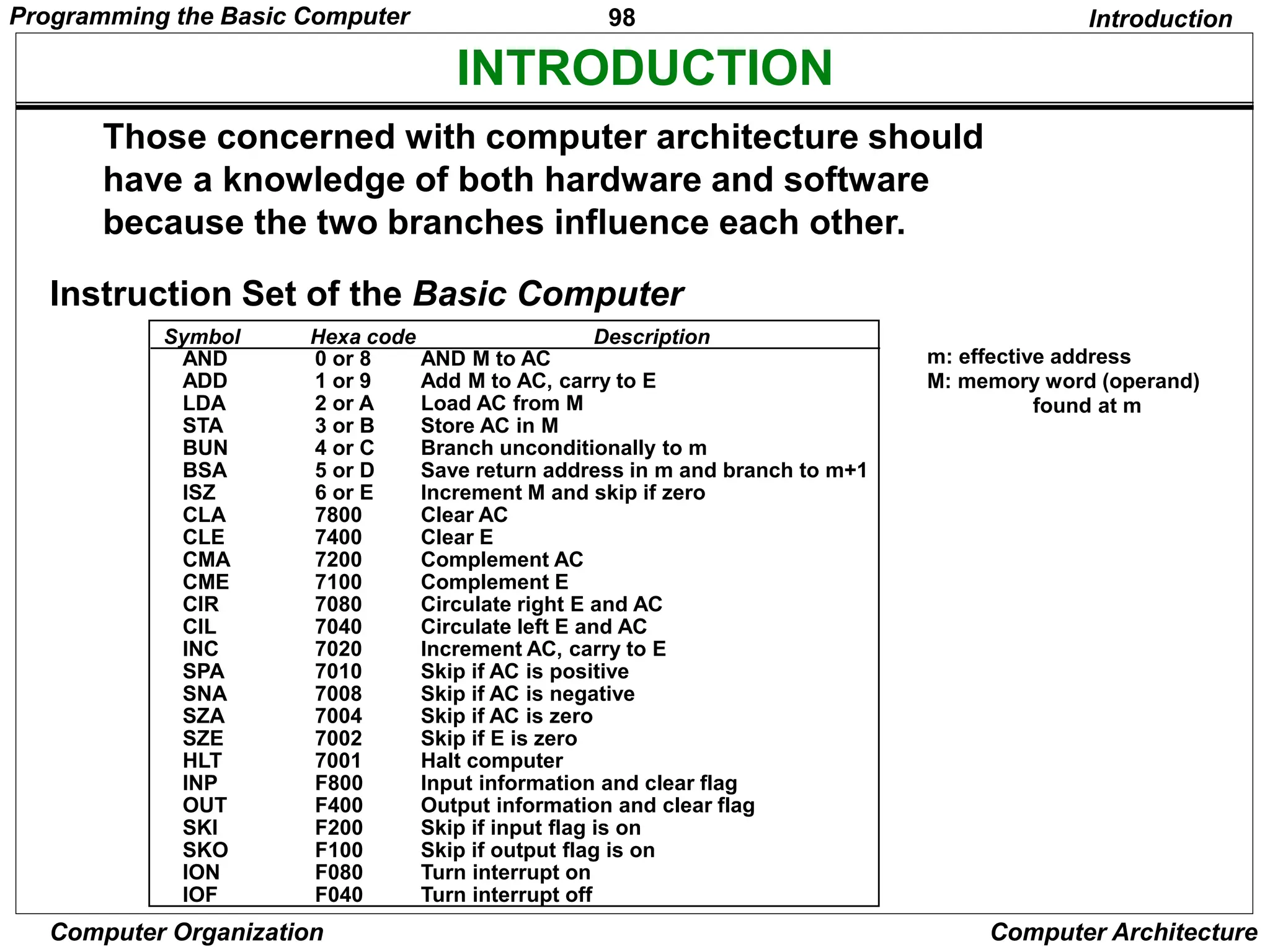
INTRODUCTION
Symbol Hexa code Description
Those concerned with computer architecture should
have a knowledge of both hardware and software
because the two branches influence each other.
m: effective address
M: memory word (operand)
found at m
Introduction
AND 0 or 8 AND M to AC
ADD 1 or 9 Add M to AC, carry to E
LDA 2 or A Load AC from M
STA 3 or B Store AC in M
BUN 4 or C Branch unconditionally to m
BSA 5 or D Save return address in m and branch to m+1
ISZ 6 or E Increment M and skip if zero
CLA 7800 Clear AC
CLE 7400 Clear E
CMA 7200 Complement AC
CME 7100 Complement E
CIR 7080 Circulate right E and AC
CIL 7040 Circulate left E and AC
INC 7020 Increment AC, carry to E
SPA 7010 Skip if AC is positive
SNA 7008 Skip if AC is negative
SZA 7004 Skip if AC is zero
SZE 7002 Skip if E is zero
HLT 7001 Halt computer
INP F800 Input information and clear flag
OUT F400 Output information and clear flag
SKI F200 Skip if input flag is on
SKO F100 Skip if output flag is on
ION F080 Turn interrupt on
IOF F040 Turn interrupt off
Instruction Set of the Basic Computer
Programming the Basic Computer
99
Computer Organization Computer Architecture
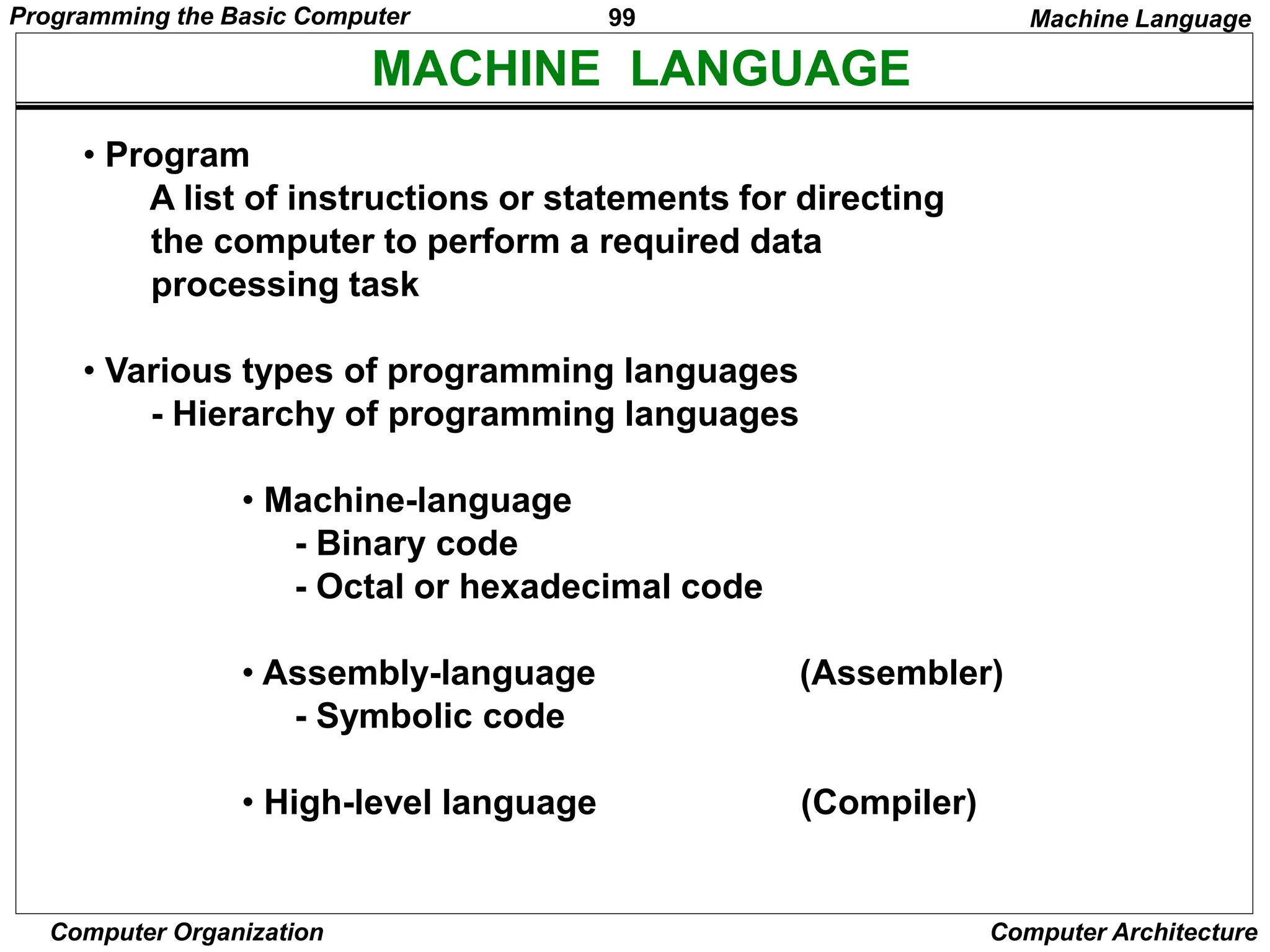
MACHINE LANGUAGE
• Program
A list of instructions or statements for directing
the computer to perform a required data
processing task
• Various types of programming languages
- Hierarchy of programming languages
• Machine-language
- Binary code
- Octal or hexadecimal code
• Assembly-language (Assembler)
- Symbolic code
• High-level language (Compiler)
Machine Language
Programming the Basic Computer
100
Computer Organization Computer Architecture
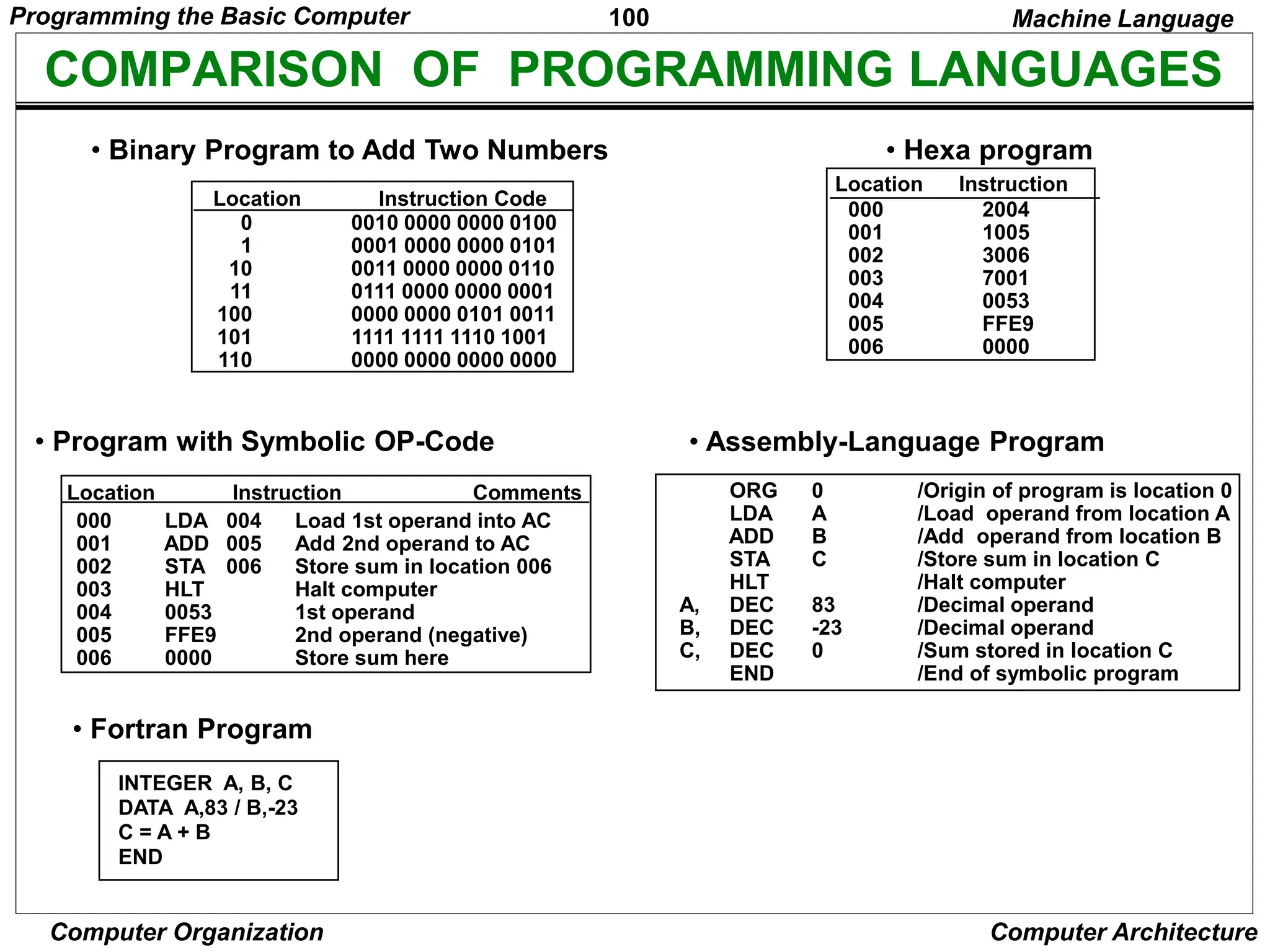
COMPARISON OF PROGRAMMING LANGUAGES
0 0010 0000 0000 0100
1 0001 0000 0000 0101
10 0011 0000 0000 0110
11 0111 0000 0000 0001
100 0000 0000 0101 0011
101 1111 1111 1110 1001
110 0000 0000 0000 0000
• Binary Program to Add Two Numbers
Location Instruction Code
000 2004
001 1005
002 3006
003 7001
004 0053
005 FFE9
006 0000
• Hexa program
Location Instruction
• Program with Symbolic OP-Code
000 LDA 004 Load 1st operand into AC
001 ADD 005 Add 2nd operand to AC
002 STA 006 Store sum in location 006
003 HLT Halt computer
004 0053 1st operand
005 FFE9 2nd operand (negative)
006 0000 Store sum here
Location Instruction Comments
• Assembly-Language Program
• Fortran Program
INTEGER A, B, C
DATA A,83 / B,-23
C = A + B
END
Machine Language
ORG 0 /Origin of program is location 0
LDA A /Load operand from location A
ADD B /Add operand from location B
STA C /Store sum in location C
HLT /Halt computer
A, DEC 83 /Decimal operand
B, DEC -23 /Decimal operand
C, DEC 0 /Sum stored in location C
END /End of symbolic program
Programming the Basic Computer
101
Computer Organization Computer Architecture
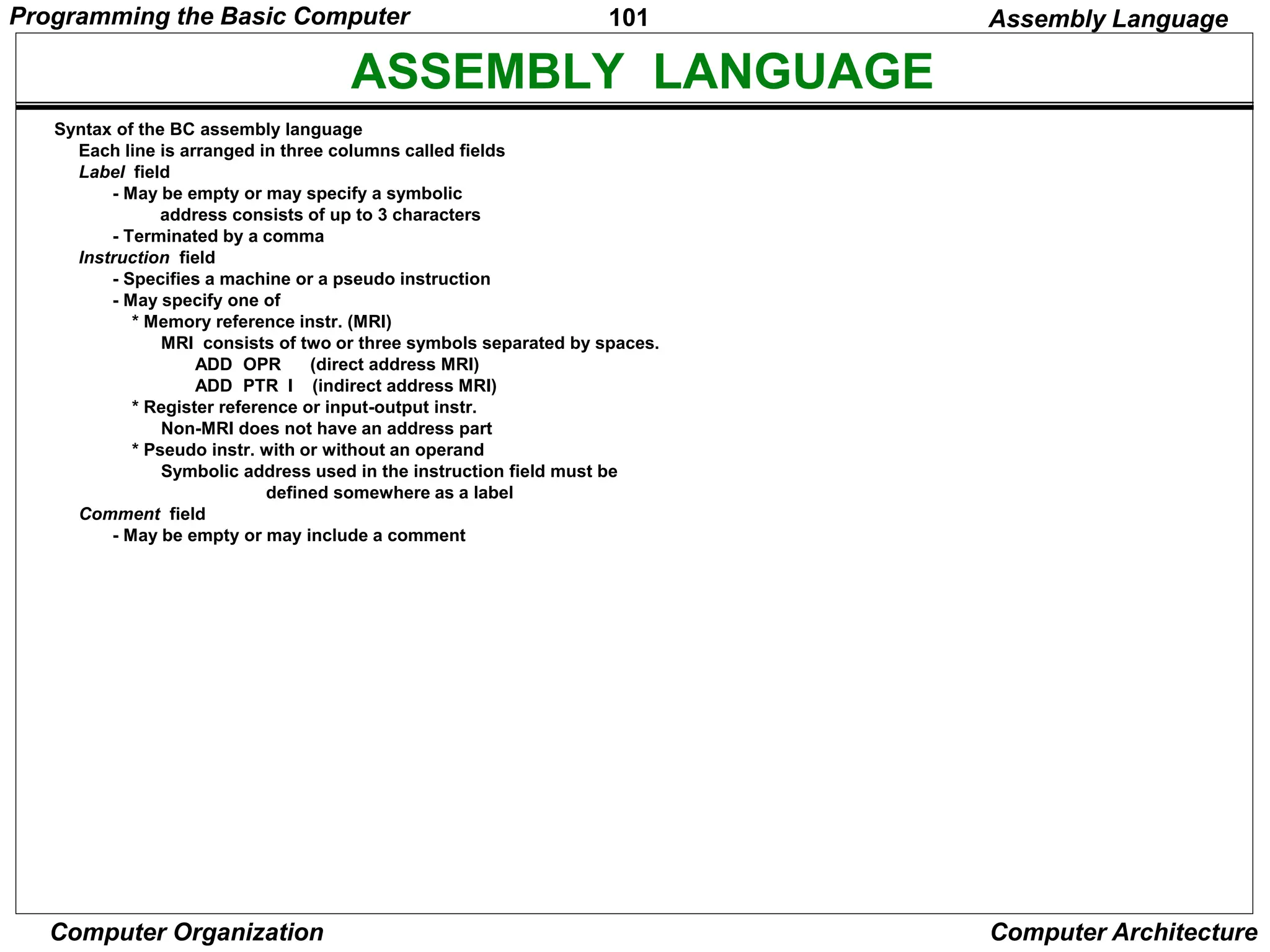
ASSEMBLY LANGUAGE
Syntax of the BC assembly language
Each line is arranged in three columns called fields
Label field
- May be empty or may specify a symbolic
address consists of up to 3 characters
- Terminated by a comma
Instruction field
- Specifies a machine or a pseudo instruction
- May specify one of
* Memory reference instr. (MRI)
MRI consists of two or three symbols separated by spaces.
ADD OPR (direct address MRI)
ADD PTR I (indirect address MRI)
* Register reference or input-output instr.
Non-MRI does not have an address part
* Pseudo instr. with or without an operand
Symbolic address used in the instruction field must be
defined somewhere as a label
Comment field
- May be empty or may include a comment
Assembly Language
Programming the Basic Computer
102
Computer Organization Computer Architecture
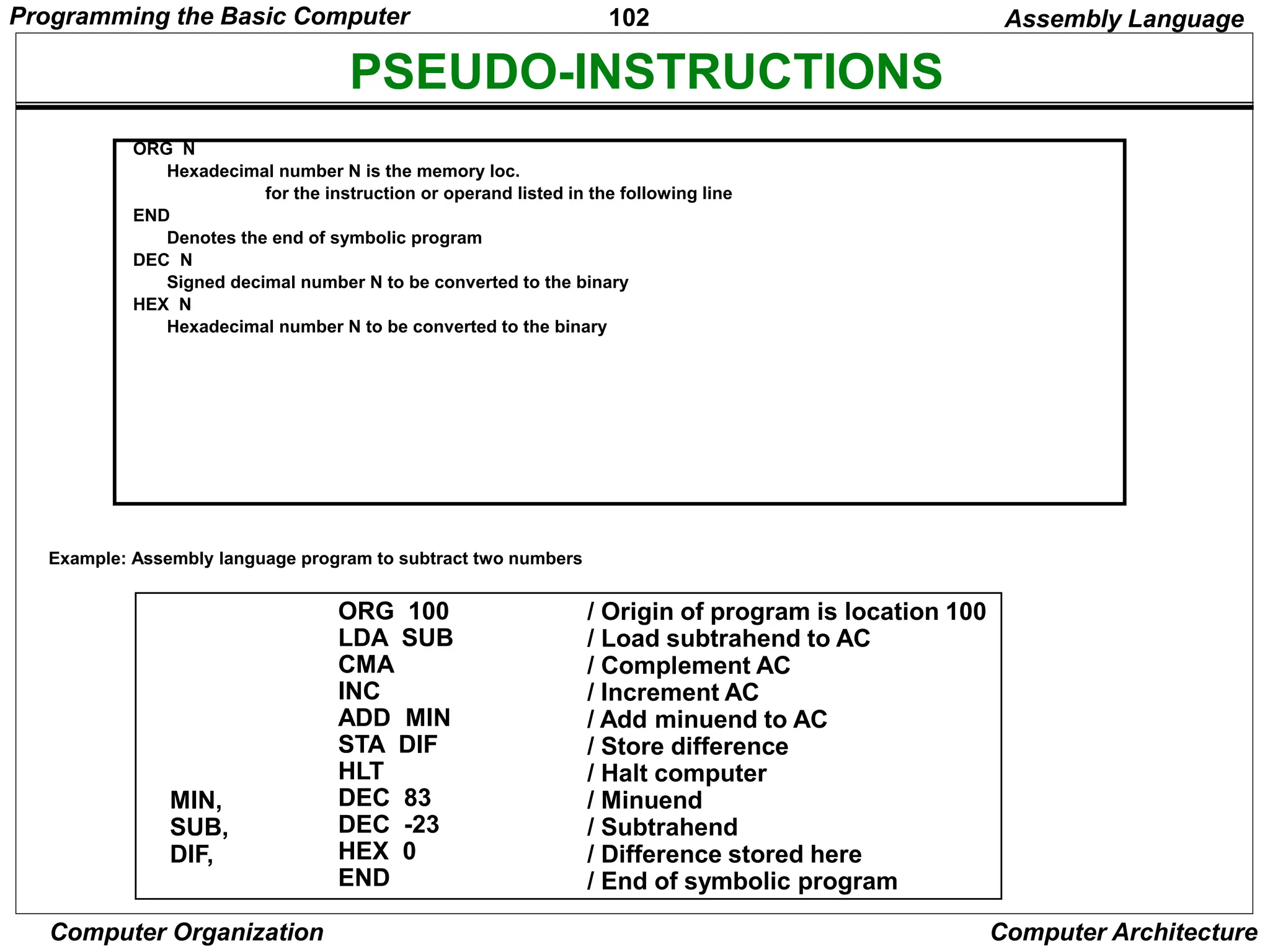
PSEUDO-INSTRUCTIONS
ORG N
Hexadecimal number N is the memory loc.
for the instruction or operand listed in the following line
END
Denotes the end of symbolic program
DEC N
Signed decimal number N to be converted to the binary
HEX N
Hexadecimal number N to be converted to the binary
Example: Assembly language program to subtract two numbers
ORG 100
LDA SUB
CMA
INC
ADD MIN
STA DIF
HLT
DEC 83
DEC -23
HEX 0
END
/ Origin of program is location 100
/ Load subtrahend to AC
/ Complement AC
/ Increment AC
/ Add minuend to AC
/ Store difference
/ Halt computer
/ Minuend
/ Subtrahend
/ Difference stored here
/ End of symbolic program
MIN,
SUB,
DIF,
Assembly Language
Programming the Basic Computer
103
Computer Organization Computer Architecture
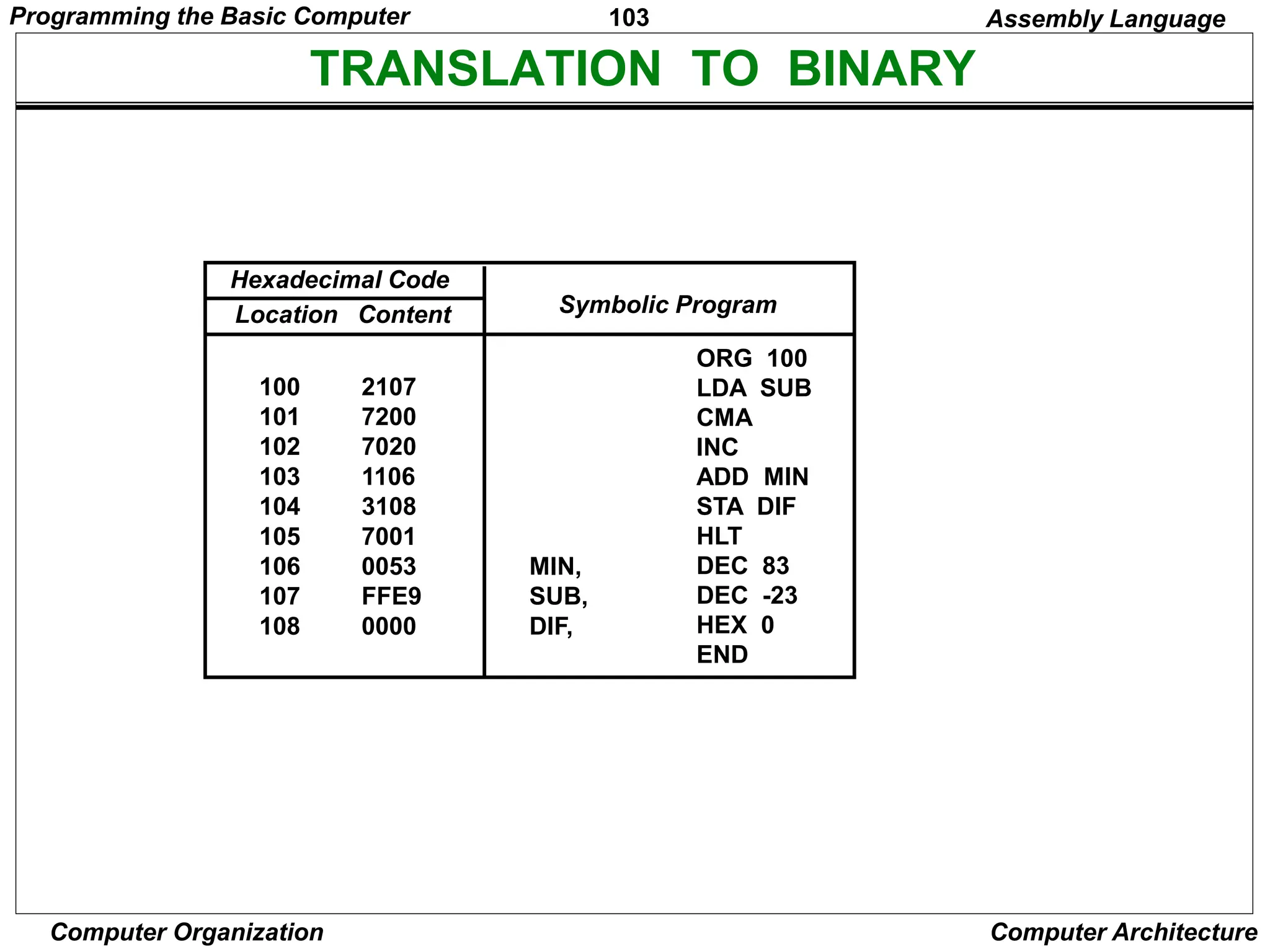
TRANSLATION TO BINARY
ORG 100
LDA SUB
CMA
INC
ADD MIN
STA DIF
HLT
DEC 83
DEC -23
HEX 0
END
MIN,
SUB,
DIF,
100 2107
101 7200
102 7020
103 1106
104 3108
105 7001
106 0053
107 FFE9
108 0000
Symbolic Program
Location Content
Hexadecimal Code
Assembly Language
Programming the Basic Computer
104
Computer Organization Computer Architecture
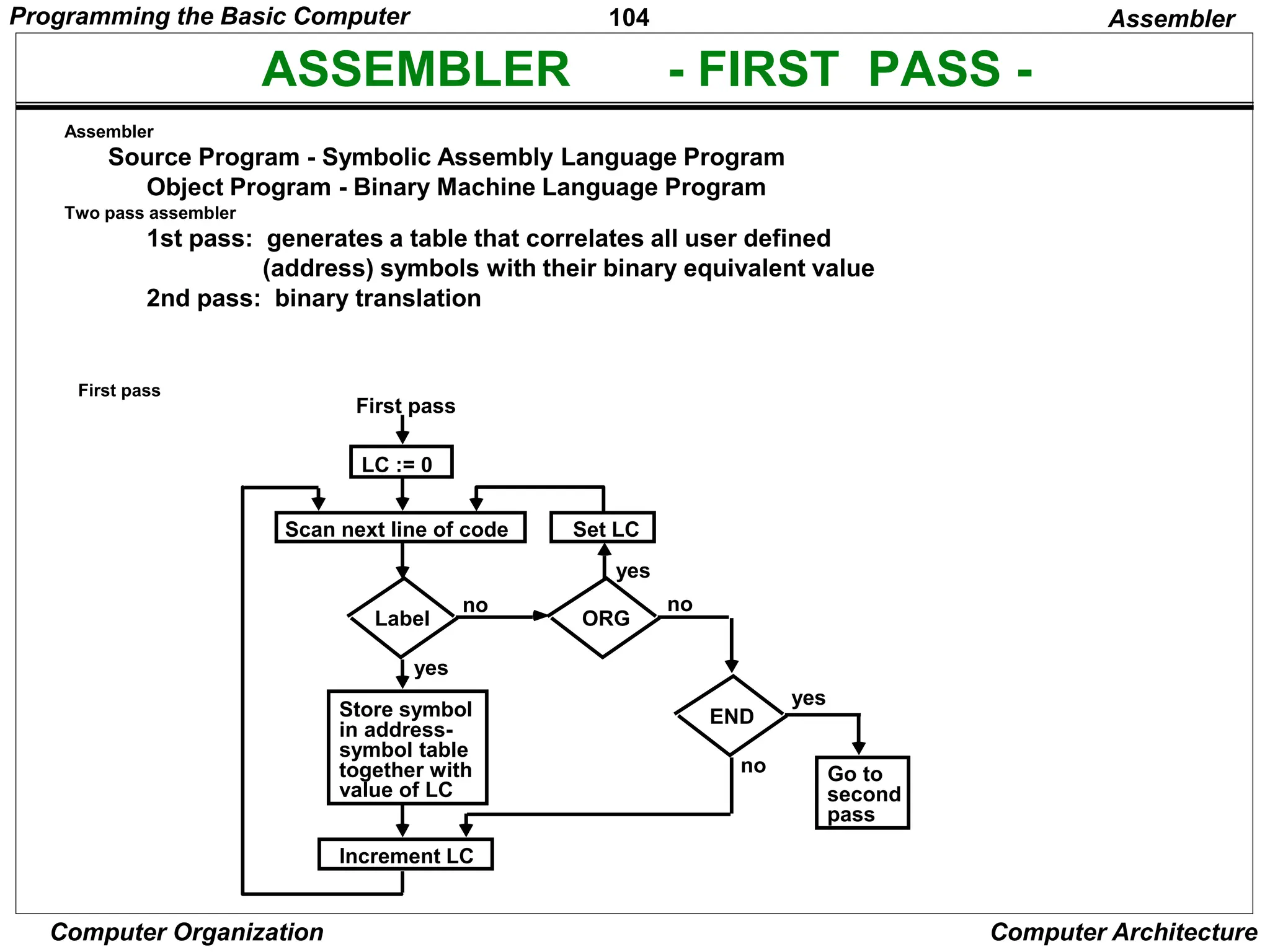
ASSEMBLER - FIRST PASS -
Assembler
Source Program - Symbolic Assembly Language Program
Object Program - Binary Machine Language Program
Two pass assembler
1st pass: generates a table that correlates all user defined
(address) symbols with their binary equivalent value
2nd pass: binary translation
First pass
Assembler
First pass
LC := 0
Scan next line of code Set LC
Label
no
yes
yes
no
ORG
Store symbol
in address-
symbol table
together with
value of LC
END
Increment LC
Go to
second
pass
no
yes
Programming the Basic Computer
105
Computer Organization Computer Architecture
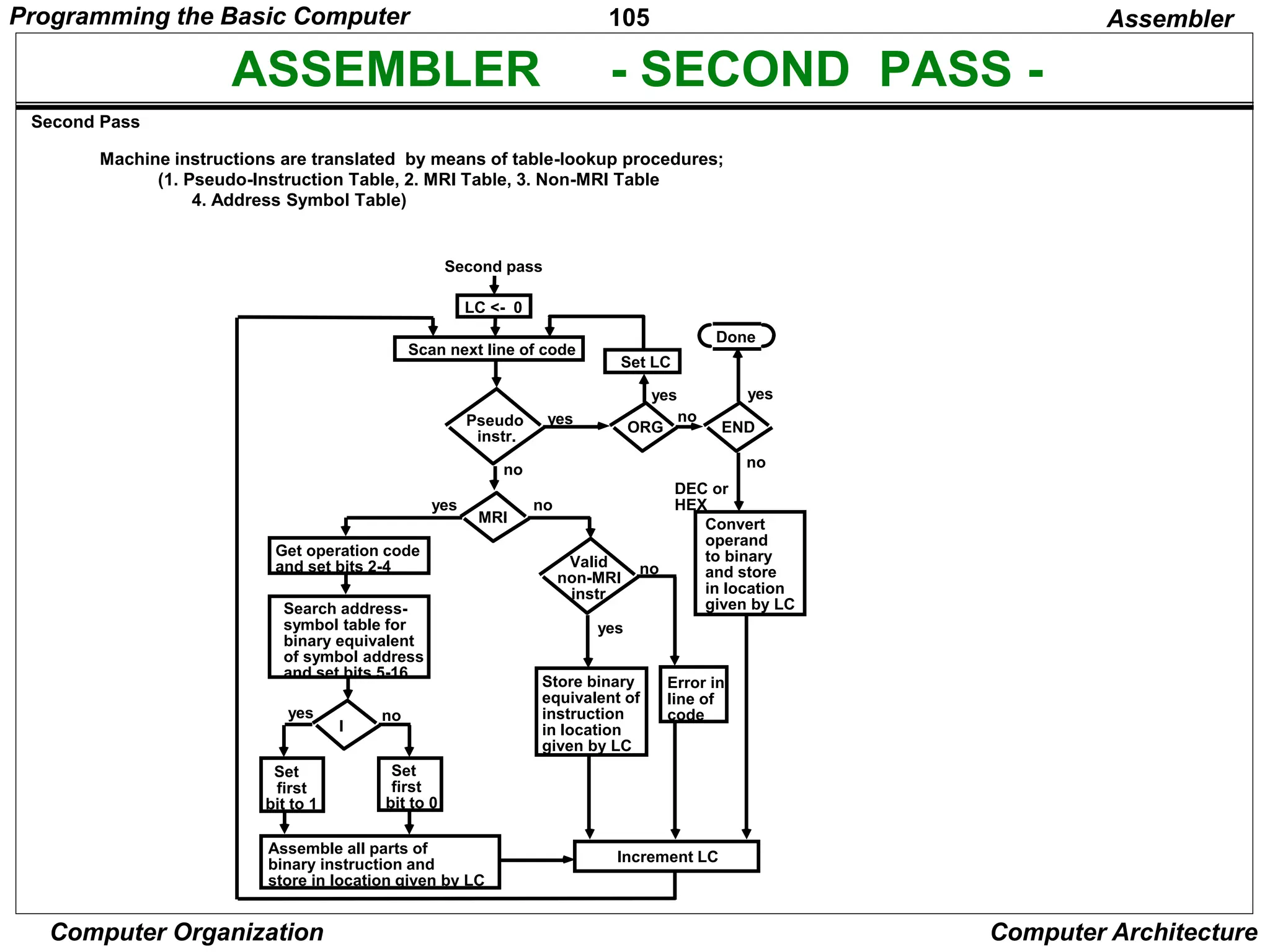
ASSEMBLER - SECOND PASS -
Machine instructions are translated by means of table-lookup procedures;
(1. Pseudo-Instruction Table, 2. MRI Table, 3. Non-MRI Table
4. Address Symbol Table)
Assembler
Second pass
LC <- 0
Scan next line of code
Set LC
yes
yes
ORG
Pseudo
instr.
yes
END
no
Done
yes
MRI
no
Valid
non-MRI
instr.
no
Convert
operand
to binary
and store
in location
given by LC
no
DEC or
HEX
Error in
line of
code
Store binary
equivalent of
instruction
in location
given by LC
yes
no
Get operation code
and set bits 2-4
Search address-
symbol table for
binary equivalent
of symbol address
and set bits 5-16
I
Set
first
bit to 0
Set
first
bit to 1
yes no
Assemble all parts of
binary instruction and
store in location given by LC
Increment LC
Second Pass
Programming the Basic Computer
106
Computer Organization Computer Architecture
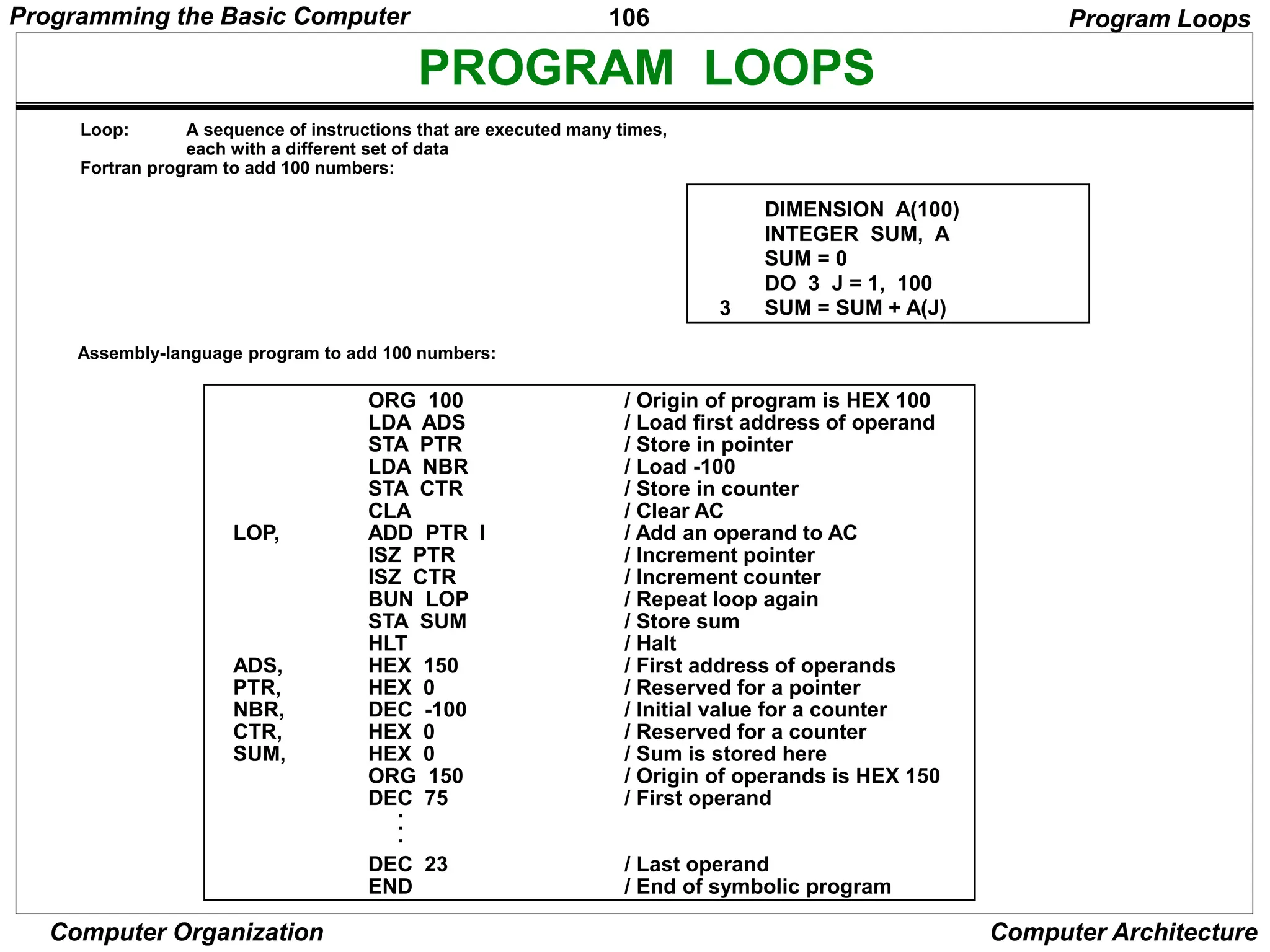
PROGRAM LOOPS
DIMENSION A(100)
INTEGER SUM, A
SUM = 0
DO 3 J = 1, 100
SUM = SUM + A(J)
3
ORG 100
LDA ADS
STA PTR
LDA NBR
STA CTR
CLA
ADD PTR I
ISZ PTR
ISZ CTR
BUN LOP
STA SUM
HLT
HEX 150
HEX 0
DEC -100
HEX 0
HEX 0
ORG 150
DEC 75
DEC 23
END
/ Origin of program is HEX 100
/ Load first address of operand
/ Store in pointer
/ Load -100
/ Store in counter
/ Clear AC
/ Add an operand to AC
/ Increment pointer
/ Increment counter
/ Repeat loop again
/ Store sum
/ Halt
/ First address of operands
/ Reserved for a pointer
/ Initial value for a counter
/ Reserved for a counter
/ Sum is stored here
/ Origin of operands is HEX 150
/ First operand
/ Last operand
/ End of symbolic program
LOP,
ADS,
PTR,
NBR,
CTR,
SUM,
Program Loops
Loop: A sequence of instructions that are executed many times,
each with a different set of data
Fortran program to add 100 numbers:
.
.
.
Assembly-language program to add 100 numbers:
Programming the Basic Computer
107
Computer Organization Computer Architecture
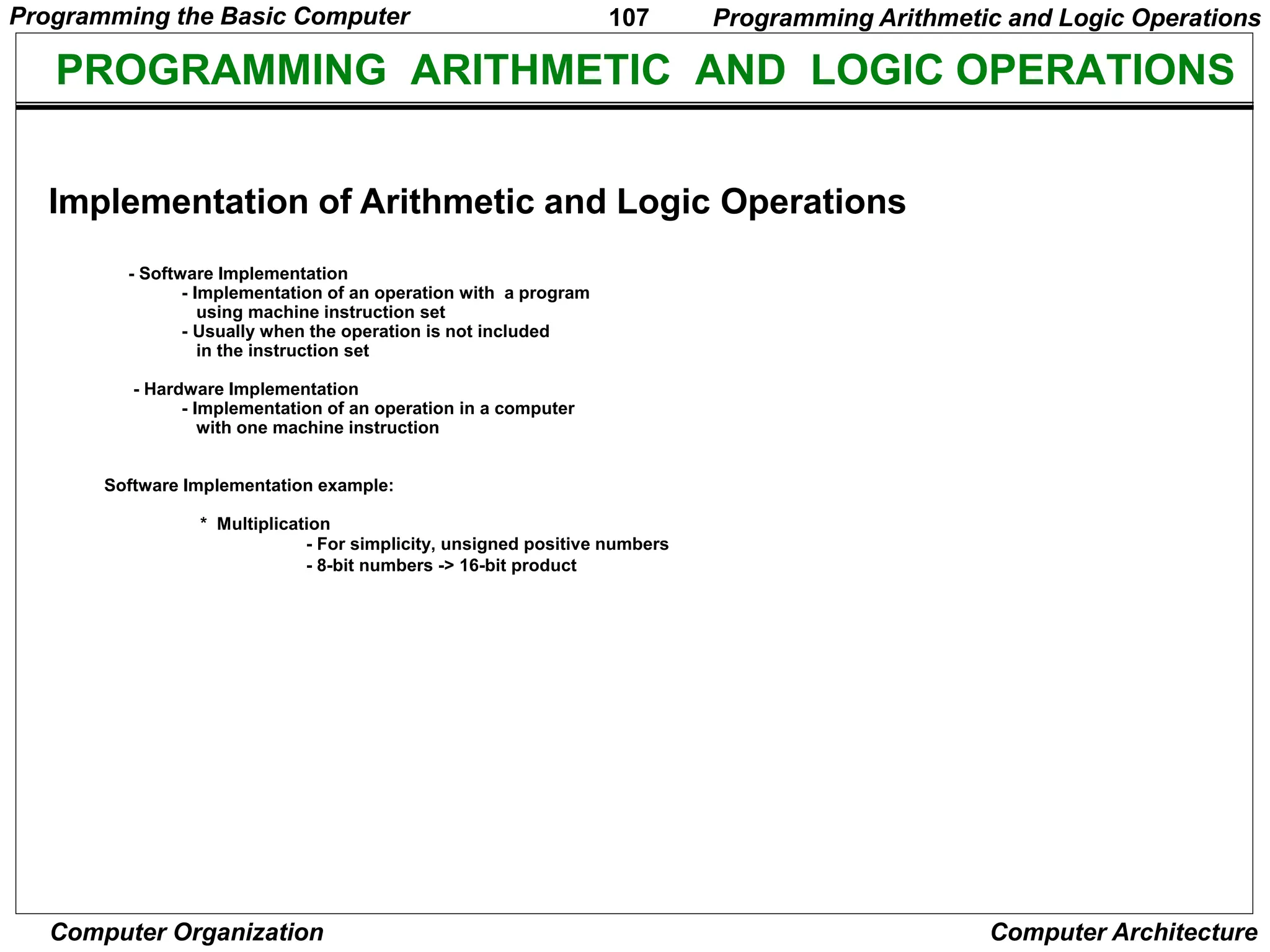
PROGRAMMING ARITHMETIC AND LOGIC OPERATIONS
- Software Implementation
- Implementation of an operation with a program
using machine instruction set
- Usually when the operation is not included
in the instruction set
- Hardware Implementation
- Implementation of an operation in a computer
with one machine instruction
Software Implementation example:
* Multiplication
- For simplicity, unsigned positive numbers
- 8-bit numbers -> 16-bit product
Programming Arithmetic and Logic Operations
Implementation of Arithmetic and Logic Operations
Programming the Basic Computer
108
Computer Organization Computer Architecture
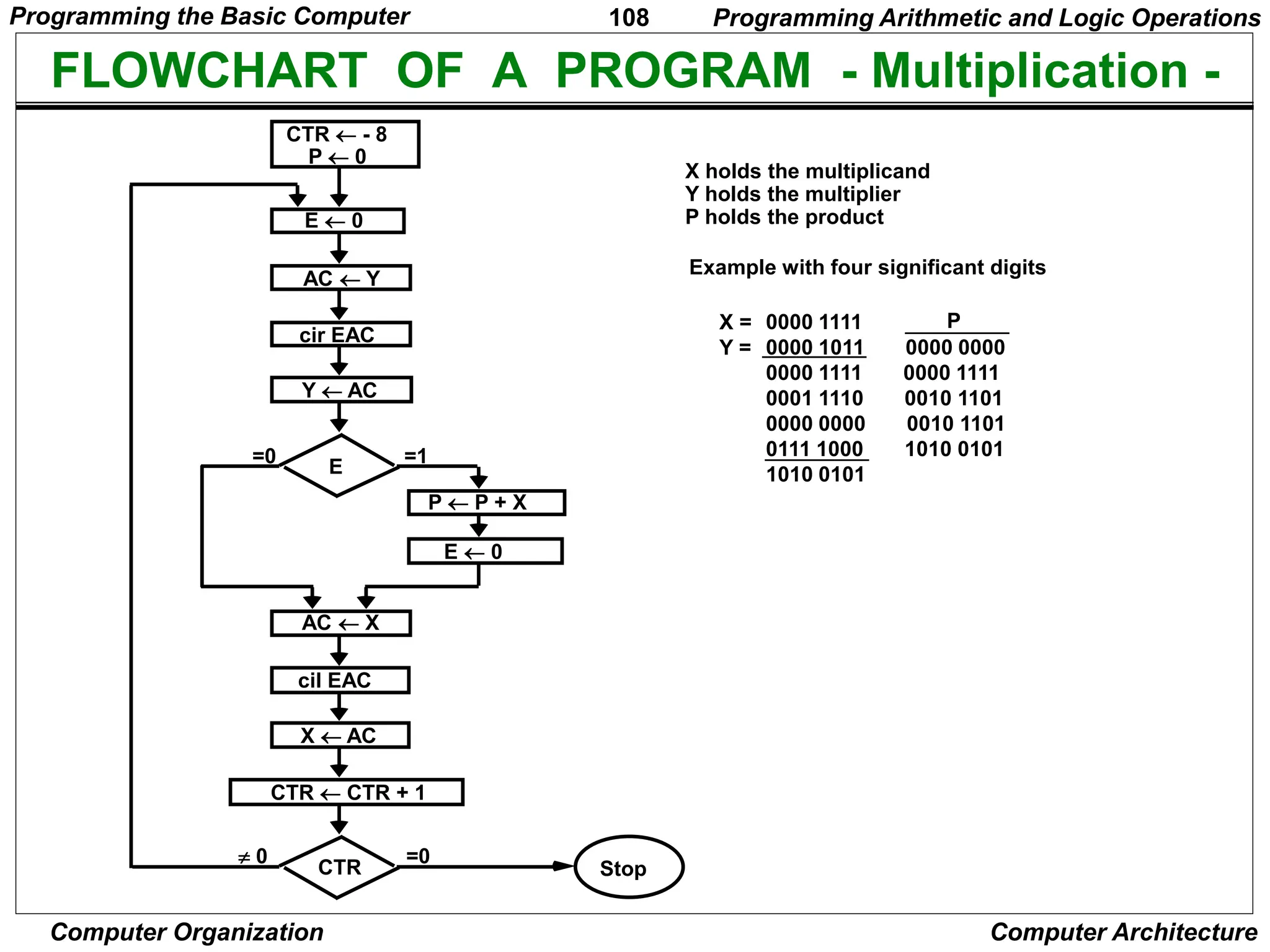
FLOWCHART OF A PROGRAM - Multiplication -
X holds the multiplicand
Y holds the multiplier
P holds the product
Example with four significant digits
0000 1111
0000 1011 0000 0000
0000 1111 0000 1111
0001 1110 0010 1101
0000 0000 0010 1101
0111 1000 1010 0101
1010 0101
Programming Arithmetic and Logic Operations
cil
CTR  - 8
P  0
E  0
AC  Y
Y  AC
cir EAC
E
P  P + X
E  0
AC  X
cil EAC
X  AC
CTR  CTR + 1
=1
=0
CTR
=0
Stop
 0
X =
Y =
P
Programming the Basic Computer
109
Computer Organization Computer Architecture
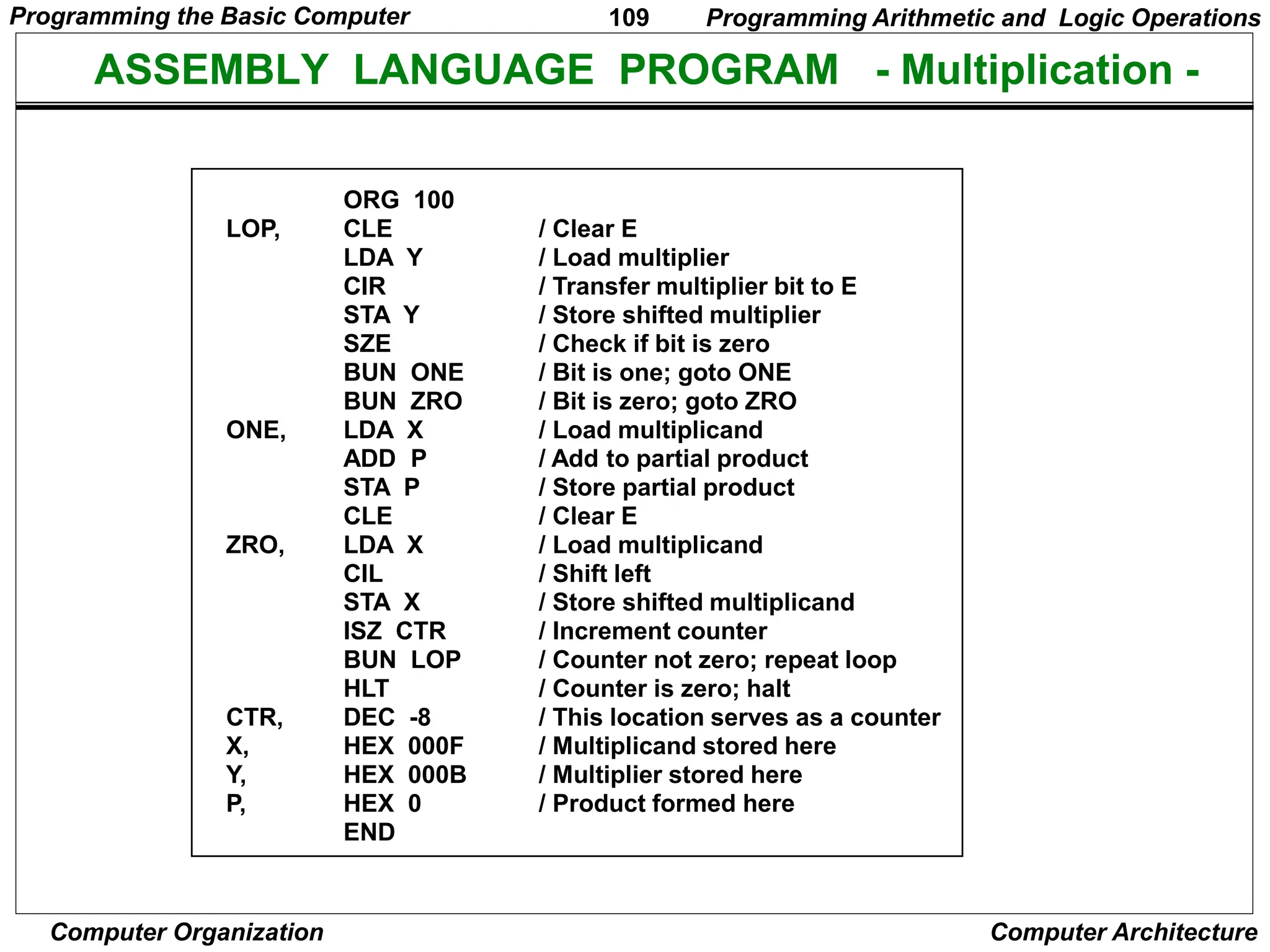
ASSEMBLY LANGUAGE PROGRAM - Multiplication -
ORG 100
CLE
LDA Y
CIR
STA Y
SZE
BUN ONE
BUN ZRO
LDA X
ADD P
STA P
CLE
LDA X
CIL
STA X
ISZ CTR
BUN LOP
HLT
DEC -8
HEX 000F
HEX 000B
HEX 0
END
/ Clear E
/ Load multiplier
/ Transfer multiplier bit to E
/ Store shifted multiplier
/ Check if bit is zero
/ Bit is one; goto ONE
/ Bit is zero; goto ZRO
/ Load multiplicand
/ Add to partial product
/ Store partial product
/ Clear E
/ Load multiplicand
/ Shift left
/ Store shifted multiplicand
/ Increment counter
/ Counter not zero; repeat loop
/ Counter is zero; halt
/ This location serves as a counter
/ Multiplicand stored here
/ Multiplier stored here
/ Product formed here
LOP,
ONE,
ZRO,
CTR,
X,
Y,
P,
Programming Arithmetic and Logic Operations
Programming the Basic Computer
110
Computer Organization Computer Architecture
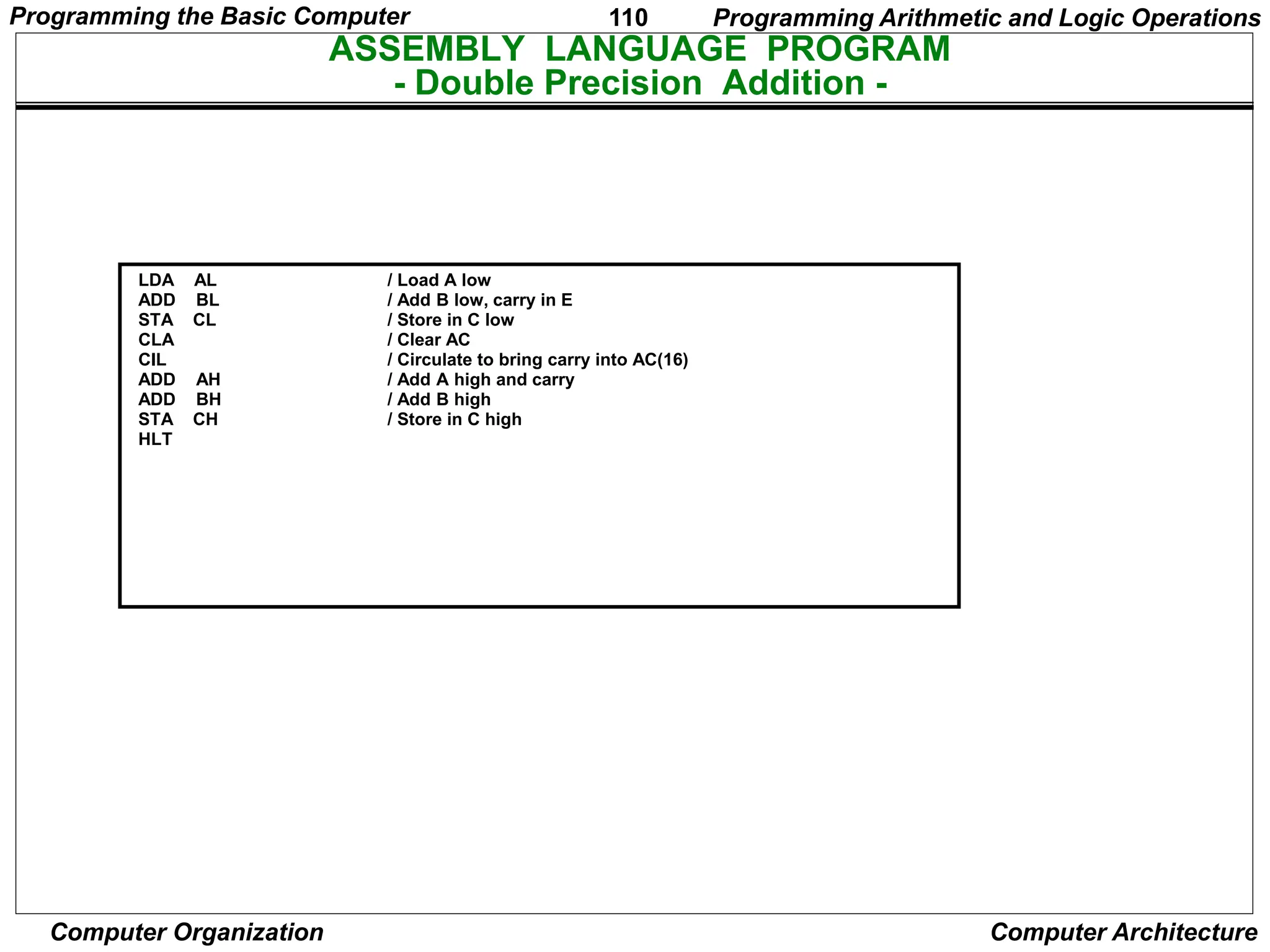
ASSEMBLY LANGUAGE PROGRAM
- Double Precision Addition -
LDA AL
ADD BL
STA CL
CLA
CIL
ADD AH
ADD BH
STA CH
HLT
/ Load A low
/ Add B low, carry in E
/ Store in C low
/ Clear AC
/ Circulate to bring carry into AC(16)
/ Add A high and carry
/ Add B high
/ Store in C high
Programming Arithmetic and Logic Operations
Programming the Basic Computer
111
Computer Organization Computer Architecture
ASSEMBLY LANGUAGE PROGRAM
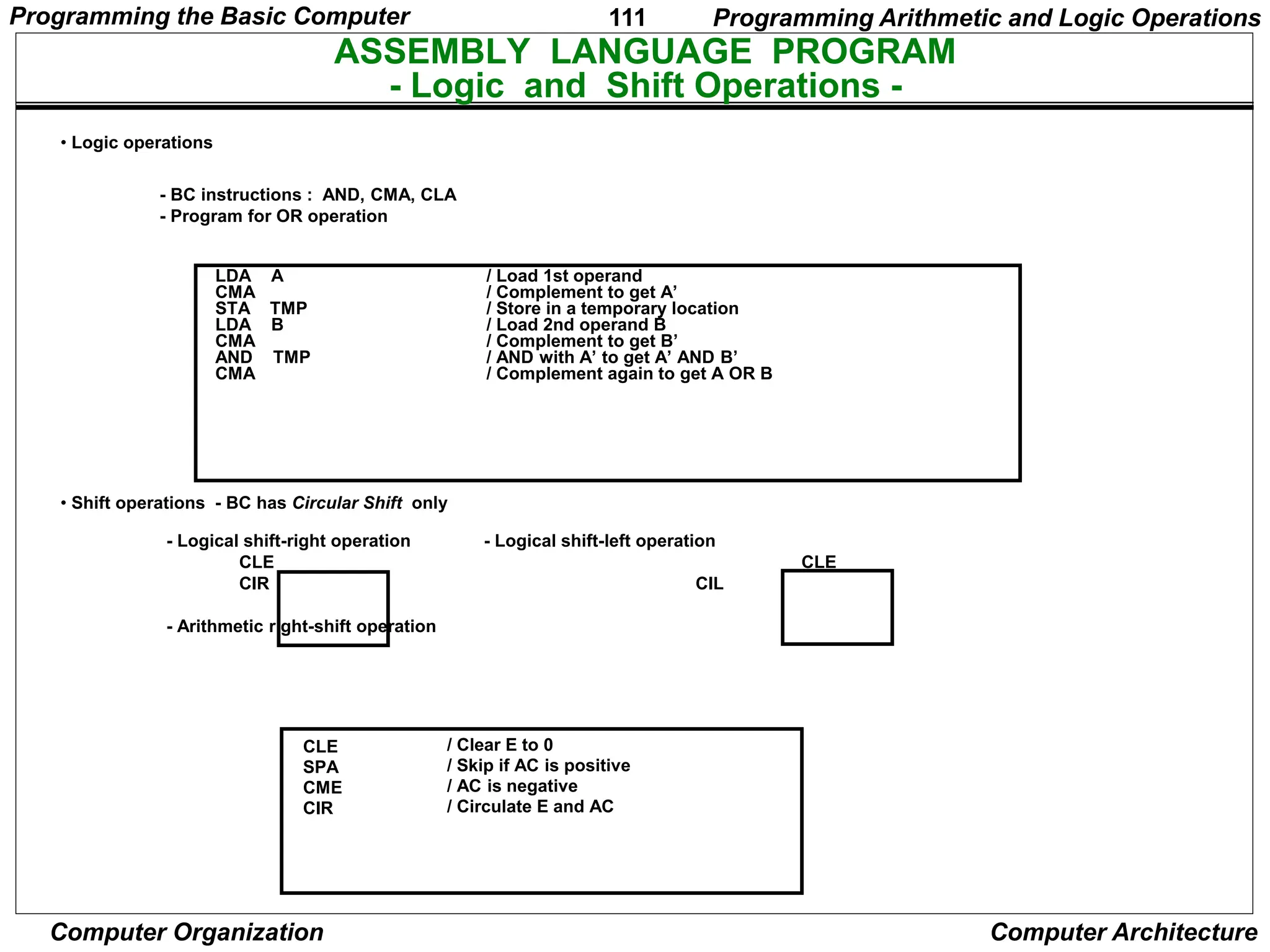
- Logic and Shift Operations -
• Logic operations
- BC instructions : AND, CMA, CLA
- Program for OR operation
LDA A
CMA
STA TMP
LDA B
CMA
AND TMP
CMA
/ Load 1st operand
/ Complement to get A’
/ Store in a temporary location
/ Load 2nd operand B
/ Complement to get B’
/ AND with A’ to get A’ AND B’
/ Complement again to get A OR B
• Shift operations - BC has Circular Shift only
- Logical shift-right operation - Logical shift-left operation
CLE CLE
CIR CIL
- Arithmetic right-shift operation
CLE
SPA
CME
CIR
/ Clear E to 0
/ Skip if AC is positive
/ AC is negative
/ Circulate E and AC
Programming Arithmetic and Logic Operations
Programming the Basic Computer
112
Computer Organization Computer Architecture
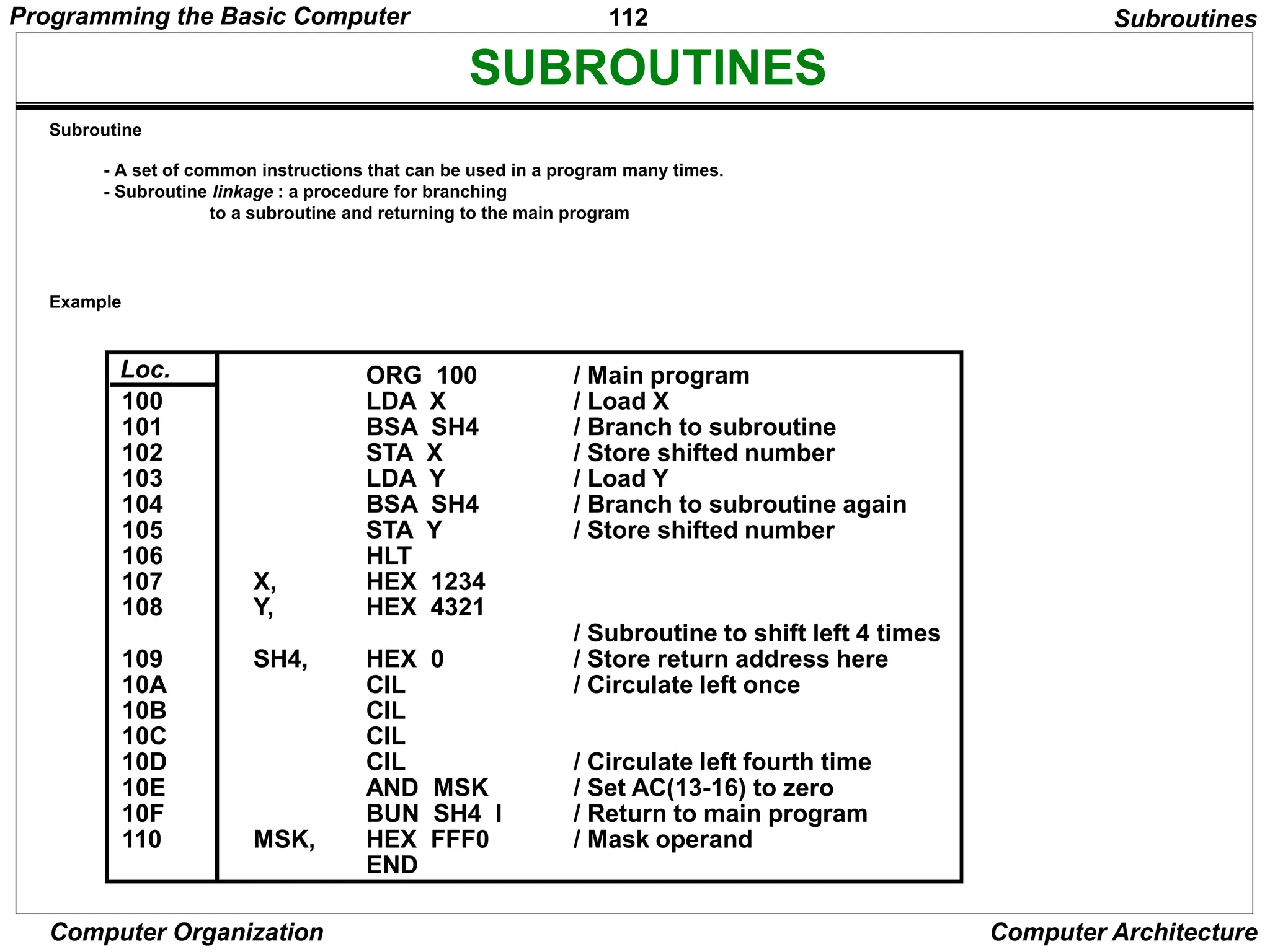
SUBROUTINES
- A set of common instructions that can be used in a program many times.
- Subroutine linkage : a procedure for branching
to a subroutine and returning to the main program
ORG 100
LDA X
BSA SH4
STA X
LDA Y
BSA SH4
STA Y
HLT
HEX 1234
HEX 4321
HEX 0
CIL
CIL
CIL
CIL
AND MSK
BUN SH4 I
HEX FFF0
END
/ Main program
/ Load X
/ Branch to subroutine
/ Store shifted number
/ Load Y
/ Branch to subroutine again
/ Store shifted number
/ Subroutine to shift left 4 times
/ Store return address here
/ Circulate left once
/ Circulate left fourth time
/ Set AC(13-16) to zero
/ Return to main program
/ Mask operand
X,
Y,
SH4,
MSK,
100
101
102
103
104
105
106
107
108
109
10A
10B
10C
10D
10E
10F
110
Loc.
Subroutines
Subroutine
Example
Programming the Basic Computer
113
Computer Organization Computer Architecture
SUBROUTINE PARAMETERS AND DATA LINKAGE
ORG 200
LDA X
BSA OR
HEX 3AF6
STA Y
HLT
HEX 7B95
HEX 0
HEX 0
CMA
STA TMP
LDA OR I
CMA
AND TMP
CMA
ISZ OR
BUN OR I
HEX 0
END
/ Load 1st operand into AC
/ Branch to subroutine OR
/ 2nd operand stored here
/ Subroutine returns here
/ 1st operand stored here
/ Result stored here
/ Subroutine OR
/ Complement 1st operand
/ Store in temporary location
/ Load 2nd operand
/ Complement 2nd operand
/ AND complemented 1st operand
/ Complement again to get OR
/ Increment return address
/ Return to main program
/ Temporary storage
X,
Y,
OR,
TMP,
200
201
202
203
204
205
206
207
208
209
20A
20B
20C
20D
20E
20F
210
Loc.
Example: Subroutine performing LOGICAL OR operation; Need two parameters
Subroutines
Linkage of Parameters and Data between the Main Program and a Subroutine
- via Registers
- via Memory locations
- ….
Programming the Basic Computer
114
Computer Organization Computer Architecture
SUBROUTINE - Moving a Block of Data -
BSA MVE
HEX 100
HEX 200
DEC -16
HLT
HEX 0
LDA MVE I
STA PT1
ISZ MVE
LDA MVE I
STA PT2
ISZ MVE
LDA MVE I
STA CTR
ISZ MVE
LDA PT1 I
STA PT2 I
ISZ PT1
ISZ PT2
ISZ CTR
BUN LOP
BUN MVE I
--
--
--
/ Main program
/ Branch to subroutine
/ 1st address of source data
/ 1st address of destination data
/ Number of items to move
/ Subroutine MVE
/ Bring address of source
/ Store in 1st pointer
/ Increment return address
/ Bring address of destination
/ Store in 2nd pointer
/ Increment return address
/ Bring number of items
/ Store in counter
/ Increment return address
/ Load source item
/ Store in destination
/ Increment source pointer
/ Increment destination pointer
/ Increment counter
/ Repeat 16 times
/ Return to main program
MVE,
LOP,
PT1,
PT2,
CTR,
• Fortran subroutine
SUBROUTINE MVE (SOURCE, DEST, N)
DIMENSION SOURCE(N), DEST(N)
DO 20 I = 1, N
DEST(I) = SOURCE(I)
RETURN
END
20
Subroutines
Programming the Basic Computer
115
Computer Organization Computer Architecture
INPUT OUTPUT PROGRAM
Program to Input one Character(Byte)
SKI
BUN CIF
INP
OUT
STA CHR
HLT
--
/ Check input flag
/ Flag=0, branch to check again
/ Flag=1, input character
/ Display to ensure correctness
/ Store character
/ Store character here
CIF,
CHR,
LDA CHR
SKO
BUN COF
OUT
HLT
HEX 0057
/ Load character into AC
/ Check output flag
/ Flag=0, branch to check again
/ Flag=1, output character
/ Character is "W"
COF,
CHR,
Input Output Program
Program to Output a Character
Programming the Basic Computer
116
Computer Organization Computer Architecture
CHARACTER MANIPULATION
--
SKI
BUN FST
INP
OUT
BSA SH4
BSA SH4
SKI
BUN SCD
INP
OUT
BUN IN2 I
/ Subroutine entry
/ Input 1st character
/ Logical Shift left 4 bits
/ 4 more bits
/ Input 2nd character
/ Return
IN2,
FST,
SCD,
Subroutine to Input 2 Characters and pack into a word
Input Output Program
Programming the Basic Computer
117
Computer Organization Computer Architecture
PROGRAM INTERRUPT
Tasks of Interrupt Service Routine
- Save the Status of CPU
Contents of processor registers and Flags
- Identify the source of Interrupt
Check which flag is set
- Service the device whose flag is set
(Input Output Subroutine)
- Restore contents of processor registers and flags
- Turn the interrupt facility on
- Return to the running program
Load PC of the interrupted program
Input Output Program
Programming the Basic Computer
118
Computer Organization Computer Architecture
INTERRUPT SERVICE ROUTINE
-
BUN SRV
CLA
ION
LDA X
ADD Y
STA Z
STA SAC
CIR
STA SE
SKI
BUN NXT
INP
OUT
STA PT1 I
ISZ PT1
SKO
BUN EXT
LDA PT2 I
OUT
ISZ PT2
LDA SE
CIL
LDA SAC
ION
BUN ZRO I
-
-
-
-
/ Return address stored here
/ Branch to service routine
/ Portion of running program
/ Turn on interrupt facility
/ Interrupt occurs here
/ Program returns here after interrupt
/ Interrupt service routine
/ Store content of AC
/ Move E into AC(1)
/ Store content of E
/ Check input flag
/ Flag is off, check next flag
/ Flag is on, input character
/ Print character
/ Store it in input buffer
/ Increment input pointer
/ Check output flag
/ Flag is off, exit
/ Load character from output buffer
/ Output character
/ Increment output pointer
/ Restore value of AC(1)
/ Shift it to E
/ Restore content of AC
/ Turn interrupt on
/ Return to running program
/ AC is stored here
/ E is stored here
/ Pointer of input buffer
/ Pointer of output buffer
ZRO,
SRV,
NXT,
EXT,
SAC,
SE,
PT1,
PT2,
0
1
100
101
102
103
104
200
Loc.
Input Output Program
Programming the Basic Computer
119
Computer Organization Computer Architecture
MICROPROGRAMMED CONTROL
• Control Memory
• Sequencing Microinstructions
• Microprogram Example
• Design of Control Unit
• Microinstruction Format
• Nanostorage and Nanoprogram
Microprogrammed Control
120
Computer Organization Computer Architecture
COMPARISON OF CONTROL UNIT IMPLEMENTATIONS
Implementation of Control Unit
Control Unit Implementation
Combinational Logic Circuits (Hard-wired)
Microprogram
I R Status F/Fs
Control Data
Combinational
Logic Circuits
Control
Points
CPU
Memory
Timing State
Ins. Cycle State
Control Unit's State
Status F/Fs
Control Data
Next Address
Generation
Logic
C
S
A
R
Control
Storage
(-program
memory)
M
e
m
o
r
y
I R
C
S
D
R
C
P
s
CPU
D
}
Microprogrammed Control
121
Computer Organization Computer Architecture
TERMINOLOGY
Microprogram
- Program stored in memory that generates all the control signals required
to execute the instruction set correctly
- Consists of microinstructions
Microinstruction
- Contains a control word and a sequencing word
Control Word - All the control information required for one clock cycle
Sequencing Word - Information needed to decide
the next microinstruction address
- Vocabulary to write a microprogram
Control Memory(Control Storage: CS)
- Storage in the microprogrammed control unit to store the microprogram
Writeable Control Memory(Writeable Control Storage:WCS)
- CS whose contents can be modified
-> Allows the microprogram can be changed
-> Instruction set can be changed or modified
Dynamic Microprogramming
- Computer system whose control unit is implemented with
a microprogram in WCS
- Microprogram can be changed by a systems programmer or a user
Microprogrammed Control
122
Computer Organization Computer Architecture
TERMINOLOGY
Sequencer (Microprogram Sequencer)
A Microprogram Control Unit that determines
the Microinstruction Address to be executed
in the next clock cycle
- In-line Sequencing
- Branch
- Conditional Branch
- Subroutine
- Loop
- Instruction OP-code mapping
Microprogrammed Control
123
Computer Organization Computer Architecture
MICROINSTRUCTION SEQUENCING
Sequencing Capabilities Required in a Control Storage
- Incrementing of the control address register
- Unconditional and conditional branches
- A mapping process from the bits of the machine
instruction to an address for control memory
- A facility for subroutine call and return
Sequencing
Instruction code
Mapping
logic
Multiplexers
Control memory (ROM)
Subroutine
register
(SBR)
Branch
logic
Status
bits
Microoperations
Control address register
(CAR)
Incrementer
MUX
select
select a status
bit
Branch address
Microprogrammed Control
124
Computer Organization Computer Architecture
CONDITIONAL BRANCH
Unconditional Branch
Fixing the value of one status bit at the input of the multiplexer to 1
Sequencing
Conditional Branch
If Condition is true, then Branch (address from
the next address field of the current microinstruction)
else Fall Through
Conditions to Test: O(overflow), N(negative),
Z(zero), C(carry), etc.
Control address register
Control memory
MUX
Load address
Increment
Status
(condition)
bits
Micro-operations
Condition select
Next address
...
Microprogrammed Control
125
Computer Organization Computer Architecture
MAPPING OF INSTRUCTIONS
Sequencing
ADD Routine
AND Routine
LDA Routine
STA Routine
BUN Routine
Control
Storage
0000
0001
0010
0011
0100
OP-codes of Instructions
ADD
AND
LDA
STA
BUN
0000
0001
0010
0011
0100
.
.
.
Direct Mapping
Address
10 0000 010
10 0001 010
10 0010 010
10 0011 010
10 0100 010
Mapping
Bits 10 xxxx 010
ADD Routine
Address
AND Routine
LDA Routine
STA Routine
BUN Routine
Microprogrammed Control
126
Computer Organization Computer Architecture
MAPPING OF INSTRUCTIONS TO MICROROUTINES
Mapping function implemented by ROM or PLA
OP-code
Mapping memory
(ROM or PLA)
Control address register
Control Memory
Mapping from the OP-code of an instruction to the
address of the Microinstruction which is the starting
microinstruction of its execution microprogram
1 0 1 1 Address
OP-code
Mapping bits
Microinstruction
address
0 x x x x 0 0
0 1 0 1 1 0 0
Machine
Instruction
Sequencing
Microprogrammed Control
127
Computer Organization Computer Architecture
MICROPROGRAM EXAMPLE
Microprogram
Computer Configuration
MUX
AR
10 0
PC
10 0
Address Memory
2048 x 16
MUX
DR
15 0
Arithmetic
logic and
shift unit
AC
15 0
SBR
6 0
CAR
6 0
Control memory
128 x 20
Control unit
Microprogrammed Control
128
Computer Organization Computer Architecture
MACHINE INSTRUCTION FORMAT
Microinstruction Format
Microprogram
EA is the effective address
Symbol OP-code Description
ADD 0000 AC  AC + M[EA]
BRANCH 0001 if (AC < 0) then (PC  EA)
STORE 0010 M[EA]  AC
EXCHANGE 0011 AC  M[EA], M[EA]  AC
Machine instruction format
I Opcode
15 14 11 10
Address
0
Sample machine instructions
F1 F2 F3 CD BR AD
3 3 3 2 2 7
F1, F2, F3: Microoperation fields
CD: Condition for branching
BR: Branch field
AD: Address field
Microprogrammed Control
129
Computer Organization Computer Architecture
MICROINSTRUCTION FIELD DESCRIPTIONS - F1,F2,F3
F1 Microoperation Symbol
000 None NOP
001 AC  AC + DR ADD
010 AC  0 CLRAC
011 AC  AC + 1 INCAC
100 AC  DR DRTAC
101 AR  DR(0-10) DRTAR
110 AR  PC PCTAR
111 M[AR]  DR WRITE
Microprogram
F2 Microoperation Symbol
000 None NOP
001 AC  AC - DR SUB
010 AC  AC  DR OR
011 AC  AC  DR AND
100 DR  M[AR] READ
101 DR  AC ACTDR
110 DR  DR + 1 INCDR
111 DR(0-10)  PC PCTDR
F3 Microoperation Symbol
000 None NOP
001 AC  AC  DR XOR
010 AC  AC’ COM
011 AC  shl AC SHL
100 AC  shr AC SHR
101 PC  PC + 1 INCPC
110 PC  AR ARTPC
111 Reserved
Microprogrammed Control
130
Computer Organization Computer Architecture
MICROINSTRUCTION FIELD DESCRIPTIONS - CD, BR
CD Condition Symbol Comments
00 Always = 1 U Unconditional branch
01 DR(15) I Indirect address bit
10 AC(15) S Sign bit of AC
11 AC = 0 Z Zero value in AC
BR Symbol Function
00 JMP CAR  AD if condition = 1
CAR  CAR + 1 if condition = 0
01 CALL CAR  AD, SBR  CAR + 1 if condition = 1
CAR  CAR + 1 if condition = 0
10 RET CAR  SBR (Return from subroutine)
11 MAP CAR(2-5)  DR(11-14), CAR(0,1,6)  0
Microprogram
Microprogrammed Control
131
Computer Organization Computer Architecture
SYMBOLIC MICROINSTRUCTIONS
• Symbols are used in microinstructions as in assembly language
• A symbolic microprogram can be translated into its binary equivalent
by a microprogram assembler.
Sample Format
five fields: label; micro-ops; CD; BR; AD
Label: may be empty or may specify a symbolic
address terminated with a colon
Micro-ops: consists of one, two, or three symbols
separated by commas
CD: one of {U, I, S, Z}, where U: Unconditional Branch
I: Indirect address bit
S: Sign of AC
Z: Zero value in AC
BR: one of {JMP, CALL, RET, MAP}
AD: one of {Symbolic address, NEXT, empty}
Microprogram
Microprogrammed Control
132
Computer Organization Computer Architecture
SYMBOLIC MICROPROGRAM - FETCH ROUTINE
AR  PC
DR  M[AR], PC  PC + 1
AR  DR(0-10), CAR(2-5)  DR(11-14), CAR(0,1,6)  0
Symbolic microprogram for the fetch cycle:
ORG 64
PCTAR U JMP NEXT
READ, INCPC U JMP NEXT
DRTAR U MAP
FETCH:
Binary equivalents translated by an assembler
1000000 110 000 000 00 00 1000001
1000001 000 100 101 00 00 1000010
1000010 101 000 000 00 11 0000000
Binary
address F1 F2 F3 CD BR AD
Microprogram
During FETCH, Read an instruction from memory
and decode the instruction and update PC
Sequence of microoperations in the fetch cycle:
Microprogrammed Control
133
Computer Organization Computer Architecture
SYMBOLIC MICROPROGRAM
• Control Storage: 128 20-bit words
• The first 64 words: Routines for the 16 machine instructions
• The last 64 words: Used for other purpose (e.g., fetch routine and other subroutines)
• Mapping: OP-code XXXX into 0XXXX00, the first address for the 16 routines are
0(0 0000 00), 4(0 0001 00), 8, 12, 16, 20, ..., 60
Microprogram
ORG 0
NOP
READ
ADD
ORG 4
NOP
NOP
NOP
ARTPC
ORG 8
NOP
ACTDR
WRITE
ORG 12
NOP
READ
ACTDR, DRTAC
WRITE
ORG 64
PCTAR
READ, INCPC
DRTAR
READ
DRTAR
I
U
U
S
U
I
U
I
U
U
I
U
U
U
U
U
U
U
U
CALL
JMP
JMP
JMP
JMP
CALL
JMP
CALL
JMP
JMP
CALL
JMP
JMP
JMP
JMP
JMP
MAP
JMP
RET
INDRCT
NEXT
FETCH
OVER
FETCH
INDRCT
FETCH
INDRCT
NEXT
FETCH
INDRCT
NEXT
NEXT
FETCH
NEXT
NEXT
NEXT
ADD:
BRANCH:
OVER:
STORE:
EXCHANGE:
FETCH:
INDRCT:
Label Microops CD BR AD
Partial Symbolic Microprogram
Microprogrammed Control
134
Computer Organization Computer Architecture
This microprogram can be implemented using ROM
Microprogram
Address Binary Microinstruction
Micro Routine Decimal Binary F1 F2 F3 CD BR AD
ADD 0 0000000 000 000 000 01 01 1000011
1 0000001 000 100 000 00 00 0000010
2 0000010 001 000 000 00 00 1000000
3 0000011 000 000 000 00 00 1000000
BRANCH 4 0000100 000 000 000 10 00 0000110
5 0000101 000 000 000 00 00 1000000
6 0000110 000 000 000 01 01 1000011
7 0000111 000 000 110 00 00 1000000
STORE 8 0001000 000 000 000 01 01 1000011
9 0001001 000 101 000 00 00 0001010
10 0001010 111 000 000 00 00 1000000
11 0001011 000 000 000 00 00 1000000
EXCHANGE 12 0001100 000 000 000 01 01 1000011
13 0001101 001 000 000 00 00 0001110
14 0001110 100 101 000 00 00 0001111
15 0001111 111 000 000 00 00 1000000
FETCH 64 1000000 110 000 000 00 00 1000001
65 1000001 000 100 101 00 00 1000010
66 1000010 101 000 000 00 11 0000000
INDRCT 67 1000011 000 100 000 00 00 1000100
68 1000100 101 000 000 00 10 0000000
BINARY MICROPROGRAM
Microprogrammed Control
135
Computer Organization Computer Architecture
DESIGN OF CONTROL UNIT
- DECODING ALU CONTROL INFORMATION -
Design of Control Unit
microoperation fields
3 x 8 decoder
7 6 5 4 3 2 1 0
F1
3 x 8 decoder
7 6 5 4 3 2 1 0
F2
3 x 8 decoder
7 6 5 4 3 2 1 0
F3
Arithmetic
logic and
shift unit
AND
ADD
DRTAC
AC
Load
From
PC
From
DR(0-10)
Select 0 1
Multiplexers
AR
Load Clock
AC
DR
DRTAR
PCTAR
Decoding of Microoperation Fields
Microprogrammed Control
136
Computer Organization Computer Architecture
MICROPROGRAM SEQUENCER
- NEXT MICROINSTRUCTION ADDRESS LOGIC -
Design of Control Unit
Subroutine
CALL
MUX-1 selects an address from one of four sources and routes it into a CAR
- In-Line Sequencing  CAR + 1
- Branch, Subroutine Call  CS(AD)
- Return from Subroutine  Output of SBR
- New Machine instruction  MAP
3 2 1 0
S
S
1
0
MUX1
External
(MAP)
SBR
L
Incrementer
CAR
Clock
Address
source
selection
In-Line
RETURN form Subroutine
Branch, CALL Address
Control Storage
S1S0 Address Source
00 CAR + 1, In-Line
01 SBR RETURN
10 CS(AD), Branch or CALL
11 MAP
Microprogrammed Control
137
Computer Organization Computer Architecture
MICROPROGRAM SEQUENCER
- CONDITION AND BRANCH CONTROL -
Design of Control Unit
Input
logic
I0
I
1
T
MUX2
Select
1
I
S
Z
Test
CD Field of CS
From
CPU BR field
of CS
L(load SBR with PC)
for subroutine Call
S0
S1
for next address
selection
I1I0T Meaning Source of Address S1S0 L
000 In-Line CAR+1 00 0
001 JMP CS(AD) 01 0
010 In-Line CAR+1 00 0
011 CALL CS(AD) and SBR <- CAR+1 01 1
10x RET SBR 10 0
11x MAP DR(11-14) 11 0
L
S1 = I1
S0 = I1I0 + I1’T
L = I1’I0T
Input Logic
Microprogrammed Control
138
Computer Organization Computer Architecture
MICROPROGRAM SEQUENCER
Design of Control Unit
3 2 1 0
S1 MUX1
External
(MAP)
SBR
Load
Incrementer
CAR
Input
logic
I
0
T
MUX2
Select
1
I
S
Z
Test
Clock
Control memory
Microops CD BR AD
L
I
1 S0
. . .
. . .
Microprogrammed Control
139
Computer Organization Computer Architecture
MICROINSTRUCTION FORMAT
Microinstruction Format
Information in a Microinstruction
- Control Information
- Sequencing Information
- Constant
Information which is useful when feeding into the system
These information needs to be organized in some way for
- Efficient use of the microinstruction bits
- Fast decoding
Field Encoding
- Encoding the microinstruction bits
- Encoding slows down the execution speed
due to the decoding delay
- Encoding also reduces the flexibility due to
the decoding hardware
Microprogrammed Control
140
Computer Organization Computer Architecture
HORIZONTAL AND VERTICAL
MICROINSTRUCTION FORMAT
Horizontal Microinstructions
Each bit directly controls each micro-operation or each control point
Horizontal implies a long microinstruction word
Advantages: Can control a variety of components operating in parallel.
--> Advantage of efficient hardware utilization
Disadvantages: Control word bits are not fully utilized
--> CS becomes large --> Costly
Vertical Microinstructions
A microinstruction format that is not horizontal
Vertical implies a short microinstruction word
Encoded Microinstruction fields
--> Needs decoding circuits for one or two levels of decoding
Microinstruction Format
One-level decoding
Field A
2 bits
2 x 4
Decoder
3 x 8
Decoder
Field B
3 bits
1 of 4 1 of 8
Two-level decoding
Field A
2 bits
2 x 4
Decoder
6 x 64
Decoder
Field B
6 bits
Decoder and
selection logic
Microprogrammed Control
141
Computer Organization Computer Architecture
NANOSTORAGE AND NANOINSTRUCTION
The decoder circuits in a vertical microprogram
storage organization can be replaced by a ROM
=> Two levels of control storage
First level - Control Storage
Second level - Nano Storage
Two-level microprogram
First level
-Vertical format Microprogram
Second level
-Horizontal format Nanoprogram
- Interprets the microinstruction fields, thus converts a vertical
microinstruction format into a horizontal
nanoinstruction format.
Usually, the microprogram consists of a large number of short
microinstructions, while the nanoprogram contains fewer words
with longer nanoinstructions.
Control Storage Hierarchy
Microprogrammed Control
142
Computer Organization Computer Architecture
TWO-LEVEL MICROPROGRAMMING - EXAMPLE
* Microprogram: 2048 microinstructions of 200 bits each
* With 1-Level Control Storage: 2048 x 200 = 409,600 bits
* Assumption:
256 distinct microinstructions among 2048
* With 2-Level Control Storage:
Nano Storage: 256 x 200 bits to store 256 distinct nanoinstructions
Control storage: 2048 x 8 bits
To address 256 nano storage locations 8 bits are needed
* Total 1-Level control storage: 409,600 bits
Total 2-Level control storage: 67,584 bits (256 x 200 + 2048 x 8)
Control Storage Hierarchy
Control address register
11 bits
Control memory
2048 x 8
Microinstruction (8 bits)
Nanomemory address
Nanomemory
256 x 200
Nanoinstructions (200 bits)
Microprogrammed Control
143
Computer Organization Computer Architecture
Overview
• Instruction Set Processor (ISP)
• Central Processing Unit (CPU)
• A typical computing task consists of a series of
steps specified by a sequence of machine
instructions that constitute a program.
• An instruction is executed by carrying out a
sequence of more rudimentary operations.
Central Processing Unit
144
Computer Organization Computer Architecture
Fundamental Concepts
• Processor fetches one instruction at a time and
perform the operation specified.
• Instructions are fetched from successive
memory locations until a branch or a jump
instruction is encountered.
• Processor keeps track of the address of the
memory location containing the next instruction
to be fetched using Program Counter (PC).
• Instruction Register (IR)
Central Processing Unit
145
Computer Organization Computer Architecture
Executing an Instruction
• Fetch the contents of the memory location
pointed to by the PC. The contents of this
location are loaded into the IR (fetch phase).
IR ← [[PC]]
• Assuming that the memory is byte addressable,
increment the contents of the PC by 4 (fetch
phase).
PC ← [PC] + 4
• Carry out the actions specified by the instruction
in the IR (execution phase).
Central Processing Unit
146
Computer Organization Computer Architecture
lines
Data
Address
lines
bus
Memory
Carry -in
ALU
PC
MAR
MDR
Y
Z
Add
XOR
Sub
bus
IR
TEMP
R0
control
ALU
lines
Control signals
R n 1
-
 
Instruction
decoder and
Internal processor
control logic
A B
Figure 7.1. Single-bus organization of the datapath inside a processor.
MUX
Select
Constant 4
Processor Organization
Datapath
Textbook Page 413
MDR HAS
TWO INPUTS
AND TWO
OUTPUTS
Central Processing Unit
147
Computer Organization Computer Architecture
Executing an Instruction
• Transfer a word of data from one processor register
to another or to the ALU.
• Perform an arithmetic or a logic operation and store
the result in a processor register.
• Fetch the contents of a given memory location and
load them into a processor register.
• Store a word of data from a processor register into a
given memory location.
Central Processing Unit
148
Computer Organization Computer Architecture
Register Transfers
B
A
Z
ALU
Yin
Y
Zin
Zout
Riin
Ri
Riout
bus
Internal processor
Constant 4
MUX
Figure 7.2. Input and output gating for the registers in Figure 7.1.
Select
Central Processing Unit
149
Computer Organization Computer Architecture
Register Transfers
• All operations and data transfers are controlled by the processor
clock.
Figure 7.3. Input and output g
ating for one re
gister bit.
D Q
Q
Clock
1
0
Riout
Riin
Bus
Figure 7.3. Input and output gating for one register bit.
Central Processing Unit
150
Computer Organization Computer Architecture
Performing an Arithmetic or Logic
Operation
• The ALU is a combinational circuit that has no
internal storage.
• ALU gets the two operands from MUX and bus.
The result is temporarily stored in register Z.
• What is the sequence of operations to add the
contents of register R1 to those of R2 and store
the result in R3?
1. R1out, Yin
2. R2out, SelectY, Add, Zin
3. Zout, R3in
Central Processing Unit
151
Computer Organization Computer Architecture
Fetching a Word from Memory
• Address into MAR; issue Read operation; data into MDR.
MDR
Memory -b
us
Figure 7.4. Connection and control signals for re
gister MDR.
data lines
Internal processor
bus
MDRout
MDRoutE
MDRin
MDRinE
Figure 7.4. Connection and control signals for register MDR.
Central Processing Unit
152
Computer Organization Computer Architecture
Fetching a Word from Memory
• The response time of each memory access
varies (cache miss, memory-mapped I/O,…).
• To accommodate this, the processor waits until
it receives an indication that the requested
operation has been completed (Memory-
Function-Completed, MFC).
• Move (R1), R2
 MAR ← [R1]
 Start a Read operation on the memory bus
 Wait for the MFC response from the memory
 Load MDR from the memory bus
 R2 ← [MDR]
Central Processing Unit
153
Computer Organization Computer Architecture
Timing
Figure 7.5. Timing of a memory Read operation.
MFC
MDRout
Assume MAR
is always available
on the address lines
of the memory bus.
R2 ← [MDR]
MAR ← [R1]
Start a Read operation on the memory bus
Wait for the MFC response from the memory
Load MDR from the memory bus
Central Processing Unit
154
Computer Organization Computer Architecture
Execution of a Complete
Instruction
• Add (R3), R1
• Fetch the instruction
• Fetch the first operand (the contents of the memory
location pointed to by R3)
• Perform the addition
• Load the result into R1
Central Processing Unit
155
Computer Organization Computer Architecture
Architecture
B
A
Z
ALU
Yin
Y
Zin
Zout
Riin
Ri
Riout
bus
Internal processor
Constant 4
MUX
Figure 7.2. Input and output gating for the registers in Figure 7.1.
Select
Central Processing Unit
156
Computer Organization Computer Architecture
Execution of a Complete
Instruction
Step Action
1 PCout , MARin , Read,Select4,
Add, Zin
2 Zout , PCin , Yin , WMF C
3 MDRout , IRin
4 R3out , MARin , Read
5 R1out , Yin , WMF C
6 MDRout , SelectY,Add, Zin
7 Zout , R1in , End
Figure7.6. Control sequence
for executionof the instruction Add (R3),R1.
lines
Data
Address
lines
bus
Memory
Carry -in
ALU
PC
MAR
MDR
Y
Z
Add
XOR
Sub
bus
IR
TEMP
R0
control
ALU
lines
Control signals
R n 1
-
 
Instruction
decoder and
Internal processor
control logic
A B
Figure 7.1. Single-bus organization of the datapath inside a processor.
MUX
Select
Constant 4
Add (R3), R1
Central Processing Unit
157
Computer Organization Computer Architecture
Execution of Branch Instructions
• A branch instruction replaces the contents of PC
with the branch target address, which is usually
obtained by adding an offset X given in the branch
instruction.
• The offset X is usually the difference between the
branch target address and the address immediately
following the branch instruction.
• Conditional branch
Central Processing Unit
158
Computer Organization Computer Architecture
Execution of Branch Instructions
Step Action
1 PCout, MAR in, Read,Select4,
Add, Zin
2 Zout, PCin , Yin, WMF C
3 MDRout , IRin
4 Offset-field-of-IR
out, Add, Zin
5 Zout, PCin, End
Figure 7.7. Control sequence for an unconditional branch instruction.
Central Processing Unit
159
Computer Organization Computer Architecture
Multiple-Bus Organization
Memory b
us
data lines
Figure 7.8. Three-b
us or
ganization of the datapath.
Bus A Bus B Bus C
Instruction
decoder
PC
Re
gister
f ile
Constant 4
ALU
MDR
A
B
R
MUX
Incrementer
Address
lines
MAR
IR
Central Processing Unit
160
Computer Organization Computer Architecture
Multiple-Bus Organization
• Add R4, R5, R6
Step Action
1 PC
out
, R=B, MAR
in
, Read, IncPC
2 WMF C
3 MDR
outB
, R=B, IR
in
4 R4
outA
, R5
outB
, SelectA, Add, R6
in
, End
Figure 7.9. Control sequence for the instruction. Add R4,R5,R6,
for the three-bus organization in Figure 7.8.
Central Processing Unit
161
Computer Organization Computer Architecture
Quiz
• What is the control
sequence for execution
of the instruction
Add R1, R2
including the instruction
fetch phase? (Assume
single bus architecture)
lines
Data
Address
lines
bus
Memory
Carry -in
ALU
PC
MAR
MDR
Y
Z
Add
XOR
Sub
bus
IR
TEMP
R0
control
ALU
lines
Control signals
R n 1
-
 
Instruction
decoder and
Internal processor
control logic
A B
Figure 7.1. Single-bus organization of the datapath inside a processor.
MUX
Select
Constant 4
Central Processing Unit
162
Computer Organization Computer Architecture
Control Unit Organization
Figure 7.10. Control unit organization.
CLK
Clock
Control step
IR
encoder
Decoder/
Control signals
codes
counter
inputs
Condition
External
Central Processing Unit
163
Computer Organization Computer Architecture
Detailed Block Description
External
inputs
Figure 7.11. Separation of the decoding and encoding functions.
Encoder
Reset
CLK
Clock
Control signals
counter
Run End
Condition
codes
decoder
Instruction
Step decoder
Control step
IR
T1 T2 Tn
INS1
INS2
INS
m
Central Processing Unit
164
Computer Organization Computer Architecture
Generating Zin
• Zin = T1 + T6 • ADD + T4 • BR + …
Figure 7.12. Generation of the Zin control signal for the processor in Figure 7.1.
T1
Add
Branch
T4
T6
Central Processing Unit
165
Computer Organization Computer Architecture
Generating End
• End = T7 • ADD + T5 • BR + (T5 • N + T4 • N) • BRN +…
Figure 7.13.Generation of the End control signal.
T7
Add Branch
Branch<0
T5
End
N
N
T4
T5
Central Processing Unit
166
Computer Organization Computer Architecture
A Complete Processor
Instruction
unit
Inte
ger
unit
Floating-point
unit
Instruction
cache
Data
cache
Bus interf
ace
Main
memory
Input/
Output
Sy stem b
us
Processor
Figure 7.14. Block diagram of a complete processor
.
Central Processing Unit
167
Computer Organization Computer Architecture
Overview
• Control signals are generated by a program similar to machine
language programs.
• Control Word (CW); microroutine; microinstruction
PC
in
PC
out
MAR
in
Read
MDR
out
IR
in
Y
in
Select
Add
Z
in
Z
out
R1
out
R1
in
R3
out
WMFC
End
0
1
0
0
0
0
0
0
0
0
0
0
0
1
1
0
0
0
0
0
0
1
0
0
1
0
0
0
1
0
0
1
0
0
0
0
0
1
0
0
1
0
0
0
1
0
0
0
0
0
1
0
0
1
0
0
1
0
0
0
0
0
0
1
0
0
0
0
1
0
1
0
0
0
0
1
0
0
1
0
0
0
0
1
0
0
0
0
1
0
0
0
0
0
0
0
0
1
0
0
0
1
0
0
0
0
1
0
0
1
0
0
Micro -
instruction
1
2
3
4
5
6
7
Figure 7.15 An e
xample of microinstructions for Figure 7.6.
Microprogrammed Control
168
Computer Organization Computer Architecture
Overview
Step Action
1 PCout , MARin , Read,Select4,
Add, Zin
2 Zout , PCin , Yin , WMF C
3 MDRout , IRin
4 R3out , MARin , Read
5 R1out , Yin , WMF C
6 MDRout , SelectY,Add, Zin
7 Zout , R1in , End
Figure7.6. Control sequence
for executionof the instruction Add (R3),R1.
Microprogrammed Control
169
Computer Organization Computer Architecture
Overview
• Control store
Figure 7.16. Basic organization of a microprogrammed control unit.
store
Control
generator
Starting
address
CW
Clock PC
IR
One function
cannot be carried
out by this simple
organization.
Microprogrammed Control
170
Computer Organization Computer Architecture
Overview
• The previous organization cannot handle the situation when the
control unit is required to check the status of the condition codes
or external inputs to choose between alternative courses of action.
• Use conditional branch microinstruction.
AddressMicroinstruction
0 PCout , MARin , Read,Select4,Add, Zin
1 Zout , PCin , Yin , WMFC
2 MDRout , IRin
3 Branchto starting
address
of appropriate
microroutine
. ... .. ... ... .. ... .. ... ... .. ... ... .. ... .. ... ... .. ... .. ... ... .. ... ..
25 If N=0, thenbranchto microinstruction
0
26 Offset-field-of-IR
out, SelectY,Add, Zin
27 Zout , PCin , End
Figure 7.17. Microroutine for the instruction Branch<0.
Microprogrammed Control
171
Computer Organization Computer Architecture
Overview
Figure 7.18. Organization of the control unit to allow
conditional branching in the microprogram.
Control
store
Clock
generator
Starting and
branch address Condition
codes
inputs
External
CW
IR
PC
Microprogrammed Control
172
Computer Organization Computer Architecture
Microinstructions
• A straightforward way to structure microinstructions
is to assign one bit position to each control signal.
• However, this is very inefficient.
• The length can be reduced: most signals are not
needed simultaneously, and many signals are
mutually exclusive.
• All mutually exclusive signals are placed in the same
group in binary coding.
Microprogrammed Control
173
Computer Organization Computer Architecture
Partial Format for the
Microinstructions
F2 (3 bits)
000: No transf er
001: PC
in
010: IR
in
011: Z
in
100: R0
in
101: R1
in
110: R2
in
111: R3
in
F1 F2 F3 F4 F5
F1 (4 bits) F3 (3 bits) F4 (4 bits) F5 (2 bits)
0000: No transf er
0001: PC
out
0010: MDR
out
0011: Z
out
0100: R0
out
0101: R1
out
0110: R2
out
0111: R3
out
1010: TEMP
out
1011: Of f set
out
000: No transf er
001: MARin
010: MDR
in
011: TEMP
in
100: Y
in
0000: Add
0001: Sub
1111: XOR
16 ALU
f unctions
00: No action
01: Read
10: Write
F6 F7 F8
F6 (1 bit) F7 (1 bit) F8 (1 bit)
0: SelectY
1: Select4
0: No action
1: WMFC
0: Continue
1: End
Figure 7.19. An example of a partial format for field-encoded microinstructions.
Microinstruction
What is the price paid for
this scheme?
Microprogrammed Control
174
Computer Organization Computer Architecture
Further Improvement
• Enumerate the patterns of required signals in all
possible microinstructions. Each meaningful
combination of active control signals can then be
assigned a distinct code.
• Vertical organization
• Horizontal organization
Microprogrammed Control
175
Computer Organization Computer Architecture
Microprogram Sequencing
• If all microprograms require only straightforward
sequential execution of microinstructions except
for branches, letting a μPC governs the
sequencing would be efficient.
• However, two disadvantages:
 Having a separate microroutine for each machine instruction
results in a large total number of microinstructions and a large
control store.
 Longer execution time because it takes more time to carry out
the required branches.
• Example: Add src, Rdst
• Four addressing modes: register, autoincrement,
autodecrement, and indexed (with indirect
forms).
Microprogrammed Control
176
Computer Organization Computer Architecture
- Bit-ORing
- Wide-Branch Addressing
- WMFC
Microprogrammed Control
177
Computer Organization Computer Architecture
OP code 0 1 0 Rsrc Rdst
Mode
Contents of IR
0
3
4
7
8
10
11
Figure 7.21.Microinstruction for Add (Rsrc)+,Rdst.
Note:Microinstruction at location 170 is not executed for this addressing mode.
Address Microinstruction
(octal)
000 PC
out
, MARin, Read, Select
4, Add, Z
in
001 Zout
, PC
in, Yin, WMFC
002 MDRout
, IRin
003 Branch {
PC 101 (from Instruction decoder);
PC
5,4  [IR10,9
]; PC
3 
121 Rsrc
out, MAR
in, Read, Select4, Add, Z
in
122 Zout
, Rsrc
in
123
170 MDRout
, MARin, Read, WMFC
171 MDRout
, Yin
172 Rdst
out, SelectY
, Add, Z
in
173 Zout
, Rdst
in, End
[IR10] ×
[IR9] ×
[IR8]}
Branch {
PC 170;PC
0  [IR8]}, WMFC
Microprogrammed Control
178
Computer Organization Computer Architecture
Microinstructions with Next-
Address Field
• The microprogram we discussed requires
several branch microinstructions, which perform
no useful operation in the datapath.
• A powerful alternative approach is to include an
address field as a part of every microinstruction
to indicate the location of the next
microinstruction to be fetched.
• Pros: separate branch microinstructions are
virtually eliminated; few limitations in assigning
addresses to microinstructions.
• Cons: additional bits for the address field
(around 1/6)
Microprogrammed Control
179
Computer Organization Computer Architecture
Microinstructions with Next-
Address Field
Figure 7.22. Microinstruction-sequencing organization.
Condition
codes
IR
Decoding circuits
Control store
Next address
Microinstruction decoder
Control signals
Inputs
External
AR
I R
Microprogrammed Control
180
Computer Organization Computer Architecture
Microprogrammed Control
181
Computer Organization Computer Architecture
Implementation of the Microroutine
(See Figure 7.23 for encoded signals.)
Figure 7.24. Implementation of the microroutine of Figure 7.21 using a
1
0
1
1
1
1
1
0
0
1
1
1
1
1
0
0
0
1
0
0
1
1
2
1 0
0
0
0
0
0
0
0
0
0
0
0
0
0
0
0
0 0
0
0
0
0
0 0
0
1
0
1
1
1
0
3
7
7
0
0
0
0
0
0
0
0
0 1
1
1
1
1
1
0
0
0
0
1
7
0
7
F9
0
0
0
0
0
0
F10
0
0
0
0
0
0
0
0
0
0
0
0
0
0
F8
F7
F6
F5
F4
0
0
0 0 0 0 0 0
0
0
0
0
0
1
0
0
0
0
0
0
0
0
0
0
0
0 1
1
0
0
0 0
1
0
0
0
1
0
0
0
0
0
0
0
0
1
1
0
0
0
0
0
1
0
0
0
0
0
0
0
1
0 0
0
0
0
0
0
0
0 0
1
0
0
0
0
0
0
0
0
1
1
1
0
1
0
0
1
0
F2
1
1
1
0 0 0 0 0 0
1
1
2
2
1
0
1
1
1
1
0
1
1
1 0
0
1
1
2
0
2
1
0
0
0
address
Octal
1
1
1 0
0
0
0
0
1 0
0
0
0
0
0
0
1
0
0
0
0
0
0
0
F0 F1
0
0 0 1
0 0
0
1
0
0
1
0
0 1
1
0
0
1
1
1
0
1
0
0
0
0
0
1
1
0
1
F3
next-microinstruction address field.
0
1
1
0
0
0 0 0 0 0 0
0 0
0 0
0
0
0
0 0 0 0 0 0
3
0 0 0
0 0 0
Microprogrammed Control
182
Computer Organization Computer Architecture
decoder
Microinstruction
Other control signals
Rdst
in
Rsrc
out
Rsrc
in
Figure 7.25. Some details of the control-signal-generating circuitry.
Microprogrammed Control
183
Computer Organization Computer Architecture
bit-ORing
Microprogrammed Control
184
Computer Organization Computer Architecture
PIPELINING AND VECTOR PROCESSING
• Parallel Processing
• Pipelining
• Arithmetic Pipeline
• Instruction Pipeline
• RISC Pipeline
• Vector Processing
• Array Processors
Pipelining and Vector Processing
185
Computer Organization Computer Architecture
PARALLEL PROCESSING
Levels of Parallel Processing
- Job or Program level
- Task or Procedure level
- Inter-Instruction level
- Intra-Instruction level
Execution of Concurrent Events in the computing
process to achieve faster Computational Speed
Parallel Processing
Pipelining and Vector Processing
186
Computer Organization Computer Architecture
PARALLEL COMPUTERS
Architectural Classification
Number of Data Streams
Number of
Instruction
Streams
Single
Multiple
Single Multiple
SISD SIMD
MISD MIMD
Parallel Processing
– Flynn's classification
» Based on the multiplicity of Instruction Streams and
Data Streams
» Instruction Stream
• Sequence of Instructions read from memory
» Data Stream
• Operations performed on the data in the processor
Pipelining and Vector Processing
187
Computer Organization Computer Architecture
COMPUTER ARCHITECTURES FOR PARALLEL
PROCESSING
Von-Neuman
based
Dataflow
Reduction
SISD
MISD
SIMD
MIMD
Superscalar processors
Superpipelined processors
VLIW
Nonexistence
Array processors
Systolic arrays
Associative processors
Shared-memory multiprocessors
Bus based
Crossbar switch based
Multistage IN based
Message-passing multicomputers
Hypercube
Mesh
Reconfigurable
Parallel Processing
Pipelining and Vector Processing
188
Computer Organization Computer Architecture
SISD COMPUTER SYSTEMS
Control
Unit
Processor
Unit
Memory
Instruction stream
Data stream
Characteristics
- Standard von Neumann machine
- Instructions and data are stored in memory
- One operation at a time
Limitations
Von Neumann bottleneck
Maximum speed of the system is limited by the
Memory Bandwidth (bits/sec or bytes/sec)
- Limitation on Memory Bandwidth
- Memory is shared by CPU and I/O
Parallel Processing
Pipelining and Vector Processing
189
Computer Organization Computer Architecture
SISD PERFORMANCE IMPROVEMENTS
• Multiprogramming
• Spooling
• Multifunction processor
• Pipelining
• Exploiting instruction-level parallelism
- Superscalar
- Superpipelining
- VLIW (Very Long Instruction Word)
Parallel Processing
Pipelining and Vector Processing
190
Computer Organization Computer Architecture
MISD COMPUTER SYSTEMS
M CU P
M CU P
M CU P
•
•
•
•
•
•
Memory
Instruction stream
Data stream
Characteristics
- There is no computer at present that can be
classified as MISD
Parallel Processing
Pipelining and Vector Processing
191
Computer Organization Computer Architecture
SIMD COMPUTER SYSTEMS
Control Unit
Memory
Alignment network
P P P
• • •
M M
M • • •
Data bus
Instruction stream
Data stream
Processor units
Memory modules
Characteristics
- Only one copy of the program exists
- A single controller executes one instruction at a time
Parallel Processing
Pipelining and Vector Processing
192
Computer Organization Computer Architecture
TYPES OF SIMD COMPUTERS
Array Processors
- The control unit broadcasts instructions to all PEs,
and all active PEs execute the same instructions
- ILLIAC IV, GF-11, Connection Machine, DAP, MPP
Systolic Arrays
- Regular arrangement of a large number of
very simple processors constructed on
VLSI circuits
- CMU Warp, Purdue CHiP
Associative Processors
- Content addressing
- Data transformation operations over many sets
of arguments with a single instruction
- STARAN, PEPE
Parallel Processing
Pipelining and Vector Processing
193
Computer Organization Computer Architecture
MIMD COMPUTER SYSTEMS
Interconnection Network
P M P M
P M • • •
Shared Memory
Characteristics
- Multiple processing units
- Execution of multiple instructions on multiple data
Types of MIMD computer systems
- Shared memory multiprocessors
- Message-passing multicomputers
Parallel Processing
Pipelining and Vector Processing
194
Computer Organization Computer Architecture
SHARED MEMORY MULTIPROCESSORS
Characteristics
All processors have equally direct access to
one large memory address space
Example systems
Bus and cache-based systems
- Sequent Balance, Encore Multimax
Multistage IN-based systems
- Ultracomputer, Butterfly, RP3, HEP
Crossbar switch-based systems
- C.mmp, Alliant FX/8
Limitations
Memory access latency
Hot spot problem
Interconnection Network(IN)
• • •
• • •
P P
P
M M
M
Buses,
Multistage IN,
Crossbar Switch
Parallel Processing
Pipelining and Vector Processing
195
Computer Organization Computer Architecture
MESSAGE-PASSING MULTICOMPUTER
Characteristics
- Interconnected computers
- Each processor has its own memory, and
communicate via message-passing
Example systems
- Tree structure: Teradata, DADO
- Mesh-connected: Rediflow, Series 2010, J-Machine
- Hypercube: Cosmic Cube, iPSC, NCUBE, FPS T Series, Mark III
Limitations
- Communication overhead
- Hard to programming
Message-Passing Network
• • •
P P
P
M M M
• • •
Point-to-point connections
Parallel Processing
Pipelining and Vector Processing
196
Computer Organization Computer Architecture
PIPELINING
R1  Ai, R2  Bi Load Ai and Bi
R3  R1 * R2, R4  Ci Multiply and load Ci
R5  R3 + R4 Add
A technique of decomposing a sequential process
into suboperations, with each subprocess being
executed in a partial dedicated segment that
operates concurrently with all other segments.
Ai * Bi + Ci for i = 1, 2, 3, ... , 7
Ai
R1 R2
Multiplier
R3 R4
Adder
R5
Memory
Pipelining
Bi Ci
Segment 1
Segment 2
Segment 3
Pipelining and Vector Processing
197
Computer Organization Computer Architecture
OPERATIONS IN EACH PIPELINE STAGE
Clock
Pulse Segment 1 Segment 2 Segment 3
Number R1 R2 R3 R4 R5
1 A1 B1
2 A2 B2 A1 * B1 C1
3 A3 B3 A2 * B2 C2 A1 * B1 + C1
4 A4 B4 A3 * B3 C3 A2 * B2 + C2
5 A5 B5 A4 * B4 C4 A3 * B3 + C3
6 A6 B6 A5 * B5 C5 A4 * B4 + C4
7 A7 B7 A6 * B6 C6 A5 * B5 + C5
8 A7 * B7 C7 A6 * B6 + C6
9 A7 * B7 + C7
Pipelining
Pipelining and Vector Processing
198
Computer Organization Computer Architecture
GENERAL PIPELINE
General Structure of a 4-Segment Pipeline
S R
1 1 S R
2 2 S R
3 3 S R
4 4
Input
Clock
Space-Time Diagram
1 2 3 4 5 6 7 8 9
T1
T1
T1
T1
T2
T2
T2
T2
T3
T3
T3
T3 T4
T4
T4
T4 T5
T5
T5
T5 T6
T6
T6
T6
Clock cycles
Segment 1
2
3
4
Pipelining
Pipelining and Vector Processing
199
Computer Organization Computer Architecture
PIPELINE SPEEDUP
n: Number of tasks to be performed
Conventional Machine (Non-Pipelined)
tn: Clock cycle
t1: Time required to complete the n tasks
t1 = n * tn
Pipelined Machine (k stages)
tp: Clock cycle (time to complete each suboperation)
tk: Time required to complete the n tasks
tk = (k + n - 1) * tp
Speedup
Sk: Speedup
Sk = n*tn / (k + n - 1)*tp
n  
Sk =
tn
tp
( = k, if tn = k * tp )
lim
Pipelining
Pipelining and Vector Processing
200
Computer Organization Computer Architecture
PIPELINE AND MULTIPLE FUNCTION UNITS
P1
I i
P2
Ii+1
P3
I i+2
P4
I i+3
Multiple Functional Units
Example
- 4-stage pipeline
- subopertion in each stage; tp = 20nS
- 100 tasks to be executed
- 1 task in non-pipelined system; 20*4 = 80nS
Pipelined System
(k + n - 1)*tp = (4 + 99) * 20 = 2060nS
Non-Pipelined System
n*k*tp = 100 * 80 = 8000nS
Speedup
Sk = 8000 / 2060 = 3.88
4-Stage Pipeline is basically identical to the system
with 4 identical function units
Pipelining
Pipelining and Vector Processing
201
Computer Organization Computer Architecture
ARITHMETIC PIPELINE
Floating-point adder
[1] Compare the exponents
[2] Align the mantissa
[3] Add/sub the mantissa
[4] Normalize the result
X = A x 2a
Y = B x 2b
R
Compare
exponents
by subtraction
a b
R
Choose exponent
Exponents
R
A B
Align mantissa
Mantissas
Difference
R
Add or subtract
mantissas
R
Normalize
result
R
R
Adjust
exponent
R
Segment 1:
Segment 2:
Segment 3:
Segment 4:
Arithmetic Pipeline
Pipelining and Vector Processing
202
Computer Organization Computer Architecture
4-STAGE FLOATING POINT ADDER
A = a x 2p B = b x 2q
p a q b
Exponent
subtractor
Fraction
selector
Fraction with min(p,q)
Right shifter
Other
fraction
t = |p - q|
r = max(p,q)
Fraction
adder
Leading zero
counter
r c
Left shifter
c
Exponent
adder
r
s d
d
Stages:
S1
S2
S3
S4
C = A + B = c x 2 = d x 2
r s
(r = max (p,q), 0.5  d < 1)
Arithmetic Pipeline
Pipelining and Vector Processing
203
Computer Organization Computer Architecture
INSTRUCTION CYCLE
Six Phases* in an Instruction Cycle
[1] Fetch an instruction from memory
[2] Decode the instruction
[3] Calculate the effective address of the operand
[4] Fetch the operands from memory
[5] Execute the operation
[6] Store the result in the proper place
* Some instructions skip some phases
* Effective address calculation can be done in
the part of the decoding phase
* Storage of the operation result into a register
is done automatically in the execution phase
==> 4-Stage Pipeline
[1] FI: Fetch an instruction from memory
[2] DA: Decode the instruction and calculate
the effective address of the operand
[3] FO: Fetch the operand
[4] EX: Execute the operation
Instruction Pipeline
Pipelining and Vector Processing
204
Computer Organization Computer Architecture
INSTRUCTION PIPELINE
Execution of Three Instructions in a 4-Stage Pipeline
Instruction Pipeline
FI DA FO EX
FI DA FO EX
FI DA FO EX
i
i+1
i+2
Conventional
Pipelined
FI DA FO EX
FI DA FO EX
FI DA FO EX
i
i+1
i+2
Pipelining and Vector Processing
205
Computer Organization Computer Architecture
INSTRUCTION EXECUTION IN A 4-STAGE PIPELINE
1 2 3 4 5 6 7 8 9 10 12 13
11
FI DA FO EX
1
FI DA FO EX
FI DA FO EX
FI DA FO EX
FI DA FO EX
FI DA FO EX
FI DA FO EX
2
3
4
5
6
7
FI
Step:
Instruction
(Branch)
Instruction Pipeline
Fetch instruction
from memory
Decode instruction
and calculate
effective address
Branch?
Fetch operand
from memory
Execute instruction
Interrupt?
Interrupt
handling
Update PC
Empty pipe
no
yes
yes
no
Segment1:
Segment2:
Segment3:
Segment4:
Pipelining and Vector Processing
206
Computer Organization Computer Architecture
MAJOR HAZARDS IN PIPELINED EXECUTION
Structural hazards(Resource Conflicts)
Hardware Resources required by the instructions in
simultaneous overlapped execution cannot be met
Data hazards (Data Dependency Conflicts)
An instruction scheduled to be executed in the pipeline requires the
result of a previous instruction, which is not yet available
JMP ID PC + PC
bubble IF ID OF OE OS
Branch address dependency
Hazards in pipelines may make it
necessary to stall the pipeline
Pipeline Interlock:
Detect Hazards Stall until it is cleared
Instruction Pipeline
ADD DA B,C +
INC DA +1
R1
bubble
Data dependency
R1 <- B + C
R1 <- R1 + 1
Control hazards
Branches and other instructions that change the PC
make the fetch of the next instruction to be delayed
Pipelining and Vector Processing
207
Computer Organization Computer Architecture
STRUCTURAL HAZARDS
Structural Hazards
Occur when some resource has not been
duplicated enough to allow all combinations
of instructions in the pipeline to execute
Example: With one memory-port, a data and an instruction fetch
cannot be initiated in the same clock
The Pipeline is stalled for a structural hazard
<- Two Loads with one port memory
-> Two-port memory will serve without stall
Instruction Pipeline
FI DA FO EX
i
i+1
i+2
FI DA FO EX
FI DA FO EX
stall
stall
Pipelining and Vector Processing
208
Computer Organization Computer Architecture
DATA HAZARDS
Data Hazards
Occurs when the execution of an instruction
depends on the results of a previous instruction
ADD R1, R2, R3
SUB R4, R1, R5
Hardware Technique
Interlock
- hardware detects the data dependencies and delays the scheduling
of the dependent instruction by stalling enough clock cycles
Forwarding (bypassing, short-circuiting)
- Accomplished by a data path that routes a value from a source
(usually an ALU) to a user, bypassing a designated register. This
allows the value to be produced to be used at an earlier stage in the
pipeline than would otherwise be possible
Software Technique
Instruction Scheduling(compiler) for delayed load
Data hazard can be dealt with either hardware
techniques or software technique
Instruction Pipeline
Pipelining and Vector Processing
209
Computer Organization Computer Architecture
FORWARDING HARDWARE
Register
file
Result
write bus
Bypass
path
ALU result buffer
MUX
ALU
R4
MUX
Instruction Pipeline
Example:
ADD R1, R2, R3
SUB R4, R1, R5
3-stage Pipeline
I: Instruction Fetch
A: Decode, Read Registers,
ALU Operations
E: Write the result to the
destination register
I A E
ADD
SUB I A E Without Bypassing
I A E
SUB With Bypassing
Pipelining and Vector Processing
210
Computer Organization Computer Architecture
INSTRUCTION SCHEDULING
a = b + c;
d = e - f;
Unscheduled code:
Delayed Load
A load requiring that the following instruction not use its result
Scheduled Code:
LW Rb, b
LW Rc, c
LW Re, e
ADD Ra, Rb, Rc
LW Rf, f
SW a, Ra
SUB Rd, Re, Rf
SW d, Rd
LW Rb, b
LW Rc, c
ADD Ra, Rb, Rc
SW a, Ra
LW Re, e
LW Rf, f
SUB Rd, Re, Rf
SW d, Rd
Instruction Pipeline
Pipelining and Vector Processing
211
Computer Organization Computer Architecture
CONTROL HAZARDS
Branch Instructions
- Branch target address is not known until
the branch instruction is completed
- Stall -> waste of cycle times
FI DA FO EX
FI DA FO EX
Branch
Instruction
Next
Instruction
Target address available
Dealing with Control Hazards
* Prefetch Target Instruction
* Branch Target Buffer
* Loop Buffer
* Branch Prediction
* Delayed Branch
Instruction Pipeline
Pipelining and Vector Processing
212
Computer Organization Computer Architecture
CONTROL HAZARDS
Instruction Pipeline
Prefetch Target Instruction
– Fetch instructions in both streams, branch not taken and branch taken
– Both are saved until branch branch is executed. Then, select the right
instruction stream and discard the wrong stream
Branch Target Buffer(BTB; Associative Memory)
– Entry: Addr of previously executed branches; Target instruction
and the next few instructions
– When fetching an instruction, search BTB.
– If found, fetch the instruction stream in BTB;
– If not, new stream is fetched and update BTB
Loop Buffer(High Speed Register file)
– Storage of entire loop that allows to execute a loop without accessing memory
Branch Prediction
– Guessing the branch condition, and fetch an instruction stream based on
the guess. Correct guess eliminates the branch penalty
Delayed Branch
– Compiler detects the branch and rearranges the instruction sequence
by inserting useful instructions that keep the pipeline busy
in the presence of a branch instruction
Pipelining and Vector Processing
213
Computer Organization Computer Architecture
RISC PIPELINE
Instruction Cycles of Three-Stage Instruction Pipeline
RISC Pipeline
RISC
- Machine with a very fast clock cycle that
executes at the rate of one instruction per cycle
<- Simple Instruction Set
Fixed Length Instruction Format
Register-to-Register Operations
Data Manipulation Instructions
I: Instruction Fetch
A: Decode, Read Registers, ALU Operations
E: Write a Register
Load and Store Instructions
I: Instruction Fetch
A: Decode, Evaluate Effective Address
E: Register-to-Memory or Memory-to-Register
Program Control Instructions
I: Instruction Fetch
A: Decode, Evaluate Branch Address
E: Write Register(PC)
Pipelining and Vector Processing
214
Computer Organization Computer Architecture
DELAYED LOAD
Three-segment pipeline timing
Pipeline timing with data conflict
clock cycle 1 2 3 4 5 6
Load R1 I A E
Load R2 I A E
Add R1+R2 I A E
Store R3 I A E
Pipeline timing with delayed load
clock cycle 1 2 3 4 5 6 7
Load R1 I A E
Load R2 I A E
NOP I A E
Add R1+R2 I A E
Store R3 I A E
LOAD: R1  M[address 1]
LOAD: R2  M[address 2]
ADD: R3  R1 + R2
STORE: M[address 3]  R3
RISC Pipeline
The data dependency is taken
care by the compiler rather
than the hardware
Pipelining and Vector Processing
215
Computer Organization Computer Architecture
DELAYED BRANCH
1
I
3 4 6
5
2
Clock cycles:
1. Load A
2. Increment
4. Subtract
5. Branch to X
7
3. Add
8
6. NOP
E
I A E
I A E
I A E
I A E
I A E
9 10
7. NOP
8. Instr. in X
I A E
I A E
1
I
3 4 6
5
2
Clock cycles:
1. Load A
2. Increment
4. Add
5. Subtract
7
3. Branch to X
8
6. Instr. in X
E
I A E
I A E
I A E
I A E
I A E
Compiler analyzes the instructions before and after
the branch and rearranges the program sequence by
inserting useful instructions in the delay steps
Using no-operation instructions
Rearranging the instructions
RISC Pipeline
Pipelining and Vector Processing
216
Computer Organization Computer Architecture
VECTOR PROCESSING
Vector Processing
Vector Processing Applications
• Problems that can be efficiently formulated in terms of vectors
– Long-range weather forecasting
– Petroleum explorations
– Seismic data analysis
– Medical diagnosis
– Aerodynamics and space flight simulations
– Artificial intelligence and expert systems
– Mapping the human genome
– Image processing
Vector Processor (computer)
Ability to process vectors, and related data structures such as matrices
and multi-dimensional arrays, much faster than conventional computers
Vector Processors may also be pipelined
Pipelining and Vector Processing
217
Computer Organization Computer Architecture
VECTOR PROGRAMMING
DO 20 I = 1, 100
20 C(I) = B(I) + A(I)
Conventional computer
Initialize I = 0
20 Read A(I)
Read B(I)
Store C(I) = A(I) + B(I)
Increment I = i + 1
If I  100 goto 20
Vector computer
C(1:100) = A(1:100) + B(1:100)
Vector Processing
Pipelining and Vector Processing
218
Computer Organization Computer Architecture
VECTOR INSTRUCTIONS
f1: V * V
f2: V * S
f3: V x V * V
f4: V x S * V
V: Vector operand
S: Scalar operand
Type Mnemonic Description (I = 1, ..., n)
Vector Processing
f1 VSQR Vector square root B(I) * SQR(A(I))
VSIN Vector sine B(I) * sin(A(I))
VCOM Vector complement A(I) * A(I)
f2 VSUM Vector summation S * S A(I)
VMAX Vector maximum S * max{A(I)}
f3 VADD Vector add C(I) * A(I) + B(I)
VMPY Vector multiply C(I) * A(I) * B(I)
VAND Vector AND C(I) * A(I) . B(I)
VLAR Vector larger C(I) * max(A(I),B(I))
VTGE Vector test > C(I) * 0 if A(I) < B(I)
C(I) * 1 if A(I) > B(I)
f4 SADD Vector-scalar add B(I) * S + A(I)
SDIV Vector-scalar divide B(I) * A(I) / S
Pipelining and Vector Processing
219
Computer Organization Computer Architecture
VECTOR INSTRUCTION FORMAT
Operation
code
Base address
source 1
Base address
source 2
Base address
destination
Vector
length
Vector Processing
Vector Instruction Format
Source
A
Source
B
Multiplier
pipeline
Adder
pipeline
Pipeline for Inner Product
Pipelining and Vector Processing
220
Computer Organization Computer Architecture
MULTIPLE MEMORY MODULE AND INTERLEAVING
Vector Processing
Multiple Module Memory
Address Interleaving
Different sets of addresses are assigned to
different memory modules
AR
Memory
array
DR
AR
Memory
array
DR
AR
Memory
array
DR
AR
Memory
array
DR
Address bus
Data bus
M0 M1 M2 M3
Pipelining and Vector Processing
221
Computer Organization Computer Architecture
MULTIPROCESSORS
• Characteristics of Multiprocessors
• Interconnection Structures
• Interprocessor Arbitration
• Interprocessor Communication
and Synchronization
• Cache Coherence
Multiprocessors
222
Computer Organization Computer Architecture
TERMINOLOGY
Parallel Computing
Simultaneous use of multiple processors, all components
of a single architecture, to solve a task. Typically processors identical,
single user (even if machine multiuser)
Distributed Computing
Use of a network of processors, each capable of being
viewed as a computer in its own right, to solve a problem. Processors
may be heterogeneous, multiuser, usually individual task is assigned
to a single processors
Concurrent Computing
All of the above?
Characteristics of Multiprocessors
Multiprocessors
223
Computer Organization Computer Architecture
TERMINOLOGY
Supercomputing
Use of fastest, biggest machines to solve big, computationally
intensive problems. Historically machines were vector computers,
but parallel/vector or parallel becoming the norm
Pipelining
Breaking a task into steps performed by different units, and multiple
inputs stream through the units, with next input starting in a unit when
previous input done with the unit but not necessarily done with the task
Vector Computing
Use of vector processors, where operation such as multiply
broken into several steps, and is applied to a stream of operands
(“vectors”). Most common special case of pipelining
Systolic
Similar to pipelining, but units are not necessarily arranged linearly,
steps are typically small and more numerous, performed in lockstep
fashion. Often used in special-purpose hardware such as image or signal
processors
Characteristics of Multiprocessors
Multiprocessors
224
Computer Organization Computer Architecture
SPEEDUP AND EFFICIENCY
A: Given problem
T*(n): Time of best sequential algorithm to solve an
instance of A of size n on 1 processor
Tp(n): Time needed by a given parallel algorithm
and given parallel architecture to solve an
instance of A of size n, using p processors
Note: T*(n)  T1(n)
Speedup: T*(n) / Tp(n)
Efficiency: T*(n) / [pTp(n)]
Speedup should be between 0 and p, and
Efficiency should be between 0 and 1
Speedup is linear if there is a constant c > 0
so that speedup is always at least cp.
1 2 3 4 5 6 7 8 9 10
Processors
Speedup
Perfect Speedup
Characteristics of Multiprocessors
Multiprocessors
225
Computer Organization Computer Architecture
AMDAHL’S LAW
Given a program
f : Fraction of time that represents operations
that must be performed serially
Maximum Possible Speedup: S
S  , with p processors
f + (1 - f ) / p
1
S < 1 / f , with unlimited number of processors
- Ignores possibility of new algorithm, with much smaller f
- Ignores possibility that more of program is run from higher speed
memory such as Registers, Cache, Main Memory
- Often problem is scaled with number of processors, and f is a
function of size which may be decreasing (Serial code may take
constant amount of time, independent of size)
Characteristics of Multiprocessors
Multiprocessors
226
Computer Organization Computer Architecture
FLYNN’s HARDWARE TAXONOMY
SI: Single Instruction Stream
- All processors are executing the same instruction in the same cycle
- Instruction may be conditional
- For Multiple processors, the control processor issues an instruction
MI: Multiple Instruction Stream
- Different processors may be simultaneously
executing different instructions
SD: Single Data Stream
- All of the processors are operating on the same
data items at any given time
MD: Multiple Data Stream
- Different processors may be simultaneously
operating on different data items
SISD : standard serial computer
MISD : very rare
MIMD and SIMD : Parallel processing computers
I: Instruction Stream
D: Data Stream
M
S S
[ ] I [ ] D
M
Characteristics of Multiprocessors
Multiprocessors
227
Computer Organization Computer Architecture
Tightly Coupled System
- Tasks and/or processors communicate in a highly synchronized
fashion
- Communicates through a common shared memory
- Shared memory system
Loosely Coupled System
- Tasks or processors do not communicate in a
synchronized fashion
- Communicates by message passing packets
- Overhead for data exchange is high
- Distributed memory system
COUPLING OF PROCESSORS
Characteristics of Multiprocessors
Multiprocessors
228
Computer Organization Computer Architecture
Granularity of Parallelism
GRANULARITY OF PARALLELISM
Coarse-grain
- A task is broken into a handful of pieces, each
of which is executed by a powerful processor
- Processors may be heterogeneous
- Computation/communication ratio is very high
Medium-grain
- Tens to few thousands of pieces
- Processors typically run the same code
- Computation/communication ratio is often hundreds or more
Fine-grain
- Thousands to perhaps millions of small pieces, executed by very
small, simple processors or through pipelines
- Processors typically have instructions broadcasted to them
- Compute/communicate ratio often near unity
Characteristics of Multiprocessors
Multiprocessors
229
Computer Organization Computer Architecture
MEMORY
Network
Processors
Memory
SHARED MEMORY
Network
Processors/Memory
DISTRIBUTED MEMORY
Shared (Global) Memory
- A Global Memory Space accessible by all processors
- Processors may also have some local memory
Distributed (Local, Message-Passing) Memory
- All memory units are associated with processors
- To retrieve information from another processor's
memory a message must be sent there
Uniform Memory
- All processors take the same time to reach all memory locations
Nonuniform (NUMA) Memory
- Memory access is not uniform
Characteristics of Multiprocessors
Multiprocessors
230
Computer Organization Computer Architecture
SHARED MEMORY MULTIPROCESSORS
Characteristics
All processors have equally direct access to one
large memory address space
Example systems
- Bus and cache-based systems: Sequent Balance, Encore Multimax
- Multistage IN-based systems: Ultracomputer, Butterfly, RP3, HEP
- Crossbar switch-based systems: C.mmp, Alliant FX/8
Limitations
Memory access latency; Hot spot problem
Interconnection Network
. . .
. . .
P P
P
M M
M
Buses,
Multistage IN,
Crossbar Switch
Characteristics of Multiprocessors
Multiprocessors
231
Computer Organization Computer Architecture
MESSAGE-PASSING MULTIPROCESSORS
Characteristics
- Interconnected computers
- Each processor has its own memory, and
communicate via message-passing
Example systems
- Tree structure: Teradata, DADO
- Mesh-connected: Rediflow, Series 2010, J-Machine
- Hypercube: Cosmic Cube, iPSC, NCUBE, FPS T Series, Mark III
Limitations
- Communication overhead; Hard to programming
Message-Passing Network
. . .
P P
P
M M M
. . .
Point-to-point connections
Characteristics of Multiprocessors
Multiprocessors
232
Computer Organization Computer Architecture
* Time-Shared Common Bus
* Multiport Memory
* Crossbar Switch
* Multistage Switching Network
* Hypercube System
INTERCONNECTION STRUCTURES
Interconnection Structure
Bus
All processors (and memory) are connected to a
common bus or busses
- Memory access is fairly uniform, but not very scalable
Multiprocessors
233
Computer Organization Computer Architecture
- A collection of signal lines that carry module-to-module communication
- Data highways connecting several digital system elements
Operations of Bus
Bus
M3 wishes to communicate with S5
[1] M3 sends signals (address) on the bus that causes
S5 to respond
[2] M3 sends data to S5 or S5 sends data to
M3(determined by the command line)
Master Device: Device that initiates and controls the communication
Slave Device: Responding device
Multiple-master buses
-> Bus conflict
-> need bus arbitration
Devices
M3 S7 M6 S5 M4
S2
BUS
Interconnection Structure
Multiprocessors
234
Computer Organization Computer Architecture
SYSTEM BUS STRUCTURE FOR MULTIPROCESSORS
Interconnection Structure
Common
Shared
Memory
System
Bus
Controller
CPU IOP
Local
Memory
System
Bus
Controller
CPU
Local
Memory
System
Bus
Controller
CPU IOP
Local
Memory
Local Bus
SYSTEM BUS
Local Bus Local Bus
Multiprocessors
235
Computer Organization Computer Architecture
MULTIPORT MEMORY
Interconnection Structure
Multiport Memory Module
- Each port serves a CPU
Memory Module Control Logic
- Each memory module has control logic
- Resolve memory module conflicts Fixed priority among CPUs
Advantages
- Multiple paths -> high transfer rate
Disadvantages
- Memory control logic
- Large number of cables and
connections
MM 1 MM 2 MM 3 MM 4
CPU 1
CPU 2
CPU 3
CPU 4
Memory Modules
Multiprocessors
236
Computer Organization Computer Architecture
CROSSBAR SWITCH
Interconnection Structure
MM1
CPU1
CPU2
CPU3
CPU4
Memory modules
MM2 MM3 MM4
Block Diagram of Crossbar Switch
Memory
Module
data
address
R/W
memory
enable
}
}
}
}
data,address, and
control from CPU 1
data,address, and
control from CPU 2
data,address, and
control from CPU 3
data,address, and
control from CPU 4
Multiplexers
and
arbitration
logic
Multiprocessors
237
Computer Organization Computer Architecture
MULTISTAGE SWITCHING NETWORK
Interconnection Structure
A
B
0
1
A connected to 0
A
B
0
1
A connected to 1
A
B
0
1
B connected to 0
A
B
0
1
B connected to 1
Interstage Switch
Multiprocessors
238
Computer Organization Computer Architecture
MULTISTAGE INTERCONNECTION NETWORK
Interconnection Structure
0
1
000
001
0
1
010
011
0
1
100
101
0
1
110
111
0
1
0
1
0
1
P1
P2
8x8 Omega Switching Network
0
1
2
3
4
5
6
7
000
001
010
011
100
101
110
111
Binary Tree with 2 x 2 Switches
Multiprocessors
239
Computer Organization Computer Architecture
HYPERCUBE INTERCONNECTION
Interconnection Structure
- p = 2n
- processors are conceptually on the corners of a
n-dimensional hypercube, and each is directly
connected to the n neighboring nodes
- Degree = n
One-cube Two-cube Three-cube
11
01
0
1 00 10
010
110
011 111
101
100
001
000
n-dimensional hypercube (binary n-cube)
Multiprocessors
240
Computer Organization Computer Architecture
INTERPROCESSOR ARBITRATION
Bus
Board level bus
Backplane level bus
Interface level bus
System Bus - A Backplane level bus
- Printed Circuit Board
- Connects CPU, IOP, and Memory
- Each of CPU, IOP, and Memory board can be
plugged into a slot in the backplane(system bus)
- Bus signals are grouped into 3 groups
Data, Address, and Control(plus power)
- Only one of CPU, IOP, and Memory can be
granted to use the bus at a time
- Arbitration mechanism is needed to handle
multiple requests
Interprocessor Arbitration
e.g. IEEE standard 796 bus
- 86 lines
Data: 16(multiple of 8)
Address: 24
Control: 26
Power: 20
Multiprocessors
241
Computer Organization Computer Architecture
SYNCHRONOUS & ASYNCHRONOUS DATA TRANSFER
Synchronous Bus
Each data item is transferred over a time slice
known to both source and destination unit
- Common clock source
- Or separate clock and synchronization signal
is transmitted periodically to synchronize
the clocks in the system
Asynchronous Bus
* Each data item is transferred by Handshake
mechanism
- Unit that transmits the data transmits a control
signal that indicates the presence of data
- Unit that receiving the data responds with
another control signal to acknowledge the
receipt of the data
* Strobe pulse - supplied by one of the units to
indicate to the other unit when the data transfer
has to occur
Interprocessor Arbitration
Multiprocessors
242
Computer Organization Computer Architecture
BUS SIGNALS
Bus signal allocation
- address
- data
- control
- arbitration
- interrupt
- timing
- power, ground
IEEE Standard 796 Multibus Signals
Data and address
Data lines (16 lines) DATA0 - DATA15
Address lines (24 lines) ADRS0 - ADRS23
Data transfer
Memory read MRDC
Memory write MWTC
IO read IORC
IO write IOWC
Transfer acknowledge TACK (XACK)
Interrupt control
Interrupt request INT0 - INT7
interrupt acknowledge INTA
Interprocessor Arbitration
Multiprocessors
243
Computer Organization Computer Architecture
BUS SIGNALS
IEEE Standard 796 Multibus Signals (Cont’d)
Miscellaneous control
Master clock CCLK
System initialization INIT
Byte high enable BHEN
Memory inhibit (2 lines) INH1 - INH2
Bus lock LOCK
Bus arbitration
Bus request BREQ
Common bus request CBRQ
Bus busy BUSY
Bus clock BCLK
Bus priority in BPRN
Bus priority out BPRO
Power and ground (20 lines)
Interprocessor Arbitration
Multiprocessors
244
Computer Organization Computer Architecture
INTERPROCESSOR ARBITRATION STATIC ARBITRATION
Serial Arbitration Procedure
Parallel Arbitration Procedure
Interprocessor Arbitration
Bus
arbiter 1
PI PO Bus
arbiter 2
PI PO Bus
arbiter 3
PI PO Bus
arbiter 4
PI PO
Highest
priority
1
Bus busy line
To next
arbiter
Bus
arbiter 1
Ack Req
Bus
arbiter 2
Ack Req
Bus
arbiter 3
Ack Req
Bus
arbiter 4
Ack Req
Bus busy line
4 x 2
Priority encoder
2 x 4
Decoder
Multiprocessors
245
Computer Organization Computer Architecture
INTERPROCESSOR ARBITRATION DYNAMIC ARBITRATION
Priorities of the units can be dynamically changeable
while the system is in operation
Time Slice
Fixed length time slice is given sequentially to
each processor, round-robin fashion
Polling
Unit address polling - Bus controller advances
the address to identify the requesting unit
LRU
FIFO
Rotating Daisy Chain
Conventional Daisy Chain - Highest priority to the
nearest unit to the bus controller
Rotating Daisy Chain - Highest priority to the unit
that is nearest to the unit that has
most recently accessed the bus(it
becomes the bus controller)
Interprocessor Arbitration
Multiprocessors
246
Computer Organization Computer Architecture
INTERPROCESSOR COMMUNICATION
Interprocessor Communication
Interprocessor Communication and Synchronization
Shared Memory
Communication Area
Receiver(s)
Mark
Sending
Processor
Receiving
Processor
Receiving
Processor
Receiving
Processor
.
.
.
Message
Shared Memory
Receiver(s)
Mark
Sending
Processor
Receiving
Processor
Receiving
Processor
Receiving
Processor
.
.
.
Message
Instruction
Interrupt
Communication Area
Multiprocessors
247
Computer Organization Computer Architecture
INTERPROCESSOR SYNCHRONIZATION
Synchronization
Communication of control information between processors
- To enforce the correct sequence of processes
- To ensure mutually exclusive access to shared writable data
Hardware Implementation
Mutual Exclusion with a Semaphore
Mutual Exclusion
- One processor to exclude or lock out access to shared resource by
other processors when it is in a Critical Section
- Critical Section is a program sequence that,
once begun, must complete execution before
another processor accesses the same shared resource
Semaphore
- A binary variable
- 1: A processor is executing a critical section,
that not available to other processors
0: Available to any requesting processor
- Software controlled Flag that is stored in
memory that all processors can be access
Interprocessor Communication and Synchronization
Multiprocessors
248
Computer Organization Computer Architecture
SEMAPHORE
Testing and Setting the Semaphore
- Avoid two or more processors test or set the same semaphore
- May cause two or more processors enter the
same critical section at the same time
- Must be implemented with an indivisible operation
R <- M[SEM] / Test semaphore /
M[SEM] <- 1 / Set semaphore /
These are being done while locked, so that other processors cannot test
and set while current processor is being executing these instructions
If R=1, another processor is executing the
critical section, the processor executed
this instruction does not access the
shared memory
If R=0, available for access, set the semaphore to 1 and access
The last instruction in the program must clear the semaphore
Interprocessor Communication and Synchronization
Multiprocessors
249
Computer Organization Computer Architecture
CACHE COHERENCE
Cache Coherence
Caches are Coherent
Cache Incoherency in
Write Through Policy
Cache Incoherency in Write Back Policy
X = 120
X = 120
P1
X = 52
P2
X = 52
P3
Main memory
Caches
Processors
Bus
X = 52
X = 120
P1
X = 52
P2
X = 52
P3
Main memory
Caches
Processors
Bus
X = 52
X = 52
P1
X = 52
P2
X = 52
P3
Main memory
Caches
Processors
Bus
Multiprocessors
250
Computer Organization Computer Architecture
MAINTAINING CACHE COHERENCY
Shared Cache
- Disallow private cache
- Access time delay
Software Approaches
* Read-Only Data are Cacheable
- Private Cache is for Read-Only data
- Shared Writable Data are not cacheable
- Compiler tags data as cacheable and noncacheable
- Degrade performance due to software overhead
* Centralized Global Table
- Status of each memory block is maintained in CGT: RO(Read-Only); RW(Read and Write)
- All caches can have copies of RO blocks
- Only one cache can have a copy of RW block
Hardware Approaches
* Snoopy Cache Controller
- Cache Controllers monitor all the bus requests from CPUs and IOPs
- All caches attached to the bus monitor the write operations
- When a word in a cache is written, memory is also updated (write through)
- Local snoopy controllers in all other caches check their memory to determine if they have
a copy of that word; If they have, that location is marked invalid(future reference to
this location causes cache miss)
Cache Coherence
Multiprocessors
251
Computer Organization Computer Architecture
PARALLEL COMPUTING
Grosche’s Law
Grosch’s Law states that the speed of computers is proportional to the
square of their cost. Thus if you are looking for a fast computer, you are
better off spending your money buying one large computer than two
small computers and connecting them.
Grosch’s Law is true within classes of computers, but not true between
classes. Computers may be priced according to Groach’s Law, but the
Law cannot be true asymptotically.
Minsky’s Conjecture
Minsky’s conjecture states that the speedup achievable
by a parallel computer increases as the logarithm of the
number of processing elements,thus making large-scale
parallelism unproductive.
Many experimental results have shown linear speedup for over
100 processors.
Parallel Computing
Multiprocessors
252
Computer Organization Computer Architecture
PARALLEL COMPUTING
n 
Amdahl’s Law
A small number of sequential operations can effectively
limit the speedup of a parallel algorithm.
Let f be the fraction of operations in a computation that must be performed sequentially,
where 0 < f < 1. Then the maximum speedup S achievable by a parallel computer with p processors
performing the computation is S < 1 / [f + (1 - f) / p]. For example, if 10% of the computation must be
performed sequentially, then the maximum speedup achievable is 10, no matter how many
processors a parallel computer has.
There exist some parallel algorithms with almost no sequential operations. As the problem size(n)
increases, f becomes smaller (f -> 0 as n->In this case, lim S = p.
Parallel Computing
History
History tells us that the speed of traditional single CPU
Computers has increased 10 folds every 5 years.
Why should great effort be expended to devise a parallel
computer that will perform tasks 10 times faster when,
by the time the new architecture is developed and
implemented, single CPU computers will be just as fast.
Utilizing parallelism is better than waiting.
Multiprocessors
253
Computer Organization Computer Architecture
PARALLEL COMPUTING
Pipelined Computers are Sufficient
Most supercomputers are vector computers, and most of the successes
attributed to supercomputers have accomplished on pipelined vector
processors, especially Cray=1 and Cyber-205.
If only vector operations can be executed at high speed, supercomputers
will not be able to tackle a large number of important problems. The
latest supercomputers incorporate both pipelining and high level
parallelism (e.g., Cray-2)
Software Inertia
Billions of dollars worth of FORTRAN software exists.
Who will rewrite them? Virtually no programmers have
any experience with a machine other than a single CPU
computer. Who will retrain them ?
Parallel Computing
Multiprocessors
254
Computer Organization Computer Architecture
INTERCONNECTION NETWORKS
Switching Network (Dynamic Network)
Processors (and Memory) are connected to routing
switches like in telephone system
- Switches might have queues(combining logic),
which improve functionality but increase latency
- Switch settings may be determined by message
headers or preset by controller
- Connections can be packet-switched or circuit-
switched(remain connected as long as it is needed)
- Usually NUMA, blocking, often scalable and upgradable
Point-Point (Static Network)
Processors are directly connected to only certain other processors and
must go multiple hops to get to additional processors
- Usually distributed memory
- Hardware may handle only single hops, or multiple hops
- Software may mask hardware limitations
- Latency is related to graph diameter, among many other factors
- Usually NUMA, nonblocking, scalable, upgradable
- Ring, Mesh, Torus, Hypercube, Binary Tree
Interconnection Structure
Multiprocessors
255
Computer Organization Computer Architecture
INTERCONNECTION NETWORKS
Switch Processor
Multistage Interconnect
Bus
Interconnection Structure
Multiprocessors
256
Computer Organization Computer Architecture
INTERCONNECTION NETWORKS
Static Topology - Direct Connection
- Provide a direct inter-processor communication path
- Usually for distributed-memory multiprocessor
Dynamic Topology - Indirect Connection
- Provide a physically separate switching network
for inter-processor communication
- Usually for shared-memory multiprocessor
Direct Connection
Interconnection Network
A graph G(V,E)
V: a set of processors (nodes)
E: a set of wires (edges)
Performance Measures: - degree, diameter, etc
Interconnection Structure
Multiprocessors
257
Computer Organization Computer Architecture
INTERCONNECTION NETWORKS
Complete connection
- Every processor is directly connected to every other processors
- Diameter = 1, Degree = p - 1
- # of wires = p ( p - 1 ) / 2; dominant cost
- Fan-in/fanout limitation makes it impractical for large p
- Interesting as a theoretical model because algorithm bounds for this
model are automatically lower bounds for all direct connection machines
Ring
- Degree = 2, (not a function of p)
- Diameter =  p/2 
Interconnection Structure
Multiprocessors
258
Computer Organization Computer Architecture
INTERCONNECTION NETWORKS
• 2-Mesh
- Degree = 4
- Diameter = 2(m - 1)
- In general, an n-dimensional mesh has
diameter = d ( p1/n - 1)
- Diameter can be halved by having wrap-around
connections (-> Torus)
- Ring is a 1-dimensional mesh with wrap-around
connection
m = p
2
. . .
. . .
m
m
Interconnection Structure
Multiprocessors
259
Computer Organization Computer Architecture
INTERCONNECTION NETWORK
Binary Tree
- Degree = 3
- Diameter = 2 log
p + 1
2
Interconnection Structure
Multiprocessors
260
Computer Organization Computer Architecture
MIN SPACE
• Baseline [Wu80]
• Flip [Batcher76]
• Indirect binary
n-cube [Peas77]
• Omega [Lawrie75]
• Regular SW banyan
[Goke73]
Delta network [Patel81]
Banyan network
=(unique path network)
PM2I network
• Data Manipulator
[Feng74]
• Augmented DM
[Siegel78]
• Inverse ADM
[Siegel79]
• Gamma [Parker84]
• Extra stage Cube
[Adams82]
• Replicated/Dialted
Delta netork
[Kruskal83]
• B-delta [Yoon88]
Multiple Path Network
Permutation/Sorting Network
( N ! )
• Clos network [53]
• Benes network [62]
• Batcher sorting
network [68]
M I N
Interconnection Structure
Multiprocessors
261
Computer Organization Computer Architecture
SOME CURRENT PARALLEL COMPUTERS
DM-SIMD
• AMT DAP
• Goodyear MPP
• Thinking Machines CM series
• MasPar MP1
• IBM GF11
SM-MIMD
• Alliant FX
• BBN Butterfly
• Encore Multimax
• Sequent Balance/Symmetry
• CRAY 2, X-MP, Y-MP
• IBM RP3
• U. Illinois CEDAR
DM-MIMD
• Intel iPSC series, Delta machine
• NCUBE series
• Meiko Computing Surface
• Carnegie-Mellon/ Intel iWarp
Multiprocessors

computer-system-architecture-morris-mano-220720124304-fefd641d.ppt

  • 1.
    1 Computer Organization ComputerArchitecture Dr.Chao Tan, Carnegie Mellon University
  • 2.
    2 Computer Organization ComputerArchitecture Chap. 1: Digital Logic Circuits • Logic Gates, • Boolean Algebra • Map Simplification, • Combinational Circuits • Filp-Flops, • Sequential Circuits Chap. 2: Digital Components • Integrated Circuits, • Decoders, • Multiplexers • Registers, • Shift Registers, • Binary Counters • Memory Unit Chap. 3: Data Representation • Data Types, • Complements • Fixed Point Representation • Floating Point Representation • Other Binary Codes, • Error Detection Codes
  • 3.
    3 Computer Organization ComputerArchitecture Chap. 4: Register Transfer and Microoperations • Register Transfer Language, • Register Transfer • Bus and Memory Transfers • Arithmetic Microoperations • Logic Microoperations, • Shift Microoperations • Arithmetic Logic Shift Unit Chap. 5: Basic Computer Organization and Design • Instruction Codes, • Computer Registers • Computer Instructions, • Timing and Control • Instruction Cycle, • Memory Reference Instructions • Input-Output and Interrupt • Complete Computer Description • Design of Basic Computer • Design of Accumulator Logic
  • 4.
    4 Computer Organization ComputerArchitecture Chap. 6: Programming the Basic Computer • Machine Language, • Assembly Language • Assembler, • Program Loops • Programming Arithmetic and Logic Operations • Subroutines, • Input-Output Programming Chap. 7: Microprogrammed Control • Control Memory, • Sequencing Microinstructions • Microprogram Example, • Design of Control Unit • Microinstruction Format Chap. 8: Central Processing Unit • General Register Organization • Stack Organization, • Instruction Formats • Addressing Modes • Data Transfer and Manipulation • Program Control • Reduced Instruction Set Computer
  • 5.
    5 Computer Organization ComputerArchitecture Chap. 9: Pipeline and Vector Processing • Parallel Processing, • Pipelining • Arithmetic Pipeline, • Instruction Pipeline • RISC Pipeline, • Vector Processing Chap. 10: Computer Arithmetic • Arithmetic with Signed-2's Complement Numbers • Multiplication and Division Algorithms • Floating-Point Arithmetic Operations • Decimal Arithmetic Unit • Decimal Arithmetic Operations Chap. 11: Input-Output Organization • Peripheral Devices, • Input-Output Interface • Asynchronous Data Transfer, • Modes of Transfer • Priority Interrupt, • Direct Memory Access
  • 6.
    6 Computer Organization ComputerArchitecture Chap. 12: Memory Organization • Memory Hierarchy, • Main Memory • Auxiliary Memory. • Associative Memory • Cache Memory, • Virtual Memory Chap. 13: Multiprocessors () • Characteristics of Multiprocessors • Interconnection Structures • Interprocessor Arbitration • Interprocessor Communication/Synchronization • Cache Coherence
  • 7.
    7 Computer Organization ComputerArchitecture SIMPLE DIGITAL SYSTEMS • Combinational and sequential circuits (learned in Chapters 1 and 2) can be used to create simple digital systems. • These are the low-level building blocks of a digital computer. • Simple digital systems are frequently characterized in terms of – the registers they contain, and – the operations that they perform. • Typically, – What operations are performed on the data in the registers – What information is passed between registers Register Transfer & -operations
  • 8.
    8 Computer Organization ComputerArchitecture REGISTER TRANSFER AND MICROOPERATIONS • Register Transfer Language • Register Transfer • Bus and Memory Transfers • Arithmetic Microoperations • Logic Microoperations • Shift Microoperations • Arithmetic Logic Shift Unit Register Transfer & -operations
  • 9.
    9 Computer Organization ComputerArchitecture MICROOPERATIONS (1) Register Transfer Language • The operations on the data in registers are called microoperations. • The functions built into registers are examples of microoperations – Shift – Load – Clear – Increment – … Register Transfer & -operations
  • 10.
    10 Computer Organization ComputerArchitecture MICROOPERATION (2) An elementary operation performed (during one clock pulse), on the information stored in one or more registers R  f(R, R) f: shift, load, clear, increment, add, subtract, complement, and, or, xor, … ALU (f) Registers (R) 1 clock cycle Register Transfer Language Register Transfer & -operations
  • 11.
    11 Computer Organization ComputerArchitecture ORGANIZATION OF A DIGITAL SYSTEM - Set of registers and their functions - Microoperations set Set of allowable microoperations provided by the organization of the computer - Control signals that initiate the sequence of microoperations (to perform the functions) • Definition of the (internal) organization of a computer Register Transfer Language Register Transfer & -operations
  • 12.
    12 Computer Organization ComputerArchitecture REGISTER TRANSFER LEVEL Register Transfer Language • Viewing a computer, or any digital system, in this way is called the register transfer level • This is because we’re focusing on – The system’s registers – The data transformations in them, and – The data transfers between them. Register Transfer & -operations
  • 13.
    13 Computer Organization ComputerArchitecture REGISTER TRANSFER LANGUAGE Register Transfer Language • Rather than specifying a digital system in words, a specific notation is used, register transfer language • For any function of the computer, the register transfer language can be used to describe the (sequence of) microoperations • Register transfer language – A symbolic language – A convenient tool for describing the internal organization of digital computers – Can also be used to facilitate the design process of digital systems. Register Transfer & -operations
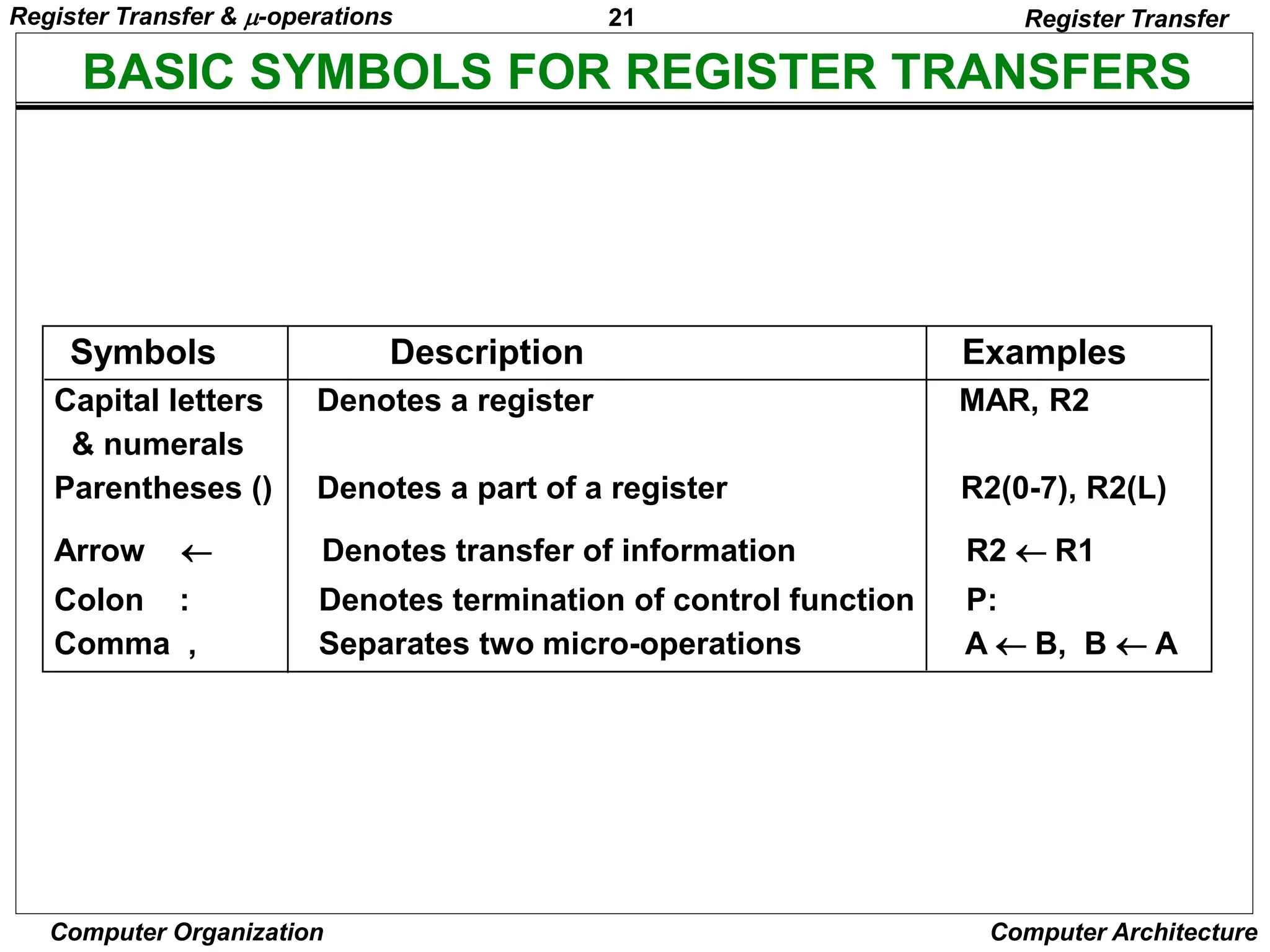
  • 14.
    14 Computer Organization ComputerArchitecture DESIGNATION OF REGISTERS Register Transfer Language • Registers are designated by capital letters, sometimes followed by numbers (e.g., A, R13, IR) • Often the names indicate function: – MAR - memory address register – PC - program counter – IR - instruction register • Registers and their contents can be viewed and represented in various ways – A register can be viewed as a single entity: – Registers may also be represented showing the bits of data they contain MAR Register Transfer & -operations
  • 15.
    15 Computer Organization ComputerArchitecture DESIGNATION OF REGISTERS Register Transfer Language R1 Register Numbering of bits Showing individual bits Subfields PC(H) PC(L) 15 8 7 0 - a register - portion of a register - a bit of a register • Common ways of drawing the block diagram of a register 7 6 5 4 3 2 1 0 R2 15 0 • Designation of a register Register Transfer & -operations
  • 16.
    16 Computer Organization ComputerArchitecture REGISTER TRANSFER Register Transfer • Copying the contents of one register to another is a register transfer • A register transfer is indicated as R2  R1 – In this case the contents of register R2 are copied (loaded) into register R1 – A simultaneous transfer of all bits from the source R1 to the destination register R2, during one clock pulse – Note that this is a non-destructive; i.e. the contents of R1 are not altered by copying (loading) them to R2 Register Transfer & -operations
  • 17.
    17 Computer Organization ComputerArchitecture REGISTER TRANSFER Register Transfer • A register transfer such as R3  R5 Implies that the digital system has – the data lines from the source register (R5) to the destination register (R3) – Parallel load in the destination register (R3) – Control lines to perform the action Register Transfer & -operations
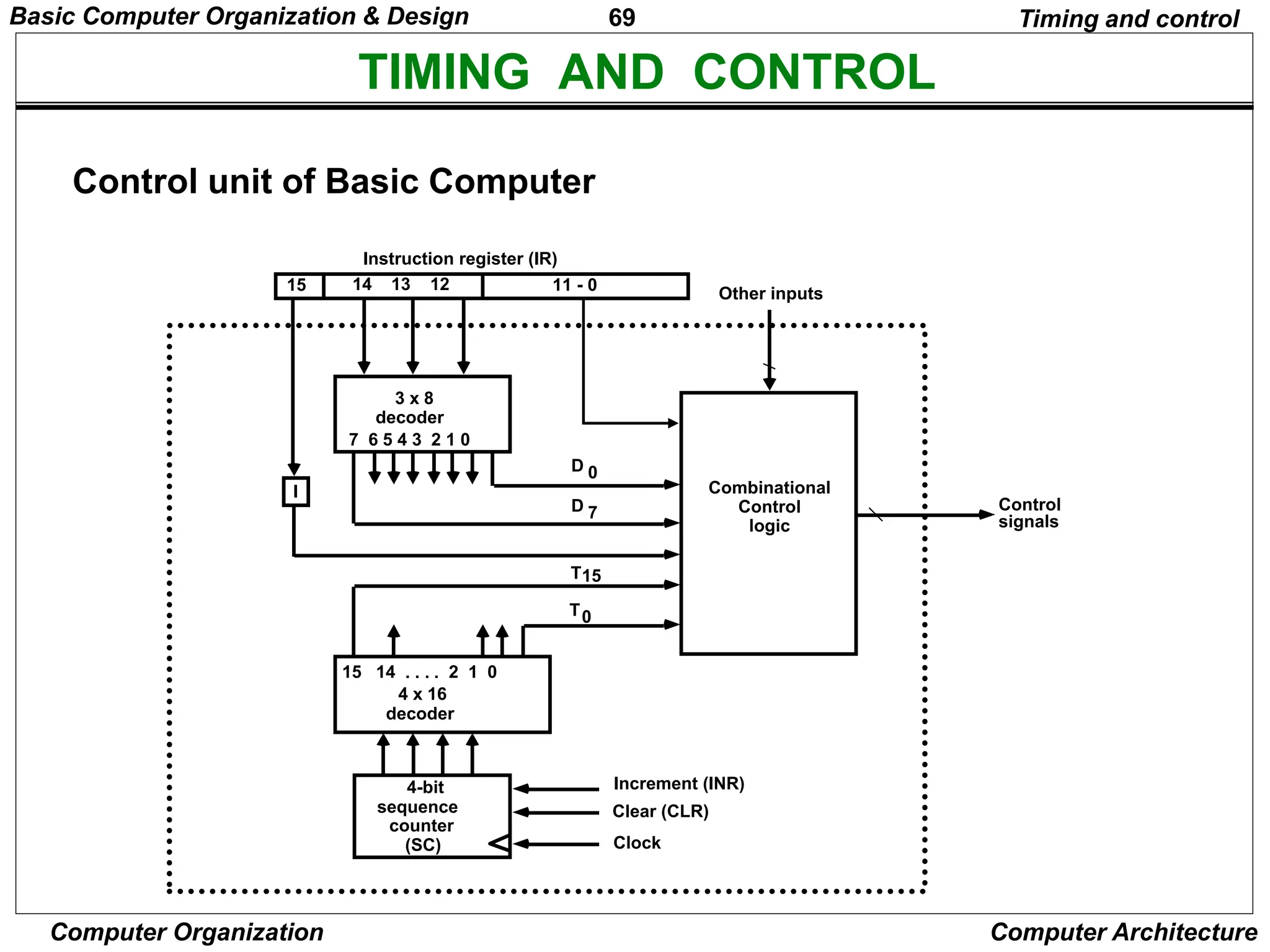
  • 18.
    18 Computer Organization ComputerArchitecture CONTROL FUNCTIONS Register Transfer • Often actions need to only occur if a certain condition is true • This is similar to an “if” statement in a programming language • In digital systems, this is often done via a control signal, called a control function – If the signal is 1, the action takes place • This is represented as: P: R2  R1 Which means “if P = 1, then load the contents of register R1 into register R2”, i.e., if (P = 1) then (R2  R1) Register Transfer & -operations
  • 19.
    19 Computer Organization ComputerArchitecture HARDWARE IMPLEMENTATION OF CONTROLLED TRANSFERS Implementation of controlled transfer P: R2 R1 Block diagram Timing diagram Clock Register Transfer Transfer occurs here R2 R1 Control Circuit Load P n Clock Load t t+1 • The same clock controls the circuits that generate the control function and the destination register • Registers are assumed to use positive-edge-triggered flip-flops Register Transfer & -operations
  • 20.
    20 Computer Organization ComputerArchitecture SIMULTANEOUS OPERATIONS Register Transfer • If two or more operations are to occur simultaneously, they are separated with commas P: R3  R5, MAR  IR • Here, if the control function P = 1, load the contents of R5 into R3, and at the same time (clock), load the contents of register IR into register MAR Register Transfer & -operations
  • 21.
    21 Computer Organization ComputerArchitecture BASIC SYMBOLS FOR REGISTER TRANSFERS Capital letters Denotes a register MAR, R2 & numerals Parentheses () Denotes a part of a register R2(0-7), R2(L) Arrow  Denotes transfer of information R2  R1 Colon : Denotes termination of control function P: Comma , Separates two micro-operations A  B, B  A Symbols Description Examples Register Transfer Register Transfer & -operations
  • 22.
    22 Computer Organization ComputerArchitecture CONNECTING REGISTRS Register Transfer • In a digital system with many registers, it is impractical to have data and control lines to directly allow each register to be loaded with the contents of every possible other registers • To completely connect n registers  n(n-1) lines • O(n2) cost – This is not a realistic approach to use in a large digital system • Instead, take a different approach • Have one centralized set of circuits for data transfer – the bus • Have control circuits to select which register is the source, and which is the destination Register Transfer & -operations
  • 23.
    23 Computer Organization ComputerArchitecture BUS AND BUS TRANSFER Bus is a path(of a group of wires) over which information is transferred, from any of several sources to any of several destinations. From a register to bus: BUS  R 1 2 3 4 1 2 3 4 1 2 3 4 1 2 3 4 Register A Register B Register C Register D B C D 1 1 1 4 x1 MUX B C D 2 2 2 4 x1 MUX B C D 3 3 3 4 x1 MUX B C D 4 4 4 4 x1 MUX 4-line bus x y select 0 0 0 0 Register A Register B Register C Register D Bus lines Bus and Memory Transfers Register Transfer & -operations
  • 24.
    24 Computer Organization ComputerArchitecture TRANSFER FROM BUS TO A DESTINATION REGISTER Three-State Bus Buffers Bus line with three-state buffers Reg. R0 Reg. R1 Reg. R2 Reg. R3 Bus lines 2 x 4 Decoder Load D0 D1 D2 D3 z w Select E (enable) Output Y=A if C=1 High-impedence if C=0 Normal input A Control input C Select Enable 0 1 2 3 S0 S1 A0 B0 C0 D0 Bus line for bit 0 Bus and Memory Transfers Register Transfer & -operations
  • 25.
    25 Computer Organization ComputerArchitecture BUS TRANSFER IN RTL Bus and Memory Transfers • Depending on whether the bus is to be mentioned explicitly or not, register transfer can be indicated as either or • In the former case the bus is implicit, but in the latter, it is explicitly indicated R2 R1 BUS R1, R2  BUS Register Transfer & -operations
  • 26.
    26 Computer Organization ComputerArchitecture MEMORY (RAM) Bus and Memory Transfers • Memory (RAM) can be thought as a sequential circuits containing some number of registers • These registers hold the words of memory • Each of the r registers is indicated by an address • These addresses range from 0 to r-1 • Each register (word) can hold n bits of data • Assume the RAM contains r = 2k words. It needs the following – n data input lines – n data output lines – k address lines – A Read control line – A Write control line data input lines data output lines n n k address lines Read Write RAM unit Register Transfer & -operations
  • 27.
    27 Computer Organization ComputerArchitecture MEMORY TRANSFER Bus and Memory Transfers • Collectively, the memory is viewed at the register level as a device, M. • Since it contains multiple locations, we must specify which address in memory we will be using • This is done by indexing memory references • Memory is usually accessed in computer systems by putting the desired address in a special register, the Memory Address Register (MAR, or AR) • When memory is accessed, the contents of the MAR get sent to the memory unit’s address lines AR Memory unit Read Write Data in Data out M Register Transfer & -operations
  • 28.
    28 Computer Organization ComputerArchitecture MEMORY READ Bus and Memory Transfers • To read a value from a location in memory and load it into a register, the register transfer language notation looks like this: • This causes the following to occur – The contents of the MAR get sent to the memory address lines – A Read (= 1) gets sent to the memory unit – The contents of the specified address are put on the memory’s output data lines – These get sent over the bus to be loaded into register R1 R1  M[MAR] Register Transfer & -operations
  • 29.
    29 Computer Organization ComputerArchitecture MEMORY WRITE Bus and Memory Transfers • To write a value from a register to a location in memory looks like this in register transfer language: • This causes the following to occur – The contents of the MAR get sent to the memory address lines – A Write (= 1) gets sent to the memory unit – The values in register R1 get sent over the bus to the data input lines of the memory – The values get loaded into the specified address in the memory M[MAR]  R1 Register Transfer & -operations
  • 30.
    30 Computer Organization ComputerArchitecture SUMMARY OF R. TRANSFER MICROOPERATIONS Bus and Memory Transfers A  B Transfer content of reg. B into reg. A AR  DR(AD) Transfer content of AD portion of reg. DR into reg. AR A  constant Transfer a binary constant into reg. A ABUS  R1, Transfer content of R1 into bus A and, at the same time, R2  ABUS transfer content of bus A into R2 AR Address register DR Data register M[R] Memory word specified by reg. R M Equivalent to M[AR] DR  M Memory read operation: transfers content of memory word specified by AR into DR M  DR Memory write operation: transfers content of DR into memory word specified by AR Register Transfer & -operations
  • 31.
    31 Computer Organization ComputerArchitecture MICROOPERATIONS • Computer system microoperations are of four types: - Register transfer microoperations - Arithmetic microoperations - Logic microoperations - Shift microoperations Arithmetic Microoperations Register Transfer & -operations
  • 32.
    32 Computer Organization ComputerArchitecture ARITHMETIC MICROOPERATIONS Summary of Typical Arithmetic Micro-Operations Arithmetic Microoperations R3  R1 + R2 Contents of R1 plus R2 transferred to R3 R3  R1 - R2 Contents of R1 minus R2 transferred to R3 R2  R2’ Complement the contents of R2 R2  R2’+ 1 2's complement the contents of R2 (negate) R3  R1 + R2’+ 1 subtraction R1  R1 + 1 Increment R1  R1 - 1 Decrement • The basic arithmetic microoperations are – Addition – Subtraction – Increment – Decrement • The additional arithmetic microoperations are – Add with carry – Subtract with borrow – Transfer/Load – etc. … Register Transfer & -operations
  • 33.
    33 Computer Organization ComputerArchitecture BINARY ADDER / SUBTRACTOR / INCREMENTER FA B0 A0 S0 C0 FA B1 A1 S1 C1 FA B2 A2 S2 C2 FA B3 A3 S3 C3 C4 Binary Adder-Subtractor FA B0 A0 S0 C0 C1 FA B1 A1 S1 C2 FA B2 A2 S2 C3 FA B3 A3 S3 C4 M Binary Incrementer HA x y C S A0 1 S0 HA x y C S A1 S1 HA x y C S A2 S2 HA x y C S A3 S3 C4 Binary Adder Arithmetic Microoperations Register Transfer & -operations
  • 34.
    34 Computer Organization ComputerArchitecture ARITHMETIC CIRCUIT S1 S0 0 1 2 3 4x1 MUX X0 Y0 C0 C1 D0 FA S1 S0 0 1 2 3 4x1 MUX X1 Y1 C1 C2 D1 FA S1 S0 0 1 2 3 4x1 MUX X2 Y2 C2 C3 D2 FA S1 S0 0 1 2 3 4x1 MUX X3 Y3 C3 C4 D3 FA Cout A0 B0 A1 B1 A2 B2 A3 B3 0 1 S0 S1 Cin S1 S0 Cin Y Output Microoperation 0 0 0 B D = A + B Add 0 0 1 B D = A + B + 1 Add with carry 0 1 0 B’ D = A + B’ Subtract with borrow 0 1 1 B’ D = A + B’+ 1 Subtract 1 0 0 0 D = A Transfer A 1 0 1 0 D = A + 1 Increment A 1 1 0 1 D = A - 1 Decrement A 1 1 1 1 D = A Transfer A Arithmetic Microoperations Register Transfer & -operations
  • 35.
    35 Computer Organization ComputerArchitecture LOGIC MICROOPERATIONS Logic Microoperations • Specify binary operations on the strings of bits in registers – Logic microoperations are bit-wise operations, i.e., they work on the individual bits of data – useful for bit manipulations on binary data – useful for making logical decisions based on the bit value • There are, in principle, 16 different logic functions that can be defined over two binary input variables • However, most systems only implement four of these – AND (), OR (), XOR (), Complement/NOT • The others can be created from combination of these 0 0 0 0 0 … 1 1 1 0 1 0 0 0 … 1 1 1 1 0 0 0 1 … 0 1 1 1 1 0 1 0 … 1 0 1 A B F0 F1 F2 … F13 F14 F15 Register Transfer & -operations
  • 36.
    36 Computer Organization ComputerArchitecture LIST OF LOGIC MICROOPERATIONS • List of Logic Microoperations - 16 different logic operations with 2 binary vars. - n binary vars → functions 2 2 n • Truth tables for 16 functions of 2 variables and the corresponding 16 logic micro-operations Boolean Function Micro- Operations Name x 0 0 1 1 y 0 1 0 1 Logic Microoperations 0 0 0 0 F0 = 0 F  0 Clear 0 0 0 1 F1 = xy F  A  B AND 0 0 1 0 F2 = xy' F  A  B’ 0 0 1 1 F3 = x F  A Transfer A 0 1 0 0 F4 = x'y F  A’ B 0 1 0 1 F5 = y F  B Transfer B 0 1 1 0 F6 = x  y F  A  B Exclusive-OR 0 1 1 1 F7 = x + y F  A  B OR 1 0 0 0 F8 = (x + y)' F  A  B)’ NOR 1 0 0 1 F9 = (x  y)' F  (A  B)’ Exclusive-NOR 1 0 1 0 F10 = y' F  B’ Complement B 1 0 1 1 F11 = x + y' F  A  B 1 1 0 0 F12 = x' F  A’ Complement A 1 1 0 1 F13 = x' + y F  A’ B 1 1 1 0 F14 = (xy)' F  (A  B)’ NAND 1 1 1 1 F15 = 1 F  all 1's Set to all 1's Register Transfer & -operations
  • 37.
    37 Computer Organization ComputerArchitecture HARDWARE IMPLEMENTATION OF LOGIC MICROOPERATIONS 0 0 F = A  B AND 0 1 F = AB OR 1 0 F = A  B XOR 1 1 F = A’ Complement S1 S0 Output -operation Function table Logic Microoperations B A S S F 1 0 i i i 0 1 2 3 4 X 1 MUX Select Register Transfer & -operations
  • 38.
    38 Computer Organization ComputerArchitecture APPLICATIONS OF LOGIC MICROOPERATIONS Logic Microoperations • Logic microoperations can be used to manipulate individual bits or a portions of a word in a register • Consider the data in a register A. In another register, B, is bit data that will be used to modify the contents of A – Selective-set A  A + B – Selective-complement A  A  B – Selective-clear A  A • B’ – Mask (Delete) A  A • B – Clear A  A  B – Insert A  (A • B) + C – Compare A  A  B – . . . Register Transfer & -operations
  • 39.
    39 Computer Organization ComputerArchitecture SELECTIVE SET Logic Microoperations • In a selective set operation, the bit pattern in B is used to set certain bits in A 1 1 0 0 At 1 0 1 0 B 1 1 1 0 At+1 (A  A + B) • If a bit in B is set to 1, that same position in A gets set to 1, otherwise that bit in A keeps its previous value Register Transfer & -operations
  • 40.
    40 Computer Organization ComputerArchitecture SELECTIVE COMPLEMENT Logic Microoperations • In a selective complement operation, the bit pattern in B is used to complement certain bits in A 1 1 0 0 At 1 0 1 0 B 0 1 1 0 At+1 (A  A  B) • If a bit in B is set to 1, that same position in A gets complemented from its original value, otherwise it is unchanged Register Transfer & -operations
  • 41.
    41 Computer Organization ComputerArchitecture SELECTIVE CLEAR Logic Microoperations • In a selective clear operation, the bit pattern in B is used to clear certain bits in A 1 1 0 0 At 1 0 1 0 B 0 1 0 0 At+1 (A  A  B’) • If a bit in B is set to 1, that same position in A gets set to 0, otherwise it is unchanged Register Transfer & -operations
  • 42.
    42 Computer Organization ComputerArchitecture MASK OPERATION Logic Microoperations • In a mask operation, the bit pattern in B is used to clear certain bits in A 1 1 0 0 At 1 0 1 0 B 1 0 0 0 At+1 (A  A  B) • If a bit in B is set to 0, that same position in A gets set to 0, otherwise it is unchanged Register Transfer & -operations
  • 43.
    43 Computer Organization ComputerArchitecture CLEAR OPERATION Logic Microoperations • In a clear operation, if the bits in the same position in A and B are the same, they are cleared in A, otherwise they are set in A 1 1 0 0 At 1 0 1 0 B 0 1 1 0 At+1 (A  A  B) Register Transfer & -operations
  • 44.
    44 Computer Organization ComputerArchitecture INSERT OPERATION Logic Microoperations • An insert operation is used to introduce a specific bit pattern into A register, leaving the other bit positions unchanged • This is done as – A mask operation to clear the desired bit positions, followed by – An OR operation to introduce the new bits into the desired positions – Example » Suppose you wanted to introduce 1010 into the low order four bits of A: 1101 1000 1011 0001 A (Original) 1101 1000 1011 1010 A (Desired) » 1101 1000 1011 0001 A (Original) 1111 1111 1111 0000 Mask 1101 1000 1011 0000 A (Intermediate) 0000 0000 0000 1010 Added bits 1101 1000 1011 1010 A (Desired) Register Transfer & -operations
  • 45.
    45 Computer Organization ComputerArchitecture SHIFT MICROOPERATIONS Shift Microoperations • There are three types of shifts – Logical shift – Circular shift – Arithmetic shift • What differentiates them is the information that goes into the serial input Serial input • A right shift operation • A left shift operation Serial input Register Transfer & -operations
  • 46.
    46 Computer Organization ComputerArchitecture LOGICAL SHIFT Shift Microoperations • In a logical shift the serial input to the shift is a 0. • A right logical shift operation: • A left logical shift operation: • In a Register Transfer Language, the following notation is used – shl for a logical shift left – shr for a logical shift right – Examples: » R2  shr R2 » R3  shl R3 0 0 Register Transfer & -operations
  • 47.
    47 Computer Organization ComputerArchitecture CIRCULAR SHIFT Shift Microoperations • In a circular shift the serial input is the bit that is shifted out of the other end of the register. • A right circular shift operation: • A left circular shift operation: • In a RTL, the following notation is used – cil for a circular shift left – cir for a circular shift right – Examples: » R2  cir R2 » R3  cil R3 Register Transfer & -operations
  • 48.
    48 Computer Organization ComputerArchitecture ARITHMETIC SHIFT Shift Microoperations • An arithmetic shift is meant for signed binary numbers (integer) • An arithmetic left shift multiplies a signed number by two • An arithmetic right shift divides a signed number by two • The main distinction of an arithmetic shift is that it must keep the sign of the number the same as it performs the multiplication or division • A right arithmetic shift operation: • A left arithmetic shift operation: 0 sign bit sign bit Register Transfer & -operations
  • 49.
    49 Computer Organization ComputerArchitecture ARITHMETIC SHIFT Shift Microoperations • An left arithmetic shift operation must be checked for the overflow 0 V Before the shift, if the leftmost two bits differ, the shift will result in an overflow • In a RTL, the following notation is used – ashl for an arithmetic shift left – ashr for an arithmetic shift right – Examples: » R2  ashr R2 » R3  ashl R3 sign bit Register Transfer & -operations
  • 50.
    50 Computer Organization ComputerArchitecture HARDWARE IMPLEMENTATION OF SHIFT MICROOPERATIONS Shift Microoperations S 0 1 H0 MUX S 0 1 H1 MUX S 0 1 H2 MUX S 0 1 H3 MUX Select 0 for shift right (down) 1 for shift left (up) Serial input (IR) A0 A1 A2 A3 Serial input (IL) Register Transfer & -operations
  • 51.
    51 Computer Organization ComputerArchitecture ARITHMETIC LOGIC SHIFT UNIT S3 S2 S1 S0 Cin Operation Function 0 0 0 0 0 F = A Transfer A 0 0 0 0 1 F = A + 1 Increment A 0 0 0 1 0 F = A + B Addition 0 0 0 1 1 F = A + B + 1 Add with carry 0 0 1 0 0 F = A + B’ Subtract with borrow 0 0 1 0 1 F = A + B’+ 1 Subtraction 0 0 1 1 0 F = A - 1 Decrement A 0 0 1 1 1 F = A TransferA 0 1 0 0 X F = A  B AND 0 1 0 1 X F = A B OR 0 1 1 0 X F = A  B XOR 0 1 1 1 X F = A’ Complement A 1 0 X X X F = shr A Shift right A into F 1 1 X X X F = shl A Shift left A into F Shift Microoperations Arithmetic Circuit Logic Circuit C C 4 x 1 MUX Select 0 1 2 3 F S3 S2 S1 S0 B A i A D A E shr shl i+1 i i i i+1 i-1 i i Register Transfer & -operations
  • 52.
    52 Computer Organization ComputerArchitecture BASIC COMPUTER ORGANIZATION AND DESIGN • Instruction Codes • Computer Registers • Computer Instructions • Timing and Control • Instruction Cycle • Memory Reference Instructions • Input-Output and Interrupt • Complete Computer Description • Design of Basic Computer • Design of Accumulator Logic Basic Computer Organization & Design
  • 53.
    53 Computer Organization ComputerArchitecture INTRODUCTION • Every different processor type has its own design (different registers, buses, microoperations, machine instructions, etc) • Modern processor is a very complex device • It contains – Many registers – Multiple arithmetic units, for both integer and floating point calculations – The ability to pipeline several consecutive instructions to speed execution – Etc. • However, to understand how processors work, we will start with a simplified processor model • This is similar to what real processors were like ~25 years ago • M. Morris Mano introduces a simple processor model he calls the Basic Computer • We will use this to introduce processor organization and the relationship of the RTL model to the higher level computer processor Basic Computer Organization & Design
  • 54.
    54 Computer Organization ComputerArchitecture THE BASIC COMPUTER • The Basic Computer has two components, a processor and memory • The memory has 4096 words in it – 4096 = 212, so it takes 12 bits to select a word in memory • Each word is 16 bits long CPU RAM 0 4095 0 15 Basic Computer Organization & Design
  • 55.
    55 Computer Organization ComputerArchitecture INSTRUCTIONS Instruction codes • Program – A sequence of (machine) instructions • (Machine) Instruction – A group of bits that tell the computer to perform a specific operation (a sequence of micro-operation) • The instructions of a program, along with any needed data are stored in memory • The CPU reads the next instruction from memory • It is placed in an Instruction Register (IR) • Control circuitry in control unit then translates the instruction into the sequence of microoperations necessary to implement it Basic Computer Organization & Design
  • 56.
    56 Computer Organization ComputerArchitecture INSTRUCTION FORMAT Instruction codes • A computer instruction is often divided into two parts – An opcode (Operation Code) that specifies the operation for that instruction – An address that specifies the registers and/or locations in memory to use for that operation • In the Basic Computer, since the memory contains 4096 (= 212) words, we needs 12 bit to specify which memory address this instruction will use • In the Basic Computer, bit 15 of the instruction specifies the addressing mode (0: direct addressing, 1: indirect addressing) • Since the memory words, and hence the instructions, are 16 bits long, that leaves 3 bits for the instruction’s opcode Opcode Address Instruction Format 15 14 12 0 I 11 Addressing mode Basic Computer Organization & Design
  • 57.
    57 Computer Organization ComputerArchitecture ADDRESSING MODES Instruction codes • The address field of an instruction can represent either – Direct address: the address in memory of the data to use (the address of the operand), or – Indirect address: the address in memory of the address in memory of the data to use • Effective Address (EA) – The address, that can be directly used without modification to access an operand for a computation-type instruction, or as the target address for a branch-type instruction 0 ADD 457 22 Operand 457 1 ADD 300 35 1350 300 Operand 1350 + AC + AC Direct addressing Indirect addressing Basic Computer Organization & Design
  • 58.
    58 Computer Organization ComputerArchitecture PROCESSOR REGISTERS Instruction codes • A processor has many registers to hold instructions, addresses, data, etc • The processor has a register, the Program Counter (PC) that holds the memory address of the next instruction to get – Since the memory in the Basic Computer only has 4096 locations, the PC only needs 12 bits • In a direct or indirect addressing, the processor needs to keep track of what locations in memory it is addressing: The Address Register (AR) is used for this – The AR is a 12 bit register in the Basic Computer • When an operand is found, using either direct or indirect addressing, it is placed in the Data Register (DR). The processor then uses this value as data for its operation • The Basic Computer has a single general purpose register – the Accumulator (AC) Basic Computer Organization & Design
  • 59.
    59 Computer Organization ComputerArchitecture PROCESSOR REGISTERS Instruction codes • The significance of a general purpose register is that it can be referred to in instructions – e.g. load AC with the contents of a specific memory location; store the contents of AC into a specified memory location • Often a processor will need a scratch register to store intermediate results or other temporary data; in the Basic Computer this is the Temporary Register (TR) • The Basic Computer uses a very simple model of input/output (I/O) operations – Input devices are considered to send 8 bits of character data to the processor – The processor can send 8 bits of character data to output devices • The Input Register (INPR) holds an 8 bit character gotten from an input device • The Output Register (OUTR) holds an 8 bit character to be send to an output device Basic Computer Organization & Design
  • 60.
    60 Computer Organization ComputerArchitecture BASIC COMPUTER REGISTERS List of BC Registers DR 16 Data Register Holds memory operand AR 12 Address Register Holds address for memory AC 16 Accumulator Processor register IR 16 Instruction Register Holds instruction code PC 12 Program Counter Holds address of instruction TR 16 Temporary Register Holds temporary data INPR 8 Input Register Holds input character OUTR 8 Output Register Holds output character Registers Registers in the Basic Computer 11 0 PC 15 0 IR 15 0 TR 7 0 OUTR 15 0 DR 15 0 AC 11 0 AR INPR 0 7 Memory 4096 x 16 CPU Basic Computer Organization & Design
  • 61.
    61 Computer Organization ComputerArchitecture COMMON BUS SYSTEM Registers • The registers in the Basic Computer are connected using a bus • This gives a savings in circuitry over complete connections between registers Basic Computer Organization & Design
  • 62.
    62 Computer Organization ComputerArchitecture COMMON BUS SYSTEM Registers S2 S1 S0 Bus Memory unit 4096 x 16 LD INR CLR Address Read Write AR LD INR CLR PC LD INR CLR DR LD INR CLR AC ALU E INPR IR LD LD INR CLR TR OUTR LD Clock 16-bit common bus 7 1 2 3 4 5 6 Basic Computer Organization & Design
  • 63.
    63 Computer Organization ComputerArchitecture COMMON BUS SYSTEM Registers AR PC DR L I C L I C L I C AC L I C ALU E IR L TR L I C OUTR LD INPR Memory 4096 x 16 Address Read Write 16-bit Common Bus 7 1 2 3 4 5 6 S0 S1 S2 Basic Computer Organization & Design
  • 64.
    64 Computer Organization ComputerArchitecture COMMON BUS SYSTEM Registers • Three control lines, S2, S1, and S0 control which register the bus selects as its input • Either one of the registers will have its load signal activated, or the memory will have its read signal activated – Will determine where the data from the bus gets loaded • The 12-bit registers, AR and PC, have 0’s loaded onto the bus in the high order 4 bit positions • When the 8-bit register OUTR is loaded from the bus, the data comes from the low order 8 bits on the bus 0 0 0 x 0 0 1 AR 0 1 0 PC 0 1 1 DR 1 0 0 AC 1 0 1 IR 1 1 0 TR 1 1 1 Memory S2 S1 S0 Register Basic Computer Organization & Design
  • 65.
    65 Computer Organization ComputerArchitecture BASIC COMPUTER INSTRUCTIONS Instructions • Basic Computer Instruction Format 15 14 12 11 0 I Opcode Address Memory-Reference Instructions (OP-code = 000 ~ 110) Register-Reference Instructions (OP-code = 111, I = 0) Input-Output Instructions (OP-code =111, I = 1) 15 12 11 0 Register operation 0 1 1 1 15 12 11 0 I/O operation 1 1 1 1 Basic Computer Organization & Design
  • 66.
    66 Computer Organization ComputerArchitecture BASIC COMPUTER INSTRUCTIONS Hex Code Symbol I = 0 I = 1 Description AND 0xxx 8xxx AND memory word to AC ADD 1xxx 9xxx Add memory word to AC LDA 2xxx Axxx Load AC from memory STA 3xxx Bxxx Store content of AC into memory BUN 4xxx Cxxx Branch unconditionally BSA 5xxx Dxxx Branch and save return address ISZ 6xxx Exxx Increment and skip if zero CLA 7800 Clear AC CLE 7400 Clear E CMA 7200 Complement AC CME 7100 Complement E CIR 7080 Circulate right AC and E CIL 7040 Circulate left AC and E INC 7020 Increment AC SPA 7010 Skip next instr. if AC is positive SNA 7008 Skip next instr. if AC is negative SZA 7004 Skip next instr. if AC is zero SZE 7002 Skip next instr. if E is zero HLT 7001 Halt computer INP F800 Input character to AC OUT F400 Output character from AC SKI F200 Skip on input flag SKO F100 Skip on output flag ION F080 Interrupt on IOF F040 Interrupt off Instructions Basic Computer Organization & Design
  • 67.
    67 Computer Organization ComputerArchitecture INSTRUCTION SET COMPLETENESS • Instruction Types A computer should have a set of instructions so that the user can construct machine language programs to evaluate any function that is known to be computable. Functional Instructions - Arithmetic, logic, and shift instructions - ADD, CMA, INC, CIR, CIL, AND, CLA Transfer Instructions - Data transfers between the main memory and the processor registers - LDA, STA Control Instructions - Program sequencing and control - BUN, BSA, ISZ Input/Output Instructions - Input and output - INP, OUT Instructions Basic Computer Organization & Design
  • 68.
    68 Computer Organization ComputerArchitecture CONTROL UNIT Instruction codes • Control unit (CU) of a processor translates from machine instructions to the control signals for the microoperations that implement them • Control units are implemented in one of two ways • Hardwired Control – CU is made up of sequential and combinational circuits to generate the control signals • Microprogrammed Control – A control memory on the processor contains microprograms that activate the necessary control signals • We will consider a hardwired implementation of the control unit for the Basic Computer Basic Computer Organization & Design
  • 69.
    69 Computer Organization ComputerArchitecture TIMING AND CONTROL Control unit of Basic Computer Timing and control Instruction register (IR) 15 14 13 12 11 - 0 3 x 8 decoder 7 6 5 4 3 2 1 0 I D 0 15 14 . . . . 2 1 0 4 x 16 decoder 4-bit sequence counter (SC) Increment (INR) Clear (CLR) Clock Other inputs Control signals D T T 7 15 0 Combinational Control logic Basic Computer Organization & Design
  • 70.
    70 Computer Organization ComputerArchitecture TIMING SIGNALS Clock T0 T1 T2 T3 T4 T0 T0 T1 T2 T3 T4 D3 CLR SC - Generated by 4-bit sequence counter and 416 decoder - The SC can be incremented or cleared. - Example: T0, T1, T2, T3, T4, T0, T1, . . . Assume: At time T4, SC is cleared to 0 if decoder output D3 is active. D3T4: SC  0 Timing and control Basic Computer Organization & Design
  • 71.
    71 Computer Organization ComputerArchitecture INSTRUCTION CYCLE • In Basic Computer, a machine instruction is executed in the following cycle: 1. Fetch an instruction from memory 2. Decode the instruction 3. Read the effective address from memory if the instruction has an indirect address 4. Execute the instruction • After an instruction is executed, the cycle starts again at step 1, for the next instruction • Note: Every different processor has its own (different) instruction cycle Basic Computer Organization & Design
  • 72.
    72 Computer Organization ComputerArchitecture FETCH and DECODE • Fetch and Decode T0: AR PC (S0S1S2=010, T0=1) T1: IR  M [AR], PC  PC + 1 (S0S1S2=111, T1=1) T2: D0, . . . , D7  Decode IR(12-14), AR  IR(0-11), I  IR(15) S2 S1 S0 Bus 7 Memory unit Address Read AR LD PC INR IR LD Clock 1 2 5 Common bus T1 T0 Instruction Cycle Basic Computer Organization & Design
  • 73.
    73 Computer Organization ComputerArchitecture DETERMINE THE TYPE OF INSTRUCTION = 0 (direct) D'7IT3: AR M[AR] D'7I'T3: Nothing D7I'T3: Execute a register-reference instr. D7IT3: Execute an input-output instr. Instrction Cycle Start SC  0 AR  PC T0 IR  M[AR], PC  PC + 1 T1 AR  IR(0-11), I  IR(15) Decode Opcode in IR(12-14), T2 D7 = 0 (Memory-reference) (Register or I/O) = 1 I I Execute register-reference instruction SC  0 Execute input-output instruction SC  0 M[AR]  AR Nothing = 0 (register) (I/O) = 1 (indirect) = 1 T3 T3 T3 T3 Execute memory-reference instruction SC  0 T4 Basic Computer Organization & Design
  • 74.
    74 Computer Organization ComputerArchitecture REGISTER REFERENCE INSTRUCTIONS r = D7 IT3 => Register Reference Instruction Bi = IR(i) , i=0,1,2,...,11 - D7 = 1, I = 0 - Register Ref. Instr. is specified in b0 ~ b11 of IR - Execution starts with timing signal T3 Instruction Cycle Register Reference Instructions are identified when r: SC  0 CLA rB11: AC  0 CLE rB10: E  0 CMA rB9: AC  AC’ CME rB8: E  E’ CIR rB7: AC  shr AC, AC(15)  E, E  AC(0) CIL rB6: AC  shl AC, AC(0)  E, E  AC(15) INC rB5: AC  AC + 1 SPA rB4: if (AC(15) = 0) then (PC  PC+1) SNA rB3: if (AC(15) = 1) then (PC  PC+1) SZA rB2: if (AC = 0) then (PC  PC+1) SZE rB1: if (E = 0) then (PC  PC+1) HLT rB0: S  0 (S is a start-stop flip-flop) Basic Computer Organization & Design
  • 75.
    75 Computer Organization ComputerArchitecture MEMORY REFERENCE INSTRUCTIONS AND to AC D0T4: DR  M[AR] Read operand D0T5: AC  AC  DR, SC  0 AND with AC ADD to AC D1T4: DR  M[AR] Read operand D1T5: AC  AC + DR, E  Cout, SC  0 Add to AC and store carry in E - The effective address of the instruction is in AR and was placed there during timing signal T2 when I = 0, or during timing signal T3 when I = 1 - Memory cycle is assumed to be short enough to complete in a CPU cycle - The execution of MR instruction starts with T4 MR Instructions Symbol Operation Decoder Symbolic Description AND D0 AC  AC  M[AR] ADD D1 AC  AC + M[AR], E  Cout LDA D2 AC  M[AR] STA D3 M[AR]  AC BUN D4 PC  AR BSA D5 M[AR]  PC, PC  AR + 1 ISZ D6 M[AR]  M[AR] + 1, if M[AR] + 1 = 0 then PC  PC+1 Basic Computer Organization & Design
  • 76.
    76 Computer Organization ComputerArchitecture MEMORY REFERENCE INSTRUCTIONS Memory, PC after execution 21 0 BSA 135 Next instruction Subroutine 20 PC = 21 AR = 135 136 1 BUN 135 Memory, PC, AR at time T4 0 BSA 135 Next instruction Subroutine 20 21 135 PC = 136 1 BUN 135 Memory Memory LDA: Load to AC D2T4: DR  M[AR] D2T5: AC  DR, SC  0 STA: Store AC D3T4: M[AR]  AC, SC  0 BUN: Branch Unconditionally D4T4: PC  AR, SC  0 BSA: Branch and Save Return Address M[AR]  PC, PC  AR + 1 Basic Computer Organization & Design
  • 77.
    77 Computer Organization ComputerArchitecture MEMORY REFERENCE INSTRUCTIONS MR Instructions BSA: D5T4: M[AR]  PC, AR  AR + 1 D5T5: PC  AR, SC  0 ISZ: Increment and Skip-if-Zero D6T4: DR  M[AR] D6T5: DR  DR + 1 D6T4: M[AR]  DR, if (DR = 0) then (PC  PC + 1), SC  0 Basic Computer Organization & Design
  • 78.
    78 Computer Organization ComputerArchitecture FLOWCHART FOR MEMORY REFERENCE INSTRUCTIONS MR Instructions Memory-reference instruction DR  M[AR] DR  M[AR] DR  M[AR] M[AR]  AC SC  0 AND ADD LDA STA AC  AC DR SC  0 AC  AC + DR E  Cout SC  0 AC  DR SC  0 D T 0 4 D T 1 4 D T 2 4 D T 3 4 D T 0 5 D T 1 5 D T 2 5 PC  AR SC  0 M[AR]  PC AR  AR + 1 DR  M[AR] BUN BSA ISZ D T 4 4 D T 5 4 D T 6 4 DR  DR + 1 D T 5 5 D T 6 5 PC  AR SC  0 M[AR]  DR If (DR = 0) then (PC  PC + 1) SC  0 D T 6 6  Basic Computer Organization & Design
  • 79.
    79 Computer Organization ComputerArchitecture INPUT-OUTPUT AND INTERRUPT • Input-Output Configuration INPR Input register - 8 bits OUTR Output register - 8 bits FGI Input flag - 1 bit FGO Output flag - 1 bit IEN Interrupt enable - 1 bit - The terminal sends and receives serial information - The serial info. from the keyboard is shifted into INPR - The serial info. for the printer is stored in the OUTR - INPR and OUTR communicate with the terminal serially and with the AC in parallel. - The flags are needed to synchronize the timing difference between I/O device and the computer A Terminal with a keyboard and a Printer I/O and Interrupt Input-output terminal Serial communication interface Computer registers and flip-flops Printer Keyboard Receiver interface Transmitter interface FGO OUTR AC INPR FGI Serial Communications Path Parallel Communications Path Basic Computer Organization & Design
  • 80.
    80 Computer Organization ComputerArchitecture PROGRAM CONTROLLED DATA TRANSFER loop: If FGI = 1 goto loop INPR  new data, FGI  1 loop: If FGO = 1 goto loop consume OUTR, FGO  1 -- CPU -- -- I/O Device -- /* Input */ /* Initially FGI = 0 */ loop: If FGI = 0 goto loop AC  INPR, FGI  0 /* Output */ /* Initially FGO = 1 */ loop: If FGO = 0 goto loop OUTR  AC, FGO  0 I/O and Interrupt Start Input FGI  0 FGI=0 AC  INPR More Character END Start Output FGO  0 FGO=0 More Character END OUTR  AC AC  Data yes no yes no FGI=0 FGO=1 yes yes no no Basic Computer Organization & Design
  • 81.
    81 Computer Organization ComputerArchitecture INPUT-OUTPUT INSTRUCTIONS D7IT3 = p IR(i) = Bi, i = 6, …, 11 p: SC  0 Clear SC INP pB11: AC(0-7)  INPR, FGI  0 Input char. to AC OUT pB10: OUTR  AC(0-7), FGO  0 Output char. from AC SKI pB9: if(FGI = 1) then (PC  PC + 1) Skip on input flag SKO pB8: if(FGO = 1) then (PC  PC + 1) Skip on output flag ION pB7: IEN  1 Interrupt enable on IOF pB6: IEN  0 Interrupt enable off Basic Computer Organization & Design
  • 82.
    82 Computer Organization ComputerArchitecture PROGRAM-CONTROLLED INPUT/OUTPUT • Program-controlled I/O - Continuous CPU involvement I/O takes valuable CPU time - CPU slowed down to I/O speed - Simple - Least hardware I/O and Interrupt Input LOOP, SKI DEV BUN LOOP INP DEV Output LOOP, LDA DATA LOP, SKO DEV BUN LOP OUT DEV Basic Computer Organization & Design
  • 83.
    83 Computer Organization ComputerArchitecture INTERRUPT INITIATED INPUT/OUTPUT - Open communication only when some data has to be passed --> interrupt. - The I/O interface, instead of the CPU, monitors the I/O device. - When the interface founds that the I/O device is ready for data transfer, it generates an interrupt request to the CPU - Upon detecting an interrupt, the CPU stops momentarily the task it is doing, branches to the service routine to process the data transfer, and then returns to the task it was performing. * IEN (Interrupt-enable flip-flop) - can be set and cleared by instructions - when cleared, the computer cannot be interrupted Basic Computer Organization & Design
  • 84.
    84 Computer Organization ComputerArchitecture FLOWCHART FOR INTERRUPT CYCLE R = Interrupt f/f - The interrupt cycle is a HW implementation of a branch and save return address operation. - At the beginning of the next instruction cycle, the instruction that is read from memory is in address 1. - At memory address 1, the programmer must store a branch instruction that sends the control to an interrupt service routine - The instruction that returns the control to the original program is "indirect BUN 0" I/O and Interrupt Store return address R =1 =0 in location 0 M[0]  PC Branch to location 1 PC  1 IEN  0 R  0 Interrupt cycle Instruction cycle Fetch and decode instructions IEN FGI FGO Execute instructions R  1 =1 =1 =1 =0 =0 =0 Basic Computer Organization & Design
  • 85.
    85 Computer Organization ComputerArchitecture REGISTER TRANSFER OPERATIONS IN INTERRUPT CYCLE Register Transfer Statements for Interrupt Cycle - R F/F  1 if IEN (FGI + FGO)T0T1T2  T0T1T2 (IEN)(FGI + FGO): R  1 - The fetch and decode phases of the instruction cycle must be modified Replace T0, T1, T2 with R'T0, R'T1, R'T2 - The interrupt cycle : RT0: AR  0, TR  PC RT1: M[AR]  TR, PC  0 RT2: PC  PC + 1, IEN  0, R  0, SC  0 After interrupt cycle 0 BUN 1120 0 1 PC = 256 255 1 BUN 0 Before interrupt Main Program 1120 I/O Program 0 BUN 1120 0 PC = 1 256 255 1 BUN 0 Memory Main Program 1120 I/O Program 256 I/O and Interrupt Basic Computer Organization & Design
  • 86.
    86 Computer Organization ComputerArchitecture FURTHER QUESTIONS ON INTERRUPT How can the CPU recognize the device requesting an interrupt ? Since different devices are likely to require different interrupt service routines, how can the CPU obtain the starting address of the appropriate routine in each case ? Should any device be allowed to interrupt the CPU while another interrupt is being serviced ? How can the situation be handled when two or more interrupt requests occur simultaneously ? I/O and Interrupt Basic Computer Organization & Design
  • 87.
    87 Computer Organization ComputerArchitecture COMPLETE COMPUTER DESCRIPTION Flowchart of Operations Description =1 (I/O) =0 (Register) =1(Indir) =0(Dir) start SC  0, IEN  0, R  0 R AR  PC R’T0 IR  M[AR], PC  PC + 1 R’T1 AR  IR(0~11), I  IR(15) D0...D7  Decode IR(12 ~ 14) R’T2 AR  0, TR  PC RT0 M[AR]  TR, PC  0 RT1 PC  PC + 1, IEN  0 R  0, SC  0 RT2 D7 I I Execute I/O Instruction Execute RR Instruction AR <- M[AR] Idle D7IT3 D7I’T3 D7’IT3 D7’I’T3 Execute MR Instruction =0(Instruction =1(Interrupt Cycle) Cycle) =1(Register or I/O) =0(Memory Ref) D7’T4 Basic Computer Organization & Design
  • 88.
    88 Computer Organization ComputerArchitecture COMPLETE COMPUTER DESCRIPTION Microoperations Description Fetch Decode Indirect Interrupt Memory-Reference AND ADD LDA STA BUN BSA ISZ RT0: RT1: RT2: D7IT3: RT0: RT1: RT2: D0T4: D0T5: D1T4: D1T5: D2T4: D2T5: D3T4: D4T4: D5T4: D5T5: D6T4: D6T5: D6T6: AR  PC IR  M[AR], PC  PC + 1 D0, ..., D7  Decode IR(12 ~ 14), AR  IR(0 ~ 11), I  IR(15) AR  M[AR] R  1 AR  0, TR  PC M[AR]  TR, PC  0 PC  PC + 1, IEN  0, R  0, SC  0 DR  M[AR] AC  AC  DR, SC  0 DR  M[AR] AC  AC + DR, E  Cout, SC  0 DR  M[AR] AC  DR, SC  0 M[AR]  AC, SC  0 PC  AR, SC  0 M[AR]  PC, AR  AR + 1 PC  AR, SC  0 DR  M[AR] DR  DR + 1 M[AR]  DR, if(DR=0) then (PC  PC + 1), SC  0 T0T1T2(IEN)(FGI + FGO): Basic Computer Organization & Design
  • 89.
    89 Computer Organization ComputerArchitecture Register-Reference CLA CLE CMA CME CIR CIL INC SPA SNA SZA SZE HLT Input-Output INP OUT SKI SKO ION IOF D7IT3 = r IR(i) = Bi r: rB11: rB10: rB9: rB8: rB7: rB6: rB5: rB4: rB3: rB2: rB1: rB0: D7IT3 = p IR(i) = Bi p: pB11: pB10: pB9: pB8: pB7: pB6: (Common to all register-reference instr) (i = 0,1,2, ..., 11) SC  0 AC  0 E  0 AC  AC E  E AC  shr AC, AC(15)  E, E  AC(0) AC  shl AC, AC(0)  E, E  AC(15) AC  AC + 1 If(AC(15) =0) then (PC  PC + 1) If(AC(15) =1) then (PC  PC + 1) If(AC = 0) then (PC  PC + 1) If(E=0) then (PC  PC + 1) S  0 (Common to all input-output instructions) (i = 6,7,8,9,10,11) SC  0 AC(0-7)  INPR, FGI  0 OUTR  AC(0-7), FGO  0 If(FGI=1) then (PC  PC + 1) If(FGO=1) then (PC  PC + 1) IEN  1 IEN  0 Description COMPLETE COMPUTER DESCRIPTION Microoperations Basic Computer Organization & Design
  • 90.
    90 Computer Organization ComputerArchitecture DESIGN OF BASIC COMPUTER(BC) Hardware Components of BC A memory unit: 4096 x 16. Registers: AR, PC, DR, AC, IR, TR, OUTR, INPR, and SC Flip-Flops(Status): I, S, E, R, IEN, FGI, and FGO Decoders: a 3x8 Opcode decoder a 4x16 timing decoder Common bus: 16 bits Control logic gates: Adder and Logic circuit: Connected to AC Control Logic Gates - Input Controls of the nine registers - Read and Write Controls of memory - Set, Clear, or Complement Controls of the flip-flops - S2, S1, S0 Controls to select a register for the bus - AC, and Adder and Logic circuit Design of Basic Computer Basic Computer Organization & Design
  • 91.
    91 Computer Organization ComputerArchitecture CONTROL OF REGISTERS AND MEMORY Scan all of the register transfer statements that change the content of AR: LD(AR) = R'T0 + R'T2 + D'7IT3 CLR(AR) = RT0 INR(AR) = D5T4 Address Register; AR R’T0: AR  PC LD(AR) R’T2: AR  IR(0-11) LD(AR) D’7IT3: AR  M[AR] LD(AR) RT0: AR  0 CLR(AR) D5T4: AR  AR + 1 INR(AR) Design of Basic Computer AR LD INR CLR Clock To bus 12 From bus 12 D' I T T R T D T 7 3 2 0 4 Basic Computer Organization & Design
  • 92.
    92 Computer Organization ComputerArchitecture CONTROL OF FLAGS pB7: IEN  1 (I/O Instruction) pB6: IEN  0 (I/O Instruction) RT2: IEN  0 (Interrupt) p = D7IT3 (Input/Output Instruction) IEN: Interrupt Enable Flag Design of Basic Computer D I T3 7 J K Q IEN p B 7 B6 T2 R Basic Computer Organization & Design
  • 93.
    93 Computer Organization ComputerArchitecture CONTROL OF COMMON BUS For AR D4T4: PC  AR D5T5: PC  AR x1 = D4T4 + D5T5 Design of Basic Computer x1 x2 x3 x4 x5 x6 x7 Encoder S 2 S 1 S 0 Multiplexer bus select inputs x1 x2 x3 x4 x5 x6 x7 S2 S1 S0 selected register 0 0 0 0 0 0 0 0 0 0 none 1 0 0 0 0 0 0 0 0 1 AR 0 1 0 0 0 0 0 0 1 0 PC 0 0 1 0 0 0 0 0 1 1 DR 0 0 0 1 0 0 0 1 0 0 AC 0 0 0 0 1 0 0 1 0 1 IR 0 0 0 0 0 1 0 1 1 0 TR 0 0 0 0 0 0 1 1 1 1 Memory Basic Computer Organization & Design
  • 94.
    94 Computer Organization ComputerArchitecture DESIGN OF ACCUMULATOR LOGIC Circuits associated with AC All the statements that change the content of AC Design of AC Logic 16 16 8 Adder and logic circuit 16 AC From DR From INPR Control gates LD INR CLR 16 To bus Clock D0T5: AC  AC  DR AND with DR D1T5: AC  AC + DR Add with DR D2T5: AC  DR Transfer from DR pB11: AC(0-7)  INPR Transfer from INPR rB9: AC  AC Complement rB7 : AC  shr AC, AC(15)  E Shift right rB6 : AC  shl AC, AC(0)  E Shift left rB11 : AC  0 Clear rB5 : AC  AC + 1 Increment Basic Computer Organization & Design
  • 95.
    95 Computer Organization ComputerArchitecture CONTROL OF AC REGISTER Gate structures for controlling the LD, INR, and CLR of AC AC LD INR CLR Clock To bus 16 From Adder and Logic 16 AND ADD DR INPR COM SHR SHL INC CLR D0 D1 D2 B11 B9 B7 B6 B5 B11 r p T5 T5 Design of AC Logic Basic Computer Organization & Design
  • 96.
    96 Computer Organization ComputerArchitecture ALU (ADDER AND LOGIC CIRCUIT) One stage of Adder and Logic circuit Design of AC Logic AND ADD DR INPR COM SHR SHL J K Q AC(i) LD FA C C From INPR bit(i) DR(i) AC(i) AC(i+1) AC(i-1) i i i+1 I Basic Computer Organization & Design
  • 97.
    97 Computer Organization ComputerArchitecture PROGRAMMING THE BASIC COMPUTER Introduction Machine Language Assembly Language Assembler Program Loops Programming Arithmetic and Logic Operations Subroutines Input-Output Programming Programming the Basic Computer
  • 98.
    98 Computer Organization ComputerArchitecture INTRODUCTION Symbol Hexa code Description Those concerned with computer architecture should have a knowledge of both hardware and software because the two branches influence each other. m: effective address M: memory word (operand) found at m Introduction AND 0 or 8 AND M to AC ADD 1 or 9 Add M to AC, carry to E LDA 2 or A Load AC from M STA 3 or B Store AC in M BUN 4 or C Branch unconditionally to m BSA 5 or D Save return address in m and branch to m+1 ISZ 6 or E Increment M and skip if zero CLA 7800 Clear AC CLE 7400 Clear E CMA 7200 Complement AC CME 7100 Complement E CIR 7080 Circulate right E and AC CIL 7040 Circulate left E and AC INC 7020 Increment AC, carry to E SPA 7010 Skip if AC is positive SNA 7008 Skip if AC is negative SZA 7004 Skip if AC is zero SZE 7002 Skip if E is zero HLT 7001 Halt computer INP F800 Input information and clear flag OUT F400 Output information and clear flag SKI F200 Skip if input flag is on SKO F100 Skip if output flag is on ION F080 Turn interrupt on IOF F040 Turn interrupt off Instruction Set of the Basic Computer Programming the Basic Computer
  • 99.
    99 Computer Organization ComputerArchitecture MACHINE LANGUAGE • Program A list of instructions or statements for directing the computer to perform a required data processing task • Various types of programming languages - Hierarchy of programming languages • Machine-language - Binary code - Octal or hexadecimal code • Assembly-language (Assembler) - Symbolic code • High-level language (Compiler) Machine Language Programming the Basic Computer
  • 100.
    100 Computer Organization ComputerArchitecture COMPARISON OF PROGRAMMING LANGUAGES 0 0010 0000 0000 0100 1 0001 0000 0000 0101 10 0011 0000 0000 0110 11 0111 0000 0000 0001 100 0000 0000 0101 0011 101 1111 1111 1110 1001 110 0000 0000 0000 0000 • Binary Program to Add Two Numbers Location Instruction Code 000 2004 001 1005 002 3006 003 7001 004 0053 005 FFE9 006 0000 • Hexa program Location Instruction • Program with Symbolic OP-Code 000 LDA 004 Load 1st operand into AC 001 ADD 005 Add 2nd operand to AC 002 STA 006 Store sum in location 006 003 HLT Halt computer 004 0053 1st operand 005 FFE9 2nd operand (negative) 006 0000 Store sum here Location Instruction Comments • Assembly-Language Program • Fortran Program INTEGER A, B, C DATA A,83 / B,-23 C = A + B END Machine Language ORG 0 /Origin of program is location 0 LDA A /Load operand from location A ADD B /Add operand from location B STA C /Store sum in location C HLT /Halt computer A, DEC 83 /Decimal operand B, DEC -23 /Decimal operand C, DEC 0 /Sum stored in location C END /End of symbolic program Programming the Basic Computer
  • 101.
    101 Computer Organization ComputerArchitecture ASSEMBLY LANGUAGE Syntax of the BC assembly language Each line is arranged in three columns called fields Label field - May be empty or may specify a symbolic address consists of up to 3 characters - Terminated by a comma Instruction field - Specifies a machine or a pseudo instruction - May specify one of * Memory reference instr. (MRI) MRI consists of two or three symbols separated by spaces. ADD OPR (direct address MRI) ADD PTR I (indirect address MRI) * Register reference or input-output instr. Non-MRI does not have an address part * Pseudo instr. with or without an operand Symbolic address used in the instruction field must be defined somewhere as a label Comment field - May be empty or may include a comment Assembly Language Programming the Basic Computer
  • 102.
    102 Computer Organization ComputerArchitecture PSEUDO-INSTRUCTIONS ORG N Hexadecimal number N is the memory loc. for the instruction or operand listed in the following line END Denotes the end of symbolic program DEC N Signed decimal number N to be converted to the binary HEX N Hexadecimal number N to be converted to the binary Example: Assembly language program to subtract two numbers ORG 100 LDA SUB CMA INC ADD MIN STA DIF HLT DEC 83 DEC -23 HEX 0 END / Origin of program is location 100 / Load subtrahend to AC / Complement AC / Increment AC / Add minuend to AC / Store difference / Halt computer / Minuend / Subtrahend / Difference stored here / End of symbolic program MIN, SUB, DIF, Assembly Language Programming the Basic Computer
  • 103.
    103 Computer Organization ComputerArchitecture TRANSLATION TO BINARY ORG 100 LDA SUB CMA INC ADD MIN STA DIF HLT DEC 83 DEC -23 HEX 0 END MIN, SUB, DIF, 100 2107 101 7200 102 7020 103 1106 104 3108 105 7001 106 0053 107 FFE9 108 0000 Symbolic Program Location Content Hexadecimal Code Assembly Language Programming the Basic Computer
  • 104.
    104 Computer Organization ComputerArchitecture ASSEMBLER - FIRST PASS - Assembler Source Program - Symbolic Assembly Language Program Object Program - Binary Machine Language Program Two pass assembler 1st pass: generates a table that correlates all user defined (address) symbols with their binary equivalent value 2nd pass: binary translation First pass Assembler First pass LC := 0 Scan next line of code Set LC Label no yes yes no ORG Store symbol in address- symbol table together with value of LC END Increment LC Go to second pass no yes Programming the Basic Computer
  • 105.
    105 Computer Organization ComputerArchitecture ASSEMBLER - SECOND PASS - Machine instructions are translated by means of table-lookup procedures; (1. Pseudo-Instruction Table, 2. MRI Table, 3. Non-MRI Table 4. Address Symbol Table) Assembler Second pass LC <- 0 Scan next line of code Set LC yes yes ORG Pseudo instr. yes END no Done yes MRI no Valid non-MRI instr. no Convert operand to binary and store in location given by LC no DEC or HEX Error in line of code Store binary equivalent of instruction in location given by LC yes no Get operation code and set bits 2-4 Search address- symbol table for binary equivalent of symbol address and set bits 5-16 I Set first bit to 0 Set first bit to 1 yes no Assemble all parts of binary instruction and store in location given by LC Increment LC Second Pass Programming the Basic Computer
  • 106.
    106 Computer Organization ComputerArchitecture PROGRAM LOOPS DIMENSION A(100) INTEGER SUM, A SUM = 0 DO 3 J = 1, 100 SUM = SUM + A(J) 3 ORG 100 LDA ADS STA PTR LDA NBR STA CTR CLA ADD PTR I ISZ PTR ISZ CTR BUN LOP STA SUM HLT HEX 150 HEX 0 DEC -100 HEX 0 HEX 0 ORG 150 DEC 75 DEC 23 END / Origin of program is HEX 100 / Load first address of operand / Store in pointer / Load -100 / Store in counter / Clear AC / Add an operand to AC / Increment pointer / Increment counter / Repeat loop again / Store sum / Halt / First address of operands / Reserved for a pointer / Initial value for a counter / Reserved for a counter / Sum is stored here / Origin of operands is HEX 150 / First operand / Last operand / End of symbolic program LOP, ADS, PTR, NBR, CTR, SUM, Program Loops Loop: A sequence of instructions that are executed many times, each with a different set of data Fortran program to add 100 numbers: . . . Assembly-language program to add 100 numbers: Programming the Basic Computer
  • 107.
    107 Computer Organization ComputerArchitecture PROGRAMMING ARITHMETIC AND LOGIC OPERATIONS - Software Implementation - Implementation of an operation with a program using machine instruction set - Usually when the operation is not included in the instruction set - Hardware Implementation - Implementation of an operation in a computer with one machine instruction Software Implementation example: * Multiplication - For simplicity, unsigned positive numbers - 8-bit numbers -> 16-bit product Programming Arithmetic and Logic Operations Implementation of Arithmetic and Logic Operations Programming the Basic Computer
  • 108.
    108 Computer Organization ComputerArchitecture FLOWCHART OF A PROGRAM - Multiplication - X holds the multiplicand Y holds the multiplier P holds the product Example with four significant digits 0000 1111 0000 1011 0000 0000 0000 1111 0000 1111 0001 1110 0010 1101 0000 0000 0010 1101 0111 1000 1010 0101 1010 0101 Programming Arithmetic and Logic Operations cil CTR  - 8 P  0 E  0 AC  Y Y  AC cir EAC E P  P + X E  0 AC  X cil EAC X  AC CTR  CTR + 1 =1 =0 CTR =0 Stop  0 X = Y = P Programming the Basic Computer
  • 109.
    109 Computer Organization ComputerArchitecture ASSEMBLY LANGUAGE PROGRAM - Multiplication - ORG 100 CLE LDA Y CIR STA Y SZE BUN ONE BUN ZRO LDA X ADD P STA P CLE LDA X CIL STA X ISZ CTR BUN LOP HLT DEC -8 HEX 000F HEX 000B HEX 0 END / Clear E / Load multiplier / Transfer multiplier bit to E / Store shifted multiplier / Check if bit is zero / Bit is one; goto ONE / Bit is zero; goto ZRO / Load multiplicand / Add to partial product / Store partial product / Clear E / Load multiplicand / Shift left / Store shifted multiplicand / Increment counter / Counter not zero; repeat loop / Counter is zero; halt / This location serves as a counter / Multiplicand stored here / Multiplier stored here / Product formed here LOP, ONE, ZRO, CTR, X, Y, P, Programming Arithmetic and Logic Operations Programming the Basic Computer
  • 110.
    110 Computer Organization ComputerArchitecture ASSEMBLY LANGUAGE PROGRAM - Double Precision Addition - LDA AL ADD BL STA CL CLA CIL ADD AH ADD BH STA CH HLT / Load A low / Add B low, carry in E / Store in C low / Clear AC / Circulate to bring carry into AC(16) / Add A high and carry / Add B high / Store in C high Programming Arithmetic and Logic Operations Programming the Basic Computer
  • 111.
    111 Computer Organization ComputerArchitecture ASSEMBLY LANGUAGE PROGRAM - Logic and Shift Operations - • Logic operations - BC instructions : AND, CMA, CLA - Program for OR operation LDA A CMA STA TMP LDA B CMA AND TMP CMA / Load 1st operand / Complement to get A’ / Store in a temporary location / Load 2nd operand B / Complement to get B’ / AND with A’ to get A’ AND B’ / Complement again to get A OR B • Shift operations - BC has Circular Shift only - Logical shift-right operation - Logical shift-left operation CLE CLE CIR CIL - Arithmetic right-shift operation CLE SPA CME CIR / Clear E to 0 / Skip if AC is positive / AC is negative / Circulate E and AC Programming Arithmetic and Logic Operations Programming the Basic Computer
  • 112.
    112 Computer Organization ComputerArchitecture SUBROUTINES - A set of common instructions that can be used in a program many times. - Subroutine linkage : a procedure for branching to a subroutine and returning to the main program ORG 100 LDA X BSA SH4 STA X LDA Y BSA SH4 STA Y HLT HEX 1234 HEX 4321 HEX 0 CIL CIL CIL CIL AND MSK BUN SH4 I HEX FFF0 END / Main program / Load X / Branch to subroutine / Store shifted number / Load Y / Branch to subroutine again / Store shifted number / Subroutine to shift left 4 times / Store return address here / Circulate left once / Circulate left fourth time / Set AC(13-16) to zero / Return to main program / Mask operand X, Y, SH4, MSK, 100 101 102 103 104 105 106 107 108 109 10A 10B 10C 10D 10E 10F 110 Loc. Subroutines Subroutine Example Programming the Basic Computer
  • 113.
    113 Computer Organization ComputerArchitecture SUBROUTINE PARAMETERS AND DATA LINKAGE ORG 200 LDA X BSA OR HEX 3AF6 STA Y HLT HEX 7B95 HEX 0 HEX 0 CMA STA TMP LDA OR I CMA AND TMP CMA ISZ OR BUN OR I HEX 0 END / Load 1st operand into AC / Branch to subroutine OR / 2nd operand stored here / Subroutine returns here / 1st operand stored here / Result stored here / Subroutine OR / Complement 1st operand / Store in temporary location / Load 2nd operand / Complement 2nd operand / AND complemented 1st operand / Complement again to get OR / Increment return address / Return to main program / Temporary storage X, Y, OR, TMP, 200 201 202 203 204 205 206 207 208 209 20A 20B 20C 20D 20E 20F 210 Loc. Example: Subroutine performing LOGICAL OR operation; Need two parameters Subroutines Linkage of Parameters and Data between the Main Program and a Subroutine - via Registers - via Memory locations - …. Programming the Basic Computer
  • 114.
    114 Computer Organization ComputerArchitecture SUBROUTINE - Moving a Block of Data - BSA MVE HEX 100 HEX 200 DEC -16 HLT HEX 0 LDA MVE I STA PT1 ISZ MVE LDA MVE I STA PT2 ISZ MVE LDA MVE I STA CTR ISZ MVE LDA PT1 I STA PT2 I ISZ PT1 ISZ PT2 ISZ CTR BUN LOP BUN MVE I -- -- -- / Main program / Branch to subroutine / 1st address of source data / 1st address of destination data / Number of items to move / Subroutine MVE / Bring address of source / Store in 1st pointer / Increment return address / Bring address of destination / Store in 2nd pointer / Increment return address / Bring number of items / Store in counter / Increment return address / Load source item / Store in destination / Increment source pointer / Increment destination pointer / Increment counter / Repeat 16 times / Return to main program MVE, LOP, PT1, PT2, CTR, • Fortran subroutine SUBROUTINE MVE (SOURCE, DEST, N) DIMENSION SOURCE(N), DEST(N) DO 20 I = 1, N DEST(I) = SOURCE(I) RETURN END 20 Subroutines Programming the Basic Computer
  • 115.
    115 Computer Organization ComputerArchitecture INPUT OUTPUT PROGRAM Program to Input one Character(Byte) SKI BUN CIF INP OUT STA CHR HLT -- / Check input flag / Flag=0, branch to check again / Flag=1, input character / Display to ensure correctness / Store character / Store character here CIF, CHR, LDA CHR SKO BUN COF OUT HLT HEX 0057 / Load character into AC / Check output flag / Flag=0, branch to check again / Flag=1, output character / Character is "W" COF, CHR, Input Output Program Program to Output a Character Programming the Basic Computer
  • 116.
    116 Computer Organization ComputerArchitecture CHARACTER MANIPULATION -- SKI BUN FST INP OUT BSA SH4 BSA SH4 SKI BUN SCD INP OUT BUN IN2 I / Subroutine entry / Input 1st character / Logical Shift left 4 bits / 4 more bits / Input 2nd character / Return IN2, FST, SCD, Subroutine to Input 2 Characters and pack into a word Input Output Program Programming the Basic Computer
  • 117.
    117 Computer Organization ComputerArchitecture PROGRAM INTERRUPT Tasks of Interrupt Service Routine - Save the Status of CPU Contents of processor registers and Flags - Identify the source of Interrupt Check which flag is set - Service the device whose flag is set (Input Output Subroutine) - Restore contents of processor registers and flags - Turn the interrupt facility on - Return to the running program Load PC of the interrupted program Input Output Program Programming the Basic Computer
  • 118.
    118 Computer Organization ComputerArchitecture INTERRUPT SERVICE ROUTINE - BUN SRV CLA ION LDA X ADD Y STA Z STA SAC CIR STA SE SKI BUN NXT INP OUT STA PT1 I ISZ PT1 SKO BUN EXT LDA PT2 I OUT ISZ PT2 LDA SE CIL LDA SAC ION BUN ZRO I - - - - / Return address stored here / Branch to service routine / Portion of running program / Turn on interrupt facility / Interrupt occurs here / Program returns here after interrupt / Interrupt service routine / Store content of AC / Move E into AC(1) / Store content of E / Check input flag / Flag is off, check next flag / Flag is on, input character / Print character / Store it in input buffer / Increment input pointer / Check output flag / Flag is off, exit / Load character from output buffer / Output character / Increment output pointer / Restore value of AC(1) / Shift it to E / Restore content of AC / Turn interrupt on / Return to running program / AC is stored here / E is stored here / Pointer of input buffer / Pointer of output buffer ZRO, SRV, NXT, EXT, SAC, SE, PT1, PT2, 0 1 100 101 102 103 104 200 Loc. Input Output Program Programming the Basic Computer
  • 119.
    119 Computer Organization ComputerArchitecture MICROPROGRAMMED CONTROL • Control Memory • Sequencing Microinstructions • Microprogram Example • Design of Control Unit • Microinstruction Format • Nanostorage and Nanoprogram Microprogrammed Control
  • 120.
    120 Computer Organization ComputerArchitecture COMPARISON OF CONTROL UNIT IMPLEMENTATIONS Implementation of Control Unit Control Unit Implementation Combinational Logic Circuits (Hard-wired) Microprogram I R Status F/Fs Control Data Combinational Logic Circuits Control Points CPU Memory Timing State Ins. Cycle State Control Unit's State Status F/Fs Control Data Next Address Generation Logic C S A R Control Storage (-program memory) M e m o r y I R C S D R C P s CPU D } Microprogrammed Control
  • 121.
    121 Computer Organization ComputerArchitecture TERMINOLOGY Microprogram - Program stored in memory that generates all the control signals required to execute the instruction set correctly - Consists of microinstructions Microinstruction - Contains a control word and a sequencing word Control Word - All the control information required for one clock cycle Sequencing Word - Information needed to decide the next microinstruction address - Vocabulary to write a microprogram Control Memory(Control Storage: CS) - Storage in the microprogrammed control unit to store the microprogram Writeable Control Memory(Writeable Control Storage:WCS) - CS whose contents can be modified -> Allows the microprogram can be changed -> Instruction set can be changed or modified Dynamic Microprogramming - Computer system whose control unit is implemented with a microprogram in WCS - Microprogram can be changed by a systems programmer or a user Microprogrammed Control
  • 122.
    122 Computer Organization ComputerArchitecture TERMINOLOGY Sequencer (Microprogram Sequencer) A Microprogram Control Unit that determines the Microinstruction Address to be executed in the next clock cycle - In-line Sequencing - Branch - Conditional Branch - Subroutine - Loop - Instruction OP-code mapping Microprogrammed Control
  • 123.
    123 Computer Organization ComputerArchitecture MICROINSTRUCTION SEQUENCING Sequencing Capabilities Required in a Control Storage - Incrementing of the control address register - Unconditional and conditional branches - A mapping process from the bits of the machine instruction to an address for control memory - A facility for subroutine call and return Sequencing Instruction code Mapping logic Multiplexers Control memory (ROM) Subroutine register (SBR) Branch logic Status bits Microoperations Control address register (CAR) Incrementer MUX select select a status bit Branch address Microprogrammed Control
  • 124.
    124 Computer Organization ComputerArchitecture CONDITIONAL BRANCH Unconditional Branch Fixing the value of one status bit at the input of the multiplexer to 1 Sequencing Conditional Branch If Condition is true, then Branch (address from the next address field of the current microinstruction) else Fall Through Conditions to Test: O(overflow), N(negative), Z(zero), C(carry), etc. Control address register Control memory MUX Load address Increment Status (condition) bits Micro-operations Condition select Next address ... Microprogrammed Control
  • 125.
    125 Computer Organization ComputerArchitecture MAPPING OF INSTRUCTIONS Sequencing ADD Routine AND Routine LDA Routine STA Routine BUN Routine Control Storage 0000 0001 0010 0011 0100 OP-codes of Instructions ADD AND LDA STA BUN 0000 0001 0010 0011 0100 . . . Direct Mapping Address 10 0000 010 10 0001 010 10 0010 010 10 0011 010 10 0100 010 Mapping Bits 10 xxxx 010 ADD Routine Address AND Routine LDA Routine STA Routine BUN Routine Microprogrammed Control
  • 126.
    126 Computer Organization ComputerArchitecture MAPPING OF INSTRUCTIONS TO MICROROUTINES Mapping function implemented by ROM or PLA OP-code Mapping memory (ROM or PLA) Control address register Control Memory Mapping from the OP-code of an instruction to the address of the Microinstruction which is the starting microinstruction of its execution microprogram 1 0 1 1 Address OP-code Mapping bits Microinstruction address 0 x x x x 0 0 0 1 0 1 1 0 0 Machine Instruction Sequencing Microprogrammed Control
  • 127.
    127 Computer Organization ComputerArchitecture MICROPROGRAM EXAMPLE Microprogram Computer Configuration MUX AR 10 0 PC 10 0 Address Memory 2048 x 16 MUX DR 15 0 Arithmetic logic and shift unit AC 15 0 SBR 6 0 CAR 6 0 Control memory 128 x 20 Control unit Microprogrammed Control
  • 128.
    128 Computer Organization ComputerArchitecture MACHINE INSTRUCTION FORMAT Microinstruction Format Microprogram EA is the effective address Symbol OP-code Description ADD 0000 AC  AC + M[EA] BRANCH 0001 if (AC < 0) then (PC  EA) STORE 0010 M[EA]  AC EXCHANGE 0011 AC  M[EA], M[EA]  AC Machine instruction format I Opcode 15 14 11 10 Address 0 Sample machine instructions F1 F2 F3 CD BR AD 3 3 3 2 2 7 F1, F2, F3: Microoperation fields CD: Condition for branching BR: Branch field AD: Address field Microprogrammed Control
  • 129.
    129 Computer Organization ComputerArchitecture MICROINSTRUCTION FIELD DESCRIPTIONS - F1,F2,F3 F1 Microoperation Symbol 000 None NOP 001 AC  AC + DR ADD 010 AC  0 CLRAC 011 AC  AC + 1 INCAC 100 AC  DR DRTAC 101 AR  DR(0-10) DRTAR 110 AR  PC PCTAR 111 M[AR]  DR WRITE Microprogram F2 Microoperation Symbol 000 None NOP 001 AC  AC - DR SUB 010 AC  AC  DR OR 011 AC  AC  DR AND 100 DR  M[AR] READ 101 DR  AC ACTDR 110 DR  DR + 1 INCDR 111 DR(0-10)  PC PCTDR F3 Microoperation Symbol 000 None NOP 001 AC  AC  DR XOR 010 AC  AC’ COM 011 AC  shl AC SHL 100 AC  shr AC SHR 101 PC  PC + 1 INCPC 110 PC  AR ARTPC 111 Reserved Microprogrammed Control
  • 130.
    130 Computer Organization ComputerArchitecture MICROINSTRUCTION FIELD DESCRIPTIONS - CD, BR CD Condition Symbol Comments 00 Always = 1 U Unconditional branch 01 DR(15) I Indirect address bit 10 AC(15) S Sign bit of AC 11 AC = 0 Z Zero value in AC BR Symbol Function 00 JMP CAR  AD if condition = 1 CAR  CAR + 1 if condition = 0 01 CALL CAR  AD, SBR  CAR + 1 if condition = 1 CAR  CAR + 1 if condition = 0 10 RET CAR  SBR (Return from subroutine) 11 MAP CAR(2-5)  DR(11-14), CAR(0,1,6)  0 Microprogram Microprogrammed Control
  • 131.
    131 Computer Organization ComputerArchitecture SYMBOLIC MICROINSTRUCTIONS • Symbols are used in microinstructions as in assembly language • A symbolic microprogram can be translated into its binary equivalent by a microprogram assembler. Sample Format five fields: label; micro-ops; CD; BR; AD Label: may be empty or may specify a symbolic address terminated with a colon Micro-ops: consists of one, two, or three symbols separated by commas CD: one of {U, I, S, Z}, where U: Unconditional Branch I: Indirect address bit S: Sign of AC Z: Zero value in AC BR: one of {JMP, CALL, RET, MAP} AD: one of {Symbolic address, NEXT, empty} Microprogram Microprogrammed Control
  • 132.
    132 Computer Organization ComputerArchitecture SYMBOLIC MICROPROGRAM - FETCH ROUTINE AR  PC DR  M[AR], PC  PC + 1 AR  DR(0-10), CAR(2-5)  DR(11-14), CAR(0,1,6)  0 Symbolic microprogram for the fetch cycle: ORG 64 PCTAR U JMP NEXT READ, INCPC U JMP NEXT DRTAR U MAP FETCH: Binary equivalents translated by an assembler 1000000 110 000 000 00 00 1000001 1000001 000 100 101 00 00 1000010 1000010 101 000 000 00 11 0000000 Binary address F1 F2 F3 CD BR AD Microprogram During FETCH, Read an instruction from memory and decode the instruction and update PC Sequence of microoperations in the fetch cycle: Microprogrammed Control
  • 133.
    133 Computer Organization ComputerArchitecture SYMBOLIC MICROPROGRAM • Control Storage: 128 20-bit words • The first 64 words: Routines for the 16 machine instructions • The last 64 words: Used for other purpose (e.g., fetch routine and other subroutines) • Mapping: OP-code XXXX into 0XXXX00, the first address for the 16 routines are 0(0 0000 00), 4(0 0001 00), 8, 12, 16, 20, ..., 60 Microprogram ORG 0 NOP READ ADD ORG 4 NOP NOP NOP ARTPC ORG 8 NOP ACTDR WRITE ORG 12 NOP READ ACTDR, DRTAC WRITE ORG 64 PCTAR READ, INCPC DRTAR READ DRTAR I U U S U I U I U U I U U U U U U U U CALL JMP JMP JMP JMP CALL JMP CALL JMP JMP CALL JMP JMP JMP JMP JMP MAP JMP RET INDRCT NEXT FETCH OVER FETCH INDRCT FETCH INDRCT NEXT FETCH INDRCT NEXT NEXT FETCH NEXT NEXT NEXT ADD: BRANCH: OVER: STORE: EXCHANGE: FETCH: INDRCT: Label Microops CD BR AD Partial Symbolic Microprogram Microprogrammed Control
  • 134.
    134 Computer Organization ComputerArchitecture This microprogram can be implemented using ROM Microprogram Address Binary Microinstruction Micro Routine Decimal Binary F1 F2 F3 CD BR AD ADD 0 0000000 000 000 000 01 01 1000011 1 0000001 000 100 000 00 00 0000010 2 0000010 001 000 000 00 00 1000000 3 0000011 000 000 000 00 00 1000000 BRANCH 4 0000100 000 000 000 10 00 0000110 5 0000101 000 000 000 00 00 1000000 6 0000110 000 000 000 01 01 1000011 7 0000111 000 000 110 00 00 1000000 STORE 8 0001000 000 000 000 01 01 1000011 9 0001001 000 101 000 00 00 0001010 10 0001010 111 000 000 00 00 1000000 11 0001011 000 000 000 00 00 1000000 EXCHANGE 12 0001100 000 000 000 01 01 1000011 13 0001101 001 000 000 00 00 0001110 14 0001110 100 101 000 00 00 0001111 15 0001111 111 000 000 00 00 1000000 FETCH 64 1000000 110 000 000 00 00 1000001 65 1000001 000 100 101 00 00 1000010 66 1000010 101 000 000 00 11 0000000 INDRCT 67 1000011 000 100 000 00 00 1000100 68 1000100 101 000 000 00 10 0000000 BINARY MICROPROGRAM Microprogrammed Control
  • 135.
    135 Computer Organization ComputerArchitecture DESIGN OF CONTROL UNIT - DECODING ALU CONTROL INFORMATION - Design of Control Unit microoperation fields 3 x 8 decoder 7 6 5 4 3 2 1 0 F1 3 x 8 decoder 7 6 5 4 3 2 1 0 F2 3 x 8 decoder 7 6 5 4 3 2 1 0 F3 Arithmetic logic and shift unit AND ADD DRTAC AC Load From PC From DR(0-10) Select 0 1 Multiplexers AR Load Clock AC DR DRTAR PCTAR Decoding of Microoperation Fields Microprogrammed Control
  • 136.
    136 Computer Organization ComputerArchitecture MICROPROGRAM SEQUENCER - NEXT MICROINSTRUCTION ADDRESS LOGIC - Design of Control Unit Subroutine CALL MUX-1 selects an address from one of four sources and routes it into a CAR - In-Line Sequencing  CAR + 1 - Branch, Subroutine Call  CS(AD) - Return from Subroutine  Output of SBR - New Machine instruction  MAP 3 2 1 0 S S 1 0 MUX1 External (MAP) SBR L Incrementer CAR Clock Address source selection In-Line RETURN form Subroutine Branch, CALL Address Control Storage S1S0 Address Source 00 CAR + 1, In-Line 01 SBR RETURN 10 CS(AD), Branch or CALL 11 MAP Microprogrammed Control
  • 137.
    137 Computer Organization ComputerArchitecture MICROPROGRAM SEQUENCER - CONDITION AND BRANCH CONTROL - Design of Control Unit Input logic I0 I 1 T MUX2 Select 1 I S Z Test CD Field of CS From CPU BR field of CS L(load SBR with PC) for subroutine Call S0 S1 for next address selection I1I0T Meaning Source of Address S1S0 L 000 In-Line CAR+1 00 0 001 JMP CS(AD) 01 0 010 In-Line CAR+1 00 0 011 CALL CS(AD) and SBR <- CAR+1 01 1 10x RET SBR 10 0 11x MAP DR(11-14) 11 0 L S1 = I1 S0 = I1I0 + I1’T L = I1’I0T Input Logic Microprogrammed Control
  • 138.
    138 Computer Organization ComputerArchitecture MICROPROGRAM SEQUENCER Design of Control Unit 3 2 1 0 S1 MUX1 External (MAP) SBR Load Incrementer CAR Input logic I 0 T MUX2 Select 1 I S Z Test Clock Control memory Microops CD BR AD L I 1 S0 . . . . . . Microprogrammed Control
  • 139.
    139 Computer Organization ComputerArchitecture MICROINSTRUCTION FORMAT Microinstruction Format Information in a Microinstruction - Control Information - Sequencing Information - Constant Information which is useful when feeding into the system These information needs to be organized in some way for - Efficient use of the microinstruction bits - Fast decoding Field Encoding - Encoding the microinstruction bits - Encoding slows down the execution speed due to the decoding delay - Encoding also reduces the flexibility due to the decoding hardware Microprogrammed Control
  • 140.
    140 Computer Organization ComputerArchitecture HORIZONTAL AND VERTICAL MICROINSTRUCTION FORMAT Horizontal Microinstructions Each bit directly controls each micro-operation or each control point Horizontal implies a long microinstruction word Advantages: Can control a variety of components operating in parallel. --> Advantage of efficient hardware utilization Disadvantages: Control word bits are not fully utilized --> CS becomes large --> Costly Vertical Microinstructions A microinstruction format that is not horizontal Vertical implies a short microinstruction word Encoded Microinstruction fields --> Needs decoding circuits for one or two levels of decoding Microinstruction Format One-level decoding Field A 2 bits 2 x 4 Decoder 3 x 8 Decoder Field B 3 bits 1 of 4 1 of 8 Two-level decoding Field A 2 bits 2 x 4 Decoder 6 x 64 Decoder Field B 6 bits Decoder and selection logic Microprogrammed Control
  • 141.
    141 Computer Organization ComputerArchitecture NANOSTORAGE AND NANOINSTRUCTION The decoder circuits in a vertical microprogram storage organization can be replaced by a ROM => Two levels of control storage First level - Control Storage Second level - Nano Storage Two-level microprogram First level -Vertical format Microprogram Second level -Horizontal format Nanoprogram - Interprets the microinstruction fields, thus converts a vertical microinstruction format into a horizontal nanoinstruction format. Usually, the microprogram consists of a large number of short microinstructions, while the nanoprogram contains fewer words with longer nanoinstructions. Control Storage Hierarchy Microprogrammed Control
  • 142.
    142 Computer Organization ComputerArchitecture TWO-LEVEL MICROPROGRAMMING - EXAMPLE * Microprogram: 2048 microinstructions of 200 bits each * With 1-Level Control Storage: 2048 x 200 = 409,600 bits * Assumption: 256 distinct microinstructions among 2048 * With 2-Level Control Storage: Nano Storage: 256 x 200 bits to store 256 distinct nanoinstructions Control storage: 2048 x 8 bits To address 256 nano storage locations 8 bits are needed * Total 1-Level control storage: 409,600 bits Total 2-Level control storage: 67,584 bits (256 x 200 + 2048 x 8) Control Storage Hierarchy Control address register 11 bits Control memory 2048 x 8 Microinstruction (8 bits) Nanomemory address Nanomemory 256 x 200 Nanoinstructions (200 bits) Microprogrammed Control
  • 143.
    143 Computer Organization ComputerArchitecture Overview • Instruction Set Processor (ISP) • Central Processing Unit (CPU) • A typical computing task consists of a series of steps specified by a sequence of machine instructions that constitute a program. • An instruction is executed by carrying out a sequence of more rudimentary operations. Central Processing Unit
  • 144.
    144 Computer Organization ComputerArchitecture Fundamental Concepts • Processor fetches one instruction at a time and perform the operation specified. • Instructions are fetched from successive memory locations until a branch or a jump instruction is encountered. • Processor keeps track of the address of the memory location containing the next instruction to be fetched using Program Counter (PC). • Instruction Register (IR) Central Processing Unit
  • 145.
    145 Computer Organization ComputerArchitecture Executing an Instruction • Fetch the contents of the memory location pointed to by the PC. The contents of this location are loaded into the IR (fetch phase). IR ← [[PC]] • Assuming that the memory is byte addressable, increment the contents of the PC by 4 (fetch phase). PC ← [PC] + 4 • Carry out the actions specified by the instruction in the IR (execution phase). Central Processing Unit
  • 146.
    146 Computer Organization ComputerArchitecture lines Data Address lines bus Memory Carry -in ALU PC MAR MDR Y Z Add XOR Sub bus IR TEMP R0 control ALU lines Control signals R n 1 -   Instruction decoder and Internal processor control logic A B Figure 7.1. Single-bus organization of the datapath inside a processor. MUX Select Constant 4 Processor Organization Datapath Textbook Page 413 MDR HAS TWO INPUTS AND TWO OUTPUTS Central Processing Unit
  • 147.
    147 Computer Organization ComputerArchitecture Executing an Instruction • Transfer a word of data from one processor register to another or to the ALU. • Perform an arithmetic or a logic operation and store the result in a processor register. • Fetch the contents of a given memory location and load them into a processor register. • Store a word of data from a processor register into a given memory location. Central Processing Unit
  • 148.
    148 Computer Organization ComputerArchitecture Register Transfers B A Z ALU Yin Y Zin Zout Riin Ri Riout bus Internal processor Constant 4 MUX Figure 7.2. Input and output gating for the registers in Figure 7.1. Select Central Processing Unit
  • 149.
    149 Computer Organization ComputerArchitecture Register Transfers • All operations and data transfers are controlled by the processor clock. Figure 7.3. Input and output g ating for one re gister bit. D Q Q Clock 1 0 Riout Riin Bus Figure 7.3. Input and output gating for one register bit. Central Processing Unit
  • 150.
    150 Computer Organization ComputerArchitecture Performing an Arithmetic or Logic Operation • The ALU is a combinational circuit that has no internal storage. • ALU gets the two operands from MUX and bus. The result is temporarily stored in register Z. • What is the sequence of operations to add the contents of register R1 to those of R2 and store the result in R3? 1. R1out, Yin 2. R2out, SelectY, Add, Zin 3. Zout, R3in Central Processing Unit
  • 151.
    151 Computer Organization ComputerArchitecture Fetching a Word from Memory • Address into MAR; issue Read operation; data into MDR. MDR Memory -b us Figure 7.4. Connection and control signals for re gister MDR. data lines Internal processor bus MDRout MDRoutE MDRin MDRinE Figure 7.4. Connection and control signals for register MDR. Central Processing Unit
  • 152.
    152 Computer Organization ComputerArchitecture Fetching a Word from Memory • The response time of each memory access varies (cache miss, memory-mapped I/O,…). • To accommodate this, the processor waits until it receives an indication that the requested operation has been completed (Memory- Function-Completed, MFC). • Move (R1), R2  MAR ← [R1]  Start a Read operation on the memory bus  Wait for the MFC response from the memory  Load MDR from the memory bus  R2 ← [MDR] Central Processing Unit
  • 153.
    153 Computer Organization ComputerArchitecture Timing Figure 7.5. Timing of a memory Read operation. MFC MDRout Assume MAR is always available on the address lines of the memory bus. R2 ← [MDR] MAR ← [R1] Start a Read operation on the memory bus Wait for the MFC response from the memory Load MDR from the memory bus Central Processing Unit
  • 154.
    154 Computer Organization ComputerArchitecture Execution of a Complete Instruction • Add (R3), R1 • Fetch the instruction • Fetch the first operand (the contents of the memory location pointed to by R3) • Perform the addition • Load the result into R1 Central Processing Unit
  • 155.
    155 Computer Organization ComputerArchitecture Architecture B A Z ALU Yin Y Zin Zout Riin Ri Riout bus Internal processor Constant 4 MUX Figure 7.2. Input and output gating for the registers in Figure 7.1. Select Central Processing Unit
  • 156.
    156 Computer Organization ComputerArchitecture Execution of a Complete Instruction Step Action 1 PCout , MARin , Read,Select4, Add, Zin 2 Zout , PCin , Yin , WMF C 3 MDRout , IRin 4 R3out , MARin , Read 5 R1out , Yin , WMF C 6 MDRout , SelectY,Add, Zin 7 Zout , R1in , End Figure7.6. Control sequence for executionof the instruction Add (R3),R1. lines Data Address lines bus Memory Carry -in ALU PC MAR MDR Y Z Add XOR Sub bus IR TEMP R0 control ALU lines Control signals R n 1 -   Instruction decoder and Internal processor control logic A B Figure 7.1. Single-bus organization of the datapath inside a processor. MUX Select Constant 4 Add (R3), R1 Central Processing Unit
  • 157.
    157 Computer Organization ComputerArchitecture Execution of Branch Instructions • A branch instruction replaces the contents of PC with the branch target address, which is usually obtained by adding an offset X given in the branch instruction. • The offset X is usually the difference between the branch target address and the address immediately following the branch instruction. • Conditional branch Central Processing Unit
  • 158.
    158 Computer Organization ComputerArchitecture Execution of Branch Instructions Step Action 1 PCout, MAR in, Read,Select4, Add, Zin 2 Zout, PCin , Yin, WMF C 3 MDRout , IRin 4 Offset-field-of-IR out, Add, Zin 5 Zout, PCin, End Figure 7.7. Control sequence for an unconditional branch instruction. Central Processing Unit
  • 159.
    159 Computer Organization ComputerArchitecture Multiple-Bus Organization Memory b us data lines Figure 7.8. Three-b us or ganization of the datapath. Bus A Bus B Bus C Instruction decoder PC Re gister f ile Constant 4 ALU MDR A B R MUX Incrementer Address lines MAR IR Central Processing Unit
  • 160.
    160 Computer Organization ComputerArchitecture Multiple-Bus Organization • Add R4, R5, R6 Step Action 1 PC out , R=B, MAR in , Read, IncPC 2 WMF C 3 MDR outB , R=B, IR in 4 R4 outA , R5 outB , SelectA, Add, R6 in , End Figure 7.9. Control sequence for the instruction. Add R4,R5,R6, for the three-bus organization in Figure 7.8. Central Processing Unit
  • 161.
    161 Computer Organization ComputerArchitecture Quiz • What is the control sequence for execution of the instruction Add R1, R2 including the instruction fetch phase? (Assume single bus architecture) lines Data Address lines bus Memory Carry -in ALU PC MAR MDR Y Z Add XOR Sub bus IR TEMP R0 control ALU lines Control signals R n 1 -   Instruction decoder and Internal processor control logic A B Figure 7.1. Single-bus organization of the datapath inside a processor. MUX Select Constant 4 Central Processing Unit
  • 162.
    162 Computer Organization ComputerArchitecture Control Unit Organization Figure 7.10. Control unit organization. CLK Clock Control step IR encoder Decoder/ Control signals codes counter inputs Condition External Central Processing Unit
  • 163.
    163 Computer Organization ComputerArchitecture Detailed Block Description External inputs Figure 7.11. Separation of the decoding and encoding functions. Encoder Reset CLK Clock Control signals counter Run End Condition codes decoder Instruction Step decoder Control step IR T1 T2 Tn INS1 INS2 INS m Central Processing Unit
  • 164.
    164 Computer Organization ComputerArchitecture Generating Zin • Zin = T1 + T6 • ADD + T4 • BR + … Figure 7.12. Generation of the Zin control signal for the processor in Figure 7.1. T1 Add Branch T4 T6 Central Processing Unit
  • 165.
    165 Computer Organization ComputerArchitecture Generating End • End = T7 • ADD + T5 • BR + (T5 • N + T4 • N) • BRN +… Figure 7.13.Generation of the End control signal. T7 Add Branch Branch<0 T5 End N N T4 T5 Central Processing Unit
  • 166.
    166 Computer Organization ComputerArchitecture A Complete Processor Instruction unit Inte ger unit Floating-point unit Instruction cache Data cache Bus interf ace Main memory Input/ Output Sy stem b us Processor Figure 7.14. Block diagram of a complete processor . Central Processing Unit
  • 167.
    167 Computer Organization ComputerArchitecture Overview • Control signals are generated by a program similar to machine language programs. • Control Word (CW); microroutine; microinstruction PC in PC out MAR in Read MDR out IR in Y in Select Add Z in Z out R1 out R1 in R3 out WMFC End 0 1 0 0 0 0 0 0 0 0 0 0 0 1 1 0 0 0 0 0 0 1 0 0 1 0 0 0 1 0 0 1 0 0 0 0 0 1 0 0 1 0 0 0 1 0 0 0 0 0 1 0 0 1 0 0 1 0 0 0 0 0 0 1 0 0 0 0 1 0 1 0 0 0 0 1 0 0 1 0 0 0 0 1 0 0 0 0 1 0 0 0 0 0 0 0 0 1 0 0 0 1 0 0 0 0 1 0 0 1 0 0 Micro - instruction 1 2 3 4 5 6 7 Figure 7.15 An e xample of microinstructions for Figure 7.6. Microprogrammed Control
  • 168.
    168 Computer Organization ComputerArchitecture Overview Step Action 1 PCout , MARin , Read,Select4, Add, Zin 2 Zout , PCin , Yin , WMF C 3 MDRout , IRin 4 R3out , MARin , Read 5 R1out , Yin , WMF C 6 MDRout , SelectY,Add, Zin 7 Zout , R1in , End Figure7.6. Control sequence for executionof the instruction Add (R3),R1. Microprogrammed Control
  • 169.
    169 Computer Organization ComputerArchitecture Overview • Control store Figure 7.16. Basic organization of a microprogrammed control unit. store Control generator Starting address CW Clock PC IR One function cannot be carried out by this simple organization. Microprogrammed Control
  • 170.
    170 Computer Organization ComputerArchitecture Overview • The previous organization cannot handle the situation when the control unit is required to check the status of the condition codes or external inputs to choose between alternative courses of action. • Use conditional branch microinstruction. AddressMicroinstruction 0 PCout , MARin , Read,Select4,Add, Zin 1 Zout , PCin , Yin , WMFC 2 MDRout , IRin 3 Branchto starting address of appropriate microroutine . ... .. ... ... .. ... .. ... ... .. ... ... .. ... .. ... ... .. ... .. ... ... .. ... .. 25 If N=0, thenbranchto microinstruction 0 26 Offset-field-of-IR out, SelectY,Add, Zin 27 Zout , PCin , End Figure 7.17. Microroutine for the instruction Branch<0. Microprogrammed Control
  • 171.
    171 Computer Organization ComputerArchitecture Overview Figure 7.18. Organization of the control unit to allow conditional branching in the microprogram. Control store Clock generator Starting and branch address Condition codes inputs External CW IR PC Microprogrammed Control
  • 172.
    172 Computer Organization ComputerArchitecture Microinstructions • A straightforward way to structure microinstructions is to assign one bit position to each control signal. • However, this is very inefficient. • The length can be reduced: most signals are not needed simultaneously, and many signals are mutually exclusive. • All mutually exclusive signals are placed in the same group in binary coding. Microprogrammed Control
  • 173.
    173 Computer Organization ComputerArchitecture Partial Format for the Microinstructions F2 (3 bits) 000: No transf er 001: PC in 010: IR in 011: Z in 100: R0 in 101: R1 in 110: R2 in 111: R3 in F1 F2 F3 F4 F5 F1 (4 bits) F3 (3 bits) F4 (4 bits) F5 (2 bits) 0000: No transf er 0001: PC out 0010: MDR out 0011: Z out 0100: R0 out 0101: R1 out 0110: R2 out 0111: R3 out 1010: TEMP out 1011: Of f set out 000: No transf er 001: MARin 010: MDR in 011: TEMP in 100: Y in 0000: Add 0001: Sub 1111: XOR 16 ALU f unctions 00: No action 01: Read 10: Write F6 F7 F8 F6 (1 bit) F7 (1 bit) F8 (1 bit) 0: SelectY 1: Select4 0: No action 1: WMFC 0: Continue 1: End Figure 7.19. An example of a partial format for field-encoded microinstructions. Microinstruction What is the price paid for this scheme? Microprogrammed Control
  • 174.
    174 Computer Organization ComputerArchitecture Further Improvement • Enumerate the patterns of required signals in all possible microinstructions. Each meaningful combination of active control signals can then be assigned a distinct code. • Vertical organization • Horizontal organization Microprogrammed Control
  • 175.
    175 Computer Organization ComputerArchitecture Microprogram Sequencing • If all microprograms require only straightforward sequential execution of microinstructions except for branches, letting a μPC governs the sequencing would be efficient. • However, two disadvantages:  Having a separate microroutine for each machine instruction results in a large total number of microinstructions and a large control store.  Longer execution time because it takes more time to carry out the required branches. • Example: Add src, Rdst • Four addressing modes: register, autoincrement, autodecrement, and indexed (with indirect forms). Microprogrammed Control
  • 176.
    176 Computer Organization ComputerArchitecture - Bit-ORing - Wide-Branch Addressing - WMFC Microprogrammed Control
  • 177.
    177 Computer Organization ComputerArchitecture OP code 0 1 0 Rsrc Rdst Mode Contents of IR 0 3 4 7 8 10 11 Figure 7.21.Microinstruction for Add (Rsrc)+,Rdst. Note:Microinstruction at location 170 is not executed for this addressing mode. Address Microinstruction (octal) 000 PC out , MARin, Read, Select 4, Add, Z in 001 Zout , PC in, Yin, WMFC 002 MDRout , IRin 003 Branch { PC 101 (from Instruction decoder); PC 5,4  [IR10,9 ]; PC 3  121 Rsrc out, MAR in, Read, Select4, Add, Z in 122 Zout , Rsrc in 123 170 MDRout , MARin, Read, WMFC 171 MDRout , Yin 172 Rdst out, SelectY , Add, Z in 173 Zout , Rdst in, End [IR10] × [IR9] × [IR8]} Branch { PC 170;PC 0  [IR8]}, WMFC Microprogrammed Control
  • 178.
    178 Computer Organization ComputerArchitecture Microinstructions with Next- Address Field • The microprogram we discussed requires several branch microinstructions, which perform no useful operation in the datapath. • A powerful alternative approach is to include an address field as a part of every microinstruction to indicate the location of the next microinstruction to be fetched. • Pros: separate branch microinstructions are virtually eliminated; few limitations in assigning addresses to microinstructions. • Cons: additional bits for the address field (around 1/6) Microprogrammed Control
  • 179.
    179 Computer Organization ComputerArchitecture Microinstructions with Next- Address Field Figure 7.22. Microinstruction-sequencing organization. Condition codes IR Decoding circuits Control store Next address Microinstruction decoder Control signals Inputs External AR I R Microprogrammed Control
  • 180.
    180 Computer Organization ComputerArchitecture Microprogrammed Control
  • 181.
    181 Computer Organization ComputerArchitecture Implementation of the Microroutine (See Figure 7.23 for encoded signals.) Figure 7.24. Implementation of the microroutine of Figure 7.21 using a 1 0 1 1 1 1 1 0 0 1 1 1 1 1 0 0 0 1 0 0 1 1 2 1 0 0 0 0 0 0 0 0 0 0 0 0 0 0 0 0 0 0 0 0 0 0 0 0 0 1 0 1 1 1 0 3 7 7 0 0 0 0 0 0 0 0 0 1 1 1 1 1 1 0 0 0 0 1 7 0 7 F9 0 0 0 0 0 0 F10 0 0 0 0 0 0 0 0 0 0 0 0 0 0 F8 F7 F6 F5 F4 0 0 0 0 0 0 0 0 0 0 0 0 0 1 0 0 0 0 0 0 0 0 0 0 0 0 1 1 0 0 0 0 1 0 0 0 1 0 0 0 0 0 0 0 0 1 1 0 0 0 0 0 1 0 0 0 0 0 0 0 1 0 0 0 0 0 0 0 0 0 0 1 0 0 0 0 0 0 0 0 1 1 1 0 1 0 0 1 0 F2 1 1 1 0 0 0 0 0 0 1 1 2 2 1 0 1 1 1 1 0 1 1 1 0 0 1 1 2 0 2 1 0 0 0 address Octal 1 1 1 0 0 0 0 0 1 0 0 0 0 0 0 0 1 0 0 0 0 0 0 0 F0 F1 0 0 0 1 0 0 0 1 0 0 1 0 0 1 1 0 0 1 1 1 0 1 0 0 0 0 0 1 1 0 1 F3 next-microinstruction address field. 0 1 1 0 0 0 0 0 0 0 0 0 0 0 0 0 0 0 0 0 0 0 0 0 3 0 0 0 0 0 0 Microprogrammed Control
  • 182.
    182 Computer Organization ComputerArchitecture decoder Microinstruction Other control signals Rdst in Rsrc out Rsrc in Figure 7.25. Some details of the control-signal-generating circuitry. Microprogrammed Control
  • 183.
    183 Computer Organization ComputerArchitecture bit-ORing Microprogrammed Control
  • 184.
    184 Computer Organization ComputerArchitecture PIPELINING AND VECTOR PROCESSING • Parallel Processing • Pipelining • Arithmetic Pipeline • Instruction Pipeline • RISC Pipeline • Vector Processing • Array Processors Pipelining and Vector Processing
  • 185.
    185 Computer Organization ComputerArchitecture PARALLEL PROCESSING Levels of Parallel Processing - Job or Program level - Task or Procedure level - Inter-Instruction level - Intra-Instruction level Execution of Concurrent Events in the computing process to achieve faster Computational Speed Parallel Processing Pipelining and Vector Processing
  • 186.
    186 Computer Organization ComputerArchitecture PARALLEL COMPUTERS Architectural Classification Number of Data Streams Number of Instruction Streams Single Multiple Single Multiple SISD SIMD MISD MIMD Parallel Processing – Flynn's classification » Based on the multiplicity of Instruction Streams and Data Streams » Instruction Stream • Sequence of Instructions read from memory » Data Stream • Operations performed on the data in the processor Pipelining and Vector Processing
  • 187.
    187 Computer Organization ComputerArchitecture COMPUTER ARCHITECTURES FOR PARALLEL PROCESSING Von-Neuman based Dataflow Reduction SISD MISD SIMD MIMD Superscalar processors Superpipelined processors VLIW Nonexistence Array processors Systolic arrays Associative processors Shared-memory multiprocessors Bus based Crossbar switch based Multistage IN based Message-passing multicomputers Hypercube Mesh Reconfigurable Parallel Processing Pipelining and Vector Processing
  • 188.
    188 Computer Organization ComputerArchitecture SISD COMPUTER SYSTEMS Control Unit Processor Unit Memory Instruction stream Data stream Characteristics - Standard von Neumann machine - Instructions and data are stored in memory - One operation at a time Limitations Von Neumann bottleneck Maximum speed of the system is limited by the Memory Bandwidth (bits/sec or bytes/sec) - Limitation on Memory Bandwidth - Memory is shared by CPU and I/O Parallel Processing Pipelining and Vector Processing
  • 189.
    189 Computer Organization ComputerArchitecture SISD PERFORMANCE IMPROVEMENTS • Multiprogramming • Spooling • Multifunction processor • Pipelining • Exploiting instruction-level parallelism - Superscalar - Superpipelining - VLIW (Very Long Instruction Word) Parallel Processing Pipelining and Vector Processing
  • 190.
    190 Computer Organization ComputerArchitecture MISD COMPUTER SYSTEMS M CU P M CU P M CU P • • • • • • Memory Instruction stream Data stream Characteristics - There is no computer at present that can be classified as MISD Parallel Processing Pipelining and Vector Processing
  • 191.
    191 Computer Organization ComputerArchitecture SIMD COMPUTER SYSTEMS Control Unit Memory Alignment network P P P • • • M M M • • • Data bus Instruction stream Data stream Processor units Memory modules Characteristics - Only one copy of the program exists - A single controller executes one instruction at a time Parallel Processing Pipelining and Vector Processing
  • 192.
    192 Computer Organization ComputerArchitecture TYPES OF SIMD COMPUTERS Array Processors - The control unit broadcasts instructions to all PEs, and all active PEs execute the same instructions - ILLIAC IV, GF-11, Connection Machine, DAP, MPP Systolic Arrays - Regular arrangement of a large number of very simple processors constructed on VLSI circuits - CMU Warp, Purdue CHiP Associative Processors - Content addressing - Data transformation operations over many sets of arguments with a single instruction - STARAN, PEPE Parallel Processing Pipelining and Vector Processing
  • 193.
    193 Computer Organization ComputerArchitecture MIMD COMPUTER SYSTEMS Interconnection Network P M P M P M • • • Shared Memory Characteristics - Multiple processing units - Execution of multiple instructions on multiple data Types of MIMD computer systems - Shared memory multiprocessors - Message-passing multicomputers Parallel Processing Pipelining and Vector Processing
  • 194.
    194 Computer Organization ComputerArchitecture SHARED MEMORY MULTIPROCESSORS Characteristics All processors have equally direct access to one large memory address space Example systems Bus and cache-based systems - Sequent Balance, Encore Multimax Multistage IN-based systems - Ultracomputer, Butterfly, RP3, HEP Crossbar switch-based systems - C.mmp, Alliant FX/8 Limitations Memory access latency Hot spot problem Interconnection Network(IN) • • • • • • P P P M M M Buses, Multistage IN, Crossbar Switch Parallel Processing Pipelining and Vector Processing
  • 195.
    195 Computer Organization ComputerArchitecture MESSAGE-PASSING MULTICOMPUTER Characteristics - Interconnected computers - Each processor has its own memory, and communicate via message-passing Example systems - Tree structure: Teradata, DADO - Mesh-connected: Rediflow, Series 2010, J-Machine - Hypercube: Cosmic Cube, iPSC, NCUBE, FPS T Series, Mark III Limitations - Communication overhead - Hard to programming Message-Passing Network • • • P P P M M M • • • Point-to-point connections Parallel Processing Pipelining and Vector Processing
  • 196.
    196 Computer Organization ComputerArchitecture PIPELINING R1  Ai, R2  Bi Load Ai and Bi R3  R1 * R2, R4  Ci Multiply and load Ci R5  R3 + R4 Add A technique of decomposing a sequential process into suboperations, with each subprocess being executed in a partial dedicated segment that operates concurrently with all other segments. Ai * Bi + Ci for i = 1, 2, 3, ... , 7 Ai R1 R2 Multiplier R3 R4 Adder R5 Memory Pipelining Bi Ci Segment 1 Segment 2 Segment 3 Pipelining and Vector Processing
  • 197.
    197 Computer Organization ComputerArchitecture OPERATIONS IN EACH PIPELINE STAGE Clock Pulse Segment 1 Segment 2 Segment 3 Number R1 R2 R3 R4 R5 1 A1 B1 2 A2 B2 A1 * B1 C1 3 A3 B3 A2 * B2 C2 A1 * B1 + C1 4 A4 B4 A3 * B3 C3 A2 * B2 + C2 5 A5 B5 A4 * B4 C4 A3 * B3 + C3 6 A6 B6 A5 * B5 C5 A4 * B4 + C4 7 A7 B7 A6 * B6 C6 A5 * B5 + C5 8 A7 * B7 C7 A6 * B6 + C6 9 A7 * B7 + C7 Pipelining Pipelining and Vector Processing
  • 198.
    198 Computer Organization ComputerArchitecture GENERAL PIPELINE General Structure of a 4-Segment Pipeline S R 1 1 S R 2 2 S R 3 3 S R 4 4 Input Clock Space-Time Diagram 1 2 3 4 5 6 7 8 9 T1 T1 T1 T1 T2 T2 T2 T2 T3 T3 T3 T3 T4 T4 T4 T4 T5 T5 T5 T5 T6 T6 T6 T6 Clock cycles Segment 1 2 3 4 Pipelining Pipelining and Vector Processing
  • 199.
    199 Computer Organization ComputerArchitecture PIPELINE SPEEDUP n: Number of tasks to be performed Conventional Machine (Non-Pipelined) tn: Clock cycle t1: Time required to complete the n tasks t1 = n * tn Pipelined Machine (k stages) tp: Clock cycle (time to complete each suboperation) tk: Time required to complete the n tasks tk = (k + n - 1) * tp Speedup Sk: Speedup Sk = n*tn / (k + n - 1)*tp n   Sk = tn tp ( = k, if tn = k * tp ) lim Pipelining Pipelining and Vector Processing
  • 200.
    200 Computer Organization ComputerArchitecture PIPELINE AND MULTIPLE FUNCTION UNITS P1 I i P2 Ii+1 P3 I i+2 P4 I i+3 Multiple Functional Units Example - 4-stage pipeline - subopertion in each stage; tp = 20nS - 100 tasks to be executed - 1 task in non-pipelined system; 20*4 = 80nS Pipelined System (k + n - 1)*tp = (4 + 99) * 20 = 2060nS Non-Pipelined System n*k*tp = 100 * 80 = 8000nS Speedup Sk = 8000 / 2060 = 3.88 4-Stage Pipeline is basically identical to the system with 4 identical function units Pipelining Pipelining and Vector Processing
  • 201.
    201 Computer Organization ComputerArchitecture ARITHMETIC PIPELINE Floating-point adder [1] Compare the exponents [2] Align the mantissa [3] Add/sub the mantissa [4] Normalize the result X = A x 2a Y = B x 2b R Compare exponents by subtraction a b R Choose exponent Exponents R A B Align mantissa Mantissas Difference R Add or subtract mantissas R Normalize result R R Adjust exponent R Segment 1: Segment 2: Segment 3: Segment 4: Arithmetic Pipeline Pipelining and Vector Processing
  • 202.
    202 Computer Organization ComputerArchitecture 4-STAGE FLOATING POINT ADDER A = a x 2p B = b x 2q p a q b Exponent subtractor Fraction selector Fraction with min(p,q) Right shifter Other fraction t = |p - q| r = max(p,q) Fraction adder Leading zero counter r c Left shifter c Exponent adder r s d d Stages: S1 S2 S3 S4 C = A + B = c x 2 = d x 2 r s (r = max (p,q), 0.5  d < 1) Arithmetic Pipeline Pipelining and Vector Processing
  • 203.
    203 Computer Organization ComputerArchitecture INSTRUCTION CYCLE Six Phases* in an Instruction Cycle [1] Fetch an instruction from memory [2] Decode the instruction [3] Calculate the effective address of the operand [4] Fetch the operands from memory [5] Execute the operation [6] Store the result in the proper place * Some instructions skip some phases * Effective address calculation can be done in the part of the decoding phase * Storage of the operation result into a register is done automatically in the execution phase ==> 4-Stage Pipeline [1] FI: Fetch an instruction from memory [2] DA: Decode the instruction and calculate the effective address of the operand [3] FO: Fetch the operand [4] EX: Execute the operation Instruction Pipeline Pipelining and Vector Processing
  • 204.
    204 Computer Organization ComputerArchitecture INSTRUCTION PIPELINE Execution of Three Instructions in a 4-Stage Pipeline Instruction Pipeline FI DA FO EX FI DA FO EX FI DA FO EX i i+1 i+2 Conventional Pipelined FI DA FO EX FI DA FO EX FI DA FO EX i i+1 i+2 Pipelining and Vector Processing
  • 205.
    205 Computer Organization ComputerArchitecture INSTRUCTION EXECUTION IN A 4-STAGE PIPELINE 1 2 3 4 5 6 7 8 9 10 12 13 11 FI DA FO EX 1 FI DA FO EX FI DA FO EX FI DA FO EX FI DA FO EX FI DA FO EX FI DA FO EX 2 3 4 5 6 7 FI Step: Instruction (Branch) Instruction Pipeline Fetch instruction from memory Decode instruction and calculate effective address Branch? Fetch operand from memory Execute instruction Interrupt? Interrupt handling Update PC Empty pipe no yes yes no Segment1: Segment2: Segment3: Segment4: Pipelining and Vector Processing
  • 206.
    206 Computer Organization ComputerArchitecture MAJOR HAZARDS IN PIPELINED EXECUTION Structural hazards(Resource Conflicts) Hardware Resources required by the instructions in simultaneous overlapped execution cannot be met Data hazards (Data Dependency Conflicts) An instruction scheduled to be executed in the pipeline requires the result of a previous instruction, which is not yet available JMP ID PC + PC bubble IF ID OF OE OS Branch address dependency Hazards in pipelines may make it necessary to stall the pipeline Pipeline Interlock: Detect Hazards Stall until it is cleared Instruction Pipeline ADD DA B,C + INC DA +1 R1 bubble Data dependency R1 <- B + C R1 <- R1 + 1 Control hazards Branches and other instructions that change the PC make the fetch of the next instruction to be delayed Pipelining and Vector Processing
  • 207.
    207 Computer Organization ComputerArchitecture STRUCTURAL HAZARDS Structural Hazards Occur when some resource has not been duplicated enough to allow all combinations of instructions in the pipeline to execute Example: With one memory-port, a data and an instruction fetch cannot be initiated in the same clock The Pipeline is stalled for a structural hazard <- Two Loads with one port memory -> Two-port memory will serve without stall Instruction Pipeline FI DA FO EX i i+1 i+2 FI DA FO EX FI DA FO EX stall stall Pipelining and Vector Processing
  • 208.
    208 Computer Organization ComputerArchitecture DATA HAZARDS Data Hazards Occurs when the execution of an instruction depends on the results of a previous instruction ADD R1, R2, R3 SUB R4, R1, R5 Hardware Technique Interlock - hardware detects the data dependencies and delays the scheduling of the dependent instruction by stalling enough clock cycles Forwarding (bypassing, short-circuiting) - Accomplished by a data path that routes a value from a source (usually an ALU) to a user, bypassing a designated register. This allows the value to be produced to be used at an earlier stage in the pipeline than would otherwise be possible Software Technique Instruction Scheduling(compiler) for delayed load Data hazard can be dealt with either hardware techniques or software technique Instruction Pipeline Pipelining and Vector Processing
  • 209.
    209 Computer Organization ComputerArchitecture FORWARDING HARDWARE Register file Result write bus Bypass path ALU result buffer MUX ALU R4 MUX Instruction Pipeline Example: ADD R1, R2, R3 SUB R4, R1, R5 3-stage Pipeline I: Instruction Fetch A: Decode, Read Registers, ALU Operations E: Write the result to the destination register I A E ADD SUB I A E Without Bypassing I A E SUB With Bypassing Pipelining and Vector Processing
  • 210.
    210 Computer Organization ComputerArchitecture INSTRUCTION SCHEDULING a = b + c; d = e - f; Unscheduled code: Delayed Load A load requiring that the following instruction not use its result Scheduled Code: LW Rb, b LW Rc, c LW Re, e ADD Ra, Rb, Rc LW Rf, f SW a, Ra SUB Rd, Re, Rf SW d, Rd LW Rb, b LW Rc, c ADD Ra, Rb, Rc SW a, Ra LW Re, e LW Rf, f SUB Rd, Re, Rf SW d, Rd Instruction Pipeline Pipelining and Vector Processing
  • 211.
    211 Computer Organization ComputerArchitecture CONTROL HAZARDS Branch Instructions - Branch target address is not known until the branch instruction is completed - Stall -> waste of cycle times FI DA FO EX FI DA FO EX Branch Instruction Next Instruction Target address available Dealing with Control Hazards * Prefetch Target Instruction * Branch Target Buffer * Loop Buffer * Branch Prediction * Delayed Branch Instruction Pipeline Pipelining and Vector Processing
  • 212.
    212 Computer Organization ComputerArchitecture CONTROL HAZARDS Instruction Pipeline Prefetch Target Instruction – Fetch instructions in both streams, branch not taken and branch taken – Both are saved until branch branch is executed. Then, select the right instruction stream and discard the wrong stream Branch Target Buffer(BTB; Associative Memory) – Entry: Addr of previously executed branches; Target instruction and the next few instructions – When fetching an instruction, search BTB. – If found, fetch the instruction stream in BTB; – If not, new stream is fetched and update BTB Loop Buffer(High Speed Register file) – Storage of entire loop that allows to execute a loop without accessing memory Branch Prediction – Guessing the branch condition, and fetch an instruction stream based on the guess. Correct guess eliminates the branch penalty Delayed Branch – Compiler detects the branch and rearranges the instruction sequence by inserting useful instructions that keep the pipeline busy in the presence of a branch instruction Pipelining and Vector Processing
  • 213.
    213 Computer Organization ComputerArchitecture RISC PIPELINE Instruction Cycles of Three-Stage Instruction Pipeline RISC Pipeline RISC - Machine with a very fast clock cycle that executes at the rate of one instruction per cycle <- Simple Instruction Set Fixed Length Instruction Format Register-to-Register Operations Data Manipulation Instructions I: Instruction Fetch A: Decode, Read Registers, ALU Operations E: Write a Register Load and Store Instructions I: Instruction Fetch A: Decode, Evaluate Effective Address E: Register-to-Memory or Memory-to-Register Program Control Instructions I: Instruction Fetch A: Decode, Evaluate Branch Address E: Write Register(PC) Pipelining and Vector Processing
  • 214.
    214 Computer Organization ComputerArchitecture DELAYED LOAD Three-segment pipeline timing Pipeline timing with data conflict clock cycle 1 2 3 4 5 6 Load R1 I A E Load R2 I A E Add R1+R2 I A E Store R3 I A E Pipeline timing with delayed load clock cycle 1 2 3 4 5 6 7 Load R1 I A E Load R2 I A E NOP I A E Add R1+R2 I A E Store R3 I A E LOAD: R1  M[address 1] LOAD: R2  M[address 2] ADD: R3  R1 + R2 STORE: M[address 3]  R3 RISC Pipeline The data dependency is taken care by the compiler rather than the hardware Pipelining and Vector Processing
  • 215.
    215 Computer Organization ComputerArchitecture DELAYED BRANCH 1 I 3 4 6 5 2 Clock cycles: 1. Load A 2. Increment 4. Subtract 5. Branch to X 7 3. Add 8 6. NOP E I A E I A E I A E I A E I A E 9 10 7. NOP 8. Instr. in X I A E I A E 1 I 3 4 6 5 2 Clock cycles: 1. Load A 2. Increment 4. Add 5. Subtract 7 3. Branch to X 8 6. Instr. in X E I A E I A E I A E I A E I A E Compiler analyzes the instructions before and after the branch and rearranges the program sequence by inserting useful instructions in the delay steps Using no-operation instructions Rearranging the instructions RISC Pipeline Pipelining and Vector Processing
  • 216.
    216 Computer Organization ComputerArchitecture VECTOR PROCESSING Vector Processing Vector Processing Applications • Problems that can be efficiently formulated in terms of vectors – Long-range weather forecasting – Petroleum explorations – Seismic data analysis – Medical diagnosis – Aerodynamics and space flight simulations – Artificial intelligence and expert systems – Mapping the human genome – Image processing Vector Processor (computer) Ability to process vectors, and related data structures such as matrices and multi-dimensional arrays, much faster than conventional computers Vector Processors may also be pipelined Pipelining and Vector Processing
  • 217.
    217 Computer Organization ComputerArchitecture VECTOR PROGRAMMING DO 20 I = 1, 100 20 C(I) = B(I) + A(I) Conventional computer Initialize I = 0 20 Read A(I) Read B(I) Store C(I) = A(I) + B(I) Increment I = i + 1 If I  100 goto 20 Vector computer C(1:100) = A(1:100) + B(1:100) Vector Processing Pipelining and Vector Processing
  • 218.
    218 Computer Organization ComputerArchitecture VECTOR INSTRUCTIONS f1: V * V f2: V * S f3: V x V * V f4: V x S * V V: Vector operand S: Scalar operand Type Mnemonic Description (I = 1, ..., n) Vector Processing f1 VSQR Vector square root B(I) * SQR(A(I)) VSIN Vector sine B(I) * sin(A(I)) VCOM Vector complement A(I) * A(I) f2 VSUM Vector summation S * S A(I) VMAX Vector maximum S * max{A(I)} f3 VADD Vector add C(I) * A(I) + B(I) VMPY Vector multiply C(I) * A(I) * B(I) VAND Vector AND C(I) * A(I) . B(I) VLAR Vector larger C(I) * max(A(I),B(I)) VTGE Vector test > C(I) * 0 if A(I) < B(I) C(I) * 1 if A(I) > B(I) f4 SADD Vector-scalar add B(I) * S + A(I) SDIV Vector-scalar divide B(I) * A(I) / S Pipelining and Vector Processing
  • 219.
    219 Computer Organization ComputerArchitecture VECTOR INSTRUCTION FORMAT Operation code Base address source 1 Base address source 2 Base address destination Vector length Vector Processing Vector Instruction Format Source A Source B Multiplier pipeline Adder pipeline Pipeline for Inner Product Pipelining and Vector Processing
  • 220.
    220 Computer Organization ComputerArchitecture MULTIPLE MEMORY MODULE AND INTERLEAVING Vector Processing Multiple Module Memory Address Interleaving Different sets of addresses are assigned to different memory modules AR Memory array DR AR Memory array DR AR Memory array DR AR Memory array DR Address bus Data bus M0 M1 M2 M3 Pipelining and Vector Processing
  • 221.
    221 Computer Organization ComputerArchitecture MULTIPROCESSORS • Characteristics of Multiprocessors • Interconnection Structures • Interprocessor Arbitration • Interprocessor Communication and Synchronization • Cache Coherence Multiprocessors
  • 222.
    222 Computer Organization ComputerArchitecture TERMINOLOGY Parallel Computing Simultaneous use of multiple processors, all components of a single architecture, to solve a task. Typically processors identical, single user (even if machine multiuser) Distributed Computing Use of a network of processors, each capable of being viewed as a computer in its own right, to solve a problem. Processors may be heterogeneous, multiuser, usually individual task is assigned to a single processors Concurrent Computing All of the above? Characteristics of Multiprocessors Multiprocessors
  • 223.
    223 Computer Organization ComputerArchitecture TERMINOLOGY Supercomputing Use of fastest, biggest machines to solve big, computationally intensive problems. Historically machines were vector computers, but parallel/vector or parallel becoming the norm Pipelining Breaking a task into steps performed by different units, and multiple inputs stream through the units, with next input starting in a unit when previous input done with the unit but not necessarily done with the task Vector Computing Use of vector processors, where operation such as multiply broken into several steps, and is applied to a stream of operands (“vectors”). Most common special case of pipelining Systolic Similar to pipelining, but units are not necessarily arranged linearly, steps are typically small and more numerous, performed in lockstep fashion. Often used in special-purpose hardware such as image or signal processors Characteristics of Multiprocessors Multiprocessors
  • 224.
    224 Computer Organization ComputerArchitecture SPEEDUP AND EFFICIENCY A: Given problem T*(n): Time of best sequential algorithm to solve an instance of A of size n on 1 processor Tp(n): Time needed by a given parallel algorithm and given parallel architecture to solve an instance of A of size n, using p processors Note: T*(n)  T1(n) Speedup: T*(n) / Tp(n) Efficiency: T*(n) / [pTp(n)] Speedup should be between 0 and p, and Efficiency should be between 0 and 1 Speedup is linear if there is a constant c > 0 so that speedup is always at least cp. 1 2 3 4 5 6 7 8 9 10 Processors Speedup Perfect Speedup Characteristics of Multiprocessors Multiprocessors
  • 225.
    225 Computer Organization ComputerArchitecture AMDAHL’S LAW Given a program f : Fraction of time that represents operations that must be performed serially Maximum Possible Speedup: S S  , with p processors f + (1 - f ) / p 1 S < 1 / f , with unlimited number of processors - Ignores possibility of new algorithm, with much smaller f - Ignores possibility that more of program is run from higher speed memory such as Registers, Cache, Main Memory - Often problem is scaled with number of processors, and f is a function of size which may be decreasing (Serial code may take constant amount of time, independent of size) Characteristics of Multiprocessors Multiprocessors
  • 226.
    226 Computer Organization ComputerArchitecture FLYNN’s HARDWARE TAXONOMY SI: Single Instruction Stream - All processors are executing the same instruction in the same cycle - Instruction may be conditional - For Multiple processors, the control processor issues an instruction MI: Multiple Instruction Stream - Different processors may be simultaneously executing different instructions SD: Single Data Stream - All of the processors are operating on the same data items at any given time MD: Multiple Data Stream - Different processors may be simultaneously operating on different data items SISD : standard serial computer MISD : very rare MIMD and SIMD : Parallel processing computers I: Instruction Stream D: Data Stream M S S [ ] I [ ] D M Characteristics of Multiprocessors Multiprocessors
  • 227.
    227 Computer Organization ComputerArchitecture Tightly Coupled System - Tasks and/or processors communicate in a highly synchronized fashion - Communicates through a common shared memory - Shared memory system Loosely Coupled System - Tasks or processors do not communicate in a synchronized fashion - Communicates by message passing packets - Overhead for data exchange is high - Distributed memory system COUPLING OF PROCESSORS Characteristics of Multiprocessors Multiprocessors
  • 228.
    228 Computer Organization ComputerArchitecture Granularity of Parallelism GRANULARITY OF PARALLELISM Coarse-grain - A task is broken into a handful of pieces, each of which is executed by a powerful processor - Processors may be heterogeneous - Computation/communication ratio is very high Medium-grain - Tens to few thousands of pieces - Processors typically run the same code - Computation/communication ratio is often hundreds or more Fine-grain - Thousands to perhaps millions of small pieces, executed by very small, simple processors or through pipelines - Processors typically have instructions broadcasted to them - Compute/communicate ratio often near unity Characteristics of Multiprocessors Multiprocessors
  • 229.
    229 Computer Organization ComputerArchitecture MEMORY Network Processors Memory SHARED MEMORY Network Processors/Memory DISTRIBUTED MEMORY Shared (Global) Memory - A Global Memory Space accessible by all processors - Processors may also have some local memory Distributed (Local, Message-Passing) Memory - All memory units are associated with processors - To retrieve information from another processor's memory a message must be sent there Uniform Memory - All processors take the same time to reach all memory locations Nonuniform (NUMA) Memory - Memory access is not uniform Characteristics of Multiprocessors Multiprocessors
  • 230.
    230 Computer Organization ComputerArchitecture SHARED MEMORY MULTIPROCESSORS Characteristics All processors have equally direct access to one large memory address space Example systems - Bus and cache-based systems: Sequent Balance, Encore Multimax - Multistage IN-based systems: Ultracomputer, Butterfly, RP3, HEP - Crossbar switch-based systems: C.mmp, Alliant FX/8 Limitations Memory access latency; Hot spot problem Interconnection Network . . . . . . P P P M M M Buses, Multistage IN, Crossbar Switch Characteristics of Multiprocessors Multiprocessors
  • 231.
    231 Computer Organization ComputerArchitecture MESSAGE-PASSING MULTIPROCESSORS Characteristics - Interconnected computers - Each processor has its own memory, and communicate via message-passing Example systems - Tree structure: Teradata, DADO - Mesh-connected: Rediflow, Series 2010, J-Machine - Hypercube: Cosmic Cube, iPSC, NCUBE, FPS T Series, Mark III Limitations - Communication overhead; Hard to programming Message-Passing Network . . . P P P M M M . . . Point-to-point connections Characteristics of Multiprocessors Multiprocessors
  • 232.
    232 Computer Organization ComputerArchitecture * Time-Shared Common Bus * Multiport Memory * Crossbar Switch * Multistage Switching Network * Hypercube System INTERCONNECTION STRUCTURES Interconnection Structure Bus All processors (and memory) are connected to a common bus or busses - Memory access is fairly uniform, but not very scalable Multiprocessors
  • 233.
    233 Computer Organization ComputerArchitecture - A collection of signal lines that carry module-to-module communication - Data highways connecting several digital system elements Operations of Bus Bus M3 wishes to communicate with S5 [1] M3 sends signals (address) on the bus that causes S5 to respond [2] M3 sends data to S5 or S5 sends data to M3(determined by the command line) Master Device: Device that initiates and controls the communication Slave Device: Responding device Multiple-master buses -> Bus conflict -> need bus arbitration Devices M3 S7 M6 S5 M4 S2 BUS Interconnection Structure Multiprocessors
  • 234.
    234 Computer Organization ComputerArchitecture SYSTEM BUS STRUCTURE FOR MULTIPROCESSORS Interconnection Structure Common Shared Memory System Bus Controller CPU IOP Local Memory System Bus Controller CPU Local Memory System Bus Controller CPU IOP Local Memory Local Bus SYSTEM BUS Local Bus Local Bus Multiprocessors
  • 235.
    235 Computer Organization ComputerArchitecture MULTIPORT MEMORY Interconnection Structure Multiport Memory Module - Each port serves a CPU Memory Module Control Logic - Each memory module has control logic - Resolve memory module conflicts Fixed priority among CPUs Advantages - Multiple paths -> high transfer rate Disadvantages - Memory control logic - Large number of cables and connections MM 1 MM 2 MM 3 MM 4 CPU 1 CPU 2 CPU 3 CPU 4 Memory Modules Multiprocessors
  • 236.
    236 Computer Organization ComputerArchitecture CROSSBAR SWITCH Interconnection Structure MM1 CPU1 CPU2 CPU3 CPU4 Memory modules MM2 MM3 MM4 Block Diagram of Crossbar Switch Memory Module data address R/W memory enable } } } } data,address, and control from CPU 1 data,address, and control from CPU 2 data,address, and control from CPU 3 data,address, and control from CPU 4 Multiplexers and arbitration logic Multiprocessors
  • 237.
    237 Computer Organization ComputerArchitecture MULTISTAGE SWITCHING NETWORK Interconnection Structure A B 0 1 A connected to 0 A B 0 1 A connected to 1 A B 0 1 B connected to 0 A B 0 1 B connected to 1 Interstage Switch Multiprocessors
  • 238.
    238 Computer Organization ComputerArchitecture MULTISTAGE INTERCONNECTION NETWORK Interconnection Structure 0 1 000 001 0 1 010 011 0 1 100 101 0 1 110 111 0 1 0 1 0 1 P1 P2 8x8 Omega Switching Network 0 1 2 3 4 5 6 7 000 001 010 011 100 101 110 111 Binary Tree with 2 x 2 Switches Multiprocessors
  • 239.
    239 Computer Organization ComputerArchitecture HYPERCUBE INTERCONNECTION Interconnection Structure - p = 2n - processors are conceptually on the corners of a n-dimensional hypercube, and each is directly connected to the n neighboring nodes - Degree = n One-cube Two-cube Three-cube 11 01 0 1 00 10 010 110 011 111 101 100 001 000 n-dimensional hypercube (binary n-cube) Multiprocessors
  • 240.
    240 Computer Organization ComputerArchitecture INTERPROCESSOR ARBITRATION Bus Board level bus Backplane level bus Interface level bus System Bus - A Backplane level bus - Printed Circuit Board - Connects CPU, IOP, and Memory - Each of CPU, IOP, and Memory board can be plugged into a slot in the backplane(system bus) - Bus signals are grouped into 3 groups Data, Address, and Control(plus power) - Only one of CPU, IOP, and Memory can be granted to use the bus at a time - Arbitration mechanism is needed to handle multiple requests Interprocessor Arbitration e.g. IEEE standard 796 bus - 86 lines Data: 16(multiple of 8) Address: 24 Control: 26 Power: 20 Multiprocessors
  • 241.
    241 Computer Organization ComputerArchitecture SYNCHRONOUS & ASYNCHRONOUS DATA TRANSFER Synchronous Bus Each data item is transferred over a time slice known to both source and destination unit - Common clock source - Or separate clock and synchronization signal is transmitted periodically to synchronize the clocks in the system Asynchronous Bus * Each data item is transferred by Handshake mechanism - Unit that transmits the data transmits a control signal that indicates the presence of data - Unit that receiving the data responds with another control signal to acknowledge the receipt of the data * Strobe pulse - supplied by one of the units to indicate to the other unit when the data transfer has to occur Interprocessor Arbitration Multiprocessors
  • 242.
    242 Computer Organization ComputerArchitecture BUS SIGNALS Bus signal allocation - address - data - control - arbitration - interrupt - timing - power, ground IEEE Standard 796 Multibus Signals Data and address Data lines (16 lines) DATA0 - DATA15 Address lines (24 lines) ADRS0 - ADRS23 Data transfer Memory read MRDC Memory write MWTC IO read IORC IO write IOWC Transfer acknowledge TACK (XACK) Interrupt control Interrupt request INT0 - INT7 interrupt acknowledge INTA Interprocessor Arbitration Multiprocessors
  • 243.
    243 Computer Organization ComputerArchitecture BUS SIGNALS IEEE Standard 796 Multibus Signals (Cont’d) Miscellaneous control Master clock CCLK System initialization INIT Byte high enable BHEN Memory inhibit (2 lines) INH1 - INH2 Bus lock LOCK Bus arbitration Bus request BREQ Common bus request CBRQ Bus busy BUSY Bus clock BCLK Bus priority in BPRN Bus priority out BPRO Power and ground (20 lines) Interprocessor Arbitration Multiprocessors
  • 244.
    244 Computer Organization ComputerArchitecture INTERPROCESSOR ARBITRATION STATIC ARBITRATION Serial Arbitration Procedure Parallel Arbitration Procedure Interprocessor Arbitration Bus arbiter 1 PI PO Bus arbiter 2 PI PO Bus arbiter 3 PI PO Bus arbiter 4 PI PO Highest priority 1 Bus busy line To next arbiter Bus arbiter 1 Ack Req Bus arbiter 2 Ack Req Bus arbiter 3 Ack Req Bus arbiter 4 Ack Req Bus busy line 4 x 2 Priority encoder 2 x 4 Decoder Multiprocessors
  • 245.
    245 Computer Organization ComputerArchitecture INTERPROCESSOR ARBITRATION DYNAMIC ARBITRATION Priorities of the units can be dynamically changeable while the system is in operation Time Slice Fixed length time slice is given sequentially to each processor, round-robin fashion Polling Unit address polling - Bus controller advances the address to identify the requesting unit LRU FIFO Rotating Daisy Chain Conventional Daisy Chain - Highest priority to the nearest unit to the bus controller Rotating Daisy Chain - Highest priority to the unit that is nearest to the unit that has most recently accessed the bus(it becomes the bus controller) Interprocessor Arbitration Multiprocessors
  • 246.
    246 Computer Organization ComputerArchitecture INTERPROCESSOR COMMUNICATION Interprocessor Communication Interprocessor Communication and Synchronization Shared Memory Communication Area Receiver(s) Mark Sending Processor Receiving Processor Receiving Processor Receiving Processor . . . Message Shared Memory Receiver(s) Mark Sending Processor Receiving Processor Receiving Processor Receiving Processor . . . Message Instruction Interrupt Communication Area Multiprocessors
  • 247.
    247 Computer Organization ComputerArchitecture INTERPROCESSOR SYNCHRONIZATION Synchronization Communication of control information between processors - To enforce the correct sequence of processes - To ensure mutually exclusive access to shared writable data Hardware Implementation Mutual Exclusion with a Semaphore Mutual Exclusion - One processor to exclude or lock out access to shared resource by other processors when it is in a Critical Section - Critical Section is a program sequence that, once begun, must complete execution before another processor accesses the same shared resource Semaphore - A binary variable - 1: A processor is executing a critical section, that not available to other processors 0: Available to any requesting processor - Software controlled Flag that is stored in memory that all processors can be access Interprocessor Communication and Synchronization Multiprocessors
  • 248.
    248 Computer Organization ComputerArchitecture SEMAPHORE Testing and Setting the Semaphore - Avoid two or more processors test or set the same semaphore - May cause two or more processors enter the same critical section at the same time - Must be implemented with an indivisible operation R <- M[SEM] / Test semaphore / M[SEM] <- 1 / Set semaphore / These are being done while locked, so that other processors cannot test and set while current processor is being executing these instructions If R=1, another processor is executing the critical section, the processor executed this instruction does not access the shared memory If R=0, available for access, set the semaphore to 1 and access The last instruction in the program must clear the semaphore Interprocessor Communication and Synchronization Multiprocessors
  • 249.
    249 Computer Organization ComputerArchitecture CACHE COHERENCE Cache Coherence Caches are Coherent Cache Incoherency in Write Through Policy Cache Incoherency in Write Back Policy X = 120 X = 120 P1 X = 52 P2 X = 52 P3 Main memory Caches Processors Bus X = 52 X = 120 P1 X = 52 P2 X = 52 P3 Main memory Caches Processors Bus X = 52 X = 52 P1 X = 52 P2 X = 52 P3 Main memory Caches Processors Bus Multiprocessors
  • 250.
    250 Computer Organization ComputerArchitecture MAINTAINING CACHE COHERENCY Shared Cache - Disallow private cache - Access time delay Software Approaches * Read-Only Data are Cacheable - Private Cache is for Read-Only data - Shared Writable Data are not cacheable - Compiler tags data as cacheable and noncacheable - Degrade performance due to software overhead * Centralized Global Table - Status of each memory block is maintained in CGT: RO(Read-Only); RW(Read and Write) - All caches can have copies of RO blocks - Only one cache can have a copy of RW block Hardware Approaches * Snoopy Cache Controller - Cache Controllers monitor all the bus requests from CPUs and IOPs - All caches attached to the bus monitor the write operations - When a word in a cache is written, memory is also updated (write through) - Local snoopy controllers in all other caches check their memory to determine if they have a copy of that word; If they have, that location is marked invalid(future reference to this location causes cache miss) Cache Coherence Multiprocessors
  • 251.
    251 Computer Organization ComputerArchitecture PARALLEL COMPUTING Grosche’s Law Grosch’s Law states that the speed of computers is proportional to the square of their cost. Thus if you are looking for a fast computer, you are better off spending your money buying one large computer than two small computers and connecting them. Grosch’s Law is true within classes of computers, but not true between classes. Computers may be priced according to Groach’s Law, but the Law cannot be true asymptotically. Minsky’s Conjecture Minsky’s conjecture states that the speedup achievable by a parallel computer increases as the logarithm of the number of processing elements,thus making large-scale parallelism unproductive. Many experimental results have shown linear speedup for over 100 processors. Parallel Computing Multiprocessors
  • 252.
    252 Computer Organization ComputerArchitecture PARALLEL COMPUTING n  Amdahl’s Law A small number of sequential operations can effectively limit the speedup of a parallel algorithm. Let f be the fraction of operations in a computation that must be performed sequentially, where 0 < f < 1. Then the maximum speedup S achievable by a parallel computer with p processors performing the computation is S < 1 / [f + (1 - f) / p]. For example, if 10% of the computation must be performed sequentially, then the maximum speedup achievable is 10, no matter how many processors a parallel computer has. There exist some parallel algorithms with almost no sequential operations. As the problem size(n) increases, f becomes smaller (f -> 0 as n->In this case, lim S = p. Parallel Computing History History tells us that the speed of traditional single CPU Computers has increased 10 folds every 5 years. Why should great effort be expended to devise a parallel computer that will perform tasks 10 times faster when, by the time the new architecture is developed and implemented, single CPU computers will be just as fast. Utilizing parallelism is better than waiting. Multiprocessors
  • 253.
    253 Computer Organization ComputerArchitecture PARALLEL COMPUTING Pipelined Computers are Sufficient Most supercomputers are vector computers, and most of the successes attributed to supercomputers have accomplished on pipelined vector processors, especially Cray=1 and Cyber-205. If only vector operations can be executed at high speed, supercomputers will not be able to tackle a large number of important problems. The latest supercomputers incorporate both pipelining and high level parallelism (e.g., Cray-2) Software Inertia Billions of dollars worth of FORTRAN software exists. Who will rewrite them? Virtually no programmers have any experience with a machine other than a single CPU computer. Who will retrain them ? Parallel Computing Multiprocessors
  • 254.
    254 Computer Organization ComputerArchitecture INTERCONNECTION NETWORKS Switching Network (Dynamic Network) Processors (and Memory) are connected to routing switches like in telephone system - Switches might have queues(combining logic), which improve functionality but increase latency - Switch settings may be determined by message headers or preset by controller - Connections can be packet-switched or circuit- switched(remain connected as long as it is needed) - Usually NUMA, blocking, often scalable and upgradable Point-Point (Static Network) Processors are directly connected to only certain other processors and must go multiple hops to get to additional processors - Usually distributed memory - Hardware may handle only single hops, or multiple hops - Software may mask hardware limitations - Latency is related to graph diameter, among many other factors - Usually NUMA, nonblocking, scalable, upgradable - Ring, Mesh, Torus, Hypercube, Binary Tree Interconnection Structure Multiprocessors
  • 255.
    255 Computer Organization ComputerArchitecture INTERCONNECTION NETWORKS Switch Processor Multistage Interconnect Bus Interconnection Structure Multiprocessors
  • 256.
    256 Computer Organization ComputerArchitecture INTERCONNECTION NETWORKS Static Topology - Direct Connection - Provide a direct inter-processor communication path - Usually for distributed-memory multiprocessor Dynamic Topology - Indirect Connection - Provide a physically separate switching network for inter-processor communication - Usually for shared-memory multiprocessor Direct Connection Interconnection Network A graph G(V,E) V: a set of processors (nodes) E: a set of wires (edges) Performance Measures: - degree, diameter, etc Interconnection Structure Multiprocessors
  • 257.
    257 Computer Organization ComputerArchitecture INTERCONNECTION NETWORKS Complete connection - Every processor is directly connected to every other processors - Diameter = 1, Degree = p - 1 - # of wires = p ( p - 1 ) / 2; dominant cost - Fan-in/fanout limitation makes it impractical for large p - Interesting as a theoretical model because algorithm bounds for this model are automatically lower bounds for all direct connection machines Ring - Degree = 2, (not a function of p) - Diameter =  p/2  Interconnection Structure Multiprocessors
  • 258.
    258 Computer Organization ComputerArchitecture INTERCONNECTION NETWORKS • 2-Mesh - Degree = 4 - Diameter = 2(m - 1) - In general, an n-dimensional mesh has diameter = d ( p1/n - 1) - Diameter can be halved by having wrap-around connections (-> Torus) - Ring is a 1-dimensional mesh with wrap-around connection m = p 2 . . . . . . m m Interconnection Structure Multiprocessors
  • 259.
    259 Computer Organization ComputerArchitecture INTERCONNECTION NETWORK Binary Tree - Degree = 3 - Diameter = 2 log p + 1 2 Interconnection Structure Multiprocessors
  • 260.
    260 Computer Organization ComputerArchitecture MIN SPACE • Baseline [Wu80] • Flip [Batcher76] • Indirect binary n-cube [Peas77] • Omega [Lawrie75] • Regular SW banyan [Goke73] Delta network [Patel81] Banyan network =(unique path network) PM2I network • Data Manipulator [Feng74] • Augmented DM [Siegel78] • Inverse ADM [Siegel79] • Gamma [Parker84] • Extra stage Cube [Adams82] • Replicated/Dialted Delta netork [Kruskal83] • B-delta [Yoon88] Multiple Path Network Permutation/Sorting Network ( N ! ) • Clos network [53] • Benes network [62] • Batcher sorting network [68] M I N Interconnection Structure Multiprocessors
  • 261.
    261 Computer Organization ComputerArchitecture SOME CURRENT PARALLEL COMPUTERS DM-SIMD • AMT DAP • Goodyear MPP • Thinking Machines CM series • MasPar MP1 • IBM GF11 SM-MIMD • Alliant FX • BBN Butterfly • Encore Multimax • Sequent Balance/Symmetry • CRAY 2, X-MP, Y-MP • IBM RP3 • U. Illinois CEDAR DM-MIMD • Intel iPSC series, Delta machine • NCUBE series • Meiko Computing Surface • Carnegie-Mellon/ Intel iWarp Multiprocessors