Data structures

    in VB.NET


                  1
Processing
Once the data has been entered into the
program, we need to “do something with it”
This is the data processing part
Most of what you want to do to it has been
done before – many times!
There are some standard “structures” that it
is useful to know about


                                               2
How a program runs
Variables have a space reserved in
memory (they are declared and initialised)
They might be given a value
The next lines in the program or part of
the program that is running are read and
executed one at a time


                                             3
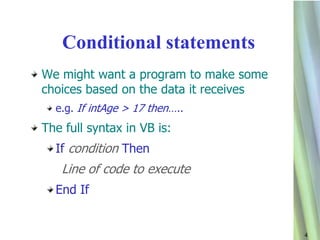
Conditional statements
We might want a program to make some
choices based on the data it receives
  e.g. If intAge > 17 then…..
The full syntax in VB is:
  If condition Then
   Line of code to execute
  End If


                                        4
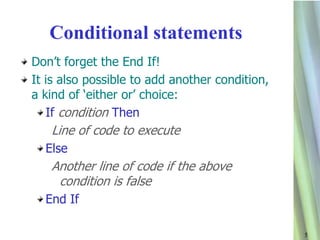
Conditional statements
Don‟t forget the End If!
It is also possible to add another condition,
a kind of „either or‟ choice:
   If condition Then
   Line of code to execute
  Else
   Another line of code if the above
    condition is false
  End If

                                                5
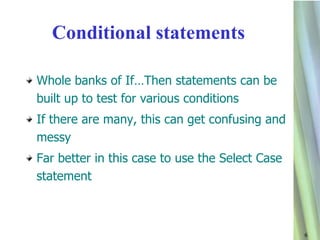
Conditional statements

Whole banks of If…Then statements can be
built up to test for various conditions
If there are many, this can get confusing and
messy
Far better in this case to use the Select Case
statement


                                                 6
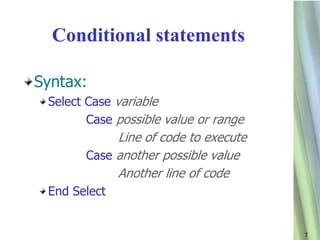
Conditional statements

Syntax:
 Select Case variable
        Case possible value or range
            Line of code to execute
       Case another possible value
            Another line of code
 End Select


                                       7
Loop structures
These are used when we want lines of code to
be executed many times
How many times depends on either various
conditions being met or we might want it to
run a set number of times
There are loops for all occasions and
programmers have their favourites!


                                               8
Loop structures
If we want the loop to run a fixed number of
times, we use a For…..Next loop
This will use a variable as a counter
Syntax:
  For first value To last value
   Line of code to execute
  Next value


                                               9
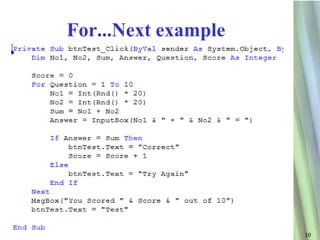
For...Next example


                     10
Loop structures
If you want the loop to carry on an unspecified
number of times until a condition is met,
use a Do….While Loop
  Beware! It is possible to create loops that carry on to
  infinity
  Infinite loops aren‟t the end of world – the computer
  may crash so you might lose some unsaved work
  Pressing Ctrl + Break sometimes works to stop it


                                                            11
Loop structures
Syntax:
   Do While value=whatever
          Line of code to execute
   Loop


Or (my favourite):
   While value=whatever
          Line of code execute
   End While


                                    12
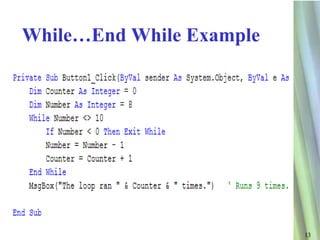
While…End While Example


                          13
Loop structures
Loops can also be nested
This is where it can get really confusing
One loop can search through one set of data
But it can be running inside another loop
This is useful where data is in a table
  One loop deals with rows
  The other deals with columns


                                              14
Loop structures
When nesting loops, it is important to get the
code looking tidy
The best way to do this is with indentation
  The section of code after the first line is tabbed in
  The last line is tabbed out


                                                          15
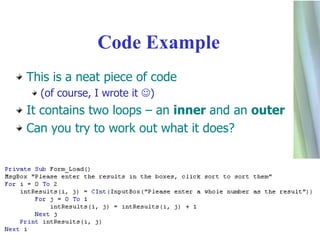
Code Example
This is a neat piece of code
  (of course, I wrote it )
It contains two loops – an inner and an outer
Can you try to work out what it does?


                                                16
Programming terms

In this session we have covered the three
ways that programs flow
  Sequence – running one line after another
  Selection – using conditional statements
  Iteration – using loops


                                              17

Data structures vb

  • 1.
    Data structures in VB.NET 1
  • 2.
    Processing Once the datahas been entered into the program, we need to “do something with it” This is the data processing part Most of what you want to do to it has been done before – many times! There are some standard “structures” that it is useful to know about 2
  • 3.
    How a programruns Variables have a space reserved in memory (they are declared and initialised) They might be given a value The next lines in the program or part of the program that is running are read and executed one at a time 3
  • 4.
    Conditional statements We mightwant a program to make some choices based on the data it receives e.g. If intAge > 17 then….. The full syntax in VB is: If condition Then Line of code to execute End If 4
  • 5.
    Conditional statements Don‟t forgetthe End If! It is also possible to add another condition, a kind of „either or‟ choice: If condition Then Line of code to execute Else Another line of code if the above condition is false End If 5
  • 6.
    Conditional statements Whole banksof If…Then statements can be built up to test for various conditions If there are many, this can get confusing and messy Far better in this case to use the Select Case statement 6
  • 7.
    Conditional statements Syntax: SelectCase variable Case possible value or range Line of code to execute Case another possible value Another line of code End Select 7
  • 8.
    Loop structures These areused when we want lines of code to be executed many times How many times depends on either various conditions being met or we might want it to run a set number of times There are loops for all occasions and programmers have their favourites! 8
  • 9.
    Loop structures If wewant the loop to run a fixed number of times, we use a For…..Next loop This will use a variable as a counter Syntax: For first value To last value Line of code to execute Next value 9
  • 10.
  • 11.
    Loop structures If youwant the loop to carry on an unspecified number of times until a condition is met, use a Do….While Loop Beware! It is possible to create loops that carry on to infinity Infinite loops aren‟t the end of world – the computer may crash so you might lose some unsaved work Pressing Ctrl + Break sometimes works to stop it 11
  • 12.
    Loop structures Syntax: Do While value=whatever Line of code to execute Loop Or (my favourite): While value=whatever Line of code execute End While 12
  • 13.
  • 14.
    Loop structures Loops canalso be nested This is where it can get really confusing One loop can search through one set of data But it can be running inside another loop This is useful where data is in a table One loop deals with rows The other deals with columns 14
  • 15.
    Loop structures When nestingloops, it is important to get the code looking tidy The best way to do this is with indentation The section of code after the first line is tabbed in The last line is tabbed out 15
  • 16.
    Code Example This isa neat piece of code (of course, I wrote it ) It contains two loops – an inner and an outer Can you try to work out what it does? 16
  • 17.
    Programming terms In thissession we have covered the three ways that programs flow Sequence – running one line after another Selection – using conditional statements Iteration – using loops 17