Practical - 02
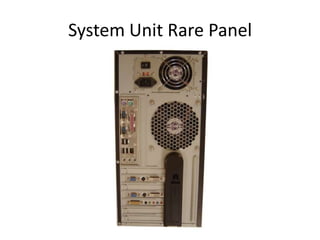
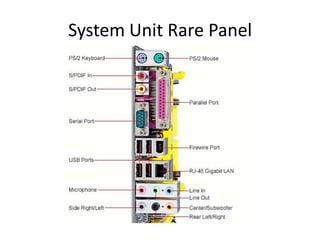
System Unit Rare Panel
Ports and Connectors
System Unit Rare Panel
Ports
• A computer port is a connection point or interface
between a computer and an external or internal
device. Internal ports may connect such devices as
hard drives and CD ROM or DVD drives; external ports
may connect modems, printers, mice and other
devices.
• A port serves as an interface between the computer
and other computers or peripheral devices. Physically,
a port is a specialized outlet on a piece of equipment to
which a plug or cable connects. Electronically, the
several conductors making up the outlet provide a
signal transfer between devices.
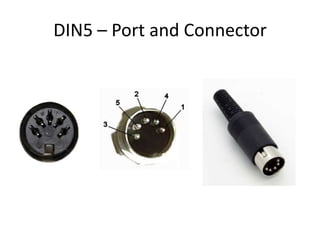
DIN5 – Port and Connector
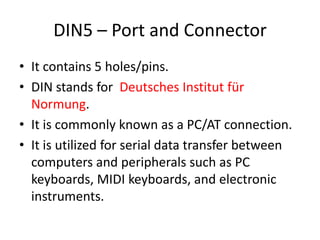
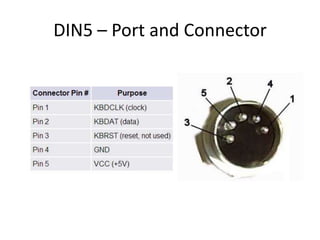
• It contains 5 holes/pins.
• DIN stands for Deutsches Institut für
Normung.
• It is commonly known as a PC/AT connection.
• It is utilized for serial data transfer between
computers and peripherals such as PC
keyboards, MIDI keyboards, and electronic
instruments.
DIN5 – Port and Connector
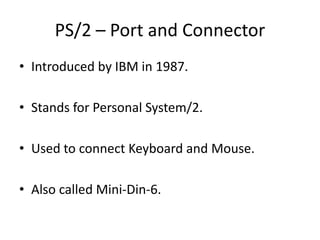
PS/2 – Port and Connector
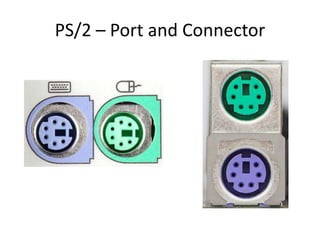
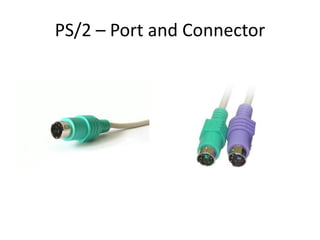
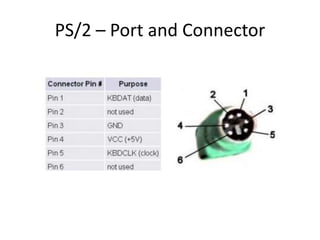
• Introduced by IBM in 1987.
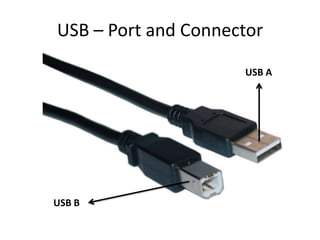
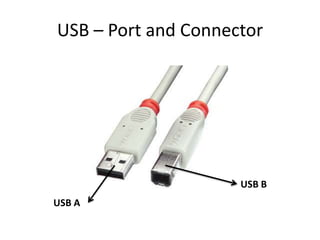
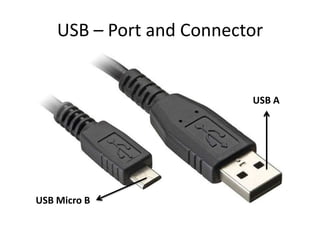
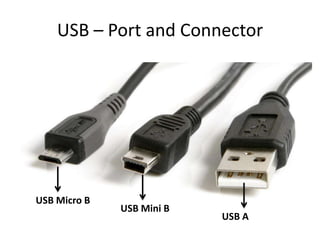
• Stands for Personal System/2.
• Used to connect Keyboard and Mouse.

• Also called Mini-Din-6.
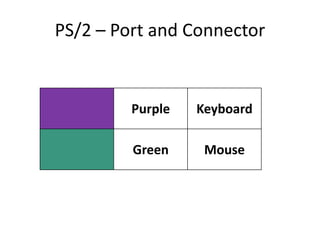
PS/2 – Port and Connector

Purple

Keyboard

Green

Mouse
PS/2 – Port and Connector
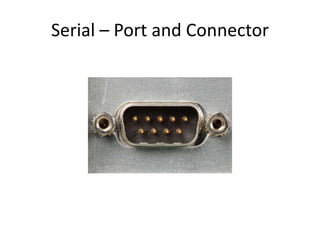
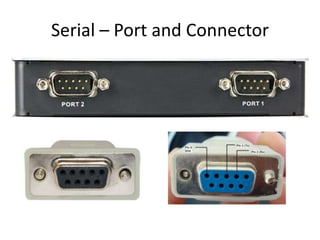
Serial – Port and Connector
•
•
•
•
•

Sends the data serially bit by bit.
Also called DB9.
Also called COM ports (Communication).
Bi-Directional (Transmit and Receive).
Mostly used to connect serial mouse, modem,
GPS Receivers and Bar code scanners.
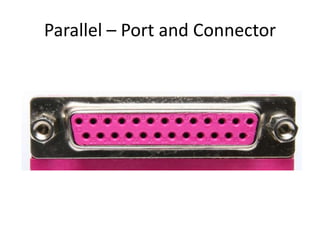
Parallel – Port and Connector

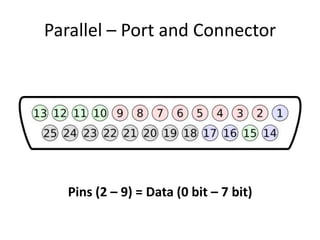
Pins (2 – 9) = Data (0 bit – 7 bit)
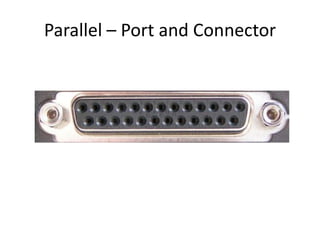
Parallel – Port and Connector
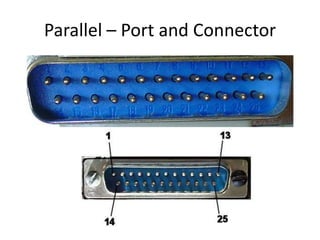
• Sends 8 bits at a time.
• Also called DB25 or Centronics port.
• Also called Printer Port or LPT (Line Printer
Terminal).
• Mostly used to connect printers, scanners and
external drives.
• A newer type of parallel port, which supports the
same connectors as the Centronics interface, is
the EPP (Enhanced Parallel Port) or ECP (Extended
Capabilities Port).
VGA – Port and Connector
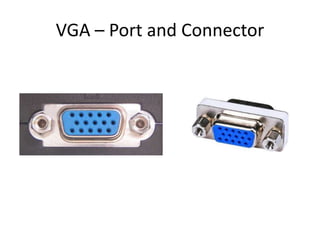
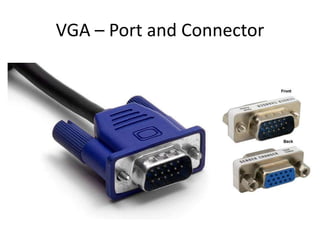
• VGA stands for Video Graphics Array.
• Also called DE15 or DB15.
• Also called RGB Connector.

• Used to connect Monitor, TV and Projector.
VGA – Port and Connector
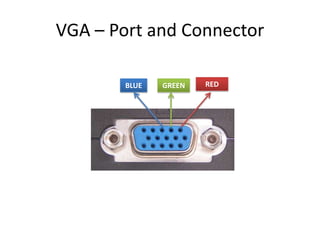
BLUE

GREEN

RED
VGA – Port and Connector
USB – Port and Connector
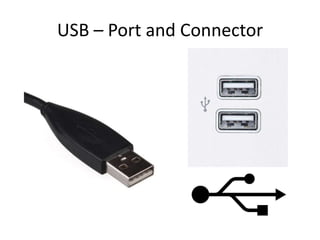
• USB stands for Universal Serial Bus.
• Used to connect many different types of devices
to system unit.

• Is Plug and Play.
• Up to 127 devices can be connected.
• Used to connect Monitor, TV and Projector.
USB – Port and Connector
Versions of USB

• USB 1.0 (Full Speed)
• Released in the year 1996
• Maximum transfer speed of 12 Mbits/s

• USB 2.0 (High Speed)
• Released in the year 2000
• Maximum transfer speed of 480 Mbits/s

• USB 3.0 (Super Speed)
• Released in the year 2008
• Maximum transfer speed of 5 Gbits/s
USB – Port and Connector
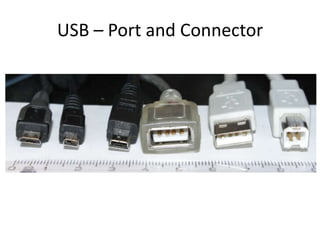
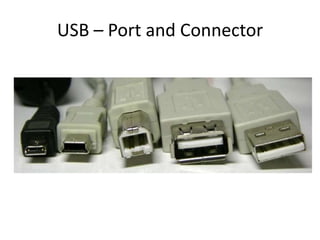
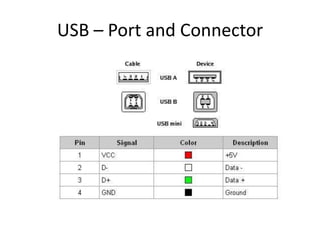
Types of USB Connectors and ports
• USB A
• USB B
• USB Mini A
• USB Mini B
• USB Micro AB
• USB Micro B
USB – Port and Connector
USB A

USB B
USB – Port and Connector

USB B
USB A
USB – Port and Connector

USB A

USB Micro B
USB – Port and Connector

USB Micro B

USB Mini B

USB A
USB – Port and Connector

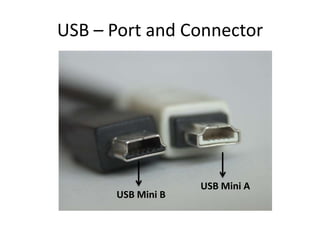
USB Mini B

USB Mini A
USB – Port and Connector

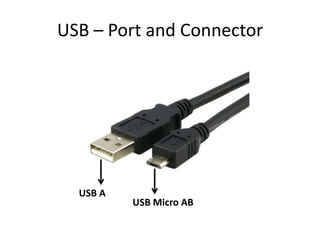
USB A

USB Micro AB
USB – Port and Connector
Firewire – Port and Connector
•
•
•
•
•
•

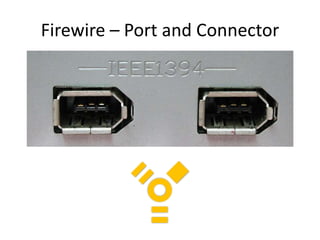
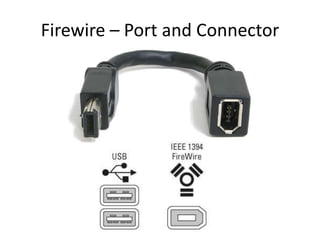
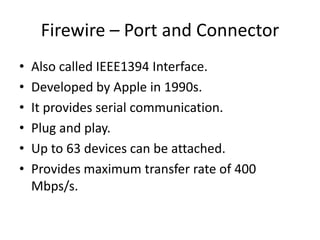
Also called IEEE1394 Interface.
Developed by Apple in 1990s.
It provides serial communication.
Plug and play.
Up to 63 devices can be attached.
Provides maximum transfer rate of 400
Mbps/s.
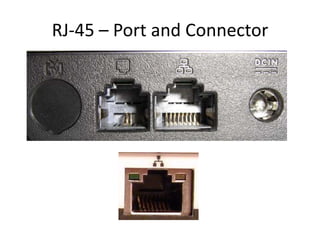
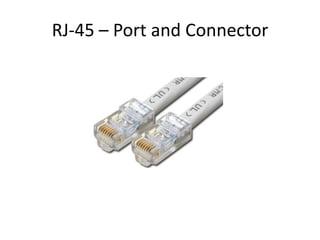
RJ-45 – Port and Connector
• Stands for Rigid Jack 45 or Registered Jack 45.
• Used to connect computer over Local Area
Network (LAN)
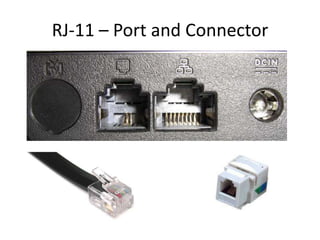
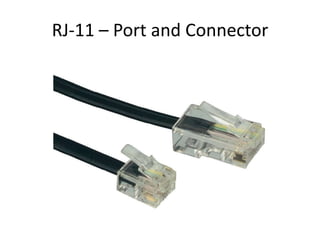
RJ-11 – Port and Connector
• Stands for Rigid Jack 11 or Registered Jack 11.
• Also called Phone connector or Phone Jack.
• Used to connect computer over Internet using
dial up phone line.
RJ-11 – Port and Connector
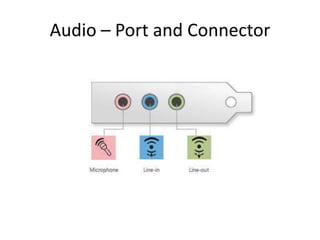
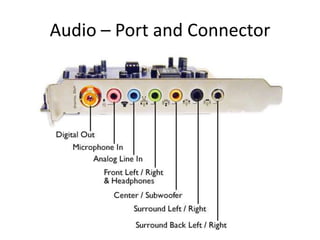
Audio – Port and Connector

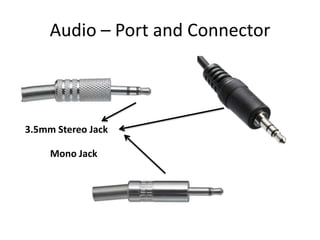
3.5mm Stereo Jack
Mono Jack
Audio – Port and Connector
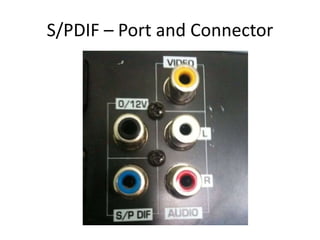
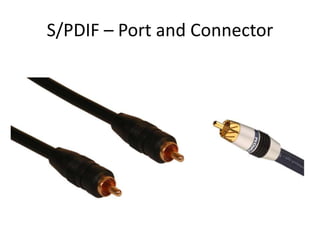
S/PDIF – Port and Connector
• Stands for
Sony/Philips Digital Interconnect Format.
• Provides Audio interface.
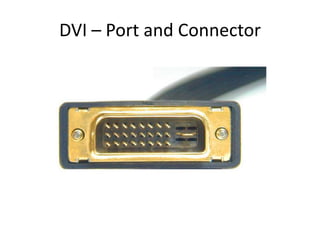
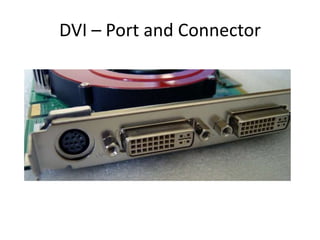
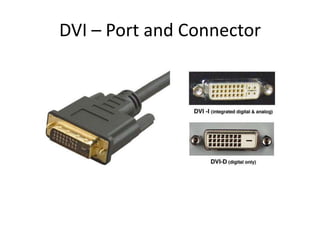
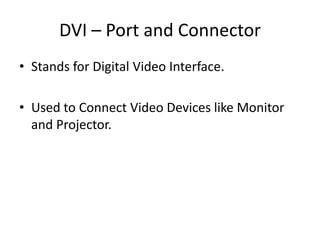
DVI – Port and Connector
• Stands for Digital Video Interface.
• Used to Connect Video Devices like Monitor
and Projector.
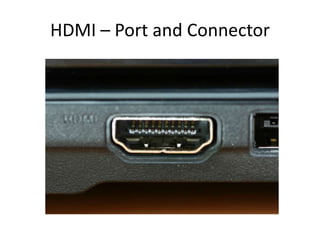
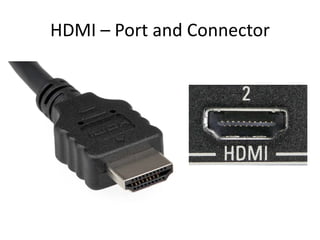
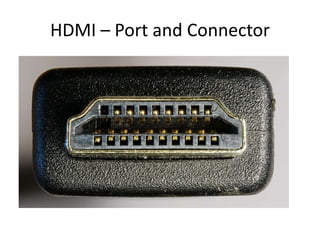
HDMI – Port and Connector
• Stands for High-Definition Multimedia
Interface.
• Audio and video interface.
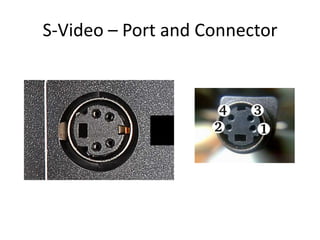
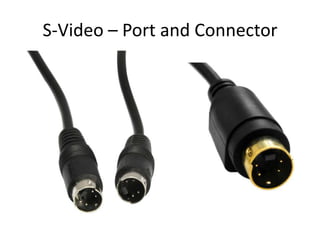
S-Video – Port and Connector
• Stands for Separate Video.
• Contains 4 pins.
• Provides Video interface.
Label the Ports
Label the Ports
Label the Ports
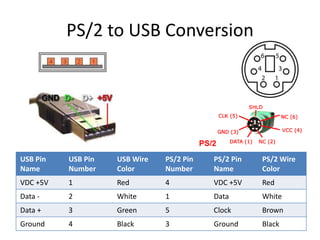
PS/2 to USB Conversion

USB Pin
Name

USB Pin
Number

USB Wire
Color

PS/2 Pin
Number

PS/2 Pin
Name

PS/2 Wire
Color

VDC +5V

1

Red

4

VDC +5V

Red

Data -

2

White

1

Data

White

Data +

3

Green

5

Clock

Brown

Ground

4

Black

3

Ground

Black

computer practicals

  • 1.
    Practical - 02 SystemUnit Rare Panel Ports and Connectors
  • 2.
  • 3.
  • 4.
    Ports • A computerport is a connection point or interface between a computer and an external or internal device. Internal ports may connect such devices as hard drives and CD ROM or DVD drives; external ports may connect modems, printers, mice and other devices. • A port serves as an interface between the computer and other computers or peripheral devices. Physically, a port is a specialized outlet on a piece of equipment to which a plug or cable connects. Electronically, the several conductors making up the outlet provide a signal transfer between devices.
  • 5.
    DIN5 – Portand Connector
  • 6.
    DIN5 – Portand Connector • It contains 5 holes/pins. • DIN stands for Deutsches Institut für Normung. • It is commonly known as a PC/AT connection. • It is utilized for serial data transfer between computers and peripherals such as PC keyboards, MIDI keyboards, and electronic instruments.
  • 7.
    DIN5 – Portand Connector
  • 8.
    PS/2 – Portand Connector
  • 9.
    PS/2 – Portand Connector
  • 10.
    PS/2 – Portand Connector • Introduced by IBM in 1987. • Stands for Personal System/2. • Used to connect Keyboard and Mouse. • Also called Mini-Din-6.
  • 11.
    PS/2 – Portand Connector Purple Keyboard Green Mouse
  • 12.
    PS/2 – Portand Connector
  • 13.
    Serial – Portand Connector
  • 14.
    Serial – Portand Connector
  • 15.
    Serial – Portand Connector • • • • • Sends the data serially bit by bit. Also called DB9. Also called COM ports (Communication). Bi-Directional (Transmit and Receive). Mostly used to connect serial mouse, modem, GPS Receivers and Bar code scanners.
  • 16.
    Parallel – Portand Connector
  • 17.
    Parallel – Portand Connector
  • 18.
    Parallel – Portand Connector Pins (2 – 9) = Data (0 bit – 7 bit)
  • 19.
    Parallel – Portand Connector
  • 20.
    Parallel – Portand Connector • Sends 8 bits at a time. • Also called DB25 or Centronics port. • Also called Printer Port or LPT (Line Printer Terminal). • Mostly used to connect printers, scanners and external drives. • A newer type of parallel port, which supports the same connectors as the Centronics interface, is the EPP (Enhanced Parallel Port) or ECP (Extended Capabilities Port).
  • 21.
    VGA – Portand Connector
  • 22.
    VGA – Portand Connector
  • 23.
    VGA – Portand Connector • VGA stands for Video Graphics Array. • Also called DE15 or DB15. • Also called RGB Connector. • Used to connect Monitor, TV and Projector.
  • 24.
    VGA – Portand Connector BLUE GREEN RED
  • 25.
    VGA – Portand Connector
  • 26.
    USB – Portand Connector
  • 27.
    USB – Portand Connector • USB stands for Universal Serial Bus. • Used to connect many different types of devices to system unit. • Is Plug and Play. • Up to 127 devices can be connected. • Used to connect Monitor, TV and Projector.
  • 28.
    USB – Portand Connector Versions of USB • USB 1.0 (Full Speed) • Released in the year 1996 • Maximum transfer speed of 12 Mbits/s • USB 2.0 (High Speed) • Released in the year 2000 • Maximum transfer speed of 480 Mbits/s • USB 3.0 (Super Speed) • Released in the year 2008 • Maximum transfer speed of 5 Gbits/s
  • 29.
    USB – Portand Connector Types of USB Connectors and ports • USB A • USB B • USB Mini A • USB Mini B • USB Micro AB • USB Micro B
  • 30.
    USB – Portand Connector USB A USB B
  • 31.
    USB – Portand Connector USB B USB A
  • 32.
    USB – Portand Connector USB A USB Micro B
  • 33.
    USB – Portand Connector USB Micro B USB Mini B USB A
  • 34.
    USB – Portand Connector USB Mini B USB Mini A
  • 35.
    USB – Portand Connector USB A USB Micro AB
  • 36.
    USB – Portand Connector
  • 37.
    USB – Portand Connector
  • 38.
    USB – Portand Connector
  • 39.
    Firewire – Portand Connector
  • 40.
    Firewire – Portand Connector
  • 41.
    Firewire – Portand Connector • • • • • • Also called IEEE1394 Interface. Developed by Apple in 1990s. It provides serial communication. Plug and play. Up to 63 devices can be attached. Provides maximum transfer rate of 400 Mbps/s.
  • 42.
    RJ-45 – Portand Connector
  • 43.
    RJ-45 – Portand Connector
  • 44.
    RJ-45 – Portand Connector • Stands for Rigid Jack 45 or Registered Jack 45. • Used to connect computer over Local Area Network (LAN)
  • 45.
    RJ-11 – Portand Connector
  • 46.
    RJ-11 – Portand Connector • Stands for Rigid Jack 11 or Registered Jack 11. • Also called Phone connector or Phone Jack. • Used to connect computer over Internet using dial up phone line.
  • 47.
    RJ-11 – Portand Connector
  • 48.
    Audio – Portand Connector
  • 49.
    Audio – Portand Connector
  • 50.
    Audio – Portand Connector 3.5mm Stereo Jack Mono Jack
  • 51.
    Audio – Portand Connector
  • 52.
    S/PDIF – Portand Connector
  • 53.
    S/PDIF – Portand Connector
  • 54.
    S/PDIF – Portand Connector • Stands for Sony/Philips Digital Interconnect Format. • Provides Audio interface.
  • 55.
    DVI – Portand Connector
  • 56.
    DVI – Portand Connector
  • 57.
    DVI – Portand Connector
  • 58.
    DVI – Portand Connector • Stands for Digital Video Interface. • Used to Connect Video Devices like Monitor and Projector.
  • 59.
    HDMI – Portand Connector
  • 60.
    HDMI – Portand Connector
  • 61.
    HDMI – Portand Connector
  • 62.
    HDMI – Portand Connector • Stands for High-Definition Multimedia Interface. • Audio and video interface.
  • 63.
    S-Video – Portand Connector
  • 64.
    S-Video – Portand Connector
  • 65.
    S-Video – Portand Connector • Stands for Separate Video. • Contains 4 pins. • Provides Video interface.
  • 66.
  • 67.
  • 68.
  • 69.
    PS/2 to USBConversion USB Pin Name USB Pin Number USB Wire Color PS/2 Pin Number PS/2 Pin Name PS/2 Wire Color VDC +5V 1 Red 4 VDC +5V Red Data - 2 White 1 Data White Data + 3 Green 5 Clock Brown Ground 4 Black 3 Ground Black