Computer Systems
Ports
System Devices
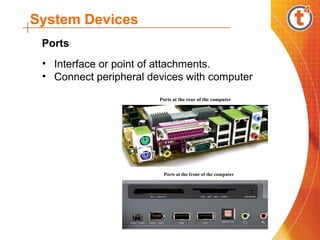
• Interface or point of attachments.
• Connect peripheral devices with computer
Ports at the rear of the computer
Ports at the front of the computer
Ports
System Devices
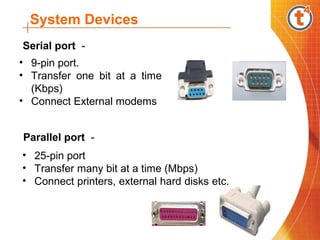
• 9-pin port.
• Transfer one bit at a time
(Kbps)
• Connect External modems
• 25-pin port
• Transfer many bit at a time (Mbps)
• Connect printers, external hard disks etc.
Serial port -
Parallel port -
System Devices
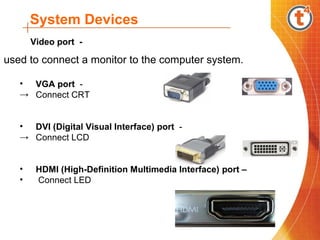
used to connect a monitor to the computer system.
• VGA port -
→ Connect CRT
• DVI (Digital Visual Interface) port -
→ Connect LCD
• HDMI (High-Definition Multimedia Interface) port –
• Connect LED
Video port -
System Devices
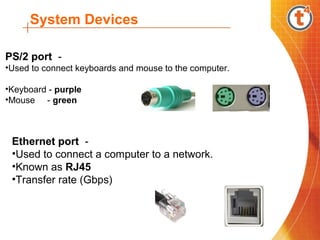
PS/2 port -
•Used to connect keyboards and mouse to the computer.
•Keyboard - purple
•Mouse - green
Ethernet port -
•Used to connect a computer to a network.
•Known as RJ45
•Transfer rate (Gbps)
System Devices
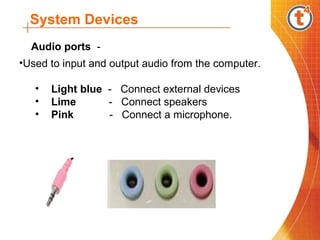
•Used to input and output audio from the computer.
• Light blue - Connect external devices
• Lime - Connect speakers
• Pink - Connect a microphone.
Audio ports -
System Devices
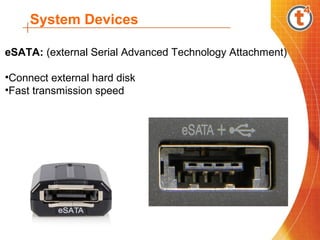
eSATA: (external Serial Advanced Technology Attachment)
•Connect external hard disk
•Fast transmission speed
System Devices
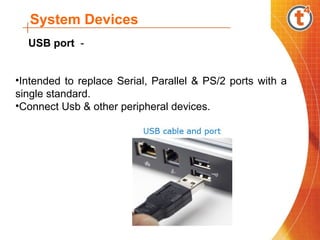
•Intended to replace Serial, Parallel & PS/2 ports with a
single standard.
•Connect Usb & other peripheral devices.
USB port -
Ports
Ports

Ports

  • 1.
  • 2.
    System Devices • Interfaceor point of attachments. • Connect peripheral devices with computer Ports at the rear of the computer Ports at the front of the computer Ports
  • 3.
    System Devices • 9-pinport. • Transfer one bit at a time (Kbps) • Connect External modems • 25-pin port • Transfer many bit at a time (Mbps) • Connect printers, external hard disks etc. Serial port - Parallel port -
  • 4.
    System Devices used toconnect a monitor to the computer system. • VGA port - → Connect CRT • DVI (Digital Visual Interface) port - → Connect LCD • HDMI (High-Definition Multimedia Interface) port – • Connect LED Video port -
  • 5.
    System Devices PS/2 port- •Used to connect keyboards and mouse to the computer. •Keyboard - purple •Mouse - green Ethernet port - •Used to connect a computer to a network. •Known as RJ45 •Transfer rate (Gbps)
  • 6.
    System Devices •Used toinput and output audio from the computer. • Light blue - Connect external devices • Lime - Connect speakers • Pink - Connect a microphone. Audio ports -
  • 7.
    System Devices eSATA: (externalSerial Advanced Technology Attachment) •Connect external hard disk •Fast transmission speed
  • 8.
    System Devices •Intended toreplace Serial, Parallel & PS/2 ports with a single standard. •Connect Usb & other peripheral devices. USB port -