1
Submitted by:
Sonia Maqsood
Topic:
Computer Network
Submitted to:
Mr.Tehzeeb-ul-Hassan
Faisalabad Institute of Management and Science.
2
Computer Network:
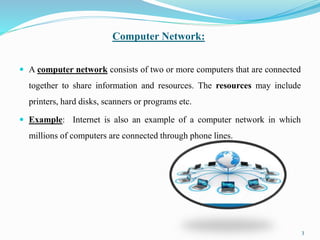
 A computer network consists of two or more computers that are connected
together to share information and resources. The resources may include
printers, hard disks, scanners or programs etc.
 Example: Internet is also an example of a computer network in which
millions of computers are connected through phone lines.
3
TYPES OF COMPUTER NETWORK
1. LAN – Local Area Network
2. WAN – Wide Area Network
3. MAN – Metropolitan Area Network
4. PAN – Personal Area Network
4
Local Area Network (LAN)
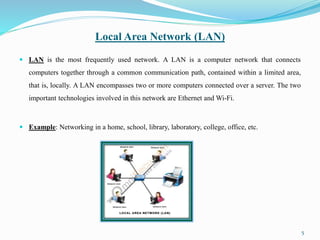
 LAN is the most frequently used network. A LAN is a computer network that connects
computers together through a common communication path, contained within a limited area,
that is, locally. A LAN encompasses two or more computers connected over a server. The two
important technologies involved in this network are Ethernet and Wi-Fi.
 Example: Networking in a home, school, library, laboratory, college, office, etc.
5
Local Area Network(LAN)
ADVANTAGES DISADVANTAGES
 Centralized Data: The data of all network
users can be stored on a hard disk of the
central/server computer. This help users to
use any computer in a network to access
the required data.
 Data Security: It will be easy to manage
data at only one place and the data will be
more secure too.
 Easy and Cheap Communication: Data
and messages can easily be shared with the
other computer connected to the network.
 High Setup Cost: The initial setup costs of
installing Local Area Networks is high
because there is special software required
to make a server. Also, communication
devices like as switches, hubs, routers,
cables are costly.
 Privacy Violations: The LAN
administrator can see and check personal
data files of each and every LAN user. .
6
Wide Area Network (WAN)
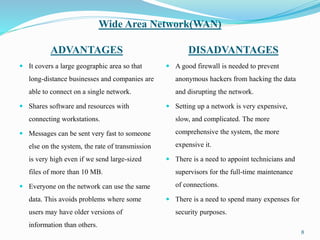
 WAN is a type of computer network that connects computers over a large geographical distance
through a shared communication path. It is not restrained to a single location but extends over
many locations. WAN can also be defined as a group of local area networks that communicate
with each other.
 Example: Internet is the example of WAN.
7
Wide Area Network(WAN)
ADVANTAGES DISADVANTAGES
 It covers a large geographic area so that
long-distance businesses and companies are
able to connect on a single network.
 Shares software and resources with
connecting workstations.
 Messages can be sent very fast to someone
else on the system, the rate of transmission
is very high even if we send large-sized
files of more than 10 MB.
 Everyone on the network can use the same
data. This avoids problems where some
users may have older versions of
information than others.
 A good firewall is needed to prevent
anonymous hackers from hacking the data
and disrupting the network.
 Setting up a network is very expensive,
slow, and complicated. The more
comprehensive the system, the more
expensive it.
 There is a need to appoint technicians and
supervisors for the full-time maintenance
of connections.
 There is a need to spend many expenses for
security purposes.
8
Metropolitan Area Network(MAN)
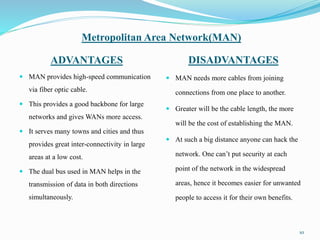
 A MAN is larger than a LAN but smaller than a WAN. This is the type of computer network
that connects computers over a geographical distance through a shared communication path
over a city, town or metropolitan area.
 Example: Networking in towns, cities, a single large city, large area within multiple buildings,
etc.
9
Metropolitan Area Network(MAN)
ADVANTAGES DISADVANTAGES
 MAN provides high-speed communication
via fiber optic cable.
 This provides a good backbone for large
networks and gives WANs more access.
 It serves many towns and cities and thus
provides great inter-connectivity in large
areas at a low cost.
 The dual bus used in MAN helps in the
transmission of data in both directions
simultaneously.
 MAN needs more cables from joining
connections from one place to another.
 Greater will be the cable length, the more
will be the cost of establishing the MAN.
 At such a big distance anyone can hack the
network. One can’t put security at each
point of the network in the widespread
areas, hence it becomes easier for unwanted
people to access it for their own benefits.
10
Personal Area Network(PAN)
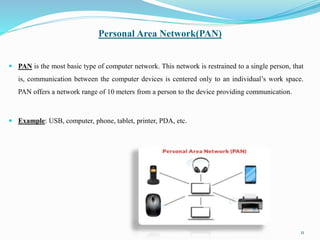
 PAN is the most basic type of computer network. This network is restrained to a single person, that
is, communication between the computer devices is centered only to an individual’s work space.
PAN offers a network range of 10 meters from a person to the device providing communication.
 Example: USB, computer, phone, tablet, printer, PDA, etc.
11
Personal Area Network(PAN)
ADVANTAGES DISADVANTAGES
 Used in office, conference, and meetings
 It is used in TV remotes, AC remotes, etc.
 Connect to many devices at a time
 No extra space requires.
 Affordable Cost.
 Portable
 Easy to use
 Reliable
 PAN can be operated in less range of areas.
 Can only be used for personal area
 Slow data transfer
 Interfere with radio signals:
 Infrared signals travel only in a straight line.
12
13

Computer Network

  • 1.
  • 2.
    Submitted by: Sonia Maqsood Topic: ComputerNetwork Submitted to: Mr.Tehzeeb-ul-Hassan Faisalabad Institute of Management and Science. 2
  • 3.
    Computer Network:  Acomputer network consists of two or more computers that are connected together to share information and resources. The resources may include printers, hard disks, scanners or programs etc.  Example: Internet is also an example of a computer network in which millions of computers are connected through phone lines. 3
  • 4.
    TYPES OF COMPUTERNETWORK 1. LAN – Local Area Network 2. WAN – Wide Area Network 3. MAN – Metropolitan Area Network 4. PAN – Personal Area Network 4
  • 5.
    Local Area Network(LAN)  LAN is the most frequently used network. A LAN is a computer network that connects computers together through a common communication path, contained within a limited area, that is, locally. A LAN encompasses two or more computers connected over a server. The two important technologies involved in this network are Ethernet and Wi-Fi.  Example: Networking in a home, school, library, laboratory, college, office, etc. 5
  • 6.
    Local Area Network(LAN) ADVANTAGESDISADVANTAGES  Centralized Data: The data of all network users can be stored on a hard disk of the central/server computer. This help users to use any computer in a network to access the required data.  Data Security: It will be easy to manage data at only one place and the data will be more secure too.  Easy and Cheap Communication: Data and messages can easily be shared with the other computer connected to the network.  High Setup Cost: The initial setup costs of installing Local Area Networks is high because there is special software required to make a server. Also, communication devices like as switches, hubs, routers, cables are costly.  Privacy Violations: The LAN administrator can see and check personal data files of each and every LAN user. . 6
  • 7.
    Wide Area Network(WAN)  WAN is a type of computer network that connects computers over a large geographical distance through a shared communication path. It is not restrained to a single location but extends over many locations. WAN can also be defined as a group of local area networks that communicate with each other.  Example: Internet is the example of WAN. 7
  • 8.
    Wide Area Network(WAN) ADVANTAGESDISADVANTAGES  It covers a large geographic area so that long-distance businesses and companies are able to connect on a single network.  Shares software and resources with connecting workstations.  Messages can be sent very fast to someone else on the system, the rate of transmission is very high even if we send large-sized files of more than 10 MB.  Everyone on the network can use the same data. This avoids problems where some users may have older versions of information than others.  A good firewall is needed to prevent anonymous hackers from hacking the data and disrupting the network.  Setting up a network is very expensive, slow, and complicated. The more comprehensive the system, the more expensive it.  There is a need to appoint technicians and supervisors for the full-time maintenance of connections.  There is a need to spend many expenses for security purposes. 8
  • 9.
    Metropolitan Area Network(MAN) A MAN is larger than a LAN but smaller than a WAN. This is the type of computer network that connects computers over a geographical distance through a shared communication path over a city, town or metropolitan area.  Example: Networking in towns, cities, a single large city, large area within multiple buildings, etc. 9
  • 10.
    Metropolitan Area Network(MAN) ADVANTAGESDISADVANTAGES  MAN provides high-speed communication via fiber optic cable.  This provides a good backbone for large networks and gives WANs more access.  It serves many towns and cities and thus provides great inter-connectivity in large areas at a low cost.  The dual bus used in MAN helps in the transmission of data in both directions simultaneously.  MAN needs more cables from joining connections from one place to another.  Greater will be the cable length, the more will be the cost of establishing the MAN.  At such a big distance anyone can hack the network. One can’t put security at each point of the network in the widespread areas, hence it becomes easier for unwanted people to access it for their own benefits. 10
  • 11.
    Personal Area Network(PAN) PAN is the most basic type of computer network. This network is restrained to a single person, that is, communication between the computer devices is centered only to an individual’s work space. PAN offers a network range of 10 meters from a person to the device providing communication.  Example: USB, computer, phone, tablet, printer, PDA, etc. 11
  • 12.
    Personal Area Network(PAN) ADVANTAGESDISADVANTAGES  Used in office, conference, and meetings  It is used in TV remotes, AC remotes, etc.  Connect to many devices at a time  No extra space requires.  Affordable Cost.  Portable  Easy to use  Reliable  PAN can be operated in less range of areas.  Can only be used for personal area  Slow data transfer  Interfere with radio signals:  Infrared signals travel only in a straight line. 12
  • 13.