Programming in Java
Variable & Data Types
1
www.infoviaan.com
Variable
10010
age
11010
name
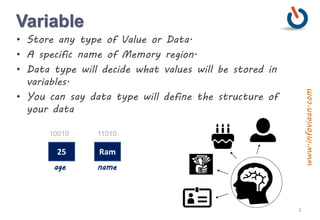
• Store any type of Value or Data.
• A specific name of Memory region.
• Data type will decide what values will be stored in
variables.
• You can say data type will define the structure of
your data
25 Ram
2
www.infoviaan.com
Data type
a b
10101 10111
18
10010
age
11010
name
int String
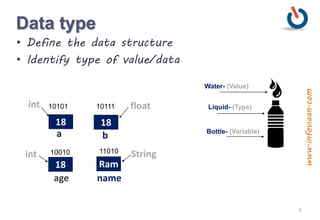
Water- (Value)
Liquid- (Type)
Bottle- (Variable)
• Define the data structure
• Identify type of value/data
Ram
int float
18 18
3
www.infoviaan.com
Categories of data type
• Primitive Data type
• Reference Data type/Composite data type
• User Define/Custom Data type
4
www.infoviaan.com
boolean – 1 byte
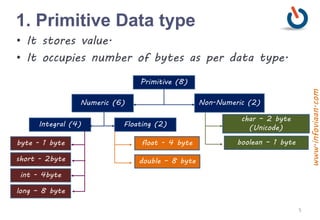
1. Primitive Data type
Primitive (8)
Numeric (6) Non-Numeric (2)
Integral (4) Floating (2)
char – 2 byte
(Unicode)
float - 4 byte
double – 8 byte
byte - 1 byte
short - 2byte
int - 4byte
long – 8 byte
• It stores value.
• It occupies number of bytes as per data type.
5
www.infoviaan.com
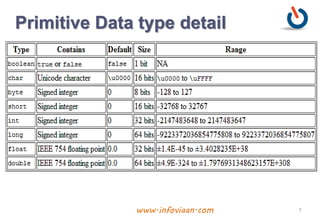
Primitive Data types
• Decimal values will be stored in float and double
data type.
• Non-decimals values will be stored in int, long,
byte and short data types.
• Character will be stored in char data type.
• true/false will be stored in boolean data types.
6
www.infoviaan.com
Primitive Data type detail
7www.infoviaan.com
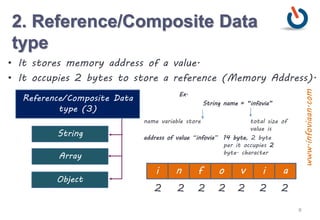
2. Reference/Composite Data
type
Reference/Composite Data
type (3)
String
• It stores memory address of a value.
• It occupies 2 bytes to store a reference (Memory Address).
Array
Object
Ex.
String name = “infovia”
name variable store total size of
value is
address of value “infovia” 14 byte, 2 byte
per it occupies 2
byte. character
i n f ao v i
2 2 2 2 2 2 2
8
www.infoviaan.com
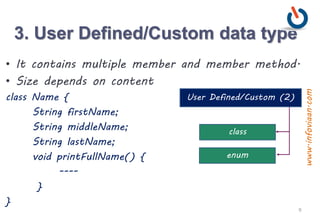
3. User Defined/Custom data type
User Defined/Custom (2)
• It contains multiple member and member method.
• Size depends on content
class Name {
String firstName;
String middleName;
String lastName;
void printFullName() {
----
}
}
class
enum
9
www.infoviaan.com
Program - Sum of two numbers
10
public class Sum {
public static void main(String[] args) {
int firstValue, secondValue, resultOfSum;
firstValue = 25;
secondValue = 15;
resultOfSum = firstValue + secondValue ;
System.out.println(“Sum Result is = ”+ resultOfSum);
}
}
www.infoviaan.com
Variable declaration
type variable_name;
Meaning: variable <variable-name> will be a variable of type
<type>
Where type can be:
int //integer
double //real number
Example:
int a, b, c;
double x;
int sum;
11
www.infoviaan.com
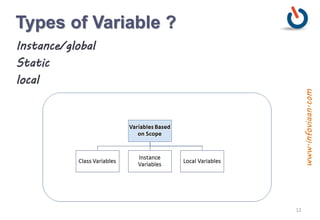
Types of Variable ?
Instance/global
Static
local
12
www.infoviaan.com
Program - Division
13
public class Division {
public static void main(String[] args) {
float a, b, c;
a = 25.678f;
b = 15;
c = a / b;
System.out.println(“Division Result is = ”+ c);
}
}
/* Output
Division Result is = 1.7118666
if use double data type then result is =
1.7118666330973307
*/
www.infoviaan.com
Program - DataTypeExercise
14
public class DataTypeExercise {
public static void main(String[] args) {
int i =50;
float f = 25.5f;
double d = 89.789;
boolean b = true;
System.out.print(“ ”+ i + b + f + d)
;
}
}
www.infoviaan.com
Constant declaration
Declare variable -
syntax =
type variable_name;
ex. –
double radius = 2.45; // it can be change
Declare Constant -
syntax =
final type constant_name= value;
ex. –
final double PI = 3.1415; // can not be change, now it
fixed
15
www.infoviaan.com
Program –Constant Area of
Circle
16
public class AreaOfCircle {
public static void main(String[] args) {
final double PI = 3.1415;
double area;
float radius = 3.5f ;
area = PI* radius * radius ;
System.out.println(“Area of Circle = ”+
area);
}
}
www.infoviaan.com
Java Comments
• Single-line comment – it is used to comment only one
line.
• Multi-line comment - it is used to comment multiple
lines of code.
• Document comment – it is used to create documentation
API.
Example :
Single Line Comment –
//This is single line comment
Multi Line Comment
/* This is Multi Line Comment
this is multi line comment */
17
www.infoviaan.com
Identifier
• A name in java program is identifier, which can be
used for identification purpose.
• It can be method name, variable name, class name or
label name.
public class Test{
public static void main(String[] args){
int x = 25;
}
}
18
www.infoviaan.com
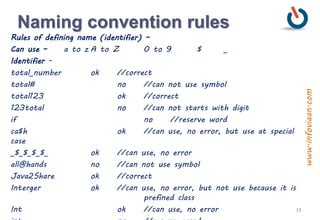
Naming convention rules
Rules of defining name (identifier) –
Can use – a to z A to Z 0 to 9 $ _
Identifier -
total_number ok //correct
total# no //can not use symbol
total123 ok //correct
123total no //can not starts with digit
if no //reserve word
ca$h ok //can use, no error, but use at special
case
_$_$_$_$_ ok //can use, no error
all@hands no //can not use symbol
Java2Share ok //correct
Interger ok //can use, no error, but not use because it is
prefined class
Int ok //can use, no error 19
www.infoviaan.com
Naming convention rules
class Test{
public static void main(String args[]) {
int number = 10;
int Number = 20; //ok, but use with class (first
character of class name is capital)
int NUMBER =30; //ok, but use with Constant
declaration(All Caps)
int String =78; // ok, no error, but - wrong it is
predefine class
int Runnable = 78; // ok, no error, but - wrong predefine
Interface
} // we can differentiate
with case
} //case sensitive programming
language 20
www.infoviaan.com
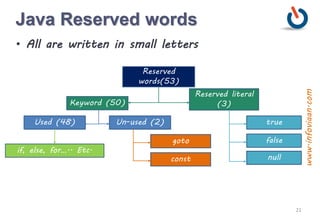
Java Reserved words
• All are written in small letters
false
Reserved
words(53)
Keyword (50)
Reserved literal
(3)
Used (48) Un-used (2) true
goto
const
if, else, for….. Etc.
null
21
www.infoviaan.com
Return type keyword (1) - void
Used Keywords - 48
Keyword for data type (8) - byte, short, int, long, float, double, char,
boolean
Keyword for control statements (11) –
if, else, switch, case, default, while, do, for, break, continue , return
Keyword for exception handling(6) - try, catch, finally, throw, throws, assert
(1.4)
Keywords for access modifier (11) -
private, public, protected, static , final, abstract, synchronized, native,
strictfp (1.2), transient, volatile
Class related keywords (6) - class, interface, extends, implements, package,
import
Object related keywords(4) - new, instanceof, super, this
To define group of named constants (1) – enum (1.5)
22
www.infoviaan.com
Literals
int x = 20;
[Data typevariable constant | literal ]
int x= 10; //decimal value
int x= 010; //octal value -> 8 (octal to
decimal)
int x= 0X10; //hexadecimal value-(base -16)
int x = 10; //ok
int x = 0788; // no CE
int x = 0777 // ok
int x = 0XFace; // ok
int x= 0XBeef; //ok
int x = 0XBeer; //no
23
www.infoviaan.com
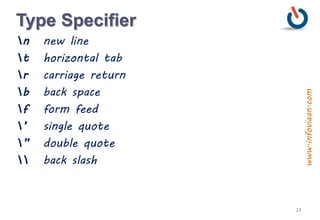
Type Specifier
n new line
t horizontal tab
r carriage return
b back space
f form feed
’ single quote
” double quote
 back slash
24
www.infoviaan.com
QA
1. Is Java primitive data type stored on stack or heap?
2.What is the default value of local variables in Java?
3.Can you compare a boolean with an int variable in
Java?
4.What is the default value of char data type in Java?
5.What is the output?
System.out.println(1.0/0);
6.Which format is used for char data type in java?
7. Difference between primitive variables and reference
variables?
25
www.infoviaan.com
Get in Touch
Thank You
www.infoviaan.com
26
www.infoviaan.com

Variables and Data Types

  • 1.
    Programming in Java Variable& Data Types 1 www.infoviaan.com
  • 2.
    Variable 10010 age 11010 name • Store anytype of Value or Data. • A specific name of Memory region. • Data type will decide what values will be stored in variables. • You can say data type will define the structure of your data 25 Ram 2 www.infoviaan.com
  • 3.
    Data type a b 1010110111 18 10010 age 11010 name int String Water- (Value) Liquid- (Type) Bottle- (Variable) • Define the data structure • Identify type of value/data Ram int float 18 18 3 www.infoviaan.com
  • 4.
    Categories of datatype • Primitive Data type • Reference Data type/Composite data type • User Define/Custom Data type 4 www.infoviaan.com
  • 5.
    boolean – 1byte 1. Primitive Data type Primitive (8) Numeric (6) Non-Numeric (2) Integral (4) Floating (2) char – 2 byte (Unicode) float - 4 byte double – 8 byte byte - 1 byte short - 2byte int - 4byte long – 8 byte • It stores value. • It occupies number of bytes as per data type. 5 www.infoviaan.com
  • 6.
    Primitive Data types •Decimal values will be stored in float and double data type. • Non-decimals values will be stored in int, long, byte and short data types. • Character will be stored in char data type. • true/false will be stored in boolean data types. 6 www.infoviaan.com
  • 7.
    Primitive Data typedetail 7www.infoviaan.com
  • 8.
    2. Reference/Composite Data type Reference/CompositeData type (3) String • It stores memory address of a value. • It occupies 2 bytes to store a reference (Memory Address). Array Object Ex. String name = “infovia” name variable store total size of value is address of value “infovia” 14 byte, 2 byte per it occupies 2 byte. character i n f ao v i 2 2 2 2 2 2 2 8 www.infoviaan.com
  • 9.
    3. User Defined/Customdata type User Defined/Custom (2) • It contains multiple member and member method. • Size depends on content class Name { String firstName; String middleName; String lastName; void printFullName() { ---- } } class enum 9 www.infoviaan.com
  • 10.
    Program - Sumof two numbers 10 public class Sum { public static void main(String[] args) { int firstValue, secondValue, resultOfSum; firstValue = 25; secondValue = 15; resultOfSum = firstValue + secondValue ; System.out.println(“Sum Result is = ”+ resultOfSum); } } www.infoviaan.com
  • 11.
    Variable declaration type variable_name; Meaning:variable <variable-name> will be a variable of type <type> Where type can be: int //integer double //real number Example: int a, b, c; double x; int sum; 11 www.infoviaan.com
  • 12.
    Types of Variable? Instance/global Static local 12 www.infoviaan.com
  • 13.
    Program - Division 13 publicclass Division { public static void main(String[] args) { float a, b, c; a = 25.678f; b = 15; c = a / b; System.out.println(“Division Result is = ”+ c); } } /* Output Division Result is = 1.7118666 if use double data type then result is = 1.7118666330973307 */ www.infoviaan.com
  • 14.
    Program - DataTypeExercise 14 publicclass DataTypeExercise { public static void main(String[] args) { int i =50; float f = 25.5f; double d = 89.789; boolean b = true; System.out.print(“ ”+ i + b + f + d) ; } } www.infoviaan.com
  • 15.
    Constant declaration Declare variable- syntax = type variable_name; ex. – double radius = 2.45; // it can be change Declare Constant - syntax = final type constant_name= value; ex. – final double PI = 3.1415; // can not be change, now it fixed 15 www.infoviaan.com
  • 16.
    Program –Constant Areaof Circle 16 public class AreaOfCircle { public static void main(String[] args) { final double PI = 3.1415; double area; float radius = 3.5f ; area = PI* radius * radius ; System.out.println(“Area of Circle = ”+ area); } } www.infoviaan.com
  • 17.
    Java Comments • Single-linecomment – it is used to comment only one line. • Multi-line comment - it is used to comment multiple lines of code. • Document comment – it is used to create documentation API. Example : Single Line Comment – //This is single line comment Multi Line Comment /* This is Multi Line Comment this is multi line comment */ 17 www.infoviaan.com
  • 18.
    Identifier • A namein java program is identifier, which can be used for identification purpose. • It can be method name, variable name, class name or label name. public class Test{ public static void main(String[] args){ int x = 25; } } 18 www.infoviaan.com
  • 19.
    Naming convention rules Rulesof defining name (identifier) – Can use – a to z A to Z 0 to 9 $ _ Identifier - total_number ok //correct total# no //can not use symbol total123 ok //correct 123total no //can not starts with digit if no //reserve word ca$h ok //can use, no error, but use at special case _$_$_$_$_ ok //can use, no error all@hands no //can not use symbol Java2Share ok //correct Interger ok //can use, no error, but not use because it is prefined class Int ok //can use, no error 19 www.infoviaan.com
  • 20.
    Naming convention rules classTest{ public static void main(String args[]) { int number = 10; int Number = 20; //ok, but use with class (first character of class name is capital) int NUMBER =30; //ok, but use with Constant declaration(All Caps) int String =78; // ok, no error, but - wrong it is predefine class int Runnable = 78; // ok, no error, but - wrong predefine Interface } // we can differentiate with case } //case sensitive programming language 20 www.infoviaan.com
  • 21.
    Java Reserved words •All are written in small letters false Reserved words(53) Keyword (50) Reserved literal (3) Used (48) Un-used (2) true goto const if, else, for….. Etc. null 21 www.infoviaan.com
  • 22.
    Return type keyword(1) - void Used Keywords - 48 Keyword for data type (8) - byte, short, int, long, float, double, char, boolean Keyword for control statements (11) – if, else, switch, case, default, while, do, for, break, continue , return Keyword for exception handling(6) - try, catch, finally, throw, throws, assert (1.4) Keywords for access modifier (11) - private, public, protected, static , final, abstract, synchronized, native, strictfp (1.2), transient, volatile Class related keywords (6) - class, interface, extends, implements, package, import Object related keywords(4) - new, instanceof, super, this To define group of named constants (1) – enum (1.5) 22 www.infoviaan.com
  • 23.
    Literals int x =20; [Data typevariable constant | literal ] int x= 10; //decimal value int x= 010; //octal value -> 8 (octal to decimal) int x= 0X10; //hexadecimal value-(base -16) int x = 10; //ok int x = 0788; // no CE int x = 0777 // ok int x = 0XFace; // ok int x= 0XBeef; //ok int x = 0XBeer; //no 23 www.infoviaan.com
  • 24.
    Type Specifier n newline t horizontal tab r carriage return b back space f form feed ’ single quote ” double quote back slash 24 www.infoviaan.com
  • 25.
    QA 1. Is Javaprimitive data type stored on stack or heap? 2.What is the default value of local variables in Java? 3.Can you compare a boolean with an int variable in Java? 4.What is the default value of char data type in Java? 5.What is the output? System.out.println(1.0/0); 6.Which format is used for char data type in java? 7. Difference between primitive variables and reference variables? 25 www.infoviaan.com
  • 26.
    Get in Touch ThankYou www.infoviaan.com 26 www.infoviaan.com