HARDWARE AND SOFTWARE
COMPONENTS OF COMPUTER AND THEIR
EDUCATIONAL IMPLICATIONS
Dr. Roma Smart Joseph
Teacher Educator I Lucknow I India
Hardware Components:
Hardware refers to any physical or tangible elements of Computer.
There are four main Computer hardware components-
•Input devices
•Output Devices
•Processing devices
•Memory ( storage) devices
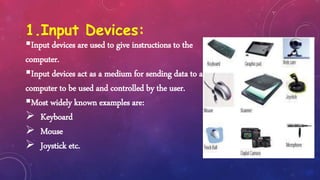
1.Input Devices:
Input devices are used to give instructions to the
computer.
Input devices act as a medium for sending data to a
computer to be used and controlled by the user.
Most widely known examples are:
 Keyboard
 Mouse
 Joystick etc.
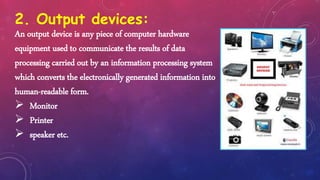
2. Output devices:
An output device is any piece of computer hardware
equipment used to communicate the results of data
processing carried out by an information processing system
which converts the electronically generated information into
human-readable form.
 Monitor
 Printer
 speaker etc.
3. PROCESSING DEVICES
 Data received from an input device, first
go through an intermediate stage before it
is sent to an output device.
 Processing is the intermediate stage where
raw data is transformed into meaningful
output information for the user.
 An example of a processing device is the
central processing unit (CPU), which is a
set of electronic circuitry that processes
and executes instructions.
4. MEMORY (STORAGE) DEVICES
• Memory devices in computer are capable
of storing information temporarily or
permanently.
• There are two types of memory;
• Primary and Secondary.
• Primary memory refers to RAM (random
access memory), which is used to store
instructions and data temporarily before
and after they are processed.
4. MEMORY (STORAGE) DEVICES
• RAM is volatile, which simply means it only
retains information when
• The computer is turned on and is cleared
once the computer turns off.
• Secondary memory refers to any external
storage media.
• Secondary memory is non-volatile, which
means that information can be stored
long-term.
• The most common example of an external
secondary memory device is the USB flash
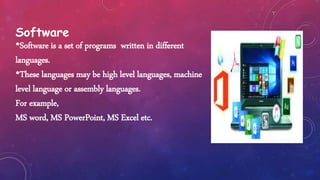
Software
•Software is a set of programs written in different
languages.
•These languages may be high level languages, machine
level language or assembly languages.
For example,
MS word, MS PowerPoint, MS Excel etc.
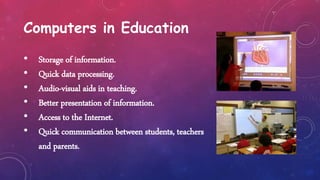
Computers in Education
• Storage of information.
• Quick data processing.
• Audio-visual aids in teaching.
• Better presentation of information.
• Access to the Internet.
• Quick communication between students, teachers
and parents.
1.Computers are a brilliant aid in teaching.
2.Computers have given impetus to distance education.
3.Computer software help better presentation of information.
IMPORTANCE
4.Computers enable access to the Internet which has information on
literally everything.
5.Computer, hard drives and storage devices are an excellent way to
store data.
REFERNCES
• Computer Applications by Sangeeta Panchal and Alka Sabharwal
• https://squareboat.com/blog/different-types-of-software-with-examples
• https://www.wikipedia.org
• https://techterms.com
• https://ecomputernotes.com
THANK YOU

Hardware and Software Components of Computer

  • 1.
    HARDWARE AND SOFTWARE COMPONENTSOF COMPUTER AND THEIR EDUCATIONAL IMPLICATIONS Dr. Roma Smart Joseph Teacher Educator I Lucknow I India
  • 2.
    Hardware Components: Hardware refersto any physical or tangible elements of Computer. There are four main Computer hardware components- •Input devices •Output Devices •Processing devices •Memory ( storage) devices
  • 3.
    1.Input Devices: Input devicesare used to give instructions to the computer. Input devices act as a medium for sending data to a computer to be used and controlled by the user. Most widely known examples are:  Keyboard  Mouse  Joystick etc.
  • 4.
    2. Output devices: Anoutput device is any piece of computer hardware equipment used to communicate the results of data processing carried out by an information processing system which converts the electronically generated information into human-readable form.  Monitor  Printer  speaker etc.
  • 5.
    3. PROCESSING DEVICES Data received from an input device, first go through an intermediate stage before it is sent to an output device.  Processing is the intermediate stage where raw data is transformed into meaningful output information for the user.  An example of a processing device is the central processing unit (CPU), which is a set of electronic circuitry that processes and executes instructions.
  • 6.
    4. MEMORY (STORAGE)DEVICES • Memory devices in computer are capable of storing information temporarily or permanently. • There are two types of memory; • Primary and Secondary. • Primary memory refers to RAM (random access memory), which is used to store instructions and data temporarily before and after they are processed.
  • 7.
    4. MEMORY (STORAGE)DEVICES • RAM is volatile, which simply means it only retains information when • The computer is turned on and is cleared once the computer turns off. • Secondary memory refers to any external storage media. • Secondary memory is non-volatile, which means that information can be stored long-term. • The most common example of an external secondary memory device is the USB flash
  • 8.
    Software •Software is aset of programs written in different languages. •These languages may be high level languages, machine level language or assembly languages. For example, MS word, MS PowerPoint, MS Excel etc.
  • 9.
    Computers in Education •Storage of information. • Quick data processing. • Audio-visual aids in teaching. • Better presentation of information. • Access to the Internet. • Quick communication between students, teachers and parents.
  • 10.
    1.Computers are abrilliant aid in teaching. 2.Computers have given impetus to distance education. 3.Computer software help better presentation of information. IMPORTANCE
  • 11.
    4.Computers enable accessto the Internet which has information on literally everything. 5.Computer, hard drives and storage devices are an excellent way to store data.
  • 12.
    REFERNCES • Computer Applicationsby Sangeeta Panchal and Alka Sabharwal • https://squareboat.com/blog/different-types-of-software-with-examples • https://www.wikipedia.org • https://techterms.com • https://ecomputernotes.com
  • 13.