Compliant Collaboration:
Responsibly Empower &
Sustain at Scale
Richard Harbridge
2toLead Chief Technology
Officer & Microsoft MVP
Tue., Mar. 15, 2022
Webinar
11:00 AM (EST)
RICHARD
HARBRIDGE
My twitter is @RHarbridge, I’m super friendly & I am proud to work at 2toLead.
CTO & MVP | SPEAKER & AUTHOR | SUPER FRIENDLY
What are we hearing?
Collaboration
Are we collaborating enough? Should we collaborate more? Why aren’t we collaborating more?
Of surveyed employees
believe that people in
their own
organization don’t
collaborate enough.
Of employees and
executives cite lack of
collaboration or
ineffective communication
for workplace failures.
86%
39%
Source: Salesforce
Source: Visix
Of employees say the
ability to collaborate
makes them more loyal.
33%
Source: The Economist
Maybe how we collaborate matters just as much as how much we collaborate?
Of surveyed professionals
depend on technology
to collaborate.
Of the respondents
experienced challenges
while working on their
collaboration tools.
59%
83%
Source: Alfresco
Source: Alfresco
Maybe how we collaborate matters just as much as how much we collaborate?
1. The Digital Path to Business Resilience | BCG
Some industry leaders have concerns around increased risk of data leakage and more as
collaboration volume increases along with velocity and variety.
Compliance
Collaboration
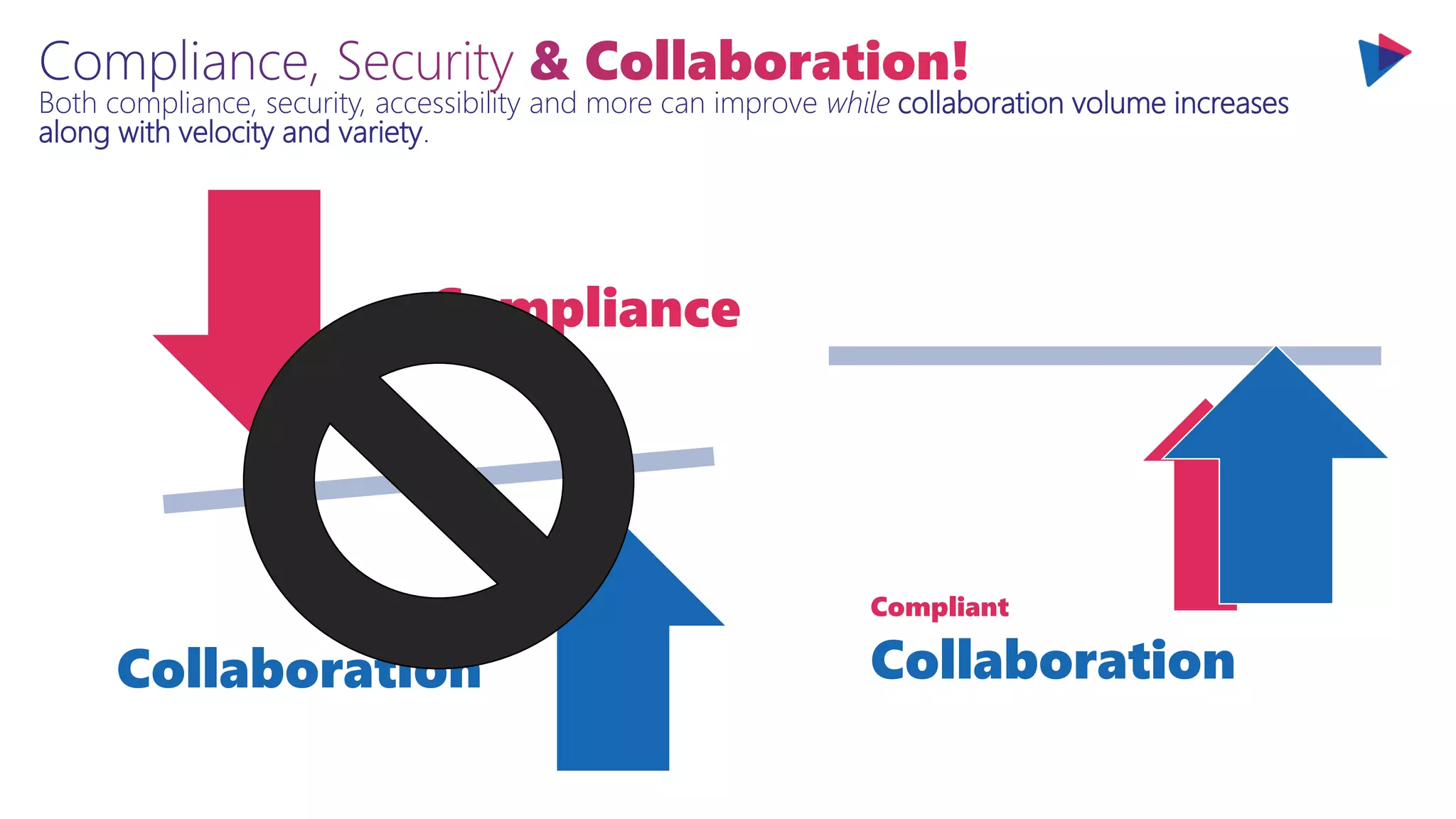
Both compliance, security, accessibility and more can improve while collaboration volume increases
along with velocity and variety.
Compliance
Collaboration
Both compliance, security, accessibility and more can improve while collaboration volume increases
along with velocity and variety.
Compliance
Collaboration
Compliant
Collaboration
Collaboration
Where’s the best practices?
Agenda
Comprehensive &
Connected Collaboration
Enhanced & Responsible Collaboration
Tackling Collaboration Sprawl At Scale
Planning For The Future Of Collaboration
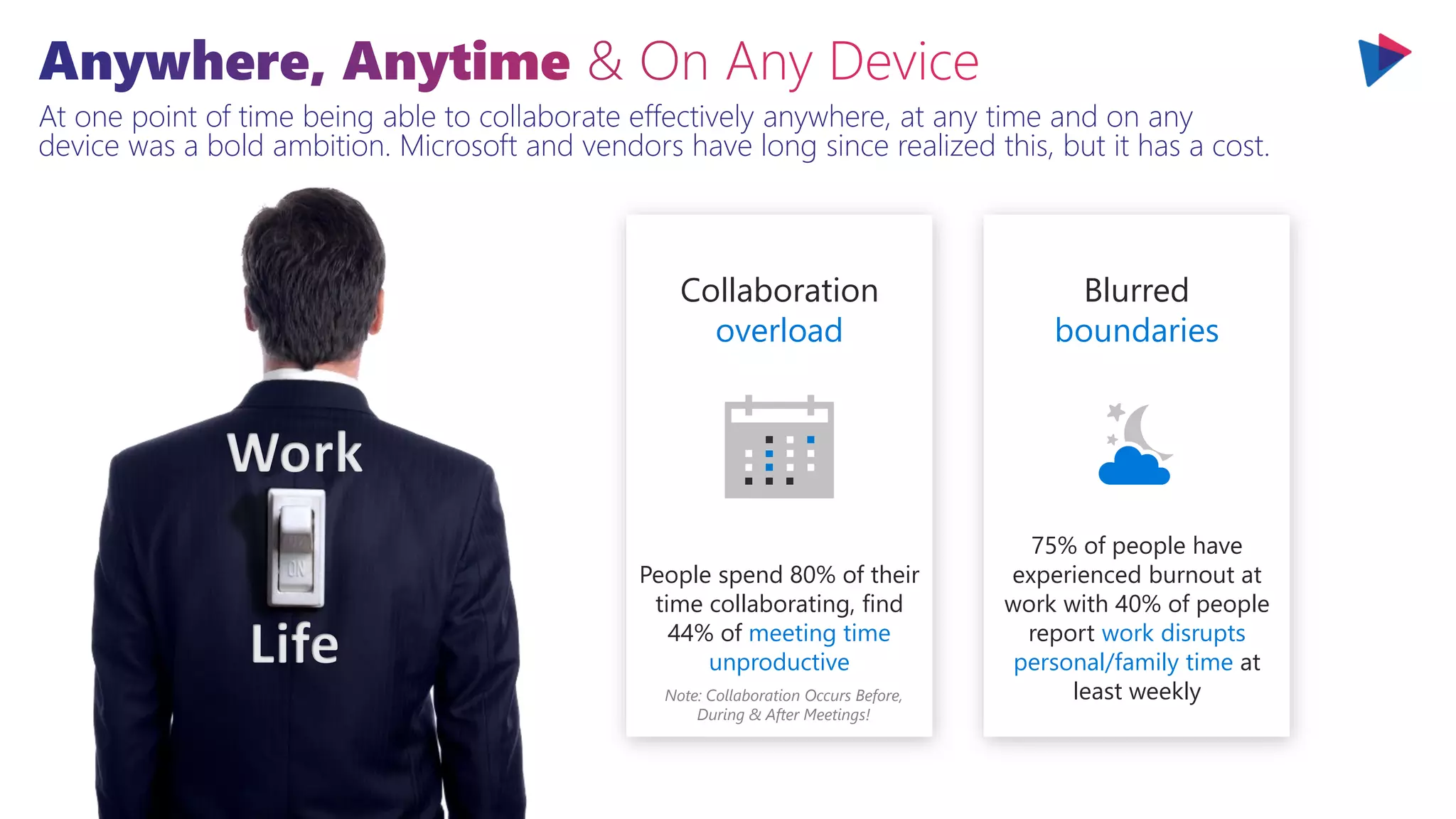
At one point of time being able to collaborate effectively anywhere, at any time and on any
device was a bold ambition. Microsoft and vendors have long since realized this, but it has a cost.
Collaboration
overload
People spend 80% of their
time collaborating, find
44% of meeting time
unproductive
Note: Collaboration Occurs Before,
During & After Meetings!
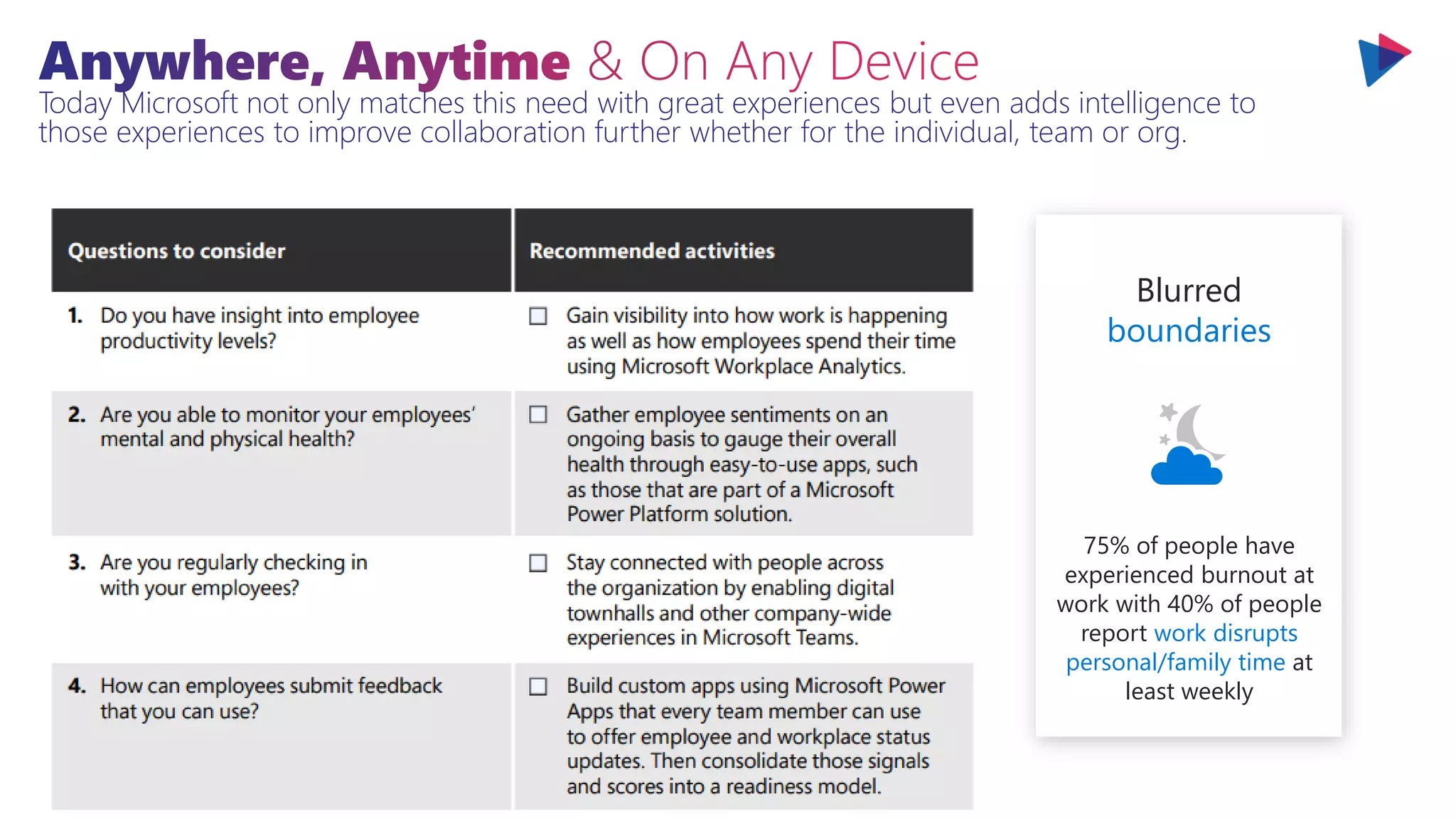
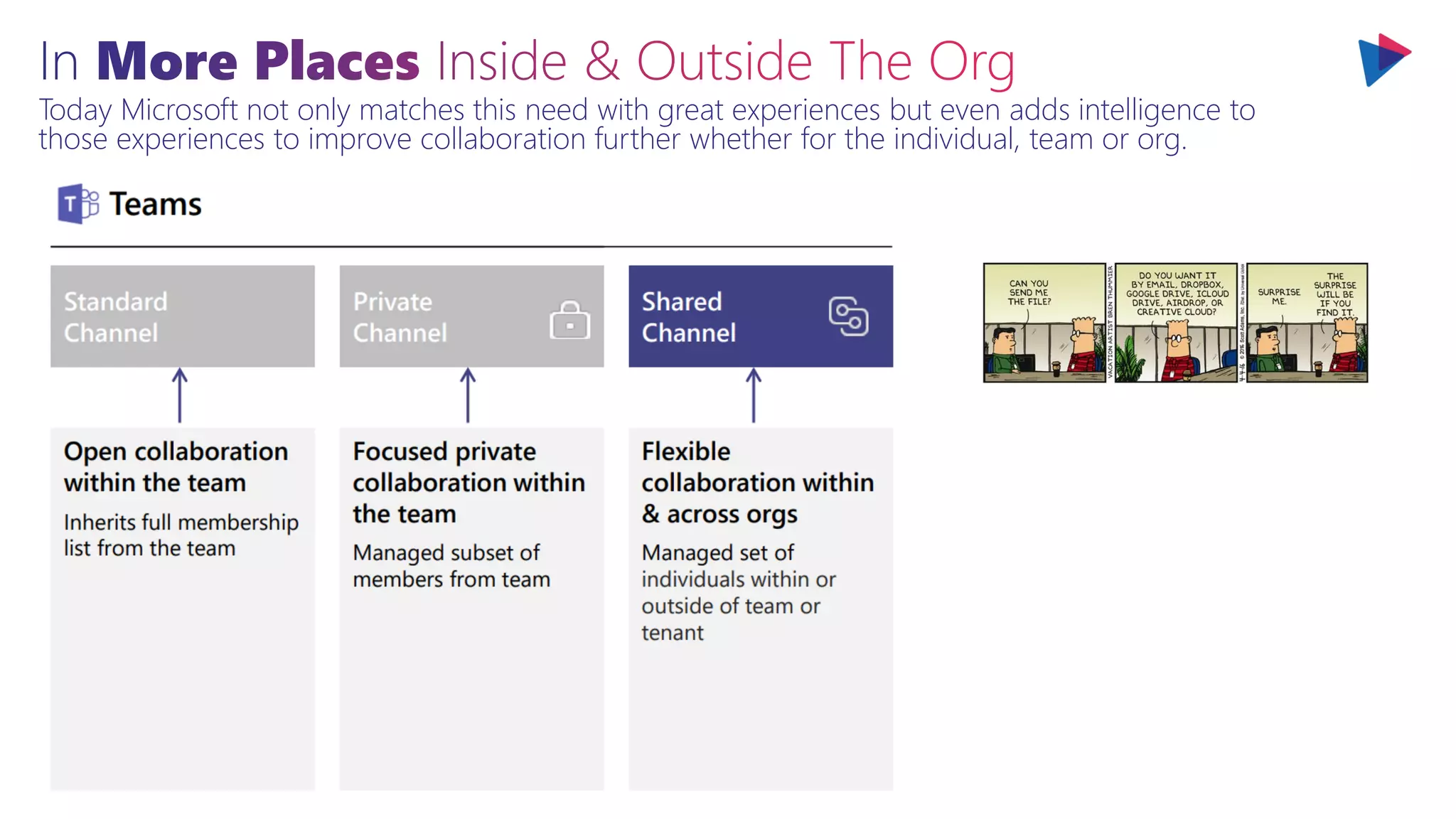
Today Microsoft not only matches this need with great experiences but even adds intelligence to
those experiences to improve collaboration further whether for the individual, team or org.
Collaboration
overload
People spend 80% of their
time collaborating, find
44% of meeting time
unproductive
Note: Collaboration Occurs Before,
During & After Meetings!
Most of the dissatisfaction in
meetings comes from not
collaborating enough before
it, after it, or in a different
way during it. Meetings are
important but they are often
overused and used poorly.
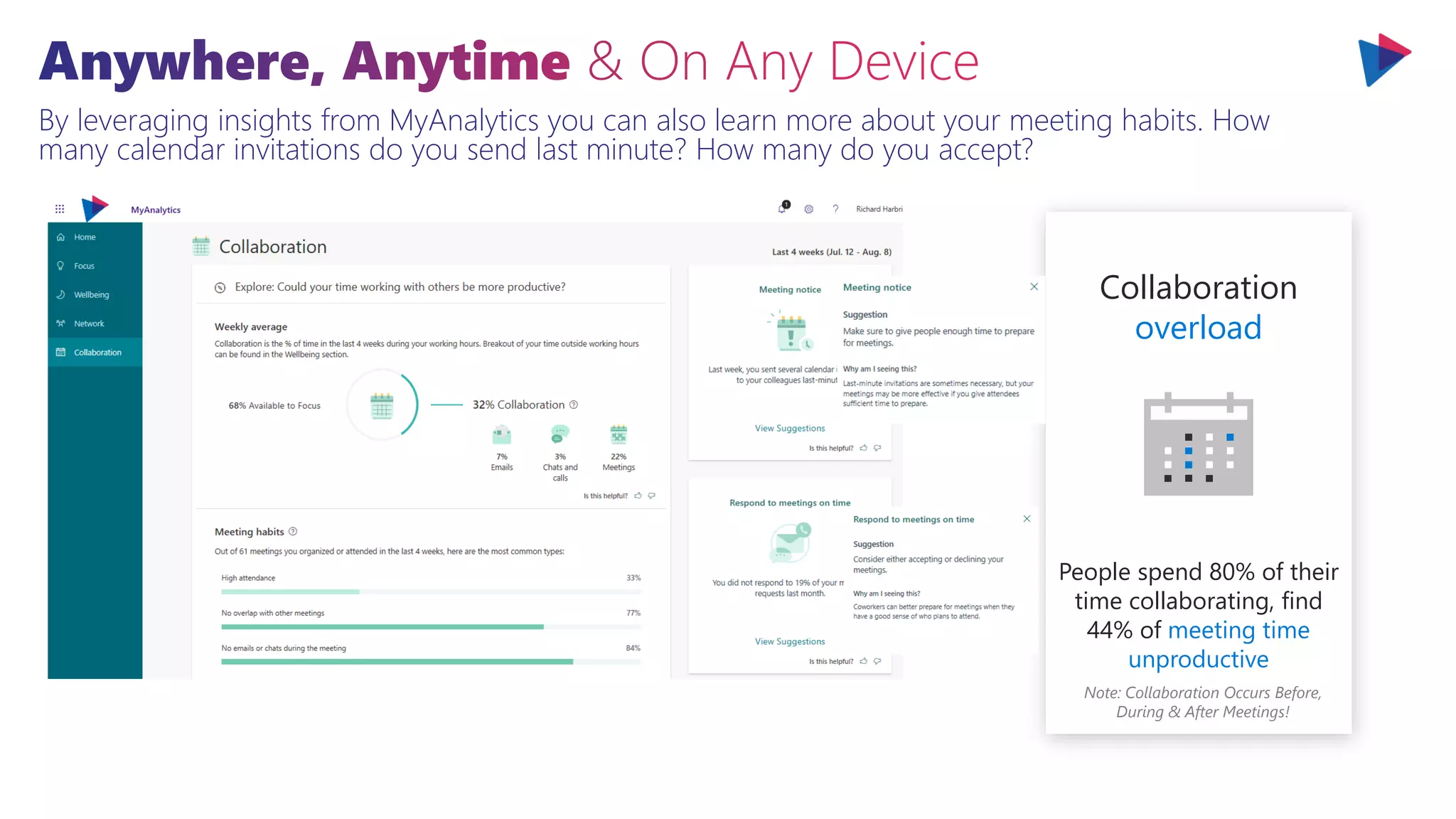
By leveraging insights from MyAnalytics you can also learn more about your meeting habits. How
many calendar invitations do you send last minute? How many do you accept?
Collaboration
overload
People spend 80% of their
time collaborating, find
44% of meeting time
unproductive
Note: Collaboration Occurs Before,
During & After Meetings!
Today Microsoft not only matches this need with great experiences but even adds intelligence to
those experiences to improve collaboration further whether for the individual, team or org.
Collaboration
overload
People spend 80% of their
time collaborating, find
44% of meeting time
unproductive
Note: Collaboration Occurs Before,
During & After Meetings!
At one point of time being able to collaborate effectively anywhere, at any time and on any
device was a bold ambition. Microsoft and vendors have long since realized this, but it has a cost.
Collaboration
overload
People spend 80% of their
time collaborating, find
44% of meeting time
unproductive
Note: Collaboration Occurs Before,
During & After Meetings!
At one point of time being able to collaborate effectively anywhere, at any time and on any
device was a bold ambition. Microsoft and vendors have long since realized this, but it has a cost.
Blurred
boundaries
75% of people have
experienced burnout at
work with 40% of people
report work disrupts
personal/family time at
least weekly
Collaboration
overload
People spend 80% of their
time collaborating, find
44% of meeting time
unproductive
Note: Collaboration Occurs Before,
During & After Meetings!
Today Microsoft not only matches this need with great experiences but even adds intelligence to
those experiences to improve collaboration further whether for the individual, team or org.
Blurred
boundaries
75% of people have
experienced burnout at
work with 40% of people
report work disrupts
personal/family time at
least weekly
Today Microsoft not only matches this need with great experiences but even adds intelligence to
those experiences to improve collaboration further whether for the individual, team or org.
Blurred
boundaries
75% of people have
experienced burnout at
work with 40% of people
report work disrupts
personal/family time at
least weekly
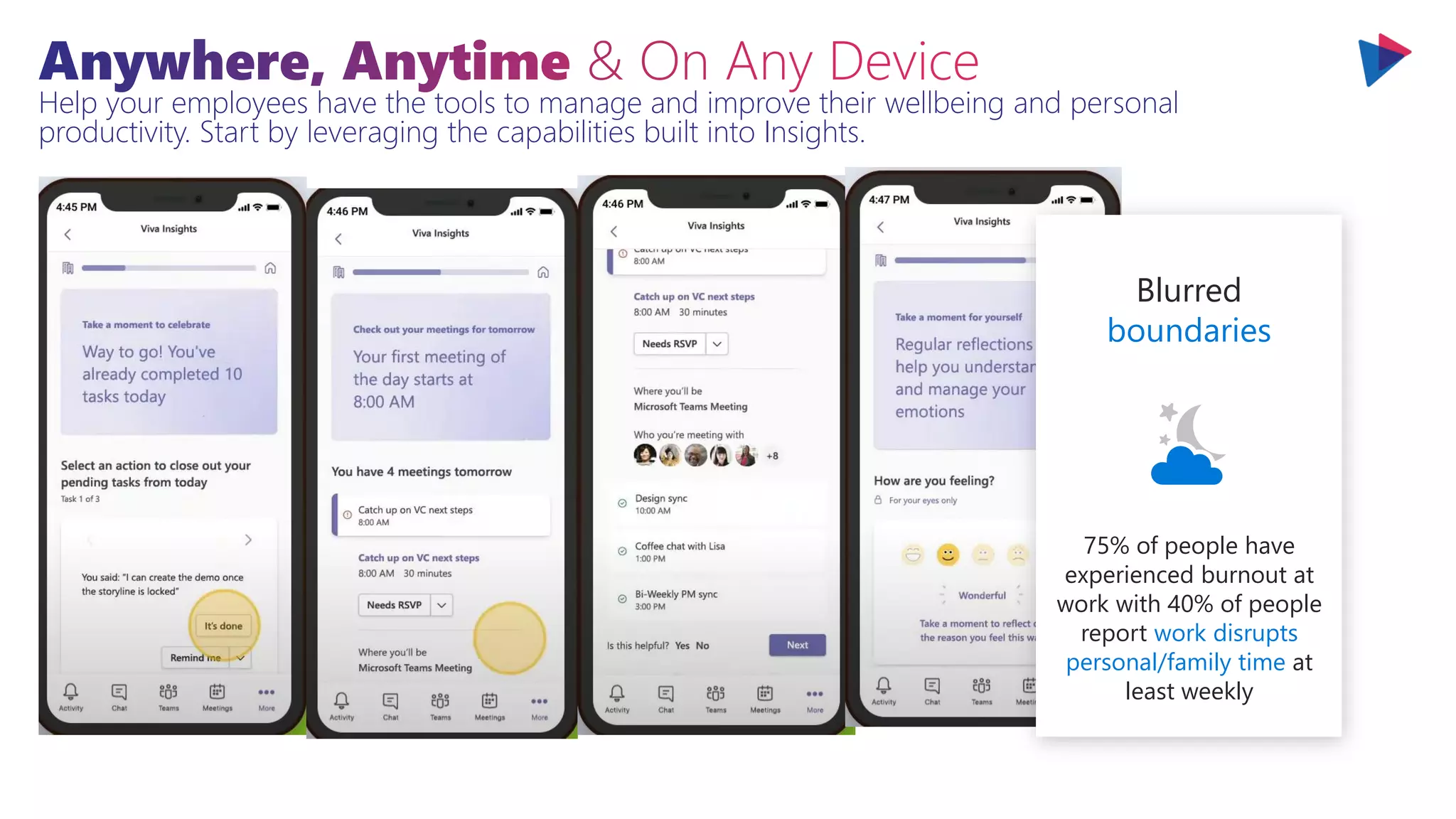
Help your employees have the tools to manage and improve their wellbeing and personal
productivity. Start by leveraging the capabilities built into Insights.
Blurred
boundaries
75% of people have
experienced burnout at
work with 40% of people
report work disrupts
personal/family time at
least weekly
Help your employees have the tools to manage and improve their wellbeing and personal
productivity. Start by leveraging the capabilities built into Insights.
Blurred
boundaries
75% of people have
experienced burnout at
work with 40% of people
report work disrupts
personal/family time at
least weekly
Help your employees have the tools to manage and improve their wellbeing and personal
productivity. Start by leveraging the capabilities built into Insights.
Blurred
boundaries
75% of people have
experienced burnout at
work with 40% of people
report work disrupts
personal/family time at
least weekly
We need solutions that help us manage our time, our conflicts, the things we might have forgotten or
missed and more. These options need to be available in Outlook, mobile and where we work.
Blurred
boundaries
75% of people have
experienced burnout at
work with 40% of people
report work disrupts
personal/family time at
least weekly
Help your employees have the tools to manage and improve their wellbeing and personal
productivity. Start by leveraging the capabilities built into Insights.
Blurred
boundaries
75% of people have
experienced burnout at
work with 40% of people
report work disrupts
personal/family time at
least weekly
Help your employees have the tools to manage and improve their wellbeing and personal
productivity. Start by leveraging the capabilities built into Insights.
Blurred
boundaries
75% of people have
experienced burnout at
work with 40% of people
report work disrupts
personal/family time at
least weekly
Help your employees have the tools to manage and improve their wellbeing and personal
productivity. Start by leveraging the capabilities built into Insights.
Blurred
boundaries
75% of people have
experienced burnout at
work with 40% of people
report work disrupts
personal/family time at
least weekly
We work with more people on a day-to-day basis today than ever before. The majority of people work
with 10 or more people on a day-to-day basis and half of those report working with more than 20.
Continuous
interruptions
People switch tasks every
40 seconds, take 25+
minutes to refocus after
interruptions
We need solutions that help us manage our time, our conflicts, the things we might have forgotten or
missed and more. These options need to be available in Outlook, mobile and where we work.
Continuous
interruptions
People switch tasks every
40 seconds, take 25+
minutes to refocus after
interruptions
We work across more silos, teams and orgs. We work with contractors, customers or partners more.
Collaborating with external parties is accelerating as are expectations around collaboration.
Today Microsoft not only matches this need with great experiences but even adds intelligence to
those experiences to improve collaboration further whether for the individual, team or org.
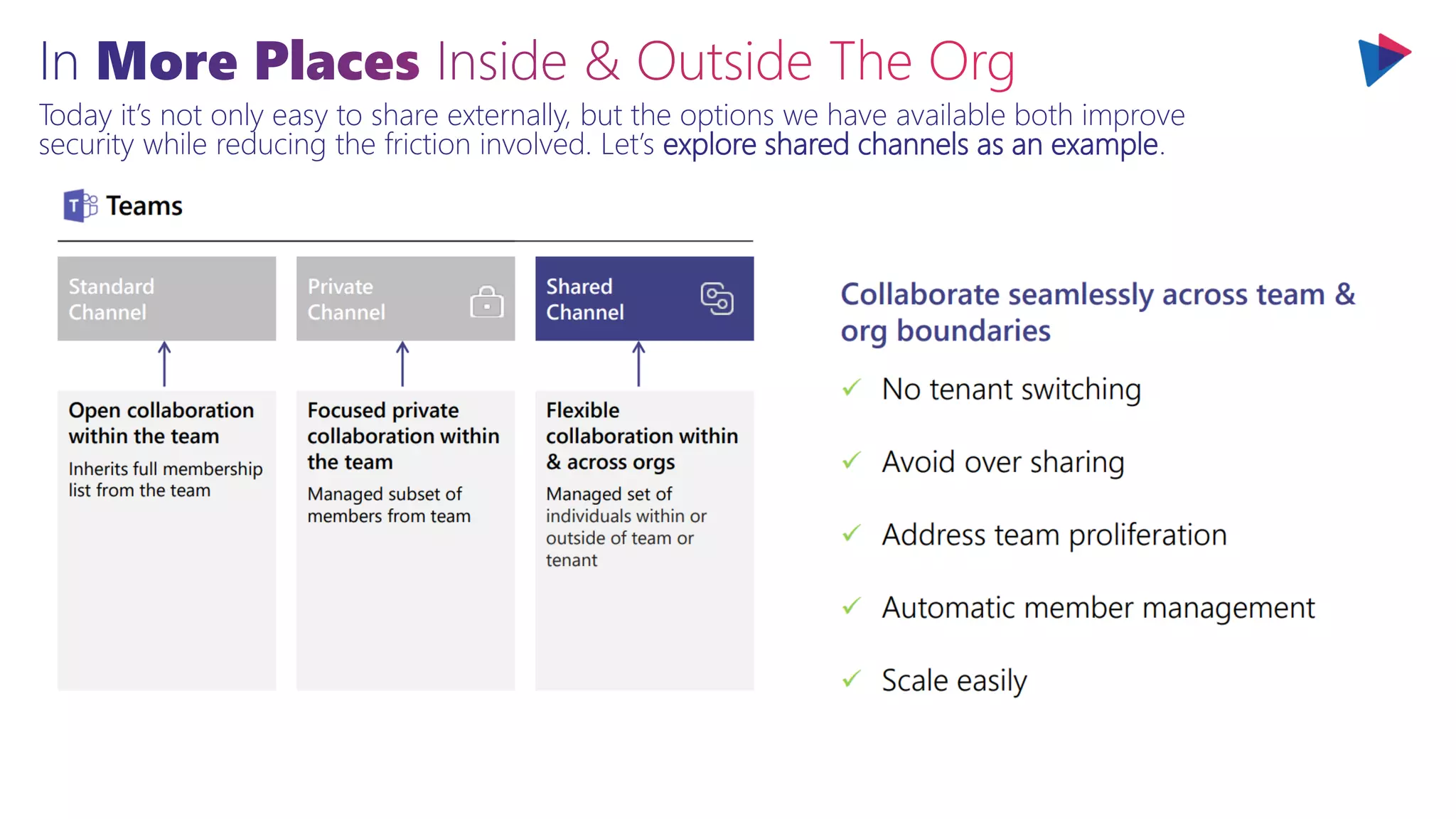
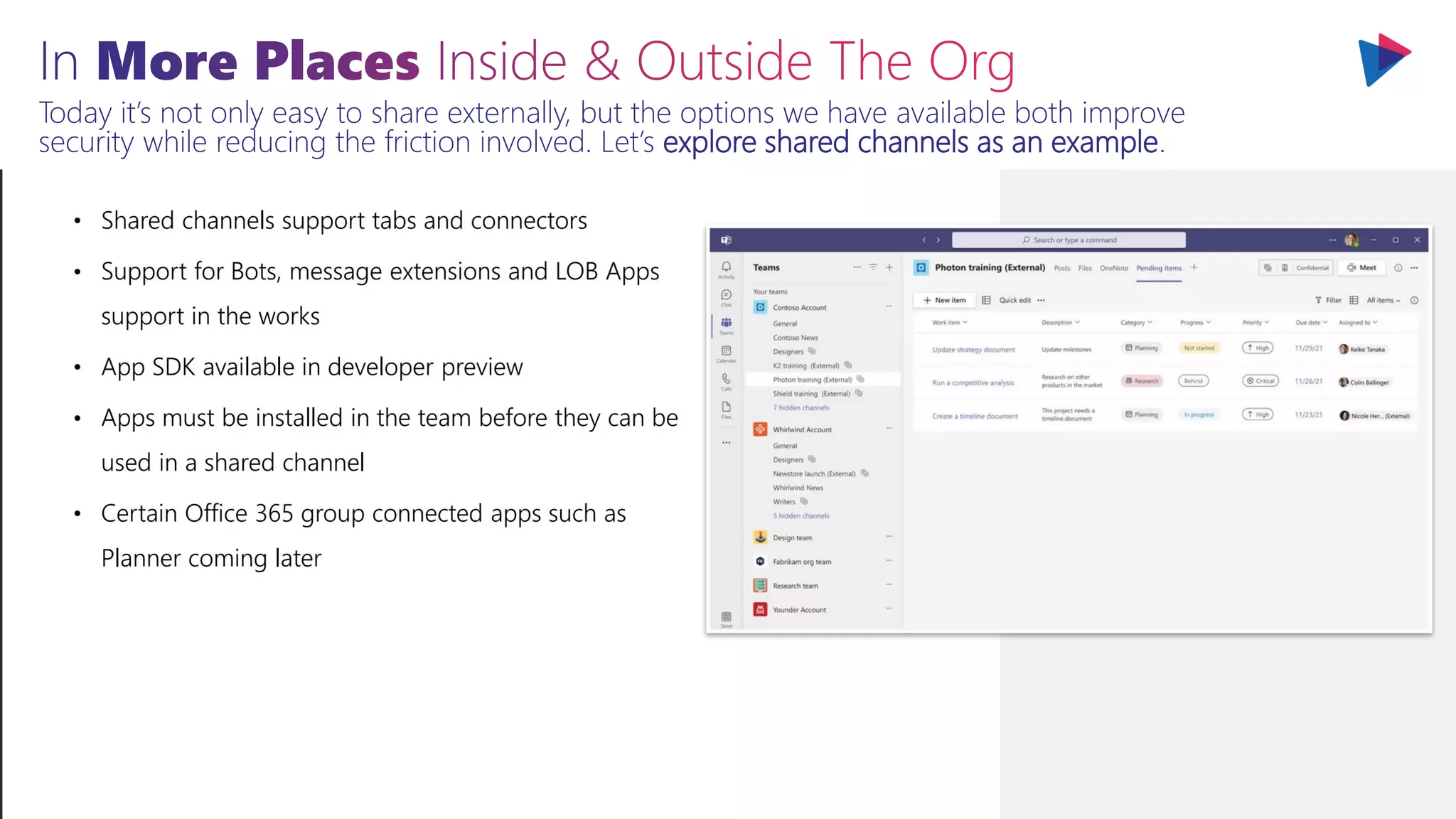
Today it’s not only easy to share externally, but the options we have available both improve
security while reducing the friction involved. Let’s explore shared channels as an example.
Today it’s not only easy to share externally, but the options we have available both improve
security while reducing the friction involved. Let’s explore shared channels as an example.
Today it’s not only easy to share externally, but the options we have available both improve
security while reducing the friction involved. Let’s explore shared channels as an example.
Today it’s not only easy to share externally, but the options we have available both improve
security while reducing the friction involved. Let’s explore shared channels as an example.
Today it’s not only easy to share externally, but the options we have available both improve
security while reducing the friction involved. Let’s explore shared channels as an example.
Today it’s not only easy to share externally, but the options we have available both improve
security while reducing the friction involved. Let’s explore shared channels as an example.
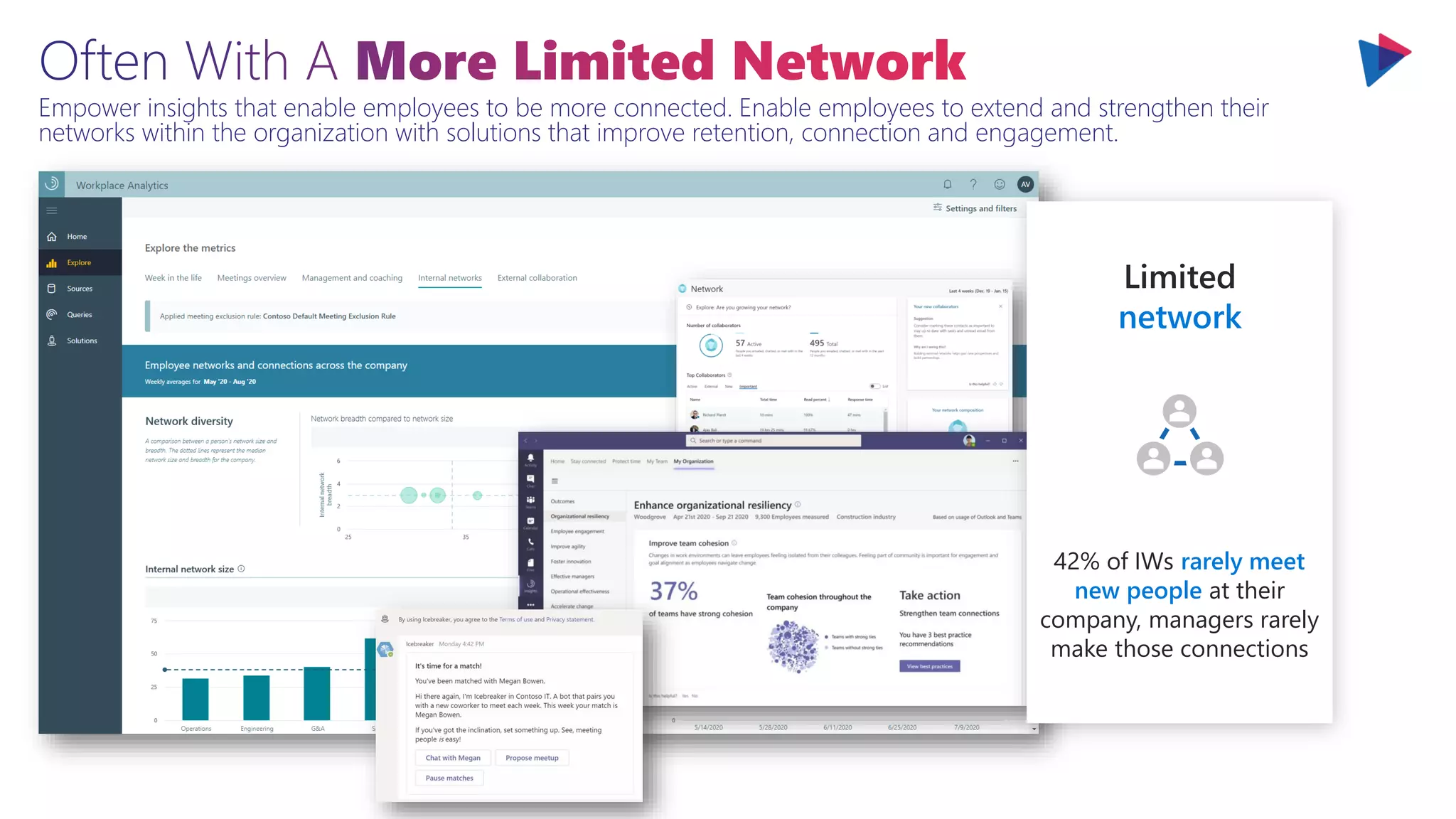
IWs rarely meet new people at their company; when they do meet new people, it’s most often
through a formal or informal company event. How many have you had during this pandemic?
Limited
network
42% of IWs rarely meet
new people at their
company, managers rarely
make those connections
Empower insights that enable employees to be more connected. Enable employees to extend and strengthen their
networks within the organization with solutions that improve retention, connection and engagement.
Limited
network
42% of IWs rarely meet
new people at their
company, managers rarely
make those connections
The actual actioning of your improvement plans, nudge plans or more has tooling built in and you can
use the measures to track impact it just requires planning. Be pro-active improving collaboration!
Agenda
Comprehensive & Connected Collaboration
Enhanced & Responsible
Collaboration
Tackling Collaboration Sprawl At Scale
Planning For The Future Of Collaboration
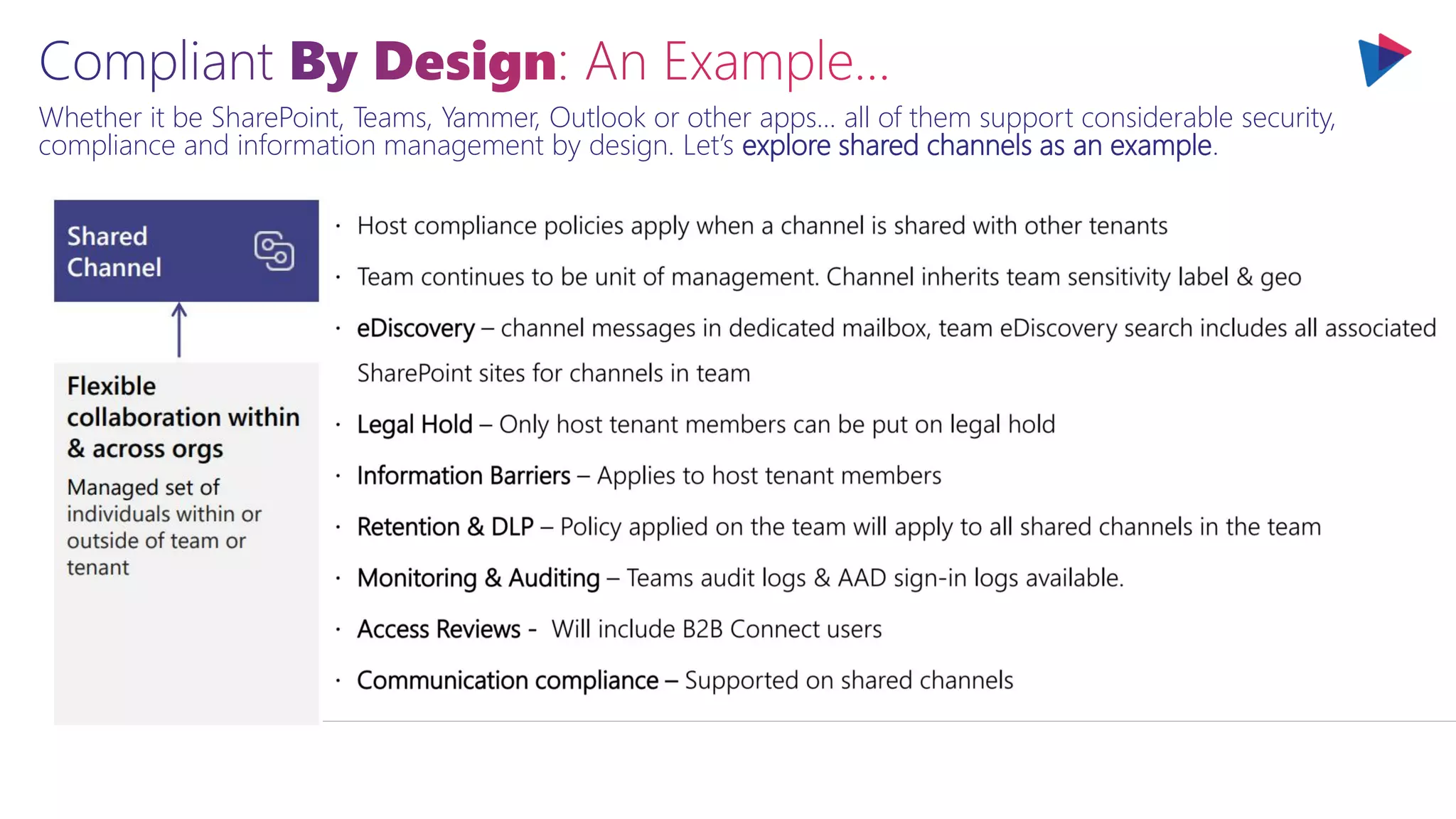
Whether it be SharePoint, Teams, Yammer, Outlook or other apps… all of them support considerable security,
compliance and information management by design. Let’s explore shared channels as an example.
Whether it be SharePoint, Teams, Yammer, Outlook or other apps… all of them support considerable security,
compliance and information management by design. Let’s explore shared channels as an example.
Whether it be SharePoint, Teams, Yammer, Outlook or other apps… all of them support considerable security,
compliance and information management by design. Let’s explore shared channels as an example.
Whether it be SharePoint, Teams, Yammer, Outlook or other apps… all of them support considerable security,
compliance and information management by design. Let’s explore shared channels as an example.
Whether it be SharePoint, Teams, Yammer, Outlook or other apps… all of them support considerable security,
compliance and information management by design. Let’s explore shared channels as an example.
Whether it be SharePoint, Teams, Yammer, Outlook or other apps… all of them support considerable security,
compliance and information management by design. Let’s explore shared channels as an example.
While that example of shared channels is a great one for how collaboration enablement and
configuration should be planned there are even more important experiences and patterns to prioritize.
Valuable experiences are driven by metadata which not only facilitate compliance and findability but also are the
corner stone for effective process and information management.
Valuable experiences are driven by metadata which not only facilitate compliance and findability but also are the corner
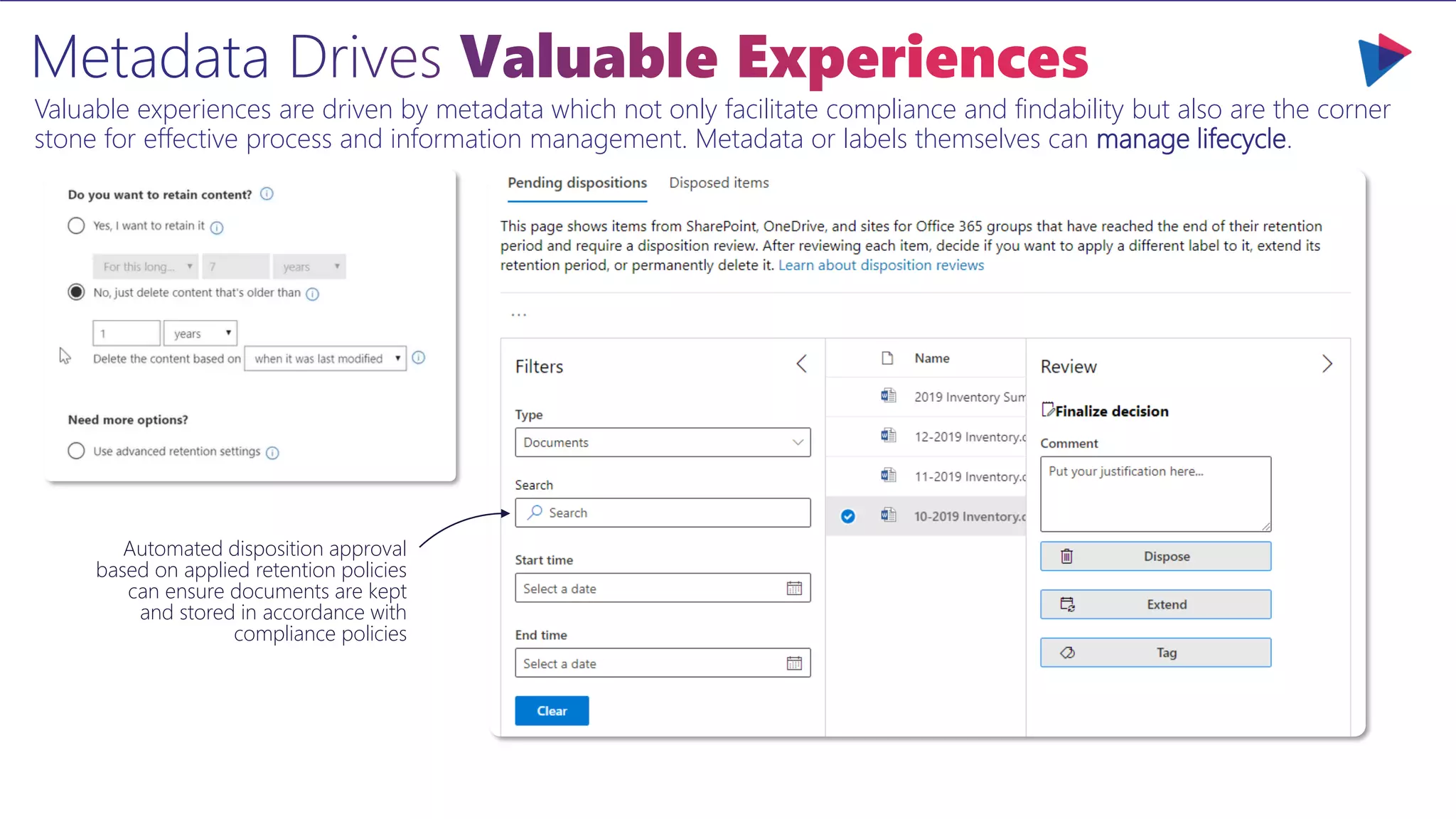
stone for effective process and information management. Metadata or labels themselves can manage lifecycle.
Automated disposition approval
based on applied retention policies
can ensure documents are kept
and stored in accordance with
compliance policies
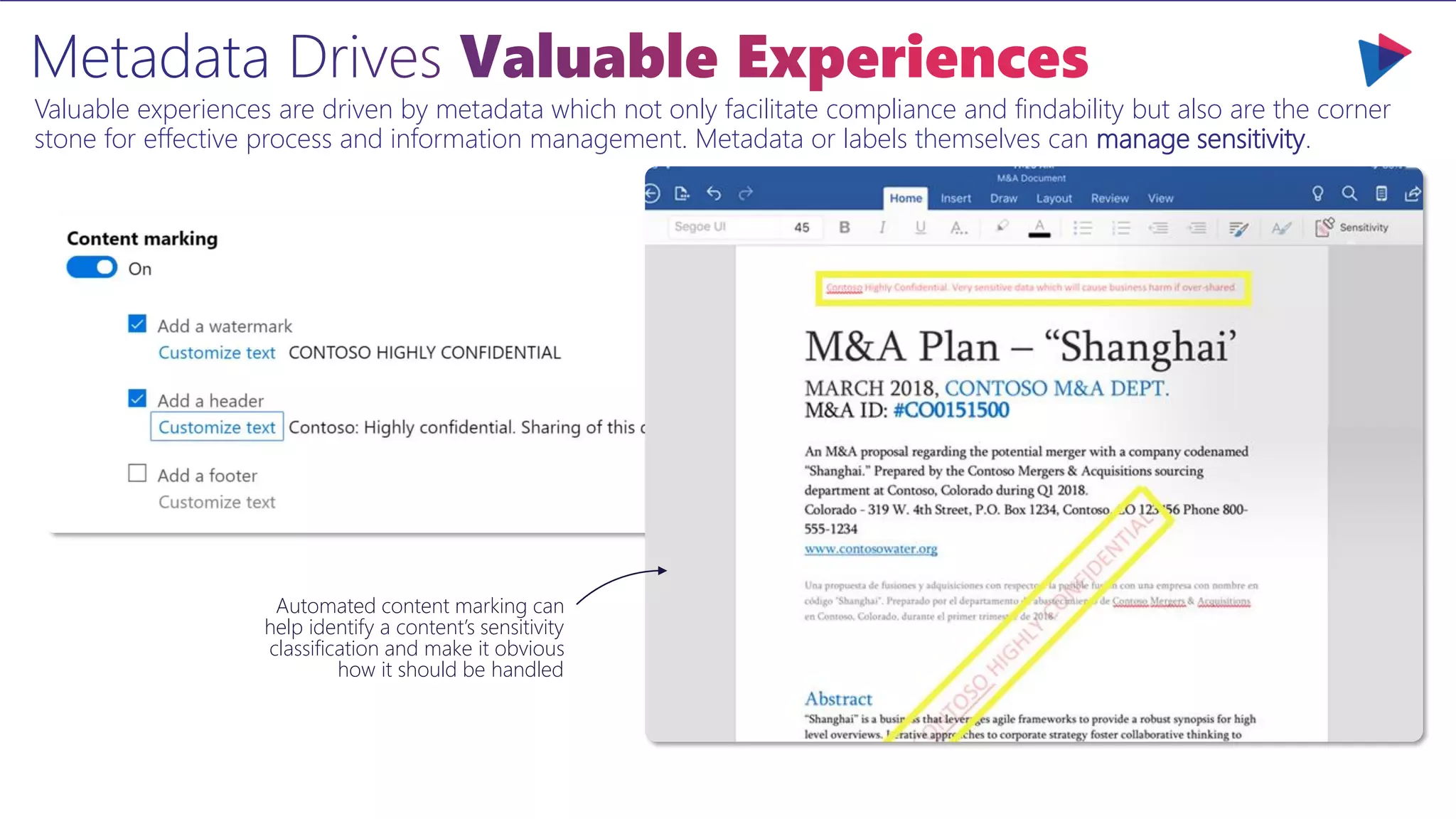
Automated content marking can
help identify a content’s sensitivity
classification and make it obvious
how it should be handled
Valuable experiences are driven by metadata which not only facilitate compliance and findability but also are the corner
stone for effective process and information management. Metadata or labels themselves can manage sensitivity.
The metadata about each workspace that is automatically tagged or assigned when filing becomes invaluable for
searching for, retrieving and working with that content as a user or when applying sensitivity or retention rules.
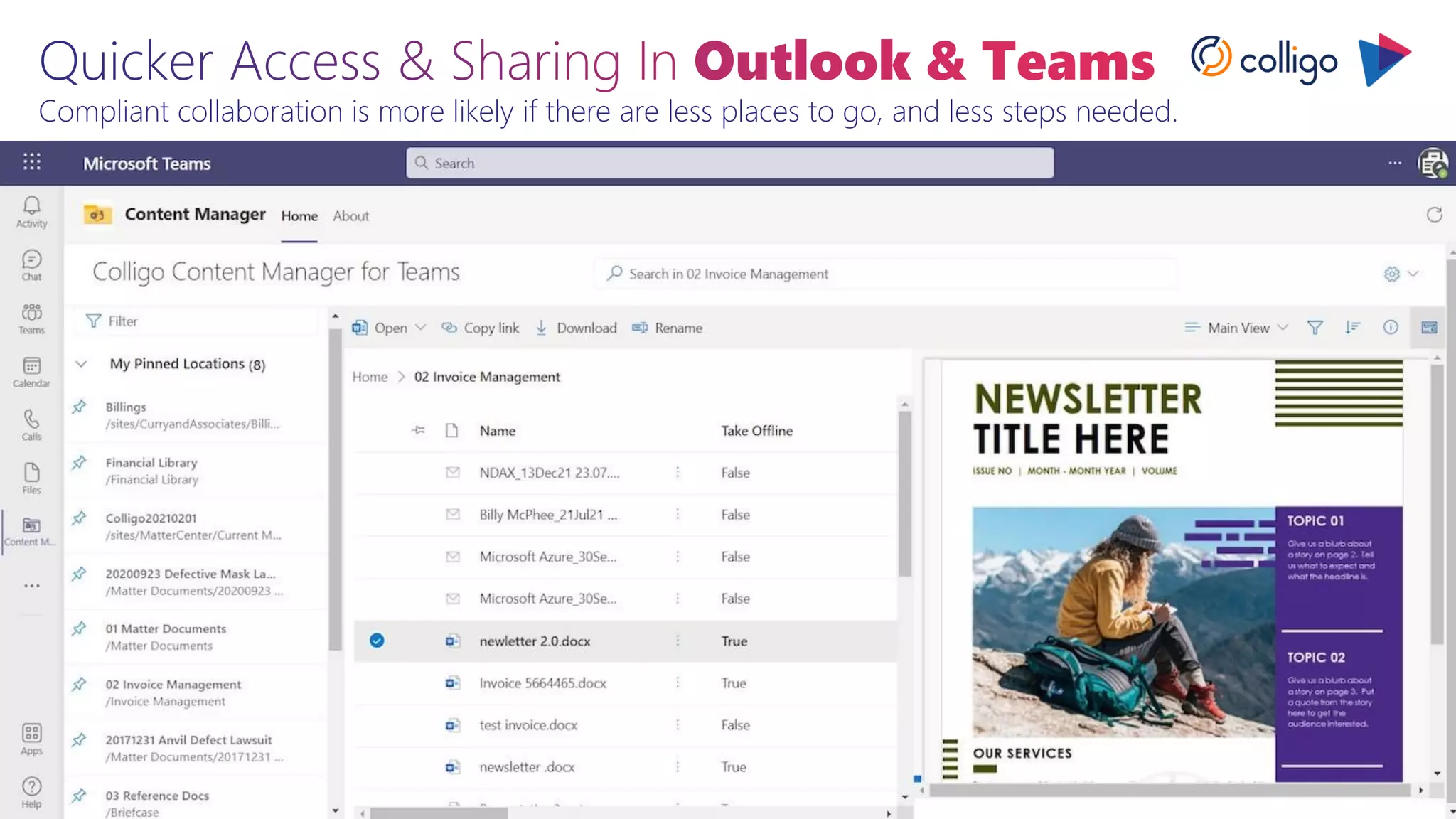
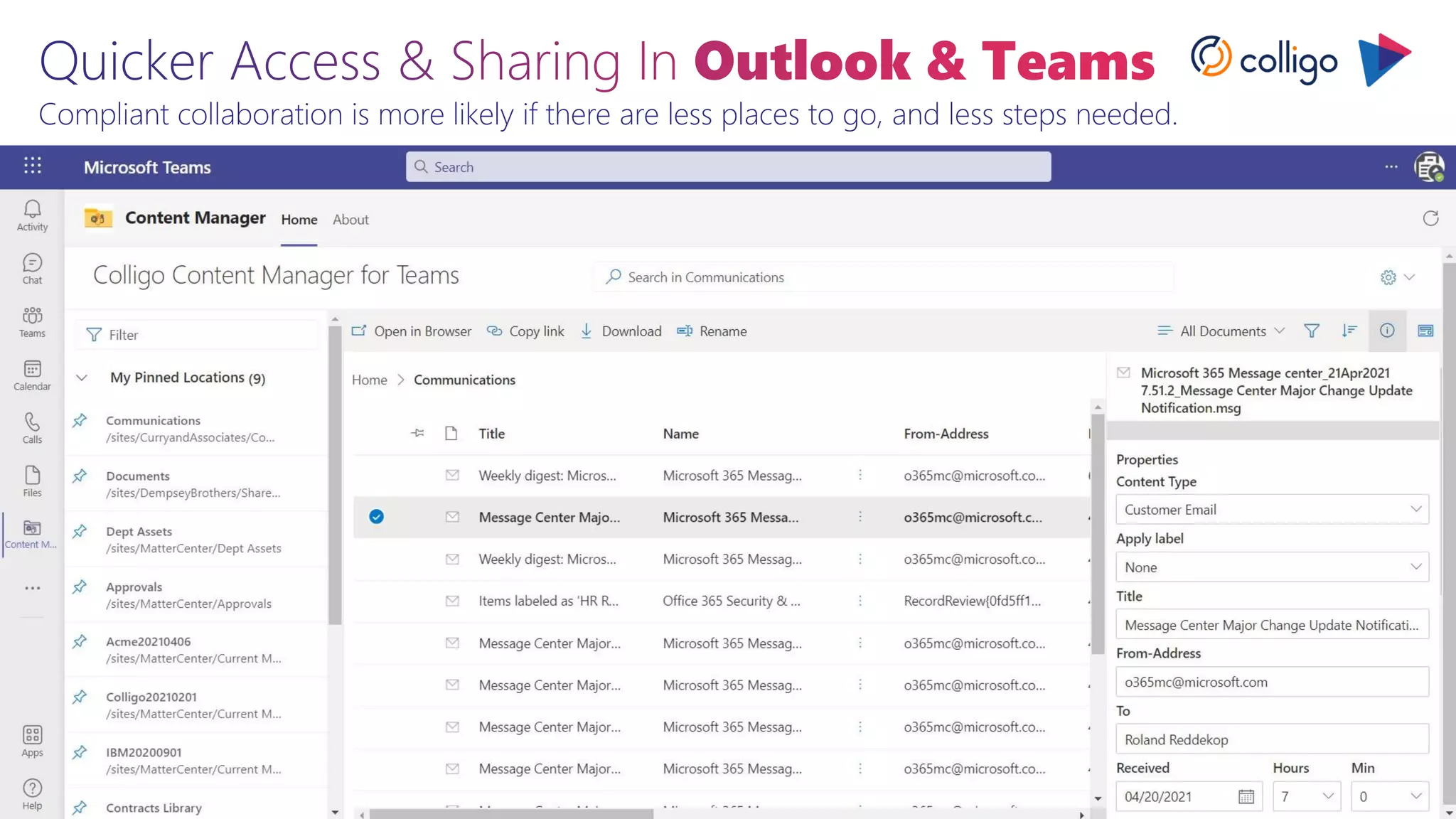
Collaboration happens in Outlook and sometimes not with links. Enable collaboration improvement.
Compliant collaboration is more likely if there are less places to go, and less steps needed.
New AI and intelligent content services and capabilities make it easier to build content understanding and
classification apps directly into the content management flow such as with SharePoint Syntex.
Object detection
Form processing
Document
understanding
Manual
Process digital content -
photos, scans,
receipts, business cards,
videos with OCR & text
Capture content types and
metadata from purchase
orders, applications, other
structured documents
Customize for
your org’s forms
Taught by your
subject matter experts
Capture content types and
metadata from contracts,
resumes, other
unstructured documents
Smart, right out of the box
Data entry and labor-
intensive processing
Any content
New AI and intelligent content services and capabilities make it easier to build content understanding and
classification apps directly into the content management flow such as with SharePoint Syntex.
Classifying this content has incredible benefits from sensitivity protection to retention management. If
we can avoid risks by classifying content automatically, by default, and easily we can reduce our risk.
Classifying this content has incredible benefits from sensitivity protection to retention management. If
we can avoid risks by classifying content automatically, by default, and easily we can reduce our risk.
Classifying this content has incredible benefits from sensitivity protection to retention management. If
we can avoid risks by classifying content automatically, by default, and easily we can reduce our risk.
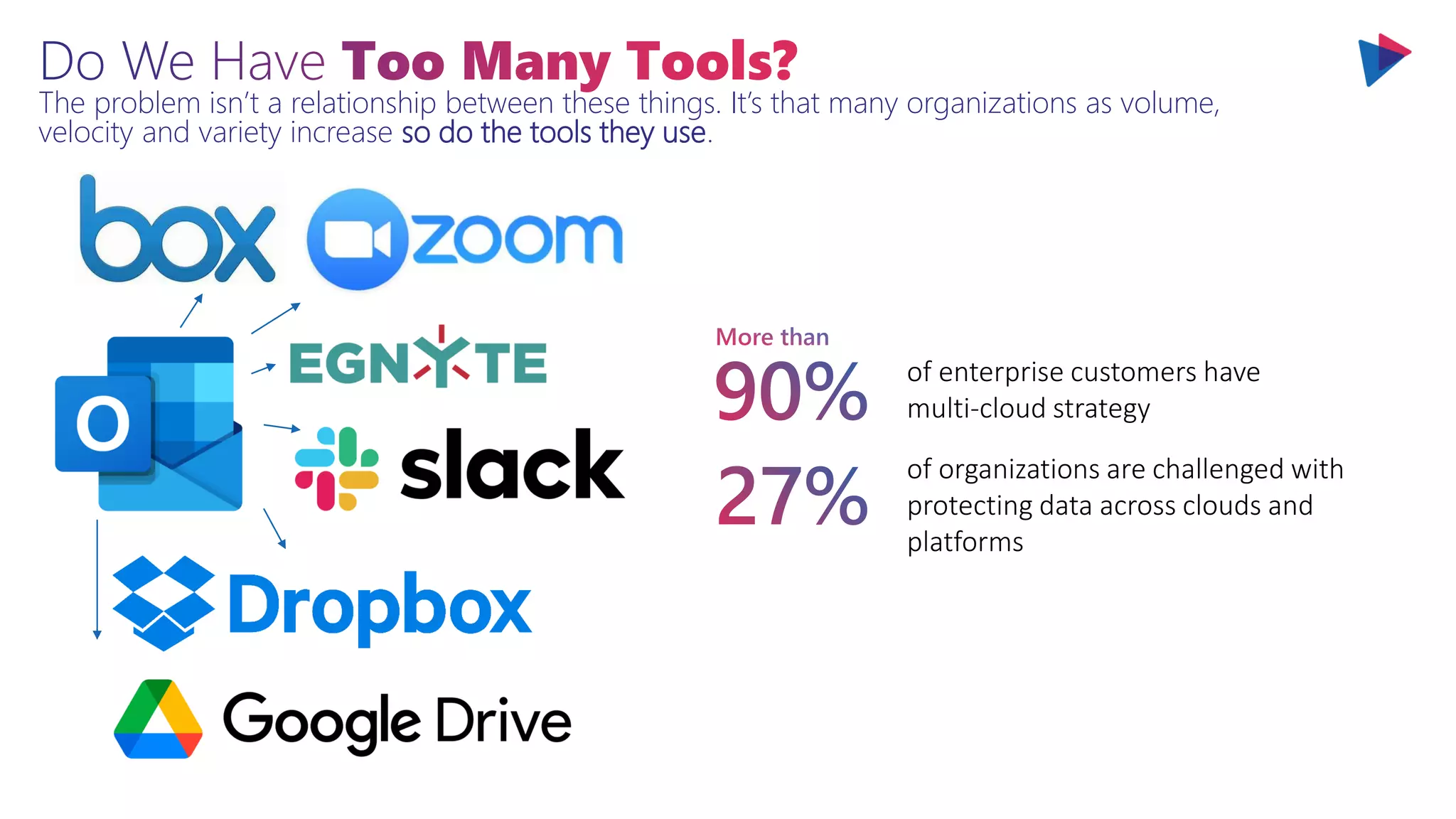
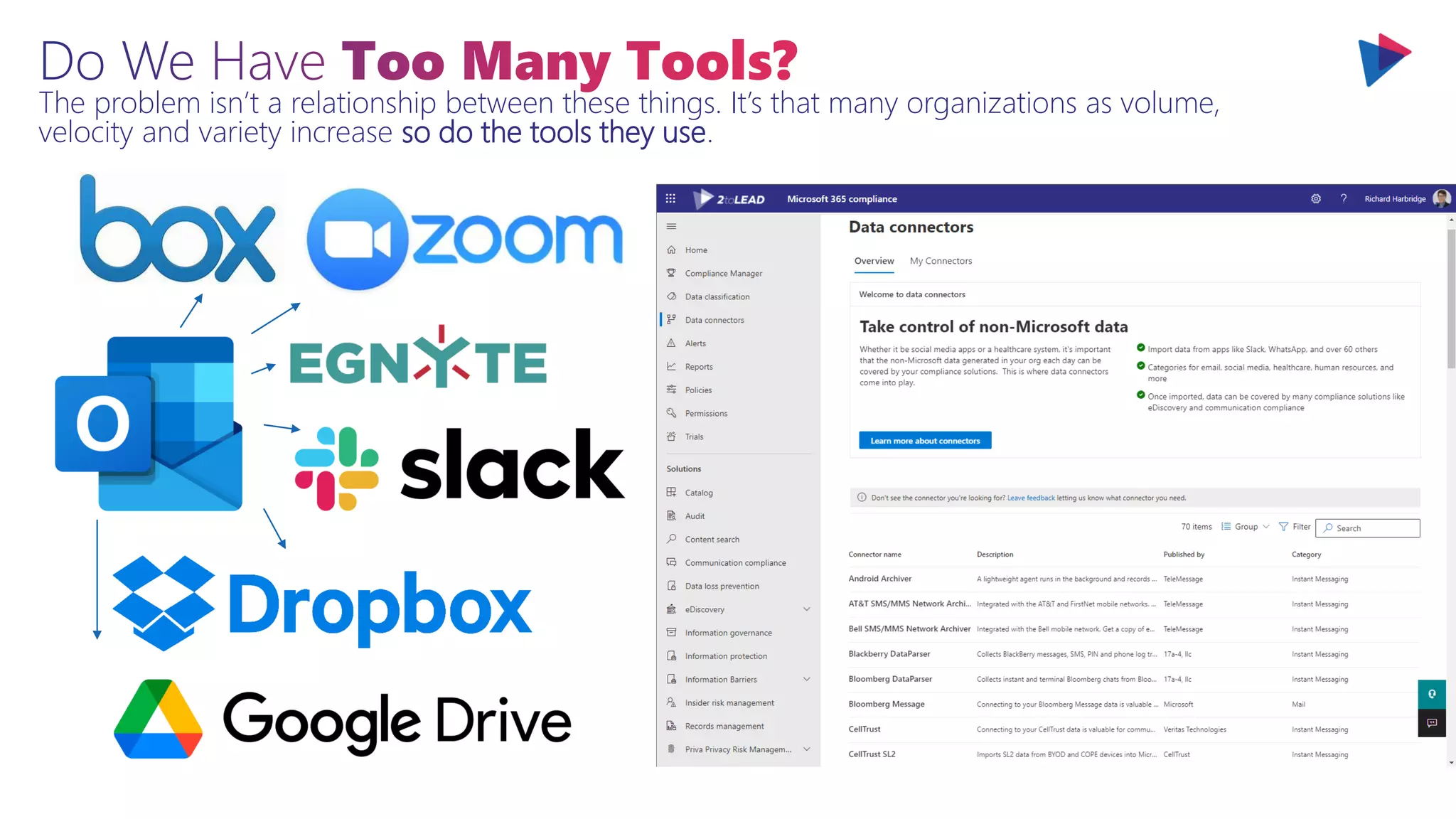
The problem isn’t a relationship between these things. It’s that many organizations as volume,
velocity and variety increase so do the tools they use.
The problem isn’t a relationship between these things. It’s that many organizations as volume,
velocity and variety increase so do the tools they use.
The problem isn’t a relationship between these things. It’s that many organizations as volume,
velocity and variety increase so do the tools they use.
There is a comprehensive strategy from the architecture level to the experience level that is responsible
for why Microsoft 365 scales collaboration, compliance and security across applications and solutions.
Microsoft Collaborative Apps
Device OS
UX Microsoft Teams Microsoft Office
Components Fluid Framework • Adaptive Cards • Connectors
Logic Azure PaaS Power Platform
Data Microsoft Graph Microsoft Dataverse
Communications Azure Communications Services
Identity Azure Active Directory
Pro-dev Low/no code
Legacy
Applications
High
Maintenance
Cost
Lower
Performance
Technical
Limitation
Worse &
Disconnected
User Experience
Modern
Applications
More Efficient
With Lower
Maintenance
Cost
High
Performance &
More Scalable
More Secure &
More
Manageable
Better & More
Integrated User
Experiences
Agenda
Comprehensive & Connected Collaboration
Enhanced & Responsible Collaboration
Tackling Collaboration
Sprawl At Scale
Planning For The Future Of Collaboration
Problem: Collaboration Spaces Grow Over Time…
The modern digital workplace and Intranet has a continually increasing number of digital
spaces or ‘sites’ where content is stored and shared.
Problem: Collaboration Spaces Grow Over Time …
Most organizations don’t know who created a digital space (SP Site, Team, Yammer
Community, etc.). What was its purpose? It’s department? It’s product, client, project, etc.?
As an end user this
makes navigating these
spaces extremely
challenging.
Think it’s better as an
administrator or digital
workplace/intranet leader?
It’s not.
Problem: Collaboration Spaces Grow Over Time …
Most organizations don’t know who created a digital space (SP Site, Team, Yammer
Community, etc.). What was its purpose? It’s department? It’s product, client, project,
etc.?
As an end user this
makes navigating these
spaces extremely
challenging.
Think it’s better as an
administrator or digital
workplace/intranet leader?
It’s not.
Why Do We Need To Manage Sprawl?
What are the common issues that come with unmanaged sprawl of Microsoft Teams,
SharePoint Sites, or even Yammer Communities? www.M365Sprawl.com
Ineffective
Naming
Unclear Purpose Or
Workspace Focus
Unclear Official vs
Unofficial
Cannot Differentiate
At A Glance
Inappropriate Name
Usage
Owners
Missing
Orphaned
Teams/Sites
Unmanaged
Teams/Sites
Sponsor vs Owner
Challenge
Private Channels
(Don’t Require
Owner)
Redundant
Teams/Sites
Decreased User
Confidence
Inconsistent
Workspaces
Increased
Operational Load
Increased Costs To
Support
Data Loss
Risks
Limited Ability To
Target Labels For
Information
Protection
Limited Ability To
Determine Risk
Limited Ability To
Pro-actively Mitigate
Risks
Limited Permission
Review & Increased
Chances Of Over
Sharing
Loss Of
Control
Often Unmanaged
Use Of Apps (Cannot
Target)
Unmanaged
Integration
Limited Ability To
Target Labels For
Retention
No Clear Escalation If
Owner Missing Or
Unresponsive
Slower
Team/Site
Start
Not Tailored Or Fit
To Purpose
Inconsistent
Design/Layout Leads
To Relearning
Hesitation To
Optimize Created
Spaces
Technically
Challenging
Navigation
Productivity
Costs
Challenging For New
Users To Ramp
Hard To Find
Workspaces
Uncertain Who
Owns A Workspace
Reliance On Others
To Link
Training &
Adoption
Challenges
When To Use What
Challenges
No Consistency
Makes It Harder To
Train
Unmanaged
Workspaces Cannot
Be Targeted With
Guidance
Difficulty Identifying
Champions & Pro-
actively Targeting
Champions
M365Sprawl.com
Why is asking a few extra questions on provisioning so important? What value does this
extra metadata provide once we have it for reference?
Workspace
(Site/Team)
Metadata
Enables Default
Metadata
Empowers Effective
Labelling
Targeted Content
Protection
Targeted Retention
Management
Differentiate
Templates
Faster Adoption
Improved
Productivity
Consistency
Manage More
Effectively
Target Support
Improve Lifecycle
Management
Reduce Redundancy
& Empower
Discovery
Sample Metadata Questions
• What is the purpose or business reason
for this workspace?
• What division does this relate to?
• What department does this relate to?
• What product does this relate to?
• What customer does this relate to?
• What project does this relate to?
• Will this workspace contain highly
confidential information?
• Who is the business sponsor for this
workspace?
• What should the visibility of this
workspace be? Should it be shown in
the directory?
While OOTB can work great for many smaller orgs (less than 100 users), most need more
structure to support governance, lifecycle management, and better search/navigation
experiences.
Out Of The Box
●
By centralizing and governing the creation of ‘spaces’ (groups, teams, sites etc.) we can
improve content organization and apply things like default metadata and pre-configured
templates.
FREE: https://docs.microsoft.com/en-us/microsoftteams/platform/samples/app-templates#request-a-team
Watch out for premium connector costs with Power Automate on the provisioning! (This is just meant as an example).
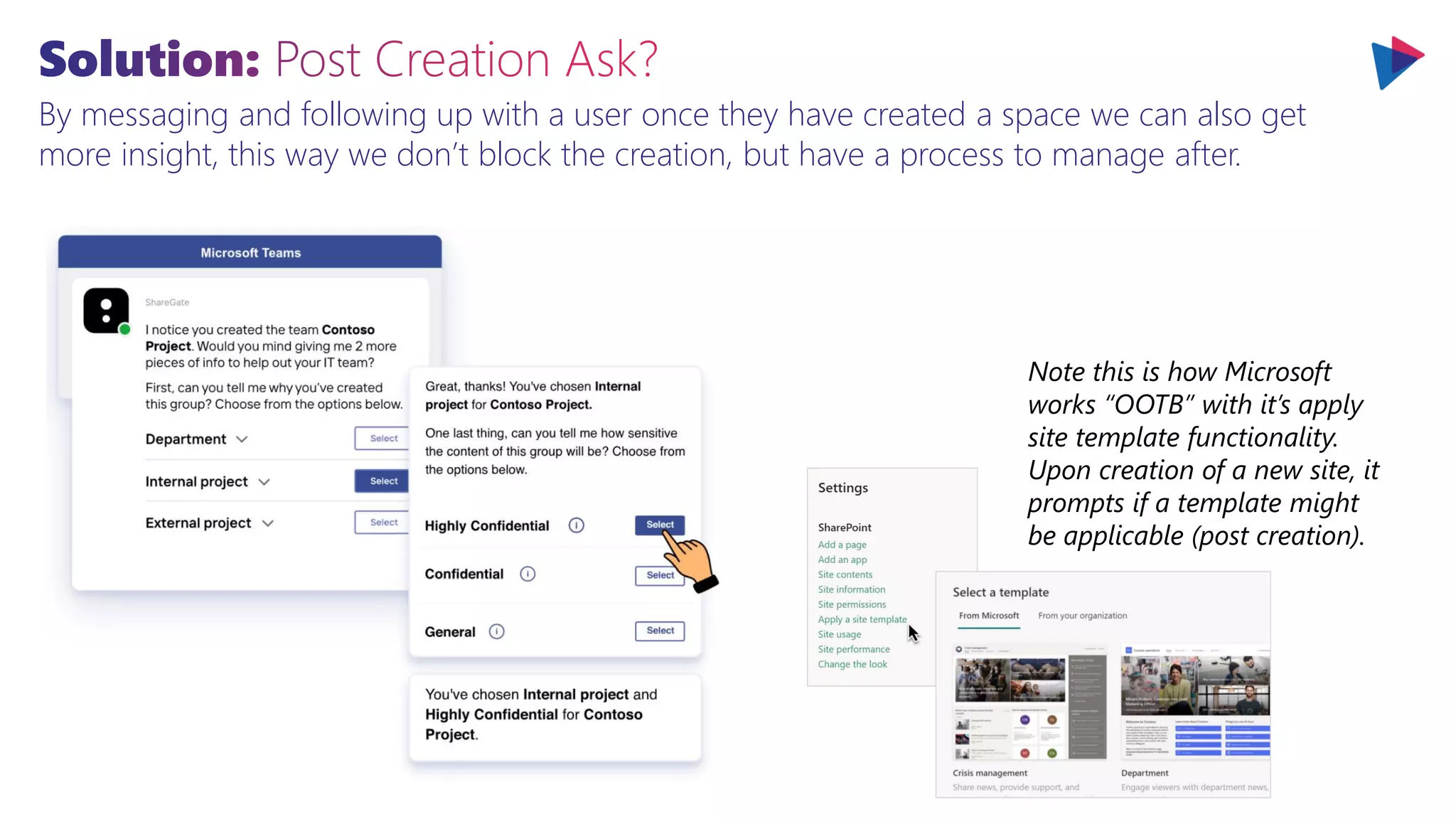
By messaging and following up with a user once they have created a space we can also get
more insight, this way we don’t block the creation, but have a process to manage after.
Note this is how Microsoft
works “OOTB” with it’s apply
site template functionality.
Upon creation of a new site, it
prompts if a template might
be applicable (post creation).
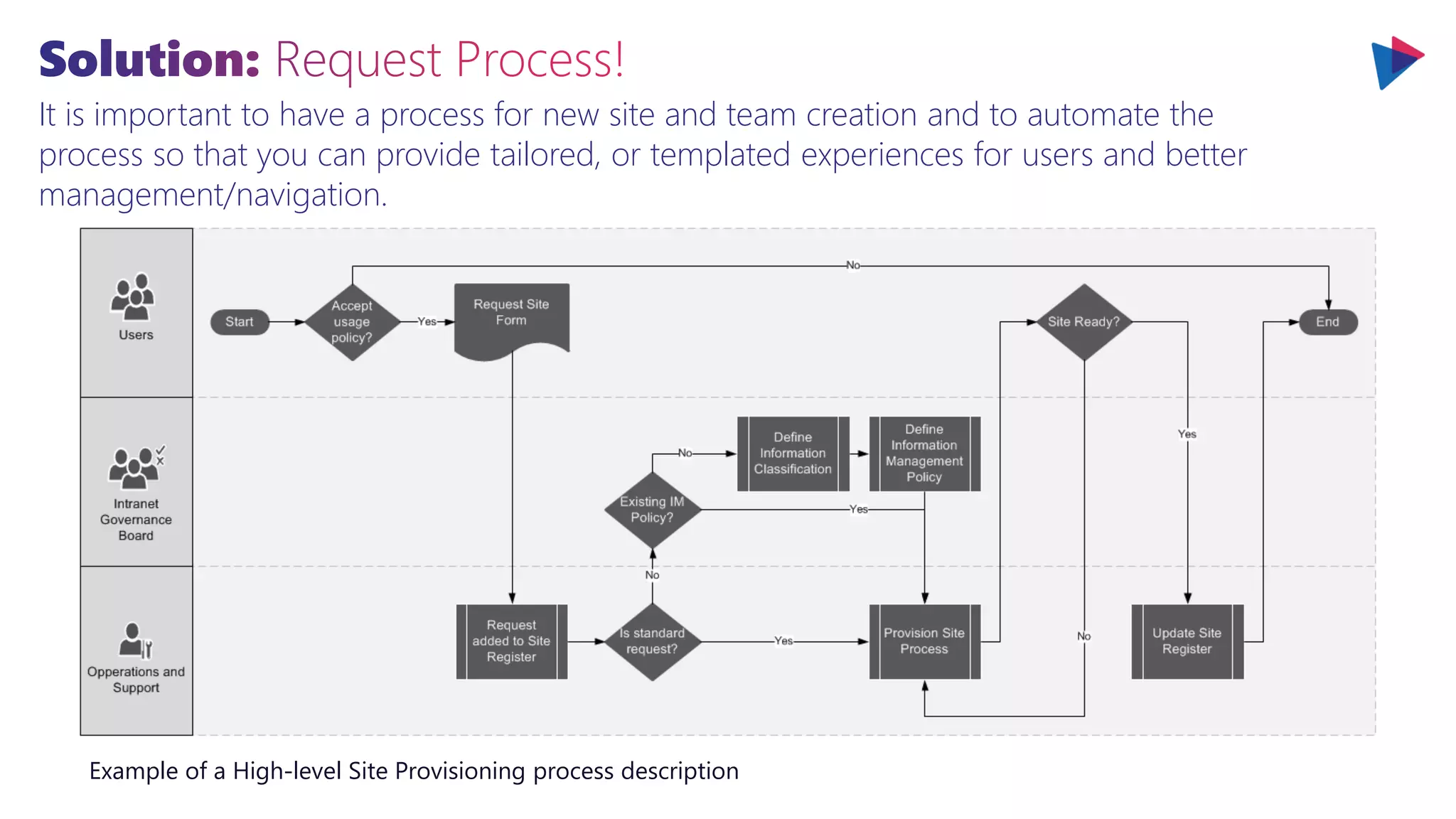
It is important to have a process for new site and team creation and to automate the
process so that you can provide tailored, or templated experiences for users and better
management/navigation.
Example of a High-level Site Provisioning process description
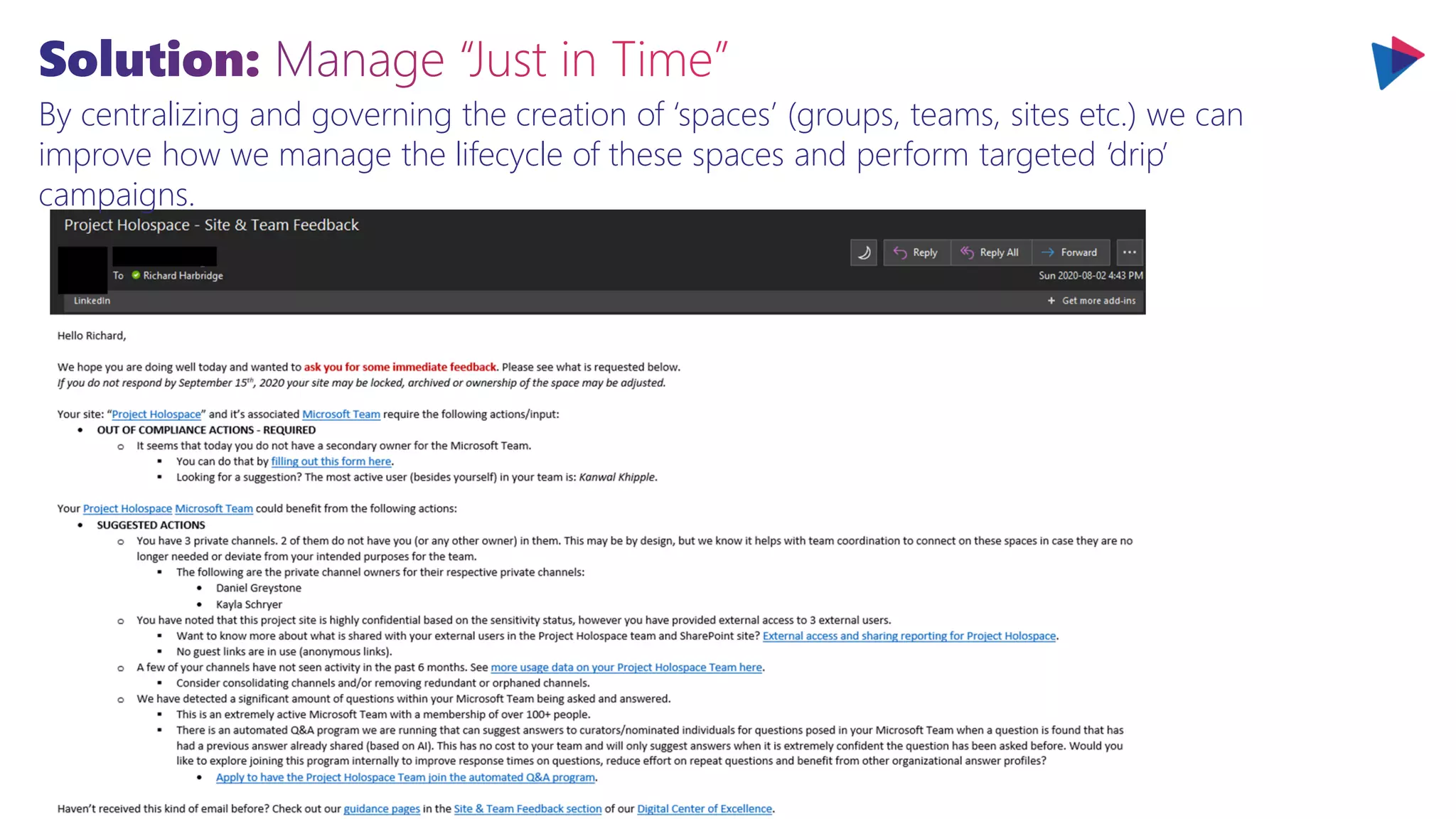
By centralizing and governing the creation of ‘spaces’ (groups, teams, sites etc.) we can
improve how we manage the lifecycle of these spaces and perform targeted ‘drip’
campaigns.
What is shown below is a simple mockup of a filtered OOTB directory experience. You can create
many pages with different views/visuals and relevant links to resources (Team, Site, Yammer, etc.)
Our communities can be filtered or explored by hierarchies (site explorer), by focus area (topic map), by the ones you recently visited or have favorited (your sites, your
teams, your communities) or by filtering the columns below (just click the column header).
Link ID Community Manager(s) Practice Groups Date Created Category Private Owner
International Bank Of Banking EB001 Strange, Stephen; Connor, Sarah; Ripley, Ellen Corporate Securities 11/16/2018 RFP Y Snow, John
Travis County, Washington TCT001 Opel, Glenn; Knight, Misty; Allen, Tim; Banner,
Bruce; Marco, Polo, Rambo, John
Litigation; Environmental 11/15/2018 RFP Y Jones, Jessica
Gotham Housing Authority SAH012 Balboa, Rocky Government; Real Estate 11/03/2018 Pitch Y Jones, Jessica
Harbridge Corp HIL003 Parker, Peter; Spector, Marc; Segal, Steven; Bond,
James
Trademark & Copyright 10/30/2018 Proposal N Danvers, Carol
Metropolis Independent School
District
DIS020 Brooks, Mel; Knight, Misty; Grey, Jean; Banner,
Bruce
Public/Education Law 10/27/2018 RFP N Jones, Jessica
International Bank Of Banking EB001 Strange, Stephen; Connor, Sarah; Ripley, Ellen Corporate Securities 11/16/2018 RFP Y Snow, John
Travis County, Washington TCT001 Opel, Glenn; Knight, Misty; Allen, Tim; Banner,
Bruce; Marco, Polo, Rambo, John
Litigation; Environmental 11/15/2018 RFP Y Jones, Jessica
Gotham Housing Authority SAH012 Balboa, Rocky Government; Real Estate 11/03/2018 Pitch Y Jones, Jessica
Harbridge Corp HIL003 Parker, Peter; Spector, Marc; Segal, Steven; Bond,
James
Trademark & Copyright 10/30/2018 Proposal N Danvers, Carol
SITES, TEAMS & COMMUNITIES IN OUR ORG Not Following
BROWSE SECTIONS DEPARTMENTS SITES, TEAMS & COMMUNITIES MY LINKS
Org
Logo
Search
Out Of The Box
●
OOTB Lists and web
parts can give you
directory experiences if
you simply store the
data from the request
process (approved or
already created
spaces).
* Public by default
scales & works better
in the long run
Since the registry or master list of sites, teams, communities and other digital spaces will exist it is
well worth presenting this to users to improve navigation while showing value of key metadata.
Agenda
Comprehensive & Connected Collaboration
Enhanced & Responsible Collaboration
Tackling Collaboration Sprawl At Scale
Planning For The Future
Of Collaboration
It’s important to modernize how you approach, plan and support collaboration so that when further
changes come your organization is resilient and ready enough to take advantage of them.
The distribution of collaborative work is often extremely lopsided. In most cases, 20% to 35% of value-
added collaborations come from only 3% to 5% of employees.
Individual Group
Interviews
Requirements
Defined
Aggregated
Employee Needs
Review
Roadmap
Defined
Requirements
Prioritized
Following the review and finalization of Employee Needs, requirements would be prioritized and
confirmed. These requirements (often in the form of user stories) are then grouped with
related needs into recommended initiatives that could be sequenced over time. Finally,
existing in-flight organizational initiatives are integrated into the timeline.
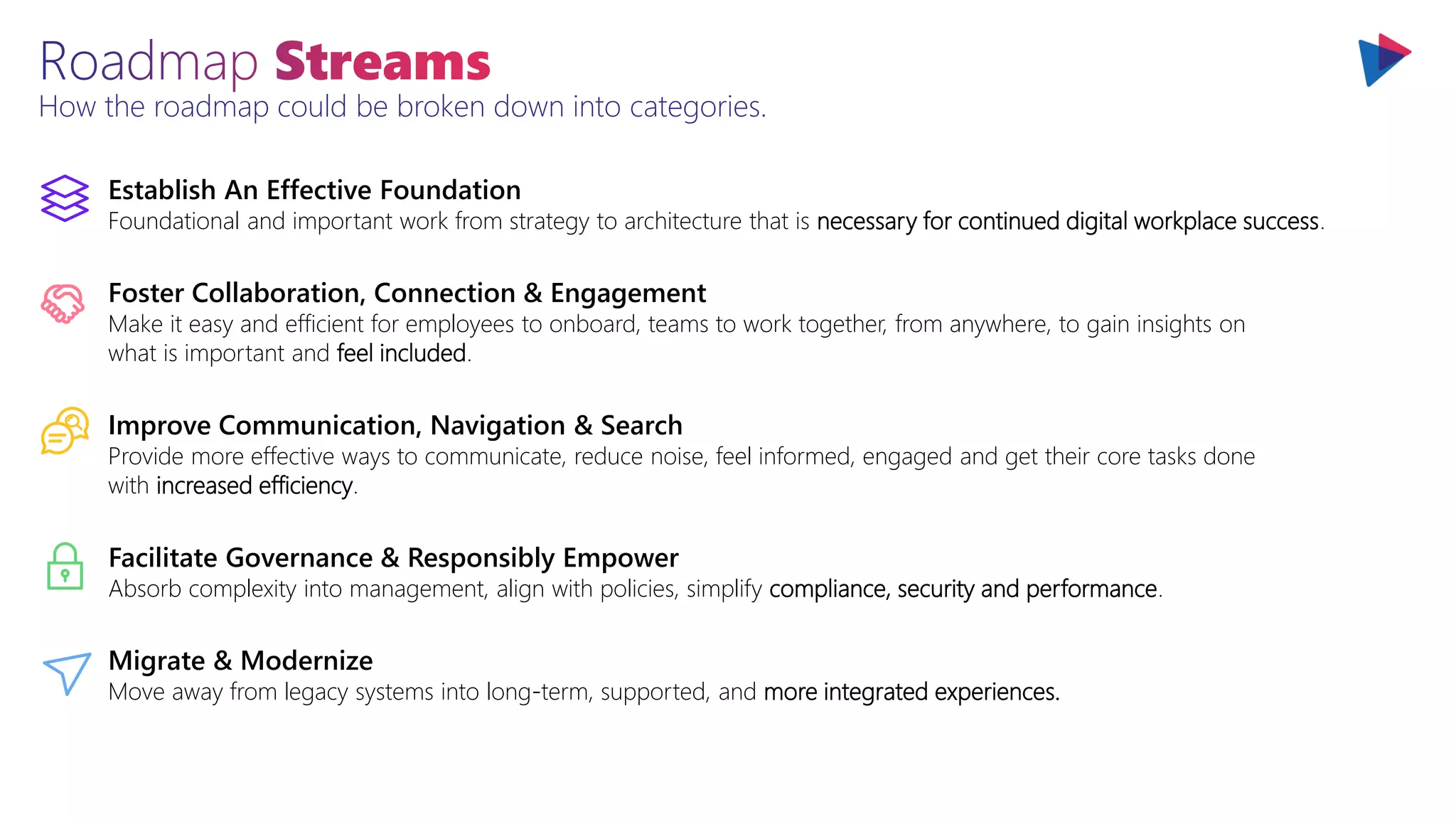
How the roadmap could be broken down into categories.
Facilitate Governance & Responsibly Empower
Absorb complexity into management, align with policies, simplify compliance, security and performance.
Establish An Effective Foundation
Foundational and important work from strategy to architecture that is necessary for continued digital workplace success.
Migrate & Modernize
Move away from legacy systems into long-term, supported, and more integrated experiences.
Foster Collaboration, Connection & Engagement
Make it easy and efficient for employees to onboard, teams to work together, from anywhere, to gain insights on
what is important and feel included.
Improve Communication, Navigation & Search
Provide more effective ways to communicate, reduce noise, feel informed, engaged and get their core tasks done
with increased efficiency.
PHASE 1 - Modernize
0-6 months
PHASE 2 – Connect & Integrate
6-12 months
PHASE 3 – Intelligent & Automated
12-24 months
A summary example of initiatives planned over the next 24 months.
Digital Workplace
Strategy & Roadmap
Modern Navigation
(Custom Header & Footer)
Employee Preboarding
Portal(s)
Migrate & Develop
Intranet Content
Establish Digital
Workplace Backlog
Intranet Site, Page &
Team Template Design
Intranet Governance
Design & Planning
Employee Networking &
Connection App (Release 1)
Foster Collaboration,
Connection & Engagement
Improve Communication,
Navigation & Search
Migrate
& Modernize
Establish An
Effective Foundation
Facilitate Governance
& Responsibly Empower
Teams Company
Communicator App
Employee Onboarding
Organization Portal(s)
Employee Onboarding
Departmental Site(s)
Digital Workplace
Directory (Release 1)
Digital Workplace
Directory (Release 2)
Employee Networking &
Connection App (Release 2)
Teams Company
Communicator App (Enhancements)
Targeted Search Experience
& Search Refiners
Intranet Navigation
& Search Design
Intranet Integration
& Solution Design
Intranet Content Design
& Migration Planning
Build Of Sites, Pages,
Teams & IA
Intranet Launch
Automating & Improving Onboarding,
Transfers & Offboarding Solution(s) (Release 1)
Bring The Intranet Into
Context Of Work (Topics)
Bring Knowledge To Users In The Context
Of Their Work (Topics Broader Rollout)
Enhanced Intranet
Insights (Release 1)
My Links, Alerts &
Subscriptions (Release 1)
Digital Center Of
Excellence (Release 1)
Digital Center Of
Excellence (Release 2)
Targeted Viva
Learning (Pilot)
What else matters?
Collaboration
M365Intranets.com
M365Sprawl.com
M365Campaigns.com
Explore 800+ Pages of
Free Expert Guidance…
M365Metrics.com
M365Resources.com
SharePointMigrations.com
Thank You
Let’s connect and find ways to do more and work together.
CTO & MICROSOFT MVP | SPEAKER & AUTHOR | SUPER FRIENDLY
RICHARD HARBRIDGE
Message me on LinkedIn or Email Richard@2toLead.com
200+ Awesome Presentations at:
400+ Pages of Whitepapers at:
M365Intranets.com M365Resources.com
M365Metrics.com Office365Campaigns.com
SharePointMigrations.com M365Sprawl.com
Slideshare.Net/RHarbridge
2toLead.com/whitepapers
Thank you!

Compliant Collaboration In Microsoft 365

  • 1.
    Compliant Collaboration: Responsibly Empower& Sustain at Scale Richard Harbridge 2toLead Chief Technology Officer & Microsoft MVP Tue., Mar. 15, 2022 Webinar 11:00 AM (EST)
  • 2.
    RICHARD HARBRIDGE My twitter is@RHarbridge, I’m super friendly & I am proud to work at 2toLead. CTO & MVP | SPEAKER & AUTHOR | SUPER FRIENDLY
  • 3.
    What are wehearing? Collaboration
  • 4.
    Are we collaboratingenough? Should we collaborate more? Why aren’t we collaborating more? Of surveyed employees believe that people in their own organization don’t collaborate enough. Of employees and executives cite lack of collaboration or ineffective communication for workplace failures. 86% 39% Source: Salesforce Source: Visix Of employees say the ability to collaborate makes them more loyal. 33% Source: The Economist
  • 5.
    Maybe how wecollaborate matters just as much as how much we collaborate? Of surveyed professionals depend on technology to collaborate. Of the respondents experienced challenges while working on their collaboration tools. 59% 83% Source: Alfresco Source: Alfresco
  • 6.
    Maybe how wecollaborate matters just as much as how much we collaborate? 1. The Digital Path to Business Resilience | BCG
  • 7.
    Some industry leadershave concerns around increased risk of data leakage and more as collaboration volume increases along with velocity and variety. Compliance Collaboration
  • 8.
    Both compliance, security,accessibility and more can improve while collaboration volume increases along with velocity and variety. Compliance Collaboration
  • 9.
    Both compliance, security,accessibility and more can improve while collaboration volume increases along with velocity and variety. Compliance Collaboration Compliant Collaboration
  • 10.
  • 11.
    Agenda Comprehensive & Connected Collaboration Enhanced& Responsible Collaboration Tackling Collaboration Sprawl At Scale Planning For The Future Of Collaboration
  • 12.
    At one pointof time being able to collaborate effectively anywhere, at any time and on any device was a bold ambition. Microsoft and vendors have long since realized this, but it has a cost. Collaboration overload People spend 80% of their time collaborating, find 44% of meeting time unproductive Note: Collaboration Occurs Before, During & After Meetings!
  • 13.
    Today Microsoft notonly matches this need with great experiences but even adds intelligence to those experiences to improve collaboration further whether for the individual, team or org. Collaboration overload People spend 80% of their time collaborating, find 44% of meeting time unproductive Note: Collaboration Occurs Before, During & After Meetings! Most of the dissatisfaction in meetings comes from not collaborating enough before it, after it, or in a different way during it. Meetings are important but they are often overused and used poorly.
  • 14.
    By leveraging insightsfrom MyAnalytics you can also learn more about your meeting habits. How many calendar invitations do you send last minute? How many do you accept? Collaboration overload People spend 80% of their time collaborating, find 44% of meeting time unproductive Note: Collaboration Occurs Before, During & After Meetings!
  • 15.
    Today Microsoft notonly matches this need with great experiences but even adds intelligence to those experiences to improve collaboration further whether for the individual, team or org. Collaboration overload People spend 80% of their time collaborating, find 44% of meeting time unproductive Note: Collaboration Occurs Before, During & After Meetings!
  • 16.
    At one pointof time being able to collaborate effectively anywhere, at any time and on any device was a bold ambition. Microsoft and vendors have long since realized this, but it has a cost. Collaboration overload People spend 80% of their time collaborating, find 44% of meeting time unproductive Note: Collaboration Occurs Before, During & After Meetings!
  • 17.
    At one pointof time being able to collaborate effectively anywhere, at any time and on any device was a bold ambition. Microsoft and vendors have long since realized this, but it has a cost. Blurred boundaries 75% of people have experienced burnout at work with 40% of people report work disrupts personal/family time at least weekly Collaboration overload People spend 80% of their time collaborating, find 44% of meeting time unproductive Note: Collaboration Occurs Before, During & After Meetings!
  • 18.
    Today Microsoft notonly matches this need with great experiences but even adds intelligence to those experiences to improve collaboration further whether for the individual, team or org. Blurred boundaries 75% of people have experienced burnout at work with 40% of people report work disrupts personal/family time at least weekly
  • 19.
    Today Microsoft notonly matches this need with great experiences but even adds intelligence to those experiences to improve collaboration further whether for the individual, team or org. Blurred boundaries 75% of people have experienced burnout at work with 40% of people report work disrupts personal/family time at least weekly
  • 20.
    Help your employeeshave the tools to manage and improve their wellbeing and personal productivity. Start by leveraging the capabilities built into Insights. Blurred boundaries 75% of people have experienced burnout at work with 40% of people report work disrupts personal/family time at least weekly
  • 21.
    Help your employeeshave the tools to manage and improve their wellbeing and personal productivity. Start by leveraging the capabilities built into Insights. Blurred boundaries 75% of people have experienced burnout at work with 40% of people report work disrupts personal/family time at least weekly
  • 22.
    Help your employeeshave the tools to manage and improve their wellbeing and personal productivity. Start by leveraging the capabilities built into Insights. Blurred boundaries 75% of people have experienced burnout at work with 40% of people report work disrupts personal/family time at least weekly
  • 23.
    We need solutionsthat help us manage our time, our conflicts, the things we might have forgotten or missed and more. These options need to be available in Outlook, mobile and where we work. Blurred boundaries 75% of people have experienced burnout at work with 40% of people report work disrupts personal/family time at least weekly
  • 24.
    Help your employeeshave the tools to manage and improve their wellbeing and personal productivity. Start by leveraging the capabilities built into Insights. Blurred boundaries 75% of people have experienced burnout at work with 40% of people report work disrupts personal/family time at least weekly
  • 25.
    Help your employeeshave the tools to manage and improve their wellbeing and personal productivity. Start by leveraging the capabilities built into Insights. Blurred boundaries 75% of people have experienced burnout at work with 40% of people report work disrupts personal/family time at least weekly
  • 26.
    Help your employeeshave the tools to manage and improve their wellbeing and personal productivity. Start by leveraging the capabilities built into Insights. Blurred boundaries 75% of people have experienced burnout at work with 40% of people report work disrupts personal/family time at least weekly
  • 27.
    We work withmore people on a day-to-day basis today than ever before. The majority of people work with 10 or more people on a day-to-day basis and half of those report working with more than 20. Continuous interruptions People switch tasks every 40 seconds, take 25+ minutes to refocus after interruptions
  • 28.
    We need solutionsthat help us manage our time, our conflicts, the things we might have forgotten or missed and more. These options need to be available in Outlook, mobile and where we work. Continuous interruptions People switch tasks every 40 seconds, take 25+ minutes to refocus after interruptions
  • 29.
    We work acrossmore silos, teams and orgs. We work with contractors, customers or partners more. Collaborating with external parties is accelerating as are expectations around collaboration.
  • 30.
    Today Microsoft notonly matches this need with great experiences but even adds intelligence to those experiences to improve collaboration further whether for the individual, team or org.
  • 31.
    Today it’s notonly easy to share externally, but the options we have available both improve security while reducing the friction involved. Let’s explore shared channels as an example.
  • 32.
    Today it’s notonly easy to share externally, but the options we have available both improve security while reducing the friction involved. Let’s explore shared channels as an example.
  • 33.
    Today it’s notonly easy to share externally, but the options we have available both improve security while reducing the friction involved. Let’s explore shared channels as an example.
  • 34.
    Today it’s notonly easy to share externally, but the options we have available both improve security while reducing the friction involved. Let’s explore shared channels as an example.
  • 35.
    Today it’s notonly easy to share externally, but the options we have available both improve security while reducing the friction involved. Let’s explore shared channels as an example.
  • 36.
    Today it’s notonly easy to share externally, but the options we have available both improve security while reducing the friction involved. Let’s explore shared channels as an example.
  • 37.
    IWs rarely meetnew people at their company; when they do meet new people, it’s most often through a formal or informal company event. How many have you had during this pandemic? Limited network 42% of IWs rarely meet new people at their company, managers rarely make those connections
  • 38.
    Empower insights thatenable employees to be more connected. Enable employees to extend and strengthen their networks within the organization with solutions that improve retention, connection and engagement. Limited network 42% of IWs rarely meet new people at their company, managers rarely make those connections
  • 39.
    The actual actioningof your improvement plans, nudge plans or more has tooling built in and you can use the measures to track impact it just requires planning. Be pro-active improving collaboration!
  • 40.
    Agenda Comprehensive & ConnectedCollaboration Enhanced & Responsible Collaboration Tackling Collaboration Sprawl At Scale Planning For The Future Of Collaboration
  • 41.
    Whether it beSharePoint, Teams, Yammer, Outlook or other apps… all of them support considerable security, compliance and information management by design. Let’s explore shared channels as an example.
  • 42.
    Whether it beSharePoint, Teams, Yammer, Outlook or other apps… all of them support considerable security, compliance and information management by design. Let’s explore shared channels as an example.
  • 43.
    Whether it beSharePoint, Teams, Yammer, Outlook or other apps… all of them support considerable security, compliance and information management by design. Let’s explore shared channels as an example.
  • 44.
    Whether it beSharePoint, Teams, Yammer, Outlook or other apps… all of them support considerable security, compliance and information management by design. Let’s explore shared channels as an example.
  • 45.
    Whether it beSharePoint, Teams, Yammer, Outlook or other apps… all of them support considerable security, compliance and information management by design. Let’s explore shared channels as an example.
  • 46.
    Whether it beSharePoint, Teams, Yammer, Outlook or other apps… all of them support considerable security, compliance and information management by design. Let’s explore shared channels as an example.
  • 47.
    While that exampleof shared channels is a great one for how collaboration enablement and configuration should be planned there are even more important experiences and patterns to prioritize.
  • 48.
    Valuable experiences aredriven by metadata which not only facilitate compliance and findability but also are the corner stone for effective process and information management.
  • 49.
    Valuable experiences aredriven by metadata which not only facilitate compliance and findability but also are the corner stone for effective process and information management. Metadata or labels themselves can manage lifecycle. Automated disposition approval based on applied retention policies can ensure documents are kept and stored in accordance with compliance policies
  • 50.
    Automated content markingcan help identify a content’s sensitivity classification and make it obvious how it should be handled Valuable experiences are driven by metadata which not only facilitate compliance and findability but also are the corner stone for effective process and information management. Metadata or labels themselves can manage sensitivity.
  • 51.
    The metadata abouteach workspace that is automatically tagged or assigned when filing becomes invaluable for searching for, retrieving and working with that content as a user or when applying sensitivity or retention rules.
  • 52.
    Collaboration happens inOutlook and sometimes not with links. Enable collaboration improvement.
  • 53.
    Compliant collaboration ismore likely if there are less places to go, and less steps needed.
  • 54.
    Compliant collaboration ismore likely if there are less places to go, and less steps needed.
  • 55.
    Compliant collaboration ismore likely if there are less places to go, and less steps needed.
  • 56.
    New AI andintelligent content services and capabilities make it easier to build content understanding and classification apps directly into the content management flow such as with SharePoint Syntex. Object detection Form processing Document understanding Manual Process digital content - photos, scans, receipts, business cards, videos with OCR & text Capture content types and metadata from purchase orders, applications, other structured documents Customize for your org’s forms Taught by your subject matter experts Capture content types and metadata from contracts, resumes, other unstructured documents Smart, right out of the box Data entry and labor- intensive processing Any content
  • 57.
    New AI andintelligent content services and capabilities make it easier to build content understanding and classification apps directly into the content management flow such as with SharePoint Syntex.
  • 58.
    Classifying this contenthas incredible benefits from sensitivity protection to retention management. If we can avoid risks by classifying content automatically, by default, and easily we can reduce our risk.
  • 59.
    Classifying this contenthas incredible benefits from sensitivity protection to retention management. If we can avoid risks by classifying content automatically, by default, and easily we can reduce our risk.
  • 60.
    Classifying this contenthas incredible benefits from sensitivity protection to retention management. If we can avoid risks by classifying content automatically, by default, and easily we can reduce our risk.
  • 61.
    The problem isn’ta relationship between these things. It’s that many organizations as volume, velocity and variety increase so do the tools they use.
  • 62.
    The problem isn’ta relationship between these things. It’s that many organizations as volume, velocity and variety increase so do the tools they use.
  • 63.
    The problem isn’ta relationship between these things. It’s that many organizations as volume, velocity and variety increase so do the tools they use.
  • 64.
    There is acomprehensive strategy from the architecture level to the experience level that is responsible for why Microsoft 365 scales collaboration, compliance and security across applications and solutions. Microsoft Collaborative Apps Device OS UX Microsoft Teams Microsoft Office Components Fluid Framework • Adaptive Cards • Connectors Logic Azure PaaS Power Platform Data Microsoft Graph Microsoft Dataverse Communications Azure Communications Services Identity Azure Active Directory Pro-dev Low/no code Legacy Applications High Maintenance Cost Lower Performance Technical Limitation Worse & Disconnected User Experience Modern Applications More Efficient With Lower Maintenance Cost High Performance & More Scalable More Secure & More Manageable Better & More Integrated User Experiences
  • 65.
    Agenda Comprehensive & ConnectedCollaboration Enhanced & Responsible Collaboration Tackling Collaboration Sprawl At Scale Planning For The Future Of Collaboration
  • 66.
    Problem: Collaboration SpacesGrow Over Time… The modern digital workplace and Intranet has a continually increasing number of digital spaces or ‘sites’ where content is stored and shared.
  • 67.
    Problem: Collaboration SpacesGrow Over Time … Most organizations don’t know who created a digital space (SP Site, Team, Yammer Community, etc.). What was its purpose? It’s department? It’s product, client, project, etc.? As an end user this makes navigating these spaces extremely challenging. Think it’s better as an administrator or digital workplace/intranet leader? It’s not.
  • 68.
    Problem: Collaboration SpacesGrow Over Time … Most organizations don’t know who created a digital space (SP Site, Team, Yammer Community, etc.). What was its purpose? It’s department? It’s product, client, project, etc.? As an end user this makes navigating these spaces extremely challenging. Think it’s better as an administrator or digital workplace/intranet leader? It’s not.
  • 69.
    Why Do WeNeed To Manage Sprawl? What are the common issues that come with unmanaged sprawl of Microsoft Teams, SharePoint Sites, or even Yammer Communities? www.M365Sprawl.com Ineffective Naming Unclear Purpose Or Workspace Focus Unclear Official vs Unofficial Cannot Differentiate At A Glance Inappropriate Name Usage Owners Missing Orphaned Teams/Sites Unmanaged Teams/Sites Sponsor vs Owner Challenge Private Channels (Don’t Require Owner) Redundant Teams/Sites Decreased User Confidence Inconsistent Workspaces Increased Operational Load Increased Costs To Support Data Loss Risks Limited Ability To Target Labels For Information Protection Limited Ability To Determine Risk Limited Ability To Pro-actively Mitigate Risks Limited Permission Review & Increased Chances Of Over Sharing Loss Of Control Often Unmanaged Use Of Apps (Cannot Target) Unmanaged Integration Limited Ability To Target Labels For Retention No Clear Escalation If Owner Missing Or Unresponsive Slower Team/Site Start Not Tailored Or Fit To Purpose Inconsistent Design/Layout Leads To Relearning Hesitation To Optimize Created Spaces Technically Challenging Navigation Productivity Costs Challenging For New Users To Ramp Hard To Find Workspaces Uncertain Who Owns A Workspace Reliance On Others To Link Training & Adoption Challenges When To Use What Challenges No Consistency Makes It Harder To Train Unmanaged Workspaces Cannot Be Targeted With Guidance Difficulty Identifying Champions & Pro- actively Targeting Champions
  • 70.
  • 71.
    Why is askinga few extra questions on provisioning so important? What value does this extra metadata provide once we have it for reference? Workspace (Site/Team) Metadata Enables Default Metadata Empowers Effective Labelling Targeted Content Protection Targeted Retention Management Differentiate Templates Faster Adoption Improved Productivity Consistency Manage More Effectively Target Support Improve Lifecycle Management Reduce Redundancy & Empower Discovery Sample Metadata Questions • What is the purpose or business reason for this workspace? • What division does this relate to? • What department does this relate to? • What product does this relate to? • What customer does this relate to? • What project does this relate to? • Will this workspace contain highly confidential information? • Who is the business sponsor for this workspace? • What should the visibility of this workspace be? Should it be shown in the directory?
  • 72.
    While OOTB canwork great for many smaller orgs (less than 100 users), most need more structure to support governance, lifecycle management, and better search/navigation experiences. Out Of The Box ●
  • 73.
    By centralizing andgoverning the creation of ‘spaces’ (groups, teams, sites etc.) we can improve content organization and apply things like default metadata and pre-configured templates. FREE: https://docs.microsoft.com/en-us/microsoftteams/platform/samples/app-templates#request-a-team Watch out for premium connector costs with Power Automate on the provisioning! (This is just meant as an example).
  • 74.
    By messaging andfollowing up with a user once they have created a space we can also get more insight, this way we don’t block the creation, but have a process to manage after. Note this is how Microsoft works “OOTB” with it’s apply site template functionality. Upon creation of a new site, it prompts if a template might be applicable (post creation).
  • 75.
    It is importantto have a process for new site and team creation and to automate the process so that you can provide tailored, or templated experiences for users and better management/navigation. Example of a High-level Site Provisioning process description
  • 76.
    By centralizing andgoverning the creation of ‘spaces’ (groups, teams, sites etc.) we can improve how we manage the lifecycle of these spaces and perform targeted ‘drip’ campaigns.
  • 77.
    What is shownbelow is a simple mockup of a filtered OOTB directory experience. You can create many pages with different views/visuals and relevant links to resources (Team, Site, Yammer, etc.) Our communities can be filtered or explored by hierarchies (site explorer), by focus area (topic map), by the ones you recently visited or have favorited (your sites, your teams, your communities) or by filtering the columns below (just click the column header). Link ID Community Manager(s) Practice Groups Date Created Category Private Owner International Bank Of Banking EB001 Strange, Stephen; Connor, Sarah; Ripley, Ellen Corporate Securities 11/16/2018 RFP Y Snow, John Travis County, Washington TCT001 Opel, Glenn; Knight, Misty; Allen, Tim; Banner, Bruce; Marco, Polo, Rambo, John Litigation; Environmental 11/15/2018 RFP Y Jones, Jessica Gotham Housing Authority SAH012 Balboa, Rocky Government; Real Estate 11/03/2018 Pitch Y Jones, Jessica Harbridge Corp HIL003 Parker, Peter; Spector, Marc; Segal, Steven; Bond, James Trademark & Copyright 10/30/2018 Proposal N Danvers, Carol Metropolis Independent School District DIS020 Brooks, Mel; Knight, Misty; Grey, Jean; Banner, Bruce Public/Education Law 10/27/2018 RFP N Jones, Jessica International Bank Of Banking EB001 Strange, Stephen; Connor, Sarah; Ripley, Ellen Corporate Securities 11/16/2018 RFP Y Snow, John Travis County, Washington TCT001 Opel, Glenn; Knight, Misty; Allen, Tim; Banner, Bruce; Marco, Polo, Rambo, John Litigation; Environmental 11/15/2018 RFP Y Jones, Jessica Gotham Housing Authority SAH012 Balboa, Rocky Government; Real Estate 11/03/2018 Pitch Y Jones, Jessica Harbridge Corp HIL003 Parker, Peter; Spector, Marc; Segal, Steven; Bond, James Trademark & Copyright 10/30/2018 Proposal N Danvers, Carol SITES, TEAMS & COMMUNITIES IN OUR ORG Not Following BROWSE SECTIONS DEPARTMENTS SITES, TEAMS & COMMUNITIES MY LINKS Org Logo Search Out Of The Box ● OOTB Lists and web parts can give you directory experiences if you simply store the data from the request process (approved or already created spaces). * Public by default scales & works better in the long run
  • 78.
    Since the registryor master list of sites, teams, communities and other digital spaces will exist it is well worth presenting this to users to improve navigation while showing value of key metadata.
  • 79.
    Agenda Comprehensive & ConnectedCollaboration Enhanced & Responsible Collaboration Tackling Collaboration Sprawl At Scale Planning For The Future Of Collaboration
  • 80.
    It’s important tomodernize how you approach, plan and support collaboration so that when further changes come your organization is resilient and ready enough to take advantage of them.
  • 81.
    The distribution ofcollaborative work is often extremely lopsided. In most cases, 20% to 35% of value- added collaborations come from only 3% to 5% of employees.
  • 82.
    Individual Group Interviews Requirements Defined Aggregated Employee Needs Review Roadmap Defined Requirements Prioritized Followingthe review and finalization of Employee Needs, requirements would be prioritized and confirmed. These requirements (often in the form of user stories) are then grouped with related needs into recommended initiatives that could be sequenced over time. Finally, existing in-flight organizational initiatives are integrated into the timeline.
  • 83.
    How the roadmapcould be broken down into categories. Facilitate Governance & Responsibly Empower Absorb complexity into management, align with policies, simplify compliance, security and performance. Establish An Effective Foundation Foundational and important work from strategy to architecture that is necessary for continued digital workplace success. Migrate & Modernize Move away from legacy systems into long-term, supported, and more integrated experiences. Foster Collaboration, Connection & Engagement Make it easy and efficient for employees to onboard, teams to work together, from anywhere, to gain insights on what is important and feel included. Improve Communication, Navigation & Search Provide more effective ways to communicate, reduce noise, feel informed, engaged and get their core tasks done with increased efficiency.
  • 84.
    PHASE 1 -Modernize 0-6 months PHASE 2 – Connect & Integrate 6-12 months PHASE 3 – Intelligent & Automated 12-24 months A summary example of initiatives planned over the next 24 months. Digital Workplace Strategy & Roadmap Modern Navigation (Custom Header & Footer) Employee Preboarding Portal(s) Migrate & Develop Intranet Content Establish Digital Workplace Backlog Intranet Site, Page & Team Template Design Intranet Governance Design & Planning Employee Networking & Connection App (Release 1) Foster Collaboration, Connection & Engagement Improve Communication, Navigation & Search Migrate & Modernize Establish An Effective Foundation Facilitate Governance & Responsibly Empower Teams Company Communicator App Employee Onboarding Organization Portal(s) Employee Onboarding Departmental Site(s) Digital Workplace Directory (Release 1) Digital Workplace Directory (Release 2) Employee Networking & Connection App (Release 2) Teams Company Communicator App (Enhancements) Targeted Search Experience & Search Refiners Intranet Navigation & Search Design Intranet Integration & Solution Design Intranet Content Design & Migration Planning Build Of Sites, Pages, Teams & IA Intranet Launch Automating & Improving Onboarding, Transfers & Offboarding Solution(s) (Release 1) Bring The Intranet Into Context Of Work (Topics) Bring Knowledge To Users In The Context Of Their Work (Topics Broader Rollout) Enhanced Intranet Insights (Release 1) My Links, Alerts & Subscriptions (Release 1) Digital Center Of Excellence (Release 1) Digital Center Of Excellence (Release 2) Targeted Viva Learning (Pilot)
  • 85.
  • 86.
    M365Intranets.com M365Sprawl.com M365Campaigns.com Explore 800+ Pagesof Free Expert Guidance… M365Metrics.com M365Resources.com SharePointMigrations.com
  • 87.
    Thank You Let’s connectand find ways to do more and work together. CTO & MICROSOFT MVP | SPEAKER & AUTHOR | SUPER FRIENDLY RICHARD HARBRIDGE Message me on LinkedIn or Email Richard@2toLead.com 200+ Awesome Presentations at: 400+ Pages of Whitepapers at: M365Intranets.com M365Resources.com M365Metrics.com Office365Campaigns.com SharePointMigrations.com M365Sprawl.com Slideshare.Net/RHarbridge 2toLead.com/whitepapers
  • 88.