BUG LIFECYCLE
What is Bug
 Bugs arise from mistakes and errors, made by
people, in either a program’s source code or
its design.
 A bug can be an error, mistake, defect or
fault, which may cause failure or deviation
from expected results.
 A fault in computer program that prevents it
from working correctly or produces an
incorrect result.
 Often a bug is caused by conflicts in
software when applications try to run in
tandem.
Difference in Bug, Defect and Error
 Bug is an error found BEFORE the application goes into
production(By Tester).
 Defect is an error found AFTER application goes into
production(By Customer).
 Anything that is not confirming to expected behavior
and it may be at any stage is Error.
 An Error can be a defect or Bug and deviated from
Customer Requirement.
What is Bug Life Cycle
 The duration between the first time bug is found
(‘New’) and closed successfully (‘Closed’),
rejected, postponed or deferred is called as ‘Bug
Life Cycle’
 When tester logs any new bug the mandatory fields
are: Build version, Submit On, Product, Module,
Severity, Synopsis and Description to Reproduce.
 Optional fields (if you are using manual Bug
submission template): Customer name, Browser,
Operating system, File Attachments or screenshots.
There are various stages of bug life cycle-
1. New
2. Open
3. Assign
4. Retest
5. Deferred
6. Reopened
7. Duplicate
8. Rejected and
9. Closed
Stages of Bug Life Cycle(Contd.)
1.New: When the bug is posted for the first time, its
state will be “NEW”. This means that the bug is not yet
approved.
2.Open: After a tester has posted a bug, the lead of the
tester approves that the bug is genuine and he changes
the state as “OPEN”. Lead of Tester can set the bug
status as: Open can Assign the bug to developer or
bug may be deferred until next release.
3.Assign: Once the lead changes the state as “OPEN”,
he assigns the bug to corresponding developer or
developer team. The state of the bug now is changed to
“ASSIGN”.
Stages of Bug Life Cycle(Contd.)
Developer can set bug status as:
• won’t fix
• Couldn’t reproduce
• Need more information or
• Fixed
4.If the bug status set by developer is either ‘Need
more info’ or Fixed then QA responds with specific
action.
Retest: Once the developer fixes the bug, he has to
assign the bug to the testing team for next round of
testing. Before he releases the software with bug
fixed, he changes the state of bug to “RETEST”. It
specifies that the bug has been fixed and is released
to testing team.
Stages of Bug Life Cycle(Contd.)
5.Deferred: If the bug is not related to current build
or cannot be fixed in this release or bug is not
important to fix immediately then the project manager
can set the bug status as deferred.
6.Rejected: If the developer feels that the bug is not
genuine, he rejects the bug. Then the state of the bug
is changed to “REJECTED”.
7.Duplicate: If the bug is repeated twice or the two
bugs mention the same concept of the bug, then one bug
status is changed to “DUPLICATE”.
Stages of Bug Life Cycle(Contd.)
8.Reopened: If the bug still exists even after the bug
is fixed by the developer, the tester changes the
status to “REOPENED”. The bug traverses the life
cycle once again.
9.Closed: Once the bug is fixed, it is tested by the
tester. If the tester feels that the bug no longer
exists in the software, he changes the status of the
bug to “CLOSED”. This state means that the bug is
fixed, tested and approved.
Stages of Bug Life Cycle(Contd.)
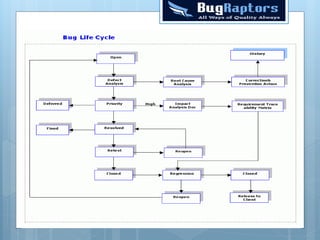
 Defect Analysis-It is detailed analysis of defects in QA
and development team.
 Root cause analysis (RCA) is a stage of problem solving
methods aimed at identifying the root causes of problems or
events. The practice of RCA is predicated on the belief
that problems are best solved by attempting to correct or
eliminate root causes.
 Corrective & Preventive Action –To find the causes of
issue and make sure it doesn’t happen again.
 An impact analysis results in the differentiation
between critical (urgent) and non-critical (non-urgent)
organization functions/ activities.
Stages of Bug Life Cycle(Contd.)
 Requirements traceability can be defined as the
ability to describe and trace the life of a
requirement, in both a forward and backward
direction. The matrix will present to you the table
of features and for each feature you will see if
there is backward and forward traceability --
meaning is each feature mapped back to an objective?
and is each feature complete with requirements?
 Regression testing involves testing the entire
system after bugs have been fixed. This ensures that
nothing else was broken when the bug was fixed.
Testing the actual fix is what is normally called
"retesting".
The Severity of Bug
 A sample guideline for assignGuidelines on deciding ment of
severity Levels during the product test phase includes:
 Critical / Show Stopper — An item that prevents further
testing of the product or function under test can be classified
as Critical Bug. No workaround is possible for such bugs.
Examples of this include a missing menu option or security
permission required to access a function under test.
 Major / High — A defect that does not function as
expected/designed or cause other functionality to fail to meet
requirements can be classified as Major Bug. The workaround can
be provided for such bugs. Examples of this include inaccurate
calculations; the wrong field being updated, etc.
 Average / Medium — The defects which do not conform to
standards and conventions can be classified as Medium Bugs.
Easy workarounds exists to achieve functionality objectives.
Examples include matching visual and text links which lead to
different end points.
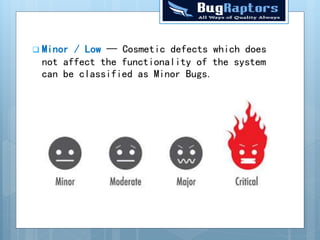
 Minor / Low — Cosmetic defects which does
not affect the functionality of the system
can be classified as Minor Bugs.
The Priority of Bug
 A priority classification of a software error is based
on the importance and urgency of resolving the error.
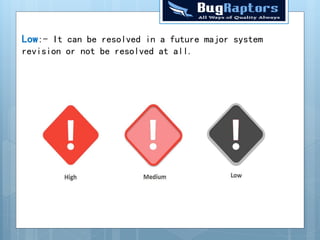
 Immediate:- The bug should be resolved immediately.
 High:- This bug should be resolved as soon as
possible in the normal course of development activity,
before the software is released.
 Medium:- This bug should be repaired after serious
bugs have been fixed.
Low:- It can be resolved in a future major system
revision or not be resolved at all.
Thank you

Bug life cycle

  • 1.
  • 2.
    What is Bug Bugs arise from mistakes and errors, made by people, in either a program’s source code or its design.
  • 3.
     A bugcan be an error, mistake, defect or fault, which may cause failure or deviation from expected results.  A fault in computer program that prevents it from working correctly or produces an incorrect result.  Often a bug is caused by conflicts in software when applications try to run in tandem.
  • 4.
    Difference in Bug,Defect and Error  Bug is an error found BEFORE the application goes into production(By Tester).  Defect is an error found AFTER application goes into production(By Customer).  Anything that is not confirming to expected behavior and it may be at any stage is Error.  An Error can be a defect or Bug and deviated from Customer Requirement.
  • 5.
    What is BugLife Cycle  The duration between the first time bug is found (‘New’) and closed successfully (‘Closed’), rejected, postponed or deferred is called as ‘Bug Life Cycle’  When tester logs any new bug the mandatory fields are: Build version, Submit On, Product, Module, Severity, Synopsis and Description to Reproduce.  Optional fields (if you are using manual Bug submission template): Customer name, Browser, Operating system, File Attachments or screenshots.
  • 6.
    There are variousstages of bug life cycle- 1. New 2. Open 3. Assign 4. Retest 5. Deferred 6. Reopened 7. Duplicate 8. Rejected and 9. Closed
  • 8.
    Stages of BugLife Cycle(Contd.) 1.New: When the bug is posted for the first time, its state will be “NEW”. This means that the bug is not yet approved. 2.Open: After a tester has posted a bug, the lead of the tester approves that the bug is genuine and he changes the state as “OPEN”. Lead of Tester can set the bug status as: Open can Assign the bug to developer or bug may be deferred until next release. 3.Assign: Once the lead changes the state as “OPEN”, he assigns the bug to corresponding developer or developer team. The state of the bug now is changed to “ASSIGN”.
  • 9.
    Stages of BugLife Cycle(Contd.) Developer can set bug status as: • won’t fix • Couldn’t reproduce • Need more information or • Fixed 4.If the bug status set by developer is either ‘Need more info’ or Fixed then QA responds with specific action. Retest: Once the developer fixes the bug, he has to assign the bug to the testing team for next round of testing. Before he releases the software with bug fixed, he changes the state of bug to “RETEST”. It specifies that the bug has been fixed and is released to testing team.
  • 10.
    Stages of BugLife Cycle(Contd.) 5.Deferred: If the bug is not related to current build or cannot be fixed in this release or bug is not important to fix immediately then the project manager can set the bug status as deferred. 6.Rejected: If the developer feels that the bug is not genuine, he rejects the bug. Then the state of the bug is changed to “REJECTED”. 7.Duplicate: If the bug is repeated twice or the two bugs mention the same concept of the bug, then one bug status is changed to “DUPLICATE”.
  • 11.
    Stages of BugLife Cycle(Contd.) 8.Reopened: If the bug still exists even after the bug is fixed by the developer, the tester changes the status to “REOPENED”. The bug traverses the life cycle once again. 9.Closed: Once the bug is fixed, it is tested by the tester. If the tester feels that the bug no longer exists in the software, he changes the status of the bug to “CLOSED”. This state means that the bug is fixed, tested and approved.
  • 12.
    Stages of BugLife Cycle(Contd.)  Defect Analysis-It is detailed analysis of defects in QA and development team.  Root cause analysis (RCA) is a stage of problem solving methods aimed at identifying the root causes of problems or events. The practice of RCA is predicated on the belief that problems are best solved by attempting to correct or eliminate root causes.  Corrective & Preventive Action –To find the causes of issue and make sure it doesn’t happen again.  An impact analysis results in the differentiation between critical (urgent) and non-critical (non-urgent) organization functions/ activities.
  • 13.
    Stages of BugLife Cycle(Contd.)  Requirements traceability can be defined as the ability to describe and trace the life of a requirement, in both a forward and backward direction. The matrix will present to you the table of features and for each feature you will see if there is backward and forward traceability -- meaning is each feature mapped back to an objective? and is each feature complete with requirements?  Regression testing involves testing the entire system after bugs have been fixed. This ensures that nothing else was broken when the bug was fixed. Testing the actual fix is what is normally called "retesting".
  • 14.
    The Severity ofBug  A sample guideline for assignGuidelines on deciding ment of severity Levels during the product test phase includes:  Critical / Show Stopper — An item that prevents further testing of the product or function under test can be classified as Critical Bug. No workaround is possible for such bugs. Examples of this include a missing menu option or security permission required to access a function under test.  Major / High — A defect that does not function as expected/designed or cause other functionality to fail to meet requirements can be classified as Major Bug. The workaround can be provided for such bugs. Examples of this include inaccurate calculations; the wrong field being updated, etc.  Average / Medium — The defects which do not conform to standards and conventions can be classified as Medium Bugs. Easy workarounds exists to achieve functionality objectives. Examples include matching visual and text links which lead to different end points.
  • 15.
     Minor /Low — Cosmetic defects which does not affect the functionality of the system can be classified as Minor Bugs.
  • 16.
    The Priority ofBug  A priority classification of a software error is based on the importance and urgency of resolving the error.  Immediate:- The bug should be resolved immediately.  High:- This bug should be resolved as soon as possible in the normal course of development activity, before the software is released.  Medium:- This bug should be repaired after serious bugs have been fixed.
  • 17.
    Low:- It canbe resolved in a future major system revision or not be resolved at all.
  • 18.