1
UNIT - 1
Introduction to
Software Engineering
The evolving role of software
changing nature of software
software myths.
Introduction to Software Engineering
The Evolving role of software
Dual role of Software
1. Software as a Product
•Software is developed and delivered as a standalone entity to users.
•It acts as a solution to a specific problem or fulfills user needs.
Example: Word processors, mobile apps, antivirus tools, games, etc.
Information Transformer:
Produces, manages, manipulates, and displays data or information.
Examples: Report generation, data visualization, dashboards.
3
What is the work Product?
 From the point of view of a software engineer, the work product is the programs, documents, and
content.
 From the user’s viewpoint, the work product is the resultant information that somehow makes the
user’s world better.
2. Software as a Vehicle for Delivering a Product
•Software acts as the medium or platform through which hardware or
another software system performs.
•It enables and manages the functioning of other systems.
Includes:
Control of computer hardware (e.g., Operating Systems like Windows,
Linux).
Communication of information (e.g., Networking Software, Internet
Protocols).
Creation of other software (e.g., Compilers, IDEs, Code Libraries,
Software Tools).
The Evolving role of software
Software products may be developed for a particular customer or may be
developed for a general market.
Software products may be
 Generic - developed to be sold to a range of different customers.
E.g. PC software such as Excel or Word.
 Custom - developed for a single customer according to their specification.
E.g. Banking Systems, Hospital management system.
The Evolving role of software
What is software?
Software is a collection of programs, data, and instructions that tell a computer how
to perform specific tasks or operations. Unlike hardware, software is intangible
—you can’t touch it, but it controls everything the computer does.
Types of Software & Examples
1. System Software
 Helps run and manage computer hardware.
 Provides a platform for other software to run.
Examples:
 Operating Systems: Windows, Linux, macOS
 Device Drivers: Printer driver, graphics driver
 Utility Programs: Antivirus, Disk Cleanup, File Management tools
6
2. Application Software
•Designed to perform specific tasks for the user.
Examples:
•MS Word, MS Excel, PowerPoint
•Web Browsers: Google Chrome, Firefox
•Media Players: VLC, Windows Media Player
•Mobile Apps: WhatsApp, Instagram, Zoom
3. Programming Software
•Provides tools for developers to write, test, and maintain software.
Examples:
•Text Editors: Notepad++, Sublime Text
•Compilers: GCC, Turbo C++
•IDEs (Integrated Development Environments): Visual Studio, Eclipse, PyCharm
4. Embedded Software
•Software built into devices to control their functions.
Examples:
•Software in Washing Machines, Smart TVs, Microwave
Ovens
•Software in ATMs, Smart Cards
5. Middleware
Acts as a bridge between system software and
applications or between two applications.
•Examples:
• Database middleware (Oracle, JDBC)
• Message Oriented Middleware (RabbitMQ, Kafka)
Characteristics of software
1. Functionality
Definition: The ability of the software to perform the tasks it is designed for.
Examples: A word processor allowing users to type, edit, and format text; an
operating system managing hardware and software resources.
2. Reliability
Definition: The consistency of software to perform tasks without failure over time.
Examples: Bug-free execution, consistent performance under various conditions,
and handling unexpected situations (e.g., errors or crashes).
9
3. Usability
Definition: How easy and intuitive the software is for users to interact with.
Examples: Well-designed graphical user interfaces (GUIs), clear instructions, and an
efficient user experience.
4. Performance
Definition: How efficiently the software runs in terms of speed, resource consumption,
and responsiveness.
Examples: A web application loading quickly, a mobile app consuming minimal
battery, or a database query returning results in milliseconds.
5. Maintainability
Definition: The ease with which software can be modified, updated, and fixed over
time.
Examples: Code being easy to understand and modify, good documentation, and
the ability to add new features or address bugs without breaking existing
functionality.
6. Portability
Definition: The ability of software to run on different platforms or environments
without modification.
Examples: A web application accessible from any browser, a mobile app running
on both iOS and Android, or a program running on Windows, Linux, and macOS.
7. Scalability
Definition: The ability of software to handle increased load or size efficiently.
Examples: A database system managing more records as the application grows,
or a web server handling more simultaneous users as traffic increases.
8. Security
Definition: The ability of software to protect itself from unauthorized access or
malicious activities.
Examples: Encryption, secure user authentication, regular security patches, and
protection against attacks like SQL injection or cross-site scripting (XSS).
9. Interoperability
Definition: The ability of software to work with other software systems or
components.
Examples: APIs, data exchange formats like JSON or XML, or integration with
third-party services and tools.
10. Extensibility
Definition: The ability of software to be expanded with additional features or
functionalities without altering its core structure.
Examples: A modular plugin system, customizable themes, or adding new modules
to an enterprise resource planning (ERP) system.
11. Efficiency
Definition: The software's ability to make optimal use of resources like CPU,
memory, and bandwidth.
Examples: A video compression software reducing file size without
compromising quality, or a game running smoothly on low-end hardware.
12. Flexibility
Definition: The software’s ability to adapt to changing requirements or
environments.
Examples: A content management system (CMS) being customizable, or a
software that allows configuration settings to adjust its behavior.
13. Documentation
Definition: Detailed information about how the software works, how to install it, and
how to troubleshoot issues.
Examples: API documentation, user manuals, developer guides, and release notes.
14. Adaptability
Definition: The ability to evolve in response to new user needs or technological
advancements.
Examples: Software that regularly updates to incorporate new features, or systems that
evolve with changes in hardware or software standards.
15. Cost
Definition: The economic factors involved in acquiring, deploying, and
maintaining the software.
Examples: Initial purchase cost, licensing fees, ongoing support and
maintenance costs, or open-source solutions with no upfront fees but
community-driven maintenance.
The Changing Nature of Software
Seven Broad Categories of software are challenges
for software engineers
System software
Application software
Engineering and scientific software
Embedded software
Product-line software
Web-applications
Artificial intelligence software 17
The Changing Nature of Software
System software
•System software is a collection of programs written to service
other programs
•Ex. Compilers, operating system, drivers etc.
Application Software
•Application software consists of standalone programs that solve a
specific business need.
•Application software is used to control the business function in
real-time.
18
Engineering /Scientific software:
◦ Characterized by "number crunching" algorithms.
◦ Applications range from astronomy to volcano logy, from
automotive stress analysis to space shuttle orbital dynamics, and
from molecular biology to automated manufacturing.
Ex. Computer Aided Design (CAD), system stimulation etc.
Embedded Software:
◦ It resides in read-only memory and is used to control products and
systems
◦ Used to control products and systems for the consumer and
industrial markets.
Ex. keypad control for a microwave oven.
Product line software:
◦ Designed to provide a specific capability for use by many
different customers, product line software can focus on a limited
and esoteric marketplace.
Ex. Word processing, spreadsheet, CG, multimedia, etc.
Web Applications:
◦ Web apps can be little more than a set of linked hypertext files.
◦ It evolving into sophisticated computing environments that not
only provide standalone features, functions but also integrated
with corporate database and business applications.
Artificial Intelligence software
◦ AI software makes use of non-numerical algorithms to solve
complex problems that are not amenable to computation or
straightforward analysis
Ex. Robotics, expert system, game playing, etc.
Legacy Software
• Legacy software are older programs that are developed
decades ago.
• The quality of legacy software is poor because it has
inextensible design, convoluted code, poor and nonexistent
documentation, test cases and results that are not achieved.
22
 The software must be adapted to meet the needs of new computing
environment or technology.
 The software must be enhanced to implement new business
requirements.
 The software must be extended to make it interoperable with more
modern systems or database
 The software must be rearchitected to make it viable within a network
environment.
23
•As time passes legacy systems evolve due to following
reasons:
1. COBOL-based Banking Systems
•Where Used: Many banks and financial institutions worldwide.
•Details: COBOL (Common Business-Oriented Language) was developed in the 1950s and is still used in core
banking systems for transactions and account management.
2. Windows XP Operating System
•Where Used: Older government offices, small businesses, ATMs.
•Details: Despite its end-of-life support in 2014, some systems still use it due to application compatibility
or cost of upgrading.
3. Mainframe Applications (IBM z/OS)
•Where Used: Airlines, insurance companies, stock exchanges.
•Details: Mission-critical applications running on IBM mainframes using software developed decades
ago.
4. Lotus Notes/Domino
•Where Used: Some enterprises and public sector organizations.
•Details: Used for email, collaboration, and databases; now largely replaced by Microsoft 365 and Google
Workspace.
Examples
7. SAP R/3 (Old Versions)
•Where Used: Manufacturing and enterprise companies.
•Details: SAP R/3 was a popular ERP system. Some organizations still use old versions rather than upgrading to
SAP S/4HANA.
8. Internet Explorer (IE) Based Applications
•Where Used: Government portals, internal enterprise apps.
•Details: IE has been phased out, but some legacy apps were built specifically to work with it.
9. AS/400 Systems (IBM iSeries)
•Where Used: Retail, manufacturing, logistics.
•Details: Old business applications developed for the IBM AS/400 platform, still running reliably in some
organizations.
10. Microsoft Access 97/2003
•Where Used: Small businesses, education, local databases.
•Details: Used to create small database applications; many old Access apps still work in internal environments.
5. Visual Basic 6 Applications
•Where Used: Small businesses and old ERP systems.
•Details: VB6 was popular in the late 1990s, but it's no longer supported by Microsoft since 2008.
6. FoxPro / dBase Applications
•Where Used: Local shops, government departments.
•Details: Database management systems used for accounting or inventory control, mostly in small-scale setups.
Software Evolution
• Software evolves due to changes
• Changes occur due to correction, adaption and enhancement
• 8 Laws of unified theory
The Law of Continuing Change (1974).
The Law of Increasing Complexity (1974).
The Law of Self-Regulation (1974).
The Law of Conservation of Organizational Stability (1980).
The Law of Conservation of Familiarity (1980).
The Law of Continuing Growth (1980).
The Law of Declining Quality (1996).
The Feedback System Law (1996).
26
 In the field of software development, there are several
myths that can lead to misconceptions and poor decision-
making.
These myths arise from a lack of understanding of the
complexities of software engineering and its processes.
Software myths
Software Myths
Three types of myth
1.Management myth
2.Customer myth
3.Practitioner’s myth
28
Management Myths
1. Management Myths
These myths are held by project managers or executives, often related to project control, cost, and
team performance.
Examples:
“Adding more people to a late project will speed it up.”
Truth: This usually causes further delays due to increased communication overhead and
➤
onboarding time (Brooks’ Law).
“If we have tools, we don’t need skilled developers.”
Truth: Tools help, but skilled professionals are essential for quality software.
➤
“Once we write the program and get it to work, our job is done.”
Truth: Maintenance, updates, and bug fixing are ongoing parts of the software lifecycle.
➤
29
Customer Myth
2. Customer Myths
These are misconceptions held by clients or end-users of the software.
Examples:
“A general statement of objectives is enough to start programming.”
Truth: Without clear, detailed requirements, the final product may not meet user needs.
➤
“Changes can be easily made later.”
Truth: Late-stage changes are costly and can affect system stability.
➤
“All we need is the software to work; documentation and testing are optional.”
Truth: Without documentation and testing, the software becomes difficult to maintain, scale, or
➤
debug.
30
Developer Myths
3. Practitioner’s Myths
These are beliefs held by software developers or engineers themselves.
Examples:
“Once the program is working, it’s correct.”
Truth: The program must be thoroughly tested to ensure it meets all requirements and handles edge
➤
cases.
“Software engineering just adds paperwork and delays.”
Truth: Proper software engineering practices ensure reliability, maintainability, and quality.
➤
“We can fix problems later during integration.”
Truth: Fixing issues early (e.g., during design or coding) is much more cost-effective.
➤
31
A Generic view of process
 Software engineering- a layered technology
 a process framework
 The capability maturity model integration
(CMMI).
SOFTWARE ENGINEERING-A LAYERED
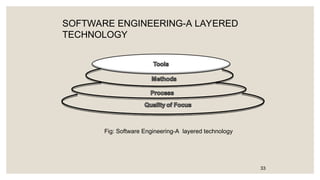
TECHNOLOGY
33
Fig: Software Engineering-A layered technology
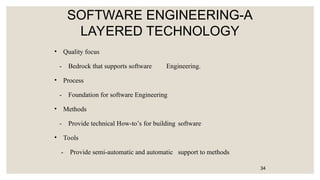
SOFTWARE ENGINEERING-A
LAYERED TECHNOLOGY
• Quality focus
- Bedrock that supports software Engineering.
• Process
- Foundation for software Engineering
• Methods
- Provide technical How-to’s for building software
• Tools
- Provide semi-automatic and automatic support to methods
34
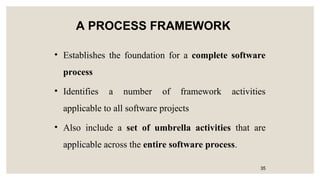
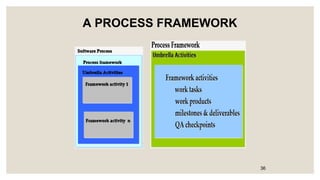
A PROCESS FRAMEWORK
• Establishes the foundation for a complete software
process
• Identifies a number of framework activities
applicable to all software projects
• Also include a set of umbrella activities that are
applicable across the entire software process.
35
A PROCESS FRAMEWORK
36
A PROCESS FRAMEWORK
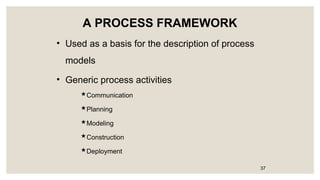
• Used as a basis for the description of process
models
• Generic process activities
Communication
Planning
Modeling
Construction
Deployment
37
A PROCESS FRAMEWORK
• Generic view of engineering complimented by a
number of umbrella activities
– Software project tracking and control
– Formal technical reviews
– Software quality assurance
– Software configuration management
– Work product preparation and production
– Reusability management
– Measurement
– Risk management 38
CAPABILITY MATURITY MODEL
INTEGRATION(CMMI)
• Developed by SEI(Software Engineering institute)
• Assess the process model followed by an organization and rate the
organization with different levels
• A set of software engineering capabilities should be present as
organizations reach different levels of process capability and maturity.
• CMMI process meta model can be represented in different ways
1.A continuous model
2.A staged model
39
Continuous model:
-Lets organization select specific improvement that best meet its business objectives
and minimize risk
-Levels are called capability levels.
-Describes a process in 2 dimensions
-Each process area is assessed against specific goals and practices and is rated
according to the following capability levels.
CMMI
• Six levels of CMMI
– Level 0:Incomplete
– Level 1:Performed
– Level 2:Managed
– Level 3:Defined
– Level 4:Quantitatively managed
– Level 5:Optimized
41
CMMI
• INCOMPLETE
-Process is adhoc.Objective and goal of process areas are not known Performed
-Goal, objective, work tasks, work products and other activities of software process
are carried out
• Managed -Activities are monitored, reviewed, evaluated and controlled
• Defined -Activities are standardized, integrated and documented
• Quantitatively Managed
-Metrics and indicators are available to measure the process and quality
• Optimized
- Continuous process improvement based on quantitative feed back from the user
-Use of innovative ideas and techniques, statistical quality control and other
methods for process improvement.
42
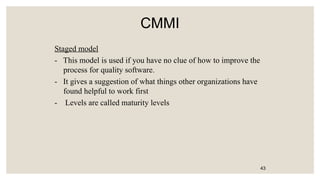
CMMI
Staged model
- This model is used if you have no clue of how to improve the
process for quality software.
- It gives a suggestion of what things other organizations have
found helpful to work first
- Levels are called maturity levels
43
 The waterfall model
 Spiral model
 Agile methodology
Process models:
PROCESS MODELS
• Help in the software development
• Guide the software team through a set of
framework activities
• Process Models may be linear,
incremental or evolutionary
45
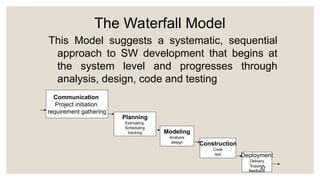
THE WATERFALL MODEL
• Used when requirements are well
understood in the beginning
• Also called classic life cycle
• A systematic, sequential approach to
Software development
• Begins with customer specification of
Requirements and progresses through
planning, modeling, construction and
deployment
46
The Waterfall Model
This Model suggests a systematic, sequential
approach to SW development that begins at
the system level and progresses through
analysis, design, code and testing
Communication
Project initiation
requirement gathering
Planning
Estimating
Scheduling
tracking Modeling
Analysis
design Construction
Code
test Deployment
Delivery
Support
feedback
47
PROBLEMS IN WATERFALL
MODEL
• Real projects rarely follow the sequential
flow since they are always iterative
• The model requires requirements to be
explicitly spelled out in the beginning,
which is often difficult
• A working model is not available until late
in the project time plan
48
THE INCREMENTAL PROCESS
MODEL
• Linear sequential model is not suited for
projects which are iterative in nature
• Incremental model suits such projects
• Used when initial requirements are
reasonably well-defined and compelling
need to provide limited functionality quickly
• Functionality expanded further in later
releases
• Software is developed in increments
49
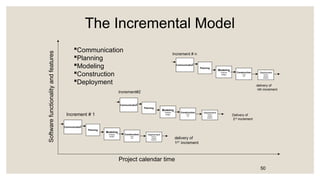
The Incremental Model
Communication
Planning
Modeling
Construction
Deployment
Software
functionality
and
features
Project calendar time
Increment # 1
Communication
Planning
Modeling
Analysis
design
Construction
Code
test
Deployment
Delivery
Support
feedback
delivery of
1ST
increment
Communication
Planning
Modeling
Analysis
design
Construction
Code
test
Deployment
Delivery
Support
feedback
Increment#2
Communication
Planning
Modeling
Analysis
design
Construction
Code
test
Deployment
Delivery
Support
feedback
Delivery of
2nd
increment
delivery of
nth increment
Increment # n
50
THE INCREMENTAL MODEL
• Software releases in increments
• 1st
increment constitutes Core product
• Basic requirements are addressed
• Core product undergoes detailed evaluation by
the customer
• As a result, plan is developed for the next
increment
Plan addresses the modification of core product
to better meet the needs of customer
• Process is repeated until the complete product is
produced
51
THE RAD MODEL
(Rapid Application Development)
• An incremental software process model
• Having a short development cycle
• High-speed adoption of the waterfall
model using a component based
construction approach
• Creates a fully functional system within a
very short span time of 60 to 90 days
52
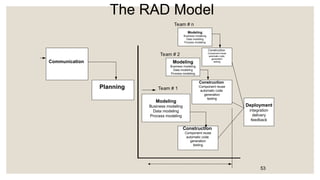
The RAD Model
Communication
Planning
Construction
Component reuse
automatic code
generation
testing
Modeling
Business modeling
Data modeling
Process modeling
Construction
Component reuse
automatic code
generation
testing
Modeling
Business modeling
Data modeling
Process modeling
Construction
Component reuse
automatic code
generation
testing
Modeling
Business modeling
Data modeling
Process modeling
Team # 1
Team # 2
Team # n
Deployment
integration
delivery
feedback
53
THE RAD MODEL
• Multiple software teams work in parallel on different
functions
• Modeling encompasses three major phases: Business
modeling, Data modeling and process modeling
• Construction uses reusable components, automatic code
generation and testing
• Problems in RAD

Requires a number of RAD teams

Requires commitment from both developer and customer
for rapid-fire completion of activities

Requires modularity

Not suited when technical risks are high
54
EVOLUTIONARY PROCESS
MODEL
• Software evolves over a period of time
• Business and product requirements often
change as development proceeds making a
straight-line path to an end product unrealistic
• Evolutionary models are iterative and as such
are applicable to modern day applications
• Types of evolutionary models
– Prototyping
– Spiral model
– Concurrent development model
55
PROTOTYPING
• Mock up or model( throw away version) of a
software product
• Used when customer defines a set of
objective but does not identify input, output,
or processing requirements
• Developer is not sure of:
– efficiency of an algorithm
– adaptability of an operating system
– human/machine interaction
56
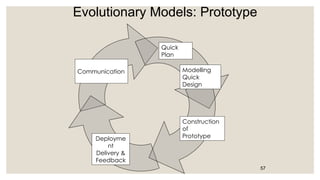
Evolutionary Models: Prototype
57
Communication
Quick
Plan
Modelling
Quick
Design
Construction
of
Prototype
Deployme
nt
Delivery &
Feedback
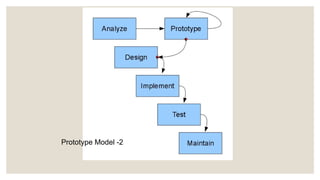
Prototype Model -2
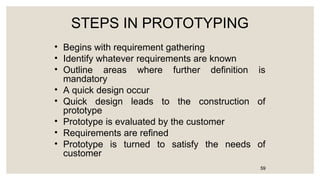
STEPS IN PROTOTYPING
• Begins with requirement gathering
• Identify whatever requirements are known
• Outline areas where further definition is
mandatory
• A quick design occur
• Quick design leads to the construction of
prototype
• Prototype is evaluated by the customer
• Requirements are refined
• Prototype is turned to satisfy the needs of
customer
59
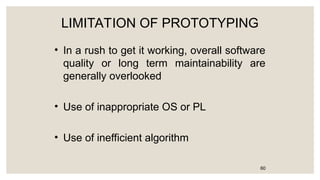
LIMITATION OF PROTOTYPING
• In a rush to get it working, overall software
quality or long term maintainability are
generally overlooked
• Use of inappropriate OS or PL
• Use of inefficient algorithm
60
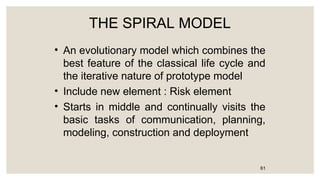
THE SPIRAL MODEL
• An evolutionary model which combines the
best feature of the classical life cycle and
the iterative nature of prototype model
• Include new element : Risk element
• Starts in middle and continually visits the
basic tasks of communication, planning,
modeling, construction and deployment
61
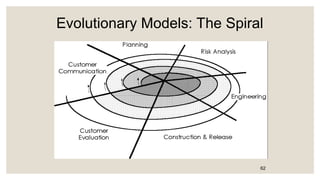
Evolutionary Models: The Spiral
62
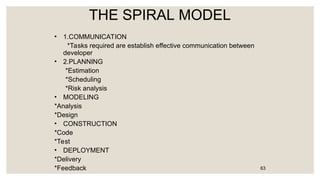
THE SPIRAL MODEL
• 1.COMMUNICATION
*Tasks required are establish effective communication between
developer
• 2.PLANNING
*Estimation
*Scheduling
*Risk analysis
• MODELING
*Analysis
*Design
• CONSTRUCTION
*Code
*Test
• DEPLOYMENT
*Delivery
*Feedback 63
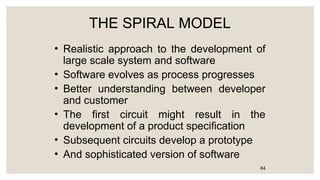
THE SPIRAL MODEL
• Realistic approach to the development of
large scale system and software
• Software evolves as process progresses
• Better understanding between developer
and customer
• The first circuit might result in the
development of a product specification
• Subsequent circuits develop a prototype
• And sophisticated version of software
64
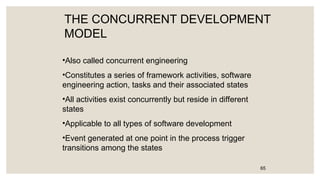
THE CONCURRENT DEVELOPMENT
MODEL
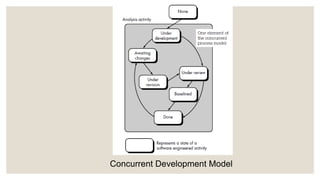
•Also called concurrent engineering
•Constitutes a series of framework activities, software
engineering action, tasks and their associated states
•All activities exist concurrently but reside in different
states
•Applicable to all types of software development
•Event generated at one point in the process trigger
transitions among the states
65
Concurrent Development Model
A FINAL COMMENT ON
EVOLUTIONARY PROCESS
• Difficult in project planning
• Speed of evolution is not known
• Does not focus on flexibility and
extensibility (more emphasis on high
quality)
• Requirement is balance between high
quality and flexibility and extensibility
67
THE UNIFIED PROCESS
• Evolved by Rumbaugh, Booch, Jacobson
• Combines the best features their OO models
• Adopts additional features proposed by other
experts
• Resulted in Unified Modeling Language(UML)
• Unified process developed Rumbaugh and Booch
• A framework for Object-Oriented Software Engineering
using UML
68
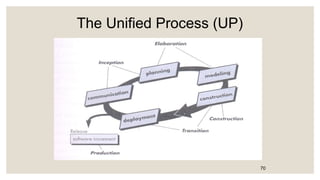
PHASES OF UNIFIED PROCESS
• INCEPTION PHASE
• ELABORATION PHASE
• CONSTRUCTION PHASE
• TRANSITION PHASE
69
The Unified Process (UP)
70
UNIFIED PROCESS WORK PRODUCTS
• Tasks which are required to be completed during
different phases
• Inception Phase
Vision document, Initial Use-Case model, Initial Risk
assessment, Project Plan.
• Elaboration Phase
Use-Case model, Analysis model, Software
Architecture description, Preliminary design model,
Preliminary model
71
UNIFIED PROCESS WORK PRODUCTS
• Construction Phase
Design model, Software components, Test plan
and procedure, Test cases, Manuals
• Transition Phase
Delivered software increment, Beta test reports,
General user feedback
72
Unit-1 in software engineering note ppt complete

  • 1.
    1 UNIT - 1 Introductionto Software Engineering
  • 2.
    The evolving roleof software changing nature of software software myths. Introduction to Software Engineering
  • 3.
    The Evolving roleof software Dual role of Software 1. Software as a Product •Software is developed and delivered as a standalone entity to users. •It acts as a solution to a specific problem or fulfills user needs. Example: Word processors, mobile apps, antivirus tools, games, etc. Information Transformer: Produces, manages, manipulates, and displays data or information. Examples: Report generation, data visualization, dashboards. 3 What is the work Product?  From the point of view of a software engineer, the work product is the programs, documents, and content.  From the user’s viewpoint, the work product is the resultant information that somehow makes the user’s world better.
  • 4.
    2. Software asa Vehicle for Delivering a Product •Software acts as the medium or platform through which hardware or another software system performs. •It enables and manages the functioning of other systems. Includes: Control of computer hardware (e.g., Operating Systems like Windows, Linux). Communication of information (e.g., Networking Software, Internet Protocols). Creation of other software (e.g., Compilers, IDEs, Code Libraries, Software Tools). The Evolving role of software
  • 5.
    Software products maybe developed for a particular customer or may be developed for a general market. Software products may be  Generic - developed to be sold to a range of different customers. E.g. PC software such as Excel or Word.  Custom - developed for a single customer according to their specification. E.g. Banking Systems, Hospital management system. The Evolving role of software
  • 6.
    What is software? Softwareis a collection of programs, data, and instructions that tell a computer how to perform specific tasks or operations. Unlike hardware, software is intangible —you can’t touch it, but it controls everything the computer does. Types of Software & Examples 1. System Software  Helps run and manage computer hardware.  Provides a platform for other software to run. Examples:  Operating Systems: Windows, Linux, macOS  Device Drivers: Printer driver, graphics driver  Utility Programs: Antivirus, Disk Cleanup, File Management tools 6
  • 7.
    2. Application Software •Designedto perform specific tasks for the user. Examples: •MS Word, MS Excel, PowerPoint •Web Browsers: Google Chrome, Firefox •Media Players: VLC, Windows Media Player •Mobile Apps: WhatsApp, Instagram, Zoom 3. Programming Software •Provides tools for developers to write, test, and maintain software. Examples: •Text Editors: Notepad++, Sublime Text •Compilers: GCC, Turbo C++ •IDEs (Integrated Development Environments): Visual Studio, Eclipse, PyCharm
  • 8.
    4. Embedded Software •Softwarebuilt into devices to control their functions. Examples: •Software in Washing Machines, Smart TVs, Microwave Ovens •Software in ATMs, Smart Cards 5. Middleware Acts as a bridge between system software and applications or between two applications. •Examples: • Database middleware (Oracle, JDBC) • Message Oriented Middleware (RabbitMQ, Kafka)
  • 9.
    Characteristics of software 1.Functionality Definition: The ability of the software to perform the tasks it is designed for. Examples: A word processor allowing users to type, edit, and format text; an operating system managing hardware and software resources. 2. Reliability Definition: The consistency of software to perform tasks without failure over time. Examples: Bug-free execution, consistent performance under various conditions, and handling unexpected situations (e.g., errors or crashes). 9
  • 10.
    3. Usability Definition: Howeasy and intuitive the software is for users to interact with. Examples: Well-designed graphical user interfaces (GUIs), clear instructions, and an efficient user experience. 4. Performance Definition: How efficiently the software runs in terms of speed, resource consumption, and responsiveness. Examples: A web application loading quickly, a mobile app consuming minimal battery, or a database query returning results in milliseconds.
  • 11.
    5. Maintainability Definition: Theease with which software can be modified, updated, and fixed over time. Examples: Code being easy to understand and modify, good documentation, and the ability to add new features or address bugs without breaking existing functionality. 6. Portability Definition: The ability of software to run on different platforms or environments without modification. Examples: A web application accessible from any browser, a mobile app running on both iOS and Android, or a program running on Windows, Linux, and macOS.
  • 12.
    7. Scalability Definition: Theability of software to handle increased load or size efficiently. Examples: A database system managing more records as the application grows, or a web server handling more simultaneous users as traffic increases. 8. Security Definition: The ability of software to protect itself from unauthorized access or malicious activities. Examples: Encryption, secure user authentication, regular security patches, and protection against attacks like SQL injection or cross-site scripting (XSS).
  • 13.
    9. Interoperability Definition: Theability of software to work with other software systems or components. Examples: APIs, data exchange formats like JSON or XML, or integration with third-party services and tools. 10. Extensibility Definition: The ability of software to be expanded with additional features or functionalities without altering its core structure. Examples: A modular plugin system, customizable themes, or adding new modules to an enterprise resource planning (ERP) system.
  • 14.
    11. Efficiency Definition: Thesoftware's ability to make optimal use of resources like CPU, memory, and bandwidth. Examples: A video compression software reducing file size without compromising quality, or a game running smoothly on low-end hardware. 12. Flexibility Definition: The software’s ability to adapt to changing requirements or environments. Examples: A content management system (CMS) being customizable, or a software that allows configuration settings to adjust its behavior.
  • 15.
    13. Documentation Definition: Detailedinformation about how the software works, how to install it, and how to troubleshoot issues. Examples: API documentation, user manuals, developer guides, and release notes. 14. Adaptability Definition: The ability to evolve in response to new user needs or technological advancements. Examples: Software that regularly updates to incorporate new features, or systems that evolve with changes in hardware or software standards.
  • 16.
    15. Cost Definition: Theeconomic factors involved in acquiring, deploying, and maintaining the software. Examples: Initial purchase cost, licensing fees, ongoing support and maintenance costs, or open-source solutions with no upfront fees but community-driven maintenance.
  • 17.
    The Changing Natureof Software Seven Broad Categories of software are challenges for software engineers System software Application software Engineering and scientific software Embedded software Product-line software Web-applications Artificial intelligence software 17
  • 18.
    The Changing Natureof Software System software •System software is a collection of programs written to service other programs •Ex. Compilers, operating system, drivers etc. Application Software •Application software consists of standalone programs that solve a specific business need. •Application software is used to control the business function in real-time. 18
  • 19.
    Engineering /Scientific software: ◦Characterized by "number crunching" algorithms. ◦ Applications range from astronomy to volcano logy, from automotive stress analysis to space shuttle orbital dynamics, and from molecular biology to automated manufacturing. Ex. Computer Aided Design (CAD), system stimulation etc.
  • 20.
    Embedded Software: ◦ Itresides in read-only memory and is used to control products and systems ◦ Used to control products and systems for the consumer and industrial markets. Ex. keypad control for a microwave oven. Product line software: ◦ Designed to provide a specific capability for use by many different customers, product line software can focus on a limited and esoteric marketplace. Ex. Word processing, spreadsheet, CG, multimedia, etc.
  • 21.
    Web Applications: ◦ Webapps can be little more than a set of linked hypertext files. ◦ It evolving into sophisticated computing environments that not only provide standalone features, functions but also integrated with corporate database and business applications. Artificial Intelligence software ◦ AI software makes use of non-numerical algorithms to solve complex problems that are not amenable to computation or straightforward analysis Ex. Robotics, expert system, game playing, etc.
  • 22.
    Legacy Software • Legacysoftware are older programs that are developed decades ago. • The quality of legacy software is poor because it has inextensible design, convoluted code, poor and nonexistent documentation, test cases and results that are not achieved. 22
  • 23.
     The softwaremust be adapted to meet the needs of new computing environment or technology.  The software must be enhanced to implement new business requirements.  The software must be extended to make it interoperable with more modern systems or database  The software must be rearchitected to make it viable within a network environment. 23 •As time passes legacy systems evolve due to following reasons:
  • 24.
    1. COBOL-based BankingSystems •Where Used: Many banks and financial institutions worldwide. •Details: COBOL (Common Business-Oriented Language) was developed in the 1950s and is still used in core banking systems for transactions and account management. 2. Windows XP Operating System •Where Used: Older government offices, small businesses, ATMs. •Details: Despite its end-of-life support in 2014, some systems still use it due to application compatibility or cost of upgrading. 3. Mainframe Applications (IBM z/OS) •Where Used: Airlines, insurance companies, stock exchanges. •Details: Mission-critical applications running on IBM mainframes using software developed decades ago. 4. Lotus Notes/Domino •Where Used: Some enterprises and public sector organizations. •Details: Used for email, collaboration, and databases; now largely replaced by Microsoft 365 and Google Workspace. Examples
  • 25.
    7. SAP R/3(Old Versions) •Where Used: Manufacturing and enterprise companies. •Details: SAP R/3 was a popular ERP system. Some organizations still use old versions rather than upgrading to SAP S/4HANA. 8. Internet Explorer (IE) Based Applications •Where Used: Government portals, internal enterprise apps. •Details: IE has been phased out, but some legacy apps were built specifically to work with it. 9. AS/400 Systems (IBM iSeries) •Where Used: Retail, manufacturing, logistics. •Details: Old business applications developed for the IBM AS/400 platform, still running reliably in some organizations. 10. Microsoft Access 97/2003 •Where Used: Small businesses, education, local databases. •Details: Used to create small database applications; many old Access apps still work in internal environments. 5. Visual Basic 6 Applications •Where Used: Small businesses and old ERP systems. •Details: VB6 was popular in the late 1990s, but it's no longer supported by Microsoft since 2008. 6. FoxPro / dBase Applications •Where Used: Local shops, government departments. •Details: Database management systems used for accounting or inventory control, mostly in small-scale setups.
  • 26.
    Software Evolution • Softwareevolves due to changes • Changes occur due to correction, adaption and enhancement • 8 Laws of unified theory The Law of Continuing Change (1974). The Law of Increasing Complexity (1974). The Law of Self-Regulation (1974). The Law of Conservation of Organizational Stability (1980). The Law of Conservation of Familiarity (1980). The Law of Continuing Growth (1980). The Law of Declining Quality (1996). The Feedback System Law (1996). 26
  • 27.
     In thefield of software development, there are several myths that can lead to misconceptions and poor decision- making. These myths arise from a lack of understanding of the complexities of software engineering and its processes. Software myths
  • 28.
    Software Myths Three typesof myth 1.Management myth 2.Customer myth 3.Practitioner’s myth 28
  • 29.
    Management Myths 1. ManagementMyths These myths are held by project managers or executives, often related to project control, cost, and team performance. Examples: “Adding more people to a late project will speed it up.” Truth: This usually causes further delays due to increased communication overhead and ➤ onboarding time (Brooks’ Law). “If we have tools, we don’t need skilled developers.” Truth: Tools help, but skilled professionals are essential for quality software. ➤ “Once we write the program and get it to work, our job is done.” Truth: Maintenance, updates, and bug fixing are ongoing parts of the software lifecycle. ➤ 29
  • 30.
    Customer Myth 2. CustomerMyths These are misconceptions held by clients or end-users of the software. Examples: “A general statement of objectives is enough to start programming.” Truth: Without clear, detailed requirements, the final product may not meet user needs. ➤ “Changes can be easily made later.” Truth: Late-stage changes are costly and can affect system stability. ➤ “All we need is the software to work; documentation and testing are optional.” Truth: Without documentation and testing, the software becomes difficult to maintain, scale, or ➤ debug. 30
  • 31.
    Developer Myths 3. Practitioner’sMyths These are beliefs held by software developers or engineers themselves. Examples: “Once the program is working, it’s correct.” Truth: The program must be thoroughly tested to ensure it meets all requirements and handles edge ➤ cases. “Software engineering just adds paperwork and delays.” Truth: Proper software engineering practices ensure reliability, maintainability, and quality. ➤ “We can fix problems later during integration.” Truth: Fixing issues early (e.g., during design or coding) is much more cost-effective. ➤ 31
  • 32.
    A Generic viewof process  Software engineering- a layered technology  a process framework  The capability maturity model integration (CMMI).
  • 33.
    SOFTWARE ENGINEERING-A LAYERED TECHNOLOGY 33 Fig:Software Engineering-A layered technology
  • 34.
    SOFTWARE ENGINEERING-A LAYERED TECHNOLOGY •Quality focus - Bedrock that supports software Engineering. • Process - Foundation for software Engineering • Methods - Provide technical How-to’s for building software • Tools - Provide semi-automatic and automatic support to methods 34
  • 35.
    A PROCESS FRAMEWORK •Establishes the foundation for a complete software process • Identifies a number of framework activities applicable to all software projects • Also include a set of umbrella activities that are applicable across the entire software process. 35
  • 36.
  • 37.
    A PROCESS FRAMEWORK •Used as a basis for the description of process models • Generic process activities Communication Planning Modeling Construction Deployment 37
  • 38.
    A PROCESS FRAMEWORK •Generic view of engineering complimented by a number of umbrella activities – Software project tracking and control – Formal technical reviews – Software quality assurance – Software configuration management – Work product preparation and production – Reusability management – Measurement – Risk management 38
  • 39.
    CAPABILITY MATURITY MODEL INTEGRATION(CMMI) •Developed by SEI(Software Engineering institute) • Assess the process model followed by an organization and rate the organization with different levels • A set of software engineering capabilities should be present as organizations reach different levels of process capability and maturity. • CMMI process meta model can be represented in different ways 1.A continuous model 2.A staged model 39
  • 40.
    Continuous model: -Lets organizationselect specific improvement that best meet its business objectives and minimize risk -Levels are called capability levels. -Describes a process in 2 dimensions -Each process area is assessed against specific goals and practices and is rated according to the following capability levels.
  • 41.
    CMMI • Six levelsof CMMI – Level 0:Incomplete – Level 1:Performed – Level 2:Managed – Level 3:Defined – Level 4:Quantitatively managed – Level 5:Optimized 41
  • 42.
    CMMI • INCOMPLETE -Process isadhoc.Objective and goal of process areas are not known Performed -Goal, objective, work tasks, work products and other activities of software process are carried out • Managed -Activities are monitored, reviewed, evaluated and controlled • Defined -Activities are standardized, integrated and documented • Quantitatively Managed -Metrics and indicators are available to measure the process and quality • Optimized - Continuous process improvement based on quantitative feed back from the user -Use of innovative ideas and techniques, statistical quality control and other methods for process improvement. 42
  • 43.
    CMMI Staged model - Thismodel is used if you have no clue of how to improve the process for quality software. - It gives a suggestion of what things other organizations have found helpful to work first - Levels are called maturity levels 43
  • 44.
     The waterfallmodel  Spiral model  Agile methodology Process models:
  • 45.
    PROCESS MODELS • Helpin the software development • Guide the software team through a set of framework activities • Process Models may be linear, incremental or evolutionary 45
  • 46.
    THE WATERFALL MODEL •Used when requirements are well understood in the beginning • Also called classic life cycle • A systematic, sequential approach to Software development • Begins with customer specification of Requirements and progresses through planning, modeling, construction and deployment 46
  • 47.
    The Waterfall Model ThisModel suggests a systematic, sequential approach to SW development that begins at the system level and progresses through analysis, design, code and testing Communication Project initiation requirement gathering Planning Estimating Scheduling tracking Modeling Analysis design Construction Code test Deployment Delivery Support feedback 47
  • 48.
    PROBLEMS IN WATERFALL MODEL •Real projects rarely follow the sequential flow since they are always iterative • The model requires requirements to be explicitly spelled out in the beginning, which is often difficult • A working model is not available until late in the project time plan 48
  • 49.
    THE INCREMENTAL PROCESS MODEL •Linear sequential model is not suited for projects which are iterative in nature • Incremental model suits such projects • Used when initial requirements are reasonably well-defined and compelling need to provide limited functionality quickly • Functionality expanded further in later releases • Software is developed in increments 49
  • 50.
    The Incremental Model Communication Planning Modeling Construction Deployment Software functionality and features Projectcalendar time Increment # 1 Communication Planning Modeling Analysis design Construction Code test Deployment Delivery Support feedback delivery of 1ST increment Communication Planning Modeling Analysis design Construction Code test Deployment Delivery Support feedback Increment#2 Communication Planning Modeling Analysis design Construction Code test Deployment Delivery Support feedback Delivery of 2nd increment delivery of nth increment Increment # n 50
  • 51.
    THE INCREMENTAL MODEL •Software releases in increments • 1st increment constitutes Core product • Basic requirements are addressed • Core product undergoes detailed evaluation by the customer • As a result, plan is developed for the next increment Plan addresses the modification of core product to better meet the needs of customer • Process is repeated until the complete product is produced 51
  • 52.
    THE RAD MODEL (RapidApplication Development) • An incremental software process model • Having a short development cycle • High-speed adoption of the waterfall model using a component based construction approach • Creates a fully functional system within a very short span time of 60 to 90 days 52
  • 53.
    The RAD Model Communication Planning Construction Componentreuse automatic code generation testing Modeling Business modeling Data modeling Process modeling Construction Component reuse automatic code generation testing Modeling Business modeling Data modeling Process modeling Construction Component reuse automatic code generation testing Modeling Business modeling Data modeling Process modeling Team # 1 Team # 2 Team # n Deployment integration delivery feedback 53
  • 54.
    THE RAD MODEL •Multiple software teams work in parallel on different functions • Modeling encompasses three major phases: Business modeling, Data modeling and process modeling • Construction uses reusable components, automatic code generation and testing • Problems in RAD  Requires a number of RAD teams  Requires commitment from both developer and customer for rapid-fire completion of activities  Requires modularity  Not suited when technical risks are high 54
  • 55.
    EVOLUTIONARY PROCESS MODEL • Softwareevolves over a period of time • Business and product requirements often change as development proceeds making a straight-line path to an end product unrealistic • Evolutionary models are iterative and as such are applicable to modern day applications • Types of evolutionary models – Prototyping – Spiral model – Concurrent development model 55
  • 56.
    PROTOTYPING • Mock upor model( throw away version) of a software product • Used when customer defines a set of objective but does not identify input, output, or processing requirements • Developer is not sure of: – efficiency of an algorithm – adaptability of an operating system – human/machine interaction 56
  • 57.
  • 58.
  • 59.
    STEPS IN PROTOTYPING •Begins with requirement gathering • Identify whatever requirements are known • Outline areas where further definition is mandatory • A quick design occur • Quick design leads to the construction of prototype • Prototype is evaluated by the customer • Requirements are refined • Prototype is turned to satisfy the needs of customer 59
  • 60.
    LIMITATION OF PROTOTYPING •In a rush to get it working, overall software quality or long term maintainability are generally overlooked • Use of inappropriate OS or PL • Use of inefficient algorithm 60
  • 61.
    THE SPIRAL MODEL •An evolutionary model which combines the best feature of the classical life cycle and the iterative nature of prototype model • Include new element : Risk element • Starts in middle and continually visits the basic tasks of communication, planning, modeling, construction and deployment 61
  • 62.
  • 63.
    THE SPIRAL MODEL •1.COMMUNICATION *Tasks required are establish effective communication between developer • 2.PLANNING *Estimation *Scheduling *Risk analysis • MODELING *Analysis *Design • CONSTRUCTION *Code *Test • DEPLOYMENT *Delivery *Feedback 63
  • 64.
    THE SPIRAL MODEL •Realistic approach to the development of large scale system and software • Software evolves as process progresses • Better understanding between developer and customer • The first circuit might result in the development of a product specification • Subsequent circuits develop a prototype • And sophisticated version of software 64
  • 65.
    THE CONCURRENT DEVELOPMENT MODEL •Alsocalled concurrent engineering •Constitutes a series of framework activities, software engineering action, tasks and their associated states •All activities exist concurrently but reside in different states •Applicable to all types of software development •Event generated at one point in the process trigger transitions among the states 65
  • 66.
  • 67.
    A FINAL COMMENTON EVOLUTIONARY PROCESS • Difficult in project planning • Speed of evolution is not known • Does not focus on flexibility and extensibility (more emphasis on high quality) • Requirement is balance between high quality and flexibility and extensibility 67
  • 68.
    THE UNIFIED PROCESS •Evolved by Rumbaugh, Booch, Jacobson • Combines the best features their OO models • Adopts additional features proposed by other experts • Resulted in Unified Modeling Language(UML) • Unified process developed Rumbaugh and Booch • A framework for Object-Oriented Software Engineering using UML 68
  • 69.
    PHASES OF UNIFIEDPROCESS • INCEPTION PHASE • ELABORATION PHASE • CONSTRUCTION PHASE • TRANSITION PHASE 69
  • 70.
  • 71.
    UNIFIED PROCESS WORKPRODUCTS • Tasks which are required to be completed during different phases • Inception Phase Vision document, Initial Use-Case model, Initial Risk assessment, Project Plan. • Elaboration Phase Use-Case model, Analysis model, Software Architecture description, Preliminary design model, Preliminary model 71
  • 72.
    UNIFIED PROCESS WORKPRODUCTS • Construction Phase Design model, Software components, Test plan and procedure, Test cases, Manuals • Transition Phase Delivered software increment, Beta test reports, General user feedback 72