Comparative Study of Open Source
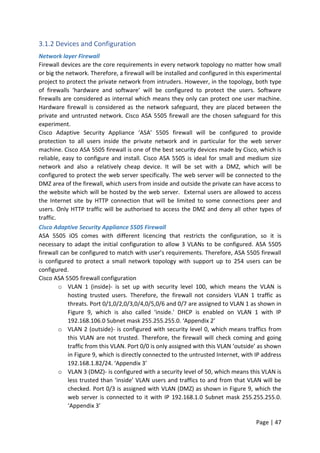
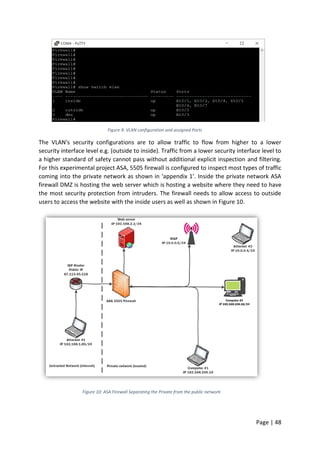
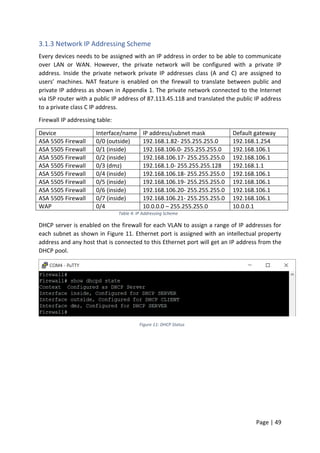
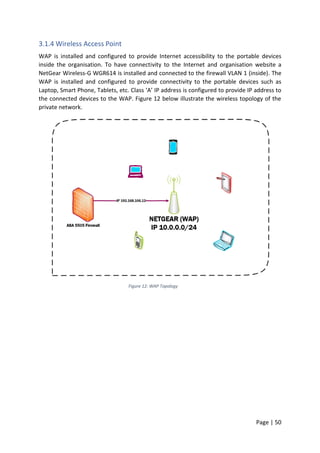
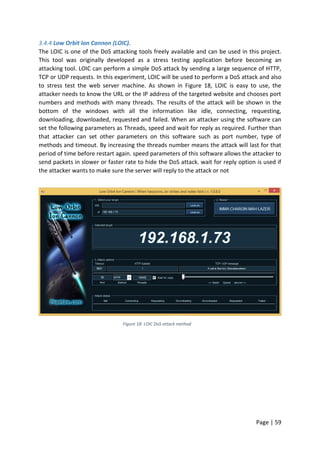
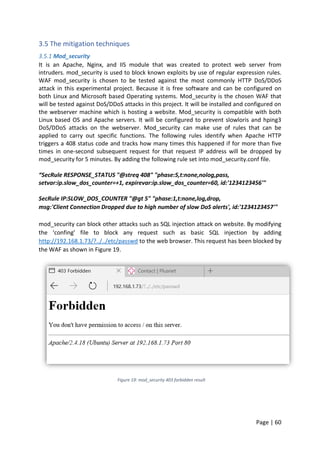
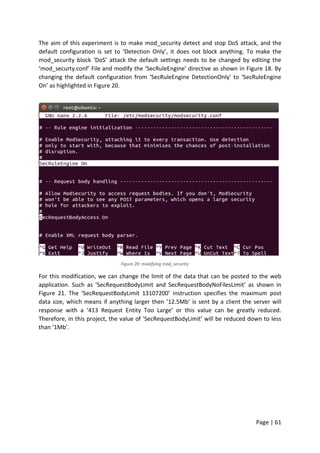
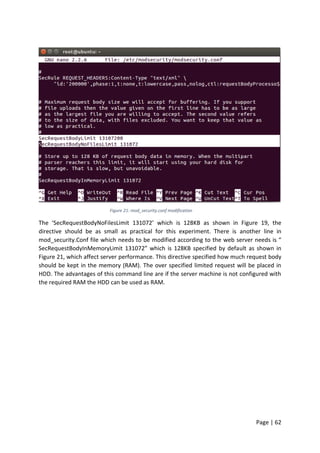
Security Solutions against DoS/DDoS
By Dashti Abdullah
Matric No: S1224722
A dissertation submitted in partial fulfilment of the requirements of
Glasgow Caledonian University
for the degree of Master of Science in
MSc Advanced Internetwork Engineering
(MMI123177-15-C)
Module Leader: Dr. Jackie Riley
Project Supervisor: Frances Garven
August 2016
“This piece of coursework is my own original work and has not been submitted
elsewhere in fulfilment of the requirement of this or any other award”
Signed: Date: 24/08/201
Page | 1
Acknowledgements
I would like to take this opportunity to thank my supervisor, Frances Garven for her support,
advice and feedback throughout the MSc project. I would also like to extend my thanks to
my family and friends for their support, encouragement and understanding.
Page | 2
Abstract
Improving Internet network security has turned out to be unquestionably critical in
every network. The quick expansion of computer network systems brings both excellent
suitability and new security threats for users. It is not easy to keep up with the increasing
volume of cyber-attacks and the influence on network traffic. Network security problems
exist over all the layers of the computer network. The use of Firewall technology is essential
to improve network security and it acts as the network safeguard, protecting the private
network from the untrusted Internet. There are a few types of firewalls, for example,
software and hardware firewalls. Software firewalls can only protect a single machine or
one host, but hardware firewalls can protect the entire network from intruders. Firewalls
too suffer from vulnerabilities and can be targeted by attackers; it has been noticed that the
percentage of vulnerabilities located in firewalls are increasing steadily. Both Network and
Application layer security mechanisms are known to suffer from malicious attacks
particularly Distributed Denial of Service (DDoS) attacks. DDoS attacks have become the
frightening problem for computer system users, system administrators, and businesses.
Despite enormous efforts in combating DDoS attacks in recent years, DDoS attacks are still a
significant threat to the security of cyberspace. Detection and prevention of DDoS attacks is
a major research topic for researchers over the world. The prime target for cyber-attacks is
web applications; the most recent studies shows that approximately 75% of all successful
web attacks exploit application vulnerabilities. However, traditional firewalls can block
packets effectively at the network layer but are ineffective against attacks that target
application weaknesses. the aim of this experiment was to test the open source security
solutions against HTTP DoD/DDoS attacks. Therefore, mod_evasive, (D)DoS Deflate and
mod_security WAF have been tested against HTTP DoS/DDoS attacks. The aim of this
experimental project is to identify and compare the weaknesses of available open source
DoS/DDoS attacks mitigation software against the most sophisticated type of network
attack. mod_evasive, (D)DoS Deflate and mod_security will be compared and also critically
analysed. The results of the experimental project are helpful for organisations to select the
most appropriate Web Application Firewall to protect their data from intruders.
Keywords: Denial of Service (DoS), Distributed Denial of Service (DDoS), Web Application
Firewall (WAF), Mod_security, Mod_evasive, (D)DoS Deflate, Information Technology (IT),
Apache, Network Security.
Page | 3
Table of Contents
Chapter One...............................................................................................................................7
1.0 Introduction .....................................................................................................................7
1.1 Backgrounds.....................................................................................................................7
1.1.1 Zero Day Attack.......................................................................................................10
1.1.2 Network Layer Firewall...........................................................................................10
1.1.3 DDoS Attack ............................................................................................................12
1.1.4 Common Denial of Service/Distributed Denial of Service attacks .........................14
1.1.5 Problem Description ...............................................................................................15
1.1.6 Network Security ....................................................................................................15
1.1.7 WAF mod_security, mod_evasive and (D)DoS Deflate. .........................................15
1.2 Project Aim.....................................................................................................................16
1.2.1 Project Objectives...................................................................................................16
1.2.2 Project’s Milestones and Deliverables....................................................................17
1.3 Technical Methods of the Proposed Project .................................................................18
1.3.1 Fundamental...........................................................................................................18
1.3.2 Critical Appraisal of Relevant toolkits or platforms................................................20
1.4 Project Plan....................................................................................................................23
1.4.1 Project’s PERT/CPM chart.......................................................................................23
1.4.2 Project Gantt chart .................................................................................................24
1.4.3 Resource Requirements..........................................................................................25
1.4.4 Risk Management Strategy.....................................................................................28
1.4.5 Hypotheses .............................................................................................................29
Chapter Two.............................................................................................................................30
2.0 Literature Review...........................................................................................................30
2.1 Secure Sphere ............................................................................................................31
2.1.1 WebSniper...............................................................................................................31
2.1.2 Server Defender VP.................................................................................................31
2.1.3 Secure IIS.................................................................................................................32
2.1.4 Barracuda................................................................................................................32
2.1.5 Web Defend............................................................................................................33
2.1.6 F5-BIG IP..................................................................................................................33
2.1.8 Network Layer Firewall...........................................................................................34
Page | 4
2.1.9 Linux based Operating Systems..............................................................................35
2.1.9.1 Kali Linux ..............................................................................................................35
2.1.9.2 Ubuntu Linux........................................................................................................36
2.2.1 DoS/DDoS attack.....................................................................................................36
2.2.2 Existing countermeasures.......................................................................................37
2.2.3 Mod_Security..........................................................................................................37
2.2.4 Mod_evasive...........................................................................................................39
2.2.5 (D)DoS Deflate ........................................................................................................41
2.2.6 Critical Evaluation for Web Application Firewall Solutions ....................................42
2.2.7 Critical Analysis .......................................................................................................43
2.3 Conclusion......................................................................................................................44
2.3.1 Conclusion...............................................................................................................44
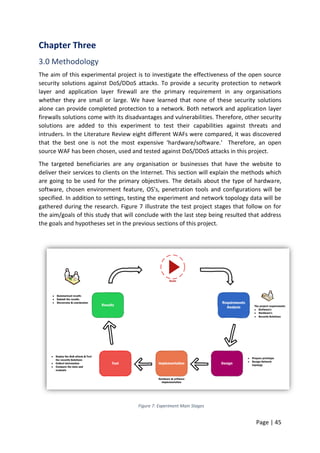
Chapter Three ..........................................................................................................................45
3.0 Methodology..................................................................................................................45
3.1 Design.............................................................................................................................46
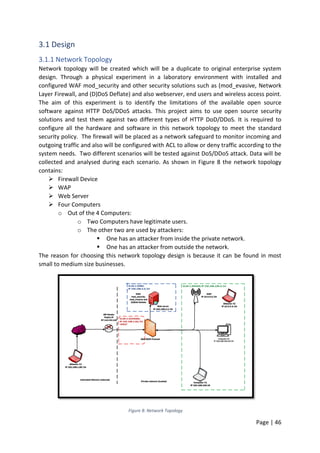
3.1.1 Network Topology...................................................................................................46
3.1.2 Devices and Configuration......................................................................................47
3.1.3 Network IP Addressing Scheme..............................................................................49
3.1.4 Wireless Access Point .............................................................................................50
3.1.5 Web Server..............................................................................................................51
3.1.6 Users and attacker’s computers setup ...................................................................53
3.1.7 Attackers Computers ..............................................................................................53
3.1.8 Legitimate Users Computers...................................................................................54
3.1.9 DoS/DDoS attacks ...................................................................................................54
3.2 Tools to be used by Attackers/Hackers .....................................................................54
3.3 Tools to be used by Network Administrators............................................................55
3.4 DoS/DDoS Methods ...................................................................................................56
3.4.1 Types of DoS/DDoS attacks.....................................................................................56
3.5 The mitigation techniques .........................................................................................60
Chapter Four ............................................................................................................................67
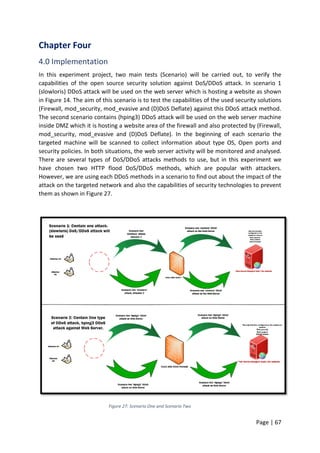
4.0 Implementation .............................................................................................................67
4.1 Scenario One..............................................................................................................68
4.2 Scenario Two..............................................................................................................73
Page | 5
Chapter Five.............................................................................................................................77
5.0 Findings..........................................................................................................................77
5.1 Scenario 1 slowloris attack results.............................................................................78
5.2 Scenario Two hping3 attack results...........................................................................86
Chapter Six ...............................................................................................................................89
6.0 Discussion.......................................................................................................................89
6.1 Project Resume..........................................................................................................91
6.2 Project Critique ..........................................................................................................92
6.3 Further Work..............................................................................................................92
Chapter Seven..........................................................................................................................93
7.0 Conclusions ....................................................................................................................93
Chapter Eight ...........................................................................................................................95
8.0 References .....................................................................................................................95
Chapter Nine............................................................................................................................99
9.0 Appendices.....................................................................................................................99
Figure 1: Web Application Firewall Architecture .......................................................................8
Figure 2: Web Application Firewall Operation...........................................................................9
Figure 3: DDoS attack...............................................................................................................13
Figure 4: Network Topology Diagram......................................................................................18
Figure 5: Project PERT/CPM chart ...........................................................................................23
Figure 6: Project Gantt chart ...................................................................................................24
Figure 7: Experiment Main Stages...........................................................................................45
Figure 8: Network Topology.....................................................................................................46
Figure 9: VLAN configuration and assigned Ports....................................................................48
Figure 10: ASA Firewall Separating the Private from the public network...............................48
Figure 11: DHCP Status ............................................................................................................49
Figure 12: WAP Topology.........................................................................................................50
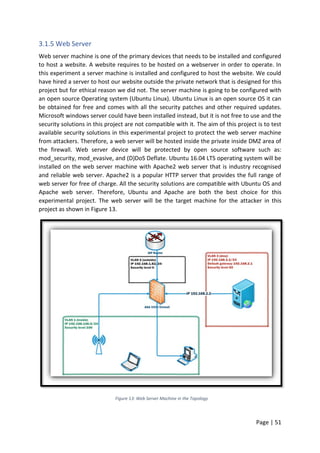
Figure 13: Web Server Machine in the Topology ....................................................................51
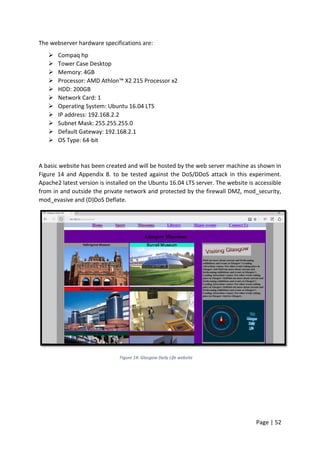
Figure 14: Glasgow Daily Life website .....................................................................................52
Figure 15: Awstats....................................................................................................................55
Figure 16: Slowloris attack.......................................................................................................57
Figure 17: hping3 DDoS attack.................................................................................................58
Figure 18: LOIC DoS attack method.........................................................................................59
Figure 19: mod_security 403 forbidden result ........................................................................60
Figure 20: modifying mod_security .........................................................................................61
Figure 21: mod_security.conf modification.............................................................................62
Page | 6
Figure 22: The Default Configuration ......................................................................................63
Figure 23: test example of mod_evasive configuration ..........................................................64
Figure 24: accessing website is denied with 403 Forbidden ...................................................64
Figure 25: (D)DoS Deflate.conf file Modification.....................................................................65
Figure 26: APF-firewall configuration file ................................................................................66
Figure 27: Scenario One and Scenario Two .............................................................................67
Figure 28: Nmap Scan Result for the webserver .....................................................................68
Figure 29: accessing website from user’s web browser..........................................................69
Figure 30: Nmap scan ..............................................................................................................70
Figure 31: SQL injection result.................................................................................................70
Figure 32: access denied with 403 Forbidden .........................................................................71
Figure 33: slowloris DDoS attack on the website ....................................................................72
Figure 34: slowloris building sockets and sending data ..........................................................72
Figure 35: Nmap scan result ....................................................................................................73
Figure 36: Pining server machine results.................................................................................74
Figure 37: Glasgow Daily Life reachability ...............................................................................74
Figure 38: Siege stress test on webserver ...............................................................................75
Figure 39: hping3 DDoS attack from Kali Linux........................................................................76
Figure 40: The website is not accessible from user’s web browser ........................................78
Figure 41: Website is not accessible during the attack ...........................................................78
Figure 42: Glasgow Daily Life during DDoS attack...................................................................79
Figure 43: server machine pinging results...............................................................................79
Figure 44: LOIC attacking tool..................................................................................................80
Figure 45: LOIC attacking test result........................................................................................80
Figure 46: LOIC slow attack......................................................................................................81
Figure 47: LOIC attack..............................................................................................................81
Figure 48: Awstats results on HTTP requests to webserver....................................................83
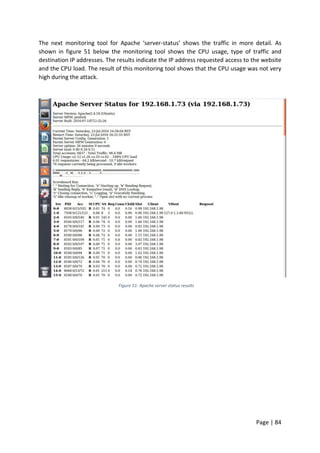
Figure 49: Apache server status results...................................................................................84
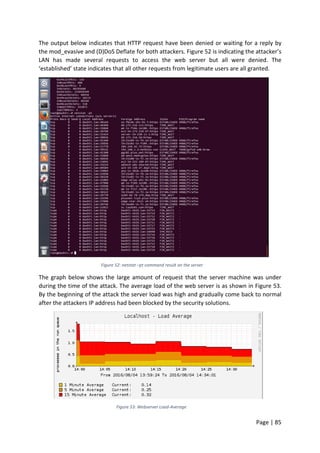
Figure 50: netstat –pt command result on the server.............................................................85
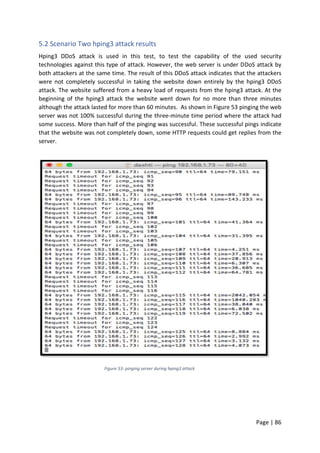
Figure 51: pinging server during hping3 attack .......................................................................86
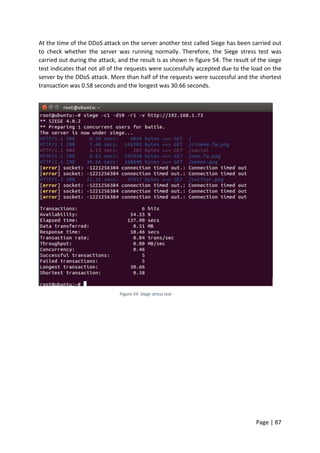
Figure 52: Siege stress test ......................................................................................................87
Figure 53: website accessibility from web browser during hping3 attack ..............................88
Figure 54: pinging webserver IP address.................................................................................88
Figure 55: Home page............................................................................................................114
Figure 56: Sport Page.............................................................................................................114
Figure 57: Glasgow Museums page.......................................................................................115
Figure 58: Glasgow Libraries page.........................................................................................115
Figure 59: Major Evenest page ..............................................................................................116
Figure 60: Contact us page ....................................................................................................117
Page | 7
Chapter One
1.0 Introduction
The demands on web services are diverse and are expanding day-by-day, and malicious web
attacks, mainly at the application layer, are also growing significantly. “Firewall technology
emerged in the late 1980s when the Internet was a relatively new technology regarding its
global use and connectivity” (Dr. T. Alkharobi, 2007). The primary responsibility of Web
application firewalls (WAFs) is to protect web applications from attackers by using the black
and white list based approach, and they are specifically designed to inspect HTTP/S traffic.
WAFs are hardware, or software devices positioned to monitor website traffic, with the
ability to enforce policy on browser/server transactions “(N. Khochare, S. Chalurkar, 2013).
WAFs can scan information that is being passed over to them to make sure that the
information is acceptable, based on their set of rules. The white list is dependent on the
signature from each web service which is generated by each website policy. However, the
blacklist is based on known attacks and it is easy to maintain by other WAF nodes.
1.1 Backgrounds
WAFs are much like network firewalls as they are designed to protect unsecured users, and
also WAF is intended to protect unsecured websites “The predecessors to firewalls for
network security were the routers used in the late 1980s to separate systems from one
another.” (K. Ingham, S. Forrest, 2002). According to J. Beechey survey “Web applications
continue to be a prime vector of attack for criminals, and the trend shows no sign of
abating; attackers increasingly shun network attacks for cross-site scripting, SQL injection,
and many other infiltration techniques aimed at the application layer."(J. Beechey, 2009)
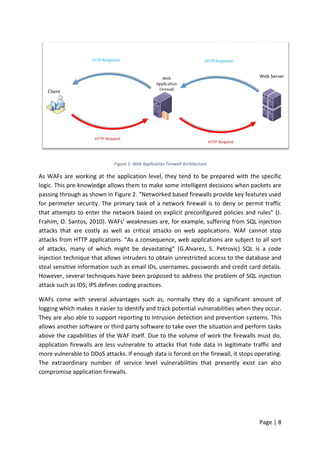
WAF, as the name implies, operates in the application layer of the OSI model.” WAF inspects
the contents of the traffic blocking specified content, such as viruses, and certain websites
attempts to exploit known logical errors in client’s software as shown in Figure 1. WAF also
sees the information as a data stream and not as a sequence of packets; therefore, they are
acting as clients, which means they are not directing traffic between networks. “They are
hosts running proxy servers, which permit no traffic directly between networks, and which
perform elaborate logging and auditing of traffic passing through them.” (Curtin, Matt,
2013). WAF is also known as a proxy-based or reverse-proxy firewall; it is a computer
networking firewall that operates at the network layer of a protocol stack. WAF is
implemented as software that is installed on a piece of network hardware, but often it is a
host using several forms of proxy servers to proxy traffic before passing it on to the client.
Page | 8
Figure 1: Web Application Firewall Architecture
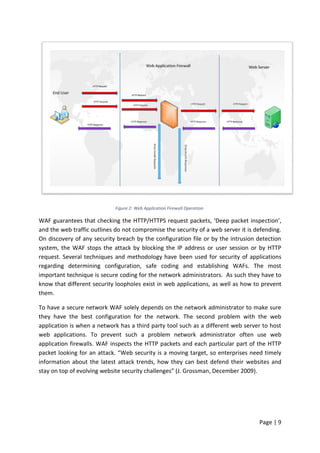
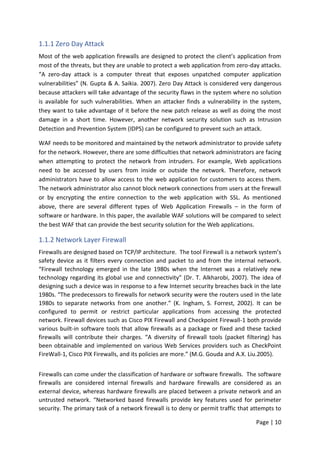
As WAFs are working at the application level, they tend to be prepared with the specific
logic. This pre-knowledge allows them to make some intelligent decisions when packets are
passing through as shown in Figure 2. “Networked based firewalls provide key features used
for perimeter security. The primary task of a network firewall is to deny or permit traffic
that attempts to enter the network based on explicit preconfigured policies and rules” (J.
Frahim, O. Santos, 2010). WAFs’ weaknesses are, for example, suffering from SQL injection
attacks that are costly as well as critical attacks on web applications. WAF cannot stop
attacks from HTTP applications. “As a consequence, web applications are subject to all sort
of attacks, many of which might be devastating” (G.Alvarez, S. Petrovic) SQL is a code
injection technique that allows intruders to obtain unrestricted access to the database and
steal sensitive information such as email IDs, usernames, passwords and credit card details.
However, several techniques have been proposed to address the problem of SQL injection
attack such as IDS; IPS defines coding practices.
WAFs come with several advantages such as, normally they do a significant amount of
logging which makes it easier to identify and track potential vulnerabilities when they occur.
They are also able to support reporting to Intrusion detection and prevention systems. This
allows another software or third party software to take over the situation and perform tasks
above the capabilities of the WAF itself. Due to the volume of work the firewalls must do,
application firewalls are less vulnerable to attacks that hide data in legitimate traffic and
more vulnerable to DDoS attacks. If enough data is forced on the firewall, it stops operating.
The extraordinary number of service level vulnerabilities that presently exist can also
compromise application firewalls.
Page | 9
Figure 2: Web Application Firewall Operation
WAF guarantees that checking the HTTP/HTTPS request packets, ‘Deep packet inspection’,
and the web traffic outlines do not compromise the security of a web server it is defending.
On discovery of any security breach by the configuration file or by the intrusion detection
system, the WAF stops the attack by blocking the IP address or user session or by HTTP
request. Several techniques and methodology have been used for security of applications
regarding determining configuration, safe coding and establishing WAFs. The most
important technique is secure coding for the network administrators. As such they have to
know that different security loopholes exist in web applications, as well as how to prevent
them.
To have a secure network WAF solely depends on the network administrator to make sure
they have the best configuration for the network. The second problem with the web
application is when a network has a third party tool such as a different web server to host
web applications. To prevent such a problem network administrator often use web
application firewalls. WAF inspects the HTTP packets and each particular part of the HTTP
packet looking for an attack. “Web security is a moving target, so enterprises need timely
information about the latest attack trends, how they can best defend their websites and
stay on top of evolving website security challenges” (J. Grossman, December 2009).
Page | 10
1.1.1 Zero Day Attack
Most of the web application firewalls are designed to protect the client’s application from
most of the threats, but they are unable to protect a web application from zero-day attacks.
“A zero-day attack is a computer threat that exposes unpatched computer application
vulnerabilities” (N. Gupta & A. Saikia. 2007). Zero Day Attack is considered very dangerous
because attackers will take advantage of the security flaws in the system where no solution
is available for such vulnerabilities. When an attacker finds a vulnerability in the system,
they want to take advantage of it before the new patch release as well as doing the most
damage in a short time. However, another network security solution such as Intrusion
Detection and Prevention System (IDPS) can be configured to prevent such an attack.
WAF needs to be monitored and maintained by the network administrator to provide safety
for the network. However, there are some difficulties that network administrators are facing
when attempting to protect the network from intruders. For example, Web applications
need to be accessed by users from inside or outside the network. Therefore, network
administrators have to allow access to the web application for customers to access them.
The network administrator also cannot block network connections from users at the firewall
or by encrypting the entire connection to the web application with SSL. As mentioned
above, there are several different types of Web Application Firewalls – in the form of
software or hardware. In this paper, the available WAF solutions will be compared to select
the best WAF that can provide the best security solution for the Web applications.
1.1.2 Network Layer Firewall
Firewalls are designed based on TCP/IP architecture. The tool Firewall is a network system’s
safety device as it filters every connection and packet to and from the internal network.
“Firewall technology emerged in the late 1980s when the Internet was a relatively new
technology regarding its global use and connectivity” (Dr. T. Alkharobi, 2007). The idea of
designing such a device was in response to a few Internet security breaches back in the late
1980s. “The predecessors to firewalls for network security were the routers used in the late
1980s to separate networks from one another.” (K. Ingham, S. Forrest, 2002). It can be
configured to permit or restrict particular applications from accessing the protected
network. Firewall devices such as Cisco PIX Firewall and Checkpoint Firewall-1 both provide
various built-in software tools that allow firewalls as a package or fixed and these tacked
firewalls will contribute their charges. “A diversity of firewall tools (packet filtering) has
been obtainable and implemented on various Web Services providers such as CheckPoint
FireWall-1, Cisco PIX Firewalls, and its policies are more.” (M.G. Gouda and A.X. Liu.2005).
Firewalls can come under the classification of hardware or software firewalls. The software
firewalls are considered internal firewalls and hardware firewalls are considered as an
external device, whereas hardware firewalls are placed between a private network and an
untrusted network. “Networked based firewalls provide key features used for perimeter
security. The primary task of a network firewall is to deny or permit traffic that attempts to
Page | 11
enter the network based on explicit preconfigured policies and rules” (J. Frahim, O. Santos,
2010). Software firewalls are mostly an additional piece of software installed on Operating
systems for extra security only for the host based; unlike the hardware firewall that is to
protect the entire private network. Firewalls have several classifications depending on
where the communication is taking place, or where it is interrupted. “Major firewall tools
hold set of laws that use Internet Protocol address ranges, with subnets or CIDR blocks1:
this is the instance for Check Point and Juniper: the significant exclusion is Cisco that only
supports individual Protocol (Internet) addresses or subnets. Hence, firewall tools need their
unique mechanisms” (J. Wack, et al. 2002).
According to M. Gouda and A. Liu “But these mechanisms are not yet accomplished the
higher performance, and it is dreadfully significant to maintain the policy list of the firewall
tool as small as possible to advance the throughput and lower the execution time” (M.
Gouda and A. Liu with E. Al-Shaer.2005). There is more than one type of firewall, as
aforementioned, there are Hardware and software firewalls, and there are also other
functionalities that a firewall has. For example:
 Network Address Translation ‘NAT.'
NAT is a technique that firewalls can use to hide a private network from the public
Internet, by protecting the allocated private IP address and exposing its public IP
address to the internet. “A firewall is a security device placed between your private
network and the public network. It hides the internal network from prying eyes and
helps protect internal resources from unauthorised attacks”. (R. Cantin, 1999). The
Firewall will translate the connection between a public and private network by using
NAT, and it provides IP address simplification too. “Network address and port
translators (NATs) and firewalls break the IP connectivity model by preventing hosts
outside the protected network from initiating a connection with a host inside the
protected network” (S. Guha, P. Francis, 2008).
 Packet Filters and Network Layer
Packet filters usually operate at the TCP/IP layer checking every packet from and to
the private network. If a packet does not match the established rule set, it will not
be allowed access to the private network. “Network layer firewalls fall into two sub-
categories, stateful and stateless. Stateful firewalls maintain context about active
sessions and use that state information to speed packet processing. Stateless
firewalls require less memory and can be faster for simple filters that need less time
to filter than to look up a session” (M. Sharma, 2009).
 DMZs are the most suitable place for public information.
The way clients, potential customers, and the stranger can obtain the information
they require about the organisation without accessing the internal network. To
create a DMZ, the firewall has to have three network interfaces. One interface for
untrusted users, one for the inside of the private network and last one goes to DMZ.
Page | 12
Restricting DMZ access to traffic or users that allow to go through to the private
network and perhaps less restrictive rules for some internal users. “Probably the
most important thing to recognize about a firewall is that it implements an access
control policy.” (John R. Vacca & Scott R. Ellis. 2005).
The goal of a network layer firewall is to either permit or deny packets based on information
in the IP header and transport layer header. The information in the intellectual property
header like source IP address and the destination IP addresses are used, and information in
TCP headers like port numbers are used. The following scenario demonstrates the practical
use of network layer firewalls. When a packet reaches a network layer firewall, the firewall
initially checks the source and destination IP address in the IP header. If a rule matches,
which is to block or permit the particular address, the firewall performs the required
operation. The firewall looks into the transport layer headers for matching rules based on
port numbers, based on which the necessary operation is performed.
Every firewall device needs to be configured to match the user’s needs because each user
has different security requirements. “There is no such thing as an out of the box, plug-and-
play, and firewall installation. Once the hardware is set up and ready to operate, it is
necessary to set security policies, which can be a time-consuming and cumbersome
process” (B. Yocom, Brown, et al. U.E. 2001). To get maximum use of the firewall, it has to
be configured correctly to suit the business requirements, a properly configured firewall
should meet all users’ requirements in LAN and should be set to balance between the
network security and its functionality. Firewalls need to be configured to match the user’s
requirements, as every user has different needs of security policy. “Networked based
firewalls provide key features used for perimeter security. The primary task of a network
firewall is to deny or permit traffic that attempts to enter the network based on explicit
preconfigured policies and rules” (J. Frahim, O. Santos, 2010) .
1.1.3 DDoS Attack
In a (DoS) Denial of Service attack, an attacker penetrates and exhausts a computer system’s
resources preventing users from using network services such as website, web server or the
system of equipment. “DDoS attack is an extension of DoS attack where huge numbers of
compromised sources are launching the attack simultaneously on the web server to deny
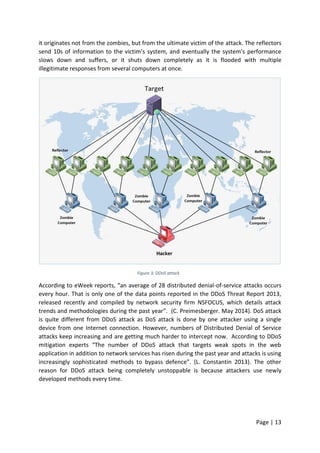
the services to legitimate users” (G. F. Coulouris. 2005). A DDoS attack is a synchronised and
multiple DoS attack that is launched from many converted machines as shown in figure 3.
“The ultimate targets for the attack is termed the ‘Primary Victim’ while all the cooperated
systems participating in the attack are referred to as the ‘Secondary Victims.' (B. Rawal & H.
Ramcharan, 2013). DDoS attack allows the attacker to launch a larger and more devastating
attack by adding many Secondary Victims in the attack. The way it works is that the hacker
sends the command to his zombie army to initiate the attack as shown in Figure 3. Each
computer within the zombie army sends a connection request to the reflectors that are
innocent computers. When the reflectors receive the request to attack a target, it looks like
Page | 13
it originates not from the zombies, but from the ultimate victim of the attack. The reflectors
send 10s of information to the victim’s system, and eventually the system's performance
slows down and suffers, or it shuts down completely as it is flooded with multiple
illegitimate responses from several computers at once.
Figure 3: DDoS attack
According to eWeek reports, “an average of 28 distributed denial-of-service attacks occurs
every hour. That is only one of the data points reported in the DDoS Threat Report 2013,
released recently and compiled by network security firm NSFOCUS, which details attack
trends and methodologies during the past year”. (C. Preimesberger. May 2014). DoS attack
is quite different from DDoS attack as DoS attack is done by one attacker using a single
device from one Internet connection. However, numbers of Distributed Denial of Service
attacks keep increasing and are getting much harder to intercept now. According to DDoS
mitigation experts “The number of DDoS attack that targets weak spots in the web
application in addition to network services has risen during the past year and attacks is using
increasingly sophisticated methods to bypass defence”. (L. Constantin 2013). The other
reason for DDoS attack being completely unstoppable is because attackers use newly
developed methods every time.
Page | 14
1.1.4 Common Denial of Service/Distributed Denial of Service attacks
In recent years, big organisations and companies have been at the receiving end of DDoS
attacks. The attackers are usually targeting the most common applications such as Web
Servers, Gateways, DNS servers, electronic commerce applications and Voice over IP
servers. The impact of the attacks shows how vulnerable and unprotected the internet has
become against DDoS attacks. “Considering the economic implications of network
downtime on businesses, it becomes imperative that businesses invest a lot of money and
resources in protecting their IT infrastructure” (R. Beverly and S. Bauer.2013).
Some of the DoS/DDoS attacks example:
 Fraggle and Smurf
Smurf attack has become more popular with the attackers; this approach of
performing DoS attacks is based on the use of ICMP packets. Fraggle attack is similar
to Smurf is their operation mechanism although UDP packets are sent instead of
ICMP echo packets.
 Flooding
The attacker sends significant amounts of packets to its victim with the intent of
consuming up all the targeted victim’s available resources to make it unavailable to
other users.
 Reaction
This technique requires the use of actual incidence response and backup systems
combined with filtering of excessive traffic to mitigate the effects of attacks.
DDoS attacks usually exhaust bandwidth, memory, or processing capacity of a targeted
machine, network or service. “DDoS attack tools are typically designed to be friendly with
different Operating Systems (OS). Any OS system (such as UNIX, Linux, Solaris, or Windows)
may have DDoS agents or handler code designed to work on it” (R. Beverly and S.
Bauer.2013).
DDoS attacks based protocol
This type of DDoS attack may start with SYN floods, which usually consumes the available
bandwidth. DDoS attack will include the Smurf DDoS, fragmented packets attack and ping of
death. Distributed Denial of Service based protocol attack consumes the entire server
resources; also, it may even consume the available resources of the intermediate
communication devices such as the load balancer, router, and firewall.
DDoS volume-based attack
This type of DDoS attack includes ICMP floods, UDP floods and maybe some other spoofed
packets floods. Volume based attacks aim to douse the bandwidth of the target site. The
problem with DDoS attack is the traffic seems to be regular traffic that the server would
usually receive. Therefore, intercepting this legitimate lookalike traffic is not easy, and
therefore this is where the problem starts.
Page | 15
1.1.5 Problem Description
In the literature review section, the available Web Application Firewalls have been
compared, both hardware and software. Therefore, the research question is:
“Does open source Web Application Firewall Mod_security and DoS/DDoS mitigation
techniques mod_evasive and (D)DoS Deflate can provide any protection against DoS/DDoS
attacks?”
1.1.6 Network Security
Securing the network is becoming more difficult by time, attackers are financially motivated,
and they are not wasting their time on attacking primary networks. Attackers are now
shifting their attacking strategies by attacking the sensitive data through Web applications.
Traditional security methods are not capable of protecting the network from intruders and
stopping attackers. However, in this experimental paper, we have highlighted the available
Web Application Firewall solutions from open source and commercial as well as both
hardware and software.
As described above, a network layer firewall is beneficial when network communication has
to be blocked or permitted based on IP address information in the IP header or based on
port numbers. These type of firewalls are significant when a particular IP address or a group
of IP addresses or services or specific application needs to be restricted or granted access. A
network layer firewall does not have the capacity to look into the application layer
information and analyses data to check if the content is vulnerable.
1.1.7 WAF mod_security, mod_evasive and (D)DoS Deflate.
As described in the earlier sections, a web application firewall is beneficial when an
application server has to be protected from vulnerabilities existing in the protocol. These
firewalls are not useful in scenarios where, access permission or restriction is provided
based on information in the IP and transport layer headers, as they do not have the capacity
to look into the relevant information.
Through analysis of web application firewall and DDoS mitigating solutions, the following
weaknesses of Web Application Firewalls and mod_security have been identified.
 Mod_evasive is Apache module, which can provide protection against some of the
DoS/DDoS attack. It is an open source software and can be installed and used for
free of charge.
 Mod_security has several limitations such as it is unable to detect forced browsing
attacks, session ID brute forcing attacks, the additional load on the server because it
runs on every web server and the writing of complex rules and configuration have to
be done manually.
 (D)DoS Deflate is also Apache module, can provide protections against DoS/DDoS
attacks. It is an open source software can be installed for free, can only be used to
provide protection against DoS/DDoS attacks not for any other malware and threats.
Page | 16
In the following section of this proposal, Aim and Objectives are going to be discussed in
section 2 which will be used to identify the primary goals of this experimental project with
the required technologies and highlight the main objectives.
1.2 Project Aim
The aim of this experimental project is to investigate on Web Application Firewall
Mod_security with DDoS mitigation techniques Mod_evasive and (D)DoS Deflate against
DDoS attacks. With the intention of comparing and evaluating their capabilities against
DoS/DDoS attacks. It is intended to build a network topology installing and configure
Mod_security, Mod_evasive and (D)DoS Deflate for a medium sized network in a laboratory
environment. Network Traffic and information will be collected and analysed using
monitoring tools such as Nmap, Awstats, and status server. The final aim of this project is to
investigate the extent of the network vulnerabilities to a DDoS attack and identify possible
improvements to make the network more secure.
1.2.1 Project Objectives
The Objectives to be completed are as follow:
 First Objectives is to Understand:
o The importance of network security, Confidentiality, and Availability.
Network security parameters, Confidentiality of information, and Availability
of services.
o DDoS technique how to launch an attack on the target and revise existing
resources to learn about DoS/DDoS attacks and their impact on the target web
server.
o How to implement and configure the security tools in the network topology, to
balance between providing the best security possible with the technology
functionality.
 Second Objectives is to Design Network Topology:
o Construct a laboratory environment to build two different topologies and then
install and configure WAF ‘Mod_Security, mod_evasive and (D)DoS Deflate
to test each security solution against the DoS/DDoS attacks.
o Configure the best security policies for both testbed scenarios to be
implemented on both security tools to prevent the intruders from accessing the
network.
o Construct and configure attacker’s computers and install and test Kali Linux
penetration system.
o Build and configure the web server. Create a website to be hosted by the web-
server.
 Third Objective is Test and Results:
o Design two different scenarios. 1st Scenario will contain WAF mod_security,
mod_evasive and (D)DoS Deflate solutions installed to be tested against
slowloris HTTP DoS/DDoS attacks.
o The 2nd
scenario will contain ‘mod_security, mod_evasive and (D)DoS Deflate’
solutions installed with a firewall to be tested against hping3 HTTP DoS/DDoS
attacks.
o The result of both scenarios will be collected and stored to be analysed later.
Page | 17
 Fourth Objectives is to Evaluate:
o Captured data to be stored then, to be analysed and compared later, and
evaluate the results.
o Evaluate both scenarios results, to determine which, the most effective
security solution is.
o Presenting data statistics and graphs.
1.2.2 Project’s Milestones and Deliverables
The aim of this experimental project is to provide an answer for the users that depend on
security solutions such as Firewall and WAF mod_security & mod_evasive to protect their
web-servers from DDoS attacks. However, the project Milestones are as shown in the
following section.
Milestones:
 Stage One: Research and learn about all the technologies that are required for this
project. To understand the importance of both WAF technologies, and how to launch
a DDoS attack.
 Stage Two: Design a network topology, which is similar to an organisation
infrastructure.
 Stage Three: Test the security tools capabilities against the DDoS attack in two
Different scenarios.
 Stage Four: Analysing the test results and produce a conclusion.
Deliverables:
The deliverables of this experimental project will be the results of two different scenarios in
two different topology designs for both WAF technologies against DDoS attacks. This is to
reflect the increase in DoS/DDoS attacks and the new methods used to make servers,
services and LAN slow down or unavailable to the legitimate users. This experimental
project also aims to provide an answer for the business that solely depends on those
security tools to protect their sensitive data regarding which one of the security tools can
protect the private network from intruders and if any of them can prevent such attack. The
results of this project will clarify if the organisations are protected from such attack or not.
The project will investigate whether free software is capable of protecting the network from
such attacks or if payable services provide better protection.
Page | 18
1.3 Technical Methods of the Proposed Project
This experimental project will investigate and compare Web application firewall
mod_security and Network layer firewall against DoS/DDoS attacks. To identify the
limitation of those security tools, the test will be carried out using hardware and software in
a laboratory environment as follows:
1.3.1 Fundamental
The test will be conducted in the laboratory environment that contains:
Network topology:
 Construct and design different network topologies in the Laboratory Environment
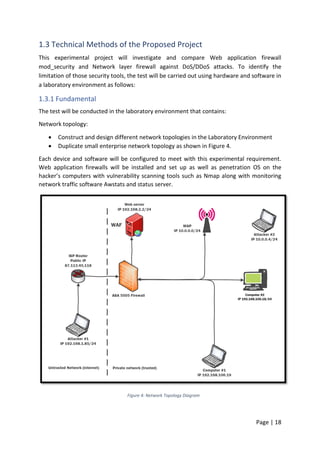
 Duplicate small enterprise network topology as shown in Figure 4.
Each device and software will be configured to meet with this experimental requirement.
Web application firewalls will be installed and set up as well as penetration OS on the
hacker’s computers with vulnerability scanning tools such as Nmap along with monitoring
network traffic software Awstats and status server.
Figure 4: Network Topology Diagram
Page | 19
Hardwares:
 Firewall device
 Web Server machine
 Wireless Access point
 Four Computers:
 Two computers will have legitimate accounts
 One computer will have an attacker based on outside the private network
 One computer will have an attacker based on inside the private network
Software:
 Operating Systems. (Apple Macintosh & Windows OS- on two user’s PC)
 Kali Linux based OS. (On both attackers’ computers).
 Web server (Linux Ubuntu).
 Web Application Firewall (on the Web Server machine).
 Nmap, and Awstats.
 Siege Server Load-Testing.
Page | 20
1.3.2 Critical Appraisal of Relevant toolkits or platforms
Network Topology:
Extracting real number data out of the physical machines is more accurate than the simulation
software, which will significantly affect the data output completion of the project with
expected results. For this reasons, this project uses network topology in the laboratory
environment to accomplish the tasks.
In this project both hardware and software are going to be used as follows:
Hardwares:
 Firewall:
Each and every network needs to have a firewall installed on the network; it is acting
as the network safeguard. In this experimental test Cisco ASA, 5505 firewalls will be
installed and configured to protect the private network from intruders. “Networked
based firewalls provide key features used for perimeter security. The primary task of
a network firewall is to deny or permit traffic that attempts to enter the network
based on explicit preconfigured policies and rules” (J. Frahim, O. Santos, 2010). Cisco
Firewalls are one of the most used security tools that are used in enterprise
networks. Cisco firewall device is not the very best available, the reason as shown in
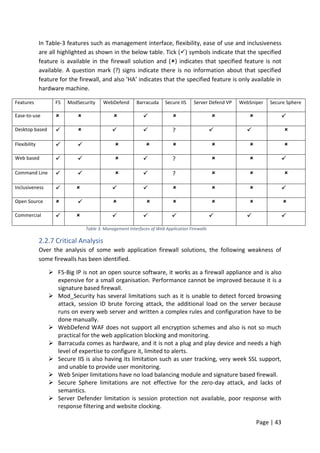
Table 3. Regarding installation, configuration, administration, management and
performance Cisco firewalls are not the best. However, Cisco provides settings guide
and command references for their technologies. Therefore, Cisco ASA 5505 firewall
has been chosen.
 Web Server:
A web server will be installed and configured to host a website for the duplicated
enterprise topology. The web server will be placed under the DMZ area of the
firewall which, the appropriate security policy will be set up for the web server
machine. The web server machine needs to be a very powerful device to host a
website and provide accessibility to every client. However, the web server needs to
be monitored at all times by network administrators for any fault and website
availability.
 Wireless Access Point:
A wireless access point will be installed and configured on the private network. To
provide Internet accessibility to all the wireless devices inside the private network to
have reachability to the company website. The wireless access point will provide
reachability for these users with wireless devices only.
 Computers:
In this experimental test, computers are to be placed for the users inside and outside
of the private network. The DoS/DDoS attack will be launched from two computers
that the hackers use. The hackers utilise the two computers which are configured
with Kali Linux operating systems. The remaining two computers are going to be
used to test the web server availabilities. For testing the tasks of this experimental
Page | 21
project four computers have been chosen, to be installed and configured. Each
computer machine is for a particular task and comes with special software and
application installed on them for this project. Two of the computers are used mainly
for attacking the server. Moreover, the other two are going to be employed by a
network administrator to collect data and check the website availability.
Software:
 Operating Systems:
An operating system will be installed and configured on each computer that is going
to be used in this experimental project. Three different OS will be utilised which are:
Microsoft OS, Apple Macintosh and Kali Linux based OS. The web server machine will
be configured with Linux Ubuntu; a user computer will be configured with Microsoft
Windows7 and the other user’s device with Apple Macintosh, and also the attacker’s
machine will be set with Kali Linux OS’s. Kali-Rolling OS is a new release of the
Offensive security team and contains more than 500 penetration-testing programs.
 Kali Linux:
The only OS that contains security attacking checking and hacking network systems;
Linux-based OS is the best choice. Kali Linux, in particular, is the best option for these
purposes. Kali Linux is a hacker’s favourite OS because it has more than 500 built in
penetration tools. The motivation for choosing a penetration tool such as Kali Linux
OS is, it contains all the attacking and hacking tools for this test. “Kali Linux is built
for professional penetration testing and security auditing.” (J. Muniz, A. Lakhani
2009).
 Web Server:
Linux Ubuntu is the choosing Operating system for this experimental project. The
other available server to choose for this project is Microsoft Windows server, which
is not free software, and it requires being at the high level of expertise to manage
such a server.
 Web Application Firewall and other Open Source Software:
In this experimental project mod_evasive and mod_security Web Application
Firewall with some other open source software such as (DDoS Deflate, HTTP attack,
mod_status, and APF) will be tested against DDoS attack. To choose the most
appropriate solution, we had to compare eight different web application solutions as
shown in Table 1 and 2. The chosen Web Application Firewall solutions are
mod_evasive and Mod_Security, which both contain most of the security features
for this test.
o Mod_evasive is an open source software that is designed to protect the
network from DoS/DDoS attacks. This free software will run on Apache and
Nginx only.
Page | 22
o Mod_Security has several limitations such as it is unable to detect forced
browsing attack, session ID brute forcing attack, the additional load on the
server because runs on every web server and writing complex rules and
configuration have to be done manually.
o (D)DoS Deflate is an open source software and can be obtained for free. It
can be configured with only on Linux platform, not any others. The
configuration file can be modified according to users needs.
 Nmap:
Scanning the network for vulnerabilities is a critical mission that has to be done by
the network administrator to make sure there are no open ports that can be used by
the intruders. However, to meet with this project requirement Nmap is a chosen
piece of software that can scan the network for an open port. Both the attackers and
network administrators can use the software for the same purposes which scan the
network for vulnerabilities. “Nmap ‘Network Mapper’ is an open source tool for
network exploration and security auditing” (G. F. Lyon, 2011).
 Siege:
Siege is used on Linux based operating systems to reveal issues in the server before
it goes live. It is an open source software that works with Debian and Ubuntu
platforms only. In this test, Siege will be used to check the website availability and
also respond to requests during and before the attack.
 DDoS Deflate
DDoS Deflate is a light weighted bash shell script designed to contribute in the
process of blocking DoS/DDoS attack. It tracks and monitors all IP address that
making a connection to the web server.
Page | 23
1.4 Project Plan
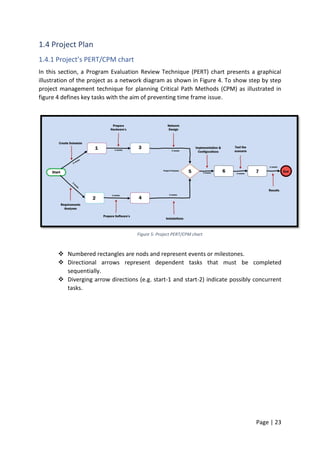
1.4.1 Project’s PERT/CPM chart
In this section, a Program Evaluation Review Technique (PERT) chart presents a graphical
illustration of the project as a network diagram as shown in Figure 4. To show step by step
project management technique for planning Critical Path Methods (CPM) as illustrated in
figure 4 defines key tasks with the aim of preventing time frame issue.
Figure 5: Project PERT/CPM chart
 Numbered rectangles are nods and represent events or milestones.
 Directional arrows represent dependent tasks that must be completed
sequentially.
 Diverging arrow directions (e.g. start-1 and start-2) indicate possibly concurrent
tasks.
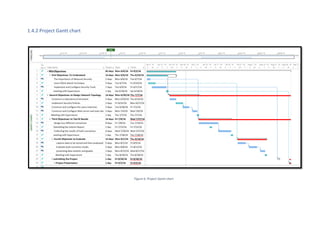
1.4.2 Project Gantt chart
Figure 6: Project Gantt chart
1.4.3 Resource Requirements
Resource Requirements for 1st Objectives:
I. The importance of network security, Confidentiality, and Availability. Network
security parameters, Confidentiality of information, and Availability of services.
 Do research on the importance of Data Confidentiality and Availability. The
resources of this requirement are journals, magazine, and books, such as:
(Cisco, Top-Down Network Design, and 3rd Edition ISBN-10: 1-58720-283-
2, ISBN- 13: 978-1-58720-283-4). (http://www.infosecurity-magazine.com/)
II. DDoS techniques: How to launch an attack on the target and revise existing resources
to learn about DoS/DDoS attacks and their impact on the target web server.
 Do research on the implications of the attack on the targets, and the available
tools to be used in this experimental project. To choose the best possible
DDoS attacking tools and the effectiveness of the attacking tools on the target.
Resources of this requirement are reading books, stories, watching tutorial
videos on the internet. Resources are:
(https://blog.radware.com/security/2015/06/what-do-you-know-about-ddos-
attacks/),
(http://ieeexplore.ieee.org/xpl/login.jsp?tp=&arnumber=5635484&url=http%3
A%2F%2Fieeexplore.ieee.org%2Fstamp%2Fstamp.jsp%3Ftp%3D%26arnum
ber%3D5635484).
(https://www.youtube.com/results?search_query=ddos+attack+tutorial+2015).
III. How to implement and configure the security tools in the network topology, to
balance between providing best security possible with the technology functionality.
 First to do research on the chosen security solution and their functionality
against the security threats available today. However, for this experimental
project it is required to purchase hardware Cisco ASA 5505, WAF and other
software mod_security, mod_evasive and (D)DoS Deflate to use in this
experimental project. Resources are:
(http://www.onestoppcshop.co.uk/cisco-asa-5505-ASA5505-BUN-
K9.html?gclid=CjwKEAjw_ci3BRDSvfjortr--
DQSJADU8f2jq3Ty2KN21ZBHwayGro97RCgEttknqKUj2q-i-qZnZRoC3-
Xw_wcB ), https://www.thefanclub.co.za/how-to/how-install-apache2-
modsecurity-and-modevasive-ubuntu-1204-lts-server,
http://ubtutorials.com/tutorial/1138/how-install-ddos-deflate-ubuntu
Page | 26
Resource Requirements for 2nd Objectives:
I. Construct a laboratory environment for the test and build and to duplicate enterprise
network topology.
 Duplicating an enterprise network topology is the critical aspect for the
project. Configuring the actual hardware and software in the laboratory
environment has its advantages over simulated test. However, the resources
for task are:
(http://www.cisco.com/c/dam/en/us/td/docs/solutions/CVD/Aug2014/Campus
DesignSummary-AUG14.pdf) &
(http://www.cisco.com/c/dam/en/us/td/docs/solutions/CVD/Oct2015/Campus_
LAN_Wireless_LAN_Design_Oct2105.pdf).
II. Configure best security policies for both testbed scenarios to be implemented on both
security tools in order to prevent the intruders from accessing the network.
 Cisco provides security configuration for the Cisco ASA 5505 Firewall, for
this experimental project we will refer to Cisco website for Configuration
guide. all three security solutions configuration guide can be obtained from
Ubuntu 16.04 LTS website
(http://www.cisco.com/c/dam/en/us/td/docs/solutions/CRD/Sep2015/WP-
Enterprise-Security-Baseline-Sep15.pdf) &
(http://www.cisco.com/c/en/us/support/security/asa-5505-adaptive-security-
appliance/model.html),&(http://blog.secaserver.com/2011/10/install-
mod_security-apache2-easiest/) ((http://www.modsecurity.org/)
III. Construct and configure attackers’ computers and install Kali Linux penetration
system.
 Two computers are going to be installed with Kali Linux OS in order to attack
the network and test the security solutions. Kali Linux is an open source OS
provided by Offensive Security and can be downloaded from their website.
(https://www.kali.org/downloads/).
IV. Construct and configure the web-server to host web page. By choosing from the
available resources, such as Linux-based or Microsoft OS.
 Building and configuring a server machine to host a web site. For this
experimental project a Linux Ubuntu will be installed and can be downloaded
from (http://www.ubuntu.com/download/desktop)
Page | 27
Resource Requirements for 3rd Objectives:
I. Designing two different scenarios. 1st
scenario will contain WAF mod_security,
mod_evasive and (D)DoS Deflate installed to be tested against slowloris HTTP
DoS/DDoS attacks.
 Cisco provides campuses topology design and it can be used for the purposes
of this project.
(http://www.cisco.com/c/dam/en/us/td/docs/solutions/CVD/Aug2014/Campus
DesignSummary-AUG14.pdf).&
(http://www.cisco.com/c/dam/en/us/td/docs/solutions/CVD/Aug2013/CVD-
CampusWiredLANDesignGuide-AUG13.pdf).
 Mod_security, mod_evasive and (D)DoS Deflate will be installed and
configured on the Ubuntu Server.
II. 2nd
scenario will contain Mod_Security, mod_evasive and (D)DoS Deflate solutions
installed with Cisco Firewall and tested against hping3 HTTP DoS/DDoS attacks.
 Mod_Security mod_evasive and (D)DoS Deflate will also be installed and
configured on the Ubuntu 16.04 LTS. (http://www.modsecurity.org/).
(http://ubtutorials.com/tutorial/1138/how-install-ddos-deflate-ubuntu), (
https://www.thefanclub.co.za/how-to/how-install-apache2-modsecurity-and-
modevasive-ubuntu-1204-lts-server)
III. Result of both scenarios will be collected and stored in order to be analysed later.
 Tools such as Nmap, Awstats mod_status and Siege will be used to capture the
traffic and check the network for other vulnerabilities. Wireshark is open
source software it can be downloaded from (https://www.wireshark.org/).
Nmap is also open source software and it can be downloaded from
(https://nmap.org/). Siege is open source software which can be only used on
Linux based OS, it can be downloaded from: (https://www.joedog.org/siege-
home). PRTG is a network monitoring software that can alert administrator
before emergencies occur, and it can be downloaded from
(https://www.paessler.com/prtg).
Resources Requirement for 4th Objectives:
I. Evaluate both scenarios results, in order to determine which has the most effective
security solution.
II. Captured data to be stored then, to be analysed and compared later, and evaluate the
results.
 Data will be captured during the attack and after the attack in order to be
analysed later by using, Wireshark and PRTG software.
III. Presenting data statistics and graphs.
 Data results will be presented in statistics using Microsoft Excel and PRTG
software.
Page | 28
1.4.4 Risk Management Strategy
First Objectives risk managements
Risk for this objective
The risk of this objective is when best security policy could not be provided for the network or
failing to balance between solution capabilities and this experiment requirement. Another risk
that could be facing this objective is when applying a security policy that none of the security
solutions can handle, that could make the network slow. The risk may face this objective is not
to be able to learn the DDoS attack techniques.
Contingency Plan
Have second security policy to be configured if it is needed. Make sure the security solutions
are properly configured so that there is not any configuration that the devices cannot handle.
Have another OS ready to be configured with DDoS attack tools.
Most Crucial Risk: high
Second Objectives risk managements:
Risk for this objective
The risk that could be facing this objective is missing configuring the security solution. The
second risk is testing this project on the laboratory environment, this could not be possible
because of the hardware requirements. Another risk for this objective is if the attacking tools
which have been mentioned did not work or failed to be installed. Another risk for this
objective is if the web server machine does not have the minimum hardware requirement for
the windows web server OS.
Contingency Plan
Reconfigure both security solutions in case of miss configuration, by trying different approach
or different configuration guide. If failed to duplicate an enterprise network topology it can be
replaced by a small organisation network topology. The web server machine can be upgraded
if required or try different web server OS such as Linux web server.
Most Crucial Risk: Medium
Third Objectives risk managements:
Risk for this objective The risk of this objective is if the test bed scenarios failed to produce satisfying results in case
of one the scenario topology results could not be captured, or one of the devices get damaged
during the test as a result of the attack.
Contingency Plan Repeat the same test more than one time if it is required. Use different OS to capture the
traffic if it is necessary, and prepare backup hardware.
Most Crucial Risk: Medium
Fourth Objectives risk managements:
Risk for this objective The risk of this objective is losing captured data, the software that is prepared for this test
does not show satisfying results.
Contingency Plan If any of the software for this objective did not work on particular OS, a different OS will be
installed which is more compatible with (S) software. Testing more than two scenarios when is
needed for better results, using backup software such as Solarwinds.
Most Crucial Risk: Medium
Page | 29
1.4.5 Hypotheses
The following proposed hypotheses that have been introduced to test security solutions in
this experimental project. Hypotheses have been established based on what may be
revealed by this experimental project.
Hypotheses 1: installing WAF solutions inside private network would benefit and help the
network administrator to secure the network from hackers. However, having only WAF
installed is not providing the complete protection against all types of intruders/hackers.
WAF have limitations against DoS/DDoS attacks; it will not be able to prevent these attacks
when they are using HTTP application floods to attack web server.
Hypotheses 2: To protect the private network against DoS/DDoS attacks expensive
hardware and software are required to be purchased. Open source software also can
provide protecting against intruders and hackers. Therefore, open source security solutions
software will be tested against the most sophisticated attack in this experimental project.
The available open source security solutions can be configured to protect the private
network against DoS/DDoS attacks.
Page | 30
Chapter Two
2.0 Literature Review
The aim of this survey paper is to understand the argument of the characteristics and also
the technology of the key elements of Web Application Firewall (WAF) and open source
DDoS mitigating techniques. There are several WAF and DDoS mitigating technologies
provided by different vendors; each one comes with advantages and disadvantages. There
are several theories to explain how to implement both layer solution and how it should be
configured as well as which vendor proposes the best solution for the users. However, this
review focuses on the open source WAF software ‘mod_security’ and mitigating DDoS
attack techniques (mod_evasive and (D)DoS Deflate) solutions which are available and can
be installed on a host machine device, and Firewall appliance. Therefore, the literature
covers a variety of such solutions, and this review will focus on eight web application
solutions to be compared with mod_evasive and (D)DoS Deflate. In this literature review,
current methods of DDoS mitigation will be examined. WAF solutions are Secure Sphere,
Web Sniper, Server defender AI, Secure IIS, Barracuda, Web Defend, F5, and Mod Security.
In this literature review the hardware and software requirements are identified for the Web
Application Firewall software, to be installed on.
Page | 31
2.1 Secure Sphere
SecureSphere WAF dynamically learns about applications usual behaviour and compares
this with the ‘threat intelligence gathering source’ from around the world and is also
updated in real time to deliver greater security. “The industry leading SecureSphere Web
Application Firewall identifies and acts upon dangers maliciously woven into innocent-
looking website traffic; traffic that slips right through traditional defences” (Imperva, 2015).
Imperva Secure Sphere is providing solutions that can secure enterprise data centres and
protects exclusive information, critical servers and tradition business applications. In A,
Shulman’s white paper about Top 10 Database Threats and Solution SecureSphere is
mentioned as a solution for several threats that web applications are facing today.
However, in their arguments about preventing SQL injection, which most web applications
are sufferings from, there is vulnerability against SQL injection misuse. It is mentioned that a
combination of three techniques can effectively prevent SQL injection. The techniques are
IPS, SecureSphere and Correlated Attack Validation technologies. According to A, Shulman
none of this technology is useful in the prevention of an SQL injection attack by itself. For
example, IPS can only identify vulnerable SQL injection or stored procedures and is
therefore not enough to prevent the attack. “SecureSphere IPS includes unique database
signature dictionaries designed specifically to identify sensitive stored procedures and SQL
injection strings”. (A, Shulman 2006).
2.1.1 WebSniper
webSniper is another product to protect web servers from many known attacks such as SQL
injection, buffer overflows, cross-site scripting, and path traversal. WebSniper comes as
hardware and can be installed inside the private network to protect the web application
from intruders. WebSniper identifications are achieved via signature of known attacks and
behavioural form of known attacks. WebSnipe monitors the demands sent via the Internet
and distinguishes between acceptable requests and illegitimate requests. WbSniper can only
monitor the traffic; it cannot stop an attack. “The product's features can, of course, enable
only monitoring of traffic (without blocking) – based on the organization's information
security policy and the preferences of its Information Security Manager.” (WebSniper
Developer January 2008).
2.1.2 Server Defender VP
Server Defender VP is an effective firewall against the web application attacks. It is cost-
efficient and advanced yet an easy to use software web application firewall ideal for small to
medium size networks that run IIS. According to the software developer this solution is the
perfect software to secure IIS server “ServerDefender VP Web application firewall for IIS is
designed to provide protection for websites and applications running on the Microsoft IIS
Web server by blocking Web attacks including SQL injection, buffer overflows, cross-site
scripting (XSS) and request forgery (CSRF), zero-day, brute force, dictionary, denial of service
and others” (Port80 April 2013).
Page | 32
2.1.3 Secure IIS
eEye Secure IIS provides the application layer with protection against zero-day attacks,
known attacks, and unauthorised Web access. Secure IIS manages data as it is routed by IIS
and can block a request at any point if it is related to any attack, containing SQL injection
and XSS etc. Secure IIS examines applications at each level of processing either on both
network layer or at the kernel level. According to E, Janot & P, Zavarsky they described
SecureIIS as follow, “eEye Digital Security’s SecureIIS could perhaps be considered the
commercial MS-oriented counterpart to ModSecurity”. (E, Janot & P, Zavarsky. 2008).
Secure IIS can also bring protection to intranet and extranet better than the other WAFs.
“Unlike any Intrusion Detection System or firewall currently on the market, SecureIIS can
stop attacks on both encrypted and unencrypted sessions”. (From PR Newswire Journal,
2001). F. Raouf, stated that "We at eEye came to the conclusion last year that there has to
be a better way to manage the security of IIS other than the current approach of reactive
patch management," Chief Operating Officer at eEye Digital Security. "With SecureIIS the
Microsoft IIS platform becomes the most secure platform on the market." (PR, Newswire
Journal, 2002).
2.1.4 Barracuda
Barracuda solution is a firewall device that can be configured to act as a web application
firewall. Barracuda firewall has many functions such as intelligent traffic flow control, IPsec
VPN and a state full packet inspection firewall. According to S. Kay Miller. Information
Security Magazine September 2008 “Barracuda having the higher capability of high
availability, coach and compression, SLL acceleration & offloading and regularity compliance
features”. Also, several other tests have been done on few other WAFs that deliver SSL/VPN
connectivity. The WAF solutions that have been tested are Barracuda SSL VPN 380,
WatchGuard SSL 560, Dell Sonic Wall EX-7000 and Cisco ASA 5515-X Security appliance.
The test has been done by ‘Android Corp’: “We found each of these products to be capable,
fully mature and established in the marketplace, which made it a bit of a challenge to
choose a winner. Our top pick, the Cisco ASA 5515X security appliance narrowly edged out
the competition. While it didn't dominate in every category, the Cisco ASA 5515X won top
billing due to its rich feature set, robust and granular configuration options and overall
balance of capacity and features”. In that experiment, they found out that the other four
solutions that have been tested were essentially runners-up, each product with its unique
features that makes them suitable for implementation. According to a recent Cisco
comparison of firewalls, Barracuda is not as efficient in handling: “load balancing is not so
much active, and it is also a signature based firewall so performance can be improvised”.
(PCI-DSS).
Page | 33
2.1.5 Web Defend
WebDefend is a web application firewall that offers an application layer technology with
real time detection of an attack. It is from TrustWave and offers some more extra features
further than strictly being a firewall. WebDefend key features are, out of box PCI
compliance, Dynamic Application profiling, application security defect detection, inbound
and outbound traffic analysis and SSL attack detection. “It is PCI DSS compliance and
provides detection and protection against known vulnerabilities and imminent threats such
as Google hacking, malicious bots, site scraping and zero-day attacks” (A, Razzaq. A, Hur
2013). In the new release of the WebDefends solution is upgraded with capabilities to
protect web application in any languages according to the creator of the WebDefend’s,
“WebDefend's new internationalization capabilities can protect Web applications in any
language, including double-byte languages such as Japanese, Korean and Chinese.”
(TrustWave, 2015). Web Defend is not so much great with web applications blocking and
monitoring “Web Defend firewall is not so much efficient for the web application
monitoring and preventing these facilities are not provided in this firewall, and it did not
support all the encryption schemes” (A, Razzaq. A, Hur 2013).
2.1.6 F5-BIG IP
BIG-IP ‘Application Security Manager’ contains complete, built-in authenticated application
security policies for frequent applications as well as a fixed policy-building engine that can
become familiarised with application updates. This type of Firewall works as an appliance
and provides primary services like blocking and traffic monitoring. F5-Big IP is in the top ten
in the WAF solutions. According to the developer, this solution can prevent DDoS attack
“With advanced firewall capabilities, it secures applications against layer seven distributed
denial-of-service (DDoS) attacks and application vulnerabilities where other WAFs fail” (BIG-
IP ASM).
In Android Corp experimental test, F5 was one of the products that have been tested with
the other four solutions. “F5 BIGIP Edge Gateway 3900 acceleration feature allows remote
connections 10x faster than without acceleration, supporting up to 600 logins per second
and 600 concurrent users. While we did not independently verify these impressive sounding
numbers, acceleration sets the BIGIP Edge Gateway 3900 apart from the other products we
tested and may make this product especially appealing in demanding environments
requiring very high throughput.” (Android Corp, 2013). However, according to Android Corp,
even though the test was satisfied it was not easy as the testers were unable to configure F5
without some error and help.
Page | 34
2.1.8 Network Layer Firewall
A firewall can be installed and configured as a barrier against outside users to prevent
unwanted traffic from coming in to the network. Therefore, the firewall is every networking
requirement to protect the network from intruders. However, in this experimental project, a
firewall will be installed and configured to protect the private network. Firewalls provide a
choke point at which auditing and security can be enforced. They also allow users from
inside the private network to access resources on the Internet while providing controlled
access from the Internet to hosts inside VPN. According to (Johen R. et al. 2005). “A firewall
opens communications channels between two networks and has no control over what users
choose to transmit using these channels. It has no concept of the value or sensitivity of the
data it is transferring between networks, and therefore, it cannot protect information on
that basis”. This is a fair definition of a network layer firewall. However, when it comes to
the firewall configuration and protection of the private network from intruder’s, the firewall
can be configured to provide an extra security level to a particular user or a group of users.
“Your confidential and proprietary company information should be stored behind your DMZ
on your internal network”. (R. Vacca and R. Ellis, 2005). DMZ should be hosting servers that
needed an extra layer of security, yet should not be hosting servers, which contain source
code, sensitive trade secrets, or proprietary information. According to (H. Merrill Lynch.
2000) “firewall will not address how the business handles e-mails attachments, modems,
‘sneaker net’ hard copy data, or any of some other security issues”. However, firewalls
cannot protect the users very well against SQL injection, DoS/DDoS attacks, and viruses. In
other words, firewalls cannot have held responsible for an attack, which is based encoding
binary files for transforming over a network according to (R. Vacca and R. Ellis, 2005).
Therefore, a firewall cannot protect against data-driven attacks; for example, something is
mailed or copied to an internal user when it is then executed. “Firewall typically does not
perform virus scanning; the scanning process can significantly increase the load on a server,
compromising the performance of the system” (H. Merrill Lynch. 2000). Some firewalls can
determine based on the content of the packet, what file needs to be sent to a separate virus
scanning server.
According to Yocom, et al, (2011), a comparison study between the primary firewall devices
on firewall administration, performance, configuration, and management showed that there
are not big differences between them; the test result was as below table 1.
Firewalls devices Installation15%,configuration15%,administration&manag
ement25%, features25%, performance20%
Cisco PIX 525 80%
CyberGuard KnightStar 88%
Lucent VPN Firewall Brick 201 82%
NetScreen 500 Firewall 81%
Symantec Enterprise Firewall 80%
Table 1: the best available firewalls in the market.
Page | 35
In a survey conducted by (ADC, 2011) on firewall performance against DoS and DDoS attack
showed that firewalls do have vulnerabilities and limitations against DoS and DDoS attack:
 42% had a firewall fail due to network-layer DoS traffic load
 36% had a firewall fail due to app-layer DoS traffic load
 38% say safeguards understand traffic context less than ‘somewhat well’
 36% say safeguards protect against complex, blended threats less than
‘somewhat well’
 53% say network performance impact from safeguard ‘somewhat’ to ‘extremely
challenging
These results show that the network is not fully protected by the firewalls when it comes to
DoS and DDoS attack. However, firewalls need to be combined with another security
technology for greater network protection. Firewall policies must be realistic and reflect the
level of security in the entire network.
2.1.9 Linux based Operating Systems
For this experimental project, there are few options to choose from that would be adequate
to run attacking test from. Some of them are not free software as well as not an open
source OS. However, the best choice for running as server and penetration test is Linux
based OS’s. The primary factor when choosing an appropriate system is compatibility.
Therefore, Linux based OS’s such as Ubuntu, Kali Linux, and Centos are going to be the
chosen Operating Systems for this project. “Backtrack is packed with every security and
hacker tool used by security professionals and professional hackers” (K. Hess, 2013). Linux is
distributed with no licence fees at all, and it is available in some versions that run with
closely the same feel and look. “Linux is famed both for its stability and for its efficiency,
often running for months, or occasionally years at a time without having to be rebooted,
while also achieving excellent performance”. (Abzug, C. 2004).
2.1.9.1 Kali Linux
To choose from available OS for penetration that can be used for DoS/DDoS attacks, it is
necessary to pick between the best two available OS. Backtrack Linux is one of the best OS
for penetration tests which is used by both hackers and network administrators since it was
developed. According to the developers backtrack is a combination of three live Linux
penetration testing destitutions: IWHAX, Auditor and WHOPPIX “Backtrack is one of the
most famous Linux distribution systems, as can be proven by the number of downloads that
reached more than four million as Backtrack Linux 4.0 pre-final” (L. Allen, et al. 2014). To
meet with this project requirement Kali Linux will be used for attacking the target host. It
has several advantages over backtrack, such as Kali Linux comes with more updated tools.
Which means users are getting latest package updates and security solutions “The tools are
streamlined with Debian repositories and synchronised four times a day” (Lakhani el al.
2013). According to Kali Linux developers, Kali is more secure, more mature and enterprise
version of Backtrack. Another experiment on Wi-Fi that Kali Linux is used to create an
Page | 36
application that can check intruders trying to access the protected Wi-Fi done by Mehta el
al, (2014). However, in Mehta experiment Kali Linux is used to create an Evil Twin access
point. It is being used as a port security tool to mitigate man in the middle attack. “Kali Linux
contains several more tools which are called top 10 security tools by Kali Linux itself such as:
John, Zaproxy, Nmap, Metasploit, burp-suite, hydra, aircrack-ng Maltego, Sqlmap and
Wireshark” (S. Ali, et al 2014). Powers (2013) have made a comparison between Linux
Distributions and it shows that Kali Linux was 25th on the list of the popular operating
system developed by Linux.
2.1.9.2 Ubuntu Linux
To meet with another requirement of this project; we need to have another operating
system to be used as a network server to host a website. Therefore, Ubuntu is being chosen
to be installed and configured as a web server. Ubuntu is an open source and free OS, which
comes with several other software, build in and they also can be used in this project. “The
main license used is the GNU General Public License (GNU GPL) which, along with the GNU
Lesser General Public License (GNU LGPL), explicitly declares that users are free to run, copy,
distribute, study, change, develop and improve the software” (family Unix-like, 2007). A
comparison study has been carried out between Ubuntu and Microsoft Windows OS by
researcher Ju et .al, (2008), which they claim that Windows performs better than Ubuntu.
However, a similar research done by Fuzi et al, (2014), disputes these results and proved
that Ubuntu is better, more robust and resilient to DoS/DDoS attack. However, as
mentioned before for this experimental project Ubuntu will be used as its free and open
source and equally efficient and the user can get an update from the developer for more
than 18 months.
2.2.1 DoS/DDoS attack
Denials of service/Distributed Denial of service are becoming increasingly common, and
most security solutions are unable to prevent such attacks. The best network security
policies can help to prevent such attack; there is not much to do to eliminate the chance of
one happening. There is few packet-filtering program, and mitigation techniques are
available, but no one strategy has been tested and proven active. Not long ago the Hong
Kong Stock Exchange was attacked according to (Verisign. (2012). The website was affected
which was used to broadcast price-sensitive information. Such attacks can be used as a
distraction while hacker/attacker collects information from elsewhere in the victim’s
system. DoS/DDoS attack defence can be divided into two stages: Prevention and
Mitigation.
Best security practice comes under Prevention stage when OS’s are frequently updated and
scanned for viruses and also policies placed on groups and users. Prevention stage is when
resources increased to the point DoS attack pose no threats. The second solution is not
cheap to use practically. However, according to (Cross, K. (2011)” There are services
available to be used which that will increase bandwidth during the extreme traffic spikes”.
After the DDoS attack has started a mitigating technique can be used to identify the source
Page | 37
of the attack and block it the IP address of the attacker. However, Firewalls are unable to
detect the attack but can be configured to block certain IP addresses from accessing the
network if the source IP address and ports of the attacker are identified during DoS attack
only. 2.2.2 Slowloris.pl methodology
As indicated in RFC2616 “The HTTP protocol specification states that a blank line must be
used to indicate the end of the request headers and the beginning of the payload”. The way
HTTP works is when the web server receives the entire request then it may respond.
However, sending two or more consecutive newlines creates a blank line. The way
slowlories attack works is by establishing multiple incomplete requests to the web server.
These incomplete applications are always sent with no terminating newline sequence. An
experiment has been carried out by (K. Sourav and D. Mishra) indicate all the applications
results “Very few requests have been terminated, but most of the requests are in R status,
that means the server is still reading the claims. As slowlories never sends the complete
packet, the requests are never going to be complete until it timeouts, till then the server will
continue to preserve its memory for those requests”. Therefore, legitimate users cannot
access the web server when it is under attack. Another research has been done used
slowlories attack on an Apache server and stated “in the case of a DDoS attack CPU uses
reaches to a maximum amount and remains like that until the attack is terminated. But
when client termination model is deployed, the CPU uses continuously decreases with
time”. (K. Sourav and D. Mishra 2011).
2.2.2 Existing countermeasures
Some techniques have been proposed for an HTTP-based attack such as mod_security,
mod_evasive and DDoS deflate. All these countermeasures are for Apache web server, and
three of them are open source which can be configured on the web server free of charge.
2.2.3 Mod_Security
Mod_security is an open source WAF which can be installed on both Microsoft and Linux
based operating systems. It performs logging of complete HTTP transactions and can
monitor HTTP traffic in real-time. “For our purposes here, suffice it to say that of the
different types of vulnerabilities in Web servers, by far the most typical is inadequate or
incomplete user-input validation” (Mick Bauer. 2006).
etl (L. Elizabeth, 2012) “For our final mitigation method, we tested mod_security.
Mod_security had very inconsistent results, ranging from succeeding in 30 seconds to 1
minute and 25 seconds. The average time for the server to come back up under
mod_security was 60.5 seconds”. Mod security is a Linux-based software and it is an Apache
module that helps to protect websites from many attacks “It is used to block commonly
known exploits by use of regular expressions and rule sets and is enabled on all InMotion
servers by default.” (T. Sisson Oct 2014). Mod Security can block frequent code injection
attacks, which reinforce the security of the client machine. Mod Security is a free software
Page | 38
which can be installed and configured on Apache and NGINX web server. According to S. PK,
(2009) and in his article about Mod_Security intro “Mod_Security is an open source
intrusion detection and prevention engine for web applications. It operates embedded into
the web server, acting as a powerful umbrella – shielding applications from attacks.
Mod_Security supports both branches of the Apache web server”. Which he described Mod
Security as web applications IDPS, there are few disadvantages of this software, for
example, the user needs to have high knowledge about the software and to be a security
and protocol expert and also know how to manually install it and update the signature.
According to A, Moosa. & E, Alsaffar, shortly the database name would be so big a standard
server could not check every packet at the usually required speed. “Negative signatures
database increases every day, and within two or three years, the traditional methods of
security controls using these huge rules-sets will not be able to be applied to check every
transaction.” But this is not to imply that this is a concern only for Mod_Security as nearly all
application-level security solutions depend on negative logic built filtering protection mode.
“If there is an e-Government web portal, hosted on a Linux RedHat Enterprise Linux 4 with
Apache 2.2.8 web server.
Humbly, there are 100,000 HTTP requests on average coming to this web server
simultaneously. If Mod_Security was installed with a rules-set of 150 certified rules, then by
doing simple calculations, 15,000,000 simultaneous matching processes have to be done in
real time without significant latency. This would require a cluster of high-performance
servers to maintain enough resources (CPU/RAM) to achieve this tremendous scale of
processing requirements”. In Forrester Research study published in 2006. Mod_Security
provides the “best attack detection for web application threats” (Gavin, M 2006).
ModSecurity WAF, proposed by Ivan Ristic, is an open source solution based on attack
signature detection. Mod_Security is widely used and has medium performances. Though
this system is strongly related to some types of web servers and it only analyses POST
queries to avoid performance deterioration. Also, the rules formalism is very complex which
requires a high expertise in HTTP protocol and regular expressions coding. Ivan Ristic
proposed Mod_Security WAF solution, which is based on attack signature detection. It has
been mentioned by some other WAF creator such as f5 Web Application Security Manager
and Security group that Mod Security solution should not be used for the below reasons:
 “Mod_Security runs on every web server which is an additional load on the servers
that negatively impact the performance and decreases capacity to serve users as
well as applications”.
 “Expertise are needed to write rules after understanding the attacks which is time
consuming task otherwise you have to trust third-party which is an unnecessary
security risk.”
Page | 39
 “Expertise is needed in the HTTP protocol for sanitizing the HTTP response.
Moreover, you have to be an expert in Apache configuration directives, and the
specific directives used to configure Mod Security.”
 “The configuration and writing complex rules & regular expression have to be done
manually unless you purchase a commercial version of Mod Security”.
2.2.4 Mod_evasive
This security solution is a very useful security tool, depending on the server sensitivity this
solution can be modified at any time if desired. It is a third party module that was made to
perform a simple task and does it very well. Mod_evasive can detect when a web server is
receiving a DoS attack and can prevent that attack from doing as much damage as it would
normally do. According to (K. Coar, and R. Bowen, 2008) “mod_evasive detects when a
single client is making multiple requests in a short period, and denies further requests from
client”. The network administrator can change the time and access numbers by a customer
to higher or lower. Mod_evasive configuration can place more restrictions on the customer
access to the website. According to (K. Sourav and D. Mishra) experimental test on
mod_evasive “If any of source IP registered in legitimate table is creating incomplete HTTP
requests, it monitors the intellectual property, and if the number of incomplete requests
exceeds the threshold (Nth) amount of requests, the IP will be copied to suspicious table,
and further action is taken.
 i. If (InPac > Nth)
 ii. Move the IP to tab_sus”
 mod_evasive detection is achieved by producing an internal dynamic hash table of
URLs and IP addresses. Mod_evasive will deny any single IP address for the following
reasons: When a single IP address requesting the same page more than two times
per second.
 When a single IP address making more than fifty simultaneous requests on the same
page per second.
 When an IP address already temporally blacklisted for the above reasons.
Another test has been carried out by L. Elizabeth, et al. (2012) and in their experimental test
mod_evasive was one of the Apache modules was tested” This, too, had a setting for
maximum connections per IP, which we configured at 70 and 50. With mod_evasive
installed and set to 70 maximum requests, the server came back up with an average of 59.5
seconds. When we changed the setting to 50, it came up in 56.5 seconds on average.
According to this test, the server was down due to a DDoS attack but it came back after 56.5
second which is a long time means the server was down. In another experimental test on
Mobile cloud mod_evasive is used to prevent DDoS attack and the result as noted from the
paper is not satisfying “This mod is accepted at being successful in helping Apache servers
mitigate DDoS attacks, but for the mobile setting it is not deemed an acceptable tool”.
The reason for that according to (D. Jensen, 2014) “The other huge drawback in
mod_evasive on the mobile is that even when triggering for a malicious user, the connection
requests are still able to queue before being replied to with 403 forbidden HTTP messages”.
Page | 40
Mod_evasive may not work for some, which solely it depends on the user’s requirements.
However, (A. Bogus, 2008) describes mod_evasive in his book as follow “we can shape
traffic, evade lechers and deep link, allow proxy servers, and use our application to
authorise customers using mod_evasive, mod_trigger_b4_dl, mod_extforward, and
mod_secdownload. All of them give us terrific functionality for a slight performance cost.
Mod_evasive easily can be modified through “evasive.conf” configuration file which by
default they are physically challenged one you installed and configured it require to enable
them.
“DOSHashTableSize 3097
DOSPageCount 2
DOSSiteCount 50
DOSPageInterval 1
DOSSiteInterval 1
DOSBlockingPeriod 10
DOSEmailNotify mail@yourdomain.com
DOSLogDir "/var/log/apache2/"
The above values can be changed according to the type and amount of traffic that the
browser needs to handle as shown in Figure 18.
DOSHashTableSize— this is specifying how mod_evasive keeps track of who’s accessing to
what. By increasing this value will provide a faster lookup of the sites that client has already
visited before.
DOSPageCount—this is specifying how many identical requests to a specific URL a user can
make.
DOSSiteCount—this is specifying to how many requests overall a user can go to the website
over the ‘DOSSitInterval interval’.
DOSBlockingPeriod—when a visitor exceeds the limits by ‘DOSSPageCount or
DOSSiteCount’ their IP will be blocked during the DOSBlockingPeriod amount of time.
DOSEmailNotify—it can be configured to send an email whenever an IP address is
blacklisted.
DOSLogDir—this is to specifying the location of the log directory.
Any of these values can be changed to meet the webserver or the network administrator
needs. After the installation and configuration, the network administrator can check the
security solution if it is correctly configured or not.
Page | 41
2.2.5 (D)DoS Deflate
DDoS deflate is a lightweight bash shell script, which was designed to block and prevent
DDoS attack. DDoS Deflate has been tested by (Dr.S. Sangeetha, 2015) according to the
researcher “DDOS Deflate has stopped the current IP address through the IP tables in which
the system had started the HOIC DOS tool”. It monitors and tracks the entire intellectual
property address making connections to the webserver. DoS Deflate collects all the
information about the source IP address by using ‘Netstat’ whenever it detects the number
of connections from a single IP address which exceeds certain limits, it will block the IP
address. Another test has been done by L. Elizabeth, et al (2012) “Under (D)DoS Deflate, the
server did eventually come back up. We tested it with two different configurations. In one,
the setting for maximum requests per IP was set at 70, and in the second, it was set at 50.
This made a small, but noticeable difference: the average time for the server to come back
up went down from 40 seconds to 33.5 seconds”. This clearly indicates the server went
down from a limited during the attack and then started to comes back on again. the
following are (D)DoS Deflate parameters that network administrators can change them
according to their network needs.
 FREQ=1: cron is left as it is.
 NO_OF_CONNECTIONS=150: specifies how many connection makes IP request to the
server as malicious. The value of 150 is too high for this experiment so it needs to be
lowered down to 15 only.
 APF_BAN=1 specifies the connection has been observed by APF table. Will leave this
value as 1.
 KILL=1: specifies blocked IP address is not blocked permanently. Will let this
configuration value as it recommended.
 EMAIL_TO= “root”: network administrator can configure this line to get notified by
email when an IP is being banned.
 BAN_PERIOD=600: specifies the period the wrong IP is blocked for. We can modify
this value to be 1200 sec, which means 20 minutes.
Page | 42
2.2.6 Critical Evaluation for Web Application Firewall Solutions
Eight web application firewall solutions have been selected for comparison: F5,
Mod_Security, WebDefend, Barracuda, Secure IIS, Server Defender VP, WebSniper, and
SecureSphere. The full comparison has been carried out by choosing the measures of attack
prevention, response filtering, blocking, monitoring, website cloaking, deep inspection,
session protection, time efficient, well organised, effective, and total security performance
in Table-2. Tick symbols () indicate that the selected feature is available in the firewall
solution and () indicates that selected feature is not available. A question mark (?) signs
indicate there is no information about that specified feature for the firewall, and also ‘HA’
indicate that the specified feature is only available in hardware machine.
Name of Tools F5 ModSecurity WebDefend Barracuda Secure IIS Server Defender VP WebSniper Secure Sphere
Attack prevention        
Response filtering        
Blocking HA   HA    
monitoring HA   HA    
Website cloaking  ?      
Deep inspection HA  ?     
Session protection   ?  ?   
Time efficient        
Well organised        
Effective        
Overall Security Performance  ?   ? ? ? 
Table 2: Web Application Firewall solutions Defence Mechanism, [7]-(A, Razzaq. A, Hur 2013)
Page | 43
In Table-3 features such as management interface, flexibility, ease of use and inclusiveness
are all highlighted as shown in the below table. Tick () symbols indicate that the specified
feature is available in the firewall solution and () indicates that specified feature is not
available. A question mark (?) signs indicate there is no information about that specified
feature for the firewall, and also ‘HA’ indicates that the specified feature is only available in
hardware machine.
Features F5 ModSecurity WebDefend Barracuda Secure IIS Server Defend VP WebSniper Secure Sphere
Ease-to-use        
Desktop based     ?   
Flexibility        
Web based     ?   
Command Line     ?   
Inclusiveness        
Open Source        
Commercial        
Table 3: Management Interfaces of Web Application Firewalls
2.2.7 Critical Analysis
Over the analysis of some web application firewall solutions, the following weakness of
some firewalls has been identified.
 F5-Big IP is not an open source software, it works as a firewall appliance and is also
expensive for a small organisation. Performance cannot be improved because it is a
signature based firewall.
 Mod_Security has several limitations such as it is unable to detect forced browsing
attack, session ID brute forcing attack, the additional load on the server because
runs on every web server and written a complex rules and configuration have to be
done manually.
 WebDefend WAF does not support all encryption schemes and also is not so much
practical for the web application blocking and monitoring.
 Barracuda comes as hardware, and it is not a plug and play device and needs a high
level of expertise to configure it, limited to alerts.
 Secure IIS is also having its limitation such as user tracking, very week SSL support,
and unable to provide user monitoring.
 Web Sniper limitations have no load balancing module and signature based firewall.
 Secure Sphere limitations are not effective for the zero-day attack, and lacks of
semantics.
 Server Defender limitation is session protection not available, poor response with
response filtering and website clocking.
Page | 44
2.3 Conclusion
In this section of the report, a summary will be offered about this survey research project
and the literature review before detailing the conclusions, which have been made, based on
the literature and reviews about available WAF solutions. The findings, which are based on
the reviews of selected solutions, are also going to be critically analysed in this final section.
Also in this part of this survey paper the limitations and weakness of chosen WAF, which
were found in the comparative study, will be highlighted.
2.3.1 Conclusion
Securing the network is becoming more difficult by time, attackers are financially motivated,
and they are not wasting their time on attacking primary systems. Attackers are now shifting
their attacking strategies by attacking the sensitive data through Web applications.
Traditional security methods are not capable of protecting the network from intruders and
stopping attackers. However, in this survey paper, we have highlighted the available Web
Application Firewall solutions with open source and commercial as well as both hardware
and software. In this research, it has been concluded that there is not one security solution
neither hardware nor software that can protect the entire network from hackers/intruders.
None of the WAFs that have been compared in this survey paper has the capability to satisfy
the need of the security technologies that can be counted on by the network
administrators. As we have noticed about these WAFs, they are unable to protect sensitive
data from being stolen in some cases. The vulnerabilities can be attributed to many other
things such as insecure session management; inadequate input validation, flaws in web
server software & OS and improperly configured system settings. These are strong factors
that can compromise network security. Because the Web Application layer has no standards
and protocols, which ensure safety issues, however, it especially depends on the solution
creator and administrator that sometimes they leave loopholes in the web applications and
hackers can compromise them quickly.
However, the available network security technologies can be found complementing each
other in a network design. As mentioned above one technology working solely cannot
prevent more frequent attacks and it is required to combine them with other network
technologies. Therefore, the recommendation is to have more than one network security
solutions to protect the entire network. To have a secure network and protect sensitive
data from being compromised, organisations have to add another layer of security
mechanism to their available topology to create safer and reliable network for the
customers. Network Layer Firewall is the traditional essential device that can be installed to
protect the network from intruders. Web Application Firewall is a required security layer
that it is recommended to be installed in every network design alongside other security
technologies. Therefore, in this experimental project we are focusing on the available open
source security technologies that can provide protection to a network without buying
expensive hardware or software licencing.
Page | 45
Chapter Three
3.0 Methodology
The aim of this experimental project is to investigate the effectiveness of the open source
security solutions against DoS/DDoS attacks. To provide a security protection to network
layer and application layer firewall are the primary requirement in any organisations
whether they are small or large. We have learned that none of these security solutions
alone can provide completed protection to a network. Both network and application layer
firewalls solutions come with its disadvantages and vulnerabilities. Therefore, other security
solutions are added to this experiment to test their capabilities against threats and
intruders. In the Literature Review eight different WAFs were compared, it was discovered
that the best one is not the most expensive ‘hardware/software.' Therefore, an open
source WAF has been chosen, used and tested against DoS/DDoS attacks in this project.
The targeted beneficiaries are any organisation or businesses that have the website to
deliver their services to clients on the Internet. This section will explain the methods which
are going to be used for the primary objectives. The details about the type of hardware,
software, chosen environment feature, OS’s, penetration tools and configurations will be
specified. In addition to settings, testing the experiment and network topology data will be
gathered during the research. Figure 7 illustrate the test project stages that follow on for
the aim/goals of this study that will conclude with the last step being resulted that address
the goals and hypotheses set in the previous sections of this project.
Figure 7: Experiment Main Stages
Page | 46
3.1 Design
3.1.1 Network Topology
Network topology will be created which will be a duplicate to original enterprise system
design. Through a physical experiment in a laboratory environment with installed and
configured WAF mod_security and other security solutions such as (mod_evasive, Network
Layer Firewall, and (D)DoS Deflate) and also webserver, end users and wireless access point.
The aim of this experiment is to identify the limitations of the available open source
software against HTTP DoS/DDoS attacks. This project aims to use open source security
solutions and test them against two different types of HTTP DoD/DDoS. It is required to
configure all the hardware and software in this network topology to meet the standard
security policy. The firewall will be placed as a network safeguard to monitor incoming and
outgoing traffic and also will be configured with ACL to allow or deny traffic according to the
system needs. Two different scenarios will be tested against DoS/DDoS attack. Data will be
collected and analysed during each scenario. As shown in Figure 8 the network topology
contains:
 Firewall Device
 WAP
 Web Server
 Four Computers
o Out of the 4 Computers:
o Two Computers have legitimate users.
o The other two are used by attackers:
 One has an attacker from inside the private network.
 One has an attacker from outside the network.
The reason for choosing this network topology design is because it can be found in most
small to medium size businesses.
Figure 8: Network Topology
Page | 47
3.1.2 Devices and Configuration
Network layer Firewall
Firewall devices are the core requirements in every network topology no matter how small
or big the network. Therefore, a firewall will be installed and configured in this experimental
project to protect the private network from intruders. However, in the topology, both type
of firewalls ‘hardware and software’ will be configured to protect the users. Software
firewalls are considered as internal which means they only can protect one user machine.
Hardware firewall is considered as the network safeguard, they are placed between the
private and untrusted network. Cisco ASA 5505 firewall are the chosen safeguard for this
experiment.
Cisco Adaptive Security Appliance ‘ASA’ 5505 firewall will be configured to provide
protection to all users inside the private network and in particular for the web server
machine. Cisco ASA 5505 firewall is one of the best security devices made by Cisco, which is
reliable, easy to configure and install. Cisco ASA 5505 is ideal for small and medium size
network and also a relatively cheap device. It will be set with a DMZ, which will be
configured to protect the web server specifically. The web server will be connected to the
DMZ area of the firewall, which users from inside and outside the private can have access to
the website which will be hosted by the web server. External users are allowed to access
the Internet site by HTTP connection that will be limited to some connections peer and
users. Only HTTP traffic will be authorised to access the DMZ and deny all other types of
traffic.
Cisco Adaptive Security Appliance 5505 Firewall
ASA 5505 iOS comes with different licencing that restricts the configuration, so it is
necessary to adapt the initial configuration to allow 3 VLANs to be configured. ASA 5505
firewall can be configured to match with user’s requirements. Therefore, ASA 5505 firewall
is configured to protect a small network topology with support up to 254 users can be
configured.
Cisco ASA 5505 firewall configuration
o VLAN 1 (inside)- is set up with security level 100, which means the VLAN is
hosting trusted users. Therefore, the firewall not considers VLAN 1 traffic as
threats. Port 0/1,0/2,0/3,0/4,0/5,0/6 and 0/7 are assigned to VLAN 1 as shown in
Figure 9, which is also called ‘inside.' DHCP is enabled on VLAN 1 with IP
192.168.106.0 Subnet mask 255.255.255.0. ‘Appendix 2’
o VLAN 2 (outside)- is configured with security level 0, which means traffics from
this VLAN are not trusted. Therefore, the firewall will check coming and going
traffic from this VLAN. Port 0/0 is only assigned with this VLAN ‘outside’ as shown
in Figure 9, which is directly connected to the untrusted Internet, with IP address
192.168.1.82/24. ‘Appendix 3’
o VLAN 3 (DMZ)- is configured with a security level of 50, which means this VLAN is
less trusted than ‘inside’ VLAN users and traffics to and from that VLAN will be
checked. Port 0/3 is assigned with VLAN (DMZ) as shown in Figure 9, which the
web server is connected to it with IP 192.168.1.0 Subnet mask 255.255.255.0.
‘Appendix 3’
Page | 48
Figure 9: VLAN configuration and assigned Ports
The VLAN's security configurations are to allow traffic to flow from higher to a lower
security interface level e.g. (outside to inside). Traffic from a lower security interface level to
a higher standard of safety cannot pass without additional explicit inspection and filtering.
For this experimental project ASA, 5505 firewall is configured to inspect most types of traffic
coming into the private network as shown in ‘appendix 1’. Inside the private network ASA
firewall DMZ is hosting the web server which is hosting a website where they need to have
the most security protection from intruders. The firewall needs to allow access to outside
users to access the website with the inside users as well as shown in Figure 10.
Figure 10: ASA Firewall Separating the Private from the public network
Page | 49
3.1.3 Network IP Addressing Scheme
Every devices needs to be assigned with an IP address in order to be able to communicate
over LAN or WAN. However, the private network will be configured with a private IP
address. Inside the private network private IP addresses class (A and C) are assigned to
users’ machines. NAT feature is enabled on the firewall to translate between public and
private IP address as shown in Appendix 1. The private network connected to the Internet
via ISP router with a public IP address of 87.113.45.118 and translated the public IP address
to a private class C IP address.
Firewall IP addressing table:
Device Interface/name IP address/subnet mask Default gateway
ASA 5505 Firewall 0/0 (outside) 192.168.1.82- 255.255.255.0 192.168.1.254
ASA 5505 Firewall 0/1 (inside) 192.168.106.0- 255.255.255.0 192.168.106.1
ASA 5505 Firewall 0/2 (inside) 192.168.106.17- 255.255.255.0 192.168.106.1
ASA 5505 Firewall 0/3 (dmz) 192.168.1.0- 255.255.255.128 192.168.1.1
ASA 5505 Firewall 0/4 (inside) 192.168.106.18- 255.255.255.0 192.168.106.1
ASA 5505 Firewall 0/5 (inside) 192.168.106.19- 255.255.255.0 192.168.106.1
ASA 5505 Firewall 0/6 (inside) 192.168.106.20- 255.255.255.0 192.168.106.1
ASA 5505 Firewall 0/7 (inside) 192.168.106.21- 255.255.255.0 192.168.106.1
WAP 0/4 10.0.0.0 – 255.255.255.0 10.0.0.1
Table 4: IP Addressing Scheme
DHCP server is enabled on the firewall for each VLAN to assign a range of IP addresses for
each subnet as shown in Figure 11. Ethernet port is assigned with an intellectual property
address and any host that is connected to this Ethernet port will get an IP address from the
DHCP pool.
Figure 11: DHCP Status
Page | 50
3.1.4 Wireless Access Point
WAP is installed and configured to provide Internet accessibility to the portable devices
inside the organisation. To have connectivity to the Internet and organisation website a
NetGear Wireless-G WGR614 is installed and connected to the firewall VLAN 1 (inside). The
WAP is installed and configured to provide connectivity to the portable devices such as
Laptop, Smart Phone, Tablets, etc. Class ‘A’ IP address is configured to provide IP address to
the connected devices to the WAP. Figure 12 below illustrate the wireless topology of the
private network.
Figure 12: WAP Topology
Page | 51
3.1.5 Web Server
Web server machine is one of the primary devices that needs to be installed and configured
to host a website. A website requires to be hosted on a webserver in order to operate. In
this experiment a server machine is installed and configured to host the website. We could
have hired a server to host our website outside the private network that is designed for this
project but for ethical reason we did not. The server machine is going to be configured with
an open source Operating system (Ubuntu Linux). Ubuntu Linux is an open source OS it can
be obtained for free and comes with all the security patches and other required updates.
Microsoft windows server could have been installed instead, but it is not free to use and the
security solutions in this project are not compatible with it. The aim of this project is to test
available security solutions in this experimental project to protect the web server machine
from attackers. Therefore, a web server will be hosted inside the private inside DMZ area of
the firewall. Web server device will be protected by open source software such as:
mod_security, mod_evasive, and (D)DoS Deflate. Ubuntu 16.04 LTS operating system will be
installed on the web server machine with Apache2 web server that is industry recognised
and reliable web server. Apache2 is a popular HTTP server that provides the full range of
web server for free of charge. All the security solutions are compatible with Ubuntu OS and
Apache web server. Therefore, Ubuntu and Apache are both the best choice for this
experimental project. The web server will be the target machine for the attacker in this
project as shown in Figure 13.
Figure 13: Web Server Machine in the Topology
Page | 52
The webserver hardware specifications are:
 Compaq hp
 Tower Case Desktop
 Memory: 4GB
 Processor: AMD Athlon™ X2 215 Processor x2
 HDD: 200GB
 Network Card: 1
 Operating System: Ubuntu 16.04 LTS
 IP address: 192.168.2.2
 Subnet Mask: 255.255.255.0
 Default Gateway: 192.168.2.1
 OS Type: 64-bit
A basic website has been created and will be hosted by the web server machine as shown in
Figure 14 and Appendix 8. to be tested against the DoS/DDoS attack in this experiment.
Apache2 latest version is installed on the Ubuntu 16.04 LTS server. The website is accessible
from in and outside the private network and protected by the firewall DMZ, mod_security,
mod_evasive and (D)DoS Deflate.
Figure 14: Glasgow Daily Life website
Page | 53
3.1.6 Users and attacker’s computers setup
Four computers will be used in this experiment, out of four computers attackers use two
computers and legitimate users use the other two. The attacker’s computers are configured
with Kali Linux operating system as it comes with the attacking tools pre-configured.
However, authorised users inside the private network use the remaining two computers.
3.1.7 Attackers Computers
To test the web server and attack it by using HTTP DoS/DDoS attack, Kali Linux is the best OS
for this purpose as we have learned in the Literature Review. Two computers are required
for this test to generate a DDoS attack on the targeted machine. Therefore, two computers
are configured with penetration tools to attack the website. One of the attacker’s
computers will be located inside the private network and the other one from outside the
network. Both PCs are attacking the same target only one of them outside the private
network. To test the firewall and other used security solution capabilities against both
attackers from inside and outside the private network.
Attackers Computers Specifications:
Computer One:
 Sony Vaio 16.4-inch Laptop
 OS: Kali Linux
 Processor: Intel Core i7 CPU Q740@1.79GHz
 Memory: 4GB
 HDD: 500GB
 IP address 192.168.106.21/24
 Default Gateway: 192.168.106.1
Computer Two
 Toshiba Satellite 15-inch Laptop
 OS: Kali Linux
 Processor: Intel Core 2duo
 Memory: 2GB
 HDD: 200GB
 IP address: 192.168.1.85/24
 Default Gateway: 192.168.1.254
Page | 54
3.1.8 Legitimate Users Computers
Out of four computers, two of them are used as legitimate users inside the private network.
These two computers are used to access the website and monitor the web server activity by
the administrators. However, the two computers are assigned to the VLAN ‘inside’ to access
the Internet.
Computer One:
 Apple MacBook Pro
 Aluminium unibody MacBook 13-inch
 OS: OS X EI Capitan Version 10.11.6
 Processor: 2 GHz Inter Core2 duo
 Memory: 8GB
 HDD: 1TB
 IP address: 192.168.106.19/24
 Default Gateway: 192.168.106.1
Computer Two:
 Compaq hp:
 Tower Case Desktop
 OS: Windows7 Home Premium 64-bit
 Processor: AMD
 Memory: 2GB
 HDD: 500GB
 IP address: 192.168.106.18/24
 Default Gateway: 192.168.106.1
3.1.9 DoS/DDoS attacks
Collecting information about the targeted machine is vital for any attackers and comes as
the first stage before the attack. Information such as OS type, Open ports, type of security
policy implemented and some hosts inside a private network, etc. OS, open ports and IP
address can be easily obtained through target machine vulnerabilities. There are several
mechanisms for obtaining this information some of which will be used in this experimental
project.
3.2 Tools to be used by Attackers/Hackers
3.2.1 Nmap
Nmap is a very useful tool that can be used by both attackers and network administrators to
gather information about the network topology, users, running OS types and Open ports.
However, Nmap is going to be used to collect all this information before any attack.
Network Administrators also can use this tool to make sure no open port is left in the
topology that can be utilised by attackers.
Page | 55
3.3 Tools to be used by Network Administrators
3.3.1 Siege
A useful tool that can be used in this project by administrators is Siege. To collect
information about server response to the HTTP requests. Siege is a tool which can be
utilised on any Linux-based OS by revealing a problem in the server before it goes live or
when it is live. Siege will be used in the experimental project to check the website
availability and its response to the requests.
Command line:
Sudo siege -v -c 500 -r25 ‘target’
3.3.2 Awstats
Awstats is a powerful tool that generates advanced streaming, the web, FTP graphically. It
works as a CGI or from the command line and can bring all possible information about the
log contain as shown in Figure 15. Awstats can analyse log files from all major server tools
like Apache log, IIS, WebStar, and proxy. Awstats package is available in the Ubuntu
repository by defaults and can be installed by running:
Sudo apt-get install awstats
After the installation is done it can be run by:
Sudo a2enmod cgi
Figure 15: Awstats
Page | 56
3.4 DoS/DDoS Methods
Dos or DDoS attack is known as one of the most sophisticated cyber-attacks. DoS attack is
usually done from one computer and still has a significant impact on the targeted machine.
DDoS attack is more devastating than DoS attack because more than one computer is used
to attack a single computer. DoS/DDoS attacks are usually made by professional
hackers/attackers. Two computers are configured with DoS/DDoS attacking tools in this
experiment, and they will be attacking the web server that is hosting a website. It is
necessary to learn about the DoS/DDoS attacking techniques for the purpose of this project.
These methods of DoS/DDoS attack have been chosen because they are the most used
attacks on the commercial web servers and they are the most powerful attacks.
3.4.1 Types of DoS/DDoS attacks
3.4.2 Slowloris
Slowloris attack is a special DoS/DDoS attacks used by the intruders, and it can be used to
attack a web server or any other machine. It can be used as a DoS attack, from one machine
attacking the target machine and make it unavailable for the legitimate users. Slowlories
attempts to obtain all the connection to the web server and hold them busy for as long as
possible during one session as shown in Figure 16. This attack method is done by requesting
a connection and keep sending incomplete requests periodically with HTTP headers. The
server will keep the connection open because it keeps receiving incomplete requests until
filling their maximum synchronised connection pool and additionally rejecting any other
requests. The requirement for slowlories attack is to download the file from the Internet
and then use the file which contains code. Slowloris attack will wait for sockets to be
released by genuine requests before consuming them all. If it is not detected the attack will
last for extended periods of time for example, when attacked sockets time out it simply
reinitiates the connections.
Command Line:
Sudo perl ./slowloris.pl -dns ‘target IP address’
Or it can be very specific:
Sudo perl ./slowlories.pl -dns 12.168.2.2 -port 80 -timeout 1 num 1000 -tcpto 5 -
httpready
Dns- the target IP address
Port- the port webserver running on
Timeout- timeout delay for each thread, it will wait for the specific time before requiring tcp
space on the server
Num- number of sockets to use. Recommended to keep this value as exact as possible will
improve the attack performance
Tcpto-TCP timeout recommended to keep this value as exact as possible will improve the
attack performance.
Httpready- this is used by Apache to buffer connection. This protection can be bypassed by
sending post request instead of “get or head”
Page | 57
Figure 16: Slowloris attack
Page | 58
3.4.3 Hping3
Hping3 is a command line, free packet generator, and analyser for TCP/IP protocol able to
send ICMP echo request to the targeted network. Like many other tools hping3 is
preinstalled on Kali Linux OS. As mentioned earlier hping3 can be used for auditing and
testing of Firewalls and Networks, for example, traceroute, test IDS, exploit known
vulnerabilities, prototype IDS system and more. Hping3 also can be used as attacking tools
as shown in Figure 17.
Command line
hping3 -V -c 10000 -d 120 -S -w 64 -p 21 --flood --rand-source ‘target IP address’
-V: Vrbose modeis an option to provide additional detail as to what the computer is doing
and what drivers and software is it loading
-c: Number of packets to send “Packet Count”
-d: size of each packet to send ‘Data Size’
-S: Sending SYN packets only
-w: TCP window size
-p: destination port ‘any port can be used’
-s: base source port
--flood: do not wait for replay send packet as fast as possible and will not show replies.
--rand-source: random the source IP address mode “Spoofing”
Figure 17: hping3 DDoS attack
Page | 59
3.4.4 Low Orbit Ion Cannon (LOIC).
The LOIC is one of the DoS attacking tools freely available and can be used in this project.
This tool was originally developed as a stress testing application before becoming an
attacking tool. LOIC can perform a simple DoS attack by sending a large sequence of HTTP,
TCP or UDP requests. In this experiment, LOIC will be used to perform a DoS attack and also
to stress test the web server machine. As shown in Figure 18, LOIC is easy to use, the
attacker needs to know the URL or the IP address of the targeted website and chooses port
numbers and methods with many threads. The results of the attack will be shown in the
bottom of the windows with all the information like idle, connecting, requesting,
downloading, downloaded, requested and failed. When an attacker using the software can
set the following parameters as Threads, speed and wait for reply as required. Further than
that attacker can set other parameters on this software such as port number, type of
methods and timeout. By increasing the threads number means the attack will last for that
period of time before restart again. speed parameters of this software allows the attacker to
send packets in slower or faster rate to hide the DoS attack. wait for reply option is used if
the attacker wants to make sure the server will reply to the attack or not
Figure 18: LOIC DoS attack method
Page | 60
3.5 The mitigation techniques
3.5.1 Mod_security
It is an Apache, Nginx, and IIS module that was created to protect web server from
intruders. mod_security is used to block known exploits by use of regular expression rules.
WAF mod_security is chosen to be tested against the most commonly HTTP DoS/DDoS
attack in this experimental project. Because it is free software and can be configured on
both Linux and Microsoft based Operating systems. Mod_security is the chosen WAF that
will be tested against DoS/DDoS attacks in this project. It will be installed and configured on
the webserver machine which is hosting a website. Mod_security is compatible with both
Linux based OS and Apache servers. It will be configured to prevent slowloris and hping3
DoS/DDoS attacks on the webserver. Mod_security can make use of rules that can be
applied to carry out specific functions. The following rules identify when Apache HTTP
triggers a 408 status code and tracks how many times this happened if for more than five
times in one-second subsequent request for that request IP address will be dropped by
mod_security for 5 minutes. By adding the following rule set into mod_security.conf file.
“SecRule RESPONSE_STATUS "@streq 408" "phase:5,t:none,nolog,pass,
setvar:ip.slow_dos_counter=+1, expirevar:ip.slow_dos_counter=60, id:'1234123456'"
SecRule IP:SLOW_DOS_COUNTER "@gt 5" "phase:1,t:none,log,drop,
msg:'Client Connection Dropped due to high number of slow DoS alerts', id:'1234123457'"
mod_security can block other attacks such as SQL injection attack on website. By modifying
the ‘confing’ file to block any request such as basic SQL injection by adding
http://192.168.1.73/?../../etc/passwd to the web browser. This request has been blocked by
the WAF as shown in Figure 19.
Figure 19: mod_security 403 forbidden result
Page | 61
The aim of this experiment is to make mod_security detect and stop DoS attack, and the
default configuration is set to ‘Detection Only’, it does not block anything. To make the
mod_security block ‘DoS’ attack the default settings needs to be changed by editing the
‘mod_securty.conf’ File and modify the ‘SecRuleEngine’ directive as shown in Figure 18. By
changing the default configuration from ‘SecRuleEngine DetectionOnly’ to ‘SecRuleEngine
On’ as highlighted in Figure 20.
Figure 20: modifying mod_security
For this modification, we can change the limit of the data that can be posted to the web
application. Such as ‘SecRequestBodyLimit and SecRequestBodyNoFilesLimit’ as shown in
Figure 21. The ‘SecRequestBodyLimit 13107200’ instruction specifies the maximum post
data size, which means if anything larger then ’12.5Mb’ is sent by a client the server will
response with a ‘413 Request Entity Too Large’ or this value can be greatly reduced.
Therefore, in this project, the value of ‘SecRequestBodyLimit’ will be reduced down to less
than ‘1Mb’.
Page | 62
Figure 21: mod_security.conf modification
The ‘SecRequestBodyNoFilesLimit 131072’ which is 128KB as shown in Figure 19, the
directive should be as small as practical for this experiment. There is another line in
mod_security.Conf file which needs to be modified according to the web server needs is “
SecRequestBodyInMemoryLimit 131072” which is 128KB specified by default as shown in
Figure 21, which affect server performance. This directive specified how much request body
should be kept in the memory (RAM). The over specified limited request will be placed in
HDD. The advantages of this command line are if the server machine is not configured with
the required RAM the HDD can be used as RAM.
Page | 63
3.5.2 Mod_evasive
Mod_evasive is installed and configured on the webserver machine to protect it against
DoS/DDoS attacks in this experiment. It can protect the server against DoS/DDoS and brute
force attacks on Apache server. It can provide action during attacks and report the incident
via email and Syslog facilities when it is configured. Mod_evasive works by creating a
dynamic internal table of URL and IP address. The default configuration can be modified to
meet the users need as shown in figure 22.
Figure 22: The Default Configuration
The above values can be changed according to the type and amount of traffic that the
browser and server needs to handle as shown in Figure 22.
DOSHashTableSize— this is specifying how mod_evasive keeps track of who is accessing
what. By increasing this value will provide a faster lookup of the sites that client has already
visited before.
DOSPageCount—this is specifying how many identical requests to a specific URL a user can
make.
DOSSiteCount—this is specifying to how many request overall a user can make to the
website over the ‘DOSSitInterval interval’.
DOSBlockingPeriod—when a visitor exceeds the limits by ‘DOSSPageCount or
DOSSiteCount’ their IP will be blocked during the DOSBlockingPeriod amount of time.
DOSEmailNotify—it can be configured to send an email whenever an IP address is
blacklisted.
DOSLogDir—this is to specifying the location of the log directory.
Any of these values can be changed to meet the web server or the network administrator
needs. After the installation and configuration, the system administrator can check the
security solution if it is correctly configured or not. This command line can test the
configuration of mod_evasive:
Sudo perl /usr/share/doc/libapache2-mod-evasive/examples/test.pl
Page | 64
The result of this command is shown in Figure 23. This script makes 100 requests and out of
this 100 requests only 4 of them were permitted, and the 96 other requests have been
denied with 403 forbidden as shown in Figure 23.
Figure 23: test example of mod_evasive configuration
After mod_evasive has been installed and configured Figure 23 indicates it is configured and
enabled. To test if mod_evasive is working or not we have tried to access the web server
from a web browser on a user’s PC for more than five times in a one second and the result is
indicated in Figure 24.
Figure 24: accessing website is denied with 403 Forbidden
Page | 65
3.5.3 (D)DoS Deflate
(D)DoS Deflate is another method which is going to be used in this experimental against
DoS/DDoS attacks. It is open source software and it can be installed and configured on any
Linux based OS. It also works well on Apache server and it can provide a great protection
against DoS/DDoS attacks. (D)DoS Deflate is installed and configured on the web server
machine to protect it from intruders and attackers. (D)DoS Deflate configuration can be
modified like the other security solutions used in this project. To meet with this project
requirement, it is necessary to amend the default configuration for this security solution.
Editing the (D)DoS Deflate can be done from this command line:
Sudo nano /usr/local/ddos/ddos.conf
The default configuration for (D)DoS Deflate is as shown in Figure 25. The value of this
configuration can be changed according to the server and website requirement. In this
experimental project, we have only configured a basic website with no more than six pages.
Therefore, we can modify the configuration accordingly.
Figure 25: (D)DoS Deflate.conf file Modification
 FREQ=1: cron is left as it is.
 NO_OF_CONNECTIONS=150: specifies how many connection makes IP request to the
server as malicious. The value of 150 is too high for this experiment so it needs to be
lowered down to 15 only.
 APF_BAN=1 specifies the connection has been observed by APF table. Will leave this
value as 1.
 KILL=1: specifies blocked IP address is not blocked permanently. Will let this
configuration value as it recommended.
 EMAIL_TO= “root”: network administrator can configure this line to get notified by
email when an IP is being banned.
 BAN_PERIOD=600: specifies the period the wrong IP is blocked for. We can modify
this value to be 1200 sec, which means 20 minutes.
Page | 66
3.5.4 APF (Advanced Policy Firewall)
APF Firewall is a policy based IPTBALES firewall system that employs a subset of features to
satisfy the expert Linux user. APF is configured in this project with other security solutions to
provide extra security against DoS/DDoS attack. Having APF firewall configured would help
(D)DoS Deflate to detect the malicious attempts to the server machine. As shown in Figure
25, (D)DoS Deflate is working on APF iptables to get information about the IP addresses
accessing the server. We will modify APF firewall configuration as shown in Figure 26 to
meet with this experiment requirement such as:
 IFACE_IN and OUT= eth0
 Blocking undesirable P2P_PORTS :BLK_P2P_PORTS=
"1214,2323,4660_4678,6257,6699,6346,6347,6881_6889,6346,7778"
 Common inbound (ingress) TCP ports IG_TCP_CPORTS="22,80,443" unblocking the
ports we use for web site.
There are more options which can be configured with it but we only configured what is
required for this project
Figure 26: APF-firewall configuration file
Page | 67
Chapter Four
4.0 Implementation
In this experiment project, two main tests (Scenario) will be carried out, to verify the
capabilities of the open source security solution against DoS/DDoS attack. In scenario 1
(slowloris) DDoS attack will be used on the web server which is hosting a website as shown
in Figure 14. The aim of this scenario is to test the capabilities of the used security solutions
(Firewall, mod_security, mod_evasive and (D)DoS Deflate) against this DDoS attack method.
The second scenario contains (hping3) DDoS attack will be used on the web server machine
inside DMZ which it is hosting a website area of the firewall and also protected by (Firewall,
mod_security, mod_evasive and (D)DoS Deflate). In the beginning of each scenario the
targeted machine will be scanned to collect information about type OS, Open ports and
security policies. In both situations, the web server activity will be monitored and analysed.
There are several types of DoS/DDoS attacks methods to use, but in this experiment we
have chosen two HTTP flood DoS/DDoS methods, which are popular with attackers.
However, we are using each DDoS methods in a scenario to find out about the impact of the
attack on the targeted network and also the capabilities of security technologies to prevent
them as shown in Figure 27.
Figure 27: Scenario One and Scenario Two
Page | 68
4.1 Scenario One
This scenario will contain one test against the web server. In this trial, ‘slowloris’ HTTP flood
DDoS attack will be used on the website which is hosted on the web server machine. In this
test, two users will be participating in the offensive where one attacker is based on the
private network, and the other is built outside the private network. Both attackers are
attacking the website at the same time. The aim of this test is to identify the capabilities of
each security solution against this type of the HTTP DoS/DDoS attacks. Before the attack
starts, information will be collected by the attackers using ‘Nmap’ to receive all information
about the target open ports, IP address and type of OS. Data will be collected and will be
analysed later during the attack on the web server by the network administrator. All the
security technologies are configured to protect the server machine from attackers.
4.1.1 Step One
The first move is to check the web server availabilities and opened ports to make sure the
web server is available. Therefore, Nmap will be used to collect information about the web
server machine inside the private network. Scanning the targeted system is a crucial step
that all attackers need to take before attacking the target. By scanning the targeted
machine, as shown in Figure 28, the attackers will find out the open ports which is the most
important information to collect to attack the target using the open port. The web server
machine is configured with mod_security, mod_evasive and (D)DoS Deflate inside the
Firewall DMZ area.
Figure 28: Nmap Scan Result for the webserver
Page | 69
As shown in Figure 28, the web server machine has two open ports, which are port 80 and
port 514. The attacker can use one of these open ports to attack the web server machine.
Only port 80 will be utilised in this experiment to attack the web server computer. Collecting
information about the firewall or the default gateway for the targeted network is as
essential as gathering information about the targeted web server. Therefore, the firewall
will be scanned to find out about the available open ports, or any other vulnerabilities it
might have. The web server is reachable from both inside and outside of the private
network from a web browser to access the website as shown in Figure 29.
Figure 29: accessing website from user’s web browser
The attackers need to collect information about the targeted network system. Information
such as Firewall, proxy servers, IDS, security polices, OS types, Open ports and users inside
the private network. From Nmap scan, we can see all the available users inside the private
network that are connected to the Firewall device. Figure 30 illustrates the devices attached
to the firewall.
Page | 70
Figure 30: Nmap scan
4.1.2 Attacking the Website
Before the actual DDoS attack starts we have tried the basic SQL injection to test the
protection the website has, and the result indicates the website is protected from any type
of attack including SQL injection as shown in Figure 31.
Figure 31: SQL injection result
Page | 71
SQL injection results indicate that the web server is secured, and the mod_security blocked
and denied the access. Another test has been done manually from the attacker’s web
browser by trying to access the website and refreshing the web site more than five times in
one second and the results are shown in Figure 32.
Figure 32: access denied with 403 Forbidden
The result as shown in Figure 32 indicates that mod_evasive is enabled and blocking the
user requests because received more than five requests at one second from the same user.
However, ‘slowloris’ attack has been launched from both attackers’ machines to take
Glasgow Daily Life website down. As shown in Figure 33. From attacker number 1: IP
address 192.168.14.13, from Kali Linux OS using HTTP floods ‘slowloris’ DDoS attack has
been launched on the web server IP address 192.168.1.73. From attacker number 2: IP
address 10.0.0.6: by using Kali Linux OS using HTTP floods ‘slowloris’ DDoS attack has
launched with attacker number 1 on web server machine to take down the website.
Command line:
root@dashti:~/Desktop# perl ./slowloris.pl -dns 192.168.1.73 -port 80 -timeout 1 num
1000
Page | 72
Figure 33: slowloris DDoS attack on the website
From the first second of the attack slowloris attack will floods the website with 100s of HTTP
requests. Each one of the requests left incomplete while another request is trying to open
another one. By this method the webserver will be overloaded with requests and drop any
other requests to the website. Slowloris DDoS attack has sent 1805923 packets in less than
10 minutes and will continuing to send more every second as shown in Figure 34. This result
is only from one attacker’s PC, by multiplying this amount of packets by two is equals to
3,611,846 packets in less than 10 minutes by both attackers.
Figure 34: slowloris building sockets and sending data
For the result of this test please refer to the (Chapter Five Finding), page 78-85.
Page | 73
4.2 Scenario Two
This scenario will contain one test where hping3 DDoS attack will be used to take down the
server. Hping3 DDoS attack will be used on the website, and all the security technologies
(mod_security, mod_evasive, (D)DoS Deflate and Firewall) will be in the defence line to
protect the web server. The aim of this test is to identify the capability of the used security
technologies against ‘hping3’ attack. Nmap will be used before the attacks to collected
information about the firewall device, security configurations and also web server machine.
Data will be collected and analysed during the attack. In this scenario both attackers will
launch hping3 HTTP floods attack on the web server at the same time. During and after the
attack the webserver will be monitored and data will be collected to be analysed.
4.2.1 Step One
The first step before attacking the web server is attackers need to collect information about
the targeted machine to gather information about open ports, OS type, and security policy.
To obtain this information, Nmap will be used to scan the web server computer and collect
information about (open ports, services running on the opened ports and type of OS).
Obtaining this critical information on the targeted machine would help the attackers to
launch a successful attack.
4.2.2 Nmap Scanning
Running the intense scan on the targeted webserver machine IP address 192.168.1.73, from
attacker one PC with IP address of 192.168.1.85. Nmap scan results are showing that the
webserver machine is up and running and with two open ports. From the scan result, we
can see the name of the website that hosted by the webserver Apache and type of OS as
shown in Figure 35. Port 80 is open for HTTP traffic same port will be used to attack the
webserver from.
Figure 35: Nmap scan result
Page | 74
The network is continuously monitored especially the web server by the network
administrator. The network administrator checks the server machine for reachability by
pinging the server IP address. As shown in figure 36.
Figure 36: Pining server machine results
Pinging results indicate the webserver is running normally and is up and running as well.
Figure is 37 Showing the website is up and running, and it can be reachable from client’s
web browser before that attack.
Figure 37: Glasgow Daily Life reachability
Page | 75
4.2.3 Siege Server Load Testing
The network administrator runs siege command to stress test the web server. By running
this command, the system administrator will determine server availability, and the load can
handle. In siege stress test on the web server as shown in the Figure 38 Shown that the
server is running normally and all the requests are accepted. Siege stress test results
indicate ten applications for ten users have been sending requests, and all transactions were
successful, and the longest transaction took only 0.91.
Figure 38: Siege stress test on webserver
By the time all the tests have been carried out on the server machine we can determine it is
up and running. Server machine is ready to provide services to any users wants to access the
website at any time. Although it is configured with the security technologies to limit
accesses to the website from one users but that will not make the website unavailable for
any users. The website has only six page, therefore, mod_evasive and (D)DoS Deflate
configured to deny any users who requesting to access it for more than six times.
Page | 76
4.2.4 Attacking the Webserver
After running Nmap to scan the network now we have all the critical information about the
web server and services running on it. Both attackers will be using ‘hping3’ DDoS attack to
attack the web server using server (port 80). Attacker number one IP address
192.168.14.131 using Kali Linux OS and attacker number two IP address 10.0.0.5 using Kali
Linux OS have launched DDoS attack on the web server to take the website down. The web
server is protected by (mod_security, mod_evasive, (D)DoS Deflate and firewall) security
technologies. Using Kali Linux OS by both attackers from terminal window using Command
line: as shown in Figure 39.
Sudo hping3 -V -c 1000000 -d 120 -S -w 64 -p 80 –flood –rand-source 192.168.1.73
Figure 39: hping3 DDoS attack from Kali Linux
As we have learned in the literature review about hping3 DDoS attack that it uses random IP
address during the attack. As shown in Figure 39, the hping3 attack chose an IP address
192.168.14.131 randomly to attack the web server with. By using a different command
syntax in the command line for hping3 we can make the DDoS attack to use the actual PC IP
address instead of randomly picking an IP address for itself, by using:
Hping3 –flood -S 192.168.1.73
By this command hping3 attack will use the machine IP address to attack the targeted
machine. However, hping3 attack does not show any more information during the attack for
example how many packets have been send or replies as shown in figure 39.
For the result of this test please refer to (Chapter Five Finding), page 86-88.
Page | 77
Chapter Five
5.0 Findings
This section of the project will cover the results that were produced from the testing of
DoS/DDoS attacking methods against the website. Also in this section, the capabilities of the
security solutions that have been chosen for this project will be tested against DoS/DDoS
attacks. This article will primarily highlight the results from section four methods of this
project applied and provided discussions of what they present concerning meeting the
objectives and aims in this project.
Table 5: Finding overview
Page | 78
5.1 Scenario 1 slowloris attack results
In this section, the result of slowloris DDoS HTTP flooding attack that has been launched
from both attackers’ computers will be presented. The server is under attack from both PCs
using ‘slowloris’ DDoS attack has been successfully launched. The results are as shown
below. The attack was successful at the beginning and the web-server went down for a
short period of time after both attackers had started their attack. As shown in Figure 40 the
website was down and not reachable from any web browsers.
Figure 40: The website is not accessible from user’s web browser
The server was not accessible either from inside or outside the private network. As shown in
figure 41 below the website was not accessible to the users and web browser as a result of
slowloris attack.
Figure 41: Website is not accessible during the attack
Page | 79
Although the website was still under DDoS attack from both attackers and it was down for a
short time, the server machine was able to come back up slowly. The server was down for
approximately three minutes and then slowly started to come back up and users could
access the website as shown in Figure 42.
Figure 42: Glasgow Daily Life during DDoS attack
As shown in figure 43 below when the website was back on again after the DDoS attack
from the attackers, pinging the web server machine was successful. This was another test
we have done to test the server availability and the entire ping was successful.
Figure 43: server machine pinging results
Page | 80
The webserver was reachable by the legitimate users as it was shown in Figures 42 and 43.
The below tests have been carried out to find out whether the server is reachable from
attacker’s PC or not. The second attacking method that has been used to test the website
reachability from attacker’s PS is called Low Orbit Ion Cannon. The attacking tools of this
attack indicate that 1094 HTTP requests to the server has failed and did not get a reply from
the web server as shown in Figure 44. As this test has been carried out from the attacker’s
PC, the attackers were blocked by (D)DoS Deflate and mod_evasive so that any more
requests to the web-server would fail.
Figure 44: LOIC attacking tool
Same test has been carried out from the attacker’s PC using LOIC attacking tool. The
parameters of the attack have been changed as shown in Figure 45 for example, 100 threads
mean it will count down from 100 to 0 and restart from 100 second again and to not wait
for replay and the result is as indicating 577 request have failed to get a replay from the
server.
Figure 45: LOIC attacking test result
Page | 81
The above tests done when the software were on fast attack. to check if the security
solutions can detect if we out the test on slow attack which means can send the request to
access website slower. However, the result of LOIC in slow attack indicating all the request
has failed and did not get any replay from server as shown in figure 46.
Figure 46: LOIC slow attack
In below test we have changed the attacking software parameters again to enable Wait for
replay with normal attacking speed as shown in figure 47. The result indicate the attack was
not successful and all the request failed to get a replay from the server.
Figure 47: LOIC attack
Page | 82
In below test we have changed the software parameters to slower and wait for reply and
the result is as shown in figure 48.
Figure 48: LOIC software test result on slower
LOIC software had been tested again and the parameters have been changed peed to
medium and not wait for replay and the result is as shown in Figure 49.
Figure 49: LOIC software test with not waiting for reply and medium speed
Page | 83
LOIC software have been used in this experiment in order to find out if the attackers PC can
still make any request or having negative impact on the server after the attacked. Therefore,
the result of this software test is indicating that all the request had been made to the server
machine by attacker’s machine was denied. The effect of parameters setting of Low Orbit
Ion Cannon software attack as mentioned previously in section 3.4.4 page 59, describing the
LOIC there are three parameters which the attackers can set to control his attack such as
speed, threads, wait for reply, port number, methods and timeout.
Therefore, the server machine could not reply to any of the attacker’s PC request. The table
below is shown the LOIC software where different parameters have been tested on the
server during after the three minutes’ server was down.
LOIC software Effect of Speed test
Speed Idle Connecting Failed Wait for reply
Slow 72 28 88 Yes
Medium 9 91 475 Yes
Fast 41 59 1094 Yes
Slow 0 100 201 No
Medium 91 9 190 No
Fast 75 25 577 No
Table 6: LOIC effect of speed tests
As shown in the table above that three different type of speed have been tested with wait
for replay and the result was different each time. With slower speed less packed have been
sent and therefore the number of the failed packets was low. Number of threads have no
effect on the attack as it will restart the count down once it reaches 0.
The results from monitoring tools in this project have been capturing the traffic accessing
the webserver. The logs that have been monitored by Awstats monitoring tools for Apache
indicate that both attackers’ PCs requested HTTP access was as shown in Figure 50. This
result shows that not all of the HTTP requests made by the attackers were successful and
only 104 hits with 3.4 MB of bandwidth were accepted from ‘dashti-mbp.lan’ with 51 hits
with 4.39MB bandwidth received from the other attacker PC ‘dashti-vaio.lan’. The reason
dashti-mbp.lan has got more hits than the other is because before the attack started the
webserver reachability had been tested for several times, therefore, all the hits had been
recorded and shown more hits than the other pc.
Figure 50: Awstats results on HTTP requests to webserver
Page | 84
The next monitoring tool for Apache ‘server-status’ shows the traffic in more detail. As
shown in figure 51 below the monitoring tool shows the CPU usage, type of traffic and
destination IP addresses. The results indicate the IP address requested access to the website
and the CPU load. The result of this monitoring tool shows that the CPU usage was not very
high during the attack.
Figure 51: Apache server status results
Page | 85
The output below indicates that HTTP request have been denied or waiting for a reply by
the mod_evasive and (D)DoS Deflate for both attackers. Figure 52 is indicating the attacker’s
LAN has made several requests to access the web server but all were denied. The
‘established’ state indicates that all other requests from legitimate users are all granted.
Figure 52: netstat –pt command result on the server
The graph below shows the large amount of request that the server machine was under
during the time of the attack. The average load of the web server is as shown in Figure 53.
By the beginning of the attack the server load was high and gradually come back to normal
after the attackers IP address had been blocked by the security solutions.
Figure 53: Webserver Load-Average
Page | 86
5.2 Scenario Two hping3 attack results
Hping3 DDoS attack is used in this test, to test the capability of the used security
technologies against this type of attack. However, the web server is under DDoS attack by
both attackers at the same time. The result of this DDoS attack indicates that the attackers
were not completely successful in taking the website down entirely by the hping3 DDoS
attack. The website suffered from a heavy load of requests from the hping3 attack. At the
beginning of the hping3 attack the website went down for no more than three minutes
although the attack lasted for more than 60 minutes. As shown in Figure 53 pinging the web
server was not 100% successful during the three-minute time period where the attack had
some success. More than half of the pinging was successful. These successful pings indicate
that the website was not completely down, some HTTP requests could get replies from the
server.
Figure 53: pinging server during hping3 attack
Page | 87
At the time of the DDoS attack on the server another test called Siege has been carried out
to check whether the server was running normally. Therefore, the Siege stress test was
carried out during the attack, and the result is as shown in figure 54. The result of the siege
test indicates that not all of the requests were successfully accepted due to the load on the
server by the DDoS attack. More than half of the requests were successful and the shortest
transaction was 0.58 seconds and the longest was 30.66 seconds.
Figure 54: Siege stress test
Page | 88
However, after three minutes the web server started to come back on slowly, and the
website was accessible again. As shown in Figure 55 the hping3 attack did not take down the
server completely. During the attack the website was still accessible but not as normal.
Figure 55: website accessibility from web browser during hping3 attack
To make sure the server is reachable the network administrator tried to ping the server IP
address for reachability. Pinging the server was also successful from the administrator and
users machine as shown in Figure 56 and appendix [6]. Although all these tests have been
carried out when the web server was still under DDoS attack, but the server was up and
running but not as normal.
Figure 56: pinging webserver IP address
Page | 89
Chapter Six
6.0 Discussion
The purpose of this research was to find the weaknesses and strengths of free (open
sources) security technologies against HTTP DoS/DDoS attacks. Organisations and
businesses have been suffering from the impact of HTTP DoS/DDoS attacks. Network
systems are still suffering from HTTP DDoS attack despite the available expansive hardware
and software to protect systems from the impact of DoS/DDoS attacks. However, DoS/DDoS
attacks have many methods of implementation but in most cases they seek to make the
victims organisation lose money data or clients, or further than that to destroy resources.
The aim of this research was to identify if the available open source software and OS’s can
protect network systems from HTTP DoS/DDoS attacks. The results of this research indicate
that by having (mod_security, mod_evasive, (D)DoS Deflate and firewall) these security
measures in place is not enough to protect the network from the most sophisticated cyber-
attack. Although the results of this research indicate that the open source OS’s and software
tools may be as good if not better than commercial ones. All three (mod_security,
mod_evasive and (D)DoS Deflate) could identify the HTTP flood traffic as a threat and block
the source IP address of the flood. However, the negative side of the results was that it took
time for the server to recover.
The server machine used in the experiment was a common computer that can be found in
homes and offices. The server was not intended to be a web server but it was capable of
hosting a website. Therefore, the capabilities of handling DoS/DDoS attacks was not as high
as would be for an actual web server machine. For DoS/ DDoS attacks there were no
hardware limitation in machines used for DoS/DDoS attacks. Unfortunately, as the results of
this experiment all resulted in some down time for the server this would not be acceptable
for many organisations. The longer a server is down the more money the organisation
would loss and this could be hundreds or maybe thousands of pounds even if the period
down time was less in a minute. However, in other research papers it was reported that the
recovery of Mod_security and Mod_evasive from DoS/DDoS attacks was less than 197
seconds. Whereas the results of this research showed that the recovery from DoS/DDoS
attacks was more than three minutes, in fact it was an average of three minutes. Due to the
limitations of available hardware and other required resources the research could not be
expanded to further investigate the strength of several security solutions been implemented
simultaneously. The strength of all the security solutions in this experiment was the
capability of working together to provide better protection.
The Slowlories attacks were more effective than the Hping3 attack. During the slowloris
attack the server was completely down for the three-minute period but during the Hping3
attack server machine could still be accessed during the first three-minute of the attack.
DoS/DDoS attacks cannot be prevented by network layer firewalls because the packets are
normal legitimate traffic that can be from any user. DoS/DDoS attacks can only be detected
by using a measurement such as the number of request from peer users in a specific period
of time or packet size. Both of these measurements can be recognised by mod_security,
Page | 90
mod_evasive and (D)DoS Deflate. These security tools are best suited to small organisations
running Apache server, although (D)DoS Deflate is the only solution that cannot run on
other servers other than Apache.
(D)DoS Deflate is the security technology that has been tested in this research and is only
suitable for protection against HTTP DDoS attacks. It would not be effective against other
kinds of DDoS attacks. (D)DoS Deflate was successful in its purpose, although it could not
stop the web-server from going down for a short period of time. (D)DoS Deflate has
blacklisted IPs of both attackers during each scenario and allowed legitimate users to access
the website. (D)DoS Deflate is scalable, if the network administrator knows about the type
of traffic the web-server receives, the configuration can be modified to meet the server
needs. It is therefore viable technology for mitigating DoS/DDoS attacks.
Mod_evasive was effective, although it could not stop the server from going down but it did
block the attackers IP addresses from making more damage to the website. It can also be
configured to suit specific server needs, but it lacks good documentation and error logs.
Mod_security worked and was successful although it was highly inconsistent, not easily
configured and lacking in logs for specific user needs. It did not block DoS/DDoS attacks
unlike the other two solutions which did. Therefore, mod_evasive is a better alternative for
an Apache server for mitigating DoS/DDoS attacks. It has advantages, however, for
providing protection against other kinds of malware and attacks such as SQL Injection.
Therefore, the answer to the previously posed research question is ‘yes open source
security solutions can provide protection to network systems’. However, this research was
limited to HTTP DoS/DDoS attacks. Mod_security maybe an ideal solution for those looking
for protection against other types of attacks. Furthermore, to this, mod_security is more
effective with custom rules rather than the default.
The LOIC software was used in this project as a testing tool where also it can be used as an
attacking tool. However, when it was used in this research was to test whether the
attacker’s PC can make any HTTP request to the server after the slowloris and hping3
attacks. The result of this test was clearly showing that the attackers PC were blocked by
Mod_evasive and (D)DoS Deflate. Therefore, all the HTTP requests from both attackers were
denied and could not make any more connection to the server machine.
Page | 91
6.1 Project Resume
The aim of this project was to test the capability of open source security technologies
(mod_security, mod_evasive and (D)DoS Deflate) against the most sophisticated cyber-
attack. All these security solutions are used in modern network topology from small to
medium size enterprise networks. The research question that was investigated in this
experiment is:
“Does open source Web Application Firewall mod_security and DoS/DDoS mitigation
techniques (mod_evasive and (D)DoS Deflate) provide any protection against DoS/DDoS
attacks?”
By investigating the available security technologies and network topologies identified the
research question. By researching for other studies that have used similar technologies in
this research which was done through a critical study of literature. During the completion of
this project we had to make some adjustments before we started the methods section. The
project objectives ran into some difficulties due to software licensing. To overcome these
difficulties, we had to amend the project objectives. The project structure has been changed
to meet the objective of the project by adding other technologies to the objective. However,
the change was from subscribed software to open source software. The completion of this
experiment was accomplished by combining of four primary objectives. Primary objectives,
which identified the use of useful hardware, software that have been used to configure,
scan, monitor and capture network traffic. It was also critical to identify appropriate OS’s
and software that could be used by both professional attackers and network administrator
at the same time. Furthermore, DoS/DDoS attacks methodology and their impact on the
network systems analysed and identified. The project continued to analyse the used security
solutions as the project primary objectives in methodology.
By duplicating a small enterprise network topology in a laboratory environment and also
installing and configuring required hardware and software. In the literature review sections,
we have compared the available WAF and chose the open source mod_security to be used
in this project. In the same section we have studied the other security technologies used in
the project through a critical study of literature. In the next stage, methods test has been
carried out and (firewall, mod_security, mod_evasive and (D)DoS Deflate) have been tested
against slowloris and hoing3 DoS/DDoS attacks in order to answer the research question.
Further to this, two different DDoS attacks have been used and in two scenarios all the
security technologies were tested. The research question was investigated by testing
security solutions all together against the most sophisticated cyber-attack and the result
was the attack was not completely successful. In both scenarios the attackers were not
100% successful by attacking the website. The attacks only managed to take down the
website for not more than three minutes and after that time the server was back on and
running as normal. In both scenarios both DoS/DDoS attack methods failed to make the
server unavailable for legitimate users. The attacks might have been successful for a short
time but not completely. Although the attacks might not have been marked as successful
they managed to make the server unavailable for the other users. Business and
organisations could benefit from the results of this experiment where their network security
can be compromised.
Page | 92
6.2 Project Critique
In this research a variety of hardware, software, configurations, security tools, penetration
tools and OS’s have been used in order to satisfy the project aims. It was concluded that
open source security solutions are capable of preventing DDoS attacks but not without
some loss of the server down time. There were limitations in the available software and
hardware and we were only able to test mitigation methods that were open source and free
to use. One of the software limitation was that the WAF licensing was only available for 30
days and therefore, this software was replaced with and open source solution. This project
required a server machine that could run a web site and all three mod_security,
mod_evasive and (D)DoS Deflate. The hardware that was available was much less than the
minimum requirement. The minimum requirement was to have 32GB Ram, Two NIC and
quad core processor is the minimum requirement.
The network topology design was also a limiting factor, as the Apache2 connection only
allowed for 150 simultaneous connections. Therefore, with the limitations of Apache and
the hardware resources we were only able to test our methods on a small scale. Hardware
of a higher specification particularly for the server machine would have enabled the
research to further investigate the recovery time from DoS/DDoS attacks. Despite the
limitations and difficulties this research has successfully attained its aims within the
specified time limit. Unfortunately, hardware limitation did not allow for the production of a
wider scope of results or the inclusion of more sophisticated technologies.
6.3 Further Work
To continue working on this project or similar experiment it is essential to have required and
up to date hardware and software. The results of this experiment have proven that open
source security solution can provide reasonable protections against intruders and hackers.
Therefore, using open source software and OS’s has its advantages compared to commercial
software and OS’s. Including another security methods is recommended to expand the
probability of reducing the impact of DDoS attack on network systems. more research needs
to be done on LOIC software to be used as a testing or attacking tools. Recommended
solutions are by adding proxy server, load balancer and extra NIC to the system for better
results. Server with higher bandwidth than the attackers.
Server resources not to be wasted on any other application on the OS. the server hardwares
are important factors to be take in consideration for managing multiple request. Having all
these technologies configured in a network system will enhance the chances of having more
reliable network that can prevent DoS/DDoS attacks. In future projects it is recommended
to add the above technologies to the experiment for better results and a more complete
project. Mastering security modules, log events and traffic analyser will improve the
chances to handle an attack weather it is Denial of Service or Distributed denial of service
attacks. Whereas the critical evaluation highlighted that limitation existed within this
experiment, they also suggest the possibility for future work to be taken on. Although a
study based on strong relevant literature is essential, deeper research could enhance the
result of this type of study.
Page | 93
Chapter Seven
7.0 Conclusions
The project successfully completed and identified weaknesses and strengths of the open
source security solutions in this experiment. Also HTTP DoS/DDoS attacks impact on the
targeted network has been identified as well. It has been proven that having open source
security solutions can protect you from the most sophisticated cyber-attack. It can be
concluded that Slowloris and hping3 HTTP flood attack can be intercepted with these open
source security tools. It has been noticed that both HTTP attack methods can have a
negative impact on the web server but only for short period of time. However, configuring
all these security technologies can have a positive impact on the network by providing
better protection. Although this experiment was designed to duplicate a small to medium
network topology in laboratory environment, therefore DDoS attacks were also designed to
at small scale. It was concluded that the HTTP DoS/DDoS attacks were successful for only
197 seconds, this period of time is not very critical for an experiment environment, but it
might be not ideal in a production environment. The attackers were successful only in the
first three minutes of the attack because the server machine could not handle all the traffic
from attackers at the same time.
It has been noticed that hping3 HTTP flood did not took down the server completely during
the first three minutes of the attack. The server was still reachable and legitimate users
could access the website. During the first three minutes of hping3 DDoS attack the website
was very slow and only %50 of the request from legitimate users was dropped. Slowloris
HTTP flood was more successful than hping3 HTTP flood. During the first three minutes of
slowloris HTTP DDoS attack the server machine was down completely and could not reply to
any other requests. The reason slowloris have had more negative impact on the server was
due the number of sockets to use during the attack. Due to lake of hardware requirements
server machine could not process the amount of traffic coming from both attackers at the
same time. Therefore, the total time period the server was down can be reduced to less
than one minute with the minimum hardware requirement for server machine.
Both (D)DoS Deflate and mod_evasive default configuration is to block any users making
more than 150 request in one second, however, in this experiment a basic website has been
created with six pages. Therefore, the default configuration was amended and number of
access for users reduced down to six requests peer user. After the users exceed the amount
of the request peer second it will be blocked and not allowed to make more request and
their IP address to be blacklisted. IP address had to be manually removed from blacklist in
order to have access to the website again. Therefore, the attackers could not have access to
the server after the specified blocked time was over. After that period of time the attackers
could not have access or make any HTTP request to the server again. The reason for that
were both IP addresses of the attackers was blacklisted by both mod_evasive and (D)DoS
Page | 94
Deflate. It has been proven that mod_security, mod_evasive and (D)DoS Deflate did identify
the threat from attackers and denied more access to prevent further damages. It is also
critical to install and configure all of the security solutions in the network system for better
protection.
It can be concluded that open source security solutions can provide a good protection for
network systems for less coast. The completion of this experiment was accomplished
through a complete literature review and real analysis techniques. Produced data in this
project was both relevant and natural to investigating the project research question and
hypothesis. The study has revealed that there is a possibility that a server may not provide
services when it is under DDoS attack for short period of time. The result collected and
detailed in chapter Five would be of potential interest to those who having small network
topology. Although this experiment was conducted with small network scenarios, the
differences between small and medium network security arrangements are fairly similar,
thus, the result are applicable. Therefore, the results of this project are of importance to all
businesses, organisation and companies who use their website to deliver business to their
clients.
Page | 95
Chapter Eight
8.0 References
ADC Security Survey—Global Findings 2011, as reported by the respondents © F5 Networks, Inc.
http://www.slideshare.net/f5dotcom/2011-f5-adc-security-survey-global-slide-share/
Abzug, C. 2004. Linux Operating System. The Internet Encyclopedia.
Aamir Lakhani, Joey Muniz. Kali Linux – The next generation for BackTrack. Posted In Hacking - By
Aamir Lakhani on Monday, May 27th, 2013. http://www.techrepublic.com/blog/linux-and-open-
source/better-than-backtrack-kali-linux-offers-new-brand-of-pen-testing-tools/
Abdul Razzaq, Ali Hur, Sidra Shahbaz, Muddassar Masood, H Farooq Ahmad. Critical Analysis
on Web Application Firewall Solutions 2013.
Asaad Moosa & Eanas Muhsen Alsaffar. Proposing a Hybrid-Intelligent Framework to Secure e-
Government Web Applications 2008.
Android Corp, Cisco edges F5 in VPN shootout: All five reviewed products deliver impressive SSL
VPN features, Apr 22, 2013. http://search.proquest.com/docview/1331146050?accountid=15977
Amichai Shulman. Co-Founder, CTO Imperva, Inc. Top Ten Database Security Threats. How to
Mitigate the Most Significant Database Vulnerabilities, 2006.
Alvarez, G., Petrovic, S.: A new taxonomy of Web attacks suitable for efficient encoding.
Computers and Security 22(5), 453–449 (2003)
BIG‑IP Application Security Manager DATASHEE. https://www.f5.com/pdf/products/big-ip-
application-security-manager-ds.pdf
Bharat Rawal and H. Ramcharan; Anthony Tsetse. Emergence of DDoS resistant augmented Split
architecture. 11-13 Dec. 2013. Published in: High Capacity Optical Networks and Enabling
Technologies (HONET-CNS), 2013 10th International Conference on. Publisher: IEEE.
Bogus, Andre. Lighttpd. Packt Publishing Ltd, 2008.
Curtin, Matt. “Internet Firewalls: Frequently Asked Questions.” November 25, 1999. URL:
http://www.interhack.net/pubs/fwfaq/
Cross, K. (2011). Steps to defeat a ddos attack on your organisation. Database and Network
Journal, 41(5), 16.
Coar, Ken, Rich Bowen, and Richard Cooper Bowen. Apache Cookbook: Solutions and Examples for
Apache Administration. " O'Reilly Media, Inc.", 2008.
Chris Preimesberger 28/05/2014 http://www.eweek.com/security/slideshows/ddos-attack-volume-
escalates-as-new-methods-emerge.html#sthash.SHwsbBI3.dpuf
Dr.Talal Alkharobi. Firewalls, 29/05/2007.
Dr.S.Brilly Sangeetha. DDoS Deflate and APF (Advanced Policy Firewall):A Report. International
Journal of Computer Trends and Technology (IJCTT) – volume 27 Number 2 – September 2015
David Jensen, DDoS DEFENSE AGAINST BOTNETS IN THE MOBILE CLOUD. UNIVERSITY OF NORTH
TEXAS May 2014.
Page | 96
eEye(R) Digital Security Releases Attack Prevention Solution For Microsoft IIS Web Servers 2002, ,
New York. PR Newswire.
Elizabeth L, Delaney L.S., Joshua Boeker, Wenying Sun. LIVING IN DENIAL - A COMPARISON OF
DISTRIBUTED DENIAL OF SERVICE MITIGATION METHODS. Volume 13, Issue 1, pp. 190-198,
2012.
Etienne Janot, Pavol Zavarsky. Preventing SQL Injections in Online Applications: Study,
Recommendations and Java Solution Prototype Based on the SQL DOM, 2008.
E. Al-Shaer and H. Hamed. Discovery of policy anomalies in distributed firewalls. In IEEE
INFOCOM’04, pages 2605–2616, March 2004.
Cantin, R. 1999, Firewalls are the essential first line of defence, CEDROM-SNi fbo
Transcontinental, Willowdale.
Eldad Chai. 28/05/2013. Incapsula's Five-Ring Approach to Application Layer DDoS Protection.
https://www.incapsula.com/blog/application-layer-7-ddos-protection.html
Four reasons not to use ModSecurity,
http://devcentral.f5.com/weblogs/macvittie/archive/2008/07/ 23/3477.aspx July 23, 2008. As
mentioned in (Abdul Razzaq, Ali Hur, Sidra Shahbaz, Muddassar Masood, H Farooq Ahmad.
Critical Analysis on Web Application Firewall Solutions 2013.)
Family Unix-like, O. S., and G. N. U. Userland. "Ubuntu (operating system)."
Gavin, M.: The Forrester Wave™: Web Application Firewalls, Q2 2006,
http://www.forrester.com/Research/Document/Excerpt/0,7211,38766,00.html
G. F. Coulouris, J. Dollimore, and T. Kindberg, Distributed systems: concepts and design. pearson
education, 2005.
Gordon “Fyodor” Lyon, The Official Nmap Project Guide to Network Discovery and Security
Scanning, 2011. http://nmap.org/book/toc.html
H. Merrill Lynch, CISSP. Firewall Fundamentals. Security Architecture Models, Date: November
1,2000.
https://www.ietf.org/rfc/rfc2616.txt
http://search.proquest.com/docview/449027844/9859B42E7C374BEDPQ/2?accountid=15977
Harold Ramcharn and Bharat Rawal “Smurf Security Defense Mechanism with Split-protocol” The
Seventh International Conference on Emerging Security Information, Systems and Technologies
SECURWARE 2013.
Ivan Ristic : ModSecurity Handbook: The Complete Guide to the Popular Open Source Web
Application Firewall, 2010 Feisty Duck Ltd Edition ISBN: 1907117024
Imperva, Imperva SecureSphere Web Application Firewall 2015.
http://www.imperva.com/Products/WebApplicationFirewall
Jeremiah Grossman, December 9 2009 http://www.prnewswire.com/news-releases/whitehat-
security-sixth-quarterly-website-security-statistics-report-shows-eight-out-of-ten-websites-
vulnerable-to-attack-65354657.html
Page | 97
Joseph Muniz, Aamir Lakhani, Web Penetration Testing with Kali Linux. Packt Publishing ©2013
ISBN:1782163166 9781782163169.
Johen R. Vacca & Scott R. Ellis Firewalls Jumpstart for Network and System Administrations.
Copyright © 2005, Elsevier Inc. All rights reserved.
J, Frahim & O, Santos, 2010, "Cisco ASA: All-in-one Firewall, IPS, Anti-X, AND VPN Adaptive
security appliance, 2nd edition*
J. Wack, K. Cutler, and J. Pole, “Guidelines on Firewalls and Firewall Policy”. National Institute of
Standards and Technology, Jan. 2002.
Jim Beechey, “Web Application Firewalls: Defence in Depth for Your Web Infrastructure” March
2009
Kenneth Ingham and STEPHANIE FORRESTA History and Survey of Network Firewalls University of
New Mexico 2002.
Ken Hess, BackTrack Linux: The Ultimate Hacker's Arsenal. Admin Network & Security
Magazine,2013. http://www.admin-magazine.com/Articles/BackTrack-Linux-The-Ultimate-Hacker-
s-Arsenal
Lee Allen, Tedi Heriyanto, Shakeel Ali. Kali Linux – Assuring Security by penetration testing
Publisher, Packt Publishing Ltd, 2014. ISBN: 1849519498, 9781849519496
M.G. Gouda and A.X. Liu, “A Model of Stateful Firewalls and Its Properties,” Proc. IEEE Int’l Conf.
Dependable Systems and Networks (DSN), June 2005.
M. Gouda and A. Liu, “A model of stateful firewalls and its properties,” Proceedings of International
Conference on Dependable Systems and Networks, 2005 (DSN), pp. 128–137, 28 June-1 July
2005.
M. Sharma NETWORK SECURITY USING FIREWALLS, September 2009
http://ggnindia.dronacharya.info/Downloads/Seminars/Proceedings_ETCT.pdf#page=64
Mick Bauer. Getting started with mod_security, Journal Linux Journal Archive Volume 2006 Issue
143, March 2006.
Mohd Faris Mohd Fuzi, Ros Syamsul Hamid, Muhammad Akram Ahmad, Virtual Desktop
Environment on Cloud Computing Platform. 2014 IEEE 5th Control and System Graduate Research
Colloquium, Aug. 11 - 12, UiTM, Shah Alam, Malaysia.
Nilesh Khochare, Satish Chalurkar, B.B.Meshram. Web Application Vulnerabilities Detection
Techniques Survey. IJCSNS International Journal of Computer Science and Network Security,
VOL.13 No.6, June 2013.
Namit Gupta and Abakash Saikia. Web Application Firewall. 30/04/2007.
PR Newswire [New York] 09 May 2001: 1. eEye(TM) Digital Security Releases SecureIIS(TM), the
Application Firewall For Microsoft IIS Web Server. New York.
http://search.proquest.com/docview/444009692/9859B42E7C374BEDPQ/1?accountid=15977
PCI-DSS -Information Supplement: Application Reviews and Web Application Firewalls Clarified.
Saikat Guha, Paul Francis. Characterization and Measurement of TCP Traversal through NATs and
Firewalls 2008. http://nutss.gforge.cis.cornell.edu/pub/imc05-tcpnat/#note2
Sandeep PK, August 2009. Mod Security Intro.
http://www.supportpro.com/blog/2009/08/mod_security-intro/
Page | 98
S, Kay Miller. Information Security Magazine, September 2008
SecureIIS Web Server Security, http://eeye.com/html/assets/pdf/datasheet_secureiis.pdf
TrustWave, Trustwave Upgrades WebDefend® Web Application Firewall for Greater Functionality.
https://www.trustwave.com/Company/Newsroom/News/Trustwave-Upgrades-
WebDefend%C2%AE-Web-Application-Firewall-for-Greater-Functionality/ 18/11/15 at 9:28
Accessed the website.
Tim Sisson Oct 3, 2014. What is Mod_Security and why is it important
http://www.inmotionhosting.com/support/website/modsecurity/what-is-modsecurity-and-why-is-
it-important
Ulf Lamping, Richard Sharpe, and Ed Warnicke. Wireshark User’s Guide for Wireshark 1.99.
http://sunsite.icm.edu.pl/packages/wireshark/docs/user-guide-a4.pdf
Verisign. (2012). Products and services - network intelligence and availability. Retrieved from
http://www.verisigninc.com/en_US/products-and-services/network-intelligence-
availability/index.xhtml
WebSniper Developer BuGSec. January 2008. http://www.bugsec.com/index.php?q=WebSniper
Xiaoen Ju and Hengming Zou. Operating System Robustness Forecast and Selection. 1071-
9458/08 $25.00 © 2008 IEEE
Yocom, B., Brown, K.D. & Bilger, U.E. 2001, "Firewalls make the grade", Business Communications
Review, vol. 31, no. 6, pp. 62-70.*
Page | 99
Chapter Nine
9.0 Appendices
[1]- firewall ‘show running configuration’
Firewall# show running-config
: Saved
:
ASA Version 8.3(2)
!
hostname Firewall
enable password 4uQtljz7JQzBIRhg encrypted
passwd 2KFQnbNIdI.2KYOU encrypted
names
!
interface Vlan1
nameif inside
security-level 100
ip address 192.168.106.1 255.255.255.0
!
interface Vlan2
nameif outside
security-level 0
ip address dhcp setroute
!
interface Vlan3
no forward interface Vlan1
nameif dmz
security-level 50
ip address 192.168.1.1 255.255.255.128
!
Page | 100
interface Ethernet0/0
switchport access vlan 2
!
interface Ethernet0/1
!
interface Ethernet0/2
!
interface Ethernet0/3
switchport access vlan 3
!
interface Ethernet0/4
!
interface Ethernet0/5
!
interface Ethernet0/6
!
interface Ethernet0/7
!
boot system disk0:/asdm-632.bin
ftp mode passive
object network obj_any
subnet 0.0.0.0 0.0.0.0
object network net-192.168.106
subnet 192.168.106.0 255.255.255.0
object network dmz-subnet
subnet 192.168.1.0 255.255.255.128
object network webserver-external-ip
host 192.168.1.73
object network webserver
Page | 101
host 192.168.106.1
object-group icmp-type ALLOW_ICMP
icmp-object echo-reply
icmp-object time-exceeded
icmp-object unreachable
icmp-object traceroute
access-list OUTSIDE-DMZ extended permit ip any host 192.168.1.73
access-list outside_acl extended permit tcp any object webserver eq www
access-list OUTSIDE extended permit tcp host 192.168.1.85 host 192.168.1.73 eq www
access-list testcap extended permit ip host 192.168.106.1 host 192.168.1.73
access-list testcap extended permit ip host 192.168.1.82 host 192.168.106.1
access-list outside_rule extended permit tcp any host 192.168.1.73 eq https
access-list outside_rule extended permit tcp any host 192.168.1.73 eq www
access-list outside_access_in extended permit tcp any host 192.168.1.73 eq www
access-list outside_access_in extended permit tcp any host 192.168.1.73 eq https
access-list outside_access_in extended permit tcp any host 192.168.106.1 eq https
pager lines 24
logging asdm informational
mtu inside 1500
mtu outside 1500
mtu dmz 1500
icmp unreachable rate-limit 1 burst-size 1
asdm image disk0:/asdm-64.bin
asdm history enable
arp timeout 14400
!
object network obj_any
nat (inside,outside) dynamic interface
object network net-192.168.106
Page | 102
nat (inside,outside) dynamic interface
object network dmz-subnet
nat (dmz,outside) dynamic interface
object network webserver
nat (dmz,outside) static webserver-external-ip service tcp www www
timeout xlate 3:00:00
timeout conn 1:00:00 half-closed 0:10:00 udp 0:02:00 icmp 0:00:02
timeout sunrpc 0:10:00 h323 0:05:00 h225 1:00:00 mgcp 0:05:00 mgcp-pat 0:05:00
timeout sip 0:30:00 sip_media 0:02:00 sip-invite 0:03:00 sip-disconnect 0:02:00
timeout sip-provisional-media 0:02:00 uauth 0:05:00 absolute
timeout tcp-proxy-reassembly 0:01:00
dynamic-access-policy-record DfltAccessPolicy
http server enable
http 192.168.106.0 255.255.255.0 inside
no snmp-server location
no snmp-server contact
snmp-server enable traps snmp authentication linkup linkdown coldstart
crypto ipsec security-association lifetime seconds 28800
crypto ipsec security-association lifetime kilobytes 4608000
telnet 192.168.106.0 255.255.255.0 inside
telnet timeout 10
ssh 192.168.106.0 255.255.255.0 inside
ssh 192.168.1.0 255.255.255.0 outside
ssh timeout 10
console timeout 0
dhcpd auto_config outside
!
dhcpd address 192.168.106.2-192.168.106.22 inside
dhcpd enable inside
Page | 103
!
dhcpd address 192.168.1.71-192.168.1.73 dmz
dhcpd enable dmz
!
threat-detection basic-threat
threat-detection statistics access-list
no threat-detection statistics tcp-intercept
webvpn
!
class-map inspection_default
match default-inspection-traffic
!
!
policy-map type inspect dns preset_dns_map
parameters
message-length maximum client auto
message-length maximum 512
policy-map global_policy
class inspection_default
inspect dns preset_dns_map
inspect ftp
inspect h323 h225
inspect h323 ras
inspect rsh
inspect rtsp
inspect esmtp
inspect sqlnet
inspect skinny
Page | 104
inspect sunrpc
inspect xdmcp
inspect sip
inspect netbios
inspect tftp
inspect ip-options
inspect icmp
!
service-policy global_policy global
prompt hostname context
Cryptochecksum:d41d8cd98f00b204e9800998ecf8427e
: end
Firewall#
[2]- Firewall ‘show interface vlan 1’
Firewall# show interface vlan 1
Interface Vlan1 "inside", is up, line protocol is up
Hardware is EtherSVI, BW 100 Mbps, DLY 100 usec
MAC address 68ef.bd02.1a02, MTU 1500
IP address 192.168.106.1, subnet mask 255.255.255.0
Traffic Statistics for "inside":
13657691 packets input, 2544313124 bytes
22454716 packets output, 27376492803 bytes
32699 packets dropped
1 minute input rate 3 pkts/sec, 975 bytes/sec
1 minute output rate 3 pkts/sec, 1642 bytes/sec
1 minute drop rate, 0 pkts/sec
5 minute input rate 3 pkts/sec, 935 bytes/sec
5 minute output rate 3 pkts/sec, 1394 bytes/sec
Page | 105
5 minute drop rate, 0 pkts/sec
[3]- Firewall ‘show interface vlan 2’
Firewall# show interface vlan 2
Interface Vlan2 "outside", is up, line protocol is up
Hardware is EtherSVI, BW 100 Mbps, DLY 100 usec
MAC address 68ef.bd02.1a02, MTU 1500
IP address 192.168.1.82, subnet mask 255.255.255.0
Traffic Statistics for "outside":
22607873 packets input, 27402744781 bytes
13628975 packets output, 2542441578 bytes
50276 packets dropped
1 minute input rate 3 pkts/sec, 1922 bytes/sec
1 minute output rate 3 pkts/sec, 777 bytes/sec
1 minute drop rate, 0 pkts/sec
5 minute input rate 3 pkts/sec, 1213 bytes/sec
5 minute output rate 2 pkts/sec, 785 bytes/sec
5 minute drop rate, 0 pkts/sec
[4]- Firewall ‘show interface vlan 3’
Firewall# show interface vlan 3
Interface Vlan3 "dmz", is up, line protocol is up
Hardware is EtherSVI, BW 100 Mbps, DLY 100 usec
MAC address 68ef.bd02.1a02, MTU 1500
IP address 192.168.2.1, subnet mask 255.255.255.0
Traffic Statistics for "dmz":
3595 packets input, 530035 bytes
4166 packets output, 3097897 bytes
46 packets dropped
1 minute input rate 0 pkts/sec, 0 bytes/sec
1 minute output rate 0 pkts/sec, 0 bytes/sec
Page | 106
1 minute drop rate, 0 pkts/sec
5 minute input rate 0 pkts/sec, 6 bytes/sec
5 minute output rate 0 pkts/sec, 17 bytes/sec
5 minute drop rate, 0 pkts/sec
[5]- ciscoasa(config)# show traffic
outside:
received (in 339033.460 secs):
206 packets 22456 bytes
0 pkts/sec 0 bytes/sec
transmitted (in 339033.460 secs):
3 packets 1180 bytes
0 pkts/sec 0 bytes/sec
1 minute input rate 0 pkts/sec, 0 bytes/sec
1 minute output rate 0 pkts/sec, 0 bytes/sec
1 minute drop rate, 0 pkts/sec
5 minute input rate 0 pkts/sec, 0 bytes/sec
5 minute output rate 0 pkts/sec, 0 bytes/sec
5 minute drop rate, 0 pkts/sec
inside:
received (in 339033.560 secs):
67543 packets 4126581 bytes
0 pkts/sec 12 bytes/sec
transmitted (in 339033.560 secs):
2 packets 56 bytes
0 pkts/sec 0 bytes/sec
1 minute input rate 0 pkts/sec, 28 bytes/sec
1 minute output rate 0 pkts/sec, 0 bytes/sec
1 minute drop rate, 0 pkts/sec
5 minute input rate 0 pkts/sec, 19 bytes/sec
Page | 107
5 minute output rate 0 pkts/sec, 0 bytes/sec
5 minute drop rate, 0 pkts/sec
DMZ:
received (in 339041.610 secs):
122 packets 29300 bytes
0 pkts/sec 0 bytes/sec
transmitted (in 339041.610 secs):
0 packets 0 bytes
0 pkts/sec 0 bytes/sec
1 minute input rate 0 pkts/sec, 0 bytes/sec
1 minute output rate 0 pkts/sec, 0 bytes/sec
1 minute drop rate, 0 pkts/sec
5 minute input rate 0 pkts/sec, 0 bytes/sec
5 minute output rate 0 pkts/sec, 0 bytes/sec
5 minute drop rate, 0 pkts/sec
_internal_loopback:
received (in 339039.400 secs):
0 packets 0 bytes
0 pkts/sec 0 bytes/sec
transmitted (in 339039.400 secs):
0 packets 0 bytes
0 pkts/sec 0 bytes/sec
1 minute input rate 0 pkts/sec, 0 bytes/sec
1 minute output rate 0 pkts/sec, 0 bytes/sec
1 minute drop rate, 0 pkts/sec
5 minute input rate 0 pkts/sec, 0 bytes/sec
5 minute output rate 0 pkts/sec, 0 bytes/sec
5 minute drop rate, 0 pkts/sec
Page | 108
----------------------------------------
Aggregated Traffic on Physical Interface
----------------------------------------
Ethernet0/0:
received (in 2548091.350 secs):
72905322 packets 69823730456 bytes
1 pkts/sec 27001 bytes/sec
transmitted (in 2548091.350 secs):
51590044 packets 8495011336 bytes
0 pkts/sec 3000 bytes/sec
1 minute input rate 257 pkts/sec, 21547 bytes/sec
1 minute output rate 98 pkts/sec, 7257 bytes/sec
1 minute drop rate, 0 pkts/sec
5 minute input rate 153 pkts/sec, 10724 bytes/sec
5 minute output rate 70 pkts/sec, 4852 bytes/sec
5 minute drop rate, 0 pkts/sec
Ethernet0/1:
received (in 2548091.350 secs):
0 packets 0 bytes
0 pkts/sec 0 bytes/sec
transmitted (in 2548091.350 secs):
0 packets 0 bytes
0 pkts/sec 0 bytes/sec
1 minute input rate 0 pkts/sec, 0 bytes/sec
1 minute output rate 0 pkts/sec, 0 bytes/sec
1 minute drop rate, 0 pkts/sec
5 minute input rate 0 pkts/sec, 0 bytes/sec
5 minute output rate 0 pkts/sec, 0 bytes/sec
5 minute drop rate, 0 pkts/sec
Page | 109
Ethernet0/2:
received (in 2548098.350 secs):
14525280 packets 1691317165 bytes
0 pkts/sec 1 bytes/sec
transmitted (in 2548098.350 secs):
22611955 packets 22863271706 bytes
0 pkts/sec 8000 bytes/sec
1 minute input rate 5925 pkts/sec, 379843 bytes/sec
1 minute output rate 5926 pkts/sec, 380203 bytes/sec
1 minute drop rate, 0 pkts/sec
5 minute input rate 5897 pkts/sec, 377488 bytes/sec
5 minute output rate 5897 pkts/sec, 377659 bytes/sec
5 minute drop rate, 0 pkts/sec
Ethernet0/3:
received (in 2548098.360 secs):
20982462 packets 1790666565 bytes
1 pkts/sec 1 bytes/sec
transmitted (in 2548098.360 secs):
21720300 packets 3242306512 bytes
0 pkts/sec 1001 bytes/sec
1 minute input rate 6004 pkts/sec, 384395 bytes/sec
1 minute output rate 6156 pkts/sec, 394468 bytes/sec
1 minute drop rate, 0 pkts/sec
5 minute input rate 5967 pkts/sec, 382245 bytes/sec
5 minute output rate 6050 pkts/sec, 388054 bytes/sec
5 minute drop rate, 0 pkts/sec
Ethernet0/4:
received (in 2548105.750 secs):
24542987 packets 6231626107 bytes
Page | 110
1 pkts/sec 2000 bytes/sec
transmitted (in 2548105.750 secs):
36725393 packets 44865726728 bytes
0 pkts/sec 17000 bytes/sec
1 minute input rate 5 pkts/sec, 618 bytes/sec
1 minute output rate 5 pkts/sec, 4162 bytes/sec
1 minute drop rate, 0 pkts/sec
5 minute input rate 0 pkts/sec, 6 bytes/sec
5 minute output rate 0 pkts/sec, 115 bytes/sec
5 minute drop rate, 0 pkts/sec
Ethernet0/5:
received (in 2548105.750 secs):
0 packets 0 bytes
0 pkts/sec 0 bytes/sec
transmitted (in 2548105.750 secs):
0 packets 0 bytes
0 pkts/sec 0 bytes/sec
1 minute input rate 0 pkts/sec, 0 bytes/sec
1 minute output rate 0 pkts/sec, 0 bytes/sec
1 minute drop rate, 0 pkts/sec
5 minute input rate 0 pkts/sec, 0 bytes/sec
5 minute output rate 0 pkts/sec, 0 bytes/sec
5 minute drop rate, 0 pkts/sec
Ethernet0/6:
received (in 2548107.860 secs):
0 packets 0 bytes
0 pkts/sec 0 bytes/sec
transmitted (in 2548107.860 secs):
0 packets 0 bytes
Page | 111
0 pkts/sec 0 bytes/sec
1 minute input rate 0 pkts/sec, 0 bytes/sec
1 minute output rate 0 pkts/sec, 0 bytes/sec
1 minute drop rate, 0 pkts/sec
5 minute input rate 0 pkts/sec, 0 bytes/sec
5 minute output rate 0 pkts/sec, 0 bytes/sec
5 minute drop rate, 0 pkts/sec
Ethernet0/7:
received (in 2548109.680 secs):
0 packets 0 bytes
0 pkts/sec 0 bytes/sec
transmitted (in 2548109.680 secs):
0 packets 0 bytes
0 pkts/sec 0 bytes/sec
1 minute input rate 0 pkts/sec, 0 bytes/sec
1 minute output rate 0 pkts/sec, 0 bytes/sec
1 minute drop rate, 0 pkts/sec
5 minute input rate 0 pkts/sec, 0 bytes/sec
5 minute output rate 0 pkts/sec, 0 bytes/sec
5 minute drop rate, 0 pkts/sec
Internal-Data0/0:
received (in 2548109.680 secs):
74544941 packets 61629734912 bytes
0 pkts/sec 24001 bytes/sec
transmitted (in 2548109.680 secs):
74107583 packets 61521631699 bytes
0 pkts/sec 24000 bytes/sec
1 minute input rate 0 pkts/sec, 101 bytes/sec
1 minute output rate 0 pkts/sec, 0 bytes/sec
Page | 112
1 minute drop rate, 0 pkts/sec
5 minute input rate 0 pkts/sec, 28 bytes/sec
5 minute output rate 0 pkts/sec, 0 bytes/sec
5 minute drop rate, 0 pkts/sec
Internal-Data0/1:
received (in 2548113.460 secs):
74107583 packets 61521631699 bytes
0 pkts/sec 24000 bytes/sec
transmitted (in 2548113.460 secs):
74544939 packets 61629734776 bytes
0 pkts/sec 24001 bytes/sec
1 minute input rate 0 pkts/sec, 0 bytes/sec
1 minute output rate 0 pkts/sec, 101 bytes/sec
1 minute drop rate, 0 pkts/sec
5 minute input rate 0 pkts/sec, 0 bytes/sec
5 minute output rate 0 pkts/sec, 28 bytes/sec
5 minute drop rate, 0 pkts/sec
[6]- Pinging the webserver results
Page | 113
[7]- Glasgow Daily Life Website pages
Home page:
Page | 114
Figure 57: Home page
Sport Page
Figure 58: Sport Page
Page | 115
Glasgow Museums page
Figure 59: Glasgow Museums page
Glasgow Libraries Page
Figure 60: Glasgow Libraries page
Page | 116
Major Events page
Figure 61: Major Evenest page
Contact us page
Page | 117
Figure 62: Contact us page

Comparative Study of Mod Security (Autosaved)

  • 1.
    Comparative Study ofOpen Source Security Solutions against DoS/DDoS By Dashti Abdullah Matric No: S1224722 A dissertation submitted in partial fulfilment of the requirements of Glasgow Caledonian University for the degree of Master of Science in MSc Advanced Internetwork Engineering (MMI123177-15-C) Module Leader: Dr. Jackie Riley Project Supervisor: Frances Garven August 2016 “This piece of coursework is my own original work and has not been submitted elsewhere in fulfilment of the requirement of this or any other award” Signed: Date: 24/08/201
  • 2.
    Page | 1 Acknowledgements Iwould like to take this opportunity to thank my supervisor, Frances Garven for her support, advice and feedback throughout the MSc project. I would also like to extend my thanks to my family and friends for their support, encouragement and understanding.
  • 3.
    Page | 2 Abstract ImprovingInternet network security has turned out to be unquestionably critical in every network. The quick expansion of computer network systems brings both excellent suitability and new security threats for users. It is not easy to keep up with the increasing volume of cyber-attacks and the influence on network traffic. Network security problems exist over all the layers of the computer network. The use of Firewall technology is essential to improve network security and it acts as the network safeguard, protecting the private network from the untrusted Internet. There are a few types of firewalls, for example, software and hardware firewalls. Software firewalls can only protect a single machine or one host, but hardware firewalls can protect the entire network from intruders. Firewalls too suffer from vulnerabilities and can be targeted by attackers; it has been noticed that the percentage of vulnerabilities located in firewalls are increasing steadily. Both Network and Application layer security mechanisms are known to suffer from malicious attacks particularly Distributed Denial of Service (DDoS) attacks. DDoS attacks have become the frightening problem for computer system users, system administrators, and businesses. Despite enormous efforts in combating DDoS attacks in recent years, DDoS attacks are still a significant threat to the security of cyberspace. Detection and prevention of DDoS attacks is a major research topic for researchers over the world. The prime target for cyber-attacks is web applications; the most recent studies shows that approximately 75% of all successful web attacks exploit application vulnerabilities. However, traditional firewalls can block packets effectively at the network layer but are ineffective against attacks that target application weaknesses. the aim of this experiment was to test the open source security solutions against HTTP DoD/DDoS attacks. Therefore, mod_evasive, (D)DoS Deflate and mod_security WAF have been tested against HTTP DoS/DDoS attacks. The aim of this experimental project is to identify and compare the weaknesses of available open source DoS/DDoS attacks mitigation software against the most sophisticated type of network attack. mod_evasive, (D)DoS Deflate and mod_security will be compared and also critically analysed. The results of the experimental project are helpful for organisations to select the most appropriate Web Application Firewall to protect their data from intruders. Keywords: Denial of Service (DoS), Distributed Denial of Service (DDoS), Web Application Firewall (WAF), Mod_security, Mod_evasive, (D)DoS Deflate, Information Technology (IT), Apache, Network Security.
  • 4.
    Page | 3 Tableof Contents Chapter One...............................................................................................................................7 1.0 Introduction .....................................................................................................................7 1.1 Backgrounds.....................................................................................................................7 1.1.1 Zero Day Attack.......................................................................................................10 1.1.2 Network Layer Firewall...........................................................................................10 1.1.3 DDoS Attack ............................................................................................................12 1.1.4 Common Denial of Service/Distributed Denial of Service attacks .........................14 1.1.5 Problem Description ...............................................................................................15 1.1.6 Network Security ....................................................................................................15 1.1.7 WAF mod_security, mod_evasive and (D)DoS Deflate. .........................................15 1.2 Project Aim.....................................................................................................................16 1.2.1 Project Objectives...................................................................................................16 1.2.2 Project’s Milestones and Deliverables....................................................................17 1.3 Technical Methods of the Proposed Project .................................................................18 1.3.1 Fundamental...........................................................................................................18 1.3.2 Critical Appraisal of Relevant toolkits or platforms................................................20 1.4 Project Plan....................................................................................................................23 1.4.1 Project’s PERT/CPM chart.......................................................................................23 1.4.2 Project Gantt chart .................................................................................................24 1.4.3 Resource Requirements..........................................................................................25 1.4.4 Risk Management Strategy.....................................................................................28 1.4.5 Hypotheses .............................................................................................................29 Chapter Two.............................................................................................................................30 2.0 Literature Review...........................................................................................................30 2.1 Secure Sphere ............................................................................................................31 2.1.1 WebSniper...............................................................................................................31 2.1.2 Server Defender VP.................................................................................................31 2.1.3 Secure IIS.................................................................................................................32 2.1.4 Barracuda................................................................................................................32 2.1.5 Web Defend............................................................................................................33 2.1.6 F5-BIG IP..................................................................................................................33 2.1.8 Network Layer Firewall...........................................................................................34
  • 5.
    Page | 4 2.1.9Linux based Operating Systems..............................................................................35 2.1.9.1 Kali Linux ..............................................................................................................35 2.1.9.2 Ubuntu Linux........................................................................................................36 2.2.1 DoS/DDoS attack.....................................................................................................36 2.2.2 Existing countermeasures.......................................................................................37 2.2.3 Mod_Security..........................................................................................................37 2.2.4 Mod_evasive...........................................................................................................39 2.2.5 (D)DoS Deflate ........................................................................................................41 2.2.6 Critical Evaluation for Web Application Firewall Solutions ....................................42 2.2.7 Critical Analysis .......................................................................................................43 2.3 Conclusion......................................................................................................................44 2.3.1 Conclusion...............................................................................................................44 Chapter Three ..........................................................................................................................45 3.0 Methodology..................................................................................................................45 3.1 Design.............................................................................................................................46 3.1.1 Network Topology...................................................................................................46 3.1.2 Devices and Configuration......................................................................................47 3.1.3 Network IP Addressing Scheme..............................................................................49 3.1.4 Wireless Access Point .............................................................................................50 3.1.5 Web Server..............................................................................................................51 3.1.6 Users and attacker’s computers setup ...................................................................53 3.1.7 Attackers Computers ..............................................................................................53 3.1.8 Legitimate Users Computers...................................................................................54 3.1.9 DoS/DDoS attacks ...................................................................................................54 3.2 Tools to be used by Attackers/Hackers .....................................................................54 3.3 Tools to be used by Network Administrators............................................................55 3.4 DoS/DDoS Methods ...................................................................................................56 3.4.1 Types of DoS/DDoS attacks.....................................................................................56 3.5 The mitigation techniques .........................................................................................60 Chapter Four ............................................................................................................................67 4.0 Implementation .............................................................................................................67 4.1 Scenario One..............................................................................................................68 4.2 Scenario Two..............................................................................................................73
  • 6.
    Page | 5 ChapterFive.............................................................................................................................77 5.0 Findings..........................................................................................................................77 5.1 Scenario 1 slowloris attack results.............................................................................78 5.2 Scenario Two hping3 attack results...........................................................................86 Chapter Six ...............................................................................................................................89 6.0 Discussion.......................................................................................................................89 6.1 Project Resume..........................................................................................................91 6.2 Project Critique ..........................................................................................................92 6.3 Further Work..............................................................................................................92 Chapter Seven..........................................................................................................................93 7.0 Conclusions ....................................................................................................................93 Chapter Eight ...........................................................................................................................95 8.0 References .....................................................................................................................95 Chapter Nine............................................................................................................................99 9.0 Appendices.....................................................................................................................99 Figure 1: Web Application Firewall Architecture .......................................................................8 Figure 2: Web Application Firewall Operation...........................................................................9 Figure 3: DDoS attack...............................................................................................................13 Figure 4: Network Topology Diagram......................................................................................18 Figure 5: Project PERT/CPM chart ...........................................................................................23 Figure 6: Project Gantt chart ...................................................................................................24 Figure 7: Experiment Main Stages...........................................................................................45 Figure 8: Network Topology.....................................................................................................46 Figure 9: VLAN configuration and assigned Ports....................................................................48 Figure 10: ASA Firewall Separating the Private from the public network...............................48 Figure 11: DHCP Status ............................................................................................................49 Figure 12: WAP Topology.........................................................................................................50 Figure 13: Web Server Machine in the Topology ....................................................................51 Figure 14: Glasgow Daily Life website .....................................................................................52 Figure 15: Awstats....................................................................................................................55 Figure 16: Slowloris attack.......................................................................................................57 Figure 17: hping3 DDoS attack.................................................................................................58 Figure 18: LOIC DoS attack method.........................................................................................59 Figure 19: mod_security 403 forbidden result ........................................................................60 Figure 20: modifying mod_security .........................................................................................61 Figure 21: mod_security.conf modification.............................................................................62
  • 7.
    Page | 6 Figure22: The Default Configuration ......................................................................................63 Figure 23: test example of mod_evasive configuration ..........................................................64 Figure 24: accessing website is denied with 403 Forbidden ...................................................64 Figure 25: (D)DoS Deflate.conf file Modification.....................................................................65 Figure 26: APF-firewall configuration file ................................................................................66 Figure 27: Scenario One and Scenario Two .............................................................................67 Figure 28: Nmap Scan Result for the webserver .....................................................................68 Figure 29: accessing website from user’s web browser..........................................................69 Figure 30: Nmap scan ..............................................................................................................70 Figure 31: SQL injection result.................................................................................................70 Figure 32: access denied with 403 Forbidden .........................................................................71 Figure 33: slowloris DDoS attack on the website ....................................................................72 Figure 34: slowloris building sockets and sending data ..........................................................72 Figure 35: Nmap scan result ....................................................................................................73 Figure 36: Pining server machine results.................................................................................74 Figure 37: Glasgow Daily Life reachability ...............................................................................74 Figure 38: Siege stress test on webserver ...............................................................................75 Figure 39: hping3 DDoS attack from Kali Linux........................................................................76 Figure 40: The website is not accessible from user’s web browser ........................................78 Figure 41: Website is not accessible during the attack ...........................................................78 Figure 42: Glasgow Daily Life during DDoS attack...................................................................79 Figure 43: server machine pinging results...............................................................................79 Figure 44: LOIC attacking tool..................................................................................................80 Figure 45: LOIC attacking test result........................................................................................80 Figure 46: LOIC slow attack......................................................................................................81 Figure 47: LOIC attack..............................................................................................................81 Figure 48: Awstats results on HTTP requests to webserver....................................................83 Figure 49: Apache server status results...................................................................................84 Figure 50: netstat –pt command result on the server.............................................................85 Figure 51: pinging server during hping3 attack .......................................................................86 Figure 52: Siege stress test ......................................................................................................87 Figure 53: website accessibility from web browser during hping3 attack ..............................88 Figure 54: pinging webserver IP address.................................................................................88 Figure 55: Home page............................................................................................................114 Figure 56: Sport Page.............................................................................................................114 Figure 57: Glasgow Museums page.......................................................................................115 Figure 58: Glasgow Libraries page.........................................................................................115 Figure 59: Major Evenest page ..............................................................................................116 Figure 60: Contact us page ....................................................................................................117
  • 8.
    Page | 7 ChapterOne 1.0 Introduction The demands on web services are diverse and are expanding day-by-day, and malicious web attacks, mainly at the application layer, are also growing significantly. “Firewall technology emerged in the late 1980s when the Internet was a relatively new technology regarding its global use and connectivity” (Dr. T. Alkharobi, 2007). The primary responsibility of Web application firewalls (WAFs) is to protect web applications from attackers by using the black and white list based approach, and they are specifically designed to inspect HTTP/S traffic. WAFs are hardware, or software devices positioned to monitor website traffic, with the ability to enforce policy on browser/server transactions “(N. Khochare, S. Chalurkar, 2013). WAFs can scan information that is being passed over to them to make sure that the information is acceptable, based on their set of rules. The white list is dependent on the signature from each web service which is generated by each website policy. However, the blacklist is based on known attacks and it is easy to maintain by other WAF nodes. 1.1 Backgrounds WAFs are much like network firewalls as they are designed to protect unsecured users, and also WAF is intended to protect unsecured websites “The predecessors to firewalls for network security were the routers used in the late 1980s to separate systems from one another.” (K. Ingham, S. Forrest, 2002). According to J. Beechey survey “Web applications continue to be a prime vector of attack for criminals, and the trend shows no sign of abating; attackers increasingly shun network attacks for cross-site scripting, SQL injection, and many other infiltration techniques aimed at the application layer."(J. Beechey, 2009) WAF, as the name implies, operates in the application layer of the OSI model.” WAF inspects the contents of the traffic blocking specified content, such as viruses, and certain websites attempts to exploit known logical errors in client’s software as shown in Figure 1. WAF also sees the information as a data stream and not as a sequence of packets; therefore, they are acting as clients, which means they are not directing traffic between networks. “They are hosts running proxy servers, which permit no traffic directly between networks, and which perform elaborate logging and auditing of traffic passing through them.” (Curtin, Matt, 2013). WAF is also known as a proxy-based or reverse-proxy firewall; it is a computer networking firewall that operates at the network layer of a protocol stack. WAF is implemented as software that is installed on a piece of network hardware, but often it is a host using several forms of proxy servers to proxy traffic before passing it on to the client.
  • 9.
    Page | 8 Figure1: Web Application Firewall Architecture As WAFs are working at the application level, they tend to be prepared with the specific logic. This pre-knowledge allows them to make some intelligent decisions when packets are passing through as shown in Figure 2. “Networked based firewalls provide key features used for perimeter security. The primary task of a network firewall is to deny or permit traffic that attempts to enter the network based on explicit preconfigured policies and rules” (J. Frahim, O. Santos, 2010). WAFs’ weaknesses are, for example, suffering from SQL injection attacks that are costly as well as critical attacks on web applications. WAF cannot stop attacks from HTTP applications. “As a consequence, web applications are subject to all sort of attacks, many of which might be devastating” (G.Alvarez, S. Petrovic) SQL is a code injection technique that allows intruders to obtain unrestricted access to the database and steal sensitive information such as email IDs, usernames, passwords and credit card details. However, several techniques have been proposed to address the problem of SQL injection attack such as IDS; IPS defines coding practices. WAFs come with several advantages such as, normally they do a significant amount of logging which makes it easier to identify and track potential vulnerabilities when they occur. They are also able to support reporting to Intrusion detection and prevention systems. This allows another software or third party software to take over the situation and perform tasks above the capabilities of the WAF itself. Due to the volume of work the firewalls must do, application firewalls are less vulnerable to attacks that hide data in legitimate traffic and more vulnerable to DDoS attacks. If enough data is forced on the firewall, it stops operating. The extraordinary number of service level vulnerabilities that presently exist can also compromise application firewalls.
  • 10.
    Page | 9 Figure2: Web Application Firewall Operation WAF guarantees that checking the HTTP/HTTPS request packets, ‘Deep packet inspection’, and the web traffic outlines do not compromise the security of a web server it is defending. On discovery of any security breach by the configuration file or by the intrusion detection system, the WAF stops the attack by blocking the IP address or user session or by HTTP request. Several techniques and methodology have been used for security of applications regarding determining configuration, safe coding and establishing WAFs. The most important technique is secure coding for the network administrators. As such they have to know that different security loopholes exist in web applications, as well as how to prevent them. To have a secure network WAF solely depends on the network administrator to make sure they have the best configuration for the network. The second problem with the web application is when a network has a third party tool such as a different web server to host web applications. To prevent such a problem network administrator often use web application firewalls. WAF inspects the HTTP packets and each particular part of the HTTP packet looking for an attack. “Web security is a moving target, so enterprises need timely information about the latest attack trends, how they can best defend their websites and stay on top of evolving website security challenges” (J. Grossman, December 2009).
  • 11.
    Page | 10 1.1.1Zero Day Attack Most of the web application firewalls are designed to protect the client’s application from most of the threats, but they are unable to protect a web application from zero-day attacks. “A zero-day attack is a computer threat that exposes unpatched computer application vulnerabilities” (N. Gupta & A. Saikia. 2007). Zero Day Attack is considered very dangerous because attackers will take advantage of the security flaws in the system where no solution is available for such vulnerabilities. When an attacker finds a vulnerability in the system, they want to take advantage of it before the new patch release as well as doing the most damage in a short time. However, another network security solution such as Intrusion Detection and Prevention System (IDPS) can be configured to prevent such an attack. WAF needs to be monitored and maintained by the network administrator to provide safety for the network. However, there are some difficulties that network administrators are facing when attempting to protect the network from intruders. For example, Web applications need to be accessed by users from inside or outside the network. Therefore, network administrators have to allow access to the web application for customers to access them. The network administrator also cannot block network connections from users at the firewall or by encrypting the entire connection to the web application with SSL. As mentioned above, there are several different types of Web Application Firewalls – in the form of software or hardware. In this paper, the available WAF solutions will be compared to select the best WAF that can provide the best security solution for the Web applications. 1.1.2 Network Layer Firewall Firewalls are designed based on TCP/IP architecture. The tool Firewall is a network system’s safety device as it filters every connection and packet to and from the internal network. “Firewall technology emerged in the late 1980s when the Internet was a relatively new technology regarding its global use and connectivity” (Dr. T. Alkharobi, 2007). The idea of designing such a device was in response to a few Internet security breaches back in the late 1980s. “The predecessors to firewalls for network security were the routers used in the late 1980s to separate networks from one another.” (K. Ingham, S. Forrest, 2002). It can be configured to permit or restrict particular applications from accessing the protected network. Firewall devices such as Cisco PIX Firewall and Checkpoint Firewall-1 both provide various built-in software tools that allow firewalls as a package or fixed and these tacked firewalls will contribute their charges. “A diversity of firewall tools (packet filtering) has been obtainable and implemented on various Web Services providers such as CheckPoint FireWall-1, Cisco PIX Firewalls, and its policies are more.” (M.G. Gouda and A.X. Liu.2005). Firewalls can come under the classification of hardware or software firewalls. The software firewalls are considered internal firewalls and hardware firewalls are considered as an external device, whereas hardware firewalls are placed between a private network and an untrusted network. “Networked based firewalls provide key features used for perimeter security. The primary task of a network firewall is to deny or permit traffic that attempts to
  • 12.
    Page | 11 enterthe network based on explicit preconfigured policies and rules” (J. Frahim, O. Santos, 2010). Software firewalls are mostly an additional piece of software installed on Operating systems for extra security only for the host based; unlike the hardware firewall that is to protect the entire private network. Firewalls have several classifications depending on where the communication is taking place, or where it is interrupted. “Major firewall tools hold set of laws that use Internet Protocol address ranges, with subnets or CIDR blocks1: this is the instance for Check Point and Juniper: the significant exclusion is Cisco that only supports individual Protocol (Internet) addresses or subnets. Hence, firewall tools need their unique mechanisms” (J. Wack, et al. 2002). According to M. Gouda and A. Liu “But these mechanisms are not yet accomplished the higher performance, and it is dreadfully significant to maintain the policy list of the firewall tool as small as possible to advance the throughput and lower the execution time” (M. Gouda and A. Liu with E. Al-Shaer.2005). There is more than one type of firewall, as aforementioned, there are Hardware and software firewalls, and there are also other functionalities that a firewall has. For example:  Network Address Translation ‘NAT.' NAT is a technique that firewalls can use to hide a private network from the public Internet, by protecting the allocated private IP address and exposing its public IP address to the internet. “A firewall is a security device placed between your private network and the public network. It hides the internal network from prying eyes and helps protect internal resources from unauthorised attacks”. (R. Cantin, 1999). The Firewall will translate the connection between a public and private network by using NAT, and it provides IP address simplification too. “Network address and port translators (NATs) and firewalls break the IP connectivity model by preventing hosts outside the protected network from initiating a connection with a host inside the protected network” (S. Guha, P. Francis, 2008).  Packet Filters and Network Layer Packet filters usually operate at the TCP/IP layer checking every packet from and to the private network. If a packet does not match the established rule set, it will not be allowed access to the private network. “Network layer firewalls fall into two sub- categories, stateful and stateless. Stateful firewalls maintain context about active sessions and use that state information to speed packet processing. Stateless firewalls require less memory and can be faster for simple filters that need less time to filter than to look up a session” (M. Sharma, 2009).  DMZs are the most suitable place for public information. The way clients, potential customers, and the stranger can obtain the information they require about the organisation without accessing the internal network. To create a DMZ, the firewall has to have three network interfaces. One interface for untrusted users, one for the inside of the private network and last one goes to DMZ.
  • 13.
    Page | 12 RestrictingDMZ access to traffic or users that allow to go through to the private network and perhaps less restrictive rules for some internal users. “Probably the most important thing to recognize about a firewall is that it implements an access control policy.” (John R. Vacca & Scott R. Ellis. 2005). The goal of a network layer firewall is to either permit or deny packets based on information in the IP header and transport layer header. The information in the intellectual property header like source IP address and the destination IP addresses are used, and information in TCP headers like port numbers are used. The following scenario demonstrates the practical use of network layer firewalls. When a packet reaches a network layer firewall, the firewall initially checks the source and destination IP address in the IP header. If a rule matches, which is to block or permit the particular address, the firewall performs the required operation. The firewall looks into the transport layer headers for matching rules based on port numbers, based on which the necessary operation is performed. Every firewall device needs to be configured to match the user’s needs because each user has different security requirements. “There is no such thing as an out of the box, plug-and- play, and firewall installation. Once the hardware is set up and ready to operate, it is necessary to set security policies, which can be a time-consuming and cumbersome process” (B. Yocom, Brown, et al. U.E. 2001). To get maximum use of the firewall, it has to be configured correctly to suit the business requirements, a properly configured firewall should meet all users’ requirements in LAN and should be set to balance between the network security and its functionality. Firewalls need to be configured to match the user’s requirements, as every user has different needs of security policy. “Networked based firewalls provide key features used for perimeter security. The primary task of a network firewall is to deny or permit traffic that attempts to enter the network based on explicit preconfigured policies and rules” (J. Frahim, O. Santos, 2010) . 1.1.3 DDoS Attack In a (DoS) Denial of Service attack, an attacker penetrates and exhausts a computer system’s resources preventing users from using network services such as website, web server or the system of equipment. “DDoS attack is an extension of DoS attack where huge numbers of compromised sources are launching the attack simultaneously on the web server to deny the services to legitimate users” (G. F. Coulouris. 2005). A DDoS attack is a synchronised and multiple DoS attack that is launched from many converted machines as shown in figure 3. “The ultimate targets for the attack is termed the ‘Primary Victim’ while all the cooperated systems participating in the attack are referred to as the ‘Secondary Victims.' (B. Rawal & H. Ramcharan, 2013). DDoS attack allows the attacker to launch a larger and more devastating attack by adding many Secondary Victims in the attack. The way it works is that the hacker sends the command to his zombie army to initiate the attack as shown in Figure 3. Each computer within the zombie army sends a connection request to the reflectors that are innocent computers. When the reflectors receive the request to attack a target, it looks like
  • 14.
    Page | 13 itoriginates not from the zombies, but from the ultimate victim of the attack. The reflectors send 10s of information to the victim’s system, and eventually the system's performance slows down and suffers, or it shuts down completely as it is flooded with multiple illegitimate responses from several computers at once. Figure 3: DDoS attack According to eWeek reports, “an average of 28 distributed denial-of-service attacks occurs every hour. That is only one of the data points reported in the DDoS Threat Report 2013, released recently and compiled by network security firm NSFOCUS, which details attack trends and methodologies during the past year”. (C. Preimesberger. May 2014). DoS attack is quite different from DDoS attack as DoS attack is done by one attacker using a single device from one Internet connection. However, numbers of Distributed Denial of Service attacks keep increasing and are getting much harder to intercept now. According to DDoS mitigation experts “The number of DDoS attack that targets weak spots in the web application in addition to network services has risen during the past year and attacks is using increasingly sophisticated methods to bypass defence”. (L. Constantin 2013). The other reason for DDoS attack being completely unstoppable is because attackers use newly developed methods every time.
  • 15.
    Page | 14 1.1.4Common Denial of Service/Distributed Denial of Service attacks In recent years, big organisations and companies have been at the receiving end of DDoS attacks. The attackers are usually targeting the most common applications such as Web Servers, Gateways, DNS servers, electronic commerce applications and Voice over IP servers. The impact of the attacks shows how vulnerable and unprotected the internet has become against DDoS attacks. “Considering the economic implications of network downtime on businesses, it becomes imperative that businesses invest a lot of money and resources in protecting their IT infrastructure” (R. Beverly and S. Bauer.2013). Some of the DoS/DDoS attacks example:  Fraggle and Smurf Smurf attack has become more popular with the attackers; this approach of performing DoS attacks is based on the use of ICMP packets. Fraggle attack is similar to Smurf is their operation mechanism although UDP packets are sent instead of ICMP echo packets.  Flooding The attacker sends significant amounts of packets to its victim with the intent of consuming up all the targeted victim’s available resources to make it unavailable to other users.  Reaction This technique requires the use of actual incidence response and backup systems combined with filtering of excessive traffic to mitigate the effects of attacks. DDoS attacks usually exhaust bandwidth, memory, or processing capacity of a targeted machine, network or service. “DDoS attack tools are typically designed to be friendly with different Operating Systems (OS). Any OS system (such as UNIX, Linux, Solaris, or Windows) may have DDoS agents or handler code designed to work on it” (R. Beverly and S. Bauer.2013). DDoS attacks based protocol This type of DDoS attack may start with SYN floods, which usually consumes the available bandwidth. DDoS attack will include the Smurf DDoS, fragmented packets attack and ping of death. Distributed Denial of Service based protocol attack consumes the entire server resources; also, it may even consume the available resources of the intermediate communication devices such as the load balancer, router, and firewall. DDoS volume-based attack This type of DDoS attack includes ICMP floods, UDP floods and maybe some other spoofed packets floods. Volume based attacks aim to douse the bandwidth of the target site. The problem with DDoS attack is the traffic seems to be regular traffic that the server would usually receive. Therefore, intercepting this legitimate lookalike traffic is not easy, and therefore this is where the problem starts.
  • 16.
    Page | 15 1.1.5Problem Description In the literature review section, the available Web Application Firewalls have been compared, both hardware and software. Therefore, the research question is: “Does open source Web Application Firewall Mod_security and DoS/DDoS mitigation techniques mod_evasive and (D)DoS Deflate can provide any protection against DoS/DDoS attacks?” 1.1.6 Network Security Securing the network is becoming more difficult by time, attackers are financially motivated, and they are not wasting their time on attacking primary networks. Attackers are now shifting their attacking strategies by attacking the sensitive data through Web applications. Traditional security methods are not capable of protecting the network from intruders and stopping attackers. However, in this experimental paper, we have highlighted the available Web Application Firewall solutions from open source and commercial as well as both hardware and software. As described above, a network layer firewall is beneficial when network communication has to be blocked or permitted based on IP address information in the IP header or based on port numbers. These type of firewalls are significant when a particular IP address or a group of IP addresses or services or specific application needs to be restricted or granted access. A network layer firewall does not have the capacity to look into the application layer information and analyses data to check if the content is vulnerable. 1.1.7 WAF mod_security, mod_evasive and (D)DoS Deflate. As described in the earlier sections, a web application firewall is beneficial when an application server has to be protected from vulnerabilities existing in the protocol. These firewalls are not useful in scenarios where, access permission or restriction is provided based on information in the IP and transport layer headers, as they do not have the capacity to look into the relevant information. Through analysis of web application firewall and DDoS mitigating solutions, the following weaknesses of Web Application Firewalls and mod_security have been identified.  Mod_evasive is Apache module, which can provide protection against some of the DoS/DDoS attack. It is an open source software and can be installed and used for free of charge.  Mod_security has several limitations such as it is unable to detect forced browsing attacks, session ID brute forcing attacks, the additional load on the server because it runs on every web server and the writing of complex rules and configuration have to be done manually.  (D)DoS Deflate is also Apache module, can provide protections against DoS/DDoS attacks. It is an open source software can be installed for free, can only be used to provide protection against DoS/DDoS attacks not for any other malware and threats.
  • 17.
    Page | 16 Inthe following section of this proposal, Aim and Objectives are going to be discussed in section 2 which will be used to identify the primary goals of this experimental project with the required technologies and highlight the main objectives. 1.2 Project Aim The aim of this experimental project is to investigate on Web Application Firewall Mod_security with DDoS mitigation techniques Mod_evasive and (D)DoS Deflate against DDoS attacks. With the intention of comparing and evaluating their capabilities against DoS/DDoS attacks. It is intended to build a network topology installing and configure Mod_security, Mod_evasive and (D)DoS Deflate for a medium sized network in a laboratory environment. Network Traffic and information will be collected and analysed using monitoring tools such as Nmap, Awstats, and status server. The final aim of this project is to investigate the extent of the network vulnerabilities to a DDoS attack and identify possible improvements to make the network more secure. 1.2.1 Project Objectives The Objectives to be completed are as follow:  First Objectives is to Understand: o The importance of network security, Confidentiality, and Availability. Network security parameters, Confidentiality of information, and Availability of services. o DDoS technique how to launch an attack on the target and revise existing resources to learn about DoS/DDoS attacks and their impact on the target web server. o How to implement and configure the security tools in the network topology, to balance between providing the best security possible with the technology functionality.  Second Objectives is to Design Network Topology: o Construct a laboratory environment to build two different topologies and then install and configure WAF ‘Mod_Security, mod_evasive and (D)DoS Deflate to test each security solution against the DoS/DDoS attacks. o Configure the best security policies for both testbed scenarios to be implemented on both security tools to prevent the intruders from accessing the network. o Construct and configure attacker’s computers and install and test Kali Linux penetration system. o Build and configure the web server. Create a website to be hosted by the web- server.  Third Objective is Test and Results: o Design two different scenarios. 1st Scenario will contain WAF mod_security, mod_evasive and (D)DoS Deflate solutions installed to be tested against slowloris HTTP DoS/DDoS attacks. o The 2nd scenario will contain ‘mod_security, mod_evasive and (D)DoS Deflate’ solutions installed with a firewall to be tested against hping3 HTTP DoS/DDoS attacks. o The result of both scenarios will be collected and stored to be analysed later.
  • 18.
    Page | 17 Fourth Objectives is to Evaluate: o Captured data to be stored then, to be analysed and compared later, and evaluate the results. o Evaluate both scenarios results, to determine which, the most effective security solution is. o Presenting data statistics and graphs. 1.2.2 Project’s Milestones and Deliverables The aim of this experimental project is to provide an answer for the users that depend on security solutions such as Firewall and WAF mod_security & mod_evasive to protect their web-servers from DDoS attacks. However, the project Milestones are as shown in the following section. Milestones:  Stage One: Research and learn about all the technologies that are required for this project. To understand the importance of both WAF technologies, and how to launch a DDoS attack.  Stage Two: Design a network topology, which is similar to an organisation infrastructure.  Stage Three: Test the security tools capabilities against the DDoS attack in two Different scenarios.  Stage Four: Analysing the test results and produce a conclusion. Deliverables: The deliverables of this experimental project will be the results of two different scenarios in two different topology designs for both WAF technologies against DDoS attacks. This is to reflect the increase in DoS/DDoS attacks and the new methods used to make servers, services and LAN slow down or unavailable to the legitimate users. This experimental project also aims to provide an answer for the business that solely depends on those security tools to protect their sensitive data regarding which one of the security tools can protect the private network from intruders and if any of them can prevent such attack. The results of this project will clarify if the organisations are protected from such attack or not. The project will investigate whether free software is capable of protecting the network from such attacks or if payable services provide better protection.
  • 19.
    Page | 18 1.3Technical Methods of the Proposed Project This experimental project will investigate and compare Web application firewall mod_security and Network layer firewall against DoS/DDoS attacks. To identify the limitation of those security tools, the test will be carried out using hardware and software in a laboratory environment as follows: 1.3.1 Fundamental The test will be conducted in the laboratory environment that contains: Network topology:  Construct and design different network topologies in the Laboratory Environment  Duplicate small enterprise network topology as shown in Figure 4. Each device and software will be configured to meet with this experimental requirement. Web application firewalls will be installed and set up as well as penetration OS on the hacker’s computers with vulnerability scanning tools such as Nmap along with monitoring network traffic software Awstats and status server. Figure 4: Network Topology Diagram
  • 20.
    Page | 19 Hardwares: Firewall device  Web Server machine  Wireless Access point  Four Computers:  Two computers will have legitimate accounts  One computer will have an attacker based on outside the private network  One computer will have an attacker based on inside the private network Software:  Operating Systems. (Apple Macintosh & Windows OS- on two user’s PC)  Kali Linux based OS. (On both attackers’ computers).  Web server (Linux Ubuntu).  Web Application Firewall (on the Web Server machine).  Nmap, and Awstats.  Siege Server Load-Testing.
  • 21.
    Page | 20 1.3.2Critical Appraisal of Relevant toolkits or platforms Network Topology: Extracting real number data out of the physical machines is more accurate than the simulation software, which will significantly affect the data output completion of the project with expected results. For this reasons, this project uses network topology in the laboratory environment to accomplish the tasks. In this project both hardware and software are going to be used as follows: Hardwares:  Firewall: Each and every network needs to have a firewall installed on the network; it is acting as the network safeguard. In this experimental test Cisco ASA, 5505 firewalls will be installed and configured to protect the private network from intruders. “Networked based firewalls provide key features used for perimeter security. The primary task of a network firewall is to deny or permit traffic that attempts to enter the network based on explicit preconfigured policies and rules” (J. Frahim, O. Santos, 2010). Cisco Firewalls are one of the most used security tools that are used in enterprise networks. Cisco firewall device is not the very best available, the reason as shown in Table 3. Regarding installation, configuration, administration, management and performance Cisco firewalls are not the best. However, Cisco provides settings guide and command references for their technologies. Therefore, Cisco ASA 5505 firewall has been chosen.  Web Server: A web server will be installed and configured to host a website for the duplicated enterprise topology. The web server will be placed under the DMZ area of the firewall which, the appropriate security policy will be set up for the web server machine. The web server machine needs to be a very powerful device to host a website and provide accessibility to every client. However, the web server needs to be monitored at all times by network administrators for any fault and website availability.  Wireless Access Point: A wireless access point will be installed and configured on the private network. To provide Internet accessibility to all the wireless devices inside the private network to have reachability to the company website. The wireless access point will provide reachability for these users with wireless devices only.  Computers: In this experimental test, computers are to be placed for the users inside and outside of the private network. The DoS/DDoS attack will be launched from two computers that the hackers use. The hackers utilise the two computers which are configured with Kali Linux operating systems. The remaining two computers are going to be used to test the web server availabilities. For testing the tasks of this experimental
  • 22.
    Page | 21 projectfour computers have been chosen, to be installed and configured. Each computer machine is for a particular task and comes with special software and application installed on them for this project. Two of the computers are used mainly for attacking the server. Moreover, the other two are going to be employed by a network administrator to collect data and check the website availability. Software:  Operating Systems: An operating system will be installed and configured on each computer that is going to be used in this experimental project. Three different OS will be utilised which are: Microsoft OS, Apple Macintosh and Kali Linux based OS. The web server machine will be configured with Linux Ubuntu; a user computer will be configured with Microsoft Windows7 and the other user’s device with Apple Macintosh, and also the attacker’s machine will be set with Kali Linux OS’s. Kali-Rolling OS is a new release of the Offensive security team and contains more than 500 penetration-testing programs.  Kali Linux: The only OS that contains security attacking checking and hacking network systems; Linux-based OS is the best choice. Kali Linux, in particular, is the best option for these purposes. Kali Linux is a hacker’s favourite OS because it has more than 500 built in penetration tools. The motivation for choosing a penetration tool such as Kali Linux OS is, it contains all the attacking and hacking tools for this test. “Kali Linux is built for professional penetration testing and security auditing.” (J. Muniz, A. Lakhani 2009).  Web Server: Linux Ubuntu is the choosing Operating system for this experimental project. The other available server to choose for this project is Microsoft Windows server, which is not free software, and it requires being at the high level of expertise to manage such a server.  Web Application Firewall and other Open Source Software: In this experimental project mod_evasive and mod_security Web Application Firewall with some other open source software such as (DDoS Deflate, HTTP attack, mod_status, and APF) will be tested against DDoS attack. To choose the most appropriate solution, we had to compare eight different web application solutions as shown in Table 1 and 2. The chosen Web Application Firewall solutions are mod_evasive and Mod_Security, which both contain most of the security features for this test. o Mod_evasive is an open source software that is designed to protect the network from DoS/DDoS attacks. This free software will run on Apache and Nginx only.
  • 23.
    Page | 22 oMod_Security has several limitations such as it is unable to detect forced browsing attack, session ID brute forcing attack, the additional load on the server because runs on every web server and writing complex rules and configuration have to be done manually. o (D)DoS Deflate is an open source software and can be obtained for free. It can be configured with only on Linux platform, not any others. The configuration file can be modified according to users needs.  Nmap: Scanning the network for vulnerabilities is a critical mission that has to be done by the network administrator to make sure there are no open ports that can be used by the intruders. However, to meet with this project requirement Nmap is a chosen piece of software that can scan the network for an open port. Both the attackers and network administrators can use the software for the same purposes which scan the network for vulnerabilities. “Nmap ‘Network Mapper’ is an open source tool for network exploration and security auditing” (G. F. Lyon, 2011).  Siege: Siege is used on Linux based operating systems to reveal issues in the server before it goes live. It is an open source software that works with Debian and Ubuntu platforms only. In this test, Siege will be used to check the website availability and also respond to requests during and before the attack.  DDoS Deflate DDoS Deflate is a light weighted bash shell script designed to contribute in the process of blocking DoS/DDoS attack. It tracks and monitors all IP address that making a connection to the web server.
  • 24.
    Page | 23 1.4Project Plan 1.4.1 Project’s PERT/CPM chart In this section, a Program Evaluation Review Technique (PERT) chart presents a graphical illustration of the project as a network diagram as shown in Figure 4. To show step by step project management technique for planning Critical Path Methods (CPM) as illustrated in figure 4 defines key tasks with the aim of preventing time frame issue. Figure 5: Project PERT/CPM chart  Numbered rectangles are nods and represent events or milestones.  Directional arrows represent dependent tasks that must be completed sequentially.  Diverging arrow directions (e.g. start-1 and start-2) indicate possibly concurrent tasks.
  • 25.
    1.4.2 Project Ganttchart Figure 6: Project Gantt chart
  • 26.
    1.4.3 Resource Requirements ResourceRequirements for 1st Objectives: I. The importance of network security, Confidentiality, and Availability. Network security parameters, Confidentiality of information, and Availability of services.  Do research on the importance of Data Confidentiality and Availability. The resources of this requirement are journals, magazine, and books, such as: (Cisco, Top-Down Network Design, and 3rd Edition ISBN-10: 1-58720-283- 2, ISBN- 13: 978-1-58720-283-4). (http://www.infosecurity-magazine.com/) II. DDoS techniques: How to launch an attack on the target and revise existing resources to learn about DoS/DDoS attacks and their impact on the target web server.  Do research on the implications of the attack on the targets, and the available tools to be used in this experimental project. To choose the best possible DDoS attacking tools and the effectiveness of the attacking tools on the target. Resources of this requirement are reading books, stories, watching tutorial videos on the internet. Resources are: (https://blog.radware.com/security/2015/06/what-do-you-know-about-ddos- attacks/), (http://ieeexplore.ieee.org/xpl/login.jsp?tp=&arnumber=5635484&url=http%3 A%2F%2Fieeexplore.ieee.org%2Fstamp%2Fstamp.jsp%3Ftp%3D%26arnum ber%3D5635484). (https://www.youtube.com/results?search_query=ddos+attack+tutorial+2015). III. How to implement and configure the security tools in the network topology, to balance between providing best security possible with the technology functionality.  First to do research on the chosen security solution and their functionality against the security threats available today. However, for this experimental project it is required to purchase hardware Cisco ASA 5505, WAF and other software mod_security, mod_evasive and (D)DoS Deflate to use in this experimental project. Resources are: (http://www.onestoppcshop.co.uk/cisco-asa-5505-ASA5505-BUN- K9.html?gclid=CjwKEAjw_ci3BRDSvfjortr-- DQSJADU8f2jq3Ty2KN21ZBHwayGro97RCgEttknqKUj2q-i-qZnZRoC3- Xw_wcB ), https://www.thefanclub.co.za/how-to/how-install-apache2- modsecurity-and-modevasive-ubuntu-1204-lts-server, http://ubtutorials.com/tutorial/1138/how-install-ddos-deflate-ubuntu
  • 27.
    Page | 26 ResourceRequirements for 2nd Objectives: I. Construct a laboratory environment for the test and build and to duplicate enterprise network topology.  Duplicating an enterprise network topology is the critical aspect for the project. Configuring the actual hardware and software in the laboratory environment has its advantages over simulated test. However, the resources for task are: (http://www.cisco.com/c/dam/en/us/td/docs/solutions/CVD/Aug2014/Campus DesignSummary-AUG14.pdf) & (http://www.cisco.com/c/dam/en/us/td/docs/solutions/CVD/Oct2015/Campus_ LAN_Wireless_LAN_Design_Oct2105.pdf). II. Configure best security policies for both testbed scenarios to be implemented on both security tools in order to prevent the intruders from accessing the network.  Cisco provides security configuration for the Cisco ASA 5505 Firewall, for this experimental project we will refer to Cisco website for Configuration guide. all three security solutions configuration guide can be obtained from Ubuntu 16.04 LTS website (http://www.cisco.com/c/dam/en/us/td/docs/solutions/CRD/Sep2015/WP- Enterprise-Security-Baseline-Sep15.pdf) & (http://www.cisco.com/c/en/us/support/security/asa-5505-adaptive-security- appliance/model.html),&(http://blog.secaserver.com/2011/10/install- mod_security-apache2-easiest/) ((http://www.modsecurity.org/) III. Construct and configure attackers’ computers and install Kali Linux penetration system.  Two computers are going to be installed with Kali Linux OS in order to attack the network and test the security solutions. Kali Linux is an open source OS provided by Offensive Security and can be downloaded from their website. (https://www.kali.org/downloads/). IV. Construct and configure the web-server to host web page. By choosing from the available resources, such as Linux-based or Microsoft OS.  Building and configuring a server machine to host a web site. For this experimental project a Linux Ubuntu will be installed and can be downloaded from (http://www.ubuntu.com/download/desktop)
  • 28.
    Page | 27 ResourceRequirements for 3rd Objectives: I. Designing two different scenarios. 1st scenario will contain WAF mod_security, mod_evasive and (D)DoS Deflate installed to be tested against slowloris HTTP DoS/DDoS attacks.  Cisco provides campuses topology design and it can be used for the purposes of this project. (http://www.cisco.com/c/dam/en/us/td/docs/solutions/CVD/Aug2014/Campus DesignSummary-AUG14.pdf).& (http://www.cisco.com/c/dam/en/us/td/docs/solutions/CVD/Aug2013/CVD- CampusWiredLANDesignGuide-AUG13.pdf).  Mod_security, mod_evasive and (D)DoS Deflate will be installed and configured on the Ubuntu Server. II. 2nd scenario will contain Mod_Security, mod_evasive and (D)DoS Deflate solutions installed with Cisco Firewall and tested against hping3 HTTP DoS/DDoS attacks.  Mod_Security mod_evasive and (D)DoS Deflate will also be installed and configured on the Ubuntu 16.04 LTS. (http://www.modsecurity.org/). (http://ubtutorials.com/tutorial/1138/how-install-ddos-deflate-ubuntu), ( https://www.thefanclub.co.za/how-to/how-install-apache2-modsecurity-and- modevasive-ubuntu-1204-lts-server) III. Result of both scenarios will be collected and stored in order to be analysed later.  Tools such as Nmap, Awstats mod_status and Siege will be used to capture the traffic and check the network for other vulnerabilities. Wireshark is open source software it can be downloaded from (https://www.wireshark.org/). Nmap is also open source software and it can be downloaded from (https://nmap.org/). Siege is open source software which can be only used on Linux based OS, it can be downloaded from: (https://www.joedog.org/siege- home). PRTG is a network monitoring software that can alert administrator before emergencies occur, and it can be downloaded from (https://www.paessler.com/prtg). Resources Requirement for 4th Objectives: I. Evaluate both scenarios results, in order to determine which has the most effective security solution. II. Captured data to be stored then, to be analysed and compared later, and evaluate the results.  Data will be captured during the attack and after the attack in order to be analysed later by using, Wireshark and PRTG software. III. Presenting data statistics and graphs.  Data results will be presented in statistics using Microsoft Excel and PRTG software.
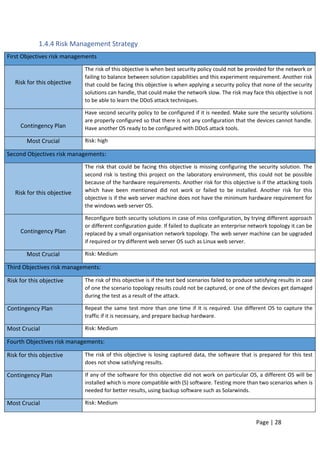
  • 29.
    Page | 28 1.4.4Risk Management Strategy First Objectives risk managements Risk for this objective The risk of this objective is when best security policy could not be provided for the network or failing to balance between solution capabilities and this experiment requirement. Another risk that could be facing this objective is when applying a security policy that none of the security solutions can handle, that could make the network slow. The risk may face this objective is not to be able to learn the DDoS attack techniques. Contingency Plan Have second security policy to be configured if it is needed. Make sure the security solutions are properly configured so that there is not any configuration that the devices cannot handle. Have another OS ready to be configured with DDoS attack tools. Most Crucial Risk: high Second Objectives risk managements: Risk for this objective The risk that could be facing this objective is missing configuring the security solution. The second risk is testing this project on the laboratory environment, this could not be possible because of the hardware requirements. Another risk for this objective is if the attacking tools which have been mentioned did not work or failed to be installed. Another risk for this objective is if the web server machine does not have the minimum hardware requirement for the windows web server OS. Contingency Plan Reconfigure both security solutions in case of miss configuration, by trying different approach or different configuration guide. If failed to duplicate an enterprise network topology it can be replaced by a small organisation network topology. The web server machine can be upgraded if required or try different web server OS such as Linux web server. Most Crucial Risk: Medium Third Objectives risk managements: Risk for this objective The risk of this objective is if the test bed scenarios failed to produce satisfying results in case of one the scenario topology results could not be captured, or one of the devices get damaged during the test as a result of the attack. Contingency Plan Repeat the same test more than one time if it is required. Use different OS to capture the traffic if it is necessary, and prepare backup hardware. Most Crucial Risk: Medium Fourth Objectives risk managements: Risk for this objective The risk of this objective is losing captured data, the software that is prepared for this test does not show satisfying results. Contingency Plan If any of the software for this objective did not work on particular OS, a different OS will be installed which is more compatible with (S) software. Testing more than two scenarios when is needed for better results, using backup software such as Solarwinds. Most Crucial Risk: Medium
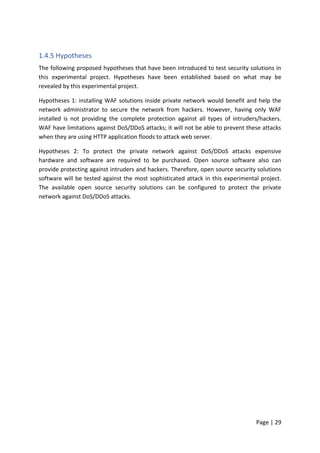
  • 30.
    Page | 29 1.4.5Hypotheses The following proposed hypotheses that have been introduced to test security solutions in this experimental project. Hypotheses have been established based on what may be revealed by this experimental project. Hypotheses 1: installing WAF solutions inside private network would benefit and help the network administrator to secure the network from hackers. However, having only WAF installed is not providing the complete protection against all types of intruders/hackers. WAF have limitations against DoS/DDoS attacks; it will not be able to prevent these attacks when they are using HTTP application floods to attack web server. Hypotheses 2: To protect the private network against DoS/DDoS attacks expensive hardware and software are required to be purchased. Open source software also can provide protecting against intruders and hackers. Therefore, open source security solutions software will be tested against the most sophisticated attack in this experimental project. The available open source security solutions can be configured to protect the private network against DoS/DDoS attacks.
  • 31.
    Page | 30 ChapterTwo 2.0 Literature Review The aim of this survey paper is to understand the argument of the characteristics and also the technology of the key elements of Web Application Firewall (WAF) and open source DDoS mitigating techniques. There are several WAF and DDoS mitigating technologies provided by different vendors; each one comes with advantages and disadvantages. There are several theories to explain how to implement both layer solution and how it should be configured as well as which vendor proposes the best solution for the users. However, this review focuses on the open source WAF software ‘mod_security’ and mitigating DDoS attack techniques (mod_evasive and (D)DoS Deflate) solutions which are available and can be installed on a host machine device, and Firewall appliance. Therefore, the literature covers a variety of such solutions, and this review will focus on eight web application solutions to be compared with mod_evasive and (D)DoS Deflate. In this literature review, current methods of DDoS mitigation will be examined. WAF solutions are Secure Sphere, Web Sniper, Server defender AI, Secure IIS, Barracuda, Web Defend, F5, and Mod Security. In this literature review the hardware and software requirements are identified for the Web Application Firewall software, to be installed on.
  • 32.
    Page | 31 2.1Secure Sphere SecureSphere WAF dynamically learns about applications usual behaviour and compares this with the ‘threat intelligence gathering source’ from around the world and is also updated in real time to deliver greater security. “The industry leading SecureSphere Web Application Firewall identifies and acts upon dangers maliciously woven into innocent- looking website traffic; traffic that slips right through traditional defences” (Imperva, 2015). Imperva Secure Sphere is providing solutions that can secure enterprise data centres and protects exclusive information, critical servers and tradition business applications. In A, Shulman’s white paper about Top 10 Database Threats and Solution SecureSphere is mentioned as a solution for several threats that web applications are facing today. However, in their arguments about preventing SQL injection, which most web applications are sufferings from, there is vulnerability against SQL injection misuse. It is mentioned that a combination of three techniques can effectively prevent SQL injection. The techniques are IPS, SecureSphere and Correlated Attack Validation technologies. According to A, Shulman none of this technology is useful in the prevention of an SQL injection attack by itself. For example, IPS can only identify vulnerable SQL injection or stored procedures and is therefore not enough to prevent the attack. “SecureSphere IPS includes unique database signature dictionaries designed specifically to identify sensitive stored procedures and SQL injection strings”. (A, Shulman 2006). 2.1.1 WebSniper webSniper is another product to protect web servers from many known attacks such as SQL injection, buffer overflows, cross-site scripting, and path traversal. WebSniper comes as hardware and can be installed inside the private network to protect the web application from intruders. WebSniper identifications are achieved via signature of known attacks and behavioural form of known attacks. WebSnipe monitors the demands sent via the Internet and distinguishes between acceptable requests and illegitimate requests. WbSniper can only monitor the traffic; it cannot stop an attack. “The product's features can, of course, enable only monitoring of traffic (without blocking) – based on the organization's information security policy and the preferences of its Information Security Manager.” (WebSniper Developer January 2008). 2.1.2 Server Defender VP Server Defender VP is an effective firewall against the web application attacks. It is cost- efficient and advanced yet an easy to use software web application firewall ideal for small to medium size networks that run IIS. According to the software developer this solution is the perfect software to secure IIS server “ServerDefender VP Web application firewall for IIS is designed to provide protection for websites and applications running on the Microsoft IIS Web server by blocking Web attacks including SQL injection, buffer overflows, cross-site scripting (XSS) and request forgery (CSRF), zero-day, brute force, dictionary, denial of service and others” (Port80 April 2013).
  • 33.
    Page | 32 2.1.3Secure IIS eEye Secure IIS provides the application layer with protection against zero-day attacks, known attacks, and unauthorised Web access. Secure IIS manages data as it is routed by IIS and can block a request at any point if it is related to any attack, containing SQL injection and XSS etc. Secure IIS examines applications at each level of processing either on both network layer or at the kernel level. According to E, Janot & P, Zavarsky they described SecureIIS as follow, “eEye Digital Security’s SecureIIS could perhaps be considered the commercial MS-oriented counterpart to ModSecurity”. (E, Janot & P, Zavarsky. 2008). Secure IIS can also bring protection to intranet and extranet better than the other WAFs. “Unlike any Intrusion Detection System or firewall currently on the market, SecureIIS can stop attacks on both encrypted and unencrypted sessions”. (From PR Newswire Journal, 2001). F. Raouf, stated that "We at eEye came to the conclusion last year that there has to be a better way to manage the security of IIS other than the current approach of reactive patch management," Chief Operating Officer at eEye Digital Security. "With SecureIIS the Microsoft IIS platform becomes the most secure platform on the market." (PR, Newswire Journal, 2002). 2.1.4 Barracuda Barracuda solution is a firewall device that can be configured to act as a web application firewall. Barracuda firewall has many functions such as intelligent traffic flow control, IPsec VPN and a state full packet inspection firewall. According to S. Kay Miller. Information Security Magazine September 2008 “Barracuda having the higher capability of high availability, coach and compression, SLL acceleration & offloading and regularity compliance features”. Also, several other tests have been done on few other WAFs that deliver SSL/VPN connectivity. The WAF solutions that have been tested are Barracuda SSL VPN 380, WatchGuard SSL 560, Dell Sonic Wall EX-7000 and Cisco ASA 5515-X Security appliance. The test has been done by ‘Android Corp’: “We found each of these products to be capable, fully mature and established in the marketplace, which made it a bit of a challenge to choose a winner. Our top pick, the Cisco ASA 5515X security appliance narrowly edged out the competition. While it didn't dominate in every category, the Cisco ASA 5515X won top billing due to its rich feature set, robust and granular configuration options and overall balance of capacity and features”. In that experiment, they found out that the other four solutions that have been tested were essentially runners-up, each product with its unique features that makes them suitable for implementation. According to a recent Cisco comparison of firewalls, Barracuda is not as efficient in handling: “load balancing is not so much active, and it is also a signature based firewall so performance can be improvised”. (PCI-DSS).
  • 34.
    Page | 33 2.1.5Web Defend WebDefend is a web application firewall that offers an application layer technology with real time detection of an attack. It is from TrustWave and offers some more extra features further than strictly being a firewall. WebDefend key features are, out of box PCI compliance, Dynamic Application profiling, application security defect detection, inbound and outbound traffic analysis and SSL attack detection. “It is PCI DSS compliance and provides detection and protection against known vulnerabilities and imminent threats such as Google hacking, malicious bots, site scraping and zero-day attacks” (A, Razzaq. A, Hur 2013). In the new release of the WebDefends solution is upgraded with capabilities to protect web application in any languages according to the creator of the WebDefend’s, “WebDefend's new internationalization capabilities can protect Web applications in any language, including double-byte languages such as Japanese, Korean and Chinese.” (TrustWave, 2015). Web Defend is not so much great with web applications blocking and monitoring “Web Defend firewall is not so much efficient for the web application monitoring and preventing these facilities are not provided in this firewall, and it did not support all the encryption schemes” (A, Razzaq. A, Hur 2013). 2.1.6 F5-BIG IP BIG-IP ‘Application Security Manager’ contains complete, built-in authenticated application security policies for frequent applications as well as a fixed policy-building engine that can become familiarised with application updates. This type of Firewall works as an appliance and provides primary services like blocking and traffic monitoring. F5-Big IP is in the top ten in the WAF solutions. According to the developer, this solution can prevent DDoS attack “With advanced firewall capabilities, it secures applications against layer seven distributed denial-of-service (DDoS) attacks and application vulnerabilities where other WAFs fail” (BIG- IP ASM). In Android Corp experimental test, F5 was one of the products that have been tested with the other four solutions. “F5 BIGIP Edge Gateway 3900 acceleration feature allows remote connections 10x faster than without acceleration, supporting up to 600 logins per second and 600 concurrent users. While we did not independently verify these impressive sounding numbers, acceleration sets the BIGIP Edge Gateway 3900 apart from the other products we tested and may make this product especially appealing in demanding environments requiring very high throughput.” (Android Corp, 2013). However, according to Android Corp, even though the test was satisfied it was not easy as the testers were unable to configure F5 without some error and help.
  • 35.
    Page | 34 2.1.8Network Layer Firewall A firewall can be installed and configured as a barrier against outside users to prevent unwanted traffic from coming in to the network. Therefore, the firewall is every networking requirement to protect the network from intruders. However, in this experimental project, a firewall will be installed and configured to protect the private network. Firewalls provide a choke point at which auditing and security can be enforced. They also allow users from inside the private network to access resources on the Internet while providing controlled access from the Internet to hosts inside VPN. According to (Johen R. et al. 2005). “A firewall opens communications channels between two networks and has no control over what users choose to transmit using these channels. It has no concept of the value or sensitivity of the data it is transferring between networks, and therefore, it cannot protect information on that basis”. This is a fair definition of a network layer firewall. However, when it comes to the firewall configuration and protection of the private network from intruder’s, the firewall can be configured to provide an extra security level to a particular user or a group of users. “Your confidential and proprietary company information should be stored behind your DMZ on your internal network”. (R. Vacca and R. Ellis, 2005). DMZ should be hosting servers that needed an extra layer of security, yet should not be hosting servers, which contain source code, sensitive trade secrets, or proprietary information. According to (H. Merrill Lynch. 2000) “firewall will not address how the business handles e-mails attachments, modems, ‘sneaker net’ hard copy data, or any of some other security issues”. However, firewalls cannot protect the users very well against SQL injection, DoS/DDoS attacks, and viruses. In other words, firewalls cannot have held responsible for an attack, which is based encoding binary files for transforming over a network according to (R. Vacca and R. Ellis, 2005). Therefore, a firewall cannot protect against data-driven attacks; for example, something is mailed or copied to an internal user when it is then executed. “Firewall typically does not perform virus scanning; the scanning process can significantly increase the load on a server, compromising the performance of the system” (H. Merrill Lynch. 2000). Some firewalls can determine based on the content of the packet, what file needs to be sent to a separate virus scanning server. According to Yocom, et al, (2011), a comparison study between the primary firewall devices on firewall administration, performance, configuration, and management showed that there are not big differences between them; the test result was as below table 1. Firewalls devices Installation15%,configuration15%,administration&manag ement25%, features25%, performance20% Cisco PIX 525 80% CyberGuard KnightStar 88% Lucent VPN Firewall Brick 201 82% NetScreen 500 Firewall 81% Symantec Enterprise Firewall 80% Table 1: the best available firewalls in the market.
  • 36.
    Page | 35 Ina survey conducted by (ADC, 2011) on firewall performance against DoS and DDoS attack showed that firewalls do have vulnerabilities and limitations against DoS and DDoS attack:  42% had a firewall fail due to network-layer DoS traffic load  36% had a firewall fail due to app-layer DoS traffic load  38% say safeguards understand traffic context less than ‘somewhat well’  36% say safeguards protect against complex, blended threats less than ‘somewhat well’  53% say network performance impact from safeguard ‘somewhat’ to ‘extremely challenging These results show that the network is not fully protected by the firewalls when it comes to DoS and DDoS attack. However, firewalls need to be combined with another security technology for greater network protection. Firewall policies must be realistic and reflect the level of security in the entire network. 2.1.9 Linux based Operating Systems For this experimental project, there are few options to choose from that would be adequate to run attacking test from. Some of them are not free software as well as not an open source OS. However, the best choice for running as server and penetration test is Linux based OS’s. The primary factor when choosing an appropriate system is compatibility. Therefore, Linux based OS’s such as Ubuntu, Kali Linux, and Centos are going to be the chosen Operating Systems for this project. “Backtrack is packed with every security and hacker tool used by security professionals and professional hackers” (K. Hess, 2013). Linux is distributed with no licence fees at all, and it is available in some versions that run with closely the same feel and look. “Linux is famed both for its stability and for its efficiency, often running for months, or occasionally years at a time without having to be rebooted, while also achieving excellent performance”. (Abzug, C. 2004). 2.1.9.1 Kali Linux To choose from available OS for penetration that can be used for DoS/DDoS attacks, it is necessary to pick between the best two available OS. Backtrack Linux is one of the best OS for penetration tests which is used by both hackers and network administrators since it was developed. According to the developers backtrack is a combination of three live Linux penetration testing destitutions: IWHAX, Auditor and WHOPPIX “Backtrack is one of the most famous Linux distribution systems, as can be proven by the number of downloads that reached more than four million as Backtrack Linux 4.0 pre-final” (L. Allen, et al. 2014). To meet with this project requirement Kali Linux will be used for attacking the target host. It has several advantages over backtrack, such as Kali Linux comes with more updated tools. Which means users are getting latest package updates and security solutions “The tools are streamlined with Debian repositories and synchronised four times a day” (Lakhani el al. 2013). According to Kali Linux developers, Kali is more secure, more mature and enterprise version of Backtrack. Another experiment on Wi-Fi that Kali Linux is used to create an
  • 37.
    Page | 36 applicationthat can check intruders trying to access the protected Wi-Fi done by Mehta el al, (2014). However, in Mehta experiment Kali Linux is used to create an Evil Twin access point. It is being used as a port security tool to mitigate man in the middle attack. “Kali Linux contains several more tools which are called top 10 security tools by Kali Linux itself such as: John, Zaproxy, Nmap, Metasploit, burp-suite, hydra, aircrack-ng Maltego, Sqlmap and Wireshark” (S. Ali, et al 2014). Powers (2013) have made a comparison between Linux Distributions and it shows that Kali Linux was 25th on the list of the popular operating system developed by Linux. 2.1.9.2 Ubuntu Linux To meet with another requirement of this project; we need to have another operating system to be used as a network server to host a website. Therefore, Ubuntu is being chosen to be installed and configured as a web server. Ubuntu is an open source and free OS, which comes with several other software, build in and they also can be used in this project. “The main license used is the GNU General Public License (GNU GPL) which, along with the GNU Lesser General Public License (GNU LGPL), explicitly declares that users are free to run, copy, distribute, study, change, develop and improve the software” (family Unix-like, 2007). A comparison study has been carried out between Ubuntu and Microsoft Windows OS by researcher Ju et .al, (2008), which they claim that Windows performs better than Ubuntu. However, a similar research done by Fuzi et al, (2014), disputes these results and proved that Ubuntu is better, more robust and resilient to DoS/DDoS attack. However, as mentioned before for this experimental project Ubuntu will be used as its free and open source and equally efficient and the user can get an update from the developer for more than 18 months. 2.2.1 DoS/DDoS attack Denials of service/Distributed Denial of service are becoming increasingly common, and most security solutions are unable to prevent such attacks. The best network security policies can help to prevent such attack; there is not much to do to eliminate the chance of one happening. There is few packet-filtering program, and mitigation techniques are available, but no one strategy has been tested and proven active. Not long ago the Hong Kong Stock Exchange was attacked according to (Verisign. (2012). The website was affected which was used to broadcast price-sensitive information. Such attacks can be used as a distraction while hacker/attacker collects information from elsewhere in the victim’s system. DoS/DDoS attack defence can be divided into two stages: Prevention and Mitigation. Best security practice comes under Prevention stage when OS’s are frequently updated and scanned for viruses and also policies placed on groups and users. Prevention stage is when resources increased to the point DoS attack pose no threats. The second solution is not cheap to use practically. However, according to (Cross, K. (2011)” There are services available to be used which that will increase bandwidth during the extreme traffic spikes”. After the DDoS attack has started a mitigating technique can be used to identify the source
  • 38.
    Page | 37 ofthe attack and block it the IP address of the attacker. However, Firewalls are unable to detect the attack but can be configured to block certain IP addresses from accessing the network if the source IP address and ports of the attacker are identified during DoS attack only. 2.2.2 Slowloris.pl methodology As indicated in RFC2616 “The HTTP protocol specification states that a blank line must be used to indicate the end of the request headers and the beginning of the payload”. The way HTTP works is when the web server receives the entire request then it may respond. However, sending two or more consecutive newlines creates a blank line. The way slowlories attack works is by establishing multiple incomplete requests to the web server. These incomplete applications are always sent with no terminating newline sequence. An experiment has been carried out by (K. Sourav and D. Mishra) indicate all the applications results “Very few requests have been terminated, but most of the requests are in R status, that means the server is still reading the claims. As slowlories never sends the complete packet, the requests are never going to be complete until it timeouts, till then the server will continue to preserve its memory for those requests”. Therefore, legitimate users cannot access the web server when it is under attack. Another research has been done used slowlories attack on an Apache server and stated “in the case of a DDoS attack CPU uses reaches to a maximum amount and remains like that until the attack is terminated. But when client termination model is deployed, the CPU uses continuously decreases with time”. (K. Sourav and D. Mishra 2011). 2.2.2 Existing countermeasures Some techniques have been proposed for an HTTP-based attack such as mod_security, mod_evasive and DDoS deflate. All these countermeasures are for Apache web server, and three of them are open source which can be configured on the web server free of charge. 2.2.3 Mod_Security Mod_security is an open source WAF which can be installed on both Microsoft and Linux based operating systems. It performs logging of complete HTTP transactions and can monitor HTTP traffic in real-time. “For our purposes here, suffice it to say that of the different types of vulnerabilities in Web servers, by far the most typical is inadequate or incomplete user-input validation” (Mick Bauer. 2006). etl (L. Elizabeth, 2012) “For our final mitigation method, we tested mod_security. Mod_security had very inconsistent results, ranging from succeeding in 30 seconds to 1 minute and 25 seconds. The average time for the server to come back up under mod_security was 60.5 seconds”. Mod security is a Linux-based software and it is an Apache module that helps to protect websites from many attacks “It is used to block commonly known exploits by use of regular expressions and rule sets and is enabled on all InMotion servers by default.” (T. Sisson Oct 2014). Mod Security can block frequent code injection attacks, which reinforce the security of the client machine. Mod Security is a free software
  • 39.
    Page | 38 whichcan be installed and configured on Apache and NGINX web server. According to S. PK, (2009) and in his article about Mod_Security intro “Mod_Security is an open source intrusion detection and prevention engine for web applications. It operates embedded into the web server, acting as a powerful umbrella – shielding applications from attacks. Mod_Security supports both branches of the Apache web server”. Which he described Mod Security as web applications IDPS, there are few disadvantages of this software, for example, the user needs to have high knowledge about the software and to be a security and protocol expert and also know how to manually install it and update the signature. According to A, Moosa. & E, Alsaffar, shortly the database name would be so big a standard server could not check every packet at the usually required speed. “Negative signatures database increases every day, and within two or three years, the traditional methods of security controls using these huge rules-sets will not be able to be applied to check every transaction.” But this is not to imply that this is a concern only for Mod_Security as nearly all application-level security solutions depend on negative logic built filtering protection mode. “If there is an e-Government web portal, hosted on a Linux RedHat Enterprise Linux 4 with Apache 2.2.8 web server. Humbly, there are 100,000 HTTP requests on average coming to this web server simultaneously. If Mod_Security was installed with a rules-set of 150 certified rules, then by doing simple calculations, 15,000,000 simultaneous matching processes have to be done in real time without significant latency. This would require a cluster of high-performance servers to maintain enough resources (CPU/RAM) to achieve this tremendous scale of processing requirements”. In Forrester Research study published in 2006. Mod_Security provides the “best attack detection for web application threats” (Gavin, M 2006). ModSecurity WAF, proposed by Ivan Ristic, is an open source solution based on attack signature detection. Mod_Security is widely used and has medium performances. Though this system is strongly related to some types of web servers and it only analyses POST queries to avoid performance deterioration. Also, the rules formalism is very complex which requires a high expertise in HTTP protocol and regular expressions coding. Ivan Ristic proposed Mod_Security WAF solution, which is based on attack signature detection. It has been mentioned by some other WAF creator such as f5 Web Application Security Manager and Security group that Mod Security solution should not be used for the below reasons:  “Mod_Security runs on every web server which is an additional load on the servers that negatively impact the performance and decreases capacity to serve users as well as applications”.  “Expertise are needed to write rules after understanding the attacks which is time consuming task otherwise you have to trust third-party which is an unnecessary security risk.”
  • 40.
    Page | 39 “Expertise is needed in the HTTP protocol for sanitizing the HTTP response. Moreover, you have to be an expert in Apache configuration directives, and the specific directives used to configure Mod Security.”  “The configuration and writing complex rules & regular expression have to be done manually unless you purchase a commercial version of Mod Security”. 2.2.4 Mod_evasive This security solution is a very useful security tool, depending on the server sensitivity this solution can be modified at any time if desired. It is a third party module that was made to perform a simple task and does it very well. Mod_evasive can detect when a web server is receiving a DoS attack and can prevent that attack from doing as much damage as it would normally do. According to (K. Coar, and R. Bowen, 2008) “mod_evasive detects when a single client is making multiple requests in a short period, and denies further requests from client”. The network administrator can change the time and access numbers by a customer to higher or lower. Mod_evasive configuration can place more restrictions on the customer access to the website. According to (K. Sourav and D. Mishra) experimental test on mod_evasive “If any of source IP registered in legitimate table is creating incomplete HTTP requests, it monitors the intellectual property, and if the number of incomplete requests exceeds the threshold (Nth) amount of requests, the IP will be copied to suspicious table, and further action is taken.  i. If (InPac > Nth)  ii. Move the IP to tab_sus”  mod_evasive detection is achieved by producing an internal dynamic hash table of URLs and IP addresses. Mod_evasive will deny any single IP address for the following reasons: When a single IP address requesting the same page more than two times per second.  When a single IP address making more than fifty simultaneous requests on the same page per second.  When an IP address already temporally blacklisted for the above reasons. Another test has been carried out by L. Elizabeth, et al. (2012) and in their experimental test mod_evasive was one of the Apache modules was tested” This, too, had a setting for maximum connections per IP, which we configured at 70 and 50. With mod_evasive installed and set to 70 maximum requests, the server came back up with an average of 59.5 seconds. When we changed the setting to 50, it came up in 56.5 seconds on average. According to this test, the server was down due to a DDoS attack but it came back after 56.5 second which is a long time means the server was down. In another experimental test on Mobile cloud mod_evasive is used to prevent DDoS attack and the result as noted from the paper is not satisfying “This mod is accepted at being successful in helping Apache servers mitigate DDoS attacks, but for the mobile setting it is not deemed an acceptable tool”. The reason for that according to (D. Jensen, 2014) “The other huge drawback in mod_evasive on the mobile is that even when triggering for a malicious user, the connection requests are still able to queue before being replied to with 403 forbidden HTTP messages”.
  • 41.
    Page | 40 Mod_evasivemay not work for some, which solely it depends on the user’s requirements. However, (A. Bogus, 2008) describes mod_evasive in his book as follow “we can shape traffic, evade lechers and deep link, allow proxy servers, and use our application to authorise customers using mod_evasive, mod_trigger_b4_dl, mod_extforward, and mod_secdownload. All of them give us terrific functionality for a slight performance cost. Mod_evasive easily can be modified through “evasive.conf” configuration file which by default they are physically challenged one you installed and configured it require to enable them. “DOSHashTableSize 3097 DOSPageCount 2 DOSSiteCount 50 DOSPageInterval 1 DOSSiteInterval 1 DOSBlockingPeriod 10 DOSEmailNotify mail@yourdomain.com DOSLogDir "/var/log/apache2/" The above values can be changed according to the type and amount of traffic that the browser needs to handle as shown in Figure 18. DOSHashTableSize— this is specifying how mod_evasive keeps track of who’s accessing to what. By increasing this value will provide a faster lookup of the sites that client has already visited before. DOSPageCount—this is specifying how many identical requests to a specific URL a user can make. DOSSiteCount—this is specifying to how many requests overall a user can go to the website over the ‘DOSSitInterval interval’. DOSBlockingPeriod—when a visitor exceeds the limits by ‘DOSSPageCount or DOSSiteCount’ their IP will be blocked during the DOSBlockingPeriod amount of time. DOSEmailNotify—it can be configured to send an email whenever an IP address is blacklisted. DOSLogDir—this is to specifying the location of the log directory. Any of these values can be changed to meet the webserver or the network administrator needs. After the installation and configuration, the network administrator can check the security solution if it is correctly configured or not.
  • 42.
    Page | 41 2.2.5(D)DoS Deflate DDoS deflate is a lightweight bash shell script, which was designed to block and prevent DDoS attack. DDoS Deflate has been tested by (Dr.S. Sangeetha, 2015) according to the researcher “DDOS Deflate has stopped the current IP address through the IP tables in which the system had started the HOIC DOS tool”. It monitors and tracks the entire intellectual property address making connections to the webserver. DoS Deflate collects all the information about the source IP address by using ‘Netstat’ whenever it detects the number of connections from a single IP address which exceeds certain limits, it will block the IP address. Another test has been done by L. Elizabeth, et al (2012) “Under (D)DoS Deflate, the server did eventually come back up. We tested it with two different configurations. In one, the setting for maximum requests per IP was set at 70, and in the second, it was set at 50. This made a small, but noticeable difference: the average time for the server to come back up went down from 40 seconds to 33.5 seconds”. This clearly indicates the server went down from a limited during the attack and then started to comes back on again. the following are (D)DoS Deflate parameters that network administrators can change them according to their network needs.  FREQ=1: cron is left as it is.  NO_OF_CONNECTIONS=150: specifies how many connection makes IP request to the server as malicious. The value of 150 is too high for this experiment so it needs to be lowered down to 15 only.  APF_BAN=1 specifies the connection has been observed by APF table. Will leave this value as 1.  KILL=1: specifies blocked IP address is not blocked permanently. Will let this configuration value as it recommended.  EMAIL_TO= “root”: network administrator can configure this line to get notified by email when an IP is being banned.  BAN_PERIOD=600: specifies the period the wrong IP is blocked for. We can modify this value to be 1200 sec, which means 20 minutes.
  • 43.
    Page | 42 2.2.6Critical Evaluation for Web Application Firewall Solutions Eight web application firewall solutions have been selected for comparison: F5, Mod_Security, WebDefend, Barracuda, Secure IIS, Server Defender VP, WebSniper, and SecureSphere. The full comparison has been carried out by choosing the measures of attack prevention, response filtering, blocking, monitoring, website cloaking, deep inspection, session protection, time efficient, well organised, effective, and total security performance in Table-2. Tick symbols () indicate that the selected feature is available in the firewall solution and () indicates that selected feature is not available. A question mark (?) signs indicate there is no information about that specified feature for the firewall, and also ‘HA’ indicate that the specified feature is only available in hardware machine. Name of Tools F5 ModSecurity WebDefend Barracuda Secure IIS Server Defender VP WebSniper Secure Sphere Attack prevention         Response filtering         Blocking HA   HA     monitoring HA   HA     Website cloaking  ?       Deep inspection HA  ?      Session protection   ?  ?    Time efficient         Well organised         Effective         Overall Security Performance  ?   ? ? ?  Table 2: Web Application Firewall solutions Defence Mechanism, [7]-(A, Razzaq. A, Hur 2013)
  • 44.
    Page | 43 InTable-3 features such as management interface, flexibility, ease of use and inclusiveness are all highlighted as shown in the below table. Tick () symbols indicate that the specified feature is available in the firewall solution and () indicates that specified feature is not available. A question mark (?) signs indicate there is no information about that specified feature for the firewall, and also ‘HA’ indicates that the specified feature is only available in hardware machine. Features F5 ModSecurity WebDefend Barracuda Secure IIS Server Defend VP WebSniper Secure Sphere Ease-to-use         Desktop based     ?    Flexibility         Web based     ?    Command Line     ?    Inclusiveness         Open Source         Commercial         Table 3: Management Interfaces of Web Application Firewalls 2.2.7 Critical Analysis Over the analysis of some web application firewall solutions, the following weakness of some firewalls has been identified.  F5-Big IP is not an open source software, it works as a firewall appliance and is also expensive for a small organisation. Performance cannot be improved because it is a signature based firewall.  Mod_Security has several limitations such as it is unable to detect forced browsing attack, session ID brute forcing attack, the additional load on the server because runs on every web server and written a complex rules and configuration have to be done manually.  WebDefend WAF does not support all encryption schemes and also is not so much practical for the web application blocking and monitoring.  Barracuda comes as hardware, and it is not a plug and play device and needs a high level of expertise to configure it, limited to alerts.  Secure IIS is also having its limitation such as user tracking, very week SSL support, and unable to provide user monitoring.  Web Sniper limitations have no load balancing module and signature based firewall.  Secure Sphere limitations are not effective for the zero-day attack, and lacks of semantics.  Server Defender limitation is session protection not available, poor response with response filtering and website clocking.
  • 45.
    Page | 44 2.3Conclusion In this section of the report, a summary will be offered about this survey research project and the literature review before detailing the conclusions, which have been made, based on the literature and reviews about available WAF solutions. The findings, which are based on the reviews of selected solutions, are also going to be critically analysed in this final section. Also in this part of this survey paper the limitations and weakness of chosen WAF, which were found in the comparative study, will be highlighted. 2.3.1 Conclusion Securing the network is becoming more difficult by time, attackers are financially motivated, and they are not wasting their time on attacking primary systems. Attackers are now shifting their attacking strategies by attacking the sensitive data through Web applications. Traditional security methods are not capable of protecting the network from intruders and stopping attackers. However, in this survey paper, we have highlighted the available Web Application Firewall solutions with open source and commercial as well as both hardware and software. In this research, it has been concluded that there is not one security solution neither hardware nor software that can protect the entire network from hackers/intruders. None of the WAFs that have been compared in this survey paper has the capability to satisfy the need of the security technologies that can be counted on by the network administrators. As we have noticed about these WAFs, they are unable to protect sensitive data from being stolen in some cases. The vulnerabilities can be attributed to many other things such as insecure session management; inadequate input validation, flaws in web server software & OS and improperly configured system settings. These are strong factors that can compromise network security. Because the Web Application layer has no standards and protocols, which ensure safety issues, however, it especially depends on the solution creator and administrator that sometimes they leave loopholes in the web applications and hackers can compromise them quickly. However, the available network security technologies can be found complementing each other in a network design. As mentioned above one technology working solely cannot prevent more frequent attacks and it is required to combine them with other network technologies. Therefore, the recommendation is to have more than one network security solutions to protect the entire network. To have a secure network and protect sensitive data from being compromised, organisations have to add another layer of security mechanism to their available topology to create safer and reliable network for the customers. Network Layer Firewall is the traditional essential device that can be installed to protect the network from intruders. Web Application Firewall is a required security layer that it is recommended to be installed in every network design alongside other security technologies. Therefore, in this experimental project we are focusing on the available open source security technologies that can provide protection to a network without buying expensive hardware or software licencing.
  • 46.
    Page | 45 ChapterThree 3.0 Methodology The aim of this experimental project is to investigate the effectiveness of the open source security solutions against DoS/DDoS attacks. To provide a security protection to network layer and application layer firewall are the primary requirement in any organisations whether they are small or large. We have learned that none of these security solutions alone can provide completed protection to a network. Both network and application layer firewalls solutions come with its disadvantages and vulnerabilities. Therefore, other security solutions are added to this experiment to test their capabilities against threats and intruders. In the Literature Review eight different WAFs were compared, it was discovered that the best one is not the most expensive ‘hardware/software.' Therefore, an open source WAF has been chosen, used and tested against DoS/DDoS attacks in this project. The targeted beneficiaries are any organisation or businesses that have the website to deliver their services to clients on the Internet. This section will explain the methods which are going to be used for the primary objectives. The details about the type of hardware, software, chosen environment feature, OS’s, penetration tools and configurations will be specified. In addition to settings, testing the experiment and network topology data will be gathered during the research. Figure 7 illustrate the test project stages that follow on for the aim/goals of this study that will conclude with the last step being resulted that address the goals and hypotheses set in the previous sections of this project. Figure 7: Experiment Main Stages
  • 47.
    Page | 46 3.1Design 3.1.1 Network Topology Network topology will be created which will be a duplicate to original enterprise system design. Through a physical experiment in a laboratory environment with installed and configured WAF mod_security and other security solutions such as (mod_evasive, Network Layer Firewall, and (D)DoS Deflate) and also webserver, end users and wireless access point. The aim of this experiment is to identify the limitations of the available open source software against HTTP DoS/DDoS attacks. This project aims to use open source security solutions and test them against two different types of HTTP DoD/DDoS. It is required to configure all the hardware and software in this network topology to meet the standard security policy. The firewall will be placed as a network safeguard to monitor incoming and outgoing traffic and also will be configured with ACL to allow or deny traffic according to the system needs. Two different scenarios will be tested against DoS/DDoS attack. Data will be collected and analysed during each scenario. As shown in Figure 8 the network topology contains:  Firewall Device  WAP  Web Server  Four Computers o Out of the 4 Computers: o Two Computers have legitimate users. o The other two are used by attackers:  One has an attacker from inside the private network.  One has an attacker from outside the network. The reason for choosing this network topology design is because it can be found in most small to medium size businesses. Figure 8: Network Topology
  • 48.
    Page | 47 3.1.2Devices and Configuration Network layer Firewall Firewall devices are the core requirements in every network topology no matter how small or big the network. Therefore, a firewall will be installed and configured in this experimental project to protect the private network from intruders. However, in the topology, both type of firewalls ‘hardware and software’ will be configured to protect the users. Software firewalls are considered as internal which means they only can protect one user machine. Hardware firewall is considered as the network safeguard, they are placed between the private and untrusted network. Cisco ASA 5505 firewall are the chosen safeguard for this experiment. Cisco Adaptive Security Appliance ‘ASA’ 5505 firewall will be configured to provide protection to all users inside the private network and in particular for the web server machine. Cisco ASA 5505 firewall is one of the best security devices made by Cisco, which is reliable, easy to configure and install. Cisco ASA 5505 is ideal for small and medium size network and also a relatively cheap device. It will be set with a DMZ, which will be configured to protect the web server specifically. The web server will be connected to the DMZ area of the firewall, which users from inside and outside the private can have access to the website which will be hosted by the web server. External users are allowed to access the Internet site by HTTP connection that will be limited to some connections peer and users. Only HTTP traffic will be authorised to access the DMZ and deny all other types of traffic. Cisco Adaptive Security Appliance 5505 Firewall ASA 5505 iOS comes with different licencing that restricts the configuration, so it is necessary to adapt the initial configuration to allow 3 VLANs to be configured. ASA 5505 firewall can be configured to match with user’s requirements. Therefore, ASA 5505 firewall is configured to protect a small network topology with support up to 254 users can be configured. Cisco ASA 5505 firewall configuration o VLAN 1 (inside)- is set up with security level 100, which means the VLAN is hosting trusted users. Therefore, the firewall not considers VLAN 1 traffic as threats. Port 0/1,0/2,0/3,0/4,0/5,0/6 and 0/7 are assigned to VLAN 1 as shown in Figure 9, which is also called ‘inside.' DHCP is enabled on VLAN 1 with IP 192.168.106.0 Subnet mask 255.255.255.0. ‘Appendix 2’ o VLAN 2 (outside)- is configured with security level 0, which means traffics from this VLAN are not trusted. Therefore, the firewall will check coming and going traffic from this VLAN. Port 0/0 is only assigned with this VLAN ‘outside’ as shown in Figure 9, which is directly connected to the untrusted Internet, with IP address 192.168.1.82/24. ‘Appendix 3’ o VLAN 3 (DMZ)- is configured with a security level of 50, which means this VLAN is less trusted than ‘inside’ VLAN users and traffics to and from that VLAN will be checked. Port 0/3 is assigned with VLAN (DMZ) as shown in Figure 9, which the web server is connected to it with IP 192.168.1.0 Subnet mask 255.255.255.0. ‘Appendix 3’
  • 49.
    Page | 48 Figure9: VLAN configuration and assigned Ports The VLAN's security configurations are to allow traffic to flow from higher to a lower security interface level e.g. (outside to inside). Traffic from a lower security interface level to a higher standard of safety cannot pass without additional explicit inspection and filtering. For this experimental project ASA, 5505 firewall is configured to inspect most types of traffic coming into the private network as shown in ‘appendix 1’. Inside the private network ASA firewall DMZ is hosting the web server which is hosting a website where they need to have the most security protection from intruders. The firewall needs to allow access to outside users to access the website with the inside users as well as shown in Figure 10. Figure 10: ASA Firewall Separating the Private from the public network
  • 50.
    Page | 49 3.1.3Network IP Addressing Scheme Every devices needs to be assigned with an IP address in order to be able to communicate over LAN or WAN. However, the private network will be configured with a private IP address. Inside the private network private IP addresses class (A and C) are assigned to users’ machines. NAT feature is enabled on the firewall to translate between public and private IP address as shown in Appendix 1. The private network connected to the Internet via ISP router with a public IP address of 87.113.45.118 and translated the public IP address to a private class C IP address. Firewall IP addressing table: Device Interface/name IP address/subnet mask Default gateway ASA 5505 Firewall 0/0 (outside) 192.168.1.82- 255.255.255.0 192.168.1.254 ASA 5505 Firewall 0/1 (inside) 192.168.106.0- 255.255.255.0 192.168.106.1 ASA 5505 Firewall 0/2 (inside) 192.168.106.17- 255.255.255.0 192.168.106.1 ASA 5505 Firewall 0/3 (dmz) 192.168.1.0- 255.255.255.128 192.168.1.1 ASA 5505 Firewall 0/4 (inside) 192.168.106.18- 255.255.255.0 192.168.106.1 ASA 5505 Firewall 0/5 (inside) 192.168.106.19- 255.255.255.0 192.168.106.1 ASA 5505 Firewall 0/6 (inside) 192.168.106.20- 255.255.255.0 192.168.106.1 ASA 5505 Firewall 0/7 (inside) 192.168.106.21- 255.255.255.0 192.168.106.1 WAP 0/4 10.0.0.0 – 255.255.255.0 10.0.0.1 Table 4: IP Addressing Scheme DHCP server is enabled on the firewall for each VLAN to assign a range of IP addresses for each subnet as shown in Figure 11. Ethernet port is assigned with an intellectual property address and any host that is connected to this Ethernet port will get an IP address from the DHCP pool. Figure 11: DHCP Status
  • 51.
    Page | 50 3.1.4Wireless Access Point WAP is installed and configured to provide Internet accessibility to the portable devices inside the organisation. To have connectivity to the Internet and organisation website a NetGear Wireless-G WGR614 is installed and connected to the firewall VLAN 1 (inside). The WAP is installed and configured to provide connectivity to the portable devices such as Laptop, Smart Phone, Tablets, etc. Class ‘A’ IP address is configured to provide IP address to the connected devices to the WAP. Figure 12 below illustrate the wireless topology of the private network. Figure 12: WAP Topology
  • 52.
    Page | 51 3.1.5Web Server Web server machine is one of the primary devices that needs to be installed and configured to host a website. A website requires to be hosted on a webserver in order to operate. In this experiment a server machine is installed and configured to host the website. We could have hired a server to host our website outside the private network that is designed for this project but for ethical reason we did not. The server machine is going to be configured with an open source Operating system (Ubuntu Linux). Ubuntu Linux is an open source OS it can be obtained for free and comes with all the security patches and other required updates. Microsoft windows server could have been installed instead, but it is not free to use and the security solutions in this project are not compatible with it. The aim of this project is to test available security solutions in this experimental project to protect the web server machine from attackers. Therefore, a web server will be hosted inside the private inside DMZ area of the firewall. Web server device will be protected by open source software such as: mod_security, mod_evasive, and (D)DoS Deflate. Ubuntu 16.04 LTS operating system will be installed on the web server machine with Apache2 web server that is industry recognised and reliable web server. Apache2 is a popular HTTP server that provides the full range of web server for free of charge. All the security solutions are compatible with Ubuntu OS and Apache web server. Therefore, Ubuntu and Apache are both the best choice for this experimental project. The web server will be the target machine for the attacker in this project as shown in Figure 13. Figure 13: Web Server Machine in the Topology
  • 53.
    Page | 52 Thewebserver hardware specifications are:  Compaq hp  Tower Case Desktop  Memory: 4GB  Processor: AMD Athlon™ X2 215 Processor x2  HDD: 200GB  Network Card: 1  Operating System: Ubuntu 16.04 LTS  IP address: 192.168.2.2  Subnet Mask: 255.255.255.0  Default Gateway: 192.168.2.1  OS Type: 64-bit A basic website has been created and will be hosted by the web server machine as shown in Figure 14 and Appendix 8. to be tested against the DoS/DDoS attack in this experiment. Apache2 latest version is installed on the Ubuntu 16.04 LTS server. The website is accessible from in and outside the private network and protected by the firewall DMZ, mod_security, mod_evasive and (D)DoS Deflate. Figure 14: Glasgow Daily Life website
  • 54.
    Page | 53 3.1.6Users and attacker’s computers setup Four computers will be used in this experiment, out of four computers attackers use two computers and legitimate users use the other two. The attacker’s computers are configured with Kali Linux operating system as it comes with the attacking tools pre-configured. However, authorised users inside the private network use the remaining two computers. 3.1.7 Attackers Computers To test the web server and attack it by using HTTP DoS/DDoS attack, Kali Linux is the best OS for this purpose as we have learned in the Literature Review. Two computers are required for this test to generate a DDoS attack on the targeted machine. Therefore, two computers are configured with penetration tools to attack the website. One of the attacker’s computers will be located inside the private network and the other one from outside the network. Both PCs are attacking the same target only one of them outside the private network. To test the firewall and other used security solution capabilities against both attackers from inside and outside the private network. Attackers Computers Specifications: Computer One:  Sony Vaio 16.4-inch Laptop  OS: Kali Linux  Processor: Intel Core i7 CPU Q740@1.79GHz  Memory: 4GB  HDD: 500GB  IP address 192.168.106.21/24  Default Gateway: 192.168.106.1 Computer Two  Toshiba Satellite 15-inch Laptop  OS: Kali Linux  Processor: Intel Core 2duo  Memory: 2GB  HDD: 200GB  IP address: 192.168.1.85/24  Default Gateway: 192.168.1.254
  • 55.
    Page | 54 3.1.8Legitimate Users Computers Out of four computers, two of them are used as legitimate users inside the private network. These two computers are used to access the website and monitor the web server activity by the administrators. However, the two computers are assigned to the VLAN ‘inside’ to access the Internet. Computer One:  Apple MacBook Pro  Aluminium unibody MacBook 13-inch  OS: OS X EI Capitan Version 10.11.6  Processor: 2 GHz Inter Core2 duo  Memory: 8GB  HDD: 1TB  IP address: 192.168.106.19/24  Default Gateway: 192.168.106.1 Computer Two:  Compaq hp:  Tower Case Desktop  OS: Windows7 Home Premium 64-bit  Processor: AMD  Memory: 2GB  HDD: 500GB  IP address: 192.168.106.18/24  Default Gateway: 192.168.106.1 3.1.9 DoS/DDoS attacks Collecting information about the targeted machine is vital for any attackers and comes as the first stage before the attack. Information such as OS type, Open ports, type of security policy implemented and some hosts inside a private network, etc. OS, open ports and IP address can be easily obtained through target machine vulnerabilities. There are several mechanisms for obtaining this information some of which will be used in this experimental project. 3.2 Tools to be used by Attackers/Hackers 3.2.1 Nmap Nmap is a very useful tool that can be used by both attackers and network administrators to gather information about the network topology, users, running OS types and Open ports. However, Nmap is going to be used to collect all this information before any attack. Network Administrators also can use this tool to make sure no open port is left in the topology that can be utilised by attackers.
  • 56.
    Page | 55 3.3Tools to be used by Network Administrators 3.3.1 Siege A useful tool that can be used in this project by administrators is Siege. To collect information about server response to the HTTP requests. Siege is a tool which can be utilised on any Linux-based OS by revealing a problem in the server before it goes live or when it is live. Siege will be used in the experimental project to check the website availability and its response to the requests. Command line: Sudo siege -v -c 500 -r25 ‘target’ 3.3.2 Awstats Awstats is a powerful tool that generates advanced streaming, the web, FTP graphically. It works as a CGI or from the command line and can bring all possible information about the log contain as shown in Figure 15. Awstats can analyse log files from all major server tools like Apache log, IIS, WebStar, and proxy. Awstats package is available in the Ubuntu repository by defaults and can be installed by running: Sudo apt-get install awstats After the installation is done it can be run by: Sudo a2enmod cgi Figure 15: Awstats
  • 57.
    Page | 56 3.4DoS/DDoS Methods Dos or DDoS attack is known as one of the most sophisticated cyber-attacks. DoS attack is usually done from one computer and still has a significant impact on the targeted machine. DDoS attack is more devastating than DoS attack because more than one computer is used to attack a single computer. DoS/DDoS attacks are usually made by professional hackers/attackers. Two computers are configured with DoS/DDoS attacking tools in this experiment, and they will be attacking the web server that is hosting a website. It is necessary to learn about the DoS/DDoS attacking techniques for the purpose of this project. These methods of DoS/DDoS attack have been chosen because they are the most used attacks on the commercial web servers and they are the most powerful attacks. 3.4.1 Types of DoS/DDoS attacks 3.4.2 Slowloris Slowloris attack is a special DoS/DDoS attacks used by the intruders, and it can be used to attack a web server or any other machine. It can be used as a DoS attack, from one machine attacking the target machine and make it unavailable for the legitimate users. Slowlories attempts to obtain all the connection to the web server and hold them busy for as long as possible during one session as shown in Figure 16. This attack method is done by requesting a connection and keep sending incomplete requests periodically with HTTP headers. The server will keep the connection open because it keeps receiving incomplete requests until filling their maximum synchronised connection pool and additionally rejecting any other requests. The requirement for slowlories attack is to download the file from the Internet and then use the file which contains code. Slowloris attack will wait for sockets to be released by genuine requests before consuming them all. If it is not detected the attack will last for extended periods of time for example, when attacked sockets time out it simply reinitiates the connections. Command Line: Sudo perl ./slowloris.pl -dns ‘target IP address’ Or it can be very specific: Sudo perl ./slowlories.pl -dns 12.168.2.2 -port 80 -timeout 1 num 1000 -tcpto 5 - httpready Dns- the target IP address Port- the port webserver running on Timeout- timeout delay for each thread, it will wait for the specific time before requiring tcp space on the server Num- number of sockets to use. Recommended to keep this value as exact as possible will improve the attack performance Tcpto-TCP timeout recommended to keep this value as exact as possible will improve the attack performance. Httpready- this is used by Apache to buffer connection. This protection can be bypassed by sending post request instead of “get or head”
  • 58.
    Page | 57 Figure16: Slowloris attack
  • 59.
    Page | 58 3.4.3Hping3 Hping3 is a command line, free packet generator, and analyser for TCP/IP protocol able to send ICMP echo request to the targeted network. Like many other tools hping3 is preinstalled on Kali Linux OS. As mentioned earlier hping3 can be used for auditing and testing of Firewalls and Networks, for example, traceroute, test IDS, exploit known vulnerabilities, prototype IDS system and more. Hping3 also can be used as attacking tools as shown in Figure 17. Command line hping3 -V -c 10000 -d 120 -S -w 64 -p 21 --flood --rand-source ‘target IP address’ -V: Vrbose modeis an option to provide additional detail as to what the computer is doing and what drivers and software is it loading -c: Number of packets to send “Packet Count” -d: size of each packet to send ‘Data Size’ -S: Sending SYN packets only -w: TCP window size -p: destination port ‘any port can be used’ -s: base source port --flood: do not wait for replay send packet as fast as possible and will not show replies. --rand-source: random the source IP address mode “Spoofing” Figure 17: hping3 DDoS attack
  • 60.
    Page | 59 3.4.4Low Orbit Ion Cannon (LOIC). The LOIC is one of the DoS attacking tools freely available and can be used in this project. This tool was originally developed as a stress testing application before becoming an attacking tool. LOIC can perform a simple DoS attack by sending a large sequence of HTTP, TCP or UDP requests. In this experiment, LOIC will be used to perform a DoS attack and also to stress test the web server machine. As shown in Figure 18, LOIC is easy to use, the attacker needs to know the URL or the IP address of the targeted website and chooses port numbers and methods with many threads. The results of the attack will be shown in the bottom of the windows with all the information like idle, connecting, requesting, downloading, downloaded, requested and failed. When an attacker using the software can set the following parameters as Threads, speed and wait for reply as required. Further than that attacker can set other parameters on this software such as port number, type of methods and timeout. By increasing the threads number means the attack will last for that period of time before restart again. speed parameters of this software allows the attacker to send packets in slower or faster rate to hide the DoS attack. wait for reply option is used if the attacker wants to make sure the server will reply to the attack or not Figure 18: LOIC DoS attack method
  • 61.
    Page | 60 3.5The mitigation techniques 3.5.1 Mod_security It is an Apache, Nginx, and IIS module that was created to protect web server from intruders. mod_security is used to block known exploits by use of regular expression rules. WAF mod_security is chosen to be tested against the most commonly HTTP DoS/DDoS attack in this experimental project. Because it is free software and can be configured on both Linux and Microsoft based Operating systems. Mod_security is the chosen WAF that will be tested against DoS/DDoS attacks in this project. It will be installed and configured on the webserver machine which is hosting a website. Mod_security is compatible with both Linux based OS and Apache servers. It will be configured to prevent slowloris and hping3 DoS/DDoS attacks on the webserver. Mod_security can make use of rules that can be applied to carry out specific functions. The following rules identify when Apache HTTP triggers a 408 status code and tracks how many times this happened if for more than five times in one-second subsequent request for that request IP address will be dropped by mod_security for 5 minutes. By adding the following rule set into mod_security.conf file. “SecRule RESPONSE_STATUS "@streq 408" "phase:5,t:none,nolog,pass, setvar:ip.slow_dos_counter=+1, expirevar:ip.slow_dos_counter=60, id:'1234123456'" SecRule IP:SLOW_DOS_COUNTER "@gt 5" "phase:1,t:none,log,drop, msg:'Client Connection Dropped due to high number of slow DoS alerts', id:'1234123457'" mod_security can block other attacks such as SQL injection attack on website. By modifying the ‘confing’ file to block any request such as basic SQL injection by adding http://192.168.1.73/?../../etc/passwd to the web browser. This request has been blocked by the WAF as shown in Figure 19. Figure 19: mod_security 403 forbidden result
  • 62.
    Page | 61 Theaim of this experiment is to make mod_security detect and stop DoS attack, and the default configuration is set to ‘Detection Only’, it does not block anything. To make the mod_security block ‘DoS’ attack the default settings needs to be changed by editing the ‘mod_securty.conf’ File and modify the ‘SecRuleEngine’ directive as shown in Figure 18. By changing the default configuration from ‘SecRuleEngine DetectionOnly’ to ‘SecRuleEngine On’ as highlighted in Figure 20. Figure 20: modifying mod_security For this modification, we can change the limit of the data that can be posted to the web application. Such as ‘SecRequestBodyLimit and SecRequestBodyNoFilesLimit’ as shown in Figure 21. The ‘SecRequestBodyLimit 13107200’ instruction specifies the maximum post data size, which means if anything larger then ’12.5Mb’ is sent by a client the server will response with a ‘413 Request Entity Too Large’ or this value can be greatly reduced. Therefore, in this project, the value of ‘SecRequestBodyLimit’ will be reduced down to less than ‘1Mb’.
  • 63.
    Page | 62 Figure21: mod_security.conf modification The ‘SecRequestBodyNoFilesLimit 131072’ which is 128KB as shown in Figure 19, the directive should be as small as practical for this experiment. There is another line in mod_security.Conf file which needs to be modified according to the web server needs is “ SecRequestBodyInMemoryLimit 131072” which is 128KB specified by default as shown in Figure 21, which affect server performance. This directive specified how much request body should be kept in the memory (RAM). The over specified limited request will be placed in HDD. The advantages of this command line are if the server machine is not configured with the required RAM the HDD can be used as RAM.
  • 64.
    Page | 63 3.5.2Mod_evasive Mod_evasive is installed and configured on the webserver machine to protect it against DoS/DDoS attacks in this experiment. It can protect the server against DoS/DDoS and brute force attacks on Apache server. It can provide action during attacks and report the incident via email and Syslog facilities when it is configured. Mod_evasive works by creating a dynamic internal table of URL and IP address. The default configuration can be modified to meet the users need as shown in figure 22. Figure 22: The Default Configuration The above values can be changed according to the type and amount of traffic that the browser and server needs to handle as shown in Figure 22. DOSHashTableSize— this is specifying how mod_evasive keeps track of who is accessing what. By increasing this value will provide a faster lookup of the sites that client has already visited before. DOSPageCount—this is specifying how many identical requests to a specific URL a user can make. DOSSiteCount—this is specifying to how many request overall a user can make to the website over the ‘DOSSitInterval interval’. DOSBlockingPeriod—when a visitor exceeds the limits by ‘DOSSPageCount or DOSSiteCount’ their IP will be blocked during the DOSBlockingPeriod amount of time. DOSEmailNotify—it can be configured to send an email whenever an IP address is blacklisted. DOSLogDir—this is to specifying the location of the log directory. Any of these values can be changed to meet the web server or the network administrator needs. After the installation and configuration, the system administrator can check the security solution if it is correctly configured or not. This command line can test the configuration of mod_evasive: Sudo perl /usr/share/doc/libapache2-mod-evasive/examples/test.pl
  • 65.
    Page | 64 Theresult of this command is shown in Figure 23. This script makes 100 requests and out of this 100 requests only 4 of them were permitted, and the 96 other requests have been denied with 403 forbidden as shown in Figure 23. Figure 23: test example of mod_evasive configuration After mod_evasive has been installed and configured Figure 23 indicates it is configured and enabled. To test if mod_evasive is working or not we have tried to access the web server from a web browser on a user’s PC for more than five times in a one second and the result is indicated in Figure 24. Figure 24: accessing website is denied with 403 Forbidden
  • 66.
    Page | 65 3.5.3(D)DoS Deflate (D)DoS Deflate is another method which is going to be used in this experimental against DoS/DDoS attacks. It is open source software and it can be installed and configured on any Linux based OS. It also works well on Apache server and it can provide a great protection against DoS/DDoS attacks. (D)DoS Deflate is installed and configured on the web server machine to protect it from intruders and attackers. (D)DoS Deflate configuration can be modified like the other security solutions used in this project. To meet with this project requirement, it is necessary to amend the default configuration for this security solution. Editing the (D)DoS Deflate can be done from this command line: Sudo nano /usr/local/ddos/ddos.conf The default configuration for (D)DoS Deflate is as shown in Figure 25. The value of this configuration can be changed according to the server and website requirement. In this experimental project, we have only configured a basic website with no more than six pages. Therefore, we can modify the configuration accordingly. Figure 25: (D)DoS Deflate.conf file Modification  FREQ=1: cron is left as it is.  NO_OF_CONNECTIONS=150: specifies how many connection makes IP request to the server as malicious. The value of 150 is too high for this experiment so it needs to be lowered down to 15 only.  APF_BAN=1 specifies the connection has been observed by APF table. Will leave this value as 1.  KILL=1: specifies blocked IP address is not blocked permanently. Will let this configuration value as it recommended.  EMAIL_TO= “root”: network administrator can configure this line to get notified by email when an IP is being banned.  BAN_PERIOD=600: specifies the period the wrong IP is blocked for. We can modify this value to be 1200 sec, which means 20 minutes.
  • 67.
    Page | 66 3.5.4APF (Advanced Policy Firewall) APF Firewall is a policy based IPTBALES firewall system that employs a subset of features to satisfy the expert Linux user. APF is configured in this project with other security solutions to provide extra security against DoS/DDoS attack. Having APF firewall configured would help (D)DoS Deflate to detect the malicious attempts to the server machine. As shown in Figure 25, (D)DoS Deflate is working on APF iptables to get information about the IP addresses accessing the server. We will modify APF firewall configuration as shown in Figure 26 to meet with this experiment requirement such as:  IFACE_IN and OUT= eth0  Blocking undesirable P2P_PORTS :BLK_P2P_PORTS= "1214,2323,4660_4678,6257,6699,6346,6347,6881_6889,6346,7778"  Common inbound (ingress) TCP ports IG_TCP_CPORTS="22,80,443" unblocking the ports we use for web site. There are more options which can be configured with it but we only configured what is required for this project Figure 26: APF-firewall configuration file
  • 68.
    Page | 67 ChapterFour 4.0 Implementation In this experiment project, two main tests (Scenario) will be carried out, to verify the capabilities of the open source security solution against DoS/DDoS attack. In scenario 1 (slowloris) DDoS attack will be used on the web server which is hosting a website as shown in Figure 14. The aim of this scenario is to test the capabilities of the used security solutions (Firewall, mod_security, mod_evasive and (D)DoS Deflate) against this DDoS attack method. The second scenario contains (hping3) DDoS attack will be used on the web server machine inside DMZ which it is hosting a website area of the firewall and also protected by (Firewall, mod_security, mod_evasive and (D)DoS Deflate). In the beginning of each scenario the targeted machine will be scanned to collect information about type OS, Open ports and security policies. In both situations, the web server activity will be monitored and analysed. There are several types of DoS/DDoS attacks methods to use, but in this experiment we have chosen two HTTP flood DoS/DDoS methods, which are popular with attackers. However, we are using each DDoS methods in a scenario to find out about the impact of the attack on the targeted network and also the capabilities of security technologies to prevent them as shown in Figure 27. Figure 27: Scenario One and Scenario Two
  • 69.
    Page | 68 4.1Scenario One This scenario will contain one test against the web server. In this trial, ‘slowloris’ HTTP flood DDoS attack will be used on the website which is hosted on the web server machine. In this test, two users will be participating in the offensive where one attacker is based on the private network, and the other is built outside the private network. Both attackers are attacking the website at the same time. The aim of this test is to identify the capabilities of each security solution against this type of the HTTP DoS/DDoS attacks. Before the attack starts, information will be collected by the attackers using ‘Nmap’ to receive all information about the target open ports, IP address and type of OS. Data will be collected and will be analysed later during the attack on the web server by the network administrator. All the security technologies are configured to protect the server machine from attackers. 4.1.1 Step One The first move is to check the web server availabilities and opened ports to make sure the web server is available. Therefore, Nmap will be used to collect information about the web server machine inside the private network. Scanning the targeted system is a crucial step that all attackers need to take before attacking the target. By scanning the targeted machine, as shown in Figure 28, the attackers will find out the open ports which is the most important information to collect to attack the target using the open port. The web server machine is configured with mod_security, mod_evasive and (D)DoS Deflate inside the Firewall DMZ area. Figure 28: Nmap Scan Result for the webserver
  • 70.
    Page | 69 Asshown in Figure 28, the web server machine has two open ports, which are port 80 and port 514. The attacker can use one of these open ports to attack the web server machine. Only port 80 will be utilised in this experiment to attack the web server computer. Collecting information about the firewall or the default gateway for the targeted network is as essential as gathering information about the targeted web server. Therefore, the firewall will be scanned to find out about the available open ports, or any other vulnerabilities it might have. The web server is reachable from both inside and outside of the private network from a web browser to access the website as shown in Figure 29. Figure 29: accessing website from user’s web browser The attackers need to collect information about the targeted network system. Information such as Firewall, proxy servers, IDS, security polices, OS types, Open ports and users inside the private network. From Nmap scan, we can see all the available users inside the private network that are connected to the Firewall device. Figure 30 illustrates the devices attached to the firewall.
  • 71.
    Page | 70 Figure30: Nmap scan 4.1.2 Attacking the Website Before the actual DDoS attack starts we have tried the basic SQL injection to test the protection the website has, and the result indicates the website is protected from any type of attack including SQL injection as shown in Figure 31. Figure 31: SQL injection result
  • 72.
    Page | 71 SQLinjection results indicate that the web server is secured, and the mod_security blocked and denied the access. Another test has been done manually from the attacker’s web browser by trying to access the website and refreshing the web site more than five times in one second and the results are shown in Figure 32. Figure 32: access denied with 403 Forbidden The result as shown in Figure 32 indicates that mod_evasive is enabled and blocking the user requests because received more than five requests at one second from the same user. However, ‘slowloris’ attack has been launched from both attackers’ machines to take Glasgow Daily Life website down. As shown in Figure 33. From attacker number 1: IP address 192.168.14.13, from Kali Linux OS using HTTP floods ‘slowloris’ DDoS attack has been launched on the web server IP address 192.168.1.73. From attacker number 2: IP address 10.0.0.6: by using Kali Linux OS using HTTP floods ‘slowloris’ DDoS attack has launched with attacker number 1 on web server machine to take down the website. Command line: root@dashti:~/Desktop# perl ./slowloris.pl -dns 192.168.1.73 -port 80 -timeout 1 num 1000
  • 73.
    Page | 72 Figure33: slowloris DDoS attack on the website From the first second of the attack slowloris attack will floods the website with 100s of HTTP requests. Each one of the requests left incomplete while another request is trying to open another one. By this method the webserver will be overloaded with requests and drop any other requests to the website. Slowloris DDoS attack has sent 1805923 packets in less than 10 minutes and will continuing to send more every second as shown in Figure 34. This result is only from one attacker’s PC, by multiplying this amount of packets by two is equals to 3,611,846 packets in less than 10 minutes by both attackers. Figure 34: slowloris building sockets and sending data For the result of this test please refer to the (Chapter Five Finding), page 78-85.
  • 74.
    Page | 73 4.2Scenario Two This scenario will contain one test where hping3 DDoS attack will be used to take down the server. Hping3 DDoS attack will be used on the website, and all the security technologies (mod_security, mod_evasive, (D)DoS Deflate and Firewall) will be in the defence line to protect the web server. The aim of this test is to identify the capability of the used security technologies against ‘hping3’ attack. Nmap will be used before the attacks to collected information about the firewall device, security configurations and also web server machine. Data will be collected and analysed during the attack. In this scenario both attackers will launch hping3 HTTP floods attack on the web server at the same time. During and after the attack the webserver will be monitored and data will be collected to be analysed. 4.2.1 Step One The first step before attacking the web server is attackers need to collect information about the targeted machine to gather information about open ports, OS type, and security policy. To obtain this information, Nmap will be used to scan the web server computer and collect information about (open ports, services running on the opened ports and type of OS). Obtaining this critical information on the targeted machine would help the attackers to launch a successful attack. 4.2.2 Nmap Scanning Running the intense scan on the targeted webserver machine IP address 192.168.1.73, from attacker one PC with IP address of 192.168.1.85. Nmap scan results are showing that the webserver machine is up and running and with two open ports. From the scan result, we can see the name of the website that hosted by the webserver Apache and type of OS as shown in Figure 35. Port 80 is open for HTTP traffic same port will be used to attack the webserver from. Figure 35: Nmap scan result
  • 75.
    Page | 74 Thenetwork is continuously monitored especially the web server by the network administrator. The network administrator checks the server machine for reachability by pinging the server IP address. As shown in figure 36. Figure 36: Pining server machine results Pinging results indicate the webserver is running normally and is up and running as well. Figure is 37 Showing the website is up and running, and it can be reachable from client’s web browser before that attack. Figure 37: Glasgow Daily Life reachability
  • 76.
    Page | 75 4.2.3Siege Server Load Testing The network administrator runs siege command to stress test the web server. By running this command, the system administrator will determine server availability, and the load can handle. In siege stress test on the web server as shown in the Figure 38 Shown that the server is running normally and all the requests are accepted. Siege stress test results indicate ten applications for ten users have been sending requests, and all transactions were successful, and the longest transaction took only 0.91. Figure 38: Siege stress test on webserver By the time all the tests have been carried out on the server machine we can determine it is up and running. Server machine is ready to provide services to any users wants to access the website at any time. Although it is configured with the security technologies to limit accesses to the website from one users but that will not make the website unavailable for any users. The website has only six page, therefore, mod_evasive and (D)DoS Deflate configured to deny any users who requesting to access it for more than six times.
  • 77.
    Page | 76 4.2.4Attacking the Webserver After running Nmap to scan the network now we have all the critical information about the web server and services running on it. Both attackers will be using ‘hping3’ DDoS attack to attack the web server using server (port 80). Attacker number one IP address 192.168.14.131 using Kali Linux OS and attacker number two IP address 10.0.0.5 using Kali Linux OS have launched DDoS attack on the web server to take the website down. The web server is protected by (mod_security, mod_evasive, (D)DoS Deflate and firewall) security technologies. Using Kali Linux OS by both attackers from terminal window using Command line: as shown in Figure 39. Sudo hping3 -V -c 1000000 -d 120 -S -w 64 -p 80 –flood –rand-source 192.168.1.73 Figure 39: hping3 DDoS attack from Kali Linux As we have learned in the literature review about hping3 DDoS attack that it uses random IP address during the attack. As shown in Figure 39, the hping3 attack chose an IP address 192.168.14.131 randomly to attack the web server with. By using a different command syntax in the command line for hping3 we can make the DDoS attack to use the actual PC IP address instead of randomly picking an IP address for itself, by using: Hping3 –flood -S 192.168.1.73 By this command hping3 attack will use the machine IP address to attack the targeted machine. However, hping3 attack does not show any more information during the attack for example how many packets have been send or replies as shown in figure 39. For the result of this test please refer to (Chapter Five Finding), page 86-88.
  • 78.
    Page | 77 ChapterFive 5.0 Findings This section of the project will cover the results that were produced from the testing of DoS/DDoS attacking methods against the website. Also in this section, the capabilities of the security solutions that have been chosen for this project will be tested against DoS/DDoS attacks. This article will primarily highlight the results from section four methods of this project applied and provided discussions of what they present concerning meeting the objectives and aims in this project. Table 5: Finding overview
  • 79.
    Page | 78 5.1Scenario 1 slowloris attack results In this section, the result of slowloris DDoS HTTP flooding attack that has been launched from both attackers’ computers will be presented. The server is under attack from both PCs using ‘slowloris’ DDoS attack has been successfully launched. The results are as shown below. The attack was successful at the beginning and the web-server went down for a short period of time after both attackers had started their attack. As shown in Figure 40 the website was down and not reachable from any web browsers. Figure 40: The website is not accessible from user’s web browser The server was not accessible either from inside or outside the private network. As shown in figure 41 below the website was not accessible to the users and web browser as a result of slowloris attack. Figure 41: Website is not accessible during the attack
  • 80.
    Page | 79 Althoughthe website was still under DDoS attack from both attackers and it was down for a short time, the server machine was able to come back up slowly. The server was down for approximately three minutes and then slowly started to come back up and users could access the website as shown in Figure 42. Figure 42: Glasgow Daily Life during DDoS attack As shown in figure 43 below when the website was back on again after the DDoS attack from the attackers, pinging the web server machine was successful. This was another test we have done to test the server availability and the entire ping was successful. Figure 43: server machine pinging results
  • 81.
    Page | 80 Thewebserver was reachable by the legitimate users as it was shown in Figures 42 and 43. The below tests have been carried out to find out whether the server is reachable from attacker’s PC or not. The second attacking method that has been used to test the website reachability from attacker’s PS is called Low Orbit Ion Cannon. The attacking tools of this attack indicate that 1094 HTTP requests to the server has failed and did not get a reply from the web server as shown in Figure 44. As this test has been carried out from the attacker’s PC, the attackers were blocked by (D)DoS Deflate and mod_evasive so that any more requests to the web-server would fail. Figure 44: LOIC attacking tool Same test has been carried out from the attacker’s PC using LOIC attacking tool. The parameters of the attack have been changed as shown in Figure 45 for example, 100 threads mean it will count down from 100 to 0 and restart from 100 second again and to not wait for replay and the result is as indicating 577 request have failed to get a replay from the server. Figure 45: LOIC attacking test result
  • 82.
    Page | 81 Theabove tests done when the software were on fast attack. to check if the security solutions can detect if we out the test on slow attack which means can send the request to access website slower. However, the result of LOIC in slow attack indicating all the request has failed and did not get any replay from server as shown in figure 46. Figure 46: LOIC slow attack In below test we have changed the attacking software parameters again to enable Wait for replay with normal attacking speed as shown in figure 47. The result indicate the attack was not successful and all the request failed to get a replay from the server. Figure 47: LOIC attack
  • 83.
    Page | 82 Inbelow test we have changed the software parameters to slower and wait for reply and the result is as shown in figure 48. Figure 48: LOIC software test result on slower LOIC software had been tested again and the parameters have been changed peed to medium and not wait for replay and the result is as shown in Figure 49. Figure 49: LOIC software test with not waiting for reply and medium speed
  • 84.
    Page | 83 LOICsoftware have been used in this experiment in order to find out if the attackers PC can still make any request or having negative impact on the server after the attacked. Therefore, the result of this software test is indicating that all the request had been made to the server machine by attacker’s machine was denied. The effect of parameters setting of Low Orbit Ion Cannon software attack as mentioned previously in section 3.4.4 page 59, describing the LOIC there are three parameters which the attackers can set to control his attack such as speed, threads, wait for reply, port number, methods and timeout. Therefore, the server machine could not reply to any of the attacker’s PC request. The table below is shown the LOIC software where different parameters have been tested on the server during after the three minutes’ server was down. LOIC software Effect of Speed test Speed Idle Connecting Failed Wait for reply Slow 72 28 88 Yes Medium 9 91 475 Yes Fast 41 59 1094 Yes Slow 0 100 201 No Medium 91 9 190 No Fast 75 25 577 No Table 6: LOIC effect of speed tests As shown in the table above that three different type of speed have been tested with wait for replay and the result was different each time. With slower speed less packed have been sent and therefore the number of the failed packets was low. Number of threads have no effect on the attack as it will restart the count down once it reaches 0. The results from monitoring tools in this project have been capturing the traffic accessing the webserver. The logs that have been monitored by Awstats monitoring tools for Apache indicate that both attackers’ PCs requested HTTP access was as shown in Figure 50. This result shows that not all of the HTTP requests made by the attackers were successful and only 104 hits with 3.4 MB of bandwidth were accepted from ‘dashti-mbp.lan’ with 51 hits with 4.39MB bandwidth received from the other attacker PC ‘dashti-vaio.lan’. The reason dashti-mbp.lan has got more hits than the other is because before the attack started the webserver reachability had been tested for several times, therefore, all the hits had been recorded and shown more hits than the other pc. Figure 50: Awstats results on HTTP requests to webserver
  • 85.
    Page | 84 Thenext monitoring tool for Apache ‘server-status’ shows the traffic in more detail. As shown in figure 51 below the monitoring tool shows the CPU usage, type of traffic and destination IP addresses. The results indicate the IP address requested access to the website and the CPU load. The result of this monitoring tool shows that the CPU usage was not very high during the attack. Figure 51: Apache server status results
  • 86.
    Page | 85 Theoutput below indicates that HTTP request have been denied or waiting for a reply by the mod_evasive and (D)DoS Deflate for both attackers. Figure 52 is indicating the attacker’s LAN has made several requests to access the web server but all were denied. The ‘established’ state indicates that all other requests from legitimate users are all granted. Figure 52: netstat –pt command result on the server The graph below shows the large amount of request that the server machine was under during the time of the attack. The average load of the web server is as shown in Figure 53. By the beginning of the attack the server load was high and gradually come back to normal after the attackers IP address had been blocked by the security solutions. Figure 53: Webserver Load-Average
  • 87.
    Page | 86 5.2Scenario Two hping3 attack results Hping3 DDoS attack is used in this test, to test the capability of the used security technologies against this type of attack. However, the web server is under DDoS attack by both attackers at the same time. The result of this DDoS attack indicates that the attackers were not completely successful in taking the website down entirely by the hping3 DDoS attack. The website suffered from a heavy load of requests from the hping3 attack. At the beginning of the hping3 attack the website went down for no more than three minutes although the attack lasted for more than 60 minutes. As shown in Figure 53 pinging the web server was not 100% successful during the three-minute time period where the attack had some success. More than half of the pinging was successful. These successful pings indicate that the website was not completely down, some HTTP requests could get replies from the server. Figure 53: pinging server during hping3 attack
  • 88.
    Page | 87 Atthe time of the DDoS attack on the server another test called Siege has been carried out to check whether the server was running normally. Therefore, the Siege stress test was carried out during the attack, and the result is as shown in figure 54. The result of the siege test indicates that not all of the requests were successfully accepted due to the load on the server by the DDoS attack. More than half of the requests were successful and the shortest transaction was 0.58 seconds and the longest was 30.66 seconds. Figure 54: Siege stress test
  • 89.
    Page | 88 However,after three minutes the web server started to come back on slowly, and the website was accessible again. As shown in Figure 55 the hping3 attack did not take down the server completely. During the attack the website was still accessible but not as normal. Figure 55: website accessibility from web browser during hping3 attack To make sure the server is reachable the network administrator tried to ping the server IP address for reachability. Pinging the server was also successful from the administrator and users machine as shown in Figure 56 and appendix [6]. Although all these tests have been carried out when the web server was still under DDoS attack, but the server was up and running but not as normal. Figure 56: pinging webserver IP address
  • 90.
    Page | 89 ChapterSix 6.0 Discussion The purpose of this research was to find the weaknesses and strengths of free (open sources) security technologies against HTTP DoS/DDoS attacks. Organisations and businesses have been suffering from the impact of HTTP DoS/DDoS attacks. Network systems are still suffering from HTTP DDoS attack despite the available expansive hardware and software to protect systems from the impact of DoS/DDoS attacks. However, DoS/DDoS attacks have many methods of implementation but in most cases they seek to make the victims organisation lose money data or clients, or further than that to destroy resources. The aim of this research was to identify if the available open source software and OS’s can protect network systems from HTTP DoS/DDoS attacks. The results of this research indicate that by having (mod_security, mod_evasive, (D)DoS Deflate and firewall) these security measures in place is not enough to protect the network from the most sophisticated cyber- attack. Although the results of this research indicate that the open source OS’s and software tools may be as good if not better than commercial ones. All three (mod_security, mod_evasive and (D)DoS Deflate) could identify the HTTP flood traffic as a threat and block the source IP address of the flood. However, the negative side of the results was that it took time for the server to recover. The server machine used in the experiment was a common computer that can be found in homes and offices. The server was not intended to be a web server but it was capable of hosting a website. Therefore, the capabilities of handling DoS/DDoS attacks was not as high as would be for an actual web server machine. For DoS/ DDoS attacks there were no hardware limitation in machines used for DoS/DDoS attacks. Unfortunately, as the results of this experiment all resulted in some down time for the server this would not be acceptable for many organisations. The longer a server is down the more money the organisation would loss and this could be hundreds or maybe thousands of pounds even if the period down time was less in a minute. However, in other research papers it was reported that the recovery of Mod_security and Mod_evasive from DoS/DDoS attacks was less than 197 seconds. Whereas the results of this research showed that the recovery from DoS/DDoS attacks was more than three minutes, in fact it was an average of three minutes. Due to the limitations of available hardware and other required resources the research could not be expanded to further investigate the strength of several security solutions been implemented simultaneously. The strength of all the security solutions in this experiment was the capability of working together to provide better protection. The Slowlories attacks were more effective than the Hping3 attack. During the slowloris attack the server was completely down for the three-minute period but during the Hping3 attack server machine could still be accessed during the first three-minute of the attack. DoS/DDoS attacks cannot be prevented by network layer firewalls because the packets are normal legitimate traffic that can be from any user. DoS/DDoS attacks can only be detected by using a measurement such as the number of request from peer users in a specific period of time or packet size. Both of these measurements can be recognised by mod_security,
  • 91.
    Page | 90 mod_evasiveand (D)DoS Deflate. These security tools are best suited to small organisations running Apache server, although (D)DoS Deflate is the only solution that cannot run on other servers other than Apache. (D)DoS Deflate is the security technology that has been tested in this research and is only suitable for protection against HTTP DDoS attacks. It would not be effective against other kinds of DDoS attacks. (D)DoS Deflate was successful in its purpose, although it could not stop the web-server from going down for a short period of time. (D)DoS Deflate has blacklisted IPs of both attackers during each scenario and allowed legitimate users to access the website. (D)DoS Deflate is scalable, if the network administrator knows about the type of traffic the web-server receives, the configuration can be modified to meet the server needs. It is therefore viable technology for mitigating DoS/DDoS attacks. Mod_evasive was effective, although it could not stop the server from going down but it did block the attackers IP addresses from making more damage to the website. It can also be configured to suit specific server needs, but it lacks good documentation and error logs. Mod_security worked and was successful although it was highly inconsistent, not easily configured and lacking in logs for specific user needs. It did not block DoS/DDoS attacks unlike the other two solutions which did. Therefore, mod_evasive is a better alternative for an Apache server for mitigating DoS/DDoS attacks. It has advantages, however, for providing protection against other kinds of malware and attacks such as SQL Injection. Therefore, the answer to the previously posed research question is ‘yes open source security solutions can provide protection to network systems’. However, this research was limited to HTTP DoS/DDoS attacks. Mod_security maybe an ideal solution for those looking for protection against other types of attacks. Furthermore, to this, mod_security is more effective with custom rules rather than the default. The LOIC software was used in this project as a testing tool where also it can be used as an attacking tool. However, when it was used in this research was to test whether the attacker’s PC can make any HTTP request to the server after the slowloris and hping3 attacks. The result of this test was clearly showing that the attackers PC were blocked by Mod_evasive and (D)DoS Deflate. Therefore, all the HTTP requests from both attackers were denied and could not make any more connection to the server machine.
  • 92.
    Page | 91 6.1Project Resume The aim of this project was to test the capability of open source security technologies (mod_security, mod_evasive and (D)DoS Deflate) against the most sophisticated cyber- attack. All these security solutions are used in modern network topology from small to medium size enterprise networks. The research question that was investigated in this experiment is: “Does open source Web Application Firewall mod_security and DoS/DDoS mitigation techniques (mod_evasive and (D)DoS Deflate) provide any protection against DoS/DDoS attacks?” By investigating the available security technologies and network topologies identified the research question. By researching for other studies that have used similar technologies in this research which was done through a critical study of literature. During the completion of this project we had to make some adjustments before we started the methods section. The project objectives ran into some difficulties due to software licensing. To overcome these difficulties, we had to amend the project objectives. The project structure has been changed to meet the objective of the project by adding other technologies to the objective. However, the change was from subscribed software to open source software. The completion of this experiment was accomplished by combining of four primary objectives. Primary objectives, which identified the use of useful hardware, software that have been used to configure, scan, monitor and capture network traffic. It was also critical to identify appropriate OS’s and software that could be used by both professional attackers and network administrator at the same time. Furthermore, DoS/DDoS attacks methodology and their impact on the network systems analysed and identified. The project continued to analyse the used security solutions as the project primary objectives in methodology. By duplicating a small enterprise network topology in a laboratory environment and also installing and configuring required hardware and software. In the literature review sections, we have compared the available WAF and chose the open source mod_security to be used in this project. In the same section we have studied the other security technologies used in the project through a critical study of literature. In the next stage, methods test has been carried out and (firewall, mod_security, mod_evasive and (D)DoS Deflate) have been tested against slowloris and hoing3 DoS/DDoS attacks in order to answer the research question. Further to this, two different DDoS attacks have been used and in two scenarios all the security technologies were tested. The research question was investigated by testing security solutions all together against the most sophisticated cyber-attack and the result was the attack was not completely successful. In both scenarios the attackers were not 100% successful by attacking the website. The attacks only managed to take down the website for not more than three minutes and after that time the server was back on and running as normal. In both scenarios both DoS/DDoS attack methods failed to make the server unavailable for legitimate users. The attacks might have been successful for a short time but not completely. Although the attacks might not have been marked as successful they managed to make the server unavailable for the other users. Business and organisations could benefit from the results of this experiment where their network security can be compromised.
  • 93.
    Page | 92 6.2Project Critique In this research a variety of hardware, software, configurations, security tools, penetration tools and OS’s have been used in order to satisfy the project aims. It was concluded that open source security solutions are capable of preventing DDoS attacks but not without some loss of the server down time. There were limitations in the available software and hardware and we were only able to test mitigation methods that were open source and free to use. One of the software limitation was that the WAF licensing was only available for 30 days and therefore, this software was replaced with and open source solution. This project required a server machine that could run a web site and all three mod_security, mod_evasive and (D)DoS Deflate. The hardware that was available was much less than the minimum requirement. The minimum requirement was to have 32GB Ram, Two NIC and quad core processor is the minimum requirement. The network topology design was also a limiting factor, as the Apache2 connection only allowed for 150 simultaneous connections. Therefore, with the limitations of Apache and the hardware resources we were only able to test our methods on a small scale. Hardware of a higher specification particularly for the server machine would have enabled the research to further investigate the recovery time from DoS/DDoS attacks. Despite the limitations and difficulties this research has successfully attained its aims within the specified time limit. Unfortunately, hardware limitation did not allow for the production of a wider scope of results or the inclusion of more sophisticated technologies. 6.3 Further Work To continue working on this project or similar experiment it is essential to have required and up to date hardware and software. The results of this experiment have proven that open source security solution can provide reasonable protections against intruders and hackers. Therefore, using open source software and OS’s has its advantages compared to commercial software and OS’s. Including another security methods is recommended to expand the probability of reducing the impact of DDoS attack on network systems. more research needs to be done on LOIC software to be used as a testing or attacking tools. Recommended solutions are by adding proxy server, load balancer and extra NIC to the system for better results. Server with higher bandwidth than the attackers. Server resources not to be wasted on any other application on the OS. the server hardwares are important factors to be take in consideration for managing multiple request. Having all these technologies configured in a network system will enhance the chances of having more reliable network that can prevent DoS/DDoS attacks. In future projects it is recommended to add the above technologies to the experiment for better results and a more complete project. Mastering security modules, log events and traffic analyser will improve the chances to handle an attack weather it is Denial of Service or Distributed denial of service attacks. Whereas the critical evaluation highlighted that limitation existed within this experiment, they also suggest the possibility for future work to be taken on. Although a study based on strong relevant literature is essential, deeper research could enhance the result of this type of study.
  • 94.
    Page | 93 ChapterSeven 7.0 Conclusions The project successfully completed and identified weaknesses and strengths of the open source security solutions in this experiment. Also HTTP DoS/DDoS attacks impact on the targeted network has been identified as well. It has been proven that having open source security solutions can protect you from the most sophisticated cyber-attack. It can be concluded that Slowloris and hping3 HTTP flood attack can be intercepted with these open source security tools. It has been noticed that both HTTP attack methods can have a negative impact on the web server but only for short period of time. However, configuring all these security technologies can have a positive impact on the network by providing better protection. Although this experiment was designed to duplicate a small to medium network topology in laboratory environment, therefore DDoS attacks were also designed to at small scale. It was concluded that the HTTP DoS/DDoS attacks were successful for only 197 seconds, this period of time is not very critical for an experiment environment, but it might be not ideal in a production environment. The attackers were successful only in the first three minutes of the attack because the server machine could not handle all the traffic from attackers at the same time. It has been noticed that hping3 HTTP flood did not took down the server completely during the first three minutes of the attack. The server was still reachable and legitimate users could access the website. During the first three minutes of hping3 DDoS attack the website was very slow and only %50 of the request from legitimate users was dropped. Slowloris HTTP flood was more successful than hping3 HTTP flood. During the first three minutes of slowloris HTTP DDoS attack the server machine was down completely and could not reply to any other requests. The reason slowloris have had more negative impact on the server was due the number of sockets to use during the attack. Due to lake of hardware requirements server machine could not process the amount of traffic coming from both attackers at the same time. Therefore, the total time period the server was down can be reduced to less than one minute with the minimum hardware requirement for server machine. Both (D)DoS Deflate and mod_evasive default configuration is to block any users making more than 150 request in one second, however, in this experiment a basic website has been created with six pages. Therefore, the default configuration was amended and number of access for users reduced down to six requests peer user. After the users exceed the amount of the request peer second it will be blocked and not allowed to make more request and their IP address to be blacklisted. IP address had to be manually removed from blacklist in order to have access to the website again. Therefore, the attackers could not have access to the server after the specified blocked time was over. After that period of time the attackers could not have access or make any HTTP request to the server again. The reason for that were both IP addresses of the attackers was blacklisted by both mod_evasive and (D)DoS
  • 95.
    Page | 94 Deflate.It has been proven that mod_security, mod_evasive and (D)DoS Deflate did identify the threat from attackers and denied more access to prevent further damages. It is also critical to install and configure all of the security solutions in the network system for better protection. It can be concluded that open source security solutions can provide a good protection for network systems for less coast. The completion of this experiment was accomplished through a complete literature review and real analysis techniques. Produced data in this project was both relevant and natural to investigating the project research question and hypothesis. The study has revealed that there is a possibility that a server may not provide services when it is under DDoS attack for short period of time. The result collected and detailed in chapter Five would be of potential interest to those who having small network topology. Although this experiment was conducted with small network scenarios, the differences between small and medium network security arrangements are fairly similar, thus, the result are applicable. Therefore, the results of this project are of importance to all businesses, organisation and companies who use their website to deliver business to their clients.
  • 96.
    Page | 95 ChapterEight 8.0 References ADC Security Survey—Global Findings 2011, as reported by the respondents © F5 Networks, Inc. http://www.slideshare.net/f5dotcom/2011-f5-adc-security-survey-global-slide-share/ Abzug, C. 2004. Linux Operating System. The Internet Encyclopedia. Aamir Lakhani, Joey Muniz. Kali Linux – The next generation for BackTrack. Posted In Hacking - By Aamir Lakhani on Monday, May 27th, 2013. http://www.techrepublic.com/blog/linux-and-open- source/better-than-backtrack-kali-linux-offers-new-brand-of-pen-testing-tools/ Abdul Razzaq, Ali Hur, Sidra Shahbaz, Muddassar Masood, H Farooq Ahmad. Critical Analysis on Web Application Firewall Solutions 2013. Asaad Moosa & Eanas Muhsen Alsaffar. Proposing a Hybrid-Intelligent Framework to Secure e- Government Web Applications 2008. Android Corp, Cisco edges F5 in VPN shootout: All five reviewed products deliver impressive SSL VPN features, Apr 22, 2013. http://search.proquest.com/docview/1331146050?accountid=15977 Amichai Shulman. Co-Founder, CTO Imperva, Inc. Top Ten Database Security Threats. How to Mitigate the Most Significant Database Vulnerabilities, 2006. Alvarez, G., Petrovic, S.: A new taxonomy of Web attacks suitable for efficient encoding. Computers and Security 22(5), 453–449 (2003) BIG‑IP Application Security Manager DATASHEE. https://www.f5.com/pdf/products/big-ip- application-security-manager-ds.pdf Bharat Rawal and H. Ramcharan; Anthony Tsetse. Emergence of DDoS resistant augmented Split architecture. 11-13 Dec. 2013. Published in: High Capacity Optical Networks and Enabling Technologies (HONET-CNS), 2013 10th International Conference on. Publisher: IEEE. Bogus, Andre. Lighttpd. Packt Publishing Ltd, 2008. Curtin, Matt. “Internet Firewalls: Frequently Asked Questions.” November 25, 1999. URL: http://www.interhack.net/pubs/fwfaq/ Cross, K. (2011). Steps to defeat a ddos attack on your organisation. Database and Network Journal, 41(5), 16. Coar, Ken, Rich Bowen, and Richard Cooper Bowen. Apache Cookbook: Solutions and Examples for Apache Administration. " O'Reilly Media, Inc.", 2008. Chris Preimesberger 28/05/2014 http://www.eweek.com/security/slideshows/ddos-attack-volume- escalates-as-new-methods-emerge.html#sthash.SHwsbBI3.dpuf Dr.Talal Alkharobi. Firewalls, 29/05/2007. Dr.S.Brilly Sangeetha. DDoS Deflate and APF (Advanced Policy Firewall):A Report. International Journal of Computer Trends and Technology (IJCTT) – volume 27 Number 2 – September 2015 David Jensen, DDoS DEFENSE AGAINST BOTNETS IN THE MOBILE CLOUD. UNIVERSITY OF NORTH TEXAS May 2014.
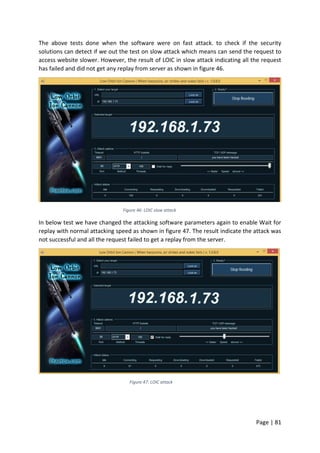
  • 97.
    Page | 96 eEye(R)Digital Security Releases Attack Prevention Solution For Microsoft IIS Web Servers 2002, , New York. PR Newswire. Elizabeth L, Delaney L.S., Joshua Boeker, Wenying Sun. LIVING IN DENIAL - A COMPARISON OF DISTRIBUTED DENIAL OF SERVICE MITIGATION METHODS. Volume 13, Issue 1, pp. 190-198, 2012. Etienne Janot, Pavol Zavarsky. Preventing SQL Injections in Online Applications: Study, Recommendations and Java Solution Prototype Based on the SQL DOM, 2008. E. Al-Shaer and H. Hamed. Discovery of policy anomalies in distributed firewalls. In IEEE INFOCOM’04, pages 2605–2616, March 2004. Cantin, R. 1999, Firewalls are the essential first line of defence, CEDROM-SNi fbo Transcontinental, Willowdale. Eldad Chai. 28/05/2013. Incapsula's Five-Ring Approach to Application Layer DDoS Protection. https://www.incapsula.com/blog/application-layer-7-ddos-protection.html Four reasons not to use ModSecurity, http://devcentral.f5.com/weblogs/macvittie/archive/2008/07/ 23/3477.aspx July 23, 2008. As mentioned in (Abdul Razzaq, Ali Hur, Sidra Shahbaz, Muddassar Masood, H Farooq Ahmad. Critical Analysis on Web Application Firewall Solutions 2013.) Family Unix-like, O. S., and G. N. U. Userland. "Ubuntu (operating system)." Gavin, M.: The Forrester Wave™: Web Application Firewalls, Q2 2006, http://www.forrester.com/Research/Document/Excerpt/0,7211,38766,00.html G. F. Coulouris, J. Dollimore, and T. Kindberg, Distributed systems: concepts and design. pearson education, 2005. Gordon “Fyodor” Lyon, The Official Nmap Project Guide to Network Discovery and Security Scanning, 2011. http://nmap.org/book/toc.html H. Merrill Lynch, CISSP. Firewall Fundamentals. Security Architecture Models, Date: November 1,2000. https://www.ietf.org/rfc/rfc2616.txt http://search.proquest.com/docview/449027844/9859B42E7C374BEDPQ/2?accountid=15977 Harold Ramcharn and Bharat Rawal “Smurf Security Defense Mechanism with Split-protocol” The Seventh International Conference on Emerging Security Information, Systems and Technologies SECURWARE 2013. Ivan Ristic : ModSecurity Handbook: The Complete Guide to the Popular Open Source Web Application Firewall, 2010 Feisty Duck Ltd Edition ISBN: 1907117024 Imperva, Imperva SecureSphere Web Application Firewall 2015. http://www.imperva.com/Products/WebApplicationFirewall Jeremiah Grossman, December 9 2009 http://www.prnewswire.com/news-releases/whitehat- security-sixth-quarterly-website-security-statistics-report-shows-eight-out-of-ten-websites- vulnerable-to-attack-65354657.html
  • 98.
    Page | 97 JosephMuniz, Aamir Lakhani, Web Penetration Testing with Kali Linux. Packt Publishing ©2013 ISBN:1782163166 9781782163169. Johen R. Vacca & Scott R. Ellis Firewalls Jumpstart for Network and System Administrations. Copyright © 2005, Elsevier Inc. All rights reserved. J, Frahim & O, Santos, 2010, "Cisco ASA: All-in-one Firewall, IPS, Anti-X, AND VPN Adaptive security appliance, 2nd edition* J. Wack, K. Cutler, and J. Pole, “Guidelines on Firewalls and Firewall Policy”. National Institute of Standards and Technology, Jan. 2002. Jim Beechey, “Web Application Firewalls: Defence in Depth for Your Web Infrastructure” March 2009 Kenneth Ingham and STEPHANIE FORRESTA History and Survey of Network Firewalls University of New Mexico 2002. Ken Hess, BackTrack Linux: The Ultimate Hacker's Arsenal. Admin Network & Security Magazine,2013. http://www.admin-magazine.com/Articles/BackTrack-Linux-The-Ultimate-Hacker- s-Arsenal Lee Allen, Tedi Heriyanto, Shakeel Ali. Kali Linux – Assuring Security by penetration testing Publisher, Packt Publishing Ltd, 2014. ISBN: 1849519498, 9781849519496 M.G. Gouda and A.X. Liu, “A Model of Stateful Firewalls and Its Properties,” Proc. IEEE Int’l Conf. Dependable Systems and Networks (DSN), June 2005. M. Gouda and A. Liu, “A model of stateful firewalls and its properties,” Proceedings of International Conference on Dependable Systems and Networks, 2005 (DSN), pp. 128–137, 28 June-1 July 2005. M. Sharma NETWORK SECURITY USING FIREWALLS, September 2009 http://ggnindia.dronacharya.info/Downloads/Seminars/Proceedings_ETCT.pdf#page=64 Mick Bauer. Getting started with mod_security, Journal Linux Journal Archive Volume 2006 Issue 143, March 2006. Mohd Faris Mohd Fuzi, Ros Syamsul Hamid, Muhammad Akram Ahmad, Virtual Desktop Environment on Cloud Computing Platform. 2014 IEEE 5th Control and System Graduate Research Colloquium, Aug. 11 - 12, UiTM, Shah Alam, Malaysia. Nilesh Khochare, Satish Chalurkar, B.B.Meshram. Web Application Vulnerabilities Detection Techniques Survey. IJCSNS International Journal of Computer Science and Network Security, VOL.13 No.6, June 2013. Namit Gupta and Abakash Saikia. Web Application Firewall. 30/04/2007. PR Newswire [New York] 09 May 2001: 1. eEye(TM) Digital Security Releases SecureIIS(TM), the Application Firewall For Microsoft IIS Web Server. New York. http://search.proquest.com/docview/444009692/9859B42E7C374BEDPQ/1?accountid=15977 PCI-DSS -Information Supplement: Application Reviews and Web Application Firewalls Clarified. Saikat Guha, Paul Francis. Characterization and Measurement of TCP Traversal through NATs and Firewalls 2008. http://nutss.gforge.cis.cornell.edu/pub/imc05-tcpnat/#note2 Sandeep PK, August 2009. Mod Security Intro. http://www.supportpro.com/blog/2009/08/mod_security-intro/
  • 99.
    Page | 98 S,Kay Miller. Information Security Magazine, September 2008 SecureIIS Web Server Security, http://eeye.com/html/assets/pdf/datasheet_secureiis.pdf TrustWave, Trustwave Upgrades WebDefend® Web Application Firewall for Greater Functionality. https://www.trustwave.com/Company/Newsroom/News/Trustwave-Upgrades- WebDefend%C2%AE-Web-Application-Firewall-for-Greater-Functionality/ 18/11/15 at 9:28 Accessed the website. Tim Sisson Oct 3, 2014. What is Mod_Security and why is it important http://www.inmotionhosting.com/support/website/modsecurity/what-is-modsecurity-and-why-is- it-important Ulf Lamping, Richard Sharpe, and Ed Warnicke. Wireshark User’s Guide for Wireshark 1.99. http://sunsite.icm.edu.pl/packages/wireshark/docs/user-guide-a4.pdf Verisign. (2012). Products and services - network intelligence and availability. Retrieved from http://www.verisigninc.com/en_US/products-and-services/network-intelligence- availability/index.xhtml WebSniper Developer BuGSec. January 2008. http://www.bugsec.com/index.php?q=WebSniper Xiaoen Ju and Hengming Zou. Operating System Robustness Forecast and Selection. 1071- 9458/08 $25.00 © 2008 IEEE Yocom, B., Brown, K.D. & Bilger, U.E. 2001, "Firewalls make the grade", Business Communications Review, vol. 31, no. 6, pp. 62-70.*
  • 100.
    Page | 99 ChapterNine 9.0 Appendices [1]- firewall ‘show running configuration’ Firewall# show running-config : Saved : ASA Version 8.3(2) ! hostname Firewall enable password 4uQtljz7JQzBIRhg encrypted passwd 2KFQnbNIdI.2KYOU encrypted names ! interface Vlan1 nameif inside security-level 100 ip address 192.168.106.1 255.255.255.0 ! interface Vlan2 nameif outside security-level 0 ip address dhcp setroute ! interface Vlan3 no forward interface Vlan1 nameif dmz security-level 50 ip address 192.168.1.1 255.255.255.128 !
  • 101.
    Page | 100 interfaceEthernet0/0 switchport access vlan 2 ! interface Ethernet0/1 ! interface Ethernet0/2 ! interface Ethernet0/3 switchport access vlan 3 ! interface Ethernet0/4 ! interface Ethernet0/5 ! interface Ethernet0/6 ! interface Ethernet0/7 ! boot system disk0:/asdm-632.bin ftp mode passive object network obj_any subnet 0.0.0.0 0.0.0.0 object network net-192.168.106 subnet 192.168.106.0 255.255.255.0 object network dmz-subnet subnet 192.168.1.0 255.255.255.128 object network webserver-external-ip host 192.168.1.73 object network webserver
  • 102.
    Page | 101 host192.168.106.1 object-group icmp-type ALLOW_ICMP icmp-object echo-reply icmp-object time-exceeded icmp-object unreachable icmp-object traceroute access-list OUTSIDE-DMZ extended permit ip any host 192.168.1.73 access-list outside_acl extended permit tcp any object webserver eq www access-list OUTSIDE extended permit tcp host 192.168.1.85 host 192.168.1.73 eq www access-list testcap extended permit ip host 192.168.106.1 host 192.168.1.73 access-list testcap extended permit ip host 192.168.1.82 host 192.168.106.1 access-list outside_rule extended permit tcp any host 192.168.1.73 eq https access-list outside_rule extended permit tcp any host 192.168.1.73 eq www access-list outside_access_in extended permit tcp any host 192.168.1.73 eq www access-list outside_access_in extended permit tcp any host 192.168.1.73 eq https access-list outside_access_in extended permit tcp any host 192.168.106.1 eq https pager lines 24 logging asdm informational mtu inside 1500 mtu outside 1500 mtu dmz 1500 icmp unreachable rate-limit 1 burst-size 1 asdm image disk0:/asdm-64.bin asdm history enable arp timeout 14400 ! object network obj_any nat (inside,outside) dynamic interface object network net-192.168.106
  • 103.
    Page | 102 nat(inside,outside) dynamic interface object network dmz-subnet nat (dmz,outside) dynamic interface object network webserver nat (dmz,outside) static webserver-external-ip service tcp www www timeout xlate 3:00:00 timeout conn 1:00:00 half-closed 0:10:00 udp 0:02:00 icmp 0:00:02 timeout sunrpc 0:10:00 h323 0:05:00 h225 1:00:00 mgcp 0:05:00 mgcp-pat 0:05:00 timeout sip 0:30:00 sip_media 0:02:00 sip-invite 0:03:00 sip-disconnect 0:02:00 timeout sip-provisional-media 0:02:00 uauth 0:05:00 absolute timeout tcp-proxy-reassembly 0:01:00 dynamic-access-policy-record DfltAccessPolicy http server enable http 192.168.106.0 255.255.255.0 inside no snmp-server location no snmp-server contact snmp-server enable traps snmp authentication linkup linkdown coldstart crypto ipsec security-association lifetime seconds 28800 crypto ipsec security-association lifetime kilobytes 4608000 telnet 192.168.106.0 255.255.255.0 inside telnet timeout 10 ssh 192.168.106.0 255.255.255.0 inside ssh 192.168.1.0 255.255.255.0 outside ssh timeout 10 console timeout 0 dhcpd auto_config outside ! dhcpd address 192.168.106.2-192.168.106.22 inside dhcpd enable inside
  • 104.
    Page | 103 ! dhcpdaddress 192.168.1.71-192.168.1.73 dmz dhcpd enable dmz ! threat-detection basic-threat threat-detection statistics access-list no threat-detection statistics tcp-intercept webvpn ! class-map inspection_default match default-inspection-traffic ! ! policy-map type inspect dns preset_dns_map parameters message-length maximum client auto message-length maximum 512 policy-map global_policy class inspection_default inspect dns preset_dns_map inspect ftp inspect h323 h225 inspect h323 ras inspect rsh inspect rtsp inspect esmtp inspect sqlnet inspect skinny
  • 105.
    Page | 104 inspectsunrpc inspect xdmcp inspect sip inspect netbios inspect tftp inspect ip-options inspect icmp ! service-policy global_policy global prompt hostname context Cryptochecksum:d41d8cd98f00b204e9800998ecf8427e : end Firewall# [2]- Firewall ‘show interface vlan 1’ Firewall# show interface vlan 1 Interface Vlan1 "inside", is up, line protocol is up Hardware is EtherSVI, BW 100 Mbps, DLY 100 usec MAC address 68ef.bd02.1a02, MTU 1500 IP address 192.168.106.1, subnet mask 255.255.255.0 Traffic Statistics for "inside": 13657691 packets input, 2544313124 bytes 22454716 packets output, 27376492803 bytes 32699 packets dropped 1 minute input rate 3 pkts/sec, 975 bytes/sec 1 minute output rate 3 pkts/sec, 1642 bytes/sec 1 minute drop rate, 0 pkts/sec 5 minute input rate 3 pkts/sec, 935 bytes/sec 5 minute output rate 3 pkts/sec, 1394 bytes/sec
  • 106.
    Page | 105 5minute drop rate, 0 pkts/sec [3]- Firewall ‘show interface vlan 2’ Firewall# show interface vlan 2 Interface Vlan2 "outside", is up, line protocol is up Hardware is EtherSVI, BW 100 Mbps, DLY 100 usec MAC address 68ef.bd02.1a02, MTU 1500 IP address 192.168.1.82, subnet mask 255.255.255.0 Traffic Statistics for "outside": 22607873 packets input, 27402744781 bytes 13628975 packets output, 2542441578 bytes 50276 packets dropped 1 minute input rate 3 pkts/sec, 1922 bytes/sec 1 minute output rate 3 pkts/sec, 777 bytes/sec 1 minute drop rate, 0 pkts/sec 5 minute input rate 3 pkts/sec, 1213 bytes/sec 5 minute output rate 2 pkts/sec, 785 bytes/sec 5 minute drop rate, 0 pkts/sec [4]- Firewall ‘show interface vlan 3’ Firewall# show interface vlan 3 Interface Vlan3 "dmz", is up, line protocol is up Hardware is EtherSVI, BW 100 Mbps, DLY 100 usec MAC address 68ef.bd02.1a02, MTU 1500 IP address 192.168.2.1, subnet mask 255.255.255.0 Traffic Statistics for "dmz": 3595 packets input, 530035 bytes 4166 packets output, 3097897 bytes 46 packets dropped 1 minute input rate 0 pkts/sec, 0 bytes/sec 1 minute output rate 0 pkts/sec, 0 bytes/sec
  • 107.
    Page | 106 1minute drop rate, 0 pkts/sec 5 minute input rate 0 pkts/sec, 6 bytes/sec 5 minute output rate 0 pkts/sec, 17 bytes/sec 5 minute drop rate, 0 pkts/sec [5]- ciscoasa(config)# show traffic outside: received (in 339033.460 secs): 206 packets 22456 bytes 0 pkts/sec 0 bytes/sec transmitted (in 339033.460 secs): 3 packets 1180 bytes 0 pkts/sec 0 bytes/sec 1 minute input rate 0 pkts/sec, 0 bytes/sec 1 minute output rate 0 pkts/sec, 0 bytes/sec 1 minute drop rate, 0 pkts/sec 5 minute input rate 0 pkts/sec, 0 bytes/sec 5 minute output rate 0 pkts/sec, 0 bytes/sec 5 minute drop rate, 0 pkts/sec inside: received (in 339033.560 secs): 67543 packets 4126581 bytes 0 pkts/sec 12 bytes/sec transmitted (in 339033.560 secs): 2 packets 56 bytes 0 pkts/sec 0 bytes/sec 1 minute input rate 0 pkts/sec, 28 bytes/sec 1 minute output rate 0 pkts/sec, 0 bytes/sec 1 minute drop rate, 0 pkts/sec 5 minute input rate 0 pkts/sec, 19 bytes/sec
  • 108.
    Page | 107 5minute output rate 0 pkts/sec, 0 bytes/sec 5 minute drop rate, 0 pkts/sec DMZ: received (in 339041.610 secs): 122 packets 29300 bytes 0 pkts/sec 0 bytes/sec transmitted (in 339041.610 secs): 0 packets 0 bytes 0 pkts/sec 0 bytes/sec 1 minute input rate 0 pkts/sec, 0 bytes/sec 1 minute output rate 0 pkts/sec, 0 bytes/sec 1 minute drop rate, 0 pkts/sec 5 minute input rate 0 pkts/sec, 0 bytes/sec 5 minute output rate 0 pkts/sec, 0 bytes/sec 5 minute drop rate, 0 pkts/sec _internal_loopback: received (in 339039.400 secs): 0 packets 0 bytes 0 pkts/sec 0 bytes/sec transmitted (in 339039.400 secs): 0 packets 0 bytes 0 pkts/sec 0 bytes/sec 1 minute input rate 0 pkts/sec, 0 bytes/sec 1 minute output rate 0 pkts/sec, 0 bytes/sec 1 minute drop rate, 0 pkts/sec 5 minute input rate 0 pkts/sec, 0 bytes/sec 5 minute output rate 0 pkts/sec, 0 bytes/sec 5 minute drop rate, 0 pkts/sec
  • 109.
    Page | 108 ---------------------------------------- AggregatedTraffic on Physical Interface ---------------------------------------- Ethernet0/0: received (in 2548091.350 secs): 72905322 packets 69823730456 bytes 1 pkts/sec 27001 bytes/sec transmitted (in 2548091.350 secs): 51590044 packets 8495011336 bytes 0 pkts/sec 3000 bytes/sec 1 minute input rate 257 pkts/sec, 21547 bytes/sec 1 minute output rate 98 pkts/sec, 7257 bytes/sec 1 minute drop rate, 0 pkts/sec 5 minute input rate 153 pkts/sec, 10724 bytes/sec 5 minute output rate 70 pkts/sec, 4852 bytes/sec 5 minute drop rate, 0 pkts/sec Ethernet0/1: received (in 2548091.350 secs): 0 packets 0 bytes 0 pkts/sec 0 bytes/sec transmitted (in 2548091.350 secs): 0 packets 0 bytes 0 pkts/sec 0 bytes/sec 1 minute input rate 0 pkts/sec, 0 bytes/sec 1 minute output rate 0 pkts/sec, 0 bytes/sec 1 minute drop rate, 0 pkts/sec 5 minute input rate 0 pkts/sec, 0 bytes/sec 5 minute output rate 0 pkts/sec, 0 bytes/sec 5 minute drop rate, 0 pkts/sec
  • 110.
    Page | 109 Ethernet0/2: received(in 2548098.350 secs): 14525280 packets 1691317165 bytes 0 pkts/sec 1 bytes/sec transmitted (in 2548098.350 secs): 22611955 packets 22863271706 bytes 0 pkts/sec 8000 bytes/sec 1 minute input rate 5925 pkts/sec, 379843 bytes/sec 1 minute output rate 5926 pkts/sec, 380203 bytes/sec 1 minute drop rate, 0 pkts/sec 5 minute input rate 5897 pkts/sec, 377488 bytes/sec 5 minute output rate 5897 pkts/sec, 377659 bytes/sec 5 minute drop rate, 0 pkts/sec Ethernet0/3: received (in 2548098.360 secs): 20982462 packets 1790666565 bytes 1 pkts/sec 1 bytes/sec transmitted (in 2548098.360 secs): 21720300 packets 3242306512 bytes 0 pkts/sec 1001 bytes/sec 1 minute input rate 6004 pkts/sec, 384395 bytes/sec 1 minute output rate 6156 pkts/sec, 394468 bytes/sec 1 minute drop rate, 0 pkts/sec 5 minute input rate 5967 pkts/sec, 382245 bytes/sec 5 minute output rate 6050 pkts/sec, 388054 bytes/sec 5 minute drop rate, 0 pkts/sec Ethernet0/4: received (in 2548105.750 secs): 24542987 packets 6231626107 bytes
  • 111.
    Page | 110 1pkts/sec 2000 bytes/sec transmitted (in 2548105.750 secs): 36725393 packets 44865726728 bytes 0 pkts/sec 17000 bytes/sec 1 minute input rate 5 pkts/sec, 618 bytes/sec 1 minute output rate 5 pkts/sec, 4162 bytes/sec 1 minute drop rate, 0 pkts/sec 5 minute input rate 0 pkts/sec, 6 bytes/sec 5 minute output rate 0 pkts/sec, 115 bytes/sec 5 minute drop rate, 0 pkts/sec Ethernet0/5: received (in 2548105.750 secs): 0 packets 0 bytes 0 pkts/sec 0 bytes/sec transmitted (in 2548105.750 secs): 0 packets 0 bytes 0 pkts/sec 0 bytes/sec 1 minute input rate 0 pkts/sec, 0 bytes/sec 1 minute output rate 0 pkts/sec, 0 bytes/sec 1 minute drop rate, 0 pkts/sec 5 minute input rate 0 pkts/sec, 0 bytes/sec 5 minute output rate 0 pkts/sec, 0 bytes/sec 5 minute drop rate, 0 pkts/sec Ethernet0/6: received (in 2548107.860 secs): 0 packets 0 bytes 0 pkts/sec 0 bytes/sec transmitted (in 2548107.860 secs): 0 packets 0 bytes
  • 112.
    Page | 111 0pkts/sec 0 bytes/sec 1 minute input rate 0 pkts/sec, 0 bytes/sec 1 minute output rate 0 pkts/sec, 0 bytes/sec 1 minute drop rate, 0 pkts/sec 5 minute input rate 0 pkts/sec, 0 bytes/sec 5 minute output rate 0 pkts/sec, 0 bytes/sec 5 minute drop rate, 0 pkts/sec Ethernet0/7: received (in 2548109.680 secs): 0 packets 0 bytes 0 pkts/sec 0 bytes/sec transmitted (in 2548109.680 secs): 0 packets 0 bytes 0 pkts/sec 0 bytes/sec 1 minute input rate 0 pkts/sec, 0 bytes/sec 1 minute output rate 0 pkts/sec, 0 bytes/sec 1 minute drop rate, 0 pkts/sec 5 minute input rate 0 pkts/sec, 0 bytes/sec 5 minute output rate 0 pkts/sec, 0 bytes/sec 5 minute drop rate, 0 pkts/sec Internal-Data0/0: received (in 2548109.680 secs): 74544941 packets 61629734912 bytes 0 pkts/sec 24001 bytes/sec transmitted (in 2548109.680 secs): 74107583 packets 61521631699 bytes 0 pkts/sec 24000 bytes/sec 1 minute input rate 0 pkts/sec, 101 bytes/sec 1 minute output rate 0 pkts/sec, 0 bytes/sec
  • 113.
    Page | 112 1minute drop rate, 0 pkts/sec 5 minute input rate 0 pkts/sec, 28 bytes/sec 5 minute output rate 0 pkts/sec, 0 bytes/sec 5 minute drop rate, 0 pkts/sec Internal-Data0/1: received (in 2548113.460 secs): 74107583 packets 61521631699 bytes 0 pkts/sec 24000 bytes/sec transmitted (in 2548113.460 secs): 74544939 packets 61629734776 bytes 0 pkts/sec 24001 bytes/sec 1 minute input rate 0 pkts/sec, 0 bytes/sec 1 minute output rate 0 pkts/sec, 101 bytes/sec 1 minute drop rate, 0 pkts/sec 5 minute input rate 0 pkts/sec, 0 bytes/sec 5 minute output rate 0 pkts/sec, 28 bytes/sec 5 minute drop rate, 0 pkts/sec [6]- Pinging the webserver results
  • 114.
    Page | 113 [7]-Glasgow Daily Life Website pages Home page:
  • 115.
    Page | 114 Figure57: Home page Sport Page Figure 58: Sport Page
  • 116.
    Page | 115 GlasgowMuseums page Figure 59: Glasgow Museums page Glasgow Libraries Page Figure 60: Glasgow Libraries page
  • 117.
    Page | 116 MajorEvents page Figure 61: Major Evenest page Contact us page
  • 118.
    Page | 117 Figure62: Contact us page