COM1407
Computer Programming
Lecture 04
Type Casting, Command Line Arguments
and Defining Constants
K.A.S.H. Kulathilake
B.Sc. (Hons) IT, MCS , M.Phil., SEDA(UK)
Rajarata University of Sri Lanka
Department of Physical Sciences
1
Objectives
• At the end of this lecture students should be able
to;
▫ Define type cast and type promotion in C
programming language.
▫ Define command line arguments in C
Programming language.
▫ Declare constants according to the C
programming.
▫ Apply math.h header file for problem solving.
▫ Apply taught concepts for writing programs.
2
Type Casting
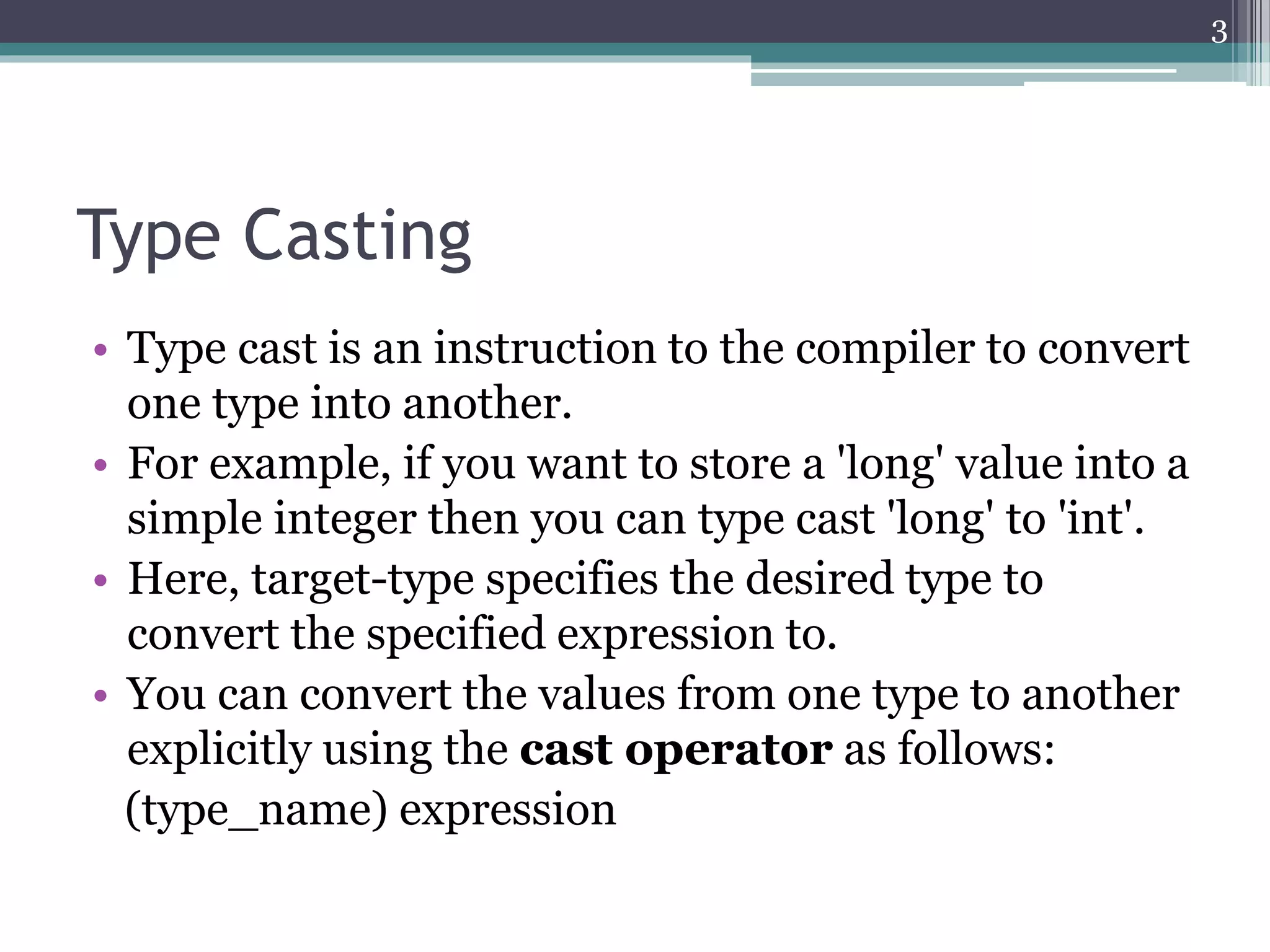
• Type cast is an instruction to the compiler to convert
one type into another.
• For example, if you want to store a 'long' value into a
simple integer then you can type cast 'long' to 'int'.
• Here, target-type specifies the desired type to
convert the specified expression to.
• You can convert the values from one type to another
explicitly using the cast operator as follows:
(type_name) expression
3
Type Casting (Cont…)
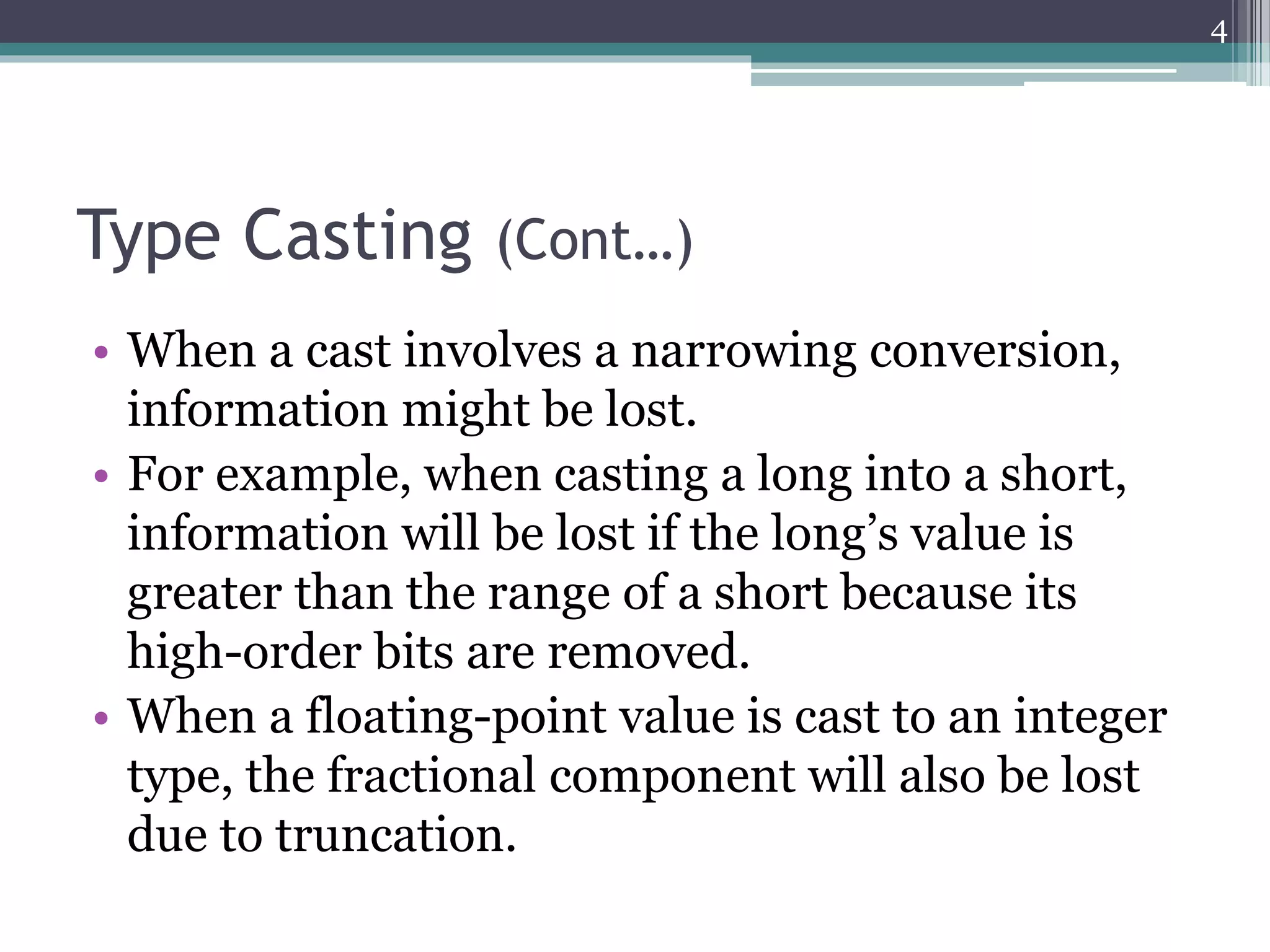
• When a cast involves a narrowing conversion,
information might be lost.
• For example, when casting a long into a short,
information will be lost if the long’s value is
greater than the range of a short because its
high-order bits are removed.
• When a floating-point value is cast to an integer
type, the fractional component will also be lost
due to truncation.
4
Type Casting (Cont…)
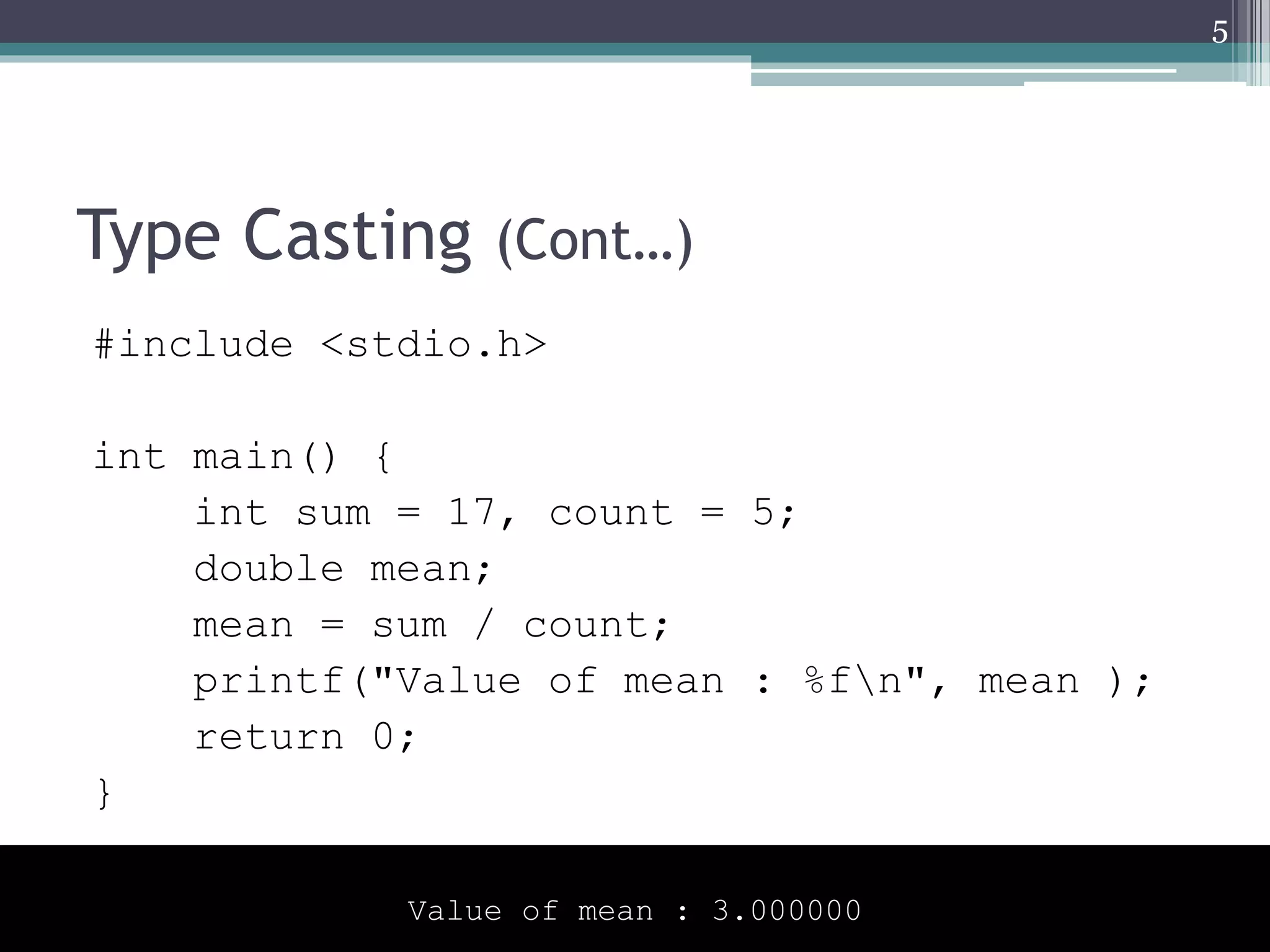
#include <stdio.h>
int main() {
int sum = 17, count = 5;
double mean;
mean = sum / count;
printf("Value of mean : %fn", mean );
return 0;
}
5
Value of mean : 3.000000
Type Casting (Cont…)
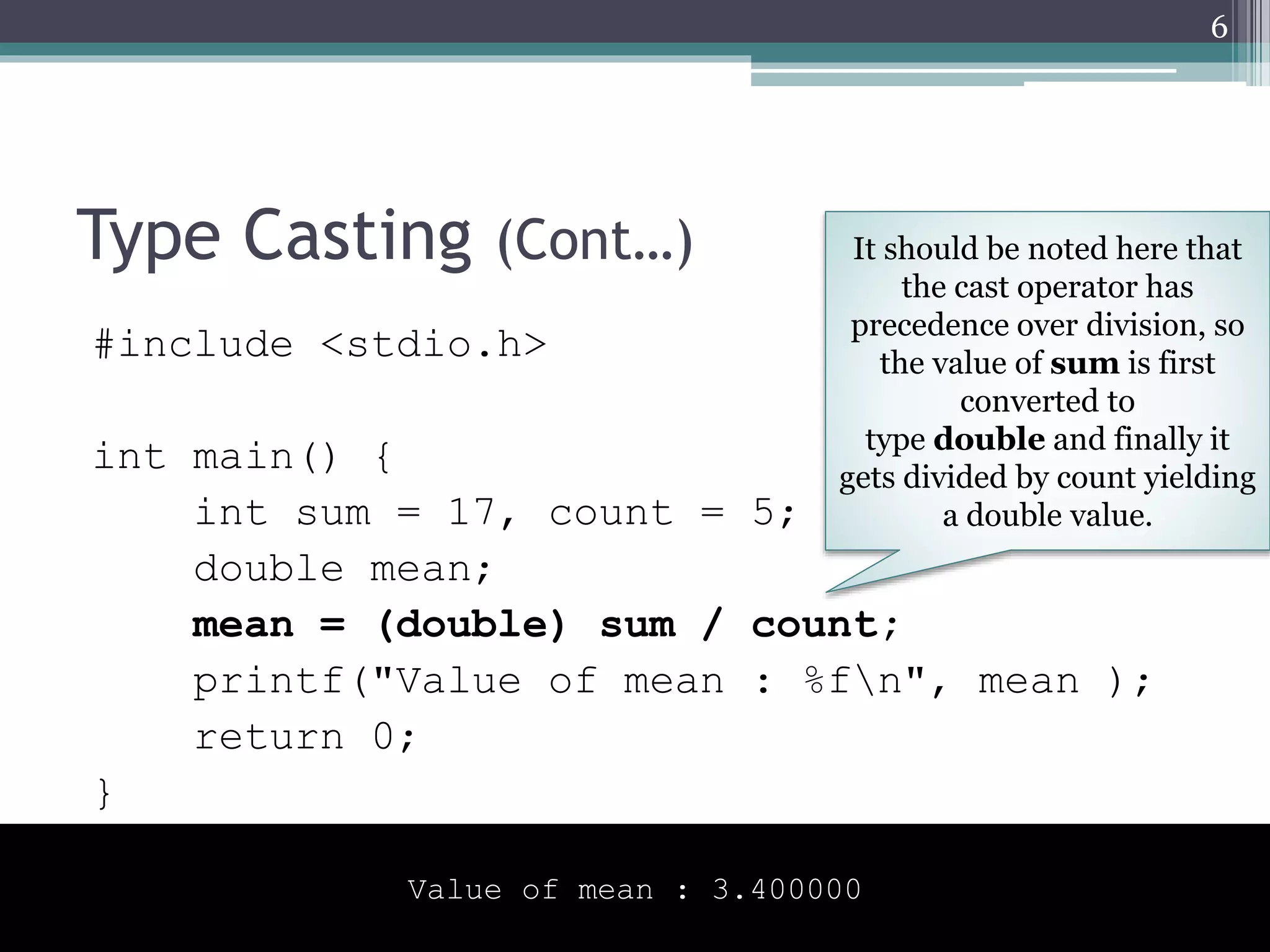
#include <stdio.h>
int main() {
int sum = 17, count = 5;
double mean;
mean = (double) sum / count;
printf("Value of mean : %fn", mean );
return 0;
}
6
Value of mean : 3.400000
It should be noted here that
the cast operator has
precedence over division, so
the value of sum is first
converted to
type double and finally it
gets divided by count yielding
a double value.
Type Promotion/ Automatic Casting
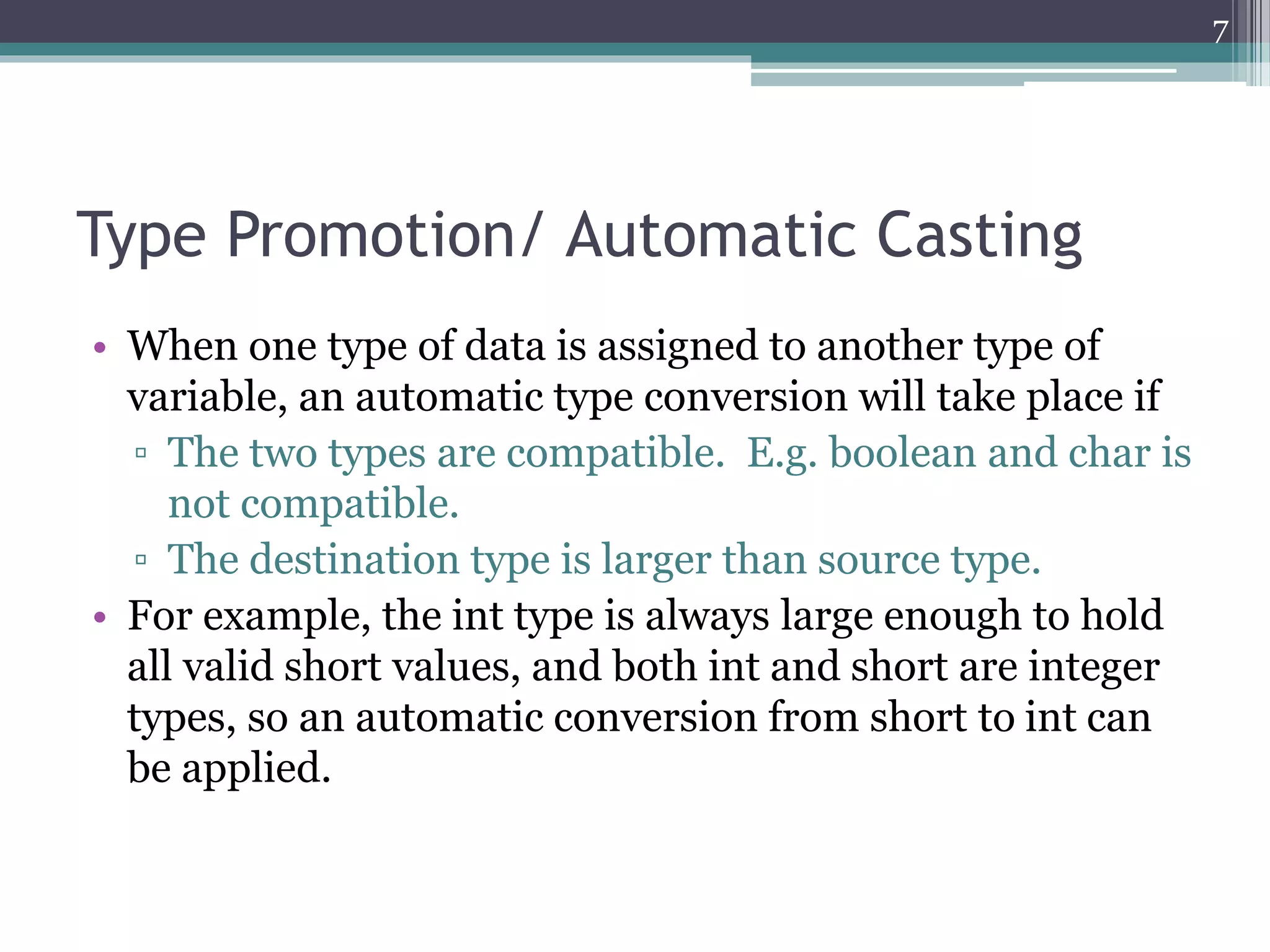
• When one type of data is assigned to another type of
variable, an automatic type conversion will take place if
▫ The two types are compatible. E.g. boolean and char is
not compatible.
▫ The destination type is larger than source type.
• For example, the int type is always large enough to hold
all valid short values, and both int and short are integer
types, so an automatic conversion from short to int can
be applied.
7
Type Promotion/ Automatic Casting
(Cont…)
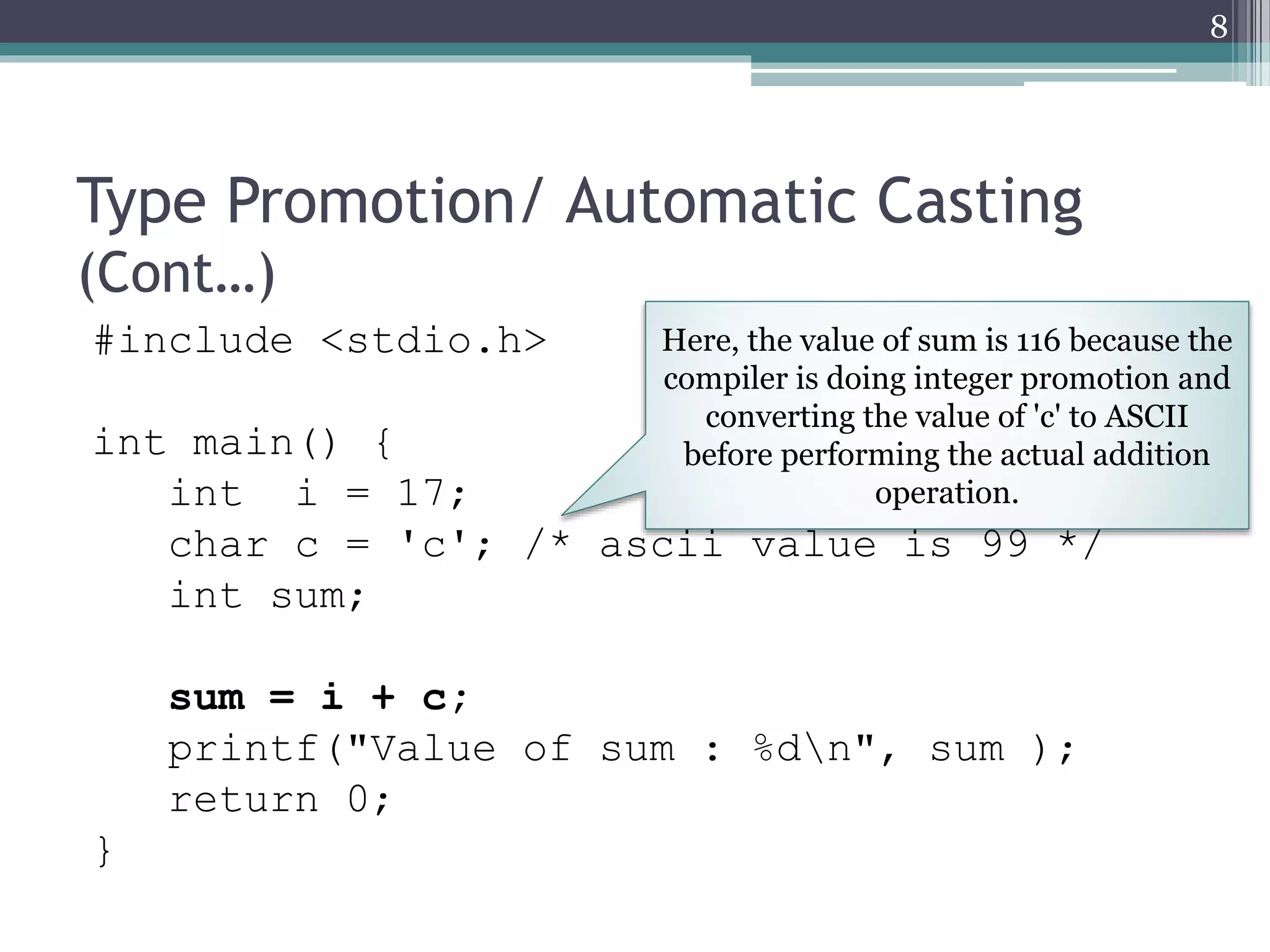
#include <stdio.h>
int main() {
int i = 17;
char c = 'c'; /* ascii value is 99 */
int sum;
sum = i + c;
printf("Value of sum : %dn", sum );
return 0;
}
8
Here, the value of sum is 116 because the
compiler is doing integer promotion and
converting the value of 'c' to ASCII
before performing the actual addition
operation.
Typical Arithmetic Conversion
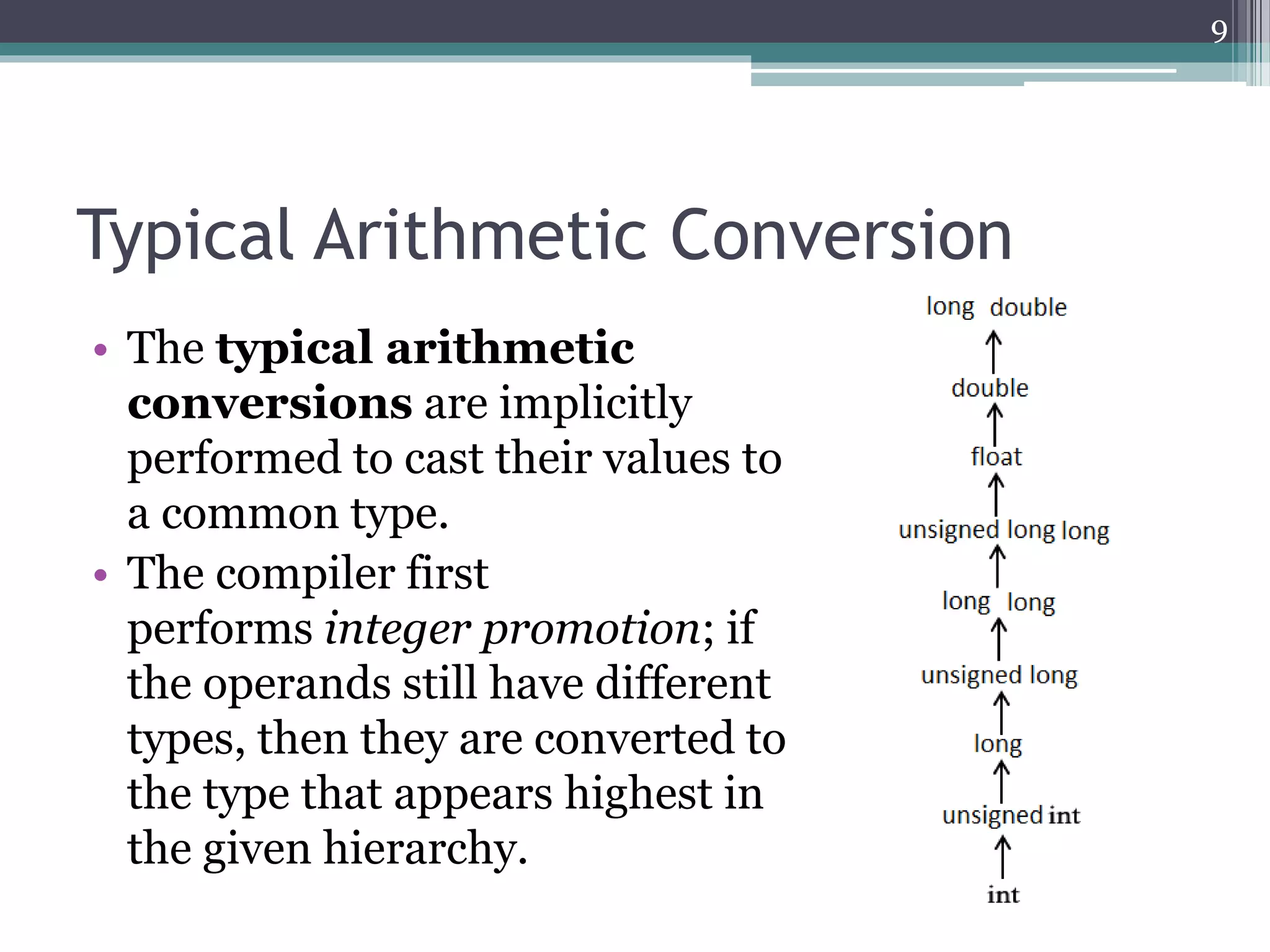
• The typical arithmetic
conversions are implicitly
performed to cast their values to
a common type.
• The compiler first
performs integer promotion; if
the operands still have different
types, then they are converted to
the type that appears highest in
the given hierarchy.
9
Typical Arithmetic Conversion (Cont…)
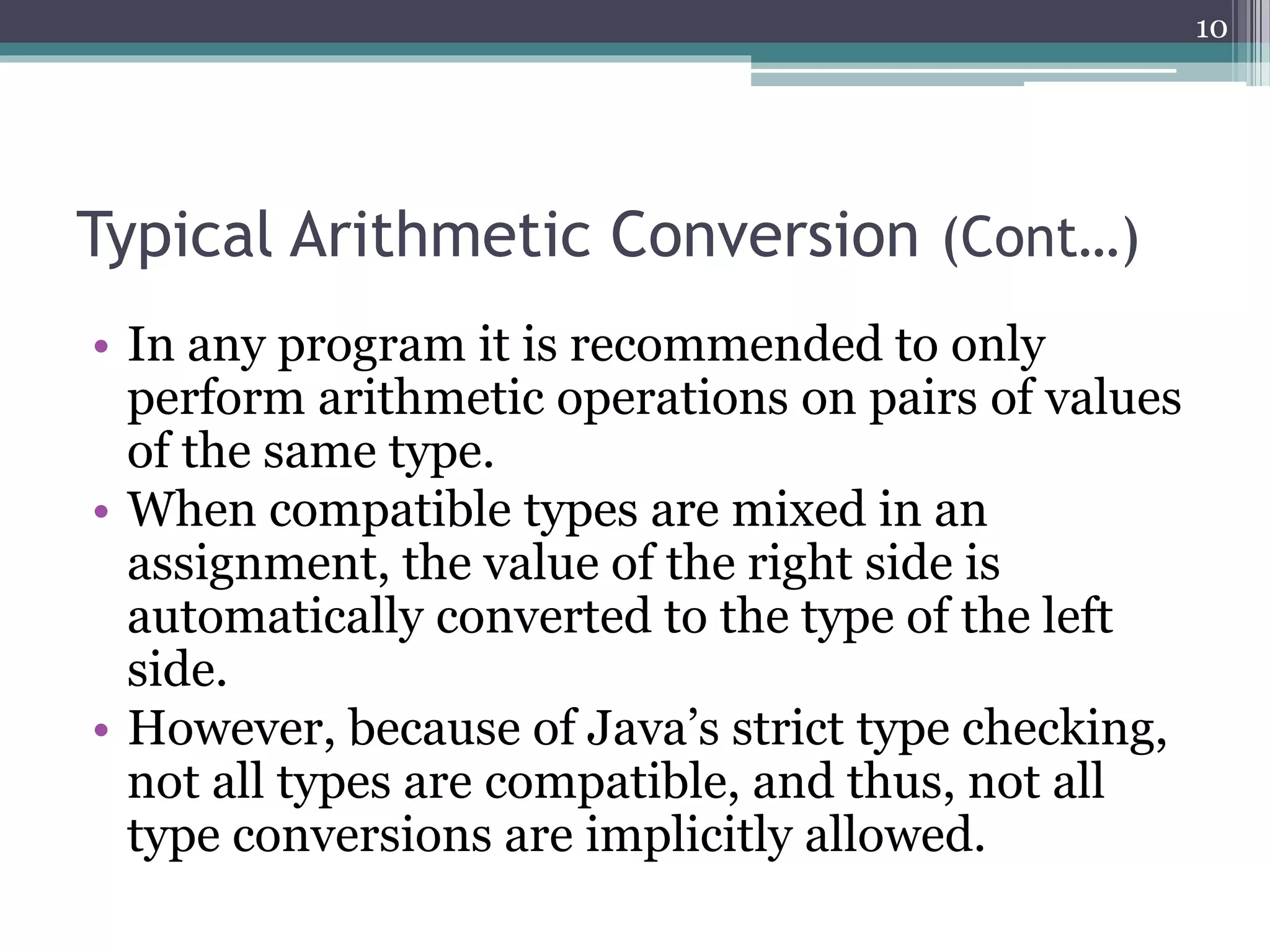
• In any program it is recommended to only
perform arithmetic operations on pairs of values
of the same type.
• When compatible types are mixed in an
assignment, the value of the right side is
automatically converted to the type of the left
side.
• However, because of Java’s strict type checking,
not all types are compatible, and thus, not all
type conversions are implicitly allowed.
10
Typical Arithmetic Conversion (Cont…)
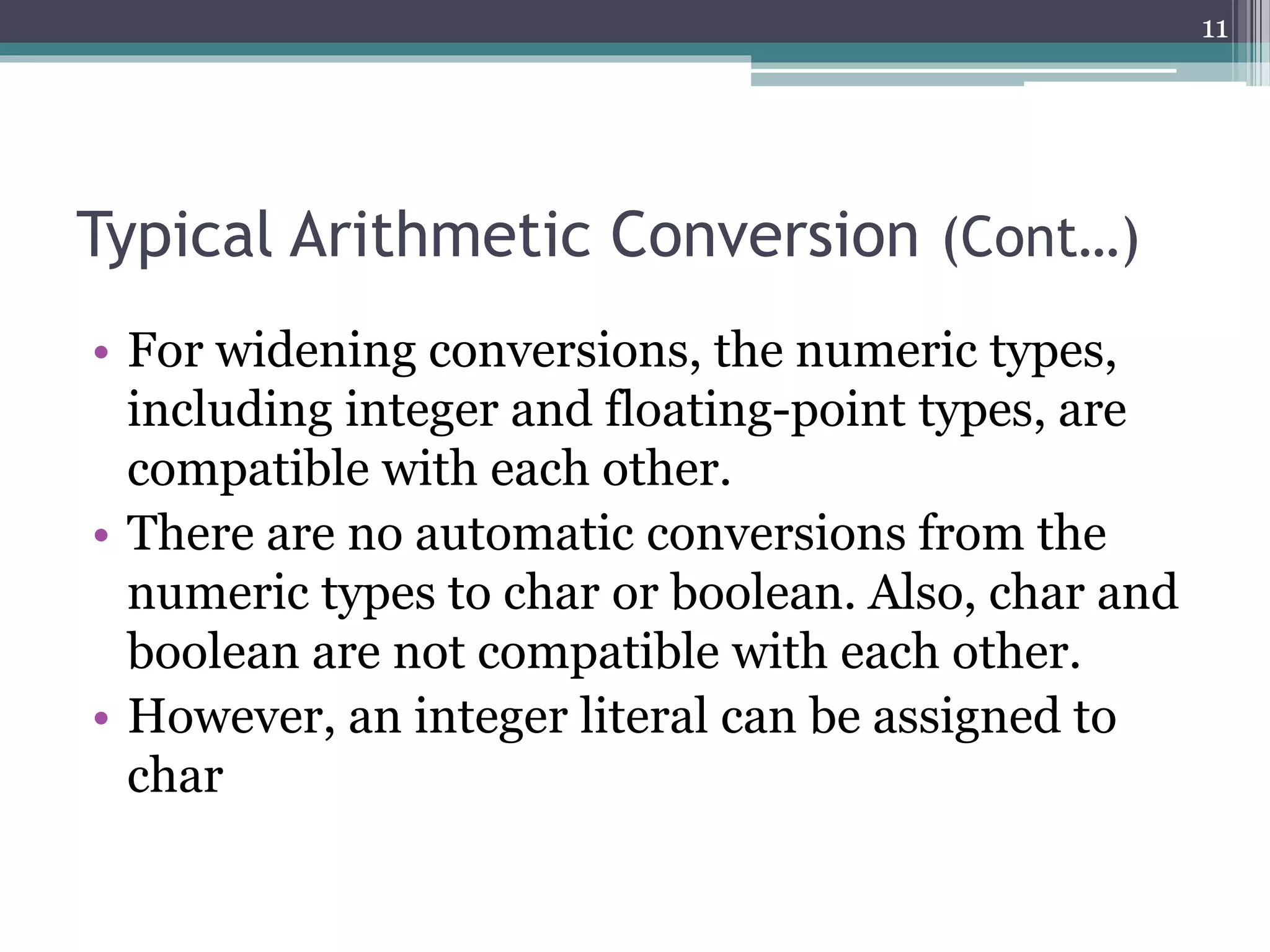
• For widening conversions, the numeric types,
including integer and floating-point types, are
compatible with each other.
• There are no automatic conversions from the
numeric types to char or boolean. Also, char and
boolean are not compatible with each other.
• However, an integer literal can be assigned to
char
11
Typical Arithmetic Conversion (Cont…)
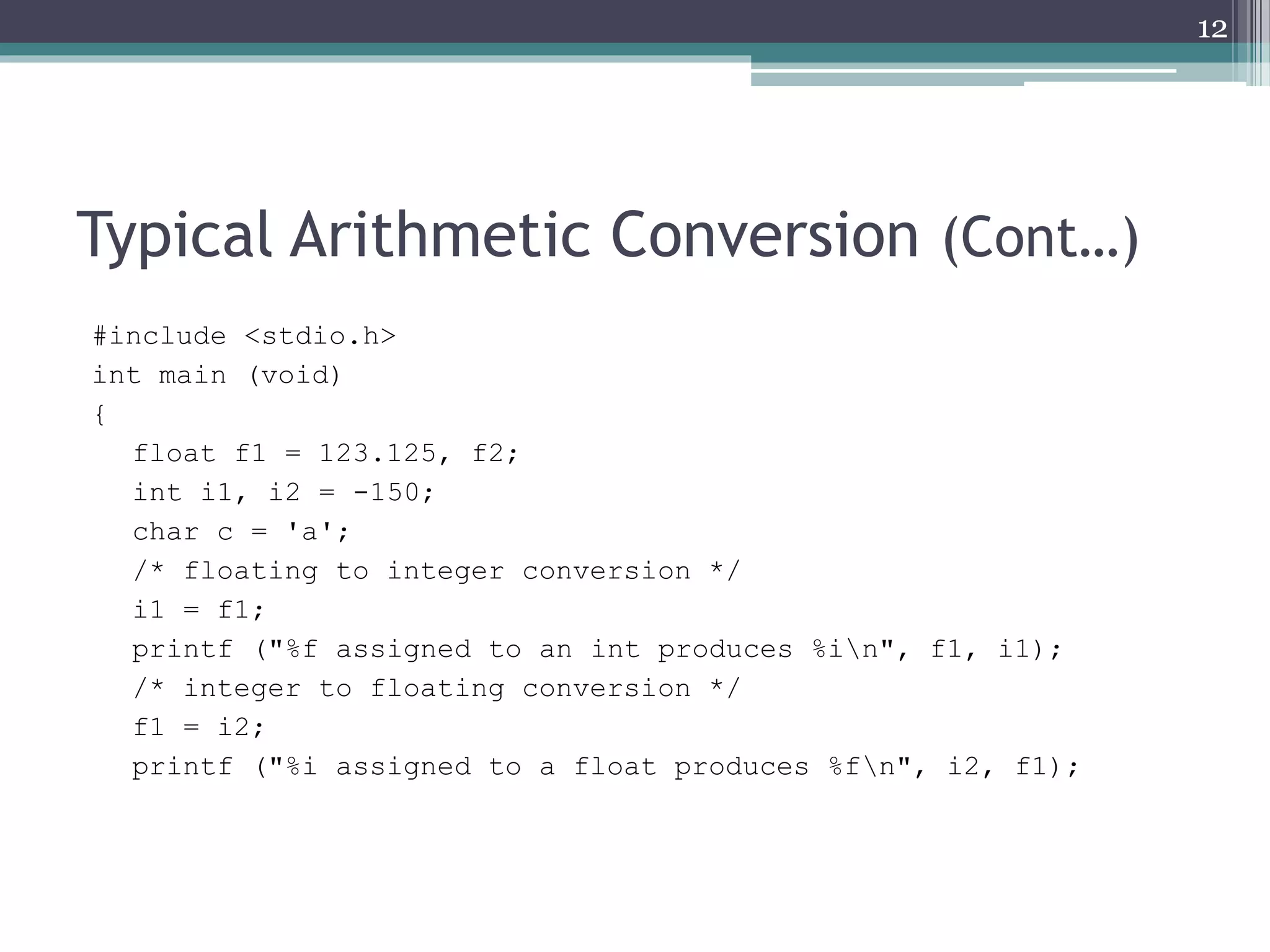
#include <stdio.h>
int main (void)
{
float f1 = 123.125, f2;
int i1, i2 = -150;
char c = 'a';
/* floating to integer conversion */
i1 = f1;
printf ("%f assigned to an int produces %in", f1, i1);
/* integer to floating conversion */
f1 = i2;
printf ("%i assigned to a float produces %fn", i2, f1);
12
Typical Arithmetic Conversion (Cont…)
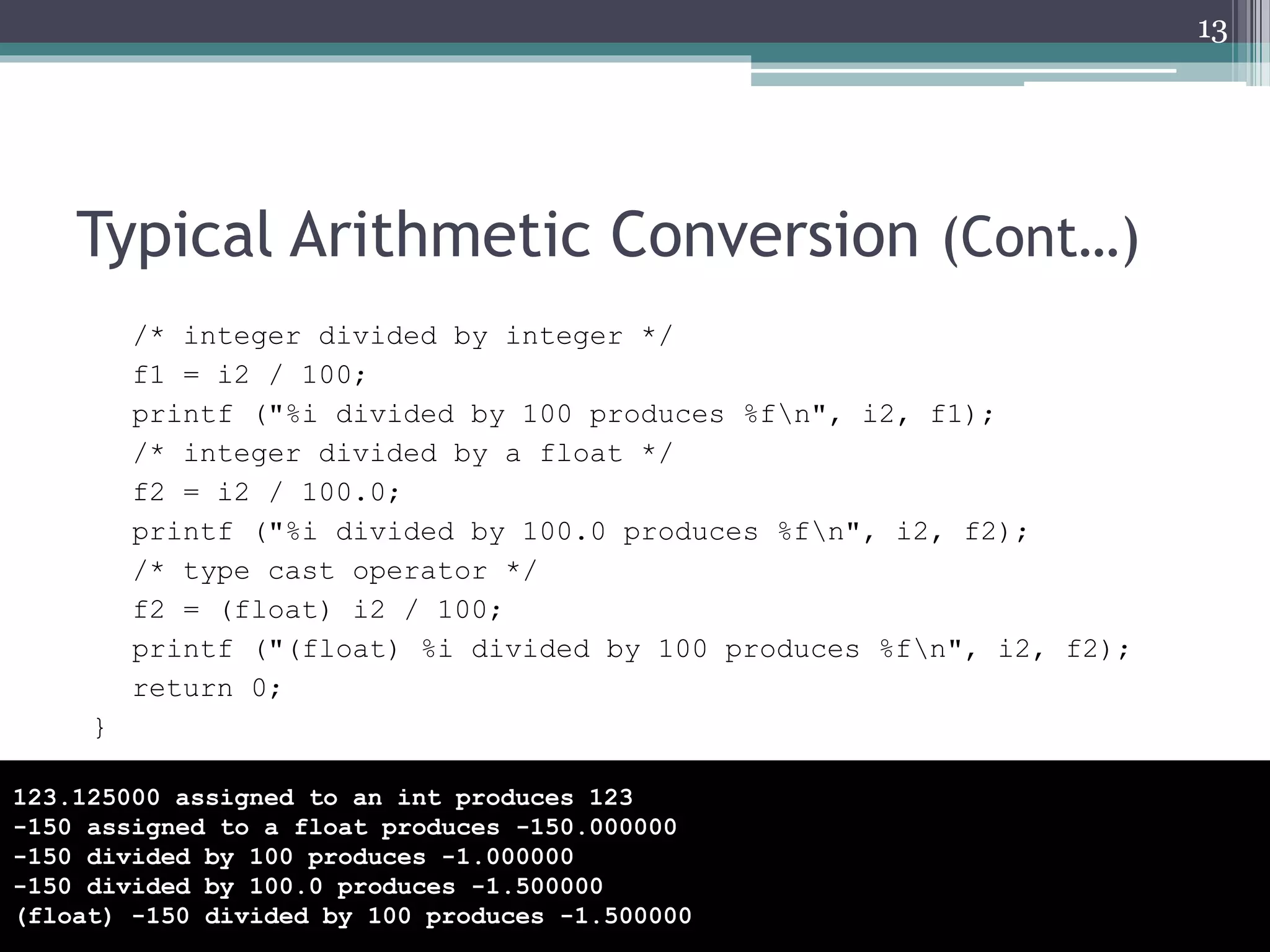
/* integer divided by integer */
f1 = i2 / 100;
printf ("%i divided by 100 produces %fn", i2, f1);
/* integer divided by a float */
f2 = i2 / 100.0;
printf ("%i divided by 100.0 produces %fn", i2, f2);
/* type cast operator */
f2 = (float) i2 / 100;
printf ("(float) %i divided by 100 produces %fn", i2, f2);
return 0;
}
13
123.125000 assigned to an int produces 123
-150 assigned to a float produces -150.000000
-150 divided by 100 produces -1.000000
-150 divided by 100.0 produces -1.500000
(float) -150 divided by 100 produces -1.500000
Command Line Arguments
• It is possible to pass some values from the command
line to your C programs when they are executed.
• These values are called command line
arguments and many times they are important for
your program especially when you want to control
your program from outside instead of hard coding
those values inside the code.
• The command line arguments are handled using
main() function arguments where argc refers to the
number of arguments passed, and argv[] is a
pointer array which points to each argument passed
to the program.
14
Command Line Arguments (Cont…)
#include <stdio.h>
int main( int argc, char *argv[] )
{
printf("The first argument supplied is %sn", argv[0]);
printf("The second argument supplied is %sn",
argv[1]);
return 0;
}
15
F:CL04>CommandLineArguments.exe test
The first argument supplied is CommandLineArguments.exe
The second argument supplied is test
When you run the program remember to
pass the arguments
Command Line Arguments (Cont…)
• It should be noted that argv[0] holds the name of the
program itself and argv[1] is a pointer to the first
command line argument supplied, and *argv[n] is the
last argument.
• If no arguments are supplied, argc will be one, and if you
pass one argument then argc is set at 2.
• E.g. F:CL04>CommandLineArguments.exe test
16
argv CommandLineArguments.exe test
argc is 2 here
Command Line Arguments (Cont…)
#include <stdio.h>
int main( int argc, char
*argv[] )
{
printf("The first
argument supplied is %sn",
argv[0]);
printf("The second
argument supplied is %sn",
argv[1]);
printf("The third
argument supplied is %sn",
argv[2]);
return 0;
}
17
F:CL04>CommandLineArguments.exe arg1 arg2
The first argument supplied is
CommandLineArguments.exe
The second argument supplied is arg1
The third argument supplied is arg2
F:CL04>CommandLineArguments.exe "arg1" "arg2"
The first argument supplied is
CommandLineArguments.exe
The second argument supplied is arg1
The third argument supplied is arg2
F:CL04>CommandLineArguments.exe "arg1" arg2
The first argument supplied is
CommandLineArguments.exe
The second argument supplied is arg1
The third argument supplied is arg2
Command Line Arguments (Cont…)
18
F:CL04>CommandLineArguments.exe arg1 "arg2"
The first argument supplied is
CommandLineArguments.exe
The second argument supplied is arg1
The third argument supplied is arg2
F:CL04>CommandLineArguments.exe arg1, arg2
The first argument supplied is
CommandLineArguments.exe
The second argument supplied is arg1,
The third argument supplied is arg2
#include <stdio.h>
int main( int argc, char
*argv[] )
{
printf("The first
argument supplied is %sn",
argv[0]);
printf("The second
argument supplied is %sn",
argv[1]);
printf("The third
argument supplied is %sn",
argv[2]);
return 0;
}
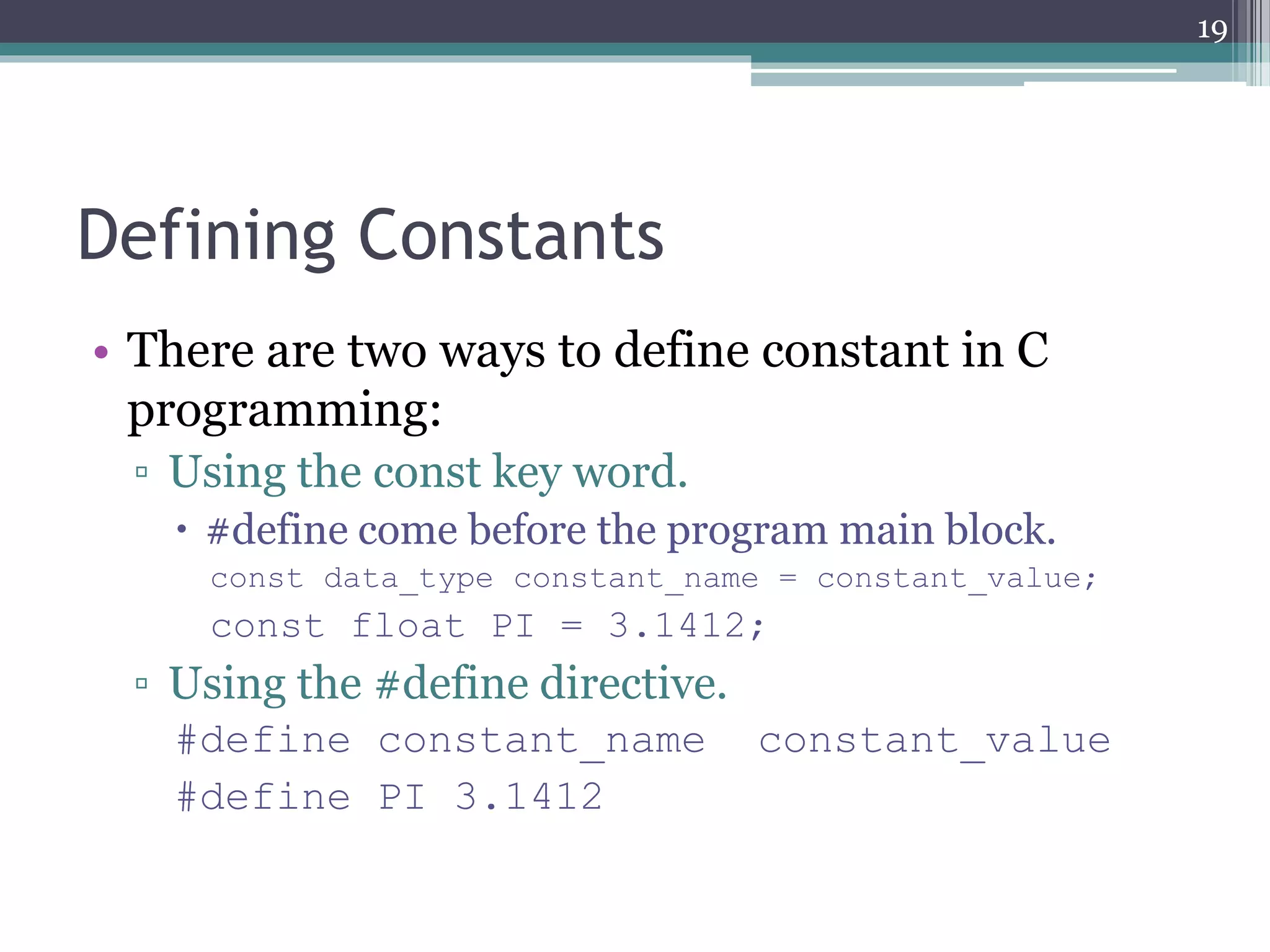
Defining Constants
• There are two ways to define constant in C
programming:
▫ Using the const key word.
 #define come before the program main block.
const data_type constant_name = constant_value;
const float PI = 3.1412;
▫ Using the #define directive.
#define constant_name constant_value
#define PI 3.1412
19
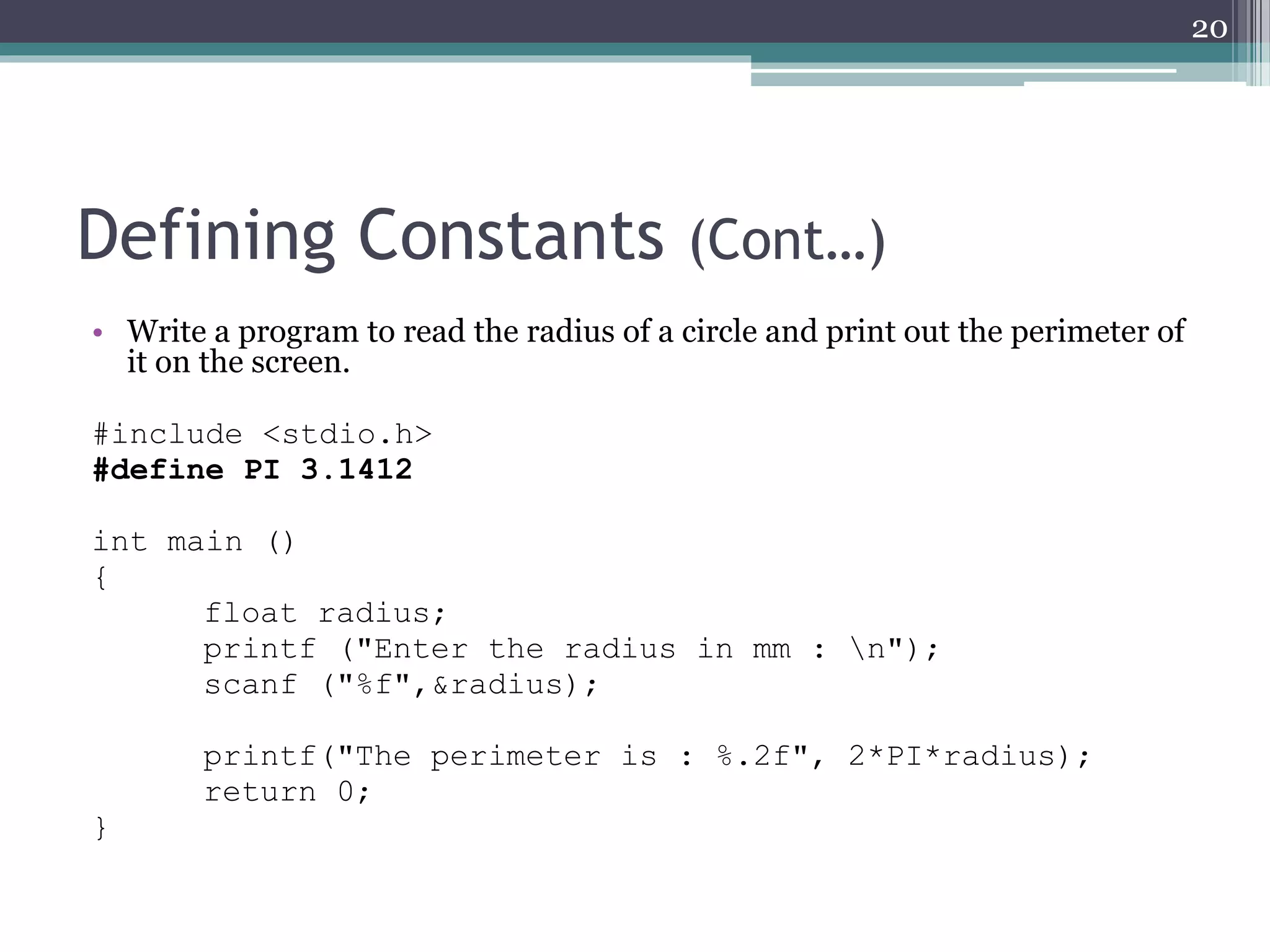
Defining Constants (Cont…)
• Write a program to read the radius of a circle and print out the perimeter of
it on the screen.
#include <stdio.h>
#define PI 3.1412
int main ()
{
float radius;
printf ("Enter the radius in mm : n");
scanf ("%f",&radius);
printf("The perimeter is : %.2f", 2*PI*radius);
return 0;
}
20
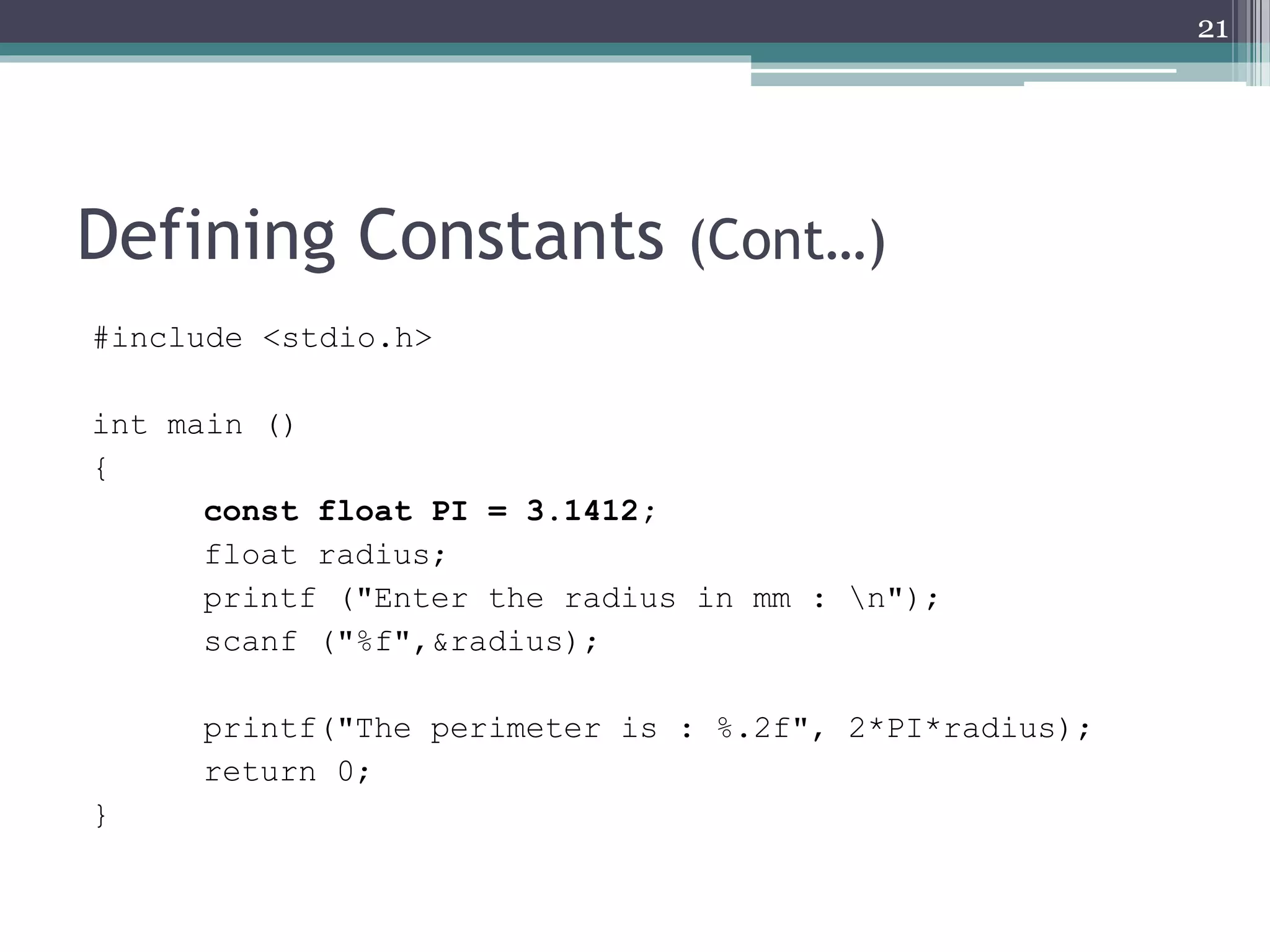
Defining Constants (Cont…)
#include <stdio.h>
int main ()
{
const float PI = 3.1412;
float radius;
printf ("Enter the radius in mm : n");
scanf ("%f",&radius);
printf("The perimeter is : %.2f", 2*PI*radius);
return 0;
}
21
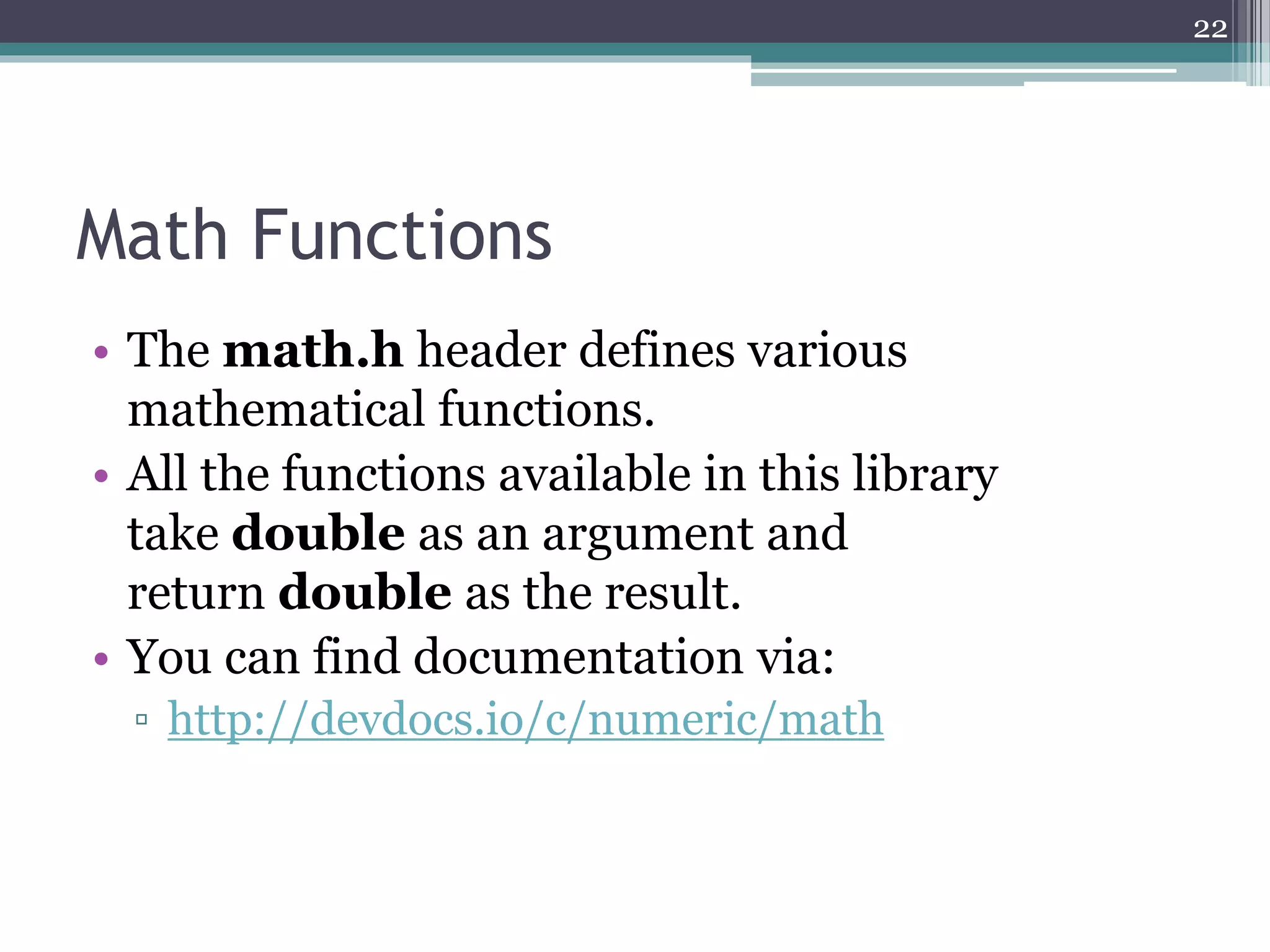
Math Functions
• The math.h header defines various
mathematical functions.
• All the functions available in this library
take double as an argument and
return double as the result.
• You can find documentation via:
▫ http://devdocs.io/c/numeric/math
22
Math Functions (Cont…)
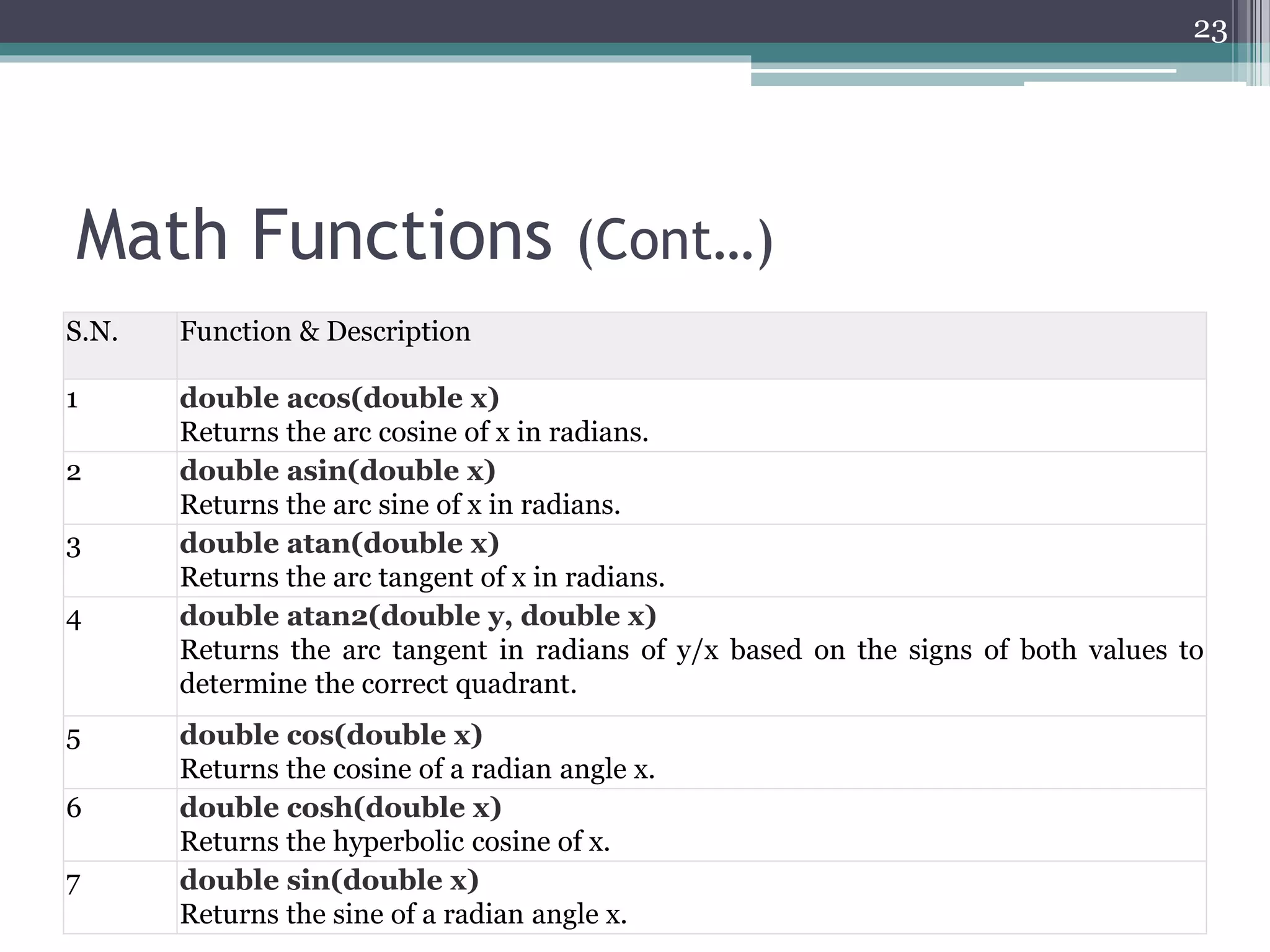
S.N. Function & Description
1 double acos(double x)
Returns the arc cosine of x in radians.
2 double asin(double x)
Returns the arc sine of x in radians.
3 double atan(double x)
Returns the arc tangent of x in radians.
4 double atan2(double y, double x)
Returns the arc tangent in radians of y/x based on the signs of both values to
determine the correct quadrant.
5 double cos(double x)
Returns the cosine of a radian angle x.
6 double cosh(double x)
Returns the hyperbolic cosine of x.
7 double sin(double x)
Returns the sine of a radian angle x.
23
Math Functions (Cont…)
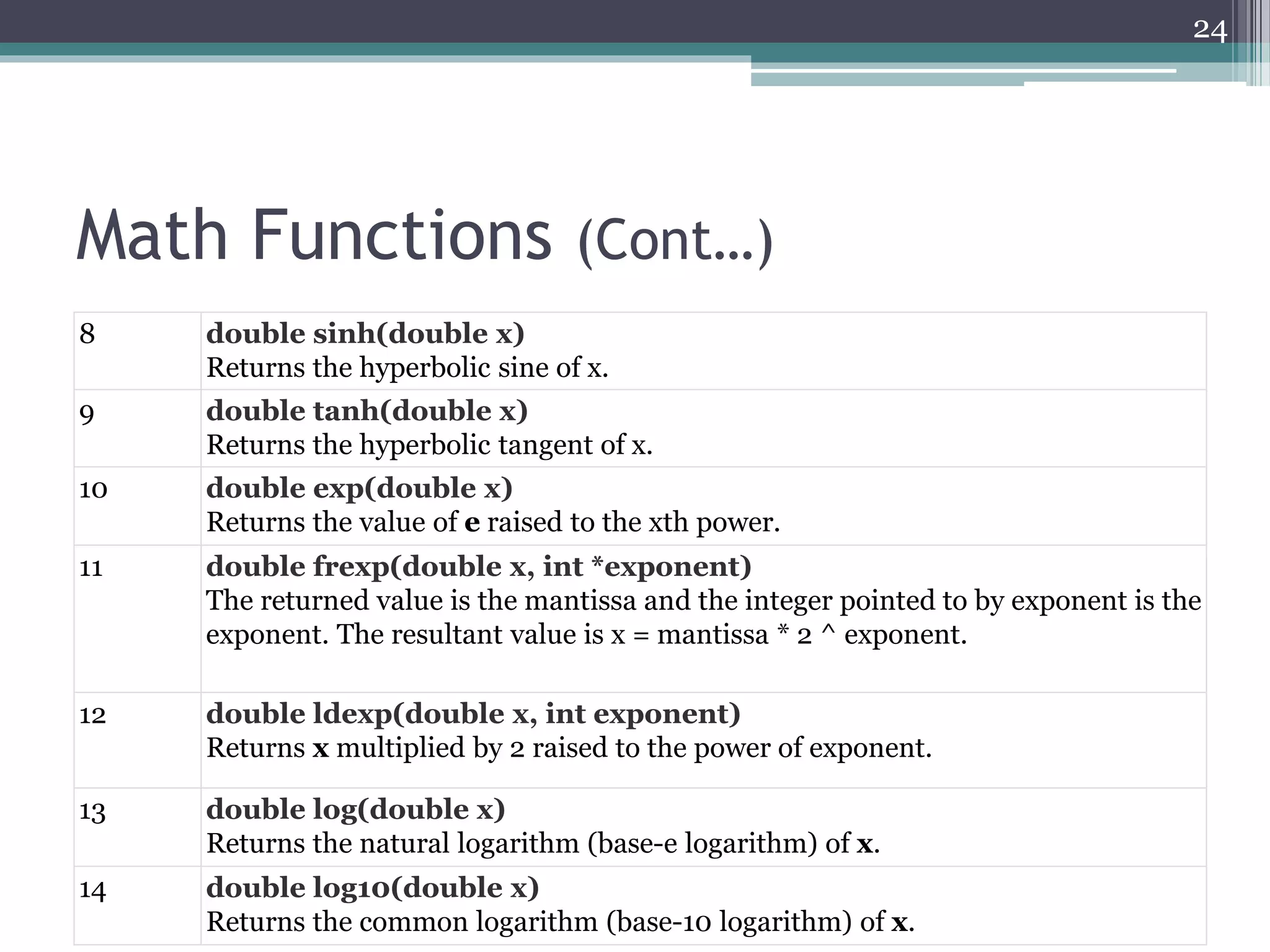
8 double sinh(double x)
Returns the hyperbolic sine of x.
9 double tanh(double x)
Returns the hyperbolic tangent of x.
10 double exp(double x)
Returns the value of e raised to the xth power.
11 double frexp(double x, int *exponent)
The returned value is the mantissa and the integer pointed to by exponent is the
exponent. The resultant value is x = mantissa * 2 ^ exponent.
12 double ldexp(double x, int exponent)
Returns x multiplied by 2 raised to the power of exponent.
13 double log(double x)
Returns the natural logarithm (base-e logarithm) of x.
14 double log10(double x)
Returns the common logarithm (base-10 logarithm) of x.
24
Math Functions (Cont…)
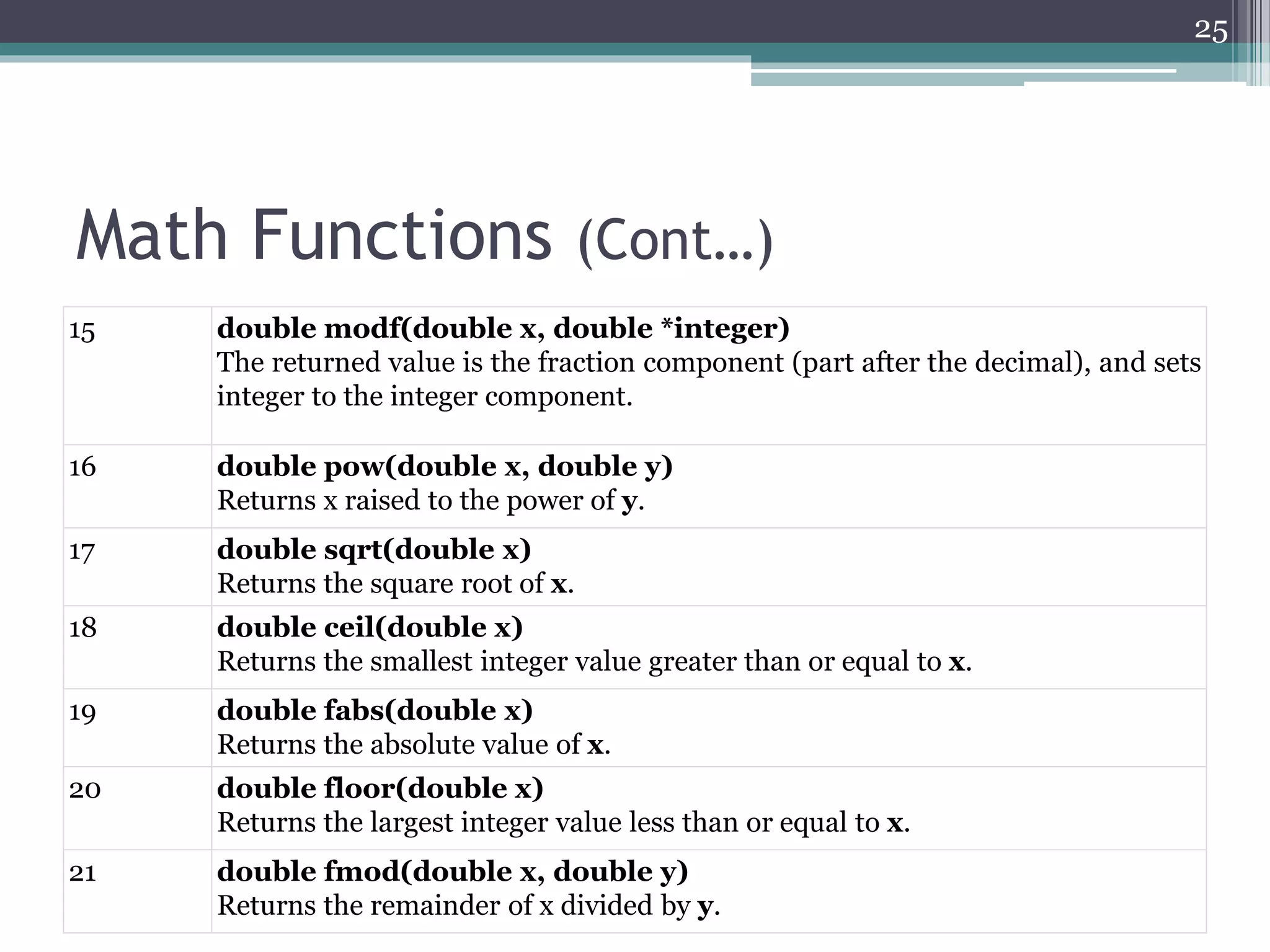
15 double modf(double x, double *integer)
The returned value is the fraction component (part after the decimal), and sets
integer to the integer component.
16 double pow(double x, double y)
Returns x raised to the power of y.
17 double sqrt(double x)
Returns the square root of x.
18 double ceil(double x)
Returns the smallest integer value greater than or equal to x.
19 double fabs(double x)
Returns the absolute value of x.
20 double floor(double x)
Returns the largest integer value less than or equal to x.
21 double fmod(double x, double y)
Returns the remainder of x divided by y.
25
Math Functions (Cont…)
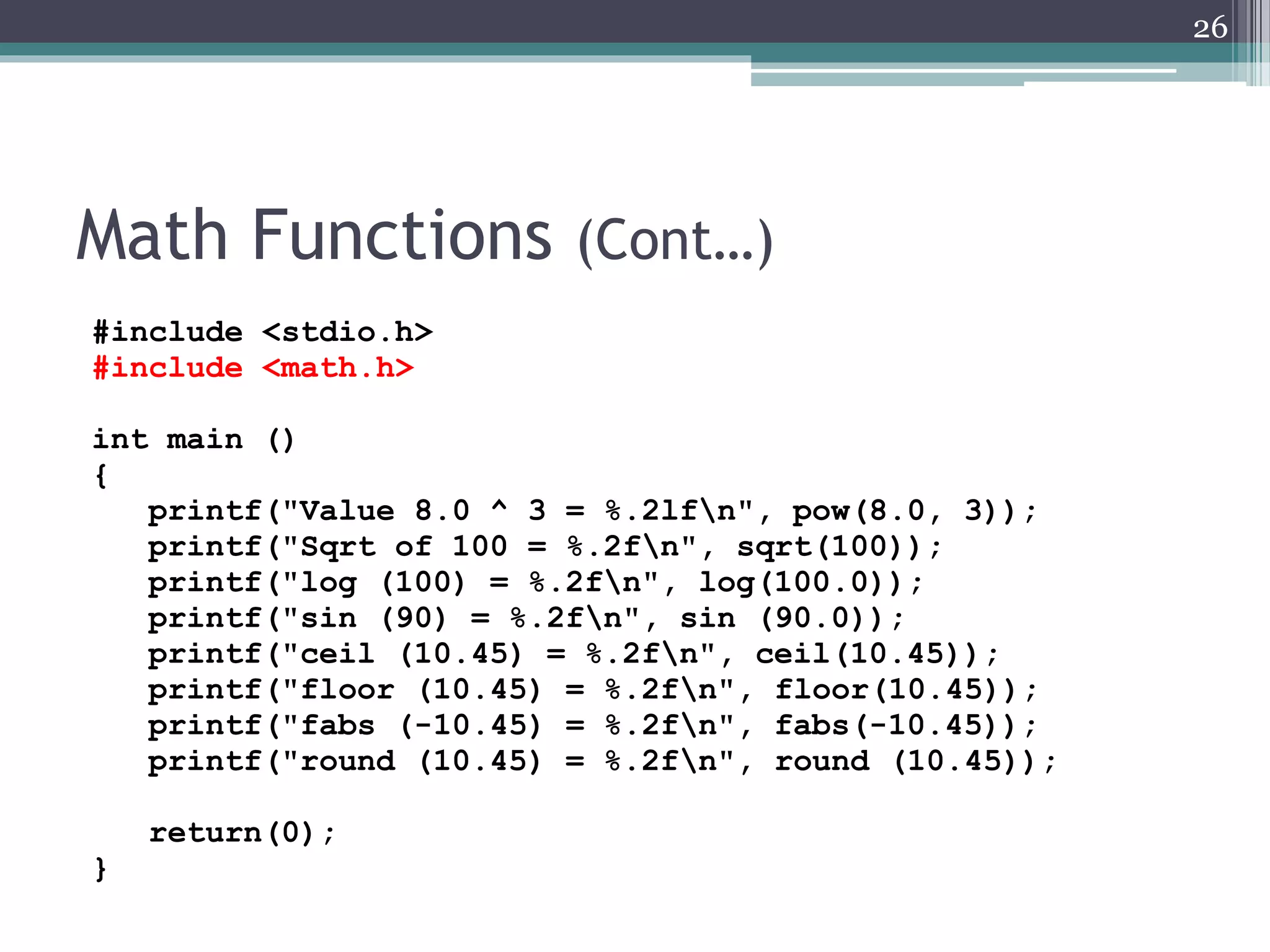
#include <stdio.h>
#include <math.h>
int main ()
{
printf("Value 8.0 ^ 3 = %.2lfn", pow(8.0, 3));
printf("Sqrt of 100 = %.2fn", sqrt(100));
printf("log (100) = %.2fn", log(100.0));
printf("sin (90) = %.2fn", sin (90.0));
printf("ceil (10.45) = %.2fn", ceil(10.45));
printf("floor (10.45) = %.2fn", floor(10.45));
printf("fabs (-10.45) = %.2fn", fabs(-10.45));
printf("round (10.45) = %.2fn", round (10.45));
return(0);
}
26
Objective Re-cap
• Now you should be able to:
▫ Define type cast and type promotion in C
programming language.
▫ Define command line arguments in C
Programming language.
▫ Declare constants according to the C
programming.
▫ Apply math.h header file for problem solving.
▫ Apply taught concepts for writing programs.
27
References
• Appendix A, section 5 - Programming in C, 3rd
Edition, Stephen G. Kochan
28
Next: C Operators
29

COM1407: Type Casting, Command Line Arguments and Defining Constants

  • 1.
    COM1407 Computer Programming Lecture 04 TypeCasting, Command Line Arguments and Defining Constants K.A.S.H. Kulathilake B.Sc. (Hons) IT, MCS , M.Phil., SEDA(UK) Rajarata University of Sri Lanka Department of Physical Sciences 1
  • 2.
    Objectives • At theend of this lecture students should be able to; ▫ Define type cast and type promotion in C programming language. ▫ Define command line arguments in C Programming language. ▫ Declare constants according to the C programming. ▫ Apply math.h header file for problem solving. ▫ Apply taught concepts for writing programs. 2
  • 3.
    Type Casting • Typecast is an instruction to the compiler to convert one type into another. • For example, if you want to store a 'long' value into a simple integer then you can type cast 'long' to 'int'. • Here, target-type specifies the desired type to convert the specified expression to. • You can convert the values from one type to another explicitly using the cast operator as follows: (type_name) expression 3
  • 4.
    Type Casting (Cont…) •When a cast involves a narrowing conversion, information might be lost. • For example, when casting a long into a short, information will be lost if the long’s value is greater than the range of a short because its high-order bits are removed. • When a floating-point value is cast to an integer type, the fractional component will also be lost due to truncation. 4
  • 5.
    Type Casting (Cont…) #include<stdio.h> int main() { int sum = 17, count = 5; double mean; mean = sum / count; printf("Value of mean : %fn", mean ); return 0; } 5 Value of mean : 3.000000
  • 6.
    Type Casting (Cont…) #include<stdio.h> int main() { int sum = 17, count = 5; double mean; mean = (double) sum / count; printf("Value of mean : %fn", mean ); return 0; } 6 Value of mean : 3.400000 It should be noted here that the cast operator has precedence over division, so the value of sum is first converted to type double and finally it gets divided by count yielding a double value.
  • 7.
    Type Promotion/ AutomaticCasting • When one type of data is assigned to another type of variable, an automatic type conversion will take place if ▫ The two types are compatible. E.g. boolean and char is not compatible. ▫ The destination type is larger than source type. • For example, the int type is always large enough to hold all valid short values, and both int and short are integer types, so an automatic conversion from short to int can be applied. 7
  • 8.
    Type Promotion/ AutomaticCasting (Cont…) #include <stdio.h> int main() { int i = 17; char c = 'c'; /* ascii value is 99 */ int sum; sum = i + c; printf("Value of sum : %dn", sum ); return 0; } 8 Here, the value of sum is 116 because the compiler is doing integer promotion and converting the value of 'c' to ASCII before performing the actual addition operation.
  • 9.
    Typical Arithmetic Conversion •The typical arithmetic conversions are implicitly performed to cast their values to a common type. • The compiler first performs integer promotion; if the operands still have different types, then they are converted to the type that appears highest in the given hierarchy. 9
  • 10.
    Typical Arithmetic Conversion(Cont…) • In any program it is recommended to only perform arithmetic operations on pairs of values of the same type. • When compatible types are mixed in an assignment, the value of the right side is automatically converted to the type of the left side. • However, because of Java’s strict type checking, not all types are compatible, and thus, not all type conversions are implicitly allowed. 10
  • 11.
    Typical Arithmetic Conversion(Cont…) • For widening conversions, the numeric types, including integer and floating-point types, are compatible with each other. • There are no automatic conversions from the numeric types to char or boolean. Also, char and boolean are not compatible with each other. • However, an integer literal can be assigned to char 11
  • 12.
    Typical Arithmetic Conversion(Cont…) #include <stdio.h> int main (void) { float f1 = 123.125, f2; int i1, i2 = -150; char c = 'a'; /* floating to integer conversion */ i1 = f1; printf ("%f assigned to an int produces %in", f1, i1); /* integer to floating conversion */ f1 = i2; printf ("%i assigned to a float produces %fn", i2, f1); 12
  • 13.
    Typical Arithmetic Conversion(Cont…) /* integer divided by integer */ f1 = i2 / 100; printf ("%i divided by 100 produces %fn", i2, f1); /* integer divided by a float */ f2 = i2 / 100.0; printf ("%i divided by 100.0 produces %fn", i2, f2); /* type cast operator */ f2 = (float) i2 / 100; printf ("(float) %i divided by 100 produces %fn", i2, f2); return 0; } 13 123.125000 assigned to an int produces 123 -150 assigned to a float produces -150.000000 -150 divided by 100 produces -1.000000 -150 divided by 100.0 produces -1.500000 (float) -150 divided by 100 produces -1.500000
  • 14.
    Command Line Arguments •It is possible to pass some values from the command line to your C programs when they are executed. • These values are called command line arguments and many times they are important for your program especially when you want to control your program from outside instead of hard coding those values inside the code. • The command line arguments are handled using main() function arguments where argc refers to the number of arguments passed, and argv[] is a pointer array which points to each argument passed to the program. 14
  • 15.
    Command Line Arguments(Cont…) #include <stdio.h> int main( int argc, char *argv[] ) { printf("The first argument supplied is %sn", argv[0]); printf("The second argument supplied is %sn", argv[1]); return 0; } 15 F:CL04>CommandLineArguments.exe test The first argument supplied is CommandLineArguments.exe The second argument supplied is test When you run the program remember to pass the arguments
  • 16.
    Command Line Arguments(Cont…) • It should be noted that argv[0] holds the name of the program itself and argv[1] is a pointer to the first command line argument supplied, and *argv[n] is the last argument. • If no arguments are supplied, argc will be one, and if you pass one argument then argc is set at 2. • E.g. F:CL04>CommandLineArguments.exe test 16 argv CommandLineArguments.exe test argc is 2 here
  • 17.
    Command Line Arguments(Cont…) #include <stdio.h> int main( int argc, char *argv[] ) { printf("The first argument supplied is %sn", argv[0]); printf("The second argument supplied is %sn", argv[1]); printf("The third argument supplied is %sn", argv[2]); return 0; } 17 F:CL04>CommandLineArguments.exe arg1 arg2 The first argument supplied is CommandLineArguments.exe The second argument supplied is arg1 The third argument supplied is arg2 F:CL04>CommandLineArguments.exe "arg1" "arg2" The first argument supplied is CommandLineArguments.exe The second argument supplied is arg1 The third argument supplied is arg2 F:CL04>CommandLineArguments.exe "arg1" arg2 The first argument supplied is CommandLineArguments.exe The second argument supplied is arg1 The third argument supplied is arg2
  • 18.
    Command Line Arguments(Cont…) 18 F:CL04>CommandLineArguments.exe arg1 "arg2" The first argument supplied is CommandLineArguments.exe The second argument supplied is arg1 The third argument supplied is arg2 F:CL04>CommandLineArguments.exe arg1, arg2 The first argument supplied is CommandLineArguments.exe The second argument supplied is arg1, The third argument supplied is arg2 #include <stdio.h> int main( int argc, char *argv[] ) { printf("The first argument supplied is %sn", argv[0]); printf("The second argument supplied is %sn", argv[1]); printf("The third argument supplied is %sn", argv[2]); return 0; }
  • 19.
    Defining Constants • Thereare two ways to define constant in C programming: ▫ Using the const key word.  #define come before the program main block. const data_type constant_name = constant_value; const float PI = 3.1412; ▫ Using the #define directive. #define constant_name constant_value #define PI 3.1412 19
  • 20.
    Defining Constants (Cont…) •Write a program to read the radius of a circle and print out the perimeter of it on the screen. #include <stdio.h> #define PI 3.1412 int main () { float radius; printf ("Enter the radius in mm : n"); scanf ("%f",&radius); printf("The perimeter is : %.2f", 2*PI*radius); return 0; } 20
  • 21.
    Defining Constants (Cont…) #include<stdio.h> int main () { const float PI = 3.1412; float radius; printf ("Enter the radius in mm : n"); scanf ("%f",&radius); printf("The perimeter is : %.2f", 2*PI*radius); return 0; } 21
  • 22.
    Math Functions • Themath.h header defines various mathematical functions. • All the functions available in this library take double as an argument and return double as the result. • You can find documentation via: ▫ http://devdocs.io/c/numeric/math 22
  • 23.
    Math Functions (Cont…) S.N.Function & Description 1 double acos(double x) Returns the arc cosine of x in radians. 2 double asin(double x) Returns the arc sine of x in radians. 3 double atan(double x) Returns the arc tangent of x in radians. 4 double atan2(double y, double x) Returns the arc tangent in radians of y/x based on the signs of both values to determine the correct quadrant. 5 double cos(double x) Returns the cosine of a radian angle x. 6 double cosh(double x) Returns the hyperbolic cosine of x. 7 double sin(double x) Returns the sine of a radian angle x. 23
  • 24.
    Math Functions (Cont…) 8double sinh(double x) Returns the hyperbolic sine of x. 9 double tanh(double x) Returns the hyperbolic tangent of x. 10 double exp(double x) Returns the value of e raised to the xth power. 11 double frexp(double x, int *exponent) The returned value is the mantissa and the integer pointed to by exponent is the exponent. The resultant value is x = mantissa * 2 ^ exponent. 12 double ldexp(double x, int exponent) Returns x multiplied by 2 raised to the power of exponent. 13 double log(double x) Returns the natural logarithm (base-e logarithm) of x. 14 double log10(double x) Returns the common logarithm (base-10 logarithm) of x. 24
  • 25.
    Math Functions (Cont…) 15double modf(double x, double *integer) The returned value is the fraction component (part after the decimal), and sets integer to the integer component. 16 double pow(double x, double y) Returns x raised to the power of y. 17 double sqrt(double x) Returns the square root of x. 18 double ceil(double x) Returns the smallest integer value greater than or equal to x. 19 double fabs(double x) Returns the absolute value of x. 20 double floor(double x) Returns the largest integer value less than or equal to x. 21 double fmod(double x, double y) Returns the remainder of x divided by y. 25
  • 26.
    Math Functions (Cont…) #include<stdio.h> #include <math.h> int main () { printf("Value 8.0 ^ 3 = %.2lfn", pow(8.0, 3)); printf("Sqrt of 100 = %.2fn", sqrt(100)); printf("log (100) = %.2fn", log(100.0)); printf("sin (90) = %.2fn", sin (90.0)); printf("ceil (10.45) = %.2fn", ceil(10.45)); printf("floor (10.45) = %.2fn", floor(10.45)); printf("fabs (-10.45) = %.2fn", fabs(-10.45)); printf("round (10.45) = %.2fn", round (10.45)); return(0); } 26
  • 27.
    Objective Re-cap • Nowyou should be able to: ▫ Define type cast and type promotion in C programming language. ▫ Define command line arguments in C Programming language. ▫ Declare constants according to the C programming. ▫ Apply math.h header file for problem solving. ▫ Apply taught concepts for writing programs. 27
  • 28.
    References • Appendix A,section 5 - Programming in C, 3rd Edition, Stephen G. Kochan 28
  • 29.