Flat Plan Evaluation
I drew my flat plans up free hand of graph paper so that I could get a more clear idea on the
layout, creating these flat plans allowed me to test different designs and get a glimpse into
what my finishing magazine will look like.

Front Cover
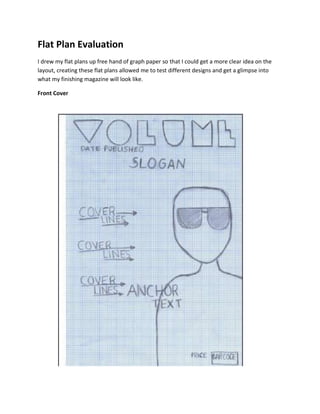
Masthead- The masthead represents the name of my title which is “volume” the name volume
came up after looking through hundreds of different musical words. I thought that “volume” was
straight to the point and my target audience would know straight away that my magazine was
based on music, my peers agreed that this was a good name for a music magazine. I then went on
to creating the design for my title before drawing it I looked through a range of different style on
dafont.com I eventually found one called disco deck which is had an urban edgy look to it I
instantly liked it and thought it would be suited to my style of magazine.


                            Main Image- I decided to situate my main image on the right
                            hand side of the page to leave space for my cover lines and
                            anchor text, this is a traditional layout and found on many
                            different professional magazines. I decided to dress my actor in
                            Ray Bans as I said in my organization, I thought the use of sun
                            glasses was effective and gave a mysterious look to the actor
                            and make the audience want to read more on the actor.

                            I decided to also use a mid shot as when doing the preliminary
                            task I thought a mid shot worked well and fitted on the page
                            nicely. I also personally believe it draws the audience in more.


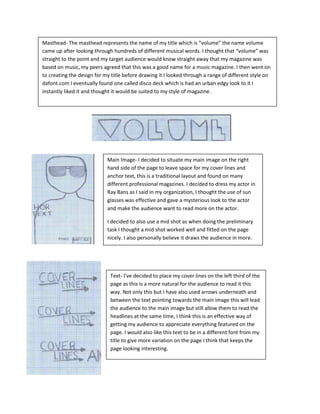
                             Text- I’ve decided to place my cover lines on the left third of the
                             page as this is a more natural for the audience to read it this
                             way. Not only this but I have also used arrows underneath and
                             between the text pointing towards the main image this will lead
                             the audience to the main image but still allow them to read the
                             headlines at the same time, I think this is an effective way of
                             getting my audience to appreciate everything featured on the
                             page. I would also like this text to be in a different font from my
                             title to give more variation on the page I think that keeps the
                             page looking interesting.
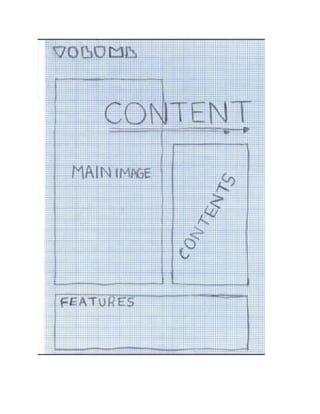
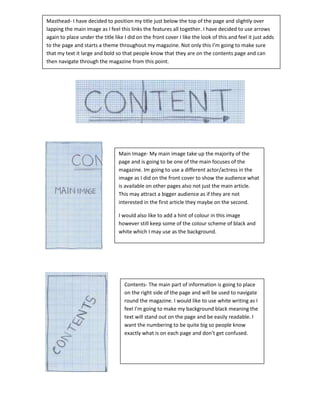
Masthead- I have decided to position my title just below the top of the page and slightly over
lapping the main image as I feel this links the features all together. I have decided to use arrows
again to place under the title like I did on the front cover I like the look of this and feel it just adds
to the page and starts a theme throughout my magazine. Not only this I’m going to make sure
that my text it large and bold so that people know that they are on the contents page and can
then navigate through the magazine from this point.


                                 Main Image- My main image take up the majority of the
                                 page and is going to be one of the main focuses of the
                                 magazine. Im going to use a different actor/actress in the
                                 image as I did on the front cover to show the audience what
                                 is available on other pages also not just the main article.
                                 This may attract a bigger audience as if they are not
                                 interested in the first article they maybe on the second.

                                 I would also like to add a hint of colour in this image
                                 however still keep some of the colour scheme of black and
                                 white which I may use as the background.


                                    Contents- The main part of information is going to place
                                    on the right side of the page and will be used to navigate
                                    round the magazine. I would like to use white writing as I
                                    feel I’m going to make my background black meaning the
                                    text will stand out on the page and be easily readable. I
                                    want the numbering to be quite big so people know
                                    exactly what is on each page and don’t get confused.
Double Page Spread
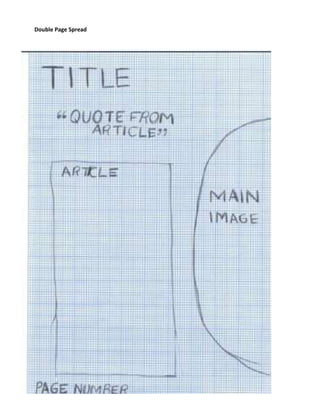
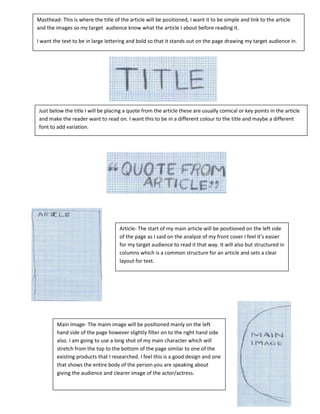
Masthead- This is where the title of the article will be positioned, I want it to be simple and link to the article
and the images so my target audience know what the article I about before reading it.

I want the text to be in large lettering and bold so that it stands out on the page drawing my target audience in.


Just below the title I will be placing a quote from the article these are usually comical or key points in the article
and make the reader want to read on. I want this to be in a different colour to the title and maybe a different
font to add variation.


                                     Article- The start of my main article will be positioned on the left side
                                     of the page as I said on the analyze of my front cover I feel it’s easier
                                     for my target audience to read it that way. It will also but structured in
                                     columns which is a common structure for an article and sets a clear
                                     layout for text.


         Main Image- The maim image will be positioned manly on the left
         hand side of the page however slightly filter on to the right hand side
         also. I am going to use a long shot of my main character which will
         stretch from the top to the bottom of the page similar to one of the
         existing products that I researched. I feel this is a good design and one
         that shows the entire body of the person you are speaking about
         giving the audience and clearer image of the actor/actress.
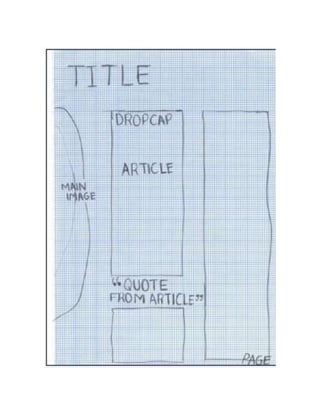
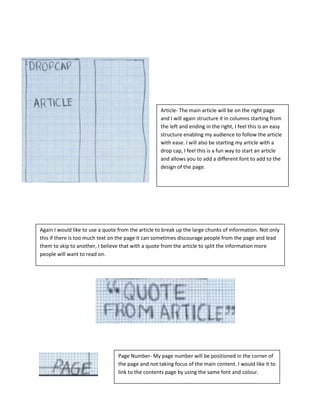
Article- The main article will be on the right page
                                                    and I will again structure it in columns starting from
                                                    the left and ending in the right, I feel this is an easy
                                                    structure enabling my audience to follow the article
                                                    with ease. I will also be starting my article with a
                                                    drop cap, I feel this is a fun way to start an article
                                                    and allows you to add a different font to add to the
                                                    design of the page.


Again I would like to use a quote from the article to break up the large chunks of information. Not only
this if there is too much text on the page it can sometimes discourage people from the page and lead
them to skip to another, I believe that with a quote from the article to split the information more
people will want to read on.


                                  Page Number- My page number will be positioned in the corner of
                                  the page and not taking focus of the main content. I would like it to
                                  link to the contents page by using the same font and colour.

Flat Plan Evaluation PR

  • 1.
    Flat Plan Evaluation Idrew my flat plans up free hand of graph paper so that I could get a more clear idea on the layout, creating these flat plans allowed me to test different designs and get a glimpse into what my finishing magazine will look like. Front Cover
  • 2.
    Masthead- The mastheadrepresents the name of my title which is “volume” the name volume came up after looking through hundreds of different musical words. I thought that “volume” was straight to the point and my target audience would know straight away that my magazine was based on music, my peers agreed that this was a good name for a music magazine. I then went on to creating the design for my title before drawing it I looked through a range of different style on dafont.com I eventually found one called disco deck which is had an urban edgy look to it I instantly liked it and thought it would be suited to my style of magazine. Main Image- I decided to situate my main image on the right hand side of the page to leave space for my cover lines and anchor text, this is a traditional layout and found on many different professional magazines. I decided to dress my actor in Ray Bans as I said in my organization, I thought the use of sun glasses was effective and gave a mysterious look to the actor and make the audience want to read more on the actor. I decided to also use a mid shot as when doing the preliminary task I thought a mid shot worked well and fitted on the page nicely. I also personally believe it draws the audience in more. Text- I’ve decided to place my cover lines on the left third of the page as this is a more natural for the audience to read it this way. Not only this but I have also used arrows underneath and between the text pointing towards the main image this will lead the audience to the main image but still allow them to read the headlines at the same time, I think this is an effective way of getting my audience to appreciate everything featured on the page. I would also like this text to be in a different font from my title to give more variation on the page I think that keeps the page looking interesting.
  • 4.
    Masthead- I havedecided to position my title just below the top of the page and slightly over lapping the main image as I feel this links the features all together. I have decided to use arrows again to place under the title like I did on the front cover I like the look of this and feel it just adds to the page and starts a theme throughout my magazine. Not only this I’m going to make sure that my text it large and bold so that people know that they are on the contents page and can then navigate through the magazine from this point. Main Image- My main image take up the majority of the page and is going to be one of the main focuses of the magazine. Im going to use a different actor/actress in the image as I did on the front cover to show the audience what is available on other pages also not just the main article. This may attract a bigger audience as if they are not interested in the first article they maybe on the second. I would also like to add a hint of colour in this image however still keep some of the colour scheme of black and white which I may use as the background. Contents- The main part of information is going to place on the right side of the page and will be used to navigate round the magazine. I would like to use white writing as I feel I’m going to make my background black meaning the text will stand out on the page and be easily readable. I want the numbering to be quite big so people know exactly what is on each page and don’t get confused.
  • 5.
  • 7.
    Masthead- This iswhere the title of the article will be positioned, I want it to be simple and link to the article and the images so my target audience know what the article I about before reading it. I want the text to be in large lettering and bold so that it stands out on the page drawing my target audience in. Just below the title I will be placing a quote from the article these are usually comical or key points in the article and make the reader want to read on. I want this to be in a different colour to the title and maybe a different font to add variation. Article- The start of my main article will be positioned on the left side of the page as I said on the analyze of my front cover I feel it’s easier for my target audience to read it that way. It will also but structured in columns which is a common structure for an article and sets a clear layout for text. Main Image- The maim image will be positioned manly on the left hand side of the page however slightly filter on to the right hand side also. I am going to use a long shot of my main character which will stretch from the top to the bottom of the page similar to one of the existing products that I researched. I feel this is a good design and one that shows the entire body of the person you are speaking about giving the audience and clearer image of the actor/actress.
  • 8.
    Article- The mainarticle will be on the right page and I will again structure it in columns starting from the left and ending in the right, I feel this is an easy structure enabling my audience to follow the article with ease. I will also be starting my article with a drop cap, I feel this is a fun way to start an article and allows you to add a different font to add to the design of the page. Again I would like to use a quote from the article to break up the large chunks of information. Not only this if there is too much text on the page it can sometimes discourage people from the page and lead them to skip to another, I believe that with a quote from the article to split the information more people will want to read on. Page Number- My page number will be positioned in the corner of the page and not taking focus of the main content. I would like it to link to the contents page by using the same font and colour.