
ArcGIS Pipeline Referencing
Lessons Learned
Wayne Meyer - SCANA
Clarke Wiley – SSP Innovations
Introductions
• Wayne Meyer – GIS Manager
• Clarke Wiley – Director, Pipeline
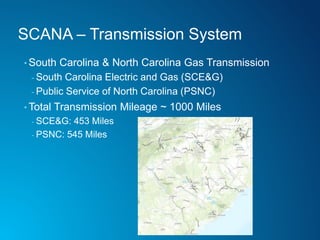
SCANA – Transmission System
• South Carolina & North Carolina Gas Transmission
- South Carolina Electric and Gas (SCE&G)
- Public Service of North Carolina (PSNC)
• Total Transmission Mileage ~ 1000 Miles
- SCE&G: 453 Miles
- PSNC: 545 Miles
SCANA – GIS Environments
• SCEG GIS
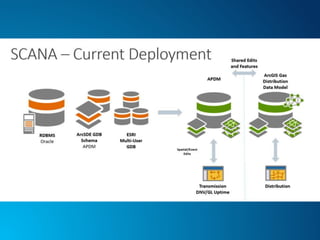
- South Carolina SCANA Gas Transmission
- ArcGIS Pipeline Data Model
- South Carolina SCANA Gas Distribution
- ArcGIS Gas Distribution Data Model
- Current GIS Environment
- ArcGIS 10.2.1
• PSNC GIS
- Current GIS Environment
- Smallworld
- Transmission and Distribution data managed within the same
SW model/tools
Project Overview - Transmission
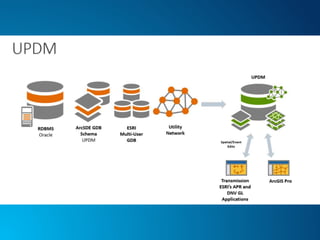
• Consolidation and Migration of SCEG (APDM) & PSNC
(Smallworld) gas assets into Utility Pipeline Data Model (UPDM)
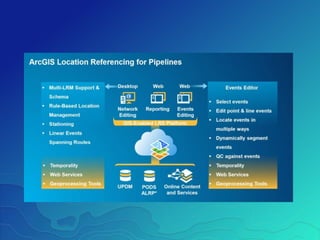
• Implementation of ArcGIS Pipeline Referencing Tools
- ArcGIS Pro Extension – Centerline Editing
- ArcGIS Server Extenstion – Web Event Editing
- ArcGIS Desktop Extension – APR Configuration
• DNV GL – Synergi Pipeline
- Risk
- MAOP
- HCA/Class
- ILI/Survey Data Tools
Project Overview - Distribution
• Consolidation and Migration of SCEG (ArcGIS Gas
Distribution Data Model) & PSNC (Smallworld) gas
assets into Utility Pipeline Data Model (UPDM)
• Distribution and database efforts (UPDM, migration) led
by team of Esri Business Partners
• Focus for todays presentation will be on the Transmission
components.
Why UPDM?
SCANA’s Reasoning
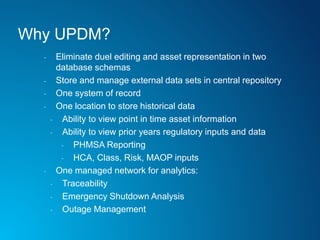
Why UPDM?
- Eliminate duel editing and asset representation in two
database schemas
- Store and manage external data sets in central repository
- One system of record
- One location to store historical data
- Ability to view point in time asset information
- Ability to view prior years regulatory inputs and data
- PHMSA Reporting
- HCA, Class, Risk, MAOP inputs
- One managed network for analytics:
- Traceability
- Emergency Shutdown Analysis
- Outage Management
Why UPDM?
- GIS – Management: Single Database Infrastructure
- Backups, DB Tuning, DB Management
- Applications and Integrations
- Ability to program and configure against one location
- Streamlined integration points
- Clarity for the User Community
- Regulatory Reporting, Asset Views, Mileage, Summaries all
coming from one centralized location
- No need to compare and/or combine data from multiple locations
for reporting
- Future integrations with one GIS database for scheduling & WFM
- Ability to extend the viewing and consuming capabilities from one
centralized database
- ArcGIS Enterprise
- MAKE OUR GIS A DECISION MAKING TOOL!
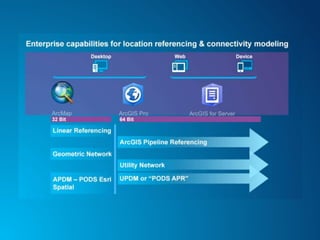
ArcGIS Pipeline Referencing
Lesson #1 – Early Adopters
Early Adopters
• First companies on board, including SCANA, find UPDM
appealing since both the distribution and transmission gas
assets can be stored within the same enterprise
geodatabase
• Operators seeing the benefit of Esri out of the box tools
versus third party software products for core pipeline
management
• ArcGIS Pipeline Referencing – Centerline & Event
Management
• Pro – Distribution
Early Adopters
• Pure transmission operators (gas or liquids) have
historically stored in PODS (Relational/Spatial) or APDM
• With PODS Next Generation on the horizon and the
perceived jump from APDM to UPDM, we’ve found that
pure transmission operators are road-mapping and
planning prior to making the move
- Integration points to current PODS or APDM model
- Application compatibility (HCA/Class, Risk, MAOP/MOP
and Alignment Sheet Generation)
- Migration and Esri Version Upgrade Planning
ArcGIS Pipeline Referencing
Lesson #2 – Data
Data, Data, Data
• How are pipeline routes being stored in the new model?
- Past models, stored pipelines and systems in StationSeries
and LineLoop/LineLoopHierarchy tables.
- UPDM…review existing systems hierarchy and make key
decisions for modeling the pipeline LRS networks
• Do you still need historical stationing?
• Simply utilize continuous network and manage true pipeline
length/location?
• SCANA:
• PSNC Smallworld pipeline management versus SCEG Esri
(APDM) Data Management
• P_ContinuousNetwork
Data, Data, Data
• Data Mapping Phase
- Example: APDM.PipeSegment & APDM.Coating -> UPDM.P_Pipes
• UPDM Database Extensions
- Where is data duplicated?
- Where can we consolidate?
- Between both source datasets or within the same
- What fields are truly needed to support GIS asset and integrity
management
• Phased Data Migrations
- End User Review
- Application Testing
Data, Data, Data
• Data Migration
- Team Effort Between Esri Business Partners
• Established empty UPDM Schema
- Transmission
- Distribution
- Shared Features (P_Pipes, P_Fittings, P_Valves)
• Configure APR
- LRS Networks, LRS Events, etc
• Migrate Data from PSNC & SCEG
Data, Data, Data
• Current Project Utilizes FME (Smallworld) & Scripting
• Don’t discount the APR Toolbox!
- Streamlined Workflows
- GIS Centric
- Makes data loading a non-DBA task
- Append Events (Location Referencing Tools)
- Generate shapes and Event GUIDs
- Add, Retire or Replace
ArcGIS Pipeline Referencing
Lesson #3 – Architecture & Licensing
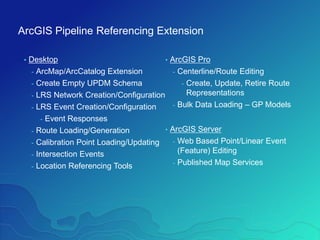
ArcGIS Pipeline Referencing Extension
• Desktop
- ArcMap/ArcCatalog Extension
- Create Empty UPDM Schema
- LRS Network Creation/Configuration
- LRS Event Creation/Configuration
- Event Responses
- Route Loading/Generation
- Calibration Point Loading/Updating
- Intersection Events
- Location Referencing Tools
• ArcGIS Pro
- Centerline/Route Editing
- Create, Update, Retire Route
Representations
- Bulk Data Loading – GP Models
• ArcGIS Server
- Web Based Point/Linear Event
(Feature) Editing
- Published Map Services
Licensing and Deployment
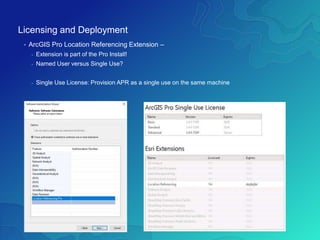
• ArcGIS Pro Location Referencing Extension –
- Extension is part of the Pro Install!
- Named User versus Single Use?
- Single Use License: Provision APR as a single use on the same machine
Licensing and Deployment
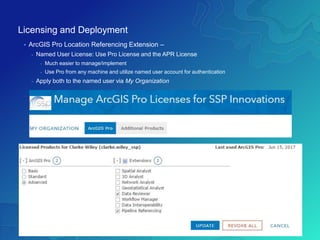
• ArcGIS Pro Location Referencing Extension –
- Named User License: Use Pro License and the APR License
- Much easier to manage/implement
- Use Pro from any machine and utilize named user account for authentication
- Apply both to the named user via My Organization
Licensing and Deployment
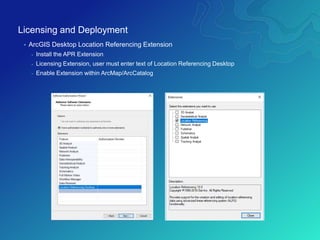
• ArcGIS Desktop Location Referencing Extension
- Install the APR Extension
- Licensing Extension, user must enter text of Location Referencing Desktop
- Enable Extension within ArcMap/ArcCatalog
Licensing and Deployment
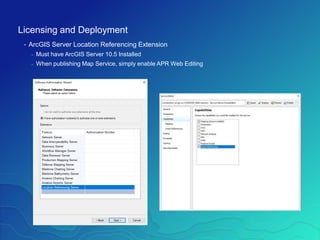
• ArcGIS Server Location Referencing Extension
- Must have ArcGIS Server 10.5 Installed
- When publishing Map Service, simply enable APR Web Editing
ArcGIS Pipeline Referencing
Lesson #4 – Tips!
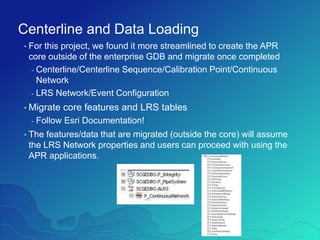
Centerline and Data Loading
• For this project, we found it more streamlined to create the APR
core outside of the enterprise GDB and migrate once completed
- Centerline/Centerline Sequence/Calibration Point/Continuous
Network
- LRS Network/Event Configuration
• Migrate core features and LRS tables
- Follow Esri Documentation!
• The features/data that are migrated (outside the core) will assume
the LRS Network properties and users can proceed with using the
APR applications.
Centerline and Data Loading
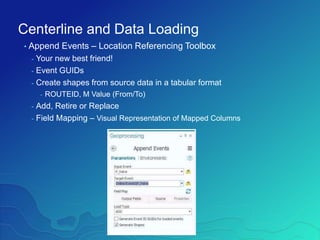
• Append Events – Location Referencing Toolbox
- Your new best friend!
- Event GUIDs
- Create shapes from source data in a tabular format
- ROUTEID, M Value (From/To)
- Add, Retire or Replace
- Field Mapping – Visual Representation of Mapped Columns
Questions?
Wayne Meyer – wmeyer@scana.com
Clarke Wiley – clarke.wiley@sspinnovations.com

ArcGIS Pipeline Referencing - Lessons Learned

  • 1.
    ArcGIS Pipeline Referencing LessonsLearned Wayne Meyer - SCANA Clarke Wiley – SSP Innovations
  • 2.
    Introductions • Wayne Meyer– GIS Manager • Clarke Wiley – Director, Pipeline
  • 3.
    SCANA – TransmissionSystem • South Carolina & North Carolina Gas Transmission - South Carolina Electric and Gas (SCE&G) - Public Service of North Carolina (PSNC) • Total Transmission Mileage ~ 1000 Miles - SCE&G: 453 Miles - PSNC: 545 Miles
  • 4.
    SCANA – GISEnvironments • SCEG GIS - South Carolina SCANA Gas Transmission - ArcGIS Pipeline Data Model - South Carolina SCANA Gas Distribution - ArcGIS Gas Distribution Data Model - Current GIS Environment - ArcGIS 10.2.1 • PSNC GIS - Current GIS Environment - Smallworld - Transmission and Distribution data managed within the same SW model/tools
  • 5.
    Project Overview -Transmission • Consolidation and Migration of SCEG (APDM) & PSNC (Smallworld) gas assets into Utility Pipeline Data Model (UPDM) • Implementation of ArcGIS Pipeline Referencing Tools - ArcGIS Pro Extension – Centerline Editing - ArcGIS Server Extenstion – Web Event Editing - ArcGIS Desktop Extension – APR Configuration • DNV GL – Synergi Pipeline - Risk - MAOP - HCA/Class - ILI/Survey Data Tools
  • 6.
    Project Overview -Distribution • Consolidation and Migration of SCEG (ArcGIS Gas Distribution Data Model) & PSNC (Smallworld) gas assets into Utility Pipeline Data Model (UPDM) • Distribution and database efforts (UPDM, migration) led by team of Esri Business Partners • Focus for todays presentation will be on the Transmission components.
  • 10.
  • 11.
    Why UPDM? - Eliminateduel editing and asset representation in two database schemas - Store and manage external data sets in central repository - One system of record - One location to store historical data - Ability to view point in time asset information - Ability to view prior years regulatory inputs and data - PHMSA Reporting - HCA, Class, Risk, MAOP inputs - One managed network for analytics: - Traceability - Emergency Shutdown Analysis - Outage Management
  • 12.
    Why UPDM? - GIS– Management: Single Database Infrastructure - Backups, DB Tuning, DB Management - Applications and Integrations - Ability to program and configure against one location - Streamlined integration points - Clarity for the User Community - Regulatory Reporting, Asset Views, Mileage, Summaries all coming from one centralized location - No need to compare and/or combine data from multiple locations for reporting - Future integrations with one GIS database for scheduling & WFM - Ability to extend the viewing and consuming capabilities from one centralized database - ArcGIS Enterprise - MAKE OUR GIS A DECISION MAKING TOOL!
  • 13.
  • 14.
    Early Adopters • Firstcompanies on board, including SCANA, find UPDM appealing since both the distribution and transmission gas assets can be stored within the same enterprise geodatabase • Operators seeing the benefit of Esri out of the box tools versus third party software products for core pipeline management • ArcGIS Pipeline Referencing – Centerline & Event Management • Pro – Distribution
  • 15.
    Early Adopters • Puretransmission operators (gas or liquids) have historically stored in PODS (Relational/Spatial) or APDM • With PODS Next Generation on the horizon and the perceived jump from APDM to UPDM, we’ve found that pure transmission operators are road-mapping and planning prior to making the move - Integration points to current PODS or APDM model - Application compatibility (HCA/Class, Risk, MAOP/MOP and Alignment Sheet Generation) - Migration and Esri Version Upgrade Planning
  • 16.
  • 17.
    Data, Data, Data •How are pipeline routes being stored in the new model? - Past models, stored pipelines and systems in StationSeries and LineLoop/LineLoopHierarchy tables. - UPDM…review existing systems hierarchy and make key decisions for modeling the pipeline LRS networks • Do you still need historical stationing? • Simply utilize continuous network and manage true pipeline length/location? • SCANA: • PSNC Smallworld pipeline management versus SCEG Esri (APDM) Data Management • P_ContinuousNetwork
  • 18.
    Data, Data, Data •Data Mapping Phase - Example: APDM.PipeSegment & APDM.Coating -> UPDM.P_Pipes • UPDM Database Extensions - Where is data duplicated? - Where can we consolidate? - Between both source datasets or within the same - What fields are truly needed to support GIS asset and integrity management • Phased Data Migrations - End User Review - Application Testing
  • 19.
    Data, Data, Data •Data Migration - Team Effort Between Esri Business Partners • Established empty UPDM Schema - Transmission - Distribution - Shared Features (P_Pipes, P_Fittings, P_Valves) • Configure APR - LRS Networks, LRS Events, etc • Migrate Data from PSNC & SCEG
  • 20.
    Data, Data, Data •Current Project Utilizes FME (Smallworld) & Scripting • Don’t discount the APR Toolbox! - Streamlined Workflows - GIS Centric - Makes data loading a non-DBA task - Append Events (Location Referencing Tools) - Generate shapes and Event GUIDs - Add, Retire or Replace
  • 21.
    ArcGIS Pipeline Referencing Lesson#3 – Architecture & Licensing
  • 23.
    ArcGIS Pipeline ReferencingExtension • Desktop - ArcMap/ArcCatalog Extension - Create Empty UPDM Schema - LRS Network Creation/Configuration - LRS Event Creation/Configuration - Event Responses - Route Loading/Generation - Calibration Point Loading/Updating - Intersection Events - Location Referencing Tools • ArcGIS Pro - Centerline/Route Editing - Create, Update, Retire Route Representations - Bulk Data Loading – GP Models • ArcGIS Server - Web Based Point/Linear Event (Feature) Editing - Published Map Services
  • 24.
    Licensing and Deployment •ArcGIS Pro Location Referencing Extension – - Extension is part of the Pro Install! - Named User versus Single Use? - Single Use License: Provision APR as a single use on the same machine
  • 25.
    Licensing and Deployment •ArcGIS Pro Location Referencing Extension – - Named User License: Use Pro License and the APR License - Much easier to manage/implement - Use Pro from any machine and utilize named user account for authentication - Apply both to the named user via My Organization
  • 26.
    Licensing and Deployment •ArcGIS Desktop Location Referencing Extension - Install the APR Extension - Licensing Extension, user must enter text of Location Referencing Desktop - Enable Extension within ArcMap/ArcCatalog
  • 27.
    Licensing and Deployment •ArcGIS Server Location Referencing Extension - Must have ArcGIS Server 10.5 Installed - When publishing Map Service, simply enable APR Web Editing
  • 28.
  • 29.
    Centerline and DataLoading • For this project, we found it more streamlined to create the APR core outside of the enterprise GDB and migrate once completed - Centerline/Centerline Sequence/Calibration Point/Continuous Network - LRS Network/Event Configuration • Migrate core features and LRS tables - Follow Esri Documentation! • The features/data that are migrated (outside the core) will assume the LRS Network properties and users can proceed with using the APR applications.
  • 30.
    Centerline and DataLoading • Append Events – Location Referencing Toolbox - Your new best friend! - Event GUIDs - Create shapes from source data in a tabular format - ROUTEID, M Value (From/To) - Add, Retire or Replace - Field Mapping – Visual Representation of Mapped Columns
  • 31.
    Questions? Wayne Meyer –wmeyer@scana.com Clarke Wiley – clarke.wiley@sspinnovations.com