












SIMPLE TOOLS FOR SHARING
Images:courtesyofpixabay.com
http://goo.gl/vXMYb9
#StudioCurious
To learn at least two tools that
enhance your collaborative choices
Learning Intention
Session Links
Site and Activity Address Additional info
Padlet activity 1 https://goo.gl/6vXvdT For sharing and discussion
Padlet site https://padlet.com/ For sharing and discussion
Popplet http://goo.gl/WRi7LL For brainstorming
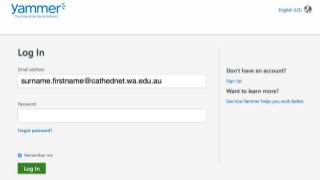
Yammer Yammer.com Surname.firstname@cathednet.w
a.edu.au
Twitter Twitter.com #StudioCurious
Slideshare http://goo.gl/vXMYb9 A copy of the slides
Enter the link below in
your browser and address
the associated questions
Tool 1 - Padlet
https://goo.gl/6vXvdT
Create your own account
and padlet at
Padlet
https://padlet.com/
Share your padlet with at
least one person
Enter this link in your browser:
Tool 2 - Popplet
Username:CEWApractice@gmail.com
Password: CewaxxPractice
http://goo.gl/WRi7LL
Tool 3 - Yammer
Yammer is FB sharing for business
Yammer
Go to Yammer. Com
Yammer is FB sharing for business
Tool 3 - Yammer
Go to Yammer.Com
Yammer is FB sharing for business
Yammer
Go to Yammer. Com
• In a pair construct a witty or pithy
comment on what you have learned
today using the hashtag
#studiocurious
• You must add an image to your post
• Quality free images at Pixabay.com
Twitter
Groenewald.daniel@cathednet.wa.edu.au
@d_groenewald
Notes
To learn two tools that enhance your
collaborative choices
Learning Intention
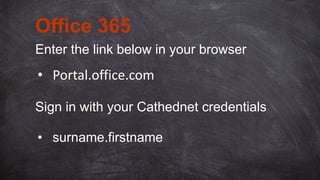
Enter the link below in your browser
Office 365
• Portal.office.com
• surname.firstname
Sign in with your Cathednet credentials
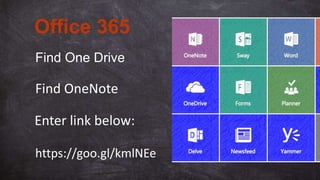
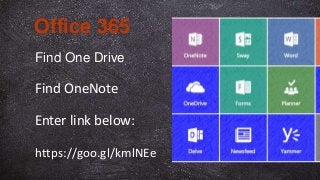
Find One Drive
Office 365
Find OneNote
Enter link below:
https://goo.gl/kmlNEe
Office 365
Enter this link:
Answer the question
https://goo.gl/kmlNEe
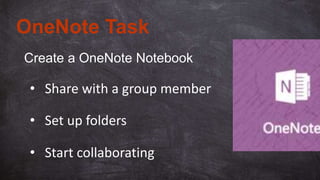
Create a OneNote Notebook
OneNote Task
• Share with a group member
• Set up folders
• Start collaborating

Collaboration presentation

  • 1.
    SIMPLE TOOLS FORSHARING Images:courtesyofpixabay.com http://goo.gl/vXMYb9 #StudioCurious
  • 2.
    To learn atleast two tools that enhance your collaborative choices Learning Intention
  • 3.
    Session Links Site andActivity Address Additional info Padlet activity 1 https://goo.gl/6vXvdT For sharing and discussion Padlet site https://padlet.com/ For sharing and discussion Popplet http://goo.gl/WRi7LL For brainstorming Yammer Yammer.com Surname.firstname@cathednet.w a.edu.au Twitter Twitter.com #StudioCurious Slideshare http://goo.gl/vXMYb9 A copy of the slides
  • 4.
    Enter the linkbelow in your browser and address the associated questions Tool 1 - Padlet https://goo.gl/6vXvdT
  • 5.
    Create your ownaccount and padlet at Padlet https://padlet.com/ Share your padlet with at least one person
  • 6.
    Enter this linkin your browser: Tool 2 - Popplet Username:CEWApractice@gmail.com Password: CewaxxPractice http://goo.gl/WRi7LL
  • 7.
    Tool 3 -Yammer
  • 8.
    Yammer is FBsharing for business Yammer Go to Yammer. Com
  • 10.
    Yammer is FBsharing for business Tool 3 - Yammer Go to Yammer.Com
  • 11.
    Yammer is FBsharing for business Yammer Go to Yammer. Com
  • 12.
    • In apair construct a witty or pithy comment on what you have learned today using the hashtag #studiocurious • You must add an image to your post • Quality free images at Pixabay.com Twitter
  • 13.
  • 14.
  • 15.
    To learn twotools that enhance your collaborative choices Learning Intention
  • 16.
    Enter the linkbelow in your browser Office 365 • Portal.office.com • surname.firstname Sign in with your Cathednet credentials
  • 17.
    Find One Drive Office365 Find OneNote Enter link below: https://goo.gl/kmlNEe
  • 18.
    Office 365 Enter thislink: Answer the question https://goo.gl/kmlNEe
  • 19.
    Create a OneNoteNotebook OneNote Task • Share with a group member • Set up folders • Start collaborating