Google for Educators Overview
Organize
with Google Tools
Lucy Gray
University of Chicago
Center for Elementary Mathematics and Science Education
iSummit ’09
Thursday, July 9, 2009
Google Calendar
Google Docs
Gmail
Reader
Mobile
Google Apps Education Edition
Thursday, July 9, 2009
If you use Gmail, Google Docs etc. already, you have a Google account.
You do not need a Gmail account; you can use any email address to get a
Google account.
Gmail is recommended, however. You can have all your email from other
accounts deliveredy to Gmail if you so choose.
Google Account:
Gmail and Google Account:
Sign Up for a Google Account	
Thursday, July 9, 2009
Multiple calendars
Sync with iCal
Mobile
Public and private calendars
Tasks
Part of Google Apps Education Edition
Google
http://www.google.com/calendar
Thursday, July 9, 2009
Play with Google Calendar
Add an fictitious appointment to your calendar. Double click on a day or use Quick
Add.
Invite someone to this appointment. Use my email address (elemenous@gmail.com)
or a neighbor’s.
Explore the arrow next to your calendar’s name. Change the color of your calendar.
Click on Tasks and start creating a to do list.
Look at your calendar in the different views: Day, Week, Month, 7 Days & Agenda
Click on Settings and explore. Find Create a New Calendar and note that you can
import calendars from other software programs such as iCal
Thursday, July 9, 2009
Google Docs
http://docs.google.com
Docs, Spreadsheets, Forms, Presentations
Templates
Sharing and publishing capabilities
Part of Google Apps Education Edition
Thursday, July 9, 2009
Play with Google Docs
Create a document and share it with a neighbor or me
(elemenous@gmail.com)
Experiment with text and tools including the drawing tool.
Save your document and then create a folder. Drag and drop a document
into it.
Create a survey using Forms and invite someone to take they survey OR
Take this survey: http://tinyurl.com/isummitsurvey
See the results of the survey: http://tinyurl.com/isummitsurveyspreadsheet
Add to this presentation: http://tinyurl.com/isummitpresentation
Thursday, July 9, 2009
Gmail
http://mail.google.com
Themes
Search
Labels
Drag and drop
Labs
Open attachments in Google Docs
Thursday, July 9, 2009
Play with Gmail
Change your theme under Settings>Themes.
Create a few labels and filters to organize your mail. Examples: parents, work,
personal, urgent, iSummit
Examine your Chat settings. Edit as necessary and consider installing voice
and video chat.
Click on Labs and explore some experimental features.
Look at the Offline setting and consider installing Google Gears. You can read
email offline now!
Thursday, July 9, 2009
Google Reader
http://www.google.com/reader
Direct information to automatically come to one place for easy browsing.
Subscribe to blogs, web sites, podcasts etc.
Subscribe to searches.
Monitor web sites, wikis, Google docs for changes.
Thursday, July 9, 2009
Helpful Video
http://tinyurl.com/rssinplainenglish
Thursday, July 9, 2009
Play with Google Reader
Subscribe to a blog or other news source using search and Add a
Subscription.
Add a blog by copying and pasting a hyperlink to an RSS feed. Control-click
on the orange RSS button on David Warlick’s blog and copy the url. David’s
blog can be found at: http://davidwarlick.com/2cents/.
Add friends and share an item with your friends.
Check out shared items and note that there is a public page for this that you
can link to.
Try browsing for stuff.
Set up folders to organize subscriptions.
Thursday, July 9, 2009
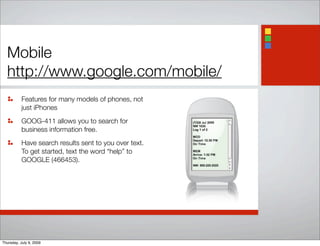
Mobile
http://www.google.com/mobile/
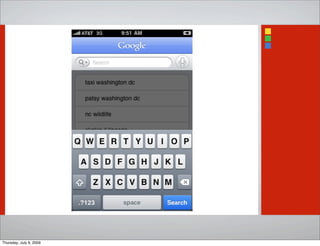
Features for many models of phones, not
just iPhones
GOOG-411 allows you to search for
business information free.
Have search results sent to you over text.
To get started, text the word “help” to
GOOGLE (466453).
Thursday, July 9, 2009
Play with Mobile Features	
Get started by visiting the Google Mobile page and entering your phone
number. A message will be sent to you to once you’ve linked Google to your
phone.
Try Voice Search.
Try accessing items we’ve played with today such as your Google Reader.
Add an appointment to your calendar from your phone.
Find out if your flight will be on time or a list of pizza joints in your
neighborhood.
Thursday, July 9, 2009
Google Apps Education Edition
Google Apps Edu community: http://edu.googleapps.com/
Google Apps Education Edition main page: http://www.google.com/a/edu/
Moodle Integration: http://code.google.com/p/moodle-google/
Includes:
Gmail
Calendar
Docs
Sites
Video
Message Security (free for new and existing education customers)
Thursday, July 9, 2009
Find me on ....
Gmail: elemenous@gmail.com
Blog: http://lucygray.org
Skype, AIM, Flickr, Twitter, YouTube, del.icio.us,
Diigo: elemenous
Thursday, July 9, 2009

Organize With Google Tools

  • 1.
    Google for EducatorsOverview Organize with Google Tools Lucy Gray University of Chicago Center for Elementary Mathematics and Science Education iSummit ’09 Thursday, July 9, 2009
  • 2.
    Google Calendar Google Docs Gmail Reader Mobile GoogleApps Education Edition Thursday, July 9, 2009
  • 3.
    If you useGmail, Google Docs etc. already, you have a Google account. You do not need a Gmail account; you can use any email address to get a Google account. Gmail is recommended, however. You can have all your email from other accounts deliveredy to Gmail if you so choose. Google Account: Gmail and Google Account: Sign Up for a Google Account Thursday, July 9, 2009
  • 4.
    Multiple calendars Sync withiCal Mobile Public and private calendars Tasks Part of Google Apps Education Edition Google http://www.google.com/calendar Thursday, July 9, 2009
  • 5.
    Play with GoogleCalendar Add an fictitious appointment to your calendar. Double click on a day or use Quick Add. Invite someone to this appointment. Use my email address (elemenous@gmail.com) or a neighbor’s. Explore the arrow next to your calendar’s name. Change the color of your calendar. Click on Tasks and start creating a to do list. Look at your calendar in the different views: Day, Week, Month, 7 Days & Agenda Click on Settings and explore. Find Create a New Calendar and note that you can import calendars from other software programs such as iCal Thursday, July 9, 2009
  • 6.
    Google Docs http://docs.google.com Docs, Spreadsheets,Forms, Presentations Templates Sharing and publishing capabilities Part of Google Apps Education Edition Thursday, July 9, 2009
  • 7.
    Play with GoogleDocs Create a document and share it with a neighbor or me (elemenous@gmail.com) Experiment with text and tools including the drawing tool. Save your document and then create a folder. Drag and drop a document into it. Create a survey using Forms and invite someone to take they survey OR Take this survey: http://tinyurl.com/isummitsurvey See the results of the survey: http://tinyurl.com/isummitsurveyspreadsheet Add to this presentation: http://tinyurl.com/isummitpresentation Thursday, July 9, 2009
  • 8.
    Gmail http://mail.google.com Themes Search Labels Drag and drop Labs Openattachments in Google Docs Thursday, July 9, 2009
  • 9.
    Play with Gmail Changeyour theme under Settings>Themes. Create a few labels and filters to organize your mail. Examples: parents, work, personal, urgent, iSummit Examine your Chat settings. Edit as necessary and consider installing voice and video chat. Click on Labs and explore some experimental features. Look at the Offline setting and consider installing Google Gears. You can read email offline now! Thursday, July 9, 2009
  • 10.
    Google Reader http://www.google.com/reader Direct informationto automatically come to one place for easy browsing. Subscribe to blogs, web sites, podcasts etc. Subscribe to searches. Monitor web sites, wikis, Google docs for changes. Thursday, July 9, 2009
  • 11.
  • 12.
    Play with GoogleReader Subscribe to a blog or other news source using search and Add a Subscription. Add a blog by copying and pasting a hyperlink to an RSS feed. Control-click on the orange RSS button on David Warlick’s blog and copy the url. David’s blog can be found at: http://davidwarlick.com/2cents/. Add friends and share an item with your friends. Check out shared items and note that there is a public page for this that you can link to. Try browsing for stuff. Set up folders to organize subscriptions. Thursday, July 9, 2009
  • 13.
    Mobile http://www.google.com/mobile/ Features for manymodels of phones, not just iPhones GOOG-411 allows you to search for business information free. Have search results sent to you over text. To get started, text the word “help” to GOOGLE (466453). Thursday, July 9, 2009
  • 14.
  • 15.
    Play with MobileFeatures Get started by visiting the Google Mobile page and entering your phone number. A message will be sent to you to once you’ve linked Google to your phone. Try Voice Search. Try accessing items we’ve played with today such as your Google Reader. Add an appointment to your calendar from your phone. Find out if your flight will be on time or a list of pizza joints in your neighborhood. Thursday, July 9, 2009
  • 16.
    Google Apps EducationEdition Google Apps Edu community: http://edu.googleapps.com/ Google Apps Education Edition main page: http://www.google.com/a/edu/ Moodle Integration: http://code.google.com/p/moodle-google/ Includes: Gmail Calendar Docs Sites Video Message Security (free for new and existing education customers) Thursday, July 9, 2009
  • 17.
    Find me on.... Gmail: elemenous@gmail.com Blog: http://lucygray.org Skype, AIM, Flickr, Twitter, YouTube, del.icio.us, Diigo: elemenous Thursday, July 9, 2009