CODING FOR LIBRARIANS
PART 2: CODING 101
HANDS-ON INTRODUCTION
Bohyun Kim
Associate Director, Health Sciences & Human Services Library
University of Maryland, Baltimore
ReachingAcross Illinois Library System -Webinar
Tue, May 31, 2016 1:00 PM - 2:00 PM CDT
WHY AREYOU INTERESTED IN CODING?
• Q.What do you want to be able to do once you learn how to code?
• Q. Do you have previous experience with coding, and if so what is it?
• Q. If you tried to teach yourself how to code before, what were some of the difficulties?
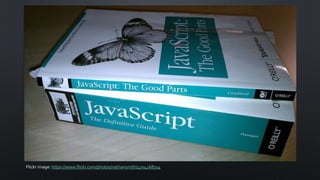
Flickr image: https://www.flickr.com/photos/nathansmith/4704268314
WHAT IS JAVASCRIPT?
• JavaScript is a cross-platform, object-oriented scripting language. It is a
small and lightweight language. Inside a host environment (for example, a
web browser), JavaScript can be connected to the objects of its
environment to provide programmatic control over them.
• JavaScript contains a standard library of objects, such as Array, Date, and
Math, and a core set of language elements such as operators, control
structures, and statements. Core JavaScript can be extended for a variety
of purposes by supplementing it with additional objects;
• https://developer.mozilla.org/en-
US/docs/Web/JavaScript/Guide/Introduction
JS
• Default scripting language for theWeb.
• Runs in a browser!
• Minimal dev environment setup
SET-UP
• A computer with access to the Internet
• Web browser
• Firefox
• Web Console (http://www.howtogeek.com/105320/how-to-use-
firefoxs-web-developer-tools/)
• Or, Firebug: https://addons.mozilla.org/en-
US/firefox/addon/firebug/
• Or, Chrome
• Devtools (https://developer.chrome.com/devtools)
LET’STRY RUNNING A SCRIPT!
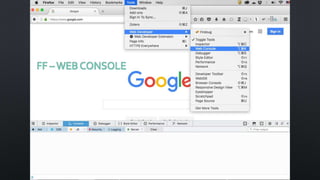
• Open up your web browser – FF or Chrome.
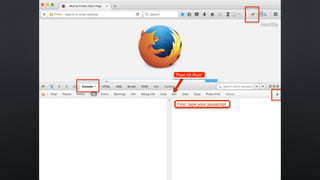
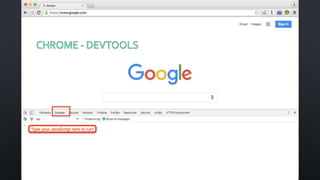
• Press F-12 to open up a browser console.
FF –WEB CONSOLE
FF- FIREBUG
CHROME - DEVTOOLS
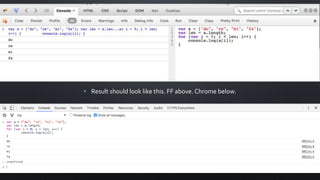
TYPETHIS IN & RUN IT!
var a = ["do", "re", "mi", "fa"];
var len = a.length;
for (var i = 0; i < len; i++) {
console.log(a[i]);
}
• Result should look like this. FF above. Chrome below.
SUCCESS? : )
Don’t worry yet about what it means.
We will take a look again at the end of this workshop.
And it will all make sense then!
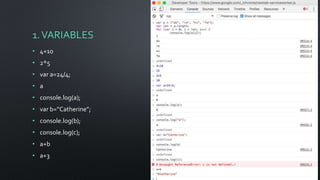
1.VARIABLES
• 4+10
• 2*5
• var a=24/4;
• a
• console.log(a);
• var b=“Catherine”;
• console.log(b);
• console.log(c);
• a+b
• a+3
VARIABLES & OPERATORS
• http://www.w3schools.com/js/js_variables.asp
• http://www.w3schools.com/js/js_operators.asp
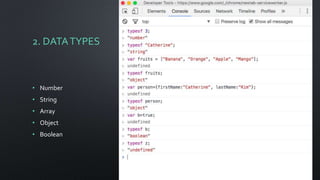
2. DATATYPES
• Number
• String
• Array
• Object
• Boolean
DATATYPES
• http://www.w3schools.com/js/js_datatypes.asp
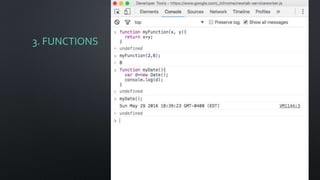
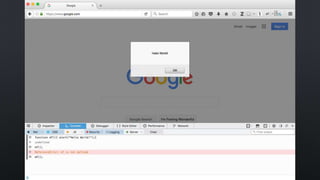
3. FUNCTIONS
FUNCTIONS
• http://www.w3schools.com/js/js_functions.asp
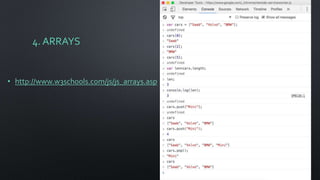
4. ARRAYS
• http://www.w3schools.com/js/js_arrays.asp
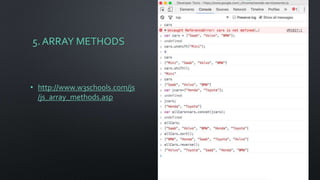
5. ARRAY METHODS
• http://www.w3schools.com/js
/js_array_methods.asp
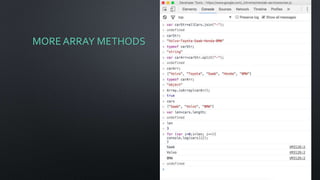
MORE ARRAY METHODS
DIDWE
RUN OUT OFTIME
YET? : )
6. FOR LOOP
var a = ["do", "re", "mi", "fa"];
var len = a.length;
for (var i = 0; i < len; i++) {
console.log(a[i]);
}
FOR LOOP
• http://www.w3schools.com/js/js_loop_for.asp
7. STRING
• http://www.w3schools.com/js/js_strings.asp
8. METHODS FORTHE STRING OBJECT
• http://www.w3schools.com/js/js_string_methods.asp
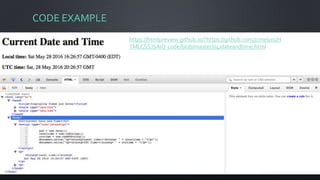
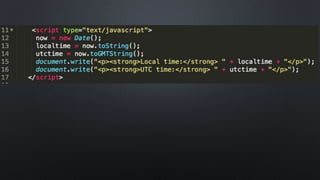
CODE EXAMPLE
https://htmlpreview.github.io/?https://github.com/jcmeloni/H
TMLCSSJSAiO-code/blob/master/04/dateandtime.html
MORE CODE EXAMPLES BY ME
WITH EXPLANATION
• The simplest AJAX: writing your own code (1)
http://www.bohyunkim.net/blog/archives/2186
• More APIs: writing your own code (2) http://www.bohyunkim.net/blog/archives/2219
• Playing with JavaScript and JQuery – the Ebook link HTML string generator and the
EZproxy bookmarklet generator http://www.bohyunkim.net/blog/archives/255
• Fear no Longer Regular Expressions http://www.bohyunkim.net/blog/archives/2595
• Using the StripeAPI to Collect Library Fines by Accepting Online Payments
http://www.bohyunkim.net/blog/archives/3009
• More simple code examples at https://github.com/bohyunkim/examples
TIPS
• Don’t be discouraged or frustrated.You are teaching yourself a language.
• Be persistent and realistic.
• Set small goals that solve real-life problems.
• Form or join a study group & find like-minded folks!
• Comment your code and document since you will forget what you have
learned and made.
THANKYOU!

Coding 101: A hands-on introduction