WHAT IS BRAND?
                 CONFIDENCE

                      PASSION

BRAND VALUES
A SET OF UNIQUE
                IS…      BELONGING

                       ACTION
                   SECURITY
BUILDING EQUITY IN YOU

• LOOK AT YOUR PERSONAL BRAND AS AN
 INVESTMENT
• SET GOALS FOR YOUR PUBLIC IMAGE
• RUN A BLOG OR WEBSITE THAT IS ALL YOU
• BE UBIQUITOUS AND CONSISTENT
• ENGAGE AND GET PEOPLE TALKING
• ALWAYS CONTINUE LEARNING AND GROWING
The Basics of

   PRSSA SAC STATE | APRIL 18, 2013
LINKEDIN: WHY YOU NEED IT
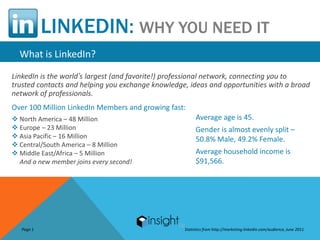
  What is LinkedIn?
LinkedIn is the world’s largest (and favorite!) professional network, connecting you to
trusted contacts and helping you exchange knowledge, ideas and opportunities with a broad
network of professionals.
Over 100 Million LinkedIn Members and growing fast:
 North America – 48 Million                            Average age is 45.
 Europe – 23 Million                                   Gender is almost evenly split –
 Asia Pacific – 16 Million                             50.8% Male, 49.2% Female.
 Central/South America – 8 Million
 Middle East/Africa – 5 Million                        Average household income is
  And a new member joins every second!                  $91,566.


   Page 1                                          Statistics from http://marketing.linkedin.com/audience, June 2011
LINKEDIN: WHY YOU NEED IT
Distinguishing Between Social vs. Professional Networks
         LinkedIn is a professional network intended to create business opportunities:
          Maintain business  contacts online
          Get introduced to professionals & service providers
          Recommend colleagues & check references
          Conduct research
          Receive industry news / ask & answer industry questions
          Find, post or forward jobs

         Unlike social networks, LinkedIn’s purpose is to present your professional,
         rather than your personal, image. Don’t confuse the two.


Page 2
LINKEDIN: WHY YOU NEED IT
Why Do We Care?
         LinkedIn establishes your professional profile:
         LinkedIn gives you the keys to controlling your online identity. Have you Googled
         yourself lately? LinkedIn profiles rise to the top of search results, letting you control
         the first impression people get when searching for you online.
         LinkedIn makes it easy to stay in touch with colleagues and friends:
         In today’s professional world, people change jobs and locations constantly. By
         connecting on LinkedIn, your address book will never go out of date. Your contacts
         update their profiles, keeping you current with their latest jobs, projects and contact
         info. You’ll stay in closer contact with great tools to communicate and collaborate.


Page 3
LINKEDIN: WHY YOU NEED IT
Why Do We Care? (continued)
         LinkedIn helps you explore opportunities:
         Whether you’re looking for a career opportunity, winning new clients or building your
         professional reputation, LinkedIn connects you to jobs, sales leads and ideal business
         partners. With a powerful search engine, company research tools and a jobs board
         that shows who you know at listed companies, LinkedIn is the place to turn for new
         opportunities.


Page 4
LINKEDIN: WHY YOU NEED IT
Why Do We Care? (continued)
         LinkedIn helps you boost your PR efforts:
         •   Research journalists before you pitch to them, to discover insights and other
             background information that will help you make a better pitch
         •   Get introduced to journalists, editors and bloggers
         •   Be discoverable by a different audience than you’re already reaching
         •   Improve your company website’s SEO
         •   Gather intelligence on your market, audience, and competitors


Page 4
LINKEDIN: HOW TO JOIN
Becoming a Member is Easy
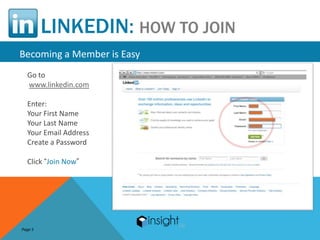
  Go to
  www.linkedin.com

  Enter:
  Your First Name
  Your Last Name
  Your Email Address
  Create a Password

  Click “Join Now”


Page 5
LINKEDIN: SETTING UP YOUR ACCOUNT
Adjusting Your Account Settings

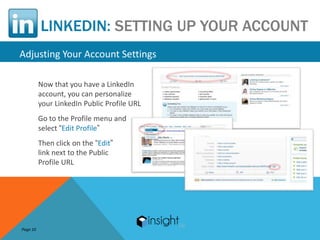
          Now that you have a LinkedIn
          account, you can personalize
          your LinkedIn Public Profile URL
          Go to the Profile menu and
          select “Edit Profile”
          Then click on the “Edit”
          link next to the Public
          Profile URL


Page 10
LINKEDIN: SETTING UP YOUR ACCOUNT
   Adjusting Your Account Settings
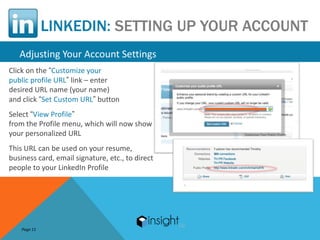
Click on the “Customize your
public profile URL” link – enter
desired URL name (your name)
and click “Set Custom URL” button
Select “View Profile”
from the Profile menu, which will now show
your personalized URL
This URL can be used on your resume,
business card, email signature, etc., to direct
people to your LinkedIn Profile


    Page 11
LINKEDIN: BUILDING YOUR PROFILE
Where’s the Beef?
Everyone starts on LinkedIn with a profile. It can be as simple as your name. But there
are four reasons why you want your profile to be “beefy”:
1. Your Profile is an opportunity to tell your story –
 The depth and breadth of your experience
 Your professional recommendations
 Your certifications and educational experience
 Your brand – positioning as expert in your field and best choice for job

2. Every word in your profile is keyword searchable –
 Beefy profiles increase your chances of being found, users rely on keyword searches
to find those with certain types of experience, classifications, and skill sets


Page 17
LINKEDIN: BUILDING YOUR PROFILE
Where’s the Beef?
3. A beefy profile shows that you are not a dinosaur –
 You keep abreast of current trends in your profession and social media
 You embrace technology and change in a positive manner

4. Your profile will regularly be compared with those of your competitors –
Include a plethora of information, keywords, and details about
who you are, what you hope to accomplish, and how you might be
able to assist others
See what your competitors are saying about themselves–awards
they’ve won, certifications they hold, types of projects they’ve worked on–to jog your
memory and remind you of similar information you could include in your own profile


Page 18
LINKEDIN: BUILDING YOUR PROFILE
Why You Want a 100% Complete Profile
                                    LinkedIn’s definition of a 100% Complete Profile:
     Research shows you will be
                                     Name   and Position……………………..25%
     40 times more effective on
                                     Picture………………………………………….5%
     LinkedIn if you have
                                     Summary………………………………………5%
     a fully completed profile.
                                     Specialties…………………………………….5%
     Failing to complete your
                                     Education……………………………………15%
     profile is like playing golf    Past Job #1………………………………….15%
     with a bag full of putters.     Past Job #2………………………………….15%
     Use all the tools that          Recommendation #1…………………….5%
     LinkedIn offers!                Recommendation #2…………………….5%
                                     Recommendation #3…………………….5%


Page 19
LINKEDIN: BUILDING YOUR PROFILE
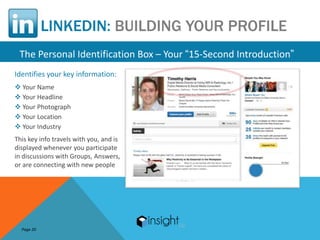
 The Personal Identification Box – Your “15-Second Introduction”
Identifies your key information:
 Your Name
 Your Headline
 Your Photograph
 Your Location
 Your Industry
This key info travels with you, and is
displayed whenever you participate
in discussions with Groups, Answers,
or are connecting with new people


  Page 20
LINKEDIN: BUILDING YOUR PROFILE
   The Personal Identification Box – Your “15-Second Introduction”

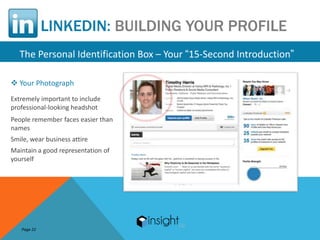
 Your Photograph
Extremely important to include
professional-looking headshot
People remember faces easier than
names
Smile, wear business attire
Maintain a good representation of
yourself


   Page 22
LINKEDIN: BUILDING YOUR PROFILE
   The Personal Identification Box – Your “15-Second Introduction”
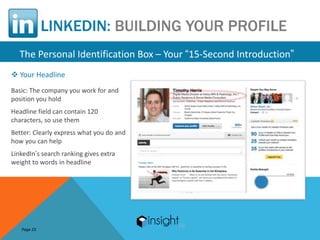
 Your Headline
Basic: The company you work for and
position you hold
Headline field can contain 120
characters, so use them
Better: Clearly express what you do and
how you can help
LinkedIn’s search ranking gives extra
weight to words in headline


   Page 23
LINKEDIN: BUILDING YOUR PROFILE
  The Personal Identification Box – Your “15-Second Introduction”

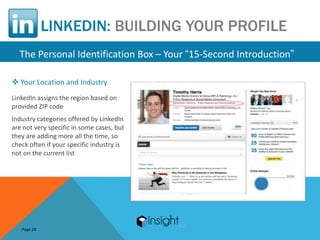
 Your Location and Industry
LinkedIn assigns the region based on
provided ZIP code
Industry categories offered by LinkedIn
are not very specific in some cases, but
they are adding more all the time, so
check often if your specific industry is
not on the current list


   Page 24
LINKEDIN: BUILDING YOUR PROFILE
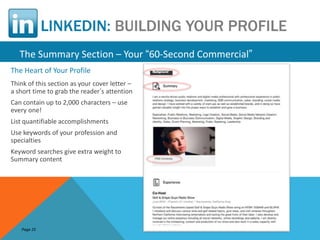
   The Summary Section – Your “60-Second Commercial”
The Heart of Your Profile
Think of this section as your cover letter –
a short time to grab the reader’s attention
Can contain up to 2,000 characters – use
every one!
List quantifiable accomplishments
Use keywords of your profession and
specialties
Keyword searches give extra weight to
Summary content


   Page 25
LINKEDIN: BUILDING YOUR PROFILE
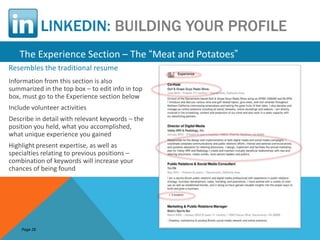
   The Experience Section – The “Meat and Potatoes”
Resembles the traditional resume
Information from this section is also
summarized in the top box – to edit info in top
box, must go to the Experience section below
Include volunteer activities
Describe in detail with relevant keywords – the
position you held, what you accomplished,
what unique experience you gained
Highlight present expertise, as well as
specialties relating to previous positions –
combination of keywords will increase your
chances of being found


    Page 26
LINKEDIN: BUILDING YOUR PROFILE
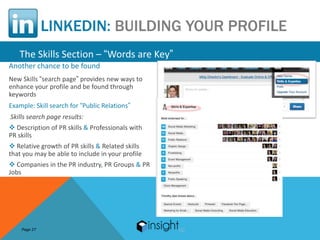
   The Skills Section – “Words are Key”
Another chance to be found
New Skills “search page” provides new ways to
enhance your profile and be found through
keywords
Example: Skill search for “Public Relations”
Skills search page results:
 Description of PR skills & Professionals with
PR skills
 Relative growth of PR skills & Related skills
that you may be able to include in your profile
 Companies in the PR industry, PR Groups & PR
Jobs


    Page 27
LINKEDIN: MAKING CONNECTIONS
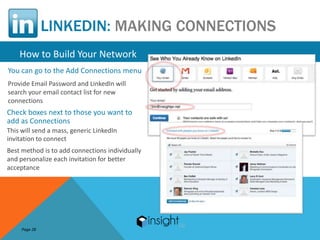
    How to Build Your Network
You can go to the Add Connections menu
Provide Email Password and LinkedIn will
search your email contact list for new
connections
Check boxes next to those you want to
add as Connections
This will send a mass, generic LinkedIn
invitation to connect
Best method is to add connections individually
and personalize each invitation for better
acceptance


     Page 28
LINKEDIN: MAKING CONNECTIONS
  How to Build Your Network
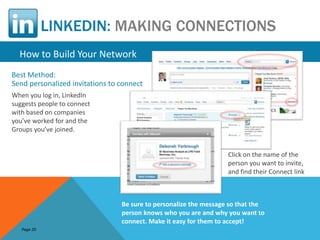
Best Method:
Send personalized invitations to connect
When you log in, LinkedIn
suggests people to connect
with based on companies
you’ve worked for and the
Groups you’ve joined.


                                                                   Click on the name of the
                                                                   person you want to invite,
                                                                   and find their Connect link


                                 Be sure to personalize the message so that the
                                 person knows who you are and why you want to
                                 connect. Make it easy for them to accept!
   Page 29
LINKEDIN: JOINING GROUPS
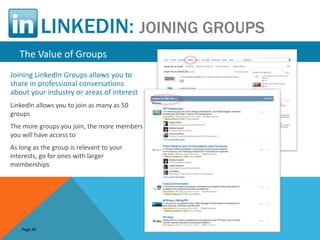
   The Value of Groups
Joining LinkedIn Groups allows you to
share in professional conversations
about your industry or areas of interest
LinkedIn allows you to join as many as 50
groups
The more groups you join, the more members
you will have access to
As long as the group is relevant to your
interests, go for ones with larger
memberships


    Page 30
LINKEDIN: JOINING GROUPS
The Value of Groups
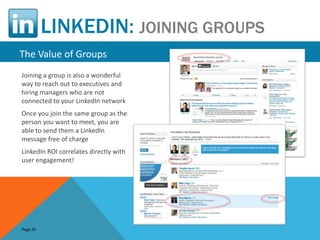
Joining a group is also a wonderful
way to reach out to executives and
hiring managers who are not
connected to your LinkedIn network
Once you join the same group as the
person you want to meet, you are
able to send them a LinkedIn
message free of charge
LinkedIn ROI correlates directly with
user engagement!


Page 31
LINKEDIN
 Remember…
To make the most of your LinkedIn account!
Complete your LinkedIn Profile to 100%
Personalize your Public Profile URL, and use it on your resume, business cards, and email signatures
List quantifiable accomplishments, skill sets, key words, and common misspellings of your name
Build your LinkedIn network by sending personalized, rather than generic, invitations to connect
Ask for LinkedIn recommendations from managers, co-workers, and clients
Join Groups that are relevant to your industry and get engaged!
Log in and use your LinkedIn account every day!


  Page 32
ONE LAST THING…


   RAISE YOUR
IF YOU HAVE A SMART PHONE
         HAND
QUESTIONS
I KNOW YOU HAVE ONE
STAY IN TOUCH

SOCIAL                             DIRECT
•   www.facebook.com/TimUncork     Cell: 916.390.0537
    ed                             Email: Tim@insightpr.net
•   @TimUncorked |
    @10DollarWino
•   www.linkedin.com/in/TimUncor
WEB ked
                                   RADIO
•   www.GolfandGrapeGuys.com       •   The Golf & Grape Guys Radio
•   www.10dollarWino.com               Show on KFBK 1520am &
                                       92.5fm Every Sunday From
•   www.insightpr.net                  1pm – 2pm
THANKS
HAVE A GREAT NIGHT

Insight PR - PRSSA Sac State Presentation 4/18/2013

  • 4.
    WHAT IS BRAND? CONFIDENCE PASSION BRAND VALUES A SET OF UNIQUE IS… BELONGING ACTION SECURITY
  • 5.
    BUILDING EQUITY INYOU • LOOK AT YOUR PERSONAL BRAND AS AN INVESTMENT • SET GOALS FOR YOUR PUBLIC IMAGE • RUN A BLOG OR WEBSITE THAT IS ALL YOU • BE UBIQUITOUS AND CONSISTENT • ENGAGE AND GET PEOPLE TALKING • ALWAYS CONTINUE LEARNING AND GROWING
  • 6.
    The Basics of PRSSA SAC STATE | APRIL 18, 2013
  • 7.
    LINKEDIN: WHY YOUNEED IT What is LinkedIn? LinkedIn is the world’s largest (and favorite!) professional network, connecting you to trusted contacts and helping you exchange knowledge, ideas and opportunities with a broad network of professionals. Over 100 Million LinkedIn Members and growing fast:  North America – 48 Million Average age is 45.  Europe – 23 Million Gender is almost evenly split –  Asia Pacific – 16 Million 50.8% Male, 49.2% Female.  Central/South America – 8 Million  Middle East/Africa – 5 Million Average household income is And a new member joins every second! $91,566. Page 1 Statistics from http://marketing.linkedin.com/audience, June 2011
  • 8.
    LINKEDIN: WHY YOUNEED IT Distinguishing Between Social vs. Professional Networks LinkedIn is a professional network intended to create business opportunities:  Maintain business contacts online  Get introduced to professionals & service providers  Recommend colleagues & check references  Conduct research  Receive industry news / ask & answer industry questions  Find, post or forward jobs Unlike social networks, LinkedIn’s purpose is to present your professional, rather than your personal, image. Don’t confuse the two. Page 2
  • 9.
    LINKEDIN: WHY YOUNEED IT Why Do We Care? LinkedIn establishes your professional profile: LinkedIn gives you the keys to controlling your online identity. Have you Googled yourself lately? LinkedIn profiles rise to the top of search results, letting you control the first impression people get when searching for you online. LinkedIn makes it easy to stay in touch with colleagues and friends: In today’s professional world, people change jobs and locations constantly. By connecting on LinkedIn, your address book will never go out of date. Your contacts update their profiles, keeping you current with their latest jobs, projects and contact info. You’ll stay in closer contact with great tools to communicate and collaborate. Page 3
  • 10.
    LINKEDIN: WHY YOUNEED IT Why Do We Care? (continued) LinkedIn helps you explore opportunities: Whether you’re looking for a career opportunity, winning new clients or building your professional reputation, LinkedIn connects you to jobs, sales leads and ideal business partners. With a powerful search engine, company research tools and a jobs board that shows who you know at listed companies, LinkedIn is the place to turn for new opportunities. Page 4
  • 11.
    LINKEDIN: WHY YOUNEED IT Why Do We Care? (continued) LinkedIn helps you boost your PR efforts: • Research journalists before you pitch to them, to discover insights and other background information that will help you make a better pitch • Get introduced to journalists, editors and bloggers • Be discoverable by a different audience than you’re already reaching • Improve your company website’s SEO • Gather intelligence on your market, audience, and competitors Page 4
  • 12.
    LINKEDIN: HOW TOJOIN Becoming a Member is Easy Go to www.linkedin.com Enter: Your First Name Your Last Name Your Email Address Create a Password Click “Join Now” Page 5
  • 13.
    LINKEDIN: SETTING UPYOUR ACCOUNT Adjusting Your Account Settings Now that you have a LinkedIn account, you can personalize your LinkedIn Public Profile URL Go to the Profile menu and select “Edit Profile” Then click on the “Edit” link next to the Public Profile URL Page 10
  • 14.
    LINKEDIN: SETTING UPYOUR ACCOUNT Adjusting Your Account Settings Click on the “Customize your public profile URL” link – enter desired URL name (your name) and click “Set Custom URL” button Select “View Profile” from the Profile menu, which will now show your personalized URL This URL can be used on your resume, business card, email signature, etc., to direct people to your LinkedIn Profile Page 11
  • 15.
    LINKEDIN: BUILDING YOURPROFILE Where’s the Beef? Everyone starts on LinkedIn with a profile. It can be as simple as your name. But there are four reasons why you want your profile to be “beefy”: 1. Your Profile is an opportunity to tell your story –  The depth and breadth of your experience  Your professional recommendations  Your certifications and educational experience  Your brand – positioning as expert in your field and best choice for job 2. Every word in your profile is keyword searchable –  Beefy profiles increase your chances of being found, users rely on keyword searches to find those with certain types of experience, classifications, and skill sets Page 17
  • 16.
    LINKEDIN: BUILDING YOURPROFILE Where’s the Beef? 3. A beefy profile shows that you are not a dinosaur –  You keep abreast of current trends in your profession and social media  You embrace technology and change in a positive manner 4. Your profile will regularly be compared with those of your competitors – Include a plethora of information, keywords, and details about who you are, what you hope to accomplish, and how you might be able to assist others See what your competitors are saying about themselves–awards they’ve won, certifications they hold, types of projects they’ve worked on–to jog your memory and remind you of similar information you could include in your own profile Page 18
  • 17.
    LINKEDIN: BUILDING YOURPROFILE Why You Want a 100% Complete Profile LinkedIn’s definition of a 100% Complete Profile: Research shows you will be  Name and Position……………………..25% 40 times more effective on  Picture………………………………………….5% LinkedIn if you have  Summary………………………………………5% a fully completed profile.  Specialties…………………………………….5% Failing to complete your  Education……………………………………15% profile is like playing golf  Past Job #1………………………………….15% with a bag full of putters.  Past Job #2………………………………….15% Use all the tools that  Recommendation #1…………………….5% LinkedIn offers!  Recommendation #2…………………….5%  Recommendation #3…………………….5% Page 19
  • 18.
    LINKEDIN: BUILDING YOURPROFILE The Personal Identification Box – Your “15-Second Introduction” Identifies your key information:  Your Name  Your Headline  Your Photograph  Your Location  Your Industry This key info travels with you, and is displayed whenever you participate in discussions with Groups, Answers, or are connecting with new people Page 20
  • 19.
    LINKEDIN: BUILDING YOURPROFILE The Personal Identification Box – Your “15-Second Introduction”  Your Photograph Extremely important to include professional-looking headshot People remember faces easier than names Smile, wear business attire Maintain a good representation of yourself Page 22
  • 20.
    LINKEDIN: BUILDING YOURPROFILE The Personal Identification Box – Your “15-Second Introduction”  Your Headline Basic: The company you work for and position you hold Headline field can contain 120 characters, so use them Better: Clearly express what you do and how you can help LinkedIn’s search ranking gives extra weight to words in headline Page 23
  • 21.
    LINKEDIN: BUILDING YOURPROFILE The Personal Identification Box – Your “15-Second Introduction”  Your Location and Industry LinkedIn assigns the region based on provided ZIP code Industry categories offered by LinkedIn are not very specific in some cases, but they are adding more all the time, so check often if your specific industry is not on the current list Page 24
  • 22.
    LINKEDIN: BUILDING YOURPROFILE The Summary Section – Your “60-Second Commercial” The Heart of Your Profile Think of this section as your cover letter – a short time to grab the reader’s attention Can contain up to 2,000 characters – use every one! List quantifiable accomplishments Use keywords of your profession and specialties Keyword searches give extra weight to Summary content Page 25
  • 23.
    LINKEDIN: BUILDING YOURPROFILE The Experience Section – The “Meat and Potatoes” Resembles the traditional resume Information from this section is also summarized in the top box – to edit info in top box, must go to the Experience section below Include volunteer activities Describe in detail with relevant keywords – the position you held, what you accomplished, what unique experience you gained Highlight present expertise, as well as specialties relating to previous positions – combination of keywords will increase your chances of being found Page 26
  • 24.
    LINKEDIN: BUILDING YOURPROFILE The Skills Section – “Words are Key” Another chance to be found New Skills “search page” provides new ways to enhance your profile and be found through keywords Example: Skill search for “Public Relations” Skills search page results:  Description of PR skills & Professionals with PR skills  Relative growth of PR skills & Related skills that you may be able to include in your profile  Companies in the PR industry, PR Groups & PR Jobs Page 27
  • 25.
    LINKEDIN: MAKING CONNECTIONS How to Build Your Network You can go to the Add Connections menu Provide Email Password and LinkedIn will search your email contact list for new connections Check boxes next to those you want to add as Connections This will send a mass, generic LinkedIn invitation to connect Best method is to add connections individually and personalize each invitation for better acceptance Page 28
  • 26.
    LINKEDIN: MAKING CONNECTIONS How to Build Your Network Best Method: Send personalized invitations to connect When you log in, LinkedIn suggests people to connect with based on companies you’ve worked for and the Groups you’ve joined. Click on the name of the person you want to invite, and find their Connect link Be sure to personalize the message so that the person knows who you are and why you want to connect. Make it easy for them to accept! Page 29
  • 27.
    LINKEDIN: JOINING GROUPS The Value of Groups Joining LinkedIn Groups allows you to share in professional conversations about your industry or areas of interest LinkedIn allows you to join as many as 50 groups The more groups you join, the more members you will have access to As long as the group is relevant to your interests, go for ones with larger memberships Page 30
  • 28.
    LINKEDIN: JOINING GROUPS TheValue of Groups Joining a group is also a wonderful way to reach out to executives and hiring managers who are not connected to your LinkedIn network Once you join the same group as the person you want to meet, you are able to send them a LinkedIn message free of charge LinkedIn ROI correlates directly with user engagement! Page 31
  • 29.
    LINKEDIN Remember… To makethe most of your LinkedIn account! Complete your LinkedIn Profile to 100% Personalize your Public Profile URL, and use it on your resume, business cards, and email signatures List quantifiable accomplishments, skill sets, key words, and common misspellings of your name Build your LinkedIn network by sending personalized, rather than generic, invitations to connect Ask for LinkedIn recommendations from managers, co-workers, and clients Join Groups that are relevant to your industry and get engaged! Log in and use your LinkedIn account every day! Page 32
  • 30.
    ONE LAST THING… RAISE YOUR IF YOU HAVE A SMART PHONE HAND
  • 31.
  • 32.
    STAY IN TOUCH SOCIAL DIRECT • www.facebook.com/TimUncork Cell: 916.390.0537 ed Email: Tim@insightpr.net • @TimUncorked | @10DollarWino • www.linkedin.com/in/TimUncor WEB ked RADIO • www.GolfandGrapeGuys.com • The Golf & Grape Guys Radio • www.10dollarWino.com Show on KFBK 1520am & 92.5fm Every Sunday From • www.insightpr.net 1pm – 2pm
  • 33.

Editor's Notes

  • #8 LinkedIn is the world’s largest (and favorite!) professional network, connecting you to trusted contacts and helping you exchange knowledge, ideas and opportunities with a broad network of professionals.Over 100 Million LinkedIn Members and growing fast:North America – 48 MillionEurope – 23 MillionAsia Pacific – 16 MillionCentral/South America – 8 MillionMiddle East/Africa – 5 MillionAnd a new member joins every second!Average age is 45.Gender is almost evenly split – 50.8% Male, 49.2% Female.Average household income is $91,566.
  • #9 LinkedIn is a professional network intended to create business opportunities: Maintain business contacts online Get introduced to professionals & service providers Recommend colleagues & check references Conduct research Receive industry news / ask & answer industry questions Find, post or forward jobsUnlike social networks, LinkedIn’s purpose is to present your professional, rather than your personal, image. Don’t confuse the two.
  • #10 LinkedIn establishes your professional profile:LinkedIn gives you the keys to controlling your online identity. Have you Googled yourself lately? LinkedIn profiles rise to the top of search results, letting you control the first impression people get when searching for you online.LinkedIn makes it easy to stay in touch with colleagues and friends:In today’s professional world, people change jobs and locations constantly. By connecting on LinkedIn, your address book will never go out of date. Your contacts update their profiles, keeping you current with their latest jobs, projects and contact info. You’ll stay in closer contact with great tools to communicate and collaborate.
  • #11 LinkedIn helps you explore opportunities:Whether you’re looking for a career opportunity, winning new clients or building your professional reputation, LinkedIn connects you to jobs, sales leads and ideal business partners. With a powerful search engine, company research tools and a jobs board that shows who you know at listed companies, LinkedIn is the place to turn for new opportunities.
  • #12 LinkedIn helps you explore opportunities:Whether you’re looking for a career opportunity, winning new clients or building your professional reputation, LinkedIn connects you to jobs, sales leads and ideal business partners. With a powerful search engine, company research tools and a jobs board that shows who you know at listed companies, LinkedIn is the place to turn for new opportunities.
  • #13 Go towww.linkedin.comEnter:Your First NameYour Last NameYour Email AddressCreate a PasswordClick “Join Now”
  • #15 Click on the “Customize your public profile URL” link – enter desired URL name (your name)and click “Set Custom URL”buttonSelect “View Profile”from the Profile menu, which will now show your personalized URL This URL can be used on your resume, business card, email signature, etc., to direct people to your LinkedIn Profile
  • #16 Everyone starts on LinkedIn with a profile. It can be as simple as your name. But there are four reasons why you want your profile to be “beefy”:1. Your Profile is an opportunity to tell your story – The depth and breadth of your experience Your professional recommendations Your certifications and educational experience Your brand – positioning as expert in your field and best choice for job2. Every word in your profile is keyword searchable – Beefy profiles increase your chances of being found, users rely on keyword searches to find those with certain types of experience, classifications, and skill sets
  • #17 3. A beefy profile shows that you are not a dinosaur – You keep abreast of current trends in your profession and social media You embrace technology and change in a positive manner4. Your profile will regularly be compared with those of your competitors –Include a plethora of information, keywords, and details about who you are, what you hope to accomplish, and how you might be able to assist othersSee what your competitors are saying about themselves–awards they’ve won, certifications they hold, types of projects they’ve worked on–to jog your memory and remind you of similar information you could include in your own profile
  • #18 Research shows you will be 40 times more effective on LinkedIn if you havea fully completed profile. Failing to complete your profile is like playing golf with a bag full of putters. Use all the tools that LinkedIn offers!LinkedIn’s definition of a 100% Complete Profile: Name and Position……………………..25% Picture………………………………………….5% Summary………………………………………5% Specialties…………………………………….5% Education……………………………………15% Past Job #1………………………………….15% Past Job #2………………………………….15% Recommendation #1…………………….5% Recommendation #2…………………….5% Recommendation #3…………………….5%
  • #19 Identifies your key information:Your NameYour HeadlineYour PhotographYour LocationYour IndustryThis key info travels with you, and is displayed whenever you participate in discussions with Groups, Answers, or are connecting with new people