CNIT 128
Hacking Mobile Devices
2. Analyzing iOS Apps

Part 2
Topics: Part 1
• The Security Model

• iOS Apps

• Jailbreaking Explained
Topics: Part 2
• The Data Protection API

• The iOS Keychain

• TouchID

• Reverse Engineering iOS Binaries
The Data Protection API
File Encryption in iOS
• Per-file encryption key

• Locked with a protection class

• Protection classes govern when the class
keys are kept in memory

• Secure enclave manages keys 

• In devices with A7 or later chip
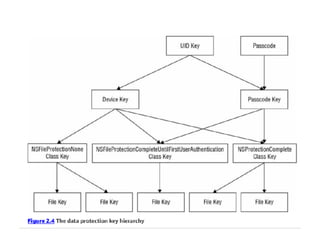
Passcode Key
• Uses Password-Based Key Derivation
Function 2 (PBKDF2)

• Inputs are user's passcode and a device-
specific key known as the UID key

• UID key is embedded in the device's
hardware-based crypto accelerator

• Cannot be accessed by software on the
device
Protection Classes
• No Protection
• Not encrypted

• Complete Protection
• Encrypted; inaccessible when device is
locked

• Complete Unless Open
• If file is in use, it's unencrypted when
device is locked
Protection Classes
• Complete Until First User Authentication
• Encrypted only from bootup to first
unlock

• Only protects it from attacks requiring a
device reboot

• This is the default setting
The iOS Keychain
Keychain Protection
Classes
• kSecAttrAccessibleAlways
• The keychain item is always accessible

• kSecAttrAccessibleWhenUnlocked
• The keychain item is accessible only when the
device is unlocked

• kSecAttrAccessibleAfterFirstUnlock
• The keychain item is only accessible after the first
unlock from boot. This offers some protection
against attacks that require a device reboot
• SecAttrAccessibleAlwaysThisDeviceOnly
• The keychain item is always accessible but cannot be migrated to
other devices. 

• kSecAttrAccessibleWhenUnlockedThisDeviceOnly
• The keychain item is only accessible when the device is unlocked
and may not be migrated to other devices 

• kSecAttrAccessibleAfterFirstUnlockThisDeviceOnly

• The keychain item is accessible after the first unlock from boot and
may not be migrated to other devices 

• kSecAttrAccessibleWhenPasscodeSetThisDeviceOnly
• Only allows you to store keychain items if a passcode is set on the
device. These items are accessible only when a passcode is set; if
the password is later unset, they cannot be decrypted
Keychain Protection
Classes
Access Control and
Authentication Policies
• Introduced in iOS 8

• Prevents access to keychain items when no
passcode is set on the device

• Requires entry of the passcode or Touch ID
(fingerprint)
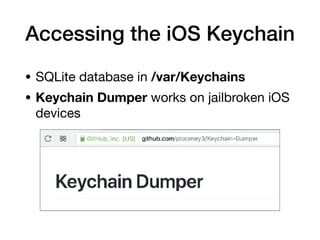
Accessing the iOS Keychain
• SQLite database in /var/Keychains
• Keychain Dumper works on jailbroken iOS
devices
TouchID
Device Locking
• If Touch ID is not enabled:

• Secure Enclave holds the data protection
class keys

• When device is locked the key material is
discarded

• For the "Complete Protection" class
With Touch ID Enabled
• Keys are not discarded, but held in memory

• Wrapped with a key that is available only
to the Touch ID system

• After Touch ID authentication, the wrapping
key becomes available
Reverse Engineering
iOS Binaries
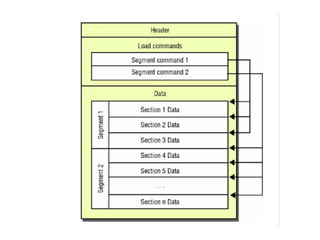
Mach-O Binaries
• Header
• Identifies file format & architecture
• Load commands
• File layout
• Location of symbol table

• Encrypted segments

• Shared libraries
• Data
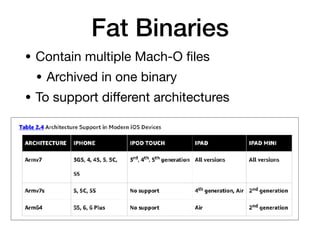
Fat Binaries
• Contain multiple Mach-O files

• Archived in one binary

• To support different architectures
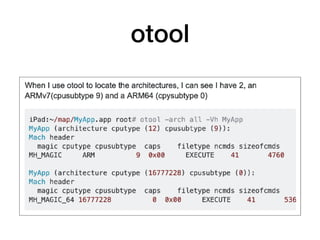
otool
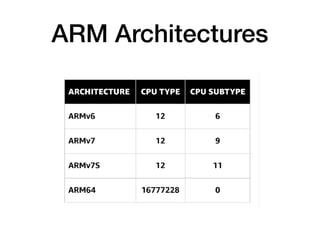
ARM Architectures
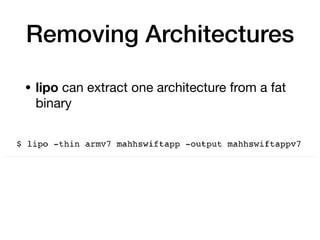
Removing Architectures
• lipo can extract one architecture from a fat
binary
Security-Related Features
Position-Indendent
Executable (PIE)
• A compiler option 

• Required for Address Space Layout
Randomization (ASLR)

• All built-in Apple apps have PIE, since iOS 5

• You can check other apps with otool
Stack Smashing Protection
• Places a canary value on the stack

• To protect the saved base pointer and
instruction pointer (rbp and rip)

• The LLVm compiler applies it intelligently

• Only to functions that need it

• Typically, ones that use character arrays

• Enabled by default for apps compiled with
recent versions of Xcode
Automatic Reference
Counting (ARC)
• Introduced in iOS SDK v 5.0

• Reduces risk of use-after-free and double-
free vulnerabilities

• Heap memory corruption
Decrypting App Store
Binaries
Encryption
• Apps in the App Store

• Are encrypted with FairPlay Digital Rights
Management (DRM)

• Apps are decrypted at run time by the
loader
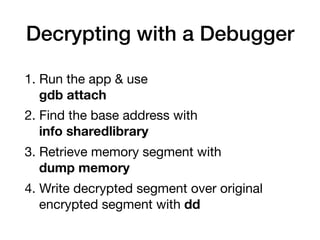
Decrypting with a Debugger
1. Run the app & use

	 gdb attach

2. Find the base address with 

	 info sharedlibrary
3. Retrieve memory segment with 

dump memory
4. Write decrypted segment over original 		 	
	 encrypted segment with dd
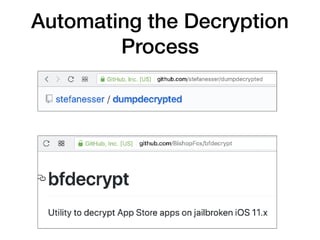
Automating the Decryption
Process
Inspecting Decrypted
Binaries
• class-dump-z and class-dump

• Shows details about internal classes,
methods, and variables

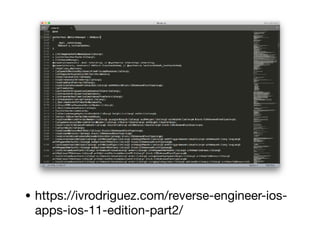
• The next page shows the class-dump
output for the Starbucks app

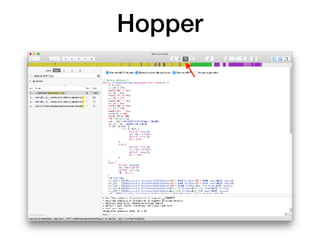
• To disassemble and decompile apps, use
Hopper or IDA Pro
• https://ivrodriguez.com/reverse-engineer-ios-
apps-ios-11-edition-part2/
Hopper
CNIT 128 2. Analyzing iOS Applications (Part 2)

CNIT 128 2. Analyzing iOS Applications (Part 2)

  • 1.
    CNIT 128 Hacking MobileDevices 2. Analyzing iOS Apps Part 2
  • 2.
    Topics: Part 1 •The Security Model • iOS Apps • Jailbreaking Explained
  • 3.
    Topics: Part 2 •The Data Protection API • The iOS Keychain • TouchID • Reverse Engineering iOS Binaries
  • 4.
  • 6.
    File Encryption iniOS • Per-file encryption key • Locked with a protection class • Protection classes govern when the class keys are kept in memory • Secure enclave manages keys • In devices with A7 or later chip
  • 7.
    Passcode Key • UsesPassword-Based Key Derivation Function 2 (PBKDF2) • Inputs are user's passcode and a device- specific key known as the UID key • UID key is embedded in the device's hardware-based crypto accelerator • Cannot be accessed by software on the device
  • 9.
    Protection Classes • NoProtection • Not encrypted • Complete Protection • Encrypted; inaccessible when device is locked • Complete Unless Open • If file is in use, it's unencrypted when device is locked
  • 10.
    Protection Classes • CompleteUntil First User Authentication • Encrypted only from bootup to first unlock • Only protects it from attacks requiring a device reboot • This is the default setting
  • 11.
  • 12.
    Keychain Protection Classes • kSecAttrAccessibleAlways •The keychain item is always accessible • kSecAttrAccessibleWhenUnlocked • The keychain item is accessible only when the device is unlocked • kSecAttrAccessibleAfterFirstUnlock • The keychain item is only accessible after the first unlock from boot. This offers some protection against attacks that require a device reboot
  • 13.
    • SecAttrAccessibleAlwaysThisDeviceOnly • Thekeychain item is always accessible but cannot be migrated to other devices. • kSecAttrAccessibleWhenUnlockedThisDeviceOnly • The keychain item is only accessible when the device is unlocked and may not be migrated to other devices • kSecAttrAccessibleAfterFirstUnlockThisDeviceOnly • The keychain item is accessible after the first unlock from boot and may not be migrated to other devices • kSecAttrAccessibleWhenPasscodeSetThisDeviceOnly • Only allows you to store keychain items if a passcode is set on the device. These items are accessible only when a passcode is set; if the password is later unset, they cannot be decrypted Keychain Protection Classes
  • 14.
    Access Control and AuthenticationPolicies • Introduced in iOS 8 • Prevents access to keychain items when no passcode is set on the device • Requires entry of the passcode or Touch ID (fingerprint)
  • 15.
    Accessing the iOSKeychain • SQLite database in /var/Keychains • Keychain Dumper works on jailbroken iOS devices
  • 16.
  • 17.
    Device Locking • IfTouch ID is not enabled: • Secure Enclave holds the data protection class keys • When device is locked the key material is discarded • For the "Complete Protection" class
  • 18.
    With Touch IDEnabled • Keys are not discarded, but held in memory • Wrapped with a key that is available only to the Touch ID system • After Touch ID authentication, the wrapping key becomes available
  • 20.
  • 21.
    Mach-O Binaries • Header •Identifies file format & architecture • Load commands • File layout • Location of symbol table • Encrypted segments • Shared libraries • Data
  • 23.
    Fat Binaries • Containmultiple Mach-O files • Archived in one binary • To support different architectures
  • 24.
  • 25.
  • 26.
    Removing Architectures • lipocan extract one architecture from a fat binary
  • 27.
  • 28.
    Position-Indendent Executable (PIE) • Acompiler option • Required for Address Space Layout Randomization (ASLR) • All built-in Apple apps have PIE, since iOS 5 • You can check other apps with otool
  • 29.
    Stack Smashing Protection •Places a canary value on the stack • To protect the saved base pointer and instruction pointer (rbp and rip) • The LLVm compiler applies it intelligently • Only to functions that need it • Typically, ones that use character arrays • Enabled by default for apps compiled with recent versions of Xcode
  • 30.
    Automatic Reference Counting (ARC) •Introduced in iOS SDK v 5.0 • Reduces risk of use-after-free and double- free vulnerabilities • Heap memory corruption
  • 31.
  • 32.
    Encryption • Apps inthe App Store • Are encrypted with FairPlay Digital Rights Management (DRM) • Apps are decrypted at run time by the loader
  • 33.
    Decrypting with aDebugger 1. Run the app & use
 gdb attach 2. Find the base address with 
 info sharedlibrary 3. Retrieve memory segment with 
 dump memory 4. Write decrypted segment over original encrypted segment with dd
  • 34.
  • 35.
    Inspecting Decrypted Binaries • class-dump-zand class-dump • Shows details about internal classes, methods, and variables • The next page shows the class-dump output for the Starbucks app • To disassemble and decompile apps, use Hopper or IDA Pro
  • 36.
  • 37.