Partitioned Reliable Operating System Environment Eric Van Hensbergen (bergevan@us.ibm.com)
Agenda Background Motivation Virtualization Overview PROSE Approach Preliminary Performance Analysis Noise/OS Interference Analysis Status Update Future Work
Background Motivation: Push the mainstream heavy-weight operating systems out of the way. Why: Finer grain of control over system services: scheduling, memory allocation, interrupt handling (or lack thereof) Reliability: application-specific kernels are likely to be smaller and may even be verifiable using formal methods Hardware support: Enable use of hardware-specific features which may not be well-matched to generalized mainstream operating system.
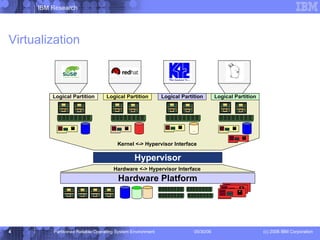
Virtualization Kernel <-> Hypervisor Interface Hardware Platform Hypervisor Logical Partition Logical Partition Logical Partition Logical Partition Hardware <-> Hypervisor Interface
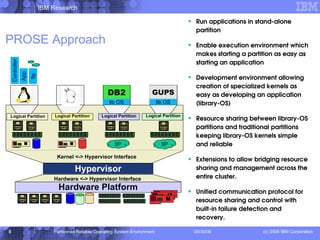
PROSE Approach Run applications in stand-alone partition Enable execution environment which makes starting a partition as easy as starting an application Development environment allowing creation of specialized kernels as easy as developing an application (library-OS) Resource sharing between library-OS partitions and traditional partitions keeping library-OS kernels simple and reliable Extensions to allow bridging resource sharing and management across the entire cluster. Unified communication protocol for resource sharing and control with built-in failure detection and recovery. Kernel <-> Hypervisor Interface Logical Partition Hardware Platform Hypervisor Logical Partition Logical Partition Logical Partition Hardware <-> Hypervisor Interface DB2 lib OS lib OS GUPS 9P 9P Controller Controller App 9p
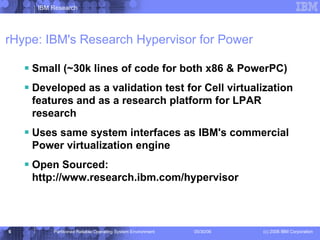
rHype: IBM's Research Hypervisor for Power Small (~30k lines of code for both x86 & PowerPC) Developed as a validation test for Cell virtualization features and as a research platform for LPAR research Uses same system interfaces as IBM's commercial Power virtualization engine Open Sourced: http://www.research.ibm.com/hypervisor
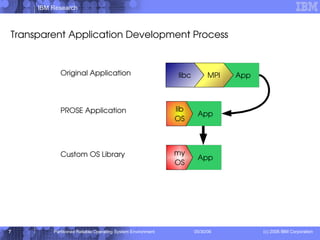
Transparent Application Development Process Original Application PROSE Application Custom OS Library
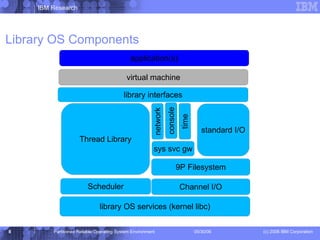
Library OS Components library OS services (kernel libc) 9P Filesystem Channel I/O Scheduler Thread Library standard I/O sys svc gw network console time library interfaces virtual machine application(s)
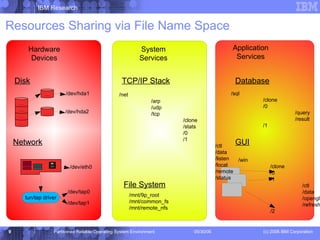
Hardware Devices System Services Application Services Disk Network TCP/IP Stack Database GUI /dev/eth0 /dev/tap0 /dev/tap1 /net /arp /udp /tcp /clone /stats /0 /1 /ctl /data /listen /local /remote /status File System /mnt/9p_root /mnt/common_fs /mnt/remote_nfs /sql /clone /0 /query /result /1 /win /clone /0 /1 /ctl /data /opengl /refresh /2 Resources Sharing via File Name Space /dev/hda1 /dev/hda2
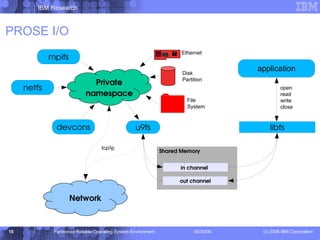
PROSE I/O in channel out channel Shared Memory open read write close tcp/ip Ethernet Disk Partition File System Private namespace Network
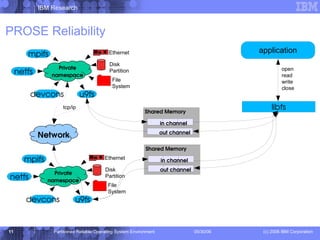
PROSE Reliability in channel out channel Shared Memory open read write close tcp/ip Ethernet Disk Partition File System in channel out channel Shared Memory Ethernet Disk Partition File System Private namespace Network Private namespace
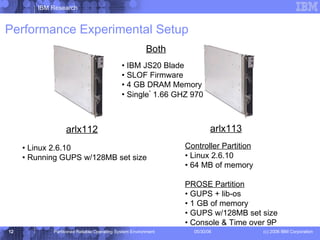
arlx112 arlx113 Both IBM JS20 Blade SLOF Firmware 4 GB DRAM Memory Single *  1.66 GHZ 970 Linux 2.6.10 Running GUPS w/128MB set size Controller Partition Linux 2.6.10 64 MB of memory PROSE Partition GUPS + lib-os 1 GB of memory GUPS w/128MB set size Console & Time over 9P Performance Experimental Setup
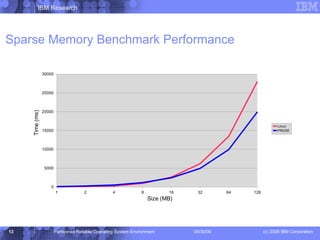
Sparse Memory Benchmark Performance
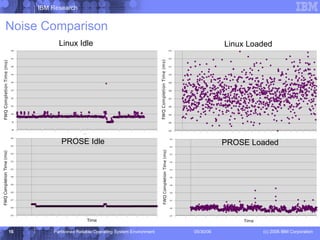
Noise Control w/PROSE & Hypervisors Allow strict control of percentage of CPU devoted to application versus system daemons and I/O requests Can eliminate jitter associated with interrupt service routines Provides a higher degree of determinism that vanilla Linux, but does so at a performance cost
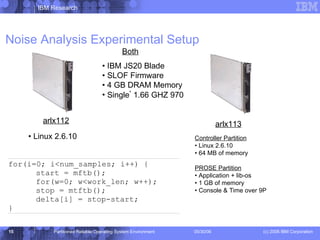
Noise Analysis Experimental Setup arlx112 arlx113 Both IBM JS20 Blade SLOF Firmware 4 GB DRAM Memory Single *  1.66 GHZ 970 Linux 2.6.10 Controller Partition Linux 2.6.10 64 MB of memory PROSE Partition Application + lib-os 1 GB of memory Console & Time over 9P
Noise Comparison Linux Idle Linux Loaded PROSE Idle PROSE Loaded
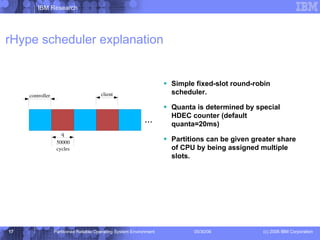
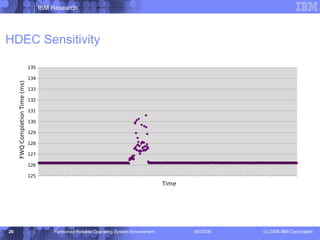
rHype scheduler explanation Simple fixed-slot round-robin scheduler. Quanta is determined by special HDEC counter (default quanta=20ms) Partitions can be given greater share of CPU by being assigned multiple slots.
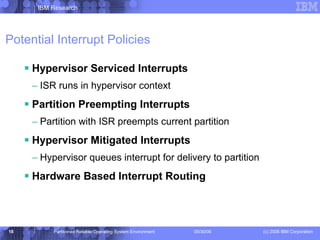
Potential Interrupt Policies Hypervisor Serviced Interrupts ISR runs in hypervisor context Partition Preempting Interrupts Partition with ISR preempts current partition Hypervisor Mitigated Interrupts Hypervisor queues interrupt for delivery to partition Hardware Based Interrupt Routing
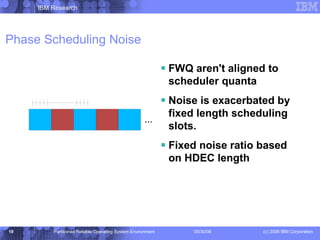
Phase Scheduling Noise FWQ aren't aligned to scheduler quanta Noise is exacerbated by fixed length scheduling slots. Fixed noise ratio based on HDEC length ...
Status Implementing a PAPR compliant CR/Q transport for 9P which could be used by IBM's commercial hypervisor. Thread module has been implemented and will be available as part of PROSE libraries. Prototype Xen 9P transport was implemented with reliability/fail-over capabilities.  Needs to be moved to new code-base. Working to support a JVM running on top of PROSE in order to be able to run a large scale commercial workload for performance analysis.
Future Work Performance Experiments Continue on track to being able to run a large commercial workload instead of microbenchmarks. Noise Experiments Experiment with dynamic scheduling policy which adapts slot-scheduler based on idle yielding. Repeat experiments with different interrupt service policies. Repeat experiments with different virtualization implementations (Xen, VMware, IBM Virtualization Engine, etc.) Repeat experiments with a standard benchmark w/ I/O dependencies instead of relying on microbenchmarks. SMP studies.
Acknowledgments This work would not be possible without the contributions of  Jimi   Xenidis , Michal  Ostrowski , Orran Krieger, and the rest of the rHype team. This work was supported in part by the Defense Advanced Research Projects Agency under contract no. NBCH30390004. http://www.research.ibm.com/prose http://www.research.ibm.com/hypervisor http://www.research.ibm.com/systemsim
BACKUP SLIDES
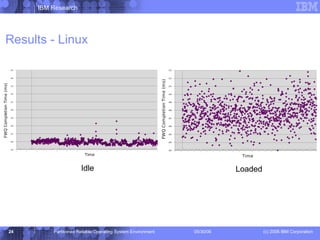
Results - Linux Idle Loaded
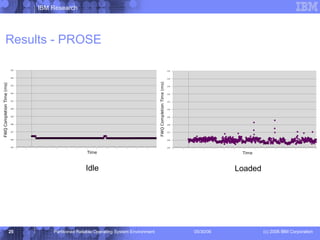
Results - PROSE Idle Loaded
HDEC Sensitivity

PROSE

  • 1.
    Partitioned Reliable OperatingSystem Environment Eric Van Hensbergen (bergevan@us.ibm.com)
  • 2.
    Agenda Background MotivationVirtualization Overview PROSE Approach Preliminary Performance Analysis Noise/OS Interference Analysis Status Update Future Work
  • 3.
    Background Motivation: Pushthe mainstream heavy-weight operating systems out of the way. Why: Finer grain of control over system services: scheduling, memory allocation, interrupt handling (or lack thereof) Reliability: application-specific kernels are likely to be smaller and may even be verifiable using formal methods Hardware support: Enable use of hardware-specific features which may not be well-matched to generalized mainstream operating system.
  • 4.
    Virtualization Kernel <->Hypervisor Interface Hardware Platform Hypervisor Logical Partition Logical Partition Logical Partition Logical Partition Hardware <-> Hypervisor Interface
  • 5.
    PROSE Approach Runapplications in stand-alone partition Enable execution environment which makes starting a partition as easy as starting an application Development environment allowing creation of specialized kernels as easy as developing an application (library-OS) Resource sharing between library-OS partitions and traditional partitions keeping library-OS kernels simple and reliable Extensions to allow bridging resource sharing and management across the entire cluster. Unified communication protocol for resource sharing and control with built-in failure detection and recovery. Kernel <-> Hypervisor Interface Logical Partition Hardware Platform Hypervisor Logical Partition Logical Partition Logical Partition Hardware <-> Hypervisor Interface DB2 lib OS lib OS GUPS 9P 9P Controller Controller App 9p
  • 6.
    rHype: IBM's ResearchHypervisor for Power Small (~30k lines of code for both x86 & PowerPC) Developed as a validation test for Cell virtualization features and as a research platform for LPAR research Uses same system interfaces as IBM's commercial Power virtualization engine Open Sourced: http://www.research.ibm.com/hypervisor
  • 7.
    Transparent Application DevelopmentProcess Original Application PROSE Application Custom OS Library
  • 8.
    Library OS Componentslibrary OS services (kernel libc) 9P Filesystem Channel I/O Scheduler Thread Library standard I/O sys svc gw network console time library interfaces virtual machine application(s)
  • 9.
    Hardware Devices SystemServices Application Services Disk Network TCP/IP Stack Database GUI /dev/eth0 /dev/tap0 /dev/tap1 /net /arp /udp /tcp /clone /stats /0 /1 /ctl /data /listen /local /remote /status File System /mnt/9p_root /mnt/common_fs /mnt/remote_nfs /sql /clone /0 /query /result /1 /win /clone /0 /1 /ctl /data /opengl /refresh /2 Resources Sharing via File Name Space /dev/hda1 /dev/hda2
  • 10.
    PROSE I/O inchannel out channel Shared Memory open read write close tcp/ip Ethernet Disk Partition File System Private namespace Network
  • 11.
    PROSE Reliability inchannel out channel Shared Memory open read write close tcp/ip Ethernet Disk Partition File System in channel out channel Shared Memory Ethernet Disk Partition File System Private namespace Network Private namespace
  • 12.
    arlx112 arlx113 BothIBM JS20 Blade SLOF Firmware 4 GB DRAM Memory Single * 1.66 GHZ 970 Linux 2.6.10 Running GUPS w/128MB set size Controller Partition Linux 2.6.10 64 MB of memory PROSE Partition GUPS + lib-os 1 GB of memory GUPS w/128MB set size Console & Time over 9P Performance Experimental Setup
  • 13.
  • 14.
    Noise Control w/PROSE& Hypervisors Allow strict control of percentage of CPU devoted to application versus system daemons and I/O requests Can eliminate jitter associated with interrupt service routines Provides a higher degree of determinism that vanilla Linux, but does so at a performance cost
  • 15.
    Noise Analysis ExperimentalSetup arlx112 arlx113 Both IBM JS20 Blade SLOF Firmware 4 GB DRAM Memory Single * 1.66 GHZ 970 Linux 2.6.10 Controller Partition Linux 2.6.10 64 MB of memory PROSE Partition Application + lib-os 1 GB of memory Console & Time over 9P
  • 16.
    Noise Comparison LinuxIdle Linux Loaded PROSE Idle PROSE Loaded
  • 17.
    rHype scheduler explanationSimple fixed-slot round-robin scheduler. Quanta is determined by special HDEC counter (default quanta=20ms) Partitions can be given greater share of CPU by being assigned multiple slots.
  • 18.
    Potential Interrupt PoliciesHypervisor Serviced Interrupts ISR runs in hypervisor context Partition Preempting Interrupts Partition with ISR preempts current partition Hypervisor Mitigated Interrupts Hypervisor queues interrupt for delivery to partition Hardware Based Interrupt Routing
  • 19.
    Phase Scheduling NoiseFWQ aren't aligned to scheduler quanta Noise is exacerbated by fixed length scheduling slots. Fixed noise ratio based on HDEC length ...
  • 20.
    Status Implementing aPAPR compliant CR/Q transport for 9P which could be used by IBM's commercial hypervisor. Thread module has been implemented and will be available as part of PROSE libraries. Prototype Xen 9P transport was implemented with reliability/fail-over capabilities. Needs to be moved to new code-base. Working to support a JVM running on top of PROSE in order to be able to run a large scale commercial workload for performance analysis.
  • 21.
    Future Work PerformanceExperiments Continue on track to being able to run a large commercial workload instead of microbenchmarks. Noise Experiments Experiment with dynamic scheduling policy which adapts slot-scheduler based on idle yielding. Repeat experiments with different interrupt service policies. Repeat experiments with different virtualization implementations (Xen, VMware, IBM Virtualization Engine, etc.) Repeat experiments with a standard benchmark w/ I/O dependencies instead of relying on microbenchmarks. SMP studies.
  • 22.
    Acknowledgments This workwould not be possible without the contributions of Jimi Xenidis , Michal Ostrowski , Orran Krieger, and the rest of the rHype team. This work was supported in part by the Defense Advanced Research Projects Agency under contract no. NBCH30390004. http://www.research.ibm.com/prose http://www.research.ibm.com/hypervisor http://www.research.ibm.com/systemsim
  • 23.
  • 24.
    Results - LinuxIdle Loaded
  • 25.
    Results - PROSEIdle Loaded
  • 26.

Editor's Notes

  • #2 To replace the title / subtitle with your own: Click on the title block -&gt; select all the text by pressing Ctrl+A -&gt; press Delete key -&gt; type your own text
  • #5 A pot file is a Design Template file, which provides you the “look” of the presentation You apply a pot file by opening the Task Pane with View &gt; Task Pane and select Slide Design – Design Templates. Click on the word Browse… at bottom of Task Pane and navigate to where you stored BlueOnyx Deluxe.pot (black background) or BluePearl Deluxe.pot (white background) and click on Apply. You can switch between black and white background by navigating to that pot file and click on Apply. Another easier way to switch background is by changing color scheme. Opening the Task Pane, select Slide Design – Color Schemes and click on one of the two schemes. All your existing content (including Business Unit or Product Names) will be switched without any modification to color or wording. Start with Blank Presentation, then switch to the desired Design Template Start a new presentation as Blank Presentation You can switch to Blue Onyx Deluxe.pot by opening the Task Pane with View &gt; Task Pane and select Slide Design – Design Templates. Click on the word Browse… at bottom of Task Pane and navigate to where you stored BlueOnyx Deluxe.pot (black background) and click on Apply. Your existing content will take on Blue Onyx’s black background, and previous black text will turn to white. You should add your Business Unit or Product Name by modifying it on the Slide Master You switch to the Slide Master view by View &gt; Master &gt; Slide Master. Click on the Title Page thumbnail icon on the left, and click on the Business Unit or Product Name field to modify it. Click on the Bullet List Page thumbnail icon on the left, and click on the Business Unit or Product Name field to modify it. Click on Close Master View button on the floating Master View Toolbar You can turn on the optional date and footer fields by View &gt; Header and Footer Suggested footer on all pages including Title Page: Presentation Title | Confidential Date and time field can be fixed, or Update automatically. It appears to the right of the footer. Slide number field can be turned on as well. It appears to the left of the footer.