CLOUD COMPUTING
THE NEW AGE OF COMPUTING
Outlines
 Introduction
 What is Cloud Computing
 Why Cloud Computing?
 Cloud Architecture
 Cloud Service Models
 Cloud Storage
 Advantages
 Disadvantages
 Conclusion
INTRODUCTION
• With traditional desktop computing, we run copies of software
programs on our own computer. The documents we create are stored
on our own pc.
• With cloud computing, the software programs one use aren’t run
from one’s personal computer, but are rather stored on servers
accessed via the Internet.
• If a computer crashes, the software is still available for others
to use. Same goes for the documents one create; they’re stored
on a collection of servers accessed via the Internet.
WHAT IS CLOUD COMPUTING
• Cloud computing is a type of computing that relies on sharing computing
resources rather than having local servers or personal devices to handle
applications.
• In cloud computing, the word cloud (also phrased as "the cloud") is used as
a metaphor for "the Internet," so the phrase cloud computing means "a
type of Internet-based computing," where different services such as servers,
storage and applications are delivered to an organization's computers and
devices through the Internet.
• Cloud computing is comparable to grid computing, a type of computing
where unused processing cycles of all computers in a network are harnesses
to solve problems too intensive for any stand-alone machine.
Why Cloud Computing?
• Cloud Computing Is User Centric
• Cloud Computing Is Task-Centric
• Cloud Computing Is Powerful
• Cloud Computing Is Accessible
• Cloud Computing Is Intelligent
• Cloud Computing Is Programmable
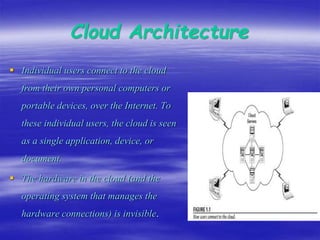
Cloud Architecture
 Individual users connect to the cloud
from their own personal computers or
portable devices, over the Internet. To
these individual users, the cloud is seen
as a single application, device, or
document.
 The hardware in the cloud (and the
operating system that manages the
hardware connections) is invisible.
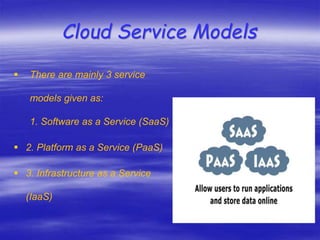
Cloud Service Models
 There are mainly 3 service
models given as:
1. Software as a Service (SaaS)
 2. Platform as a Service (PaaS)
 3. Infrastructure as a Service
(IaaS)
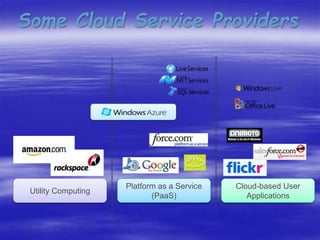
Some Cloud Service Providers
Utility Computing
Platform as a Service
(PaaS)
Cloud-based User
Applications
Cloud Storage
Cloud storage means "the storage of data online in the cloud,"
wherein a company's data is stored in and accessible from multiple
distributed and connected resources that comprise a cloud.
Cloud storage can provide the benefits of greater accessibility and
reliability; rapid deployment; strong protection for data
backup, archival and disaster recovery purposes; and lower overall
storage costs as a result of not having to purchase, manage and
maintain expensive hardware. However, cloud storage does have
the potential for security and compliance concerns.
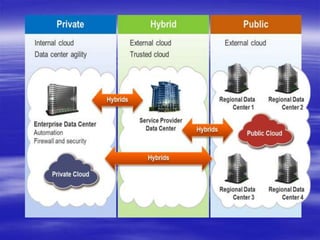
Types of Cloud Storage
1. Public Cloud
2. Private Cloud
3. Hybrid Cloud
Advantages
1. Lower computer costs.
2. Improved performance.
3. Reduced software costs.
4. Instant software updates.
5. Improved document format compatibility.
6. Unlimited storage capacity.
7. Increased data reliability.
8. Universal document access.
9. Latest version availability.
10. Device independence.
Disadvantages
1. Requires a constant Internet connection.
2. Does not work well with low-speed connections.
3. Features might be limited.
4. Can be slow.
5. Stored data might not be secure.
6. Stored data can be lost.
• Thus cloud computing provide a super-computing power
• This cloud of computers extends beyond a single
company or enterprise.
• The applications and data served by the cloud are
available to broad group of users, cross-enterprise and
cross-platform.
Conclusion
Cloud computing

Cloud computing

  • 1.
    CLOUD COMPUTING THE NEWAGE OF COMPUTING
  • 2.
    Outlines  Introduction  Whatis Cloud Computing  Why Cloud Computing?  Cloud Architecture  Cloud Service Models  Cloud Storage  Advantages  Disadvantages  Conclusion
  • 3.
    INTRODUCTION • With traditionaldesktop computing, we run copies of software programs on our own computer. The documents we create are stored on our own pc. • With cloud computing, the software programs one use aren’t run from one’s personal computer, but are rather stored on servers accessed via the Internet. • If a computer crashes, the software is still available for others to use. Same goes for the documents one create; they’re stored on a collection of servers accessed via the Internet.
  • 4.
    WHAT IS CLOUDCOMPUTING • Cloud computing is a type of computing that relies on sharing computing resources rather than having local servers or personal devices to handle applications. • In cloud computing, the word cloud (also phrased as "the cloud") is used as a metaphor for "the Internet," so the phrase cloud computing means "a type of Internet-based computing," where different services such as servers, storage and applications are delivered to an organization's computers and devices through the Internet. • Cloud computing is comparable to grid computing, a type of computing where unused processing cycles of all computers in a network are harnesses to solve problems too intensive for any stand-alone machine.
  • 5.
    Why Cloud Computing? •Cloud Computing Is User Centric • Cloud Computing Is Task-Centric • Cloud Computing Is Powerful • Cloud Computing Is Accessible • Cloud Computing Is Intelligent • Cloud Computing Is Programmable
  • 6.
    Cloud Architecture  Individualusers connect to the cloud from their own personal computers or portable devices, over the Internet. To these individual users, the cloud is seen as a single application, device, or document.  The hardware in the cloud (and the operating system that manages the hardware connections) is invisible.
  • 7.
    Cloud Service Models There are mainly 3 service models given as: 1. Software as a Service (SaaS)  2. Platform as a Service (PaaS)  3. Infrastructure as a Service (IaaS)
  • 8.
    Some Cloud ServiceProviders Utility Computing Platform as a Service (PaaS) Cloud-based User Applications
  • 9.
    Cloud Storage Cloud storagemeans "the storage of data online in the cloud," wherein a company's data is stored in and accessible from multiple distributed and connected resources that comprise a cloud. Cloud storage can provide the benefits of greater accessibility and reliability; rapid deployment; strong protection for data backup, archival and disaster recovery purposes; and lower overall storage costs as a result of not having to purchase, manage and maintain expensive hardware. However, cloud storage does have the potential for security and compliance concerns.
  • 10.
    Types of CloudStorage 1. Public Cloud 2. Private Cloud 3. Hybrid Cloud
  • 12.
    Advantages 1. Lower computercosts. 2. Improved performance. 3. Reduced software costs. 4. Instant software updates. 5. Improved document format compatibility. 6. Unlimited storage capacity. 7. Increased data reliability. 8. Universal document access. 9. Latest version availability. 10. Device independence.
  • 13.
    Disadvantages 1. Requires aconstant Internet connection. 2. Does not work well with low-speed connections. 3. Features might be limited. 4. Can be slow. 5. Stored data might not be secure. 6. Stored data can be lost.
  • 14.
    • Thus cloudcomputing provide a super-computing power • This cloud of computers extends beyond a single company or enterprise. • The applications and data served by the cloud are available to broad group of users, cross-enterprise and cross-platform. Conclusion